Callcenter-Software hilft Supportteams dabei, große Mengen an Sprachinteraktionen schneller, strukturierter und kontrollierter zu verwalten. Sie wurde entwickelt, um Wartezeiten zu verkürzen, die Anrufweiterleitung zu verbessern und Mitarbeitenden die nötigen Werkzeuge an die Hand zu geben, damit sie Probleme schnell lösen können.
Aufgrund meiner umfassenden Erfahrung bei der Bewertung von CX-Tools hinsichtlich Funktionalität, Benutzerfreundlichkeit und ROI habe ich die beste Callcenter-Software für die konsistente und skalierbare Bearbeitung eingehender und ausgehender Anrufe ermittelt. Dies hilft Ihnen dabei, die passende Callcenter-Software für Ihr Team zu finden, damit Sie einen besseren Kundenservice bieten können, ohne zusätzliche Komplexität zu schaffen.
Warum Sie unseren Software-Empfehlungen vertrauen können
6,700+
Reviews
20
Industry experts
16+
Evaluation factors
14
Years
Unser Team testet und bewertet Software seit 2012. Als CX-Führungskräfte selbst wissen wir, wie schwierig – und wichtig – es ist, die richtige Software auszuwählen.
Für diesen Leitfaden haben wir Tools mithilfe von praktischen Tests und unabhängiger Recherche bewertet und dabei unsere Bewertungskriterien angewendet.
Unsere Bewertungen spiegeln unser menschliches redaktionelles Urteilsvermögen wider, keine Verkaufsstrategie.
 Gui DrusinaCreative Director
 Tim FisherVP of AI
Vergleichstabelle für Callcenter-Software
Diese Vergleichstabelle fasst die Preisinformationen meiner besten Auswahl an Callcenter-Software zusammen:
| Tool | Best For | Trial Info | Price | ||
|---|---|---|---|---|---|
| 1 | Am besten für Kundenservice via Telefon, SMS, Video und E-Mail | Kostenlose Demo verfügbar | Ab $15/Nutzer/Monat (jährliche Abrechnung) | Website | |
| 2 | Am besten für Funktionen zur Anrufüberwachung | 7-tägige kostenlose Testversion | Ab $30/Nutzer/Monat (jährliche Abrechnung) | Website | |
| 3 | Am besten geeignet für automatisierungsgetriebene Prozesse | Kostenlose Demo verfügbar | Ab $30/Nutzer/Monat (jährliche Abrechnung) | Website | |
| 4 | Ideal für globale Callcenter | 14-tägige kostenlose Testphase verfügbar | Ab $19/Monat (jährliche Abrechnung) | Website | |
| 5 | Am besten für eine skalierbare und vielseitige Lösung geeignet | Kostenlose Demo verfügbar | Ab $15/Nutzer/Monat (jährliche Abrechnung) | Website | |
| 6 | Am besten geeignet für Sicherheit und Compliance auf Unternehmensebene | Kostenlose Demo verfügbar | Ab $110/Nutzer/Monat | Website | |
| 7 | Am besten geeignet für das Management hoher Anrufvolumina | Kostenlose Demo verfügbar | Ab $119/Nutzer/Monat | Website | |
| 8 | Am besten mit einer einheitlichen Verwaltung von Kundenreisen | Kostenlose Demo verfügbar | Ab $75/Benutzer/Monat (jährliche Abrechnung) | Website | |
| 9 | Am besten für eine einfache Bereitstellung und Verwaltung geeignet | Kostenlose Demo | Preis auf Anfrage | Website | |
| 10 | Am besten geeignet für umfassende CRM-Integrationsfunktionen | Kostenlose Demo verfügbar | Preis auf Anfrage | Website |


Bewertungen der besten Callcenter-Software
Ich habe ausführliche Zusammenfassungen meiner besten Callcenter-Softwarelösungen bereitgestellt und erläutert, warum ich jedes System in diese Liste aufgenommen habe.
 Am besten für Kundenservice via Telefon, SMS, Video und E-Mail
- Kostenlose Demo verfügbar
- Ab $15/Nutzer/Monat (jährliche Abrechnung)
Visit WebsiteCustomer Rating:4.5/5
Verfolgen, verwalten und priorisieren Sie Kundentickets in der Support-Software von Nextiva. Wenn Ihr Team eine einheitliche Plattform für Sprache, Video und Callcenter-Betrieb benötigt, vereint Nextiva diese Kanäle an einem Ort. Es eignet sich besonders für wachsende Unternehmen, die Kundenanrufe, Teamnachrichten und Zusammenarbeit über ein einziges Dashboard verwalten möchten. Nextiva hilft Ihnen, die Kommunikation zu zentralisieren und Kundeninteraktionen zu optimieren, ohne mehrere Tools jonglieren zu müssen.
Für wen ist Nextiva am besten geeignet?
Nextiva unterstützt Verantwortliche für Kundenerlebnis und IT in kleinen bis mittelgroßen Unternehmen, die Telefon, SMS, Video und E-Mail-Support in einem System verwalten möchten. Es passt zu dienstleistungsorientierten Organisationen in den USA, die eine einheitliche Kommunikationsplattform für verteilte Teams benötigen.
Warum ich Nextiva ausgewählt habe
Nextiva überzeugt durch seinen Ansatz der einheitlichen Kommunikation, der besonders wertvoll für Unternehmen ist, die alle Kundeninteraktionen an einem Ort steuern möchten. Die Plattform vereint Sprache, Video, SMS und Teamchat, sodass Ihre Mitarbeitenden problemlos zwischen Kanälen wechseln können, ohne den Zusammenhang zu verlieren. Besonders schätze ich, wie das Callcenter-Dashboard von Nextiva Anrufweiterleitung, Warteschlangenmanagement und Echtzeitüberwachung zusammenführt. Diese Struktur hilft Teams, ein hohes Aufkommen an Kundenanfragen zu bewältigen und gleichzeitig die interne Zusammenarbeit reibungslos zu gestalten.
Nextiva Hauptfunktionen
Weitere Funktionen in Nextiva, die besonders für Callcenter-Teams nützlich sind:
- Automatische Empfangszentrale: Automatisierte Begrüßungen und Anrufweiterleitung für eingehende Anrufe einrichten.
- Anrufaufzeichnung: Anrufe aufzeichnen und speichern für Qualitätssicherung und Schulung.
- Analysen und Berichte: Zugriff auf detaillierte Anrufmetriken und Leistungs-Dashboards.
- CRM-Integration: Kundendaten aus Ihrem CRM direkt mit der Callcenter-Oberfläche verbinden.
Nextiva Integrationen
Integrationen sind nicht öffentlich aufgeführt.
Pros and Cons
Pros:
- Voicemail-Transkription für verpasste Anrufe verfügbar
- Integrierte Teamnachrichten und Videomeetings
- Visueller Anruffluss-Designer für die IVR-Einrichtung
Cons:
- Internationale Anruftarife können unberechenbar sein
- Anrufaufzeichnung nur im Enterprise-Tarif enthalten
 Am besten für Funktionen zur Anrufüberwachung
- 7-tägige kostenlose Testversion
- Ab $30/Nutzer/Monat (jährliche Abrechnung)
Visit WebsiteCustomer Rating:4.3/5
Verfolgen Sie die Anrufleistung in Echtzeit über das Aircall-Analytics-Dashboard. Wenn Sie eine Callcenter-Plattform benötigen, die sich schnell mit Ihren bestehenden CRM- und Helpdesk-Tools verbindet, ist Aircall einen Blick wert. Sie ist für dynamische Vertriebs- und Supportteams konzipiert, die neue Telefonleitungen und Integrationen ohne Verzögerung durch die IT einrichten möchten. Aircall hilft Ihnen dabei, Kundengespräche zu zentralisieren und die Anrufprotokollierung zu automatisieren, sodass sich Ihr Team auf die nächste Interaktion konzentrieren kann.
Für wen ist Aircall am besten geeignet?
Kundendienstleiter, Contact-Center-Manager und Sales-Operations-Teams in kleinen bis mittelgroßen Unternehmen, die Live-Anrufüberwachung und Coaching als Teil ihres Telefonsystems benötigen. Es eignet sich für Unternehmen mit dezentral arbeitenden Support- oder Vertriebsteams, die zentrale Transparenz bezüglich Anrufaktivitäten und Echtzeit-Überwachung über verschiedene Kanäle hinweg benötigen.
Warum ich Aircall gewählt habe
Was bei Aircall besonders heraussticht, ist die Geschwindigkeit, mit der Sie ein neues Callcenter einrichten können, selbst wenn Ihr Team verteilt oder remote arbeitet. Der schnelle Einrichtungsprozess der Plattform ermöglicht es Ihnen, neue Nummern und Mitarbeiter in wenigen Minuten einzurichten – ideal für Unternehmen, die schnell skalieren oder flexibel agieren müssen. Besonders schätze ich, wie die tiefgreifenden CRM-Integrationen von Aircall Anrufdaten und Notizen automatisch synchronisieren, sodass Ihr Team immer den aktuellsten Kundenkontext zur Verfügung hat. Diese Funktionen machen Aircall zu einer starken Wahl für Teams, die Ausfallzeiten minimieren und Kundendaten kanalübergreifend einheitlich halten möchten.
Wichtige Funktionen von Aircall
Weitere Funktionen von Aircall, die für Callcenter-Teams besonders nützlich sind, beinhalten:
- Anruf-Flüstern: Vorgesetzte können Gespräche mithören und Mitarbeitern während eines Live-Anrufs Hinweise geben, ohne dass der Kunde es hört.
- Gemeinsames Anruf-Postfach: Teams können verpasste Anrufe und Voicemails über ein zentrales Dashboard einsehen, zuweisen und verwalten.
- Power Dialer: Wählt automatisch Nummernlisten durch, um Outbound-Kampagnen zu beschleunigen.
- Warm Transfer: Mitarbeiter können vor der Weiterleitung eines Gesprächs noch mit einem Kollegen sprechen, um einen reibungslosen Übergang zu gewährleisten.
Aircall-Integrationen
Zu den Integrationen gehören Salesforce, HubSpot, Intercom, Zendesk, Pipedrive, Microsoft Dynamics, Slack, Shopify, Freshdesk und Zoho CRM.
Pros and Cons
Pros:
- Hervorragender Kundensupport
- Auf mehreren Geräten verfügbar
- Umfassende Einblicke in die Kommunikation
Cons:
- Lautsprecherfunktion ist unvorhersehbar
- Keine integrierten Workforce-Management-Tools
 Am besten geeignet für automatisierungsgetriebene Prozesse
- Kostenlose Demo verfügbar
- Ab $30/Nutzer/Monat (jährliche Abrechnung)
Visit WebsiteCustomer Rating:5/5
Visualisieren Sie die Callcenter-Performance in einem zentralen Dashboard. RingCentral Contact Center bietet eine cloudbasierte Plattform, die KI-gesteuerte Erkenntnisse und Automatisierung integriert, um Kundeninteraktionen zu optimieren. Sie spricht Branchen an, die von Einzelhandel bis Gesundheitswesen reichen, in denen effizienter Kundenservice von größter Bedeutung ist. Durch die Bereitstellung von Omnichannel-Support über Sprache, Messaging und soziale Medien hilft RingCentral Unternehmen, die Kommunikation zu vereinfachen und die Leistung der Agenten zu optimieren, wodurch Herausforderungen wie das Management hoher Anrufvolumina und die Verbesserung der Kundenzufriedenheit adressiert werden.
Für wen ist RingCentral Contact Center am besten geeignet?
Kundenservice- und Supportmanager, Contact-Center-Leiter und Operationsteams in mittelständischen bis größeren Unternehmen, die eine einheitliche Plattform benötigen, um Omnichannel-Kundeninteraktionen mit Automatisierung, Routing und Analytik zu verwalten. Es eignet sich für Unternehmen mit hohen Mengen ein- und ausgehender Support- oder Vertriebsaktivitäten, die eine zentrale Überwachung der Leistung, Personalmanagement und CRM-integrierte Workflows benötigen.
Warum ich RingCentral Contact Center ausgewählt habe
Ich habe mich für RingCentral Contact Center entschieden, weil es einen starken Fokus auf automatisierungsbasierte Prozesse legt – ein Muss für jeden modernen Callcenter-Betrieb. Mit Funktionen wie Interaktivem Sprachdialogsystem (IVR) und Intelligenten virtuellen Agenten (IVA) können Sie Routine-Kundeninteraktionen automatisieren, Wartezeiten verringern und Ihrem Team ermöglichen, sich auf komplexere Anfragen zu konzentrieren. Dies steigert nicht nur die Kundenzufriedenheit, sondern optimiert auch die betriebliche Effizienz und sorgt für einen reibungslosen Betrieb Ihres Callcenters. Darüber hinaus bietet das KI-gestützte Gesprächs-Intelligenzsystem Echtzeit-Einblicke, die Ihren Agenten helfen, personalisierten Support zu bieten und die Servicequalität insgesamt zu erhöhen.
RingCentral Contact Center Hauptfunktionen
Zusätzlich zu den automatisierungsgetriebenen Prozessen bietet RingCentral Contact Center eine Vielzahl zentraler Funktionen, die seinen Nutzen als Callcenter-Software weiter steigern.
- Omnichannel-Support: Treten Sie mit Kunden über mehrere Kanäle wie Telefon, Chat, E-Mail und soziale Medien in Kontakt und gewährleisten Sie so ein nahtloses Kundenerlebnis.
- Personalmanagement: Optimieren Sie die Zeitpläne Ihres Teams und überwachen Sie die Leistung mit Tools zur Steigerung von Produktivität und Servicequalität.
- Analytik und Berichte: Gewinnen Sie Einblicke in die Leistung Ihres Callcenters mit detaillierten Analyse- und Berichtswerkzeugen, um fundierte Entscheidungen zu treffen.
- Sicherheit und Compliance: Schützen Sie vertrauliche Daten und stellen Sie die Einhaltung branchenspezifischer Vorschriften mithilfe fortschrittlicher Sicherheitsfunktionen sicher.
RingCentral Contact Center Integrationen
Integrationen umfassen Salesforce, HubSpot, Zendesk, Slack, Microsoft Teams, Google Workspace, ServiceNow, Microsoft Dynamics 365, Oracle und SugarCRM.
Pros and Cons
Pros:
- KI-gestütztes Routing für komplexe Kundenreisen
- Omnichannel-Support über Telefon, Chat und soziale Kanäle
- Integrierte Werkzeuge für Personal- und Qualitätsmanagement
Cons:
- Eingeschränkte Unterstützung für Polycom-Telefone
- Die anfängliche Anpassung erfordert erheblichen Aufwand und Ressourcen
Learn more about RingCentral Contact Center: Ideal für globale Callcenter
- 14-tägige kostenlose Testphase verfügbar
- Ab $19/Monat (jährliche Abrechnung)
Visit WebsiteCustomer Rating:4.4/5
Überwachen Sie die Aktivitäten der Kundendienstmitarbeiter direkt im CloudTalk-Dashboard. CloudTalk ist für Teams konzipiert, die erweiterte Anrufweiterleitung und Analysen über mehrere Standorte oder Remote-Setups hinweg benötigen. Es eignet sich hervorragend für Unternehmen, die verteilte Support- oder Vertriebsteams verwalten und deren Leistung messen sowie Arbeitsabläufe optimieren möchten. Die Plattform hilft Ihnen, hohe Anrufvolumina zu bewältigen, während jede Interaktion organisiert und messbar bleibt.
Für wen ist CloudTalk am besten geeignet?
CloudTalk unterstützt Betriebsleiter und IT-Teams in mittelständischen bis großen Unternehmen, die globale Callcenter betreiben. Es ist besonders geeignet für Unternehmen mit verteilten Vertriebs- und Supportteams, die eine zentrale Anrufverwaltung über mehrere Länder und Regionen hinweg benötigen.
Warum ich CloudTalk ausgewählt habe
Ich habe CloudTalk ausgewählt, weil seine fortschrittliche Anrufweiterleitung und Analytik besonders nützlich für Teams sind, die an verschiedenen Standorten oder in unterschiedlichen Zeitzonen arbeiten. Die Plattform bietet skills-basierte Weiterleitung, sodass Anrufe entsprechend der Expertise beim richtigen Agenten landen, sowie Echtzeit-Analyse-Dashboards, mit denen Sie die Anrufaktivität live überwachen können. Besonders gefällt mir die Möglichkeit, individuelle Anrufabläufe passend zur Teamstruktur einzurichten, was verteilten Betrieb reibungslos hält. Diese Funktionen machen CloudTalk zur starken Wahl für Unternehmen, die die Leistung über Remote- oder Multi-Standort-Callcenter hinweg koordinieren und messen müssen.
CloudTalk Hauptmerkmale
Weitere Funktionen von CloudTalk, die sich für Callcenter-Teams besonders abheben, sind:
- Voicemail Drop: Agenten können mit nur einem Klick voraufgezeichnete Voicemails hinterlassen und so Zeit bei wiederkehrenden Rückrufen sparen.
- Anrufaufzeichnung: Anrufe werden automatisch zu Zwecken der Qualitätssicherung, Schulung und Einhaltung von Vorschriften aufgezeichnet.
- Interactive Voice Response (IVR): Erstellen Sie mehrstufige IVR-Menüs, um Anrufer gezielt zur richtigen Abteilung oder Information zu führen.
- Klick-zu-Anruf: Starten Sie Anrufe direkt aus Ihrem CRM oder Helpdesk mit nur einem Klick und reduzieren Sie Fehler beim manuellen Wählen.
CloudTalk Integrationen
Zu den Integrationen gehören Salesforce, HubSpot, Zendesk, Pipedrive, Zoho CRM, Intercom, Freshdesk, Microsoft Teams, Monday und Shopify.
Pros and Cons
Pros:
- Stabile Gesprächsqualität
- Benutzerfreundliche Oberfläche
- Einfache Verwaltung von Mitarbeitern
Cons:
- API-Unterstützung könnte besser sein
- Updates können Probleme verursachen
 Am besten für eine skalierbare und vielseitige Lösung geeignet
- Kostenlose Demo verfügbar
- Ab $15/Nutzer/Monat (jährliche Abrechnung)
Visit WebsiteCustomer Rating:4.8/5
Behalten Sie die Zeit und Aufgaben Ihres Teams im Blick, damit Ihr Callcenter über das System so effizient wie möglich arbeitet. Wenn Ihr Team internationale Anrufe und Nachrichten über eine einzige Plattform verwalten muss, ist Squaretalk die richtige Lösung für Sie. Diese cloudbasierte Callcenter-Software ist besonders nützlich für Unternehmen mit Remote- oder verteilten Agenten, die lokale Rufnummern und automatisierte Workflows in mehreren Ländern benötigen. Squaretalk vereinfacht die globale Kommunikation und Compliance für Kundensupport- und Vertriebsteams, die in großem Umfang arbeiten.
Für wen ist Squaretalk am besten geeignet?
Squaretalk eignet sich für Kundensupport- und Vertriebsteams wachsender kleiner bis mittelgroßer Unternehmen, die eine skalierbare Kommunikationsplattform benötigen. Die Lösung ist besonders für Organisationen geeignet, die in mehreren Regionen aktiv sind und eine flexible Voice-Infrastruktur sowie das zentrale Management verteilter Teams benötigen.
Warum habe ich Squaretalk ausgewählt?
Squaretalk hat meine Aufmerksamkeit erregt, weil es für Teams entwickelt wurde, die weltweite Sprach- und Messaging-Fähigkeiten von einer einzigen Plattform benötigen. Ich habe es in diese Liste aufgenommen, da es lokale Telefonnummern in über 100 Ländern anbietet und automatisierte Anrufverteilung unterstützt – unerlässlich für die Verwaltung entfernter oder verteilter Agenten. Die cloudbasierte Telefonie-Infrastruktur der Plattform hilft Unternehmen, internationale Anrufe zu vereinfachen und die Einhaltung lokaler Vorschriften sicherzustellen. Wenn Ihr Callcenter Kunden weltweit erreichen muss, ohne mehrere Systeme zu jonglieren, ist der einheitliche Ansatz von Squaretalk eine sehr gute Wahl.
Squaretalk Hauptmerkmale
Ich habe außerdem eine Reihe weiterer Funktionen entdeckt, die den Callcenter-Betrieb unterstützen:
- Smart Dialer: Wählt automatisch Nummern aus Anruflisten und überspringt besetzte oder unbeantwortete Anrufe, damit Agenten sich auf echte Gespräche konzentrieren können.
- Anrufaufzeichnung: Zeichnet eingehende und ausgehende Anrufe zu Zwecken der Qualitätssicherung und Compliance auf.
- IVR-Designer: Ermöglicht die Erstellung individueller interaktiver Sprachmenüs über eine Drag-and-Drop-Oberfläche.
- Echtzeit-Analyse-Dashboard: Zeigt Live-Anrufmetriken und Leistungsdaten der Agenten für Vorgesetzte zur Überwachung der Aktivitäten an.
Squaretalk Integrationen
Integrationen umfassen Zoho, Salesforce, Freshworks, Pipedrive, Lynx, Programmable Messaging, Programmable Voice Access und das Call Me Back Widget.
Pros and Cons
Pros:
- Hohe Sicherheitsstandards
- Umfangreiche Reporting- und Analysefunktionen
- Benutzerfreundliche und intuitive Oberfläche
Cons:
- Begrenzte Anpassungsmöglichkeiten
- Keine mobile Anwendung
Learn more about Squaretalk: Am besten geeignet für Sicherheit und Compliance auf Unternehmensebene
- Kostenlose Demo verfügbar
- Ab $110/Nutzer/Monat
Visit WebsiteCustomer Rating:4.3/5
NiCE CXone bietet einen KI-gestützten Agentenarbeitsbereich mit Zusammenfassungen von Chats in Echtzeit, Stimmungsanalyse und automatisch erstellten Kontaktnotizen, um Kundeninteraktionen zu optimieren. NiCE CXone ist eine KI-gestützte cloudbasierte Kontaktcenter-Plattform, die eingehende und ausgehende Sprachkommunikation, digitale Kanäle, das Management von Mitarbeitereinsatz und -engagement sowie Interaktionsanalysen auf einer einzigen Plattform vereint.
Für wen eignet sich NiCE CXone am besten?
Die Plattform eignet sich besonders für unternehmensweite Kontaktcenter in regulierten Branchen wie dem Gesundheitswesen, dem Bankwesen, dem Versicherungswesen und der öffentlichen Verwaltung, die eine strenge Compliance direkt in ihre Plattform integriert benötigen.
Warum ich NiCE CXone ausgewählt habe
NiCE CXone gehört zu den besten Lösungen auf meiner Auswahlliste, weil Compliance so tief in die Plattform selbst integriert ist. Mir gefällt, dass Aufzeichnungs- und Compliance-Tools hier kein Zusatz sind, sondern in jeder Preisstufe enthalten sind, was in regulierten Branchen wichtig ist, in denen lückenlose Prüfpfade unverzichtbar sind. Funktionen wie die vollständige Abdeckung von Aufzeichnungen in Teams und eine HIPAA-fähige Infrastruktur bedeuten, dass ich keine Compliance-Lösung aus Tools von Drittanbietern zusammenstellen muss.
Wichtige Funktionen von NiCE CXone
- Omnichannel-Agentenoberfläche: Verwalten Sie Sprachkommunikation, Chat, E-Mail, SMS und soziale Nachrichten in einer einheitlichen Oberfläche.
- KI-gestütztes IVR: Implementieren Sie dialogorientierte IVR-Abläufe mithilfe von Verarbeitung natürlicher Sprache und Automatisierung.
- Management von Mitarbeitereinsatz und -engagement: Erstellen Sie Prognosen und Einsatzpläne, zeichnen Sie Interaktionen auf und verwalten Sie die Agentenleistung auf einer einzigen Cloud-Plattform.
- Analyse-Dashboard in Echtzeit: Überwachen Sie die Live-Aktivität in Warteschlangen, den Agentenstatus und KPIs des Kontaktcenters mit benutzerdefinierten Berichtstools.
Integrationen von NiCE CXone
NiCE CXone bietet direkte Integrationen mit Salesforce, Zendesk, Microsoft Dynamics 365, ServiceNow, Microsoft Teams, Oracle Service Cloud und Zoom. Für benutzerdefinierte Integrationen steht eine API zur Verfügung.
Pros and Cons
Pros:
- KI-gestützte Weiterleitung über alle digitalen Kanäle hinweg
- Integrierte Tools für Mitarbeitermanagement und Einsatzplanung
- Umfangreiche Zertifizierungen für regulierte Branchen
Cons:
- Die komplexe Implementierung erfordert die Einbindung der IT
- Die Anpassung von Berichten erfordert technisches Fachwissen
Learn more about NiCE CXone: Am besten geeignet für das Management hoher Anrufvolumina
- Kostenlose Demo verfügbar
- Ab $119/Nutzer/Monat
Visit WebsiteCustomer Rating:4.1/5
Erstellen Sie individuelle Anrufabläufe über das Admin-Dashboard. Five9 bietet eine cloudbasierte Contact Center-Plattform, die speziell für Organisationen entwickelt wurde, die KI-Automatisierung mit Unterstützung durch Live-Agenten kombinieren möchten. Es ist eine starke Wahl für Teams, die Sprache, Chat, E-Mail und soziale Kanäle vereinheitlichen und mithilfe von Analysen die Leistung optimieren wollen. Five9 hilft Unternehmen, Routineinteraktionen zu automatisieren und einen personalisierteren Service in großem Maßstab bereitzustellen.
Für wen ist Five9 am besten geeignet?
Five9 unterstützt Contact Center- und Operations-Leiter in mittelständischen bis großen Unternehmen, die hohe eingehende und ausgehende Anrufvolumina verwalten. Es eignet sich für Unternehmen in dienstleistungsorientierten und regulierten Branchen, die eine zentrale Aufsicht und Personalverwaltung über regionale oder globale Standorte hinweg benötigen.
Warum habe ich Five9 ausgewählt
Was mich an Five9 überzeugt hat, ist der Fokus auf die Verbindung von KI-gestützter Automatisierung mit umfassender Analytik für Contact Center. Die intelligenten virtuellen Agenten der Plattform bearbeiten routinemäßige Kundenanfragen und entlasten so die Live-Agenten für komplexere Anliegen. Gefallen hat mir außerdem, dass das Analytikpaket von Five9 Echtzeit- und historische Einblicke in die Agentenleistung und Kundeninteraktionen bietet. Dieser Ansatz hilft Teams, die Servicequalität und Effizienz kontinuierlich zu verbessern und dabei hohe Volumina über mehrere Kanäle hinweg zu steuern.
Wichtige Funktionen von Five9
Weitere Funktionen, die Five9 zu einer starken Option für Callcenter-Teams machen, sind:
- Predictive Dialer: Wählt automatisch Nummern und verbindet angenommene Anrufe mit verfügbaren Agenten.
- Omnichannel Routing: Leitet Kundeninteraktionen aus Sprache, Chat, E-Mail und sozialen Medien an den richtigen Agenten weiter.
- CRM-Integrationen: Verbindet sich nativ mit Salesforce, ServiceNow, Microsoft Dynamics und anderen führenden CRM-Systemen.
- Anrufaufzeichnung und -überwachung: Zeichnet Anrufe auf und ermöglicht Supervisoren, Live-Interaktionen zur Qualitätssicherung zu überwachen.
Five9 Integrationen
Integrationen umfassen Salesforce, ServiceNow, Microsoft Dynamics 365, Oracle, Zendesk, Oracle NetSuite, Zoom, Microsoft Teams, Slack und Mitel.
Pros and Cons
Pros:
- Gamification-Elemente zur Steigerung der Agentenperformance enthalten
- Umfangreiche Dokumentation
- Predictive Dialer verbessert die Effizienz bei ausgehenden Anrufen
Cons:
- Funktions-Erweiterungen können teuer sein
- Analysefunktionen für Integrationen sind nur im höchstdotierten Tarif enthalten
Learn more about Five9: Am besten mit einer einheitlichen Verwaltung von Kundenreisen
- Kostenlose Demo verfügbar
- Ab $75/Benutzer/Monat (jährliche Abrechnung)
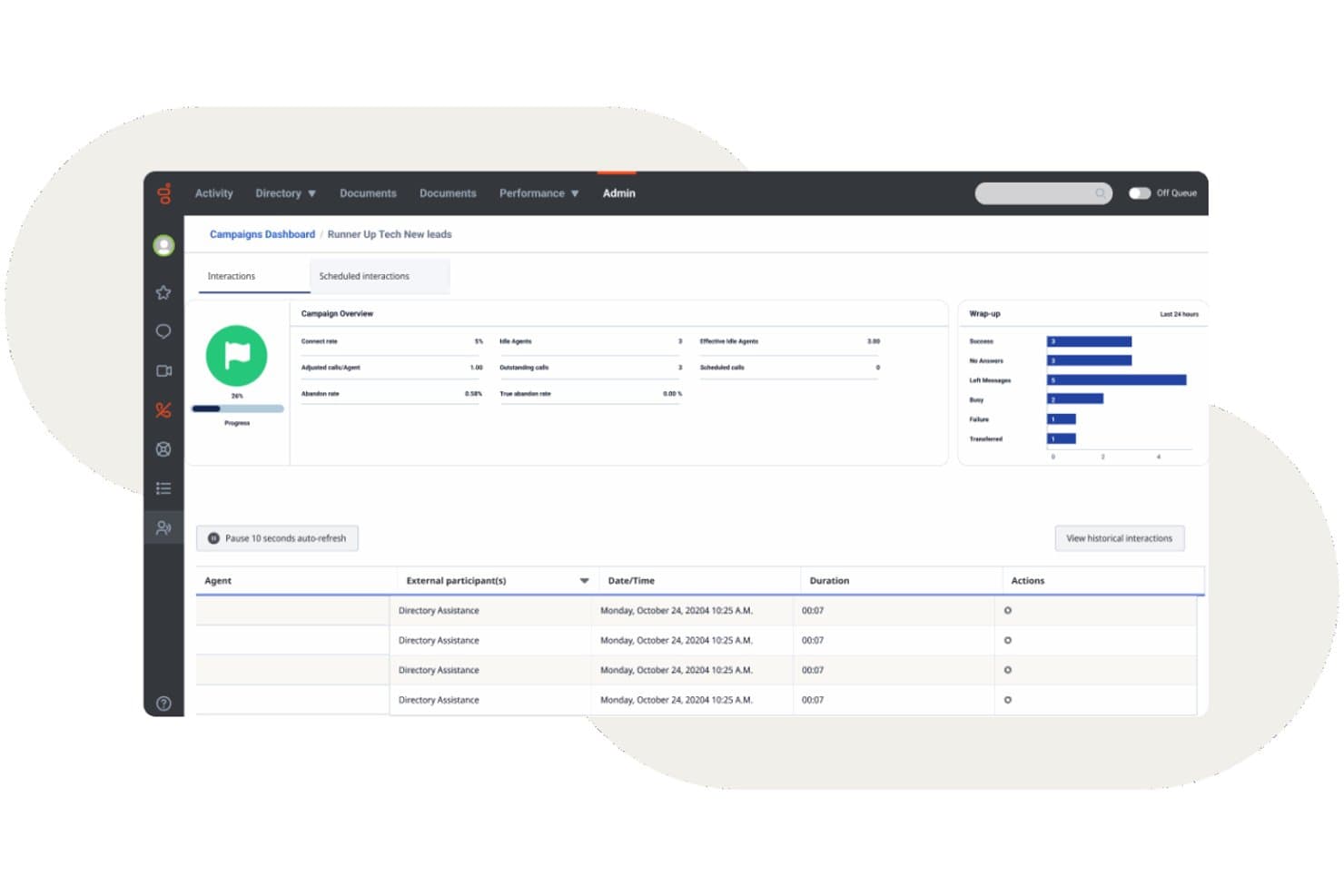
Das Kampagnen-Dashboard von Genesys Cloud CX bietet eine Echtzeitverfolgung von Interaktionen, Kennzahlen zur Nachbearbeitung und Protokolle der Mitarbeiteraktivitäten. Genesys Cloud CX ist eine cloudbasierte Kontaktcenterplattform, die Omnichannel-Routing, KI-gestützte interaktive Sprachdialogsysteme, automatisiertes Wählen für ausgehende Kontakte, Management der Mitarbeiterbindung und Echtzeitanalysen über Sprach- und digitale Kanäle hinweg kombiniert.
Für wen eignet sich Genesys Cloud CX am besten?
Genesys Cloud CX eignet sich besonders für mittelgroße bis große Kontaktcenter, die eine zentrale Plattform benötigen, um hohe Interaktionsvolumen über Sprach- und digitale Kanäle hinweg zu verwalten.
Warum ich Genesys Cloud CX ausgewählt habe
Ich habe Genesys Cloud CX in meine Top-Auswahl aufgenommen, weil die Funktionen zur Verwaltung von Kundenreisen über das herkömmliche Routing hinausgehen. Die Abläufe der Kundenreise auf der Plattform bieten mir eine visuelle Echtzeitdarstellung, wie sich Kunden über alle Kontaktpunkte hinweg bewegen. Dadurch kann ich Abbruchstellen erkennen und Interaktionen umleiten, bevor sie eskalieren. In Kombination mit prädiktiver Kundenansprache identifiziert die Plattform gefährdete Kunden während einer laufenden Websitzung und löst proaktiv einen Chat oder Rückruf aus, bevor sie den Vorgang abbrechen.
Die wichtigsten Funktionen von Genesys Cloud CX
- Omnichannel-Routing: Leiten Sie Sprach-, Chat-, E-Mail-, SMS- und Social-Media-Interaktionen in einem einzigen Arbeitsbereich an die zuständigen Mitarbeitenden weiter.
- Management der Mitarbeiterbindung: Verwalten Sie Prognosen, Einsatzplanung und Abwesenheiten mit KI-gestützten Werkzeugen für das Mitarbeiter-Engagement-Management.
- Sprach- und Stimmungsanalysen: Analysieren Sie Transkriptionen, Schlüsselwörter und die Stimmung in 100 % der Gespräche zwischen Mitarbeitenden und Kunden.
- Ökosystem für CRM-Integrationen: Verbinden Sie Salesforce, ServiceNow, Microsoft Dynamics und Hunderte weiterer Geschäftstools nativ.
Integrationen von Genesys Cloud CX
Genesys Cloud CX bietet native Integrationen mit Salesforce, ServiceNow, Zendesk, Microsoft Teams, Microsoft Dynamics 365, Zoom, Jira, Slack, Active Directory und Google Workspace. Für benutzerdefinierte Integrationen ist eine API verfügbar.
Pros and Cons
Pros:
- KI-gestütztes prädiktives Routing über alle Kanäle hinweg
- Integriertes Workforce-Management mit nativen Prognosen
- Sprachanalysen bewerten 100 % der Anrufinteraktionen
Cons:
- Die Ersteinrichtung erfordert häufig professionelle Unterstützung
- Für erweiterte Berichte ist ein erheblicher Konfigurationsaufwand erforderlich
Learn more about Genesys Cloud CX: Am besten für eine einfache Bereitstellung und Verwaltung geeignet
- Kostenlose Demo
- Preis auf Anfrage

GoTo Connect bietet eine einheitliche Oberfläche, die Nachrichten, Sprachnachrichten, Kameravorschau und die Möglichkeit zur Teilnahme an Besprechungen für Mitarbeitende im Kontaktzentrum kombiniert. GoTo Connect ist ein cloudbasiertes Kontaktzentrum und Telefonsystem, das VoIP-Telefonie, Kundeninteraktion über alle Kanäle, intelligente Anrufweiterleitung und die Echtzeitüberwachung von Mitarbeitenden auf einer einzigen Plattform vereint.
Für wen eignet sich GoTo Connect am besten?
GoTo Connect eignet sich besonders für kleine und mittelständische Unternehmen, die ein umfassend ausgestattetes Kontaktzentrum benötigen, ohne dafür ein großes IT-Team einsetzen zu müssen.
Warum ich mich für GoTo Connect entschieden habe
GoTo Connect steht auf meiner Auswahlliste, weil ein Team damit sehr schnell von der Anmeldung zu laufenden Anrufen gelangen kann. Über den zentralen Administrationsbereich kann ich Benutzer, Wählpläne und Anrufwarteschlangen in einer einzigen Oberfläche verwalten. Der visuelle Wählplan-Editor ermöglicht es mir, komplexe Anrufabläufe zu konfigurieren, ohne eine einzige Codezeile schreiben zu müssen. Außerdem hat sich der Administrationsassistent GoPilot als äußerst nützlich erwiesen, um Konfigurationsprobleme zu erkennen, bevor sie Anrufer erreichen.
Die wichtigsten Funktionen von GoTo Connect
- Plattform für Kundeninteraktion über alle Kanäle: Über ein einziges Übersichtsfenster mit Kunden per Sprachkommunikation, SMS, Chat, E-Mail, WhatsApp und sozialen Medien in Kontakt treten.
- Echtzeitanalysen: Anrufwarteschlangen, Aktivitäten der Mitarbeitenden und Leistungsdaten über konfigurierbare Live-Übersichten überwachen.
- Anrufergebnis und Nachbearbeitung: Anrufen Ergebnisse zuweisen und erforderliche Notizen nach dem Gespräch direkt in der Benutzeroberfläche der Mitarbeitenden verwalten.
- KI-gestützte Anrufzusammenfassungen: Nach Kundengesprächen automatisch Zusammenfassungen der Interaktionen und Stimmungsanalysen erstellen.
Integrationen von GoTo Connect
GoTo Connect bietet direkte Integrationen mit Salesforce, Zendesk, ServiceNow, Microsoft Teams, Miro und Gmail. Für individuelle Integrationen steht eine API zur Verfügung.
Pros and Cons
Pros:
- Schnelle Einrichtung ohne dedizierten IT-Support
- Visueller Wählplan-Editor vereinfacht die Anrufweiterleitung
- Zentraler Administrationsbereich zur Verwaltung von Benutzern und Warteschlangen
Cons:
- Begrenzter prädiktiver Dialer für ausgehende Kampagnen
- Berichte sind weniger anpassbar als bei Unternehmensplattformen
Learn more about GoTo Connect: Am besten geeignet für umfassende CRM-Integrationsfunktionen
- Kostenlose Demo verfügbar
- Preis auf Anfrage

Vonage Contact Center bietet einen Omnichannel-Agentenarbeitsplatz mit KI-gestützten Antwortvorschlägen, Empfehlungen für die nächstbeste Aktion und Echtzeit-Interaktionsmetriken für Sprache und Chat. Vonage Contact Center ist eine cloudbasierte Contact-Center-Plattform, die eingehende und ausgehende Anrufe, IVR, kompetenzbasiertes Routing, Anrufaufzeichnung, Omnichannel-Support und Echtzeitanalysen mit nativen CRM-Integrationen kombiniert.
Für wen ist Vonage Contact Center am besten geeignet?
Mittelständische bis große Teams, die bereits Salesforce, ServiceNow oder Microsoft Dynamics 365 standardisiert einsetzen und ein Contact Center benötigen, das direkt mit ihrem CRM verbunden ist.
Warum ich mich für Vonage Contact Center entschieden habe
Vonage Contact Center hat sich einen Platz auf meiner Auswahlliste verdient, weil es sich besonders tief in Salesforce, ServiceNow und Microsoft Dynamics 365 integriert. Ich schätze, dass beim Annehmen eines Anrufs durch einen Agenten der Kundenverlauf sofort über Bildschirm-Pop-ups angezeigt wird und die bidirektionale CRM-Synchronisierung die Interaktion automatisch protokolliert. Vonage nahm sogar an der BYOC-for-CCaaS-Pilotphase von Salesforce teil, wodurch seine Omnichannel- und KI-Funktionen nativ innerhalb von Service Cloud Voice ausgeführt werden.
Wichtige Funktionen von Vonage Contact Center
- Kompetenzbasiertes Routing: Leiten Sie eingehende Anrufe anhand von Kompetenzprofilen, Verfügbarkeit oder Prioritätsregeln an Agenten weiter.
- Notfallwiederherstellung und Routing von Notrufen: Leiten Sie Anrufe bei Ausfällen oder Notfällen automatisch um, um die Geschäftskontinuität sicherzustellen.
- Omnichannel-Interaktion: Bearbeiten Sie Sprache, Webchat, SMS und mehr über eine einzige Oberfläche für alle Agenten.
- Zusatzmodul für Sprachanalysen: Gewinnen Sie Erkenntnisse aus Anruftranskriptionen, der Erkennung von Schlüsselwörtern und der Sentimentanalyse über alle Interaktionen hinweg.
Integrationen von Vonage Contact Center
Vonage Contact Center bietet native Integrationen mit Salesforce, ServiceNow, Microsoft Dynamics 365, Zendesk und Microsoft Teams. Für individuelle Integrationen steht eine API zur Verfügung.
Pros and Cons
Pros:
- Tiefe native Salesforce-Integration für Agenten
- Omnichannel-Warteschlangen vereinen Sprach- und digitale Kanäle
- Echtzeit-Bildschirm-Pop-ups zeigen den vollständigen Kontext des Anrufers an
Cons:
- Die Anpassungsmöglichkeiten für historische Berichte sind begrenzt
- Die komplexe Erstkonfiguration erfordert Unterstützung durch professionelle Dienstleistungen
Learn more about Vonage Contact Center:
Weitere Callcenter-Software
Hier finden Sie einige weitere Optionen, die es nicht in die Liste der besten Callcenter-Software geschafft haben:
- 11TalkRouteAm besten geeignet für die Verwaltung mehrerer Anrufe
- 12Bright PatternIdeal für Omnichannel-Kommunikation
- 13TalkdeskAm besten geeignet für die Beantwortung von Kundenfragen
- 14TwilioAm besten für hochgradig anpassbare Contact Center geeignet
- 15DialpadBeste Multichannel-Lösung mit fortschrittlicher KI-Funktionalität
- 16Zoho VoiceAm besten für integrierte Telefonie im CRM
- 17CallHippoAm besten für KI-gestützte Kundeninteraktionen
- 18Freshdesk Contact CenterAm besten für ein erschwingliches virtuelles Kontaktzentrum
- 19Webex Contact CenterAm besten mit integriertem KI-Coaching und KI-gestützten Erkenntnissen für Agenten
- 20Creatio CRMAm besten geeignet zur Personalisierung der Kommunikation
- 21LiveAgentAm besten für integrierte Helpdesk- und Ticketing-Tools geeignet
- 22ZendeskAm besten geeignet zum Vereinheitlichen von Kommunikationskanälen
- 238x8Am besten für Omnichannel-Kommunikation
- 24Avaya Am besten geeignet zur Verbesserung der Geschäftsergebnisse
- 25Intermedia UniteAm besten geeignet für das All-in-One-Cloud-Contact-Center
- 26Aspect SoftwareAm besten geeignet für leistungsstarke Contact Center-Lösungen
So bewerte ich Callcenter-Software
Ich bewerte jede Plattform anhand einer Grundausstattung – skillbasierte Anrufverteilung, IVR, Gesprächsaufzeichnung, Live-Überwachung – bevor ich die Unterscheidungsmerkmale gewichte, die bestimmen, ob ein Tool zu Ihrem Betrieb passt.
Kernfunktionen (Mindestanforderungen für diese Liste)
Wenn ich Tools für meine Liste auswähle, bewerte ich jedes auf einer Skala von 0 (bietet die Funktion nicht) bis 5 (übertrifft Erwartungen in diesem Bereich) bei jeder der unten aufgeführten Kernfunktionen. Dann berechne ich den Gesamtscore des Tools als Prozentsatz. Jedes Tool muss einen Mindestgesamtwert von 75% erreichen, um für die Aufnahme in Betracht gezogen zu werden.
- Automatische Anrufverteilung: Ich prüfe, ob die Plattform skillbasierte und priorisierte Verteilung unterstützt, denn eine einfache Rundum-Verteilung stößt schnell an ihre Grenzen, wenn Sie technischen Support und Abrechnung unter derselben Nummer bearbeiten.
- IVR-System: Ein gutes IVR erlaubt Anrufern die Selbstbedienung bei Bestellstatus oder Kontoständen, bevor sie zu einem Agenten weitergeleitet werden. Ich achte deshalb auf mehrstufige Menüs mit einem visuellen Editor für die Anrufsteuerung.
- Inbound- & Outbound-Telefonie: Ich bewerte, ob die Plattform beide Richtungen nativ unterstützt – Teams, die Verlängerungskampagnen fahren und Supportanrufe entgegennehmen, brauchen gemischte Warteschlangen und nicht zwei getrennte Tools.
- Gesprächsaufzeichnung & Überwachung: Supervisoren brauchen mehr als nur Wiedergabe; ich achte auf Live-Mithören, Flüstern und Einschalten, damit Teamleiter ihre Agenten während schwieriger Gespräche in Echtzeit coachen können.
- Echtzeit- & historische Analysen: Dashboards, die Warteschlangentiefe, Wartezeiten und Agentenstatus in Echtzeit anzeigen, sind genauso wichtig wie Berichte zu SLA und CSAT für Nachbesprechungen nach der Schicht.
- CRM- & Business-Tool-Integration: Ich bewerte, ob die Plattform Schnittstellen zu Systemen wie Salesforce, HubSpot oder Zendesk bietet, um Anruferkontext per Screen-Pop einzublenden und Interaktionen automatisch zu protokollieren.
Sobald ich eine Liste von Tools habe, die diese Kriterien erfüllen, betrachte ich, was jede Plattform besonders macht.
Unterscheidungsmerkmale (Was Anbieter unterscheidet)
So vergleiche und kontrastiere ich verschiedene Anbieter:
Herausragende Funktionen
KI-Assistenten für Agenten sind ein wichtiger Unterschied. Ich achte auf Plattformen, die während des Gesprächs Wissensartikel und Antwortvorschläge einblenden, um die Bearbeitungszeiten bei komplexen Anliegen zu verkürzen. Workforce-Management ist ebenso relevant für Teams mit saisonalen Schwankungen, bei denen eingebaute Prognosen und Einhaltungstracking die mühsame Tabellenarbeit ersetzen. Sprach- und Stimmungsanalysen runden das Bild ab – automatisierte Bewertungen aller Interaktionen bieten den Qualitätsmanagern ein weitaus vollständigeres Bild als Zufallsstichproben.
Mehr als nur Funktionen
Compliance und Sicherheit stehen an oberster Stelle – ich prüfe auf PCI DSS und SOC 2 Zertifizierungen, insbesondere wenn Agenten Zahlungsdaten am Telefon bearbeiten. Auch Preistransparenz ist wichtig, da versteckte Telefoniekosten oder Überziehungstarife nach Inbetriebnahme das Budget sprengen können. Ich bewerte zudem zugesicherte Verfügbarkeiten und Redundanz der Netzanbieter, denn selbst kurze Ausfälle während Stoßzeiten bedeuten verpasste Anrufe und Umsatzverlust. Und letztlich schwanken Einführungszeiten je nach Anbieter erheblich – ein schnelleres Go-live ist für Teams, die von einem Altsystem migrieren, ein echter Vorteil.
So wählen Sie eine Callcenter-Software aus
Sie möchten die passende Callcenter-Software auswählen? Ordnen Sie zunächst Ihre wichtigsten CX-Prioritäten den Funktionen zu, die reale Herausforderungen in Kontaktcentern lösen:
| Wenn Ihre Priorität ... ist | Achten Sie auf ... |
|---|---|
| Wenn Ihre Priorität ... istSchnelle Reaktionen über alle Kanäle hinweg | Achten Sie auf ...Einheitlicher Posteingang für Telefon, Chat und E-Mail |
| Wenn Ihre Priorität ... istPräzise Weiterleitung komplexer Anliegen | Achten Sie auf ...Kompetenzbasierte und datengestützte Verteilung |
| Wenn Ihre Priorität ... istTransparenz über die Leistung der Mitarbeitenden | Achten Sie auf ...Echtzeit-Dashboards und detaillierte Überwachung |
| Wenn Ihre Priorität ... istFlexibler Zugriff auf Kundendaten | Achten Sie auf ...Umfassende Integrationen mit CRM- und Geschäftstools |
| Wenn Ihre Priorität ... istGlobale oder regulierte Abläufe | Achten Sie auf ...Integrierte Konformität mit PCI DSS, GDPR und HIPAA |
So prüfen Sie Ihre Auswahl
- Behauptungen zur echten Omnichannel-Funktion testen: Führen Sie einen eintägigen Test durch, bei dem drei Ticketarten (Telefon, Chat, E-Mail) weitergeleitet werden, um zu prüfen, ob die Agenten jedes Mal den vollständigen Kontext erhalten.
- Integrationstiefe validieren: Vereinbaren Sie eine Live-Demonstration, in der Bildschirm-Pop-ups und die bidirektionale Synchronisierung mit Salesforce oder HubSpot gezeigt werden – bitten Sie um eine Videoaufzeichnung zur späteren Prüfung.
- Genauigkeit der Analysen bewerten: Exportieren Sie einen Dashboard-Bericht für 48 Stunden und vergleichen Sie die Kennzahlen für Anrufvolumen, Stimmung und Bearbeitungszeit mit den Ergebnissen Ihrer bisherigen Plattform.
- Abdeckung der Compliance bestätigen: Bitten Sie den Anbieter um aktuelle Bestätigungsschreiben oder Sicherheitsdokumentationen zu PCI DSS, HIPAA und DSGVO.
- Flexibilität oder Anbieterbindung wählen: Entscheiden Sie, ob umfassende vorgefertigte Funktionen (begrenzte Anpassungsmöglichkeiten) oder offene APIs (Integration in Eigenregie, höherer Aufwand) besser zu den Fähigkeiten und Anforderungen Ihres Teams passen.
Was ist Callcenter-Software?
Callcenter-Software ist eine digitale Plattform, die die Kundenkommunikation über Telefon, Chat, E-Mail und andere Kanäle in einer Oberfläche verwaltet. Sie unterstützt Teams bei der Bearbeitung eingehender und ausgehender Interaktionen, leitet Gespräche an die richtigen Agenten weiter und überwacht die Servicequalität. Diese Plattformen umfassen häufig Werkzeuge für die Anrufverteilung, interaktive Sprachdialogsysteme (IVR), Anrufaufzeichnung, Analysen und Integrationen mit CRM-Systemen, um effiziente und konsistente Kundenerlebnisse zu unterstützen.
Callcenter- und Contact-Center-Software: Wo liegt der Unterschied?
Meiner Erfahrung nach hängt die Entscheidung zwischen diesen beiden Systemen davon ab, ob Sie ein telefonieorientiertes Team verwalten oder kanalübergreifende Kundenreisen vereinheitlichen, um Datensilos zu vermeiden.
- Callcenter-Software: Konzentriert sich hauptsächlich auf sprachbasierte Kommunikation (eingehende und ausgehende Anrufe, VoIP, IVR, Anrufweiterleitung, Telefonsupport). Sie eignet sich am besten für Teams, bei denen Sprache der wichtigste Kanal ist und die eine hohe Audioqualität benötigen.
- Contact-Center-Software (CCaaS): Bietet eine einheitliche Plattform, die Telefonsupport mit digitalen Kanälen wie Live-Chat, E-Mail, SMS, Messaging-Apps und sozialen Medien verbindet. Sie eignet sich am besten für wachsende SaaS-Unternehmen, die Interaktionsverläufe über mehrere Kanäle und die Einsatzplanung der Agenten zusammenführen möchten.
In diesem Testbericht behandle ich sowohl sprachzentrierte Callcenter-Systeme als auch Contact-Center-Plattformen für Unternehmen, damit Sie unabhängig von Ihrer betrieblichen Größe passende Optionen erhalten.
Arten von Callcenter-Software
- Cloudbasierte Callcenter-Software: Wird auf der vom Anbieter gehosteten Cloud-Infrastruktur betrieben und unterstützt remote oder dezentral arbeitende Teams bei geringen anfänglichen Kosten.
- On-Premises-Callcenter-Software: Läuft auf physischer Hardware, die in Ihren Räumlichkeiten installiert ist, und bietet umfassende Kontrolle über Serversicherheit und Datenspeicherung.
- Callcenter-Software für eingehende Anrufe: Verwaltet eingehende Kundenanfragen mithilfe von Menüs interaktiver Sprachdialogsysteme, automatischer Anrufverteilung und kompetenzbasierter Weiterleitung.
- Callcenter-Software für ausgehende Anrufe: Unterstützt Vertriebskampagnen und die Nachverfolgung von Kundenkonten mithilfe prädiktiver, leistungsstarker und progressiver automatischer Wählfunktionen.
- Callcenter-Software für eingehende und ausgehende Anrufe: Vereint Warteschlangen für eingehende Anrufe und automatische Wählfunktionen für ausgehende Anrufe in einer Oberfläche und passt den Einsatz der Agenten dynamisch an das aktuelle Anrufvolumen an.
- Omnichannel-Contact-Center-Software: Zentralisiert Sprachanrufe, Live-Chat, Textnachrichten und E-Mail-Verläufe in einer durchgängigen Kundenzeitleiste.
Trends bei Callcenter-Software
- Agentische KI und automatisierte Workflows: Softwareanbieter gehen über einfache dialogorientierte Bots hinaus und setzen autonome KI-Agenten ein. Diese Systeme bewerten den Kontext, führen mehrstufige Aufgaben aus, aktualisieren CRM-Datensätze und erledigen routinemäßige Workflows ohne menschliches Eingreifen.
- Echtzeit-Unterstützung für Agenten: Softwareanwendungen hören Live-Anrufe ab, um Audiodaten zu transkribieren, die Kundenstimmung zu analysieren und sofort Wissensdatenbankartikel abzurufen. Diese Echtzeitanleitung hilft Mitarbeitern, komplexe Kundenprobleme schneller zu lösen.
- Automatisierte Qualitätssicherung: Plattformen verwenden inzwischen maschinelle Lernmodelle, um 100 Prozent der Kundeninteraktionen zu analysieren. Die automatische Bewertung der Skripttreue, der Compliance-Regeln und des Gesprächstonus ersetzt die manuelle Stichprobenprüfung beim Coaching durch Führungskräfte.
- Low-Code-Anpassung: Die Tools bieten Drag-and-Drop-Builder für Gesprächsabläufe, Weiterleitungsregeln und Integrationen. Betriebsteams können Warteschlangenregeln und Automatisierungen schnell ohne Unterstützung durch Entwickler ändern.
- Vereinheitlichte Datenebenen: Systeme führen Sprach-, Chat-, Text- und E-Mail-Verläufe in einer einzigen Kundenzeitleiste zusammen. Diese einheitliche Struktur verschafft hybriden und dezentral arbeitenden Supportteams vollständige Transparenz über alle Kontaktpunkte.
- Omnichannel und standardmäßig für Remote-Arbeit geeignet: Mit steigenden Kundenerwartungen führen Callcenter-Plattformen Sprache, Chat, E-Mail und soziale Medien weiterhin in einer Oberfläche zusammen und bieten gleichzeitig vollständigen Fernzugriff, zuverlässige Cloud-Funktionen und integrierte Tools für das Workforce-Management.
Funktionen von Callcenter-Software
Bei der Auswahl von Callcenter-Software sollten Sie auf die folgenden wichtigen Funktionen achten:
- Automatische Anrufverteilung: Leitet eingehende Anrufe an den am besten geeigneten Mitarbeiter oder die passende Abteilung weiter und sorgt so für kürzere Wartezeiten für Anrufer und eine höhere Produktivität der Mitarbeiter.
- Interaktive Sprachsteuerung: Ermöglicht Anrufern die Interaktion mit einem Selbstbedienungsmenü per Sprache oder Tastenfeld, sodass sie schnell die richtige Abteilung erreichen oder einfache Anfragen ohne Beteiligung eines Mitarbeiters lösen können.
- Anrufaufzeichnung: Zeichnet Anrufe automatisch zu Schulungs-, Qualitätskontroll- und Streitbeilegungszwecken auf, sodass Sie Interaktionen überprüfen, Mitarbeiter coachen und die Compliance gewährleisten können.
- Echtzeitberichte und Analysen: Bietet Dashboards und detaillierte Berichte zu wichtigen Kennzahlen wie Anrufvolumen, Mitarbeiterleistung und Kundenzufriedenheit und erleichtert so die Verbesserung Ihrer Abläufe.
- Omnichannel-Support: Ermöglicht Kunden, Sie per Telefon, E-Mail, Chat oder über soziale Medien zu erreichen, sodass Ihr Team alle Gespräche an einem Ort verwalten und konsistente Unterstützung bieten kann.
- CRM-Integration: Verbindet sich mit Ihren Tools für das Kundenbeziehungsmanagement und ermöglicht Mitarbeitern, während der Anrufe auf wichtige Kundeninformationen und den bisherigen Verlauf zuzugreifen, um individuelleren Support zu bieten.
- Anrufüberwachung: Ermöglicht Vorgesetzten, Live-Anrufe mitzuhören, Mitarbeitern per Flüsterton Hinweise zu geben oder bei Bedarf Gespräche zu übernehmen – ideal für Coaching und Qualitätssicherung.
- Anrufwarteschlangen: Platziert Anrufer in virtuellen Warteschlangen mit geschätzten Wartezeiten und Aktualisierungen, wodurch Frustration verringert und Stoßzeiten bei Anrufen besser bewältigt werden.
- Workforce-Management: Unterstützt Sie bei der Schichtplanung, der Bedarfsprognose und der Überwachung der Verfügbarkeit von Mitarbeitern, damit die Personalbesetzung mit dem Anrufvolumen übereinstimmt.
- Ausgehende Anrufe: Automatisiert Aufgaben wie Nachfassaktionen, Umfragen oder Verkaufsgespräche, sodass Mitarbeiter weniger Zeit mit dem Wählen von Nummern und mehr Zeit mit Gesprächen mit Kunden verbringen.
Gängige KI-Funktionen von Callcenter-Software
Über die oben aufgeführten Standardfunktionen von Callcenter-Software hinaus integrieren viele dieser Lösungen KI-Funktionen wie:
- KI-Unterstützung für Mitarbeiter: Zeigt während Live-Anrufen Echtzeitvorschläge, Wissensdatenbankartikel und die nächstbesten Aktionen an und hilft Mitarbeitern, schneller und präziser auf Kundenfragen zu antworten.
- Sprach- und Stimmungsanalyse: Verwendet KI, um Aufzeichnungen und Live-Gespräche auf Tonfall, Emotionen und Schlüsselwörter zu analysieren, und liefert Vorgesetzten Erkenntnisse über Kundenzufriedenheit und Trends bei der Mitarbeiterleistung.
- Prädiktive Anrufweiterleitung: Nutzt KI, um Anrufer anhand früherer Ergebnisse, Fähigkeiten und Kundenprofilen mit dem am besten verfügbaren Mitarbeiter zu verbinden und so die Lösungsquote beim ersten Anruf zu verbessern.
- Automatisierte Qualitätssicherung: Setzt KI ein, um Anrufe hinsichtlich Compliance, Skripttreue und Soft Skills zu prüfen und zu bewerten. Dadurch sinkt der Bedarf an manuellen Qualitätssicherungsstichproben und Feedbackzyklen werden beschleunigt.
- Virtuelle Mitarbeiter und Chatbots: Bearbeiten routinemäßige Anfragen und Aufgaben mithilfe dialogorientierter KI, entlasten menschliche Mitarbeiter bei komplexeren Problemen und bieten kanalübergreifend rund um die Uhr Unterstützung.
Vorteile von Callcenter-Software
Die Implementierung von Callcenter-Software bietet Ihrem Team und Ihrem Unternehmen mehrere Vorteile. Hier sind einige, auf die Sie sich freuen können:
- Verbesserte Kundenzufriedenheit: Eine effiziente Anrufweiterleitung und Omnichannel-Support stellen sicher, dass Kunden schnell mit dem richtigen Mitarbeiter verbunden werden.
- Gesteigerte Teamproduktivität: KI-gestützte Erkenntnisse, Funktionen wie intelligente Wählhilfen oder Funktionen zum Anrufen per Klick sowie fortschrittliches Personalmanagement helfen Ihrem Team, sich auf Aufgaben mit hoher Priorität zu konzentrieren und den Arbeitsablauf zu optimieren.
- Bessere Datenverwaltung: Die Integration in bestehende Tools sorgt dafür, dass Kundeninformationen organisiert und zugänglich bleiben, und reduziert Fehler bei der Datenverarbeitung.
- Erhöhte Flexibilität: Funktionen für die Remote-Arbeit ermöglichen Ihrem Team, von jedem Standort aus einen konsistenten Service bereitzustellen und sich an wechselnde Arbeitsumgebungen anzupassen.
- Verwertbare Erkenntnisse: Echtzeitanalysen und anpassbare Übersichten bieten wertvolle Daten, die als Grundlage für Entscheidungen dienen und zur Verbesserung der Abläufe beitragen.
- Kosteneinsparungen: Automatisierte Planung und eine effiziente Ressourcenverteilung helfen, Betriebskosten zu senken und gleichzeitig die Servicequalität aufrechtzuerhalten.
- Verbesserte Datensicherheit: Sicherheitsvorkehrungen schützen vertrauliche Kundeninformationen, gewährleisten die Einhaltung von Vorschriften und schaffen Vertrauen.
Kosten und Preise von Callcenter-Software
Bei der Auswahl einer Callcenter-Software müssen die verschiedenen verfügbaren Preismodelle und Tarife berücksichtigt werden. Die Kosten variieren je nach Funktionen, Teamgröße, Erweiterungen und weiteren Faktoren. Die folgende Tabelle fasst gängige Tarife, deren Durchschnittspreise und typische in Callcenter-Softwarelösungen enthaltene Funktionen zusammen:
Vergleichstabelle der Tarife für Callcenter-Software
| Tariftyp | Durchschnittlicher Preis | Häufige Funktionen |
|---|---|---|
| TariftypKostenloser Tarif | Durchschnittlicher Preis$0-$15/Benutzer/Monat | Häufige FunktionenUmfasst grundlegende Anrufweiterleitung, eingeschränkte IVR-Optionen, grundlegende Berichte und einfache CRM-Integration. |
| TariftypPersönlicher Tarif | Durchschnittlicher Preis$15-$35/Benutzer/Monat | Häufige FunktionenFügt unbegrenzt viele Anrufe, Anrufaufzeichnung, verbesserte Analyseübersichten und Integrationen mit beliebten CRMs hinzu. |
| TariftypGeschäftstarif | Durchschnittlicher Preis$35-$70/Benutzer/Monat | Häufige FunktionenBietet erweiterte IVR, kompetenzbasierte Anrufweiterleitung, KI-Unterstützung für Agenten, Anrufüberwachung, benutzerdefinierte Berichte und Omnichannel-Nachrichten. |
| TariftypUnternehmenstarif | Durchschnittlicher Preis$70-$150/Benutzer/Monat | Häufige FunktionenBietet Personalmanagement, prädiktive Analysen, Support rund um die Uhr, strenge Kontrollen zur Einhaltung von Vorschriften und benutzerdefinierte SLAs. |
FAQs zur Callcenter-Software
Hier finden Sie Antworten auf häufig gestellte Fragen zur Callcenter-Software:
Welche laufenden Kosten entstehen bei Callcenter-Software?
Die laufenden Kosten für Cloud-Contact-Center-Software oder ein VoIP–Telefonsystem hängen von der Teamgröße und den Anforderungen ab. Zu den Ausgaben gehören Abonnements, Agentenlizenzen und Zusatzmodule wie Workforce-Management, Anrufaufzeichnung, Leistungsmanagement, Sprachanalyse und Qualitätsmanagement. Die Berücksichtigung von Berichten und Analysen, Warteschlangenmanagement, Aktualisierungen und Support stellt sicher, dass Ihr Outbound-Callcenter langfristig sicher bleibt.
Kann Callcenter-Software Remote- oder verteilte Callcenter-Teams unterstützen?
Moderne cloudbasierte Callcenter-Software und Plattformen für Contact-Center-as-a-Service (CCaaS) ermöglichen verteilten Teams über Unified Communications einen sicheren Zugriff. Diese Tools eignen sich ideal für ein virtuelles Callcenter und steigern die Produktivität der Agenten durch intelligentes Routing, Anrufwarteschlangen, Anrufüberwachung und warme Weiterleitungen. Das integrierte Workforce-Engagement-Management unterstützt Führungskräfte dabei, Agenten überall zu betreuen.
Wie kann ich Callcenter-Software in mein bestehendes CRM- oder Helpdesk-System integrieren?
In der Regel können Sie Callcenter-Software über integrierte Konnektoren, APIs oder Integrationsplattformen von Drittanbietern wie Zapier mit Ihrem CRM- oder Helpdesk-System verbinden. Prüfen Sie zunächst, ob Ihre Callcenter-Lösung direkte Integrationen mit gängigen CRMs wie Salesforce, monday CRM oder HubSpot anbietet. Falls nicht, suchen Sie nach API-Dokumentationen oder Middleware-Lösungen. Durch die Integration lassen sich Kundendaten und Support-Tickets automatisch synchronisieren. Dadurch erhalten Ihre Agenten umfassendere Informationen und müssen weniger Daten manuell eingeben.
Wie kann Callcenter-Software die Erstlösungsquote (FCR) meines Teams verbessern?
Callcenter-Software verbessert die Erstlösungsquote, indem sie Agenten in Echtzeit Zugriff auf die Kundenhistorie, Wissensdatenbanken und Gesprächsskripte gibt. Funktionen wie intelligentes Anrufrouting oder kompetenzbasiertes Routing leiten Anrufer an den am besten verfügbaren Agenten weiter. Überwachungstools helfen Ihnen, häufige Probleme und Wissenslücken zu erkennen, sodass Sie Ihr Team gezielt schulen können. Nutzen Sie automatisierte Ticketerstellung, Notizerfassung und sogar KI-gestützte Hinweise, um Agenten dabei zu helfen, Probleme bereits beim ersten Anruf zu lösen.
Was ist der Unterschied zwischen Omnichannel- und Multichannel-Callcenter-Software?
Omnichannel-Callcenter-Software verbindet alle Ihre Kommunikationskanäle – Telefon, E-Mail, Chat und soziale Medien –, sodass Ihre Agenten die vollständige Kundenhistorie an einem Ort sehen. Multichannel-Lösungen ermöglichen Support über verschiedene Kanäle, verwalten diese jedoch jeweils separat. Bei Omnichannel genießen Kunden ein reibungsloseres Erlebnis, und Agenten können zwischen Kanälen wechseln, ohne den Kontext zu verlieren. Dies führt zu schnellerem und persönlicherem Support.
Welche KPIs für Anrufüberwachung und Analysen sollte ich verfolgen?
Konzentrieren Sie sich auf Kennzahlen, die die betriebliche Effizienz mit der Kundenstimmung verknüpfen. Zu den wichtigsten KPIs gehören KI-gestützte Stimmungswerte, die First Contact Resolution (FCR), die Erfüllungsraten im Self-Service und die Kosten pro Interaktion. Durch die Verfolgung dieser Kennzahlen stellen Sie eine hohe Servicequalität sicher und weisen gleichzeitig einen klaren ROI gegenüber Ihrer Führungsebene nach.
Wie gehen Callcenter-Softwarelösungen mit Datensicherheit und Datenschutz um?
Moderne Lösungen schützen Unternehmensdaten durch Ende-zu-Ende-Verschlüsselung, die automatische Schwärzung personenbezogener Daten (PII) und PCI-Daten in Aufzeichnungen und Transkripten sowie strenge rollenbasierte Zugriffskontrollen. Führende Plattformen verfügen außerdem über umfassende Compliance-Zertifizierungen, darunter SOC 2 Type II, ISO 27001, DSGVO und HIPAA.