

Die 10 besten KI-Chatbots für den Kundenservice im Jahr 2026

10 Auswahl der besten KI-Chatbots für den Kundenservice


Die besten KI-Chatbots für den Kundenservice automatisieren den Support in großem Maßstab – sie beantworten häufig gestellte Fragen, reduzieren das Ticketaufkommen und entlasten Mitarbeitende bei komplexen Anliegen. Sie möchten einen Chatbot einsetzen, der Ihnen schnelle und konsistente Antworten auf einfache Kundenanfragen ermöglicht, müssen aber herausfinden, welche Option bessere Ergebnisse für Ihre Kunden und Mitarbeitenden liefert.
In diesem Artikel nutze ich meine Erfahrung im Bereich CX, um die besten KI-Chatbots zu bewerten und eine Auswahl zu treffen, mit deren Hilfe Kundenservice-Teams effektiver arbeiten und rund um die Uhr Kundensupport anbieten können.
Warum Sie unseren Software-Empfehlungen vertrauen können
Unser Team testet und bewertet Software seit 2012. Als CX-Führungskräfte selbst wissen wir, wie schwierig – und wichtig – es ist, die richtige Software auszuwählen.
Für diesen Leitfaden haben wir Tools mithilfe von praktischen Tests und unabhängiger Recherche bewertet und dabei unsere Bewertungskriterien angewendet.
Unsere Bewertungen spiegeln unser menschliches redaktionelles Urteilsvermögen wider, keine Verkaufsstrategie.
Vergleichstabelle: KI-Chatbots für den Kundenservice
Diese Vergleichstabelle fasst meine Auswahl der besten KI-Chatbots für den Kundenservice zusammen:
| Tool | Best For | Trial Info | Price | ||
|---|---|---|---|---|---|
| 1 | Am besten für KI-gestützte Unterstützung von Kundenservice-Mitarbeitern | Kostenlose Demo verfügbar | Preis auf Anfrage | Website | |
| 2 | Am besten geeignet für KI-gestützte Ticket-Triage | Kostenlose Demo + 14-tägige kostenlose Testversion verfügbar | Ab $19/Nutzer/Monat (jährliche Abrechnung) | Website | |
| 3 | Am besten geeignet für automatische Lösungen über verschiedene Kanäle hinweg | 14-tägige kostenlose Testphase verfügbar | Ab $16/Nutzer/Monat (jährliche Abrechnung) | Website | |
| 4 | Am besten geeignet mit agentischer KI, die Workflows automatisiert | Kostenloser Plan verfügbar | Preise auf Anfrage | Website | |
| 5 | Am besten geeignet für umfangreiche Marktplatzintegration | 14-tägige kostenlose Testversion | Ab $39/Agent/Monat | Website | |
| 6 | Am besten für strenge Compliance-Anforderungen an die Unternehmenssicherheit | Nicht verfügbar | Preis auf Anfrage | Website | |
| 7 | Am besten für E-Commerce-Support bei Shopify-Marken geeignet | 30-tägige kostenlose Testversion + kostenlose Demo verfügbar | Ab $40/Monat | Website | |
| 8 | Am besten für die Kontrolle von KI-Agenten auf Unternehmensebene geeignet | Kostenlose Demo verfügbar | Preise auf Anfrage | Website | |
| 9 | Am besten geeignet für sprach- und anruftranskriptionsgestützte KI | Kostenlose Testversion verfügbar | Ab 30 $/Lizenz/Monat (jährliche Abrechnung) | Website | |
| 10 | Am besten für eine schnelle Bereitstellung | 30-tägige kostenlose Testversion | Ab $199/Monat | Website |


Bewertungen der besten KI-Chatbots für den Kundenservice
Hier finden Sie meine ausführlichen Bewertungen der 20 besten KI-Chatbots für den Kundenservice, die es in meine Auswahl geschafft haben.

Cresta
Am besten für KI-gestützte Unterstützung von Kundenservice-Mitarbeitern
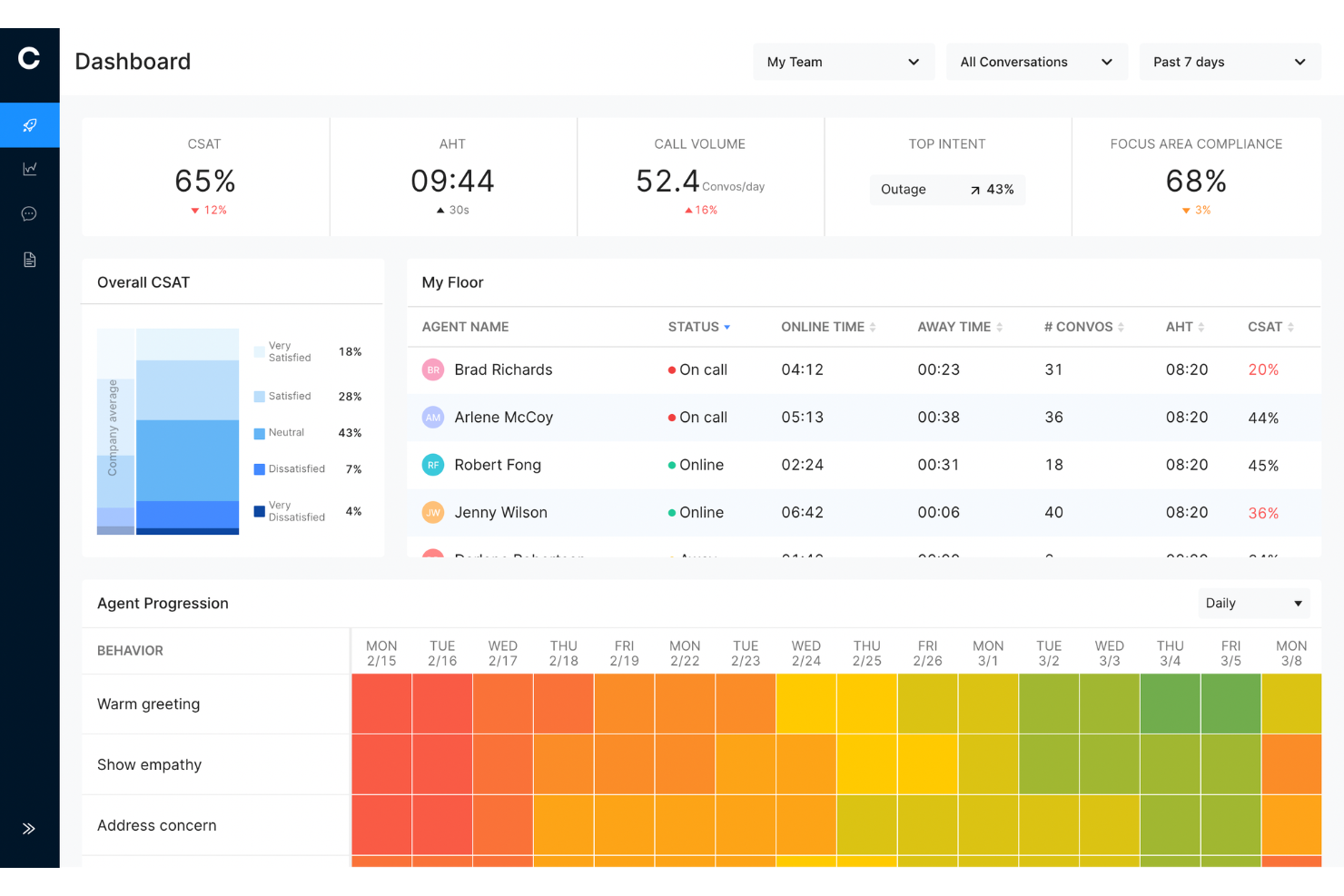
Cresta ist eine KI-gestützte Kundenserviceplattform, die autonome KI-Agenten, Echtzeitunterstützung für Kundenservice-Mitarbeiter und Gesprächsanalysen kombiniert, um Unternehmen dabei zu helfen, den Kundenservice zu automatisieren und Kundeninteraktionen über Sprach-, Chat-, SMS- und digitale Kanäle hinweg zu verbessern.
Für wen eignet sich Cresta am besten?
Cresta eignet sich am besten für große und mittelständische Contactcenter in Branchen wie Finanzdienstleistungen, Versicherungen, Telekommunikation und Einzelhandel, die große Mengen an Kundengesprächen verwalten und sowohl die Automatisierung als auch die Leistung ihrer Mitarbeiter verbessern möchten.
Warum ich Cresta ausgewählt habe
Ich habe Cresta ausgewählt, weil die Plattform die Lücke zwischen KI-Automatisierung und menschlichem Support schließt. Während die KI-Agenten routinemäßige Kundenanfragen selbstständig bearbeiten können, bietet die Plattform den Mitarbeitern während laufender Gespräche auch Unterstützung in Echtzeit. Dadurch können Unternehmen wiederkehrende Anfragen automatisieren und gleichzeitig ihre Mitarbeiter dabei unterstützen, bei komplexen Anliegen einen konsistenteren und präziseren Service zu leisten. Außerdem gefällt mir, dass Cresta Gesprächsanalysen, Qualitätsmanagement und Prozessautomatisierung in einer einzigen Plattform vereint, anstatt mehrere Einzellösungen zu erfordern.
Die wichtigsten Funktionen von Cresta
- KI-Agent: Automatisiert Kundeninteraktionen über Sprach-, Chat- und Nachrichtenkanäle und bearbeitet häufige Anfragen ohne Eingreifen eines Mitarbeiters.
- Automatische Zusammenfassung: Erstellt automatisch Gesprächszusammenfassungen und Notizen und reduziert dadurch die Nachbearbeitung nach Gesprächen sowie den Verwaltungsaufwand.
- Qualitätsmanagement: Bewertet Kundeninteraktionen anhand vordefinierter Kriterien und liefert automatisierte Bewertungserkenntnisse in großem Umfang.
- Opera-Orchestrierungsmodul: Ermöglicht Teams, KI-Prozesse und Gesprächsabläufe über eine Oberfläche ohne Programmieraufwand zu erstellen, zu verwalten und zu optimieren.
Cresta-Integrationen
Cresta lässt sich in Salesforce, ServiceNow, Microsoft Dynamics 365, Zendesk, Amazon Connect, Twilio, Five9, Genesys, NICE, HubSpot, Marketo und Databricks integrieren. Außerdem bietet die Plattform API-Zugriff für benutzerdefinierte Integrationen und die Automatisierung von Unternehmensprozessen.
Pros and Cons
Pros:
- KI-Agenten automatisieren Kundeninteraktionen
- Echtzeitunterstützung verbessert die Leistung der Mitarbeiter
- Automatisiertes Qualitätsmanagement in großem Umfang
Cons:
- Am besten für größere Unternehmen geeignet
- KI-Empfehlungen können menschliche Kontrolle erfordern

Am besten geeignet für KI-gestützte Ticket-Triage
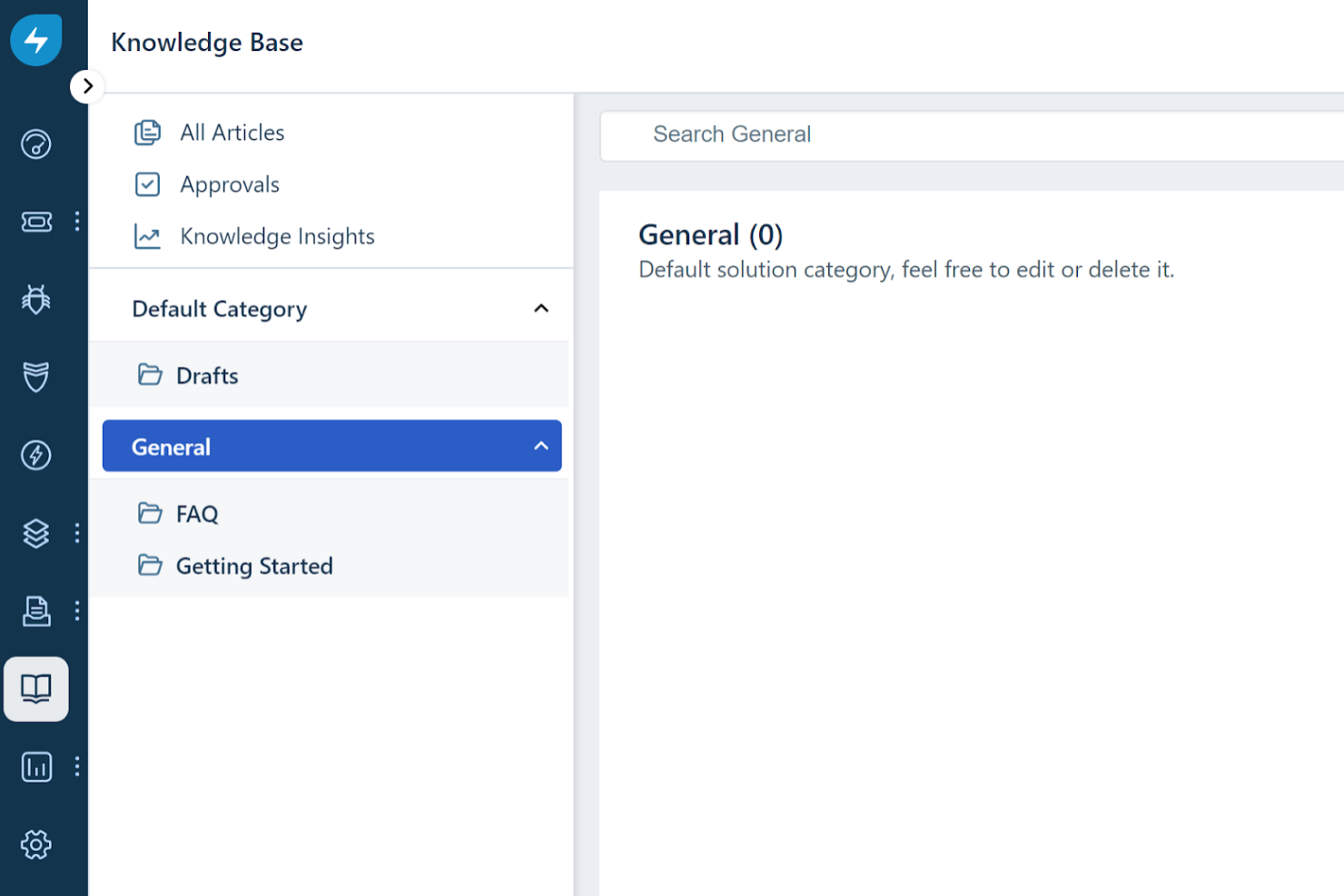
Freshdesk (ein Produkt von Freshworks Inc.) ist eine Kundenservice-Plattform, die Teams dabei unterstützt, Kundeninteraktionen über mehrere Kommunikationskanäle hinweg zu verwalten. Sie unterstützt Anfragen per E-Mail, Chat, Telefon und sozialen Medien innerhalb eines einzigen Systems, sodass Teams sowohl Routineanfragen als auch komplexere Probleme auf organisierte Weise bearbeiten können.
Warum ich Freshdesk gewählt habe
Ich habe mich für Freshdesk entschieden, weil es die Ticket-Triage in Kundenservice-Workflows besonders gut handhabt. Die Plattform beinhaltet Freddy AI, das bei der Klassifizierung eingehender Tickets unterstützt, indem es Felder wie Priorität, Gruppe oder Status basierend auf dem Ticketinhalt vorschlägt. Dies kann die manuelle Sortierung verringern und eine konsistentere Weiterleitung von Anfragen unterstützen, sodass Agenten sich auf Fälle konzentrieren können, die mehr Aufmerksamkeit erfordern.
Wichtige Funktionen von Freshdesk
Zusätzlich zur Ticketbearbeitung und Automatisierung bietet Freshdesk Funktionen, die den täglichen Kundenservicebetrieb unterstützen:
- Chatbots und Automatisierung: Unterstützt automatisierte Antworten auf häufige Anfragen, mit der Möglichkeit, Gespräche bei Bedarf an einen Agenten zu übergeben.
- Mehrsprachige Unterstützung: Ermöglicht Teams die Betreuung von Kunden in verschiedenen Sprachen.
- Anpassungstools: Teams können Workflows und Benutzeroberflächen an interne Prozesse anpassen.
- Kollaborationswerkzeuge: Unterstützt interne Diskussionen und Übergaben zwischen Agenten.
Freshdesk Integrationen
Integrationen umfassen Slack, MS Teams, Shopify, WhatsApp, Jira, Salesforce, Google Workspace, Trello, Asana und Mailchimp.
Pros and Cons
Pros:
- Fähigkeiten zum Asset-Management
- Umfangreiche Automatisierungsfunktionen zur Reduzierung manueller Aufgaben
- Enthält einen No-Code-Konversationsbot-Builder für einfache Implementierung
Cons:
- Freddy AI ist eine kostenpflichtige Zusatzfunktion
- Erweiterte Berichtsfunktionen werden von einigen als komplex angesehen

Am besten geeignet für automatische Lösungen über verschiedene Kanäle hinweg
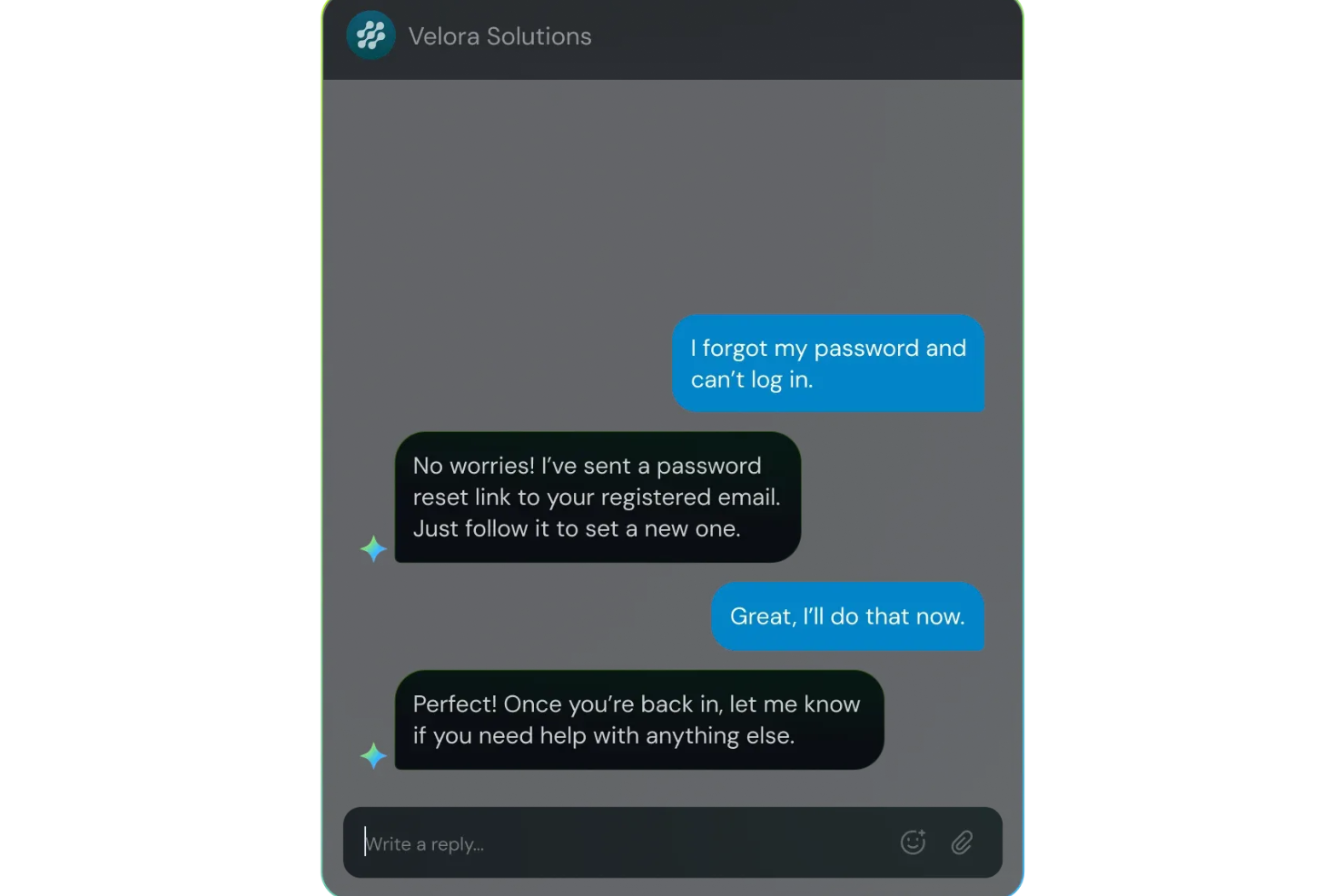
SparrowDesk ist konzipiert für Unternehmen, die ihren Kundenservice mit KI-gesteuerter Effizienz transformieren möchten. Durch die Automatisierung von Interaktionen und die Lösung eines erheblichen Teils der Anfragen werden sowohl die Antwortzeiten als auch die Arbeitsbelastung der Mitarbeitenden reduziert. Das macht SparrowDesk besonders attraktiv für Kundenserviceteams, die das Nutzererlebnis verbessern und Kommunikationsprozesse optimieren möchten.
Warum ich SparrowDesk ausgewählt habe
Ich habe mich für SparrowDesk entschieden, weil es mit seiner Luna AI eine bedeutende Anzahl an Kundenanfragen automatisch lösen kann, was Ihr Support-Team entlastet. Dieses Feature ermöglicht es Ihren Mitarbeitenden, sich auf komplexere Anliegen zu konzentrieren und die Servicequalität insgesamt zu steigern. Außerdem sorgt der zentrale Posteingang der Plattform für nahtlose Kommunikation über verschiedene Kanäle hinweg und bietet Kund:innen so ein konsistentes Serviceerlebnis.
SparrowDesk – Hauptfunktionen
Neben seinen Auto-Lösungsfähigkeiten bietet SparrowDesk weitere Funktionen, die seine Rolle als KI-Chatbot für den Kundenservice stärken:
- Service-Level-Agreements (SLA): Legen Sie Antwort- und Lösungsziele fest, um zeitnahe Unterstützung sicherzustellen.
- Schnellaktionen-Makros: Automatisieren Sie wiederkehrende Aufgaben mit vordefinierten Makros, um die Effizienz zu steigern.
- Interaktive Analysen: Nutzen Sie Echtzeit-Dashboards für Einblicke in Teamleistung und Kundenentwicklungen.
- Mehrsprachige Plattform: Bieten Sie Unterstützung in mehreren Sprachen, um ein globales Publikum zu erreichen.
SparrowDesk – Integrationen
Zurzeit listet SparrowDesk keine nativen Integrationen auf.
Pros and Cons
Pros:
- KI-Copilot unterstützt Mitarbeitende mit intelligenten Entwurfsvorschlägen.
- Mehrsprachiger Support bedient ein globales Publikum.
- Omnichannel-Posteingang zentralisiert die Kommunikation über alle Plattformen.
Cons:
- Abhängigkeit von KI eignet sich nicht für jeden Kundenservice-Stil.
- Begrenzte native Integrationen könnten nahtlose Anbindung erschweren.

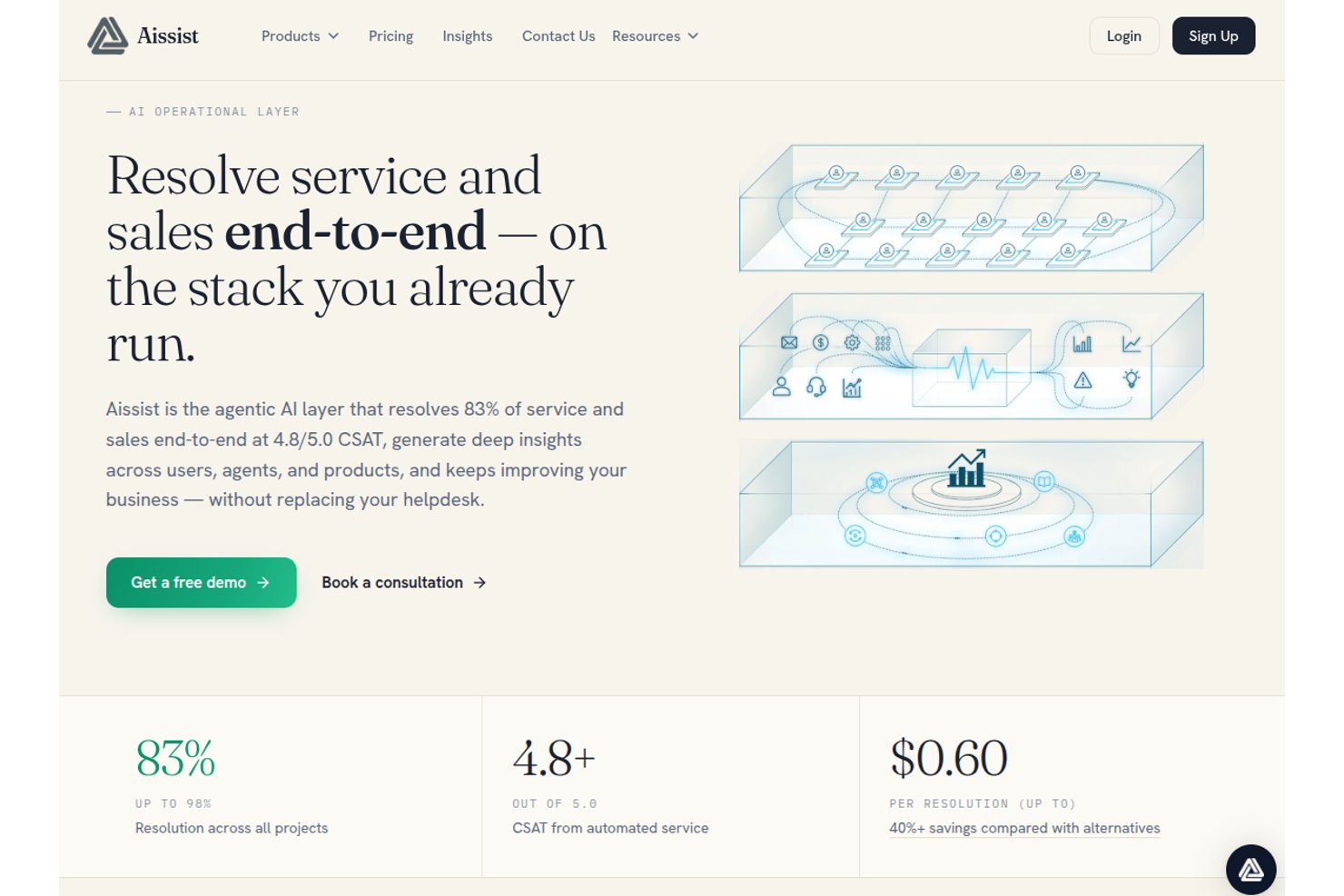
Aissist ist eine Multi-Agenten-KI-Plattform für Kundendienstteams, die digitale KI-Agenten einsetzt, um Gespräche zu führen, Ticket-Workflows zu automatisieren und Aktionen über Helpdesks, CRMs und Messaging-Kanäle hinweg auszuführen.
Für wen ist Aissist am besten geeignet?
Aissist eignet sich für Support-Teams in wachsenden Unternehmen, die hohe Ticketvolumina automatisieren müssen, ohne ihr bestehendes Helpdesk-System zu ersetzen.
Warum habe ich Aissist ausgewählt?
Ich habe Aissist als eine der besten Lösungen ausgewählt, weil die AgentMesh Multi-Agenten-Architektur weiter geht als typische Chatbots. Während die meisten Bots eine Frage beantworten und damit den Dialog beenden, markieren die digitalen Agenten von Aissist Tickets, aktualisieren Datensätze und eskalieren Fälle – und das alles in einem einzigen automatisierten Vorgang. Besonders gefällt mir das Evolve-Modul, das Muster in Live-Gesprächen erkennt und das Verhalten der KI kontinuierlich anpasst, ohne dass ein manuelles Eingreifen erforderlich ist.
Aissist Hauptfunktionen
- Pulse-Analysen und Berichte: Verfolgt wichtige Leistungskennzahlen, Trends und die Qualität der Agenten über alle Kundeninteraktionen hinweg.
- Mehrsprachige Unterstützung: Erkennt und beantwortet Anfragen automatisch in über 65 Sprachen für weltweite Abdeckung.
- Omnikanal-Konversationsmanagement: Verwaltet Kundengespräche über Chat, E-Mail, WhatsApp, SMS und soziale Medien auf einer Plattform.
- Wissensaufnahme-Engine: Integriert Unternehmensdokumente, frühere Tickets und Support-Inhalte für fundierte, markenkonforme KI-Antworten.
Aissist Integrationen
Aissist bietet native Integrationen mit Zendesk, Intercom, Salesforce, Freshdesk, Gorgias, HubSpot, Kustomer, Front, Shopify, WooCommerce und Magento und stellt eine API für individuelle Integrationen bereit.
Pros and Cons
Pros:
- AgentMesh erledigt mehrstufige Workflows autonom
- Selbstoptimierung in Echtzeit durch Mustererkennung in Gesprächen
- Einsatz über Messaging, E-Mail und Chat gleichzeitig
Cons:
- Analyse-Dashboard bietet für Enterprise-Teams zu wenig Tiefe
- Die Komplexität der Einrichtung steigt mit größeren Agentenkonfigurationen

eDesk
Am besten geeignet für umfangreiche Marktplatzintegration
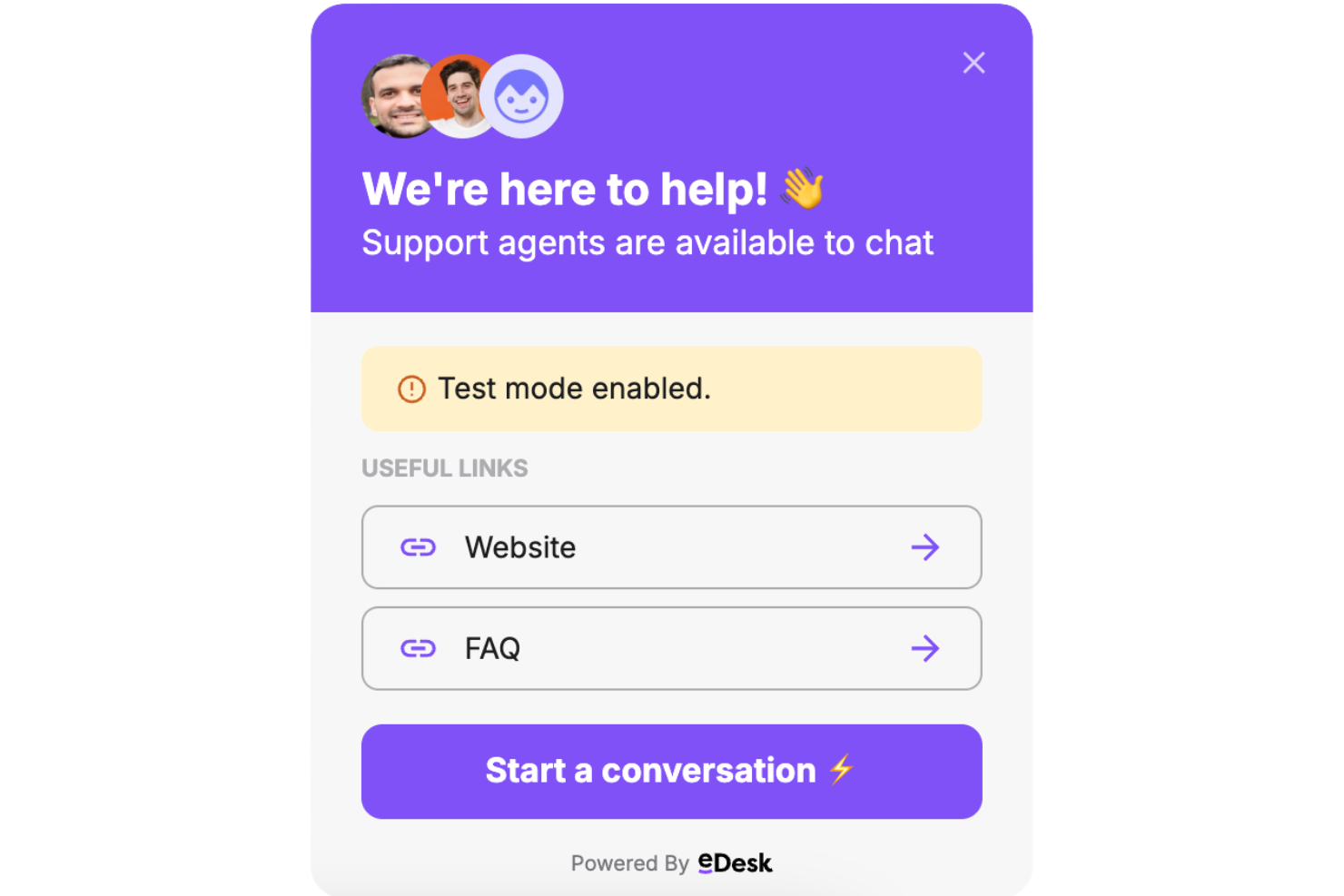
Für E-Commerce-Unternehmen, die einen KI-Chatbot für den Kundenservice suchen, bietet eDesk eine Lösung mit umfangreicher Marktplatzintegration und Tools, die Routineaufgaben im Support automatisieren und rund um die Uhr Unterstützung bieten. Die Plattform wurde entwickelt, um Kundengespräche effizienter zu verwalten, die Bearbeitung von Anfragen zu verbessern und die Produktivität von Online-Händlern zu steigern. Durch die Verbindung mit zahlreichen Plattformen, einschließlich führender Marktplätze, ermöglicht eDesk Teams, einen konsistenten Kundenservice über mehrere Kanäle hinweg aufrechtzuerhalten.
Warum ich eDesk gewählt habe
Ich habe mich für eDesk entschieden, weil es bedeutende Marktplatzintegrationen bietet, die E-Commerce-Teams dabei helfen, Kundengespräche über verschiedene Marktplatz-Kanäle hinweg zentral zu verwalten. Die Plattform automatisiert zudem Routineaufgaben im Kundenservice und hilft Teams, Anfragen effektiver zu bearbeiten. Mit dem einheitlichen Posteingang bleiben Kundenmitteilungen organisiert, während der KI-Agent die Ticketzuweisung und Stimmungsanalyse unterstützt, sodass sich Teams auf komplexere Kundenanliegen konzentrieren können.
eDesk Hauptfunktionen
Neben der umfangreichen Marktplatzintegration bietet eDesk:
- 24/7-Chatbot: Bietet Echtzeitunterstützung in Ihrem Webshop, sodass Kunden jederzeit Hilfe erhalten können.
- Echtzeit-Analysen: Liefert Analysen und Berichte, um Ihre Support-Aktivitäten besser zu verstehen und zu optimieren.
- Pre-Sales-Unterstützungs-Tools: Entwickelt, um potenzielle Kunden zu gewinnen und durch gezielte Kommunikation den Umsatz zu steigern.
- Kundenfeedback-Management: Unterstützt Sie beim Sammeln und Auswerten von Kundenmeinungen, damit Sie fundierte Geschäftsentscheidungen treffen können.
eDesk Integrationen
Integrationen umfassen Amazon, eBay, WhatsApp, Facebook, Shopify, WooCommerce, Magento, BigCommerce, Linnworks und ChannelAdvisor.
Pros and Cons
Pros:
- Konzipiert für die Bearbeitung hoher Volumina von E-Commerce-Anfragen
- KI-gestützte Automatisierungen verbessern die Effizienz der Antworten
- Integriert umfassende Bestelldaten für verbesserten Kundenservice
Cons:
- Vorrangig für E-Commerce entwickelt, weniger flexibel für andere Branchen
- Die Anpassungsmöglichkeiten der Berichte sind für komplexe Analysen begrenzt
New Product Updates from eDesk
eDesk Adds Galeria and Kaufland Support in Spain and Netherlands
eDesk adds support for Galeria, Kaufland Spain, and Kaufland Netherlands marketplaces. These integrations bring more European buyer messages into eDesk with routing, templates, AI insights, and automated translation. For more information, visit eDesk’s official site.
 .
.
Netomi
Am besten für strenge Compliance-Anforderungen an die Unternehmenssicherheit
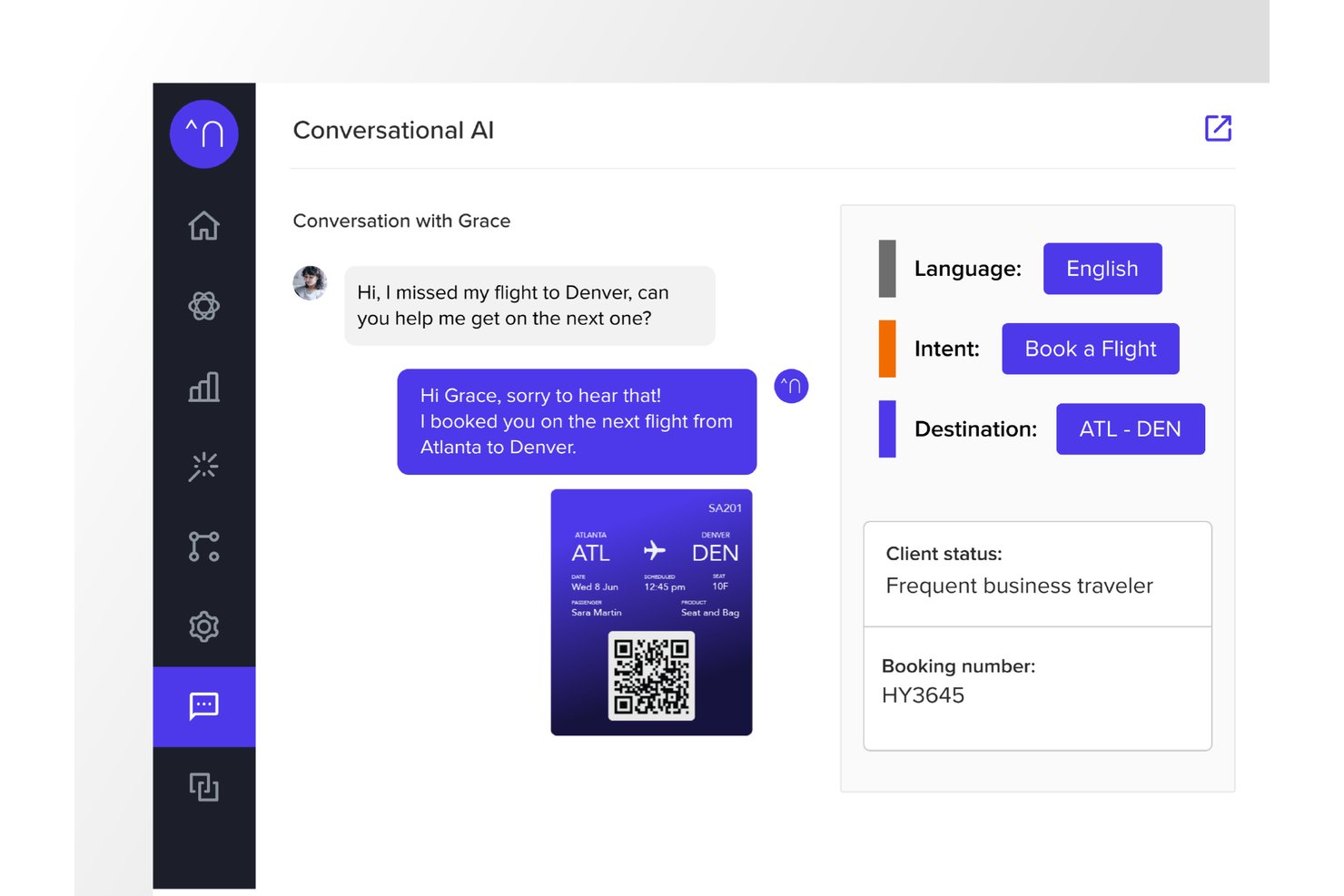
Netomi ist eine agentische KI-Plattform für den Kundenservice in Unternehmen, die autonome KI-Agenten, Co-Pilot-Unterstützung für menschliche Agenten und eine Omnichannel-Bereitstellung über Chat, E-Mail, Sprache, SMS und Messaging-Apps kombiniert.
Für wen ist Netomi am besten geeignet?
Netomi eignet sich besonders für große Unternehmen in regulierten Branchen wie Finanzdienstleistungen, Reisen, Versicherungen und Telekommunikation, die ein hohes Interaktionsvolumen bewältigen.
Warum ich Netomi ausgewählt habe
Ich habe Netomi als eine der besten Lösungen ausgewählt, weil die Sicherheits- und Compliance-Nachweise weit über eine reine Pflichtübung hinausgehen. Die Plattform verfügt über Zertifizierungen nach SOC 2 Type II, ISO 27001, HIPAA und PCI DSS, wobei Governance-Kontrollen direkt in die Architektur integriert sind. Besonders gefällt mir der Ansatz der 'genehmigten generativen KI': Themenleitplanken, Schutzmaßnahmen gegen Prompt-Injection und Fürsorgepflicht-Kontrollen werden vor jeder KI-Aktion ausgeführt und nicht nachträglich einem standardmäßigen LLM hinzugefügt.
Wichtige Funktionen von Netomi
- Echtzeit-Wissensaufnahme aus mehreren Quellen: Nimmt Inhalte aus Dokumenten, URLs, Dateien und Wissensdatenbanken automatisch auf und fasst sie zusammen.
- Omnichannel-Bereitstellung: Bietet Kundensupport über Website, mobile App, E-Mail, SMS und wichtige Messaging-Kanäle.
- Native Helpdesk-Integrationen: Verbindet sich direkt mit Zendesk, Salesforce, Kustomer, ServiceNow, Genesys, NICE und anderen CX-Plattformen.
- Vertrauenswertung mit Ausweichlogik: Weist Antworten Vertrauensstufen zu und löst anpassbare Ausweich-Workflows aus, wenn die Sicherheitsschwellenwerte nicht erreicht werden.
Netomi-Integrationen
Netomi bietet native Integrationen mit Zendesk, Salesforce, Kustomer, ServiceNow, Genesys, NICE, Five9, Amazon Connect, Cisco und LivePerson. Für individuelle Integrationen steht eine API zur Verfügung.
Pros and Cons
Pros:
- Compliance mit mehreren Zertifizierungen, einschließlich HIPAA und PCI DSS
- Autonome KI-Agenten bearbeiten komplexe Lösungen mit mehreren Schritten
- Integrierte Themenleitplanken verhindern markenfremde KI-Antworten
Cons:
- Die Komplexität der Implementierung stellt kleinere und mittelständische Teams vor Herausforderungen
- Begrenzte eigenständige Einrichtung ohne Support auf Unternehmensebene

Gorgias
Am besten für E-Commerce-Support bei Shopify-Marken geeignet
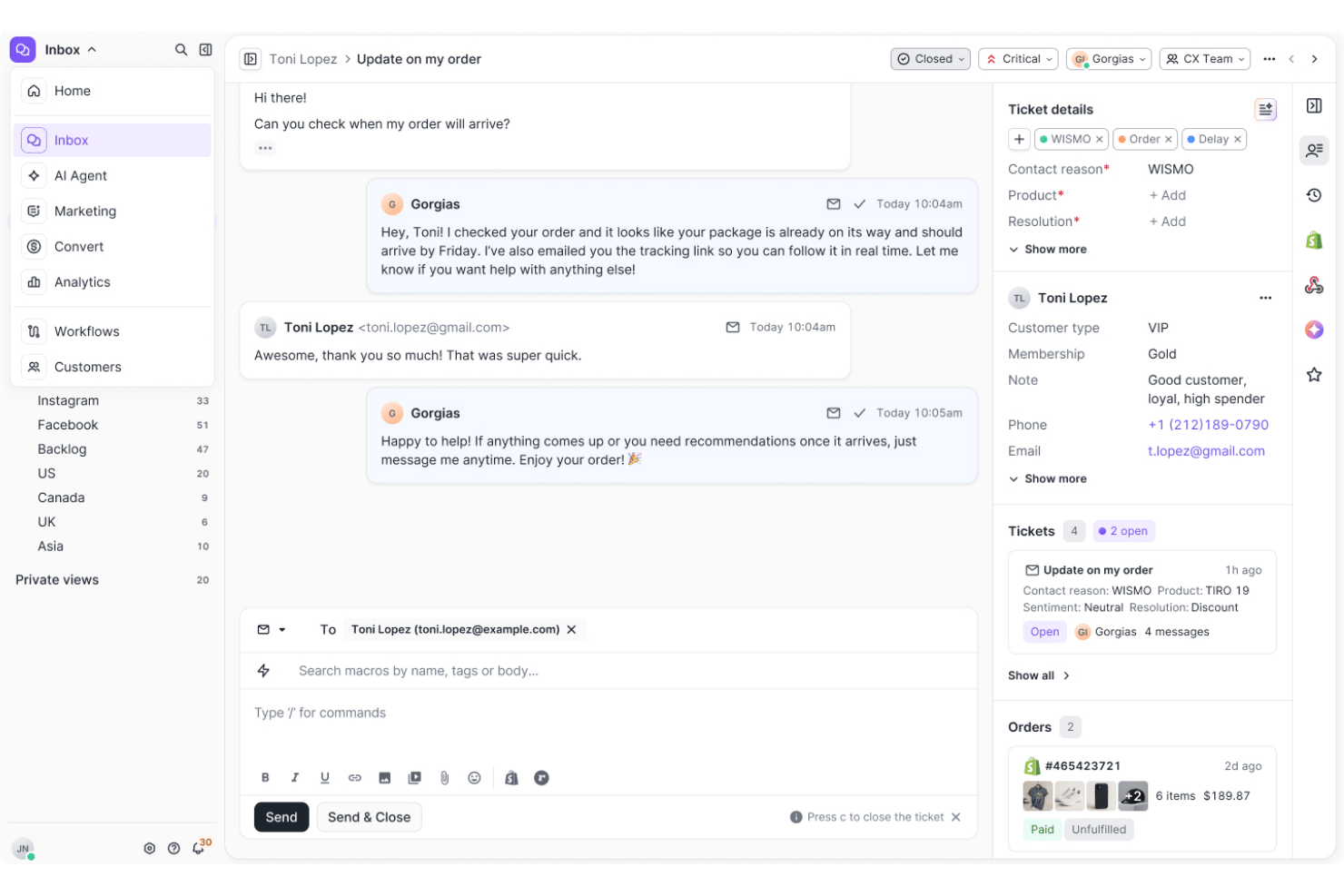
Gorgias ist eine auf E-Commerce fokussierte KI-Chatbot- und Helpdesk-Plattform, die einen dialogorientierten KI-Agenten, einen Omnichannel-Posteingang und Aktionen zur Bestellverwaltung kombiniert, um den Kundensupport über Chat, E-Mail, soziale Medien, SMS und WhatsApp abzuwickeln.
Für wen ist Gorgias am besten geeignet?
Gorgias eignet sich hervorragend für mittelständische E-Commerce-Marken, die Shopify, BigCommerce oder Magento nutzen und einen KI-gestützten Kundensupport benötigen, der auf ihren Shop-Daten basiert.
Warum ich mich für Gorgias entschieden habe
Gorgias hat sich einen Platz auf meiner Auswahlliste verdient, weil sein KI-Agent speziell anhand von E-Commerce-Konversationen und nicht anhand allgemeiner Support-Daten trainiert wird. Besonders gut gefällt mir, dass Bestellungen direkt innerhalb eines Chatverlaufs storniert, Rabattcodes angewendet und Abonnements verwaltet werden können, ohne für ein separates Backend den Tab wechseln zu müssen. Der Einkaufsassistent spricht Käufer außerdem proaktiv mit personalisierten Produktempfehlungen an und verwandelt so eine Support-Interaktion in einen aktiven Verkaufsmoment.
Die wichtigsten Funktionen von Gorgias
- Omnichannel-Posteingang: Verwalten Sie Supportanfragen per E-Mail, Chat, über soziale Medien, SMS und WhatsApp in einem einzigen zentralen Arbeitsbereich.
- Native E-Commerce-Integrationen: Stellen Sie direkte Verbindungen zu Shopify, BigCommerce, Magento und WooCommerce her, um in Echtzeit auf Bestell- und Kundendaten zuzugreifen.
- Umsatzzuordnungsberichte: Verfolgen Sie Verkäufe, die durch Interaktionen mit dem Kundenservice und Gespräche mit Agenten generiert wurden.
- Automatisierte Ticketweiterleitung: Verwenden Sie Absichten und Regeln, um Tickets automatisch dem richtigen Agenten oder Eskalationspfad zuzuweisen.
Gorgias-Integrationen
Gorgias bietet mehr als 300 native Integrationen, darunter Shopify, BigCommerce, Magento, WooCommerce, Klaviyo, Yotpo, Attentive, Recharge und Loop Returns. Für benutzerdefinierte Integrationen steht eine API zur Verfügung.
Pros and Cons
Pros:
- KI-Agent löst Tickets ohne menschliches Eingreifen
- Bestellaktionen direkt innerhalb des Chats möglich
- Proaktiver Einkaufsassistent verwandelt Support in Verkäufe
Cons:
- Außerhalb von E-Commerce-Anwendungsfällen nur begrenzter Nutzen
- Berichte bieten bei nicht umsatzbezogenen Kennzahlen wenig Tiefe

Ada
Am besten für die Kontrolle von KI-Agenten auf Unternehmensebene geeignet
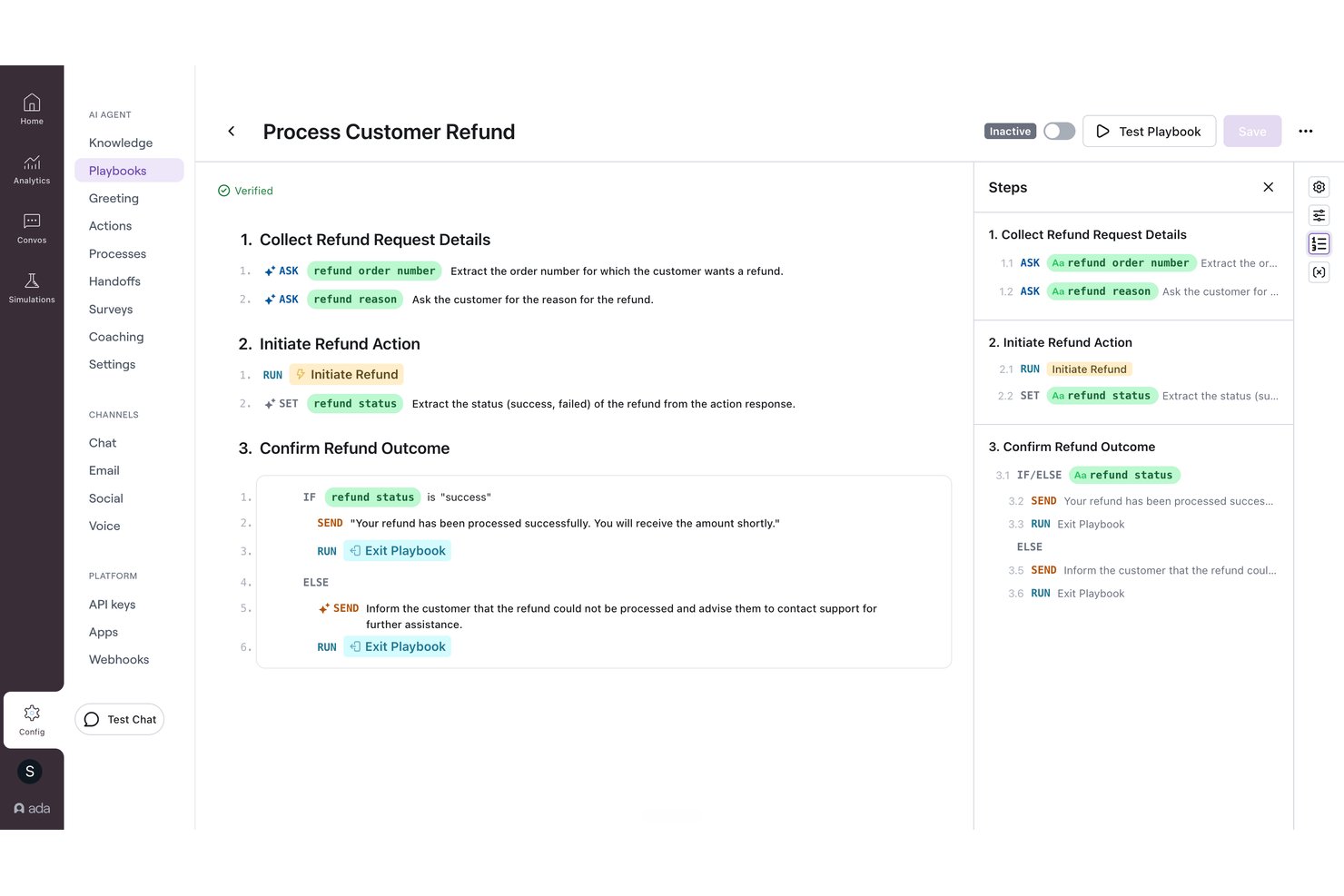
Ada ist eine KI-Kundenserviceplattform für Unternehmen, die KI-Agenten über Sprach-, Chat-, E-Mail- und Nachrichtenkanäle mithilfe einer Multi-LLM-Schlussfolgerungs-Engine bereitstellt und native Helpdesk-Integrationen sowie integrierte Funktionen zur Übergabe an menschliche Mitarbeitende bietet.
Für wen ist Ada am besten geeignet?
Ada eignet sich besonders für große Unternehmen, die jährlich Hunderttausende Kundeninteraktionen über mehrere Supportkanäle verwalten.
Warum ich Ada ausgewählt habe
Ada hat sich einen Platz auf meiner Auswahlliste verdient, weil die Plattform CX-Teams ein hohes Maß an Kontrolle über das Verhalten der KI-Agenten bietet. Besonders gut gefällt mir das System für Handlungsleitfäden, mit dem Manager KI-Antworten verbessern können, indem sie leistungsschwache Gespräche prüfen und Feedback anwenden, ohne Code anfassen zu müssen. Adas Schlussfolgerungs-Engine koordiniert außerdem Modelle von OpenAI, Anthropic und Amazon Bedrock. Mit allen Anbietern bestehen Vereinbarungen zur Nichtaufbewahrung von Daten, was beim Umgang mit sensiblen Kundendaten in großem Umfang besonders wichtig ist.
Wichtige Funktionen von Ada
- Omnichannel-Bereitstellung: Konfigurieren Sie KI-Agenten über Sprach-, Chat-, E-Mail-, SMS-, WhatsApp-, Messenger- und In-App-Kanäle von einer einzigen Plattform aus.
- Wissensaufnahme über die Knowledge API: Integrieren Sie Ihre eigenen Dokumentationssysteme mithilfe der Knowledge API, um dynamisch Antworten abzurufen.
- Compliance für Unternehmen: Umfasst SOC 2-, DSGVO-, HIPAA- und PCI-DSS-Zertifizierungen zur Unterstützung regulierter Branchen.
- Rollenbasierte Zugriffskontrollen: Verwalten Sie Berechtigungen für Agenten, Administratoren und Prüfer, um Teams sicher und skalierbar zu verwalten.
Ada-Integrationen
Ada bietet native Integrationen mit Zendesk, Salesforce, ServiceNow, Freshworks, Genesys, Dixa, Gladly, Kustomer, NICE CXone, Twilio Flex und Amazon Connect. Für benutzerdefinierte Integrationen ist eine API verfügbar.
Pros and Cons
Pros:
- Granulare Kontrolle des KI-Verhaltens über Handlungsleitfäden
- Multi-LLM-System mit Nichtaufbewahrung von Daten
- Omnichannel-Bereitstellung über Sprach- und Nachrichtenkanäle
Cons:
- Komplexe Ersteinrichtung für kleinere Supportteams
- Die Granularität der Berichte bleibt hinter der einiger Wettbewerber zurück
Aircall
Am besten geeignet für sprach- und anruftranskriptionsgestützte KI
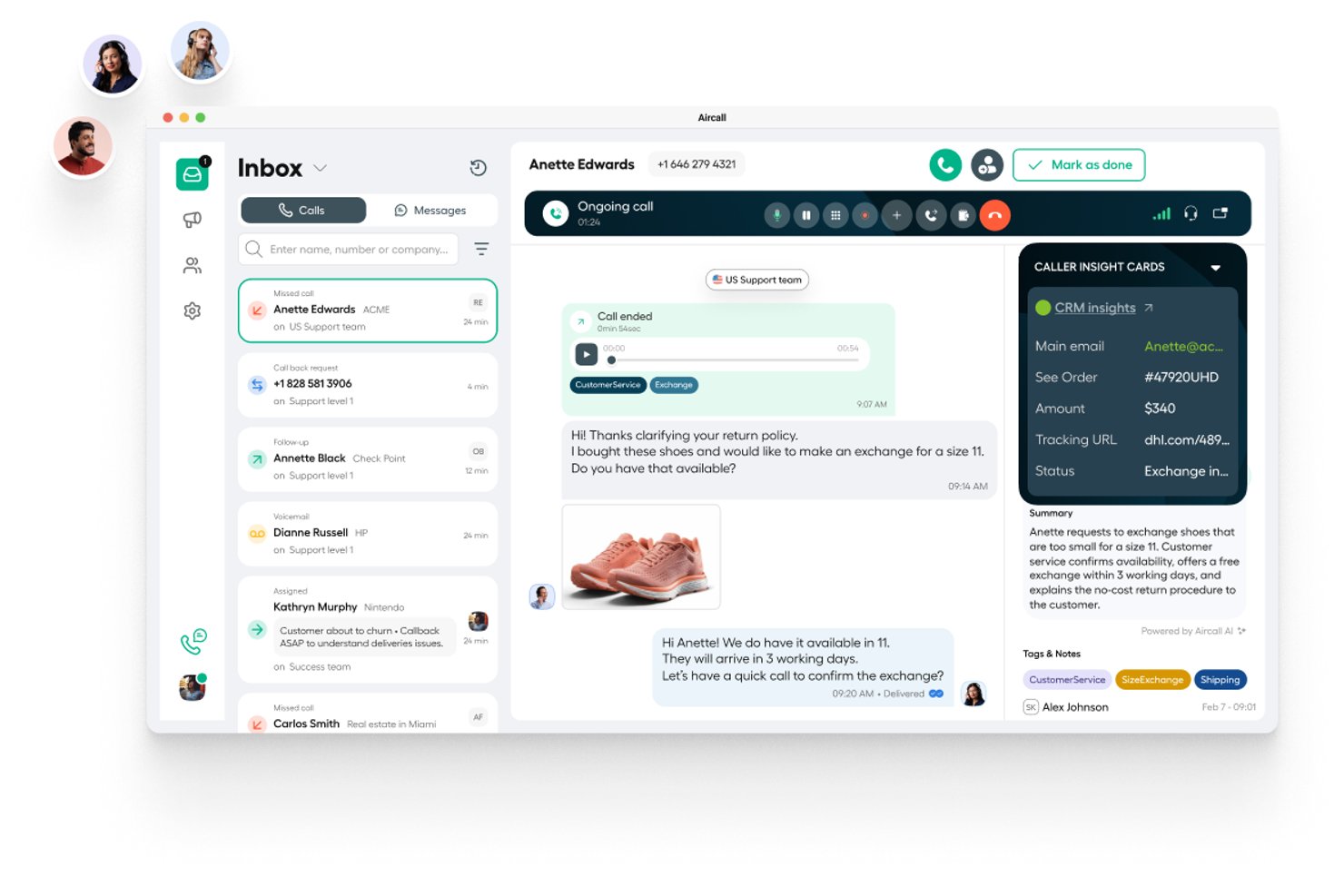
Aircall ist eine cloudbasierte Callcenter-Plattform, die AI-Sprachagenten, AI-Nachrichtenagenten für SMS und WhatsApp, Anruftranskription und Echtzeit-Gesprächsanalysen für Kundenserviceteams kombiniert.
Für wen ist Aircall am besten geeignet?
Aircall eignet sich besonders für Kontaktcenter-Teams und Kundenserviceabläufe, bei denen Sprache der wichtigste Servicekanal ist.
Warum ich Aircall ausgewählt habe
Aircall steht auf meiner Auswahlliste, weil die KI Sprachgespräche vollständig abwickelt. Besonders gut gefällt mir, dass die Anruftranskription eine Genauigkeit von mindestens 85 % erreicht und AI Assist nach jedem Anruf automatisch wichtige Themen, die Stimmung und das Verhältnis von Sprech- zu Zuhörzeit hervorhebt, ohne dass eine manuelle Überprüfung erforderlich ist. AI-Sprachagenten können häufige eingehende Fragen selbstständig lösen und Anrufer mit bereits vollständig erfasstem Gesprächskontext an einen Live-Agenten weiterleiten.
Die wichtigsten Funktionen von Aircall
- Intelligente Anrufweiterleitung: Leitet Anrufe innerhalb verteilter Teams anhand von Fähigkeiten, Verfügbarkeit oder Kundenhistorie an die passenden Agenten weiter.
- Integration mit Salesforce Service Cloud Voice: Integriert Sprache, Transkription und KI-Anrufzusammenfassungen in die Salesforce-Konsole.
- Analytics+: Bietet eine unbegrenzte Anrufhistorie, erweiterte Filtermöglichkeiten und Live-Anrufüberwachung für Manager.
- Softphone-Apps: Bietet Desktop-, Web-, Android- und iOS-Apps, damit Agenten Anrufe von jedem Gerät aus bearbeiten können.
Aircall-Integrationen
Aircall bietet mehr als 250 native Integrationen, darunter Salesforce, HubSpot, Zendesk, Intercom, Freshdesk, Microsoft Teams, Shopify, Slack, Pipedrive und Zoho CRM sowie eine API für benutzerdefinierte Integrationen.
Pros and Cons
Pros:
- Die Genauigkeit der AI-Transkription erreicht konstant 85 %
- AI-Sprachagenten lösen eingehende Anrufe selbstständig
- Die Stimmungserkennung in Echtzeit kennzeichnet gefährdete Anrufer
Cons:
- Schwache KI für Web-Chat und Nachrichten
- Kein eigenständiger Chatbot zur Selbstbedienung

My AskAI
Am besten für eine schnelle Bereitstellung
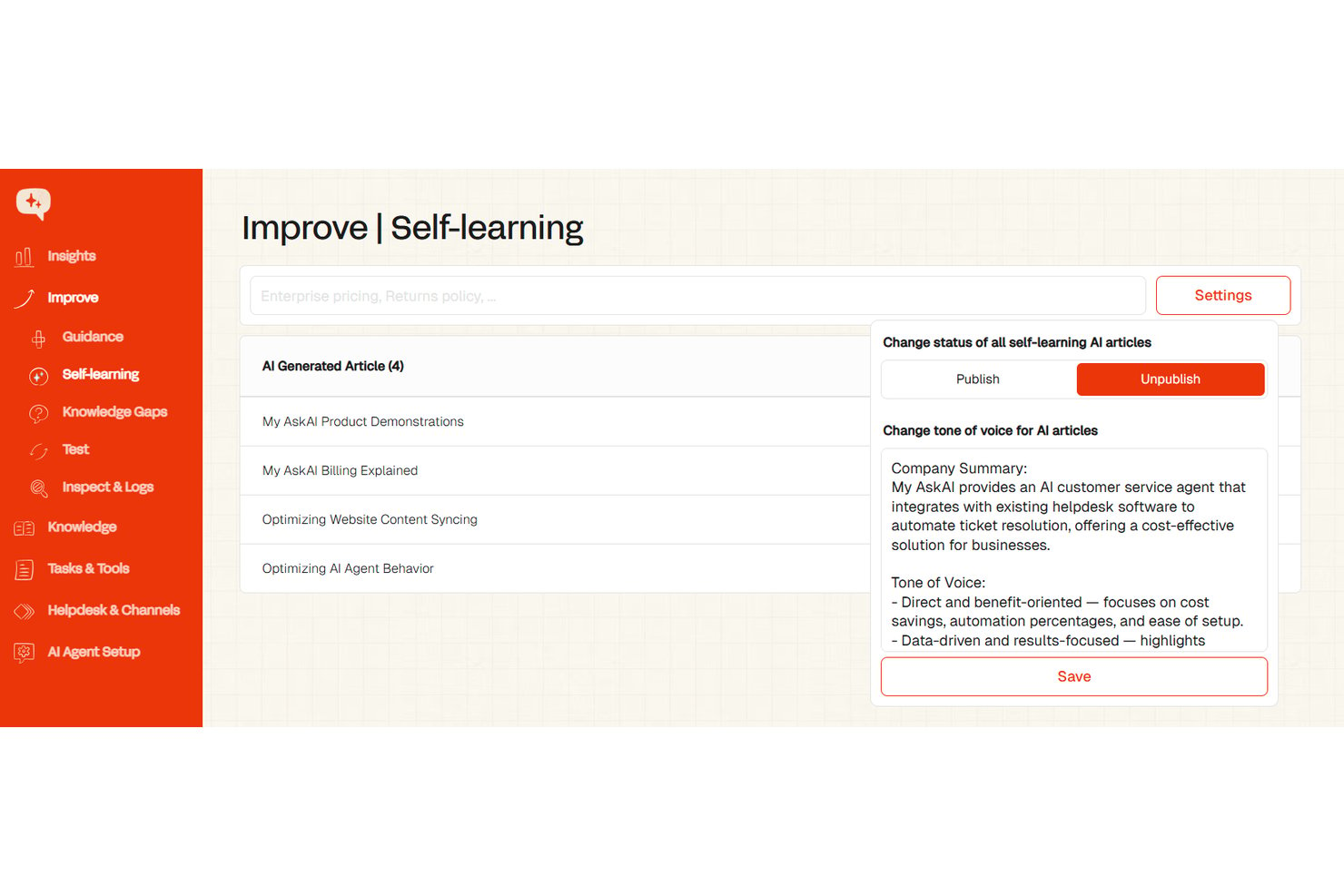
My AskAI ist ein KI-Kundenservice-Agent, der auf Ihrem bestehenden Helpdesk aufsetzt, Wissen aus Dokumenten, URLs und vergangenen Tickets aufnimmt und eingehende Supportgespräche automatisch bearbeitet und beantwortet.
Für wen eignet sich My AskAI am besten?
Es eignet sich hervorragend für kleine bis mittelgroße SaaS- und E-Commerce-Supportteams, die mithilfe von KI die Anzahl der zu bearbeitenden Tickets reduzieren möchten, ohne ihre aktuelle Helpdesk-Einrichtung zu ersetzen.
Warum ich My AskAI ausgewählt habe
My AskAI hat sich einen Platz auf meiner Auswahlliste verdient, weil die Lösung wirklich schnell einsatzbereit ist. Ich verbinde sie mit einem bestehenden Zendesk- oder Intercom-Konto, verweise sie auf die URL eines Hilfecenters, und innerhalb einer Stunde erstellt sie bereits Entwürfe für echte Ticketantworten – ganz ohne Entwicklungsaufwand. Besonders gut gefällt mir der Modus für Antwortentwürfe: Die KI schlägt Antworten vor, die von Supportmitarbeitern vor dem Versand geprüft werden, sodass Teams zunächst Vertrauen aufbauen können, bevor sie vollständig autonome Antworten aktivieren.
Die wichtigsten Funktionen von My AskAI
- Import der Wissensdatenbank: Verbindet sich mit Hilfecentern, Google Drive, Notion und URLs, um Antworten auf verifizierten Unternehmensinhalten aufzubauen.
- Bereitstellung über mehrere Kanäle: Funktioniert über Web-Widgets, E-Mail und Shopify und lässt sich direkt in führende Helpdesk-Plattformen einbinden.
- Selbstlernende Verbesserungen: Prüft eskalierte Tickets und Antworten von Mitarbeitenden, um zukünftige Antworten automatisch zu optimieren.
- Gesprächsanalysen: Liefert in der Übersicht Einblicke in die Ticketreduzierung, häufige Fragen und Leistungskennzahlen.
Integrationen von My AskAI
My AskAI bietet native Integrationen mit Zendesk, Intercom, Gorgias, Freshdesk, HubSpot und Freshchat.
Pros and Cons
Pros:
- Ausführliche Dokumentation zur Unterstützung bei der Einrichtung
- Der Modus für Antwortentwürfe stärkt schrittweise das Vertrauen der Supportmitarbeiter
- Zeigt unbeantwortete Fragen zur Überprüfung von Wissenslücken auf
Cons:
- Eingeschränkte Bot-Erstellung für komplexe Gesprächsabläufe
- Die Analysetiefe bleibt hinter der von Lösungen für Großunternehmen zurück
Weitere KI-Chatbots für den Kundenservice
Hier sind einige weitere Plattformen für konversationelle KI, die es nicht in meine Auswahl der besten Chatbot-Software geschafft haben, aber dennoch eine nähere Betrachtung wert sind:
- Comm100
Am besten für KI-Automatisierung in regulierten Branchen geeignet
- Chatbase
Am besten für KI-Agenten, die mit Ihren eigenen Daten trainiert wurden
- Gradient Labs
Am besten geeignet, um Chatbots mit privaten Daten zu verbinden
- CrafterQ
Am besten für stimmungsbasierte Antwortverarbeitung geeignet
- Weav
Ideal zur Integration von Chatbots in mobile Apps
- Robin Autonomous IT
Am besten zur Automatisierung von Ticket-Workflow-Lösungen geeignet
- Stonly
Am besten für die personalisierte Weitergabe von Wissen
- Hiver
Am besten für KI-gestützte Automatisierung
- Zendesk
E Lösung mit No-Code-Workflow-Automatisierung
- Horatio
Am besten für mehrsprachigen Kundensupport geeignet
- Zoho Desk
Am besten geeignet für KI-gesteuerte Kundeninteraktionen
- Zoho SalesIQ
Am besten geeignet für Besucher-Tracking und -Insights
- Tidio
Am besten zur Automatisierung von Kundenanfragen geeignet
- Conversica
Am besten für die Echtzeitlösung von Kundenanliegen
- Front
Am besten mit automatisierter Qualitätssicherung
- monday service
Ideal für anpassbare Service-Dashboards
- Intercom
Am besten geeignet für fortgeschrittene KI-Kundenanfragen
- Kommunicate
Am besten für mehrsprachige Unterstützung
- CoSupport AI
Am besten geeignet zur Automatisierung von Kundenanfragen
- Chatfuel
Am besten für die auf WhatsApp ausgerichtete Lead-Qualifizierung
- Assembled AI
Am besten geeignet für intelligente Fallzuweisung
- Drift
Am besten für Echtzeit-Kundeninteraktion
- Forethought
Am besten geeignet für die Bearbeitung von Kundenanfragen
- Guru
Am besten geeignet für KI-gesteuerten Wissenszugriff
- IBM Watson Assistant
Am besten geeignet, um Gesprächskontext zu erfassen
- Ushur
Am besten für Echtzeit-Interaktionen mit Kunden
- Quidget
Am besten geeignet für die Automatisierung routinemäßiger Anfragen
- SAAS First
Am besten für 24/7 KI-Kundensupport
- Compass
Am besten für KI-gestützte Echtzeit-Chat-Unterstützung
- Evly
Am besten mit individueller Markenstimmen-Konfiguration


Bewertungen verwandter CX-Software
Wenn Sie hier noch nicht gefunden haben, wonach Sie suchen, sehen Sie sich diese verwandten Tools für das Kundenerlebnismanagement an, die wir getestet und bewertet haben.
- Kundenservice-Software
- Helpdesk-Software
- Callcenter-Software
- Plattform für Kundenkommunikation
- Plattform für digitale Erlebnisse
- Tools zur Stimmungsanalyse
Was ist ein KI-Chatbot für den Kundenservice?
Ein KI-Chatbot für den Kundenservice ist eine Software, die natürliche Sprachverarbeitung und große Sprachmodelle nutzt, um den Support über Webchat, mobile Apps und Messaging-Kanäle zu automatisieren. Diese Systeme verbinden sich direkt mit Backend-Datenbanken und Tools für das Kundenbeziehungsmanagement, um die Absicht der Nutzer zu verstehen und mehrstufige Fragen zu beantworten.
Im Gegensatz zu herkömmlichen regelbasierten Tools analysieren moderne KI-Agenten den Kontext, um Arbeitsabläufe wie die Prüfung von Kontoständen oder die Verarbeitung von Tarifänderungen zu übernehmen. Wenn eine Anfrage die festgelegten Parameter überschreitet, überträgt die Software den vollständigen Gesprächsverlauf direkt an Ihr Support-Team.
So wählen Sie einen KI-Chatbot für den Kundenservice aus
Bei der Auswahl eines KI-Chatbots müssen Sie bewerten, wie gut die Software mit Ihrem Technologie-Stack verbunden werden kann und Supportprozesse verwaltet. Konzentrieren Sie sich auf Funktionen, die sich auf die Lösungsgeschwindigkeit und die Effizienz des Teams auswirken.
| Schlüsselfaktoren | Was zu beachten ist |
|---|---|
| Geschäftsziele | Schnelle Antworten: Wählen Sie Software mit direkten Synchronisierungen der Wissensdatenbank, die Hilfedokumente einliest, um wiederkehrende häufig gestellte Fragen zu beantworten. Komplexe Aufgaben ausführen: Wählen Sie Tools mit Webhook-Verbindungen, die Kontodaten aktualisieren, Rückerstattungen verarbeiten oder Abonnementpläne ändern. Globale Nutzer unterstützen: Wählen Sie Plattformen mit automatischer Übersetzung, Weiterleitung über mehrere Zeitzonen hinweg sowie Unterstützung für Chat und E-Mail. |
| Integrationen & Import der Wissensdatenbank | Überprüfen Sie direkte Verbindungen zu Ihrem CRM, Ihren Ticketsystemen und internen Datenbanken. Der Bot muss Hilfeartikel und API-Protokolle einlesen, um Aktionen wie Planaktualisierungen auszuführen. |
| Einrichtung & Wartung | Bewerten Sie den Aufwand, der erforderlich ist, um Modellregeln zu trainieren, Wissensquellen zu aktualisieren und die laufende Leistung ohne technische Ressourcen zu verwalten. |
| Weiterleitung von Gesprächen | Überprüfen Sie, wie das System komplexe Anfragen verarbeitet. Der Bot sollte bei einer Eskalation den vollständigen Gesprächskontext an Supportmitarbeiter weitergeben. |
| Sicherheit und Compliance | Stellen Sie sicher, dass die Plattform Standards wie SOC 2 und DSGVO erfüllt. Sie müssen Kundendaten während automatisierter Interaktionen schützen. |
Come valuto i chatbot AI per l'assistenza clienti
Ogni strumento qui deve andare oltre i classici alberi decisionali preimpostati: cerco AI che risolvano davvero i problemi dei clienti senza l’intervento umano. Divido la mia valutazione tra funzionalità di base che ogni soluzione deve avere per qualificarsi, e fattori differenzianti che distinguono la soluzione migliore dalle altre.
Funzionalità di base (requisiti minimi per questa lista)
Quando seleziono gli strumenti per la mia lista, valuto ciascuno su una scala da 0 (non offre la funzionalità) a 5 (eccelle in quest'area) per ciascuna delle funzionalità di base elencate di seguito. Poi, calcolo il punteggio totale dello strumento in percentuale. Ogni strumento deve raggiungere un punteggio totale minimo del 65% per essere considerato idoneo all'inclusione.
- Motore di conversazione AI: Valuto se il bot gestisce conversazioni a più turni con una reale comprensione contestuale—ad esempio un cliente che chiede informazioni su un reso e poi richiede un rimborso senza dover ripetere il numero d'ordine.
- Integrazione con la knowledge base: Ogni strumento dovrebbe attingere risposte verificate dal tuo help center, dai documenti o da URL esistenti invece di generare risposte da zero, quindi verifico come vengono acquisite le fonti e tenute sincronizzate.
- Distribuzione omnicanale: Guardo a quali canali supporta il bot—widget su sito web, mobile, WhatsApp, Messenger, SMS—e se il contesto della conversazione viene mantenuto quando un cliente cambia canale.
- Passaggio all'agente umano: È importante una transizione fluida, quindi valuto se il bot trasferisce l'intero trascritto della conversazione, i dettagli del cliente e l'intento rilevato all'agente che prende in carico il caso.
- Integrazioni helpdesk & CRM: Il bot deve potersi collegare a piattaforme come Zendesk, Salesforce, Freshdesk o Intercom, quindi verifico la presenza di connettori nativi e la sincronizzazione bidirezionale dei dati che mantiene aggiornati ticket e schede clienti.
- Analisi & reportistica: Cerco dashboard che traccino, ad esempio, il tasso di contenimento, il tasso di risoluzione e la soddisfazione del cliente—metriche che aiutano i responsabili del servizio e delle operazioni a collegare la performance del bot a risultati concreti di business.
Una volta che ho una lista di strumenti che rispettano i criteri, considero cosa differenzia ogni piattaforma.
Fattori differenzianti (cosa distingue i fornitori)
Ecco come confronto i diversi fornitori:
Caratteristiche eccezionali
Presto particolare attenzione all’assistenza agente: quando un bot può suggerire articoli pertinenti e preparare risposte per gli agenti durante la conversazione, i tempi di risoluzione si riducono rapidamente. Valuto anche i builder no-code, perché i team CX devono poter aggiornare flussi e testare nuove risposte senza dover chiedere interventi agli sviluppatori. Il rilevamento del sentiment aggiunge valore reale, segnalando clienti frustrati e adeguando il tono o indirizzando la richiesta a un agente senior prima che l’esperienza peggiori.
Oltre le caratteristiche
Anche la struttura dei prezzi è importante: verifico se i fornitori fanno pagare per risoluzione, per conversazione o per utente, perché un bot che gestisce migliaia di ticket mensili può diventare costoso con il modello sbagliato. Le misure di sicurezza AI meritano la stessa attenzione; osservo se la piattaforma permette di limitare gli argomenti, impostare soglie di affidabilità e prevenire risposte errate. Completa la mia valutazione la sicurezza dei dati, in particolare se i dati delle conversazioni vengono utilizzati per addestrare i modelli e quali certificazioni di conformità possiede il fornitore.
Trends bei KI-Chatbots für den Kundenservice
Die neuesten Trends in der KI-Chatbot-Technologie werden durch die Notwendigkeit vorangetrieben, spezifische Herausforderungen im Kundenservice zu lösen. Im Folgenden untersuche ich die wichtigsten Trends, die die Zukunft von KI-Chatbots prägen.
- Emotional intelligente Antworten: Fortschrittliche Funktionen der Verarbeitung natürlicher Sprache (NLP) ermöglichen es Chatbots, den emotionalen Ton von Kundenanfragen zu verstehen und darauf zu reagieren. Diese Entwicklung trägt dem Bedarf an einfühlsameren und kontextbezogeneren Kundeninteraktionen Rechnung und führt zu höheren Zufriedenheitsraten.
- Sprachgesteuerte Dialogschnittstellen: Die Integration der Spracherkennung ermöglicht es Nutzern, über natürliche Sprache mit Chatbots zu interagieren. Dadurch wird die Technologie zugänglicher und an die Nutzung sprachgesteuerter Geräte angepasst.
- KI-Ethik und Minderung von Verzerrungen: Ethische KI-Praktiken können Verzerrungen in Chatbot-Interaktionen entgegenwirken. Dies spiegelt das wachsende Bewusstsein für die ethischen Auswirkungen von KI und den Umgang damit wider und stellt sicher, dass Chatbots alle Nutzer fair und unvoreingenommen behandeln.
- Hyperautomatisierung von Kundenserviceprozessen: KI-Chatbots werden nicht mehr nur für einfache Fragen eingesetzt, sondern auch zur Automatisierung komplexer Kundenserviceabläufe. Dazu gehört die Integration in Backend-Systeme, um Aufgaben wie die Auftragsbearbeitung, Terminplanung und Problemlösung ohne menschliches Eingreifen auszuführen.
- Kontinuierliches Lernen und Anpassung: Chatbots, die aus jeder Interaktion lernen und ihre Antworten im Laufe der Zeit anpassen können, sind sehr gefragt. Diese Funktion stellt sicher, dass der von Chatbots erbrachte Service immer genauer und effizienter wird, und trägt dem Bedarf an einer kontinuierlichen Verbesserung der Kundenservicequalität Rechnung.
Funktionen von KI-Chatbots für den Kundenservice
Achten Sie bei der Auswahl eines KI-Chatbots für den Kundenservice auf die folgenden wichtigen Funktionen:
- Verfügbarkeit rund um die Uhr: Bearbeiten Sie Kundenanfragen zu jeder Tages- und Nachtzeit und stellen Sie sicher, dass Ihre Kunden jederzeit Unterstützung erhalten – auch an Feiertagen oder außerhalb der Geschäftszeiten.
- Omnikanal-Unterstützung: Interagieren Sie mit Nutzern über mehrere Plattformen wie Websites, soziale Medien und Messaging-Apps, damit Sie Kunden dort erreichen, wo sie am liebsten kommunizieren.
- Sofortige Antwortzeiten: Geben Sie schnelle Antworten in Echtzeit auf häufige Fragen und helfen Sie Kunden, Probleme ohne die übliche Wartezeit zu lösen.
- Nahtlose Eskalation: Übergeben Sie Gespräche problemlos an menschliche Mitarbeiter, wenn die Angelegenheit kompliziert wird, damit Kunden nicht das Gefühl bekommen, bei Bedarf mit einem Roboter festzustecken.
- Anpassbare Workflows: Passen Sie Gesprächsabläufe an die einzigartigen Dienstleistungen Ihres Unternehmens an und personalisieren Sie so den Ansatz des Chatbots für bessere Nutzererlebnisse.
- Benutzerfreundliche Oberfläche: Bieten Sie sowohl Ihrem Team als auch Ihren Kunden eine intuitive, leicht zu navigierende Umgebung, deren Bedienung keinen Doktortitel in Technologie erfordert.
- Sichere Datenverarbeitung: Schützen Sie Kundendaten mit integrierten Sicherheitsfunktionen wie Verschlüsselung und der Einhaltung von Datenschutzstandards und halten Sie die Informationen aller Beteiligten sicher.
- Detaillierte Analysen: Verfolgen Sie wichtige Kennzahlen wie Antwortzeiten, Kundenzufriedenheitswerte und Chatvolumen, damit Sie Ihren Service kontinuierlich verbessern können.
Gängige KI-Funktionen von KI-Chatbots für den Kundenservice
Über die oben aufgeführten Standardfunktionen von KI-Chatbots für den Kundenservice hinaus integrieren viele dieser Lösungen KI mit Funktionen wie:
- Verarbeitung natürlicher Sprache: Konversationssprache verstehen, damit der Chatbot Kundenfragen interpretieren kann – selbst wenn sie auf ungewöhnliche oder unerwartete Weise gestellt werden.
- Stimmungsanalyse: Erkennen, wie sich Kunden in Echtzeit fühlen, sodass der Chatbot seinen Ton anpassen oder Anliegen basierend auf den Emotionen der Kunden eskalieren kann.
- Prädiktive Vorschläge: Auf Grundlage des Verhaltens und vorheriger Chats vorhersehen, was Kunden benötigen könnten, und relevante Unterstützung bereitstellen, ohne dass danach gefragt werden muss.
- Automatisiertes Lernen und Verbessern: Aus jeder Interaktion kontinuierlich lernen, sodass der Chatbot mit der Zeit intelligenter und effektiver beim Beantworten von Fragen wird.
- Kontexterhaltung: Details aus vorherigen Interaktionen speichern, sodass Kunden sich nicht wiederholen müssen und Gespräche genau dort fortsetzen können, wo sie aufgehört haben.
Vorteile von KI-Chatbots für den Kundenservice
Durch die Automatisierung von Interaktionen und die Bereitstellung zeitnaher, intelligenter Antworten haben KI-Chatbots die Art und Weise verändert, wie Unternehmen den Kundenservice gestalten und wie Kunden mit Unternehmen interagieren. Hier sind fünf wesentliche Vorteile der Implementierung dieser Technologie:
- Sofortige Antwort: Sie liefern Antworten auf Kundenanfragen in Echtzeit, wodurch sich die Wartezeit der Kunden auf Antworten erheblich verkürzt und die allgemeine Zufriedenheit verbessert.
- Skalierbarkeit: KI-Chatbots können eine zunehmende Anzahl von Anfragen bearbeiten, ohne dass zusätzliche Ressourcen erforderlich sind, sodass Unternehmen Spitzen bei den Anforderungen im Kundenservice effizient bewältigen können.
- Kosteneffizienz: Durch die Automatisierung routinemäßiger Anfragen verringern Chatbots die Arbeitsbelastung menschlicher Mitarbeiter und senken die mit dem Kundensupport verbundenen Betriebskosten.
- Personalisierte Erlebnisse: KI-Chatbots können Gespräche auf Grundlage von Kundendaten anpassen und personalisierte Empfehlungen sowie Unterstützung anbieten, die die Kundenreise verbessern.
- Reduzierung menschlicher Fehler: Die Automatisierung von Antworten auf häufig gestellte Fragen und routinemäßige Anfragen beschleunigt nicht nur den Service, sondern minimiert auch die Wahrscheinlichkeit, dass Kunden falsche Informationen erhalten.
KI-Chatbots für den Kundenservice stellen einen bedeutenden Schritt hin zu dynamischeren, effizienteren und kundenorientierteren Geschäftsabläufen dar. Dank ihrer Fähigkeit, sich anzupassen, zu lernen und an jedem Kontaktpunkt Mehrwert zu bieten, sind diese Chatbots nicht nur ein Trend, sondern ein grundlegender Bestandteil moderner Kundenservicestrategien.
Kosten und Preise für KI-Chatbots im Kundenservice
Der Markt für KI-Chatbots im Kundenservice bietet eine Vielzahl von Tarifoptionen, die auf unterschiedliche Geschäftsanforderungen und Budgets zugeschnitten sind. Im Folgenden erläutern wir die gängigen Tarifoptionen und ihre Preise, damit Sie eine fundierte Entscheidung treffen können.
| Tariftyp | Durchschnittlicher Preis | Übliche Funktionen |
|---|---|---|
| Kostenlos | $0 | Grundlegende Chatbot-Funktionen, Begrenzte Interaktionen pro Monat, Community-Support, Grundlegende Analysen |
| Einsteiger | $20 - $50/ Monat | Grundlegend plus: Anpassbare Chatbot-Designs, Mehr Interaktionen pro Monat, E-Mail-Support |
| Professionell | $100 - $500/ Monat | Einsteiger plus: Integrationsmöglichkeiten, Erweiterte Analysen, Bevorzugter Support |
| Unternehmen | $1000+/Monat | Professionell plus: Optionen für kundenspezifische Entwicklung, Training von KI-Modellen, 24/7-Support, Unbegrenzte Interaktionen |
Jeder Tarif eignet sich für unterschiedliche Phasen des Unternehmenswachstums – von Unternehmen, die KI-Chatbot-Lösungen gerade erst erkunden, bis hin zu großen Unternehmen, die anspruchsvolle, maßgeschneiderte Funktionen benötigen. Berücksichtigen Sie bei der Auswahl eines Tarifs nicht nur den aktuellen Bedarf Ihres Unternehmens, sondern auch das zukünftige Wachstum. Stellen Sie sicher, dass die gewählte Lösung skalierbar ist, wenn sich die Anforderungen an Ihren Kundenservice weiterentwickeln.
KI-Chatbot für häufig gestellte Fragen zum Kundenservice
Hier finden Sie Antworten auf die Fragen, die ich am häufigsten zu KI, den besten KI-Chatbots und zum Kundenservice im Allgemeinen erhalte.