


HubSpot vs. monday CRM: Vergleich & Expertenbewertungen für 2026


HubSpot ist ein intelligentes All-in-One-CRM, das Vertriebs-, Marketing- und Serviceteams dabei unterstützt, Kundenbeziehungen im großen Stil aufzubauen und zu verwalten. monday CRM, Teil des monday.com-Ökosystems, ist ein flexibler, visueller Arbeitsplatz, mit dem Ihr Team Pipelines, Projekte und Nachverfolgungen an einem Ort organisieren kann.
Im Vergleich zu monday setzt HubSpot einen stärkeren Fokus auf Marketing und Automatisierung, während monday leichter für Aufgaben- und Workflow-Management anpassbar ist. In diesem Vergleich HubSpot vs. monday CRM bewerte ich diese Customer Relationship Management (CRM) Software Optionen Seite an Seite, einschließlich Funktionen, Vor- und Nachteilen, Preisen und mehr, damit Sie die beste CRM-Plattform für Ihren Anwendungsfall auswählen können.
HubSpot vs. monday CRM: An Overview
HubSpot


monday CRM


Why Trust Our Software Reviews
We’ve been testing and reviewing software since 2020. As CX leaders ourselves, we know how critical and difficult it is to make the right decision when selecting software.
We invest in deep research to help our audience make better software purchasing decisions. We’ve tested more than 2,000 tools for different CX use cases and written over 1,000 comprehensive software reviews. Learn how we stay transparent & our software review methodology.
HubSpot vs. monday CRM Pricing Comparison
| HubSpot | monday CRM | |
|---|---|---|
| Free Trial | Free plan + free demo available | Free trial available |
| Pricing | From $15/month (billed annually) | From $12/seat/month (billed annually) |
HubSpot vs. monday CRM Preise & versteckte Kosten
Bei HubSpot erhalten Sie Zugang zum Smart CRM mit jedem kostenpflichtigen HubSpot-Produkt, aber das Hinzufügen von Teammitgliedern oder das Freischalten erweiterter Funktionen bedeutet oft, zusätzliche Plätze zu kaufen oder auf größere Pakete upzugraden.
Auch bei monday CRM gibt es eine Preisstruktur pro Nutzer und Stufe, wobei viele Kernfunktionen schon in niedrigeren Tarifen enthalten sind. Automatisierungen und Integrationen sind jedoch limitiert und wachsen mit der Nutzung.
Um die richtige Wahl zu treffen, sollten Sie überlegen, wie viele Kontakte Sie verwalten wollen, welche Funktionen Sie tatsächlich benötigen und wie schnell Ihr Team wachsen könnte―besonders wenn Sie einen Preisschock nach sechs Monaten vermeiden möchten.
HubSpot vs. monday CRM Feature Comparison
Mit HubSpots Smart CRM können Sie Kontakte, Deals und Marketing-Touchpoints an einem Ort verfolgen. Das ist ideal, wenn Ihr Team einen vollständigen Überblick über die Customer Journey im Service- und Vertriebspipeline benötigt, um Deals effektiv abzuschließen.
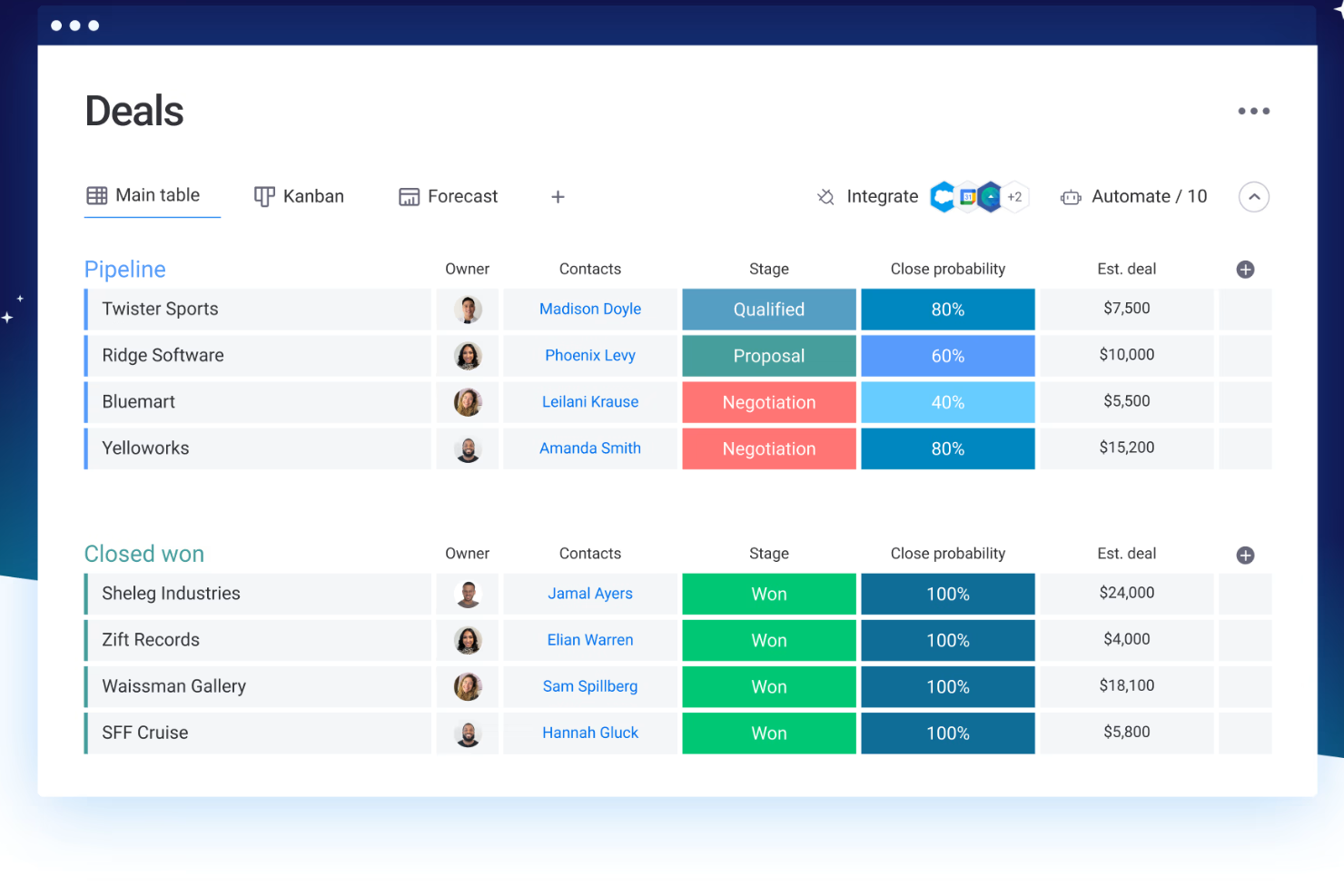
Die anpassbaren Boards von monday CRM sind besser, wenn Ihr Team bereichsübergreifend arbeitet und eine flexible Möglichkeit braucht, Deals, Aufgaben und Kundenprojekte in einer gemeinsamen Ansicht zu verwalten.
HubSpot eignet sich gut, wenn Sie den Fokus auf Leadgenerierung und Lebenszyklus-Tracking legen, während monday CRM stärker für Teams ist, die CRM-Funktionen mit Projektmanagement-Tools und operativer Arbeit verbinden.
| HubSpot | monday CRM | |
|---|---|---|
| 2-Factor Authentication | ||
| API | ||
| Calendar Management | ||
| Call Tracking | ||
| Campaign Management | ||
| Click-to-Dial | ||
| Contact Management | ||
| Contact Sharing | ||
| Custom Data Forms | ||
| Customer Management | ||
| Dashboard | ||
| Data Export | ||
| Data Import | ||
| Data Visualization | ||
| Email Integration | ||
| External Integrations | ||
| File Sharing | ||
| File Transfer | ||
| Google Apps Integration | ||
| Lead Management | ||
| Lead Scoring | ||
| Marketing Automation | ||
| Mobile App | ||
| Multi-User | ||
| Notifications | ||
| Pipeline Management | ||
| Sales Automation | ||
| Scheduling | ||
| Social-Media Integration | ||
| Task Scheduling/Tracking | ||
| Third-Party Plugins/Add-Ons |
HubSpot vs. monday CRM Integrationen
| Integration | HubSpot | monday CRM |
| Salesforce | ✅ | ✅ |
| Slack | ✅ | ✅ |
| Google Drive | ✅ | ✅ |
| Mailchimp | ✅ | ❌ |
| ❌ | ✅ | |
| Miro | ❌ | ✅ |
| Zendesk | ✅ | ✅ |
| Zoom | ✅ | ✅ |
| Microsoft Teams | ✅ | ✅ |
| Meta Ads | ✅ | ✅ |
| API | ✅ | ✅ |
| Zapier | ✅ | ✅ |
Mit der HubSpot-Integration für Salesforce können Sie Kontakte und Deals plattformübergreifend synchronisieren. Das ist hilfreich, wenn Ihr Team Salesforce in einer Abteilung und HubSpot CRM an anderer Stelle einsetzt. Die Zoom-Integration von monday CRM ist ideal für Vertriebs- oder Onboarding-Teams, die Meetings direkt aus Aufgaben-Boards heraus buchen und durchführen. HubSpot deckt im Bereich Marketing- und Leadgenerierungsintegrationen ein breiteres Spektrum ab, während sich monday CRM stärker auf funktionsübergreifende Team-Tools konzentriert.
Beide Tools arbeiten außerdem nahtlos mit anderen Produkten aus ihrem jeweiligen Portfolio zusammen. Zum Beispiel funktioniert HubSpot Smart CRM mit dem HubSpot Service Hub, Marketing Hub (für digitales Marketing und E-Mail-Marketing-Kampagnen), Sales Hub (für Lead-Scoring, Umsatzprognosen und Lead-Management) sowie Content Hub, während monday CRM mit monday work management (für Projektmanagement und Teamarbeit), monday service und monday dev zusammenarbeitet.
HubSpot vs. monday CRM Sicherheit, Compliance & Zuverlässigkeit
| Faktor | HubSpot | monday CRM |
| Datenverschlüsselung | Verwendet TLS für Datenübertragung und AES-256-Verschlüsselung im Ruhezustand. | Verwendet TLS/SSL-Verschlüsselung während der Übertragung und AES-256 im Ruhezustand. |
| Regulatorische Compliance | Entspricht GDPR, CCPA, HIPAA (Enterprise) und SOC 2 Typ II. | Erfüllt GDPR, HIPAA (Enterprise) und besitzt SOC 2 Typ II. |
| Datenresidenz | Bietet Datenzentren in der EU und den USA mit regional-spezifischen Hosting-Optionen. | Bietet Datenzentren in der EU und den USA mit flexibler Datenresidenz auf Anfrage. |
| Zugriffskontrollen | Bietet rollenbasierte Berechtigungen, SSO, 2FA und Prüfprotokolle. | Bietet detaillierte Berechtigungseinstellungen, SSO, 2FA sowie Aktivitätsprotokolle. |
| Betriebszeit und Überwachung | 99,99% Uptime-SLA mit Echtzeit-Statusüberwachung und Vorfallhistorie. | 99,9% Uptime-Garantie mit Live-Statusseite und proaktiven Benachrichtigungen. |
HubSpot bietet von Haus aus etwas mehr integrierte Compliance, während monday CRM Ihnen starke Kontrolle und Flexibilität bei Zugriff und Sichtbarkeit verschafft. Um den passenden Anbieter zu wählen, sollten Sie Ihre Anforderungen an Datenstandorte, benötigte Zertifizierungen und den Grad der Kontrolle über Zugriffs- und Prüfprotokolle prüfen.
HubSpot vs. monday CRM Benutzerfreundlichkeit
| Faktor | HubSpot | monday CRM |
| Benutzeroberfläche | Aufgeräumt und professionell, mit vielen Optionen in jeder Ansicht. | Einfach und visuell, mit Drag-and-Drop-Boards, die leicht zu bedienen sind. |
| Onboarding-Erlebnis | Bietet geführte Touren, Checklisten und eine umfangreiche Self-Service-Wissensdatenbank. | Schnell eingerichtet mit Vorlagen und In-App-Anleitungen. |
| Anpassbarkeit | Tiefe Einstellungen und Module, für deren Beherrschung Zeit benötigt wird. | Sehr anpassbar, ohne technische Kenntnisse zu benötigen. |
| Kundensupport | Umfasst Chat, Foren und Hilfedokumente; Live-Support hängt vom Tarif ab. | Bietet Live-Chat und schnelle Antwortzeiten bei den meisten Tarifen. |
| Workflow-Einfachheit | Leistungsstarke Automatisierungstools, die jedoch komplexer einzurichten sind. | Einfach zu erstellende Automatisierungen mit No-Code-, Logik-basierten Bausteinen. |
HubSpot bietet mehr Tiefe, braucht jedoch länger zum Erlernen und Einrichten – besonders, wenn Ihr Team wenig CRM-Erfahrung hat. monday CRM ermöglicht einen unkomplizierten Einstieg und ist besser geeignet für Teams, die schnelle Ergebnisse ohne steile Lernkurve erwarten.
HubSpot vs monday CRM: Pros & Cons
HubSpot
- HubSpot's automation features streamline your marketing and sales efforts.
- Robust reporting tools provide clear insights into your customer interactions.
- Its user-friendly interface helps your team get up to speed quickly.
- You might find the email templates lacking in design flexibility.
- HubSpot's advanced features might be overwhelming for small teams.
- The customization options could feel limited for complex workflows.
monday CRM
- Automation features save your team time on repetitive tasks and streamline daily work.
- It’s easy to track tasks, emails, and contact history in one place.
- You can build and adjust pipelines without needing technical help.
- You can't manage complex sales territories or multi-layered account hierarchies.
- Reporting feels limited if your team needs deeper performance or trend analysis.
- It can feel overwhelming with too many features for new users.
Best Use Cases for HubSpot and monday CRM
HubSpot
- Tech Startups HubSpot's automation and easy onboarding help your team focus on innovation rather than process.
- E-commerce The platform's robust reporting tools let you track customer behavior and optimize your sales funnel.
- Marketing Teams HubSpot Marketing Hub’s email marketing, lead scoring, lead nurturing features, and custom landing pages help you A/B test, track, and optimize campaigns.
- Sales Departments The Sales Hub and CRM system offer tracking and reporting tools to help your team with lead management, segmentation, and follow-ups, so they can close deals faster.
- Customer Service HubSpot's support tools enable your team to respond quickly and efficiently to customer inquiries.
- Nonprofits The platform's ability to manage contacts and campaigns aids in donor engagement and outreach.
monday CRM
- Customer Support Teams You can track tickets, manage handoffs, and log follow-ups all in one easy-to-navigate board.
- Sales Operations Teams You can build lightweight sales pipelines and reporting without relying on complex CRM tools.
- Small Businesses Setup is quick, and you won’t need IT to change your workflows or customize fields.
- Account Management It helps your team stay on top of renewals, upsells, and check-ins without switching tools.
- SaaS Companies You can manage leads, onboard customers, and monitor ongoing relationships without bloated features.
- Marketing Agencies It’s easy to track client requests, campaign status, and deliverables across multiple accounts.
Wer sollte HubSpot nutzen und wer monday CRM?
Meiner Meinung nach ist HubSpot eine gute Wahl, wenn Ihr Team eine umfassende CRM-Lösung mit integrierten Marketing-, Vertriebs- und Servicefunktionen benötigt. Es ist für Unternehmen konzipiert, die auf Inbound, Automatisierung und kanalübergreifendes Tracking zur Wachstumssteigerung setzen. monday CRM überzeugt, wenn Sie etwas Leichtgewichtiges, Visuelles suchen, das sich einfach an die Arbeitsabläufe Ihres Teams anpassen lässt. Ich würde monday CRM wählen, wenn Geschwindigkeit, Flexibilität und teamübergreifende Nutzung wichtiger sind als eine All-in-One-Tiefe.
Differences Between HubSpot and monday CRM
| HubSpot | monday CRM | |
|---|---|---|
| Automation Capabilities | Powerful but more technical, with advanced logic and branching workflows. | No-code builder that’s simple to use but more limited in logic depth. |
| Feature Depth | Built as a full-scale platform with advanced sales, marketing, and service tools. | Flexible CRM system with task and project management built in. |
| Learning Curve | Offers more complexity and takes longer to configure and master. | Easier to set up and learn, even for non-technical teams. |
| Marketing Integration | Fully integrated with its own marketing hub for campaigns and tracking. | Integrates with LinkedIn, but needs third-party tools for advanced marketing capabilities. |
| Pricing | Free entry point but gets expensive fast as you scale users and contacts. | More predictable per-user pricing with lower-cost tiers. |
| Read HubSpot ReviewOpens new window | Visit monday CRMOpens new window |
Similarities Between HubSpot and monday CRM
| CRM Features | Both let you manage contacts, pipelines, deals, and follow-ups—HubSpot CRM adds marketing depth, while monday CRM layers in task management. |
|---|---|
| Cloud-Based Access | Both are fully cloud-based, so your team can work from anywhere and access live data in real time. |
| Customization | Each lets you tailor views, fields, dashboards, and workflows—HubSpot through modules and settings, monday CRM through boards and columns. |
| Integrations | Both connect with tools like Gmail, Slack, and Zoom to keep your team’s workflows in sync. Moreover, both use APIs and apps like Zapier for third-party platform integration. |
| User-Friendly Design | HubSpot and monday CRM offer intuitive interfaces and workflow automation builders to streamline repetitive tasks. |
| Read HubSpot ReviewOpens new window Visit monday CRMOpens new window | |