

monday CRM Test: Vorteile, Nachteile, Funktionen & Preise


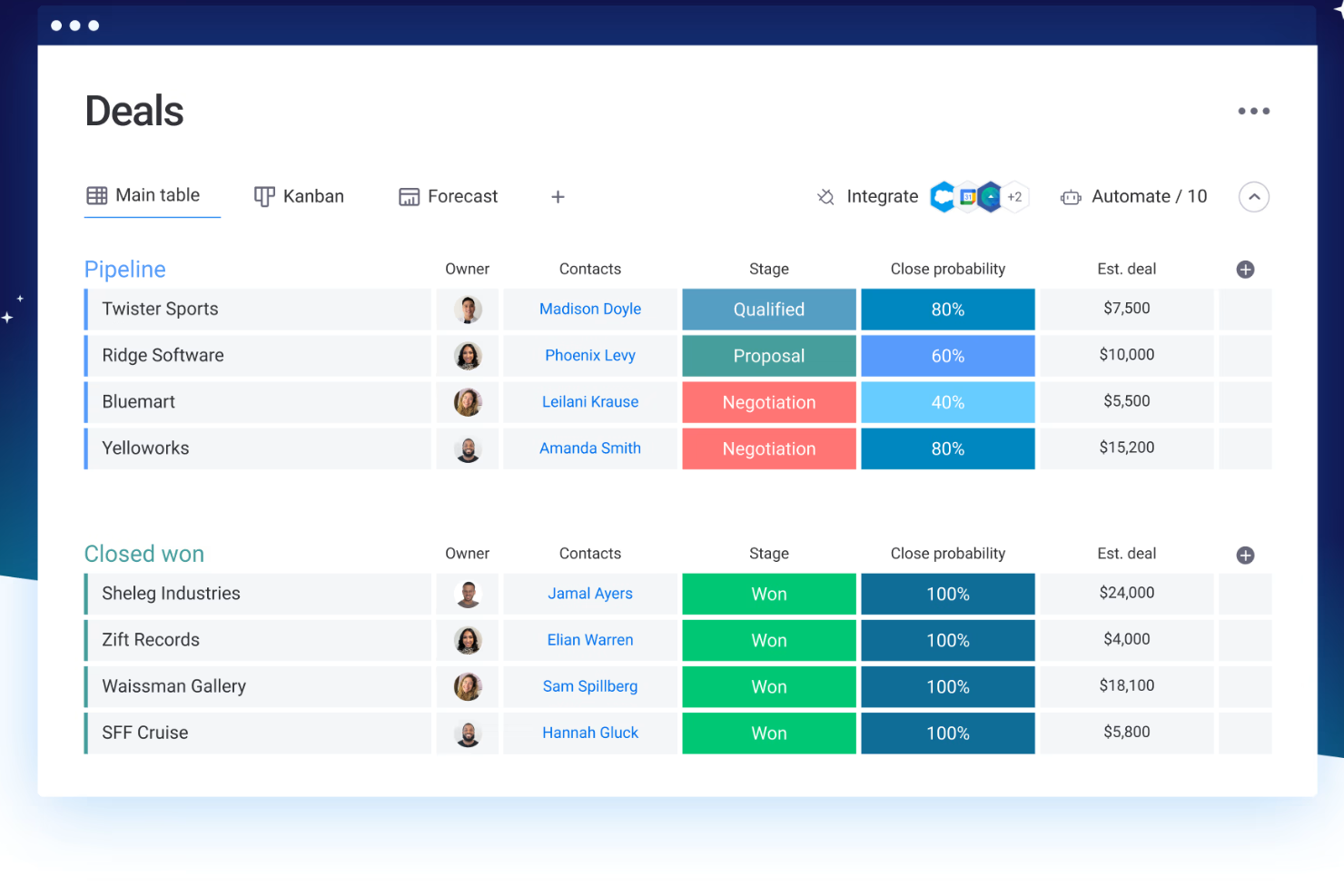
monday CRM is a customer relationship management (CRM) software that helps teams manage contacts, pipelines, and customer touchpoints in one place. It’s best suited for customer-facing teams in service, success, or account management roles, especially in fast-moving SaaS, tech, or B2B environments. Its biggest value is helping your team stay on top of follow-ups, handoffs, and ongoing customer relationships.
In this review, I’ll walk through monday CRM's key features, pros and cons, best and worst use cases, pricing, and more. Whether you're looking to improve your team's productivity or better understand customer needs, this review has the insights you need.
monday CRM Evaluation Summary
- Pricing upon request
- Free demo available
In my opinion, monday CRM stands out for its ease of use and visual flexibility, making it a strong contender in the CRM space. It outperforms competitors with its no-code customizations, robust integration capabilities, and intuitive interface, though it lacks the depth and advanced reporting of enterprise CRMs. If your team values adaptability and streamlined workflows without heavy admin overhead, monday CRM is a solid choice, especially for beginners or small teams.
Why Trust Our Software Reviews
monday CRM Overview

pros
-
Automation features save your team time on repetitive tasks and streamline daily work.
-
It’s easy to track tasks, emails, and contact history in one place.
-
You can build and adjust pipelines without needing technical help.
cons
-
You can't manage complex sales territories or multi-layered account hierarchies.
-
Reporting feels limited if your team needs deeper performance or trend analysis.
-
It can feel overwhelming with too many features for new users.
Is monday CRM Right For Your Needs?
Who Would be a Good Fit for monday CRM?
Wenn Ihr Team in einem schnelllebigen, kundenorientierten Bereich arbeitet und eine einfache, visuelle und anpassbare Lösung benötigt, ist monday CRM eine hervorragende Wahl. Es eignet sich ideal für Service-, Vertriebs- oder Account-Teams, die Kontakte, Gespräche und Follow-ups ohne große Einarbeitung verfolgen möchten. Sie erhalten schnellen Mehrwert, ohne dass ein Vollzeit-Administrator das System betreuen muss, und die vorgefertigten Vorlagen erleichtern die Einrichtung zusätzlich.
Beste Anwendungsfälle für monday CRM
-
Marketing Agencies
It’s easy to track client requests, campaign status, and deliverables across multiple accounts.
-
SaaS Companies
You can manage leads, onboard customers, and monitor ongoing relationships without bloated features.
-
Account Management
It helps your team stay on top of renewals, upsells, and check-ins without switching tools.
-
Small Businesses
Setup is quick, and you won’t need IT to change your workflows or customize fields.
-
Sales Operations Teams
You can build lightweight sales pipelines and reporting without relying on complex CRM tools.
-
Customer Support Teams
You can track tickets, manage handoffs, and log follow-ups all in one easy-to-navigate board.
Who Would be a Bad Fit for monday CRM?
Wenn Ihr Team komplexe Berichte, detaillierte Prognosen oder erweiterte Funktionen für den Vertriebsbetrieb benötigt, geht monday CRM nicht weit genug. Es ist nicht für große Vertriebsteams im Enterprise-Umfeld, regulierte Branchen oder Unternehmen mit mehrstufiger Deal-Verfolgung ausgelegt. Sie stoßen an Grenzen, wenn Ihre Abläufe von individuellen Umsatzmodellen, Gebietsmanagement oder tiefen Integrationen mit Altsystemen abhängen.
Schlechteste Anwendungsfälle für monday CRM
-
Manufacturing Firms
Its features aren't tailored for supply chain and production management.
-
Franchise Operations
You can’t segment and report across multiple locations or sales territories easily.
-
Healthcare Providers
It lacks HIPAA compliance and patient-specific tracking features.
-
Call Centers
There’s no native telephony, queueing, or call activity tracking built in.
-
Financial Services Firms
You can’t enforce the strict compliance controls needed for sensitive customer data.
-
Enterprise Sales Teams
It doesn’t support layered pipelines, custom quote logic, or robust forecasting out of the box.
How We Test & Score Tools
We’ve spent years building, refining, and improving our software testing and scoring system. The rubric is designed to capture the nuances of software selection and what makes a tool effective, focusing on critical aspects of the decision-making process.
Below, you can see exactly how our testing and scoring works across seven criteria. It allows us to provide an unbiased evaluation of the software based on core functionality, standout features, ease of use, onboarding, customer support, integrations, customer reviews, and value for money.
Core Functionality (25% of final scoring)
The starting point of our evaluation is always the core functionality of the tool. Does it have the basic features and functions that a user would expect to see? Are any of those core features locked to higher-tiered pricing plans? At its core, we expect a tool to stand up against the baseline capabilities of its competitors.
Standout Features (25% of final scoring)
Next, we evaluate uncommon standout features that go above and beyond the core functionality typically found in tools of its kind. A high score reflects specialized or unique features that make the product faster, more efficient, or offer additional value to the user.
We also evaluate how easy it is to integrate with other tools typically found in the tech stack to expand the functionality and utility of the software. Tools offering plentiful native integrations, 3rd party connections, and API access to build custom integrations score best.
Ease of Use (10% of final scoring)
We consider how quick and easy it is to execute the tasks defined in the core functionality using the tool. High scoring software is well designed, intuitive to use, offers mobile apps, provides templates, and makes relatively complex tasks seem simple.
Onboarding (10% of final scoring)
We know how important rapid team adoption is for a new platform, so we evaluate how easy it is to learn and use a tool with minimal training. We evaluate how quickly a team member can get set up and start using the tool with no experience. High scoring solutions indicate little or no support is required.
Customer Support (10% of final scoring)
We review how quick and easy it is to get unstuck and find help by phone, live chat, or knowledge base. Tools and companies that provide real-time support score best, while chatbots score worst.
Customer Reviews (10% of final scoring)
Beyond our own testing and evaluation, we consider the net promoter score from current and past customers. We review their likelihood, given the option, to choose the tool again for the core functionality. A high scoring software reflects a high net promoter score from current or past customers.
Value for Money (10% of final scoring)
Lastly, in consideration of all the other criteria, we review the average price of entry level plans against the core features and consider the value of the other evaluation criteria. Software that delivers more, for less, will score higher.
Core Features
Contact Management: You can store and manage all your customer information in one place, making it easy to access and update. This feature helps your team keep track of interactions and build better customer relationships.
Pipeline Management: Track your sales process with visual pipelines that show where each deal stands. This helps your team prioritize tasks and focus on closing deals efficiently.
Task Management: Assign and manage tasks within your team to ensure everyone knows what needs doing and when. It keeps your projects on track and ensures accountability.
Automation: Automate repetitive tasks like follow-up emails and reminders, saving your team time for more important work. This feature boosts productivity and reduces errors.
Reporting and Analytics: Generate reports to analyze your team's performance and make data-driven decisions. It helps you understand your sales trends and improve strategies.
Customizable Dashboards: Create dashboards that fit your team's specific needs, displaying relevant data at a glance. This enhances your team's ability to monitor and react to key metrics quickly.

Standout Features
Visual Workflow Builder: Design and customize workflows with an intuitive drag-and-drop interface. This allows your team to create processes that fit your unique business needs without any coding.
Time Tracking: Monitor how much time your team spends on different tasks and projects. This feature helps you understand productivity levels and manage resources effectively.

Ease of Use
monday CRM is known for its intuitive and user-friendly interface, making it easy for your team to get started without extensive training. The visual layout and drag-and-drop workflow builder simplify complex processes, allowing you to customize your workspace effortlessly.
Its responsive design ensures a smooth experience across devices, so your team can manage tasks on the go. Users often appreciate the straightforward navigation and clear organization of features, which enhances productivity and reduces the learning curve.

Onboarding
monday CRM offers a straightforward onboarding process, with guided tutorials and helpful resources that make it easy for your team to get started. The platform provides a wealth of documentation and video guides that walk you through setting up your workspace.
Users often find value in the responsive support team, which is available to assist with any questions or issues. While some users may find the initial setup a bit complex, the available resources help smooth the transition and ensure a quicker time to value.

Customer Support
monday CRM provides a range of support options that help your team resolve issues quickly. Users appreciate the responsive email and chat support, which often addresses questions efficiently.
The platform also offers a comprehensive help center with articles and FAQs that guide you through common challenges. While some users feel response times could be faster, the quality of support and available resources generally meet the needs of most teams, ensuring you can keep your work on track. Plus, monday.com has an active community for those who like to find their own answers or get tips from power-users.

Integrations
monday CRM integrates natively with Slack, Google Workspace, Gmail, Microsoft Teams, Zoom, Outlook, Zoom, HubSpot, LinkedIn, Stripe, PandaDoc, Trello, and Salesforce. monday CRM also offers an API and connects with third-party integration tools like Zapier.
Value for Money
monday CRM pricing offers strong value, especially if your team wants something easy to use without sacrificing flexibility. Although there is no free plan, monday CRM does offer a 14-day free trial.
You get a lot at the lower tiers, including automation and reporting tools that work well for small to midsize teams. Higher plans add more control, but smaller teams won’t need Enterprise to get full use out of it.
- Basic Plan: Contact management, boards, and limited automations
- Standard Plan: Activity tracking, custom pipelines, and calendar view
- Pro Plan: Sales forecasting, advanced reporting, and higher automation limits
- Enterprise Plan: Admin controls, multi-level permissions, and enterprise-grade security features

New Product Updates from monday CRM

monday CRM's AI-Powered Lead Scoring Boosts Sales Efficiency
monday CRM has launched an AI-Powered Lead Scoring feature designed to enhance sales efficiency by helping teams prioritize leads. By utilizing predictive analysis, this feature offers a more focused approach to lead management. Some important aspects that were part of this update include:
- Predictive Analysis: Allows sales teams to prioritize leads based on data-driven insights, ensuring efforts are concentrated on potential high-value prospects.
- Automatic Lead Scoring: Scores leads using engagement metrics, demographic data, and company fit, helping sales teams quickly identify priority leads.
- Focus on High-Value Prospects: Enables teams to streamline their sales processes by dedicating resources to leads with the highest potential.
Visit monday CRM's official site for more details.
 for more details.
monday CRM Specs
- 2-Factor Authentication
- API
- Calendar Management
- Call Tracking
- Campaign Management
- Click-to-Dial
- Contact Management
- Contact Sharing
- Custom Data Forms
- Customer Management
- Dashboard
- Data Export
- Data Import
- Data Visualization
- Email Integration
- External Integrations
- File Sharing
- File Transfer
- Google Apps Integration
- Lead Management
- Lead Scoring
- Marketing Automation
- Mobile App
- Multi-User
- Notifications
- Pipeline Management
- Sales Automation
- Scheduling
- Social-Media Integration
- Task Scheduling/Tracking
- Third-Party Plugins/Add-Ons
monday CRM FAQs
How does monday CRM handle data security and compliance?
Can monday CRM handle multiple pipelines?
Is monday CRM good for customer support teams?
How customizable is monday CRM?
Can my team use monday CRM on mobile?
Does monday CRM work well for post-sale customer management?
How does monday CRM support collaboration between teams?
Can we migrate data into monday CRM?
monday CRM Company Overview & History
monday.com, founded by Roy Mann, Eran Zinman, and Eran Kampf, is headquartered in Tel Aviv, Israel. It operates monday work management (for project management), monday CRM, monday service (a help desk and service management tool), and monday dev (for product development and engineering teams).
Founded in 2012, it went public on Nasdaq in June 2021, rapidly grew to over 1,850 employees, and surpassed US $1 billion in ARR by 2024. The company is known for its customizable no-code tools and supports more than 225,000 customers worldwide.
monday CRM Major Milestones
- 2012: Founded as dapulse in Tel Aviv after spinning off from Wix.
- 2014: Platform launched to the public.
- 2017: Rebranded from dapulse to monday.com
- 2019: Raised US $150 million in Series D funding; valued at US $1.9 billion. Achieved unicorn status.
- 2021: Became publicly traded on Nasdaq.
- 2022: Launch of monday Sales CRM, offering fully customizable no-code CRM workflows.
- 2023: Released monday CRM integration in Microsoft Teams for in-app pipeline access
- 2024: monday.com reached over $1 billion in annual recurring revenue.
Wie geht es weiter?
Abonnieren Sie unseren Newsletter für die neuesten CX-Insights, Anleitungen, Strategien und Ressourcen von führenden Experten aus dem CX-Bereich.