

10 mejores herramientas de gestión de comunicaciones con clientes para 2026

10 Lista de los mejores programas de gestión de comunicaciones con clientes


Los mejores programas de gestión de comunicaciones con clientes ayudan a los equipos a ofrecer mensajes coherentes y personalizados por correo electrónico, chat, redes sociales y SMS, todo desde un mismo lugar. Estas herramientas centralizan los datos, automatizan los seguimientos y proporcionan análisis que mejoran la calidad del servicio y los tiempos de respuesta.
Basándome en mis dos décadas de experiencia liderando iniciativas tecnológicas y de IA, he probado y analizado personalmente más de 20 herramientas de gestión de comunicaciones con clientes para encontrar las mejores opciones para los equipos modernos de experiencia del cliente. En esta guía descubrirás qué plataformas destacan en comunicación omnicanal, automatización, personalización y colaboración, para que puedas agilizar los flujos de trabajo y fortalecer cada interacción con los clientes.
¿Qué son los programas de gestión de comunicaciones con clientes?
El software de gestión de comunicaciones con clientes (CCM) es una herramienta que ayuda a las empresas a gestionar y optimizar sus interacciones con los clientes a través de diversos canales, como el correo electrónico, las redes sociales, el chat en vivo y las plataformas de SMS. Ofrece gestión centralizada de datos, comunicación omnicanal, automatización, mapeo del recorrido del cliente, análisis en tiempo real y funciones de personalización que permiten a los equipos crear un flujo de comunicación fluido y eficiente.
Al integrar herramientas de gestión de comunicaciones con clientes, las empresas que buscan mejorar sus marcos de atención y soporte al cliente pueden ofrecer opciones de autoservicio más eficaces, reducir el volumen de solicitudes rutinarias de soporte y elevar la experiencia general del cliente.
Por qué confiar en nuestras recomendaciones de software
Nuestro equipo lleva probando y evaluando software desde 2012. Como líderes de CX, sabemos lo difícil —y lo importante— que es elegir el software adecuado.
Para esta guía, evaluamos las herramientas mediante pruebas prácticas e investigación independiente, puntuando las herramientas según nuestros criterios de selección.
Nuestras reseñas reflejan nuestro criterio editorial humano, no un discurso de ventas.
Tabla comparativa de los 10 mejores programas de gestión de comunicaciones con clientes
Esta tabla comparativa resume los detalles básicos de cada una de mis principales selecciones de programas de gestión de comunicaciones con clientes. Puedes consultar lado a lado los detalles de precios y la disponibilidad de pruebas gratuitas o demostraciones para encontrar el mejor programa para tu presupuesto y las necesidades de tu empresa.
| Tool | Best For | Trial Info | Price | ||
|---|---|---|---|---|---|
| 1 | Ideal para soporte omnicanal | Prueba gratuita de 15 días + demo gratuita disponible | Desde $7/usuario/mes (facturado anualmente) | Website | |
| 2 | Ideal para notificaciones transaccionales | Prueba gratuita de 7 días | Desde $79/usuario/mes (facturación anual) | Website | |
| 3 | Ideal para chats con clientes impulsados por IA | 7 días de prueba gratis + plan gratuito disponible | Desde $24.17/mes (facturado anualmente) | Website | |
| 4 | Ideal para aseguramiento de calidad automatizado | Prueba gratuita de 14 días + demo gratis disponible | Desde $25/usuario/mes (facturado anualmente) | Website | |
| 5 | Lo mejor para un mensajero altamente personalizable | Prueba gratuita de 14 días + demo gratuita disponible | Desde $29/usuario/mes (facturado anualmente) | Website | |
| 6 | Ideal para análisis de redes sociales completos | Prueba gratuita de 30 días disponible | Desde $199/asiento/mes (facturado anualmente) | Website | |
| 7 | Ideal para un solo centro de atención al cliente | Plan gratuito + prueba gratis de 14 días + demo gratis disponible | Desde $9/asiento/mes (facturación anual) | Website | |
| 8 | Ideal para la comunicación usando WhatsApp | Plan gratuito disponible | Desde $99/mes | Website | |
| 9 | La mejor opción para una plataforma de servicio al cliente todo en uno | Prueba gratuita de 14 días + demo gratuita disponible | Desde $19/agente/mes (facturado anualmente) | Website | |
| 10 | Ideal para construir relaciones a gran escala | Plan gratuito disponible | Precios pago por uso | Website |
Reseñas de los 10 mejores programas de gestión de comunicaciones con clientes
Ahora analizaremos detalladamente cada herramienta de mi lista, centrándonos en lo que convierte a cada una en una opción destacada para un propósito específico.

Ideal para soporte omnicanal

Zoho Desk ofrece una solución robusta para empresas que buscan mejorar sus estrategias de comunicación con el cliente. Diseñado para adaptarse a diversas industrias y tamaños de empresa, proporciona una plataforma que respalda la interacción a través de múltiples canales, incluidos chat en vivo y soporte remoto. Esto lo convierte en una opción atractiva para los equipos de servicio al cliente que desean mejorar los tiempos de respuesta y la satisfacción del cliente mientras mantienen la privacidad de los datos.
Por qué elegí Zoho Desk
Elegí Zoho Desk porque destaca por ofrecer soporte omnicanal, lo cual es crucial para una gestión efectiva de las comunicaciones con el cliente. La plataforma permite que tu equipo interactúe con los clientes a través de correo electrónico, redes sociales y chat en vivo, asegurando que ninguna consulta quede sin respuesta. Además, la IA 'Zia' automatiza tareas rutinarias y proporciona respuestas inteligentes, permitiendo que tu equipo se enfoque en cuestiones más complejas. Esta combinación de características responde a la necesidad de interacciones oportunas y precisas con los clientes, un factor clave para las empresas que buscan soluciones de gestión de comunicaciones.
Funciones clave de Zoho Desk
Además de sus impresionantes capacidades omnicanal, Zoho Desk ofrece:
- Portal de autoservicio: Esta función permite que tus clientes encuentren respuestas de forma independiente a través de una base de conocimientos bien organizada y foros comunitarios.
- Paneles personalizables: Tu equipo puede crear paneles a medida para monitorear indicadores clave de desempeño y el sentimiento del cliente en tiempo real.
- Aplicación móvil: La aplicación móvil asegura que tu equipo pueda brindar soporte desde cualquier lugar, manteniendo las interacciones con los clientes fluidas y ágiles.
- Capacidades de integración: Con más de 200 integraciones de aplicaciones de terceros, tu equipo puede conectar fácilmente herramientas existentes para aumentar la eficiencia del flujo de trabajo.
Integraciones de Zoho Desk
Las integraciones incluyen Zoho CRM, Slack, Microsoft Teams, Jira, Salesforce, Google Workspace, Trello, Dropbox, Shopify y Outlook.
Pros and Cons
Pros:
- Se integra bien con otros productos y aplicaciones de Zoho
- La IA Zia ayuda a automatizar tareas rutinarias
- Las amplias capacidades de automatización e informes mejoran la eficiencia
Cons:
- Ocasionalmente existen problemas de rendimiento bajo tráfico elevado
- La mayoría de las funciones de Zia están limitadas al plan empresarial

Ideal para notificaciones transaccionales
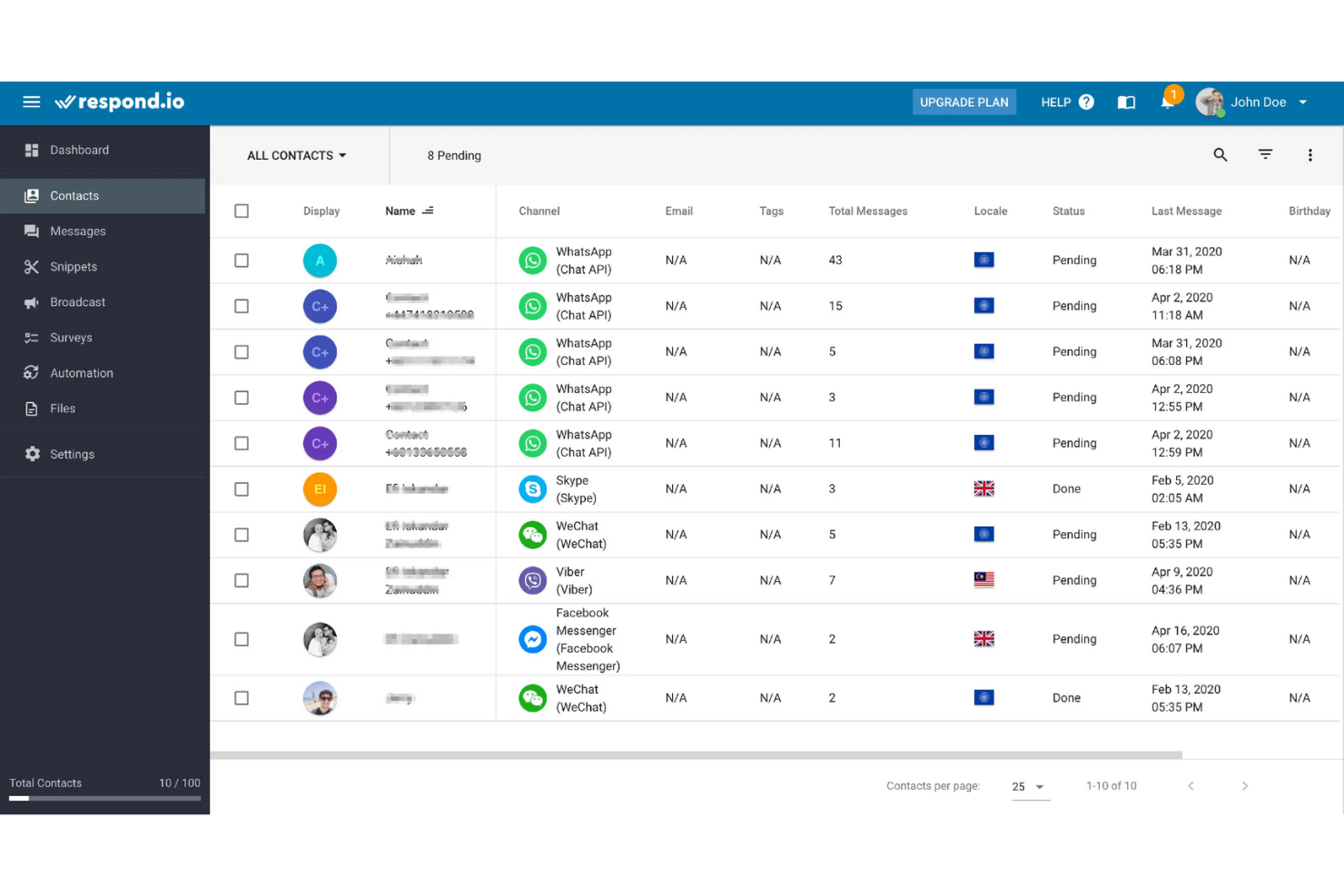
Respond.io es una plataforma de mensajería que te ayuda a promocionar, vender y brindar soporte a productos. El software unifica la comunicación con los clientes a través de mensajería instantánea, chat web y correo electrónico.
Por qué elegí Respond.io: Respond.io elimina la necesidad de alternar entre canales y equipos. Puedes configurar notificaciones transaccionales, como enviar alertas de carrito abandonado, notificaciones de pago y confirmación de actualizaciones de pedidos. También puedes dirigirte a intereses específicos mediante mensajes masivos, inscribir nuevos contactos en campañas automatizadas o disparar notificaciones basadas en eventos.
Respond.io también utiliza mensajería automatizada para identificar problemas del cliente y luego los dirige a los agentes según su habilidad, función, idioma y turno. Como resultado, puedes aumentar la visibilidad de tus ventas, calificar prospectos automáticamente y sincronizar datos con tu CRM.
Características e integraciones destacadas de Respond.io:
Respond.io ofrece un conjunto de funciones impresionante enfocado en mejorar el compromiso del cliente. La plataforma proporciona herramientas avanzadas de automatización y un chatbot inteligente para una gestión eficiente de las conversaciones, complementado con chat en vivo. El software también ofrece integración con CRM para una gestión cohesionada del cliente, soporte multicanal para un mayor alcance y encuestas para obtener retroalimentación de los clientes.
Integraciones incluyen Facebook Messenger, Google Business Messages, Instagram, LINE, Telegram, Viber, WeChat y WhatsApp.
Pros and Cons
Pros:
- Funciones de colaboración eficiente en equipo
- Capacidades avanzadas de automatización
- Opciones sólidas de comunicación multicanal
Cons:
- Las funciones avanzadas solo están disponibles en los niveles de precios superiores
- Opciones de personalización limitadas en la interfaz

Tidio
Ideal para chats con clientes impulsados por IA
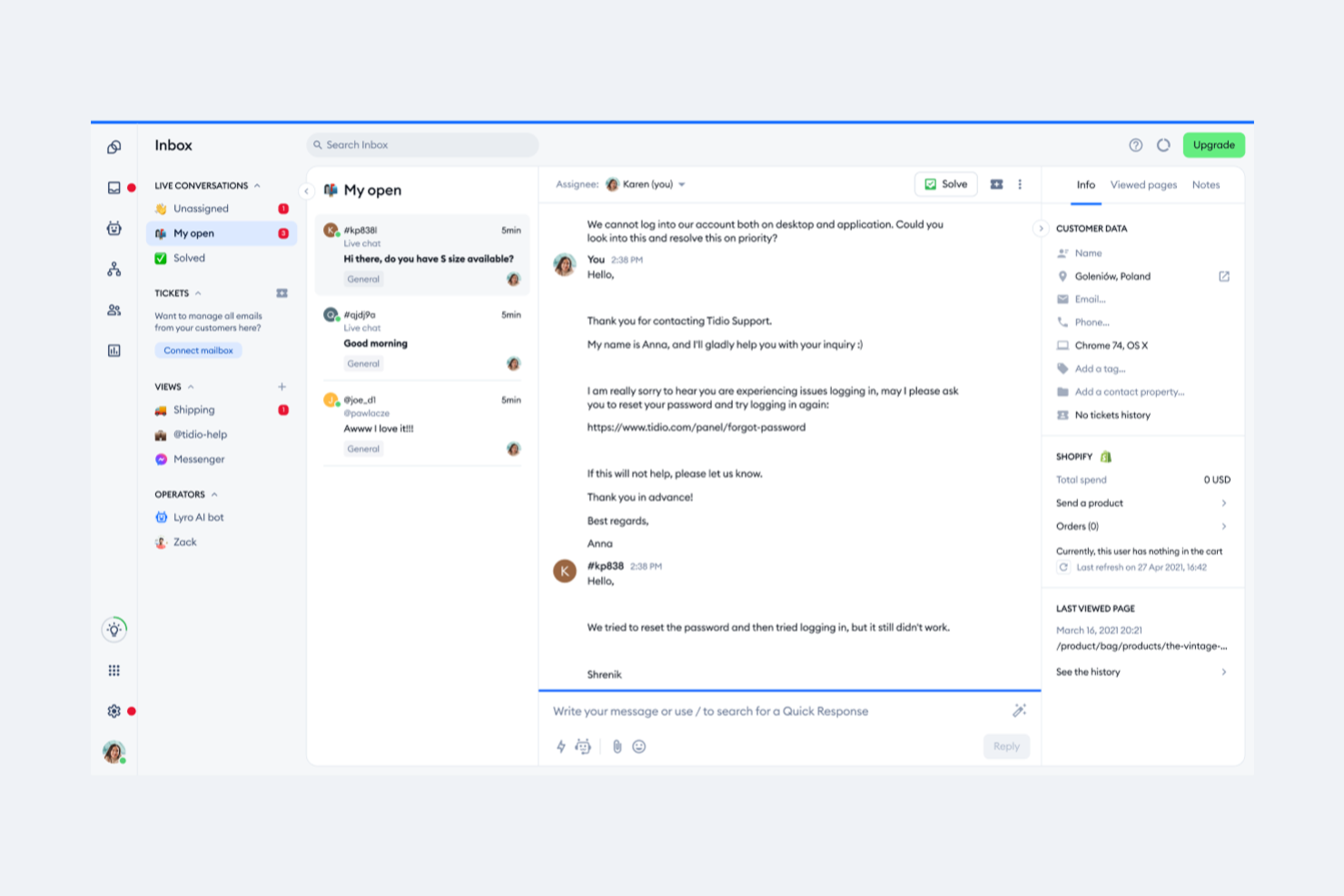
Tidio ofrece un centro de comunicaciones con el cliente que combina chat en vivo, gestión de tickets y chatbots con inteligencia artificial para ayudar a las empresas a interactuar con sus clientes a través de múltiples canales. Este software está diseñado para reducir las tareas repetitivas de los agentes, a la vez que hace que las interacciones se sientan personales y eficientes.
Por qué elegí Tidio: Elegí Tidio por su chatbot con IA, Lyro, que puede automatizar conversaciones rutinarias y proporcionar respuestas coherentes con la marca. Esto ayuda a los equipos de soporte a atender más consultas sin perder el toque personal que esperan los clientes.
También me gustó que Tidio incluye un sistema de tickets integrado, dando a los equipos una forma clara de organizar solicitudes, asignar prioridades y mantener la fluidez de las conversaciones. Para empresas que gestionan un gran volumen de consultas, esta combinación de automatización y estructura hace que Tidio sea especialmente valioso.
Funciones y integraciones destacadas de Tidio:
El valor central de Tidio reside en su widget de chat en vivo multilingüe y en las interacciones con clientes impulsadas por IA. También incluye herramientas de análisis que destacan patrones en el comportamiento del cliente y el desempeño del equipo, lo que ayuda a los gerentes a realizar mejoras basadas en datos.
Una aplicación móvil permite que los agentes se mantengan atentos incluso fuera de la oficina.
Las integraciones incluyen Shopify, WordPress, Squarespace, WIX, Adobe Commerce, Shopware, BigCommerce, PrestaShop, Ecwid by Lightspeed, Weebly, WooCommerce y OpenCart.
Pros and Cons
Pros:
- Herramienta de chatbot AI eficaz
- Sistema de tickets integrado
- Chat en vivo multilingüe
Cons:
- El editor de chatbot carece de flexibilidad
- Personalización avanzada limitada

Front
Ideal para aseguramiento de calidad automatizado
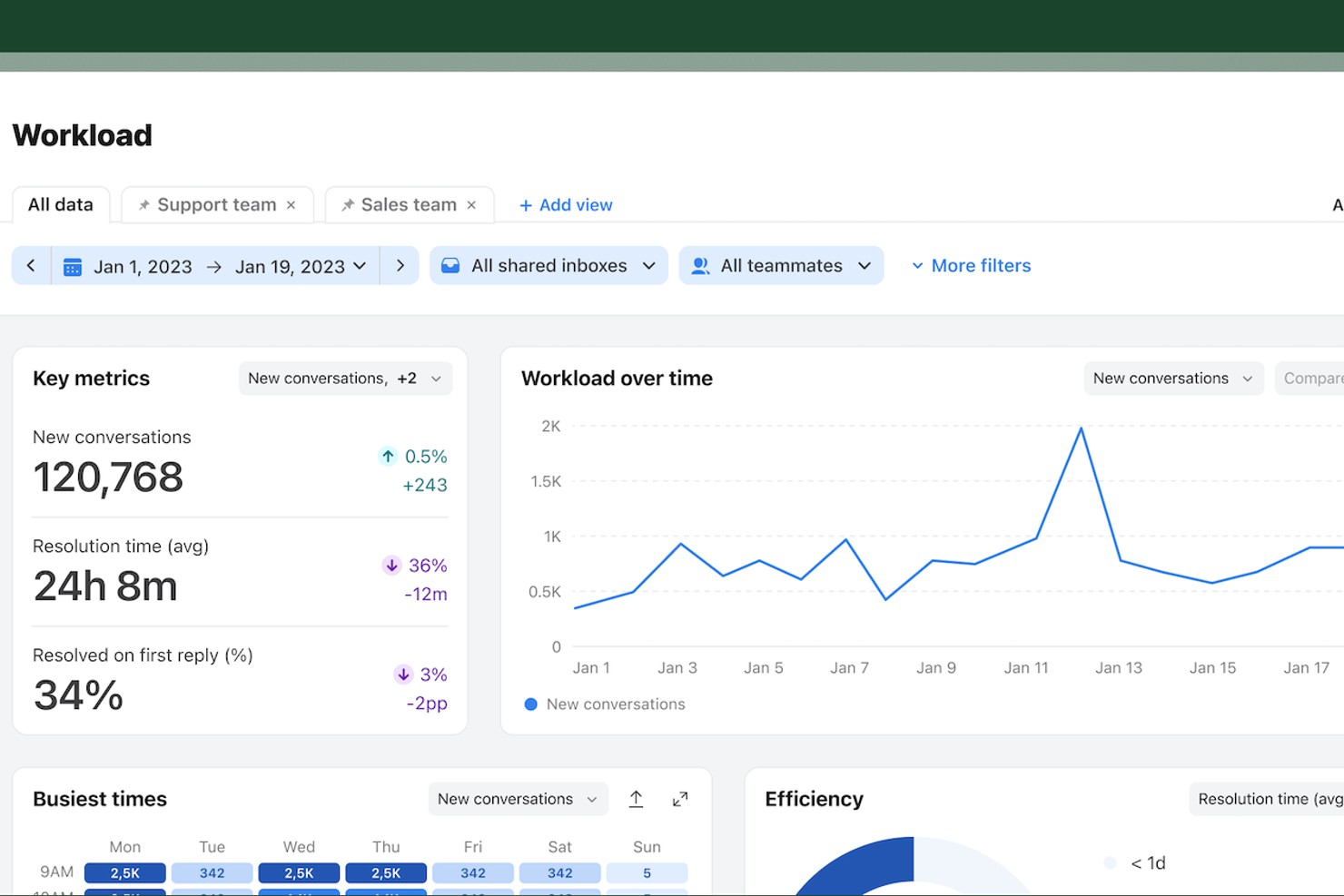
Front reúne todas las conversaciones con tus clientes en un espacio de trabajo colaborativo, facilitando que los equipos gestionen grandes volúmenes de mensajes en múltiples canales. Está diseñado para equipos de soporte al cliente, gestión de cuentas y operaciones que necesitan coordinar respuestas y mantener visibilidad en cada interacción. Si buscas reducir los tiempos de respuesta y mejorar la responsabilidad sin perder el toque personal, Front ofrece una solución flexible adaptada a las comunicaciones modernas con clientes.
¿Para quién es ideal Front?
Front es una excelente opción para equipos de soporte al cliente y gestión de cuentas en empresas medianas y grandes que necesitan gestionar un alto volumen de comunicaciones con clientes a través de diversos canales.
Por qué elegí Front
Cuando necesito un software de gestión de comunicaciones con clientes que prioriza la calidad de los mensajes, Front destaca por sus capacidades automatizadas de aseguramiento de calidad. La plataforma permite configurar reglas y flujos de trabajo que automáticamente señalan o redirigen mensajes en función de su contenido, tiempo o requisitos de SLA. Me gusta cómo las herramientas de análisis e informes de Front ayudan a los equipos a supervisar la calidad y coherencia de las respuestas en todos los canales. Estas funciones facilitan mantener altos estándares en cada interacción con el cliente, incluso a medida que aumenta el volumen de mensajes.
Características clave de Front
Otras características de Front ayudan a los equipos a gestionar las conversaciones con clientes de forma más eficiente:
- Gestión de bandeja compartida: Los equipos pueden colaborar en correos electrónicos, SMS y mensajes de redes sociales desde una única bandeja de entrada unificada.
- Comentarios internos y menciones: Los usuarios pueden dejar notas privadas y etiquetar a compañeros directamente en los hilos de mensajes para una colaboración ágil.
- Asignación de mensajes y detección de colisiones: Asigna conversaciones a miembros específicos del equipo y visualiza cuándo alguien más está revisando o respondiendo a un mensaje.
- Paneles analíticos personalizables: Supervisa el rendimiento del equipo, los tiempos de respuesta y tendencias de mensajes con herramientas de informes configurables.
Integraciones de Front
Las integraciones incluyen Salesforce, HubSpot, Slack, Asana, Aircall, Dialpad, ClickUp, FullContact, Gainsight y Chatra.
Pros and Cons
Pros:
- Comentarios internos en tiempo real y menciones a miembros del equipo
- Análisis detallado y herramientas de informes personalizables
- Detección de colisiones para evitar respuestas duplicadas
Cons:
- No dispone de un plan gratuito permanente
- Opciones limitadas de personalización de plantillas

Intercom
Lo mejor para un mensajero altamente personalizable
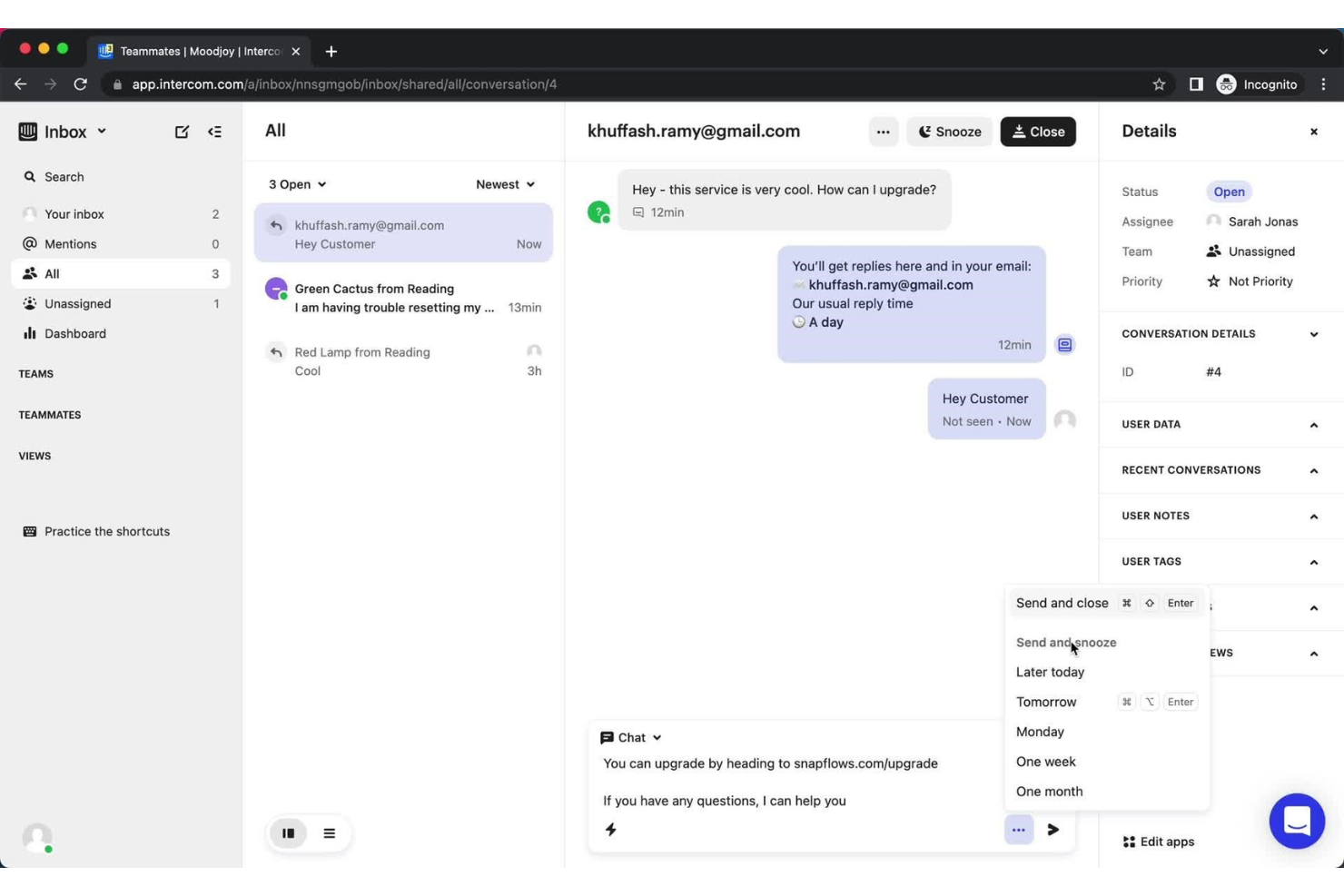
Intercom es un sistema de mensajería para clientes altamente personalizable que te permite elegir el estilo, el diseño y el contenido de tu sistema de atención al cliente. Puedes crear un diseño que se adapte a la identidad de tu marca, al mismo tiempo que generas interacciones significativas con los clientes.
Por qué elegí Intercom: Gracias a Intercom, ahora puedes asegurarte de que se ofrezca una experiencia de marca coherente en cada punto de contacto con el cliente. Su software de última generación fomenta el compromiso y sumerge a los clientes en la visión de tu empresa.
Intercom es una herramienta sin código que cualquier miembro de tu equipo puede personalizar fácilmente. Es rápida y flexible, y puede configurarse de cualquier forma que necesite tu negocio.
La plataforma ofrece respuestas rápidas tanto para los visitantes del sitio como para los clientes, y mejora las experiencias de incorporación. El resultado es una conexión profunda con tu contenido en todo el recorrido del cliente.
Funciones destacadas e integraciones de Intercom:
Intercom se destaca por ofrecer una variedad de funciones que mejoran las interacciones con los clientes y proporcionan información valiosa. Esta herramienta incorpora automatizaciones y chatbots para gestionar las conversaciones de manera eficiente y facilita la comunicación directa mediante chats bidireccionales. La colaboración en equipo es un aspecto clave, junto con la segmentación de clientes y el seguimiento del comportamiento de los usuarios. Gracias a sus herramientas de autoservicio, los clientes también pueden encontrar soluciones por sí mismos.
Integraciones incluyen Gmail, HubSpot, Jira, Mailchimp, Salesforce, Shopify, Slack, Stripe, Trello y Zendesk.
Pros and Cons
Pros:
- Seguimiento avanzado del comportamiento del usuario
- Potentes opciones de segmentación de clientes
- Mensajería versátil y chatbots
Cons:
- Integraciones de software limitadas
- Algunas limitaciones en la automatización

Ideal para análisis de redes sociales completos
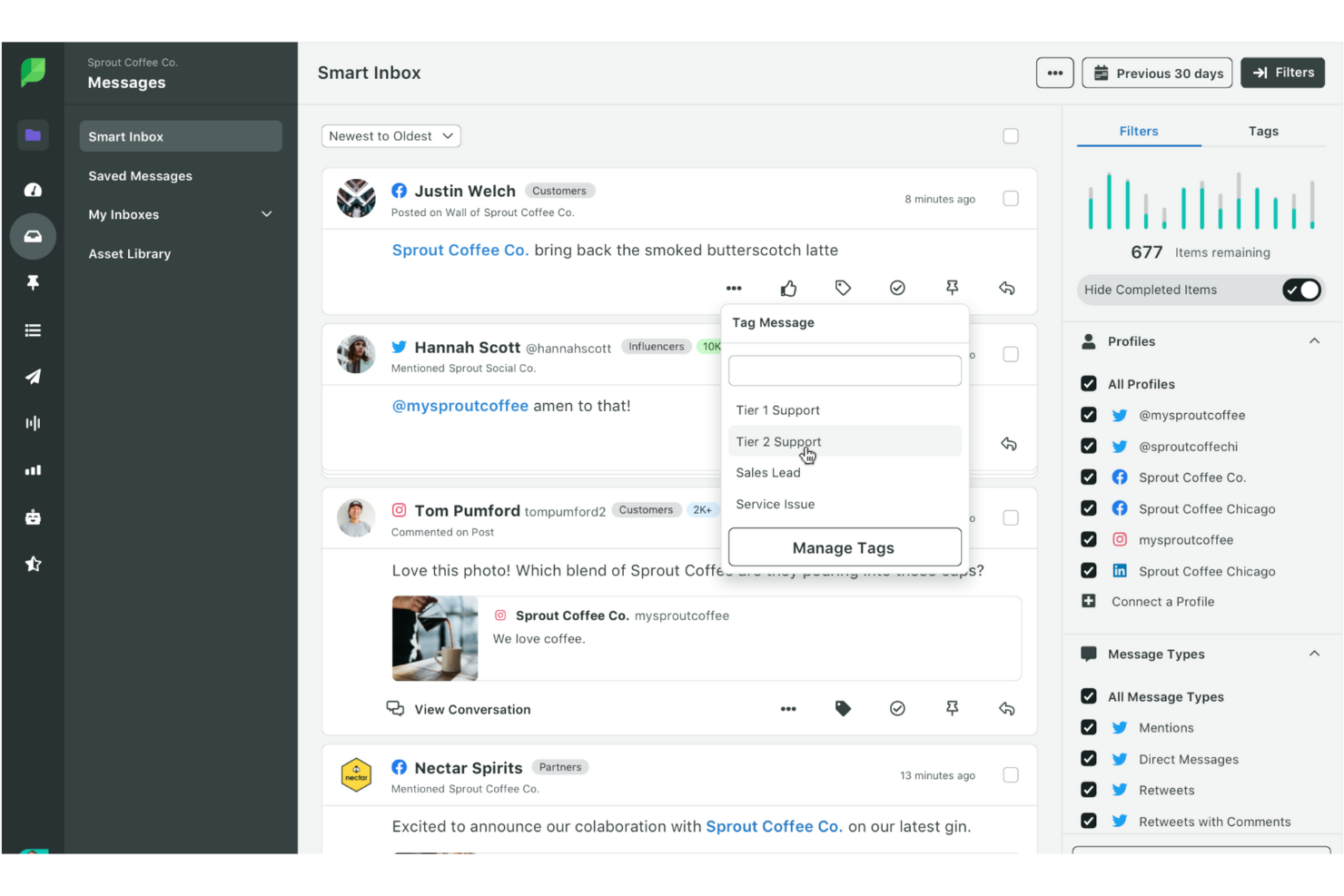
Sprout Social es una plataforma integral de gestión de redes sociales que ofrece una variedad de herramientas y soluciones para ayudar a las empresas a lograr un impacto más inteligente y rápido a través de sus esfuerzos en redes sociales. También proporciona una plataforma centralizada para gestionar las comunicaciones con clientes en diversos canales sociales.
Por qué elegí Sprout Social: La bandeja de entrada unificada de Sprout Social permite a los usuarios ver y responder mensajes, comentarios y menciones de múltiples redes en un solo lugar, agilizando el proceso de comunicación y asegurando que no se pierda ninguna interacción.
Además, las herramientas de análisis e informes del software permiten a los usuarios rastrear métricas de interacción, monitorear el rendimiento de la marca y obtener información sobre la percepción de los clientes. Estas funciones pueden ayudar a las empresas a tomar decisiones basadas en datos para mejorar sus estrategias en redes sociales y fortalecer las relaciones con los clientes.
Sprout Social también destaca por sus capacidades colaborativas, que permiten a los equipos trabajar juntos de manera fluida. Los usuarios pueden asignar tareas, dejar notas internas y gestionar flujos de aprobación, fomentando la eficiencia del trabajo en equipo y asegurando respuestas consistentes y de alta calidad a las consultas de los clientes.
Características y integraciones destacadas de Sprout Social:
Las características incluyen un historial completo de conversaciones a través de perfiles y redes para brindar contexto y referencia, detección de colisiones para mostrar indicadores en tiempo real cuando un compañero está viendo o respondiendo un mensaje, y etiquetado personalizado de mensajes entrantes para organizar la bandeja de entrada e informes sobre la actividad. Sprout Social también ofrece informes de equipo y productividad, informes grupales multicanal, informes de redes sociales, informes de Google Analytics, informes de palabras clave de X y más.
Las integraciones incluyen X (anteriormente Twitter), Facebook, TikTok, Instagram, YouTube, Marketo, Zendesk, Glassdoor, Salesforce Marketing Cloud Intelligence y WooCommerce.
Pros and Cons
Pros:
- Ofrece funciones detalladas de análisis e informes
- Los usuarios pueden programar publicaciones por adelantado
- Incluye una herramienta de escucha social
Cons:
- Curva de aprendizaje pronunciada para principiantes
- No permite programar historias de Instagram

Ideal para un solo centro de atención al cliente
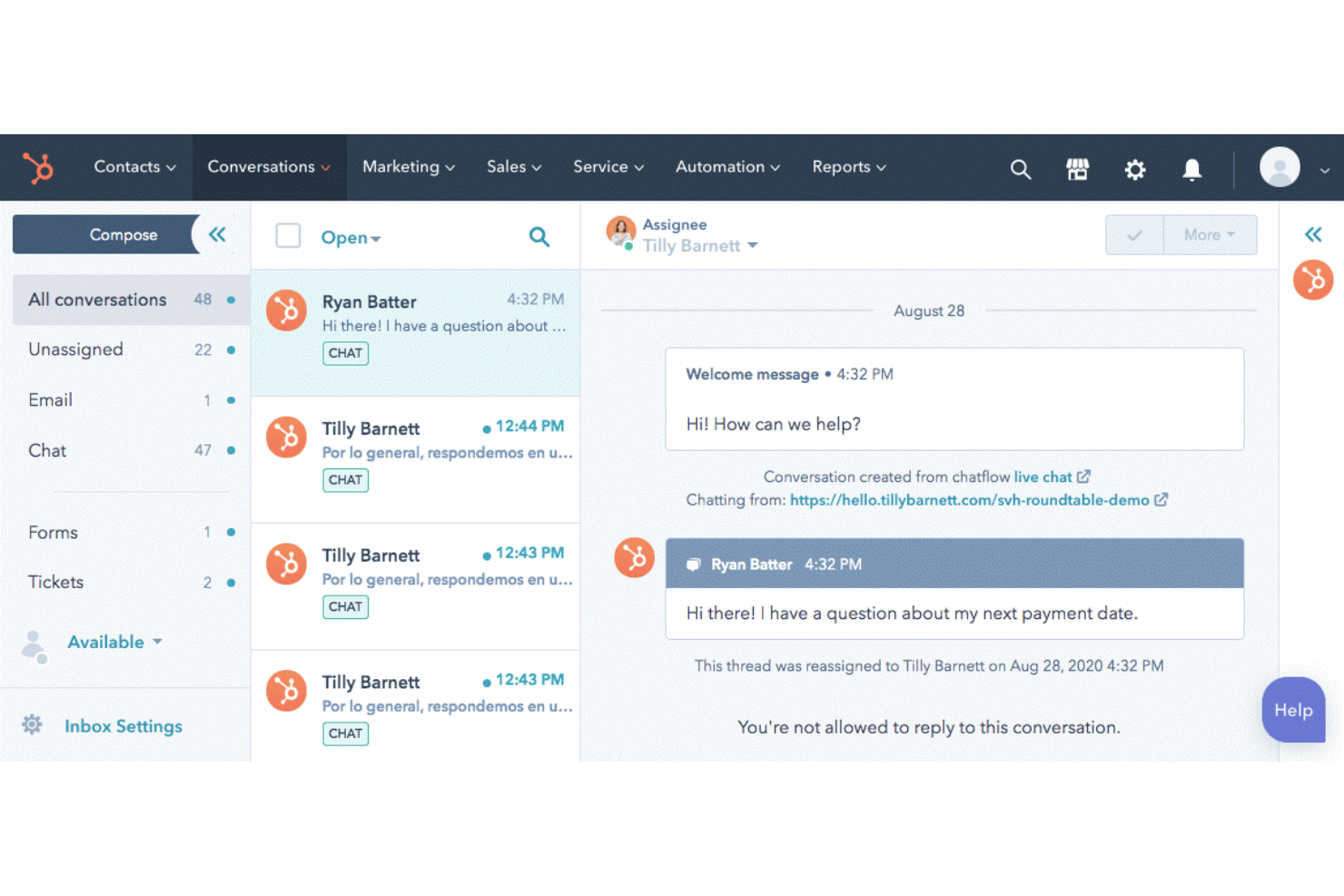
HubSpot Service Hub conecta todos los datos y canales de atención al cliente a través de una única plataforma CRM (gestión de relaciones con clientes). Esto te ayuda a apoyar, retener y hacer crecer tu base de clientes, mientras mejoras la gestión del servicio y sorprendes a tus clientes.
Por qué elegí HubSpot Service Hub: Su plataforma ofrece un portal para clientes que les da control sobre su experiencia de compra. Esto mantiene un flujo constante de conversaciones bidireccionales, permitiendo que los problemas se resuelvan más rápidamente. Además, su base de conocimientos ayuda a los clientes a resolver sus propias dudas, reduciendo el número de solicitudes de soporte. Las preguntas frecuentes pueden convertirse en una biblioteca de artículos de ayuda, videos y documentación fácil de buscar.
Funciones destacadas e integraciones de HubSpot Service Hub:
Las sólidas funciones de HubSpot incluyen mensajería omnicanal para facilitar la comunicación del personal de soporte a través de diferentes canales. Las funciones de llamadas entrantes y chat en vivo les ayudan a responder rápida y eficientemente las consultas de los clientes. HubSpot también ofrece encuestas automatizadas de satisfacción para obtener comentarios, enrutamiento de conversaciones para dirigir las consultas al lugar correcto y reportes de servicio personalizables para informes detallados.
Integraciones incluyen Aircall, Dropbox, Gmail, Jira, Mailchimp, Microsoft Teams, Salesforce, Slack, Trello y Zendesk.
Pros and Cons
Pros:
- Enrutamiento avanzado de conversaciones
- Funcionalidades para crear bases de conocimiento
- Informes de servicio personalizables
Cons:
- Funcionalidad limitada para redes sociales
- Sin videollamada nativa

Ideal para la comunicación usando WhatsApp
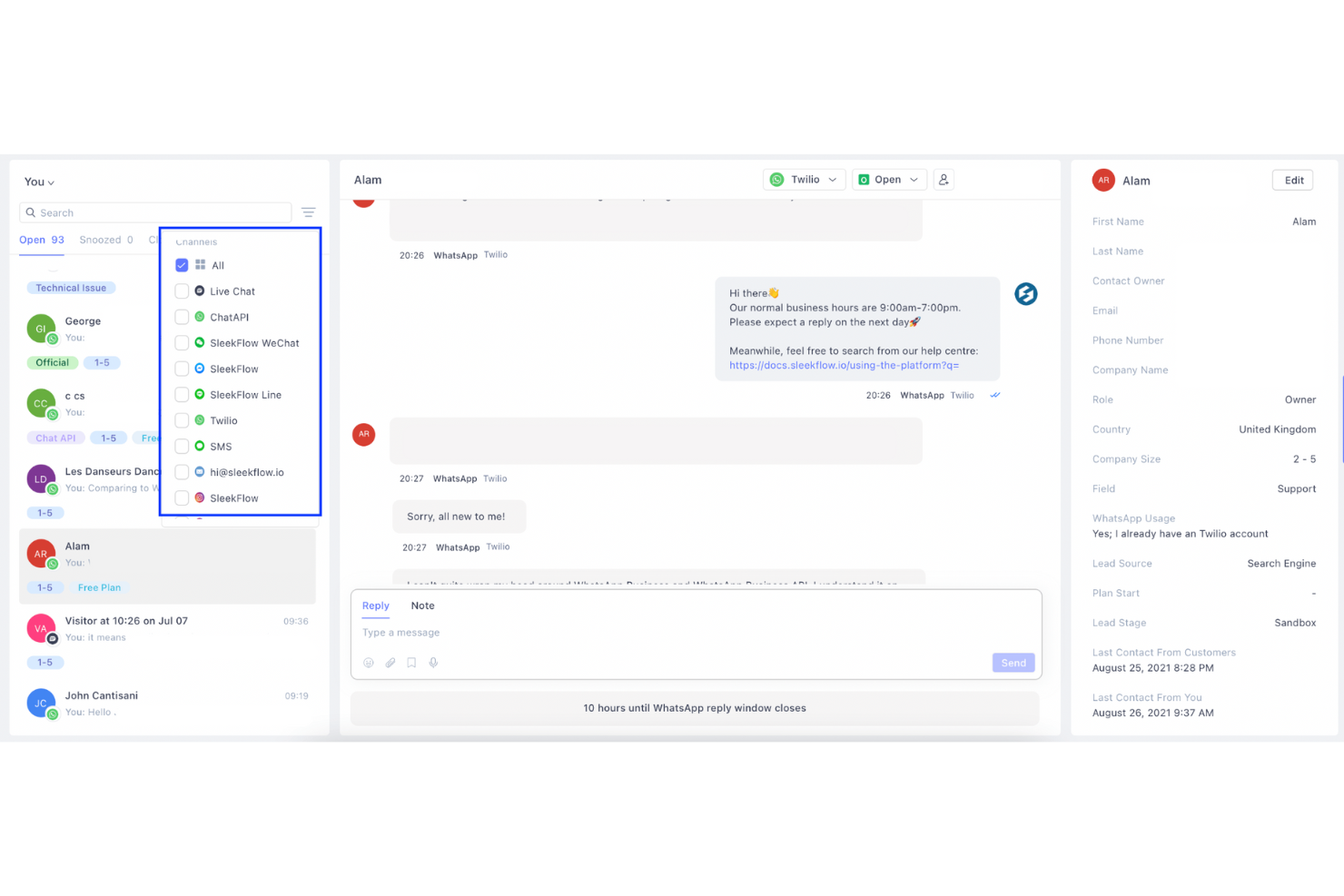
Gracias a SleekFlow, puedes promocionar tus productos y brindar soporte a tus clientes utilizando chats de mensajería en una plataforma omnicanal. El software combina todas tus aplicaciones de chat favoritas en un solo sistema fácil de usar que mejora tus capacidades de comunicación.
Por qué elegí SleekFlow: Como proveedor oficial de soluciones para WhatsApp Business, SleekFlow te da acceso a las funciones más recientes de esta plataforma. Utilizando WhatsApp u otros sistemas de mensajería, puedes conversar con los clientes, gestionando todos los chats desde un mismo panel para ofrecer una experiencia unificada al cliente.
Funciones y integraciones destacadas de SleekFlow:
Los agentes pueden colaborar en conversaciones clave entre equipos y combinar todos sus canales de mensajería en una sola plataforma de mensajería empresarial. La asignación automática de chats y las notas internas mantienen a todos en sintonía. Puedes personalizar los mensajes y campañas de difusión, o segmentar, filtrar y etiquetar a los clientes según su comportamiento de compra. Luego puedes enviar campañas dirigidas mediante WhatsApp u otros canales.
SleekFlow permite la asignación automática de chats y la incorporación de notas internas. Puedes crear mensajes de difusión y campañas personalizadas, además de segmentar, filtrar y etiquetar a los clientes según su comportamiento de compra.
Funciones destacadas incluyen una API, permisos y accesos por lotes, chat, gestión de contactos, integración con correo electrónico, integraciones externas, integración con aplicaciones de Google y gestión de clientes potenciales.
Integraciones incluyen AtomX Live Chat, Calendly, HubSpot, Instagram, Messenger,
Shopify, Telegram, Viber, WooCommerce y Zapier.
Pros and Cons
Pros:
- Enrutamiento y asignación avanzados
- Sistema robusto de etiquetas y clasificación
- Seguimiento detallado de la información del cliente
Cons:
- Funciones limitadas en los planes básicos
- Curva de aprendizaje pronunciada

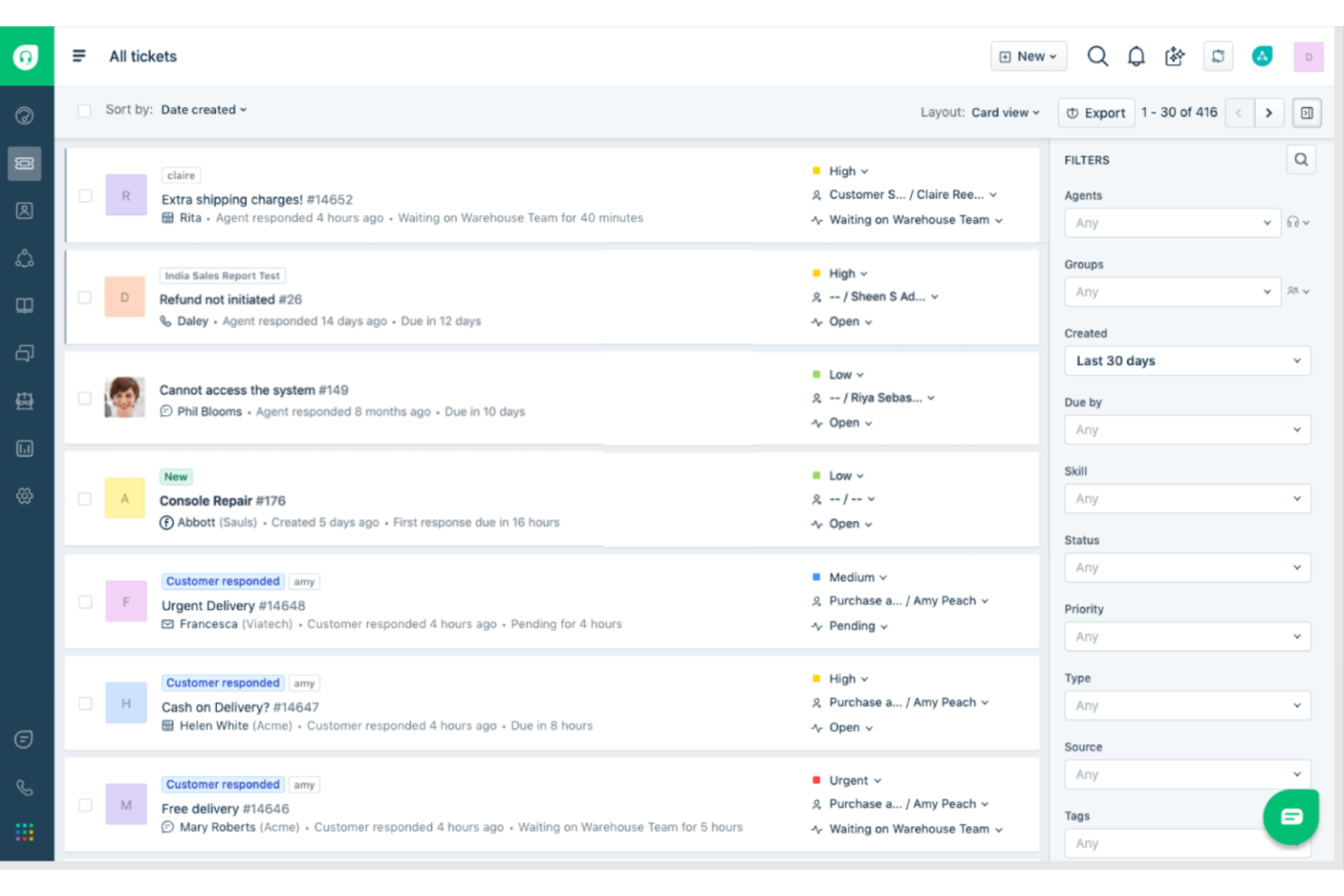
Con Freshdesk, puedes optimizar el servicio al cliente en canales tradicionales y digitales. Esta herramienta de soporte en la nube potencia a los equipos con una plataforma moderna de comunicación todo en uno.
Por qué seleccioné Freshdesk: Freshdesk ahorra tiempo a los agentes reduciendo tareas repetitivas. Pueden gestionar los tickets eficientemente, alternar entre canales y controlar los problemas de los clientes. Los líderes de equipo pueden consolidar los informes para obtener una visión unificada de la calidad del servicio.
El software permite a los clientes encontrar sus propias respuestas en el formato que prefieran. Puedes ofrecer autoservicio mediante un widget web, chat en vivo, mensajería, bots o teléfono.
El sistema asigna automáticamente los mensajes de chat, llamadas telefónicas y tickets a los agentes adecuados. También optimiza la efectividad de los agentes, sin sobrecargar a ninguna persona. Se pueden configurar umbrales para garantizar los mejores resultados.
Características destacadas e integraciones de Freshdesk:
Freshdesk es conocido por ofrecer un abanico completo de funciones que priorizan la satisfacción y eficiencia del cliente. Estas incluyen automatizaciones y personalizaciones, además de potentes herramientas para la colaboración entre agentes. El software también incluye amplias opciones de autoservicio, como bases de conocimientos, preguntas frecuentes y soporte multicanal. Freshdesk incorpora herramientas efectivas para comunicaciones salientes y ofrece informes y análisis detallados. Otra característica destacada es el uso de la gamificación para motivar a los agentes.
Integraciones incluyen Google Analytics, HubSpot, Jira, Microsoft Teams, Salesforce, Shopify, Slack, SurveyMonkey, Trello y WhatsApp Business
Pros and Cons
Pros:
- Informes y análisis personalizables
- Gamificación para motivación de agentes
- Gestión de tickets multicanal
Cons:
- Personalización limitada de plantillas de correo electrónico
- Carencia de funciones avanzadas de flujo de trabajo


Twilio MessagingX es un sistema de mensajería centralizado que conecta con los clientes utilizando sus canales preferidos. Gracias a sus APIs listas para uso empresarial, software escalable y una red inteligente, la plataforma ofrece fiabilidad a gran escala.
Por qué elegí Twilio: Con este ecosistema de mensajería confiable, los equipos pueden interactuar con los clientes utilizando mensajes verificados que eliminan el spam. Una incorporación sencilla permite a todos ponerse al día rápidamente, mientras que sus funciones de cumplimiento y privacidad garantizan una comunicación segura.
MessagingX está optimizado para la conectividad, mejor enrutamiento y transparencia de mensajes. Esto asegura una entrega y rendimiento incomparables, a través de una red global de operadores de nivel 1.
Las APIs del sistema se integran con canales de mensajería populares como chat conversacional, SMS, MMS, WhatsApp, Facebook Messenger y Google Business Messages. Así, proporcionan una base potente para soluciones CCM que abarcan atención al cliente, comercio conversacional y mensajería transaccional.
Funciones destacadas e integraciones de Twilio:
Twilio destaca gracias a funciones como capacidades avanzadas para generar confianza y un sistema sofisticado de exclusión que respeta las preferencias de los usuarios. También ofrece una API de contenido para una fácil integración y capacidades de escalabilidad de mensajería global. La plataforma presume además altas tasas de entrega y permite el redactado del contenido del mensaje para mayor privacidad. El enfoque en la traducción de contenido enriquecido garantiza que los mensajes sean claros y comprensibles en varios idiomas, con todo respaldado por un hub de confianza que asegura comunicaciones fiables y seguras.
Las integraciones incluyen Facebook Messenger, Google Business Messages, Twilio y WhatsApp.
Pros and Cons
Pros:
- API de contenido para mensajería enriquecida
- Funciones avanzadas de generación de confianza
- Alta tasa de entrega de mensajes
Cons:
- Múltiples procesos de cumplimiento
- Reequilibrio frecuente de cargas de trabajo
Otras opciones
Estas son algunas opciones adicionales que no llegaron a la lista de finalistas, pero que pueden adaptarse a tus necesidades específicas:
- Trengo
La mejor opción para una solución de bandeja de entrada única para clientes
- Thryv
Ideal para pequeñas empresas
- Touchpoint
Ideal para nutrir leads en un entorno colaborativo
- Front
La mejor para construir relaciones con clientes
- Hiver
Ideal para la colaboración interna en servicios de atención al cliente
- LiveAgent
Ideal para la gestión de tickets multicanal
- LiveChat
Ideal para chats en vivo multicanal
- Zendesk
Ideal para una experiencia del cliente personalizada


¿Qué son los programas de gestión de comunicaciones con clientes?
Los programas de gestión de comunicaciones con clientes ayudan a las empresas a crear, enviar y realizar un seguimiento de los mensajes dirigidos a los clientes a través de canales como el correo electrónico, el chat, los SMS y las redes sociales. Estas herramientas centralizan los datos de comunicación, automatizan las respuestas y permiten la personalización, lo que facilita interacciones coherentes, eficientes y alineadas con la marca que fortalecen las relaciones con los clientes y mejoran la calidad general de la experiencia.
Cómo Evalúo el Software de Gestión de Comunicaciones con el Cliente
Divido mi evaluación en criterios básicos—como el envío automático de avisos de renovación cumpliendo normativas o extractos personalizados—y diferenciadores que separan las mejores plataformas.
Funcionalidad Básica (Condiciones Indispensables para esta Lista)
Cuando selecciono herramientas para mi lista, califico cada una en una escala del 0 (no ofrece la funcionalidad) al 5 (destaca en esta área) para cada funcionalidad básica mencionada abajo. Luego, convierto la puntuación total en un porcentaje. Cada herramienta debe alcanzar una puntuación mínima total del 75% para ser considerada.
- Entrega de Mensajes Multicanal: Verifico si una plataforma puede orquestar comunicaciones a través de email, SMS, impresión, PDF y portal desde un solo envío—no solo ofrecer cada canal por separado.
- Creación y Autoría de Plantillas y Documentos: Un buen entorno de autoría permite a los usuarios de negocio crear y actualizar plantillas para extractos, avisos y cartas sin tener que esperar a IT para cada cambio.
- Personalización Dinámica: Busco reglas de contenido condicional y campos de datos variables que adapten el resultado para cada destinatario—como incluir detalles de pólizas o saldos de cuentas en un aviso de renovación.
- Automatización de Flujos de Trabajo: Evalúo si la plataforma admite flujos automáticos y por lotes, como el envío automático de un paquete de bienvenida cuando se completa la incorporación o la programación de extractos mensuales.
- Cumplimiento y Seguimiento de Auditoría: Las industrias reguladas necesitan cadenas de aprobación, historial de versiones y copias archivadas de todas las comunicaciones enviadas, por lo que busco rastreos de auditoría integrados y controles de retención.
- Integración de Datos y Sistemas: La plataforma debe conectarse con tu CRM, sistemas de negocio principales o fuentes de datos de clientes mediante APIs o conectores nativos para incorporar datos actualizados del cliente en las comunicaciones.
Una vez que tengo una lista de herramientas que cumplen con estos criterios, considero qué distingue a cada plataforma.
Factores Diferenciadores (Lo que Distingue a los Proveedores)
Así es como comparo y contrasto distintos proveedores:
Características Destacadas
La redacción asistida por IA es un gran diferenciador. Busco plataformas que ayuden a los autores a generar o mejorar mensajes manteniendo la coherencia de la voz de la marca en todos los canales. La vista previa en tiempo real es igual de importante, especialmente cuando un solo aviso debe mostrarse correctamente en email, impresión y móvil. También evalúo los análisis integrados que permiten hacer un seguimiento de entregas, aperturas y tasas de respuesta para que tu equipo pueda relacionar el rendimiento de las comunicaciones con los resultados del cliente.
Más Allá de las Características
La especialización sectorial es fundamental. Verifico si un proveedor ofrece plantillas y flujos de trabajo prediseñados para sectores regulados como seguros o salud, ya que crearlos desde cero retrasa considerablemente la puesta en marcha. También son importantes las certificaciones de cumplimiento; las plataformas que gestionan datos sensibles deben contar con credenciales como SOC 2 Tipo II o ISO 27001. Además, evalúo el soporte en la implementación, incluyendo herramientas de migración y plantillas de inicio, porque la implementación de CCM suele implicar reemplazar sistemas heredados ya asentados.
Colaboración del equipo
En mi búsqueda del mejor programa de este nicho, mi principal objetivo era encontrar herramientas que permitieran la colaboración, independientemente de dónde se encuentren los miembros del equipo. En particular, buscaba elementos como el acceso y los permisos basados en roles, para garantizar que solo los usuarios autorizados pudieran acceder a los datos de los clientes. También buscaba colaboración en tiempo real y la posibilidad de que los miembros del equipo proporcionaran comentarios inmediatos.
También consideré de fundamental importancia la gestión y el seguimiento de tareas, junto con las notificaciones y alertas que ayudan a los miembros del equipo a mantenerse encaminados. Todos necesitan actualizaciones oportunas sobre el estado de las tareas y los eventos importantes para garantizar un flujo de trabajo eficiente y cohesionado.
Usabilidad
Seleccioné software de CCM que prioriza la facilidad de uso. Busqué una interfaz intuitiva, fácil de navegar y comprender. Otras funciones de mi lista de elementos «imprescindibles» incluían la funcionalidad de arrastrar y soltar para crear documentos, plantillas y diseños. Las herramientas recibieron puntos adicionales por ofrecer un editor WYSIWYG, colecciones de plantillas y componentes prediseñados.
Otras funciones de facilidad de uso deseables incluyen un diseño adaptable, optimizado para distintos dispositivos y tamaños de pantalla. Las capacidades de prueba y vista previa también son útiles, junto con la posibilidad de adaptar el software según requisitos empresariales específicos.
Informes y análisis
También busqué funciones de generación de informes de gestión de máxima calidad en las herramientas de CCM. Estas incluyen el seguimiento de métricas de rendimiento y análisis en tiempo real, para proporcionar a los usuarios información inmediata sobre el impacto de su trabajo. La visualización de datos también es una función valiosa, ya que presenta los datos en un formato fácil de asimilar.
Las mejores herramientas también permiten a las empresas realizar pruebas A/B que comparan distintas estrategias y muestran cuál funciona mejor. También busqué análisis de segmentación y focalización para ayudar a las empresas a comprender mejor a su audiencia. Además, consideré la disponibilidad del seguimiento del rendimiento de las campañas, que ayuda a los usuarios a supervisar el éxito a lo largo del tiempo, así como la posibilidad de integrarse con otras herramientas de análisis.
Integraciones de software
El software de gestión de las comunicaciones con los clientes (CCM) debe permitir la integración de datos de clientes con sistemas CRM, sistemas de gestión de contenidos, proveedores de servicios de correo electrónico e integración con redes sociales.
También resulta útil que ofrezca una API o capacidades de webhook para ayudar a las empresas a aprovechar la tecnología y mejorar los flujos de trabajo.
Precios
Al considerar la asequibilidad, es necesario analizar factores como la escalabilidad y la flexibilidad de los planes de precios. También hay que comprobar si existen costes adicionales y cuál es el posible rendimiento de la inversión ofrecido. Como ocurre con cualquier software, las herramientas de CCM deben proporcionar valor a largo plazo y ayudar a impulsar el éxito empresarial.
Preguntas frecuentes
Cuando me piden consejo sobre el mejor software de gestión de las comunicaciones con los clientes, estas son las preguntas que surgen con mayor frecuencia:
¿Cuál es la diferencia entre el servicio de atención al cliente y el soporte al cliente?
El servicio de atención al cliente y el soporte al cliente son conceptos relacionados, pero de naturaleza distinta. El servicio de atención al cliente se refiere al apoyo general proporcionado a los compradores y define su experiencia con la empresa.
El soporte al cliente, por otro lado, se centra específicamente en atender y resolver las consultas de los clientes. Esto puede implicar abordar problemas de compra o técnicos mediante correo electrónico, chat de soporte o un sistema de tickets.
¿Cómo puede el software de CCM mejorar la experiencia del cliente?
Las soluciones de gestión de las comunicaciones con los clientes permiten enviar mensajes coherentes y personalizados a través de múltiples canales. La comunicación puede adaptarse según las preferencias del cliente y se pueden reducir los tiempos de respuesta.
Este tipo de software también permite automatizar flujos de trabajo que mantienen informados a los clientes. En general, estas herramientas garantizan que el cliente disfrute de una mejor experiencia durante todo su recorrido de compra.
¿Qué es el servicio de atención al cliente omnicanal?
El servicio de atención al cliente omnicanal ofrece a los clientes una experiencia coherente e integral a través de múltiples canales. Pueden interactuar con la empresa por teléfono, chat, correo electrónico, redes sociales o mediante interacciones presenciales.
Este enfoque se centra en sincronizar estos canales e integrarlos para garantizar una experiencia unificada que resuelva los problemas de la mejor manera posible. Esto puede lograrse independientemente del canal elegido por el cliente.
Otras reseñas de software orientado al cliente
A continuación, encontrarás otros artículos sobre temas relacionados con la experiencia del cliente que quizá te interese consultar:
- Mejor software de atención al cliente con IA para profesionales de la experiencia del cliente
- Mejores chatbots con IA para el rendimiento del servicio de atención al cliente
- Mejor software de gestión de la experiencia del cliente
- Mejores plataformas de inteligencia del cliente
- Mejor software de comentarios de clientes
- Mejor software de seguimiento del servicio de atención al cliente
- Mejor software de gestión del flujo de clientes
Un mercado en crecimiento
Esto concluye mi análisis del mejor software de gestión de las comunicaciones con los clientes. Para mantenerte al día de las novedades, no olvides suscribirte a nuestro boletín.
El mercado de la gestión de las comunicaciones con los clientes avanza rápidamente. Se espera que alcance la impresionante cifra de 2.200 millones de dólares en 2026, con una tasa de crecimiento anual compuesta del 11,2 %. Por lo tanto, cualquier empresa que aspire a impulsar la adopción y mejorar la percepción de los clientes debe invertir en tecnología de gestión de las comunicaciones con los clientes.
Así que elige de mi lista la herramienta que mejor se adapte a tus necesidades y empieza a transformar la experiencia de tus clientes. Después, estarás bien encaminado hacia un mayor éxito empresarial.