

Con tantas soluciones diferentes de software de mesa de ayuda disponibles, es difícil determinar cuál se adapta mejor a tus necesidades, especialmente si te has decidido por un software gratuito de mesa de ayuda. Sabes que quieres un software que te ayude a gestionar las tareas esenciales de soporte y a resolver eficazmente las consultas de los clientes, pero necesitas determinar qué sistema es el más adecuado.
En este artículo, te ayudaré a tomar esta decisión más fácilmente compartiendo mis conocimientos sobre los mejores programas gratuitos de mesa de ayuda para gestionar las solicitudes de atención al cliente sin afectar a tus resultados.
Por qué confiar en nuestras recomendaciones de software
6,700+
Reviews
20
Industry experts
16+
Evaluation factors
14
Years
Nuestro equipo lleva probando y evaluando software desde 2012. Como líderes de CX, sabemos lo difícil —y lo importante— que es elegir el software adecuado.
Para esta guía, evaluamos las herramientas mediante pruebas prácticas e investigación independiente, puntuando las herramientas según nuestros criterios de selección.
Nuestras reseñas reflejan nuestro criterio editorial humano, no un discurso de ventas.
 Gui DrusinaCreative Director
 Tim FisherVP of AI
Resumen de los mejores programas gratuitos de mesa de ayuda
Aunque todos los programas de mesa de ayuda de mi lista ofrecen opciones gratuitas, también cuentan con planes de pago por si deseas actualizarte. Estos son los costes básicos de cada una de las herramientas que han llegado a mi lista de favoritos:
| Tool | Best For | Trial Info | Price | ||
|---|---|---|---|---|---|
| 1 | Ideal para software de atención al cliente omnicanal | Prueba gratis de 15 días + demo gratuita disponible | Desde $7/usuario/mes (facturación anual) | Website | |
| 2 | Ideal para la gestión colaborativa de solicitudes basadas en correo electrónico | Prueba gratuita de 30 días disponible | Desde 14 $/usuario/mes (facturado anualmente) | Website | |
| 3 | Mejor para la automatización de tickets impulsada por IA | Prueba gratuita disponible | Desde $16/usuario/mes (facturado anualmente) | Website | |
| 4 | El mejor por sus 15 años en el mercado | Prueba gratuita + demo gratuita disponible | Precio bajo consulta | Website | |
| 5 | Ideal por su combinación de soporte en vivo y chatbots | Prueba gratuita de 7 días + plan gratuito disponible | Desde $24.17/mes (facturado anualmente) | Website | |
| 6 | Ideal para aseguramiento automatizado de calidad de tickets | Prueba gratuita de 14 días + demo gratis disponible | Desde $25/usuario/mes (facturación anual) | Website | |
| 7 | Mejor para funciones de colaboración | Plan gratuito + demo gratis disponible | Desde $29/usuario/mes | Website | |
| 8 | Ideal para la gestión de tickets potenciada por IA | Prueba gratuita de 14 días | Desde $9/asiento/mes (facturado anualmente) | Website | |
| 9 | Ideal para múltiples acuerdos de nivel de servicio | Plan gratuito disponible | Gratis para usar | Website | |
| 10 | Mejor widget de chat para sitios web y aplicaciones | Prueba gratuita de 14 días + demo gratuita disponible | Desde $29/usuario/mes (facturado anualmente) | Website |


Análisis de los mejores programas gratuitos de mesa de ayuda
Aquí tienes una breve descripción de cada programa gratuito de mesa de ayuda para mostrar el caso de uso más adecuado de cada herramienta, algunas funciones destacadas y capturas de pantalla que ofrecen una visión general de la interfaz de usuario.
 Ideal para software de atención al cliente omnicanal
- Prueba gratis de 15 días + demo gratuita disponible
- Desde $7/usuario/mes (facturación anual)
Visit WebsiteCustomer Rating:4.4/5
El panel de Zoho Desk te muestra qué tickets están actualmente en curso. Zoho Desk es una solución de mesa de ayuda basada en la nube que te ayuda a gestionar tickets de soporte a través de un portal de servicio al cliente. El software recoge interacciones recibidas por correo electrónico, teléfono, chat, redes sociales o formularios. Sus funciones incluyen asignación de tickets, reglas de notificación, escalamiento de servicios y acciones basadas en tiempo.
Puedes establecer reglas de flujo de trabajo para reducir la intervención humana, programar informes y medir los niveles de satisfacción del cliente. Un panel gráfico facilita el análisis de los índices de satisfacción. También puedes personalizar el sistema cambiando el nombre de las pestañas, añadiendo nuevos departamentos o personalizando las plantillas de correo electrónico.
Esta herramienta se integra con aplicaciones empresariales como Google Workspace, ScreenMagic, Jira, Slack y Salesforce.
Zoho Desk ofrece un plan gratuito para hasta tres agentes.
Learn more about Zoho Desk: Ideal para la gestión colaborativa de solicitudes basadas en correo electrónico
- Prueba gratuita de 30 días disponible
- Desde 14 $/usuario/mes (facturado anualmente)
Visit WebsiteCustomer Rating:4.8/5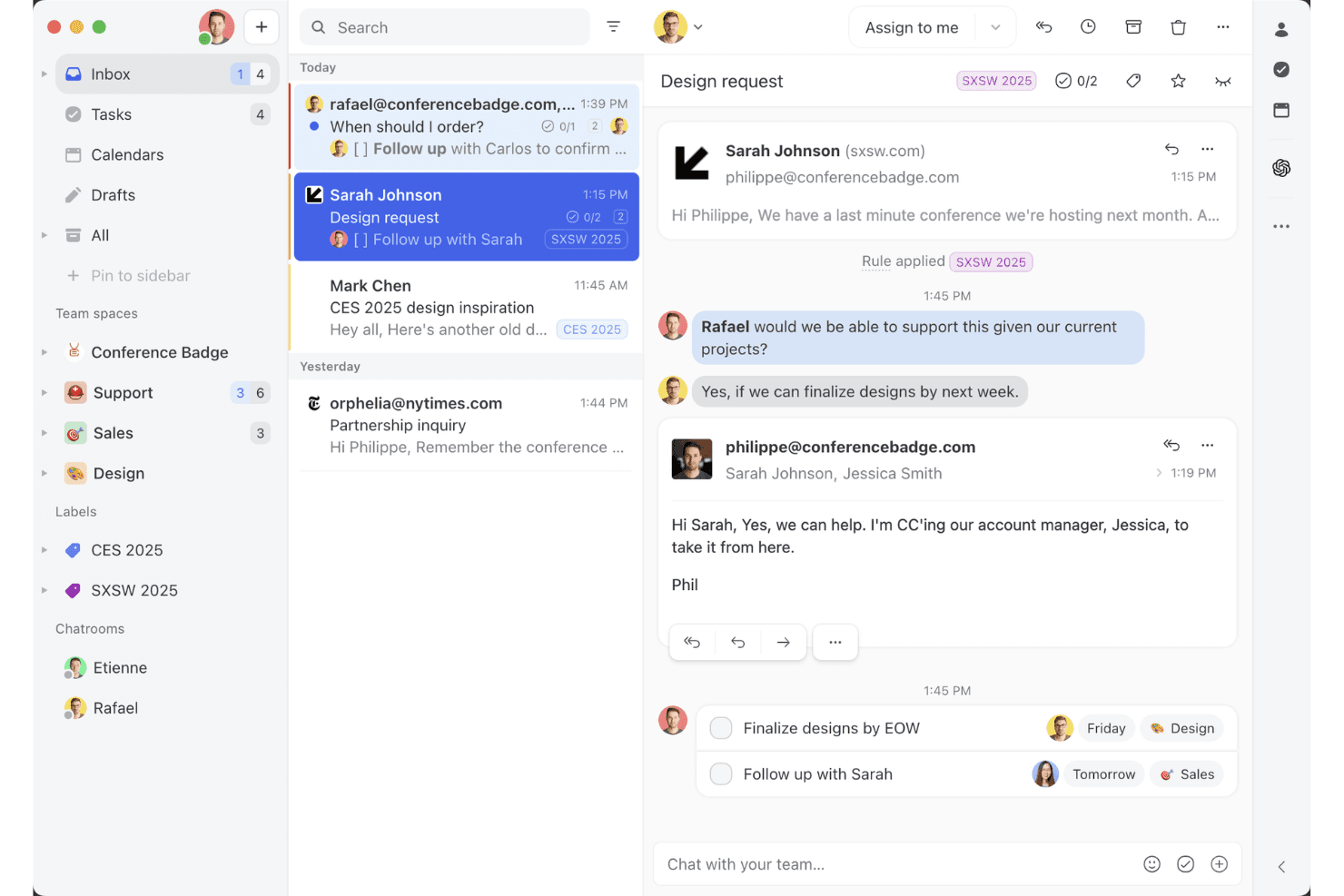
La vista de bandeja de entrada compartida de Missive muestra cómo los equipos pueden colaborar en hilos de correo electrónico, asignar tareas y gestionar conversaciones con clientes en un solo espacio de trabajo. Missive es una plataforma colaborativa de bandeja de entrada para equipos y múltiples canales que centraliza conversaciones por correo electrónico, SMS, WhatsApp, mensajería social, chat en vivo y voz, con potentes funciones de asignación, automatización y colaboración entre agentes en tiempo real.
¿Para quién es más adecuado Missive?
Equipos que desean una bandeja de entrada compartida y colaborativa que centralice las conversaciones con clientes de múltiples canales en una interfaz familiar con estilo de correo electrónico.
Por qué elegí Missive
Elegí Missive porque facilita la gestión colaborativa de solicitudes basadas en correo electrónico para equipos de CX que gestionan múltiples canales. Utilizo funciones como la redacción colaborativa en tiempo real y el chat interno en las conversaciones, lo que ayuda a mi equipo a resolver casos sin el caos del correo electrónico. Las asignaciones, el enrutamiento basado en reglas y las bandejas de entrada multicanal mantienen todo visible y listo para la acción.
Funciones principales de Missive
- Bandeja de entrada multicanal: Centraliza conversaciones por correo electrónico, SMS, WhatsApp, Instagram, Messenger, chat en vivo y voz en un solo espacio de trabajo.
- Automatización basada en reglas: Permite crear hasta 1.000 reglas personalizadas para el enrutamiento, el etiquetado automático, las escalaciones y las respuestas automáticas.
- Servidor MCP de Missive: Conecta clientes externos de IA (como Claude o ChatGPT) a mcp.missiveapp.com para buscar conversaciones de CX, consultar calendarios y redactar respuestas, manteniendo la aprobación humana como requisito antes del envío.
- Registros de auditoría en tiempo real: Registra cada acción y asignación en las conversaciones, con registros completos de usuarios y marcas de tiempo.
- Aplicaciones móviles y de escritorio: Ofrece aplicaciones nativas para iOS, Android, macOS y Windows, además de una experiencia web completa para acceder desde cualquier lugar.
Integraciones de Missive
Missive ofrece más de 25 integraciones nativas, incluidas Aircall, HubSpot, Salesforce, Asana, Trello, ClickUp, Notion, Dialpad, Shopify, Stripe, Google Drive, Dropbox y Zapier. Los planes Productive y Business también desbloquean el acceso a una API REST personalizada y al nuevo servidor MCP cuando un administrador lo activa.
¿Qué es gratuito?
Missive ofrece una prueba gratuita de 30 días que desbloquea todas las funciones, pero no ofrece un plan gratuito permanente. Después de la prueba, tendrás que elegir un plan de pago para seguir utilizando la plataforma.
Pros and Cons
Pros:
- Auténtica bandeja de entrada compartida para mensajes multicanal
- Chat de equipo en tiempo real en cada conversación
- Acceso de invitados para colaboradores externos
Cons:
- No hay un plan gratuito permanente
- No incluye una base de conocimientos nativa ni CSAT
Learn more about Missive: Mejor para la automatización de tickets impulsada por IA
- Prueba gratuita disponible
- Desde $16/usuario/mes (facturado anualmente)
Visit WebsiteCustomer Rating:4.6/5
La bandeja de entrada omnicanal de SparrowDesk centraliza las conversaciones con clientes, el estado de los tickets, los niveles de prioridad y la asignación de agentes en un solo panel de control. Para quienes buscan una solución gratuita de software de mesa de ayuda, SparrowDesk ofrece una opción interesante con sus capacidades impulsadas por IA diseñadas para automatizar una parte significativa de los tickets de soporte. Si eres una empresa que busca mejorar la eficiencia del soporte al cliente, esta plataforma proporciona una configuración rápida y poderosos agentes de IA que pueden resolver consultas al instante, ayudándote a mantener la coherencia y mejorar los tiempos de respuesta. Con SparrowDesk, puedes enfrentar los desafíos de gestionar interacciones con clientes a través de varios canales, garantizando una experiencia fluida tanto para tu equipo como para tus clientes.
Por qué elegí SparrowDesk
Elegí SparrowDesk por su capacidad única para automatizar tickets de soporte mediante agentes de IA, lo cual resulta especialmente atractivo para quienes buscan un software de mesa de ayuda gratuito. Esta automatización no solo reduce la carga de trabajo de tu equipo de soporte, sino que también garantiza que las consultas de los clientes se gestionen de manera rápida y precisa. Además, la funcionalidad de comunicación omnicanal de la plataforma te permite gestionar correos electrónicos y chats en una bandeja de entrada unificada, aumentando la eficiencia de tus operaciones de soporte. Estas capacidades hacen de SparrowDesk un fuerte candidato para empresas que quieren optimizar sus procesos de atención al cliente.
Características clave de SparrowDesk
Además de su automatización y comunicación omnicanal, también encontré destacables las siguientes características:
- Copiloto de IA: Asiste a los agentes con resúmenes instantáneos y respuestas contextuales, asegurando que tengan acceso rápido a información relevante.
- Acuerdos de nivel de servicio (SLA): Permite establecer y monitorear métricas de rendimiento para asegurar que tu equipo cumpla las expectativas de los clientes.
- Soporte multilingüe: Posibilita la comunicación con los clientes en varios idiomas, ampliando tu alcance y mejorando la satisfacción del cliente.
- Vistas personalizables: Permite adaptar el panel de control a tus necesidades específicas, ofreciendo una experiencia de usuario personalizada.
Integraciones de SparrowDesk
SparrowDesk actualmente no menciona integraciones nativas.
Pros and Cons
Pros:
- Agentes de IA reducen la carga de trabajo manual en la gestión de tickets
- La bandeja de entrada omnicanal centraliza las conversaciones con clientes
- El seguimiento de SLA apoya un rendimiento de soporte medible
Cons:
- No hay un plan gratuito para siempre disponible
- Integraciones nativas no listadas públicamente
Learn more about SparrowDesk: El mejor por sus 15 años en el mercado
- Prueba gratuita + demo gratuita disponible
- Precio bajo consulta
Visit WebsiteCustomer Rating:4.2/5
ServiceDesk Plus proporciona un panel unificado que incorpora múltiples datos y analíticas, incluyendo violaciones de SLA y solicitudes de cambio. ServiceDesk Plus es el software de gestión de servicios de pila completa para empresas de ManageEngine. Ofrece una amplia gama de soluciones de TI que respaldan los flujos de trabajo de gestión de servicios de TI (ITSM), personalizaciones sin código, informes avanzados, integraciones nativas y automatización inteligente.
Una de las características clave de ServiceDesk Plus son sus 13 prácticas distintas compatibles con ITIL4, incluyendo la gestión de incidentes, habilitación de cambios y gestión de solicitudes, para ayudarte a mejorar tus operaciones. El software también cuenta con completas funciones de gestión de problemas que brindan a los equipos de soporte de TI la capacidad de categorizar, analizar y resolver incidentes, además de identificar problemas similares o repetitivos para que puedan cerrar los tickets mucho más rápido.
El sistema de gestión de cambios de la plataforma es otra característica diseñada para ayudar a los equipos de TI a implementar mejor las modificaciones de TI con menos riesgo, gracias a procesos de planificación, aprobación e implementación más ágiles. ServiceDesk Plus también incluye un sistema de gestión del conocimiento integrado, una función de asistente virtual y capacidades de IA.
En el lado del cliente, la plataforma ofrece portales de autoservicio donde las personas pueden crear solicitudes y hacer seguimiento del estado. También dispone de un chat en vivo para soporte en tiempo real, una base de conocimientos donde puedes registrar soluciones a problemas comunes para los usuarios y aplicaciones móviles de mesa de ayuda que te permiten obtener soporte cuando lo necesites.
Otras funcionalidades de ServiceDesk Plus incluyen el enrutamiento automático de tickets y la creación de reglas de escalamiento para evitar violaciones de SLA.
Learn more about ManageEngine ServiceDesk Plus: Ideal por su combinación de soporte en vivo y chatbots
- Prueba gratuita de 7 días + plan gratuito disponible
- Desde $24.17/mes (facturado anualmente)
Visit WebsiteCustomer Rating:4.7/5
El editor de arrastrar y soltar de Tidio permite a los usuarios crear chatbots para diversos flujos de trabajo según desencadenantes y condiciones. Tidio es una solución de software de chat en vivo que ayuda a los equipos de experiencia del cliente a atender las necesidades y consultas de los clientes. La plataforma basada en la nube incluye un sistema de tickets, base de conocimientos, creador de chatbots y herramienta de chat en vivo. Proporciona información detallada sobre las interacciones con los clientes, ayudando a los equipos de experiencia del cliente a identificar áreas de mejora.
La plataforma de Tidio está diseñada para ayudar a los equipos de experiencia del cliente a gestionar todos los aspectos del recorrido del cliente, desde el primer contacto hasta la resolución. Sus chatbots automatizan tareas repetitivas como proporcionar información sobre la disponibilidad de productos o responder preguntas frecuentes, permitiendo a los usuarios ofrecer soporte al cliente 24/7.
Tidio también ofrece asistencia de agentes humanos que ayuda a resolver problemas más complejos. Su función de chat en vivo puede rastrear datos y analizar el comportamiento del cliente, lo que puede ayudarte a mejorar la experiencia del cliente. Además, puedes usar esta función para contactar proactivamente a los clientes y ofrecerles ayuda antes de que incluso la soliciten. Finalmente, el sistema de tickets de Tidio te permite priorizar consultas y asegurar que todos los clientes reciban una respuesta a tiempo.
Tidio ofrece más de 25 integraciones, incluyendo la integración de correo electrónico, muy útil para gestionar múltiples bandejas de entrada. Las integraciones incluyen Zendesk, Google Analytics, Pipedrive, Mailchimp, OpenCart y miles más a través de Zapier.
El precio de Tidio parte de $25/mes y ofrece una prueba gratuita de 7 días.
Learn more about Tidio: Ideal para aseguramiento automatizado de calidad de tickets
- Prueba gratuita de 14 días + demo gratis disponible
- Desde $25/usuario/mes (facturación anual)
Visit WebsiteCustomer Rating:4.7/5
Colabora en correos electrónicos en tiempo real con la bandeja de entrada compartida de Front: asigna conversaciones, incluye a compañeros y visualiza quién está leyendo o respondiendo, todo en un solo lugar. Front ofrece funciones de bandeja de entrada compartida y colaboración a equipos que buscan una solución moderna de mesa de ayuda. Está diseñado para empresas que desean gestionar conversaciones con clientes a través de correo electrónico, chat y canales sociales en un solo lugar. Si necesitas una herramienta que ayude a tu equipo a organizar, asignar y responder solicitudes de soporte de manera eficiente, Front es una opción a considerar.
¿Para quién es Front ideal?
Front es una buena opción para equipos de soporte y atención al cliente en pequeñas y medianas empresas que necesitan gestionar grandes volúmenes de consultas a través de múltiples canales.
Por qué elegí Front
El aseguramiento de la calidad es una prioridad para los equipos de soporte que desean mantener altos estándares en cada interacción con el cliente. Elegí Front porque ofrece herramientas automáticas de aseguramiento de calidad de tickets que revisan las conversaciones en cuanto a tono, integridad y cumplimiento de las directrices internas. Con funciones como revisiones de calidad basadas en reglas y análisis de conversaciones, los equipos pueden identificar rápidamente los tickets que requieren atención o capacitación. Esta automatización ayuda a garantizar que cada respuesta cumpla con los estándares del equipo sin requerir revisión manual de todos los tickets.
Características clave de Front
Otras funciones en Front que ayudan a los equipos a gestionar las solicitudes de soporte de manera eficiente incluyen:
- Gestión de bandeja de entrada compartida: Organiza y asigna los mensajes entrantes de múltiples canales a los miembros adecuados del equipo en una sola bandeja de entrada unificada.
- Detección de colisiones: Recibe alertas en tiempo real cuando otro compañero está viendo o respondiendo la misma conversación para evitar respuestas duplicadas.
- Respuestas predefinidas: Guarda y reutiliza plantillas de mensajes para preguntas frecuentes y así agilizar las respuestas y mantener la coherencia.
- Analítica e informes: Supervisa métricas como tiempos de respuesta, volumen de conversaciones y desempeño del equipo con paneles e informes integrados.
Integraciones de Front
Las integraciones incluyen Salesforce, Slack, Shopify, Aircall, Asana, Pipedrive, Twitter (X), Microsoft Outlook 365, Dialpad y Todoist.
¿Qué es gratis?
Front ofrece una prueba gratuita de 14 días de su plan Professional. Después del periodo de prueba, el uso continuado requiere una suscripción de pago y no existe un plan gratuito permanente.
Pros and Cons
Pros:
- La bandeja de entrada compartida permite colaboración en tiempo real
- Reglas de automatización para el enrutamiento y etiquetado de tickets
- Funciones de IA para redactar, resumir y traducir
Cons:
- El sistema de tickets carece de opciones avanzadas de ordenación y exportación
- El soporte de voz requiere integraciones de terceros
Learn more about Front: Mejor para funciones de colaboración
- Plan gratuito + demo gratis disponible
- Desde $29/usuario/mes
Visit WebsiteCustomer Rating:4.6/5
Colabora en tickets de soporte en la bandeja compartida de HelpDesk. HelpDesk es un software fácil de usar con todas las funciones que necesitas para gestionar el soporte. La herramienta reúne el correo electrónico, la mensajería y el chat en un solo panel para que puedas responder a las comunicaciones fácilmente. Además, da a cada agente visibilidad completa del historial de soporte del cliente para proporcionar contexto sobre sus problemas.
Me gustan las funciones de colaboración. Facilitan que los agentes etiqueten a otras personas en una publicación para obtener ayuda especializada. Y estas conversaciones están claramente marcadas como privadas, por lo que sabes que el cliente no puede verlas. También es fácil para los agentes ver cuándo alguien ya está trabajando en un ticket para evitar duplicaciones.
La herramienta cuenta con varias funciones de automatización que aceleran el soporte. Una útil es que puedes automatizar respuestas basadas en palabras clave del mensaje. Por ejemplo, si el texto contiene la palabra “reembolso”, puedes enviar automáticamente un mensaje con las instrucciones sobre cómo solicitar un reembolso.
Otras funciones que ahorran tiempo incluyen la capacidad de crear respuestas prediseñadas y realizar acciones en bloque. HelpDesk se conecta con Zapier para permitir integraciones.
Cuesta $34 por agente al mes para el plan de equipo. Esto también incluye roles de visualizador ilimitados. Puedes registrarte para una prueba gratuita en la página web.
Learn more about HelpDesk: Ideal para la gestión de tickets potenciada por IA
- Prueba gratuita de 14 días
- Desde $9/asiento/mes (facturado anualmente)
Visit WebsiteCustomer Rating:4.6/5
El panel de tickets de monday Service proporciona un desglose de tickets y otras métricas importantes. monday Service es una plataforma versátil de gestión de servicios diseñada para mejorar los flujos de trabajo relacionados con servicios en departamentos como TI, RR. HH., legal, compras y soporte al cliente. Es altamente personalizable, lo que permite automatizar tareas repetitivas mediante automatizaciones sin código para que puedas enfocarte en actividades más estratégicas.
Su automatización potenciada por IA mejora la gestión de tickets al etiquetar y enrutar automáticamente los tickets según la prioridad, el departamento y la urgencia, asegurando resoluciones oportunas. La capacidad de personalizar flujos de trabajo también facilita adaptar la plataforma a las necesidades específicas de tu equipo de experiencia del cliente, haciendo que tus procesos sean más eficientes.
Con funciones de comunicación en tiempo real, puedes comentar en los tickets, compartir archivos y actualizarse mutuamente sobre el progreso de los problemas de los clientes, garantizando que todos estén alineados. Las integraciones de la plataforma con otras herramientas, como Slack, Microsoft Teams y correo electrónico, también ayudan a consolidar la comunicación.
monday Service ofrece una prueba gratuita de 14 días.
Learn more about monday service: Ideal para múltiples acuerdos de nivel de servicio
- Plan gratuito disponible
- Gratis para usar
Visit WebsiteCustomer Rating:4.7/5
Raiseaticket ofrece potentes funciones en una plataforma gratuita. Raiseaticket es una plataforma de mesa de ayuda basada en la nube que organiza las comunicaciones entre los clientes y los agentes de soporte. El software ofrece flujos de trabajo para eliminar buzones de correo desordenados y problemas de solicitudes de soporte no atendidas. También proporciona información sobre el desempeño basada en datos, resumen de datos y métricas cuantificables.
Se pueden asignar tickets a equipos o agentes, adjuntar archivos, agregar notas y hacer seguimiento del tiempo dedicado a cada ticket. Tanto las comunicaciones originadas por correo electrónico como por el portal pueden gestionarse a través de un sistema unificado. Raiseaticket permite crear diferentes acuerdos de nivel de servicio (SLA) para distintos clientes.
Raiseaticket ofrece un plan gratuito que incluye una amplia gama de funciones.
Learn more about Raiseaticket: 10Mejor widget de chat para sitios web y aplicaciones
Intercom
- Prueba gratuita de 14 días + demo gratuita disponible
- Desde $29/usuario/mes (facturado anualmente)
Visit WebsiteCustomer Rating:4.4/5
La bandeja de entrada del servicio de soporte de Intercom proporciona a los agentes el contexto esencial. Permite a los clientes ponerse en contacto con tu equipo de soporte desde tu producto o sitio web, así como a través de canales como las redes sociales y el correo electrónico. Mientras tanto, los agentes pueden acceder a información importante del cliente, como conversaciones anteriores y detalles de incidencias. Las funciones más destacadas son todas las opciones de autoservicio.
Puedes añadir recursos a tu widget de chat e incluso personalizar lo que aparece según la página. O puedes utilizar la funcionalidad de soporte proactivo para resolver los problemas de los clientes antes de que ocurran. Por ejemplo, puedes enviar mensajes automáticos cuando los usuarios realizan una acción concreta, como pasar una determinada cantidad de tiempo en una página determinada.
Otras opciones de autoservicio incluyen la capacidad de crear recorridos por el producto para ayudar a los usuarios a familiarizarse con tus funcionalidades, y mensajes automáticos que se envían cuando los clientes muestran señales de estar teniendo dificultades con tu producto.
La herramienta también cuenta con muchas funciones para agilizar la asistencia en vivo, entre las que se destacan un sistema de tickets de mesa de ayuda, colaboración, enrutamiento de tickets y respuestas predefinidas.
Intercom ofrece un plan inicial para empresas muy pequeñas que cuesta $74 al mes facturado anualmente. Las empresas más grandes deben ponerse en contacto con el equipo de ventas para obtener información sobre precios.
Otros programas gratuitos de mesa de ayuda
Aquí tienes algunas opciones adicionales de software de mesa de ayuda que también ofrecen planes o pruebas gratuitas. Aunque estas herramientas no llegaron a mi lista de favoritos, merece la pena conocerlas:
- 11ProProfs Help DeskIdeal para un buzón compartido de experiencia del cliente (CX)
- 12Spiceworks Help DeskEl mejor software de mesa de ayuda para equipos de TI
- 13ManageEngine ServiceDesk PlusLa mejor para soporte informático
- 14Jira Service ManagementIdeal para opciones avanzadas de personalización
- 15Odoo HelpdeskIdeal para una vista kanban de la actividad de soporte al cliente
- 16GladlySolución de mesa de ayuda con funciones avanzadas de telefonía
- 17FrontMejor para el servicio al cliente colaborativo
- 18ngDeskIdeal para combinar ventas, soporte y marketing
- 1914.aiEl mejor motor de respuesta al cliente consciente de intenciones
- 20HiverIdeal para convertir Gmail en una mesa de ayuda
- 21LiveAgentIdeal para un widget de chat popular
- 22LiveChatMejor software de mesa de ayuda gratis para centros de llamadas
- 23Help ScoutIdeal para crear automatizaciones de contacto proactivas
- 24ZendeskMesa de ayuda con funciones avanzadas de servicio
- 25Zoho AssistIdeal para brindar soporte con acceso remoto
- 26FreshdeskIdeal para un sistema de tickets integrado entre correo electrónico y redes sociales
Have an account? Log In
Cómo evalúo el software gratuito de mesa de ayuda
Evalúo las herramientas gratuitas de mesa de ayuda en dos capas: el estándar básico que toda herramienta debe cumplir—como la gestión real de tickets y un plan gratuito permanente—y los factores que hacen que una sea mejor opción que otra.
Funcionalidad básica (indispensable para esta lista)
Cuando selecciono herramientas para mi lista, clasifico cada una en una escala del 0 (no ofrece la funcionalidad) al 5 (destaca en esta área) para cada funcionalidad principal que se muestra a continuación. Luego, calculo la puntuación total de la herramienta en porcentaje. Cada herramienta debe alcanzar una puntuación mínima total del 65% para ser considerada para inclusión.
- Disponibilidad de plan gratuito: Compruebo si cada herramienta ofrece un nivel gratuito permanente—no solo una prueba de 14 o 30 días—que brinde a un pequeño equipo de soporte acceso real y continuo a las funciones básicas de la mesa de ayuda.
- Gestión de tickets: Cada herramienta debe permitir a los agentes crear, asignar, priorizar y seguir tickets hasta su resolución, con opciones como etiquetas, estados y campos personalizados para organizar una cola en crecimiento.
- Bandeja de entrada multicanal: Busco herramientas que reúnan los mensajes de los clientes desde al menos el correo electrónico y otro canal—como un chat o un formulario web—en una sola cola para que los agentes no tengan que cambiar entre plataformas.
- Colaboración entre agentes: El soporte raramente lo gestiona solo una persona, así que evalúo si los agentes pueden dejar notas internas, transferir tickets o usar permisos basados en roles para dividir el trabajo entre el equipo.
- Base de conocimientos o autoservicio: Busco una página de preguntas frecuentes para el cliente o una base de conocimientos donde los equipos puedan publicar respuestas a preguntas comunes, como políticas de envío o pasos para configurar una cuenta, para reducir el volumen de tickets.
- Informes y seguimiento de SLA: Las métricas básicas sobre volumen de tickets, tiempo de primera respuesta y tiempo de resolución ayudan a los líderes de equipo a detectar cuellos de botella, por lo que evalúo qué informes incluye el plan gratuito.
Una vez que tengo una lista de herramientas que cumplen con este criterio, considero qué es lo que distingue a cada plataforma.
Factores diferenciadores (qué distingue a los proveedores)
Así es como comparo y contrasto diferentes proveedores:
Funciones destacadas
Las funciones impulsadas por IA, como el triaje automático y las respuestas sugeridas, marcan una verdadera diferencia cuando un equipo de dos personas atiende docenas de tickets al día. También busco un widget de chat en vivo que los agentes puedan gestionar junto con los tickets de correo electrónico—es un canal que los clientes esperan cada vez más. También son importantes las encuestas integradas de satisfacción (CSAT), ya que permiten a los líderes de equipo medir la calidad del servicio justo después de la resolución, sin necesidad de integrar una herramienta adicional de encuestas.
Más allá de las funciones
La ruta de actualización del plan gratuito al de pago importa—verifico si una herramienta te permite pasar a niveles superiores sin migrar tus datos o volver a capacitar a tu equipo. Las integraciones son igual de importantes. Una mesa de ayuda gratuita que se conecta con tu CRM o Slack mantiene a los agentes trabajando en un solo lugar, en vez de copiar datos entre pestañas. También evalúo los recursos de incorporación, ya que los planes gratuitos rara vez incluyen soporte dedicado. Una buena documentación, foros comunitarios y guías de configuración en la aplicación marcan la diferencia entre una implementación fluida y una estancada.
Cómo elegir un software gratuito de mesa de ayuda
Las listas complejas de funciones y las estructuras de precios pueden dificultar la tarea de determinar qué obtienes realmente con un software gratuito de mesa de ayuda. Para ayudarte a mantener la atención mientras avanzas en el proceso de selección del software, estos son algunos factores que debes tener en cuenta:
| Factor | Qué tener en cuenta |
|---|---|
| FactorAlcance de la oferta gratuita | Qué tener en cuentaComprueba qué incluye el plan gratuito. Asegúrate de que cubra funciones esenciales, como la gestión de tickets y la asistencia multicanal, sin costes ocultos. |
| FactorEscalabilidad | Qué tener en cuentaConsidera si el software puede crecer junto con tu equipo. Busca opciones que ofrezcan actualizaciones fluidas a planes de pago a medida que aumenten tus necesidades. |
| FactorIntegraciones | Qué tener en cuentaVerifica la compatibilidad con tus herramientas actuales, como el CRM o el correo electrónico. Una integración fluida puede ahorrar tiempo a tu equipo y reducir el trabajo manual. |
| FactorFacilidad de uso | Qué tener en cuentaAsegúrate de que la interfaz sea intuitiva y fácil de navegar. Un diseño sencillo reduce el tiempo de formación y ayuda a tu equipo a ponerse al día rápidamente. |
| FactorOpciones de asistencia | Qué tener en cuentaEvalúa la asistencia al cliente disponible para los usuarios gratuitos. Busca chat en directo, asistencia por correo electrónico y guías completas que ayuden a tu equipo cuando lo necesite. |
| FactorPersonalización | Qué tener en cuentaDetermina el nivel de personalización que se ofrece. Poder adaptar el software a tu flujo de trabajo puede mejorar la productividad y ajustarse a los procesos de tu equipo. |
| FactorLimitaciones de usuarios | Qué tener en cuentaComprueba si existe un límite en el número de usuarios del plan gratuito. Asegúrate de que se adapte al tamaño de tu equipo sin obligarte a actualizar el plan. |
| FactorSeguridad | Qué tener en cuentaEvalúa las funciones de seguridad disponibles. Asegúrate de que incluya medidas de protección de datos, como el cifrado y el cumplimiento de los estándares del sector, para proteger los datos de los clientes. |
¿Qué es un software de mesa de ayuda gratuito?
El software de mesa de ayuda gratuito son herramientas basadas en la nube que ayudan a los equipos de asistencia al cliente a organizar, realizar el seguimiento y resolver las solicitudes de los clientes, sin costes mensuales.
Estas soluciones SaaS gratuitas incluyen las funciones básicas de mesa de ayuda que esperarías, como un sistema de tickets para realizar el seguimiento de problemas, capacidades básicas de automatización para tareas repetitivas y herramientas de comunicación que ayudan a los equipos de atención al cliente a colaborar en los tickets o derivarlos cuando sea necesario. Son una forma económica de mejorar la eficiencia de tus operaciones de atención al cliente sin incurrir en más costes mensuales.
Funciones
Repasemos las funciones que suelen encontrarse en el software de mesa de ayuda y cuáles suelen incluirse en los planes gratuitos y de pago.
Funciones habituales del software de mesa de ayuda gratuito
- Gestión de tickets: Organiza las consultas de los clientes en tickets fáciles de gestionar para realizar un seguimiento y resolverlas con facilidad.
- Integración del correo electrónico: Conecta tu correo electrónico con la herramienta de mesa de ayuda para agilizar la comunicación con los clientes.
- Creación de una base de conocimientos: Permite crear un repositorio de preguntas frecuentes y guías para ofrecer asistencia de autoservicio.
- Asistencia multicanal: Permite gestionar consultas procedentes de varios canales, como el correo electrónico, el chat y las redes sociales.
- Informes básicos: Proporciona información sobre el rendimiento de la asistencia mediante informes sencillos sobre el estado de los tickets y los tiempos de respuesta.
Funciones habituales del software de mesa de ayuda de pago
- Análisis avanzados: Ofrece información detallada sobre el rendimiento del equipo y las métricas de satisfacción del cliente.
- Chatbot con inteligencia artificial: Automatiza las respuestas a preguntas frecuentes y libera a los agentes de asistencia para que atiendan problemas complejos.
- Paneles personalizables: Permite adaptar la interfaz para mostrar las métricas y los datos relevantes para tu equipo.
- Integración con redes sociales: Permite gestionar directamente las interacciones con los clientes en plataformas como Facebook y Twitter.
- Asistencia multilingüe: Ofrece la posibilidad de prestar asistencia al cliente en varios idiomas, ampliando el alcance global.
Ventajas
Implementar un software de mesa de ayuda gratuito ofrece varias ventajas para tu equipo y tu empresa. Estas son algunas de las que puedes esperar:
- Solución económica: Ofrece funciones esenciales de soporte sin necesidad de un gran presupuesto, por lo que es ideal para startups y pequeñas empresas.
- Mejor organización: La gestión de solicitudes ayuda a mantener organizadas las consultas de los clientes, lo que permite a tu equipo gestionar las peticiones de forma más eficiente.
- Comunicación mejorada: La integración del correo electrónico garantiza que todas las interacciones con los clientes estén en un solo lugar, facilitando una mejor comunicación.
- Opciones de autoservicio: Una base de conocimientos permite a los clientes encontrar respuestas por sí mismos, reduciendo la carga de trabajo de tu equipo de soporte.
- Configuración rápida: Las interfaces fáciles de usar y la incorporación sencilla permiten que tu equipo empiece a utilizar el software con una formación mínima.
- Escalabilidad: Muchas herramientas ofrecen opciones de actualización, lo que te permite ampliar el servicio a medida que crece tu negocio sin perder los datos iniciales.
- Soporte multicanal: Gestionar las consultas procedentes de distintas plataformas garantiza que ninguna pregunta de los clientes pase desapercibida, mejorando la calidad del servicio.
Costes y precios
Me doy cuenta de que has llegado a este artículo buscando las mejores opciones de software de soporte técnico disponibles de forma gratuita. Sin embargo, como los planes gratuitos solo ofrecen funciones limitadas, es muy probable que necesites ampliar tu plan en el futuro.
La tabla siguiente resume los planes habituales, sus precios medios y las funciones que suelen incluir las soluciones de software de soporte técnico:
Tabla comparativa de planes de software de soporte técnico
| Tipo de plan | Precio medio | Funciones habituales |
|---|---|---|
| Tipo de planPlan gratuito | Precio medio$0 | Funciones habitualesGestión básica de solicitudes, soporte por correo electrónico y una base de conocimientos limitada. |
| Tipo de planPlan personal | Precio medio$5-$25/usuario/mes | Funciones habitualesGestión avanzada de solicitudes, informes básicos e integraciones con plataformas de correo electrónico y chat. |
| Tipo de planPlan empresarial | Precio medio$30-$60/usuario/mes | Funciones habitualesPaneles personalizables, soporte multicanal y funciones mejoradas de análisis y generación de informes. |
| Tipo de planPlan corporativo | Precio medio$70-$100/usuario/mes | Funciones habitualesFunciones basadas en IA, opciones de seguridad avanzadas y gestión y soporte exclusivos de la cuenta. |
Preguntas frecuentes sobre software gratuito de mesa de ayuda
Estas son las respuestas a algunas preguntas frecuentes sobre el software gratuito de mesa de ayuda.
¿Puede el software gratuito de mesa de ayuda integrarse con otras herramientas?
Sí, muchas herramientas gratuitas de mesa de ayuda ofrecen integraciones con otros programas, como plataformas de correo electrónico y CRM. Estas integraciones ayudan a agilizar el flujo de trabajo de tu equipo al conectar diferentes sistemas, lo que facilita la gestión de las interacciones con los clientes sin tener que cambiar de una aplicación a otra.
¿Cómo funciona el software gratuito de mesa de ayuda?
El software gratuito de mesa de ayuda ofrece muchas de las mismas funciones que el software de mesa de ayuda de pago. Estas herramientas suelen ser niveles de entrada de planes que se amplían a opciones de mayor precio a medida que añades más funcionalidades o usuarios. Algunas de las herramientas de esta lista ofrecen planes con modelo gratuito (es decir, gratuitos para siempre), mientras que otras ofrecen una prueba gratuita durante un periodo de tiempo determinado.
¿Qué nivel de seguridad ofrece el software gratuito de mesa de ayuda?
El software gratuito de mesa de ayuda suele incluir funciones de seguridad básicas, como el cifrado de datos y controles de acceso seguros. Sin embargo, para disponer de opciones de seguridad más avanzadas, es posible que tengas que considerar planes de pago. Consulta siempre las políticas de seguridad del proveedor para asegurarte de que cumplen los requisitos de tu empresa.
¿Existe un límite en el número de usuarios de los planes gratuitos?
La mayoría de las soluciones de software gratuito de mesa de ayuda tienen un límite en el número de usuarios o agentes. Este límite varía según el proveedor, por lo que es importante consultar las especificaciones de cada herramienta para asegurarte de que se adapta al tamaño de tu equipo sin tener que actualizar el plan.
¿Qué tipo de asistencia está disponible para los usuarios gratuitos?
La asistencia para los usuarios gratuitos suele incluir acceso a recursos en línea, como preguntas frecuentes, bases de conocimientos y foros de la comunidad. Algunos proveedores pueden ofrecer asistencia por correo electrónico, pero el chat en directo y la asistencia telefónica suelen estar reservados para los planes de pago.
¿El software gratuito de mesa de ayuda ofrece opciones de personalización?
El software gratuito de mesa de ayuda suele ofrecer opciones básicas de personalización, como modificar los campos de los tickets o aplicar la imagen de marca a la interfaz. Para una personalización más amplia, es posible que tengas que actualizar a un plan de pago que permita una personalización más profunda para adaptarse a las necesidades de tu empresa.
¿Qué viene después?
Si estás investigando software gratuito de mesa de ayuda, conecta con un asesor de SoftwareSelect para obtener recomendaciones gratuitas. Rellenas un formulario y mantienes una breve conversación en la que se profundiza en los detalles de tus necesidades. Después recibirás una lista reducida de programas para revisar. Además, te ayudarán durante todo el proceso de compra, incluida la negociación de precios.
Y si este artículo te ha resultado útil, quizá también te interesen nuestras publicaciones del blog sobre el mejor software de atención al cliente.