

10 Mejores Software de Gestión de Correos para Atención al Cliente en 2026

10 Lista del Mejor Software de Gestión de Emails para Atención al Cliente


Estás gestionando múltiples consultas, intentando mantener tiempos de respuesta bajos y asegurando que cada cliente se sienta escuchado. Es mucho para manejar, y ahí es donde entra el software de gestión de correos electrónicos para atención al cliente.
Estas herramientas ayudan a tu equipo a mantenerse organizado, responder más rápido y mejorar la experiencia general del cliente. En mi experiencia, marcan la diferencia en la eficiencia y la satisfacción.
He probado y revisado de forma independiente muchas de estas soluciones. Mi objetivo es compartir información imparcial sobre las mejores opciones disponibles. Encontrarás una lista bien investigada de las mejores alternativas que responden a tus desafíos y facilitan el trabajo de tu equipo. Descubramos soluciones que podrían transformar la forma en que gestionas las interacciones con los clientes.
Por qué confiar en nuestras recomendaciones de software
Nuestro equipo lleva probando y evaluando software desde 2012. Como líderes de CX, sabemos lo difícil —y lo importante— que es elegir el software adecuado.
Para esta guía, evaluamos las herramientas mediante pruebas prácticas e investigación independiente, puntuando las herramientas según nuestros criterios de selección.
Nuestras reseñas reflejan nuestro criterio editorial humano, no un discurso de ventas.
Tabla Resumen del Mejor Software de Gestión de Emails para Atención al Cliente
| Tool | Best For | Trial Info | Price | ||
|---|---|---|---|---|---|
| 1 | Ideal para mesas de servicio de pequeñas empresas | Prueba gratis de 14 días + demo gratuita disponible | Desde $19/agente/mes (facturado anualmente) | Website | |
| 2 | Ideal para soporte y experiencia del cliente | Prueba gratuita disponible | Desde $25/usuario/mes (facturado anualmente) | Website | |
| 3 | La mejor opción para la colaboración de equipos mediante bandejas de entrada compartidas | Prueba gratuita de 30 días disponible | Desde $14/usuario/mes (facturado anualmente) | Website | |
| 4 | Ideal para la gestión de correos electrónicos impulsada por IA | Plan gratuito + prueba gratuita de 7 días + demostración gratuita disponible | Desde $25/usuario/mes (facturado anualmente) | Website | |
| 5 | Ideal para la integración con software antiguo | Prueba gratuita de 30 días disponible | Desde $15/usuario/mes | Website | |
| 6 | La mejor con análisis integrados | Prueba gratuita de 15 días + demo gratuita disponible | Desde $7/usuario/mes (facturado anualmente) | Website | |
| 7 | La mejor herramienta de gestión de correo electrónico para startups | Prueba gratuita de 14 días + demo gratuita disponible | Desde $19/agente/mes (facturado anualmente) | Website | |
| 8 | El mejor software de atención al cliente para gestionar comunicaciones multicanal | Prueba gratuita de 7 días + plan gratuito disponible | Desde $24.17/mes (facturado anualmente) | Website | |
| 9 | Ideal para una bandeja de entrada unificada de operaciones de atención al cliente | Prueba gratuita de 14 días + demo gratuita disponible | Desde $25/asiento/mes (facturado anualmente) | Website | |
| 10 | Mejor para mesas de ayuda orientadas al cliente | Demo gratuita disponible | Precio bajo solicitud | Website |


Reseñas de los 10 Mejores Softwares de Gestión de Emails para Atención al Cliente
Aquí tienes una breve descripción de cada uno de los mejores sistemas de gestión de correos electrónicos de mi lista, mostrando para qué son los mejores, además de capturas de pantalla para mostrar algunas de sus funciones.

Ideal para mesas de servicio de pequeñas empresas
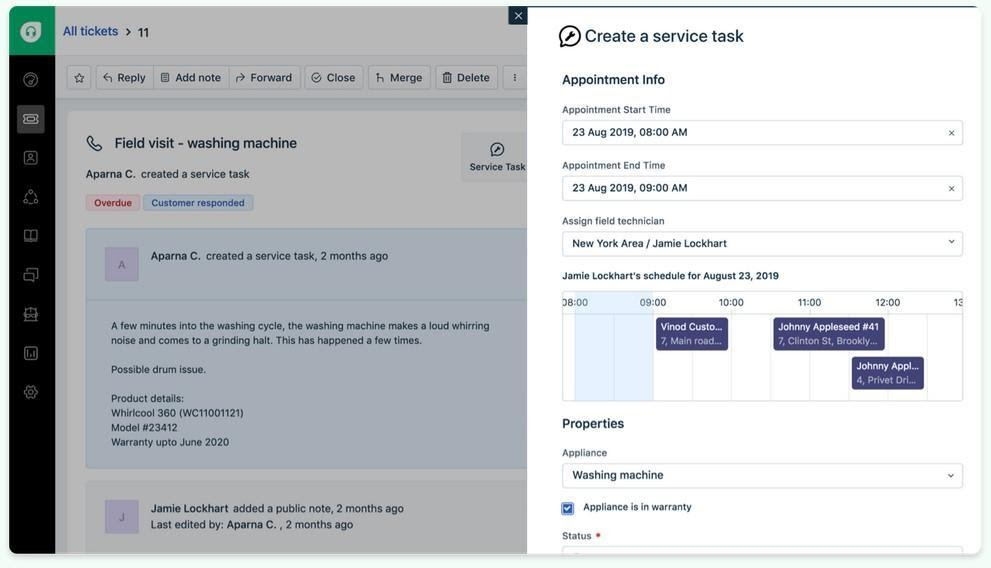
Freshdesk (un producto de Freshworks Inc.) es una plataforma de soporte al cliente diseñada para equipos que buscan una forma sencilla de gestionar consultas de clientes. Se basa en flujos de trabajo mediante tickets y admite mensajes desde múltiples canales, ayudando a los equipos a mantener la comunicación organizada dentro de un solo sistema.
Por qué elegí Freshdesk: Elegí Freshdesk por su interfaz, que está estructurada de manera que facilita el seguimiento de las tareas diarias de soporte. Al gestionar solicitudes entrantes, el sistema de tickets te ayuda a organizar conversaciones y rastrear su estado sin depender de múltiples herramientas. También incluye Freddy AI, que puede ayudar a redactar respuestas y resumir tickets dentro del flujo de trabajo existente. La capacidad de gestionar consultas de correo electrónico, teléfono y redes sociales en un solo lugar permite respuestas más coherentes en todos los canales. Los paneles de control personalizables aumentan la visibilidad de la carga de trabajo y la actividad de respuestas.
Funciones destacadas e integraciones:
Funciones incluyen un sistema de tickets que ayuda a los equipos a organizar, priorizar y resolver consultas de clientes. Su soporte multicanal permite que los mensajes de diferentes plataformas se gestionen dentro del mismo flujo de trabajo.
Integraciones incluyen herramientas como Slack, Microsoft Teams, Salesforce, Shopify, Google Workspace, Trello, Asana, Mailchimp, Dropbox y HubSpot, permitiendo que la actividad de soporte se conecte con herramientas de colaboración, CRM y productividad.
Pros and Cons
Pros:
- Soporte multicanal
- Gestión eficiente de tickets
- Flujos de trabajo de tickets claros y fáciles de seguir
Cons:
- Reportes avanzados limitados
- Requiere actualizaciones frecuentes
New Product Updates from Freshdesk

Freshdesk Adds Voice AI Agents in Freshcaller
Freshdesk introduces Voice AI Agents available through Freshcaller Marketplace apps to handle routine calls and reduce queues. This feature enables automated call handling with real-time, conversational support. For more information, visit Freshdesk's official site.

Ideal para soporte y experiencia del cliente
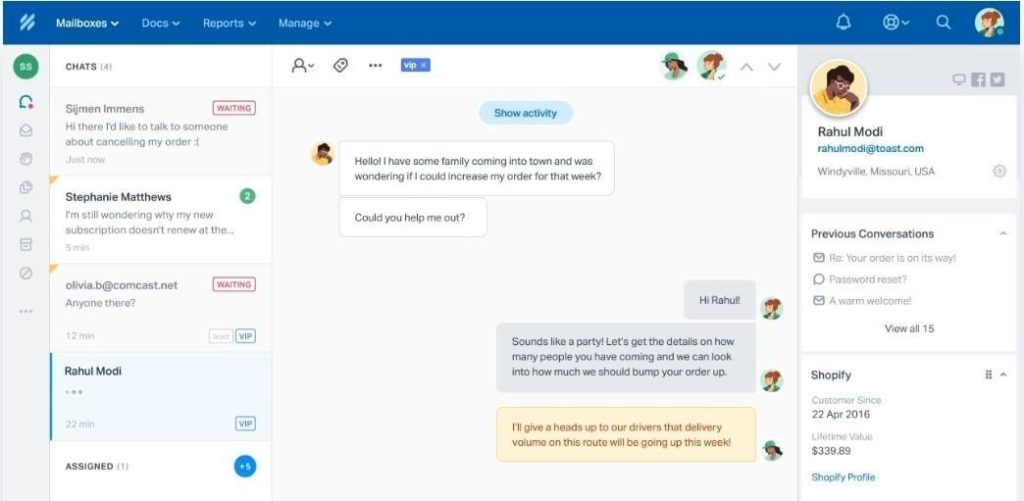
Help Scout es una plataforma de soporte al cliente dirigida a pequeñas y medianas empresas que desean ofrecer un servicio al cliente personalizado. Se centra en la gestión de correos electrónicos de clientes y en brindar herramientas para una comunicación y soporte eficientes.
Por qué elegí Help Scout: Se destaca en ofrecer un soporte personalizado con funciones que priorizan la interacción y satisfacción del cliente. La bandeja de entrada compartida de la plataforma permite que tu equipo gestione los correos electrónicos de manera colaborativa, asegurando que nada se pierda. Los perfiles de clientes de Help Scout proporcionan contexto para cada interacción, mejorando la experiencia de soporte. Las herramientas de informes te ayudan a rastrear el desempeño y mejorar la eficiencia de tu equipo.
Funciones destacadas e integraciones:
Las funciones incluyen una bandeja de entrada compartida que permite la gestión colaborativa de correos electrónicos. Los perfiles de clientes ofrecen contexto para cada interacción, facilitando la entrega de un soporte personalizado. Las herramientas de informes rastrean el rendimiento y ayudan a mejorar la eficiencia del equipo.
Las integraciones incluyen Slack, HubSpot, Salesforce, Mailchimp, Shopify, WordPress, WooCommerce, Magento, Google Workspace y Trello.
Pros and Cons
Pros:
- Colaboración sencilla dentro de los equipos
- Perfiles de clientes detallados
- Fuerte enfoque en la interacción con el cliente
Cons:
- Funciones de automatización limitadas
- Requiere entrenamiento regular
New Product Updates from Help Scout

Help Scout Adds Automatic Conversation Reassignment
Help Scout can now automatically unassign conversations when the assigned teammate has been away long enough, keeping replies moving so others can pick them up. For more information, visit Help Scout's official site.
 .
.
Missive
La mejor opción para la colaboración de equipos mediante bandejas de entrada compartidas
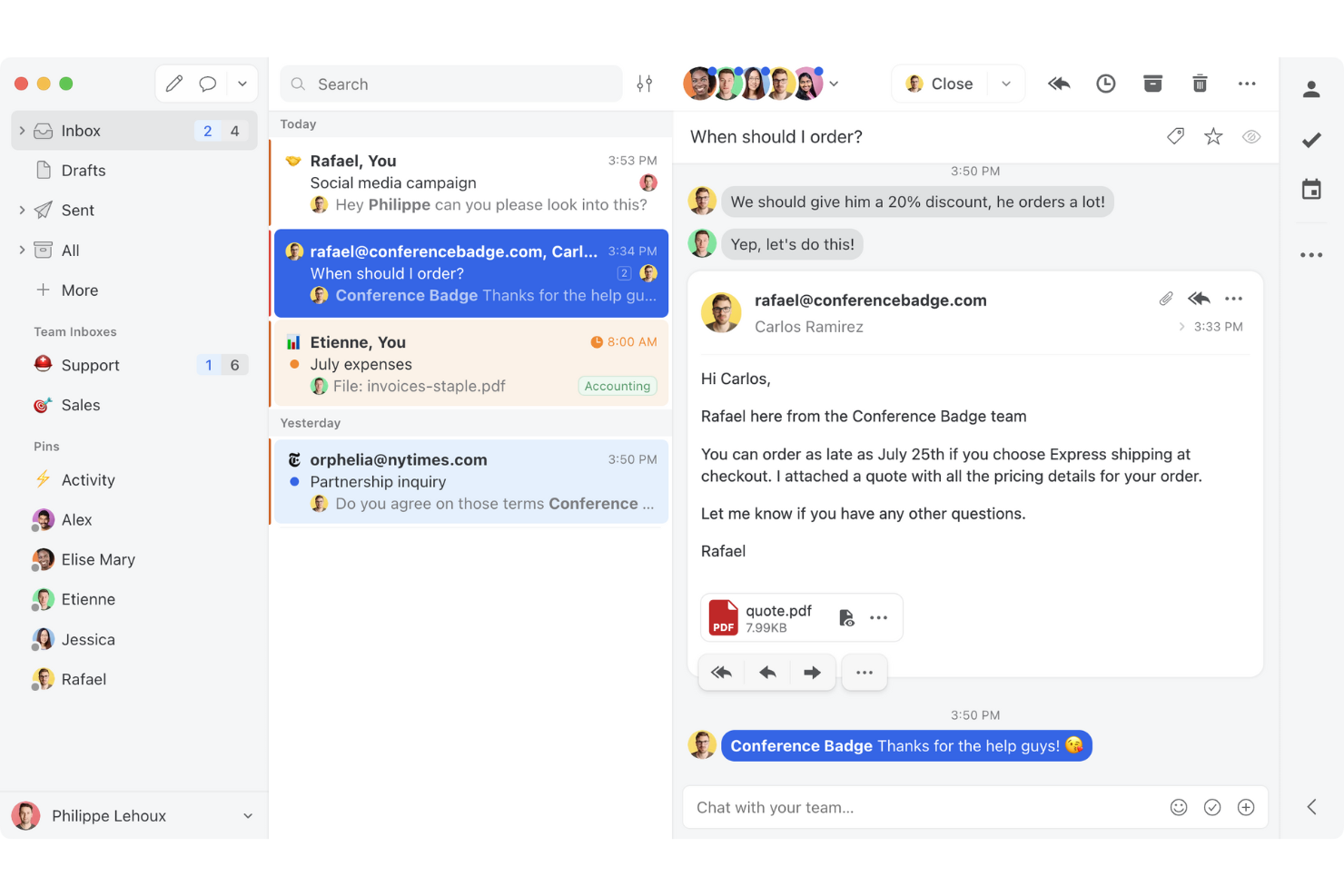
Missive es una plataforma colaborativa de gestión del correo electrónico que reúne bandejas de entrada compartidas, mensajería multicanal, conversaciones internas y automatización impulsada por IA en un solo espacio de trabajo para equipos que atienden a clientes.
¿Para quién es más adecuado Missive?
Missive es una opción excelente para equipos pequeños y medianos de atención al cliente que gestionan grandes volúmenes de correos electrónicos de forma colaborativa y necesitan que todo el equipo trabaje dentro de una única bandeja de entrada compartida.
Por qué elegí Missive
Missive merece estar entre los mejores de mi lista porque su colaboración mediante bandejas de entrada compartidas es realmente diferente a cualquier otra opción de esta categoría. Me encanta que varios agentes puedan editar conjuntamente una misma respuesta en tiempo real, de modo que un representante sénior puede intervenir y perfeccionar un borrador antes de que llegue al cliente. Las conversaciones internas permiten que mi equipo debata la respuesta adecuada directamente en el hilo del correo electrónico, sin cadenas de CC ni intercambios de mensajes en Slack.
Características principales de Missive
- Bandeja de entrada multicanal: Missive consolida el correo electrónico, WhatsApp, SMS, Facebook Messenger, los mensajes directos de Instagram y el chat en directo en un único espacio de trabajo compartido.
- Reglas de automatización impulsadas por IA: El motor de reglas de Missive detecta el tono, los plazos y el spam para activar acciones automatizadas como escalaciones, etiquetas y creación de tareas.
- Barra lateral de CRM y comercio electrónico: Las integraciones nativas con HubSpot, Salesforce, Pipedrive y Shopify muestran el historial del cliente y los datos de las oportunidades directamente junto a los hilos de correo electrónico.
- Asignación automática equilibrada según la carga de trabajo: Las conversaciones pueden distribuirse entre los agentes mediante métodos de distribución rotatoria, al agente con menor carga, a todos a la vez o aleatoria.
- Servidor MCP de Missive: Conecta herramientas externas de IA, como Claude o ChatGPT, para consultar hilos de correo electrónico del servicio de atención al cliente, revisar calendarios y redactar respuestas, manteniendo la revisión del agente como requisito antes del envío.
Integraciones de Missive
Missive ofrece integraciones nativas con HubSpot, Salesforce, Pipedrive, Close, Shopify, ChargeDesk, Asana, ClickUp y Google Drive. También proporciona una API REST abierta con webhooks, conectividad con Zapier para flujos de trabajo personalizados y su nuevo servidor MCP en los planes Productive y Business (requiere activación por parte del administrador).
Pros and Cons
Pros:
- Los equipos pueden editar conjuntamente las respuestas en tiempo real
- El chat interno exclusivo para correo electrónico elimina las complicadas cadenas de CC
- Las reglas impulsadas por IA automatizan el etiquetado y las escalaciones
Cons:
- No ofrece una herramienta nativa de CSAT ni de encuestas de satisfacción
- El seguimiento de los SLA depende de la configuración manual de reglas
New Product Updates from Missive
Missive Adds Conversation Pins
Missive now lets you pin key links, decisions, and notes inside a conversation, keeping them accessible in a dedicated Pins section in the Details sidebar. For more information, visit Missive's official site.
 .
.
Hiver
Ideal para la gestión de correos electrónicos impulsada por IA

Hiver es una plataforma moderna de atención al cliente impulsada por IA que ayuda a los equipos a gestionar correos electrónicos de clientes con facilidad. Permite a los equipos administrar todos sus canales de atención al cliente desde un panel lateral izquierdo y obtener una visión completa de las conversaciones en curso, pendientes y resueltas para cada canal.
Por qué elegí Hiver: Hiver es ideal para equipos dinámicos que desean las potentes funciones de una herramienta de mesa de ayuda completa, pero sin la complejidad y el lastre que suele implicar. Incluye una bandeja de entrada compartida para asignar y rastrear consultas, junto con herramientas de colaboración como notas, menciones con @ y borradores compartidos que mantienen al equipo alineado. Obtienes automatizaciones de flujo de trabajo y gestión de SLA para asegurar respuestas oportunas, además de análisis detallados para monitorear el desempeño y la satisfacción del cliente. La base de conocimientos ayuda a los agentes a evitar lidiar con consultas frecuentes y habituales.
Funciones e integraciones destacadas:
Funciones incluye Hiver AI, que integra capacidades de IA en todos los puntos de contacto durante la atención al cliente. Por ejemplo, Copiloto de IA ayuda a los agentes a responder a los clientes mediante respuestas contextuales, borradores de respuesta y más, mientras que los Agentes de IA permiten configurar flujos de trabajo autónomos para gestionar preguntas frecuentes, seguimientos y otras acciones. También incluye AI Insights, que utiliza las conversaciones para prever problemas y riesgos.
Integraciones incluye Aircall, Asana, Jira, Okta, QuickBooks, Salesforce, Slack, WhatsApp y Zapier, junto con más de 100 plataformas adicionales.
Pros and Cons
Pros:
- Sólidas funciones de colaboración interna
- Soporte al cliente con personas reales disponible 24/7 por chat o correo, en todos los planes (incluso el gratuito)
- Funciones de IA integradas en todas las etapas del proceso de atención al cliente
Cons:
- La experiencia móvil no es tan robusta como la de escritorio
- En comparación con otras plataformas, Hiver ofrece menos integraciones con terceros
New Product Updates from Hiver

Hiver Brings Chat Widget Support to Mobile Apps
Hiver now lets you embed the Hiver Chat Widget in iOS, Android, React Native, and Flutter apps so customers can start chats without leaving your app. For more information, visit Hiver's official site.

Ideal para la integración con software antiguo
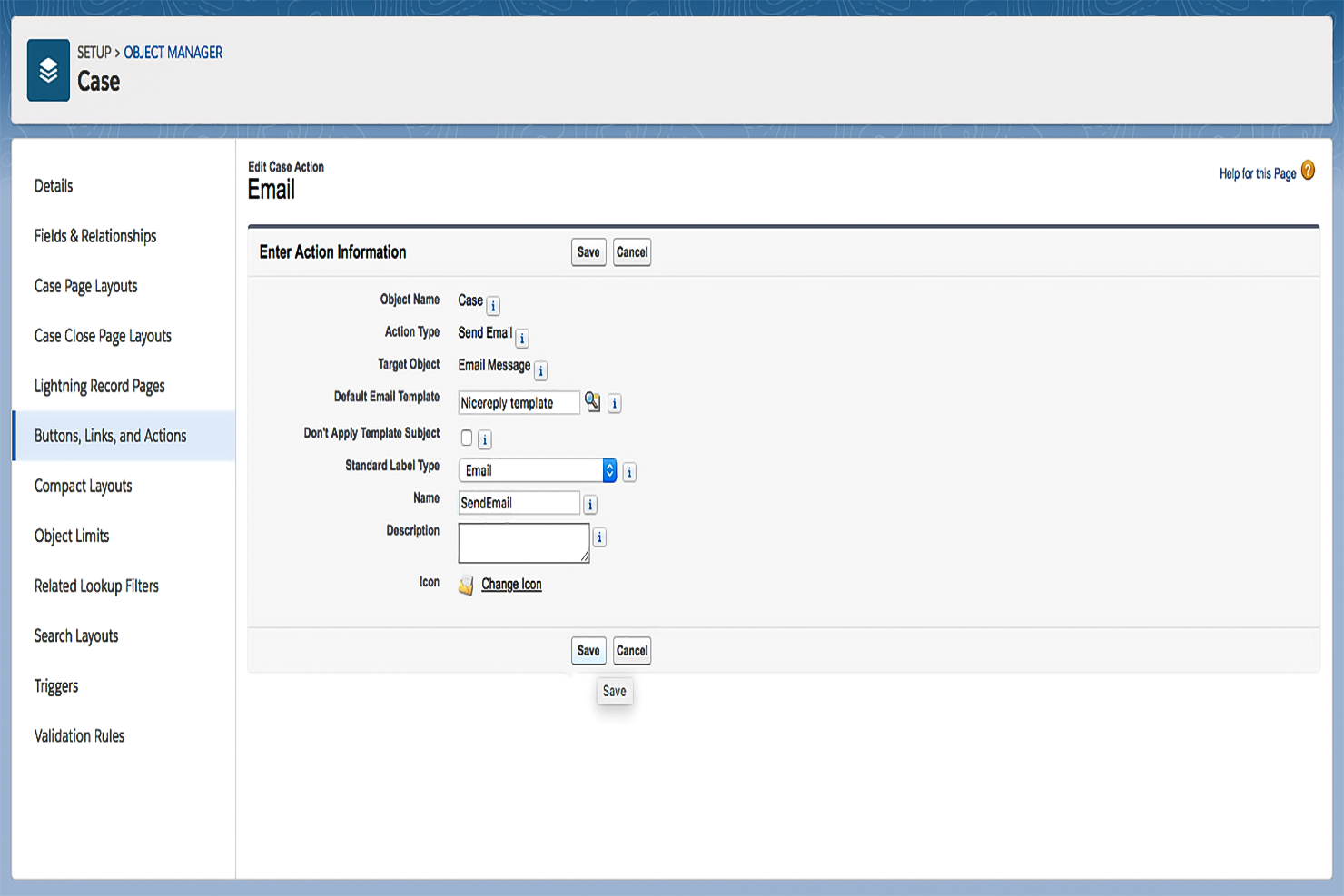
Salesforce Service Cloud es una plataforma de atención al cliente diseñada para grandes empresas que buscan mejorar sus operaciones de soporte al cliente. Facilita la gestión de casos, automatiza flujos de trabajo y ofrece soporte multicanal para aumentar la eficiencia del servicio.
Por qué elegí Salesforce Service Cloud: Diseñado pensando en grandes empresas, ofrece amplias opciones de personalización para adaptarse a necesidades comerciales complejas. Su sistema de gestión de casos maneja eficientemente grandes volúmenes de interacciones con clientes. Las funciones de automatización de la plataforma ayudan a reducir el trabajo manual, permitiendo que tu equipo se concentre en resolver incidencias. Además, sus herramientas de análisis proporcionan valiosos conocimientos para mejorar la toma de decisiones.
Funciones y conexiones destacadas:
Funciones incluyen un sistema integral de gestión de casos que realiza el seguimiento de las consultas de clientes de principio a fin. La plataforma ofrece herramientas de automatización que ayudan a reducir tareas repetitivas. Sus análisis aportan información detallada sobre las interacciones con clientes y el desempeño del servicio.
Integraciones incluyen Slack, Microsoft Teams, Google Workspace, Mailchimp, HubSpot, Zendesk, Dropbox, QuickBooks, Asana y Trello.
Pros and Cons
Pros:
- Interfaz altamente personalizable
- Sólido soporte de la comunidad
- Escalable para empresas en crecimiento
Cons:
- Curva de aprendizaje pronunciada
- Requiere una personalización considerable
New Product Updates from Agentforce Service (formerly Service Cloud)
Agentforce Service Keeps Full Agentforce Voice Transcripts After Calls
Agentforce Service now shows the full conversation history in post-call transcripts for Agentforce Voice calls within the Service Console, giving agents better context for follow-ups. For more information, visit Salesforce’s official site.
 .
.
La mejor con análisis integrados
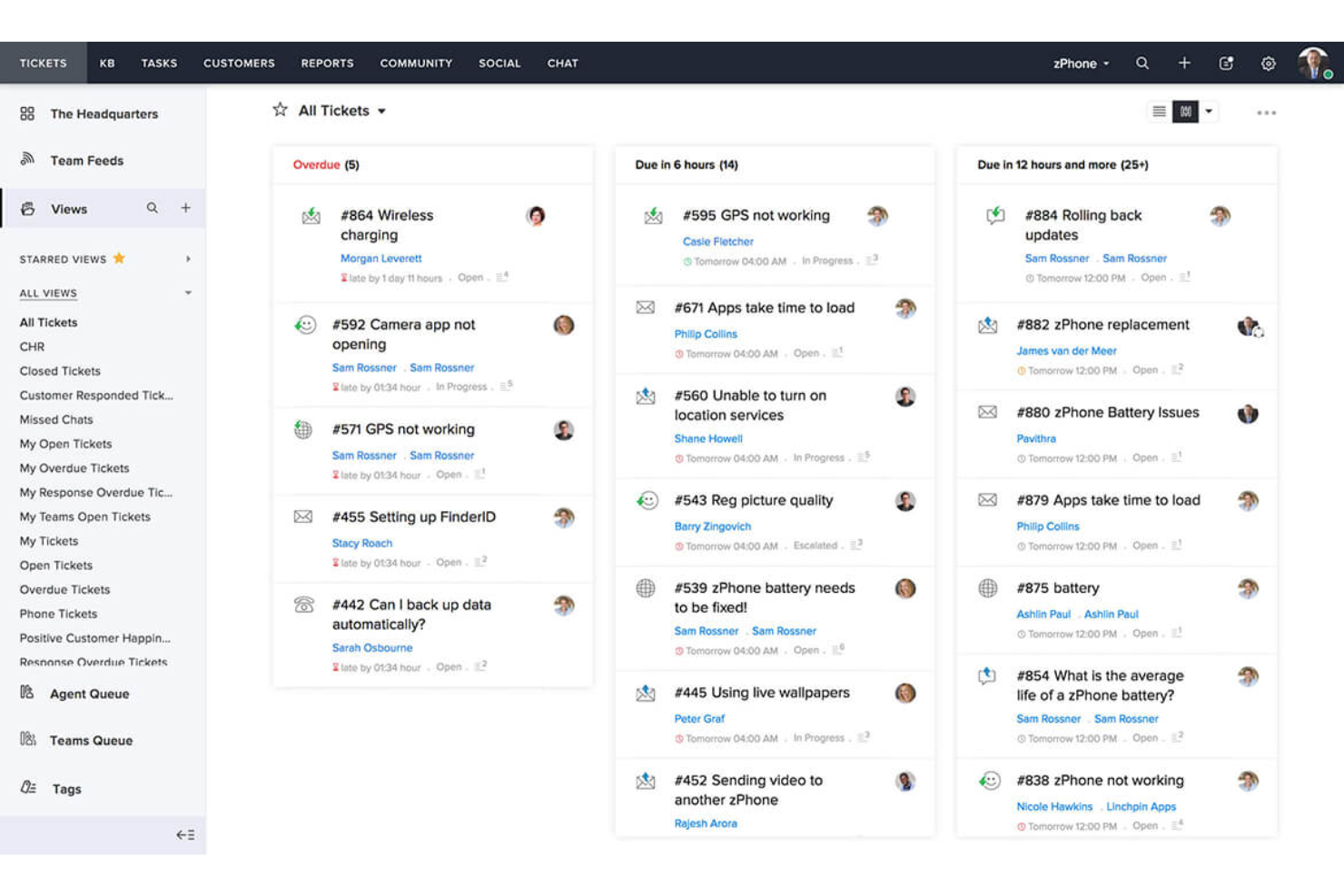
Zoho Desk es una plataforma de servicio al cliente diseñada principalmente para pequeñas empresas, ayudándolas a gestionar tickets de soporte e interacciones con clientes de forma eficiente. Ofrece herramientas para la gestión de tickets, comunicación multicanal y análisis de clientes para mejorar la prestación del servicio.
Por qué elegí Zoho Desk: Ideal para pequeñas empresas por su precio asequible y configuración sencilla. La plataforma ofrece un sistema de tickets fácil de usar que permite a tu equipo rastrear y resolver consultas de clientes. Su soporte multicanal te permite gestionar consultas desde correo electrónico, redes sociales y teléfono en un solo lugar. Los análisis integrados proporcionan información sobre el rendimiento del equipo, ayudándote a tomar decisiones informadas.
Funciones y integraciones destacadas:
Funciones incluyen un sistema de tickets sencillo que organiza las consultas de los clientes de manera eficiente. La función de soporte multicanal te permite gestionar consultas de correo electrónico, redes sociales y teléfono en un solo lugar. Las herramientas de análisis ofrecen información sobre el rendimiento del equipo y la satisfacción del cliente.
Integraciones incluyen Slack, Microsoft Teams, Shopify, Zoho CRM, Google Workspace, Mailchimp, Trello, Asana, QuickBooks y Salesforce.
Pros and Cons
Pros:
- Fácil de personalizar flujos de trabajo
- Asequible para pequeñas empresas
- Soporte multicanal
Cons:
- Herramientas de informes básicas
- Capacidades limitadas sin conexión

Zendesk
La mejor herramienta de gestión de correo electrónico para startups
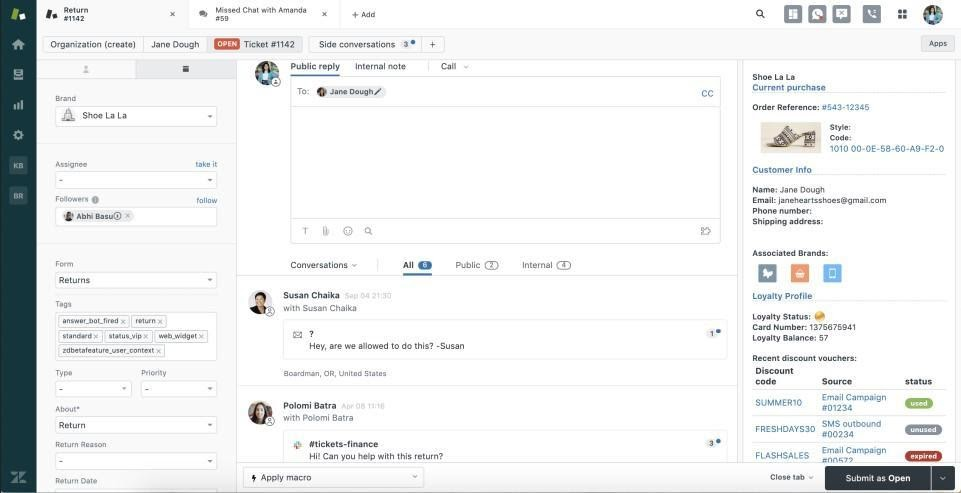
Zendesk es una plataforma de atención al cliente diseñada para empresas de todos los tamaños que necesitan soluciones escalables para gestionar las consultas de los clientes. Ofrece herramientas para la gestión de tickets, soporte y la interacción con los clientes, facilitando una comunicación y un servicio eficientes.
Por qué elegí Zendesk: Ofrece escalabilidad, lo que lo hace adecuado para empresas en crecimiento que necesitan un sistema de soporte flexible. El sistema de tickets ayuda a tu equipo a gestionar de manera eficiente las consultas de los clientes. Con flujos de trabajo personalizables, puedes adaptar la plataforma a las necesidades específicas de tu negocio. Las herramientas de análisis proporcionan información sobre las interacciones con los clientes, ayudando a optimizar tus operaciones de soporte.
Funciones y integraciones destacadas:
Funciones incluyen un sistema de tickets integral que organiza eficientemente las consultas de los clientes. Los flujos de trabajo personalizables permiten adaptar la plataforma a las necesidades de tu empresa. Las herramientas de análisis ofrecen información sobre las interacciones y el rendimiento del servicio.
Las integraciones incluyen Salesforce, Slack, Google Workspace, Shopify, Mailchimp, Trello, Asana, HubSpot, Microsoft Teams y SurveyMonkey.
Pros and Cons
Pros:
- Sistema de tickets eficiente
- Admite comunicación multicanal
- Altamente escalable para empresas en crecimiento
Cons:
- Puede ser complejo de configurar
- Capacidades limitadas sin conexión
New Product Updates from Zendesk
Zendesk Adds Email AI Replies and Predictive Routing
Zendesk’s latest email AI agents update brings configurable knowledge and welcome replies and adds predictive routing for email tickets, so you can tailor your automated emails and get inquiries resolved faster. For more information, visit Zendesk’s official site.

Tidio
El mejor software de atención al cliente para gestionar comunicaciones multicanal
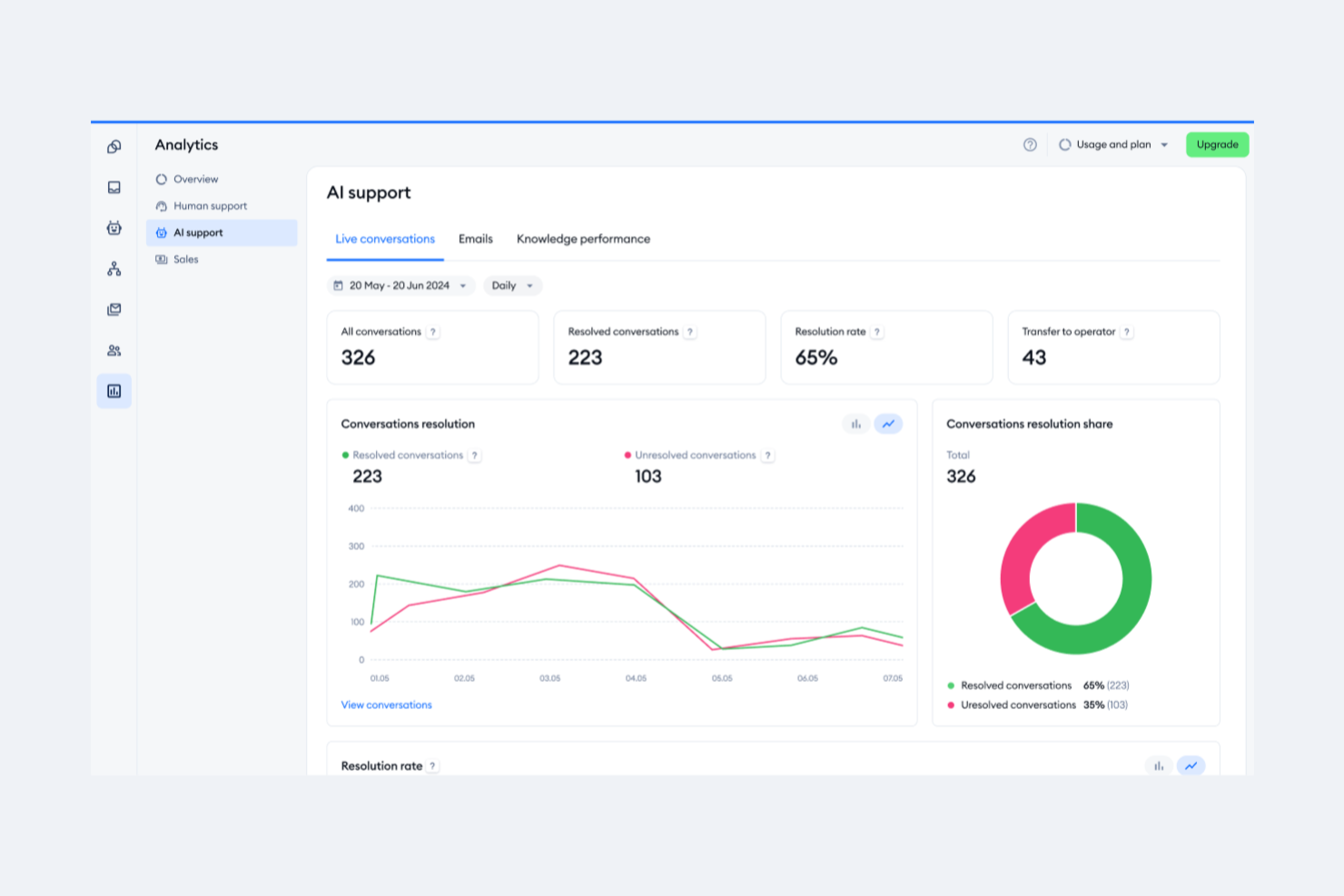
Tidio es una plataforma de comunicación con clientes que atiende principalmente a pequeñas y medianas empresas que buscan mejorar sus capacidades de soporte por chat en vivo. Ofrece chat en vivo, chatbots y gestión de correos electrónicos para ayudar a las empresas a interactuar con sus clientes de manera más efectiva.
Por qué elegí Tidio: Destaca en el soporte por chat en vivo, proporcionando interacción en tiempo real con los visitantes de tu sitio web. Los widgets de chat personalizables del sistema te permiten adaptar el aspecto a tu marca, mejorando la experiencia del usuario. Los chatbots de Tidio automatizan las respuestas, liberando a tu equipo para enfocarse en consultas más complejas. Su integración con el correo electrónico asegura que todas las comunicaciones con los clientes se gestionen en un solo lugar.
Características y conectores destacados:
Características incluyen widgets de chat personalizables que combinan con la estética de tu marca. Los chatbots de la plataforma automatizan respuestas rutinarias, permitiendo que tu equipo se centre en asuntos más complejos. Tidio también se integra con el correo electrónico, centralizando todas las comunicaciones con los clientes.
Las integraciones incluyen Shopify, WordPress, Mailchimp, HubSpot, Zendesk, Google Analytics, Facebook Messenger, Instagram, Wix y Squarespace.
Pros and Cons
Pros:
- Proceso de configuración sencillo
- Gestión centralizada de la comunicación
- Automatización de chatbot eficiente
Cons:
- Opciones de personalización limitadas
- Herramientas básicas de gestión de correo electrónico

Front
Ideal para una bandeja de entrada unificada de operaciones de atención al cliente
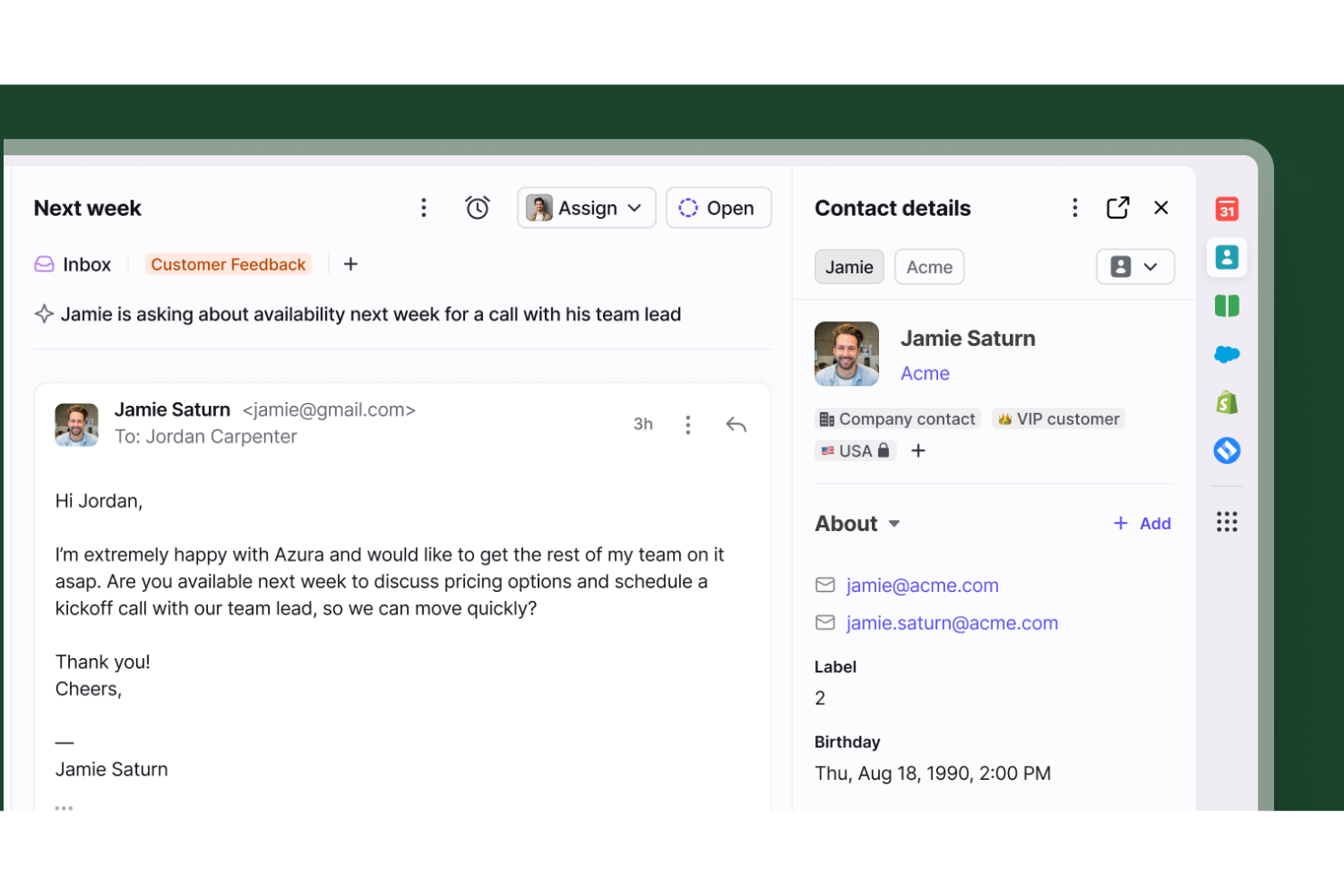
Front sirve como un espacio de trabajo colaborativo centralizado que elimina los buzones de entrada aislados y los seguimientos perdidos para los equipos de atención al cliente. Está diseñado específicamente para organizaciones que necesitan coordinar sin inconvenientes las comunicaciones con los clientes entre varias personas o departamentos, manteniendo a todos perfectamente alineados.
¿Para quién es mejor Front?
Front es ideal para organizaciones medianas y grandes que gestionan altos volúmenes de consultas de clientes y dependen en gran medida de la colaboración entre departamentos para resolverlas.
Por qué elegí Front
Seleccioné Front por su excepcional capacidad para manejar flujos de trabajo complejos y multidisciplinarios. Permite asignar conversaciones a diferentes departamentos, establecer reglas de enrutamiento personalizadas y utilizar espacios de trabajo compartidos que mantienen a todos informados. Las transferencias de conversaciones integradas y los comentarios internos de la plataforma permiten que los equipos colaboren detrás de escena sin perder el contexto, asegurando que los expertos adecuados estén involucrados en cada interacción con el cliente.
Funciones clave de Front
Otras capacidades destacadas que apoyan las operaciones de atención al cliente incluyen:
- Gestión de SLA: Establece y realiza el seguimiento de los acuerdos de nivel de servicio para garantizar la responsabilidad y respuestas oportunas ante cada consulta.
- Detección de colisiones: Recibe alertas en tiempo real cuando varios agentes visualizan o redactan una respuesta al mismo hilo, evitando completamente el trabajo duplicado.
- Analítica e informes: Accede a métricas detalladas sobre el rendimiento del equipo, tiempos de respuesta promedio y tendencias de las conversaciones para optimizar continuamente las operaciones de soporte.
- Mensajería omnicanal: Unifica correo electrónico, chat en vivo, SMS y redes sociales en una sola interfaz para una vista completa de 360 grados del cliente.
Integraciones de Front
Las integraciones incluyen Salesforce, HubSpot, Asana, Jira, Aircall, Slack, Shopify, Intercom, Dialpad y ClickUp.
Pros and Cons
Pros:
- Colaboración entre departamentos
- Evita respuestas duplicadas de los agentes
- Combina correos electrónicos personales y compartidos
Cons:
- La app móvil carece de funciones del escritorio
- Análisis disponible solo en planes superiores

HappyFox
Mejor para mesas de ayuda orientadas al cliente
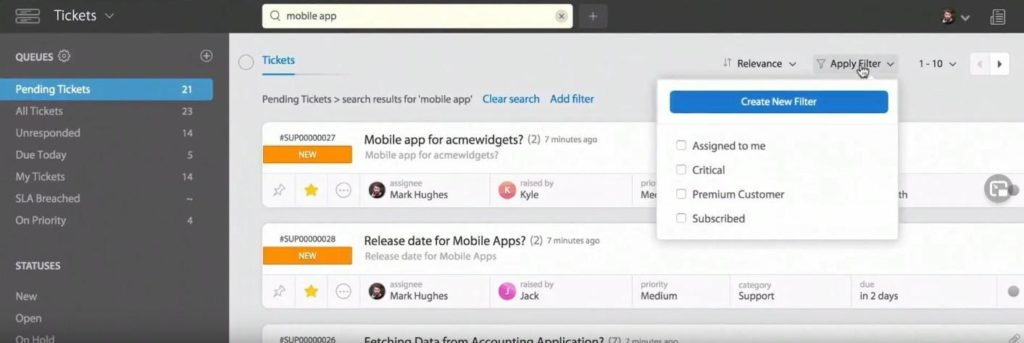
HappyFox es un software de mesa de ayuda que atiende a empresas que buscan mejorar su gestión de tickets y procesos de atención al cliente. Ayuda a los equipos a organizar, rastrear y responder a las consultas de los clientes de manera eficiente, ofreciendo un enfoque simplificado para administrar los tickets de soporte.
Por qué elegí HappyFox: Es ideal para empresas que necesitan sólidas capacidades de gestión de tickets. El software permite a tu equipo categorizar y priorizar los tickets, asegurando que los problemas críticos se aborden primero. Con flujos de trabajo automatizados, puedes asignar tickets según reglas predefinidas, reduciendo el esfuerzo manual. Las herramientas de informes ofrecen información sobre el desempeño de soporte, ayudándote a tomar decisiones basadas en datos.
Funciones destacadas e integraciones:
Funciones incluyen flujos de trabajo automatizados que optimizan la asignación y respuesta de tickets. La capacidad para categorizar y priorizar tickets permite a tu equipo enfocarse en los temas urgentes. Las herramientas de informes ofrecen información sobre el rendimiento del soporte y ayudan a identificar áreas de mejora.
Integraciones incluyen Slack, Salesforce, Shopify, QuickBooks, Jira, Mailchimp, Google Workspace, HubSpot, Microsoft Teams y Trello.
Pros and Cons
Pros:
- Fuerte categorización de tickets
- Automatización de flujos de trabajo eficiente
- Proceso de escalamiento sencillo
Cons:
- Funcionalidad limitada de la aplicación móvil
- Puede requerir muchos recursos
Otras Opciones de Software de Gestión de Emails para Atención al Cliente
Si buscas algunas herramientas extra de gestión de correos electrónicos, aquí tienes más opciones.
- monday service
Ideal para la gestión centralizada de correos electrónicos
- Issuetrak
Ideal para el envío de tickets omnicanal
- Pega
Mejor respuesta rápida a grandes volúmenes de correos electrónicos
- SAAS First
La mejor para respuestas generadas por IA
- TeamSupport
Ideal para la gestión de correos convertidos en actividades
- SparrowDesk
Ideal para automatizar las interacciones con clientes


Cómo Evalúo el Software de Gestión de Correos Electrónicos para Atención al Cliente
Divido mi evaluación en criterios básicos—como la funcionalidad de bandeja de entrada compartida y la asignación de tickets—y diferenciadores como funciones de IA e integraciones que distinguen las mejores opciones.
Funcionalidad Principal (Requisitos Fundamentales para Esta Lista)
Estas capacidades esenciales sirven como criterios de aceptación para la inclusión en mi lista:
- Bandeja de Entrada Compartida por el Equipo: Evalúo si los agentes pueden gestionar de manera colaborativa direcciones compartidas como soporte@ o ayuda@ en un solo espacio de trabajo con visibilidad en tiempo real sobre quién maneja cada caso.
- Gestión y Asignación de Tickets por Correo: Cada herramienta debe convertir los correos entrantes en tickets rastreables con asignación clara de responsables, estados de flujo de trabajo y detección de colisiones para evitar respuestas dobles.
- Automatización y Reglas de Ruteo: Busco constructores de reglas que etiqueten automáticamente, asignen y encaminen correos según condiciones como remitente, tema o plazos de SLA sin necesidad de clasificación manual.
- Respuestas Predefinidas y Plantillas: Los equipos de soporte atienden las mismas consultas diarias sobre restablecimiento de contraseñas o estado de pedidos, así que verifico si hay bibliotecas de plantillas compartidas con variables dinámicas y macros.
- Herramientas de Colaboración Interna: Analizo cómo los agentes incluyen a sus compañeros—las notas privadas, menciones con @ y borradores compartidos deben ocurrir dentro del hilo, no en un mensaje paralelo por Slack.
- Informes y Seguimiento de SLA: Los paneles de control deben mostrar tiempos de respuesta, tasas de resolución y carga de trabajo de los agentes para que los líderes puedan detectar cuellos de botella y monitorear el cumplimiento de los SLA de un vistazo.
Califico a cada proveedor en una escala del 0 (no ofrece la funcionalidad) al 5 (destaca en esta área) para cada criterio.
Los proveedores deben alcanzar una puntuación promedio mínima para ser considerados en mi lista. A partir de ahí, valoro lo que diferencia a cada plataforma.
Factores Diferenciadores (Lo que Distingue a los Proveedores)
Una vez que elaboro mi lista, así contrasto y comparo diferentes proveedores:
Características Destacadas
Las sugerencias de respuesta con IA y la detección de sentimiento son clave para equipos que buscan acelerar los tiempos de resolución y detectar peticiones urgentes antes de que escalen. También busco barras laterales con contexto del cliente que integren historiales de pedidos o datos del CRM directamente en la bandeja, facilitando la personalización de las respuestas de los agentes. Las bases de conocimiento integradas son otra ventaja, ya que permiten desviar consultas repetitivas y mantener todo unificado en una sola área de trabajo.
Más Allá de las Características
Las integraciones son importantes aquí—verifico si la plataforma se conecta nativamente con CRMs como Salesforce o HubSpot y herramientas de comercio electrónico como Shopify, ya que los agentes necesitan contexto del cliente sin cambiar de pestaña. La estructura de precios es otro factor importante, especialmente si un proveedor cobra por agente, por bandeja o por volumen, lo que puede alterar drásticamente los costos a medida que tu equipo crece. Para industrias reguladas, también evalúo certificaciones de seguridad como SOC 2 y cumplimiento de GDPR, así como el soporte para SSO y controles de acceso basados en roles.
Cómo Elegir un Software de Gestión de Emails para Atención al Cliente
Es fácil perderse entre largas listas de funciones y complejas estructuras de precios. Para ayudarte a mantener el enfoque durante tu proceso de selección de software, aquí tienes una lista de factores a tener en cuenta:
| Factor | Qué Considerar |
|---|---|
| Escalabilidad | Asegúrate de que el software pueda crecer con tu equipo, gestionando mayores volúmenes de correos y más usuarios. |
| Integraciones | Busca software que se integre con herramientas que tu equipo ya use, como sistemas de CRM y software de mesa de ayuda, |
| Personalización | Comprueba si puedes adaptar los flujos de trabajo, paneles y características a las necesidades específicas de tu equipo. |
| Facilidad de uso | Considera lo intuitiva que es la interfaz y qué tan rápido tu equipo puede adaptarse. |
| Presupuesto | Evalúa si el precio se ajusta a tu presupuesto, incluyendo costos ocultos o cargos adicionales. |
| Medidas de seguridad | Verifica que el software tenga sólidas medidas de protección de datos para mantener la información de tus clientes segura. |
| Opciones de soporte | Busca soporte disponible 24/7, múltiples canales y acceso a una base de conocimientos completa. |
| Análisis | Asegúrate de que la herramienta ofrezca funciones de reportes que brinden información sobre el desempeño de tu equipo y las interacciones con los clientes. |
Tendencias en el Software de Gestión de Emails para Atención al Cliente
En mi investigación, consulté innumerables actualizaciones de productos, comunicados de prensa y registros de lanzamientos de diferentes proveedores de software de gestión de correos electrónicos para atención al cliente. Estas son algunas de las tendencias emergentes a las que les estoy prestando atención:
- Personalización impulsada por IA: La inteligencia artificial se está utilizando para adaptar las interacciones con los clientes en función de comportamientos y preferencias previas. Esta tendencia ayuda a las empresas a ofrecer un soporte más relevante, lo que incrementa la satisfacción del cliente. Proveedores como Zendesk han integrado IA para sugerir respuestas personalizadas.
- Integración de soporte omnicanal: Las empresas están migrando hacia plataformas que unifican el correo electrónico con otros canales de comunicación como redes sociales y chat en vivo. Esta integración ofrece una experiencia de cliente cohesionada, permitiendo gestionar todas las interacciones en un solo lugar. Freshdesk es un ejemplo de plataforma que adopta esta tendencia.
- Análisis en tiempo real: El análisis de datos en tiempo real se está convirtiendo en algo crucial para mejorar la eficiencia del servicio. Estas analíticas brindan información sobre el desempeño del equipo y las interacciones con los clientes al instante, lo que posibilita una toma de decisiones rápida. Plataformas como Salesforce Service Cloud están ofreciendo estas capacidades.
- Funciones de colaboración remota: Con más equipos trabajando de forma remota, las herramientas que potencian la colaboración están en auge. Funciones como bandejas de entrada compartidas y comentarios internos permiten a los equipos trabajar juntos de manera efectiva, sin importar la ubicación. Front es conocido por sus sólidas funciones de colaboración remota.
- Enfoque en la experiencia del usuario: Hay un énfasis creciente en el diseño intuitivo y la facilidad de uso para reducir el tiempo de capacitación e incrementar la adopción. El software con interfaces sencillas y navegación amigable está siendo prioritario para las empresas. Help Scout destaca por su compromiso de ofrecer una excelente experiencia al usuario.
¿Qué es el software de gestión de correos electrónicos para atención al cliente?
El software de gestión de correos electrónicos para atención al cliente es una herramienta que ayuda a las empresas a gestionar y organizar las consultas de los clientes recibidas por correo electrónico. Normalmente utilizada por los equipos de soporte, estas soluciones aportan valor mejorando los tiempos de respuesta y asegurando una comunicación constante.
Funciones como la gestión de tickets, el análisis en tiempo real y el soporte omnicanal ayudan a organizar consultas, analizar el rendimiento y ofrecer interacciones integradas con los clientes. En conjunto, estas herramientas potencian la eficiencia y efectividad de las operaciones de atención al cliente.
Características del software de gestión de correos electrónicos para atención al cliente
Al elegir un software de gestión de correos electrónicos para atención al cliente, pon atención a las siguientes características clave:
- Gestión de tickets: Organiza las consultas de los clientes en tickets gestionables, asegurando que nada pase desapercibido.
- Soporte omnicanal: Integra diversos canales de comunicación, permitiendo interacciones fluidas con los clientes a través de varias plataformas.
- Análisis en tiempo real: Ofrece información sobre el desempeño del equipo y las interacciones con los clientes, permitiendo ajustes y mejoras rápidas.
- Flujos de trabajo personalizables: Permite a los equipos adaptar los procesos a las necesidades específicas del negocio, mejorando la eficiencia.
- Personalización impulsada por IA: Utiliza IA para adaptar las respuestas según el historial del cliente, mejorando la satisfacción y el compromiso.
- Bandejas de entrada compartidas: Facilita la colaboración al permitir que varios miembros del equipo accedan y gestionen correos electrónicos en una bandeja unificada.
- Herramientas de automatización: Reduce tareas manuales al automatizar procesos repetitivos como respuestas y asignación de tickets.
- Perfiles de clientes: Ofrece información detallada sobre cada cliente, ayudando a personalizar y mejorar la calidad del servicio.
- Herramientas de informes: Supervisa y analiza métricas de desempeño, ayudando a la toma de decisiones estratégicas y a la optimización de resultados.
- Medidas de seguridad: Garantiza la protección de los datos del cliente con mecanismos de seguridad robustos, manteniendo la confianza y el cumplimiento normativo.
Beneficios del software de gestión de correos electrónicos para atención al cliente
Implementar un software de gestión de correos electrónicos para la atención al cliente proporciona varios beneficios para tu equipo y tu negocio. Aquí tienes algunos a los que puedes aspirar:
- Tiempos de respuesta mejorados: Las herramientas de automatización ayudan a tu equipo a responder a las consultas de los clientes más rápido, mejorando la satisfacción del cliente.
- Colaboración mejorada: Los buzones compartidos y las funciones de comentarios internos facilitan que tu equipo trabaje en conjunto en los asuntos de los clientes.
- Mejores conocimientos sobre el cliente: Los perfiles de los clientes y los análisis en tiempo real brindan información valiosa que ayuda a adaptar el soporte a las necesidades individuales.
- Mayor eficiencia: La gestión de tickets y los flujos de trabajo personalizables optimizan los procesos, reduciendo la carga de trabajo de tu equipo.
- Comunicación consistente: El soporte omnicanal asegura que los clientes reciban un servicio uniforme en todos los canales, mejorando su experiencia.
- Decisiones basadas en datos: Las herramientas de informes y análisis ofrecen información sobre el rendimiento, ayudando en la planificación estratégica y las mejoras.
- Mejora de los KPIs: Mejores métricas de satisfacción del cliente, como CSAT, NPS y CES para medir la satisfacción, mejorar las experiencias y aumentar la lealtad.
Costos y Precios del Software de Gestión de Correos Electrónicos de Atención al Cliente
Seleccionar un software de gestión de correos electrónicos de atención al cliente requiere comprender los diferentes modelos y planes de precios disponibles. Los costos varían según las funciones, el tamaño del equipo, los complementos y más. La siguiente tabla resume los planes comunes, sus precios promedio y las funciones típicas incluidas en las soluciones de software de gestión de correos electrónicos de atención al cliente:
Tabla Comparativa de Planes para el Software de Gestión de Correos Electrónicos de Atención al Cliente
| Tipo de Plan | Precio Promedio | Funciones Comunes |
|---|---|---|
| Plan Gratuito | $0 | Gestión básica de tickets, soporte por correo electrónico limitado e informes básicos. |
| Plan Personal | $5-$25/usuario/mes | Gestión de tickets, soporte por correo electrónico, personalización limitada y análisis básicos. |
| Plan Empresarial | $30-$75/usuario/mes | Gestión avanzada de tickets, soporte multicanal, flujos de trabajo personalizables y análisis en tiempo real. |
| Plan Corporativo | $80-$150/usuario/mes | Personalización completa, informes avanzados, análisis basados en IA y gestión de cuentas dedicada. |