

Avis sur Custify : avantages, inconvénients, fonctionnalités et tarifs expliqués
Custify se distingue par son automatisation intuitive et ses informations exploitables, ce qui en fait une solution idéale pour les équipes SaaS à la recherche d'une gestion de la réussite client efficace et fondée sur les données, sans complexité excessive.

Nous évaluons les outils indépendamment ; les commissions aident à financer nos tests. Consultez notre politique de transparence et notre méthodologie.
Custify is a customer success software built for B2B SaaS teams that need to track customer health, manage onboarding, and intervene before accounts churn. I'd consider it if your team is outgrowing spreadsheets but doesn't need the complexity of an enterprise platform like Gainsight—Custify gives you health scoring, lifecycle automation, and task management in a setup that smaller or mid-market teams can actually own without a dedicated ops specialist.
Custify Evaluation Summary

4.9/5
- Pricing upon request
- Free demo available
Pourquoi faire confiance à nos recommandations de logiciels
6,700+
Reviews
20
Industry experts
16+
Evaluation factors
14
Years
Notre équipe teste et évalue des logiciels depuis 2012. En tant que leaders CX nous-mêmes, nous savons à quel point il est difficile — et important — de choisir le bon logiciel.
Pour ce guide, nous avons évalué les outils grâce à des tests pratiques et une recherche indépendante, en notant les outils selon nos critères de sélection.
Nos avis reflètent notre jugement éditorial humain, et non un argumentaire de vente.
 Gui DrusinaCreative Director
 Tim FisherVP of AI
Custify Overview
In my experience, Custify strikes a strong balance between usability and depth, with a clean interface and automation that’s easy to set up. Its customer health scoring and playbooks are more actionable than most, and the onboarding support is responsive. While its integrations list isn’t as long as some, the core options cover most SaaS needs.
If you’re judging solutions for fast onboarding, clear reporting, and hands-on support, Custify is a top pick for SaaS companies that want actionable insights without a steep learning curve.
Pros
- Custify provides intuitive data visualization that makes it easy for your team to identify key customer insights.
- It offers excellent customer support, ensuring your team gets quick and helpful responses when needed.
- The software's onboarding process is smooth, helping your team get up to speed without hassle.
Cons
- Some users find the platform's learning curve steep, requiring time to master all functionalities.
- The system may overwhelm small teams with features they don't need, making it less ideal for smaller businesses.
- The software may lack certain advanced customization options compared to other tools.
Is Custify Right For Your Needs?
Who Would be a Good Fit for Custify?
Custify is ideal for SaaS companies and subscription-based businesses that need to enhance customer retention. Your team will benefit from its data visualization tools, which provide clear insights into customer behaviors and trends. Tech startups and online service providers will find its intuitive interface valuable for managing customer interactions efficiently. These functionalities enable your team to focus on building and maintaining strong customer relationships, which are crucial for sustained growth.
- SaaS CompaniesCustify helps your team track customer engagement and product usage effectively.
- Tech StartupsYour startup can leverage Custify’s insights to optimize customer retention strategies.
- Customer Success TeamsCustify supports your team’s efforts with actionable data and efficient workflows.
- Online Service ProvidersYou can use Custify to enhance customer interaction and satisfaction.
- Mid-Sized BusinessesCustify’s scalable features accommodate your growing customer base seamlessly.
- Subscription-Based ModelsCustify provides the tools you need to manage subscriptions and reduce churn.
Who Would be a Bad Fit for Custify?
Custify isn’t ideal for small businesses or teams that don’t have a dedicated customer success function. The platform’s robust features might overwhelm your team if you don’t need in-depth analytics or extensive customer management tools. Companies in industries that don’t rely on subscription models or those that require significant customization might find Custify’s offerings unnecessary. If your business doesn’t focus on long-term customer engagement, Custify might not be the right fit.
- Small RetailersCustify’s features may be excessive for your straightforward sales needs.
- FreelancersYou likely won’t need Custify’s advanced customer success functionalities for solo work.
- Non-Subscription ServicesYour business model doesn’t align with Custify’s focus on subscription management.
- Highly Specialized IndustriesYou might find Custify lacks the customization options you need.
- Minimal Customer InteractionIf customer engagement isn’t a priority, Custify’s tools might be irrelevant.
- Budget-Conscious StartupsCustify’s comprehensive features might not justify the investment for your tight budget.
Comment nous testons et évaluons les outils
Nous avons passé des années à bâtir, affiner et améliorer notre système de test et de notation des logiciels. Notre grille d’évaluation est conçue pour saisir les subtilités des sélections logicielles et ce qui fait qu’un outil est efficace, en se concentrant sur les éléments essentiels du processus de décision. Vous trouverez ci-dessous le détail de notre méthodologie d’évaluation et de notation selon sept critères. Cela nous permet de fournir une évaluation impartiale des logiciels basée sur les fonctionnalités principales, les options uniques, la facilité d’utilisation, l’intégration, la prise en main, l’assistance, les avis clients et le rapport qualité/prix.
Fonctionnalité principale (25% de la note totale)
Le point de départ de notre évaluation concerne toujours la fonctionnalité principale de l’outil. Possède-t-il les fonctions que l’on attend normalement, et ces fonctions sont-elles accessibles pour toutes les offres ? Nous attendons qu’un outil soit au niveau des capacités minimales de ses concurrents.
Fonctionnalités différenciantes (25% de la note totale)
Nous évaluons ici les fonctionnalités qui se distinguent de la fonction de base habituellement présente dans ce type de logiciel. Un score élevé récompense des fonctions spécialisées qui rendent le produit plus efficace ou unique et offrent une valeur ajoutée à l’utilisateur. Nous évaluons également la capacité à s’intégrer facilement avec d’autres solutions courantes, ce qui accroît l’intérêt et l’utilité de l’outil. Les logiciels qui proposent de nombreuses intégrations natives, des connexions tierces ou une API pour les intégrations personnalisées obtiennent une meilleure note.
Facilité d’utilisation (10% de la note totale)
Nous mesurons la rapidité et la simplicité pour effectuer les tâches clés avec l’outil. On valorise le design intuitif, les applications mobiles, les templates préconçus et la capacité à simplifier les tâches complexes.
Accompagnement à la prise en main (10% de la note totale)
L’adoption rapide est essentielle. Nous examinons donc la facilité pour un nouvel utilisateur à prendre l’outil en main avec peu de formation. Nous vérifions la rapidité d’installation et d’utilisation sans expérience préalable. Les meilleurs logiciels exigent peu ou pas de support pour démarrer.
Assistance (10% de la note totale)
Nous évaluons la réactivité et la facilité d’obtenir de l’aide par téléphone, chat ou base de connaissances. Les outils offrant un support humain en temps réel ont le meilleur score ; les chatbots sont moins bien valorisés.
Avis clients (10% de la note totale)
En plus de notre expertises, nous prenons en compte le score NPS (Net Promoter Score) accordé par les utilisateurs actuels et passés. Nous analysons la probabilité qu’ils réutilisent l’outil. Les outils à score élevé possèdent un excellent NPS utilisateur.
Rapport qualité/prix (10% de la note totale)
Après examen des autres critères, nous considérons le prix moyen des offres principales par rapport aux fonctionnalités essentielles évaluées. Les solutions offrant plus pour un prix inférieur obtiennent un meilleur score.
Core Features
Customer 360
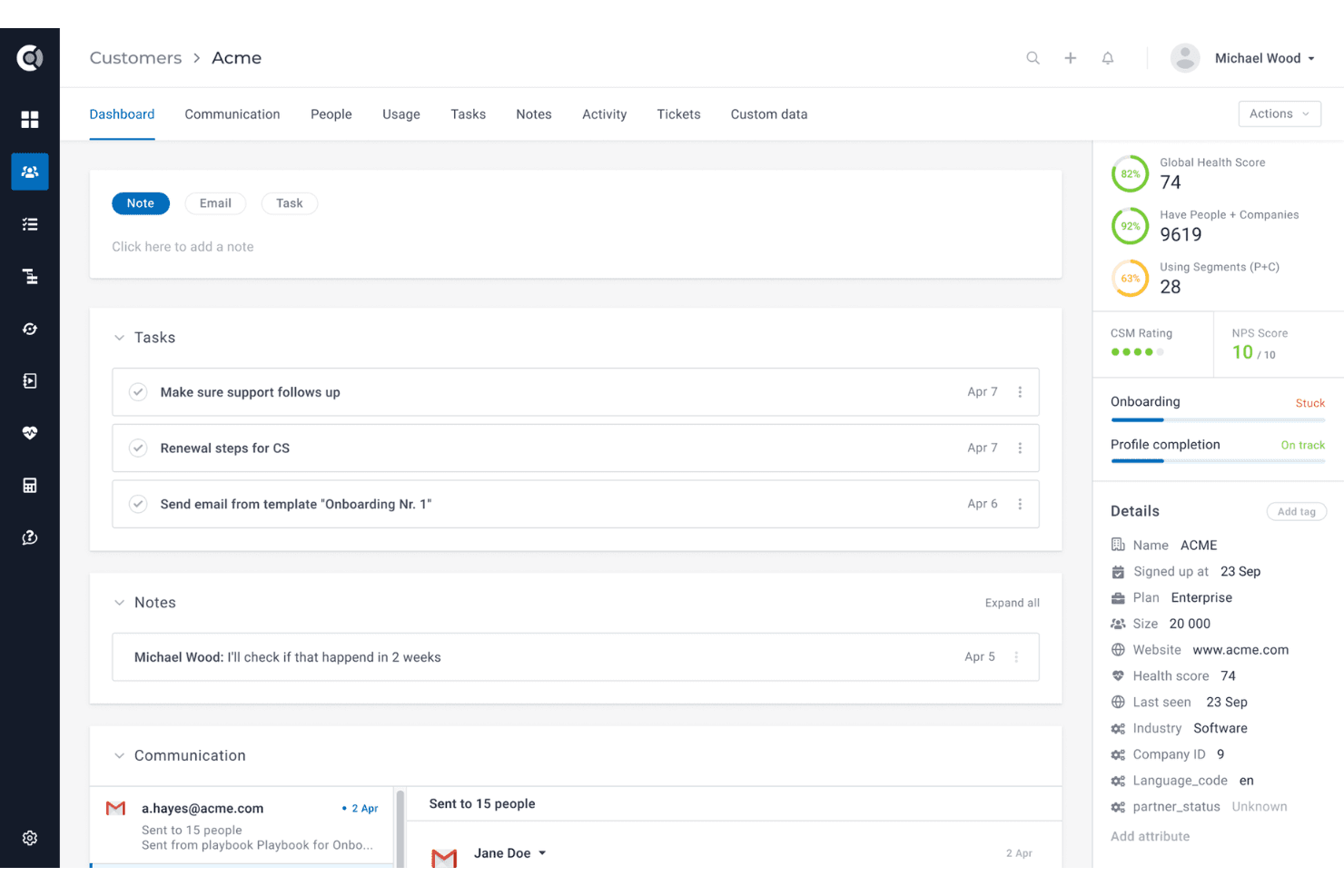
See all customer data, product usage, and lifecycle stages in one dashboard. This gives teams a complete, real-time view of every account.
Health Scoring
Define custom KPIs and track customer health with dynamic scoring. Instantly spot churn risks and upsell opportunities.
Playbooks and Automation
Automate repetitive workflows and trigger playbooks for onboarding, renewals, or at-risk accounts. Teams can focus on high-value tasks while routine actions run in the background.
Task Management and Alerts
Automatically generate actionable tasks and alerts based on customer activity. Never miss a follow-up or renewal deadline.
Dashboards and Reporting
Build custom dashboards to track KPIs and customer success metrics. Visualize trends and performance at a glance.
Customer Segmentation
Custify lets you categorize your customers based on behavior and engagement, helping your team target specific groups with tailored strategies.

Ease of Use
Custify is refreshingly straightforward, with a clean interface and intuitive navigation that lets teams get up and running quickly. Users often mention how easy it is to set up health scores, automate playbooks, and customize dashboards without technical help. The onboarding process is guided and hands-on, which reduces setup friction.
Compared to many customer success platforms, Custify’s usability stands out for busy teams who want actionable insights without a steep learning curve.
Integrations
Custify integrates with HubSpot, Salesforce, Pipedrive, Intercom, Zendesk, Jira, Slack, Stripe, Google Sheets, and Calendly, among others.
Custify also offers a comprehensive API and connects with third-party integration tools like Segment and Make.

Custify Specs
- Analytics: Yes
- API: Yes
- Calendar Management: Yes
- Chat: No
- Click-to-Dial: Yes
- CRM Integration: Yes
- Customer Management: Yes
- Customer Service: Yes
- Dashboard: Yes
- Dashboards: No
- Data Export: Yes
- Data Import: No
- Data Visualization: Yes
- External Integrations: Yes
- Feedback Management: Yes
- Knowledge Base: Yes
- Lead Management: Yes
- Lead Scoring: No
- Multi-Source Feedback: Yes
- Multi-User: Yes
- Net Promoter Score: Yes
- Notifications: Yes
- Omnichannel Referrals: No
- Online Surveys: Yes
- Review Moderation: Yes
- Scheduling: Yes
- Sentiment Analysis: No
- Social Media Monitoring: No


