
14 Customer Health Score Software for 2026

Customer Health Score Software Shortlist
Here's my pick of the 10 best software from the 14 tools reviewed.


Customer health score software tracks and analyzes customer engagement, product usage, and satisfaction to help your team identify risks and growth opportunities. If you’re searching for the best customer health score software, you likely need to predict churn, prioritize outreach, and deliver proactive support, without relying on guesswork or scattered data.
This list will help you compare leading tools, understand their unique features, and choose the right solution to monitor customer well-being and drive retention in 2026.
Why Trust Our Software Reviews
Best Customer Health Score Software Summary
This comparison chart summarizes pricing details for my top customer health score software selections to help you find the best one for your budget and business needs.
| Tool | Best For | Trial Info | Price | ||
|---|---|---|---|---|---|
| 1 | Best for automated risk alerts | Free demo available | Pricing upon request | Website | |
| 2 | Best for real-time account monitoring | Free demo available | Pricing upon request | Website | |
| 3 | Best for early-stage churn detection | Free demo available | From $59/seat/month (min. 3 seats, billed annually) | Website | |
| 4 | Best for multi-source data aggregation | Free demo available | Pricing upon request | Website | |
| 5 | Best for SaaS workflow integrations | Free demo available | Pricing upon request | Website | |
| 6 | Best for customizable health metrics | Free demo available | Pricing upon request | Website | |
| 7 | Best for renewal forecasting features | Free demo available | Pricing upon request | Website | |
| 8 | Best for small business adoption | 14-day free trial | From $49/month | Website | |
| 9 | Best for key account management teams | Free demo available | Pricing upon request | Website | |
| 10 | Best for B2B customer segmentation | Free demo available | From $617/month (billed annually) | Website |
-

SupportYourApp
Visit WebsiteThis is an aggregated rating for this tool including ratings from Crozdesk users and ratings from other sites.4.7 -
Freshdesk
Visit WebsiteThis is an aggregated rating for this tool including ratings from Crozdesk users and ratings from other sites.4.4 -
Hiver
Visit WebsiteThis is an aggregated rating for this tool including ratings from Crozdesk users and ratings from other sites.4.6




Customer Health Score Software Reviews
Below are my detailed summaries of customer health score software that made it onto my shortlist. My reviews offer a detailed look at the features, best use cases, and integrations of each platform to help you find the best one for you.

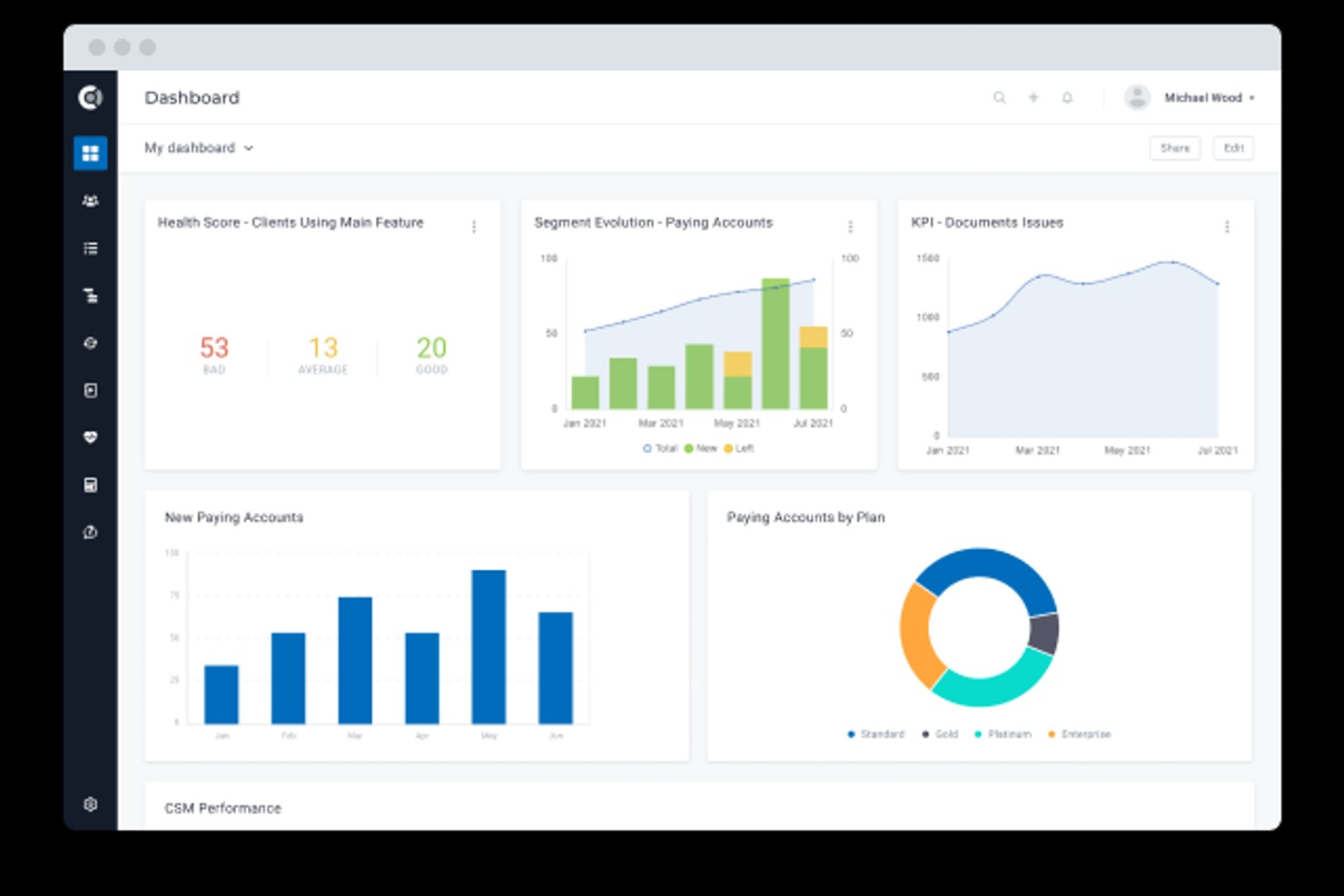
Custify is a customer success platform designed for SaaS businesses that want to monitor and improve customer health. It appeals to teams looking for automated insights and proactive management of customer relationships. With Custify, you can centralize customer data and identify risks before they impact retention.
Who Is Custify Best For?
Customer success and account managers in small to mid-sized SaaS businesses in North America and Europe automating risk alerts and engagement tracking.
Why I Picked Custify
What stands out about Custify is its focus on automated risk alerts that help customer success teams act before issues escalate. I picked Custify because it lets you set up custom health score triggers that automatically notify your team when a customer’s behavior signals churn risk or declining engagement. The platform also provides a timeline of risk events and recommended actions, so you can quickly prioritize outreach. This approach is especially useful for SaaS businesses that need to manage large portfolios and can’t afford to miss early warning signs.
Custify Key Features
Some other features in Custify that support customer health scoring include:
- Custom health score modeling: Build and adjust health score formulas using your own data points and logic.
- Customer segmentation: Group customers by lifecycle stage, usage patterns, or risk level for targeted actions.
- Playbook automation: Set up automated workflows for onboarding, renewals, and upsell opportunities.
- 360-degree customer profiles: View all customer interactions, product usage, and account history in one place.
Custify Integrations
Integrations include Salesforce, HubSpot, Zendesk, Intercom, Slack, Jira Service Management, Mixpanel, Pendo, Snowflake, and more.
Pros and Cons
Pros:
- Visual customer journey mapping tools included
- Aggregates data from multiple business systems
- Custom health score formulas for complex needs
Cons:
- Some integrations require manual configuration
- Limited customization for reporting dashboards

ChurnZero gives customer success teams a way to track account health using live data and engagement signals. It’s a strong fit for SaaS businesses and subscription-based companies that need to monitor customer activity and intervene quickly. Teams looking to centralize customer insights and automate health scoring will find ChurnZero’s approach especially relevant.
Who Is ChurnZero Best For?
Customer success managers and account teams in mid-sized to large SaaS companies in North America and Europe monitoring real-time account activity and engagement.
Why I Picked ChurnZero
I picked ChurnZero because its real-time account monitoring stands out for teams that need to act quickly on customer health changes. The platform updates health scores instantly as customer behaviors shift, so you can catch early warning signs before they become bigger issues. I also appreciate how ChurnZero surfaces engagement data and usage trends directly in the dashboard, making it easy to spot at-risk accounts. Automated alerts and playbooks help teams respond to changes in customer health without missing a beat.
ChurnZero Key Features
Some other features in ChurnZero that support customer health tracking include:
- Custom health score models: Build and adjust scoring formulas based on your own customer data and business rules.
- Customer journey mapping: Visualize each account’s progress through onboarding, adoption, and renewal stages.
- Segmented reporting: Filter and analyze health scores by customer segment, product line, or account owner.
- In-app messaging: Send targeted messages to users directly within your product based on their health status.
ChurnZero Integrations
Integrations include Salesforce, HubSpot, Slack, Microsoft Teams, Zendesk, Intercom, Pendo, QuickBooks, Zoom, and more.
Pros and Cons
Pros:
- Detailed segmentation for customer cohorts
- Real-time alerts for account health changes
- Highly customizable health score models
Cons:
- Limited dashboard edits in the Pro version
- Journeys lack project management depth
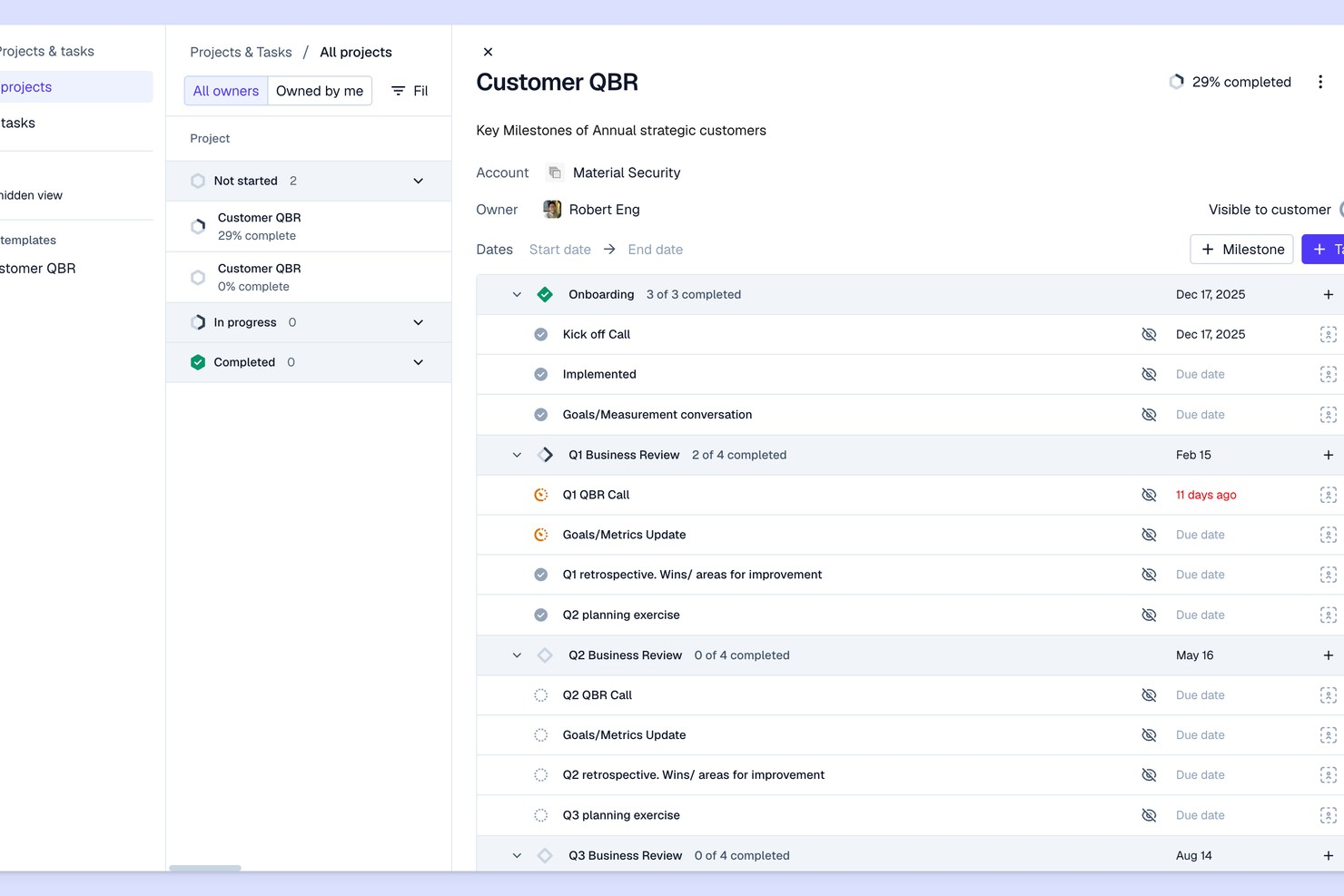
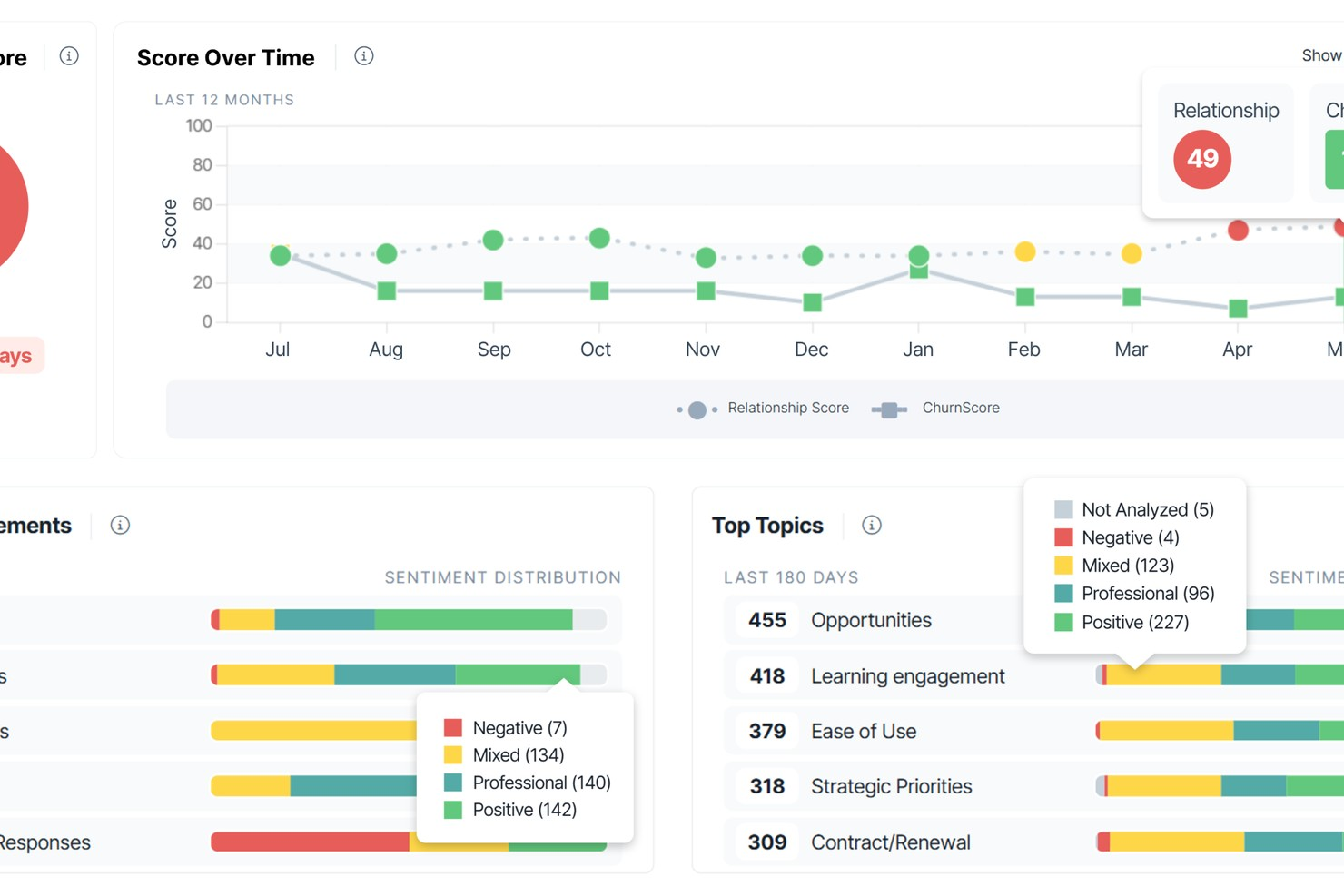
Pylon offers customer health scoring designed for SaaS teams that want to spot churn risks early. The platform appeals to customer success managers and operations leaders who need actionable signals from product usage and support data. Its focus on early warning insights helps teams intervene before accounts become at risk.
Who Is Pylon Best For?
Customer success and analytics teams in early-stage SaaS companies in North America and Europe detecting early churn signals.
Why I Picked Pylon
What drew me to Pylon is how it’s purpose-built for surfacing early churn risks, which is a challenge many SaaS teams face. The platform analyzes product usage patterns and support interactions to flag accounts that may be trending toward disengagement. I like that Pylon provides automated health scoring based on real-time signals, so teams can act before issues escalate. This focus on proactive detection makes it a strong choice for companies that want to reduce churn before it becomes a bigger problem.
Pylon Key Features
Some other features in Pylon that stand out for customer health scoring include:
- Custom health score configuration: Adjust scoring models to reflect your team’s unique risk signals and account milestones.
- Automated alerting: Receive notifications when account health drops below set thresholds.
- Customer timeline view: Track all key events, interactions, and changes in account status in a single timeline.
- Team collaboration tools: Assign owners, add notes, and coordinate follow-up actions directly within the platform.
Pylon Integrations
Integrations include Slack, Microsoft Teams, Discord, Salesforce, HubSpot, Attio, Pipedrive, PagerDuty, Opsgenie, and more.
Pros and Cons
Pros:
- Detailed customer activity timeline tracking
- Customizable health scoring models for SaaS
- Real-time alerts for at-risk accounts
Cons:
- Reporting relies heavily on manual tags
- Strongly dependent on Slack/Teams

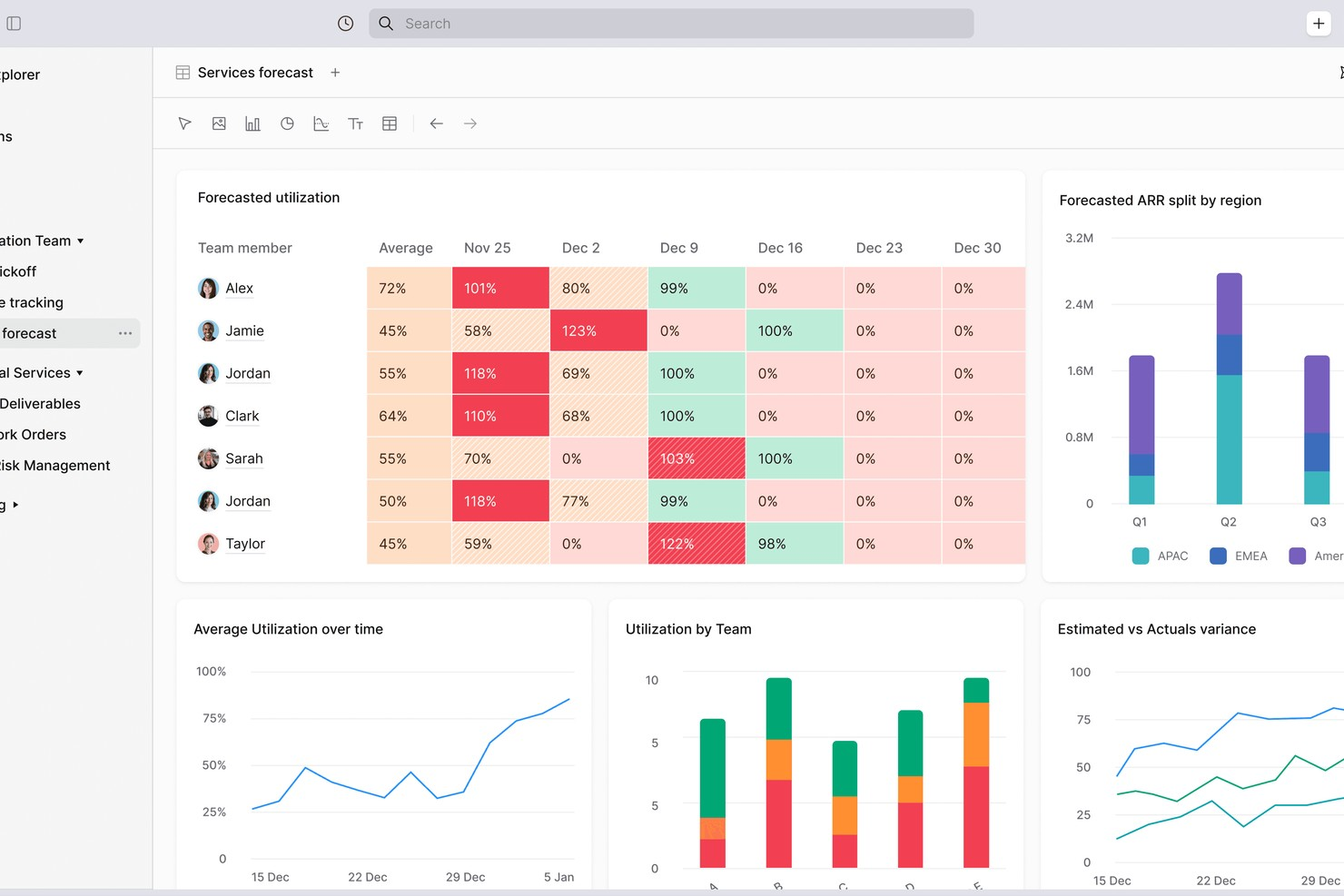
Planhat is a customer platform designed for teams that need to track and manage customer health across complex data sources. It’s a strong fit for organizations with multiple products, regions, or data systems that want a unified view of customer engagement. Customer success leaders and operations teams use Planhat to bring together usage, support, and financial data for more informed decision-making.
Who Is Planhat Best For?
Customer success and account management teams in mid-sized SaaS companies globally aggregating data from multiple sources to monitor accounts.
Why I Picked Planhat
I chose Planhat because it brings together customer data from a wide range of sources, making it easier to build accurate and actionable health scores. Planhat’s platform lets you combine product usage, support tickets, financial metrics, and custom data streams into a single customer profile. This level of aggregation is especially valuable for companies with complex data environments or multiple business units. With Planhat, I can see a holistic view of customer health that goes beyond surface-level metrics.
Planhat Key Features
Some other features in Planhat that support customer health scoring include:
- Custom health score modeling: Build and adjust health score formulas using your own logic and data fields.
- Customer journey mapping: Visualize and track customer progress through different lifecycle stages.
- Automated alerts and notifications: Set up rules to notify your team when customer health scores change or reach certain thresholds.
- Role-based dashboards: Give different teams or users tailored dashboard views based on their function or focus.
Planhat Integrations
Integrations include Salesforce, HubSpot, Zendesk, Intercom, Slack, Jira, Mixpanel, Pendo, Snowflake, and more.
Pros and Cons
Pros:
- Visual customer journey mapping tools included
- Aggregates data from multiple business systems
- Custom health score formulas for complex needs
Cons:
- Permission logic can be restrictive
- SFDC sync requires technical effort
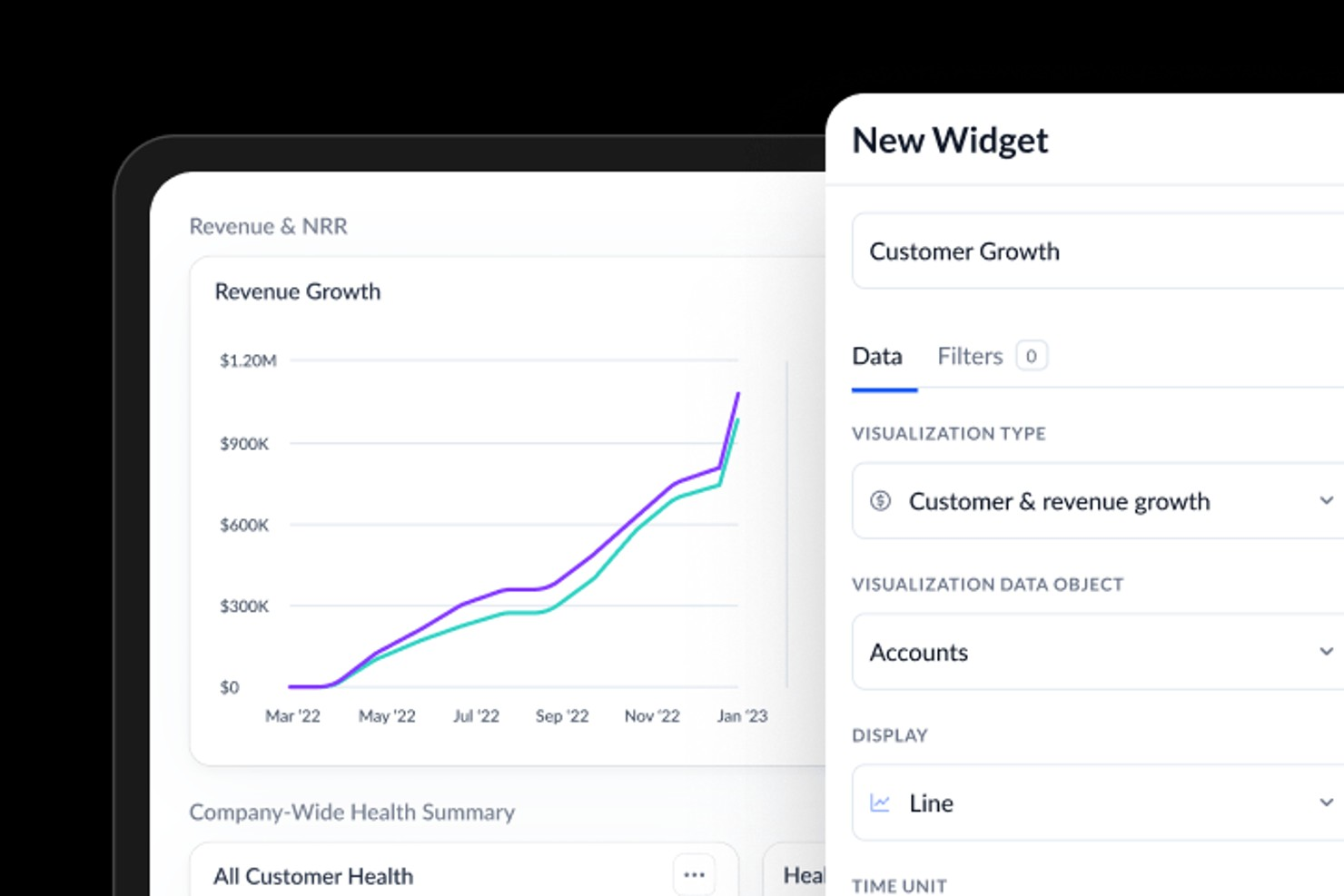
Vitally is a customer success platform designed for SaaS teams that want to unify customer data and workflows. It appeals to organizations looking to connect health scoring with daily operations and collaboration. Teams can use Vitally to centralize insights, automate processes, and keep customer health visible across departments.
Who Is Vitally Best For?
Customer success and product teams in small to mid-sized SaaS organizations worldwide integrating workflows across multiple customer-facing systems.
Why I Picked Vitally
I picked Vitally because it connects customer health scoring directly with the SaaS tools teams already use every day. Vitally’s workflow integrations let you trigger tasks, alerts, and playbooks in tools like Slack, Jira, and Salesforce based on real-time health changes. This means customer success managers can act on health insights without switching platforms or losing context. For SaaS companies that rely on tight collaboration and fast response, this level of integration makes health scoring much more actionable.
Vitally Key Features
Some other features in Vitally that support customer health scoring include:
- Custom health score builder: Create and adjust health score formulas using your own data sources and logic.
- Account and user segmentation: Group customers by lifecycle stage, product usage, or custom attributes for targeted monitoring.
- Automated playbooks: Set up rule-based workflows that trigger actions or communications based on health score changes.
- Customer timeline activity feed: View a chronological record of all customer interactions, product usage, and health score updates in one place.
Vitally Integrations
Integrations include Salesforce, HubSpot, Zendesk, Intercom, Slack, Jira, Gmail, Outlook, Mixpanel, and Stripe.
Pros and Cons
Pros:
- Automated playbooks for health-based workflows
- Native integrations with major SaaS platforms
- Customizable health score formulas for SaaS
Cons:
- No mobile app for on-the-go access
- No built-in customer survey feature

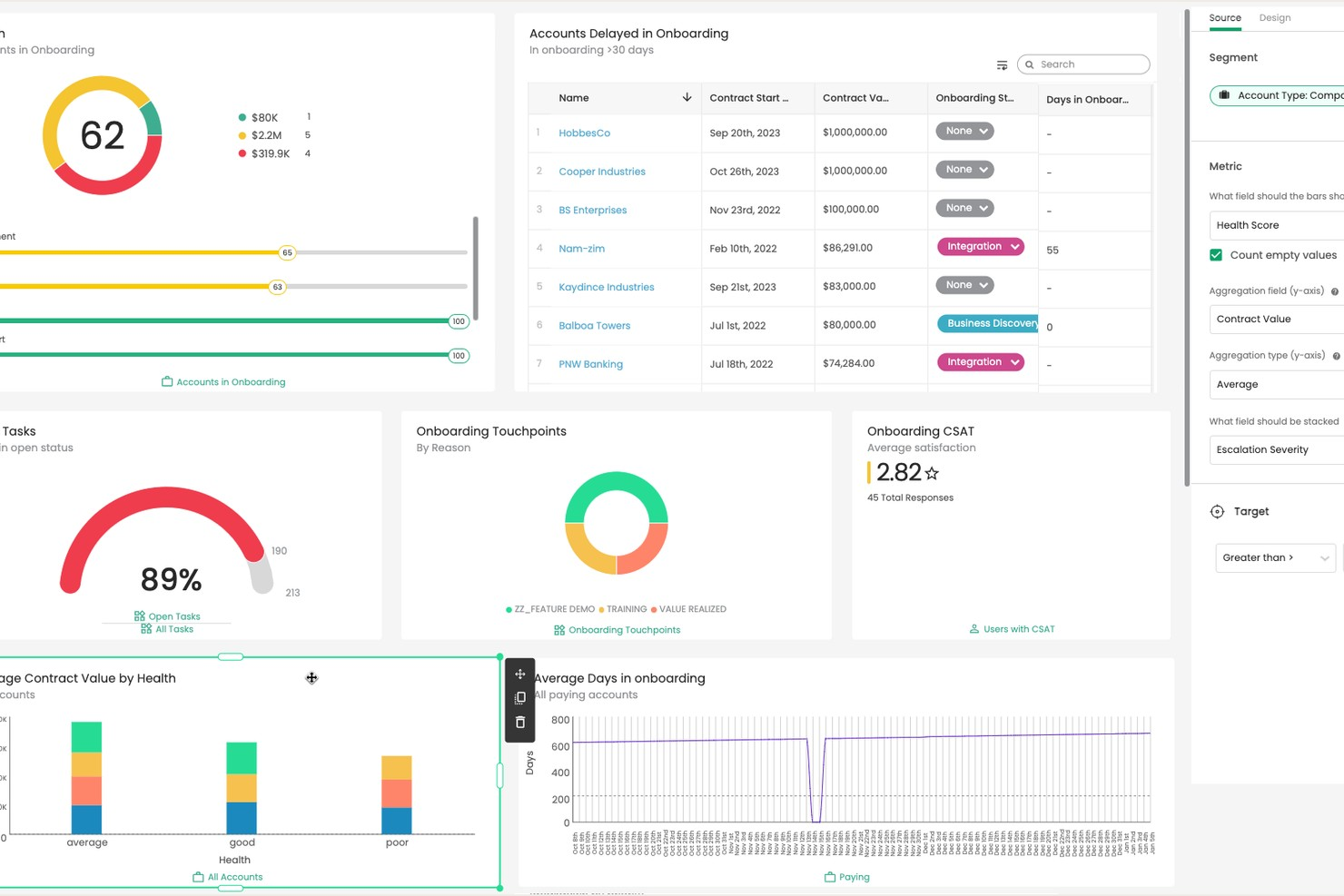
Totango gives customer success teams a way to design and track health metrics that fit their unique business needs. It’s a strong choice for organizations that want flexibility in defining what customer health means for their products or services. Teams looking to align health scoring with specific workflows and customer journeys may find Totango especially useful.
Who Is Totango Best For?
Customer success and operations teams in mid-sized to large organizations globally tracking customizable health metrics and KPIs.
Why I Picked Totango
I chose Totango because it gives teams full control over how they define and measure customer health. You can create custom health scorecards using any combination of metrics, from product usage to support interactions, and adjust them as your business evolves. I also like that Totango lets you set up different health models for different customer segments, so you’re not locked into a one-size-fits-all approach. This flexibility is especially valuable for organizations with complex customer journeys or multiple product lines.
Totango Key Features
Some other features in Totango that support customer health tracking include:
- SuccessBLOCs library: Access pre-built modules for common customer success workflows, including onboarding, adoption, and renewal.
- Automated task assignment: Assign follow-up actions to team members based on customer health changes or milestones.
- Customer journey mapping: Visualize each account’s progress through defined lifecycle stages and trigger actions at key points.
- Real-time alerts: Receive instant notifications when customer health scores drop or important events occur.
Totango Integrations
Integrations include Salesforce, Zendesk, HubSpot, Slack, Microsoft Outlook, Gmail, and more.
Pros and Cons
Pros:
- Automated alerts for health score changes
- Pre-built SuccessBLOCs for rapid deployment
- Custom health models for different segments
Cons:
- Reporting options are less flexi
- Limited customization for dashboard visualizations
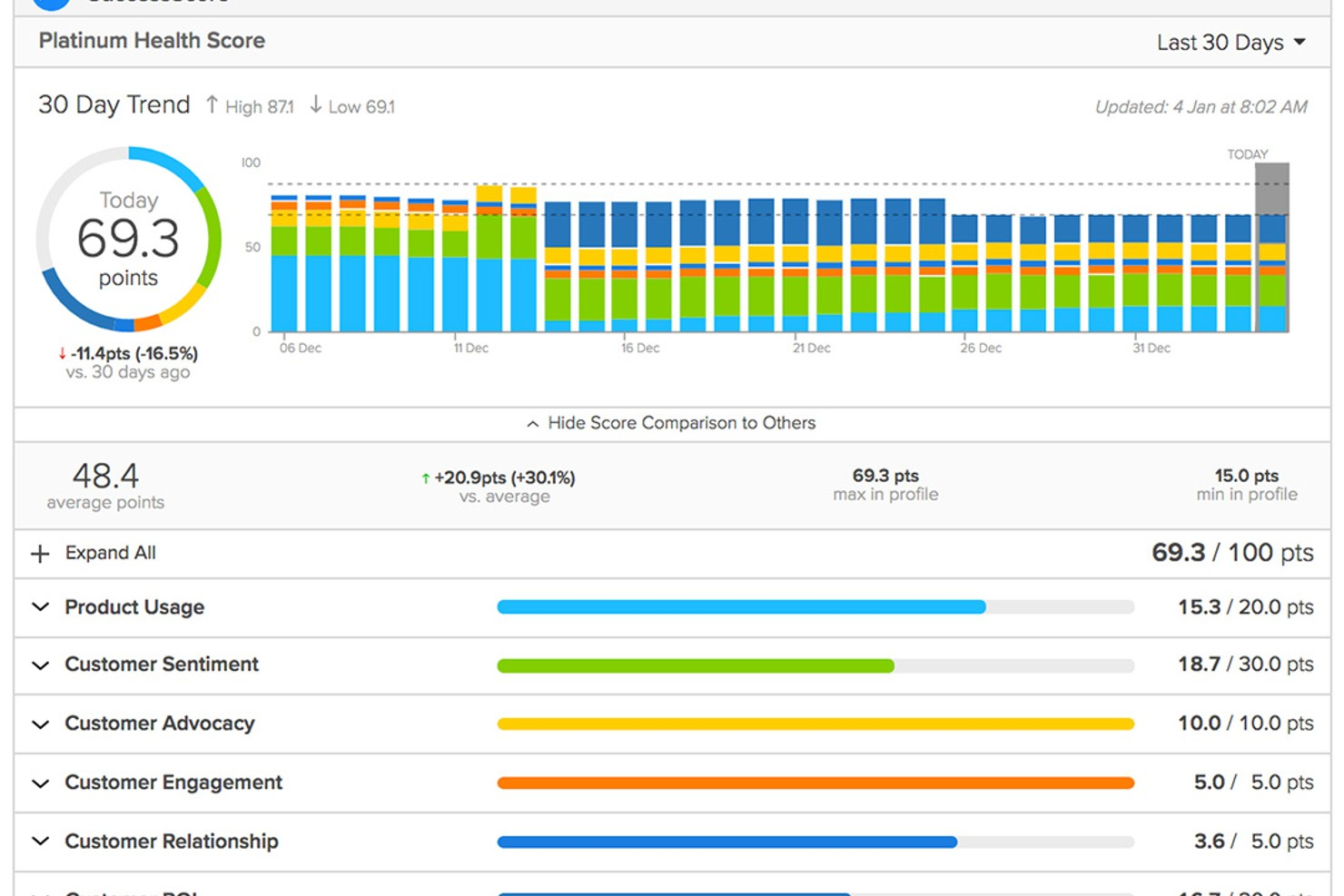
ClientSuccess is a customer success platform designed for teams that want to manage account health and retention in one place. It’s a strong fit for SaaS companies and customer success managers who need clear visibility into customer relationships and engagement. The platform helps you track customer sentiment, monitor account activity, and coordinate renewal efforts across your team.
Who Is ClientSuccess Best For?
Renewal and account management teams in mid-sized SaaS organizations globally forecasting renewals and monitoring account health.
Why I Picked ClientSuccess
What stands out about ClientSuccess is how it brings renewal forecasting into the core of customer health management. The platform lets you track renewal dates, forecast renewal likelihood, and visualize renewal pipelines alongside customer health scores. I appreciate that you can set up custom health metrics and tie them directly to renewal risk, making it easier to prioritize accounts that need attention. This focus on renewal forecasting makes ClientSuccess a strong choice for teams that want to reduce churn and improve retention outcomes.
ClientSuccess Key Features
Some other features in ClientSuccess that support customer health scoring and management include:
- Customer pulse surveys: Collect and track customer sentiment directly within the platform to inform health scores.
- Success cycle management: Map and monitor customer journeys with customizable lifecycle stages.
- Task and activity tracking: Assign, schedule, and monitor follow-up actions for each account.
- Automated alerts and notifications: Get notified about changes in customer health or key account milestones.
ClientSuccess Integrations
Integrations include Salesforce, HubSpot, Slack, Microsoft Teams, Zendesk, Jira, Gmail, Intercom, Pendo, and more.
Pros and Cons
Pros:
- Detailed customer activity timeline tracking
- Real-time alerts for at-risk accounts
- Customizable health scoring models for SaaS
Cons:
- Analytics can be slow with large amounts of data
- SmartCS AI features require premium
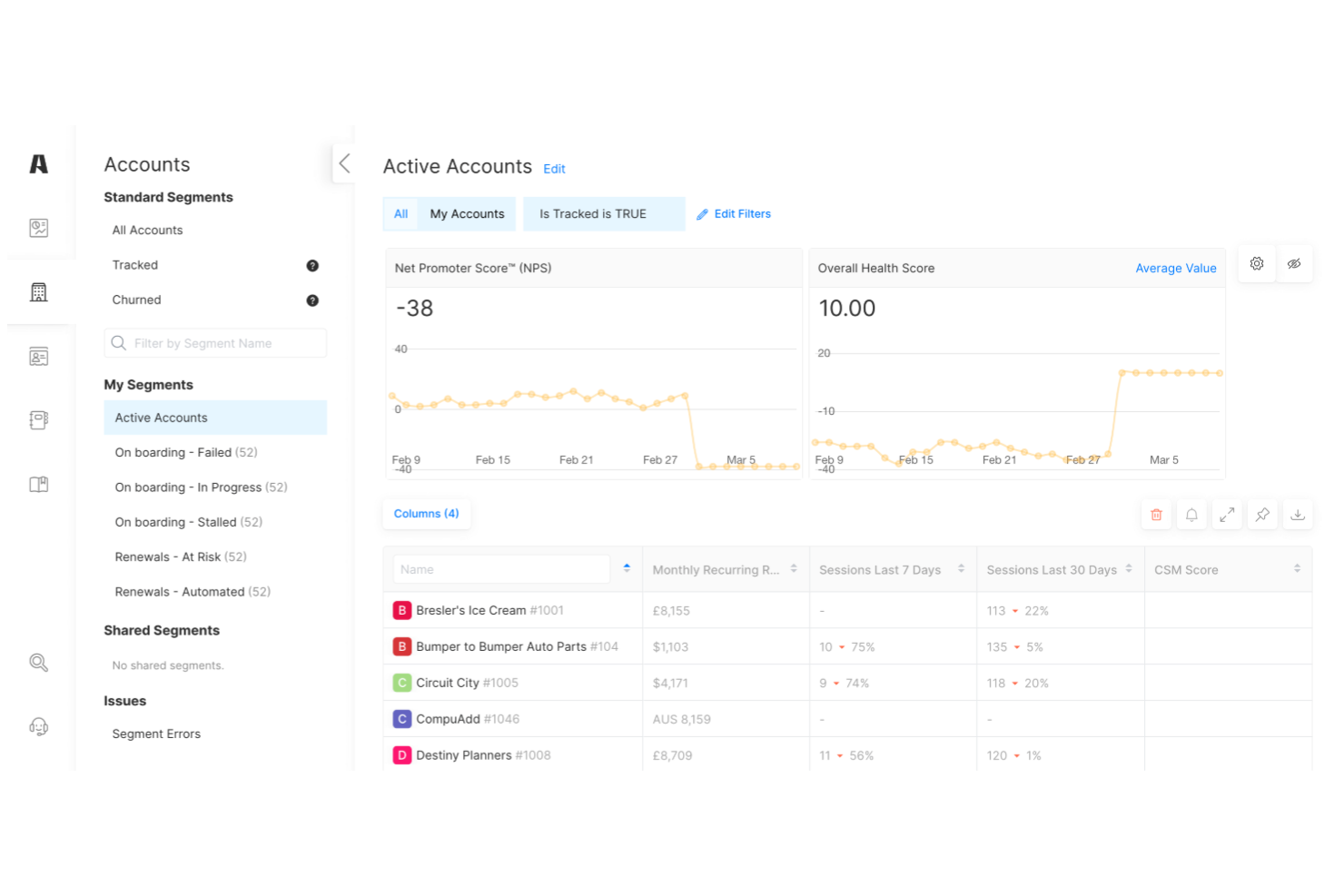
Akita offers customer health score software designed with small and midsize businesses in mind. The platform helps teams monitor customer engagement, identify churn risks, and prioritize outreach. Its straightforward setup and focus on actionable insights make it appealing for businesses looking to improve retention without complex enterprise tools.
Who Is Akita Best For?
Small business customer success teams in North America and Europe adopting lightweight tools to track account health and engagement.
Why I Picked Akita
What drew me to Akita is how it tailors customer health scoring for small business needs, rather than overwhelming users with enterprise-level complexity. The platform lets you build custom health score models using data from your CRM, support tickets, and product usage, so you can track what matters most to your business. I also like that Akita provides clear, actionable dashboards that help smaller teams quickly spot at-risk accounts and prioritize follow-up. For businesses that want a focused, manageable approach to customer health scoring, Akita stands out as a practical choice.
Akita Key Features
Some other features in Akita that support customer health scoring include:
- Automated playbooks: Trigger specific workflows or tasks based on changes in customer health scores.
- Churn risk alerts: Receive notifications when customers show early signs of disengagement or risk.
- Customer timeline view: Track all customer interactions and milestones in a single, chronological feed.
- Segmented reporting: Analyze health scores and trends by customer segment, product, or team.
Akita Integrations
Integrations include Salesforce, HubSpot, Intercom, Zendesk, Slack, QuickBooks, Mailchimp, Freshdesk, Pipedrive, and more.
Pros and Cons
Pros:
- Churn risk alerts based on real-time data
- Custom health scoring models for small teams
- Automated playbooks for customer engagement
Cons:
- Does not support in-app messaging
- Limited advanced analytics and reporting options
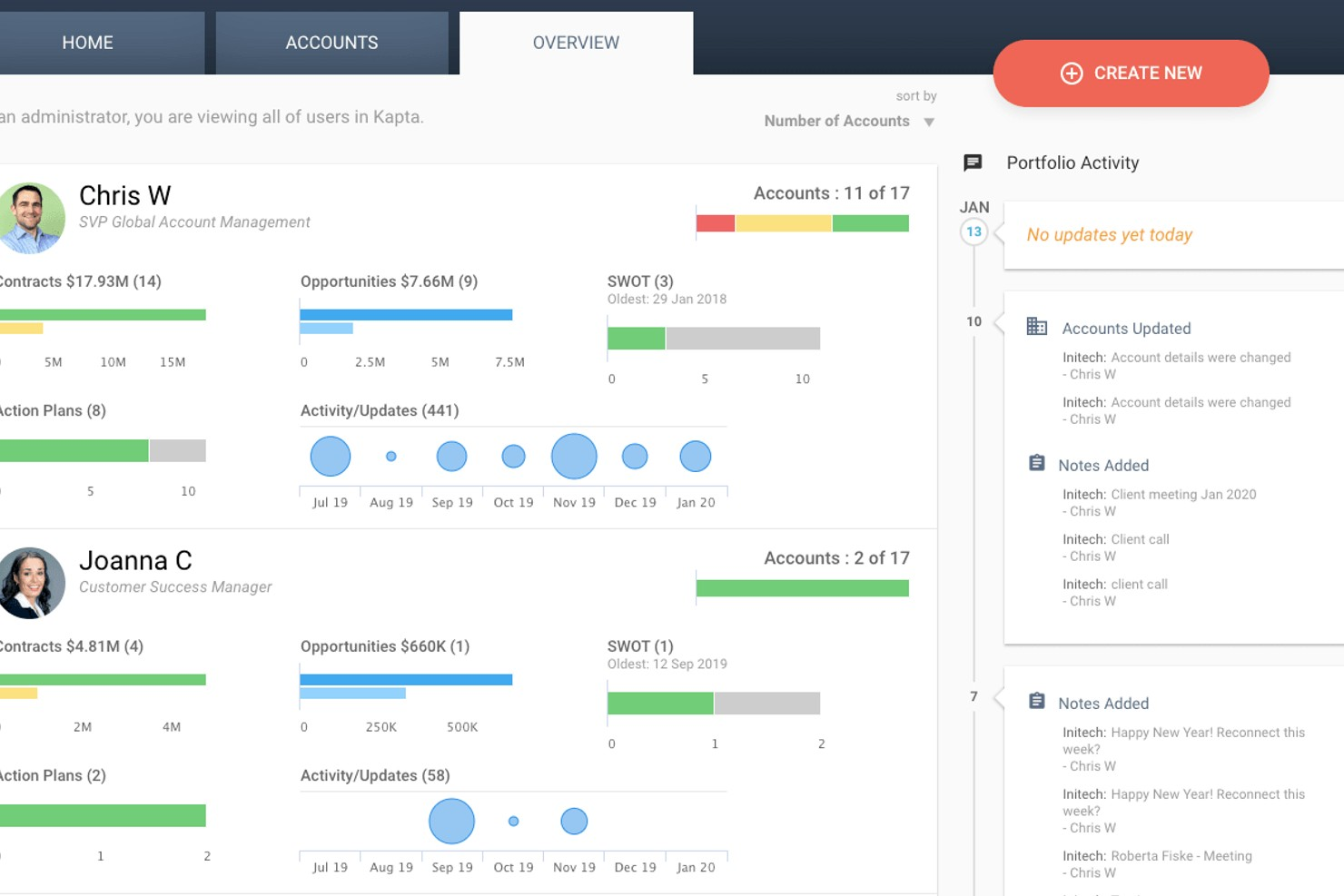
Kapta offers customer health scoring designed for teams managing strategic client relationships. The platform appeals to account managers and customer success professionals who need to track key account health and engagement. Its focus on actionable insights helps teams identify risks and opportunities within their most important accounts.
Who Is Kapta Best For?
Key account managers in mid-sized organizations globally managing enterprise-level client relationships and strategic accounts.
Why I Picked Kapta
What sets Kapta apart for me is how it’s built specifically for key account management teams that need to monitor and act on customer health at a strategic level. The platform lets you define custom health score criteria based on account plans, relationship milestones, and stakeholder engagement, which is essential for managing complex B2B relationships. I also appreciate that Kapta ties health scores directly to account action plans, so teams can quickly align on next steps when risks or opportunities surface. This focus on actionable, account-level insights makes Kapta a strong fit for organizations that treat key accounts as a core part of their business strategy.
Kapta Key Features
Some other features in Kapta that support customer health scoring include:
- Automated task tracking: Assign and monitor tasks linked to account health initiatives directly within the platform.
- Voice of customer surveys: Collect structured feedback from key stakeholders to inform health scores.
- Executive dashboard: View real-time account health metrics and trends across your portfolio.
- Integration with CRM systems: Sync account data and updates with Salesforce and other leading CRM platforms.
Kapta Integrations
Integrations include Salesforce, HubSpot, Microsoft Dynamics, Microsoft Teams, Zoho, Slack, Mailchimp, and more.
Pros and Cons
Pros:
- Account planning linked to health metrics
- Automated reminders for follow-up actions
- Customizable health scoring for key accounts
Cons:
- Rigid workflow for non-B2B models
- Heavy focus on manual KAM entry

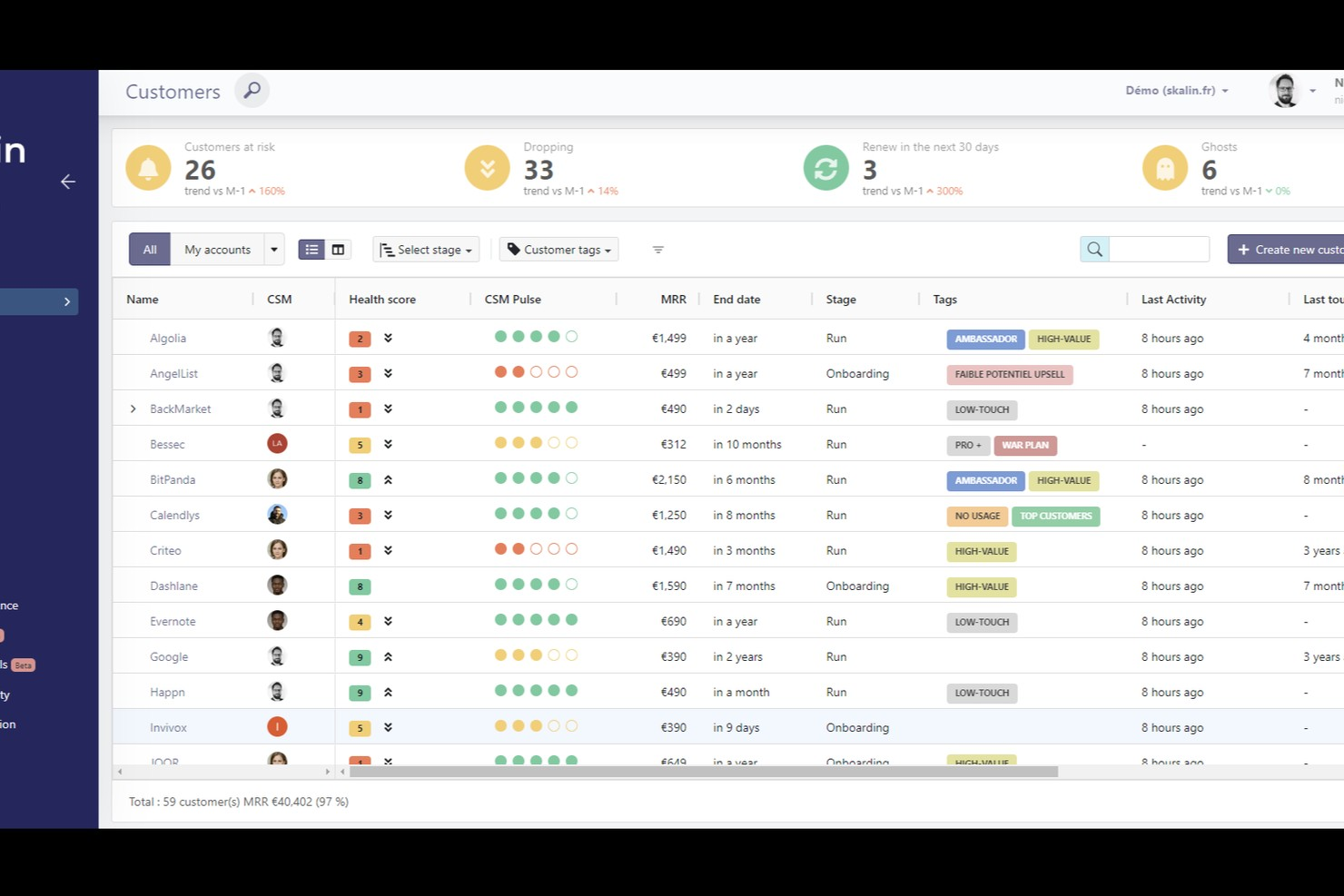
Skalin is a customer health score platform designed for B2B teams that need to manage complex customer relationships. It helps customer success managers and account teams organize, monitor, and analyze customer data in one place. The platform is especially useful for businesses looking to gain deeper insights into customer engagement and risk across multiple segments.
Who Is Skalin Best For?
Customer success and marketing teams in B2B SaaS companies worldwide segmenting accounts for tailored engagement strategies.
Why I Picked Skalin
What drew me to Skalin is how it approaches B2B customer segmentation as a core part of its health scoring process. The platform lets you define and manage multiple customer segments, then track health scores and engagement metrics for each segment separately. I like that you can set up custom rules and triggers based on segment-specific behaviors, which helps teams prioritize outreach and interventions. This makes Skalin a strong choice for organizations that need to tailor their customer health strategies to different business segments.
Skalin Key Features
Some other features in Skalin that support customer health scoring and management include:
- Automated health score calculation: The platform automatically updates customer health scores based on real-time data and predefined criteria.
- Playbook automation: Teams can create and trigger playbooks for specific customer scenarios, such as onboarding or renewal.
- Customer timeline tracking: Skalin provides a chronological view of all customer interactions and key events for each account.
- Collaboration tools: Users can assign tasks, share notes, and coordinate activities within the platform to keep teams aligned.
Skalin Integrations
Integrations include HubSpot, Salesforce, Pipedrive, Zoho, Sellsy, Intercom, Gmail, Outlook 365, Slack, and more.
Pros and Cons
Pros:
- Real-time health score updates and alerts
- Customizable segmentation for complex B2B accounts
- Automated playbooks for lifecycle management
Cons:
- Requires data exports for deep analysis
- Limited flexibility for manual entries
Other Customer Health Score Software
Here are some additional customer health score software options that didn’t make it onto my shortlist, but are still worth checking out:
- Staircase AI by Gainsight
For AI-driven relationship insights
- Velaris
For unified customer journey views
- Pendo
For product usage analytics integration
- Customer Catalyst
For customer feedback-driven scoring


Customer Health Score Software Selection Criteria
When selecting the best customer health score software to include in this list, I considered common buyer needs and pain points like tracking customer engagement trends and identifying at-risk accounts. I also used the following framework to keep my evaluation structured and fair:
Core Functionality (25% of total score)
To be considered for inclusion in this list, each solution had to fulfill these common use cases:
- Track customer health scores over time
- Aggregate data from multiple sources
- Alert teams to changes in customer status
- Visualize customer health in dashboards
- Segment customers by health score
Additional Standout Features (25% of total score)
To help further narrow down the competition, I also looked for unique features, such as:
- AI-driven health score predictions
- Customizable playbooks for lifecycle management
- Sentiment analysis from customer communications
- Automated workflow triggers based on health changes
- Deep integrations with CRM and support tools
Usability (10% of total score)
To get a sense of the usability of each system, I considered the following:
- Clean and intuitive user interface
- Simple navigation between modules
- Customizable dashboards and reports
- Minimal clicks to complete key tasks
- Responsive design for different devices
Onboarding (10% of total score)
To evaluate the onboarding experience for each platform, I considered the following:
- Step-by-step product tours for new users
- Availability of training videos and documentation
- Pre-built templates for quick setup
- Access to onboarding webinars or workshops
- In-app chatbots for real-time guidance
Customer Support (10% of total score)
To assess each software provider’s customer support services, I considered the following:
- Fast response times to support tickets
- Multiple support channels available
- Access to a dedicated customer success manager
- Comprehensive online help center
- Community forums for peer support
Value For Money (10% of total score)
To evaluate the value for money of each platform, I considered the following:
- Transparent and predictable pricing structure
- Flexible plans for different team sizes
- No hidden fees or surprise charges
- Features included at each pricing tier
- Free trial or demo availability
Customer Reviews (10% of total score)
To get a sense of overall customer satisfaction, I considered the following when reading customer reviews:
- Positive feedback on core functionality
- Reports of reliable system performance
- Comments on ease of setup and use
- Experiences with customer support quality
- Value perception compared to competitors
How to Choose Customer Health Score Software
It’s easy to get bogged down in long feature lists and complex pricing structures. To help you stay focused as you work through your unique software selection process, here’s a checklist of factors to keep in mind:
| Factor | What to Consider |
|---|---|
| Scalability | Will the software handle your current and projected customer volume? Consider if it supports multiple teams, regions, or business units as you grow. |
| Integrations | Does it connect natively to your CRM, support, and analytics tools? Check for direct integrations to avoid manual data entry or reliance on third parties. |
| Customizability | Can you tailor health score formulas, segments, and alerts to your business model? Look for flexible rule-building and field mapping. |
| Ease of use | Will your team adopt it quickly? Evaluate the interface, navigation, and how much training is needed for daily use. |
| Implementation and onboarding | How long will setup take, and what resources are required? Ask about migration support, onboarding services, and available training materials. |
| Cost | Are pricing tiers clear and predictable? Factor in user limits, add-on fees, and whether the value matches your budget and expected ROI. |
| Security safeguards | Does the vendor meet your data privacy and security standards? Confirm compliance with regulations like GDPR and review their data handling policies. |
| Support availability | What support channels are offered, and during what hours? Consider if you need 24/7 help, dedicated account management, or self-service resources. |
What Is Customer Health Score Software?
Customer health score software is a tool that tracks, calculates, and visualizes the overall status of customer accounts using data from multiple sources. It helps teams monitor engagement, identify at-risk customers, and prioritize outreach based on real-time health indicators.
By centralizing these insights, the software supports proactive customer management and drives retention strategies across support, success, and service operations teams.
Features
When selecting customer health score software, keep an eye out for the following key features:
- Health score calculation: Combines multiple data points—such as product usage, support tickets, and survey responses—into a single, trackable score that reflects customer status.
- Custom segmentation: Lets you group customers by industry, lifecycle stage, or other criteria so you can monitor health trends and tailor engagement strategies.
- Automated alerts: Notifies your team when a customer’s health score drops or meets certain thresholds, helping you act quickly to prevent churn.
- Data integration: Connects with your CRM, support, and analytics tools to pull in relevant customer data for more accurate health scoring.
- Dashboards and reporting: Provides visualizations and reports that make it easy to track health scores, spot trends, and share insights with stakeholders.
- Timeline tracking: Logs key customer interactions and events in a chronological view, giving teams context for each account’s journey.
- Playbook automation: Enables you to trigger specific workflows or tasks based on changes in customer health, such as sending follow-up emails or scheduling check-ins.
- Role-based access: Allows you to control who can view or edit health scores and related data, supporting collaboration while maintaining data security.
Common Customer Health Score Software AI Features
Beyond the standard customer health score software features listed above, many of these solutions are incorporating AI with features like:
- Predictive churn modeling: Uses machine learning to analyze historical data and forecast which customers are most likely to churn, allowing teams to intervene early.
- Automated risk detection: Continuously scans customer behavior patterns to flag subtle signs of dissatisfaction or disengagement that might be missed by manual monitoring.
- Sentiment analysis: Analyzes customer communications—such as emails, chat logs, and survey responses—to detect positive or negative sentiment and adjust health scores accordingly.
- Next-best-action recommendations: Suggests personalized actions or outreach strategies for each account based on AI-driven analysis of customer data and engagement history.
- Anomaly detection: Identifies unusual changes in customer activity or health scores, alerting teams to investigate potential issues before they escalate.
Benefits
Implementing customer health score software provides several benefits for your team and your business. Here are a few you can look forward to:
- Proactive risk management: Automated alerts and predictive analytics help your team identify and address at-risk accounts before issues escalate.
- Improved customer retention: Real-time health scores and segmentation enable targeted outreach, increasing the likelihood of keeping valuable customers.
- Data-driven decision making: Centralized dashboards and reporting provide actionable insights, supporting more informed strategies across support and success teams.
- Optimized workflows: Playbook automation and integration with existing tools reduce manual work and support timely follow-up on customer needs.
- Increased collaboration: Role-based access and shared timelines give all stakeholders a unified view of customer status and history.
- Personalized engagement: Custom segmentation and AI-powered recommendations allow you to tailor communications and interventions to each customer’s unique situation.
- Faster onboarding and value realization: Guided setup, templates, and training resources help teams quickly adopt the software and start seeing results.
Costs and Pricing
Selecting customer health score software requires an understanding of the various pricing models and plans available. Costs vary based on features, team size, add-ons, and more. The table below summarizes common plans, their average prices, and typical features included in customer health score software solutions:
Plan Comparison Table for Customer Health Score Software
| Plan Type | Average Price | Common Features |
|---|---|---|
| Free Plan | $0 | Basic health score tracking, limited integrations, simple dashboards, and email support. |
| Personal Plan | $49-500/month | Custom segmentation, automated alerts, basic reporting, and single-user access. |
| Business Plan | $1,000 – $2,500/month | Advanced integrations, team collaboration tools, workflow automation, improved dashboards, and priority support. |
| Enterprise Plan | $1,500 – $12,000+/month | Custom health models, dedicated onboarding, advanced security, API access, and dedicated account management. |
Customer Health Score Software FAQs
Here are some answers to common questions about customer health score software:
How do customer health scores get calculated?
Customer health scores are calculated by combining data from sources like product usage, support tickets, survey responses, and payment history. Each data point is weighted based on its importance to your business, and the software generates a single score that reflects the overall status of each customer.
Can I customize the health score formula for my business?
Yes, most customer health score software lets you customize the formula. You can adjust which data sources are included, set different weights for each factor, and define thresholds for what counts as healthy, at-risk, or critical.
What types of data can be integrated into customer health score software?
You can typically integrate CRM data, support ticket systems, product analytics, billing platforms, and customer feedback tools. This allows the software to pull in a wide range of signals to create a more accurate and holistic health score.
How quickly can teams start using customer health score software after purchase?
Most teams can get started within a few days to a few weeks, depending on the complexity of their data and integrations. Many platforms offer onboarding resources like product tours, templates, and training videos to speed up adoption.
What should I look for in customer health score software security?
Look for features like data encryption, role-based access controls, audit logs, and compliance with standards such as GDPR. Ask vendors about their data handling policies and any third-party security certifications they hold.