

The best emotion detection software helps teams understand how customers really feel during interactions—whether through facial expressions, voice tone, or written feedback. By turning these emotional cues into data, you can improve engagement, tailor experiences, and make decisions grounded in real human insight.
Drawing on my CX expertise, I’ve personally tested and reviewed 20+ emotion detection tools to identify the ones that offer the best mix of real-time analysis, privacy compliance, scalability, and ease of use. Whether you’re running customer research, refining digital experiences, or enhancing live interactions, in this guide you’ll find the top software solutions, their standout features, and pros and cons.
Why Trust Our Software Recommendations
6,700+
Reviews
20
Industry experts
16+
Evaluation factors
14
Years
Our team has been testing and reviewing software since 2012. As CX leaders ourselves, we know how difficult—and important—it is to choose the right software.
For this guide, we evaluated tools using hands-on testing and independent research, scoring tools using our selection criteria.
Our reviews reflect our human editorial judgment, not a sales pitch.
 Gui DrusinaCreative Director
 Tim FisherVP of AI
Best Emotion Detection Software Summary
This comparison chart summarizes pricing details for my top emotion detection software selections to help you find the best one for your budget and business needs.
| Tool | Best For | Trial Info | Price | ||
|---|---|---|---|---|---|
| 1 | Best for emotion-triggered live agent coaching | Free demo available | Pricing upon request | Website | |
| 2 | Best for custom emotion taxonomy on CX data | 30-day free trial | Pricing upon request | Website | |
| 3 | Best for contact center frustration detection | Free demo available | From $110/agent/month | Website | |
| 4 | Best for real-time empathy coaching in contact centers | Free demo available | Pricing upon request | Website | |
| 5 | Best for live emotion scoring in contact centers | Free demo available | Pricing upon request | Website | |
| 6 | Best for VoC-linked emotion root cause analysis | Free demo available | Pricing upon request | Website | |
| 7 | Best for omnichannel emotion-to-outcome analytics | 30-day free trial | Pricing upon request | Website | |
| 8 | Best for omnichannel emotion and intensity scoring | Free demo available | Pricing upon request | Website | |
| 9 | Best for emotion-linked multilingual CX analytics | Free demo available | Pricing upon request | Website | |
| 10 | Best for emotion-driven QA | Free demo available | Pricing upon request | Website |


Best Emotion Detection Software Reviews
Below are my detailed summaries of the best emotion detection software that made it onto my shortlist. My reviews offer an in-depth look at the key features, pros & cons, integrations, and ideal use cases of each tool to help you find the best one for you.
 Best for emotion-triggered live agent coaching
- Free demo available
- Pricing upon request
Visit WebsiteCustomer Rating:4.6/5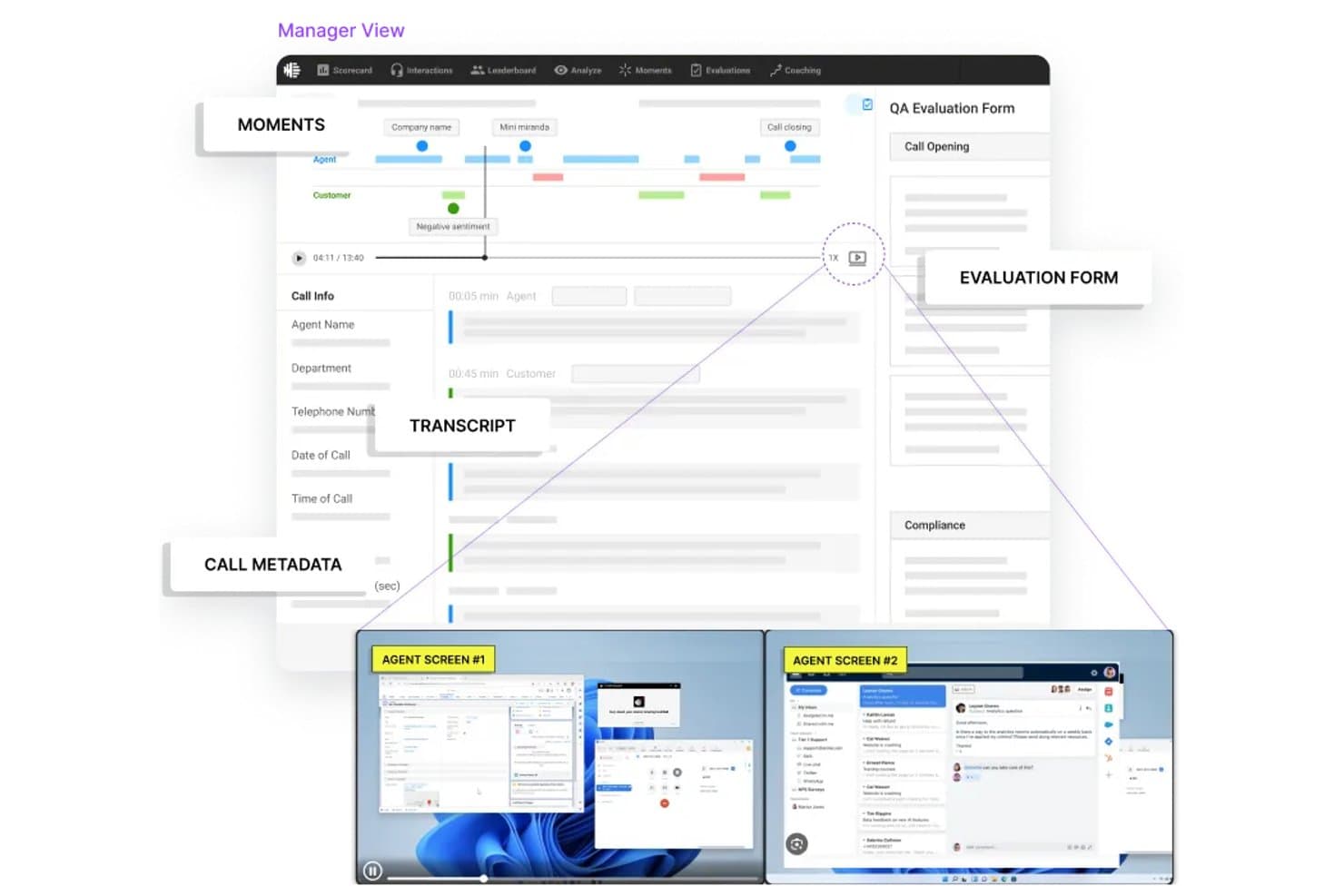
Observe.AI surfaces customer sentiment and emotion signals during calls. My Evaluation Score
- Alerts & Triggered Actions
- 5/5
- CX Data Source Integration
- 5/5
- Granular Emotion Classification
- 2/5
- Analytics & Reporting Dashboards
- 3/5
- Real-Time & Operational Detection
- 5/5
- Emotion Analysis Across Interaction Data
- 4/5
Observe.AI is a contact center conversation intelligence platform that combines real-time sentiment analysis, acoustic tone detection, and post-interaction analytics to surface emotional signals across voice and chat interactions.
Who Is Observe.AI Best For?
Observe.AI is a strong fit for enterprise contact centers with large agent teams that need live emotional signals to trigger in-call coaching and supervisor intervention.
Why I Picked Observe.AI
I've included Observe.AI in my top picks because it's the only tool on my list that directly converts live emotional signals into agent behavior changes mid-call. Its Real-Time Agent Assist fires empathy prompts and speech-rate nudges the moment customer sentiment turns negative, which means agents aren't just flagged after the fact. Supervisors get a live 360-degree dashboard showing AI-flagged calls, with barge-in capability for the highest-tension moments.
Observe.AI Key Features
- Dual-channel sentiment analysis: Independently scores customer and agent audio streams using NLP and acoustic analysis to detect tone, pitch, volume, and speech rate on each side of a call.
- Auto QA: Evaluates 100% of interactions using AI-powered scoring tied to specific conversation moments, with a drag-and-drop rule builder for custom evaluation criteria.
- Contact center LLM: A proprietary 30-billion-parameter language model trained on hundreds of millions of real contact center interactions for domain-specific sentiment accuracy.
- Multilingual ASR engine: Processes 25+ languages with built-in handling for accents, background noise, and interruptions across voice interactions.
Observe.AI Integrations
Observe.AI offers 250+ integrations, including Amazon Connect, Five9, Avaya, Zoom Contact Center, Salesforce, Zendesk, Snowflake, and Tableau. REST and GraphQL APIs, webhooks, SDKs, and MCP support enable custom connections.
Pros and Cons
Pros:
- Multilingual acoustic analysis supports global operations
- Call and chat sentiment coverage
- Real-time empathy prompts during live calls
Cons:
- Voice interactions prioritized over text channels
- Sentiment labels limited to polarity
Learn more about Observe.AI: Best for custom emotion taxonomy on CX data
- 30-day free trial
- Pricing upon request
Visit WebsiteCustomer Rating:4.6/5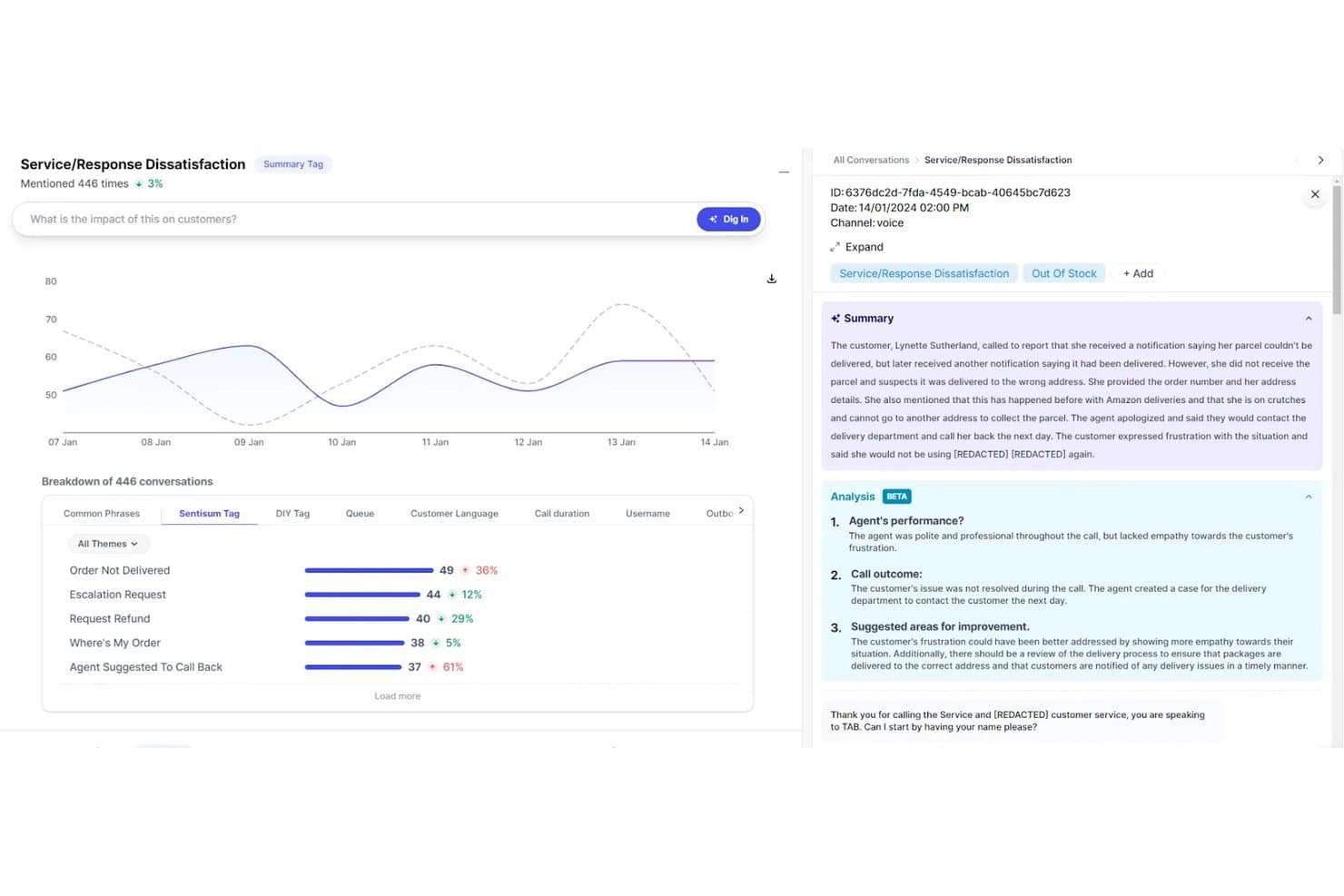
SentiSum detects emotional themes like dissatisfaction across customer conversations. My Evaluation Score
- Alerts & Triggered Actions
- 4/5
- CX Data Source Integration
- 5/5
- Granular Emotion Classification
- 4/5
- Analytics & Reporting Dashboards
- 5/5
- Real-Time & Operational Detection
- 3/5
- Emotion Analysis Across Interaction Data
- 4/5
SentiSum is an AI-native CX intelligence platform that analyzes emotion, sentiment, urgency, and churn risk across support tickets, chat, email, voice transcripts, surveys, reviews, and social data using a custom-built NLP taxonomy trained on your own interaction data.
Who Is SentiSum Best For?
SentiSum is a strong fit for enterprise CX and VoC teams that handle high interaction volumes across multiple channels and need emotion and sentiment analysis built around their own customer language.
Why I Picked SentiSum
I picked SentiSum as one of the best because it builds a custom emotion taxonomy from your actual interaction data rather than applying a generic model to it. I love that labels like "billing anxiety" or "damaged goods frustration" emerge from your real customer language, not a pre-baked category list. The aspect-based sentiment engine then scores every conversation on a 1–5 emotional intensity scale while simultaneously flagging urgency and churn risk signals across tickets, chat, email, and call transcripts.
SentiSum Key Features
- Early Warning Agent: Monitors all incoming feedback 24/7 and surfaces anomaly spikes in volume, sentiment, or resolution time hours before they show up in CSAT or churn metrics.
- "Dig In" natural language querying: Lets you ask plain-language questions like "Why did CSAT drop last week?" and returns evidence-backed answers with verbatim conversation examples.
- 100% conversation coverage: Scores every ticket, call, chat, survey, review, and bot transcript rather than a sampled subset, giving you a complete picture of customer emotion trends.
- Automated ticket prioritization and routing: Pushes urgency and emotion scores back into connected helpdesks to route high-emotion interactions to senior agents automatically.
SentiSum Integrations
SentiSum offers 100+ integrations, including Zendesk, Intercom, Genesys, NICE, Salesforce, Qualtrics, Trustpilot, Slack, and Microsoft Teams. API access supports custom data ingestion and connections to BI tools.
Pros and Cons
Pros:
- Early detection of sentiment and volume spikes
- Covers multiple conversation channels
- Custom emotion taxonomy built on real data
Cons:
- Limited insight beyond customer support data
- No live voice emotion detection
Learn more about SentiSum: Best for contact center frustration detection
- Free demo available
- From $110/agent/month
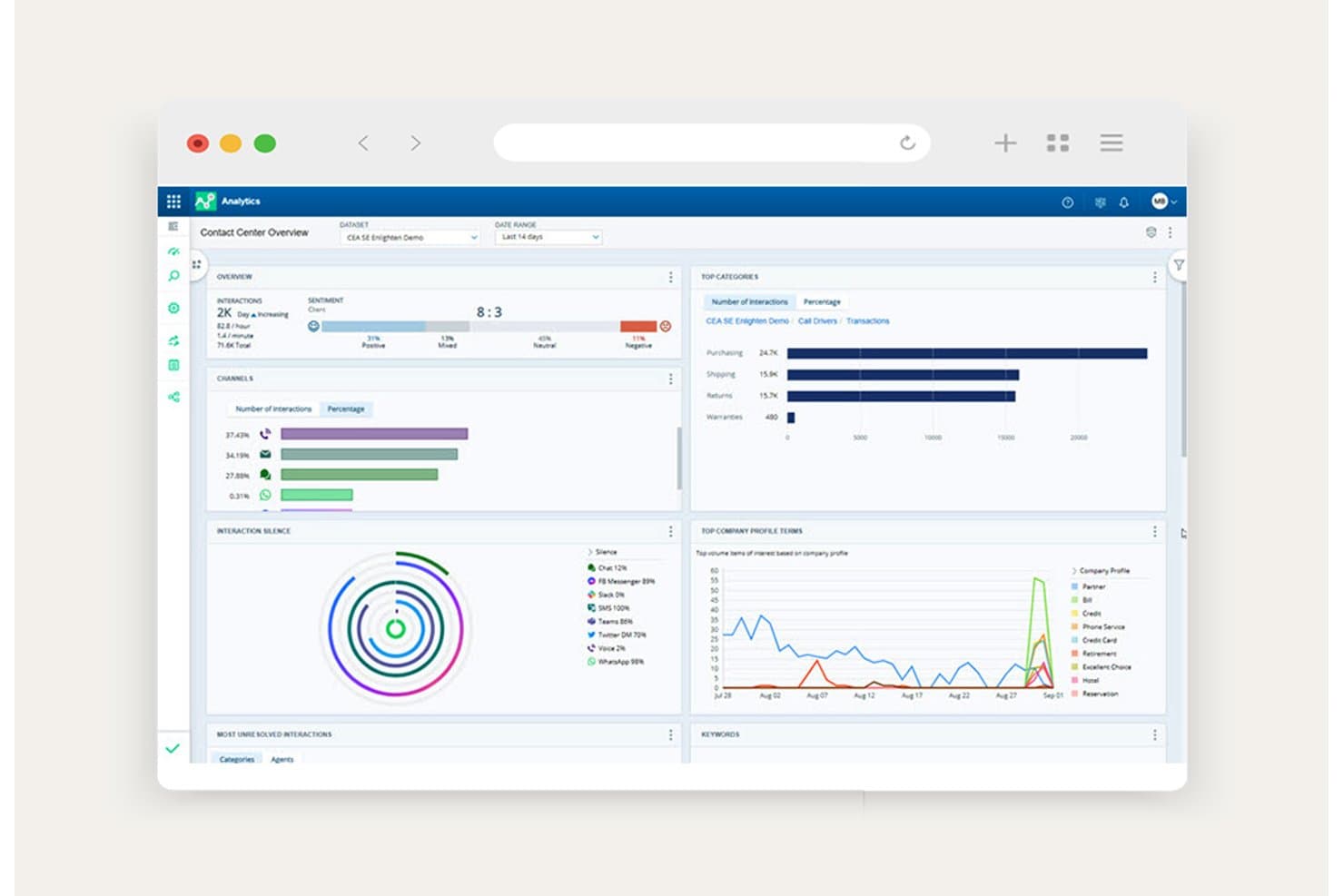
NICE Interaction Analytics tracks sentiment ratios across customer interaction channels. My Evaluation Score
- Alerts & Triggered Actions
- 5/5
- CX Data Source Integration
- 5/5
- Granular Emotion Classification
- 2/5
- Analytics & Reporting Dashboards
- 5/5
- Real-Time & Operational Detection
- 5/5
- Emotion Analysis Across Interaction Data
- 4/5
NICE Interaction Analytics is a contact center interaction analytics platform that uses AI-powered NLP and acoustic analysis to detect customer sentiment, frustration signals, and agent behavioral cues across voice, chat, email, SMS, and digital channels.
Who Is NICE Interaction Analytics Best For?
NICE Interaction Analytics is a strong fit for enterprise contact centers that need to detect and act on customer frustration signals in real time, across every voice and digital channel.
Why I Picked NICE Interaction Analytics
NICE Interaction Analytics earns its spot on my shortlist because of how specifically it's built around frustration detection, not just general sentiment. I love that it goes beyond positive/negative scoring with a dedicated ML-driven frustration metric that weights language cues by severity, so a customer saying "I've called three times" registers differently than vague dissatisfaction. Its Real-Time Interaction Guidance then pushes live behavioral nudges to agents mid-call, turning a detected frustration signal into an immediate coaching moment.
NICE Interaction Analytics Key Features
- Enlighten AI behavioral models: Purpose-built AI models score agent soft skills—like empathy, active listening, and ownership—proven to influence CSAT outcomes.
- AutoDiscovery topic clustering: AI automatically surfaces unexpected themes and topics from interaction data without requiring manual category building.
- "Ask Analytics" AI copilot: A conversational natural language interface lets you query interaction data without SQL or complex dashboard configuration.
- Analytics-based email routing: Inbound emails are routed automatically based on real-time sentiment and frustration signals across eight routing types.
NICE Interaction Analytics Integrations
NICE Interaction Analytics offers native integrations with Salesforce, Zendesk, and Epic. It also connects through the CXexchange marketplace and APIs, including the Interaction Analytics API, for custom integrations.
Pros and Cons
Pros:
- Analyzes 100% of omnichannel interactions
- Delivers real-time behavioral coaching for agents
- Detects frustration signals with dedicated ML metric
Cons:
- Emotion categories limited beyond frustration and sentiment
- Frustration detection only in English
Learn more about NICE Interaction Analytics: Best for real-time empathy coaching in contact centers
- Free demo available
- Pricing upon request
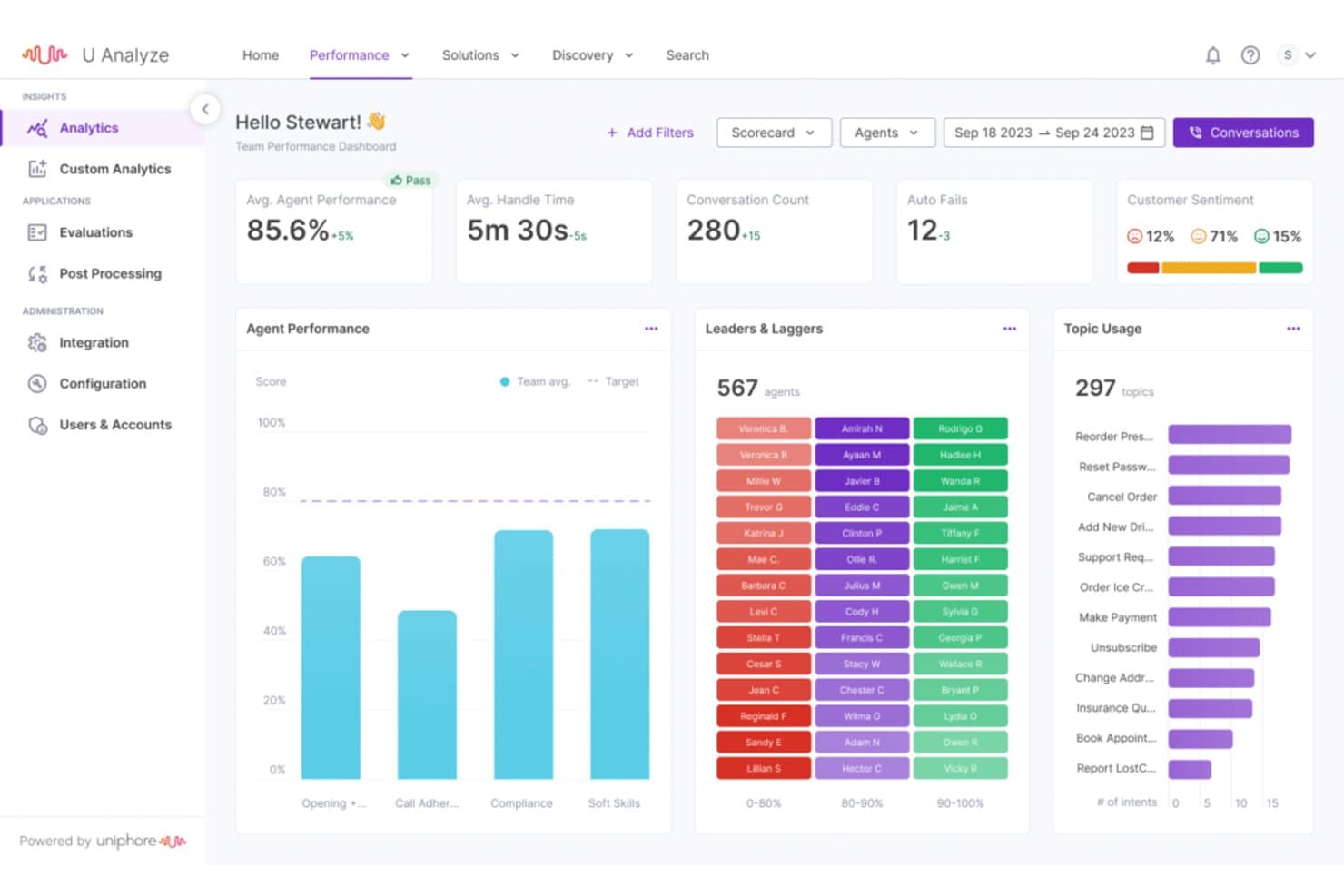
Uniphore tracks customer sentiment with negative, neutral, and positive scoring. My Evaluation Score
- Alerts & Triggered Actions
- 4/5
- CX Data Source Integration
- 5/5
- Granular Emotion Classification
- 3/5
- Analytics & Reporting Dashboards
- 4/5
- Real-Time & Operational Detection
- 5/5
- Emotion Analysis Across Interaction Data
- 4/5
Uniphore is a contact center AI platform that combines real-time emotion and sentiment detection, voice and text conversation analytics, automated QA scoring, and live agent guidance into a unified suite.
Who Is Uniphore Best For?
Uniphore is a strong fit for enterprise contact centers in regulated industries like financial services and healthcare that need real-time emotion detection paired with live agent coaching.
Why I Picked Uniphore
I picked Uniphore as one of the best because its Real-time Guidance Agent does something I find genuinely impressive: it detects emotional cues like frustration or confusion mid-call and immediately prompts agents with empathy-specific responses, not just generic scripts. That live coaching loop is what makes it purpose-built for contact centers. The Conversation Insights Agent then ties those emotion signals back to CSAT drivers across 100% of recorded interactions, so you're not working from a sampled snapshot.
Uniphore Key Features
- Automated QA scoring: Scores 100% of recorded interactions against custom QA rubrics, replacing manual sampling with evidence-based performance review.
- Topic discovery and drilldown: Surfaces emerging call drivers and escalation risks automatically, letting you segment findings by sentiment, agent, or customer.
- "Ask Your Data" querying: Lets you run natural language questions against your interaction data to pull specific sentiment and conversation insights on demand.
- Multilingual voice detection: Identifies customer language in real time across 20+ languages and adjusts agent guidance and self-service responses accordingly.
Uniphore Integrations
Uniphore integrates with Five9, NICE CXone, Genesys Cloud CX, Talkdesk, Dialpad, Salesforce, Microsoft Dynamics, HubSpot, Zendesk, and ServiceNow. It also supports custom connections through open APIs and Model Context Protocol (MCP).
Pros and Cons
Pros:
- 100% of interactions analyzed for emotion
- Multimodal emotion detection foundation
- Real-time guidance with in-call empathy prompts
Cons:
- Not designed for small or mid-sized teams
- Emotion taxonomy not fully transparent
Learn more about Uniphore: Best for live emotion scoring in contact centers
- Free demo available
- Pricing upon request
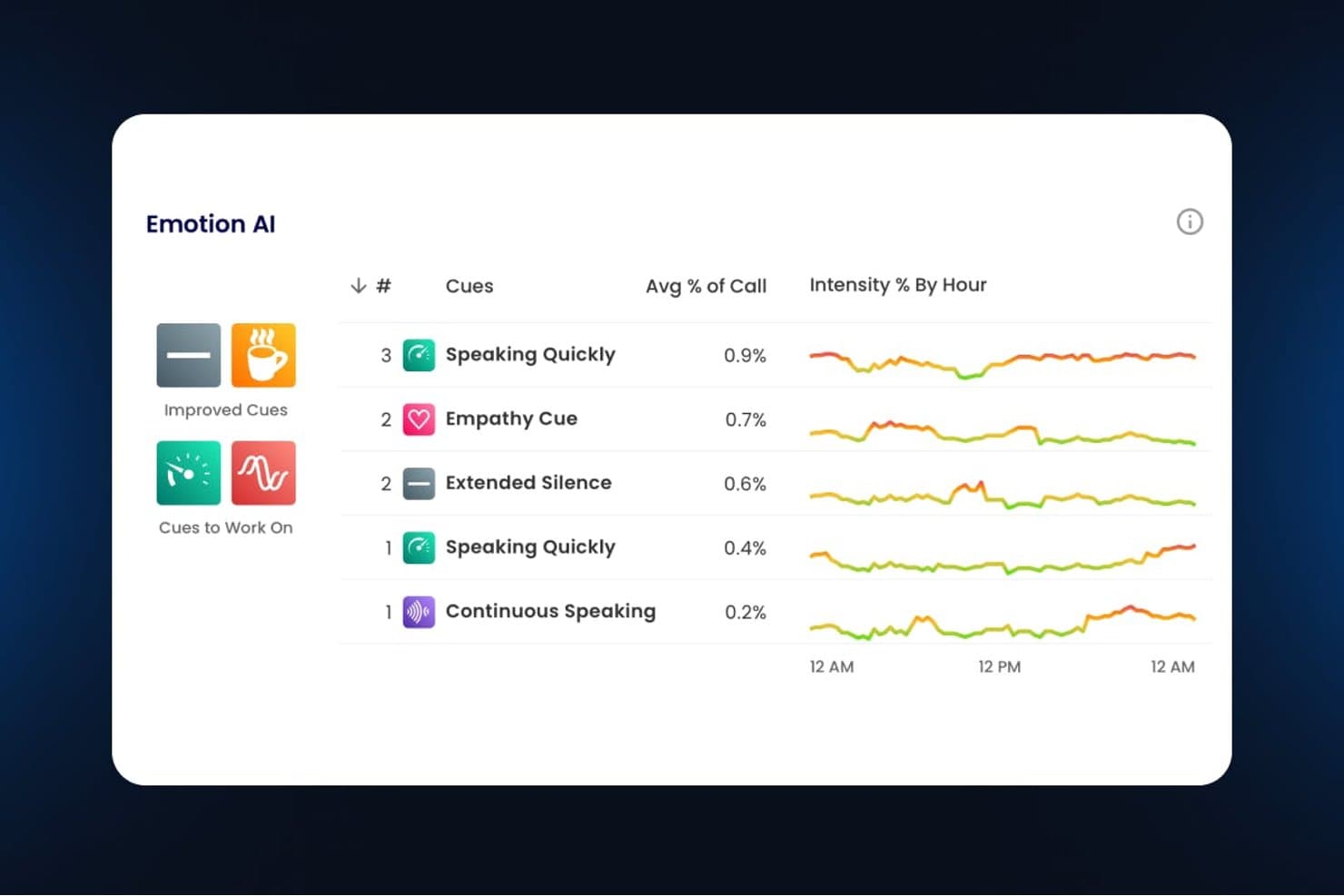
Verint Speech Analytics tracks emotional cues and intensity trends across call hours. My Evaluation Score
- Alerts & Triggered Actions
- 5/5
- CX Data Source Integration
- 5/5
- Granular Emotion Classification
- 3/5
- Analytics & Reporting Dashboards
- 4/5
- Real-Time & Operational Detection
- 5/5
- Emotion Analysis Across Interaction Data
- 4/5
Verint Speech Analytics is an enterprise speech analytics platform that detects emotion, sentiment, and acoustic stress signals across 100% of voice and digital interactions in real time, combining AI-driven transcription, live agent coaching, and cross-channel VoC analysis.
Who Is Verint Speech Analytics Best For?
Verint Speech Analytics is a strong fit for enterprise contact centers that need to detect and act on customer emotion signals during live calls, not just after them.
Why I Picked Verint Speech Analytics
Verint Speech Analytics earns its spot on my shortlist because of how it handles live emotion scoring during active calls, not just after them. The CX/EX Scoring Bot detects acoustic signals like tone and vocal stress in real time, feeding a Supervisor Live Dashboard that lets managers intervene mid-call before a frustrated customer escalates. I also like that the Coaching Bot delivers in-the-moment agent nudges based on those same emotional cues, closing the loop between detection and action instantly.
Verint Speech Analytics Key Features
- Genie Bot: A GenAI querying tool that lets analysts ask plain-language questions to surface emotional and topical trends across unstructured call data.
- PII redaction bot: An automated bot that detects and removes sensitive personal and financial information from transcripts and recordings during processing.
- Root cause and driver analytics: A built-in analysis layer that links detected emotion and sentiment signals to CX outcomes like CSAT, FCR, and AHT.
- Unified Visual Player: An interaction playback interface that combines transcripts, detected emotions, topics, screen recordings, and QA evaluations in one view.
Verint Speech Analytics Integrations
Verint Speech Analytics integrates with Amazon Connect, Five9, Genesys, and Salesforce, with native connectivity to Verint WFM and AQM. Its Open Platform and streaming APIs support custom integrations.
Pros and Cons
Pros:
- Detects nonverbal tone and stress signals
- Delivers live agent nudges during interactions
- Scores emotion and sentiment on every call
Cons:
- No transparent emotion taxonomy provided
- Inconsistent transcription accuracy for some dialects
Learn more about Verint Speech Analytics: Best for VoC-linked emotion root cause analysis
- Free demo available
- Pricing upon request
Visit WebsiteCustomer Rating:4.6/5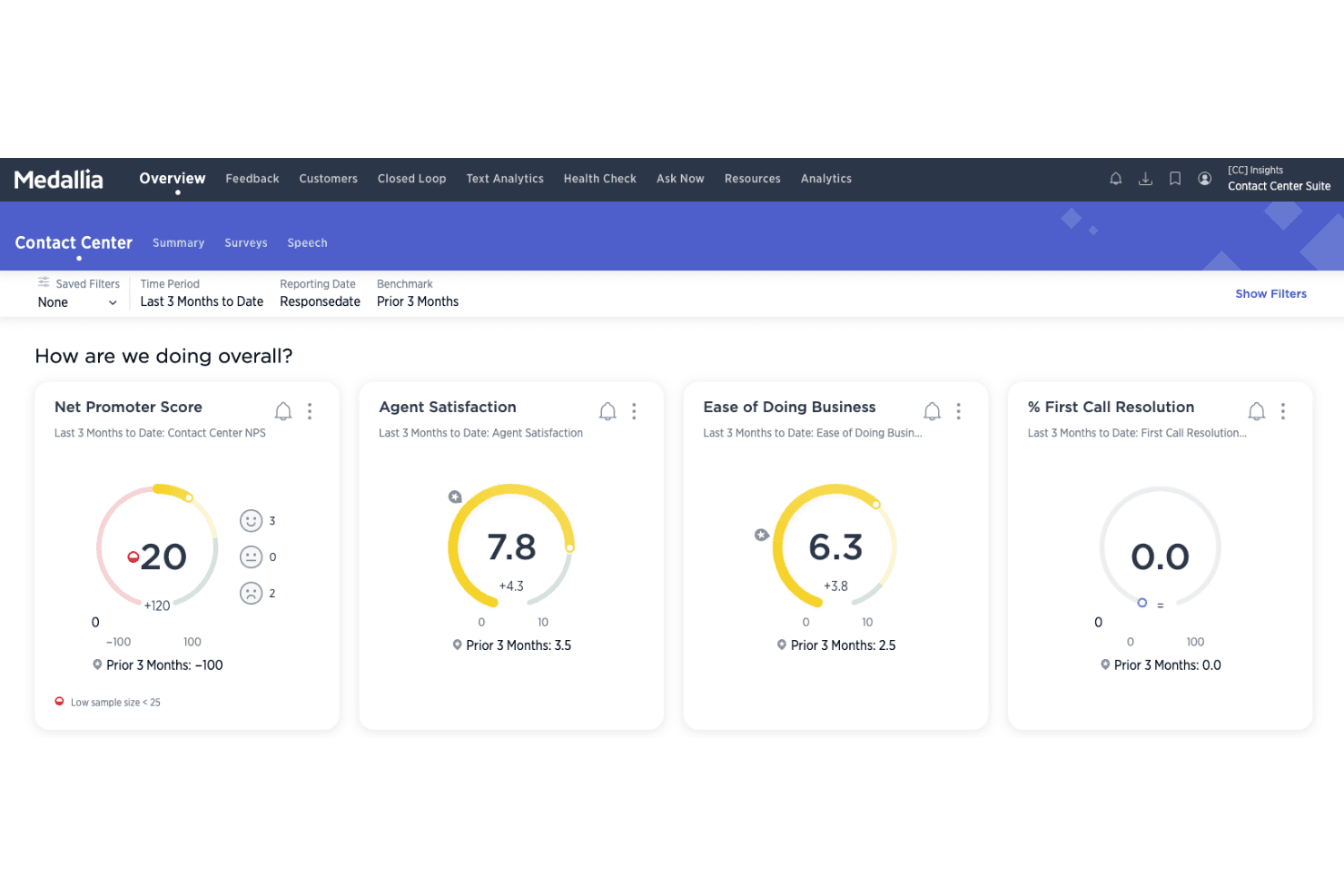
Medallia tracks satisfaction and resolution metrics across contact center interactions. My Evaluation Score
- Alerts & Triggered Actions
- 5/5
- CX Data Source Integration
- 5/5
- Granular Emotion Classification
- 4/5
- Analytics & Reporting Dashboards
- 5/5
- Real-Time & Operational Detection
- 4/5
- Emotion Analysis Across Interaction Data
- 5/5
Medallia is a VoC and customer experience analytics platform that combines NLU-based text emotion analysis with acoustic emotion detection from voice, covering surveys, chat, support tickets, social media, and call recordings in a single unified system.
Who Is Medallia Best For?
Medallia is a strong fit for enterprise CX and VoC teams that need to connect detected emotions directly to CSAT, NPS, and churn outcomes across omnichannel feedback sources.
Why I Picked Medallia
Medallia earns its spot on my shortlist because it's the only tool here that ties detected emotions directly to VoC outcomes like CSAT, NPS, and churn risk through built-in Root Cause Analysis. I particularly like that it combines NLU-based text emotion with acoustic emotion from voice, so you're capturing not just what customers say but how they sound throughout a call. Compound Topics let you layer signals together, flagging, for example, churn language plus high effort plus negative sentiment as a single operational alert.
Medallia Key Features
- Acoustic emotion detection: Medallia Speech analyzes voice recordings to surface how customers and agents sound throughout a call, capturing emotional tone shifts beyond spoken words.
- Empathy scoring: An out-of-the-box KPI that scores agent empathy across interactions, giving supervisors a measurable signal beyond sentiment polarity.
- Smart Topic Builder: A low-to-no-code environment where you can build, refine, and score custom topic models using AI-powered precision scoring.
- Predictive Account Health: A model that pulls from 100+ signals—including NPS, call center data, product usage, and revenue—to surface churn risk before it escalates.
Medallia Integrations
Medallia offers native integrations with Salesforce, Microsoft Dynamics 365, and ServiceNow, plus a documented NICE inContact CXone connector and OAuth 2.0 Speech API for custom integrations.
Pros and Cons
Pros:
- Compound topics flag churn and risk signals
- Empathy scoring highlights agent emotional intelligence
- Analyzes emotion from both text and voice
Cons:
- No live in-call agent emotion nudges
- Reporting complexity frustrates non-technical users
 Best for omnichannel emotion-to-outcome analytics
- 30-day free trial
- Pricing upon request
Visit WebsiteCustomer Rating:4/5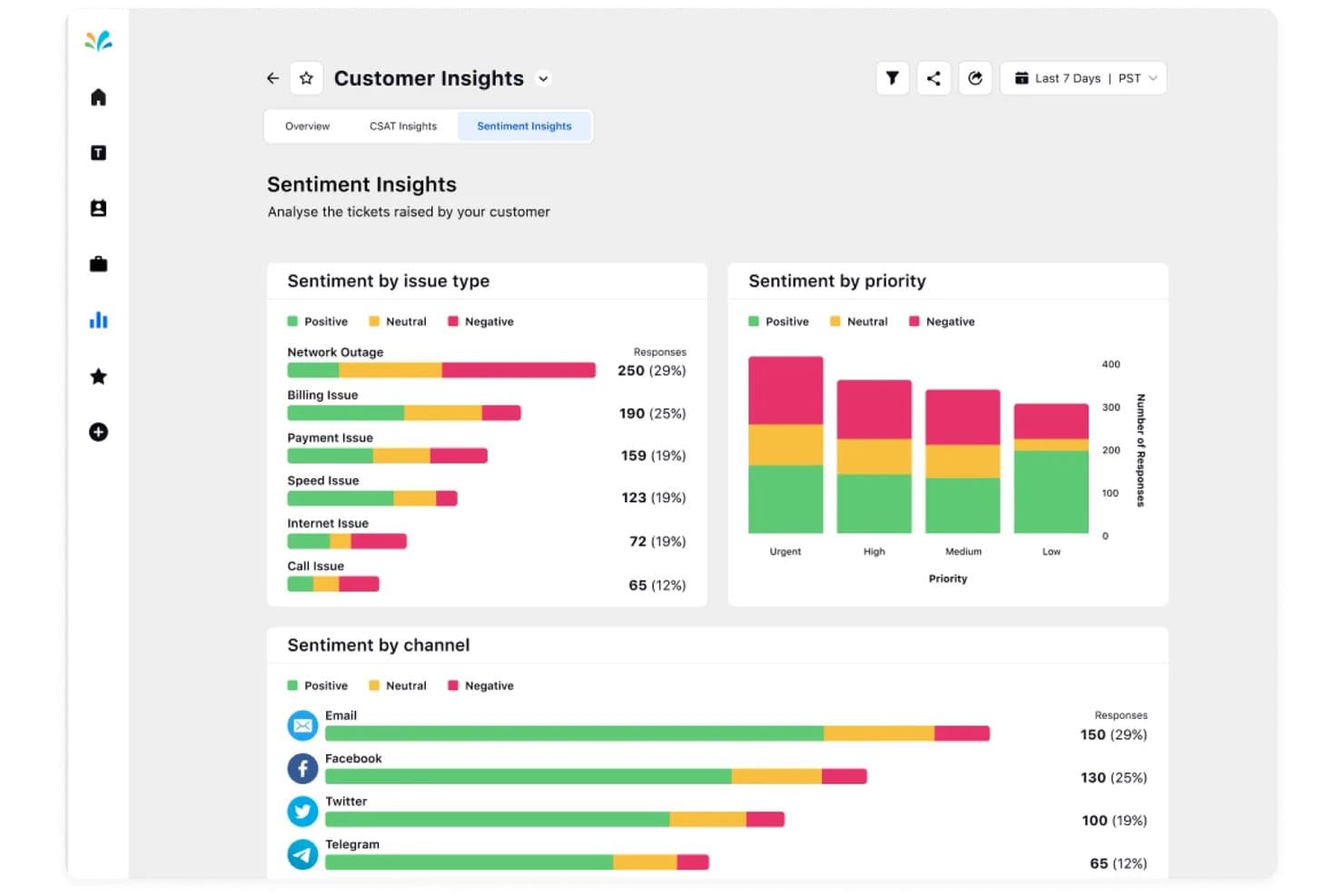
Sprinklr tracks customer sentiment by issue, priority, and channel. My Evaluation Score
- Alerts & Triggered Actions
- 5/5
- CX Data Source Integration
- 5/5
- Granular Emotion Classification
- 4/5
- Analytics & Reporting Dashboards
- 5/5
- Real-Time & Operational Detection
- 5/5
- Emotion Analysis Across Interaction Data
- 5/5
Sprinklr is an enterprise customer experience platform that applies AI-powered sentiment and emotion detection across 30+ channels—including voice, chat, email, and social—with real-time agent coaching, contact driver analytics, and multilingual emotion modeling built into a unified contact center suite.
Who Is Sprinklr Best For?
Sprinklr is a strong fit for enterprise CX and VoC teams that need emotion intelligence tied directly to business outcomes across a high volume of channels.
Why I Picked Sprinklr
I picked Sprinklr because it's the only platform I've seen that consistently ties emotion signals back to actual business outcomes, like CSAT, churn, and AHT, across 30+ channels simultaneously. Its multi-tier contact driver models automatically link detected frustration or satisfaction to specific KPIs, giving VoC leaders the "why" behind emotional trends rather than just polarity scores. Pair that with real-time Agent Nudges that fire during live interactions when sentiment dips, and you get emotion intelligence that actually changes outcomes in the moment.
Sprinklr Key Features
- Multilingual sentiment modeling: Applies per-language sentiment algorithms across 100+ languages, with ongoing expansion to support global CX operations.
- Voice tonality analysis: Combines acoustic signals from live calls with transcript context to produce more accurate sentiment and CSAT scores for voice interactions.
- 100% interaction coverage scoring: Scores every customer interaction across all channels for sentiment, quality, and compliance—no sampling required.
- Configurable AI pipeline via AI+ Studio: Lets enterprise teams select and connect LLM providers like OpenAI, Anthropic, or Amazon Bedrock to customize how emotion models run across workflows.
Sprinklr Integrations
Sprinklr documents 100+ integrations, including Salesforce, Zendesk, Microsoft Dynamics CRM, Freshdesk, ServiceNow, JIRA, Tableau, Power BI, Amazon Bedrock, and OpenAI. It also supports APIs for custom connections and integrations with WFM, quality management, and LMS systems.
Pros and Cons
Pros:
- Real-time agent nudges based on emotion
- Links emotion signals to business outcomes
- Analyzes emotions across 30+ interaction channels
Cons:
- Requires Success Manager to enable voice tonality
- Granular emotion detection limited outside social suite
Learn more about Sprinklr: Best for omnichannel emotion and intensity scoring
- Free demo available
- Pricing upon request
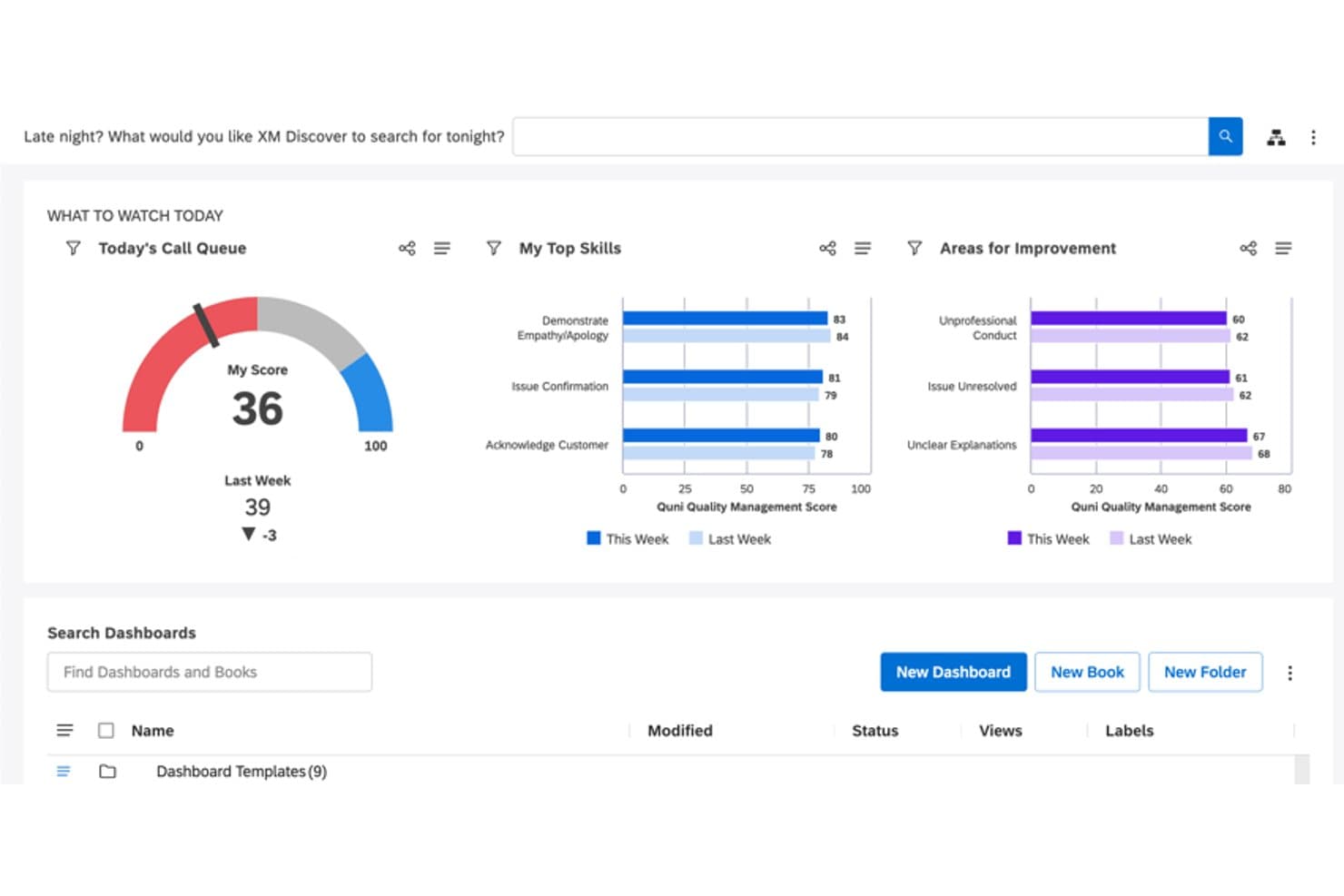
Qualtrics XM Discover tracks agent call quality scores and improvement areas. My Evaluation Score
- Alerts & Triggered Actions
- 5/5
- CX Data Source Integration
- 5/5
- Granular Emotion Classification
- 5/5
- Analytics & Reporting Dashboards
- 5/5
- Real-Time & Operational Detection
- 4/5
- Emotion Analysis Across Interaction Data
- 5/5
Qualtrics XM Discover is an NLU-powered conversation analytics platform that classifies 50+ discrete emotions at the sentence level, measures emotional intensity, and analyzes sentiment across voice, chat, email, surveys, social, and review data.
Who Is Qualtrics XM Discover Best For?
Qualtrics XM Discover is built for enterprise CX and VoC teams that need to analyze emotions across every channel—voice, chat, email, surveys, and reviews—at scale.
Why I Picked Qualtrics XM Discover
Qualtrics XM Discover earns its spot on my shortlist because no other tool I've evaluated pairs emotion classification with intensity scoring across this many channels at once. CB Emotion tags 50+ discrete emotions at the sentence level, and CB Emotional Intensity scores how strongly each emotion registers on a 1–5 scale, so I can tell the difference between mild frustration and a customer who's about to churn. That dual signal works across voice, chat, email, surveys, and reviews from a single platform.
Qualtrics XM Discover Key Features
- CB Sentiment scoring: Measures sentiment at the sentence level on a -5 to 5 scale, segmenting feedback into five categories from very negative to very positive.
- 150+ pre-built NLU models: Industry-specific AI models for verticals like healthcare, retail, and financial services come ready to deploy out of the box.
- xFlow workflow automation: A no-code automation layer that triggers downstream actions—like ticket creation or CRM writeback—when emotion or sentiment thresholds are breached.
- Intelligent Scoring for quality management: Automatically evaluates agent interactions for empathy, compliance, and resolution to support coaching and performance reviews.
Qualtrics XM Discover Integrations
Qualtrics XM Discover has documented connectors for Genesys Cloud, Salesforce, Zendesk, Qualtrics, Facebook, Trustpilot, and other review and social platforms. An API supports custom integrations, streaming pipelines, and business intelligence connectivity.
Pros and Cons
Pros:
- Supports omnichannel analysis across all CX data
- Scores emotional intensity along with emotion type
- Measures 50-plus emotions at sentence level
Cons:
- Suited only for enterprise-level CX operations
- Requires complex setup and ongoing model tuning
Learn more about Qualtrics XM Discover: Best for emotion-linked multilingual CX analytics
- Free demo available
- Pricing upon request
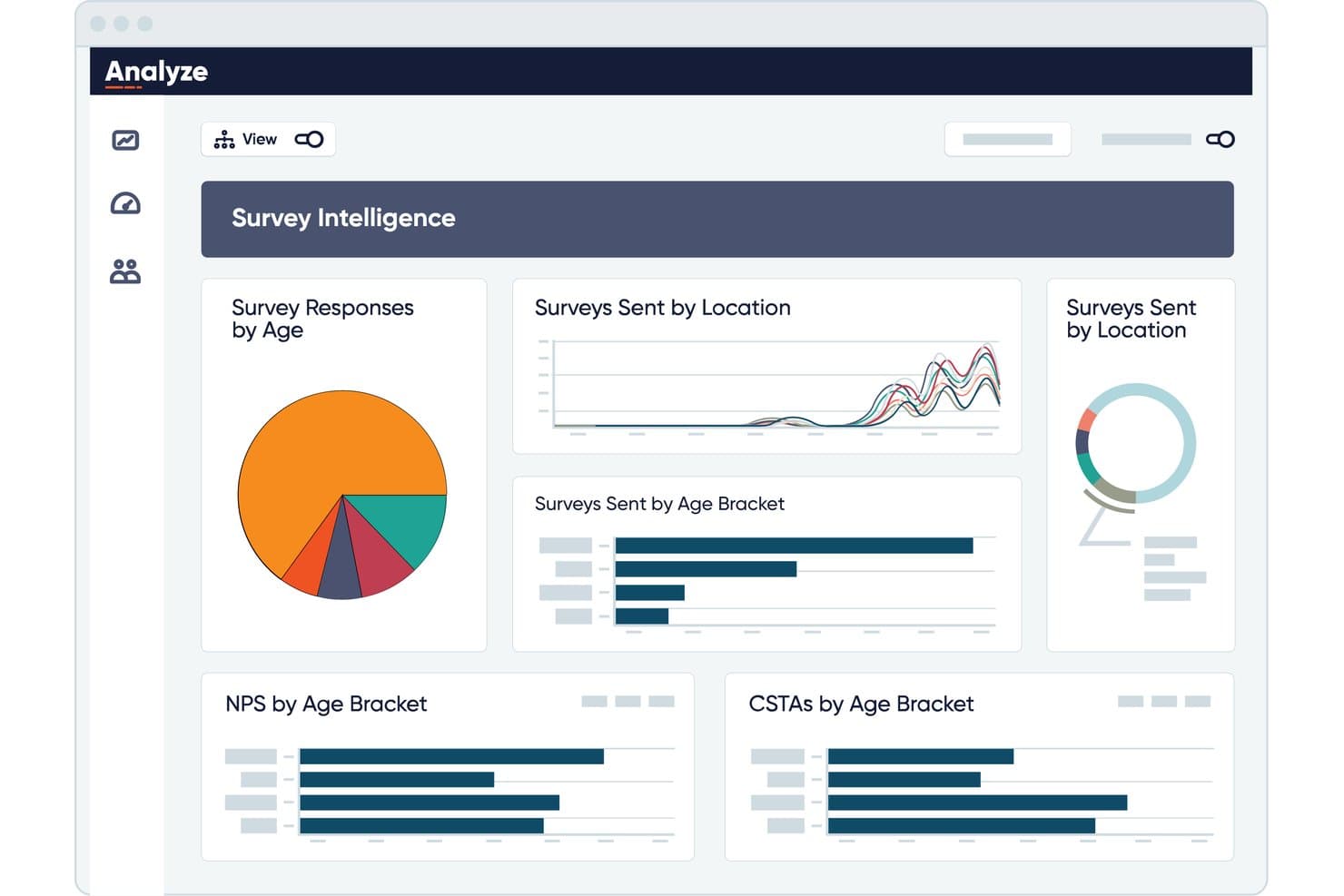
CallMiner visualizes survey responses and NPS scores by age and location. My Evaluation Score
- Alerts & Triggered Actions
- 5/5
- CX Data Source Integration
- 5/5
- Granular Emotion Classification
- 5/5
- Analytics & Reporting Dashboards
- 5/5
- Real-Time & Operational Detection
- 5/5
- Emotion Analysis Across Interaction Data
- 5/5
CallMiner is a conversation analytics platform that detects and classifies customer emotions across voice, chat, email, and text using a combination of acoustic signal analysis and NLP.
Who Is CallMiner Best For?
CallMiner is a strong fit for enterprise contact center teams that need to detect, classify, and act on customer emotions across multiple languages and interaction channels at scale.
Why I Picked CallMiner
I picked CallMiner as one of the best because it detects customer emotions across 100+ languages using both acoustic signal analysis and NLP simultaneously, which I think is rare at this scale. Where it really stands out is how emotion scores feed directly into the Coach module, auto-prioritizing real coaching moments with actual audio snippets as evidence. I also like that administrators can tune emotion thresholds per vertical without engineering help, so a healthcare team and a debt collection team can work from calibrated models that reflect their specific customer context.
CallMiner Key Features
- Real-time emotion detection: RealTime monitors live calls for emotional cues and automatically triggers supervisor alerts or escalation actions as the conversation unfolds.
- 100% interaction coverage: The platform analyzes every voice call, chat, email, and text interaction rather than a sampled subset, giving you full population-level emotion data.
- Two-dimensional emotion scoring: Emotion is classified across both sentiment polarity and intensity, enabling more precise categorization than standard positive/negative/neutral labeling.
- Unsupervised ML for outcome prediction: The Analyze module links detected emotions and topics to business metrics like NPS, churn likelihood, and likelihood to buy without requiring manual model training.
CallMiner Integrations
CallMiner offers native integrations with Genesys, Amazon Connect, Five9, NICE CXone, Talkdesk, Salesforce, Zendesk, Oracle CX, and Qualtrics. It also supports REST APIs, Tableau, Snowflake, and third-party speech-to-text engines through its Open Voice Transcription Standard.
Pros and Cons
Pros:
- Custom emotion models for each industry
- Captures emotion in real time during calls
- Multilingual emotion detection across 100+ languages
Cons:
- Emotion scores sometimes affected by transcription errors
- Requires analytics expertise to extract full value
Learn more about CallMiner:
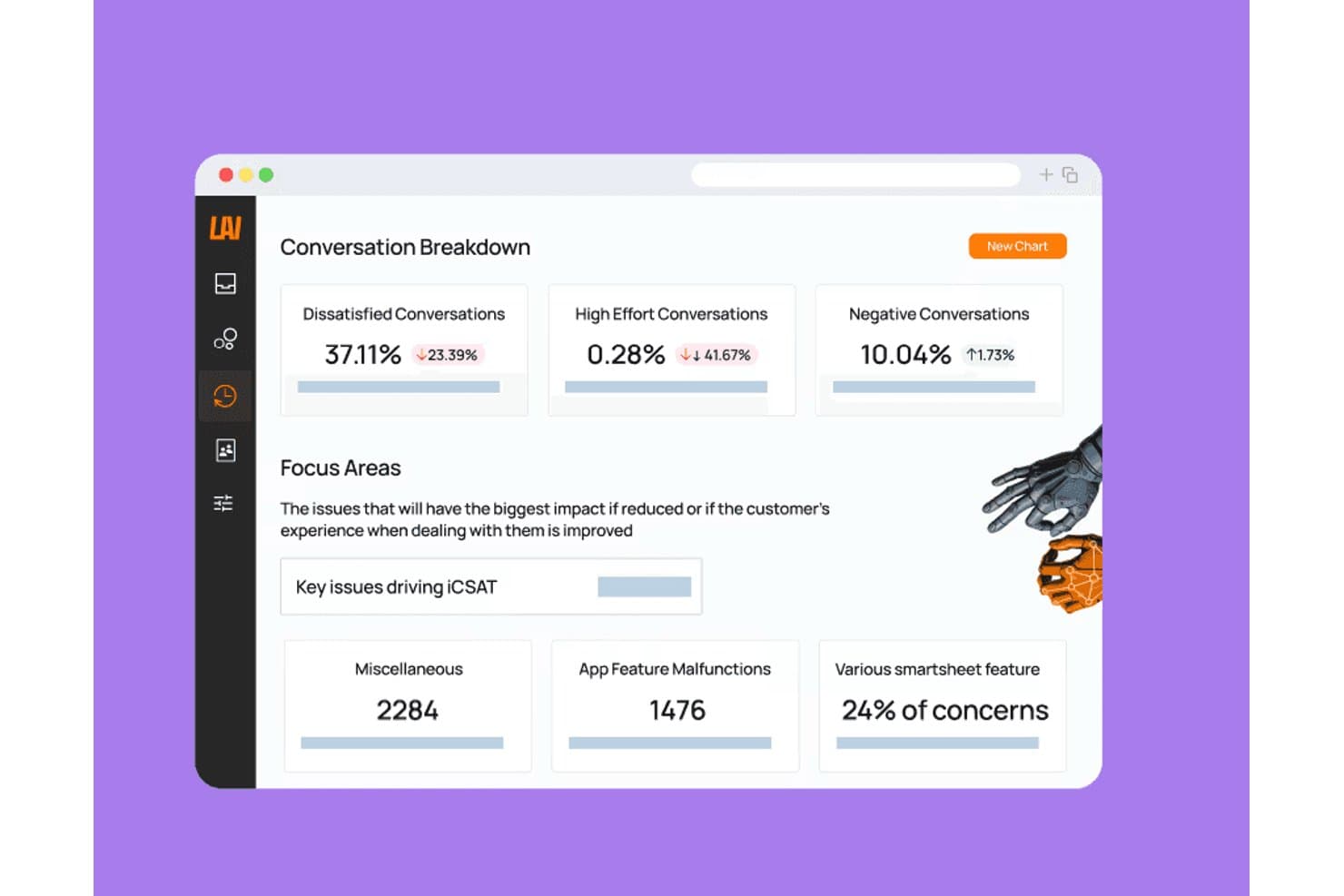
Level AI surfaces key conversation issues impacting customer satisfaction scores. My Evaluation Score
- Alerts & Triggered Actions
- 4/5
- CX Data Source Integration
- 5/5
- Granular Emotion Classification
- 5/5
- Analytics & Reporting Dashboards
- 5/5
- Real-Time & Operational Detection
- 5/5
- Emotion Analysis Across Interaction Data
- 4/5
Level AI is a contact center AI platform that detects and classifies customer emotions across voice, chat, and email interactions using semantic NLU, with real-time sentiment scoring, granular multi-emotion classification, and automated QA built in.
Who Is Level AI Best For?
Level AI is built for enterprise contact centers with large agent teams that need emotion-aware QA and coaching at scale.
Why I Picked Level AI
Level AI earns its spot on my shortlist because its emotion detection goes well beyond positive/negative labels, classifying eight discrete emotional states like annoyance, disappointment, and admiration using semantic NLU rather than keyword matching. I'm particularly impressed by how it closes the loop in real time: supervisors can monitor live Sentiment Scores across every active call and jump in via Call Whisper or Barge the moment a customer's emotional state deteriorates. That tight connection between detection and coaching, where flagged interactions automatically trigger AI-generated coaching plans with specific evidence, is what makes Level AI the clearest choice for emotion-driven QA.
Level AI Key Features
- Inferred CSAT (iCSAT): A proprietary AI model that combines sentiment, customer effort, and resolution signals to estimate satisfaction scores across 100% of interactions—no post-call survey required.
- Scenario Engine: An automated tagging system that classifies interactions by intent category (e.g., billing, refund) and correlates emotional signals with those topics across your entire interaction volume.
- Agent self-coaching dashboard: A shareable view where agents can review their own sentiment patterns, QA scores, and flagged moments to drive self-directed improvement.
- "Tenor" VoC model: A daily AI classification model that organizes customer contacts into a three-level topic hierarchy to surface recurring pain points and emerging trends.
Level AI Integrations
Level AI offers 50+ documented integrations, including Five9, Genesys, Talkdesk, Salesforce, Zendesk, Medallia, Snowflake, and Amazon S3. Its API supports custom connections for sending emotion and sentiment data to BI or workforce management tools.
Pros and Cons
Pros:
- Auto-generates coaching plans with evidence
- Real-time sentiment alerts for live intervention
- Detects eight distinct emotional states
Cons:
- No self-serve trial or instant access
- No detection for facial or biometric signals
Learn more about Level AI:
Other Emotion Detection Software
Here are some additional emotion detection software options that didn’t make it onto my shortlist, but are still worth checking out:
- 11Talkdesk Interaction AnalyticsBest for CCaaS-native emotion-to-action workflows
- 12HiverBest for AI sentiment analysis
- 13Symbl.aiBest for sentiment-linked agent coaching via API
- 14iMotionsBest for multi-modal research
- 15RightFlow by RightComBest for retail analytics
- 16Imentiv AIBest for real-time analysis
- 17Vicar VisionBest for facial expression analysis
How I Evaluate Emotion Detection Software
I split my evaluation into two layers: the baseline capabilities a tool must have—like granular emotion classification and real-time detection—and the differentiators that separate vendors when it matters most.
Core Functionality (Table Stakes For This List)
When I'm selecting tools for my list, I rank each one on a scale from 0 (does not offer the functionality) to 5 (excels in this area) for each core functionality listed below. I then calculate the tool's total score into a percentage, using 65% as a benchmark to help assess its overall fit for the list.
- Emotion Analysis Modalities: I look at whether a tool analyzes text, voice, facial, or biometric signals—and whether it combines signals for richer context.
- Granular Emotion Classification: I evaluate how far a tool goes beyond positive/negative sentiment, checking for discrete states like frustration, confusion, or satisfaction with confidence scores.
- Real-Time Detection: I check whether emotion signals surface during live interactions—not just in post-call reports—so agents or supervisors can act in the moment.
- CX Data Source Integration: I look for native connections to contact center platforms, CRMs, survey tools, and support systems rather than relying on manual data imports.
- Analytics & Reporting Dashboards: I consider whether dashboards let you filter by agent, interaction type, or emotion category—and whether they support trend tracking over time.
- Alerts & Triggered Actions: I evaluate whether the tool can trigger escalation workflows or alerts when specific emotional thresholds are detected during a customer interaction.
Once I have a list of tools that meet the criteria, I consider what sets each platform apart.
Differentiating Factors (What Sets Vendors Apart)
Here's how I compare and contrast different vendors:
Standout Features
I pay close attention to empathy coaching cues—real-time nudges delivered to agents mid-call based on live emotional tone. A tool that can surface a prompt like "acknowledge feelings" during a tense billing call is far more actionable than one that only flags issues in post-call reports. I also evaluate driver and root-cause analytics: detecting frustration matters less if the platform can't tell you why it's happening. I look for automated linkage between emotion signals and outcomes like CSAT or churn, with topic-level tagging that points to specific friction sources.
Beyond Features
Privacy and compliance posture matters a lot here—I look for configurable consent capture, PII redaction in transcripts, and certifications like SOC 2 Type II or HIPAA for teams in regulated industries. I also pay close attention to scalability: tools that process 100% of interactions rather than sampled QA subsets give you a far more accurate picture of customer sentiment across the board.
How to Choose Emotion Detection Software
It’s easy to get bogged down in long feature lists and complex pricing structures. To help you stay focused as you work through your unique software selection process, here’s a checklist of factors to keep in mind:
| Factor | What to Consider |
| Scalability | Ensure the software can grow with your business. Look for solutions that can handle increased data and user demands without compromising performance. |
| Integrations | Check if the software integrates with your existing tools. Seamless integration with CRM, marketing, and analytics platforms can enhance overall efficiency. |
| Customizability | Look for software that lets you tailor features to your needs. Custom emotion categories and reporting formats can align the tool with your specific goals. |
| Ease of use | Choose a tool with an intuitive interface. Your team should navigate it easily without extensive training, ensuring quick adoption and minimal disruption. |
| Budget | Consider the total cost, including setup and maintenance. Ensure the pricing aligns with your budget and offers a good return on investment for your needs. |
| Security safeguards | Verify that the software complies with data protection standards. Security features like encryption and access controls are crucial for protecting sensitive data. |
| Real-time analysis | If instant feedback is crucial, ensure the software provides real-time emotion detection. This is vital for applications like live customer interactions. |
| Support services | Evaluate the quality of customer support. Access to responsive support can be invaluable for troubleshooting and maximizing the tool's potential. |
Trends in Emotion Detection Software
In my research, I sourced countless product updates, press releases, and release logs from different emotion detection software vendors. Here are some of the emerging trends I’m keeping an eye on:
- Multi-modal analysis: This combines data from facial expressions, voice, and text to provide a fuller emotional picture. It's particularly useful for comprehensive customer insights. Vendors like iMotions are incorporating these capabilities to enhance research and analysis.
- Emotion-based personalization: Some software uses detected emotions to tailor user experiences in real-time. This is becoming popular in marketing, social media, and entertainment, where personalized content boosts engagement. Tools like MorphCast are leading the way in creating interactive content that adapts based on viewer emotions.
- Ethical AI development: There's a growing focus on ensuring emotion detection AI is fair and unbiased. Vendors are working to eliminate biases and ethnic disparity in emotion recognition, which is crucial for ethical AI use. Companies like Grekkom also emphasize compliance with data protection standards.
- Real-time emotion feedback: Real-time analysis is becoming essential, especially in customer service and live interactions. This feature helps businesses respond promptly to customer needs. Viso Suite offers real-time processing to enhance video content applications.
- Emotion tracking over time: Tracking emotions over extended periods provides insights into behavioral trends and patterns. This feature aids in developing strategies based on long-term emotional data. Tools like MoodMe are tapping into this trend to offer deeper insights into user behavior.
What Is Emotion Detection Software?
Emotion detection software uses artificial intelligence and text, voice, and facial analysis to identify human emotions in real time. These tools help CX, marketing, and research teams interpret emotional responses across channels by turning expressions and tone into actionable insights that improve engagement, satisfaction, and decision-making.
Features of Emotion Detection Software
When selecting emotion detection software, keep an eye out for the following key features:
- Real-time analysis: Provides immediate insights into emotions, enabling quick responses in customer interactions.
- Multi-modal capabilities: Combines facial, voice, and text data for comprehensive emotional understanding.
- Emotion tracking over time: Monitors emotions across sessions to identify trends and patterns in behavior.
- Customizable emotion categories: Allows users to define specific emotions relevant to their needs and applications.
- Privacy compliance: Ensures data handling meets regulatory standards, protecting user information.
- Detailed reporting: Offers in-depth analytics and visualizations to aid in decision-making and strategy development.
- Emotion-based personalization: Adapts content and experiences based on detected emotions to enhance engagement.
- Multiple face recognition: Identifies and analyzes emotions for more than one person in a scene, useful for group settings.
- Scalability: Supports growth and increased data demands without sacrificing performance.
- User-friendly interface: Ensures ease of use and quick adoption by minimizing the learning curve.
Benefits of Emotion Detection Software
Implementing emotion detection software provides several benefits for your team and your business. Here are a few you can look forward to:
- Enhanced customer insights: Real-time analysis and multi-modal capabilities help you understand your customers' emotions more deeply.
- Improved engagement: Emotion-based personalization adapts content to match user emotions, increasing interaction and satisfaction.
- Better decision-making: Detailed reporting and emotion tracking over time provide data-driven insights for strategic planning.
- Increased efficiency: Real-time feedback allows your team to address customer needs quickly and effectively.
- Compliance with regulations: Privacy compliance features ensure your data handling meets legal standards, protecting user information.
- Scalable solutions: Scalability allows your software to grow with your business, handling more data and users as needed.
Costs and Pricing of Emotion Detection Software
Selecting emotion detection software requires an understanding of the various pricing models and plans available. Costs vary based on features, team size, add-ons, and more. The table below summarizes common plans, their average prices, and typical features included in emotion detection tools:
Plan Comparison Table for Emotion Detection Software
| Plan Type | Average Price | Common Features |
| Free Plan | $0 | Basic emotion detection, limited data processing, and community support. |
| Personal Plan | $10-$30 /user /month | Real-time analysis, customizable emotion categories, and single-user access. |
| Business Plan | $50-$100 /user /month | Multi-modal capabilities, detailed reporting, and priority customer support. |
| Enterprise Plan | $150-$300 /user /month | Scalability for large teams, advanced security safeguards, and dedicated support. |
Emotion Detection Software FAQs
Here are some answers to common questions about emotion detection software:
How accurate is emotion recognition?
In my experience, emotion recognition accuracy varies by emotion and technology used. Generally, happiness and surprise are detected with higher accuracy, often above 95%. However, emotions like anger and sadness might be slightly less accurate. Your team should consider the specific needs and contexts when evaluating the accuracy of your application.
What technology is used in emotion detection?
Emotion detection software typically uses artificial intelligence and machine learning algorithms to analyze facial expressions and emotions. Technologies like neural networks and computer vision are commonly employed. These tools help your team interpret emotional data from images and videos effectively. Some solutions that provide voice or text analytics also rely on natural language processing (NLP).
What is emotion recognition software used for?
Emotion recognition software is used to analyze sentiments in images and videos. It’s often applied in marketing to understand customer reactions, in research to study human behavior, and in customer service to improve interactions. You can leverage these insights to enhance engagement and strategy.
What is the algorithm for emotion detection software?
Common algorithms include Haar Cascade for detecting facial features and Convolutional Neural Networks (CNN) for recognizing emotions. These algorithms work together to analyze facial characteristics and interpret emotional states. Your team can use these methods for precise emotion analysis in various applications.
How does emotion detection benefit businesses?
Emotion detection helps businesses understand customer sentiment, tailor marketing strategies, and improve customer service. By gaining insights into emotional responses, your team can offer support before an issue gets escalated, enhance user experiences, and drive engagement. This technology supports data-driven decision-making and personalized interactions.
Can emotion detection software handle multiple faces?
Yes, many emotion detection software solutions can analyze multiple faces simultaneously. This feature is essential for group settings, such as events or meetings. Your team can use this capability to gather comprehensive emotional data from multiple participants.
What's Next?
Subscribe to our newsletter for the latest CX insights, how-to guides, strategies, and resources from top experts in the CX field.