
20 Best Sentiment Analysis Tools of 2026

10 Best Sentiment Analysis Tools Shortlist
Here's my pick of the 10 best software from the 20 tools reviewed.


With so many different sentiment analysis tools available, finding the best fit for your needs is tough. You know you want software to help you monitor how people are feeling about your brand so you can ultimately improve your customer satisfaction, but you need to figure out which tool is the best fit. In this post, I'll help you make this choice easier by sharing my insights on the best sentiment analysis tools available to uncover the true emotions behind customer feedback, product reviews, or social media posts.
Why Trust Our Software Reviews
We’ve been testing and reviewing software since 2020. As CX leaders ourselves, we know how critical and difficult it is to make the right decision when selecting software.
We invest in deep research to help our audience make better software purchasing decisions. We’ve tested more than 2,000 tools for different CX use cases and written over 1,000 comprehensive software reviews. Learn how we stay transparent & our software review methodology.
The Best Sentiment Analysis Tools Summary Table
| Tool | Best For | Trial Info | Price | ||
|---|---|---|---|---|---|
| 1 | Best for AI-driven customer insights | Free demo available | Pricing upon request | Website | |
| 2 | Best for open-text sentiment analysis | Free trial + free plan + free demo available | From $39/month (billed annually) | Website | |
| 3 | Best for AI-generated summaries | Free demo available | Pricing upon request | Website | |
| 4 | Best for negative sentiment alerts | Free demo available | From $45/month (billed annually) | Website | |
| 5 | Best all-in-one sentiment analysis & brand protection tool | 14-day free trial available | From $199/month (billed annually) | Website | |
| 6 | Best for its automated sentiment research capabilities | 14-day free trial | From $299/month | Website | |
| 7 | Best for identifying frustration signals | Free plan + free demo available | Pricing upon request | Website | |
| 8 | Best for engaging customers through text messages. | Free demo available | Pricing upon request | Website | |
| 9 | Best for its IBM powered sentiment analysis | Free plan + Free demo available | From $19.99/month (billed annually) | Website | |
| 10 | Best for voice sentiment analysis | Free demo available | From $15/user/month | Website |


-

SupportYourApp
Visit WebsiteThis is an aggregated rating for this tool including ratings from Crozdesk users and ratings from other sites.4.7 -
Freshdesk
Visit WebsiteThis is an aggregated rating for this tool including ratings from Crozdesk users and ratings from other sites.4.4 -
Zendesk
Visit WebsiteThis is an aggregated rating for this tool including ratings from Crozdesk users and ratings from other sites.4.3





Best Sentiment Analysis Tools Reviews
Read on to find a quick summary of each of the sentiment analysis tools, including their strengths, weaknesses, and even software pricing.


Unwrap uses AI to help customer experience teams, product managers, and marketers analyze customer conversations and uncover patterns in sentiment, emotion, and feedback across multiple channels.
Who Is Unwrap Best For?
Unwrap is a strong fit for product and CX teams at B2B SaaS companies that need to make sense of large volumes of customer feedback without manual analysis.
Why I Picked Unwrap
Unwrap earns its spot on my shortlist because of how it turns raw customer feedback into structured, AI-generated insights without requiring manual tagging or categorization. I like that it automatically detects sentiment and themes across feedback sources like support tickets, reviews, and surveys. My team is able to see exactly which product areas or experiences are driving negative or positive sentiment, which makes prioritization conversations with product much easier. The AI summaries surface patterns I'd otherwise spend hours finding manually.
Unwrap Key Features
- Auto tagger: Automatically categorizes incoming feedback by topic and taxonomy, so nothing gets lost in an unstructured pile of responses.
- Anomaly alerts: Sends real-time Slack and email notifications when unusual spikes or drops in feedback patterns are detected.
- Natural language assistant: Lets you type plain-language questions about your feedback data and returns answers with supporting customer quotes and charts.
- Responder: Enables bulk, personalized replies to customer reviews and messages across multiple channels directly from the platform.
Unwrap Integrations
Integrations include Zendesk, Intercom, Salesforce, HubSpot, Slack, Trustpilot, Google Play, Apple App Store, Delighted, and Medallia.
Pros and Cons
Pros:
- Automated insights reduce need for manual data tagging
- Proactive alerts notify of sentiment changes quickly
- Feedback analysis time reduced significantly for users
Cons:
- Reports of occasional system lag with large datasets
- Feedback taxonomy setup may require extra effort to customize


Sogolytics gives customer experience teams and researchers a way to dig into open-ended feedback using advanced sentiment analysis and text analytics, helping organizations uncover trends and emotions that drive customer satisfaction and loyalty.
Who Is Sogolytics Best For?
Sogolytics is a strong fit for mid-sized to enterprise organizations running frequent surveys who need to extract structured insights from large volumes of open-ended customer or employee feedback.
Why I Picked Sogolytics
I picked Sogolytics as one of the best because I love how its NLP-driven open-text analysis goes beyond simple positive/negative scoring to identify the specific emotions and themes buried in open-ended responses. When my team runs a post-interaction survey, Sogolytics automatically categorizes free-text answers into custom topics we define, so I'm not manually reading through hundreds of comments to find patterns. I also use the text classification feature to correlate those open-ended themes directly with core CX metrics like CSAT and NPS, which tells me not just what customers are saying but how strongly those sentiments are driving satisfaction scores up or down.
Sogolytics Key Features
- Real-time alerts and action plans: Set up automated alerts that trigger when sentiment scores drop below a defined threshold, so your team can respond to negative feedback before it escalates.
- Customer journey mapping: Build stage-by-stage journey maps tagged with feedback data to pinpoint where sentiment dips across specific touchpoints in the customer lifecycle.
- Omnichannel feedback collection: Gather responses across email, SMS, QR codes, social media, and embedded web surveys from a single dashboard to capture sentiment across every channel.
- AI-powered survey creation: Generate complete surveys from a prompt using GenAI, including question structure and answer types, to launch targeted feedback programs faster.
Sogolytics Integrations
Integrations include Salesforce, HubSpot, Microsoft Teams, Slack, Google Sheets, Mailchimp, Zendesk, Tableau, Google Analytics, and Microsoft Power BI.
New Product Updates from Sogolytics

Sogolytics Launches AI-Powered Experience Navigator
Sogolytics introduces Experience Navigator, an AI-powered tool for building strategy and action plans. This update helps teams turn goals into tailored execution plans with relevant metrics and projects in minutes. For more information, visit Sogolytics’ official site.
 .
.
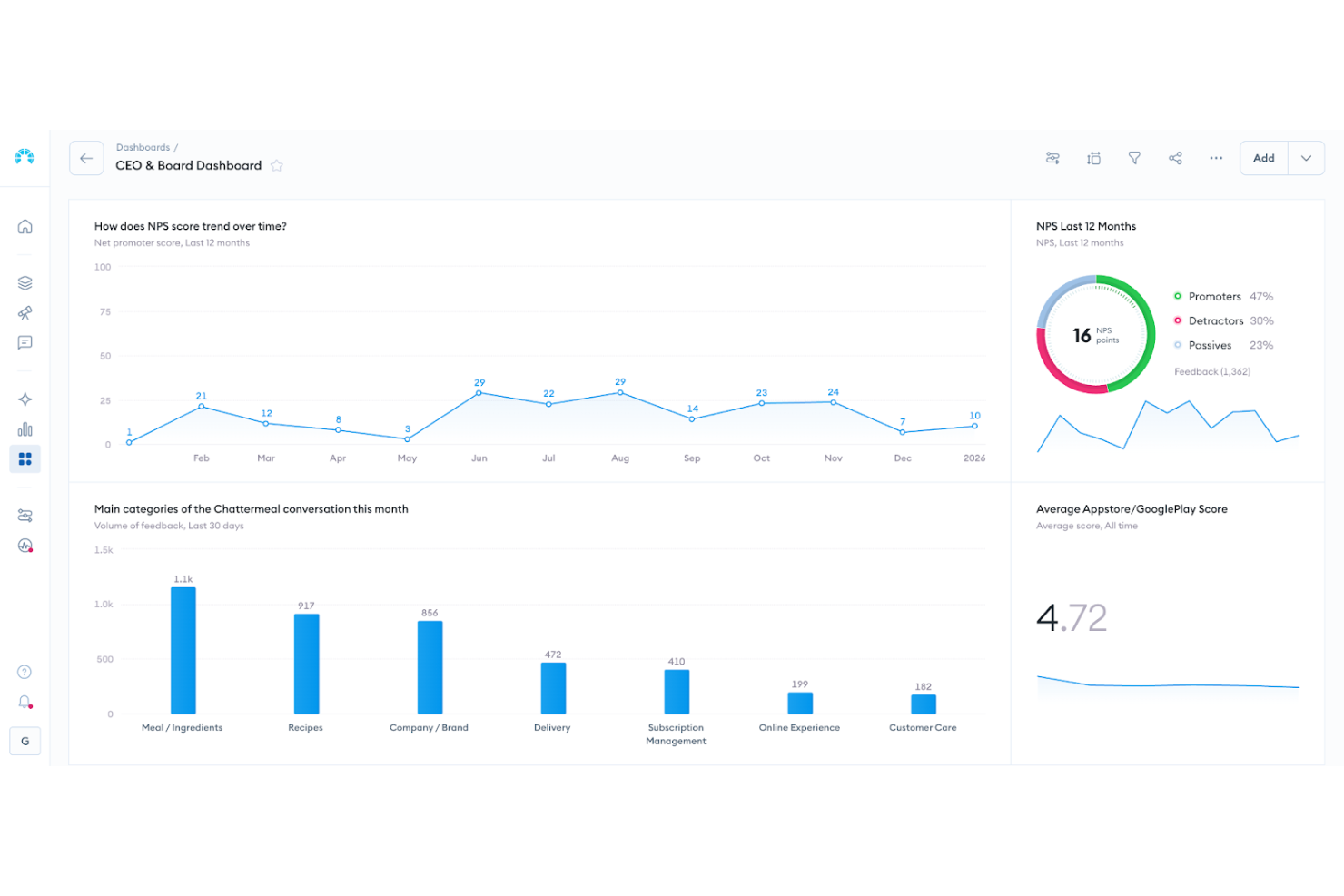
Chattermill helps customer experience and insights teams in ecommerce, SaaS, and enterprise brands analyze and understand customer sentiment by unifying feedback from multiple channels and surfacing actionable insights with AI-driven analytics.
Who Is Chattermill Best For?
Chattermill is a strong fit for mid-market and enterprise teams in ecommerce, fintech, and subscription businesses who need to analyze large volumes of customer feedback across multiple touchpoints.
Why I Picked Chattermill
I selected Chattermill for its Lyra AI, which produces concise summaries of large feedback datasets. When my team looks at thousands of support tickets or reviews at once, Lyra generates concise, descriptive summaries that surface key themes without needing a manual review of each comment. Lyra's granular sentiment detection can identify multiple themes within a single piece of feedback and assign a distinct sentiment to each, so you don't get a blunt positive/negative label for mixed reviews. The Insight Assistant lets you query your feedback data in plain language and receive structured answers, reducing the time from data to decision.
Chattermill Key Features
- Speech analytics: Transcribes and analyzes customer calls automatically, turning voice interactions into searchable, structured feedback data alongside written sources.
- Anomaly detection alerts: Monitors your feedback data and flags unexpected changes in sentiment or theme volume, with options to adjust alert sensitivity and frequency.
- Multi-dimensional report segmentation: Breaks down reports by up to three dimensions simultaneously—such as theme, location, and customer segment—to identify patterns across your data.
- Customizable themes and filters: Lets you define and generate new feedback themes from a short prompt, so your taxonomy reflects the specific language and issues your customers raise.
Chattermill Integrations
Integrations include Zendesk, Salesforce, Intercom, Trustpilot, SurveyMonkey, Qualtrics, Medallia, Gorgias, Jira, and Slack.
Pros and Cons
Pros:
- Industry specific sentiment models
- AI powered theme tagging
- Real time sentiment tracking
Cons:
- May require enterprise onboarding
- Pricing not publicly available

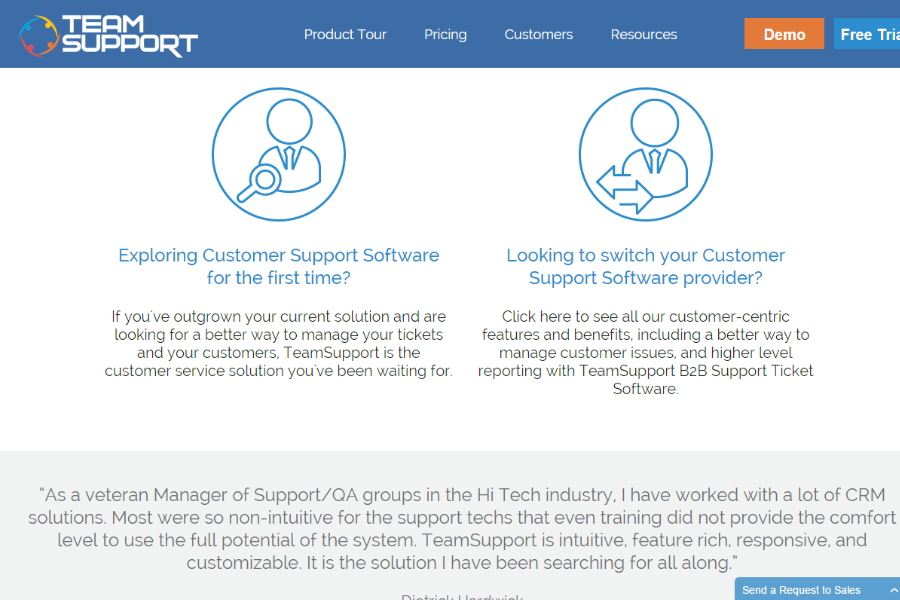
TeamSupport is a customer support platform designed for B2B companies that need to monitor, analyze, and respond to customer sentiment across support tickets and conversations.
Who Is TeamSupport Best For?
TeamSupport is a strong fit for B2B support teams that manage ongoing client relationships and need visibility into customer health across accounts.
Why I Picked TeamSupport
TeamSupport earns its spot on my shortlist because of how it connects sentiment detection directly to account-level action. The sentiment analysis feature monitors chat and ticket conversations in real time, reading emotional cues like frustration and urgency—and when negative sentiment is detected, it automatically alerts your support team so they can intervene before things escalate. I like that this isn't just a passive reporting feature; it's wired into the workflow. Additionally, the Customer Distress Index tracks how often a customer contacts support and how promptly their issues are resolved, giving you a composite view of account health that goes beyond a single sentiment score.
TeamSupport Key Features
- Product tagging: Tag tickets by product or feature to identify which parts of your product are generating the most support volume or frustration.
- AI agent: An AI agent handles routine customer questions, gathers information, and escalates complex issues to human agents when needed.
- Customizable analytics dashboards: Build dashboards that combine macro-level KPIs with drill-down reporting, with threshold-based alerts to flag emerging issues.
- Omnichannel ticket management: Manage customer conversations across email, live chat, and other channels from a single ticketing interface.
TeamSupport Integrations
Integrations include Microsoft Teams, Salesforce, HubSpot CRM, Jira Software, Dropbox, Nicereply, MS Dynamics, and Beanstalk.
Pros and Cons
Pros:
- Customizable customer self service hub
- Real time sentiment insights
- AI powered ticket automation
Cons:
- Limited mobile app functionality
- Knowledge base lacks configurability

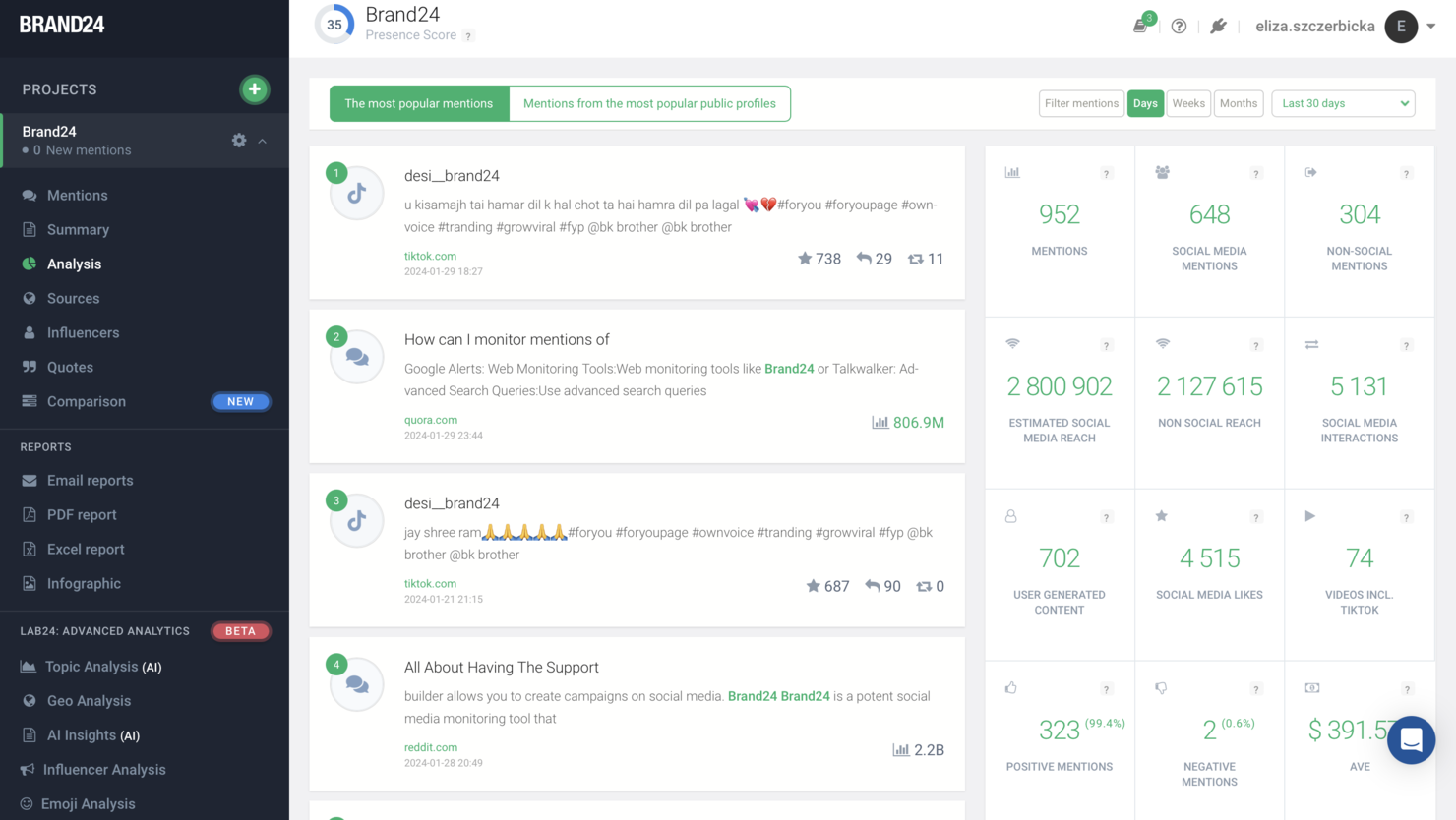
Brand24 gives marketing teams, agencies, and brands a way to monitor online conversations, analyze sentiment, and protect their reputation by tracking mentions across social media, news, blogs, and forums in real time.
Who Is Brand24 Best For?
Brand24 fits marketing teams and PR professionals in small to mid-sized businesses who need to track brand sentiment and manage their online reputation across multiple channels.
Why I Picked Brand24
Brand24 earns its spot as one of my top picks because it combines sentiment analysis with brand protection into an integrated solution rather than a bolt-on. I like how the AI-powered sentiment scoring automatically categorizes mentions as positive, negative, or neutral across social media, news, podcasts, and review sites in real time. My team also uses the anomaly detection feature to catch sudden spikes in negative sentiment before they escalate into a full reputation crisis.
Brand24 Key Features
- Mention feed: Aggregates brand mentions from social media, news, blogs, podcasts, and review sites into a single, filterable feed.
- Influence score: Assigns a numeric score to authors and sources based on their reach and engagement, helping you prioritize responses.
- Custom alerts: Sends real-time email or in-app notifications when mention volume or sentiment shifts beyond a set threshold.
- Sentiment analysis reports: Generates shareable reports that break down sentiment trends over time across specific keywords or topics.
Brand24 Integrations
Integrations include Slack and Excel, and an API is available for custom connections.
New Product Updates from Brand24

Brand24 Enhances AVE Accuracy With Geo-Based Weighting
Brand24 has refined its AVE calculation to incorporate stronger geo-based weighting, providing more precise regional values. For more information, visit Brand24's official site.
 .
.

Diffbot is an AI-powered platform that helps data-driven teams, researchers, and enterprises extract and analyze sentiment from web content at scale, making it easier to uncover trends and insights from news, forums, and social media.
Who Is Diffbot Best For?
Diffbot is a strong fit for enterprise teams and developers who need to extract and analyze sentiment from large volumes of web data through APIs and automated pipelines.
Why I Picked Diffbot
Diffbot earns its spot as one of the best on my shortlist because of how it automates the entire sentiment research pipeline, from web crawling to structured output. I particularly like the entity-directed sentiment in the Natural Language API, which doesn't just flag text as positive or negative but ties sentiment directly to specific companies, people, or topics. That means I can track how public sentiment toward a particular organization shifts across thousands of news articles and forum posts without manually reading a single one. The Discussion data type is especially useful here, pulling topic-level sentiment from forums and reviews that most tools simply ignore.
Diffbot Key Features
- Knowledge Graph search: Query a database of over 10 billion interlinked entities—including people, companies, articles, and discussions—using Diffbot Query Language (DQL).
- Crawl API: Automatically turn any website into a structured database of articles, products, or discussions without writing manual scraping rules.
- Relation extraction: Identify and map relationships between entities pulled from raw web text, surfacing connections across large unstructured datasets.
- Custom entity and relationship training: Train the NL API to recognize specialized entities and relationships specific to your domain or industry.
Diffbot Integrations
Native integrations include Excel, Google Sheets, and Tableau.


Fullstory gives digital teams in ecommerce, SaaS, and product management a way to analyze user sentiment by capturing and surfacing behavioral signals from real customer sessions, helping you pinpoint where users struggle or succeed across your digital experience.
Who Is Fullstory Best For?
Fullstory is a strong fit for product, UX, and CX teams at mid-size to enterprise digital businesses who need to understand how users actually behave—not just what they report.
Why I Picked Fullstory
Fullstory earns its spot as one of the best on my shortlist because of how it surfaces frustration signals automatically—without requiring you to set up custom events or manually tag anything. I picked it specifically for its Sentiment Signals feature, which detects behaviors like rage clicks, error clicks, and thrashed cursors in real time and alerts your team before those moments compound into churn or abandoned carts. What I really like is that each signal is automatically prioritized by business impact, so you're not just handed a list of problems—you're told which ones to fix first. Pair that with session replay that lets you watch exactly what triggered the signal, and you get a clear path from detection to resolution.
Fullstory Key Features
- Session replay: Watch full recordings of individual user sessions to see exactly how customers navigate your digital experience.
- Heatmaps: Visualize aggregated click, scroll, and movement data across any page to spot where users engage or drop off.
- Funnels: Build conversion funnels to identify where users abandon a flow and quantify the drop-off at each step.
- Data direct: Export raw behavioral data to your data warehouse for deeper analysis alongside your existing CX and product datasets.
Fullstory Integrations
Integrations include Google Analytics, Segment, Salesforce, Optimizely, Tealium, Adobe Analytics, Google Tag Manager, Zendesk, Slack, and Jira.


Podium is a customer communication platform designed for local businesses and service providers who want to analyze sentiment in real-time conversations and online reviews to improve customer experience and drive engagement.
Who Is Podium Best For?
Podium is a strong fit for local and multi-location businesses—like healthcare practices, auto dealerships, and home services—that rely heavily on customer reviews and text-based communication.
Why I Picked Podium
I picked Podium as one of the best because of how it captures sentiment directly through text-based conversations—the channel customers actually respond to. Its SMS surveys let you send one-on-one feedback requests at any point in the customer journey, so you're getting real-time sentiment data rather than waiting on email open rates. I also like the intent routing feature in the inbox, which automatically categorizes conversations based on what's being discussed, making it easy to spot negative sentiment before it escalates. On top of that, the AI Reputation Specialist monitors and responds to Google and Facebook reviews, giving you a live read on how customers feel about your business across public channels.
Podium Key Features
- Review automations: Automatically send review invites and reminders to customers via text after interactions, without manual follow-up.
- Comprehensive reporting: Track total reviews received, detailed attribution, and feedback trends across Google and Facebook from a single dashboard.
- Scheduled messages: Set messages to send at specific times so outreach reaches customers when they're most likely to respond.
- Contact profiles: Automatically sync every review and conversation to individual customer profiles for a full history of interactions.
Podium Integrations
Integrations include Google Reviews, Facebook Reviews, Phones & Calling, Webchat, Mobile App, and Google Recaptcha.


Qualaroo helps product teams, marketers, and UX professionals gather in-context customer feedback and analyze sentiment directly within digital experiences to uncover actionable insights and improve decision-making.
Who Is Qualaroo Best For?
Qualaroo is a strong fit for product and UX teams at SaaS and ecommerce companies that need to collect and analyze customer feedback directly within their digital products.
Why I Picked Qualaroo
Qualaroo earns its spot as one of the best on my shortlist because it's the only real-time feedback platform with a native IBM Watson integration for sentiment analysis. What I like most is how it goes beyond positive/negative scoring—it also surfaces keyword identification and emotional scores across five dimensions: joy, anger, disgust, sadness, and fear. My team can set up branching logic so that an angry open-text response automatically triggers a customer success follow-up, without anyone having to manually read through responses. The word cloud view surfaces recurring themes across large volumes of free-form feedback at a glance.
Qualaroo Key Features
- Question branching logic: Set up conditional survey paths so follow-up questions change based on how a respondent answers a previous question.
- Exit intent targeting: Trigger a survey nudge when a user shows signs of leaving a page, capturing feedback at the moment of drop-off.
- Mobile in-app surveys: Deploy surveys natively inside iOS and Android apps without slowing down app performance or interrupting the user experience.
- A/B testing: Run two versions of a survey nudge simultaneously to compare response rates and optimize question phrasing or placement.
Qualaroo Integrations
Integrations include Salesforce, Tableau, Intercom, Slack, HubSpot, Marketo, Eloqua, KISSmetrics, Google Analytics, and FullStory.


Nextiva gives customer experience teams and call centers AI-powered tools to analyze customer sentiment in real time, helping businesses understand caller emotions and improve service quality during every interaction.
Who Is Nextiva Best For?
Nextiva is a strong fit for contact centers and customer service teams that handle high volumes of phone-based interactions and need real-time visibility into caller sentiment.
Why I Picked Nextiva
I picked Nextiva because its sentiment analysis is deeply integrated into the voice channel. Most sentiment tools treat voice as an afterthought, but Nextiva's contact center platform runs emotion detection directly on live calls—flagging shifts in tone, pacing, and word choice in real time so supervisors can step in before a call escalates. I also like the AI-powered call summaries, which transcribe and score interactions automatically, giving my team a sentiment-tagged record of every conversation without manual note-taking. That combination of live emotion detection and post-call transcription means you're not just reacting to problems—you're building a data trail that informs coaching and quality assurance.
Nextiva Key Features
- Conversation analytics dashboard: View aggregated call data, sentiment trends, and interaction patterns across your entire contact center in one place.
- Automated call scoring: Automatically score agent performance on individual calls based on predefined criteria without manual review.
- Customer journey mapping: Track how individual customers move across voice, chat, and digital touchpoints over time.
- Intelligent call routing: Route incoming calls to the most appropriate agent based on customer history, intent, and context.
Nextiva Integrations
Integrations include Epic, ModMed, eClinicalWorks, Microsoft Teams, HubSpot, Salesforce, Zoho, Zendesk, Google Workspace, and ServiceNow.
Other Sentiment Analysis Software
Here are a few more that didn’t make the top sentiment analysis software list. If you need additional suggestions, check these out.
- Clootrack
For discovering key sentiment drivers
- Sociality.io
For teams looking for a comprehensive solution to manage their social media channels
- Sprig
For collecting and analyzing sentiment data at scale
- NICE Interaction Analytics
For teams who want an all encompassing cloud CX platform
- AskNicely
For its sentiment tracking of both employees and customers
- Lexalytics
Sentiment analytics tool for high-volume text processing
- Listen360
For its detractor alert and corrective action monitoring features
- Aylien
For its news aggregation capabilities
- UDESK
For omnichannel information analysis
- Survicate
For multi-channel feedback surveys


Related CX Software Reviews
If you still haven't found what you're looking for here, check out these related customer experience management software that have been tested and evaluated.
- Customer Service Software
- Help Desk Software
- Call Center Software
- Customer Messaging Platform
- Digital Experience Platform
- Customer Experience Management Software
Selection Criteria for Sentiment Analysis Tools
Selecting the right sentiment analysis tools is a nuanced process, tailored to address specific functionality and use cases that are crucial for understanding and enhancing customer experiences. As someone who has extensively researched these tools, I've developed a set of criteria to guide you through the selection process. This ensures that the chosen solution matches your immediate needs and supports your long-term goals in monitoring and improving customer sentiment.
Core Sentiment Analysis Tools Functionality: 25% of total weighting score
Common features for sentiment analysis tools typically include web crawling capabilities, natural language processing, emotion detection, trend analysis, multilingual support, integration capabilities, real-time analysis, social media analysis, keyword analysis, and customizable reporting.
To be considered for inclusion on my list of the best sentiment analysis tools, the solution had to support the ability to fulfill common use cases.
- Monitoring brand sentiment across multiple channels
- Analyzing customer feedback for actionable insights
- Identifying and responding to negative feedback promptly
- Tailoring communication based on customer sentiment trends
- Gathering competitive intelligence through sentiment analysis
Additional Standout Features: 25% of total weighting score
- Innovations in emotion detection for nuanced understanding of customer feedback
- Advanced NLP capabilities for accurate interpretation of sarcasm or irony
- Unique integration features with other business intelligence tools
- Proprietary technology for real-time sentiment tracking and analysis
- Exceptional capabilities in handling and analyzing large volumes of data across languages and platforms
Usability: 10% of total weighting score
- Intuitive interface that balances advanced features with ease of use
- Streamlined navigation paths that facilitate quick access to key functionalities
- Customizable dashboards that allow users to prioritize information relevant to their needs
Onboarding: 10% of total weighting score
- Comprehensive training resources including videos, templates, and product tours
- Interactive onboarding processes that guide new users through setup and use
- Support channels like chatbots and webinars that ensure a smooth transition
Customer Support: 10% of total weighting score
- Responsive and knowledgeable customer service teams
- Multiple channels for support, including live chat, email, and phone
- Community forums or user groups for peer assistance and advice
Value For Money: 10% of total weighting score
- Competitive pricing that reflects the features and benefits offered
- Transparent pricing models without hidden costs
- Flexible plans that scale with business needs
Customer Reviews: 10% of total weighting score
- High ratings for ease of use and customer satisfaction
- Positive feedback on the tool's impact on business outcomes
- Testimonials highlighting specific benefits such as improved customer service or enhanced brand reputation
In selecting sentiment analysis tools, it's paramount to prioritize platforms that not only offer advanced analytical capabilities but also deliver a user-centric experience. Through meticulous evaluation of these criteria, businesses can identify a solution that not only meets but exceeds their goals for understanding customer sentiment and enhancing brand perception, ensuring a strategic fit that propels them forward.
How to Choose Sentiment Analysis Tools
Choosing the right sentiment analysis tools can improve customer service through feedback analysis, enhance brand reputation with proactive responses to negative feedback, and provide valuable insights for personalized customer communication.
As you're shortlisting, trialing, and selecting sentiment analysis tools consider the following:
- What problem are you trying to solve - Start by identifying the sentiment analysis feature gap you're trying to fill to clarify the features and functionality the sentiment analysis tool needs to provide.
- Who will need to use it To evaluate cost and requirements, consider who'll be using the software and how many licenses you'll need. You'll need to evaluate if it'll just be the customer experience team or the whole organization that will require access. When that's clear, it's worth considering if you're prioritizing ease of use for all, or speed for your sentiment analysis tools power users.
- What other tools it needs to work with Clarify what tools you're replacing, what tools are staying, and the tools you'll need to integrate with, such as accounting, CRM or HR software. You'll need to decide if the tools will need to integrate together, or alternatively, if you can replace multiple tools with one consolidated sentiment analysis tool.
- What outcomes are important - Consider the result that the software needs to deliver to be considered a success. Consider what capability you want to gain, or what you want to improve, and how you will be measuring success. For example, an outcome could be the ability to get greater visibility into performance. You could compare sentiment analysis software features until you’re blue in the face but if you aren’t thinking about the outcomes you want to drive, you could be wasting a lot of valuable time.
- How it would work within your organization - Consider the software selection alongside your workflows and delivery methodology. Evaluate what's working well, and the areas that are causing issues that need to be addressed. Remember every business is different — don’t assume that because a tool is popular that it'll work in your organization.
Trends in Sentiment Analysis Tools
- Advancements in Natural Language Processing (NLP): There's a notable shift towards more sophisticated NLP capabilities. These advancements improve the accuracy of sentiment detection, especially in deciphering the nuances of human language, such as sarcasm, irony, and context. Enhanced NLP algorithms are crucial for businesses to gain deeper insights into customer emotions and opinions.
- Rise of Multilingual Sentiment Analysis: With the global marketplace becoming increasingly accessible, tools that offer multilingual sentiment analysis are rapidly evolving. This functionality is essential for brands operating internationally, allowing them to understand and engage with customers across different linguistic backgrounds effectively.
- Integration with Other Business Tools: The most sought-after sentiment analysis tools now boast extensive integration capabilities. Seamless connectivity with CRM systems, marketing platforms, and other business intelligence tools enables organizations to leverage sentiment analysis insights across various aspects of their operations, enhancing decision-making and strategy development.
- Emphasis on User-Centric Design and Usability: Tools that prioritize user experience, through intuitive interfaces and streamlined workflows, are becoming more prevalent. This trend addresses the need for tools that can be easily adopted by teams, reducing the learning curve and enabling quicker realization of value from the technology.
- Customizable Reporting and Analytics: The ability to customize reports and analytics dashboards to suit specific business needs is in high demand. This feature supports tailored insights that align with strategic objectives, facilitating more informed decision-making.
- Emotion Detection Beyond Positive/Negative Sentiment: Some tools are introducing capabilities to identify a wider range of emotions, such as joy, trust, anticipation, and surprise. This novel functionality offers businesses a more nuanced understanding of customer sentiment, beyond the traditional positive/negative dichotomy.
Exploring the latest trends in sentiment analysis tools reveals significant advancements aimed at enhancing brand perception and understanding customer sentiment. These trends underscore the evolving needs of customer experience professionals, reflecting the shifting landscape of customer feedback analysis and brand monitoring.
What are Sentiment Analysis Tools?
Sentiment analysis tools are software applications that use natural language processing, machine learning, and computational linguistics techniques to automatically identify, extract, and analyze the sentiment expressed in a piece of text. CX teams frequently use them to analyze customer feedback, online reviews, comments, or social media posts, and track changes to sentiment over time.
These tools help businesses and organizations gain insights into the opinions, emotions, and attitudes of their customers, stakeholders, or target audience to ultimately preserve a positive brand reputation. This type of consumer data is also useful for market research, and product analysis, and can help counteract negative sentiment influence and improve brand reputation through targeted marketing strategies.
Features of Sentiment Analysis Tools
Sentiment analysis tools help to analyze vast amounts of data from online reviews, comments, social media posts, and more. This gives you valuable insights into public perception and customer emotions or opinions regarding your brand. Here, I'll discuss the most important features to look for in sentiment analysis tools to ensure you deliver the necessary insights for brand monitoring and customer feedback analysis.
- Web Crawling Capabilities - Ability to scrape webpages and social media for sentiment analysis. This is vital for gathering a broad dataset from various online sources, ensuring your sentiment analysis covers a wide spectrum of public opinion.
- Keyword Analysis - Utilizes text analysis software to understand sentiment. This feature helps in dissecting the language used across various conversations, including slang and niche terms, to accurately gauge sentiment.
- Social Media Analysis - Analyzes sentiment on platforms like Twitter and Facebook. Given the vast amount of customer feedback present on social media, this feature is essential for real-time sentiment analysis and understanding public perception on the platforms your customers use most.
- Reporting and Analytics - Offers robust and customizable reporting tools. The ability to tailor reports and analytics allows for the distillation of complex data into actionable insights, making it easier to strategize based on sentiment trends.
- Emotion Detection - Identifies specific emotions in texts. This goes beyond simple positive or negative categorization to understand the nuances of human emotion, enriching the analysis with deeper insights into customer feelings.
- Real-time Analysis - Provides sentiment analysis in real-time. This is crucial for timely responses to emerging trends, allowing brands to react promptly to changes in public sentiment.
- Multi-language Support - Can analyze sentiment in multiple languages. This feature expands the reach of sentiment analysis, making it possible to understand feedback from a global audience.
- Accuracy and Machine Learning - Employs advanced algorithms for high accuracy. The use of machine learning ensures that the tool becomes more accurate over time, learning from the nuances of human language.
- Integration Capabilities - Easily integrates with other tools and platforms. This is important for streamlining workflow, allowing sentiment analysis data to enhance other marketing and customer service tools.
- Sentiment Trend Analysis - Tracks changes in sentiment over time. With this feature, your team can observe shifts in public sentiment, enabling them to identify patterns and potentially forecast future trends or reactions to new initiatives or products.
Whether you're aiming to deepen customer engagement, tailor marketing strategies, or enhance brand reputation, sentiment analysis tools stand as a cornerstone for achieving these objectives. They propel your organization towards its strategic goals with greater ease and effectiveness, enabling a nuanced understanding of customer emotions and opinions that inform actionable insights.
Benefits of Sentiment Analysis Tools
Using sentiment analysis tools can elevate organizations' understanding of customer emotions and opinions to an unprecedented level, offering a sophisticated blend of efficiency and insight in managing customer relations. This advanced approach allows businesses to focus more on strategic planning and customer engagement while minimizing misunderstandings and enhancing overall responsiveness.
Here are five primary advantages of utilizing sentiment analysis tools for your team:
- Real-time Customer Sentiment Tracking - Instantaneous feedback analysis. Utilizing these tools enables businesses to monitor customer sentiment in real-time, allowing for swift responses to feedback, which can significantly enhance customer satisfaction and loyalty.
- Enhanced Brand Monitoring - Comprehensive oversight of brand perception. Sentiment analysis tools provide a 360-degree view of how a brand is perceived across various platforms, enabling companies to proactively manage their reputation and mitigate potential crises before they escalate.
- Data-driven Decision Making - Insightful analytics for strategy development. By analyzing customer sentiment, businesses can make informed decisions, tailoring products, services, and marketing strategies to meet the evolving needs and preferences of their target audience.
- Improved Customer Service - Personalized interaction based on customer mood. These tools allow customer service teams to understand the emotional context of inquiries and feedback, enabling more empathetic and personalized responses that can significantly improve customer experience.
- Market Trend Analysis - Detection of shifts in public opinion and trends. Sentiment analysis can identify emerging trends and shifts in consumer behavior, offering businesses a competitive edge by adapting quickly to market changes.
Whether you're looking to deepen customer engagement, refine your marketing strategy, or proactively manage your brand reputation, sentiment analysis tools are a cornerstone for achieving these objectives. They propel your organization towards its strategic goals with greater ease and effectiveness, transforming customer feedback into a valuable asset for business growth and innovation.
Cost & Pricing for Sentiment Analysis Tools
Sentiment analysis tools offer a range of plans and pricing options tailored to meet various business needs and budgets. As a software expert, I've researched different offerings in this space to provide insights into what you can expect when exploring pricing and plans for sentiment analysis tools.
Most sentiment analysis tool providers offer tiered plans, typically ranging from free to enterprise levels. These plans often differ in features, data processing limits, and support options. Free plans are usually more suitable for individuals or small teams with limited requirements, while enterprise plans offer advanced features and scalability for larger organizations or those needing more detailed insights.
| Plan Type | Average Price | Common Features |
|---|---|---|
| Free | $0 | Basic sentiment analysis, limited data processing, community support |
| Basic | $29 - $99 | Enhanced sentiment analysis capabilities, higher data processing limits, email support |
| Professional | $100 - $499 | Advanced analytics, API access, integration options, priority support |
| Enterprise | Custom | Custom data processing limits, dedicated support, custom integrations, strategic consulting services |
Whether you're just starting to explore the impact sentiment analysis can have on understanding customer feedback, or you're ready to implement a robust solution for comprehensive brand monitoring, selecting the right plan requires careful consideration of your specific needs and budget. Tailoring your choice to match your business objectives ensures that sentiment analysis tools not only fit seamlessly into your operations but also drive your organization toward strategic success with greater precision and effectiveness.
New & Noteworthy Product Updates
Below, you’ll find my take on the latest and greatest sentiment analysis software product updates. Discover what’s now possible through feature releases, improvements, and updates on web, desktop, and mobile apps. Learn what’s new, if it’s hot—or not, and why it matters for monitoring and analyazing customer feedback, online reviews, comments, or social media posts.
April 2024: Sentiment Analysis Tools Updates
Podium Update Notes
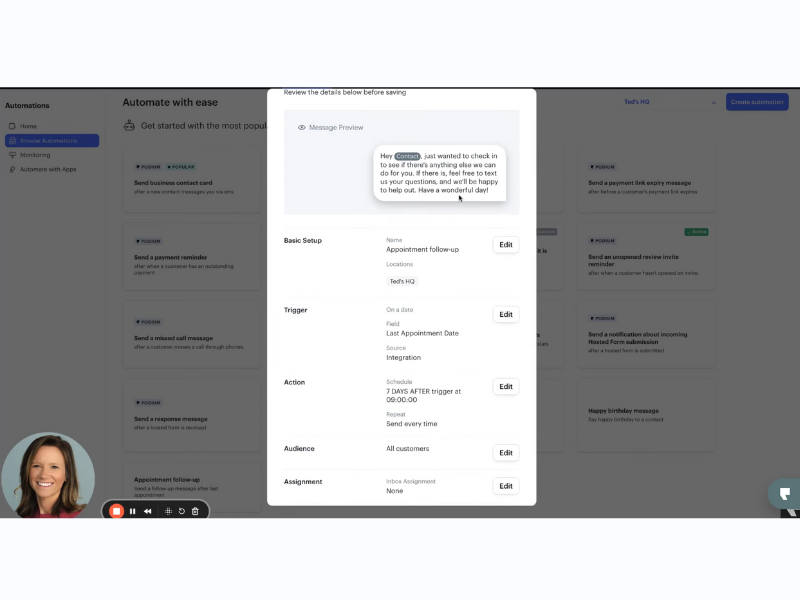
In April 2024, Podium introduced "Date-Based Automations" that enable automated messaging keyed to specific dates like birthdays, anniversaries, and membership expirations, leveraging data from Podium or integrated platforms like ServiceTitan and Housecall Pro. This feature includes templates for common communications such as birthday greetings and post-appointment follow-ups, and supports marketing efforts by targeting messages to contacts listed for marketing.
This update streamlines communication processes, ensuring timely and relevant interactions with clients, enhancing customer engagement and satisfaction. It simplifies the management of routine messages and marketing campaigns, allowing businesses to maintain a personal touch while reducing manual effort and potential for error.
Verdict: Not! The new date-based automations streamline messaging for specific occasions, which is indeed beneficial. However, it doesn’t specifically enhance sentiment analysis capabilities
March 2024: Sentiment Analysis Tools Updates
Qualaroo Update Notes
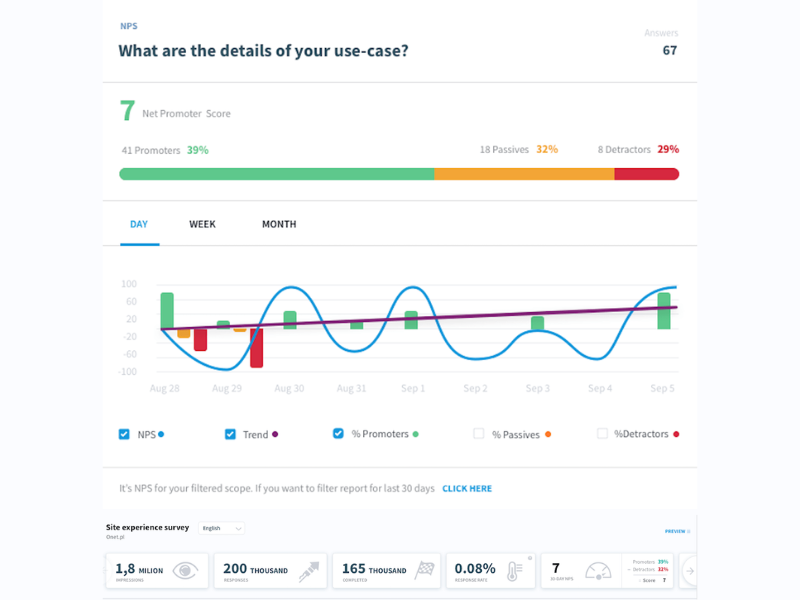
In March 2024, Qualaroo introduced the "Nudge Performance and Response Trends" feature to its reporting dashboard. This tool provides a trend line and daily insights into response rates for each Nudge, allowing users to monitor the effectiveness of their deployed surveys continuously.
This feature enables users to optimize survey engagement by adjusting targeting settings based on the observed performance trends. It also helps ensure that Nudges are active and properly positioned on the intended pages, increasing the likelihood of capturing valuable user feedback efficiently.
Verdict: Hot! The update addresses the critical need for real-time feedback on survey performance. It significantly enhances user capability to tweak and optimize surveys for better engagement and results.
February 2024: Sentiment Analysis Tools Updates
Brand24 Update Notes

Brand24 recently transitioned from weekly to monthly AI Insights, delivering a comprehensive package of AI-driven insights, trends, and actionable recommendations on the first workday of each month. These insights are designed to enhance decision-making for Pro and Enterprise users, providing a rich, consolidated report rather than frequent, smaller updates.
The shift to a monthly delivery allows users to dive deeper into the data at a more strategic level. With this model, users receive a curated, significant analysis that highlights trends and offers concrete recommendations, aimed at improving their decision-making and strategy formulation. This format is particularly useful for users who require detailed, actionable insights to drive business strategies and stay ahead in their markets.
Verdict: Hot! Monthly AI Insights eliminate clutter and boost focus, enabling better strategic decisions. This update capitalizes on the trend towards AI-driven analytics and delivers anticipated, substantial improvements, enhancing the software's value significantly.
Sentiment Analysis FAQ
Get started with sentimental analysis with answers to commonly asked questions:
What is sentiment analysis?
Sentiment analysis, sometimes called opinion mining, attempts to determine a fuller context of expression: the emotional tone, attitudes, and opinions of users or customers. Common use cases for sentiment analysis include ecommerce, politics, and customer service.
For more tips on how you can use sentiment analysis to support customer service, pop over to our guide on sentiment analysis and opinion mining.
What is sentiment?
In sentiment analysis, the sentiment is the emotional message within an expression—the emotions, opinions, and attitudes embedded in a person’s actions, writing, or speech.
How does sentiment analysis work?
Sentiment analysis, at its core, involves the use of algorithms and natural language processing (NLP) techniques to identify, extract, and quantify the emotional tone behind words. It’s like teaching a computer to understand not just what words mean but how they feel. This process can range from simple polarity checks (positive, negative, neutral) to more complex emotional states and intentions. It’s fascinating because it involves a blend of linguistics, psychology, and computer science to effectively interpret human sentiment from text data. Here’s a deep dive into how sentiment analysis works.
What is sentiment analysis used for?
Sentiment analysis is incredibly versatile, used in a wide array of fields from marketing to customer service, to gauge public opinion, monitor brand reputation, and understand customer experiences. In customer service, it offers insights into customer satisfaction and areas needing improvement. In marketing, it can help tailor campaigns by understanding audience reactions. Essentially, it’s a powerful tool for any business looking to tap into the emotional pulse of their audience and make data-driven decisions to enhance the customer experience.
What are the types of sentiment analysis tools?
Sentiment analysis tools are a type of software used in CX. Common types sentiment analyzers include:
- Social media sentiment analysis tools, usually part of a social media monitoring software
- Text analysis software
- Voice sentiment analysis, such as tone analyzers
- Customer intelligence platforms
Are there any free sentiment analysis tools?
Free sentiment analysis tools may have limited features compared to their paid counterparts but they do exist. For example, MonkeyLearn, IBM Watson, MeaningCloud all have freemium versions of their plans.
What are the key challenges in sentiment analysis?
One of the main hurdles in sentiment analysis is the subtlety and complexity of human emotion. Sarcasm, irony, and context-specific meanings can throw a wrench in the works, making it tricky for algorithms to accurately interpret sentiment. Plus, languages evolve, and new slang or expressions emerge, making continual learning and adaptation a necessity for any sentiment analysis tool. It’s a constant game of catch-up, requiring sophisticated models that can understand not just language, but the nuances of human communication.
What's Next?
If you're in the process of researching sentiment analysis tools, connect with a SoftwareSelect advisor for free recommendations.
You fill out a form and have a quick chat where they get into the specifics of your needs. Then you'll get a shortlist of software to review. They'll even support you through the entire buying process, including price negotiations.