

Die 10 besten cloudbasierten Helpdesk-Softwares im Test für 2026

10 Auswahl der besten Cloud-Helpdesk-Software


Als Manager für Kundenerlebnisse kennen Sie die täglichen Herausforderungen, Ihr Team effizient und Ihre Kunden zufrieden zu halten. Cloud-Helpdesk-Software kann dabei eine große Hilfe sein, indem sie Sie bei der Verwaltung von Tickets, der Nachverfolgung von Problemen und der Verbesserung von Antwortzeiten unterstützt. Meiner Erfahrung nach macht die richtige Software den entscheidenden Unterschied.
Ich habe verschiedene Lösungen getestet und bewertet, um Ihnen einen unvoreingenommenen Überblick über die besten verfügbaren Optionen zu geben. Gleich erfahren Sie, welche Tools Ihrem Team dabei helfen können, hervorragende Leistungen zu erbringen und Ihre Ziele im Kundenservice zu erreichen. In diesem Artikel stelle ich die besten Lösungen vor und erläutere ihre Stärken sowie die Merkmale, durch die sie sich auszeichnen. Lassen Sie uns die perfekte Lösung für Ihre Anforderungen finden.
Warum Sie unseren Software-Empfehlungen vertrauen können
Unser Team testet und bewertet Software seit 2012. Als CX-Führungskräfte selbst wissen wir, wie schwierig – und wichtig – es ist, die richtige Software auszuwählen.
Für diesen Leitfaden haben wir Tools mithilfe von praktischen Tests und unabhängiger Recherche bewertet und dabei unsere Bewertungskriterien angewendet.
Unsere Bewertungen spiegeln unser menschliches redaktionelles Urteilsvermögen wider, keine Verkaufsstrategie.
Zusammenfassung der besten Cloud-Helpdesk-Software
| Tool | Best For | Trial Info | Price | ||
|---|---|---|---|---|---|
| 1 | Am besten geeignet für KI-gesteuertes IT-Service-Management | 14-tägige kostenlose Testphase verfügbar | Ab $19/Benutzer/Monat (jährlich abgerechnet) | Website | |
| 2 | Am besten für KI-gestützte Helpdesk-Analytik | Kostenlose Demo + 14-tägige kostenlose Testversion verfügbar | Ab $19/Benutzer/Monat (jährliche Abrechnung) | Website | |
| 3 | Am besten für praxisorientiertes IT-Service-Management | 14-tägige kostenlose Testphase | Preis auf Anfrage | Website | |
| 4 | Am besten geeignet für KI-basierte automatisierte Ticketlösung | 14-tägige kostenlose Testversion verfügbar | Ab $16/Nutzer/Monat (jährliche Abrechnung) | Website | |
| 5 | Am besten geeignet für KI-gestützten Kundensupport | Kostenlose Testversion + kostenlose Demo verfügbar | Ab $25/Nutzer/Monat (jährliche Abrechnung) | Website | |
| 6 | Am besten geeignet für die individuelle Erstellung von KI-Chatbots | Kostenloser Tarif verfügbar | Ab $32/Monat (jährliche Abrechnung) | Website | |
| 7 | Am besten mit einem automatisierten Workflow-Builder | 15-tägige kostenlose Testversion + kostenloser Tarif | Ab $7/Nutzer/Monat (jährliche Abrechnung) | Website | |
| 8 | Am besten geeignet für Multi-Channel-E-Commerce-Support-Management | 14-tägige kostenlose Testversion | Ab $39/Agent/Monat | Website | |
| 9 | Am besten für kontextbezogene Benutzerunterstützung | Kostenloser Tarif verfügbar | Ab $29/Monat (jährliche Abrechnung) | Website | |
| 10 | Am besten geeignet für zentrales, kanalübergreifendes Ticketing und Kundendatenmanagement | 14-tägige kostenlose Testphase + kostenlose Demo verfügbar | Ab $19/Agent/Monat (jährliche Abrechnung) | Website |


Überblick über die 10 besten Cloud-Helpdesk-Softwares
Hier finden Sie eine kurze Beschreibung jeder Cloud-Helpdesk-Software, in der der jeweils beste Anwendungsfall, die wichtigsten Funktionen sowie einige Vor- und Nachteile vorgestellt werden. Außerdem habe ich Screenshots eingefügt, damit Sie auch einen visuellen Eindruck von der Benutzeroberfläche erhalten.
Am besten geeignet für KI-gesteuertes IT-Service-Management
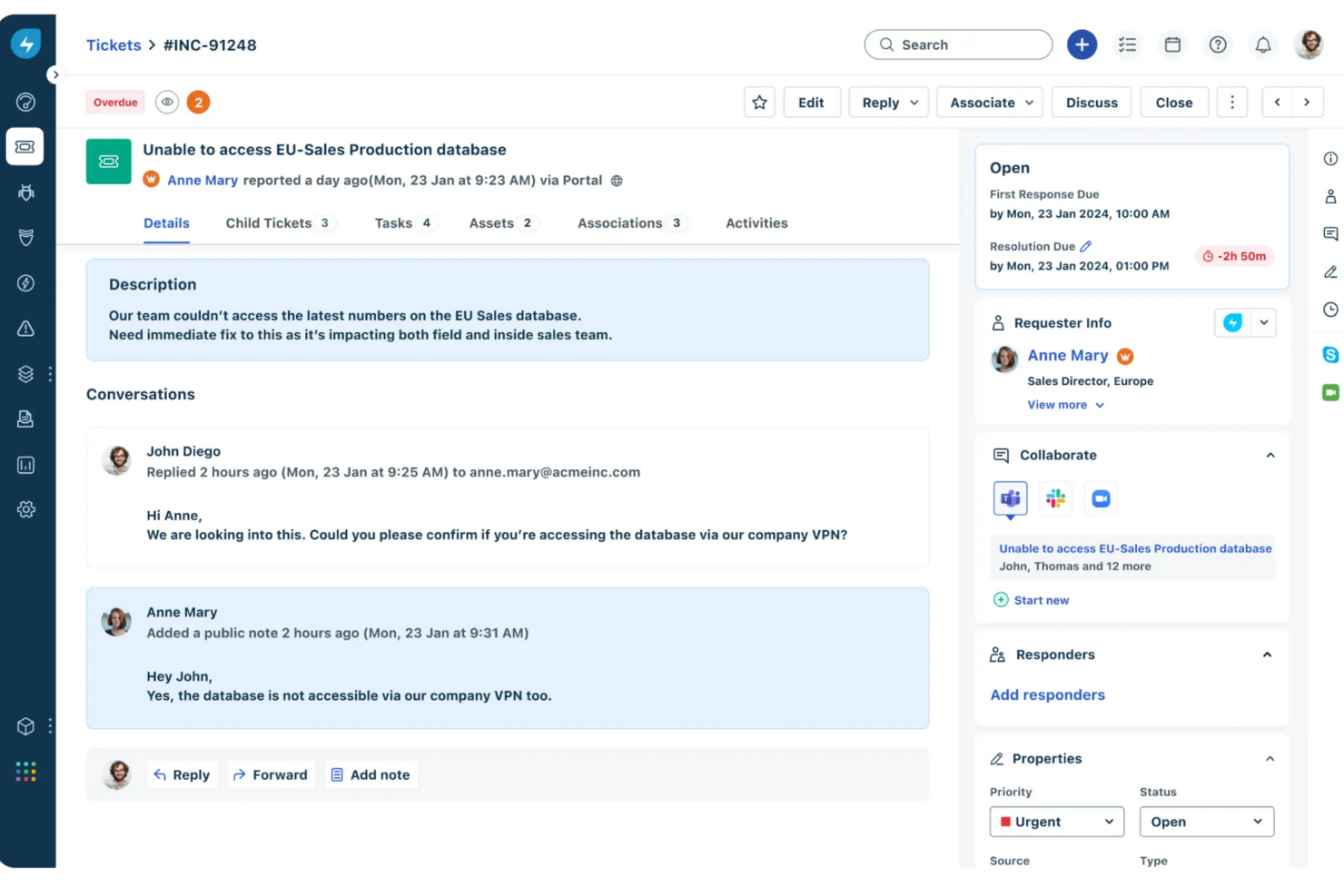
Freshservice ist eine cloudbasierte IT-Service-Management (ITSM)-Lösung, die Unternehmen dabei unterstützt, ihre IT-Abläufe zu optimieren und einen besseren Support für ihre Nutzer zu bieten. Als umfassende Helpdesk-Software bietet Freshservice eine Suite von Tools zur Verwaltung von Incidents, Serviceanfragen, Problemen, Änderungen und IT-Assets.
Freshservice zeichnet sich durch seinen KI-gestützten Ansatz im IT-Service-Management aus. Eine seiner wichtigsten Stärken liegt in den intelligenten Automatisierungsfunktionen, die künstliche Intelligenz nutzen, um Routineaufgaben zu vereinfachen und die Effizienz zu steigern. Der KI-gesteuerte virtuelle Agent Freddy unterstützt Nutzer, indem er sofortige Antworten auf häufige Anfragen liefert, sie durch Self-Service-Optionen führt und die Ticket-Erstellung und -Weiterleitung automatisiert.
Zusätzlich setzt Freshservice auf maschinelles Lernen, um historische Daten zu analysieren, Incident-Trends vorherzusagen und proaktive Maßnahmen zur Vermeidung potenzieller Probleme zu empfehlen. Mit der Funktion zur automatisierten Workflow-Verwaltung lassen sich außerdem individuelle Workflows erstellen, die automatisch Aktionen basierend auf vordefinierten Bedingungen auslösen – das reduziert den manuellen Aufwand und erhöht die Effizienz.
Hervorstechende Funktionen und Integrationen von Freshservice
Funktionen umfassen Incident Management, Problem Management, Service Request Management, Asset Management, ein Self-Service-Portal, eine Wissensdatenbank, Anbieterverwaltung, Vertragsmanagement, Servicekatalog und Multikanal-Support.
Integrationen unterstützen Jira, Slack, Microsoft Teams, Google Workspace, Azure DevOps, Zapier, Okta, AWS, Zendesk, Dropbox, Trello, Salesforce und ServiceNow.
Pros and Cons
Pros:
- Leistungsstarke Automatisierungsfunktionen
- Asset-Management-Funktionen
- Mobile App für unterwegs
Cons:
- Anpassungsmöglichkeiten sind begrenzt
- Projektmanagement-Funktionen könnten verbessert werden
New Product Updates from Freshservice
 Experience)
Freshservice Introduces a Reimagined IT Asset Management (ITAM) Experience
Freshservice introduces a reimagined IT Asset Management (ITAM) experience with continuous infrastructure discovery, dependency mapping, IPAM, and Software License Management. This update helps teams improve asset visibility and manage connected IT environments more effectively. For more information, visit Freshservice’s official site.

Am besten für KI-gestützte Helpdesk-Analytik
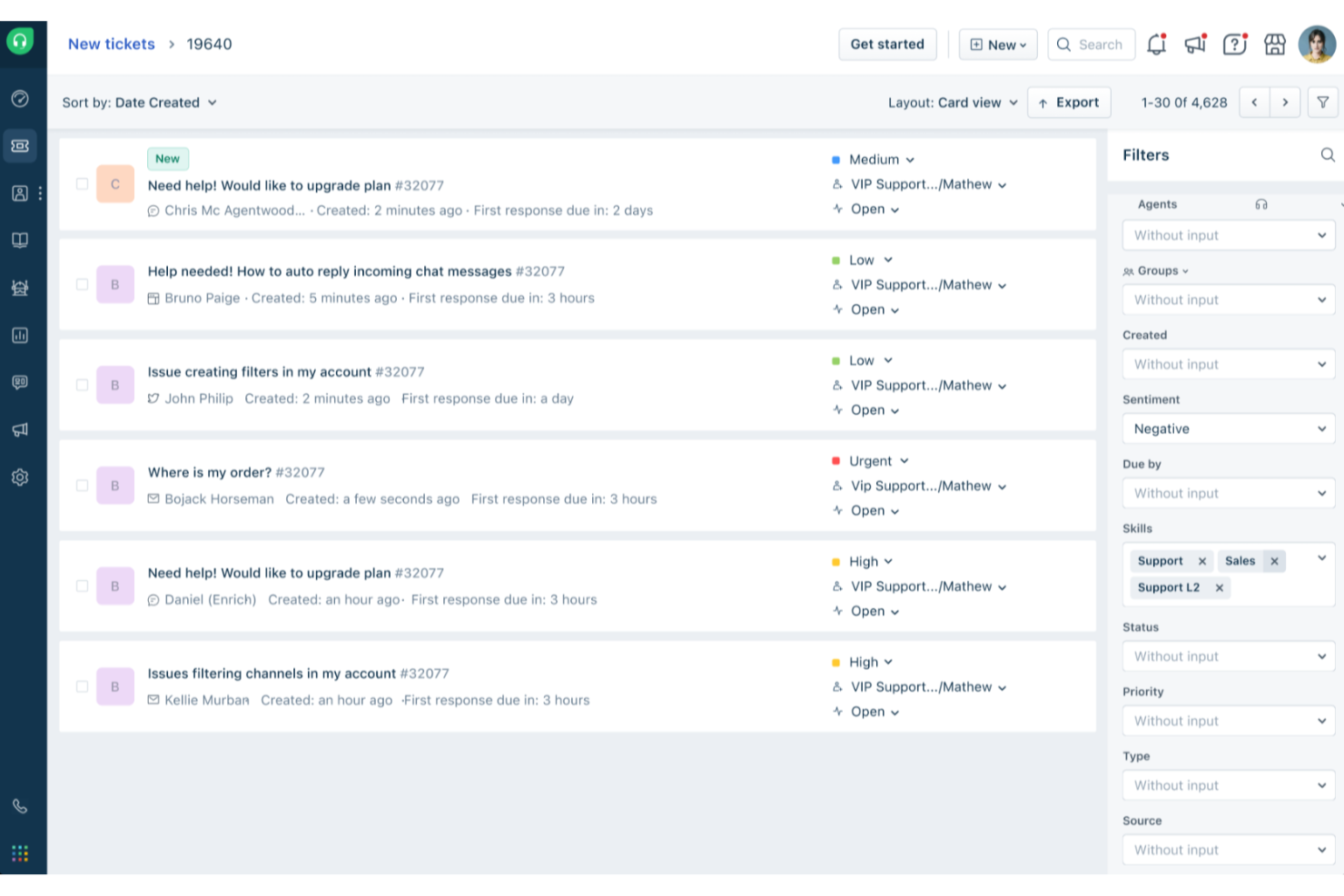
Freshdesk (ein Produkt von Freshworks Inc.) ist eine cloudbasierte Kundenservice-Plattform, die von Freshworks entwickelt wurde. Sie bietet Werkzeuge, mit denen Unternehmen Kundenanfragen verwalten und Support-Aktivitäten über verschiedene Kanäle überwachen können. Die Plattform beinhaltet Analysen, die Teams zur Überprüfung von Interaktionsdaten und zur Verfolgung von Trends in Bezug auf die Servicequalität nutzen können.
Das Ticketsystem von Freshdesk wandelt Anfragen aus E-Mail, Telefon, Chat, sozialen Medien und Webformularen in Tickets um, sodass Teams Anfragen innerhalb eines einzigen Workflows verwalten können. Automatisierungstools können verwendet werden, um Tickets anhand vordefinierter Bedingungen zuzuweisen, unbeantwortete Fälle zu eskalieren und Folgebenachrichtigungen zu senden, was hilft, Arbeitslasten konsistenter zu managen. Freddy AI ist in die Plattform integriert und unterstützt bei diesen Workflows, etwa bei der Ticketbearbeitung und -analyse innerhalb bestehender Prozesse.
Freshdesk bietet außerdem ein Self-Service-Portal, das Kunden ermöglicht, über eine Wissensdatenbank und Community-Foren selbst nach Informationen zu suchen. Diese Ressourcen geben Kunden die Möglichkeit, eigenständig Antworten zu finden, und können dazu beitragen, die Anzahl an Anfragen, die direkte Unterstützung durch einen Agenten erfordern, zu reduzieren.
Besondere Funktionen und Integrationen von Freshdesk
Funktionen umfassen Workflow-Automatisierung, Kollaborations-Tools, eine mobile App, Community-Foren, Live-Chat, Anpassungsoptionen, Mehrsprachenunterstützung, API-Zugriff, Ticketvermittlung, Zufriedenheitsumfragen, Zeiterfassung und Ticketzusammenführung.
Integrationen umfassen Mailchimp, Microsoft Teams, Salesforce, Shopify, Slack, WhatsApp sowie weitere Tools, die über den Freshdesk Marketplace verfügbar sind.
Pros and Cons
Pros:
- Leistungsfähige Ticketverwaltung
- Anpassbares Support-Portal
- Berichts- und Analysefunktionen
Cons:
- Mehrsprachige Wissensdatenbank nur in höherwertigen Tarifen verfügbar
- Es kann einige Zeit dauern, bis man alle Funktionen vollständig beherrscht
New Product Updates from Freshdesk

Freshdesk Adds Voice AI Agents in Freshcaller
Freshdesk introduces Voice AI Agents available through Freshcaller Marketplace apps to handle routine calls and reduce queues. This feature enables automated call handling with real-time, conversational support. For more information, visit Freshdesk's official site.

SysAid
Am besten für praxisorientiertes IT-Service-Management
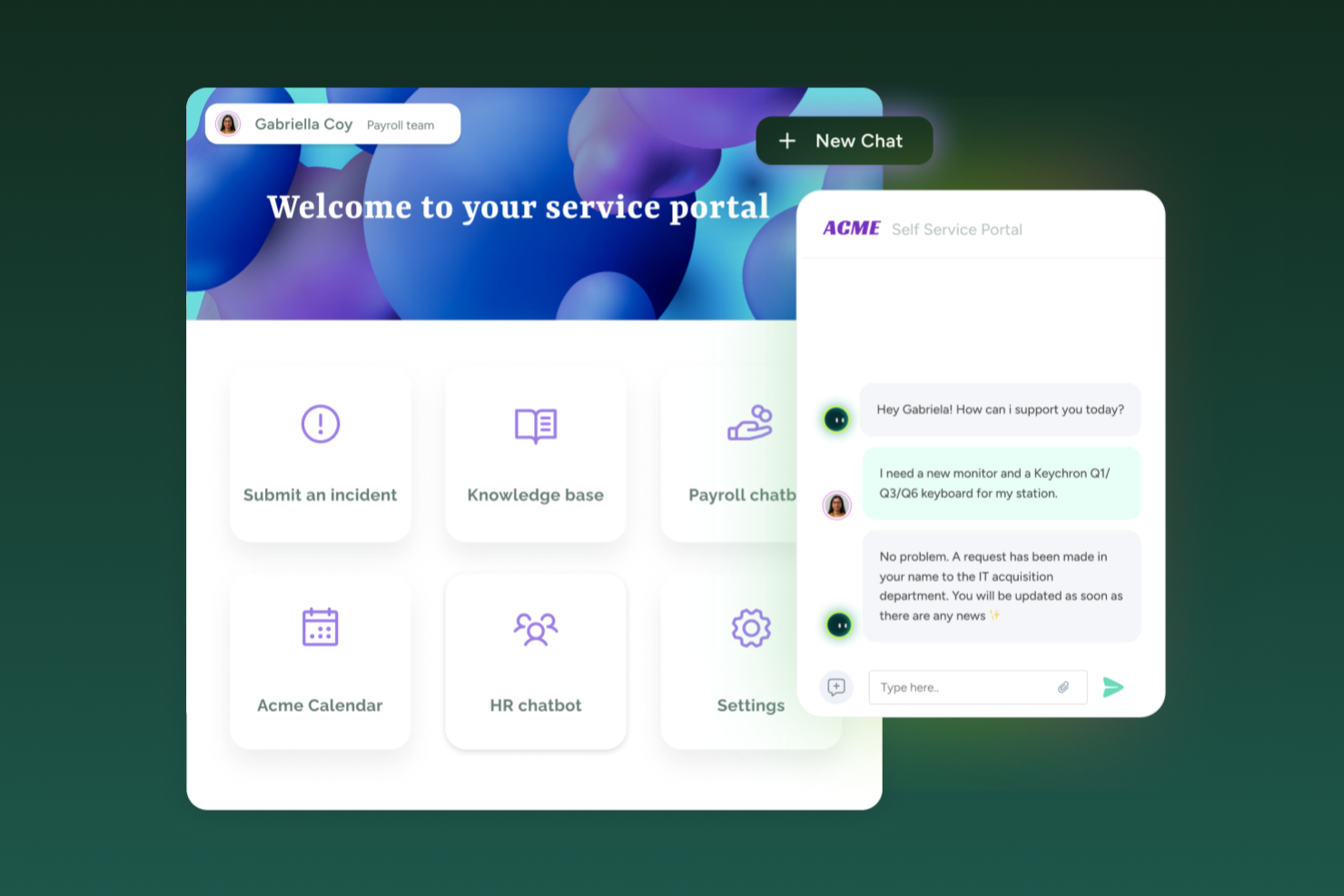
SysAid ist eine KI-basierte Helpdesk-Software, die speziell für IT-Teams entwickelt wurde. Sie unterstützt das Ticketmanagement, die Problemlösung und die Verwaltung von IT-Assets und bietet zugleich Automatisierungstools, um Service-Desk-Prozesse zu optimieren und zu standardisieren.
Besonders aufgefallen sind mir die Self-Service-Automatisierungsfunktionen dieser Plattform. Dazu gehören automatisierte Passwortzurücksetzungen und Ein-Klick-Störungsmeldungen, mit denen Mitarbeitende häufige IT-Probleme selbstständig lösen können. Dadurch kann Ihr IT-Team weniger Zeit für wiederkehrende Anfragen aufwenden und sich stärker auf technische und strategische Aufgaben konzentrieren.
Obwohl SysAid eine cloudbasierte Option bietet, kann es auch als lokale Lösung bereitgestellt werden, was gerade bei strengeren Infrastruktur- oder Datenanforderungen wichtig sein kann. Technischer Support und Schulungen helfen, Ihr Team effizient einzubinden. Über die IT-Unterstützung hinaus kann die Plattform auch von HR-Teams oder Gesundheitseinrichtungen genutzt werden, die strukturierte Service-Management-Workflows benötigen.
Herausragende Funktionen und Integrationen von SysAid
Funktionen umfassen Aufgaben- und Ticketautomatisierung, automatisierte Eskalation, ein Self-Service-Portal, Wissensdatenbank, Drag-and-drop-Workflow-Builder, Asset Management, Prüfpfade, Projektmanagement und Problemmanagement.
Integrationen umfassen Azure, Google Workspace, Jira, Microsoft Teams, Office 365, OneLogin SSO, Oomnitza, Slack, Worksafe App und Zapier.
Pros and Cons
Pros:
- Leicht zu implementieren
- Enthält Aufgabenautomatisierung
- Integriert sich mit IT-Service-Management (ITSM)
Cons:
- Eingeschränkte Anpassungen
- Preise nicht transparent
New Product Updates from SysAid

SysAid Adds Bulk Contract Import
SysAid added bulk contract import to License Manager Essentials, letting admins upload a CSV template, validate entries, and create multiple contracts at once. For more information, visit SysAid's official site.

Am besten geeignet für KI-basierte automatisierte Ticketlösung
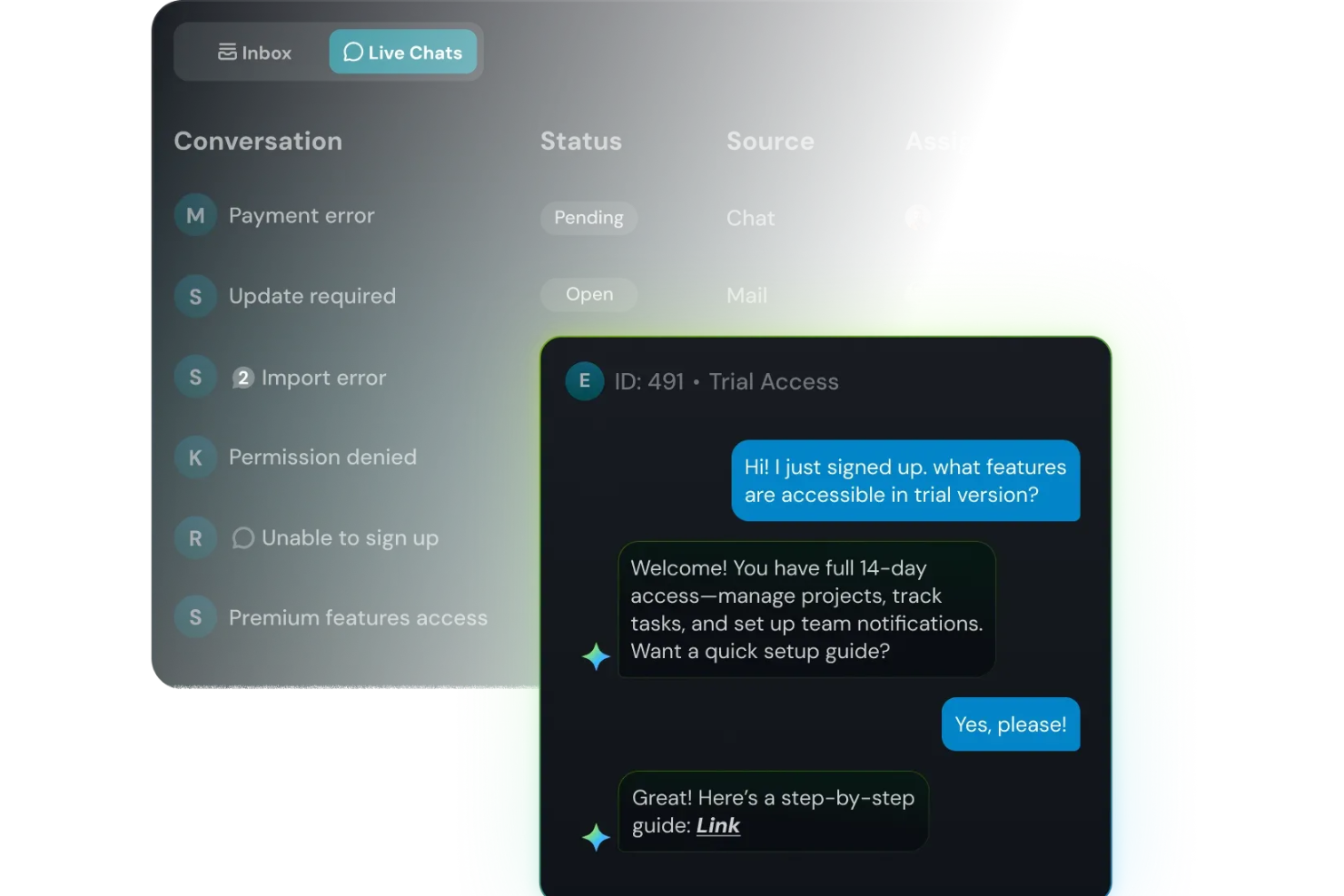
SparrowDesk ist für Support-Teams konzipiert, die einer stetigen Flut an Kundenanfragen gegenüberstehen und ein KI-gestütztes Helpdesk suchen, bei dem sie nicht zwischen mehreren Tools jonglieren müssen. Wenn Sie den Kundenservice in einem wachsenden Unternehmen managen – egal ob in SaaS, E-Commerce, Fintech oder einem anderen schnelllebigen Bereich – werden Sie schätzen, wie SparrowDesk E-Mails und Live-Chat in einem Posteingang bündelt und den KI-Agenten 'Luna' einsetzt, um Routine-Tickets zu übernehmen, sodass Ihr Team sich auf komplexere Fälle konzentrieren kann.
Warum ich SparrowDesk ausgewählt habe
Ich habe SparrowDesk wegen seiner herausragenden Fähigkeit gewählt, den Kundenservice durch KI-basierte Lösungen speziell für Cloud-Helpdesks zu automatisieren. Mit seinem Luna KI-Agent, der die Mehrheit der Anfragen eigenständig löst, kann sich Ihr Team auf komplexere Kundenbedürfnisse konzentrieren. Außerdem vereinheitlicht die Omnichannel-Inbox die Kommunikation aus verschiedenen Plattformen, sodass keine Kundenanfrage verloren geht. Der intelligente KI-Copilot unterstützt die Mitarbeitenden zusätzlich mit Echtzeit-Vorschlägen, was die Antwortgenauigkeit und Geschwindigkeit steigert.
Wichtige Funktionen von SparrowDesk
Neben der KI-gestützten Automatisierung bietet SparrowDesk eine Reihe von Funktionen, die seinen Nutzen als Cloud-Helpdesk-Software stärken:
- Service Level Agreements (SLA): Definieren Sie klare Antwort- und Lösungsziele, um einen hohen Kundenservice-Standard zu gewährleisten.
- Verwaltung der Geschäftszeiten: Legen Sie Betriebszeiten fest, um Kundenerwartungen anzupassen und die Ticketverteilung zu optimieren.
- Schnellaktions-Makros: Automatisieren Sie wiederkehrende Aufgaben, um Zeit zu sparen und die Prozess-Effizienz zu steigern.
- Interaktive Analysen: Profitieren Sie von Echtzeit-Dashboards zur Analyse der Teamleistung und zur Erkennung von Trends in der Kundeninteraktion.
SparrowDesk Integrationen
Aktuell werden von SparrowDesk keine nativen Integrationen aufgelistet.
Pros and Cons
Pros:
- KI-Agenten sind dafür ausgelegt, viele sich wiederholende Tickets automatisch zu lösen
- Copilot-Funktionen fassen lange Unterhaltungen im Agenten-Postfach zusammen
- No-Code-Workflow-Builder automatisiert Routing und Benachrichtigungen
Cons:
- Derzeitige Kanäle konzentrieren sich auf E-Mail und Live-Chat, nicht auf Telefon oder soziale Netzwerke
- Begrenzte native Integrationen könnten die nahtlose Konnektivität erschweren

Am besten geeignet für KI-gestützten Kundensupport

Salesforce Service Cloud ist eine Kundenservice-Software und Support-Anwendung, die Unternehmen eine Plattform für individuelle Marketingbeziehungen mit jedem Kunden über mehrere Kanäle und Geräte hinweg bietet. Sie ermöglicht es Organisationen, intelligenteren, schnelleren und persönlicheren Service zu leisten, indem Kundenanfragen und -gespräche verwaltet werden.
Die Plattform stellt eine Suite von Werkzeugen zur Verfügung, mit denen Unternehmen Kundeninteraktionen über verschiedene Kanäle hinweg steuern können. Beispielsweise bietet sie Funktionen für das Fallmanagement, sodass Support-Mitarbeiter Kundenprobleme nachverfolgen und lösen können. Salesforce Service Cloud enthält zudem eine Wissensdatenbank zur Speicherung und zum Abruf von Lösungen für häufige Probleme, die sowohl von Kunden als auch vom Support genutzt werden kann.
Zusätzlich bietet Salesforce Service Cloud Automatisierungen für Routineaufgaben, wie z. B. Fallzuweisung und Eskalation, um die Effizienz der Support-Teams zu steigern. Das Tool nutzt außerdem KI-Technologie, um durch Analyse von Kundendaten, bisherigen Interaktionen und Kontextinformationen vorausschauende Einblicke zu ermöglichen. Dadurch können Unternehmen Muster, Trends und potenzielle Probleme erkennen, um Kundenbedürfnisse vorherzusehen, Serviceprozesse zu optimieren und proaktiv auf Anliegen zu reagieren.
Hervorstechende Funktionen und Integrationen der Salesforce Service Cloud
Funktionen umfassen Self-Service-Communities, Tools für das Management von Serviceverträgen und Berechtigungen sowie Service-Analysen. Salesforce Service Cloud integriert sich außerdem mit sozialen Netzwerken, um Kundenanfragen, Kommentare und Beschwerden auf Social-Media-Plattformen zu überwachen und zu beantworten.
Integrationen umfassen SurveyMonkey, Tableau, Genesys, Trello, Mailchimp, Freshdesk, HubSpot CRM sowie die Salesforce-Suite, einschließlich Sales Cloud und Marketing Cloud.
Pros and Cons
Pros:
- Effizientes Fallmanagement
- Benutzerfreundliches System
- Hilft, Kundeninteraktionen zu personalisieren
Cons:
- Hohe Lernkurve für neue Nutzer
- Herausforderungen bei der Integration mit Drittsystemen
New Product Updates from Agentforce Service (formerly Service Cloud)
Agentforce Service Keeps Full Agentforce Voice Transcripts After Calls
Agentforce Service now shows the full conversation history in post-call transcripts for Agentforce Voice calls within the Service Console, giving agents better context for follow-ups. For more information, visit Salesforce’s official site.
 .
.
Chatbase
Am besten geeignet für die individuelle Erstellung von KI-Chatbots
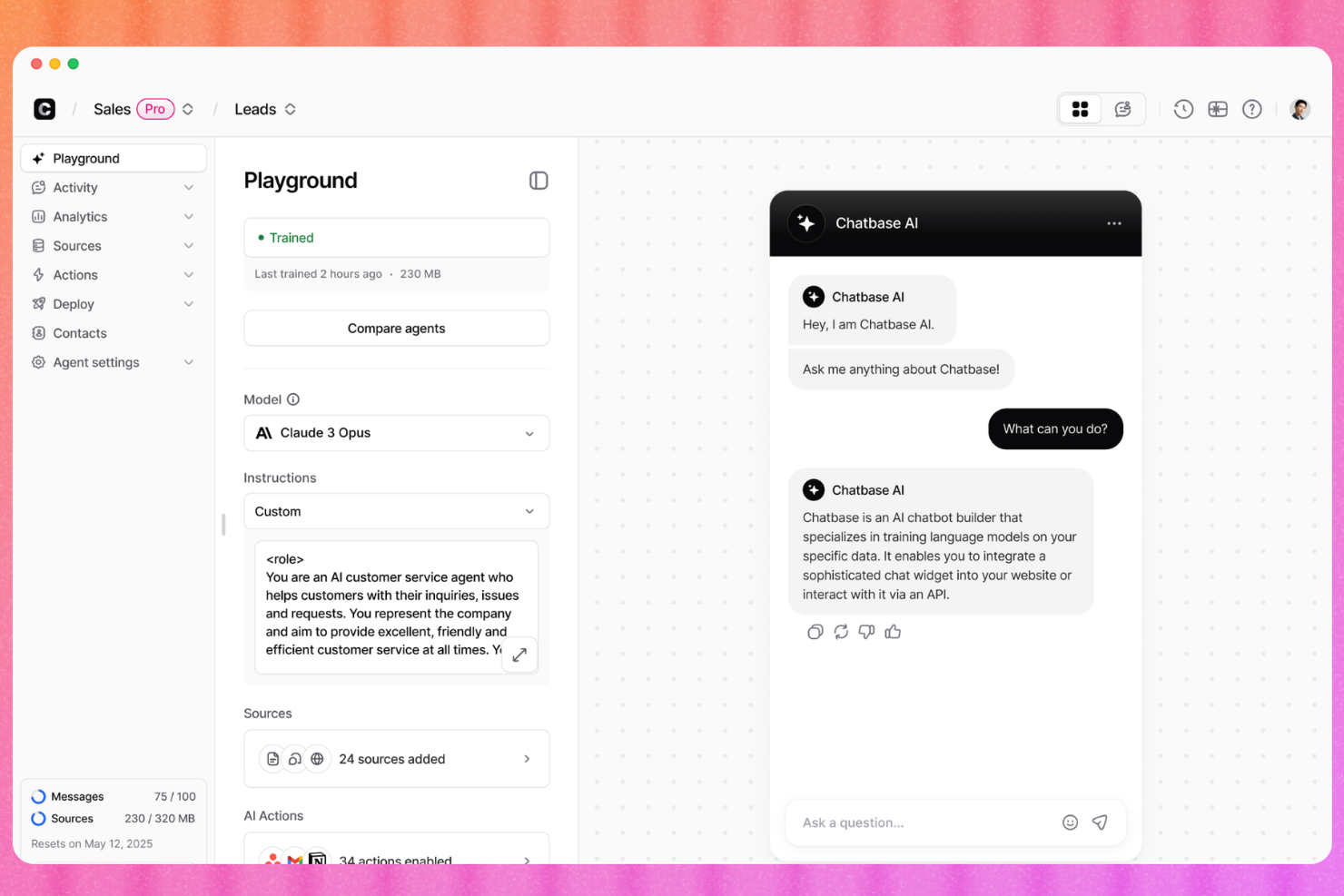
Chatbase ist ein KI-Chatbot-Builder für den Kundensupport, der es Ihnen ermöglicht, Agenten mit Ihren eigenen Unternehmensdaten zu trainieren, sie kanalübergreifend einzusetzen und komplexe Anfragen per Live-Chat oder Helpdesk-Ticketing an menschliche Agenten zu übergeben.
Für wen ist Chatbase am besten geeignet?
Chatbase ist ideal für kleine und mittelgroße Unternehmen, die ihren Kundensupport mit KI automatisieren möchten, ohne einen Chatbot von Grund auf neu zu entwickeln.
Warum ich Chatbase gewählt habe
Ich habe Chatbase in meine Top-Auswahl aufgenommen, weil Sie damit wirklich steuern können, wie Ihr KI-Support-Agent aussieht, spricht und sich verhält. Mir gefällt, dass Sie den Ton und die Leitplanken des Agenten in einfacher Sprache konfigurieren und verschiedene KI-Modelle im Playground testen können, um die beste Lösung zu finden. Mit der White-Label-Option kann ich außerdem das gesamte Chatbase-Branding entfernen, sodass sich der Agent wie ein nativer Teil des Produkts anfühlt.
Chatbase Hauptfunktionen
- Menschliche Übergabe: Leiten Sie ungelöste Gespräche direkt im Chatfenster an einen Live-Agenten weiter.
- Gesprächsanalyse: Überwachen Sie Chat-Volumen, unbeantwortete Fragen und Zufriedenheitswerte über ein zentrales Dashboard.
- Mehrsprachige Unterstützung: Erkennt und antwortet automatisch in über 80 Sprachen ohne manuelle Konfiguration.
- Eigene Datenquellen: Laden Sie PDFs, URLs oder Klartext hoch, um die Wissensbasis des Chatbots zu erweitern.
Chatbase Integrationen
Chatbase bietet native Integrationen mit WhatsApp, Slack, Instagram, Facebook Messenger, Zendesk, Salesforce, Shopify, Stripe, Notion, Calendly und Cal.com. Es verbindet sich mit Zapier und Make und verfügt über eine API für eigene Integrationen.
Pros and Cons
Pros:
- Erstellung eines No-Code-Chatbots in wenigen Minuten
- Auswahl mehrerer LLM-Anbieter möglich
- Unterstützt mehr als 80 Sprachen nativ
Cons:
- Kein visueller Flow-Builder für Konversationen
- Erfordert möglicherweise ein gewisses Training des Chat-Modells

Am besten mit einem automatisierten Workflow-Builder
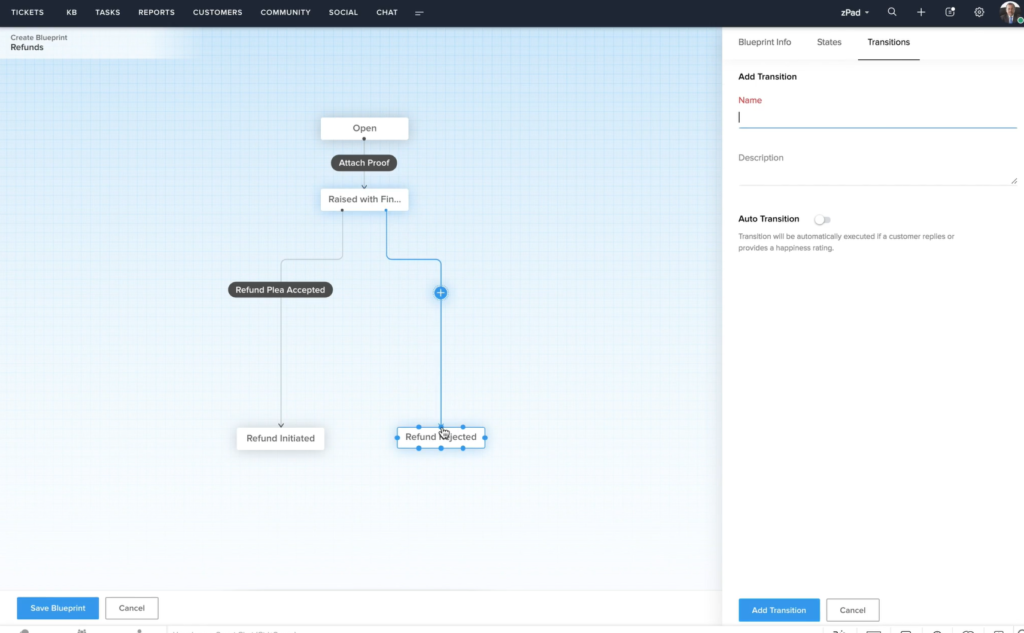
Zoho Desk ist eine Helpdesk-Software, die Omnichannel-Kundendienstvorgänge ermöglicht. Sie können mehrere Kommunikationskanäle mit dem System verbinden, darunter E-Mail, soziale Medien, Web-Chat und Sprachanrufe. Besonders hervorzuheben ist die Möglichkeit, automatisierte Workflows zu erstellen, die Ihr Team durch die Reduzierung manueller Arbeit entlasten. Ich habe diese Software in meine Liste aufgenommen, nachdem ich überprüft habe, wie einfach sie den Kundenservice gestaltet und die Produktivität der Mitarbeitenden steigert.
Die automatisierten Workflows der Software ermöglichen es Ihnen, Best Practices für Ihre Mitarbeitenden zur Beantwortung häufiger Anfragen zu definieren. Dies ist hilfreich, um ein konsistentes Kundenerlebnis zu gewährleisten und neue Mitarbeitende schnell einzuarbeiten. Der Workflow-Builder ist eine benutzerfreundliche Drag-and-Drop-Oberfläche. Sie können bestimmte Aktionen und Ergebnisse einrichten, die von festgelegten Bedingungen abhängen.
Außerdem bietet die Plattform weitere wichtige Funktionen zur Unterstützung Ihres Support-Teams. Dazu gehören Self-Service-Ressourcen, Tools für die Zusammenarbeit im Team, Berichte und die Integration mit anderen Geschäftsanwendungen.
Herausragende Funktionen und Integrationen von Zoho Desk
Funktionen umfassen Ticket-Management, automatisches Tagging von Tickets, Stimmungsanalyse, Zia-Benachrichtigungen, Zia-Dashboard, Antwortassistent, Self-Service-Tools, CRM-Integration, benutzerdefinierte Funktionen, SDKs, Marktplatz und Plattform, APIs, Berichte und Dashboards, Zeiterfassung, Multi-Brand-Helpcenter, Domain-Mapping sowie Benutzer- und Zugriffsverwaltung.
Integrationen umfassen Twilio, RingCentral, Amazon Connect, Ozonetel, Exotel, Knowlarity, Jive, sipgate, JustCall, ringover und andere Softwareoptionen.
Pros and Cons
Pros:
- Umfangreiche Anpassungsmöglichkeiten
- Übersichtliche, intuitive Oberfläche mit einfacher Navigation
- Integration mit anderen Zoho-Apps
Cons:
- Begrenztes Reporting in niedrigeren Tarifstufen
- Eingeschränkte Branding-Optionen für Kundenportale

eDesk
Am besten geeignet für Multi-Channel-E-Commerce-Support-Management

Wenn das Management von Kundeninteraktionen über mehrere Online-Verkaufskanäle hinweg überwältigend erscheint, könnte eDesk genau das sein, was Sie brauchen. Speziell für E-Commerce-Unternehmen entwickelt, zentralisiert eDesk die Kundenkommunikation und automatisiert Aufgaben, um die Komplexität des Multi-Channel-Supports zu bewältigen. Die KI-gestützten Funktionen und umfangreichen Integrationen zielen darauf ab, die Effizienz Ihres Support-Teams zu steigern und die Kundenzufriedenheit zu erhöhen.
Warum ich eDesk gewählt habe
Ich habe mich für eDesk entschieden, weil es die spezifischen Herausforderungen im E-Commerce mit Cloud-Helpdesk-Software bewältigen kann. Der einheitliche Posteingang bündelt Nachrichten aus verschiedenen Kanälen in einem übersichtlicheren Arbeitsbereich. Der KI-Agent hilft außerdem, wiederkehrende Support-Aufgaben zu automatisieren und so die manuelle Arbeitsbelastung Ihres Teams zu verringern. Diese Funktionen sorgen für eine effizientere Kommunikation und eine reibungslosere Aufgabenbearbeitung im Kundensupport.
eDesk Hauptfunktionen
Neben dem Management des Multi-Channel-E-Commerce-Supports bietet eDesk:
- KI-gestützte Automatisierung: Automatisiert wiederkehrende Aufgaben wie Ticketzuweisung und Antwortvorschläge, damit Ihr Team mehr Zeit für komplexere Anliegen hat.
- Echtzeit-Berichte: Liefert Einblicke in Ihre Support-Abläufe, um datenbasierte Entscheidungen zu ermöglichen.
- 24/7-Chatbot: Bietet Ihren Webstore-Besuchern rund um die Uhr Unterstützung, so dass keine Anfrage unbeantwortet bleibt.
- Feedback-Management: Ermöglicht das Versenden von Bewertungsanfragen an Kunden, damit Sie wertvolles Feedback sammeln und die Servicequalität verbessern können.
eDesk Integrationen
Integrationen umfassen Amazon, eBay, Walmart, Shopify, WooCommerce, BigCommerce, Magento, Facebook, Instagram und WhatsApp.
Pros and Cons
Pros:
- Automatisierung und Vorlagen reduzieren wiederkehrende Supportaufgaben
- Organisierte Ticketansichten verbessern die tägliche Arbeitseffizienz
- Integriert umfassende Bestelldaten für verbesserten Kundenservice
Cons:
- Vorrangig für E-Commerce entwickelt, weniger flexibel für andere Branchen
- Berichte und Analysen sind vorhanden, aber weniger anpassbar als bei größeren Enterprise-Lösungen
New Product Updates from eDesk
eDesk Adds Galeria and Kaufland Support in Spain and Netherlands
eDesk adds support for Galeria, Kaufland Spain, and Kaufland Netherlands marketplaces. These integrations bring more European buyer messages into eDesk with routing, templates, AI insights, and automated translation. For more information, visit eDesk’s official site.
 .
.
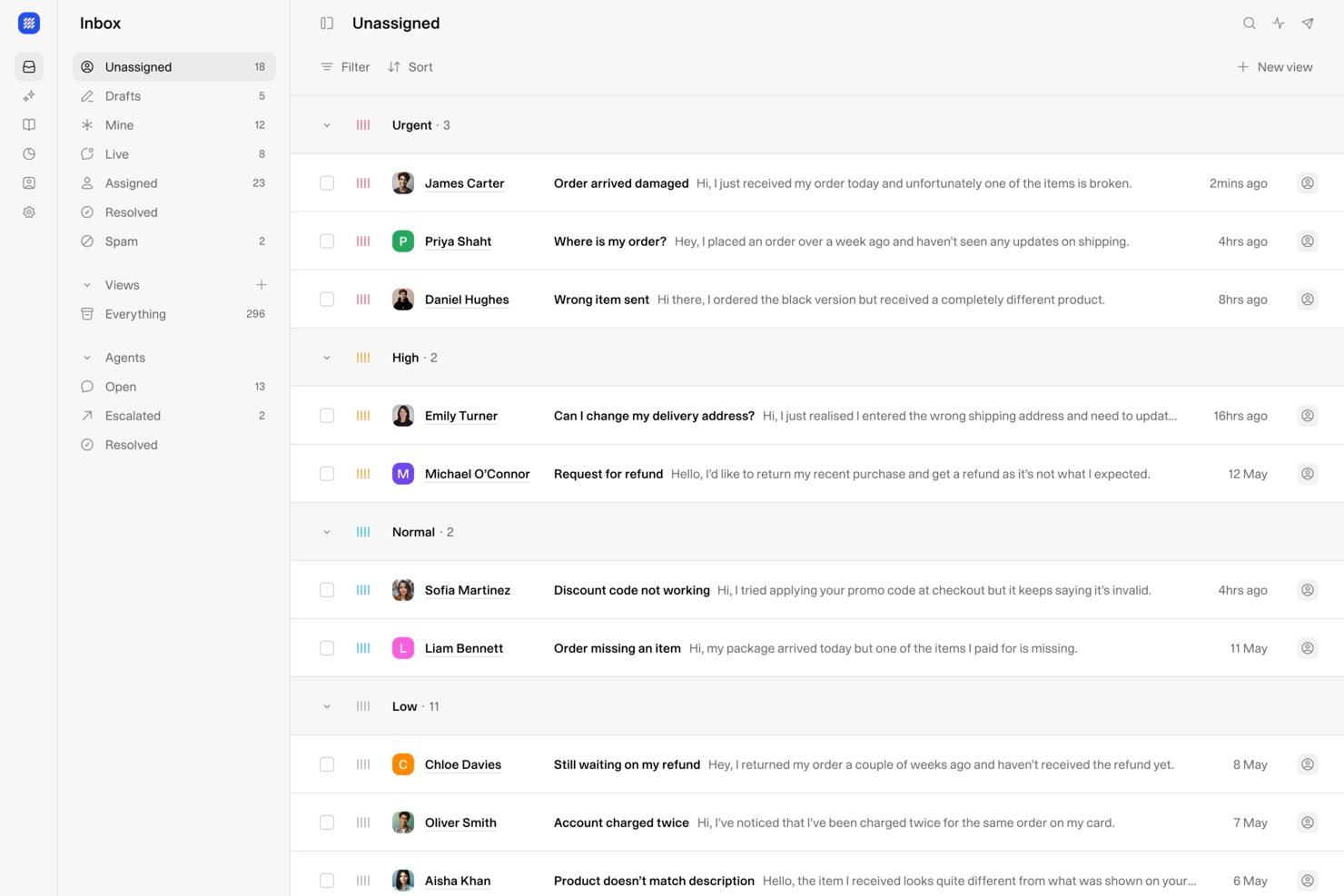
Weav ist eine KI-basierte Cloud-Helpdesk-Plattform, die KI-Agenten, einen gemeinsamen Posteingang, kundenorientierte Chatbots und ein internes Wissens-Tool kombiniert, um die Ticketbearbeitung über Supportkanäle hinweg zu übernehmen.
Für wen ist Weav am besten geeignet?
Weav eignet sich besonders für SaaS- und E-Commerce-Teams, die Kundenservice lieber über KI-gestützte Chats und Automatisierungen abwickeln möchten, anstatt über herkömmliches Ticketing.
Warum ich Weav gewählt habe
Weav hat sich einen Platz auf meiner Shortlist verdient, weil seine KI-Agenten die tatsächlichen Trainingsdaten deines Produkts verwenden, um Antworten gezielt auf die aktuellen Nutzeranfragen abzustimmen, anstatt einfach einen generischen Wissensdatenbank-Artikel zurückzugeben. Besonders gefällt mir, dass man jederzeit mit einem einfachen Prompt zusätzlichen Kontext in jeden Agenten einbringen kann – das bedeutet, die Support-Antworten passen sich situationsabhängig an das jeweils Relevante an. Auch das kontinuierliche Lernmodell hilft dabei: Weav analysiert gelöste Tickets, um sein Verständnis zu aktualisieren, sodass die Antworten präziser werden, wenn sich dein Produkt und das Verhalten deiner Kunden weiterentwickeln.
Weav Hauptfunktionen
- Spezialisierte Agenten: Baue mehrere KI-Agenten auf, die jeweils für eine bestimmte Support-Rolle oder ein Themengebiet trainiert sind, um verschiedene Kundensituationen zu betreuen.
- Antwortgenerierung: Die KI erstellt Antwortentwürfe für Agenten im Posteingang auf Basis deines Produktwissens, wobei der Agent die endgültige Kontrolle über das Versenden behält.
- Berichte: Verfolge Support-Ergebnisse, Ticket-Auflösungstrends und erkenne Schwachstellen im Support-Prozess über das integrierte Reporting-Dashboard.
- Faktengeprüfte Quellen: Interne Nutzer können genau nachvollziehen, aus welchen Trainingsdokumenten Weav die jeweilige Antwort generiert hat.
Weav Integrationen
Weav bietet eine überschaubare Anzahl nativer Integrationen, darunter Shopify, Google Drive und Stripe. Es unterstützt außerdem benutzerdefinierte Aktionen und stellt seine REST API sowie Echtzeit-Webhooks ab Pro-Tarif zur Verfügung, um individuelle Integrationen zu bauen.
Pros and Cons
Pros:
- Agenten lernen aus abgeschlossener Ticket-Historie
- Ton- und Antwortsteuerung pro Agent
- Internes Wissenstool für Agenten
Cons:
- Im kostenlosen Tarif ist die KI auf 20 Nachrichten begrenzt
- Wenige native Integrationen verfügbar

Zendesk
Am besten geeignet für zentrales, kanalübergreifendes Ticketing und Kundendatenmanagement
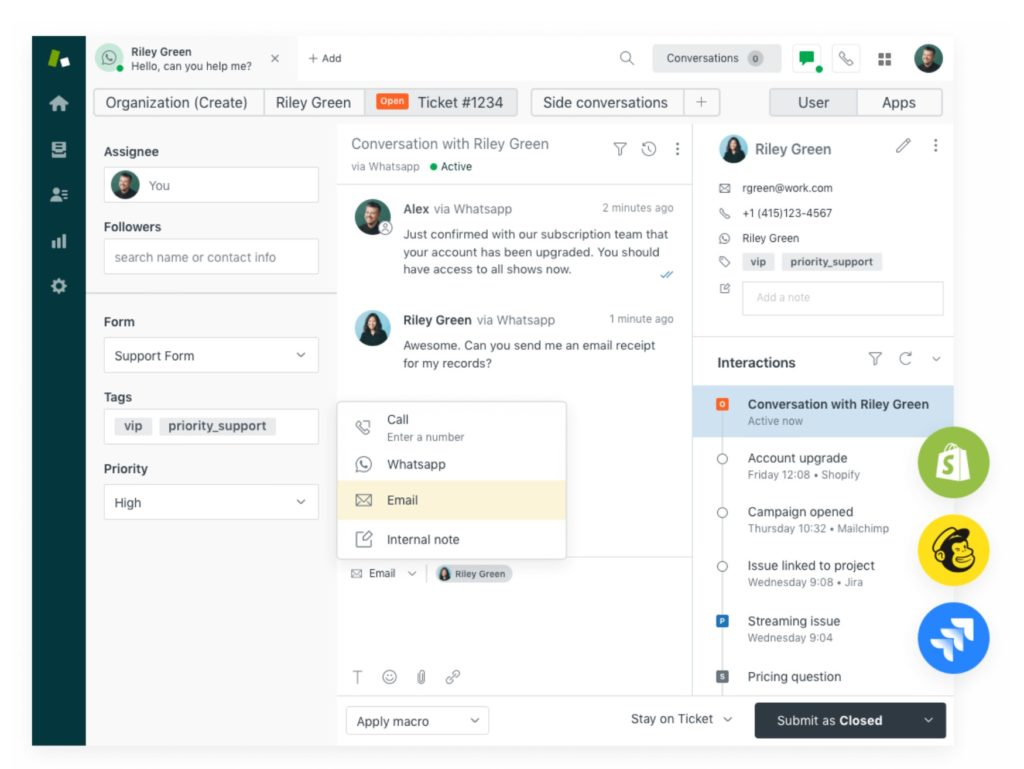
Zendesk ist eine KI-gestützte, cloudbasierte Helpdesk-Software, die Unternehmen dabei unterstützt, Kundenanfragen und -probleme zu verwalten und zu lösen, indem sie eine zentrale Plattform für die Interaktion mit Kunden über verschiedene Kanäle hinweg bereitstellt.
Das vollständig integrierte Ticketsystem von Zendesk unterstützt Kundeneingaben aus verschiedenen Kanälen, darunter E-Mail, Chat, Telefon und Social-Media-Nachrichten, und erstellt automatisch für jede Anfrage ein Ticket. Das Ticketsystem verwendet zudem CSAT-Bewertungen, Service-Level-Agreements, Zeiterfassung und Routing, um sicherzustellen, dass Sie und Ihr Team eine hochwertige Kundenerfahrung bieten.
Zendesk bietet seine eigene CRM-Plattform, Sunshine, an, die Unternehmen dabei hilft, Kundendaten zu zentralisieren und zu verwalten sowie eine einheitliche Ansicht der Kundeninteraktionen bereitzustellen. Dazu gehört eine Customer Data Platform (CDP), mit der Unternehmen Kundendaten aus verschiedenen Quellen – wie Support-Tickets, Chat-Gesprächen, E-Mails und Social-Media-Interaktionen – zusammenführen, speichern und verwalten können. Dieses einheitliche Kundenprofil ermöglicht Organisationen ein umfassendes Verständnis der Präferenzen, Historie und Verhaltensweisen ihrer Kunden und unterstützt sie so dabei, hochwertige Kundenerlebnisse zu schaffen.
Funktionen umfassen Werkzeuge zum Wissensmanagement, Live-Chat, Callcenter-Software und Funktionen für Kundenanalysen.
Integrationen umfassen Asana, Google Workspace, HubSpot, Jira, Microsoft Dynamics, Salesforce, Shopify, Slack, Trello, Zoom und über 1.200 weitere Optionen im Zendesk Marketplace.
Pros and Cons
Pros:
- Benutzerfreundliche Oberfläche und einfache Aufgabenverwaltung
- Schnelle Implementierung und günstige Preisgestaltung
- Automatisierungsfunktionen zur Prozessoptimierung
Cons:
- Begrenzte Anpassungsmöglichkeiten
- Für das Hinzufügen neuer Agenten werden Einzellizenzen benötigt
New Product Updates from Zendesk
Zendesk Adds Email AI Replies and Predictive Routing
Zendesk’s latest email AI agents update brings configurable knowledge and welcome replies and adds predictive routing for email tickets, so you can tailor your automated emails and get inquiries resolved faster. For more information, visit Zendesk’s official site.
Weitere Optionen
Hier sind einige weitere lohnenswerte Optionen, die es nicht in die Liste der besten Cloud-Helpdesk-Softwares geschafft haben:
- Tidio
Am besten geeignet für mehrsprachige Helpdesk-Kommunikation
- HappyFox
Am besten geeignet für Kunden-Self-Service
- monday service
Am besten geeignet für ein anpassbares Ticketsystem
- SolarWinds Service Desk
Am besten geeignet für einen IT-fokussierten Helpdesk
- Issuetrak
Am besten geeignet für Omnichannel-Ticketing
- Genesys Cloud CX
Am besten geeignet zur Transformation des Kundenerlebnisses
- Deskpro Draft
Am besten für cloudbasierte oder On-Premise-Helpdesks
- Bitrix24
Am besten geeignet für Unternehmen, die eine kostenlose Helpdesk-Lösung benötigen
- Front
Am besten geeignet zum Aufbau besserer Kundenbeziehungen
- Spiceworks Cloud Help Desk
Am besten geeignet für Server- und Website-Überwachung
- ManageEngine
Am besten für IT-Management und Datensicherheit
- Front
Am besten geeignet für Aufgabenautomatisierung und -verwaltung
- SAAS First
Er KI-Support-Chatbot
- Supportbench
Am besten geeignet für individuelle Strukturen und Skalierbarkeit
- Hiver
Am besten für Zusammenarbeit im Helpdesk
- NinjaOne
Am besten geeignet für zentrales IT-Management auf einer Oberfläche
- LiveAgent
Am besten geeignet für kundenorientierte Omnichannel-Service-Lösungen
- Help Scout
Am besten zur Steigerung der Produktivität von Agenten geeignet
- Zoho Assist
Am besten geeignet für sicheren, unbeaufsichtigten IT-Fernsupport


Wie ich Cloud-Helpdesk-Software bewerte
Ich teile meine Bewertung in zwei Ebenen auf: die Grundanforderungen, die ein Tool erfüllen muss – wie Omnichannel-Ticketing und SLA-Automatisierung – und die Unterscheidungsmerkmale, die eine Plattform für Ihr Team besonders machen.
Kernfunktionen (Mindestanforderungen für diese Liste)
Wenn ich Tools für meine Liste auswähle, bewerte ich jedes einzelne auf einer Skala von 0 (bietet die Funktion nicht an) bis 5 (hervorragend in diesem Bereich) für jede der untenstehenden Kernfunktionen. Dann rechne ich die Gesamtpunktzahl des Tools in einen Prozentsatz um. Jedes Tool muss eine Mindestgesamtpunktzahl von 65 % erreichen, um berücksichtigt zu werden.
- Cloud-basiertes Ticketing: Ich prüfe, ob die Plattform als vollständig cloudgehostetes SaaS-Produkt läuft und eine strukturierte Ticket-Lebenszyklusverfolgung, benutzerdefinierte Felder und Status-Workflows bietet.
- Omnichannel-Erfassung: Jedes von mir bewertete Tool muss Konversationen aus E-Mail, Chat, Telefon und sozialen Medien in eine zentrale Warteschlange bündeln, statt Kanäle zu isolieren.
- Automatisierung & Routing: Ich achte auf regelbasierte Auslöser, die Ticketzuweisung, Eskalation und Priorisierung ermöglichen – etwa um Abrechnungsanfragen automatisch an ein Spezialteam weiterzuleiten.
- Wissensdatenbank & Self-Service: Ein guter Helpdesk ermöglicht es Kunden, eigene Antworten über eine durchsuchbare, strukturierte Wissensdatenbank und ein gebrandetes Portal zu finden.
- SLA & Reporting: Ich bewerte, wie jedes Tool Reaktions- und Lösungsziele verfolgt und ob Dashboards Schlüsselkennzahlen wie CSAT, Erstantwortzeit und Trendanalysen zum Rückstau anzeigen.
- Agenten-Kollaborationstools: Funktionen wie interne Notizen, @Erwähnungen, Kollisionsschutz und Nebenunterhaltungen machen einen großen Unterschied, wenn mehrere Agenten an einem Ticket arbeiten.
Sobald ich eine Liste von Tools habe, die die Kriterien erfüllen, schaue ich, wodurch sich jede Plattform abhebt.
Unterscheidungsmerkmale (Was Anbieter besonders macht)
So vergleiche und kontrastiere ich verschiedene Anbieter:
Herausragende Funktionen
KI-gestützte Assistenten sind aktuell ein entscheidender Unterschied. Ich suche nach Tools, die Antworten vorschlagen, lange Ticketverläufe zusammenfassen und relevante Artikel während des Gesprächs für Agenten empfehlen können. Stimmungsanalysen ergänzen dies gut – wenn verärgerte Kunden markiert werden, bevor ein Agent das Ticket öffnet, hilft das Teams dabei, das Wichtige zuerst zu bearbeiten. Außerdem prüfe ich, ob eine Plattform native Sprach- und IVR-Funktionen beinhaltet. So entfällt die Notwendigkeit, ein externes Contact-Center-Tool für telefonbasierten Support anzubinden.
Über die Funktionen hinaus
Die Integrationsfähigkeit spielt hier eine große Rolle. Ich prüfe, ob sich eine Plattform nativ mit den CRMs und E-Commerce-Tools verbinden lässt, die Ihr Team bereits nutzt – wie Salesforce, HubSpot oder Shopify – sodass Agenten den vollständigen Kundenkontext erhalten, ohne die Registerkarte wechseln zu müssen. Sicherheit ist ein weiterer wichtiger Faktor, insbesondere Zertifizierungen wie SOC 2 Typ II und DSGVO-Konformität, die bei sensiblen Kundendaten in großem Maßstab entscheidend sind. Auch das Preismodell beziehe ich in meine Bewertung ein: Ich prüfe, ob Agenten-basierte Modelle bei wachsendem Support-Team bezahlbar bleiben.
So wählen Sie Cloud-Helpdesk-Software aus
Bei langen Funktionslisten und komplexen Preisstrukturen verliert man leicht den Überblick. Damit Sie sich bei der individuellen Auswahl Ihrer Software auf das Wesentliche konzentrieren können, finden Sie hier eine Checkliste mit Faktoren, die Sie berücksichtigen sollten:
| Faktor | Was Sie beachten sollten |
|---|---|
| Skalierbarkeit | Stellen Sie sicher, dass die Software mit Ihrem Unternehmen wachsen kann. Achten Sie auf Lösungen, die steigende Ticketvolumina bewältigen und eine Expansion in neue Märkte unterstützen können. |
| Integrationen | Prüfen Sie, ob sich das Tool in Ihre bestehenden Systeme wie CRM-, E-Mail- und Chat-Plattformen integrieren lässt, um für Ihr Team ein einheitliches Support-Erlebnis zu schaffen. |
| Anpassbarkeit | Überlegen Sie, wie einfach Sie die Software an die Arbeitsabläufe und Prozesse Ihres Teams anpassen können, einschließlich benutzerdefinierter Felder, Prioritäten und Ticketansichten. |
| Benutzerfreundlichkeit | Bewerten Sie die Benutzeroberfläche und wie intuitiv sie für Ihr Team ist. Ein einfaches, leicht navigierbares Design kann die Schulungszeit verkürzen und die Effizienz steigern. |
| Budget | Ermitteln Sie die Gesamtkosten einschließlich Abonnementgebühren und zusätzlicher Gebühren. Vergleichen Sie diese mit Ihrem Budget, um sicherzustellen, dass das Tool ein gutes Preis-Leistungs-Verhältnis bietet. |
| Sicherheitsvorkehrungen | Achten Sie auf Funktionen wie Datenverschlüsselung, Zugriffskontrollen und die Einhaltung von Branchenstandards, um sensible Kundeninformationen zu schützen. |
Trends bei Cloud-Helpdesk-Software
Für meine Recherche habe ich unzählige Produktaktualisierungen, Pressemitteilungen und Änderungsprotokolle verschiedener Anbieter von Cloud-Helpdesk-Software ausgewertet. Hier sind einige der aufkommenden Trends, die ich im Auge behalte:
- KI-gestützter Support: KI verbessert die Kundeninteraktionen, indem schnelle und präzise Antworten bereitgestellt werden. Tools wie Chatbots und virtuelle Assistenten werden immer ausgefeilter und helfen Teams dabei, große Mengen an Anfragen effizient zu bearbeiten.
- Mehrkanal-Funktionen: Nutzer erwarten Support über mehrere Kanäle hinweg, darunter soziale Medien, Live-Chat und E-Mail. Anbieter integrieren diese Kanäle, um ein einheitliches Erlebnis zu schaffen und Agenten den nahtlosen Wechsel zwischen ihnen zu ermöglichen.
- Selbstbedienungsportale: Unternehmen konzentrieren sich darauf, Kunden durch das Angebot von Selbstbedienungsoptionen zu unterstützen. Diese Portale bieten Zugriff auf häufig gestellte Fragen, Wissensdatenbanken und Community-Foren und entlasten dadurch die Supportteams.
- Stimmungsanalyse: Die Analyse der Kundenstimmung anhand von Interaktionen hilft Teams, Probleme zu priorisieren und die Servicequalität zu verbessern. Anbieter integrieren Tools zur Stimmungsanalyse, um Einblicke in die Gefühle der Kunden zu geben.
- Tools für den Fernsupport: Da die Arbeit im Homeoffice zunimmt, fügen Anbieter Funktionen hinzu, die Teams dabei helfen, von überall aus zusammenzuarbeiten und Probleme zu lösen. Dazu gehören gemeinsame Dashboards, Bildschirmfreigabe und Fernsteuerungsfunktionen.
Was ist cloudbasierte Helpdesk-Software?
Cloudbasierte Helpdesk-Software ist ein Tool, das Unternehmen dabei unterstützt, Kunden-Supportanfragen effizient über eine cloudbasierte Plattform zu verwalten. Sie wird typischerweise von Kundensupportteams, IT-Fachleuten und Servicemanagern eingesetzt, um die Kommunikation zu verbessern und Probleme schnell zu lösen.
Ticketverwaltung, Mehrkanal-Funktionen und Selbstbedienungsportale helfen dabei, Anfragen zu organisieren, konsistenten Support bereitzustellen und Nutzern die Möglichkeit zu geben, selbstständig Lösungen zu finden. Insgesamt verbessern diese Tools die Kundenzufriedenheit und die Produktivität der Teams, indem sie den Supportprozess optimieren.
Funktionen cloudbasierter Helpdesk-Software
Achten Sie bei der Auswahl cloudbasierter Helpdesk-Software auf die folgenden wichtigen Funktionen:
- Ticketverwaltung: Organisiert und verfolgt Kundenanfragen, stellt sicher, dass keine Anfrage übersehen wird, und ermöglicht eine effiziente Bearbeitung.
- Mehrkanal-Funktionen: Bietet Support über mehrere Kanäle wie E-Mail, Chat und soziale Medien und gewährleistet so ein einheitliches Kundenerlebnis.
- KI-gestützter Support: Nutzt KI, um schnelle Antworten zu liefern und große Mengen an Anfragen zu bearbeiten, sodass menschliche Agenten mehr Zeit für komplexere Probleme haben.
- Selbstbedienungsportale: Ermöglichen es Kunden, mithilfe häufig gestellter Fragen und Wissensdatenbanken selbst Lösungen zu finden, und reduzieren dadurch die Arbeitsbelastung der Supportteams.
- Stimmungsanalyse: Analysiert Kundeninteraktionen, um deren Gefühle einzuschätzen, und hilft Teams dabei, Prioritäten zu setzen und die Servicequalität zu verbessern.
- Tools für den Fernsupport: Erleichtern die Zusammenarbeit und Problemlösung für Teams, die aus der Ferne arbeiten, durch Funktionen wie Bildschirmfreigabe und Fernsteuerung.
- Anpassbarkeit: Ermöglicht es Teams, die Software an bestimmte Arbeitsabläufe und Prozesse anzupassen und dadurch die Gesamteffizienz zu steigern.
- Erweiterte Berichterstattung: Liefert Einblicke in Leistungskennzahlen und ermöglicht datengestützte Entscheidungen zur Verbesserung der Supportleistungen.
- Integrationsfunktionen: Verbindet sich mit bestehenden Systemen wie CRM und E-Mail und schafft so eine einheitliche Supportumgebung für mehr Effizienz.
- Sicherheitsvorkehrungen: Schützt vertrauliche Kundeninformationen durch Funktionen wie Datenverschlüsselung und Zugriffskontrollen und gewährleistet die Einhaltung von Branchenstandards.
- Gerätekompatibilität und Barrierefreiheit: Cloud-Software sollte mit einer Reihe von Geräten und Betriebssystemen kompatibel sein, von Smartphones bis hin zu Laptops und weiteren Geräten.
Vorteile cloudbasierter Helpdesk-Software
Die Einführung cloudbasierter Helpdesk-Software bietet Ihrem Team und Ihrem Unternehmen mehrere Vorteile. Hier sind einige, auf die Sie sich freuen können:
- Verbesserte Effizienz: Zentralisiert die Ticketverwaltung und automatisiert wiederkehrende Aufgaben, sodass Ihr Team Probleme schneller lösen kann.
- Höhere Kundenzufriedenheit: Bietet Unterstützung über mehrere Kanäle und Selbstbedienungsoptionen und stellt Kunden bequeme Möglichkeiten zur Verfügung, Hilfe zu erhalten.
- Datengestützte Erkenntnisse: Erweiterte Berichte und Stimmungsanalysen liefern wertvolle Informationen, mit denen Sie Ihre Support-Strategien optimieren können.
- Skalierbarkeit: Passt sich wachsenden Geschäftsanforderungen an, verarbeitet bei Bedarf höhere Ticketvolumen und erweitert die Support-Funktionen.
- Remote-Zusammenarbeit: Unterstützt die Arbeit aus der Ferne mit Funktionen wie Bildschirmfreigabe und hilft Teams, von überall aus gemeinsam Kundenprobleme zu lösen.
- Anpassbare Arbeitsabläufe: Ermöglicht es Ihnen, Prozesse an die spezifischen Anforderungen Ihres Teams anzupassen und dadurch die betriebliche Effizienz zu verbessern.
- Sichere Datenverwaltung: Schützt Kundeninformationen durch Sicherheitsvorkehrungen und gewährleistet Vertrauen sowie die Einhaltung von Branchenstandards.
Cloud-Helpdesk-Software Bewährte Implementierungspraktiken
Die Einrichtung einer neuen cloudbasierten Helpdesk-Software kann schwierig sein. Hier sind meine besten Tipps für die Implementierung eines Helpdesks:
- Erstellen Sie einen Implementierungsplan: Legen Sie klare Ziele, Zeitpläne und Verantwortlichkeiten fest. Identifizieren Sie wichtige Beteiligte für die Entscheidungsfindung.
- An Geschäftsanforderungen anpassen: Konfigurieren Sie Arbeitsabläufe, Automatisierungsregeln und Ticketkategorien passend zu den bestehenden Support-Prozessen. Vermeiden Sie unnötige Komplexität.
- Daten sorgfältig migrieren: Planen Sie eine reibungslose Datenübertragung aus Altsystemen. Bereinigen Sie alte Daten und ordnen Sie sie der Struktur des neuen Systems entsprechend zu.
- Mitarbeitende schulen und die Nutzung fördern: Stellen Sie praktische Schulungen und Dokumentationen für Supportmitarbeitende bereit. Gehen Sie auf Bedenken ein und heben Sie wichtige Vorteile hervor, um die Nutzung zu fördern.
- Leistung überwachen und Rückmeldungen einholen: Verfolgen Sie wichtige Kennzahlen wie Ticketlösungszeit, Kundenzufriedenheit und Produktivität der Supportmitarbeitenden. Holen Sie regelmäßig Rückmeldungen von den Nutzern ein.
- Optimieren und skalieren: Verfeinern Sie Arbeitsabläufe und Automatisierungen kontinuierlich auf Grundlage von Leistungserkenntnissen. Stellen Sie sicher, dass sich das System an verändernde Geschäftsanforderungen anpasst.
Kosten und Preise cloudbasierter Helpdesk-Software
Bei der Auswahl einer cloudbasierten Helpdesk-Software ist es wichtig, die verschiedenen verfügbaren Preismodelle und Tarife zu verstehen. Die Kosten variieren je nach Funktionen, Teamgröße, Zusatzoptionen und weiteren Faktoren. Die folgende Tabelle fasst gängige Tarife, ihre Durchschnittspreise und typische Funktionen cloudbasierter Helpdesk-Softwarelösungen zusammen:
Vergleichstabelle der Tarife für cloudbasierte Helpdesk-Software
| Tarifart | Durchschnittspreis | Übliche Funktionen |
|---|---|---|
| Kostenloser Tarif | $0 | Grundlegende Ticketverwaltung, E-Mail-Support und eingeschränkte Berichte. |
| Persönlicher Tarif | $5-$25/Benutzer/Monat | Ticketverwaltung, grundlegende Automatisierung und Selbstbedienungsportal. |
| Geschäftstarif | $30-$60/Benutzer/Monat | Unterstützung über mehrere Kanäle, erweiterte Analysen und Integrationsmöglichkeiten. |
| Unternehmenstarif | $70-$120/Benutzer/Monat | Anpassbare Arbeitsabläufe, KI-gestützter Support und erweiterte Sicherheitsfunktionen. |
Informiert bleiben
Ich bin überzeugt, dass diese Liste die bestmöglichen cloudbasierten Helpdesk-Softwarelösungen enthält. Bevor Sie jedoch entscheiden, welche davon für Sie die richtige ist, empfehle ich, Ihre Anforderungen als Organisation zu definieren und für die Zukunft zu planen.
Nachdem Sie Ihre wesentlichen Anforderungen eingegrenzt haben, können Sie einige dieser Dienste über deren Demo- und Testangebote ausprobieren. Nutzen Sie Ihre Erfahrungen mit den Testangeboten, um sich ein besseres Bild von den Vor- und Nachteilen jeder Software zu machen und Ihre eigene Liste weiter einzugrenzen.
Wenn Sie nach weiteren Tools suchen, um Ihren Arbeitsablauf zu vervollständigen oder in Ihre cloudbasierte Helpdesk-Software zu integrieren, bleiben Sie auf dem Laufenden und abonnieren Sie noch heute den Newsletter von The CX Lead!