

10 besten Big-Data-Kundendatenanalyse-Softwarelösungen für 2026

10 Beste Big Data Customer Analytics Software Übersicht


Die Welt der Big Data Customer Analytics kann überwältigend wirken. Sie benötigen Tools, die leistungsstarke Einblicke liefern, ohne zusätzliche Komplexität zu verursachen. Ich weiß, wie herausfordernd es sein kann, Software zu finden, die wirklich zu Ihren Anforderungen passt.
Aus meiner Erfahrung kann die richtige Analytics-Plattform die Art und Weise, wie Ihr Team das Kundenverhalten versteht und datenbasierte Entscheidungen trifft, vollkommen verändern. Mein Ziel ist es, unvoreingenommene, gut recherchierte Erkenntnisse zu teilen, damit Sie sicher auswählen können.
Im Folgenden finden Sie eine ausführliche Zusammenstellung der derzeit besten Big Data Customer Analytics Tools. Ich habe jedes davon selbst getestet, sodass Sie sich auf diese Empfehlungen für Ihren nächsten Schritt verlassen können – egal ob Sie tiefere Kundeneinblicke oder fundiertere Entscheidungen treffen möchten.
Warum Sie unseren Software-Empfehlungen vertrauen können
Unser Team testet und bewertet Software seit 2012. Als CX-Führungskräfte selbst wissen wir, wie schwierig – und wichtig – es ist, die richtige Software auszuwählen.
Für diesen Leitfaden haben wir Tools mithilfe von praktischen Tests und unabhängiger Recherche bewertet und dabei unsere Bewertungskriterien angewendet.
Unsere Bewertungen spiegeln unser menschliches redaktionelles Urteilsvermögen wider, keine Verkaufsstrategie.
Zusammenfassung: Beste Big Data Customer Analytics Software
| Tool | Best For | Trial Info | Price | ||
|---|---|---|---|---|---|
| 1 | Am besten für die Integration mit Daten- und KI-Partner-Tools geeignet | Kostenlose 14-Tage-Testversion verfügbar | Preis auf Anfrage | Website | |
| 2 | Am besten für numerische Berechnungen und Datenanalysen geeignet | Kostenlose Testversion verfügbar | Ab $1,050/Einzellizenz/Jahr | Website | |
| 3 | Beste Big-Data-Kundenanalyse-Software für Streaming-Daten | Kostenloser Plan für immer verfügbar | Ab $1.75/Stunde | Website | |
| 4 | Am besten geeignet für Produktanalysen | Kostenlose Demo verfügbar | Ab $40/Monat | Website | |
| 5 | Am besten geeignet für die Abfrage großer Datensätze | Kostenloser Plan verfügbar | Ab $0.50/credit | Website | |
| 6 | Am besten für No-Code-Analytik-Tabellenkalkulationen geeignet | Kostenlose Demo verfügbar | Die Tarife beginnen bei $25/Monat | Website | |
| 7 | Am besten geeignet für den Aufbau interaktiver Dashboards und Webanwendungen | Not available | Individueller Preis auf Anfrage | Website | |
| 8 | Am besten für Datentransformationen in Cloud-Umgebungen geeignet | 14-tägige kostenlose Testversion + Freemium-Version verfügbar | Pläne ab $100/Entwickler-Platz/Monat | Website | |
| 9 | Beste Big-Data-Analyse-Software zur Erstellung eines Data Lakehouse | Kostenlose Testversion + Demo verfügbar | Ab $0.39/DCU | Website | |
| 10 | Am besten geeignet für den Aufbau von Datenprodukten | Kostenlose Version mit Einschränkungen verfügbar | Individuelle Preisgestaltung auf Anfrage | Website |

Bewertungen: Beste Big Data Customer Analytics Software
Die folgenden Kurzüberblicke helfen Ihnen, die Besonderheiten jedes Tools im Vergleich zu anderen Big Data Customer Analytics Softwares zu verstehen.
Am besten für die Integration mit Daten- und KI-Partner-Tools geeignet
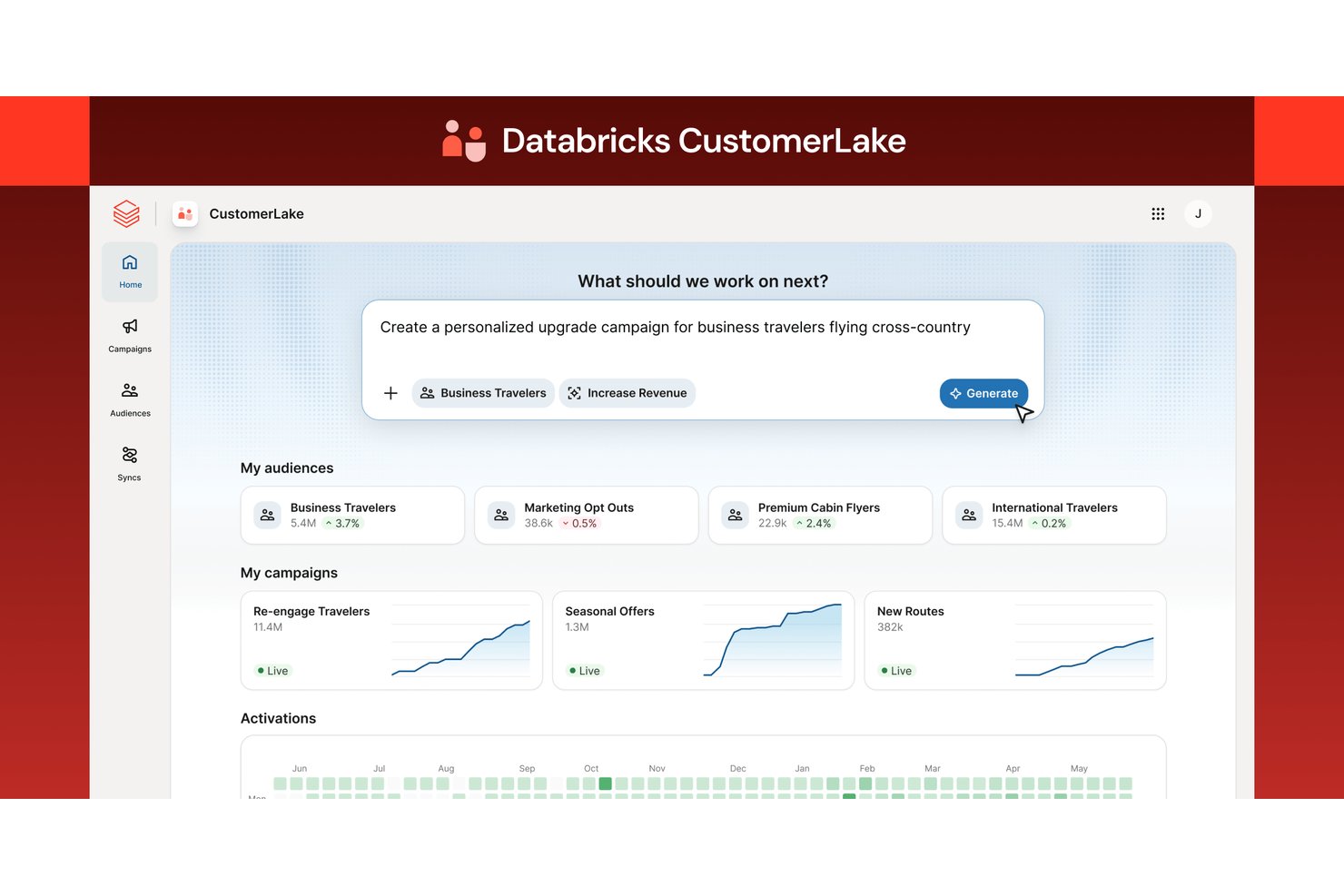
Databricks ist eine Datenintelligenzplattform auf Basis einer Lakehouse-Architektur, die Datenengineering, KI-/ML-Modellierung, Echtzeit-Streaming und groß angelegte Kundenanalysen über Cloud-Umgebungen hinweg kombiniert.
Für wen eignet sich Databricks am besten?
Die Plattform eignet sich besonders für Daten- und Analyseteams in großen Unternehmen, die komplexe Kundendaten mit hohem Volumen über mehrere Cloud-Umgebungen hinweg verwalten.
Warum ich Databricks ausgewählt habe
Ich habe Databricks in meine Top-Auswahl aufgenommen, weil das Partner-Connect-Ökosystem und der Marketplace die Verbindung zu KI-Modellanbietern wie Anthropic und OpenAI wirklich schnell ermöglichen. Mir gefällt, dass Sie Kundendaten über Agent Bricks direkt in Claude- oder GPT-basierte Agenten übertragen können, ohne Ihre Datenarchitektur neu aufbauen zu müssen. Die nativ in das Lakehouse eingebettete agentische CDP sorgt dafür, dass Segmentierung und Aktivierung auf derselben Plattform stattfinden, auf der Ihre Rohdaten liegen.
Wichtige Funktionen von Databricks
- Lakehouse-Architektur: Kombiniert die Funktionen eines Data Lake und eines Data Warehouse, um strukturierte und unstrukturierte Kundendaten zentral zu verwalten.
- Unity Catalog: Ermöglicht eine einheitliche Governance für Daten, Modelle und Dashboards über mehrere Clouds hinweg.
- Delta Live Tables: Ermöglicht fortschrittliche ETL-Workflows und Daten-Streaming-Pipelines für Echtzeitanalysen.
- Databricks-SQL-Dashboards: Ermöglichen es Nutzern, interaktive Dashboards zur Visualisierung von CX-KPIs und zur Analyse von Kennzahlen der Kundenreise zu erstellen.
Databricks-Integrationen
Databricks bietet native Integrationen mit Salesforce, SAP, AWS, Azure, Google Cloud Platform, Tableau und Fivetran. Über Partner Connect werden zusätzliche Verbindungen unterstützt, außerdem steht eine API für benutzerdefinierte Integrationen zur Verfügung.
Pros and Cons
Pros:
- Verarbeitet nativ riesige Echtzeit-Datenvolumen
- AutoML unterstützt benutzerdefinierte Abwanderungs- und CLV-Modelle
- Vereinheitlicht strukturierte und unstrukturierte Kundendaten
Cons:
- Für den Betrieb sind umfangreiche Kenntnisse im Datenengineering erforderlich
- Keine vorgefertigten CX-spezifischen Dashboards oder KPI-Vorlagen

MATLAB
Am besten für numerische Berechnungen und Datenanalysen geeignet

Das Flaggschiffprogramm von MathWorks, MATLAB, bietet Ingenieuren, Wissenschaftlern und Datenanalysten eine Programmierumgebung.
Warum ich MATLAB gewählt habe: Das Beste an MATLAB ist seine Fähigkeit, große Datensätze zu verarbeiten und zu visualisieren. Darüber hinaus bietet das integrierte Grafikwerkzeug verschiedene Optionen zur Visualisierung von Daten in zwei und drei Dimensionen.
MATLAB hat in den letzten Jahren zunehmend an Beliebtheit gewonnen, dank seiner umfangreichen Bibliothek an Werkzeugen und Funktionen für numerische Berechnungen und Datenanalysen. Insbesondere bietet es spezialisierte Toolboxes für Datenanalysten und Machine-Learning-Ingenieure. Diese Toolboxes unterstützen beim Aufbau und der Bewertung von Machine-Learning-Modellen, bei der Datenvorverarbeitung, Merkmalsauswahl und -extraktion.
Herausragende Funktionen und Integrationen von MATLAB
Funktionen umfassen 3D-/Volumenmodellierungswerkzeuge, Bearbeitungswerkzeuge, Zeichenwerkzeuge, Rendering-Werkzeuge, Finite-Elemente-Analyse, Mehrkörpersimulation, ereignisdiskrete Modellierung, kontinuierliche Ereignismodellierung, Simulation mechanischer Ereignisse, Simulation von Fertigungsprozessen, Hardwareunterstützung und Befehlsklarheit.
Integrationen umfassen Simulink, Python, Microsoft Excel, LabVIEW, C++, Stateflow, Oracle, Mathcad, SolidWorks, ANSYS und andere Softwareoptionen.
Pros and Cons
Pros:
- Hervorragende Visualisierungsmöglichkeiten
- Breite Funktionsvielfalt
- Integriert sich mit anderen Programmiersprachen
Cons:
- Begrenzte Flexibilität
- Hohe Lernkurve

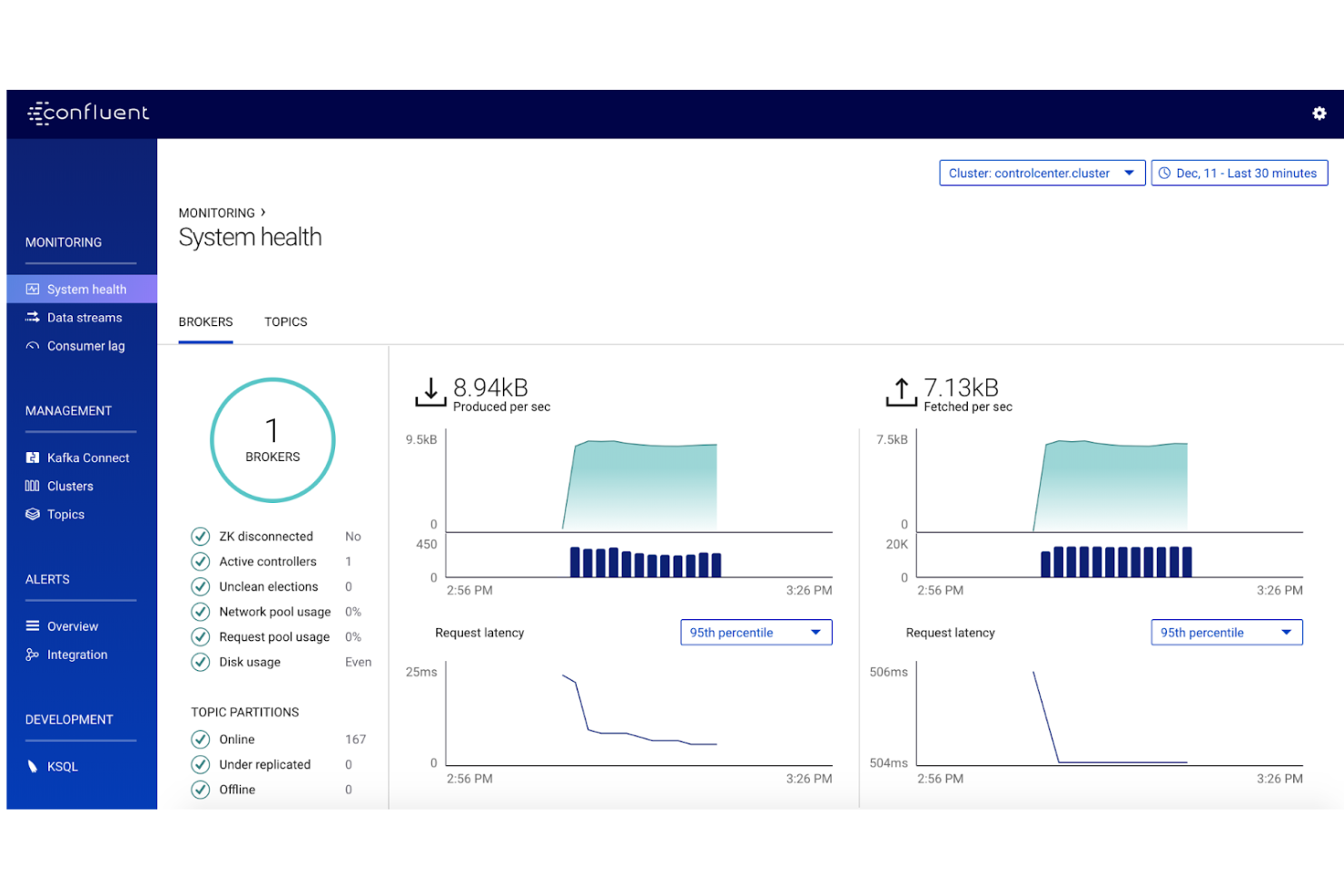
Mitbegründet von den Entwicklern von Apache Kafka, ist Confluent bei Data Engineers und Entwicklern beliebt, die eine skalierbare Plattform für die Verarbeitung von Datenströmen benötigen.
Warum ich Confluent gewählt habe: Eine der coolen Eigenschaften von Confluent ist, dass es eine einheitliche Plattform für Daten in Bewegung bietet. Es integriert Daten aus verschiedenen Quellen wie Datenbanken, Anwendungen und IoT-Geräten. Dadurch können Nutzer sofort Einblicke aus Streaming-Daten gewinnen.
Die Fähigkeit von Confluent, Echtzeitüberwachung von Daten, eine intuitive Benutzeroberfläche, Datenvisualisierungsmöglichkeiten sowie Sicherheits- und Compliance-Funktionen zu bieten, macht es zu einem ausgezeichneten Werkzeug für Daten- und Business-Analysten. Außerdem nutzt es Apache Kafka als Kerntechnologie, um eine skalierbare und latenzarme Plattform für das Management großer Mengen von Streaming-Daten bereitzustellen.
Herausragende Funktionen und Integrationen von Confluent
Funktionen umfassen Echtzeit-Analysen, Datenabfragen, Hadoop-Integration, Spark-Integration, Analyse aus mehreren Quellen, Data Lake, Datenvisualisierung, Daten-Workflow, kontrollierte Entdeckung, Datenverarbeitung, Datenquellen, Integrationen, Echtzeitverarbeitung, Berichte und Analysen.
Integrationen umfassen Ably, Adobe Experience Platform, Aerospike, Amazon S3, Azure Cosmos DB, Azure Data Explorer, Couchbase, Crux, DataStax, Datadog und weitere Softwareoptionen.
Pros and Cons
Pros:
- Gut strukturierte Dokumentation
- Bietet Echtzeitüberwachung von Daten
- Guter Kundensupport
Cons:
- Erfordert technisches Fachwissen
- Komplexe Konfiguration

Countly
Am besten geeignet für Produktanalysen
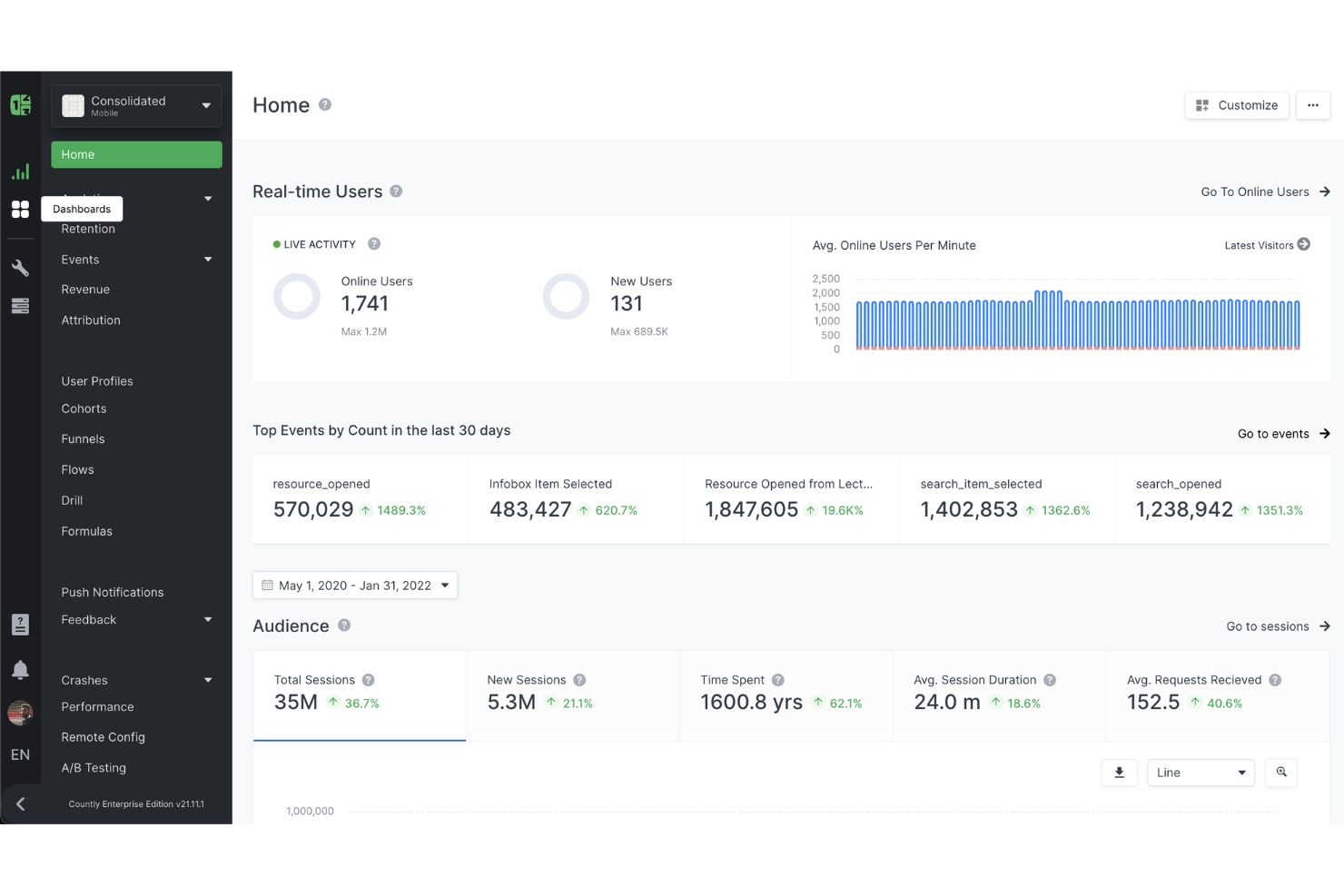
Countly ist eine Produktanalyse-Plattform, die Ihnen hilft, das Nutzerverhalten in Ihren mobilen, Web- und Desktop-Anwendungen zu verstehen. Sie liefert Echtzeit-Einblicke in das Verhalten der Nutzer, sodass Sie fundierte Entscheidungen zur Verbesserung Ihrer Produkte treffen können.
Warum ich Countly ausgewählt habe: Es bietet ein umfangreiches Funktionsspektrum, das speziell für tiefgehende Analysen entwickelt wurde. Funktionen wie Nutzerprofile und Kohorten ermöglichen eine effektive Segmentierung Ihrer Zielgruppe und helfen dabei, Muster und Trends in verschiedenen Nutzergruppen zu erkennen.
Mir gefallen auch die Möglichkeiten zur Echtzeit-Datenerfassung und -visualisierung von Countly. Sie können Nutzeraktionen in dem Moment überwachen, in dem sie stattfinden – was für schnelle Entscheidungen entscheidend ist. Diese Unmittelbarkeit ermöglicht es Ihnen, umgehend auf Nutzerverhalten zu reagieren, das Nutzererlebnis zu optimieren und Probleme zügig anzugehen.
Herausragende Funktionen und Integrationen von Countly
Funktionen umfassen Retention-Analyse, Trichterauswertung, Heatmaps, Push-Benachrichtigungen, Umfragen, Tageszeiten-Analysen, Remote-Konfiguration, Compliance-Hub-Übersicht, reCAPTCHA-Sicherheit, Nutzeranalysen und Dashboards.
Integrationen umfassen Facebook Leads, Google Sheets, TiktokLeadGeneration, Gmail, Facebook Offline Conversions, Mailchimp, Slack, Shopify, Trello, Telegram, Discord und WooCommerce.
Pros and Cons
Pros:
- Unterstützt plattformübergreifendes Tracking
- Ermöglicht On-Premise-Bereitstellung für volle Datenkontrolle
- Bietet umfassende Analyse des Nutzerverhaltens
Cons:
- Einige Integrationen sind nur in höherwertigen Tarifen verfügbar
- Einige Nutzer berichten über Herausforderungen bei komplexen Abfrageergebnissen

Am besten geeignet für die Abfrage großer Datensätze
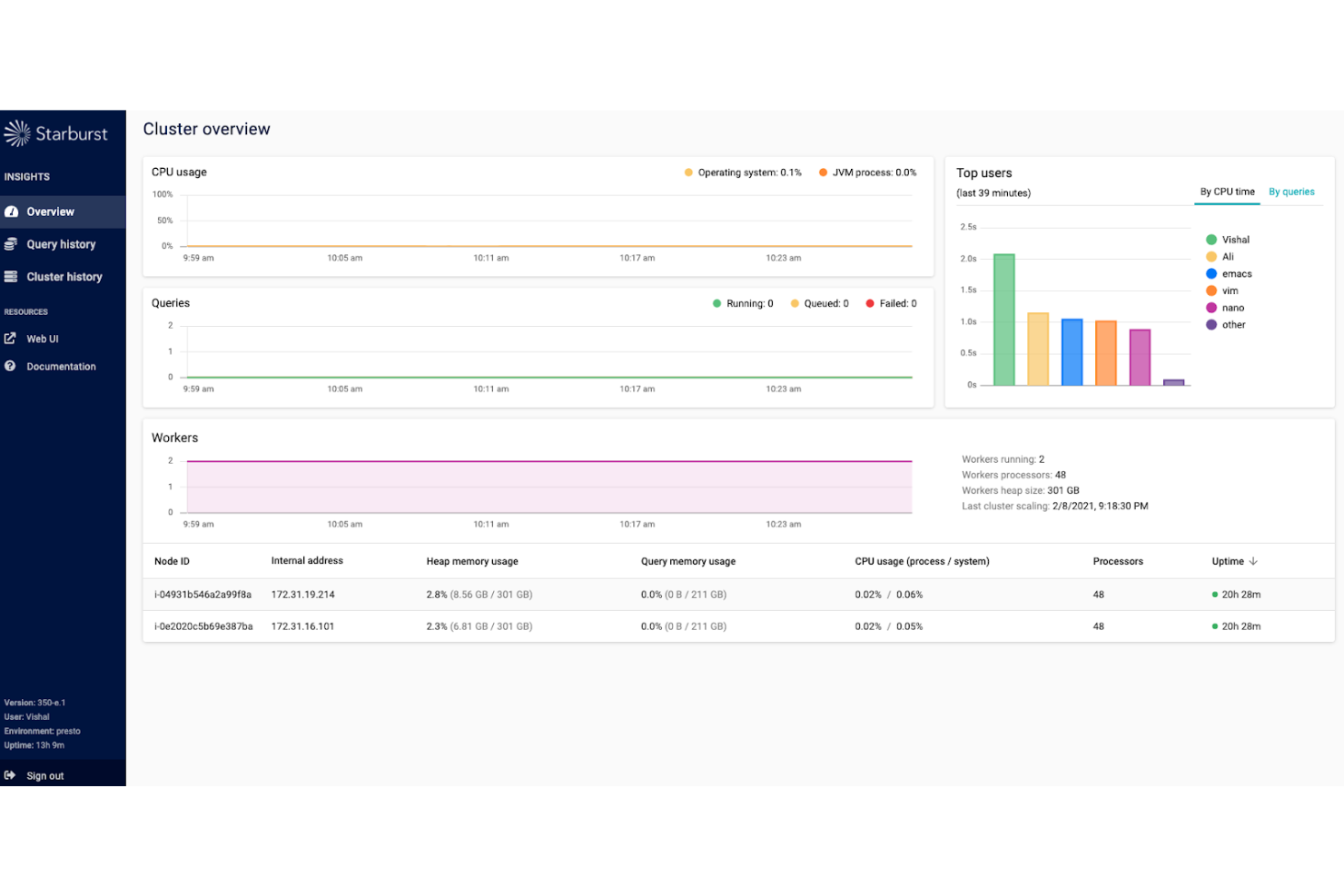
Starburst hilft Unternehmen, große Datenmengen abzufragen, und dient als zentrale Quelle der Wahrheit für Ihre Daten.
Warum ich Starburst ausgewählt habe: Traditionelle Datenvorbereitung und ETL-Prozesse sind zeitaufwendig und langsam. Starburst ermöglicht Ad-hoc-Analysen ohne die Notwendigkeit von ETL-Prozessen. Es verarbeitet Daten aus mehreren Quellen schnell und liefert Ergebnisse innerhalb von Sekunden. So können Organisationen ihre Time-to-Market beschleunigen und die Entscheidungsfindung verbessern.
Darüber hinaus bietet Starburst Funktionen wie fein abgestufte Zugriffskontrolle, Datenmaskierung und vollständige Datenverschlüsselung, um die Datensicherheit zu gewährleisten. Zusätzlich integriert es sich mit Authentifizierungsanbietern wie LDAP oder Kerberos, was Authentifizierung sicherstellt und Administratoren die Kontrolle über den Ressourcen-Zugriff ermöglicht. Starburst bietet außerdem eine große Auswahl an Konnektoren, sodass Unternehmen problemlos auf Daten aus verschiedenen Quellen zugreifen können.
Hervorstechende Funktionen und Integrationen von Starburst
Funktionen umfassen SQL-Abfrage-Engine, verteilte Architektur, Sicherheit und Data Governance, cloud-native Bereitstellungsoptionen, Multi-Cluster-Management sowie Beratungs- und Schulungsdienstleistungen.
Integrationen umfassen Accumulo, Google Big Query, Cassandra, Clickhouse, Delta Lake, Druid, Amazon DynamoDB, Elasticsearch, Greenplum, JDBC und weitere Softwareoptionen.
Pros and Cons
Pros:
- Hoch skalierbar
- 24/7 Support
- Ermöglicht schnelle Datenabfragen
Cons:
- Abhängig von externen Datenquellen, die die Leistung beeinträchtigen können
- Erfordert fortlaufende Wartung

Am besten für No-Code-Analytik-Tabellenkalkulationen geeignet
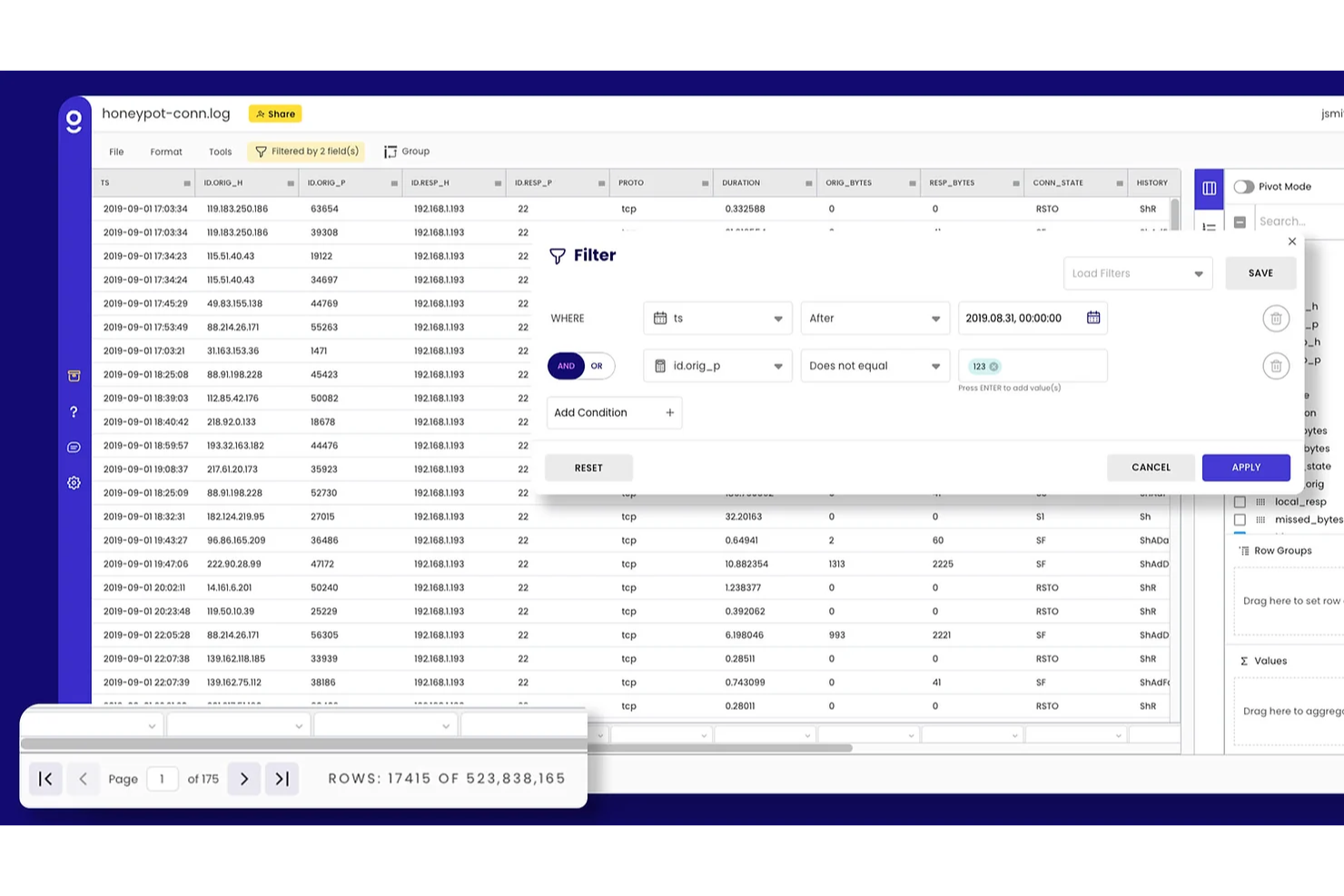
Gigasheet ist eine leistungsstarke Tabellenkalkulationssoftware, die Nutzern hilft, Erkenntnisse aus Big Data zu gewinnen, ohne dass spezielle Programmierkenntnisse erforderlich sind.
Warum ich Gigasheet ausgewählt habe: Es ist eine No-Code-Lösung, die den Bedarf an technischem Fachwissen verringert. Jeder – von Freelancern bis hin zu Fortune-500-Unternehmen – kann seine Self-Service-Funktionen nutzen, um riesige Dateien zu analysieren. Darüber hinaus bietet es mehrere Werkzeuge zur Datenbereinigung, die Nutzern helfen, ihre Daten zu säubern und vorzubereiten. Diese Tools unterstützen beim Filtern und Sortieren von Daten, Entfernen von Duplikaten, Formatieren von Daten sowie beim Teilen und Zusammenführen von Zellen.
Gigasheet bietet zudem verschiedene Werkzeuge zur Datenvisualisierung, darunter Diagramme, Kreisdiagramme und Liniendiagramme. Diese Tools helfen Ihnen dabei, Ihre Daten zum Leben zu erwecken und können individuell angepasst werden. Ein besonderes Merkmal der Visualisierungsfunktionen von Gigasheet ist, dass sie sich dynamisch aktualisieren, sobald neue Daten hinzugefügt oder bestehende Daten geändert werden. Dadurch ist es für Nutzer einfacher, den Überblick über Änderungen zu behalten und Trends oder Muster zu erkennen.
Herausragende Funktionen und Integrationen von Gigasheet
Funktionen umfassen ein Aktivitäts-Dashboard, Ad-hoc-Berichterstellung, API, Zusammenarbeitstools, anpassbare Berichte, Datenerfassung und -übertragung, Datenkonnektoren, Datenextraktion, Datenreplikation, Datentransformation, Datenvisualisierung, Datenbanksupport, Prognosen, Verarbeitung großer Datenmengen, Echtzeit-Analysen, Speicher, Premium-Support mit SLA, individuelle Datenaufbewahrungsrichtlinien, Datenisolation, SSO-Unterstützung, geplante Datenimporte und Enterprise-Datenquellen-Konnektoren.
Integrationen umfassen Zuora, Zoom, Zoho, Zendesk, Yotpo, Xero, WooCommerce, Wannafind, Vilkas, Unleashed und andere Softwareoptionen.
Pros and Cons
Pros:
- Intuitive Benutzeroberfläche
- Guter Kundensupport
- Einfache Bedienung
Cons:
- Begrenzte Kollaborationsmöglichkeiten
- Begrenzte Exportoptionen

Am besten geeignet für den Aufbau interaktiver Dashboards und Webanwendungen
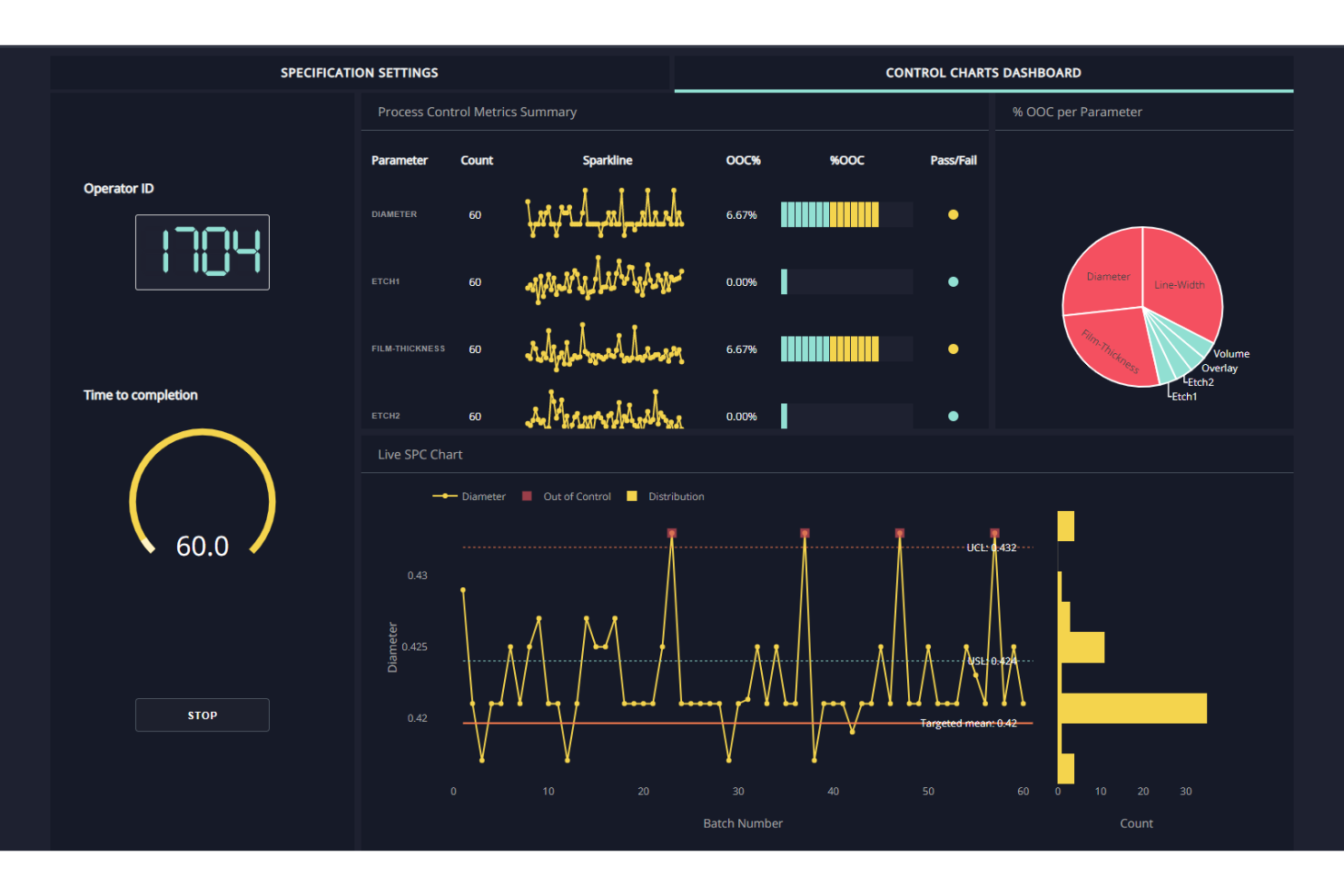
Dash Enterprise hilft Datenwissenschaftlern, Analysten und Entwicklern dabei, individuelle Dashboards und Anwendungen zu erstellen, ohne stundenlang programmieren zu müssen oder sich mit komplizierter Infrastruktur auseinanderzusetzen.
Warum ich Dash Enterprise gewählt habe: Das Merkmal, das Dash Enterprise von anderen Dashboard-Plattformen abhebt, ist die Integration von Machine-Learning-Modellen in Dashboards. Dadurch können Nutzer Daten in Echtzeit analysieren und visualisieren, Muster erkennen und Vorhersagen treffen.
Zudem ermöglicht es Anwendern, an Dashboards und Anwendungen gemeinsam mit Kollegen aus ihrer Organisation oder externen Beteiligten zu arbeiten. Es bietet Sicherheitsfunktionen auf Unternehmensebene wie rollenbasierte Zugriffskontrolle, SSL-Verschlüsselung und LDAP-Integration. Darüber hinaus kann es große Datenmengen verarbeiten, was es ideal für Anwendungsfälle auf Unternehmensniveau macht.
Herausragende Funktionen und Integrationen von Dash Enterprise
Funktionen sind Arbeitsbereiche für Daten-Apps, Design-Kit, KI-App-Katalog, Berichtsgenerator, Dashboard-Engine, App-Manager, Job-Warteschlange, Einbettung, Dateisystem, Datenbankintegration, CI/CD, Authentifizierungs-Middleware und Databricks-Integration.
Integrationen umfassen Databricks, MySQL, Postgres, Snowflake, Google BigQuery, Amazon RedShift, MS Azure SQL, Redis, MongoDB, Elasticsearch, Salesforce und weitere Softwareoptionen.
Pros and Cons
Pros:
- Übersichtliche Benutzeroberfläche
- Gute Community-Unterstützung
- Einfache Einrichtung und Konfiguration
Cons:
- Kundensupport sollte verbessert werden
- Dokumentation ist unvollständig

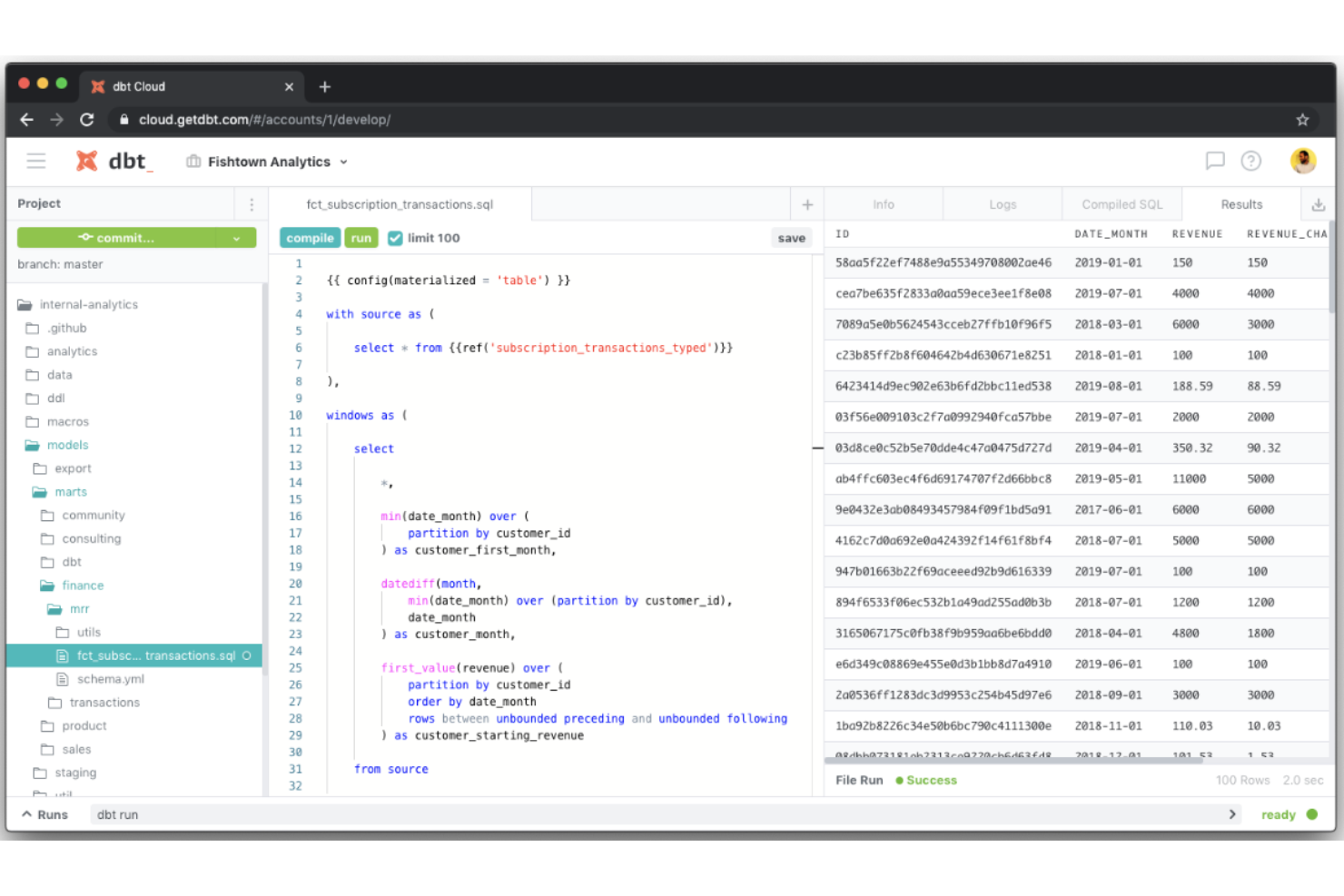
dbt (Data Build Tool) ist ein beliebtes Werkzeug zur Datenumwandlung, das Datenanalysten und -ingenieuren hilft, den 'Transform'-Schritt in ETL (Extract-Transform-Load)-Pipelines durchzuführen.
Warum ich dbt ausgewählt habe: Bei der Arbeit an einer komplexen und großen Datenpipeline arbeiten Teammitglieder häufig gleichzeitig an verschiedenen Aspekten der Pipeline, wodurch das Risiko widersprüchlicher Änderungen entsteht. Die Versionskontrollfunktion von dbt eliminiert dieses Risiko, da sie den Nutzern hilft, eine Änderungshistorie zu verwalten und bei Bedarf auf frühere Versionen zurückzurollen.
Dieses Tool richtet sich an Datenfachleute und Organisationen, die Schwierigkeiten mit der Transformation und Speicherung von Daten haben. Die Integration in Ihren Workflow hilft Ihnen dabei, Ihren Arbeitsaufwand zu reduzieren. Außerdem sorgt die integrierte Testfunktion dafür, dass die Transformationen korrekt sind.
Hervorstechende Funktionen und Integrationen von dbt
Funktionen umfassen eine browserbasierte IDE, Jobplanung, unbegrenzte tägliche Ausführungen, Protokollierung und Benachrichtigungen, Dokumentation der Daten, Berichte zur Aktualität der Datenquellen, Continuous Integration, API-Zugriff, semantische Ebene, Single Sign On (SSO), mehrere Bereitstellungsregionen, Service Level Agreements (SLAs), rollenbasierte Zugriffssteuerung (ACLs), fein abgestufte Git-Berechtigungen, Protokollierung von Audits sowie native Unterstützung für GitHub, GitLab und Azure DevOps.
Integrationen umfassen AlloyDB, Amazon Redshift, BigQuery, Databricks, Snowflake, Deepnote, Hex, Houseware, Lightdash, Mode und weitere Softwarelösungen.
Pros and Cons
Pros:
- Automatische Dokumentationserstellung
- Aktive Slack-Community
- Integrierte Testfunktionen
Cons:
- SQL- und Datenmodellierungskenntnisse erforderlich
- Eingeschränkte Unterstützung für nicht-SQL-Datenbanken

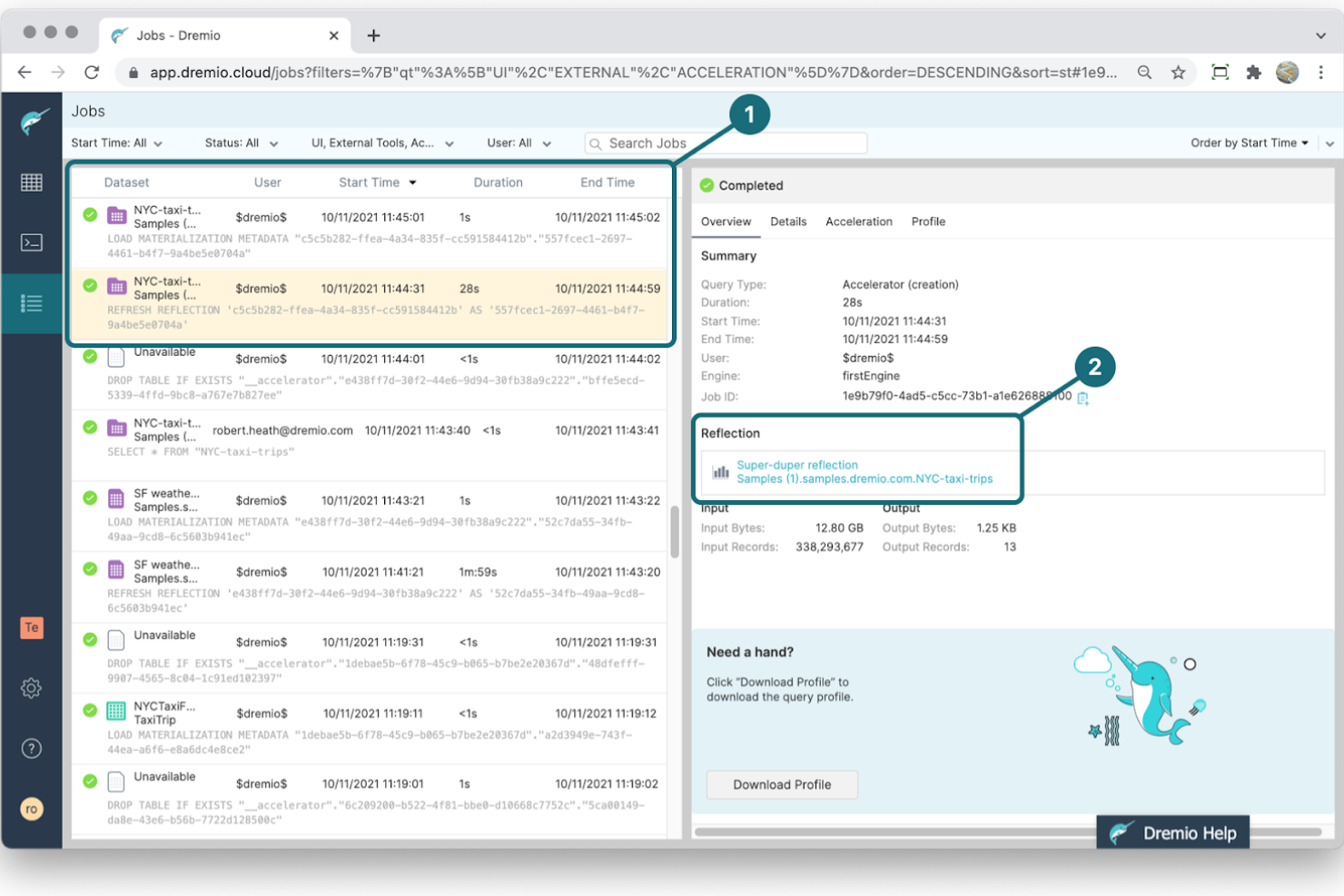
Dremio ist eine Data-as-a-Service (DAAS) Plattform, die Self-Service-Analytiktools für Datenanalysten, -ingenieure und Geschäftsinhaber bereitstellt.
Warum ich Dremio gewählt habe: Das beste Merkmal von Dremio ist seine Fähigkeit, durch Reflections die Abfragegeschwindigkeit zu erhöhen. Dabei handelt es sich um voraggregierte und indexierte Datenstrukturen, die die Analyse von Daten einfacher und schneller machen. Zusätzlich aktualisiert Dremio Reflections automatisch, sodass die Abfrageergebnisse immer aktuell sind.
Darüber hinaus kann Dremio helfen, bestehende Systeme zu modernisieren, Legacy-Infrastrukturen in die Cloud zu migrieren, bestehende Data Lakehouses zu aktualisieren und neue Projekte zu entwickeln. Es bietet außerdem eine einfach zu bedienende Oberfläche und gute Dokumentation, was die Fehlerbehebung erleichtert.
Herausragende Funktionen und Integrationen von Dremio
Funktionen umfassen eine Lakehouse-Plattform, globale Steuerungsebene, unbegrenzte Skalierung und Parallelität, Self-Service-Datenkuratierung und -freigabe, integrierte Governance und Herkunft, transparente Abfragebeschleunigung, SQL DML auf dem Lakehouse, BI-Tool-Integration, Audit-Logs, Integration von sozialen Identitätsanbietern, SOC 2 Typ 2, ISO 27001, HIPAA-Konformität, Community-Support, Integration von Unternehmensidentitätsanbietern, Datenmaskierung und SCIM-Synchronisierung.
Integrationen umfassen Airbyte, Alteryx, AWS, Collibra, dbt Labs, GoodData, intel, IBM, Microsoft, Okera und weitere Softwareoptionen.
Pros and Cons
Pros:
- Schnelle Abfragen
- Intuitive Benutzeroberfläche
- Gute Funktionen für Daten-Governance
Cons:
- Kann zusätzliche Hardware-Ressourcen erfordern
- Erfordert Drittanbieter-BI-Tools

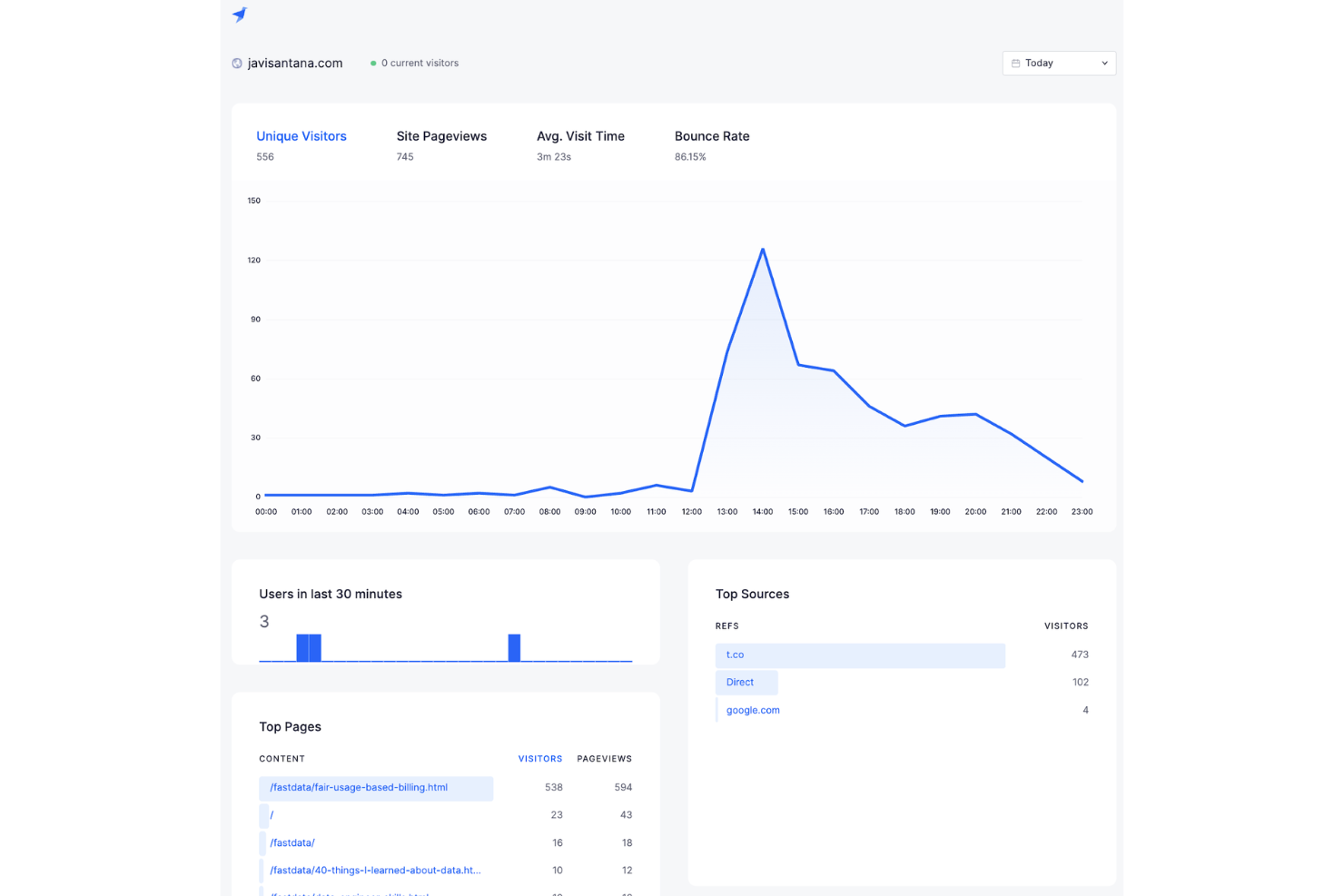
Tinybird ist eine Datenanalyseplattform für Entwickler, die skalierbare Echtzeit-Datenprodukte mit SQL-basierten APIs erstellen möchten.
Warum ich Tinybird ausgewählt habe: Das Beste an Tinybird ist seine Architektur, die eine schnelle Verarbeitung und Analyse von Echtzeitdaten ermöglicht. Der arbeitsspeicherbasierte Datenspeicher der Plattform und die vorgefertigten Konnektoren zu beliebten Datenquellen erlauben eine blitzschnelle Abfrageleistung. Tinybird verwendet eine SQL-basierte Abfragesprache, sodass Entwickler ihre bestehenden Kenntnisse zur Datenanalyse nutzen können.
Tinybird ist eine ideale Lösung für Organisationen, die eine robuste und skalierbare Datenverarbeitungsplattform suchen. Besonders gut geeignet ist sie für Anwendungsfälle, die schnelle Reaktionszeiten und niedrige Latenz erfordern, wie z. B. Echtzeit-Analysen, Monitoring und Alarmierung.
Herausragende Funktionen und Integrationen von Tinybird
Funktionen umfassen unbegrenzte Nutzer, unbegrenzte Datenquellen, Datenkonnektoren, Multi-Region-Support, unbegrenzte API-Endpunkte, Echtzeit-Materialisierung, sichere Daten und technischen Support.
Integrationen umfassen Node, Python, Schedule, Data Stores, Airtable, GitHub, Filter, Bash, Twilio, Discord, MySQL, AWS und andere Softwareoptionen.
Pros and Cons
Pros:
- Bietet vorgefertigte Datenkonnektoren
- Einfache und intuitive Benutzeroberfläche
- Einfach zu nutzende API
Cons:
- Weniger zugänglich für Organisationen mit kleinem Budget
- Benötigt individuelle Konnektoren für spezielle Datenquellen
Weitere Big Data Customer Analytics Softwares
Hier sind einige weitere Big Data Customer Analytics Optionen, die es zwar nicht auf meine Übersicht geschafft haben, aber dennoch einen Blick wert sind:


Wie ich Big Data Customer Analytics bewerte
Ich bewerte jedes Tool auf zwei Ebenen: Zum einen, ob es tatsächlich Big-Data-Workloads für CX-Teams bewältigt, die Abwanderungssignale oder Verhaltensmuster analysieren, und zum anderen, was es darüber hinaus unterscheidet.
Kernfunktionen (Grundvoraussetzungen für diese Liste)
Bei der Auswahl der Tools für meine Liste bewerte ich jedes einzelne auf einer Skala von 0 (bietet die Funktion nicht) bis 5 (übertrifft die Erwartungen in diesem Bereich) für jede unten aufgeführte Kernfunktion. Anschließend rechne ich die Gesamtpunktzahl des jeweiligen Tools prozentual um. Jedes Tool muss eine Mindestgesamtpunktzahl von 65 % erreichen, um in die Auswahl zu kommen.
- Big Data-Verarbeitung im großen Maßstab: Ich prüfe, ob eine Plattform Milliarden von Kundenereignissen – etwa Klickströme oder Transaktionsprotokolle – einlesen und abfragen kann, ohne bei Spitzenbelastungen ins Stocken zu geraten.
- Integration von Daten aus mehreren Quellen: Die Anbindung von CRM-Datensätzen, Support-Tickets, Web-Sessions und POS-Daten ist zentral. Deshalb achte ich auf vielfältige native Konnektoren und flexible API-Zugänge.
- Kundensegmentierung & Profilbildung: Ich bewerte, wie jedes Tool einheitliche Kundenprofile erstellt und ob sich Kundensegmente dynamisch anhand von Echtzeit-Verhaltenssignalen aktualisieren.
- Prädiktive & KI-gestützte Analysen: Vorgefertigte Modelle für Churn, CLV und Neigungsscores sollten direkt verfügbar sein, und es muss möglich sein, eigene Modelle auf den eigenen Daten zu trainieren oder anzupassen.
- Analyse unstrukturierter Rückmeldungen: Umfrageantworten, Support-Transkripte und Social-Media-Erwähnungen enthalten wichtige Signale. Daher achte ich auf NLP-basierte Stimmungs- und Themenanalysen über all diese Quellen hinweg.
- CX-Berichte & Dashboards: Ich prüfe, ob Dashboards CX-Kennzahlen auf Journey- und Kohortenebene – wie NPS-Trends oder Retentionskurven – in für Stakeholder verständlichen Formaten präsentieren.
Sobald ich eine Liste der Tools habe, die die Kriterien erfüllen, schaue ich mir an, wodurch sich jede Plattform unterscheidet.
Unterscheidungsmerkmale (Was Anbieter voneinander abhebt)
So vergleiche ich die unterschiedlichen Anbieter:
Herausragende Funktionen
Generative KI-Assistenten sind ein wichtiger Unterschiedsfaktor – sie ermöglichen CX-Analysten, Fragen in natürlicher Sprache wie "Warum ist die Bindung im zweiten Quartal gesunken?" zu stellen, statt komplexe Abfragen zu schreiben. Ich achte außerdem auf datengestütztes Journey Mapping, das die tatsächlichen Kundenpfade visualisiert und nicht idealisierte Abläufe. So lassen sich Absprünge zwischen Kanälen gezielt identifizieren. Echtzeit-Journey-Orchestrierung geht noch einen Schritt weiter, indem sie personalisierte Maßnahmen auslöst, sobald Kunden mitten im Onboarding zögern oder frühzeitige Abwanderungssignale zeigen.
Mehr als nur Funktionen
Compliance und Datenmanagement sind entscheidend, wenn Millionen Kundendatensätze mit PII verarbeitet werden. Ich prüfe deshalb auf granulare Zugriffskontrollen, Einwilligungsmanagement und Protokollierung. Die Passung in den CX Tech Stack ist ebenfalls relevant; eine Plattform, die sich nativ mit CRM-, Contact-Center- und Umfragetools integriert, erspart teure Middleware. Zudem bewerte ich die Time-to-Value, indem ich auf vorgefertigte CX-Datenmodelle und KPI-Vorlagen achte, denn Big-Data-Deployments im Unternehmen, die länger als sechs Monate bis zu den ersten Erkenntnissen dauern, verlieren oft intern an Schwung.
So wählen Sie Big Data Customer Analytics Software aus
Es ist leicht, sich in langen Feature-Listen und komplexen Preisstrukturen zu verlieren. Um Sie bei Ihrer individuellen Software-Auswahl zu unterstützen, finden Sie hier eine Checkliste mit Faktoren, die Sie im Hinterkopf behalten sollten:
| Faktor | Worauf achten? |
|---|---|
| Skalierbarkeit | Bewerten Sie, ob das Tool mit Ihrem Datenwachstum Schritt hält. Prüfen Sie, ob es Ihre zukünftigen Anforderungen unterstützt, ohne dass große Umstellungen nötig werden. Denken Sie an Nutzerlimits, Speicherplatz und Systemkapazität. |
| Integrationen | Überprüfen Sie, ob das Tool mit Ihren bestehenden Systemen kompatibel ist. Berücksichtigen Sie APIs, Drittanbieter-Apps und native Anbindungen. Achten Sie auf die Flexibilität beim Anschluss von CRM-, ERP- oder BI-Tools. |
| Anpassbarkeit | Klären Sie, ob Sie das Tool an Ihre Arbeitsabläufe anpassen können. Berücksichtigen Sie Dashboards, Berichte und Benutzerrollen. Vermeiden Sie Tools, die starr vorgegeben sind und nicht zu Ihren Anforderungen passen. |
| Benutzerfreundlichkeit | Bewerten Sie, wie schnell Ihr Team das Tool erlernen kann. Achten Sie auf intuitive Bedienoberflächen und klare Anleitungen. Vermeiden Sie komplizierte Systeme, die umfangreiche Schulungen erfordern. |
| Implementierung und Onboarding | Beachten Sie Zeit und Ressourcen, die für den Einstieg benötigt werden. Suchen Sie nach einfachen Einrichtungsprozessen, verfügbarer Schulung und Unterstützung beim Onboarding. Vermeiden Sie langwierige oder komplexe Setups. |
| Kosten | Vergleichen Sie die Preispläne mit Ihrem Budget. Berücksichtigen Sie versteckte Gebühren, Skalierungskosten und Vertragsbedingungen. Achten Sie auf transparente Preise und ein gutes Preis-Leistungs-Verhältnis. |
| Sicherheitsvorkehrungen | Stellen Sie sicher, dass das Tool Ihre Anforderungen an den Datenschutz erfüllt. Achten Sie auf Verschlüsselung, Zugriffskontrolle und Einhaltung von Vorschriften wie der DSGVO. Meiden Sie Tools mit schwachen Sicherheitsmaßnahmen. |
| Support-Verfügbarkeit | Beziehen Sie das gebotene Support-Niveau ein. Achten Sie auf 24/7 Support, mehrere Kontaktmöglichkeiten und eine hilfreiche Wissensdatenbank. Meiden Sie Anbieter mit eingeschränktem oder langsamem Support. |
Was ist Big Data Kundendaten-Analyse-Software?
Big Data Kundendaten-Analyse umfasst eine Reihe von Tools, die große Mengen an Kundendaten analysieren, um Erkenntnisse und Trends zu gewinnen. Marketingfachleute, Datenanalysten und Unternehmensstrategen nutzen diese Werkzeuge in der Regel, um das Kundenverhalten zu verstehen und bessere Entscheidungen zu treffen.
Datenintegration, prädiktive Analysen und Reporting-Funktionen helfen dabei, Muster zu erkennen und die Kundenbindung zu stärken. Insgesamt liefern diese Tools wertvolle Einblicke, die fundierte Geschäftsstrategien ermöglichen.
Funktionen
Beim Auswahlprozess von Big Data Kundendaten-Analyse sollten Sie auf folgende Hauptfunktionen achten:
- Datenintegration: Verbindet verschiedene Datenquellen, um einen einheitlichen Blick auf Kundendaten zu ermöglichen.
- Prädiktive Analysen: Nutzt historische Daten, um zukünftiges Kundenverhalten und Trends vorherzusagen.
- Reporting und Visualisierung: Bietet leicht verständliche, visuelle Darstellungen der Daten zur Unterstützung von Entscheidungen.
- Anpassbare Dashboards: Nutzer können ihre Arbeitsoberfläche individuell gestalten, um gezielt bestimmte Kennzahlen und Einblicke zu erhalten.
- KI-gesteuerte Einblicke: Bietet automatisierte Analysen und Empfehlungen auf Basis komplexer Datenmuster.
- Echtzeit-Datenverarbeitung: Ermöglicht die sofortige Analyse und Reaktion auf Kundeninteraktionen in Echtzeit.
- Benutzerfreundliche Oberfläche: Sorgt für eine einfache Bedienung und verkürzt die Einarbeitungszeit für neue Nutzer.
- Datenverschlüsselung: Schützt sensible Kundendaten mit fortschrittlichen Sicherheitsmaßnahmen.
- Mehrsprachige Unterstützung: Bedient Nutzer aus verschiedenen Regionen, da die Tools in mehreren Sprachen verfügbar sind.
- Integration von Drittanbietern: Verbindet sich nahtlos mit anderen Geschäftsanwendungen wie CRM- und ERP-Systemen zur erweiterten Nutzung.
Vorteile
Die Einführung von Big Data Kundendaten-Analyse bringt zahlreiche Vorteile für Ihr Team und Ihr Unternehmen mit sich. Hier einige der wichtigsten Vorteile:
- Verbesserte Entscheidungsfindung: Analysiert große Datenmengen und liefert Erkenntnisse zur Steuerung von Geschäftsstrategien.
- Besseres Kundenverständnis: Ermöglicht durch Datenintegration detaillierte Einblicke in Kundenverhalten und Präferenzen.
- Prädiktive Fähigkeiten: Prognostiziert zukünftige Trends durch prädiktive Analysen, sodass Sie den Kundenbedarf vorausschauend bedienen können.
- Höhere Effizienz: Automatisiert die Datenverarbeitung und Analyse, wodurch Zeit und Ressourcen gespart werden.
- Stärkere Sicherheit: Schützt Kundendaten durch Verschlüsselung und stellt die Einhaltung von Datenschutzbestimmungen sicher.
- Besseres Engagement: Passt Marketingmaßnahmen und Kundeninteraktionen durch KI-basierte Einblicke individuell an.
- Globale Reichweite: Unterstützt mehrsprachige Funktionen, sodass Unternehmen eine vielfältige Kundenbasis bedienen können.
Kosten & Preise
Bei der Auswahl von Big Data Kundendaten-Analyse ist es wichtig, die verschiedenen Preisstrukturen und Modelle zu verstehen. Die Kosten hängen von Funktionsumfang, Teamgröße, Zusatzoptionen und weiteren Faktoren ab. Die untenstehende Tabelle gibt einen Überblick über gängige Pläne, deren durchschnittliche Preise und typische Bestandteile von Big Data Kundendaten-Analyse-Lösungen:
Vergleichstabelle für Big Data Kundendaten-Analyse
| Plan-Typ | Durchschnittlicher Preis | Häufige Funktionen |
|---|---|---|
| Kostenloser Plan | $0 | Basis-Analysen, begrenzter Datenspeicher und Community-Support. |
| Persönlicher Plan | $10-$30/user/month | Erweiterte Analysen, anpassbare Dashboards und E-Mail-Support. |
| Business-Plan | $50-$100/user/month | Echtzeitanalysen, Integrationsmöglichkeiten und priorisierter Support. |
| Enterprise-Plan | $150-$300/user/month | Komplette Datenintegration, dedizierter Kundenbetreuer und umfassende Sicherheit. |
Big Data Kundenanalyse-Software FAQs
Hier finden Sie Antworten auf häufig gestellte Fragen rund um Big Data Kundenanalysen:
Können Big Data Kundenanalyse-Tools in bestehende Systeme integriert werden?
Ja, die meisten Lösungen bieten Integrationen mit anderen Geschäftsanwendungen wie CRM- und ERP-Systemen. Dies ermöglicht einen nahtlosen Datenfluss zwischen den Plattformen, wodurch die Datenqualität und Nutzbarkeit verbessert werden. Prüfen Sie vor dem Kauf die Kompatibilität mit Ihren bestehenden Systemen, um Integrationsprobleme zu vermeiden.
Wie gewährleiste ich den Datenschutz bei Big Data Kundenanalysen?
Wählen Sie ein Tool mit starken Sicherheitsmaßnahmen wie Verschlüsselung und Zugriffssteuerung. Überprüfen Sie die Einhaltung von Datenschutzbestimmungen wie der DSGVO. Aktualisieren Sie Ihre Software regelmäßig und schulen Sie Ihr Team in Datenschutzpraktiken, um Risiken zu minimieren.
Brauche ich technisches Fachwissen für Big Data Kundenanalysen?
Nein, viele Tools sind für Nutzer ohne technische Vorkenntnisse mit intuitiven Benutzeroberflächen und geführtem Setup gestaltet. Einige fortgeschrittene Funktionen können jedoch technisches Know-how erfordern. Suchen Sie nach Lösungen mit umfangreichen Supportressourcen, wie Tutorials und Kundensupport, um auch komplexere Funktionen erfolgreich zu nutzen.
Wie gehen diese Softwarelösungen mit großen Datenmengen um?
Diese Tools sind in der Regel auf verteilten Rechenarchitekturen aufgebaut, die horizontal skalieren. Manche setzen auf In-Memory-Verarbeitung, andere nutzen Cloud-basierten Speicher und Rechenschichten. Die Performance hängt davon ab, wie die zugrundeliegende Architektur Speicherung, Indexierung und Abfrageausführung bewältigt.
Welche Modellierungstechniken verwenden diese Softwarelösungen zur Analyse?
Viele Systeme nutzen statistische Modelle, Clustering oder prädiktive Algorithmen zur Analyse von Kundensegmenten. Die genutzten Methoden variieren: Einige Plattformen bieten fertige Modelle, andere erlauben die Entwicklung eigener Modelle. Die Transparenz und Steuerung der Modelle unterscheidet sich je nach Plattform.
Wie geht es weiter:
Wenn Sie sich aktuell über Big Data Kundenanalysen informieren, sprechen Sie kostenlos mit einem SoftwareSelect-Berater für persönliche Empfehlungen.
Sie füllen ein Formular aus und führen ein kurzes Gespräch, in dem Ihre Anforderungen konkretisiert werden. Im Anschluss erhalten Sie eine Auswahlliste passender Softwarelösungen zur Überprüfung. Auf Wunsch werden Sie während des gesamten Kaufprozesses unterstützt, einschließlich Preisverhandlungen.