

Bewertung der Kundenservice-Software Jira Service Management für 2026



Jira Service Management is a customer service software built for IT and DevOps teams managing service requests, incidents, and change management workflows. It's worth considering when your team already runs on Atlassian tools, since it connects directly with Jira Software to give developers and support teams a shared view of work. Compared to ServiceNow, Jira Service Management is a more accessible option for mid-sized teams that need structured ITSM capabilities without a lengthy enterprise implementation.
Jira Service Management Evaluation Summary
- From $25/user/month
- Free plan + 14-day free trial available
Warum Sie unseren Software-Empfehlungen vertrauen können
Unser Team testet und bewertet Software seit 2012. Als CX-Führungskräfte selbst wissen wir, wie schwierig – und wichtig – es ist, die richtige Software auszuwählen.
Für diesen Leitfaden haben wir Tools mithilfe von praktischen Tests und unabhängiger Recherche bewertet und dabei unsere Bewertungskriterien angewendet.
Unsere Bewertungen spiegeln unser menschliches redaktionelles Urteilsvermögen wider, keine Verkaufsstrategie.
Jira Service Management Overview
pros
-
You can customize workflows to fit your team's processes.
-
It offers strong project tracking and issue resolution capabilities.
-
The software enhances collaboration with clear communication channels.
cons
-
The interface might seem a bit complex at first.
-
It could take some time to fully learn all the features.
-
You may encounter occasional performance lags with large data sets.
-

SupportYourApp
Visit WebsiteThis rating combines scores from multiple user review sites to reflect overall customer sentiment about the product.4.7 -
Tidio
Visit WebsiteThis rating combines scores from multiple user review sites to reflect overall customer sentiment about the product.4.7 -
Freshdesk
Visit WebsiteThis rating combines scores from multiple user review sites to reflect overall customer sentiment about the product.4.4





Wie wir Tools testen & bewerten
Wir haben jahrelang unser System zur Softwarebewertung entwickelt, verfeinert und verbessert. Unser Bewertungsraster ist darauf ausgelegt, die Nuancen der Softwareauswahl und Merkmale eines effektiven Tools abzubilden, wobei der Fokus auf den entscheidenden Aspekten des Entscheidungsprozesses liegt. Nachfolgend sehen Sie, wie unser Test- und Bewertungssystem anhand von sieben Kriterien funktioniert. Es ermöglicht uns, eine unabhängige Bewertung der Software basierend auf Kernfunktionen, besonderen Merkmalen, Benutzerfreundlichkeit, Onboarding, Kundensupport, Integrationen, Kundenbewertungen und Preis-Leistungs-Verhältnis zu geben.
Kernfunktionen (25% der Gesamtnote)
Der Ausgangspunkt unserer Bewertung ist immer die grundlegende Funktionalität eines Tools. Verfügt es über die Basisfunktionen, die ein Benutzer erwarten würde? Sind einige dieser Kernfunktionen nur in teureren Preisplänen verfügbar? Im Kern erwarten wir, dass ein Tool mit den Grundfunktionen seiner Konkurrenten mithalten kann.
Besondere Merkmale (25% der Gesamtnote)
Anschließend bewerten wir außergewöhnliche Funktionen, die über die üblichen Kernfunktionen hinausgehen. Eine hohe Punktzahl spiegelt spezialisierte oder einzigartige Features wider, die das Produkt schneller, effizienter oder für den Endnutzer besonders wertvoll machen. Wir prüfen außerdem, wie einfach es ist, das Tool mit anderen typischerweise verwendeten Programmen zu integrieren, um die Funktionalität und den Nutzen zu erweitern. Tools mit vielen nativen Integrationen, Verbindungen zu Drittanbietern und API-Zugang für eigene Integrationen erhalten die besten Bewertungen.
Benutzerfreundlichkeit (10% der Gesamtnote)
Wir berücksichtigen, wie schnell und einfach sich Aufgaben ausführen lassen, die zur Kernfunktionalität gehören. Software mit hoher Punktzahl ist gut gestaltet, intuitiv zu bedienen, bietet mobile Apps, stellt Vorlagen bereit und erleichtert auch relativ komplexe Aufgaben erheblich.
Onboarding (10% der Gesamtnote)
Wir wissen, wie wichtig eine schnelle Team-Akzeptanz einer neuen Plattform ist. Deshalb bewerten wir, wie leicht sich ein Tool mit minimalem Training erlernen und benutzen lässt. Wir prüfen, wie schnell ein Teammitglied ohne Vorkenntnisse eingerichtet ist und das Tool nutzen kann. Lösungen mit hoher Bewertung erfordern wenig oder keine Unterstützung.
Kundensupport (10% der Gesamtnote)
Wir beurteilen, wie schnell und einfach man telefonisch, per Live-Chat oder Wissensdatenbank Unterstützung erhält. Tools und Anbieter mit echtem Echtzeit-Support bekommen die besten Bewertungen, während Chatbots am schlechtesten abschneiden.
Kundenbewertungen (10% der Gesamtnote)
Neben unseren eigenen Tests berücksichtigen wir den Net Promoter Score von aktuellen und ehemaligen Nutzern. Wir prüfen, ob sie sich wieder für das Tool entscheiden würden. Software mit hoher Bewertung weist auch einen hohen Net Promoter Score auf.
Preis-Leistungs-Verhältnis (10% der Gesamtnote)
Schließlich bewerten wir unter Berücksichtigung aller anderen Kriterien den durchschnittlichen Preis der Einstiegspläne in Bezug auf die Kernfunktionen und vergleichen den Nutzen der anderen Bewertungskriterien. Software, die mehr für weniger bietet, erhält eine höhere Bewertung.
Core Features
Issue Tracking: You can manage and resolve service requests efficiently with its robust issue tracking system. It's designed to keep your team on top of every ticket with ease.
Customizable Workflows: Tailor workflows to fit your team's unique processes, helping you streamline operations. This flexibility allows you to adapt quickly to changing needs.
Service Request Management: Handle requests from start to finish with comprehensive IT service management tools. It ensures you never miss a detail in your service delivery.
Knowledge Base: Create and maintain a centralized repository of information for your team. JSM empowers your IT teams with quick access to essential resources through a self-service portal.
Automation Rules: Automate repetitive tasks to save time and reduce errors. Let the system handle routine activities so you can focus on more critical issues.
Reporting and Analytics: Gain insights into your team's performance with detailed reports. Use data to make informed decisions and improve service quality.

Ease of Use
Jira Service Management offers a powerful suite of tools, but its complexity might challenge new users. The customer portal can feel overwhelming, especially if your team isn't familiar with its robust capabilities. However, once you get the hang of it, the customizable workflows and automation features make ticket management more efficient. The learning curve is worth the effort if your team needs a comprehensive help desk for handling complex service operations.

Jira Service Management Specs
- 2-Factor Authentication
- Analytics
- Anti-Virus
- API
- Batch Permissions & Access
- Bug Tracking
- Call Integration
- Chat
- Contact Management
- CRM Integration
- Customer Management
- Data Export
- Data Import
- Email Integration
- Escalation Management
- External Integrations
- Incident Management
- Instant Chat Integration
- Knowledge Base
- Malware Protection
- Multi-User
- Notifications
- Organization Management
- Password & Access Management
- Project Management
- Real-time Alerts
- SAP Integration
- Self-service Portal
- Social Media Integration
- Support Forum
- Ticket Management
- Workflow Management
Alternatives to Jira Service Management



Häufig gestellte Fragen zur Jira-Service-Management-Lösung
Wie unterstützt Jira Service Management Remote-Teams?
Jira Service Management bietet cloudbasierten Zugriff, sodass Ihr IT-Supportteam von überall aus zusammenarbeiten kann. Die Echtzeitbenachrichtigungen und -aktualisierungen stellen sicher, dass alle informiert bleiben, unabhängig vom Standort. Mit anpassbaren Dashboards kann Ihr Team den Fortschritt überwachen und Aufgaben effizient verwalten. Die Kommunikationstools der Plattform erleichtern außerdem die nahtlose Interaktion zwischen Remote-Teammitgliedern.
Können Sie Workflows in Jira Service Management anpassen?
Ja, Sie können Workflows an die spezifischen Prozesse Ihres Teams anpassen. Diese Flexibilität hilft Ihnen, ein System zu erstellen, das auf Ihre individuellen Anforderungen an das Servicemanagement abgestimmt ist. Sie können Schritte, Übergänge und Regeln definieren, um Aufgaben von Anfang bis Ende zu steuern. Diese Anpassungsmöglichkeit stellt sicher, dass Ihr Team einheitliche Verfahren befolgt und dadurch die Effizienz verbessert.
Welche Berichtsfunktionen bietet Jira Service Management?
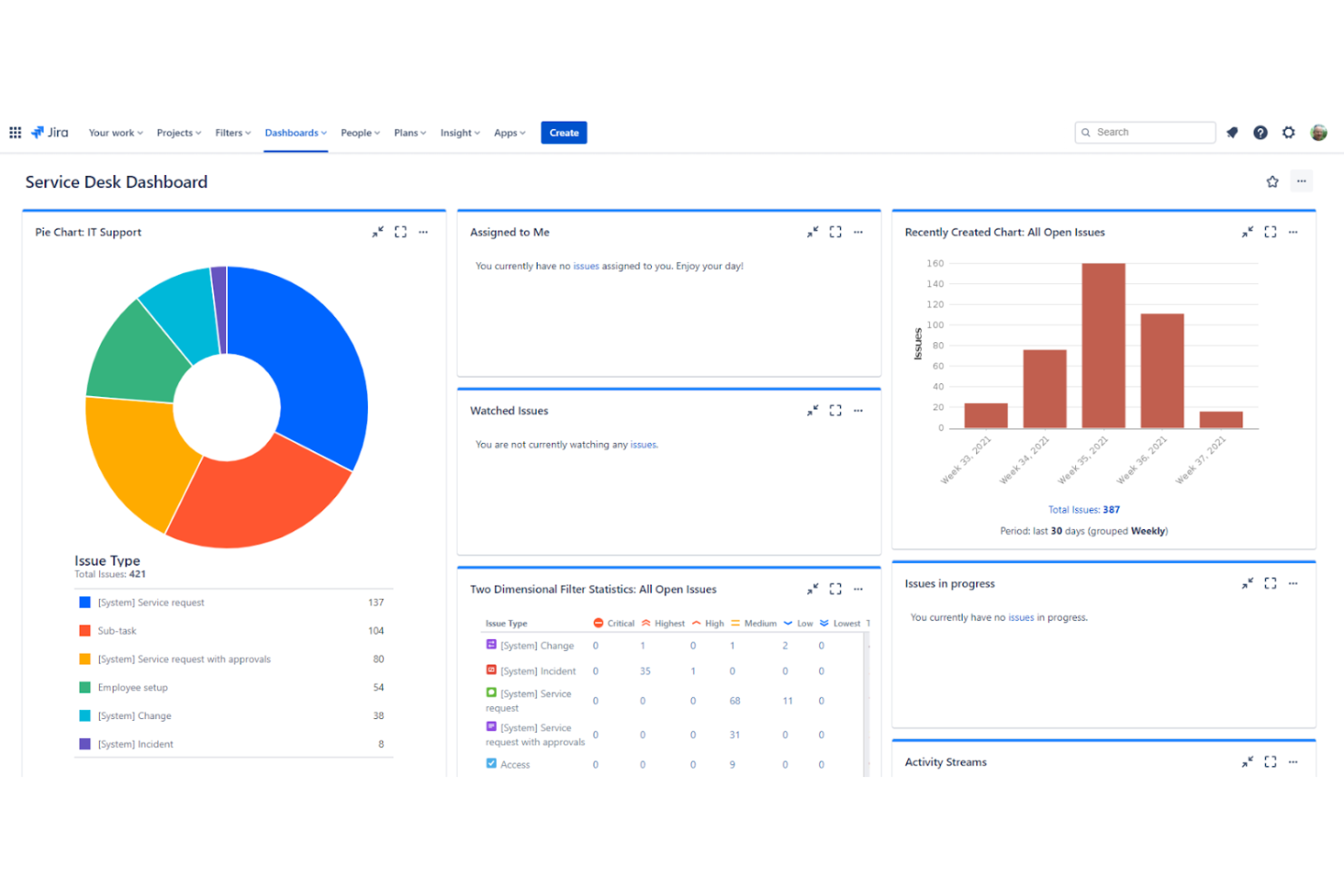
Jira Service Management bietet leistungsstarke Berichtstools, die Ihnen Einblicke in die Leistung Ihres Teams geben. Sie können detaillierte Berichte zu Serviceanfragen, Reaktionszeiten und Lösungen erstellen. Diese Analysen helfen Ihnen, Trends und Verbesserungsbereiche zu erkennen. Mit anpassbaren Dashboards können Sie wichtige Kennzahlen, die für Ihre Organisation relevant sind, einfach verfolgen.
Wie geht Jira Service Management mit Datensicherheit und Compliance um?
Jira Service Management legt mit Verschlüsselung, regelmäßigen Prüfungen und der Einhaltung von Branchenstandards wie der DSGVO großen Wert auf Datensicherheit. Es bietet rollenbasierte Zugriffskontrollen, um sicherzustellen, dass nur autorisierte und verifizierte Benutzer vertrauliche Informationen einsehen können. Die Plattform stellt außerdem Prüfprotokolle bereit, sodass Sie Änderungen nachverfolgen und die Verantwortlichkeit gewährleisten können. Dieser Fokus auf Sicherheit trägt dazu bei, die Daten Ihrer Organisation zu schützen.
Gibt es eine mobile App für Jira Service Management?
Ja, Jira Service Management bietet eine mobile App für iOS- und Android-Geräte. Mit dieser App können Ihre Teammitglieder Serviceanfragen verwalten und unterwegs zusammenarbeiten. Sie können Benachrichtigungen empfangen, Tickets beantworten und Aufgaben von Ihrem Mobilgerät aus aktualisieren, wodurch Abhängigkeiten und Hindernisse reduziert werden. Die einfache Benutzeroberfläche der App stellt sicher, dass Sie unabhängig von Ihrem Aufenthaltsort produktiv bleiben.
Wie erleichtert Jira Service Management die Kommunikation innerhalb von Teams?
Jira Service Management umfasst Tools für eine effiziente Teamkommunikation. Sie können Kommentare und Erwähnungen verwenden, um alle über Serviceanfragen auf dem Laufenden zu halten. Die Integration der Plattform in Tools für die Zusammenarbeit verbessert die Interaktion und den Informationsaustausch. Diese Funktionen helfen Ihrem Team, seine Arbeit zu koordinieren und Probleme effektiver zu lösen.
Welche Schulungsressourcen stehen neuen Benutzern zur Verfügung?
Jira Service Management bietet umfangreiche Schulungsressourcen, darunter Online-Tutorials, Dokumentationen und Community-Foren. Diese Ressourcen für das Wissensmanagement helfen neuen Benutzern, die Funktionen und Möglichkeiten der Plattform schnell zu verstehen. Sie können außerdem auf Webinare und Benutzerhandbücher zugreifen, um Ihr Wissen zu vertiefen. Diese Unterstützung stellt sicher, dass Ihr Team die Software von Anfang an effektiv einsetzen kann.
Kann Jira Service Management mit wachsenden Teams skaliert werden?
Ja, Jira Service Management ist darauf ausgelegt, mit dem Wachstum Ihrer Organisation zu skalieren. Es bietet verschiedene Preisstufen, um unterschiedliche Teamgrößen und Anforderungen abzudecken. Wenn Ihr Team wächst, können Sie weitere Benutzer hinzufügen und Funktionen an Ihre sich wandelnden Anforderungen anpassen. Diese Skalierbarkeit stellt sicher, dass die Plattform auch bei wachsender Organisation ein wertvolles Werkzeug bleibt.
Verwendet Jira Service Management ITIL?
Ja. Jira Service Management ist ein ITSM-Tool, das ITIL-Praktiken unterstützt. ITIL (Information Technology Infrastructure Library) ist ein weit verbreitetes Rahmenwerk für die effektive Verwaltung von IT-Services. Jira umfasst an ITIL ausgerichtete Funktionen wie das Management von Vorfällen, Problemen, Änderungen und Serviceanfragen und ist damit ein flexibles Tool sowohl für ITIL-konforme Organisationen als auch für Teams, die Best Practices für das IT-Servicemanagement implementieren möchten.
Jira Service Management Unternehmensübersicht & Geschichte
Jira Service Management ist ein Produkt von Atlassian mit Hauptsitz in Sydney, Australien. Es dient agilen Teams weltweit als führendes Angebot. Andere Atlassian-Produkte wie Confluence und Trello haben den Ruf des Unternehmens im Bereich Projektmanagement und Tools für die Zusammenarbeit weiter gestärkt. Das Unternehmen ist für seine innovative Arbeitskultur und sein Engagement für kontinuierliche Verbesserung bekannt. Zu den namhaften Kunden gehören große Technologieunternehmen und Konzerne, die auf seine leistungsfähigen Funktionen für das Servicemanagement setzen.
Wichtige Meilensteine von Jira Service Management
2002: Atlassian wurde in Sydney, Australien, gegründet.
2004: Jira Software wurde als Tool für das Projektmanagement eingeführt.
2013: Atlassian erreichte eine Bewertung von $1 Milliarde.
2013: Jira Service Desk wurde eingeführt, um Serviceteams mit einem leistungsfähigen Ticketsystem zu unterstützen.
2020: Jira Service Desk wurde nach umfangreichen Aktualisierungen und der Ergänzung von ITSM-Funktionen in Jira Service Management umbenannt.
2021: Atlassian übernahm Chartio und erweiterte damit seine Möglichkeiten zur Datenvisualisierung.
Wie geht es weiter?
Abonnieren Sie unseren Newsletter mit den neuesten Einblicken in das Kundenerlebnis, Anleitungen, Strategien und Ressourcen von führenden Experten auf dem Gebiet des Kundenerlebnisses.