

10 Mejores Software de Participación del Cliente de 2026

10 Mejor software de compromiso con el cliente - Lista rápida


Con tantas soluciones diferentes de software de compromiso con el cliente disponibles, encontrar la adecuada para tu empresa es todo un reto. Sabes que quieres un software que te ayude a gestionar las relaciones con tus clientes de manera eficiente para poder mejorar su experiencia y atender sus necesidades de forma más efectiva, pero necesitas averiguar cuál es el software más adecuado. En esta publicación, te ayudaré a tomar esta decisión más fácil compartiendo mis ideas sobre el mejor software de compromiso con el cliente para conectar con tus clientes a escala y fomentar una experiencia de marca positiva.
Table of Contents
- Lista de Mejores Software
- Por Qué Confiar en Nosotros
- Comparar Especificaciones
- Reseñas
- Otros Software de Participación del Cliente
- Reseñas Relacionadas
- Criterios de Selección
- Cómo Elegir
- ¿Qué es un Software de Participación del Cliente?
- Características
- Beneficios
- Costos y Precios
- Preguntas Frecuentes
Por Qué Confiar en Nuestras Reseñas de Software
Llevamos probando y revisando software desde 2020. Como líderes de CX, sabemos lo crítico y difícil que es tomar la decisión correcta al seleccionar software. Invertimos en investigación a fondo para que nuestra audiencia tome mejores decisiones de compra de software. Hemos probado más de 2,000 herramientas para distintos casos de uso de CX y escrito más de 1,000 reseñas integrales de software. Descubre cómo mantenemos la transparencia y nuestra metodología para reseñas de software.
Resumen del mejor software de compromiso con el cliente
Esta tabla comparativa resume los detalles de precios de mis principales selecciones de software de compromiso con el cliente para ayudarte a encontrar el que mejor se ajuste a tu presupuesto y necesidades empresariales.
| Tool | Best For | Trial Info | Price | ||
|---|---|---|---|---|---|
| 1 | Best for self-service support | 14-day free trial + free demo available | From $19/agent/month (billed annually) | Website | |
| 2 | Best for efficient omnichannel communications management | 14-day free trial + free demo available | From $25/user/month (billed annually) | Website | |
| 3 | Best for real-time chat automation | 7-day free trial + free plan available | From $24.17/month (billed annually) | Website | |
| 4 | Best for creating code-free product tours | 14-day free trial + free plan + free demo available | From $174/month (billed annually) | Website | |
| 5 | Best for collecting and tracking customer feedback via recurring surveys | 14-day free trial | From $19/month (billed annually) | Website | |
| 6 | Best for real-time context from external systems | 14-day free trial + free demo available | From $25/seat/month (billed annually) | Website | |
| 7 | Plan out and test personalized customer journeys | Free demo available | Pricing upon request | Website | |
| 8 | Best for customer sentiment analysis | Free demo available | From $15/user/month (billed annually) | Website | |
| 9 | Give your team the data it needs to keep customers engaged | 60-day free trial available | From $0.0002/minute | Website | |
| 10 | Keep your audience engaged with in-app communication | 30-day free trial + free plan + free demo available | Pricing upon request | Website |

-

SupportYourApp
Visit WebsiteThis is an aggregated rating for this tool including ratings from Crozdesk users and ratings from other sites.4.7 -
Tidio
Visit WebsiteThis is an aggregated rating for this tool including ratings from Crozdesk users and ratings from other sites.4.7 -
Freshdesk
Visit WebsiteThis is an aggregated rating for this tool including ratings from Crozdesk users and ratings from other sites.4.4


Reseña del mejor software de compromiso con el cliente
A continuación encontrarás mis resúmenes detallados de los mejores programas de compromiso con el cliente que entraron en mi lista corta. Mis reseñas ofrecen una visión detallada de las características clave, pros y contras, integraciones y casos de uso ideales de cada herramienta para ayudarte a encontrar la mejor opción para ti.

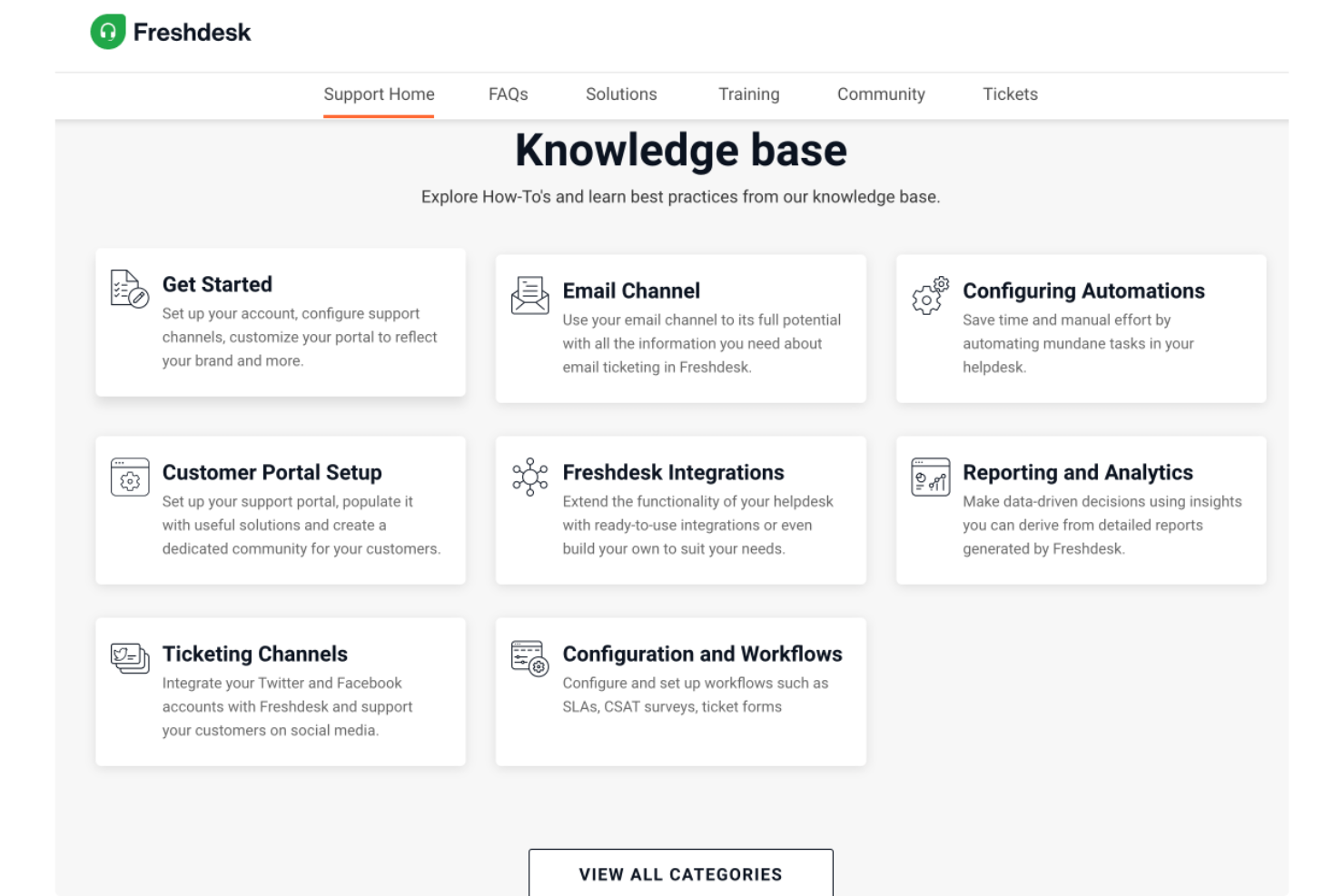
Freshdesk is designed to help businesses improve how they interact with and support their customers through a centralized engagement platform. It is well suited for teams that want to manage conversations across multiple channels while offering self-service support options for customers. With tools for ticket management, automation, and customer communication, Freshdesk helps organizations handle inquiries more efficiently and maintain consistent customer support.
Why I Picked Freshdesk
I picked Freshdesk for its self-service support capabilities, which help customers find answers through knowledge bases, portals, and community forums. It also includes AI Copilot to assist support teams with resolving issues and handling routine tasks. In addition, its centralized workspace brings customer conversations from different channels into one place.
Freshdesk Key Features
In addition to self-service support, Freshdesk offers:
- Ticketing System: Streamlines customer inquiries by organizing them into manageable tickets, ensuring no query goes unresolved.
- Knowledge Base: Empowers customers to find solutions themselves through a searchable repository of FAQs and guides.
- Community Forums: Allows customers to engage with each other and share solutions, fostering a sense of community and collaboration.
- Customer Feedback: Collects and analyzes feedback to continuously improve service quality and customer satisfaction.
Freshdesk Integrations
Integrations include Slack, MS Teams, Shopify, Google Calendar, Freshsales Suite, Google Analytics, Atlassian Jira, Mailchimp, HubSpot CRM, and Zoho CRM. Freshdesk also offers a low-code interface that allows users to create custom integrations when needed.
Pros and Cons
Pros:
- Centralized workspace for managing conversations across multiple channels
- AI Copilot helps agents handle routine tasks and resolve issues faster
- Self-service support through knowledge bases, portals, and community forums
Cons:
- Initial setup for workflows and knowledge bases can take time
- Costs can increase as teams add more agents or features
New Product Updates from Freshdesk

Freshdesk Adds Voice AI Agents in Freshcaller
Freshdesk introduces Voice AI Agents available through Freshcaller Marketplace apps to handle routine calls and reduce queues. This feature enables automated call handling with real-time, conversational support. For more information, visit Freshdesk's official site.


Front is a customer communications management platform that centralizes your email, live chat, and SMS conversations in a single inbox. It allows your team to manage customer conversations more efficiently and provide more personalized, contextual customer support and services. The software's automation capabilities and its built-in collaborative tools facilitate improved teamwork and streamlined processes.
You can alleviate your team's manual workload with the software's automations. For example, incoming requests can be automatically categorized and routed to the appropriate support agent, saving your team time and providing a quicker, more personalized experience to customers seeking assistance. You can also collect feedback from customers through the platform, providing your team with important insights about customer satisfaction, needs, questions, and more.
Secret direct messaging within customer communication threads allows team members to collaborate towards better resolutions without jumping back and forth from a separate messaging tool. Additionally, being able to set up an internal knowledge base makes it easy for team members to access crucial information for resolving customer issues swiftly.
The software has over 100 native integrations with other apps, including WhatsApp, Dialpad, Twilio, Intercom, Facebook, Instagram, Slack, Twitter, Asana, HubSpot, Jira, and Salesforce, among others. An API is also available to build custom integrations with.
Pricing for Front starts at $19 per user, per month when billed annually, and a 7 day free trial is available.
New Product Updates from Front

Front Adds AI File Uploads, New Integrations, and Autopilot Analytics
Front adds AI file uploads as knowledge sources, launches four integrations, and expands Autopilot Playbooks analytics plus early-access capabilities. These updates help teams expand AI knowledge, connect more business tools, and measure automation performance more effectively. For more information, visit Front's official site.
 .
.

Tidio is customer engagement software that combines live chat, chatbots, and multichannel messaging to help businesses respond instantly to customers across platforms like WhatsApp, Instagram, and email. Its AI chatbot, Lyro, uses natural language processing to automate replies, while live agents can step in for complex inquiries — keeping every interaction fast, helpful, and on brand.
I picked Tidio because it gives you a practical way to automate real-time conversations without losing the human touch. Its Lyro AI agent can handle common questions 24/7, while the live chat feature ensures customers still get personal support when needed. I also like that you can design automation flows without code, so your team can quickly build responsive chat experiences that fit your business goals.
Tidio’s automation flows help you route messages, follow up on abandoned carts, and send targeted responses based on user behavior. The built-in ticketing system organizes all customer requests in one place, while detailed analytics reveal engagement trends and performance insights. You can also customize your chat widgets to match your website’s branding and manage conversations from a mobile app.
Integrations include Shopify, WordPress, Squarespace, WIX, Adobe Commerce, BigCommerce, PrestaShop, and WooCommerce, among others.
New Product Updates from Tidio

Tidio Expands Lyro AI Across Email and Chat
Tidio expands Lyro AI to email ticketing and enhances its chatbot with Claude 3.0 integration. These updates improve automation across support channels and enhance AI-driven interactions. For more information, visit Tidio’s official site.
 .
.

UserGuiding is a customer onboarding and engagement platform that helps you familiarize new users with your product. You can build no-code walkthroughs that get new users up and running quickly, and show existing users how to navigate key product features and functions.
The software also facilitates customer feedback collection via micro-surveys. There are tons of pre-built survey templates to choose from, or you can build your own. The survey builder is also code-free, and the analytics dashboard provides you with real-time insights from survey responses.
UserGuiding integrates with other tools including Mixpanel, Segment, Intercom, Slack, Google Analytics, Google Tag Manager, Woopra, and HubSpot.
Paid plans start from $89 per month with annual billing, and a 14-day free trial is available.

Best for collecting and tracking customer feedback via recurring surveys

SurveySparrow is a customer engagement software that's designed to help businesses gather feedback and engage with their customers. It's all about making the process of collecting and analyzing customer feedback a whole lot easier. It's got a pretty neat interface that's easy to navigate, and it's packed with features that make it a solid choice for businesses of all sizes.
I included SurveySparrow because it can do more than just send out surveys and collect responses. Instead, it can help you engage with your customers more meaningfully so you can understand their needs and make informed decisions based on their feedback. By doing so, you'll be able to build stronger relationships with your customers and increase your brand loyalty.
One of the standout features of SurveySparrow is its conversational interface. Instead of presenting users with a long list of questions, it breaks down surveys into a chat-like conversation. This makes the survey-taking experience a lot more engaging and less tedious. Plus, it's got a variety of question types to choose from, so you can tailor your surveys to fit your needs.
Another feature that I really like is their recurring surveys. This allows you to send out surveys at regular intervals, which is great for tracking customer satisfaction over time. It's also got a robust reporting feature that lets you analyze your survey data in-depth. You can even segment your data based on different criteria, which is super useful for identifying trends and patterns.
Integrations are available with MailChimp, HubSpot, Intercom, Salesforce, Zapier, Google Sheets, Google Analytics, Facebook Pixel, and many other systems.
They offer a Basic free plan with limited features to get you started, as well as a 14-day free trial. After that, their paid plans start at $19/month.

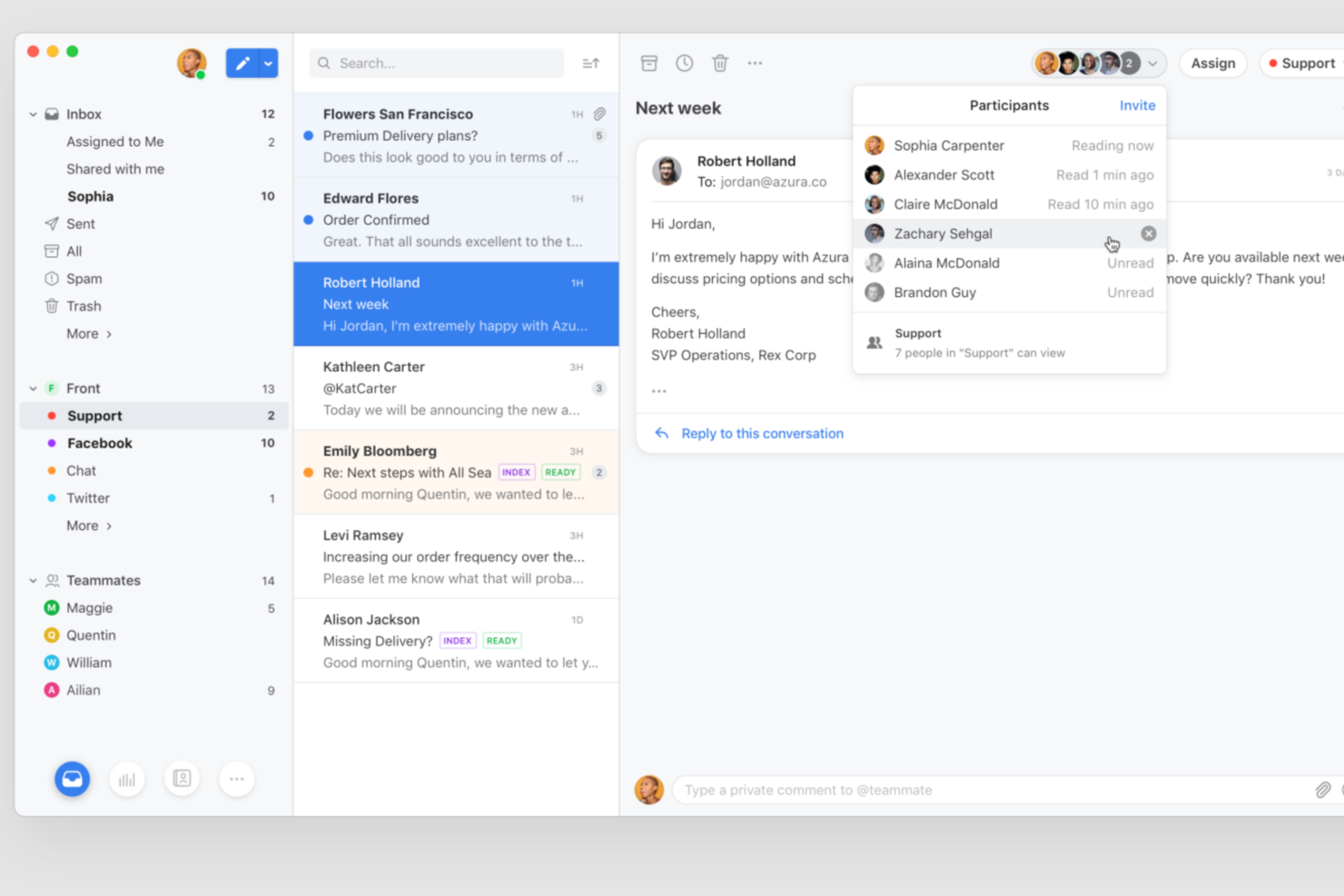
Front brings together email, chat, SMS, and social media into a single collaborative workspace for customer-facing teams. If you manage high volumes of customer conversations and need to coordinate across multiple channels, Front helps your team stay organized and responsive. Its focus on shared inboxes and workflow automation makes it a strong choice for support, success, and operations teams looking to deliver consistent, high-quality customer experiences.
Who Is Front Best For?
Front is a good fit for customer support, success, and operations teams in midsize to large businesses that need to manage high volumes of multichannel customer conversations collaboratively.
Why I Picked Front
When you need your team to have instant access to customer data from multiple systems, Front delivers real-time context right inside every conversation. I picked Front because it pulls in details from CRMs, order management tools, and other external platforms, displaying them alongside each message thread. This means agents can see purchase history, account status, or open tickets without switching tabs or searching for information. Having this context at their fingertips helps teams respond faster and with more accuracy during every customer interaction.
Front Key Features
Some other features in Front that support customer engagement teams include:
- Shared inboxes: Manage email, SMS, chat, and social media messages in a single collaborative workspace for your team.
- Internal comments: Add private notes and tag teammates directly within customer conversations to coordinate responses.
- Analytics and reporting: Track team performance, response times, and conversation trends with built-in dashboards and exportable reports.
- Customizable SLA rules: Set service level agreements and automate reminders or escalations to help your team meet response targets.
Front Integrations
Integrations include Salesforce, HubSpot, Asana, Jira, Aircall, Slack, Shopify, Intercom, Microsoft Teams, and Google Sheets.
Pros and Cons
Pros:
- SLA rules and analytics for performance tracking
- Shared inbox supports omnichannel communication
- AI triage handles complex customer requests
Cons:
- Limited customization for ticket forms and fields
- AI features require higher-tier plans

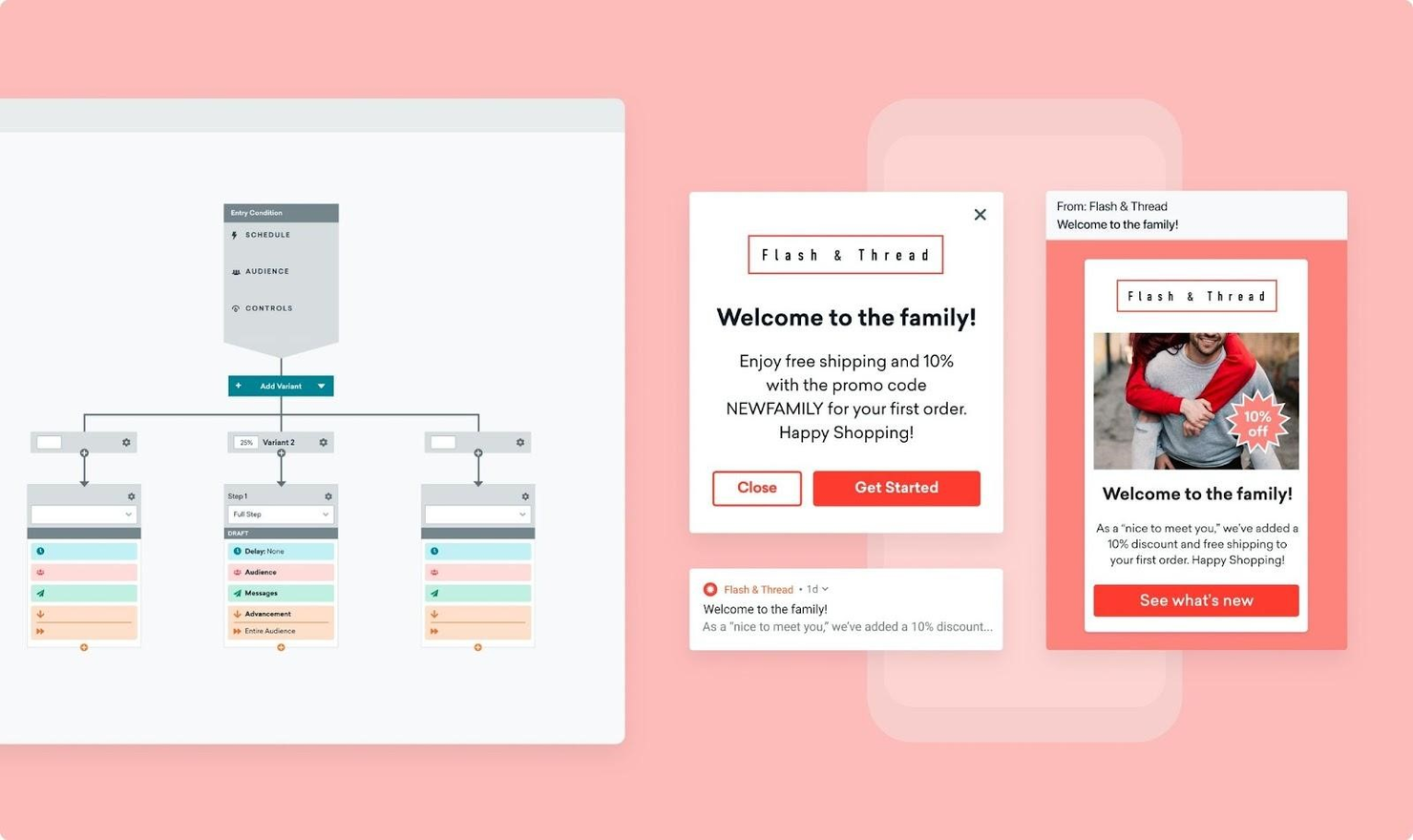
Braze is a customer engagement platform that relies on automation and interactive content to help you create memorable customer experiences. Braze’s simple drag-and-drop interface enables you to produce omnichannel customer journeys with ease.
The platform collects data from all your customer-facing channels and organizes it to help you understand customer behavior. This enables you to segment your audience and engage customers with the right message for each step of their purchasing journey.
Braze also allows you to test different campaigns and messages, so you can run short A/B tests to discover the winning messaging strategy.
Braze integrates with dozens of solutions, including Shopify, Segment, Heap, Foursquare, Facebook, and Amplitude.
Braze offers custom pricing upon request.


Nextiva is a comprehensive customer experience management platform designed to enhance business communications and customer interactions. It integrates voice, video, messaging, and collaboration tools into a single, unified solution, and helps companies manage and optimize customer interactions across various channels.
I like that Nextiva offers customer sentiment analysis as a way to help improve engagement. This feature uses advanced AI algorithms to analyze customer interactions in real-time, providing businesses with insights into customer emotions and behaviors. By understanding customer sentiment, businesses can tailor their communication strategies to address customer needs more effectively, enhancing engagement and fostering stronger relationships.
Nextiva also offers intelligent virtual assistants, which can handle routine customer inquiries and tasks, freeing up human agents to focus on more complex issues. These virtual assistants ensure that customers receive prompt and accurate responses, improving overall service efficiency. Another notable feature is Nextiva’s advanced analytics and reporting tools. These tools provide detailed insights into customer interactions and agent performance, helping businesses identify trends in engagement and make data-driven decisions.
Integrations include Salesforce, HubSpot, Microsoft Teams, Zoho CRM, Zendesk, G Suite, Microsoft Outlook, Slack, ServiceNow, QuickBooks, SugarCRM, NetSuite, and Oracle Sales Cloud.


Infobip is an omnichannel communication solution that helps businesses improve customer engagement and retention. The software offers a range of communication tools that help you build better relationships.
This solution uses customer information to build detailed profiles that include behavior data, previous interactions, and shopping and payment history. The tool uses this data to offer insights. This can help your team identify sales opportunities and act on them.
Infobip’s dashboard gives every customer success manager the data they need to offer clients the right solutions without switching tabs or navigating through multiple communication solutions.
Once they start a conversation, your sales or support specialists can see a history of the client’s interactions with your brand, and they can also set up automated notifications and reminders to let other team members know what to do.
Infobip integrates with a variety of apps, including ZohoCRM, VTEX, BIgCommerce, Hubspot, and Jira.
Infobip offers custom pricing upon request.

Pendo is a product experience platform that can help your development team keep users engaged and responsive. The software makes it easy to communicate with your users via in-app messages, product guides, and walkthroughs.
Pendo’s analytics tool helps you uncover which features your customers love and which they ignore. You can use surveys and polls as customer communication tools to collect feedback and improve your product.
You customer support specialists can access Pendo’s database to perform market research and identify behavior trends.
Pendo integrates with dozens of tools, including Jira, Hubspot, Calendly, Drift, Figma, Planhat, and Optimizely.
Pendo offers custom pricing upon request. The tool is free to use for up to 1,000 monthly active users. You can also access a demo.
Otro software de compromiso con el cliente
Aquí tienes algunas alternativas adicionales de software de compromiso con el cliente que no entraron en mi lista corta, pero que aún vale la pena revisar:
- MoEngage
Gain actionable insights from behavioral data
- Dialpad
Use AI to improve your conversations
- ZOHO CRM Plus
For predictive analytics to personalize engagement strategies
- Snoball
For automatically engaging customers for product reviews and referrals
- Salesforce Customer 360
Connect all your data to create customer profiles
- Thryv
Improve customer experience with automated review requests and review responses
- Jotform
Customer engagement software for B2B organizations
- Hiver
For AI-powered shared inbox
- LiveAgent
For ticket management
- Zendesk
Distribute customer interactions to the right employees with custom triggers
- Velaris
For secure customer collaboration
- Copper
CRM that integrates with your Google tools and tracks user activity so you can improve your relationships.


Criterios de selección de software de compromiso con el cliente
Al seleccionar el mejor software de compromiso con el cliente para incluir en esta lista, tuve en cuenta las necesidades habituales de los compradores y sus puntos de dolor, como mejorar la gestión de la interacción con los clientes y potenciar los datos obtenidos a través de la analítica. También utilicé el siguiente marco para mantener mi evaluación estructurada y justa:
Funcionalidad principal (25% de la puntuación total)
Para ser considerado para esta lista, cada solución debía cumplir estos casos de uso habituales:
- Gestionar la comunicación con el cliente
- Rastrear las interacciones con el cliente
- Proporcionar análisis de datos
- Automatizar tareas rutinarias
- Soportar múltiples canales de comunicación
Otras funciones destacadas (25% de la puntuación total)
Para ayudar a reducir aún más la competencia, también busqué características únicas como:
- Información impulsada por IA
- Informes personalizables
- Soporte multilingüe
- Funciones avanzadas de seguridad
- Integración con dispositivos IoT
Usabilidad (10% de la puntuación total)
Para tener una idea de la facilidad de uso de cada sistema, consideré lo siguiente:
- Diseño de interfaz intuitivo
- Curva de aprendizaje mínima
- Navegación clara
- Paneles de control personalizables
- Diseño responsivo
Onboarding (10% de la puntuación total)
Para evaluar la experiencia de incorporación en cada plataforma, valoré lo siguiente:
- Disponibilidad de videos de formación
- Recorridos interactivos por el producto
- Acceso a plantillas
- Soporte a través de seminarios web
- Chatbots a demanda
Soporte al cliente (10% de la puntuación total)
Para evaluar los servicios de atención al cliente de cada proveedor de software, he considerado lo siguiente:
- Disponibilidad 24/7
- Múltiples canales de soporte
- Base de conocimientos integral
- Tiempos de respuesta rápidos
- Asistencia personalizada
Valor por el dinero (10% de la puntuación total)
Para evaluar el valor por el dinero de cada plataforma, consideré lo siguiente:
- Precios competitivos
- Modelos de precios transparentes
- Funciones incluidas en los planes básicos
- Descuentos por compromisos a largo plazo
- Costo en relación a las funciones ofrecidas
Opiniones de clientes (10% de la puntuación total)
Para obtener una idea de la satisfacción general del cliente, tuve en cuenta lo siguiente al leer opiniones de clientes:
- Consistencia en los comentarios positivos
- Actualizaciones y mejoras frecuentes
- Capacidad de respuesta a los comentarios de clientes
- Facilidad de uso reportada
- Puntuaciones generales de satisfacción
Cómo elegir un software de participación del cliente
Es fácil perderse entre largas listas de funcionalidades y estructuras de precios complejas. Para ayudarte a mantenerte enfocado/a mientras avanzas en tu proceso único de selección de software, aquí tienes una lista de factores a tener en cuenta:
| Factor | Qué considerar |
|---|---|
| Escalabilidad | ¿El software crecerá con tu equipo? Considera cuántos usuarios admite y cómo gestiona el aumento de datos a medida que tu empresa crece. |
| Integraciones | ¿Se conecta con tus herramientas actuales? Verifica la compatibilidad con tu CRM, tu correo electrónico y otras plataformas esenciales para evitar interrupciones en el flujo de trabajo. |
| Personalización | ¿Puedes adaptarlo a tus necesidades? Busca opciones para ajustar flujos de trabajo, paneles e informes según tus procesos y preferencias. |
| Facilidad de uso | ¿Qué tan rápido puede adaptarse tu equipo? Una interfaz intuitiva reduce el tiempo de capacitación y minimiza los errores, mejorando la productividad desde el primer momento. |
| Implementación y puesta en marcha | ¿Qué tan sencilla es la configuración? Investiga los recursos de acogida disponibles, como tutoriales, soporte y sesiones de formación, para asegurar un comienzo rápido. |
| Costo | ¿Está dentro de tu presupuesto? Evalúa el modelo de precios, incluyendo tasas ocultas o costos adicionales por características premium, para evitar gastos inesperados. |
| Salvaguardas de seguridad | ¿Tus datos están protegidos? Asegúrate de que el software cumple con los estándares del sector para la protección de datos y ofrece funciones de seguridad robustas. |
| Disponibilidad del soporte | ¿Tendrás ayuda cuando la necesites? Revisa la disponibilidad de los servicios de soporte, incluido chat en vivo, soporte telefónico y tiempos de respuesta. |
¿Qué es un software de participación del cliente?
Un software de seguimiento de clientes es una herramienta que ayuda a las empresas a registrar, monitorear y analizar cómo interactúan los clientes con ellas. Los profesionales de ventas, marketing y servicio al cliente suelen utilizar estas herramientas para comprender el comportamiento del cliente, mejorar la interacción y realizar el seguimiento tanto de prospectos como de clientes existentes. Las funciones como la captura de datos, el seguimiento de interacciones y los informes ayudan a mantener registros actualizados, detectar patrones en el comportamiento de los clientes y medir los resultados de los esfuerzos de contacto. Estas herramientas aportan valor al ofrecer a los equipos visibilidad sobre el recorrido del cliente y ayudarlos a tomar decisiones más inteligentes gracias a datos reales de uso o interacción.
Características
Al seleccionar un software de participación del cliente, presta atención a las siguientes características clave:
- Comunicación multicanal: Esta función te permite interactuar con los clientes a través de diversas plataformas, como correo electrónico, chat y redes sociales, asegurando un compromiso constante.
- Análisis de datos: Ofrece información sobre el comportamiento y los patrones de interacción de los clientes, ayudándote a tomar decisiones informadas para mejorar las relaciones con ellos.
- Automatización: Automatiza tareas rutinarias como el envío de mensajes de seguimiento y recordatorios, liberando a tu equipo para actividades más estratégicas.
- Paneles personalizables: Permite adaptar la interfaz para mostrar la información más relevante, mejorando la productividad y el enfoque.
- Capacidades de integración: Garantiza una conectividad fluida con herramientas existentes como sistemas CRM y plataformas de correo electrónico, manteniendo la continuidad del flujo de trabajo.
- Medidas de seguridad: Protege datos sensibles de los clientes con cifrado y cumplimiento de estándares de la industria, asegurando confianza y fiabilidad.
- Informes en tiempo real: Ofrece información actualizada sobre métricas de interacción con los clientes, permitiendo ajustar las estrategias a tiempo.
- Información impulsada por IA: Utiliza inteligencia artificial para predecir necesidades y comportamientos de los clientes, ayudando a personalizar las interacciones.
- Accesibilidad móvil: Permite a los equipos gestionar las interacciones con los clientes desde cualquier lugar, asegurando respuesta y flexibilidad.
- Análisis de sentimientos: Analiza los comentarios de los clientes para medir el nivel de satisfacción e identificar áreas de mejora.
Beneficios
Implementar un software de interacción con clientes ofrece varios beneficios para tu equipo y tu negocio. Aquí tienes algunos a los que puedes aspirar:
- Mejora en la comunicación: Al ofrecer comunicación multicanal, tu equipo puede interactuar con los clientes en sus plataformas preferidas, logrando mejores relaciones.
- Mayor eficiencia: La automatización de tareas rutinarias permite a tu equipo centrarse en iniciativas más estratégicas, aumentando la productividad general.
- Toma de decisiones mejorada: El análisis de datos proporciona información valiosa sobre el comportamiento del cliente, ayudando a tomar decisiones informadas para mejorar las estrategias de interacción.
- Experiencias personalizadas: Los conocimientos impulsados por IA permiten interacciones adaptadas, haciendo que los clientes se sientan valorados y comprendidos.
- Mejor gestión de datos: Las capacidades de integración aseguran que todos los datos de clientes estén centralizados y sean accesibles, reduciendo errores y mejorando el flujo de trabajo.
- Adaptaciones oportunas: Los informes en tiempo real permiten identificar rápidamente tendencias y realizar los cambios necesarios en las tácticas de interacción.
- Relaciones más sólidas con los clientes: El análisis de sentimientos te permite comprender el nivel de satisfacción, facilitando mejoras proactivas y fomentando la fidelidad.
Costos y Precios
Seleccionar un software de interacción con clientes requiere comprender los distintos modelos y planes de precios disponibles. Los costos varían según características, tamaño del equipo, complementos y más. La siguiente tabla resume los planes más comunes, sus precios promedio y las características típicas incluidas en soluciones de software de interacción con clientes:
Tabla Comparativa de Planes para Software de Interacción con Clientes
| Tipo de plan | Precio promedio | Características comunes |
|---|---|---|
| Plan gratuito | $0 | Herramientas básicas de comunicación, análisis de datos limitado y capacidades esenciales de integración. |
| Plan personal | $5-$25/user/month | Comunicación multicanal, automatización básica y paneles personalizables. |
| Plan empresarial | $30-$75/user/month | Análisis avanzado, automatización mejorada e integración con sistemas CRM. |
| Plan corporativo | $80-$150/user/month | Información impulsada por IA, medidas de seguridad completas y soporte al cliente dedicado. |
Preguntas frecuentes sobre software de compromiso con el cliente
Aquí tienes algunas respuestas a preguntas comunes sobre el software de compromiso con el cliente:
¿Cómo determino cuál es el mejor software de compromiso con el cliente para mi negocio?
Comienza por identificar tus necesidades y objetivos específicos. Considera factores como el tamaño del equipo, herramientas existentes y los canales de comunicación con el cliente. Evalúa el software en función de la escalabilidad, facilidad de uso y capacidades de integración. Prueba diferentes opciones mediante pruebas gratuitas para ver cuál se adapta mejor a tu flujo de trabajo. Busca opiniones de usuarios para evaluar la satisfacción y la fiabilidad.
¿El software de compromiso con el cliente es adecuado para pequeñas empresas?
Sí, muchas herramientas de compromiso con el cliente están diseñadas para empresas de todos los tamaños, incluidas las pequeñas. Estas herramientas suelen ofrecer planes de precios escalables y funciones que se adaptan a las necesidades específicas de equipos pequeños. Busca software que ofrezca funciones esenciales sin una complejidad abrumadora, permitiéndote crecer a tu propio ritmo.
¿Qué tan seguro es el software de compromiso con el cliente?
La seguridad varía según el proveedor, pero la mayoría del software confiable incluye cifrado y cumplimiento de las normas de protección de datos. Verifica características como la autenticación en dos pasos y la copia de seguridad de datos. Es fundamental comprobar las medidas de seguridad del proveedor, especialmente si manejas información sensible de clientes, para garantizar la protección de los datos.
¿Qué sigue?
Si estás en el proceso de investigar software de compromiso con el cliente, conéctate con un asesor de SoftwareSelect para obtener recomendaciones gratuitas.
Solo tienes que completar un formulario y tener una conversación breve donde profundizarán en tus necesidades específicas. Luego recibirás una lista breve de software para revisar. Incluso te acompañarán durante todo el proceso de compra, incluidas las negociaciones de precio.