

10 Mejores Programas de Soporte al Cliente de 2026

10 Lista de los Mejores Software de Atención al Cliente


El software de atención al cliente ayuda a tu equipo a gestionar grandes volúmenes de consultas, mantener la coherencia entre canales y cerrar tickets sin perder el toque humano. Estas plataformas están diseñadas para agilizar flujos de trabajo, automatizar tareas repetitivas y ofrecer a tus agentes el contexto que necesitan para brindar un soporte más rápido y personalizado.
He evaluado estas herramientas basándome en su facilidad de uso, funciones de automatización, integraciones, escalabilidad y reportes. Esta guía desglosa el mejor software de atención al cliente para diferentes tamaños de equipo y modelos de soporte, para que puedas elegir una plataforma que se alinee con tus objetivos de experiencia del cliente y que ayude a transformar la manera en la que gestionas tus interacciones.
Por qué confiar en nuestras recomendaciones de software
Nuestro equipo lleva probando y evaluando software desde 2012. Como líderes de CX, sabemos lo difícil —y lo importante— que es elegir el software adecuado.
Para esta guía, evaluamos las herramientas mediante pruebas prácticas e investigación independiente, puntuando las herramientas según nuestros criterios de selección.
Nuestras reseñas reflejan nuestro criterio editorial humano, no un discurso de ventas.
Comparativa de Precios: Mejor Software de Atención al Cliente
Esta tabla comparativa resume los detalles básicos de cada una de mis principales selecciones de software de atención al cliente. Consulta los precios y la disponibilidad de pruebas gratuitas o demostraciones para ayudarte a encontrar el mejor software según tu presupuesto y necesidades empresariales.
| Tool | Best For | Trial Info | Price | ||
|---|---|---|---|---|---|
| 1 | Ideal para colaborar con partes externas | Prueba gratuita de 14 días + demo gratis disponible | Desde $19/agente/mes (facturado anualmente) | Website | |
| 2 | La mejor opción para informes y análisis en tiempo real | Demostración gratuita disponible | Desde $30/usuario/mes (facturación anual) | Website | |
| 3 | El mejor software de soporte al cliente para empresas | Prueba gratuita de 15 días + demo gratuita disponible | Desde $7/usuario/mes (facturación anual) | Website | |
| 4 | Mejor para soporte centrado en las personas | Prueba gratuita disponible | Desde $25/usuario/mes (facturado anualmente) | Website | |
| 5 | Ideal para respuestas redactadas por todo el equipo | Prueba gratuita de 30 días disponible | Desde $14/usuario/mes (facturación anual) | Website | |
| 6 | Mejor para soporte al cliente con IA multilingüe | Prueba gratuita de 7 días + plan gratuito disponible | Desde $24.17/mes (facturado anualmente) | Website | |
| 7 | Ideal por su interfaz fácil de usar y personalizable | Prueba gratuita de 15 días disponible | Desde $7/operador/mes | Website | |
| 8 | Ideal para crear experiencias personalizadas con IA | Prueba gratuita de 30 días disponible | Desde $15/usuario/mes | Website | |
| 9 | Mejor para analíticas de conversaciones | Disponible un plan gratuito | Desde $29/mes (facturado anualmente) | Website | |
| 10 | Mejor para empresas SaaS | Demo gratuita disponible | Precios a consultar | Website |

Reseñas de los 20 Mejores Software de Atención al Cliente
A continuación, encontrarás una breve descripción de mis principales selecciones para el mejor software de atención al cliente.

Ideal para colaborar con partes externas

Freshdesk (un producto de Freshworks Inc.) es una plataforma de atención al cliente diseñada para equipos que gestionan interacciones con clientes a diferentes escalas. Combina la gestión estructurada de tickets, automatización, soporte multilingüe y análisis para ayudar a los equipos a rastrear la actividad y mantener la coherencia en diferentes regiones y canales.
Por qué elegí Freshdesk
Elegí Freshdesk por su capacidad para facilitar la colaboración con partes externas. La plataforma incluye un rol de Colaborador que permite a socios o proveedores participar en conversaciones sobre tickets sin otorgarles acceso completo de agente. Esta configuración te ayuda a compartir contexto y actualizaciones mientras mantienes controlados los flujos de trabajo internos. La integración con herramientas como Microsoft Teams también permite que las actualizaciones y discusiones de tickets se mantengan dentro de las herramientas de colaboración que tu equipo ya utiliza.
Funciones clave de Freshdesk
Además de facilitar la colaboración con partes externas, Freshdesk ofrece varias otras funciones clave que apoyan las operaciones diarias de servicio al cliente:
- Freddy AI: Las herramientas de inteligencia artificial integradas asisten en tareas como la redacción de respuestas y la gestión de tickets, ayudando a los equipos a reducir el esfuerzo manual dentro de los flujos de soporte existentes.
- Herramientas de autoservicio: Una base de conocimientos multilingüe permite a los clientes buscar respuestas de manera independiente, mientras que los foros comunitarios y el versionado de artículos ayudan a los equipos a mantener la información precisa y actualizada.
- Asignación de tickets basada en habilidades: Envía las solicitudes entrantes a los agentes según habilidades predefinidas, ayudando a los equipos a alinear los problemas con la experiencia más relevante.
- Funciones de seguridad: Incluye control de acceso basado en roles, inicio de sesión único, autenticación JWT y lista blanca de IPs para ayudar a gestionar el acceso y proteger los datos de atención al cliente.
Integraciones de Freshdesk
Las integraciones incluyen Shopify, Slack, Microsoft Teams, Playvox, Google Calendar, Trello, Jira, HubSpot, Salesforce y Mailchimp.
Pros and Cons
Pros:
- Proceso eficaz de creación y envío de tickets
- El sistema unificado de tickets mejora el seguimiento y los tiempos de respuesta
- La automatización impulsada por IA aumenta la eficiencia y reduce el trabajo manual
Cons:
- La aplicación móvil puede ser engorrosa y carece de un diseño intuitivo
- Efectividad limitada para organizaciones grandes que no utilizan IA
New Product Updates from Freshdesk

Freshdesk Adds Voice AI Agents in Freshcaller
Freshdesk introduces Voice AI Agents available through Freshcaller Marketplace apps to handle routine calls and reduce queues. This feature enables automated call handling with real-time, conversational support. For more information, visit Freshdesk's official site.

La mejor opción para informes y análisis en tiempo real
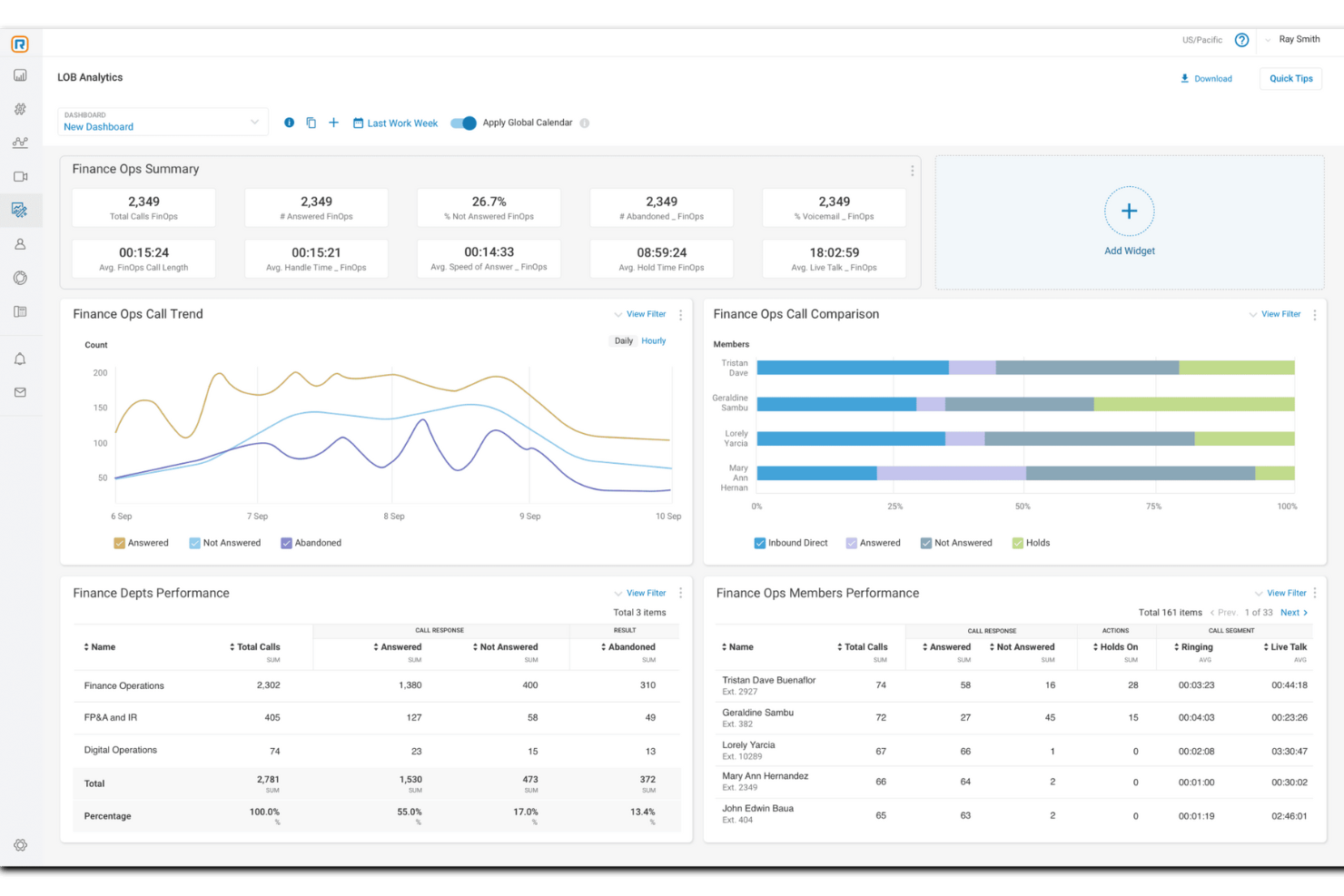
Para las empresas que buscan mejorar sus capacidades de soporte al cliente, RingCentral presenta una solución versátil diseñada para potenciar la comunicación y la satisfacción. Este software es ideal para organizaciones de diversos sectores que requieren integrar opciones de autoservicio y soporte en vivo para satisfacer variadas necesidades de los clientes. Al incorporar herramientas impulsadas por IA y conectividad multicanal, RingCentral aborda los desafíos en la gestión de interacciones con clientes, permitiendo que su equipo ofrezca un servicio personalizado y eficiente.
Por qué elegí RingCentral
Elegí RingCentral por sus excepcionales capacidades de informes y análisis en tiempo real, las cuales son cruciales para cualquier organización que busque optimizar el soporte al cliente. Los paneles personalizables en tiempo real le permiten monitorear el desempeño de las colas y de los agentes, proporcionando información accionable para una gestión eficiente del personal y de los SLA. Además, la función de inteligencia conversacional analiza las interacciones para identificar tendencias y mejorar la satisfacción del cliente. Al ofrecer una cobertura completa de informes con más de 200 reportes predefinidos, RingCentral equipa a su equipo con las herramientas necesarias para tomar decisiones informadas basadas en datos y mejorar la prestación del servicio.
Características clave de RingCentral
Además de sus capacidades de informes y análisis en tiempo real, RingCentral ofrece una variedad de funciones que atienden las necesidades de los equipos de soporte al cliente.
- Herramientas de autoservicio: Permita que sus clientes resuelvan sus propios problemas con sistemas automatizados como chatbots y respuesta de voz interactiva (IVR), mejorando la eficiencia y minimizando la necesidad de personal.
- Chat en vivo: Facilite la comunicación en tiempo real entre sus agentes y los clientes, proporcionando asistencia inmediata y un trato personalizado en cada interacción.
- Enrutamiento basado en habilidades: Dirija automáticamente las consultas de los clientes a los agentes más calificados, asegurando que los problemas sean atendidos por el personal con la experiencia adecuada.
- Integración con CRM: Conéctese de manera fluida con los sistemas existentes de gestión de relaciones con clientes para acceder a los perfiles e historiales de los clientes, permitiendo un servicio más personalizado y una resolución eficiente de los problemas.
Integraciones de RingCentral
Las integraciones incluyen Salesforce, Microsoft Teams, Google Workspace, HubSpot, Zendesk, Slack, ServiceNow, Box, Okta y DocuSign.
Pros and Cons
Pros:
- El enrutamiento de llamadas efectivo mejora el tiempo de respuesta y la eficiencia
- Análisis robustos proporcionan información útil para la toma de decisiones
- Alta fiabilidad con un 99.999% de tiempo de actividad garantiza disponibilidad constante
Cons:
- El proceso de configuración tiene una curva de aprendizaje pronunciada sin orientación
- Se desean más opciones listas para usar para necesidades diversas

El mejor software de soporte al cliente para empresas

Para quienes buscan una solución de soporte al cliente que se integre con sistemas existentes y priorice la privacidad de los datos, Zoho Desk es una opción a considerar. Esta herramienta se adapta a empresas de todos los tamaños, ofreciendo características como soporte omnicanal y automatización para mejorar sus operaciones de servicio. Con una interfaz fácil de usar y un fuerte énfasis en la seguridad, Zoho Desk permite a su equipo brindar un soporte excepcional y construir relaciones duraderas con los clientes.
Por qué elegí Zoho Desk
Elegí Zoho Desk como el mejor software de soporte al cliente para empresas porque ofrece una combinación de funciones innovadoras diseñadas para las necesidades empresariales a gran escala. Su soporte omnicanal permite a su equipo gestionar más de 10 canales de comunicación desde una sola interfaz, garantizando interacciones fluidas con los clientes a través de correo electrónico, teléfono, redes sociales y chat en vivo. La integración de Zia AI, un asistente de inteligencia artificial, mejora el soporte al ayudar a los agentes a redactar respuestas y a proporcionar atención al cliente 24/7. Además, sus capacidades de automatización optimizan procesos como la asignación de tickets y la automatización de flujos de trabajo, permitiendo que su equipo se enfoque en tareas más críticas.
Funciones clave de Zoho Desk
Además de sus capacidades orientadas a empresas, Zoho Desk ofrece funciones que mejoran la experiencia de soporte al cliente.
- Opciones de autoservicio: Permita que sus clientes encuentren soluciones por sí mismos mediante una base de conocimientos integral y foros comunitarios.
- Herramientas de productividad para agentes: Optimice la gestión de tickets y la colaboración con funciones diseñadas para mejorar el flujo de trabajo de su equipo.
- Personalización: Adapte la plataforma a las necesidades específicas de su empresa con soporte multilingüe y módulos personalizados.
- Informes y tableros: Acceda a más de 30 informes y tableros integrados para obtener información procesable basada en datos.
Integraciones de Zoho Desk
Las integraciones incluyen Zoho CRM, Zoho BugTracker, Zoho Books, Zoho Projects, Zoho Analytics, Zoho SalesIQ, Zoho Campaigns, Zoho Meetings, Zoho Creator y Zoho People.
Pros and Cons
Pros:
- Las capacidades de IA efectivas ayudan en la gestión de tickets
- Las aplicaciones móviles intuitivas mejoran la accesibilidad y eficiencia
- La comunicación multicanal admite diversas interacciones con los clientes
Cons:
- No cuenta con una aplicación dedicada de área de trabajo para agentes
- Algunos usuarios consideran que la interfaz es confusa en pantallas pequeñas

Mejor para soporte centrado en las personas
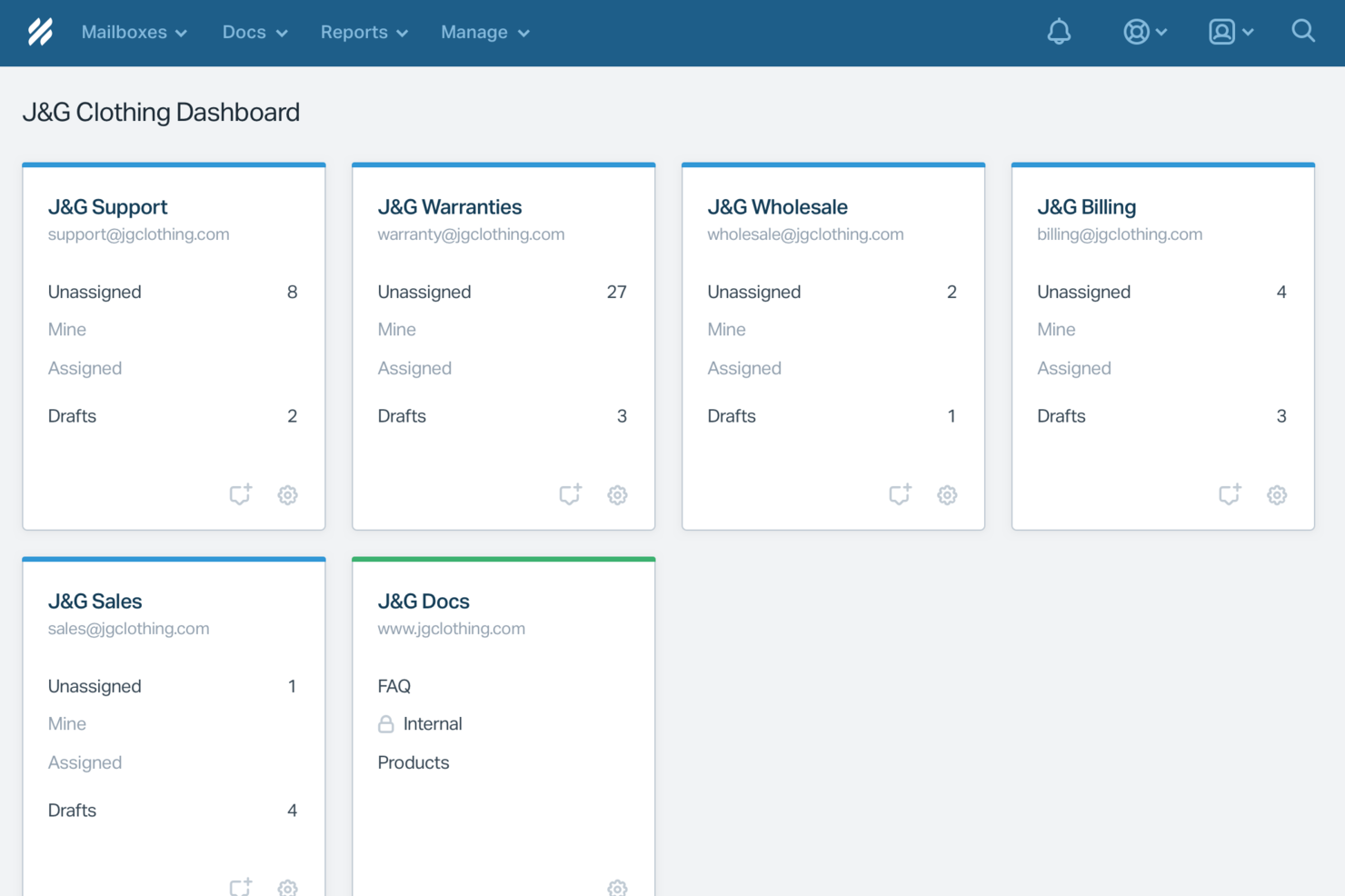
Help Scout es una solución de software de soporte al cliente diseñada para empresas que valoran las interacciones personalizadas con los clientes. Resulta especialmente atractiva para pequeñas y medianas empresas que buscan mantener un trato personal mientras escalan sus operaciones de soporte. Con funciones que automatizan tareas rutinarias y mejoran la colaboración del equipo, Help Scout responde a la necesidad de un servicio al cliente eficiente sin renunciar a la calidad de las interacciones.
Por qué elegí Help Scout
Elegí Help Scout por su capacidad única de combinar la automatización impulsada por IA con un soporte centrado en las personas, lo que lo hace ideal para equipos que desean gestionar las consultas de los clientes rápidamente sin perder el trato personal. Su función de bandeja de entrada compartida permite que tu equipo colabore sin problemas, asegurando que ninguna consulta de cliente quede sin respuesta. Además, las herramientas de mensajería proactiva de la plataforma permiten interactuar con los clientes mediante actualizaciones oportunas y solicitudes de retroalimentación, abordando de manera directa la necesidad de una comunicación efectiva en el soporte al cliente.
Características clave de Help Scout
Además de sus capacidades destacadas, también encontré varias otras funciones que mejoran su utilidad para el soporte al cliente:
- Centro de ayuda: Permite que tus clientes encuentren respuestas por sí mismos, reduciendo la carga de trabajo de tu equipo de soporte.
- Flujos de trabajo personalizados: Te permite automatizar tareas repetitivas, asegurando que tu equipo pueda concentrarse en problemas más complejos.
- Analíticas de desempeño: Ofrece información sobre los tiempos de respuesta y la eficiencia de tu equipo, ayudándote a tomar decisiones informadas para mejorar el servicio.
- Soporte multicanal: Integra diversos canales de comunicación, permitiéndote gestionar las interacciones con los clientes desde una sola plataforma.
Integraciones de Help Scout
Las integraciones incluyen Salesforce, Shopify, WhatsApp, Slack, Stripe, Trello, Mailchimp, Google Apps, ActiveCampaign y Asana. Además, se pueden crear integraciones personalizadas usando la API de Help Scout o conectando con más aplicaciones a través de Zapier.
Pros and Cons
Pros:
- Respuestas de IA resuelven tickets comunes sin intervención de un agente
- La transferencia fluida conserva el contexto de la conversación para los agentes
- La base de conocimientos integrada impulsa respuestas automáticas precisas
Cons:
- No es un chatbot independiente fuera del ecosistema de Help Scout
- La efectividad de la IA depende en gran medida de la calidad de la base de conocimientos
New Product Updates from Help Scout

Help Scout Adds Automatic Conversation Reassignment
Help Scout can now automatically unassign conversations when the assigned teammate has been away long enough, keeping replies moving so others can pick them up. For more information, visit Help Scout's official site.
 .
.
Missive
Ideal para respuestas redactadas por todo el equipo
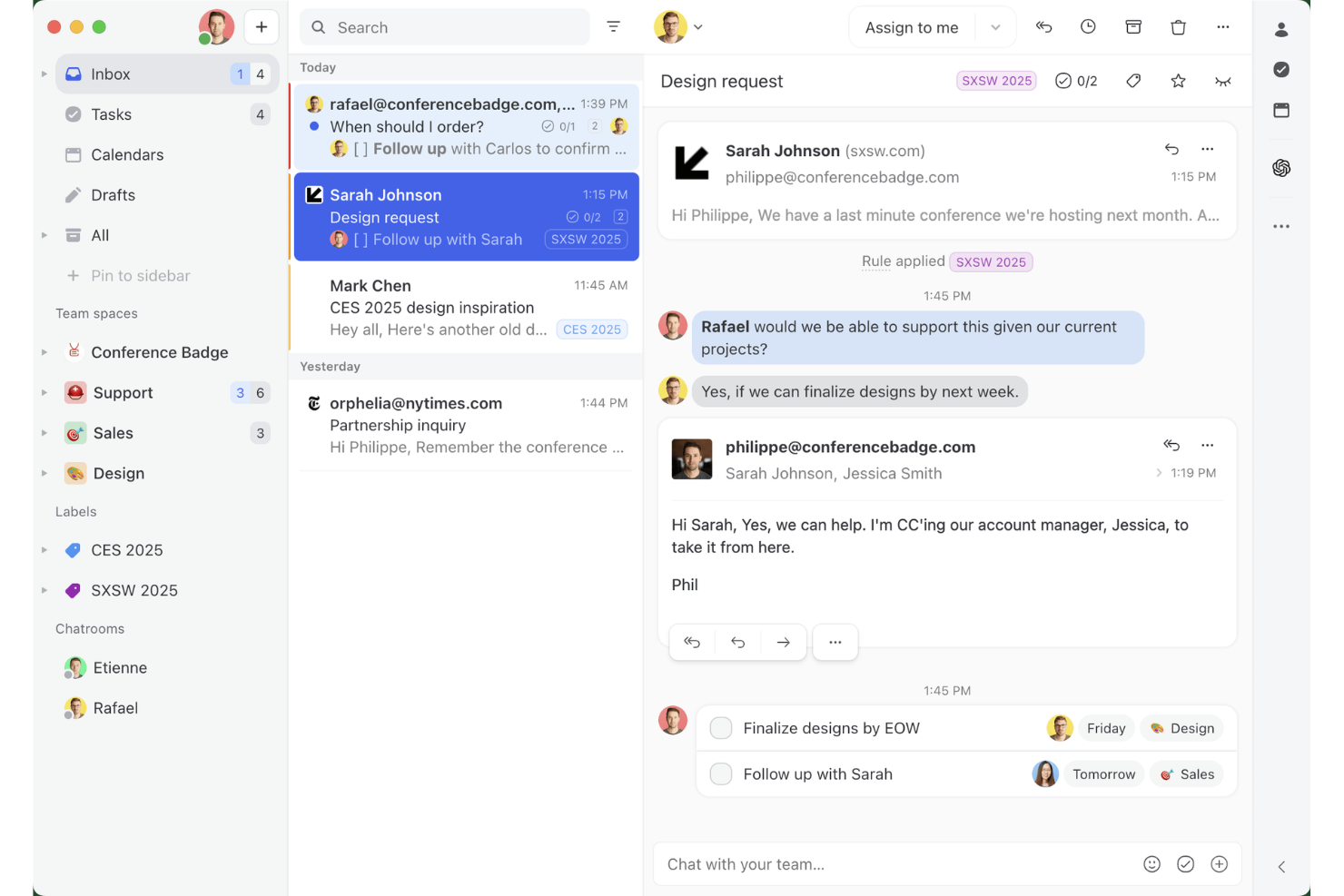
Missive es una bandeja de entrada colaborativa y una plataforma de correo electrónico compartido que unifica el correo electrónico, los SMS, WhatsApp, el chat en directo y los canales de mensajería social en un solo espacio de trabajo, con chat de equipo integrado, hilos internos y herramientas de redacción asistida por IA.
¿Para quién es más adecuado Missive?
Missive es una excelente opción para equipos de soporte pequeños y medianos que gestionan la mayoría de las interacciones con clientes por correo electrónico y quieren que todos los miembros del equipo participen en la elaboración de la respuesta adecuada.
Por qué elegí Missive
Missive se ha ganado un lugar en mi lista de favoritos por la forma tan eficaz en que facilita la redacción colaborativa de respuestas: varios agentes pueden redactar conjuntamente un mismo correo saliente en tiempo real, con hilos internos vinculados directamente a la conversación para que todo el equipo pueda aportar su opinión antes de enviar nada. También me encanta que las sugerencias de borradores de IA incorporen todo el contexto de la conversación y que un compañero pueda perfeccionar aún más el borrador utilizando esta función antes de que llegue al cliente. Este tipo de ciclo colaborativo es poco habitual en una herramienta de bandeja de entrada compartida.
Características principales de Missive
- Bandeja de entrada omnicanal unificada: Consolida el correo electrónico, los SMS, WhatsApp, los mensajes directos de Instagram, Facebook Messenger y el chat en directo en un único espacio de trabajo compartido.
- Motor de automatización basado en reglas: Admite hasta 1.000 reglas con activadores, condiciones y acciones en todos los canales conectados.
- Reglas de bandeja de entrada basadas en IA: Utiliza condiciones de IA para detectar el sentimiento, el idioma y la intención, y así crear etiquetas, asignar conversaciones y generar borradores automáticamente.
- Respuestas predefinidas con campos variables: Permite a los agentes guardar e insertar plantillas de respuesta prediseñadas que rellenan automáticamente los datos específicos del cliente.
- Servidor MCP de Missive: Conecta herramientas externas de IA, como Claude o ChatGPT, para consultar hilos de soporte, comprobar calendarios y redactar respuestas, manteniendo la revisión del agente como requisito antes del envío.
Integraciones de Missive
Missive ofrece más de 25 integraciones nativas, entre ellas HubSpot, Salesforce, Shopify, Aircall, Dialpad, Zoom, Twilio, WhatsApp Business, Facebook Messenger e Instagram Direct. También admite una API REST abierta, webhooks, integraciones de canales personalizadas, Zapier y su nuevo servidor MCP en los planes Productive y Business (requiere activación por parte del administrador).
Pros and Cons
Pros:
- Redacción conjunta en tiempo real de correos salientes
- La bandeja de entrada omnicanal unifica el correo electrónico y la mensajería
- Redacción asistida por IA con todo el contexto de la conversación
Cons:
- No incluye una base de conocimientos orientada al cliente
- No incluye encuestas CSAT o NPS integradas
New Product Updates from Missive
Missive Adds Conversation Pins
Missive now lets you pin key links, decisions, and notes inside a conversation, keeping them accessible in a dedicated Pins section in the Details sidebar. For more information, visit Missive's official site.
 .
.
Tidio
Mejor para soporte al cliente con IA multilingüe
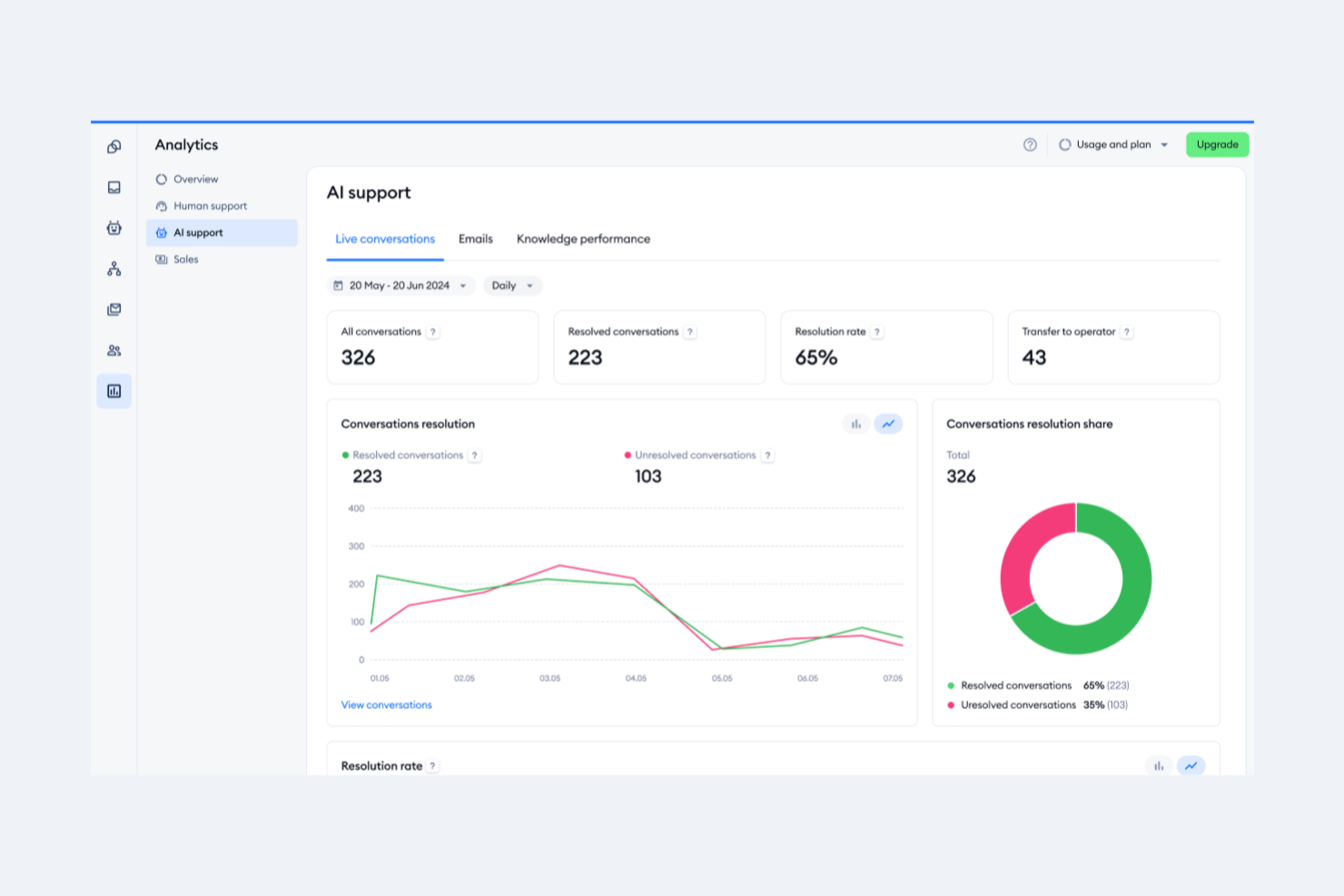
Tidio está dirigido a empresas que buscan elevar su servicio de atención al cliente automatizando tareas repetitivas y mejorando la calidad de las interacciones. Con herramientas como el agente Lyro AI, gestiona consultas rutinarias, permitiendo que tu equipo se enfoque en conversaciones más significativas. Las funciones de chat en vivo y mesa de ayuda de Tidio garantizan que tus procesos de soporte sean fluidos, ayudándote a mantener una alta satisfacción del cliente.
Por qué elegí Tidio
Elegí Tidio por su destacado soporte al cliente con IA multilingüe, esencial para empresas que desean comunicarse a través de diversos paisajes lingüísticos. El chatbot de IA de Tidio, Lyro, traduce y responde en varios idiomas, asegurando que tu equipo pueda interactuar con clientes de diferentes regiones sin barreras idiomáticas. La función de traducción en tiempo real, junto con los widgets de chat personalizables, permite una comunicación fluida, atendiendo a una base global de clientes. Estas capacidades mejoran la satisfacción del cliente y los procesos de soporte, haciendo de Tidio una opción confiable para empresas que buscan soluciones integrales de soporte multilingüe.
Funciones clave de Tidio
Además de sus capacidades multilingües, Tidio ofrece una variedad de funciones que mejoran la experiencia de atención al cliente.
- Chat en Vivo: Interactúa con tus clientes en tiempo real utilizando widgets de chat personalizables que se pueden adaptar a la estética y preferencias de tu marca.
- Sistema de Tickets: Gestiona eficientemente las consultas de los clientes convirtiendo correos y mensajes en tickets, asegurando que ninguna pregunta quede sin respuesta.
- Flujos de Trabajo Automatizados: Configura respuestas y acciones automatizadas para preguntas frecuentes y tareas rutinarias, liberando el tiempo de tu equipo para abordar asuntos más complejos.
- Integración con Plataformas de Comercio Electrónico: Conéctate fácilmente con plataformas como Shopify para gestionar pedidos directamente desde la interfaz de chat, proporcionando un proceso de soporte integrado para tu tienda en línea.
Integraciones de Tidio
Las integraciones incluyen Shopify, WordPress, HubSpot, Squarespace, Jimdo, Webydo, Drupal, Shift4Shop, Site123 y Salesforce.
Pros and Cons
Pros:
- El chatbot de IA soporta 12 idiomas
- Soporta email, chat, Messenger, Instagram y WhatsApp
- Los flujos de trabajo automatizados reducen tareas repetitivas para los equipos de soporte
Cons:
- Problemas de estabilidad en la aplicación móvil afectan el soporte en movimiento
- Sin análisis de flujo detallados para chatbots

Ideal por su interfaz fácil de usar y personalizable
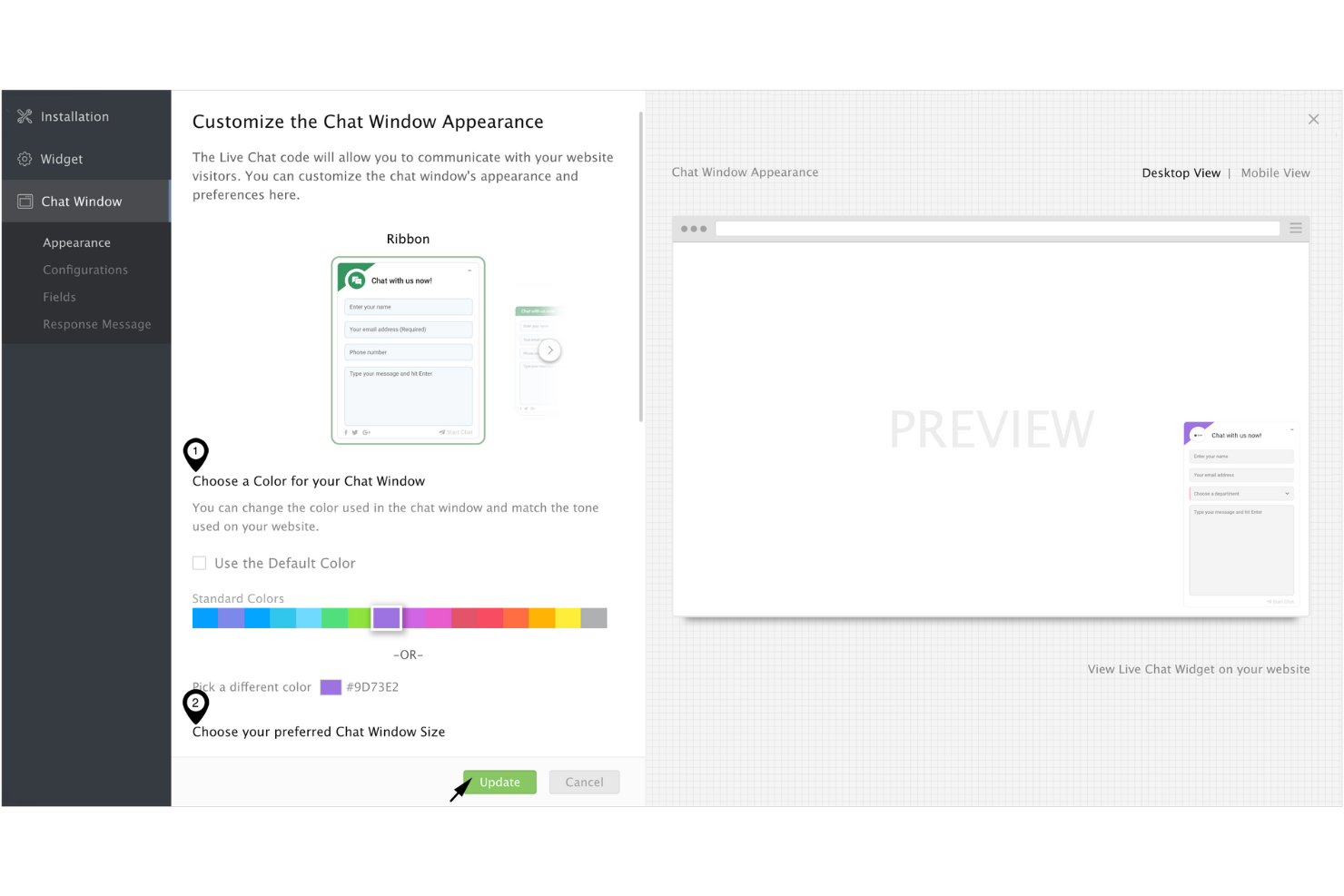
Cuando buscas mejorar tu servicio de atención al cliente, Zoho SalesIQ ofrece una solución personalizada que se adapta perfectamente a tus necesidades. Esta plataforma está diseñada para empresas que desean optimizar sus interacciones con los clientes, proporcionando herramientas como chat en vivo y seguimiento de visitantes para facilitar un compromiso proactivo. Al priorizar la privacidad del usuario y garantizar la seguridad de los datos, Zoho SalesIQ permite que tu equipo conecte con los clientes sin comprometer su confianza.
Por qué elegí Zoho SalesIQ
Elegí Zoho SalesIQ por su interfaz fácil de usar y personalizable, lo que la convierte en una opción atractiva para software de soporte al cliente. La plataforma permite adaptar funciones como chat en vivo y capacidades de chatbot a las necesidades específicas de tu negocio, asegurando una experiencia intuitiva tanto para tu equipo como para los clientes. Su integración con varios sistemas, como Zoho CRM, personaliza aún más las interacciones ofreciendo información enriquecida y comunicación fluida. Además, el compromiso de Zoho SalesIQ con la privacidad de los usuarios, empleando sus propias herramientas de seguimiento para proteger los datos de los clientes, genera confianza y confiabilidad en tus operaciones de soporte.
Funciones clave de Zoho SalesIQ
Además de su interfaz personalizable, Zoho SalesIQ ofrece una variedad de funciones que potencian tu capacidad de soporte al cliente.
- Seguimiento de visitantes en tiempo real: Esta función te permite monitorear y analizar la actividad de los visitantes en tu sitio web, brindando información útil para adaptar tus interacciones de soporte.
- Puntuación automática de clientes potenciales: Zoho SalesIQ clasifica automáticamente los leads según su comportamiento y nivel de interacción, permitiendo que tu equipo priorice los seguimientos de manera más eficaz.
- Creador de chatbots sin código: Esta herramienta te permite crear chatbots sin necesidad de programar, ofreciendo soporte 24/7 y gestionando consultas frecuentes con facilidad.
- Integración multicanal: Puedes conectar con los clientes a través de diversas plataformas como WhatsApp e Instagram, asegurando una comunicación fluida a través de diferentes canales.
Integraciones de Zoho SalesIQ
Las integraciones incluyen WordPress, GoDaddy, Zoho CRM, Zoho Desk, OpenAI, Zendesk, Mailchimp y Salesforce.
Pros and Cons
Pros:
- El seguimiento efectivo de visitantes mejora el compromiso del cliente
- Widgets de chat personalizables permiten experiencias adaptadas al usuario
- Llamadas gratuitas dentro de la aplicación para una atención rápida
Cons:
- Algunos usuarios encuentran limitadas las funciones del chatbot
- Las notificaciones en la aplicación móvil pueden ser poco fiables

Ideal para crear experiencias personalizadas con IA

Salesforce Service Cloud está dirigido a empresas que buscan elevar las interacciones con los clientes y optimizar las tareas de soporte. Al proporcionar herramientas para gestionar casos y atender múltiples canales de comunicación, resulta atractivo para industrias que dan valor a experiencias personalizadas con el cliente. Las perspectivas impulsadas por IA de la plataforma ayudan a tu equipo a reducir los tiempos de respuesta y mejorar la eficiencia del servicio, abordando desafíos comunes en el soporte al cliente.
Por qué elegí Salesforce Service Cloud
Elegí Salesforce Service Cloud por su capacidad de crear experiencias personalizadas usando IA, lo que es fundamental para empresas que desean mejorar el soporte al cliente. Con recomendaciones inteligentes y perspectivas basadas en IA, tu equipo puede ofrecer interacciones a medida que resuenan con los clientes y responden a sus necesidades específicas. Características como Einstein Bots automatizan conversaciones rutinarias, permitiendo que tu equipo se concentre en asuntos más complejos, mientras que la analítica predictiva proporciona información valiosa sobre el comportamiento del cliente. Estas herramientas no solo personalizan el recorrido del cliente, sino que también aumentan la eficiencia, haciendo de Salesforce Service Cloud una opción destacada para quienes buscan potenciar su atención al cliente.
Funciones clave de Salesforce Service Cloud
Además de crear experiencias personalizadas con IA, Salesforce Service Cloud ofrece varias funciones clave que mejoran la capacidad de soporte al cliente:
- Enrutamiento omni-canal: Esta función dirige las consultas de los clientes a los agentes más adecuados a través de diferentes canales, asegurando gestión eficiente y respuestas rápidas.
- Consola de servicio: Proporciona una interfaz unificada para los agentes, permitiéndoles gestionar interacciones con clientes de manera fluida y acceder a toda la información necesaria en un solo lugar.
- Base de conocimientos: Actúa como un repositorio centralizado de artículos y preguntas frecuentes, permitiendo a los clientes encontrar respuestas de manera autónoma y reduciendo el volumen de tickets de soporte.
- Integración con redes sociales: Permite que tu equipo interactúe con clientes a través de canales sociales, mejorando el compromiso y ampliando el alcance del soporte.
Integraciones de Salesforce Service Cloud
Las integraciones incluyen Service Cloud Voice, Data Cloud, Slack, Jira, LinkedIn, QuickBooks, MailChimp, Dropbox, Google Workspace y DocuSign.
Pros and Cons
Pros:
- Interfaz fácil de usar con paneles de control personalizables
- Ofrece una visión integral de los problemas del cliente y la gestión de casos
- Comunidad sólida y abundantes recursos de aprendizaje para soporte
Cons:
- Desafíos de personalización debido a la restricción de la función Omni
- No cuenta con asignación sencilla de casos en turnos, requiere codificación compleja
New Product Updates from Agentforce Service (formerly Service Cloud)
Agentforce Service Keeps Full Agentforce Voice Transcripts After Calls
Agentforce Service now shows the full conversation history in post-call transcripts for Agentforce Voice calls within the Service Console, giving agents better context for follow-ups. For more information, visit Salesforce’s official site.
 .
.

Weav es una plataforma de soporte al cliente impulsada por IA que combina agentes de IA, una bandeja de entrada compartida, chatbots y herramientas de formación de conocimientos para gestionar y resolver tickets de clientes con una intervención humana mínima.
¿Para quién es mejor Weav?
Weav es ideal para equipos de comercio electrónico y SaaS pequeños y medianos que desean automatizar un alto volumen de tickets de soporte sin aumentar el número de agentes de soporte.
Por qué elegí Weav
Elegí Weav como uno de los mejores por la forma en que utiliza los informes y el aprendizaje continuo de conversaciones para detectar patrones en las interacciones con los clientes. El módulo de informes de Weav hace seguimiento de los resultados de cada ticket resuelto, y su IA analiza continuamente esas interacciones para mejorar sus respuestas. Eso significa que tu equipo obtiene una visión continua de lo que preguntan los clientes, dónde tienen éxito las resoluciones y dónde existen brechas, directamente a partir de datos reales de conversaciones.
Características clave de Weav
- Agentes de IA: Despliega agentes de IA entrenados con el conocimiento de tu producto para resolver automáticamente los tickets de clientes entrantes sin intervención humana.
- Bandeja de entrada unificada: Administra todas las conversaciones con clientes en una sola bandeja de entrada compartida donde los agentes de IA y humanos trabajan juntos en el mismo hilo.
- Formación de conocimientos: Entrena la IA de Weav con un clic señalando tu sitio web, documentos de ayuda o archivos cargados.
- Reglas de escalado: Establece condiciones que deriven automáticamente los tickets no resueltos de la IA al agente humano adecuado.
Integraciones de Weav
Weav ofrece un conjunto más restringido de integraciones nativas, incluyendo Shopify, Google Drive y Stripe. También soporta acciones personalizadas, y su API REST y webhooks en tiempo real están disponibles en los planes Pro y superiores para desarrollar integraciones personalizadas.
Pros and Cons
Pros:
- Fuentes verificadas mostradas junto a las respuestas
- La sincronización con el sitio web entrena a los agentes automáticamente
- Controles de tono y respuesta por agente
Cons:
- Pocas integraciones nativas de terceros
- El plan gratuito limita la IA a 20 mensajes

Custify
Mejor para empresas SaaS
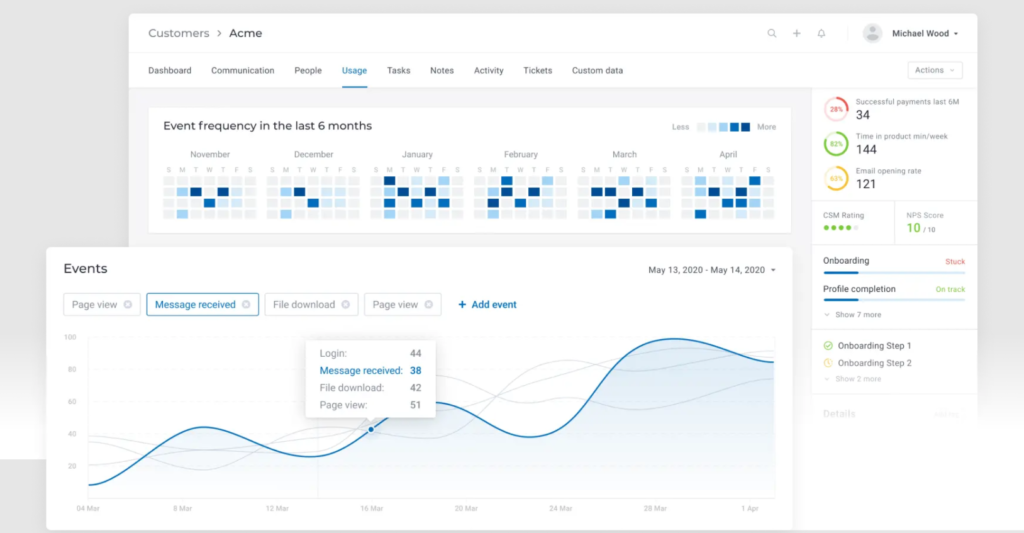
Para quienes buscan una solución de soporte al cliente adaptada a las necesidades únicas de las empresas SaaS, Custify se destaca como un socio invaluable en su objetivo de optimizar la participación y retención de clientes. Diseñado para centralizar los datos de los clientes y agilizar los flujos de trabajo, Custify ofrece información procesable que permite a su equipo centrarse en interacciones de alto valor en lugar de atascarse con procesos manuales. Ya sea que busque mejorar la adopción del producto o identificar oportunidades de venta adicional, la plataforma basada en datos de Custify convierte el éxito del cliente en una ventaja estratégica, ayudándole a transformar clientes satisfechos en defensores de por vida.
Por qué elegí Custify
Elegí Custify porque sobresale al abordar las necesidades específicas de las empresas SaaS, especialmente en el ámbito del soporte al cliente. La función Customer 360 de Custify proporciona una vista integral de los datos del cliente, permitiéndole monitorear la adopción del producto y los ciclos de vida de los clientes. Sus capacidades de automatización agilizan las operaciones diarias, liberando a su equipo de tareas manuales y permitiéndoles centrarse en interacciones de alto valor con los clientes. Al identificar oportunidades de venta adicional y brindar soporte proactivo a través de tareas y alertas, Custify empodera a su equipo para aumentar la participación del cliente y reducir la deserción, convirtiéndolo en un activo estratégico para cualquier empresa SaaS.
Funciones clave de Custify
Además de su fuerte enfoque en empresas SaaS, Custify ofrece una gama de funciones que potencian las capacidades de soporte al cliente:
- Puntuación de Salud del Cliente: Monitorea la salud del cliente en tiempo real utilizando diversas métricas, lo que permite a su equipo abordar de forma proactiva posibles problemas antes de que se produzcan bajas.
- Mapeo del Viaje del Cliente: Visualiza las interacciones con los clientes, permitiéndole identificar puntos de contacto clave y optimizar las estrategias de participación.
- Informes y Analítica: Proporciona información integral sobre métricas de éxito del cliente, ayudando a su equipo a tomar decisiones informadas y basadas en datos.
- Segmentación de Clientes: Permite adaptar la comunicación y los esfuerzos de soporte según criterios específicos de los clientes, mejorando la eficacia de sus acciones de contacto.
Integraciones de Custify
Las integraciones incluyen Salesforce, Intercom, HubSpot, Freshdesk, Stripe, Help Scout, Recurly, Zendesk Support, Microsoft Teams y Slack.
Pros and Cons
Pros:
- Centraliza la información para mejorar los conocimientos y las comunicaciones con el cliente
- Mejora significativamente la participación del cliente y los flujos operativos
- Proporciona información clara sobre oportunidades de venta adicional, aumentando los ingresos
Cons:
- Algunos usuarios experimentan problemas ocasionales de sincronización de datos
- Soporte limitado para modelos de negocio que no sean SaaS
Otros Software de Atención al Cliente que Vale la Pena Considerar
Aquí te presento algunas opciones adicionales de software de gestión de atención al cliente que no entraron en mi lista principal, pero que aún vale la pena analizar con detenimiento:
- Groove
Ideal para integraciones
- Front
Mejor para la automatización de flujos de trabajo entre equipos
- HappyFox
Ideal para la interacción con el cliente en tiempo real
- UseResponse
Ideal para comunicación centralizada
- Kustomer
La mejor opción para la seguridad de los datos de los clientes
- Issuetrak
Mejor para envíos de tickets multicanal
- Guru
Mejor para sugerencias de base de conocimientos impulsadas por IA
- Front
Ideal para la gestión de correos electrónicos en equipo
- SAAS First
Ideal para soporte omnicanal
- Hiver
Ideal para interacciones con clientes impulsadas por IA
- LiveAgent
Ideal para la gestión de tickets
- Zendesk
Ideal para automatización de tickets con IA
- Zoho Assist
Ideal para brindar soporte de acceso remoto
- OneDesk
Mejor para soluciones integradas de mesa de ayuda
- SparrowDesk
Ideal para bandeja de entrada omnicanal


Cómo Evalúo el Software de Atención al Cliente
Divido mi evaluación en criterios básicos—como la gestión omnicanal de tickets y la automatización de flujos de trabajo—y diferenciadores que revelan qué tan bien una herramienta se ajusta al modelo real de soporte de tu equipo.
Funcionalidad Principal (Requisitos Indispensables para Esta Lista)
Cuando selecciono herramientas para mi lista, califico cada una en una escala del 0 (no ofrece la funcionalidad) al 5 (sobresale en esta área) para cada funcionalidad principal mencionada a continuación. Después, convierto la puntuación total de la herramienta en un porcentaje. Cada herramienta debe alcanzar una puntuación mínima total del 75% para ser considerada.
- Gestión de Tickets: Evalúo cómo cada herramienta gestiona el ciclo completo de un ticket—creación, asignación, priorización, fusión y resolución—a través de colas de soporte reales con diferentes niveles de complejidad.
- Soporte Omnicanal: Toda la plataforma debe unificar correo electrónico, chat, teléfono, redes sociales y canales de mensajería para que los agentes no tengan que alternar entre paneles desconectados para ayudar a un solo cliente.
- Base de Conocimientos y Autoservicio: Busco centros de ayuda orientados al cliente con categorización de artículos, búsqueda y circuitos de retroalimentación que realmente reduzcan el volumen de tickets entrantes.
- Automatización y Flujos de Trabajo: Las reglas de enrutamiento, los disparadores de SLA y los caminos de escalamiento son aspectos clave aquí—verifico si los equipos pueden crear flujos de trabajo como la asignación automática de tickets de facturación a una cola especializada.
- Informes y Analítica: Los paneles de control deben mostrar indicadores clave de soporte como el tiempo de primera respuesta, tiempo de resolución, puntuaciones de CSAT y carga de trabajo de los agentes sin necesidad de exportaciones manuales o soluciones alternativas.
- Colaboración y Herramientas para Agentes: Analizo cómo colaboran los agentes en problemas complejos—funciones como notas internas, detección de colisiones y conversaciones paralelas entre equipos de soporte y de producto.
Una vez que tengo una lista de herramientas que cumplen con este criterio, considero qué hace que cada plataforma sea diferente.
Factores Diferenciadores (Qué Distingue a los Proveedores)
Así es como comparo y contrasto los diferentes proveedores:
Características Destacadas
La asistencia impulsada por IA es un gran diferenciador—reviso si una herramienta puede redactar respuestas, resumir hilos largos de tickets o sugerir artículos relevantes de la base de conocimientos a los agentes en medio de una conversación. Un panel de contexto del cliente es igual de importante, ya que los agentes que manejan una devolución o una disputa de facturación necesitan ver el historial de pedidos y las interacciones previas sin cambiar de pestaña. También evalúo los constructores de chatbots sin código, que permiten a los equipos desviar preguntas frecuentes como restablecimiento de contraseñas o consultas sobre envíos antes de que lleguen a un agente.
Más Allá de las Características
La profundidad de integración es una de las primeras cosas que reviso—tu herramienta de soporte debe conectarse con tu CRM, plataforma de comercio electrónico y herramientas internas de comunicación como Slack o Microsoft Teams. La seguridad y el cumplimiento también tienen un peso importante, especialmente para equipos que manejan datos sensibles, donde la preparación para SOC 2, GDPR o HIPAA puede determinar la idoneidad de un proveedor. Además, evalúo qué tan bien cada plataforma se ajusta a estructuras de equipo específicas, ya sea un equipo SaaS B2B que gestiona escaladas o una operación de comercio electrónico de alto volumen que procesa cientos de tickets diarios.
¿Qué es el Software de Atención al Cliente?
El software de atención al cliente es una plataforma que ayuda a las empresas a rastrear, gestionar y resolver consultas de clientes a través de múltiples canales. Mejora la eficiencia y coherencia en las respuestas, y se utiliza para optimizar la gestión de tickets, facilitar el autoservicio y mejorar la experiencia global del cliente.
Cómo Elegir un Software de Atención al Cliente
Es fácil perderse en largas listas de funciones y estructuras de precios complejas. Para ayudarte a mantener el enfoque mientras avanzas en tu proceso de selección, aquí tienes una lista de factores que debes tener en cuenta:
| Factor | Qué tener en cuenta |
|---|---|
| Escalabilidad | Asegúrate de que el software pueda crecer con tu empresa. Busca soluciones que manejen un mayor volumen de tickets y soporten más usuarios sin pérdida de rendimiento. |
| Integraciones | Revisa la compatibilidad con herramientas existentes como sistemas CRM, plataformas de correo electrónico y canales de redes sociales. Una integración fluida puede mejorar la eficiencia y el flujo de datos. |
| Personalización | Elige un software que te permita adaptar flujos de trabajo, paneles e informes a las necesidades y preferencias específicas de tu equipo. |
| Facilidad de uso | Dale prioridad a las interfaces intuitivas que requieran una formación mínima. Tu equipo debería ser capaz de navegar y realizar tareas rápidamente. |
| Presupuesto | Considera el costo total, incluidos los gastos de implementación y las tarifas periódicas. Asegúrate de que el software ofrezca las funciones necesarias dentro de tus límites financieros. |
| Medidas de seguridad | Busca medidas de seguridad sólidas, como cifrado de datos y cumplimiento de normativas como GDPR. Protege los datos de tus clientes y mantiene la confianza. |
Tendencias Futuras en el Software de Atención al Cliente
En mi investigación, consulté infinidad de actualizaciones de productos, comunicados de prensa y registros de lanzamientos de diferentes proveedores de software de atención al cliente. Aquí tienes algunas de las tendencias emergentes en las que estoy poniendo atención:
- IA y automatización en el servicio al cliente: Las empresas están aprovechando la inteligencia artificial para analizar interacciones con clientes y predecir tendencias. Esto ayuda a los equipos a entender mejor las necesidades de los clientes y tomar decisiones basadas en datos. Proveedores como Zendesk utilizan IA para ofrecer información accionable a partir de los datos de soporte.
- Soporte omnicanal: Cada vez más empresas buscan interactuar con los clientes a través de diversos canales de manera unificada. Esta tendencia facilita transiciones más fluidas entre plataformas y proporciona experiencias consistentes. Freshdesk ofrece una experiencia omnicanal robusta.
- Opciones de autoservicio: Los clientes prefieren cada vez más resolver sus problemas por sí mismos. Ahora las herramientas incluyen extensas bases de conocimientos y foros comunitarios para satisfacer esta demanda. Zoho Desk potencia el autoservicio con artículos detallados de ayuda.
- Personalización de experiencias del cliente: Adaptar las interacciones de soporte a las preferencias individuales de cada cliente se está volviendo fundamental. La personalización puede incrementar la satisfacción y la lealtad. Herramientas como Salesforce Service Cloud utilizan los datos para personalizar las experiencias.
- Herramientas para soporte remoto: Con más equipos trabajando a distancia, las herramientas que facilitan la solución y el soporte remoto están creciendo. Funcionalidades como compartir pantalla y acceso remoto son cada vez más esenciales. Zoho Assist se especializa en soluciones de soporte remoto.
Características del software de soporte al cliente
Al seleccionar un software de soporte al cliente, presta atención a las siguientes características clave:
- Gestión de tickets: Gestiona las consultas de los clientes creando, organizando y haciendo seguimiento de solicitudes de soporte. Obtienes una forma estructurada de seguir cada incidencia de principio a fin, asegurando que nada se pase por alto.
- Soporte multicanal: Brinda ayuda a través de canales como correo electrónico, chat, redes sociales y teléfono. Puedes conectar con los clientes donde ya se encuentran y centralizar las conversaciones en un solo lugar.
- Gestión de bases de conocimiento: Crea y administra una biblioteca de artículos de ayuda y preguntas frecuentes. Esto empodera a los clientes para resolver sus problemas de forma autónoma y reduce los tickets repetitivos para tu equipo.
- Herramientas de automatización: Utiliza reglas y disparadores para asignar tickets automáticamente, enviar respuestas o escalar casos urgentes. Esto te ahorra tiempo en tareas repetitivas y mantiene el soporte funcionando sin problemas incluso en los momentos de alta demanda.
- Informes y analítica: Haz seguimiento de métricas clave como tiempos de respuesta, volumen de tickets y satisfacción del cliente. Estos datos te ayudan a identificar tendencias y mejorar tus procesos de soporte sobre la base de información real.
- Funciones de colaboración: Permite la colaboración de tu equipo en tickets complejos mediante notas internas, etiquetado o bandejas de entrada compartidas. Así todos están informados y los clientes no reciben mensajes confusos.
- Capacidades de integración: Conecta el software con tu CRM, plataforma de e-commerce u otras herramientas que ya uses. Esto te permite acceder rápidamente a información relevante sobre los clientes y trabajar de manera más eficiente.
- Portales de autoservicio: Brinda a los clientes un espacio donde pueden ver sus tickets, consultar el estado o acceder a recursos de ayuda. Esto aligera la carga de tu equipo y ofrece una experiencia de soporte más amigable para los usuarios.
- Gestión de SLA: Define, controla y aplica acuerdos de nivel de servicio. Así cumples con los compromisos de tiempos de respuesta o resolución sin depender de la memoria o notas adhesivas.
- Opciones de personalización: Adapta formularios, flujos de trabajo y paneles a las necesidades específicas de tu negocio. No tienes que conformarte con un sistema genérico: hazlo realmente tuyo.
Funciones comunes de IA en el software de soporte al cliente
Además de las funciones estándar mencionadas arriba, muchas soluciones están incorporando IA con características como:
- Chatbots impulsados por IA: Responden al instante a preguntas frecuentes y realizan tareas rutinarias, liberando a tu equipo para incidencias más complejas. Estos bots emplean procesamiento de lenguaje natural para comprender y dialogar como lo haría una persona.
- Clasificación automática de tickets: Clasifican al instante los nuevos tickets por tema, urgencia o sentimiento. La inteligencia artificial analiza el contexto del mensaje y dirige cada solicitud al agente o equipo más adecuado, sin necesidad de clasificación manual.
- Análisis predictivo: Pronostican tendencias de soporte y necesidades del cliente antes de que se agraven. La IA analiza patrones de soporte para que puedas planificar recursos de forma proactiva y detectar problemas de manera anticipada.
- Análisis de sentimiento: Evalúa automáticamente el tono emocional tras los mensajes de los clientes. Así puedes priorizar conversaciones de usuarios frustrados y resolver problemas antes de que se intensifiquen.
- Sugerencias asistidas por IA para la base de conocimiento: Recomienda en tiempo real artículos útiles a clientes o agentes según el contenido de cada ticket. Esto reduce el tiempo de resolución y mantiene la satisfacción tanto de usuarios como de agentes.
- Generación automática de respuestas: Redacta respuestas sugeridas para los agentes utilizando aprendizaje automático. Puedes revisarlas, editarlas y enviarlas más rápido, asegurando un tono y calidad consistentes en cada interacción.
Beneficios del software de soporte al cliente
Implementar un software de soporte al cliente aporta varios beneficios para tu equipo y tu empresa. Aquí tienes algunos de los que puedes disfrutar:
- Tiempos de respuesta más rápidos: Las funciones de comunicación en tiempo real, como el chat en vivo, ayudan a tu equipo a atender las consultas de los clientes rápidamente.
- Mayor satisfacción del cliente: Los portales de autoservicio y los análisis impulsados por IA permiten a los usuarios encontrar respuestas fácilmente y recibir atención personalizada.
- Mayor eficiencia en los recursos: Las automatizaciones en soporte al cliente se encargan de tareas repetitivas, permitiendo a tu equipo centrarse en necesidades más complejas de los clientes.
- Experiencia del cliente consistente: Las herramientas de soporte omnicanal aseguran que los clientes reciban el mismo nivel de servicio en todas las plataformas.
- Mejor aprovechamiento de los datos: Las capacidades de integración se conectan con los sistemas existentes, posibilitando la toma de decisiones más informada mediante el acceso a datos completos.
- Aumento de la productividad del equipo: Los flujos de trabajo personalizables y la gestión de tickets ayudan a organizar y priorizar las tareas de manera efectiva.
- Comunicación y colaboración mejoradas: Facilita que tu equipo de experiencia del cliente trabaje unido y apoye a los clientes de forma eficiente.
- Escalabilidad para el crecimiento: Las soluciones de software pueden crecer con tu empresa, gestionando un mayor número de interacciones conforme el equipo se expande.
Costos y precios del software de soporte al cliente
Seleccionar un software de soporte al cliente requiere comprender los diferentes modelos y planes de precios disponibles. Los costes varían en función de las características, el tamaño del equipo, los complementos y más. La siguiente tabla resume los planes habituales, sus precios promedio y las funciones típicas incluidas en las soluciones de software de soporte al cliente:
Tabla comparativa de planes para software de soporte al cliente
| Tipo de plan | Precio promedio | Funciones comunes |
|---|---|---|
| Plan gratuito | $0 | Gestión básica de tickets, soporte por correo electrónico y reportes limitados. |
| Plan personal | $5-$25/user/month | Soporte por correo electrónico, reportes básicos e integraciones limitadas. |
| Plan empresarial | $30-$60/user/month | Soporte multicanal, reportes avanzados, herramientas de automatización y flujos de trabajo personalizables. |
| Plan corporativo | $70-$150/user/month | Conjunto completo de funciones, seguridad avanzada, soporte dedicado e integraciones ilimitadas. |
Preguntas Frecuentes sobre el Software de Soporte al Cliente
Si tienes preguntas pendientes sobre el software de soporte al cliente, no te preocupes. Aquí tienes algunas respuestas a preguntas frecuentes que deberían ayudarte a aclarar tus dudas.
¿Cómo pueden la IA y la automatización mejorar el servicio al cliente?
La IA y la automatización pueden agilizar el servicio al cliente dirigiendo tickets, respondiendo automáticamente a preguntas comunes y proporcionando recursos de autoservicio instantáneos. Puedes utilizar chatbots para responder preguntas frecuentes, configurar flujos de trabajo automáticos para tareas repetitivas y emplear IA para sugerir soluciones relevantes a los agentes. Esto no solo reduce el tiempo de respuesta, sino que también libera a tu equipo para que pueda atender casos más complejos, mejorando la satisfacción del cliente y la productividad de los agentes.
¿Qué funciones de colaboración en equipo incluyen los softwares de atención al cliente?
La mayoría de las plataformas de soporte al cliente permiten asignar tickets, compartir notas internas y mencionar (@mention) a colegas para obtener respuestas rápidas. Algunas herramientas ofrecen bandejas de entrada compartidas, chat en tiempo real y detección de colisiones para evitar trabajos duplicados. Busca funciones como compartir archivos, hilos de discusión y listas de tareas para que todos estén sincronizados y para resolver más rápido los problemas de los clientes.
¿Cómo puedo elegir el mejor software de soporte al cliente para mi organización?
Empieza por enumerar las funciones imprescindibles y las plataformas que ya utiliza tu equipo. Da prioridad a las herramientas que se adapten a tu volumen de soporte, que se integren bien con tu CRM o aplicaciones de comunicación existentes, y que ofrezcan personalización para tus flujos de trabajo únicos. Es recomendable probar demostraciones o versiones de prueba gratuitas para comprobar si la interfaz es fácil para agentes y administradores. Considera el soporte del proveedor, los informes y la fiabilidad para asegurarte de que el software pueda crecer junto con tu equipo.
¿Qué integraciones debo buscar en un software de soporte al cliente para mi equipo?
Debes buscar integraciones con tu CRM, aplicaciones de chat en vivo/mensajería, mesa de ayuda, base de conocimientos y herramientas de gestión de personal. Conectar el software de soporte al cliente con el correo electrónico, centro de llamadas y plataformas de análisis ahorra tiempo a tu equipo y asegura una visión completa de cada cliente. Prioriza el software que ofrezca buenas opciones de API para que puedas automatizar tareas y mantener tus sistemas sincronizados a medida que cambian tus necesidades.
¿Cómo puede el software de soporte al cliente ayudar con la incorporación y capacitación de agentes?
Muchas plataformas incluyen bases de conocimientos integradas, flujos de trabajo guiados y sugerencias de scripts para ayudar a los nuevos agentes a aprender rápidamente. Puedes asignar módulos de capacitación o utilizar notas internas para compartir mejores prácticas directamente en la vista del ticket. Las herramientas de informes ayudan a los gerentes a identificar oportunidades de coaching y monitorear el progreso, facilitando el desarrollo continuo y eficaz de los agentes.
¿Qué métricas debería monitorizar con el software de soporte al cliente?
Obtendrás el mayor valor siguiendo el tiempo de primera respuesta, tiempo de resolución de tickets, satisfacción del cliente (CSAT) y productividad de los agentes. Observar tendencias en el volumen de tickets, acumulaciones y tasas de escalamiento te permite identificar problemas a tiempo. Utiliza los informes integrados para detectar patrones e identificar áreas de capacitación o mejora de flujos de trabajo, ayudando a tu equipo a ofrecer un excelente servicio a gran escala.
¿Existen softwares de soporte al cliente gratuitos?
Sí, algunos proveedores de software de soporte al cliente ofrecen u003ca href=u0022https://thecxlead.com/tools/best-free-customer-service-software/u0022u003eplanes gratuitosu003c/au003e, también conocidos como planes freemium. Sin embargo, estos planes generalmente se consideran una introducción para que pruebes lo que el software ofrece, con la intención de que te suscribas a un plan de pago para acceder a funciones más avanzadas.
Otros tipos de software de soporte
Este artículo presenta opciones de software de soporte al cliente general y multipropósito, cada una con sus distintas fortalezas y debilidades. Sin embargo, también tenemos artículos en todo el sitio que profundizan en un tipo particular de software de atención al cliente. Si buscas algo más específico, estos pueden servirte de ayuda.
- Software de gestión de la experiencia del cliente
- Automatización del servicio al cliente
- Software de chat de servicio al cliente para pequeñas empresas
- Software de gestión de correos electrónicos para servicio al cliente
- Software de tickets para servicio al cliente
- Software de base de datos de clientes
- Software de servicio al cliente en redes sociales
¿Qué opinas sobre estas herramientas de servicio al cliente?
Espero que mi reseña te haya ayudado a conocer mejor la emocionante y amplia variedad de plataformas de soporte al cliente que existen. No hay una única herramienta "mejor", ya que realmente depende de los miembros de tu equipo de soporte al cliente y el modelo de tu negocio. Pero espero haber arrojado luz sobre los diferentes softwares de soporte a los que puedes recurrir para tomar la decisión más informada para tu empresa.
Puedes suscribirte al boletín de The CX Lead para mantenerte al día de todas las tendencias y novedades en experiencia del cliente de la mano de los principales expertos del sector.