10 meilleurs agents conversationnels pour le service client en ligne en 2026

10 Meilleurs chatbots pour le service client : sélection


Les chatbots pour le service client peuvent alléger la pression exercée sur les équipes d’assistance en répondant aux questions courantes, en traitant les demandes habituelles et en fournissant aux clients une assistance plus rapide, 24 heures sur 24. Mais le bon outil doit réduire la charge de travail des agents, et non créer davantage d’escalades à gérer.
Fort de plus de deux décennies d’expérience dans la création de plateformes technologiques et la direction d’opérations liées à l’IA, j’ai évalué les meilleurs chatbots pour le service client afin d’identifier les outils qui améliorent réellement l’assistance offerte aux clients et aux agents.
Pourquoi faire confiance à nos recommandations de logiciels
Notre équipe teste et évalue des logiciels depuis 2012. En tant que leaders CX nous-mêmes, nous savons à quel point il est difficile — et important — de choisir le bon logiciel.
Pour ce guide, nous avons évalué les outils grâce à des tests pratiques et une recherche indépendante, en notant les outils selon nos critères de sélection.
Nos avis reflètent notre jugement éditorial humain, et non un argumentaire de vente.
Résumé des meilleurs chatbots pour le service client
Ce tableau comparatif résume les informations tarifaires de ma sélection des meilleurs chatbots pour le service client afin de vous aider à trouver celui qui convient le mieux à votre budget et aux besoins de votre entreprise.
| Tool | Best For | Trial Info | Price | ||
|---|---|---|---|---|---|
| 1 | Idéal pour l'automatisation par IA dans les secteurs réglementés | Essai gratuit de 30 jours | À partir de 31 $/agent/mois (facturé annuellement) | Website | |
| 2 | Idéal pour l’accompagnement et les conseils aux agents en temps réel | Démo gratuite disponible | Tarification sur demande | Website | |
| 3 | Idéal pour l'intégration aux logiciels de support existants | Essai gratuit de 30 jours | À partir de $199/mois | Website | |
| 4 | Idéal pour les services financiers réglementés | Démo gratuite disponible | Tarification sur demande | Website | |
| 5 | Idéal pour la résolution de cas avec IA multi-agents | Version gratuite disponible | Tarification sur demande | Website | |
| 6 | Idéal pour un support e-commerce 24/7 | Essai gratuit de 14 jours | À partir de $39/agent/mois | Website | |
| 7 | Idéal pour combiner IA et support humain | Essai gratuit disponible | À partir de $25/utilisateur/mois (facturé annuellement) | Website | |
| 8 | Idéal pour le support multilingue | Démo gratuite + essai gratuit de 14 jours disponibles | À partir de 19 $/utilisateur/mois (facturé annuellement) | Website | |
| 9 | Idéal pour les agents IA personnalisables | Essai gratuit de 14 jours | À partir de $19/utilisateur/mois (facturé annuellement) | Website | |
| 10 | Idéal pour gérer les demandes client complexes | Offre gratuite disponible | À partir de 32 $/mois (facturation annuelle) | Website |


Avis sur les meilleurs chatbots pour le service client
Vous trouverez ci-dessous mes résumés détaillés des meilleurs chatbots pour le service client retenus dans ma sélection. Mes avis présentent en détail les principales fonctionnalités, les avantages et les inconvénients, les intégrations et les cas d’utilisation idéaux de chaque outil afin de vous aider à trouver celui qui vous convient le mieux.

Comm100
Idéal pour l'automatisation par IA dans les secteurs réglementés
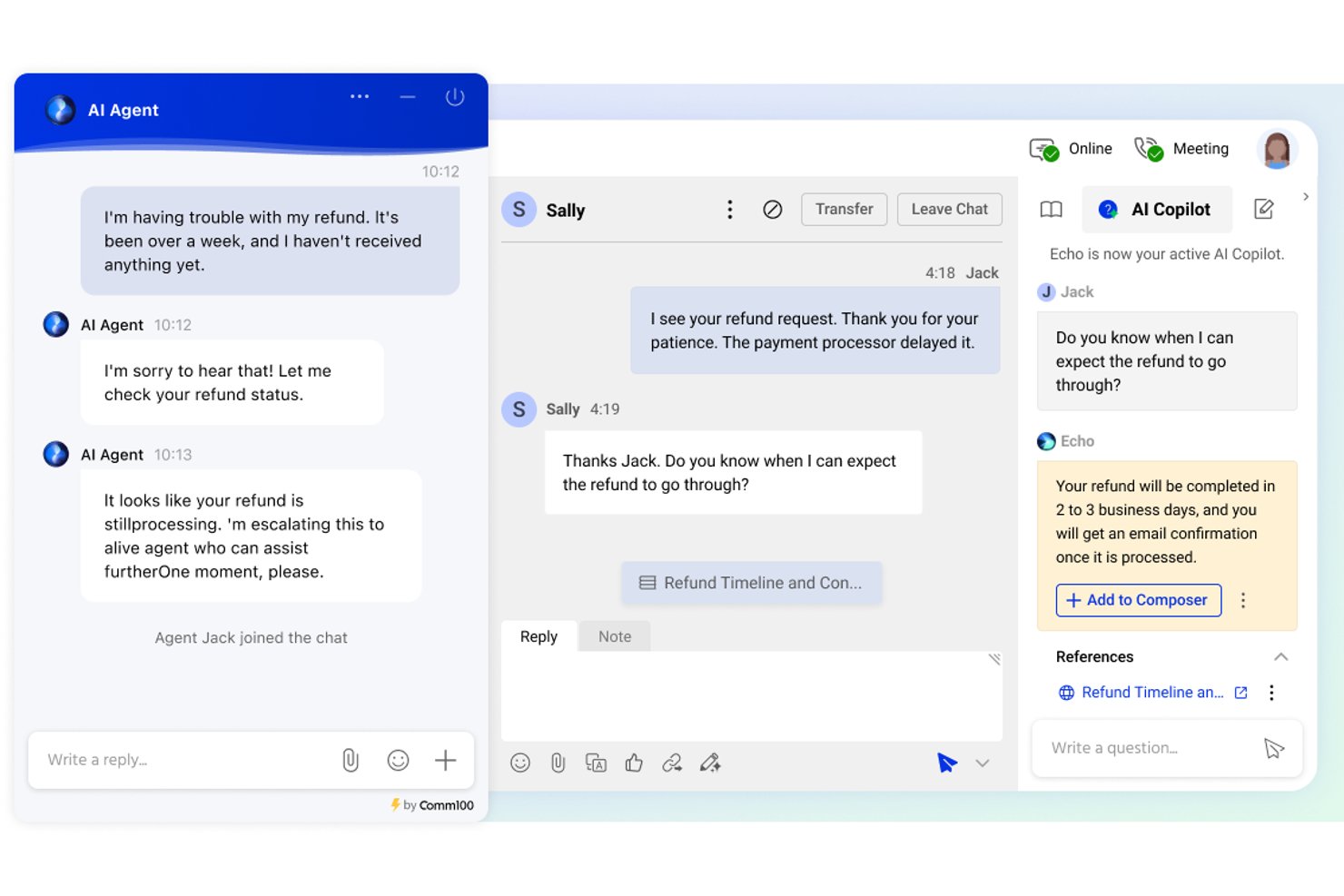
Comm100 est une plateforme de service client avec chatbot et chat en direct qui combine un agent IA, la messagerie omnicanale, des flux de travail de transfert vers un agent humain et une base de connaissances native sur plus de 12 canaux numériques et vocaux.
À qui Comm100 convient-il le mieux ?
Comm100 convient particulièrement aux équipes d'entreprises des secteurs de la santé, de l'administration publique, des services financiers et de l'enseignement supérieur qui ont besoin d'une automatisation des conversations pilotée par l'IA, avec des exigences strictes en matière de conformité et de souveraineté des données.
Pourquoi j'ai choisi Comm100
J'ai choisi Comm100 parmi les meilleures solutions parce que son architecture d'IA anti-hallucination est spécialement conçue pour les secteurs réglementés où une réponse erronée peut entraîner un véritable risque de non-conformité. L'agent IA répond uniquement à partir de sources de connaissances vérifiées, et jamais à partir de la mémoire de son modèle préentraîné, ce qui est extrêmement important dans les secteurs de la santé ou des services financiers. Son option de déploiement sur site est également rare et permet aux équipes gouvernementales et bancaires d'exécuter l'ensemble de la plateforme derrière leur propre pare-feu.
Principales fonctionnalités de Comm100
- Agent IA : Utilise le traitement automatique du langage pour répondre aux questions des clients à partir des sources de connaissances connectées.
- Actions personnalisées : Configurez l'agent IA pour effectuer des tâches pendant les conversations, notamment prendre des rendez-vous, vérifier des soldes et déclencher des flux de travail personnalisés.
- Déploiement sur site : Prend en charge le déploiement sur site pour les organisations ayant des exigences spécifiques en matière de localisation des données ou de réglementation.
- Tableau de bord de reporting : Suivez les taux de résolution par le chatbot, les temps de réponse des agents et les scores de satisfaction client depuis un tableau de bord centralisé.
Intégrations de Comm100
Comm100 propose des intégrations natives avec Salesforce, HubSpot, Microsoft Dynamics 365, Zendesk, ServiceNow, Google Drive, SharePoint Online, Confluence Cloud, Calendly et Microsoft Bookings. La plateforme fournit également une API REST, un SDK, des webhooks et une intégration avec Zapier.
Pros and Cons
Pros:
- Prend en charge les tons configurables et les instructions en langage naturel
- Prend en charge les normes SOC 2 Type II, HIPAA, ISO 27001 et la conformité au RGPD
- Prend en charge Telegram, X, LINE et WeChat
Cons:
- Certains utilisateurs signalent des difficultés avec les intégrations CRM
- Les réponses de l'IA dépendent de la qualité des sources de connaissances connectées

Cresta
Idéal pour l’accompagnement et les conseils aux agents en temps réel

Cresta est une plateforme d’IA pour centres de contacts qui combine des agents virtuels alimentés par l’IA pour automatiser les conversations avec les clients sur les canaux vocaux, le chat et les SMS, ainsi que des outils d’assistance aux agents en temps réel et d’intelligence conversationnelle.
À qui Cresta convient-elle le mieux ?
Cresta convient particulièrement aux centres de contacts d’entreprise qui cherchent à déployer des agents IA et à accompagner leurs agents humains depuis une plateforme unique.
Pourquoi j’ai choisi Cresta
Cresta mérite sa place parmi les meilleures solutions pour l’accompagnement et les conseils aux agents en temps réel grâce au fonctionnement de son produit d’assistance aux agents pendant les interactions en direct. Il fournit aux agents, en cours de conversation, des indications contextuelles, des rappels de conformité et des suggestions de la meilleure action à effectuer, plutôt qu’après coup. J’apprécie également son agent de connaissances, qui combine le contexte des conversations vocales avec les données affichées à l’écran afin de fournir instantanément des réponses étayées par des sources. De plus, les résumés d’appels générés par l’IA sont entièrement personnalisables et créés automatiquement, ce qui réduit le temps consacré par les agents aux tâches post-appel.
Principales fonctionnalités de Cresta
- Agent IA de Cresta : des agents virtuels alimentés par l’IA gèrent les conversations avec les clients sur les canaux vocaux, le chat et les SMS, avec la prise en charge de flux de travail en plusieurs étapes.
- Orchestration Opera AI : un outil sans code permettant de concevoir, tester et ajuster les flux de travail des agents IA sans assistance technique.
- Analyste IA : permet d’interroger l’ensemble de vos données conversationnelles à l’aide de questions en langage courant afin de repérer les tendances et les schémas.
- Évaluation QA automatique : évalue toutes les interactions avec les clients selon vos critères de qualité définis.
Intégrations de Cresta
Cresta s’intègre à des solutions de téléphonie et de chat telles que Five9, Amazon Connect et Genesys, ainsi qu’à des plateformes de CRM et d’engagement client comme Salesforce et Zendesk. La plateforme se connecte également à NICE CXone et Twilio. Les intégrations supplémentaires couvrent des outils marketing comme HubSpot et Marketo, ainsi que des plateformes de données telles que Databricks. Cresta propose une API pour les intégrations personnalisées.
Pros and Cons
Pros:
- Les invites d’accompagnement en direct aident les agents intermédiaires à progresser
- Analyse toutes les interactions, et pas uniquement des échantillons aléatoires
- La rédaction intelligente complète automatiquement les réponses des agents pendant les conversations
Cons:
- Les suggestions de l’assistance aux connaissances interprètent souvent mal l’intention de l’appelant
- Conçu pour les équipes d’entreprise, et non pour les petites structures

My AskAI
Idéal pour l'intégration aux logiciels de support existants
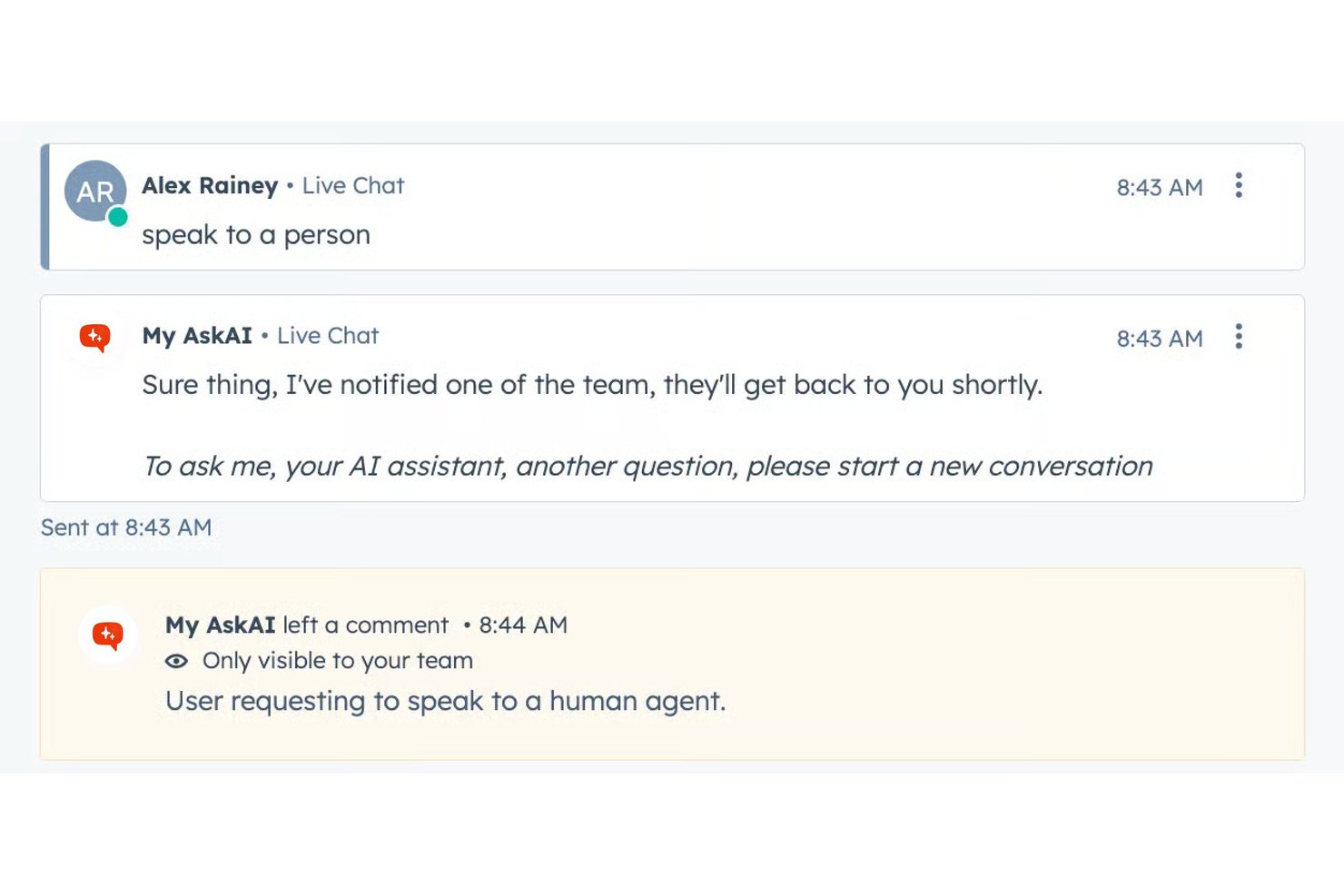
My AskAI est un chatbot de service client alimenté par l'IA qui se superpose aux logiciels de support existants tels que Zendesk, Intercom et Freshdesk, résolvant les tickets à partir de sources de connaissances synchronisées avec transfert automatique aux agents humains.
À qui My AskAI convient-il le mieux ?
Il convient particulièrement aux petites et moyennes équipes d'assistance qui utilisent déjà un logiciel de support et souhaitent réduire le nombre de tickets traités par les agents grâce à l'IA, sans changer de plateforme ni recruter de développeurs.
Pourquoi j'ai choisi My AskAI
J'ai choisi My AskAI comme l'une des meilleures solutions parce qu'il se superpose directement à votre logiciel de support existant au lieu de le remplacer. Sur Zendesk ou Intercom, il résout les tickets à partir de vos sources de connaissances et cite chaque réponse avec une référence à sa source. J'apprécie également le Studio d'amélioration des connaissances, qui analyse les anciens tickets pour identifier les lacunes et génère automatiquement du nouveau contenu d'aide. La fonctionnalité Tâches IA prend en charge des actions telles que les remboursements ou les changements d'adresse au moyen d'instructions en langage naturel.
Principales fonctionnalités de My AskAI
- Intégrations Slack et Teams : Connecte l'agent IA aux outils de discussion internes pour les questions-réponses des employés.
- Citation automatique des sources : Chaque réponse du chatbot renvoie à la source de connaissances originale pour assurer la traçabilité.
- Détection multilingue des langues : Prend en charge plus de 95 langues avec détection automatique et réponses localisées.
- Étiquetage des tickets par l'IA : Étiquette automatiquement les tickets d'assistance à l'aide de l'IA afin de faciliter leur catégorisation et la création de rapports.
Intégrations de My AskAI
My AskAI propose des intégrations natives avec Zendesk, Intercom, Gorgias, Freshdesk, HubSpot et Freshchat.
Pros and Cons
Pros:
- Se déploie sur les logiciels de support existants sans reconstruire les flux de travail
- Cite les sources dans chaque réponse de l'IA
- Identifie les lacunes dans les connaissances à partir des anciens tickets
Cons:
- Couverture omnicanale limitée au-delà du web et des e-mails
- La profondeur des analyses est inférieure à celle des concurrents axés sur les grandes entreprises

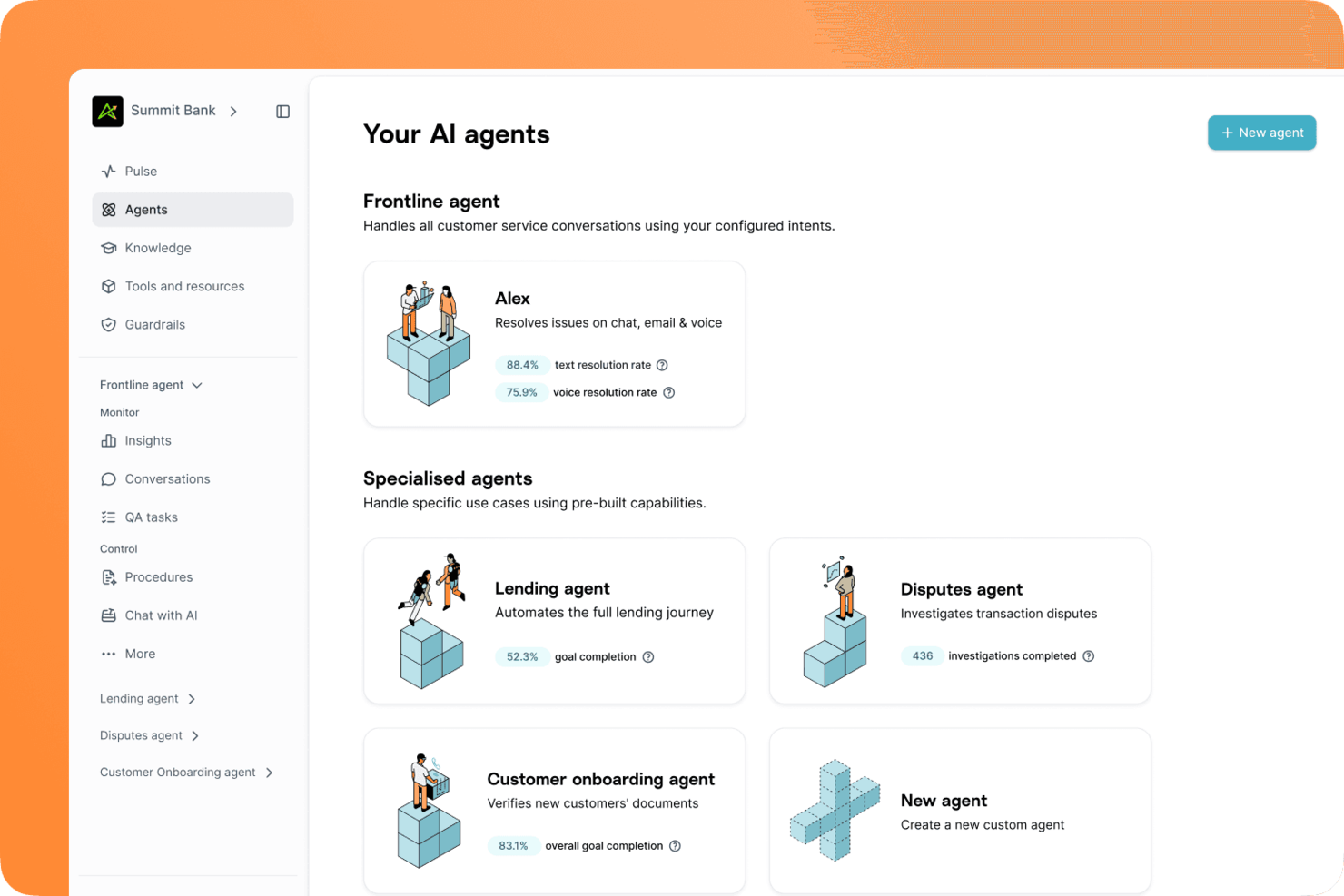
Gradient Labs est une plateforme d'opérations client native en IA, conçue spécifiquement pour les services financiers. Elle utilise des agents spécialisés qui prennent en charge le service client, les litiges, le recouvrement, l'intégration des clients et la vérification KYC.
À qui Gradient Labs convient-il le mieux ?
Gradient Labs convient particulièrement aux équipes de service client des secteurs des services financiers, de l'assurance et du crédit qui ont besoin d'un agent d'IA conçu dans le respect des exigences réglementaires.
Pourquoi j'ai choisi Gradient Labs
J'ai inclus Gradient Labs dans ma sélection principale, car c'est l'une des rares plateformes de chatbots de service client conçues dès le départ pour assurer la conformité dans les services financiers. J'apprécie particulièrement son automatisation des litiges : l'agent recueille les preuves, détermine l'issue, transmet le dossier à un agent humain pour validation, puis dépose la demande de rétrofacturation auprès du réseau de cartes. La plateforme intègre également plus de 20 garde-fous spécifiques aux services financiers à chaque tour de conversation et couvre les cadres réglementaires mondiaux, notamment le devoir de protection des consommateurs de la FCA, le règlement E, le règlement Z, la directive PSD2 et le règlement européen sur l'IA.
Principales fonctionnalités de Gradient Labs
- Déploiement omnicanal : L'agent d'IA traite les demandes des clients par chat, e-mail, voix et SMS depuis une configuration unique.
- Contrôles qualité automatisés : Chaque tour de conversation est automatiquement vérifié au regard de vos procédures définies.
- Garde-fous de conformité : Les exigences réglementaires telles que celles de la FCA, du RGPD et du règlement européen sur l'IA sont appliquées directement dans le flux de conversation.
- Transfert à un agent humain : L'agent transmet les conversations à un agent en direct lorsqu'il ne peut pas résoudre une demande.
Intégrations de Gradient Labs
Gradient Labs propose des intégrations natives avec Intercom, Zendesk, Salesforce, Freshdesk, Twilio, RingCentral, Genesys, NICE et LoanPro. Une API est également disponible pour les intégrations personnalisées.
Pros and Cons
Pros:
- Gère les conversations s'étalant sur plusieurs jours et plusieurs échanges
- Plus de 20 garde-fous de conformité intégrés
- Tarification basée sur les résultats pour chaque demande résolue
Cons:
- Conçu principalement pour les entreprises de services financiers
- Pas d'essai gratuit ni d'intégration en libre-service

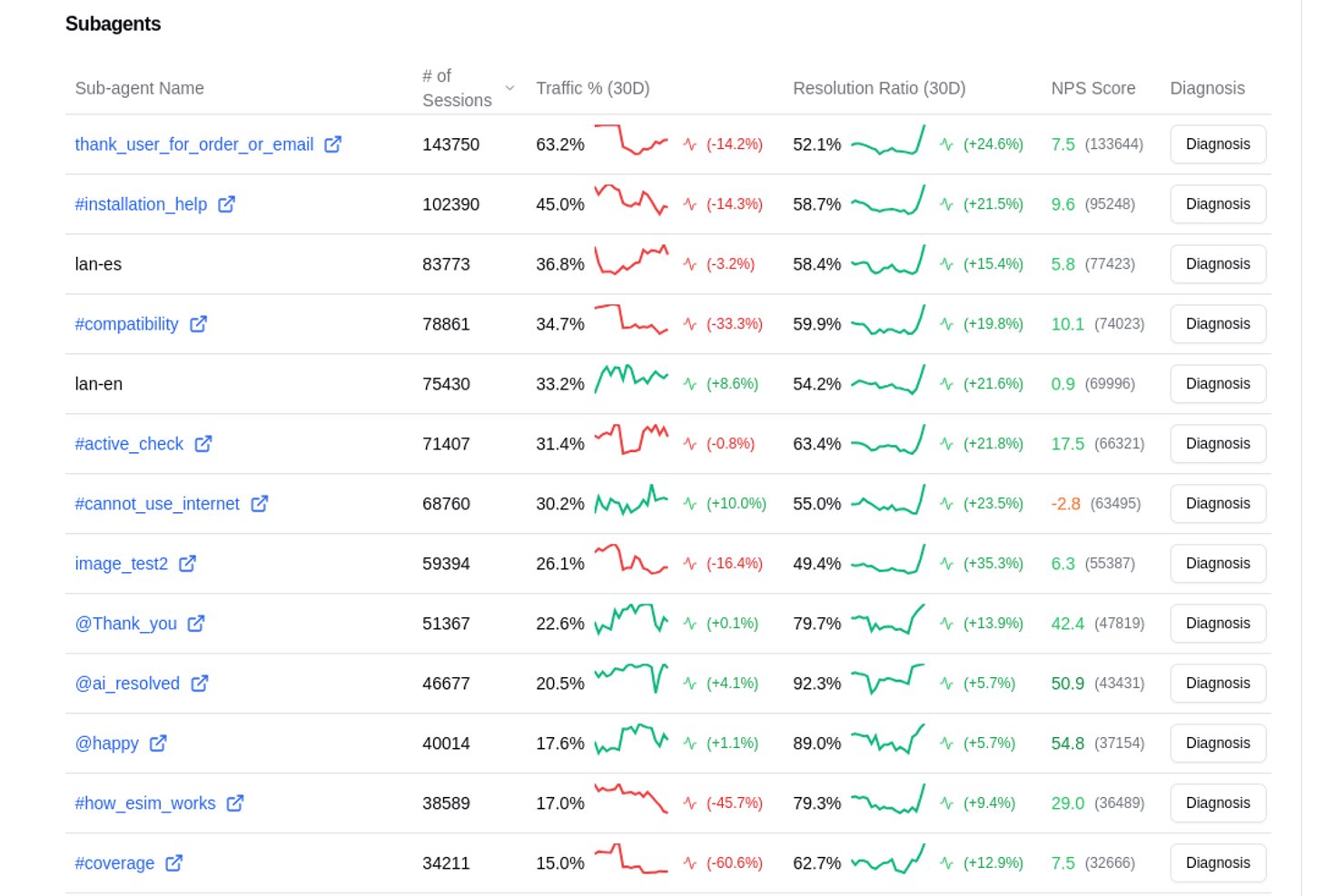
Aissist est une plateforme de service client pilotée par une IA agentique qui déploie des 'employés numériques' multi-agents pour gérer les conversations, exécuter des tâches de back-office et automatiser la résolution des tickets via e-mail, chat, SMS, WhatsApp et les réseaux sociaux.
À qui s'adresse Aissist ?
La solution est particulièrement adaptée aux équipes de support des e-commerçants et des PME qui traitent de gros volumes de tickets à l'aide de helpdesks comme Zendesk, Gorgias ou Intercom et souhaitent automatiser la résolution sans embaucher plus de personnel.
Pourquoi j'ai choisi Aissist
Aissist mérite sa place dans ma sélection grâce à son architecture AgentMesh™ qui attribue des sous-agents spécialisés aux demandes de facturation, de pré-vente et techniques, permettant de fournir des réponses précises et adaptées au domaine. J'apprécie également la capacité d'Aissist à effectuer de véritables tâches pendant la conversation : marquage des tickets, mise à jour des dossiers et déclenchement d'escalades, au lieu de simplement répondre. Concrètement, un litige de commande Shopify traité via Gorgias peut être résolu de bout en bout sans intervention humaine.
Fonctionnalités clés d’Aissist
- Intégrations natives aux helpdesks : Se connecte directement à Zendesk, Intercom, HubSpot, Freshdesk, Front et Gorgias pour une automatisation unifiée.
- Gestion omnicanale des messages : Gère les conversations sur chat, e-mail, SMS, WhatsApp et les principaux réseaux sociaux.
- Détection automatique de la langue : Prend en charge plus de 65 langues avec traduction en temps réel et réponses dans la langue de l'utilisateur.
- APIs et actions backend personnalisées : Déclenche des recherches de commandes, retours et mises à jour de compte dans les chats en direct via API REST et GraphQL.
Intégrations Aissist
Aissist propose des intégrations natives avec Zendesk, Intercom, HubSpot, Freshdesk, Gorgias, Front, Salesforce, eDesk, Shopify, WooCommerce et Magento. Une API est disponible pour les intégrations personnalisées.
Pros and Cons
Pros:
- Résolution complète des tickets sans intervention humaine
- Les sous-agents répondent précisément aux requêtes spécifiques à chaque domaine
- Prise en charge de plus de 65 langues sans duplication de bots
Cons:
- La configuration se complexifie avec la multiplication des agents
- Rapports analytiques limités par rapport à la concurrence

eDesk
Idéal pour un support e-commerce 24/7

eDesk est une solution d’assistance client alimentée par l’IA, conçue pour les entreprises en ligne. Elle gère sans effort les demandes des clients via une boîte de réception unifiée tout en automatisant les tâches du support. Grâce à son chatbot disponible 24/7 et à ses analyses en temps réel, eDesk est idéale pour les entreprises souhaitant renforcer l’engagement client et optimiser leurs opérations de support. Elle répond aux problématiques de communication efficace et de conversion des visiteurs en clients fidèles, ce qui en fait un outil indispensable pour les acteurs du commerce numérique.
Pourquoi j’ai choisi eDesk
J’ai choisi eDesk pour sa spécialisation dans l’e-commerce, offrant un chatbot disponible 24h/24 et 7j/7 qui garantit un support continu sans nécessiter d’intervention humaine constante. Cette fonctionnalité, associée à ses capacités de reporting en temps réel, vous permet de surveiller et d’améliorer l’efficacité de votre service client. La boîte de réception centralisée regroupe toutes les interactions clients, simplifiant la gestion de multiples canaux de communication et évitant que des messages restent sans réponse.
Principales fonctionnalités d’eDesk
En plus de son chatbot 24/7, eDesk propose plusieurs autres fonctionnalités pour répondre à vos besoins en service client :
- Routage intelligent des tickets : Oriente automatiquement les demandes vers les membres de l'équipe appropriés, assurant ainsi une résolution plus rapide.
- Réponses automatisées : Fournit des réponses instantanées aux questions fréquentes, libérant ainsi du temps pour traiter les cas plus complexes.
- Analyse du sentiment : Évalue le ressenti des clients afin d’adapter vos réponses et d’améliorer leur satisfaction.
- Base de connaissances : Propose une option en libre-service qui réduit le volume des sollicitations entrantes.
Intégrations d’eDesk
Les intégrations comprennent Amazon, eBay, Shopify, BigCommerce, WooCommerce, Walmart, Allegro, Google Shopping, WhatsApp et Facebook.
Pros and Cons
Pros:
- Intègre des données de commandes enrichies pour un service client optimisé
- Les automatisations IA réduisent les tâches répétitives du support
- Conçu pour gérer de grands volumes de demandes e-commerce
Cons:
- Principalement axé sur l’e-commerce, moins flexible pour d’autres secteurs
- Le reporting et l’analytique, bien que présents, sont parfois moins personnalisables que ceux de tableaux de bord plus avancés
New Product Updates from eDesk
eDesk Adds Galeria and Kaufland Support in Spain and Netherlands
eDesk adds support for Galeria, Kaufland Spain, and Kaufland Netherlands marketplaces. These integrations bring more European buyer messages into eDesk with routing, templates, AI insights, and automated translation. For more information, visit eDesk’s official site.
 .
.
Idéal pour combiner IA et support humain
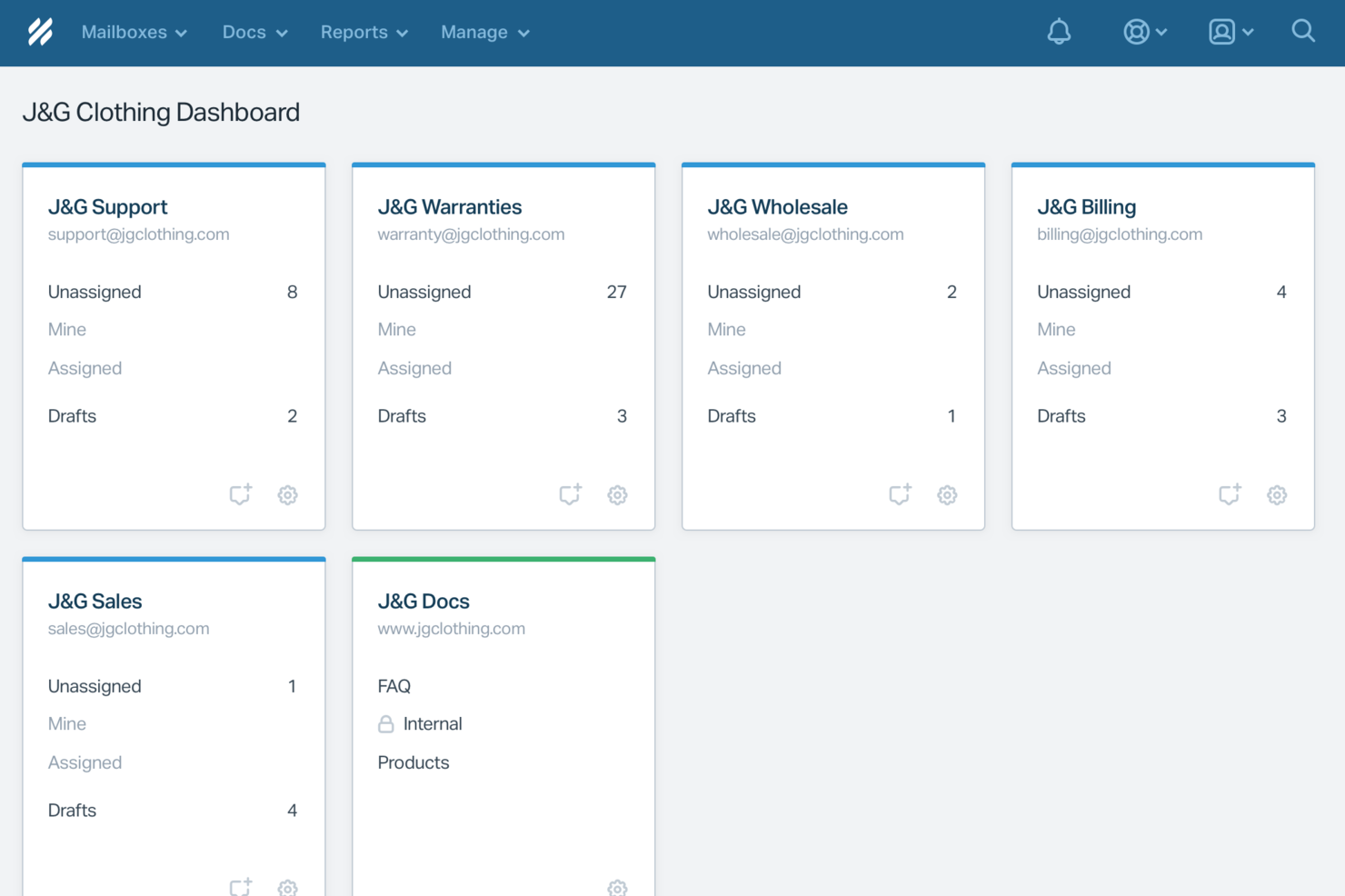
Pour les entreprises à la recherche d'une solution de chatbot qui améliore le service client, Help Scout offre un mélange idéal d'efficacité propulsée par l'IA et de contact humain. Cette plateforme séduit particulièrement les sociétés qui privilégient des interactions personnalisées avec leurs clients tout en gérant un volume élevé de demandes. Help Scout relève le défi d’équilibrer automatisation et engagement personnel, garantissant à votre équipe la possibilité de se concentrer sur un support attentionné sans sacrifier l’efficacité.
Pourquoi j’ai choisi Help Scout
J’ai choisi Help Scout parce que son approche unique combinant l’IA et le support humain en fait un excellent choix pour les chatbots de service client. L’IA de la plateforme traite efficacement jusqu’à 70 % des demandes courantes, permettant à votre équipe de se concentrer sur des questions plus complexes. De plus, la capacité de Help Scout à acheminer sans effort les conversations vers les bons membres de l’équipe assure des interactions clients personnalisées. Cette combinaison de fonctionnalités répond directement au besoin d’efficacité sans compromettre la qualité du service client.
Fonctionnalités clés de Help Scout
En plus des fonctionnalités phares, j’ai également trouvé plusieurs autres atouts qui améliorent le service client :
- Boîte de réception partagée : Cette fonctionnalité centralise les communications clients, permettant à votre équipe de gérer les demandes issues de multiples canaux en un seul endroit.
- Chat en direct : Interagissez avec vos clients en temps réel pour offrir un support immédiat et bâtir des relations plus solides.
- Base de connaissances : Permettez à vos clients de trouver eux-mêmes les réponses grâce à un référentiel d’informations bien organisé.
- Flux de travail automatisés : Automatisez les tâches répétitives et veillez à ce que les messages importants ne soient jamais oubliés, afin de renforcer la productivité de l’équipe.
Intégrations Help Scout
Les intégrations comprennent Slack, HubSpot, Salesforce, Shopify, Jira, Trello, Mailchimp, Magento, WooCommerce et Google Apps.
Pros and Cons
Pros:
- AI Answers résout les demandes courantes sans intervention d’un agent
- La transition fluide conserve le contexte des conversations pour les agents
- La base de connaissances intégrée permet des réponses automatiques précises
Cons:
- Ce n’est pas un chatbot autonome en dehors de l’écosystème Help Scout
- L’efficacité de l’IA dépend fortement de la qualité de la base de connaissances
New Product Updates from Help Scout

Help Scout Adds Automatic Conversation Reassignment
Help Scout can now automatically unassign conversations when the assigned teammate has been away long enough, keeping replies moving so others can pick them up. For more information, visit Help Scout's official site.
 .
.
Idéal pour le support multilingue
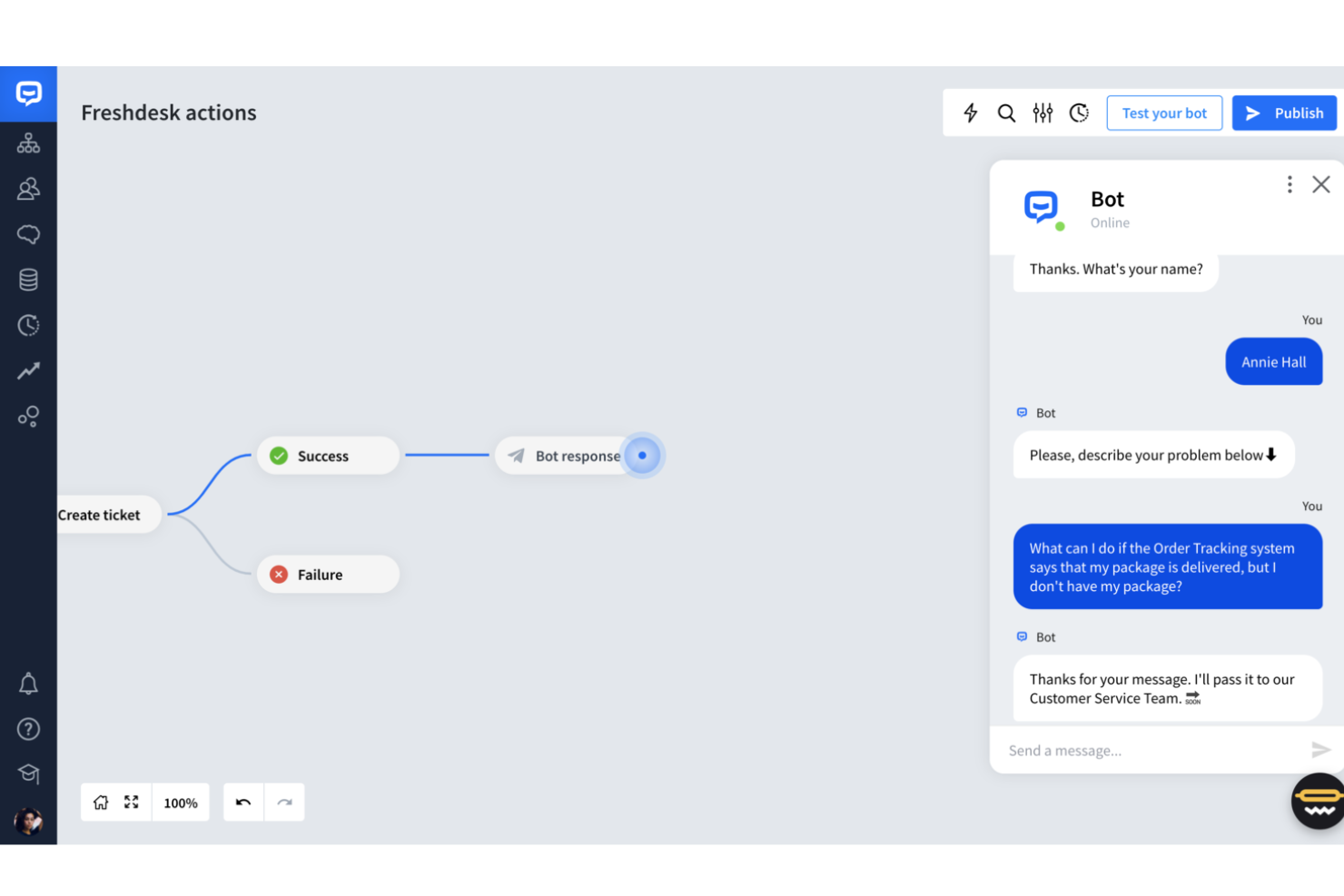
Freshdesk est une plateforme innovante de service client qui exploite la technologie de l'IA pour transformer la manière dont les entreprises interagissent avec leurs clients. Elle est conçue pour les entreprises qui souhaitent améliorer leurs opérations de support client en automatisant les réponses et en offrant des interactions personnalisées.
Pourquoi j'ai choisi Freshdesk
J'ai choisi Freshdesk pour son approche du service client basée sur l'IA, notamment grâce à ses capacités Freddy AI. Freddy AI excelle dans l'automatisation des requêtes courantes et la fourniture d'analyses en temps réel, ce qui peut considérablement réduire les délais de réponse et améliorer la qualité des interactions avec la clientèle.
J'apprécie la manière dont la plateforme offre un support multicanal et multilingue, permettant à votre équipe d'échanger avec les clients sur différentes plateformes et dans différents pays. Cela garantit que votre service client est non seulement cohérent mais aussi efficace, en répondant aux défis courants liés à la gestion d'un grand volume de demandes.
Fonctionnalités clés de Freshdesk
En plus de ses capacités en IA, Freshdesk offre plusieurs autres fonctionnalités qui en font un choix pertinent pour les chatbots de service client :
- Support en libre-service : Freshdesk vous permet de créer des portails personnalisés pour vos articles de base de connaissances. Des bots d'emails intelligents peuvent également répondre aux questions fréquentes.
- Automatisation de la gestion des tickets : Simplifie le traitement des demandes clients en automatisant les réponses aux questions récurrentes.
- Assistance en temps réel : Guide les agents en direct afin d'améliorer la qualité des échanges avec les clients.
- Analyses proactives : Fournit des informations exploitables afin d'optimiser la satisfaction client et d'améliorer les processus de service.
Intégrations de Freshdesk
Les intégrations incluent Freshservice, Freshchat, Freshcaller, Freshsales, Slack, Microsoft Teams, Shopify, Zoom, Google Workspace et Office 365.
Pros and Cons
Pros:
- Les tableaux de bord personnalisables fournissent des indicateurs de support en temps réel.
- Le support omnicanal intègre diverses plateformes de communication.
- L'automatisation par IA améliore les temps de réponse et réduit la charge de travail.
Cons:
- L'accent mis sur l'IA peut ne pas convenir à tous les modes de travail.
- Pas de solution d'appel intégrée, d'où l'utilisation d'outils séparés.
New Product Updates from Freshdesk

Freshdesk Adds Voice AI Agents in Freshcaller
Freshdesk introduces Voice AI Agents available through Freshcaller Marketplace apps to handle routine calls and reduce queues. This feature enables automated call handling with real-time, conversational support. For more information, visit Freshdesk's official site.

Zendesk
Idéal pour les agents IA personnalisables

Zendesk est une plateforme de service client qui propose des chatbots alimentés par l’IA, une gestion automatisée des tickets et une messagerie omnicanale pour les équipes d’assistance en ligne.
À qui Zendesk convient-il le mieux ?
Zendesk convient particulièrement aux équipes d’assistance de taille moyenne à grande qui ont besoin d’une solution de service client évolutive, pilotée par l’IA et couvrant plusieurs canaux numériques.
Pourquoi j’ai choisi Zendesk
Zendesk est un excellent choix, car il vous offre un contrôle approfondi sur le comportement de vos agents IA. J’apprécie particulièrement la possibilité de définir des profils personnalisés, de configurer des garde-fous pour le raisonnement de l’IA et de connecter les agents à vos propres sources de connaissances : l’assistant avec lequel vos clients interagissent ressemble ainsi à une véritable extension de votre marque, et non à une simple machine générique de questions-réponses. Le générateur d’agents IA vous permet de décrire les objectifs en langage courant plutôt que de programmer des parcours rigides, ce qui signifie que je peux gérer des demandes complexes en plusieurs étapes sans créer d’arbres de décision. La notation intégrée de l’assurance qualité couvre 100 % des interactions avec les agents IA, ce qui me permet de voir où l’agent est performant et où il doit être optimisé.
Fonctionnalités principales de Zendesk
- Messagerie omnicanale : Gérez les conversations avec les clients sur le web, les appareils mobiles, WhatsApp, Facebook et Instagram depuis un espace de travail unique pour les agents.
- Routage omnicanal : Attribuez automatiquement les tickets entrants au bon agent en fonction de la disponibilité, de la charge de travail et des compétences, sur tous les canaux.
- Copilote IA : Fournit aux agents humains des suggestions en temps réel, du contexte et des recommandations concernant les prochaines étapes, directement dans leur espace de travail.
- Tableaux de bord analytiques préconfigurés : Suivez le volume de tickets, les performances des agents et les tendances concernant les clients dès le départ, sans configurer de rapports personnalisés.
Intégrations Zendesk
Zendesk propose plus de 1 200 intégrations natives via sa place de marché, notamment avec Slack, Shopify, Google Play Reviews, Trustpilot, Pipedrive, Sprout Social, Harvest, ChannelReply et Guru. Une API est disponible pour les intégrations personnalisées.
New Product Updates from Zendesk
Zendesk Adds Email AI Replies and Predictive Routing
Zendesk’s latest email AI agents update brings configurable knowledge and welcome replies and adds predictive routing for email tickets, so you can tailor your automated emails and get inquiries resolved faster. For more information, visit Zendesk’s official site.

Chatbase
Idéal pour gérer les demandes client complexes
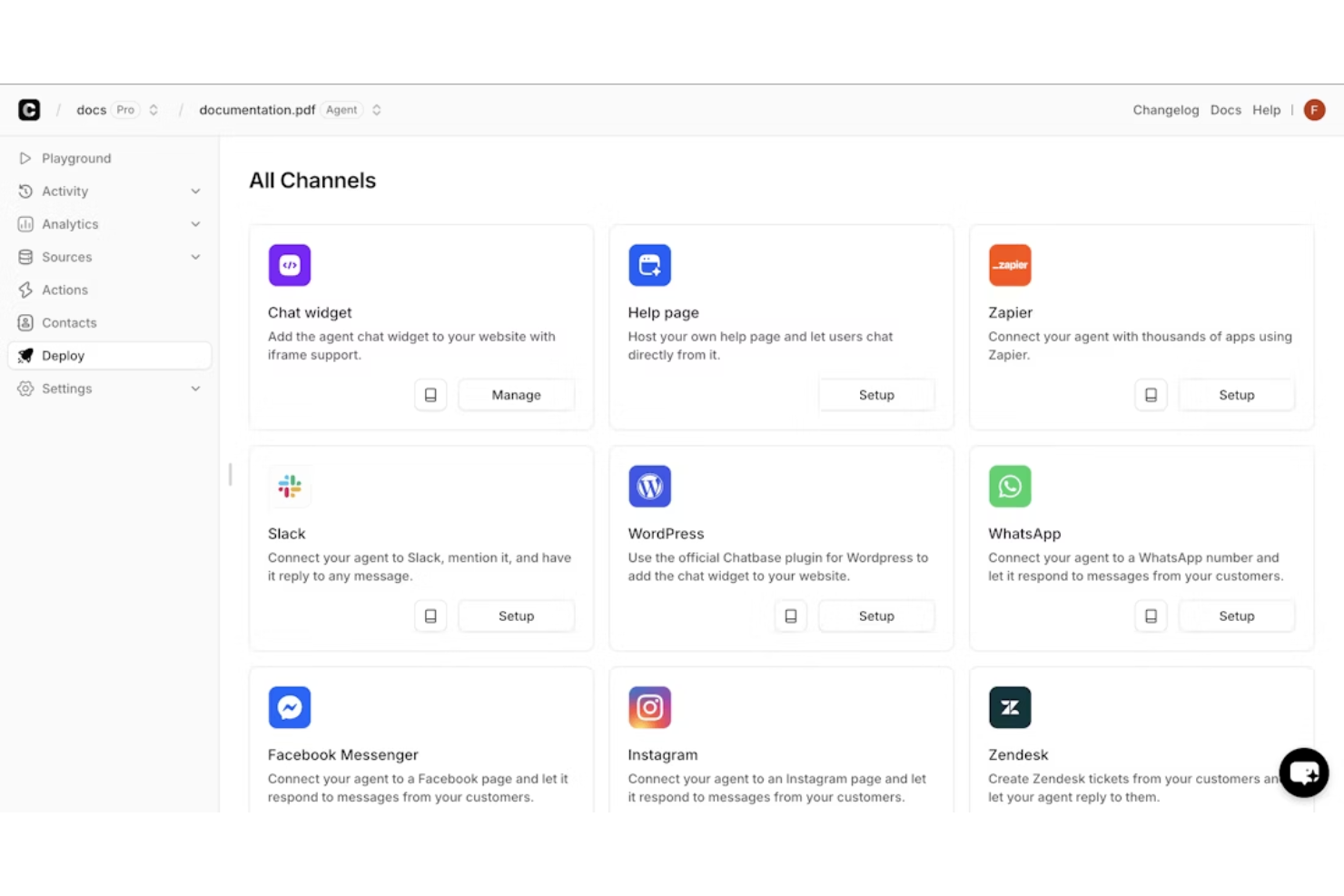
Chatbase est une plateforme de chatbot IA conçue pour améliorer le service client en gérant des demandes avancées avec précision et rapidité. Elle permet aux entreprises de créer et de personnaliser des agents de support IA sans coder, en utilisant des modèles linguistiques puissants comme GPT-3.5-turbo et GPT-4 pour offrir des conversations naturelles et humaines sur tous les canaux.
J’ai choisi Chatbase car il allie une IA conversationnelle avancée à des fonctionnalités d’escalade intelligente, garantissant que les clients obtiennent rapidement les bonnes réponses et que les demandes complexes sont transmises aisément à des agents humains. Cet équilibre entre automatisation et intervention humaine en fait une solution idéale pour les équipes cherchant un support fiable et efficace sans compromettre la supervision humaine. J’apprécie également le fait que la sécurité est intégrée dès la conception, avec une conformité SOC 2 Type II et RGPD, offrant l’assurance que les données des clients sont protégées. Ses capacités multilingues, couvrant plus de 80 langues, en font un choix pertinent pour des opérations de support client à l’international.
Les fonctionnalités incluent la configuration d’actions, permettant aux agents IA d’effectuer des tâches comme la prise de rendez-vous ou la mise à jour des abonnements, ainsi que la comparaison de modèles d’IA pour tester et affiner celui qui répond le mieux à vos besoins. La plateforme propose également des rapports et analyses avancés, offrant des informations sur la performance et des pistes d’amélioration. Les intégrations comprennent Make, Zendesk, Notion, Slack, Stripe, Salesforce, Cal.com, Calendly, WhatsApp, Zapier, Messenger, ainsi qu’un accès API pour des connexions systèmes plus poussées.
Autres chatbots pour le service client
Voici quelques autres options de chatbots pour le service client qui ne figurent pas dans ma sélection, mais qui méritent tout de même votre attention :
- SparrowDesk
Idéal pour la résolution de tickets basée sur l'IA
- Weav
Idéal pour l'analyse des données sur l'expérience client
- Birdeye
Idéal pour capturer des prospects
- Zoho SalesIQ
Idéal pour son interface facile à utiliser
- Tidio
Idéal pour sa focalisation sur la génération de ventes
- Front
Idéal pour le triage des tickets par IA
- Tars
Idéal pour la facilité de mise en place
- Intercom
Idéal pour une interface client simple
- Kommunicate
Idéal pour équilibrer chatbots et contact humain
- CoSupport AI
Idéal pour un support client plus rapide, précis et sécurisé
- Drift
Idéal pour transformer les conversations en ventes
- Acquire
Idéal pour les conversations automatisées semblables à celles d’un humain
- LiveHelpNow
Idéal pour le support client omnicanal
- Activechat
Idéal pour les marques centrées sur le client
- Crescendo
Idéal pour automatiser le support sensible à la conformité
- Helpshift
Idéal pour un déploiement rapide
- Genesys
Idéal pour les chatbots couvrant plusieurs canaux numériques
- Quiq Messaging
Idéal pour l'intégration avec des robots d'autres plateformes
- Quidget
Idéal pour automatiser le support de première ligne répétitif
- Hiver
Idéal pour l'automatisation des chats pilotés par l'IA
- Freshchat
Idéal pour développer l'assistance client sur tous les canaux
- Kayako
Idéal pour une assistance intégrée au site web et aux appareils mobiles


Comment j'évalue les chatbots pour le service client
Je divise mon évaluation en exigences de base — comme la qualité du traitement du langage naturel (NLP) et le passage à un agent humain — et en facteurs différenciants qui révèlent quels outils réduisent réellement le volume de tickets et évoluent avec votre dispositif de support.
Fonctionnalités principales (Critères indispensables pour cette liste)
Lorsque je sélectionne des outils pour ma liste, je les évalue sur une échelle de 0 (fonctionnalité non offerte) à 5 (excellent dans ce domaine) pour chacune des fonctionnalités indispensables listées ci-dessous. Ensuite, je calcule le score total de l’outil en pourcentage. Chaque outil doit obtenir un score total minimum de 65 % pour être retenu.
- IA conversationnelle & NLP : J'évalue la capacité du bot à comprendre différentes formulations — comme un client demandant « où est ma commande » vs. « je n'ai pas reçu mon colis » — et à répondre de façon naturelle.
- Déploiement omnicanal : Chaque outil doit permettre un déploiement sur les canaux vraiment utilisés par les clients, tels que le chat sur site web, WhatsApp, Facebook Messenger, SMS et applications mobiles.
- Passage à un agent humain : J’examine si la conversation peut être transmise à un agent en conservant tout le contexte, afin que le client n’ait pas à répéter son problème lorsque le bot atteint ses limites.
- Intégration de la base de connaissances : Le bot doit puiser ses réponses dans le contenu d’aide ou la documentation existante, et je vérifie s’il reste à jour lorsque le matériel source évolue.
- Intégrations CRM & helpdesk : La connexion à des plateformes comme Zendesk, Salesforce ou HubSpot est essentielle ici : je privilégie les intégrations natives qui permettent au bot de lire les données clients et consigner les interactions.
- Analytique & rapport : J'évalue si la plateforme suit des indicateurs propres au support client, comme le taux de déviation, le taux de rétention et le temps de résolution, et pas seulement le volume brut de conversations.
Une fois la liste des outils qui répondent aux critères établie, j’examine ce qui distingue chaque plateforme.
Facteurs de différenciation (Ce qui distingue les éditeurs)
Voici comment je compare et distingue les différents fournisseurs :
Fonctionnalités remarquables
Un constructeur de chatbot sans code est un vrai point fort : il permet aux équipes support d’ajuster les parcours conversationnels sans devoir solliciter un développeur à chaque modification de politique de retour. J’évalue également la gestion multilingue, notamment si le bot détecte automatiquement la langue, au lieu de forcer l’utilisateur à en choisir une. La messagerie proactive est également importante : un bot capable de déclencher une aide lorsqu’un client bloque sur une page d’erreur lors d’un paiement permet de résoudre le problème avant la création d’un ticket.
Au-delà des fonctionnalités
La structure tarifaire est un point clé dans ce secteur. Certains éditeurs facturent à la résolution, d’autres à la conversation ou à l’utilisateur actif mensuel — et cette différence peut radicalement impacter vos coûts quand le volume de tickets augmente. Je prends aussi en compte la rapidité de déploiement : un chatbot qui demande des mois d’apprentissage et de mise en œuvre retarde d’autant les avantages attendus en termes de déviation. La sécurité est un autre aspect que je vérifie, en particulier la conformité SOC 2 et RGPD, car ces bots gèrent chaque jour des données sensibles comme des informations de commande ou de compte client.
Comment choisir un chatbot pour le service client
Le meilleur chatbot pour le service client dépend des tâches que vous souhaitez lui confier, de la complexité de vos demandes d’assistance et des canaux utilisés par vos clients pour vous contacter. Concentrez-vous sur les facteurs suivants lorsque vous comparez vos options :
| Facteur | Points à prendre en compte |
|---|---|
| Volume d’assistance | Examinez les tâches auxquelles les agents consacrent le plus de temps. Si les questions répétitives représentent une grande part des tickets, privilégiez une automatisation performante des FAQ et du libre-service. |
| Questions des clients | Évaluez le degré de prévisibilité des demandes. Choisissez un chatbot de base pour les FAQ simples et un chatbot doté d’IA pour les questions variées ou contextuelles. |
| Canaux d’assistance | Identifiez les canaux que les clients utilisent déjà pour vous contacter. Choisissez un chatbot compatible avec vos canaux les plus sollicités plutôt qu’avec la liste de canaux la plus longue. |
| Intégrations | Vérifiez la compatibilité avec le service d’assistance, le CRM, la base de connaissances et les autres systèmes auxquels le chatbot doit accéder. |
| Expérience client | Testez les outils retenus avec de vraies questions de clients. Choisissez celui qui fournit des réponses précises et permet facilement de contacter un humain lorsque cela est nécessaire. |
| Indicateurs de réussite | Définissez ce que vous souhaitez améliorer avec le chatbot, comme le taux de résolution, les délais de réponse, le volume de tickets ou le CSAT. Choisissez un outil qui établit des rapports sur ces indicateurs. |
Les nouvelles tendances de l’IA dans les chatbots du service client
Les chatbots IA pour le service client élargissent les possibilités au-delà des FAQ traditionnelles et des réponses préprogrammées. Voici les principales évolutions à surveiller :
- Conversations semblables à celles avec un humain : L’IA générative rend les réponses des chatbots moins scriptées et plus aptes à comprendre le langage naturel et le contexte.
- Au-delà des FAQ de base : Les chatbots dotés d’une IA plus récente peuvent de plus en plus traiter des demandes en plusieurs étapes, comme vérifier une commande et commencer une procédure de retour.
- Personnalisation approfondie : L’IA peut utiliser l’historique client, les informations du compte et les conversations précédentes pour fournir des réponses adaptées à chaque client.
- Prise en charge de la voix et des éléments visuels : L’IA multimodale permet aux chatbots de comprendre la voix, les images et les documents en plus du texte.
- Assistance proactive : L’IA peut utiliser l’activité des clients et d’autres signaux pour identifier les problèmes potentiels et proposer de l’aide avant même que le client ne prenne contact.
- Actions autonomes : L’IA agentique commence à permettre aux chatbots d’effectuer des actions sur des systèmes connectés, comme mettre à jour un compte ou modifier une réservation.
Qu’est-ce qu’un chatbot pour le service client ?
Un chatbot pour le service client est un outil qui automatise les réponses aux demandes des clients, fournit une assistance 24 h/24 et 7 j/7 et traite les questions courantes. Les représentants du service client et les équipes d’assistance utilisent généralement ces outils pour améliorer leur efficacité et leurs délais de réponse. Des fonctionnalités telles que les réponses automatisées, les interactions en temps réel et les capacités d’intégration contribuent à gérer un grand volume de demandes et à améliorer la satisfaction client. Ces outils permettent finalement d’économiser du temps et des ressources tout en améliorant l’expérience client.
Fonctionnalités
Les meilleurs chatbots de service client associent l’automatisation à des outils qui aident les clients à obtenir des réponses précises et à contacter un agent lorsque cela est nécessaire. Les principales fonctionnalités comprennent :
- Réponses automatisées : Réponses prédéfinies ou générées par l’IA aux questions des clients.
- Traitement du langage naturel : Reconnaissance de l’intention des clients et du langage conversationnel.
- Parcours conversationnels : Chemins prédéfinis pour les FAQ, le dépannage, les réservations, les retours et autres demandes.
- Accès à la base de connaissances : Récupération d’informations à partir des FAQ, des articles d’aide et de la documentation.
- Transfert à un agent humain : Transfert des conversations du chatbot à un agent d’assistance.
- Historique des conversations : Stockage des messages et interactions précédents.
- Prise en charge multicanale : Déploiement du chatbot sur les sites web, les applications et les plateformes de messagerie.
- Prise en charge multilingue : Conversations avec les clients dans plusieurs langues.
- Intégrations : Connexions avec les systèmes de gestion de la relation client, les services d’assistance, le commerce électronique et d’autres systèmes professionnels.
- Analyses : Rapports sur les conversations, les résolutions, les escalades et l’utilisation du chatbot.
Avantages
La mise en place d’un chatbot pour le service client apporte plusieurs avantages à votre équipe et à votre entreprise. Voici quelques-uns des avantages dont vous pouvez bénéficier :
- Efficacité accrue : Automatise les demandes courantes, permettant à votre équipe de se concentrer sur les tâches complexes et de réduire les délais de réponse.
- Économies de coûts : Réduit le besoin d’une grande équipe d’assistance en traitant automatiquement un volume important de demandes.
- Amélioration de la satisfaction client : Offre une disponibilité 24 h/24 et 7 j/7, afin que les clients bénéficient d’une assistance rapide chaque fois qu’ils en ont besoin.
- Meilleure exploitation des données : Fournit des analyses sur les interactions avec les clients, vous aidant à prendre des décisions éclairées pour améliorer le service.
- Portée élargie : La prise en charge multilingue vous permet de répondre aux besoins d’une clientèle diversifiée et d’étendre votre présence sur le marché.
- Meilleure gestion des prospects : Des fonctionnalités comme la notation des prospects permettent de donner la priorité aux clients à forte valeur, optimisant ainsi vos efforts commerciaux.
- Qualité d’assistance constante : Garantit l’uniformité des réponses et de la qualité du service dans toutes les interactions avec les clients, préservant ainsi la réputation de la marque.
Coûts et tarifs
La sélection d’un chatbot pour le service client nécessite de comprendre les différents modèles tarifaires et forfaits disponibles. Les coûts varient en fonction des fonctionnalités, de la taille de l’équipe, des modules complémentaires et d’autres facteurs. Le tableau ci-dessous récapitule les forfaits courants, leurs prix moyens et les fonctionnalités généralement incluses dans les solutions de chatbot pour le service client :
Tableau comparatif des forfaits de chatbot pour le service client
| Type de forfait | Prix moyen | Fonctionnalités courantes |
|---|---|---|
| Forfait gratuit | $0 | Fonctionnalités de conversation de base, intégrations limitées et assistance standard. |
| Forfait personnel | $5-$25/utilisateur/mois | Réponses automatisées, analyses de base et assistance par e-mail. |
| Forfait professionnel | $30-$75/utilisateur/mois | Analyses avancées, prise en charge multilingue et intégrations CRM. |
| Forfait entreprise | $100-$200/utilisateur/mois | Flux de travail personnalisables, gestionnaire de compte dédié et assistance prioritaire. |
FAQ sur les chatbots pour le service client
Voici quelques réponses aux questions fréquentes sur les chatbots pour le service client :
Quelle est la différence entre les chatbots et les agents IA ?
Les chatbots interagissent principalement avec les clients par le biais de conversations : ils répondent aux questions, recueillent des informations et gèrent des flux de travail prédéfinis. Les agents IA peuvent aller plus loin en déterminant les actions nécessaires et en exécutant des tâches en plusieurs étapes dans des systèmes connectés.
Par exemple, un chatbot peut expliquer votre politique de retour, tandis qu’un agent IA peut vérifier la commande, confirmer l’éligibilité et lancer le retour.
Dois-je passer d’un chatbot traditionnel à un chatbot IA ?
Pas nécessairement. De nombreuses plateformes de chatbots ajoutent déjà des fonctionnalités d’IA. Vous pouvez donc peut-être mettre à niveau votre configuration actuelle plutôt que de changer complètement d’outil.
Commencez par vérifier ce que votre chatbot actuel peut faire. Envisagez d’adopter ses fonctionnalités d’IA — ou de changer de plateforme — si :
- Votre bot reste bloqué face à des questions inattendues : l’IA peut gérer les variations de langage sans dépendre autant de scripts prédéfinis.
- Les clients ont besoin de conversations de meilleure qualité : l’IA peut comprendre le contexte et les questions de suivi, rendant les interactions moins rigides.
- Vous souhaitez automatiser autre chose que les FAQ : les nouvelles fonctionnalités d’IA peuvent contribuer à gérer des demandes plus complexes et, dans certains cas, à effectuer des actions dans des systèmes connectés.
- Vous avez besoin d’une meilleure personnalisation : l’IA peut utiliser les données clients connectées et l’historique des conversations pour adapter les réponses.
Si votre chatbot actuel remplit correctement sa fonction, il n’est pas nécessaire de le remplacer simplement parce que des options d’IA existent. Comparez les fonctionnalités d’IA disponibles sur votre plateforme actuelle avec les problèmes que vous cherchez réellement à résoudre avant d’investir dans un nouvel outil.
Les chatbots de service client peuvent-ils s’intégrer aux logiciels de CRM et de centre d’assistance ?
Oui. La plupart des chatbots de service client s’intègrent à vos plateformes CRM et de centre d’assistance existantes pour accéder aux données clients, créer ou mettre à jour des tickets et transmettre l’historique des conversations aux agents. Vérifiez si vos outils principaux disposent d’intégrations natives ou nécessitent une API ou un connecteur tiers.
Les chatbots peuvent-ils gérer les demandes complexes des clients ?
Non, les chatbots sont généralement efficaces pour traiter les demandes courantes et simples. Pour les problèmes complexes, il est préférable de mettre en place un système permettant au chatbot de transmettre la conversation à un agent humain. Vous pouvez configurer des déclencheurs qui identifient les demandes dépassant les capacités du chatbot. Formez votre équipe à reprendre la conversation et à fournir une assistance personnalisée lorsque cela est nécessaire.
Quels canaux de service client les chatbots peuvent-ils prendre en charge ?
Les chatbots de service client peuvent prendre en charge des canaux tels que les sites web, les applications mobiles, WhatsApp, Facebook Messenger, les SMS et d’autres plateformes de messagerie. La disponibilité des canaux varie selon le fournisseur. Donnez donc la priorité aux canaux que vos clients utilisent déjà plutôt que de choisir uniquement en fonction du nombre de canaux.
Les chatbots de service client peuvent-ils remplacer les agents humains ?
Pas entièrement. Les chatbots sont particulièrement adaptés aux demandes répétitives et volumineuses, comme les FAQ, les mises à jour de commandes et le dépannage de base. Les agents humains restent importants pour les problèmes complexes, sensibles ou inhabituels. Recherchez donc un chatbot capable de reconnaître lorsqu’une demande doit être transmise et de transférer le client avec le contexte nécessaire.
Les fonctionnalités courantes des chatbots de service client incluent :
- Réponses automatisées : réponses prédéfinies ou générées par l’IA aux questions des clients.
- Traitement du langage naturel : reconnaissance de l’intention du client et du langage conversationnel.
- Flux conversationnels : parcours prédéfinis pour les FAQ, le dépannage, les réservations, les retours et autres demandes.
- Accès à une base de connaissances : récupération d’informations depuis les FAQ, les articles d’aide et la documentation.
- Transfert à un agent humain : transfert des conversations du chatbot à un agent d’assistance.
- Historique des conversations : conservation des messages et interactions précédents.
- Prise en charge multicanale : déploiement du chatbot sur les sites web, les applications et les plateformes de messagerie.
- Prise en charge multilingue : conversations avec les clients dans plusieurs langues.
- Intégrations : connexions avec les systèmes de CRM, de centre d’assistance, de commerce électronique et autres systèmes métier.
- Analyses : rapports sur les conversations, les résolutions, les escalades et l’utilisation du chatbot.
Que se passe-t-il lorsqu’un chatbot ne peut pas répondre à la question d’un client ?
Un chatbot bien conçu doit reconnaître lorsqu’il ne peut pas résoudre un problème et le transmettre automatiquement à un agent humain. Idéalement, il transmet l’historique de la conversation et les informations sur le client afin que l’agent puisse reprendre là où le chatbot s’est arrêté, sans obliger le client à tout recommencer.
| Commencez par | Points à prendre en compte |
|---|---|
| Volume d’assistance | Identifiez les tâches qui mobilisent le plus les agents. Un volume élevé de questions répétitives rend l’automatisation des FAQ et du libre-service particulièrement utile. |
| Questions des clients | Évaluez le degré de prévisibilité des demandes. Les FAQ simples peuvent nécessiter uniquement un chatbot basique, tandis que les questions variées ou contextuelles peuvent bénéficier de l’IA. |
| Canaux d’assistance | Donnez la priorité aux canaux que les clients utilisent déjà, comme le chat web, WhatsApp, les SMS ou la messagerie des réseaux sociaux. |
| Besoins d’escalade | Déterminez les problèmes qui doivent être transmis à un agent et assurez-vous que le chatbot peut les transférer en conservant le contexte de la conversation. |
| Pile technologique existante | Vérifiez la compatibilité avec le centre d’assistance, le CRM, la base de connaissances et les autres systèmes auxquels le chatbot doit accéder. |
| Expérience client | Testez le chatbot avec de vraies questions. Évaluez la qualité des réponses, la facilité d’utilisation et la simplicité avec laquelle les clients peuvent joindre un humain. |
| Indicateurs de réussite | Définissez à quoi ressemble la réussite : réduction du nombre de tickets répétitifs, hausse du taux de résolution, accélération des réponses ou amélioration du CSAT. |
Quand faut-il transmettre la conversation d’un chatbot à un agent humain ?
Effectuez une escalade lorsque les utilisateurs expriment de la frustration, lorsque le problème sort des scénarios courants que votre bot peut gérer ou lorsqu’un utilisateur demande explicitement l’aide d’un humain.
Les chatbots gèrent bien les demandes répétitives ou transactionnelles, mais les problèmes complexes ou émotionnels sont mieux pris en charge par des personnes. La définition de règles claires de transfert permet de maintenir des interactions fluides avec les clients.
Les chatbots de service client peuvent-ils personnaliser les interactions avec les clients ?
Oui, à condition d’avoir accès aux bonnes données clients. Un chatbot connecté à votre CRM ou à d’autres systèmes peut utiliser des informations telles que les données du compte, l’historique des achats ou les interactions précédentes pour fournir des réponses plus pertinentes. La personnalisation doit néanmoins respecter les politiques de confidentialité et de traitement des données de votre organisation.
Comment mesurer les performances d’un chatbot de service client ?
Suivez les indicateurs qui montrent si le chatbot répond réellement aux besoins des clients, et pas seulement s’il gère des conversations. Les KPI utiles incluent le taux de résolution, le taux d’escalade, la satisfaction client (CSAT), le temps de réponse et le taux de confinement. Examinez également les conversations échouées ou abandonnées : elles peuvent révéler des lacunes dans les connaissances ou les flux de travail du bot.
| Points à prendre en compte | Comment l’évaluer |
|---|---|
| Cas d’utilisation | Commencez par les tâches que vous souhaitez automatiser, comme les FAQ, le suivi des commandes, les retours ou le dépannage de base. |
| Transfert à un humain | Assurez-vous que les clients peuvent facilement joindre un agent lorsque le chatbot ne peut pas résoudre leur problème. |
| Canaux | Concentrez-vous sur les canaux par lesquels vos clients vous contactent déjà, qu’il s’agisse du chat web, de WhatsApp, des SMS ou de la messagerie sociale. |
| Intégrations | Vérifiez que le chatbot fonctionne avec le centre d’assistance, le CRM, la base de connaissances et les autres systèmes utilisés par votre équipe. |
| Qualité des réponses | Testez le chatbot avec de vraies questions clients, y compris des questions vagues ou inattendues, avant de vous engager. |
| Rapports | Recherchez des indicateurs tels que la résolution, l’escalade, le confinement et le CSAT afin de mesurer son impact. |
| Fonctionnalités d’IA | Déterminez le niveau d’automatisation dont vous avez réellement besoin. Les bots basiques peuvent suffire pour les FAQ, tandis que les chatbots IA peuvent gérer des conversations moins prévisibles. |