

Avec autant de solutions logicielles de chatbot disponibles, il est difficile de déterminer laquelle convient à votre entreprise. Vous savez que vous souhaitez automatiser les réponses aux questions courantes des clients afin d’améliorer leur expérience, mais vous devez déterminer quelle option est la meilleure. Dans cet article, je vais vous aider à faire ce choix plus facilement en partageant mes recommandations sur les meilleurs logiciels de chatbot pour automatiser vos interactions avec les clients, fondées sur mon expérience personnelle en matière d’expérience client.
Qu’est-ce qu’un logiciel de chatbot ?
Un logiciel de chatbot est un outil numérique qui utilise l’intelligence artificielle pour répondre aux demandes des clients en simulant une conversation humaine. Les chatbots traitent les demandes sans intervention des employés, ce qui signifie que votre équipe peut aider beaucoup plus de clients sans augmenter le nombre de ressources. Tandis que les chatbots traitent les premiers niveaux de demandes, votre équipe s’occupe des requêtes particulières.
L’utilisation d’un logiciel de chatbot permet aux entreprises de fournir une assistance client 24 h/24 et 7 j/7 aux clients du monde entier, de réduire les coûts de personnel et de main-d’œuvre et d’accélérer les délais de réponse afin d’offrir une meilleure expérience client.
Pourquoi faire confiance à nos recommandations de logiciels
6,700+
Reviews
20
Industry experts
16+
Evaluation factors
14
Years
Notre équipe teste et évalue des logiciels depuis 2012. En tant que leaders CX nous-mêmes, nous savons à quel point il est difficile — et important — de choisir le bon logiciel.
Pour ce guide, nous avons évalué les outils grâce à des tests pratiques et une recherche indépendante, en notant les outils selon nos critères de sélection.
Nos avis reflètent notre jugement éditorial humain, et non un argumentaire de vente.
 Gui DrusinaCreative Director
 Tim FisherVP of AI
Tableau comparatif des logiciels de chatbot
Ce tableau comparatif récapitule les informations tarifaires de ma sélection des meilleurs logiciels de chatbot :
| Tool | Best For | Trial Info | Price | ||
|---|---|---|---|---|---|
| 1 | Idéal pour combiner des LLM entre les étapes d’un flux de travail | Formule gratuite + démonstration gratuite disponible | À partir de $150/mois (facturé annuellement) | Website | |
| 2 | Idéal pour l’orchestration sans code des flux de travail IA | Démo gratuite disponible | Tarification sur demande | Website | |
| 3 | Idéal pour déployer l'IA dans des plateformes d'assistance existantes | Essai gratuit de 30 jours | À partir de $199/mois | Website | |
| 4 | Idéal pour un support client piloté par l’IA | Essai gratuit disponible | À partir de $25/utilisateur/mois (facturé annuellement) | Website | |
| 5 | Idéal avec un constructeur de chatbot low-code | Démo gratuite + essai gratuit de 14 jours disponible | À partir de 19 $/utilisateur/mois (facturé annuellement) | Website | |
| 6 | Idéal pour les agents avec des résumés d'IA | Essai gratuit de 14 jours disponible | À partir de $16/utilisateur/mois (facturation annuelle) | Website | |
| 7 | Idéal pour l'automatisation multi-agents | Formule gratuite disponible | À partir de $0.09/interaction | Website | |
| 8 | Idéal pour fournir une assistance par chat intégrée à l’application | Essai gratuit de 15 jours | Tarifs sur demande | Website | |
| 9 | Idéal pour des chatbots avancés à grand modèle de langage | Offre gratuite disponible | À partir de 32 $/mois (facturé annuellement) | Website | |
| 10 | Idéal pour la conception d'interfaces conversationnelles sans code | Plan gratuit disponible | À partir de 29 $/mois (facturé annuellement) | Website |


Présentation des 10 meilleurs logiciels de chatbot
Voici une brève présentation des 10 meilleurs chatbots que j’ai décrits en détail dans cet article. Elle présente le cas d’utilisation idéal et les fonctionnalités remarquables de chaque outil. J’ai également ajouté des captures d’écran pour vous donner un aperçu de leur interface utilisateur. De plus, 18 options supplémentaires sont présentées ci-dessous si vous souhaitez avoir encore plus de possibilités à étudier.
 Idéal pour combiner des LLM entre les étapes d’un flux de travail
- Formule gratuite + démonstration gratuite disponible
- À partir de $150/mois (facturé annuellement)
Visit WebsiteCustomer Rating:4.5/5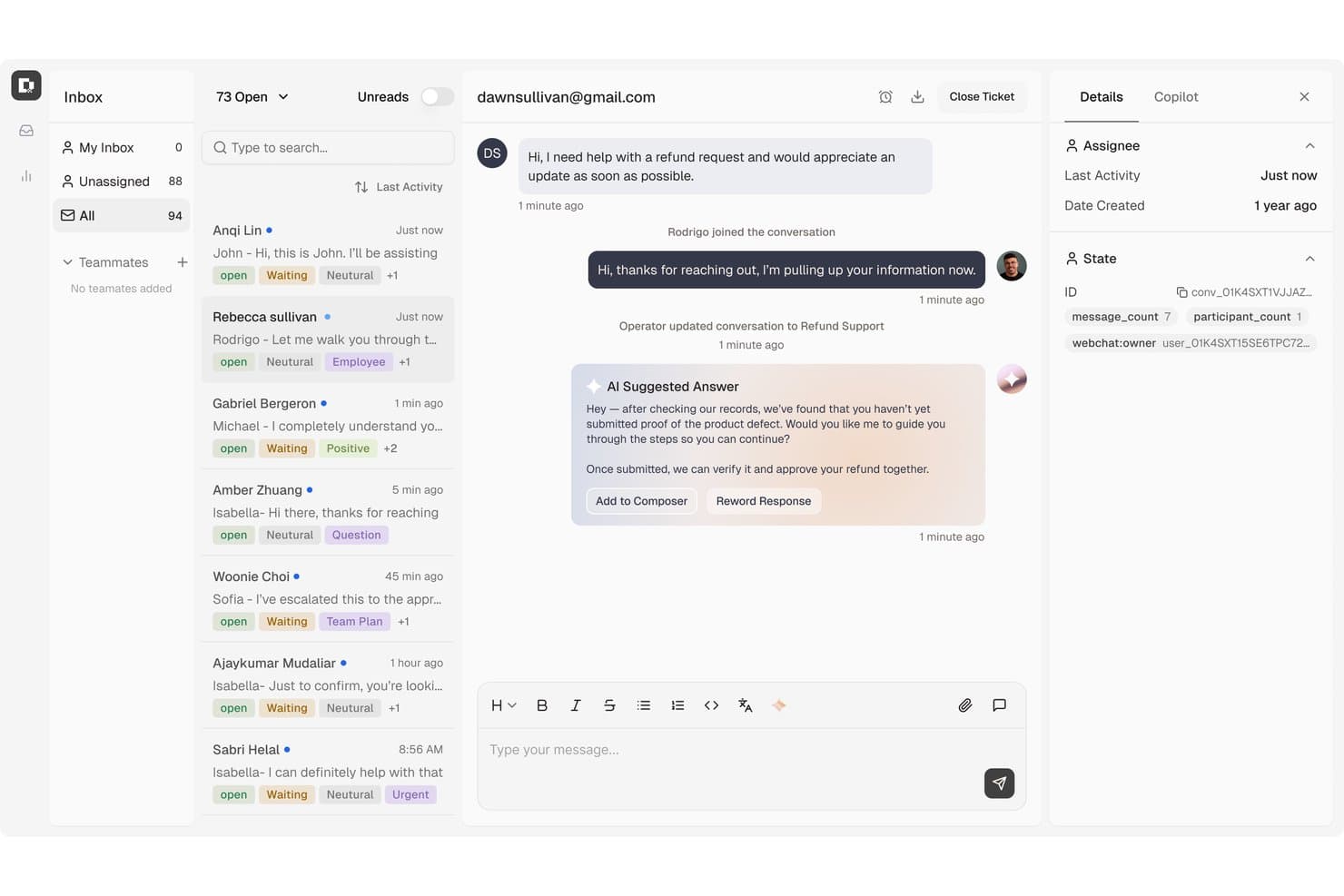
Botpress permet aux agents de gérer les conversations avec des réponses suggérées par l’IA. Botpress est une plateforme d’agents IA qui vous permet de créer, déployer et surveiller des chatbots conversationnels pour les flux de travail liés à l’assistance, à la génération de prospects et aux ventes, grâce à un générateur visuel de flux, des bases de connaissances et un vaste écosystème d’intégrations.
À qui Botpress convient-il le mieux ?
Botpress convient particulièrement aux équipes techniques et aux développeurs qui souhaitent contrôler précisément la manière dont différents LLM sont utilisés à travers les étapes d’un flux de travail conversationnel.
Pourquoi j’ai choisi Botpress
Botpress figure dans ma sélection grâce à sa flexibilité multi-LLM, qui vous permet d’attribuer différents modèles à différentes étapes d’un même flux de travail. En pratique, cela signifie que vous pouvez utiliser un modèle léger pour détecter l’intention et un modèle plus performant pour générer des réponses complexes, sans reconstruire votre flux. Le moteur autonome de Botpress Studio et son canevas visuel facilitent la mise en place de ces combinaisons de LLM parallèlement à une logique de branchement structurée.
Fonctionnalités clés de Botpress
- Intégration de bases de connaissances : Connectez des sites web, des PDF, des documents Word et des feuilles de calcul en tant que sources de connaissances consultables, auxquelles les agents se réfèrent pour répondre aux questions des utilisateurs.
- Botpress Desk : Un service d’assistance intégré qui gère les tickets de support de niveaux L1, L2 et L3 avec l’IA, notamment l’acheminement vers les équipes, l’ajout de balises aux conversations et l’escalade vers un agent humain avec l’intégralité du contexte.
- Actions IA : Les agents peuvent consulter les données en temps réel des commandes et des comptes, mettre à jour les informations du CRM ou de la facturation et traiter directement les remboursements éligibles au cours d’une conversation.
- Publication multicanal : Déployez des bots sur Webchat, WhatsApp, Telegram, Instagram, Messenger, Slack, ainsi que sur les canaux vocaux et SMS de Twilio depuis un espace de travail unique.
Intégrations de Botpress
Botpress propose des intégrations sur sa place de marché avec HubSpot, Salesforce, Shopify, Slack, WhatsApp, Google Sheets, Intercom et Zapier. Ses API Chat, Admin, Files, Tables et Runtime, ainsi que les actions de code personnalisées et les webhooks, prennent en charge les connexions personnalisées.
Pros and Cons
Pros:
- Combine des LLM entre les étapes du flux de travail
- La conception visuelle des flux nécessite peu de codage
- Les agents s’appuyant sur une base de connaissances peuvent mettre à jour les dossiers clients
Cons:
- La configuration avancée peut sembler techniquement exigeante
- Les évaluateurs signalent des problèmes occasionnels liés à la base de connaissances et aux flux
Learn more about Botpress: Idéal pour l’orchestration sans code des flux de travail IA
- Démo gratuite disponible
- Tarification sur demande
Visit WebsiteCustomer Rating:5/5
Cresta propose un assistant vocal et conversationnel optimisé par l’IA qui récupère l’historique des recherches intercanaux et suggère des options de vol personnalisées en fonction des préférences de l’utilisateur. Cresta est une plateforme de chatbot pilotée par l’IA qui fournit aux équipes CX une IA conversationnelle avancée, une automatisation des flux de travail sans code, un déploiement omnicanal et de solides capacités d’intégration pour les opérations de support client.
À qui Cresta convient-il le mieux ?
Cresta convient aux centres de contact d’entreprise et aux équipes CX à la recherche d’une automatisation pilotée par l’IA et d’une orchestration intégrée des flux de travail dans des environnements fortement axés sur le support.
Pourquoi j’ai choisi Cresta
J’ai choisi Cresta comme l’une des meilleures solutions, car son orchestration des flux de travail IA sans code permet à mon équipe de créer et de mettre à jour rapidement des expériences de chat automatisées en plusieurs étapes. J’utilise l’éditeur visuel de flux pour automatiser les réponses, déclencher des intégrations et permettre un transfert instantané vers un agent.
Fonctionnalités clés de Cresta
- Assistance aux agents en temps réel : Fournit des suggestions pilotées par l’IA aux agents humains pendant les conversations en direct.
- IA conversationnelle multilingue : Prend en charge les interactions avec les clients dans plusieurs langues grâce à des modèles linguistiques avancés.
- Assurance qualité optimisée par l’IA : Évalue automatiquement la qualité des chats et des appels pour permettre leur examen par les superviseurs.
- Tableaux de bord analytiques complets : Visualise la précision de la reconnaissance des intentions, les taux de résolution automatisée et les indicateurs de sentiment client.
Intégrations de Cresta
Cresta propose des intégrations natives avec Salesforce, Zendesk, Twilio, Amazon Connect et Genesys. Une API est disponible pour les intégrations personnalisées.
Pros and Cons
Pros:
- Coaching en temps réel pour les agents du support en direct
- Générateur visuel de flux de travail IA avec fonctionnalité glisser-déposer
- Analyses et rapports conversationnels avancés
Cons:
- La personnalisation des flux de travail peut nécessiter un accompagnement technique
- Orientation limitée vers les PME par rapport aux solutions d’entreprise
Learn more about Cresta: Idéal pour déployer l'IA dans des plateformes d'assistance existantes
- Essai gratuit de 30 jours
- À partir de $199/mois
Visit WebsiteCustomer Rating:4.5/5
My AskAI s'intègre à votre plateforme d'assistance existante, comme HubSpot, et peut automatiquement avertir un agent humain et laisser un commentaire interne lorsqu'un utilisateur demande à parler à une personne. My AskAI est un chatbot IA propulsé par un LLM qui se superpose directement aux plateformes d'assistance existantes comme Zendesk, Intercom et Freshdesk, en utilisant l'IA générative pour répondre aux demandes des clients, transmettre les conversations aux agents humains et apprendre automatiquement à partir des tickets résolus.
À qui My AskAI convient-il le mieux ?
C'est une solution particulièrement adaptée aux équipes d'assistance des entreprises de commerce électronique et SaaS de petite ou moyenne taille qui utilisent déjà une plateforme d'assistance et souhaitent automatiser la résolution des tickets sans reconstruire leur infrastructure technologique.
Pourquoi j'ai choisi My AskAI
My AskAI figure dans ma sélection parce que c'est le seul chatbot que j'ai trouvé qui s'intègre véritablement à votre plateforme d'assistance existante au lieu de la remplacer. J'apprécie particulièrement la fonctionnalité d'apprentissage automatique : lorsqu'un agent humain intervient et rédige une meilleure réponse, My AskAI lit cette réponse, la compare à la sienne et rédige automatiquement un nouvel article de la base de connaissances à partir de cet écart. Ainsi, l'IA s'améliore à chaque transmission à un agent, sans que personne n'ait à la réentraîner manuellement.
Fonctionnalités principales de My AskAI
- Traduction automatique multilingue : Traduit et répond instantanément dans plus de 95 langues sans nécessiter de bots distincts ni de traduction manuelle.
- Copilote d'assistance aux agents : Suggère des réponses rédigées par l'IA aux agents directement dans les plateformes d'assistance prises en charge pendant les conversations en direct.
- Déclencheurs d'engagement proactif : Lance des interactions de chat avec l'IA en fonction des actions de l'utilisateur, comme le temps passé sur la page ou la navigation entre les pages.
- Analyse des conversations en temps réel : Suit les demandes non résolues, la qualité des réponses et les performances liées aux intentions dans les tickets et les canaux de chat.
Intégrations de My AskAI
My AskAI propose des intégrations natives avec Zendesk, Intercom, Gorgias, Freshdesk, HubSpot et Freshchat.
Pros and Cons
Pros:
- Se déploie dans les plateformes d'assistance existantes sans les reconstruire
- Apprend automatiquement des conversations résolues par les agents
- Prend en charge plus de 95 langues sans créer de bots distincts
Cons:
- Utilité limitée sans plateforme d'assistance préexistante
- Aucun générateur visuel de flux conversationnels par glisser-déposer
Learn more about My AskAI: Idéal pour un support client piloté par l’IA
- Essai gratuit disponible
- À partir de $25/utilisateur/mois (facturé annuellement)
Visit WebsiteCustomer Rating:4.5/5
Le tableau de bord Help Scout affiche des boîtes de réception partagées entre les équipes, centralisant les conversations client dans un seul espace de travail. Help Scout est conçu pour les entreprises qui privilégient des interactions client personnalisées tout en développant leurs opérations de support. Il combine la technologie d’IA avec une touche humaine, offrant des solutions pour gérer les demandes de routine et la collaboration d’équipe. Cela en fait un choix idéal pour des secteurs tels que le SaaS, l’éducation et l’hôtellerie, où il est crucial de maintenir un lien personnel avec les clients tout en traitant un grand volume de demandes.
Pourquoi j’ai choisi Help Scout
J’ai choisi Help Scout comme solution phare parmi les logiciels de chatbot en raison de son approche unique intégrant l’IA au support humain. L’assistant IA est particulièrement remarquable, car il gère les demandes de routine, libérant ainsi votre équipe pour les questions plus complexes. De plus, la boîte de réception partagée améliore la collaboration en gardant toutes les communications organisées en un seul endroit. Ces fonctionnalités répondent directement au besoin de solutions de service client efficaces et personnalisées, faisant de Help Scout un atout précieux pour toute organisation axée sur le support.
Fonctionnalités clés de Help Scout
En plus de son assistant IA et de sa boîte de réception partagée, voici d’autres fonctionnalités de Help Scout qui pourraient vous intéresser :
- Beacon : Un hub d’assistance intégrable qui fournit des réponses instantanées guidées par l’IA et permet aux clients d’accéder facilement à leurs conversations précédentes.
- Messages proactifs : Des outils pour envoyer des messages ciblés et des mises à jour, renforçant l’engagement client.
- Messagerie intégrée à l’application : Permet à votre équipe d’accueillir et d’accompagner les clients directement dans votre produit, pour améliorer l’expérience utilisateur globale.
- Collecte de feedback : Utilise des enquêtes NPS et d’autres outils pour recueillir l’avis des clients, vous aidant à affiner vos offres de services.
Intégrations Help Scout
Les intégrations comprennent Salesforce, Slack, HubSpot, Shopify, Mailchimp, Jira, Trello, WordPress, Google Apps et WooCommerce.
Pros and Cons
Pros:
- L’IA répond aux demandes courantes sans intervention humaine
- Le relais fluide préserve le contexte de la conversation pour les agents
- La base de connaissances intégrée permet des réponses automatisées précises
Cons:
- N’est pas un chatbot autonome en dehors de l’écosystème Help Scout
- L’efficacité de l’IA dépend fortement de la qualité de la base de connaissances
Learn more about Help Scout: Idéal avec un constructeur de chatbot low-code
- Démo gratuite + essai gratuit de 14 jours disponible
- À partir de 19 $/utilisateur/mois (facturé annuellement)
Visit WebsiteCustomer Rating:4.4/5
Créez votre chatbot avec Freshdesk afin d'automatiser les demandes courantes. Freshdesk intègre l'IA conversationnelle à votre pile de support grâce à des fonctionnalités de chat intégrées et connectées, vous permettant d'offrir une assistance en temps réel et de créer des tickets sans obliger vos agents à répondre à chaque question fréquente. Que vous soyez responsable du support dans une petite marque de commerce en ligne ou membre d'une équipe de service client en croissance gérant des demandes multicanales, les options de chatbot de Freshdesk peuvent maintenir l'engagement des clients et fournir des réponses en dehors des heures d'ouverture.
Pourquoi j'ai choisi Freshdesk
J'ai choisi Freshdesk parce qu'il intègre le chat et l'automatisation pilotés par l'IA directement dans le flux de travail du support client, vous offrant des bots conversationnels capables de détourner les demandes basiques et de transformer les interactions en tickets suivis. Son agent Freddy AI utilise la compréhension du langage naturel pour répondre aux questions courantes et transmettre les plus complexes aux agents humains, permettant ainsi à votre équipe de se concentrer sur des tâches à plus forte valeur ajoutée.
Vous disposez également d'un constructeur de chatbot low-code via le Freshworks Marketplace, afin de personnaliser les parcours de dialogue sans ressources techniques. Cette combinaison d'IA native et de configuration de bot sans code fait de Freshdesk un choix pratique pour les équipes de support qui privilégient à la fois l'automatisation et la continuité du service.
Fonctionnalités clés de Freshdesk
En plus de ces fonctionnalités principales de chatbot IA, Freshdesk propose plusieurs options qui élargissent son utilité pour le support conversationnel :
- Messagerie omnicanale : Connectez le chat en direct, les messages sociaux, WhatsApp et d'autres canaux dans une seule boîte de réception afin que vos bots et agents puissent répondre depuis une vue unique.
- Suggestions Copilot IA : Fournit aux agents des suggestions de réponses, des résumés et des réponses automatisées extraites des conversations précédentes et des bases de connaissances.
- Support multicanal : Permet à votre équipe de gérer les interactions clients sur diverses plateformes à partir d'une seule interface.
- Tableau de bord personnalisable : Vous offre la flexibilité d'adapter l'espace de travail à vos besoins métiers spécifiques.
Intégrations Freshdesk
Les intégrations incluent Slack, Shopify, Jira, Microsoft Teams, Google Workspace, Mailchimp, Salesforce, HubSpot, QuickBooks et Trello. Freshdesk propose également une API pour des intégrations personnalisées.
Pros and Cons
Pros:
- Les tableaux de bord personnalisables fournissent des indicateurs de support en temps réel.
- Le support omnicanal intègre diverses plateformes de communication.
- L'automatisation par IA améliore les temps de réponse et réduit la charge de travail.
Cons:
- Absence de solution d'appel intégrée, nécessitant l'utilisation d'outils distincts.
- L'application mobile manque de certaines fonctionnalités avancées présentes sur ordinateur, limitant l'assistance en déplacement.
Learn more about Freshdesk: Idéal pour les agents avec des résumés d'IA
- Essai gratuit de 14 jours disponible
- À partir de $16/utilisateur/mois (facturation annuelle)
Visit WebsiteCustomer Rating:4.6/5
SparrowDesk propose une interface de chatbot en direct pour l'assistance client en temps réel. SparrowDesk propose une solution complète pour les entreprises souhaitant améliorer leur interaction client grâce à un logiciel de chatbot. Elle est particulièrement attrayante pour les organisations cherchant à automatiser les demandes clients récurrentes et à optimiser les processus de support. En exploitant des technologies pilotées par l'IA, SparrowDesk répond à des défis tels que la réduction des délais de réponse et l'amélioration de la satisfaction client.
Pourquoi j'ai choisi SparrowDesk
J'ai choisi SparrowDesk pour ses fonctionnalités basées sur l'intelligence artificielle qui le distinguent dans le paysage des logiciels de chatbot. Grâce à son agent IA, Luna, SparrowDesk peut résoudre automatiquement une part importante des demandes clients, permettant à votre équipe de se concentrer sur les questions plus complexes. Associée à sa fonctionnalité AI Copilot, qui génère des résumés et des brouillons de réponses intelligentes pour les agents, la plateforme soutient les équipes axées sur le chat qui doivent maintenir des temps de réponse courts et assurer un contexte précis. C'est une solution idéale si vous recherchez un chatbot/agent qui fonctionne aux côtés des agents humains, et pas seulement un bot autonome.
Principales fonctionnalités de SparrowDesk
En plus de ses capacités basées sur l'IA, SparrowDesk propose d'autres fonctionnalités qui peuvent être bénéfiques pour votre équipe :
- Espace de travail unifié : Cette fonctionnalité permet à votre équipe de gérer toutes les interactions clients depuis une seule plateforme, améliorant ainsi la collaboration et l'efficacité.
- Portails en libre-service : Les clients peuvent trouver eux-mêmes les réponses à leurs questions, réduisant ainsi la charge de travail de votre équipe de support.
- Automatisation des workflows sans code : Vous pouvez automatiser les tâches répétitives sans avoir à coder, ce qui permet de gagner du temps et des ressources.
- Widget de chat & messagerie en direct : Le module de chat en direct de SparrowDesk vous permet d'ajouter un widget de chat à votre site web, de suivre le comportement des visiteurs (pages visitées, navigateur, appareil) et d'interagir en temps réel ou de déléguer à des humains.
Intégrations SparrowDesk
Les intégrations natives ne sont actuellement pas listées par SparrowDesk.
Pros and Cons
Pros:
- Les portails en libre-service permettent aux clients de trouver des réponses de manière autonome.
- Les fonctionnalités basées sur l'IA réduisent la charge de travail du service client.
- Des recommandations personnalisées améliorent l'expérience client.
Cons:
- Intégrations natives limitées par rapport à la concurrence.
- Manque d'options de personnalisation détaillées pour les utilisateurs avancés.
Learn more about SparrowDesk: Idéal pour l'automatisation multi-agents
- Formule gratuite disponible
- À partir de $0.09/interaction

Aissist propose un tableau de bord de sous-agents affichant le nombre de sessions, les tendances de trafic, les ratios de résolution, les scores NPS et les actions de diagnostic pour chaque sous-agent chatbot. Aissist est une plateforme de chatbot IA et d'automatisation du support client reposant sur une architecture multi-agents, capable de gérer le support conversationnel, la résolution de tickets, la qualification de leads et l'automatisation des processus sur les canaux web, messagerie et email.
À qui s'adresse Aissist ?
Aissist est idéal pour les équipes de support client et d'expérience client (CX) qui traitent un grand volume de tickets sur plusieurs plateformes de helpdesk et qui recherchent plus qu'une simple déviation des FAQ.
Pourquoi j'ai choisi Aissist
J'ai choisi Aissist parmi les meilleurs, car son architecture AgentMesh réalise ce que la plupart des chatbots ne peuvent pas faire : elle coordonne plusieurs agents IA spécialisés pour accomplir des tâches en plusieurs étapes au lieu de simplement générer une réponse. J'apprécie également la couche Evolve, qui détecte automatiquement des signaux en direct, comme les échecs de paiement ou les risques de résiliation, et qui applique immédiatement des correctifs sans attendre l'intervention humaine. Ce genre d'automatisation en boucle fermée est vraiment rare dans cette catégorie.
Principales fonctionnalités d'Aissist
- IA conversationnelle multilingue : Gère les messages texte, image, vidéo et vocaux dans plus de 65 langues avec détection automatique de la langue.
- Déploiement omnicanal natif : Intègre les chatbots de manière fluide sur le web, dans une application, WhatsApp, SMS, email et réseaux sociaux.
- Intégrations CRM et helpdesk : Se connecte à Zendesk, Intercom, Freshdesk, HubSpot, Salesforce, Front et bien d'autres pour une synchronisation bidirectionnelle des données.
- Moteur d'analyse Pulse : Fournit des rapports en temps réel sur le CSAT, la reconnaissance d'intention, les taux de résolution et le ressenti client.
Intégrations Aissist
Aissist propose des intégrations natives avec Zendesk, Intercom, Freshdesk, Front, Gorgias, Kustomer, Salesforce, eDesk et HubSpot. Une API est disponible pour des intégrations personnalisées.
Pros and Cons
Pros:
- La coordination multi-agents prend en charge des workflows complexes en plusieurs étapes
- Gère plus de 65 langues avec détection automatique
- Des déclencheurs proactifs initient les discussions selon le comportement
Cons:
- L'éditeur de parcours visuel est moins abouti
- Peu d'avis utilisateurs publics et de forums communautaires
Learn more about Aissist: Idéal pour fournir une assistance par chat intégrée à l’application
- Essai gratuit de 15 jours
- Tarifs sur demande
Visit WebsiteCustomer Rating:4.3/5
Les entreprises peuvent concevoir des chatbots capables de gérer diverses tâches, qu’il s’agisse de répondre aux questions fréquemment posées ou de fournir des informations détaillées sur les produits. Zoho SalesIQ est un logiciel de chat en direct que les entreprises peuvent utiliser pour gérer les interactions avec leurs clients.
Pourquoi j’ai choisi Zoho SalesIQ : La fonctionnalité de chatbot dispose d’un outil de création sans code par glisser-déposer, qui peut être utilisé pour élaborer des scripts répondant aux questions courantes des clients. Elle peut également utiliser l’IA pour comprendre le contexte de la question d’un visiteur et fournir des réponses directement depuis votre centre de ressources client. Vos agents d’assistance comme vos clients auront accès à leur historique de discussion, ce qui permet à chacun de se remettre au fait de la situation lorsqu’un agent doit intervenir pour traiter une demande.
Ce qui est particulièrement remarquable avec ce logiciel, c’est sa capacité à gérer les chats en direct sur votre site web et vos profils de réseaux sociaux, mais il peut également être utilisé directement dans votre application. Les clients peuvent contacter votre équipe d’assistance (ou votre bot d’assistance) directement depuis votre produit, sans avoir besoin de consulter votre site ou d’envoyer un e-mail pour vous joindre.
Fonctionnalités et intégrations distinctives de Zoho SalesIQ
Les fonctionnalités comprennent des modèles de chatbot, un outil de création de scripts par glisser-déposer, la gestion des messages sur les réseaux sociaux, le suivi des visiteurs, la notation des prospects, l’acheminement des tickets et l’analyse.
Les intégrations comprennent Zoho CRM, Zoho Desk et Zoho Campaigns, ainsi que Google Analytics et Salesforce.
Forfaits et tarifs de Zoho SalesIQ
Les forfaits commencent à 7 $/opérateur/mois, et un essai gratuit de 15 jours est proposé.
Learn more about Zoho SalesIQ: Idéal pour des chatbots avancés à grand modèle de langage
- Offre gratuite disponible
- À partir de 32 $/mois (facturé annuellement)
Visit WebsiteCustomer Rating:4.4/5
Interface Chatbase pour créer des agents IA qui automatisent les flux de travail client. Chatbase est un logiciel de chatbot conçu pour créer des agents d’assistance IA capables de gérer des interactions client complexes. Il est pensé pour être intuitif aussi bien pour les utilisateurs techniques que non techniques, ce qui facilite la création, la formation et le déploiement de chatbots qui apprennent à partir des données de votre entreprise.
Pourquoi j’ai choisi Chatbase : J’ai choisi Chatbase car il met l’accent sur la création d’agents d’assistance IA avancés alimentés par de grands modèles de langage. Cela signifie que vos bots peuvent comprendre le contexte, gérer des questions nuancées et transférer les conversations à des agents humains si nécessaire. La plateforme inclut également une synchronisation des données en temps réel, permettant ainsi à vos bots de récupérer directement des informations depuis des CRM, systèmes de paiement ou outils de planification pour fournir des réponses instantanées et précises.
Une autre raison pour laquelle j’ai choisi Chatbase est sa capacité à apprendre continuellement à partir des conversations précédentes. Au fil du temps, vos agents IA deviennent plus compétents, augmentant à la fois la satisfaction client et le taux de résolution. Associé à son tableau de bord d’analytique détaillé, vous pouvez surveiller les performances du chatbot, identifier les lacunes et affiner les réponses pour une meilleure précision.
Fonctionnalités et intégrations phares de Chatbase
Fonctionnalités phares : configuration d’actions pour automatiser les tâches récurrentes au sein des applications intégrées, comparaison de modèles IA pour tester la précision des réponses, et escalade intelligente vers le support humain lorsque le bot atteint ses limites. Il prend également en charge des discussions multilingues dans plus de 80 langues et propose des rapports avancés pour suivre la qualité des interactions et les performances des agents.
Intégrations : Make, Zendesk, Notion, Slack, Stripe, Salesforce, Cal.com, Calendly, WhatsApp, Zapier et Messenger.
Plans et tarifs de Chatbase
Le tarif de Chatbase débute avec une offre gratuite, puis évolue à partir de 32 $/mois pour l’abonnement Hobby jusqu’à 400 $/mois pour Pro, avec une option Enterprise proposant des limites sur mesure, des SLA personnalisés et un support prioritaire.
Learn more about Chatbase: 10Idéal pour la conception d'interfaces conversationnelles sans code
Weav
- Plan gratuit disponible
- À partir de 29 $/mois (facturé annuellement)

Weav utilise l'IA pour hiérarchiser les conversations avec les clients et générer des brouillons de réponses, aidant les équipes de support à résoudre les demandes plus rapidement. Weav est une plateforme de chatbot alimentée par l'IA qui vous permet de créer et de déployer des agents de support personnalisés formés sur vos propres contenus, sans configuration de code, avec transfert vers un agent humain et intégrations de flux de travail via API.
À qui s'adresse Weav ?
Weav convient parfaitement aux équipes e-commerce et SaaS de petite et moyenne taille qui souhaitent déployer des chatbots de support alimentés par l'IA sans avoir recours à une équipe d'ingénierie dédiée.
Pourquoi j'ai choisi Weav
J'ai sélectionné Weav comme l'un des meilleurs outils pour la conception d'interfaces conversationnelles sans code parce que configurer un chatbot ici ne nécessite aucune intervention technique. Il suffit de synchroniser votre site web existant ou de téléverser de la documentation, et Weav s'entraîne automatiquement sur ce contenu pour créer un chatbot prêt à être déployé. Ce que je trouve particulièrement utile, ce sont les contrôles de configuration de l'agent : vous pouvez définir le ton des conversations, limiter la longueur des réponses, et spécifier des phrases interdites directement depuis le tableau de bord, offrant ainsi aux équipes non techniques un véritable contrôle sur le comportement et le langage du chatbot, sans écrire une seule ligne de code.
Principales fonctionnalités de Weav
- Transfert en direct vers un agent : Redirigez les conversations du chatbot vers un humain du support lorsqu'une question dépasse les connaissances du bot ou que des règles d'escalade sont déclenchées.
- Entraînement multi-sources : Formez votre chatbot à l'aide de paires questions-réponses, de fichiers téléversés, de contenus vidéo ou de synchronisations directes d’URL en complément du contenu du site web.
- Analyse des conversations : Suivez le taux de résolution du chatbot, les questions restées sans réponse, et le volume d'interactions pour identifier les lacunes dans les connaissances.
- Actions personnalisées : Déclenchez des flux de travail externes en pleine conversation grâce à des blocs d'action configurables reliés à vos outils existants.
Intégrations de Weav
Les intégrations natives ne sont pas clairement documentées. Weav propose une API REST orientée développeur permettant d’accéder à toutes les actions du tableau de bord de façon programmatique, ainsi que des webhooks en temps réel pour la création de workflows personnalisés.
Pros and Cons
Pros:
- L'IA s'entraîne directement à partir de vos documents existants
- Auto-apprentissage continu à partir des tickets résolus
- Les agents surveillent et rejoignent les conversations bot en direct
Cons:
- Très peu d'intégrations tierces natives
- Le plan gratuit limite à 20 messages IA
Learn more about Weav:
Autres options de chatbot
Voici plusieurs autres chatbots qui ne figurent pas dans ma sélection des 10 meilleurs, mais qui méritent tout de même d’être pris en considération. Si aucune des options ci-dessus ne répond à vos besoins, l’un des outils ci-dessous pourrait peut-être vous convenir :
- 11TidioIdéal pour son accent sur la génération de ventes
- 12TarsIdéal pour sa vaste bibliothèque de modèles
- 13FrontIdéal pour les flux de travail complexes multi-équipes
- 14KoreMeilleurs chatbots alimentés par l'IA
- 15IntercomIdéal pour des widgets de chat personnalisés
- 16KommunicateIdéal pour une mise en place rapide
- 17DriftIdéal pour les équipes de vente et marketing
- 18AcquireIdéal pour le reporting et l’analyse
- 19LiveHelpNowIdéal pour l’assistance client omnicanale
- 20CrescendoIdéal pour l'onboarding client personnalisé
- 21GuruIdéal pour connecter votre base de connaissances
- 22GenesysMeilleur chatbot pour les centres de contact
- 23Yellow.aiIdéal pour des expériences clients omnicanales
- 24Quiq MessagingIdéal pour les conversations impliquant des humains et des bots
- 25QuidgetIdéal pour automatiser le support de première ligne répétitif
- 2614.aiMeilleur moteur de réponse client capable de comprendre les intentions
- 27BotmockIdéal pour la collaboration en équipe
- 28BirdeyeMeilleur chatbot et gestion de réputation réunis
Comment j'évalue les logiciels de chatbot
Je divise mon évaluation en critères de base auxquels chaque bot doit répondre — comme la qualité du NLU et le transfert vers un agent humain — et en différenciateurs qui distinguent les outils vraiment conçus pour l'échelle de l'expérience client (CX) de ceux qui ne le sont pas.
Fonctionnalités essentielles (Critères éliminatoires pour cette liste)
Lorsque je sélectionne des outils pour ma liste, j'attribue à chacun une note de 0 (ne propose pas cette fonctionnalité) à 5 (excellent dans ce domaine) pour chaque fonctionnalité essentielle citée ci-dessous. Ensuite, je calcule le score total de l'outil en pourcentage. Chaque outil doit atteindre un score total d'au moins 65% pour être pris en compte.
- IA conversationnelle et qualité du NLU : Je vérifie si le bot peut gérer des conversations complexes à plusieurs tours et comprendre l'intention à partir d'expressions naturelles, et pas seulement via des déclencheurs par mots-clés rigides.
- Options de déploiement omnicanal : Un chatbot CX doit fonctionner là où les clients se trouvent déjà, donc j'évalue la couverture sur les canaux web, mobile, WhatsApp, Messenger et SMS.
- Transfert vers un agent humain : J'observe comment le contexte est transmis lorsque le bot escalade à un humain — si l'agent voit l'intégralité de la conversation, l'intention détectée et les informations client.
- Créateur de bot sans code : Les équipes CX doivent pouvoir concevoir et ajuster les parcours sans solliciter les développeurs ; la profondeur et la flexibilité du concepteur visuel sont donc déterminantes.
- Intégrations CRM et support client : Le bot doit pouvoir extraire et envoyer des données vers des plateformes comme Zendesk, Salesforce ou HubSpot pour que agents et bots travaillent à partir du même dossier client.
- Analyse des conversations et reporting : J'évalue si la plateforme met en avant des métriques CX actionnables comme le taux de confinement, la CSAT et les tendances des demandes non résolues, au-delà des simples volumes.
Une fois la liste des outils respectant ces critères constituée, j'analyse ce qui différencie chaque solution.
Facteurs de différenciation (Ce qui distingue les fournisseurs)
Voici comment je compare et distingue les différents fournisseurs :
Fonctionnalités remarquables
L'ingestion de connaissances par IA générative est un facteur clé de différenciation. Je vérifie si un bot peut extraire vos articles et documents de centre d'aide existants pour générer des réponses précises sans entraînement manuel des intentions. La détection du sentiment compte aussi, car elle permet au bot d'alerter plus rapidement sur des clients frustrés avant qu'ils ne partent. Il y a aussi l'assistance de l'agent, où l'IA rédige des réponses et résume les conversations pour l'humain qui prend le relais après transfert. Ce pont entre bot et agent est, pour moi, là où l'impact sur le temps de traitement et la qualité de résolution est le plus fort.
Au-delà des fonctionnalités
La vitesse de mise en place varie énormément dans ce secteur. Je vérifie si le fournisseur propose des bibliothèques d'intentions CX prêtes à l'emploi et des modèles pour que votre équipe ne doive pas tout construire de zéro. La sécurité est également primordiale — j'évalue les certifications SOC 2 Type II, les capacités de masquage des données personnelles sensibles (PII) et les options d'emplacement des données, surtout pour les équipes gérant des données sensibles dans des secteurs réglementés comme la santé ou la finance. Le modèle de tarification joue aussi un rôle. Certains facturent à la résolution, d'autres par utilisateur ou volume de conversations, et une structure inadaptée peut saper discrètement le retour sur investissement (ROI) à mesure que le volume du support augmente.
Interface utilisateur (UI)
Une bonne interface utilisateur simplifie la complexité de la création et du déploiement d’un chatbot et rend l’expérience plus conviviale. Les éléments visuels doivent permettre d’identifier facilement où accéder aux fonctionnalités clés, présenter clairement les informations relatives aux indicateurs et, de manière générale, améliorer l’expérience utilisateur.
Facilité d’utilisation
Les meilleurs outils simplifient le processus de création d’un chatbot afin que n’importe qui puisse en créer un. Tous les outils de cette liste ne nécessitent pas de code, ce qui signifie que vous pouvez créer des robots conversationnels sans connaissances en programmation. En général, ces outils de création reposent sur une fonctionnalité de glisser-déposer qui vous permet de créer facilement des flux de conversation et de modéliser les comportements.
Intégrations logicielles
Les chatbots doivent s’intégrer aux outils de messagerie et à votre site web. Les outils peuvent également s’intégrer à votre CRM ou à votre logiciel de service d’assistance. J’ai fourni une liste de certaines des intégrations prédéfinies, ainsi que des informations sur l’intégration d’applications par l’intermédiaire de logiciels tiers ou sur les options personnalisées disponibles via l’API de l’outil.
Tarifs
Les outils de cette liste sont proposés à des niveaux de prix très variés. Certains conviennent aux petites entreprises, tandis que d’autres sont mieux adaptés aux grandes entreprises. Mais je pense qu’ils offrent tous un bon rapport qualité-prix à l’entreprise adéquate.
Logiciel de chatbot : FAQ
Voici quelques réponses aux questions fréquemment posées sur les logiciels de chatbot et leur fonctionnement :
Qu'est-ce qu'un chatbot ?
Un chatbot est un logiciel qui utilise un algorithme pour imiter la communication humaine par le biais d’une conversation. Son objectif est de vous donner l’impression de parler à une autre personne, mais contrairement aux personnes avec lesquelles vous échangez, les chatbots ne prennent aucune initiative. Par conséquent, les conversations que vous avez suivront une séquence question-réponse-question-réponse.
Pour en savoir plus sur les chatbots, consultez notre article expliquant leur fonctionnement.
Comment fonctionne un logiciel de chatbot ?
Un logiciel de chatbot est un programme qui contient des chatbots préconfigurés que vous pouvez utiliser pour automatiser certaines activités de votre entreprise en contact avec les clients, comme les ventes et le service client.
De plus, les logiciels de chatbot proposent généralement un outil de création de bots qui vous aide à créer votre propre chatbot à partir de zéro. Une fois votre chatbot créé, vous pouvez le déployer sur un site web ou via une application et lui laisser gérer les demandes initiales et répétitives. Toutefois, si un client a besoin d’informations supplémentaires, le logiciel de chatbot peut réorienter la conversation vers une personne réelle, qui prendra le relais.
Si vous avez besoin de conseils pour commencer, consultez cet article qui explique comment créer vous-même un chatbot pour plus d’informations.
Existe-t-il différents types de chatbots ?
Il existe deux principaux types de chatbots : les chatbots basés sur des règles et ceux basés sur l’IA (intelligence artificielle). Les chatbots basés sur des règles vous permettent de configurer des flux de travail pour répondre à des questions préprogrammées, comme indiquer les horaires d’ouverture ou effectuer des réservations.
Les chatbots d’IA conversationnelle vont plus loin en utilisant le traitement du langage naturel (NLP) pour évaluer l’intention d’une demande client et fournir une réponse adaptée.
À quoi peuvent servir les chatbots ?
Les chatbots ont de nombreux cas d’utilisation, qui visent tous à décharger vos employés des tâches basiques et répétitives du service client. Les équipes d’assistance peuvent utiliser les chatbots pour résoudre les problèmes des clients et effectuer des dépannages. Les équipes commerciales et marketing peuvent les utiliser pour qualifier et convertir les prospects. Les boutiques de commerce électronique peuvent les utiliser pour répondre aux questions des clients sur les produits. Ces interactions se dérouleront 24 h/24 et 7 j/7 sans que votre équipe ait à lever le petit doigt.
Vous pouvez également utiliser les chatbots dans le cadre d’un modèle hybride combinant assistance en direct et aide automatisée. Par exemple, vous pouvez utiliser le chatbot pour recueillir les informations du client, puis transmettre la conversation à un agent en direct.
Quelle est la popularité des chatbots ?
L’utilisation des chatbots est en croissance. Selon une enquête Gartner menée en 2021, 37,5 % des responsables du service client prévoient de déployer des chatbots en 2023. Et à une époque où ChatGPT et d’autres solutions d’intelligence artificielle (IA) sont au cœur de toutes les conversations, ce pourcentage devrait augmenter.
Qu'est-ce que l'automatisation du support client ?
L’automatisation du support client consiste à faire d’une machine le premier point de contact. Comme vous pouvez probablement le constater, les logiciels de chatbot constituent un type d’automatisation du support client, au même titre que la réponse vocale interactive et l’automatisation des e-mails.
Découvrez-en davantage sur ses avantages et sur le rôle de l’IA dans l’automatisation.