

10 meilleurs logiciels de chat en direct pour les sites web en 2026

10 Sélection des meilleurs logiciels de chat en direct pour les sites web


Avec autant de logiciels de chat en direct pour les sites web disponibles, trouver le meilleur peut être un véritable défi. Vous voulez que vos clients obtiennent des réponses à leurs questions spécifiques sans devoir parcourir des articles en libre-service ni attendre d’être mis en relation avec un agent dans un centre d’appels, tout en ayant besoin de l’outil adapté à votre activité. Je suis là pour vous aider ! Dans cet article, je vais vous aider à faire votre choix facilement en vous faisant part de mon expérience personnelle dans l’évaluation de dizaines d’outils de chat en direct, ainsi que de ma sélection des meilleurs logiciels de chat en direct pour les sites web.
Pourquoi faire confiance à nos recommandations de logiciels
Notre équipe teste et évalue des logiciels depuis 2012. En tant que leaders CX nous-mêmes, nous savons à quel point il est difficile — et important — de choisir le bon logiciel.
Pour ce guide, nous avons évalué les outils grâce à des tests pratiques et une recherche indépendante, en notant les outils selon nos critères de sélection.
Nos avis reflètent notre jugement éditorial humain, et non un argumentaire de vente.
Tableau comparatif des logiciels de chat en direct pour les sites web
Ce tableau comparatif récapitule les informations tarifaires de ma sélection des meilleurs logiciels de chat en direct pour les sites web :
| Tool | Best For | Trial Info | Price | ||
|---|---|---|---|---|---|
| 1 | Idéal pour le chat alimenté par l’IA dans les secteurs réglementés | Essai gratuit de 30 jours | À partir de 31 $/agent/mois (facturation annuelle) | Website | |
| 2 | Idéal pour la gestion du chat en direct axée sur l’IA | Essai gratuit de 14 jours disponible | À partir de $16/utilisateur/mois (facturé annuellement) | Website | |
| 3 | Idéal pour le support client omnicanal | Essai gratuit de 30 jours disponible | À partir de $15/utilisateur/mois (facturé annuellement) | Website | |
| 4 | Idéal pour l'automatisation du service client à grande échelle | Essai gratuit + démo gratuite disponibles | À partir de 25 $/utilisateur/mois (facturé annuellement) | Website | |
| 5 | Le meilleur pour la création facile de chatbots à partir de données personnalisées | Formule gratuite disponible | À partir de 32 $/mois (facturé annuellement) | Website | |
| 6 | Idéal pour l’automatisation du chat en temps réel | Essai gratuit disponible | À partir de $0,99/résolution (minimum 50 résolutions) | Website | |
| 7 | Idéal pour un service client assisté par l’IA | Essai gratuit de 7 jours + offre gratuite disponible | À partir de $25/utilisateur/mois | Website | |
| 8 | Idéal avec onboarding personnalisable pour grandes équipes | Essai gratuit de 14 jours | À partir de $25/utilisateur/mois (facturé annuellement) | Website | |
| 9 | Idéal pour la messagerie client personnalisée | Essai gratuit de 14 jours + démo gratuite disponible | À partir de $29/utilisateur/mois (facturation annuelle) | Website | |
| 10 | Idéal pour le marketing conversationnel | Démo gratuite disponible | Prix sur demande | Website |

Avis sur les meilleurs logiciels de chat en direct pour les sites web
Vous trouverez ci-dessous mes résumés détaillés des meilleurs logiciels de chat en direct pour les sites web qui ont intégré ma sélection. Mes avis présentent en détail les principales fonctionnalités, les avantages et inconvénients, les intégrations et les cas d’utilisation idéaux de chaque outil afin de vous aider à trouver celui qui vous convient le mieux.

Comm100
Idéal pour le chat alimenté par l’IA dans les secteurs réglementés
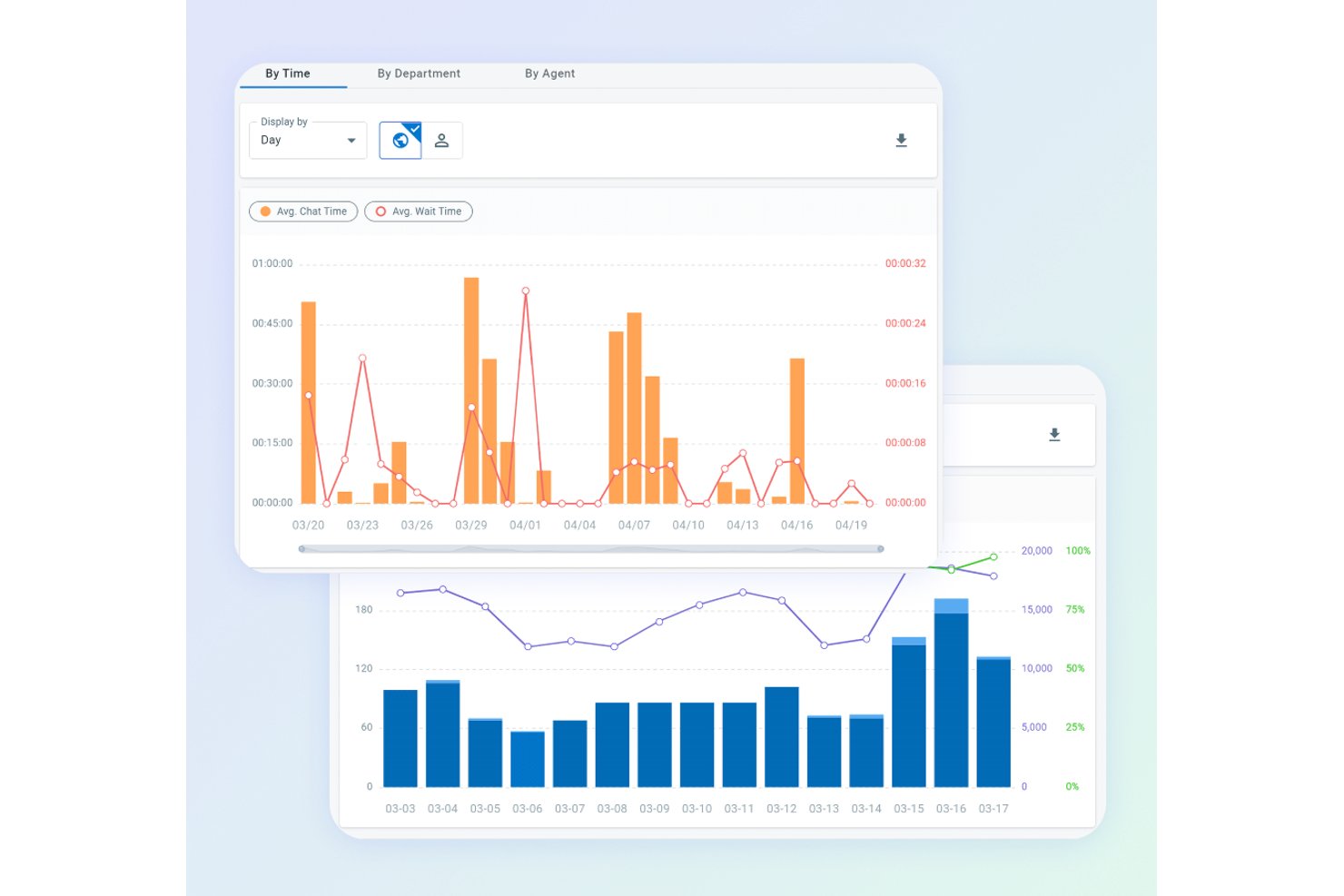
Comm100 est une plateforme de chat en direct et d’engagement client omnicanal qui combine un widget de chat personnalisable pour site web, une automatisation alimentée par l’IA, une surveillance des visiteurs en temps réel et une boîte de réception unifiée pour les agents prenant en charge plus de 12 canaux de communication.
À qui Comm100 convient-il le mieux ?
Comm100 convient particulièrement aux équipes des secteurs de la santé, des services financiers, du gouvernement et de l’enseignement supérieur qui ont besoin d’un chat alimenté par l’IA, soutenu par des certifications de conformité de niveau entreprise.
Pourquoi j’ai choisi Comm100
Comm100 figure sur ma liste restreinte en raison du sérieux avec lequel la plateforme traite la conformité sans sacrifier les capacités d’IA. J’ai rarement vu des plateformes de chat en direct égaler son ensemble de certifications : SOC 2 Type II, HIPAA, PCI DSS et ISO 27001 réunies au même endroit, ce qui est particulièrement important si vous accompagnez des patients, des étudiants ou des clients de services financiers. Les contrôles anti-hallucination de l’agent IA, qui limitent strictement les réponses aux sources de connaissances vérifiées, en font une solution à laquelle je ferais confiance dans les environnements réglementés où une seule mauvaise réponse peut entraîner de véritables risques.
Principales fonctionnalités de Comm100
- Surveillance des visiteurs en temps réel : Suit plus de 30 paramètres comportementaux, notamment le parcours de navigation, la source de référence et la valeur du panier, afin que les agents voient exactement qui se trouve sur le site avant d’entamer une conversation.
- Boîte de réception omnicanale pour les agents : Regroupe plus de 12 canaux (chat en direct, e-mail, SMS, WhatsApp, Instagram et autres) dans un espace de travail unique afin que les agents gèrent chaque conversation au même endroit.
- Routage des chats basé sur les compétences : Attribue et transfère automatiquement les chats en fonction des compétences de l’agent, du service ou du segment de visiteurs grâce à un système ACD intégré.
- Déploiement sur site : Permet aux organisations d’héberger l’intégralité de la plateforme, y compris l’IA, sur leur propre infrastructure, une possibilité rare dans cette catégorie et essentielle pour répondre à des exigences strictes de résidence des données.
Intégrations de Comm100
Comm100 propose des intégrations natives avec Salesforce, HubSpot, Microsoft Dynamics 365, Zendesk, ServiceNow, Shopify, Google Drive, SharePoint Online et Confluence Cloud. La plateforme prend également en charge l’API REST et les webhooks pour les intégrations personnalisées.
Pros and Cons
Pros:
- Couverture SOC 2 Type II, HIPAA, PCI DSS et WCAG
- Partage d’écran, vidéo et voix, et transfert de fichiers
- Entièrement intégré à la suite IA
Cons:
- Les coûts peuvent augmenter avec les fonctionnalités plus avancées
- Les fonctionnalités d’IA peuvent être surdimensionnées pour les petites équipes

Idéal pour la gestion du chat en direct axée sur l’IA
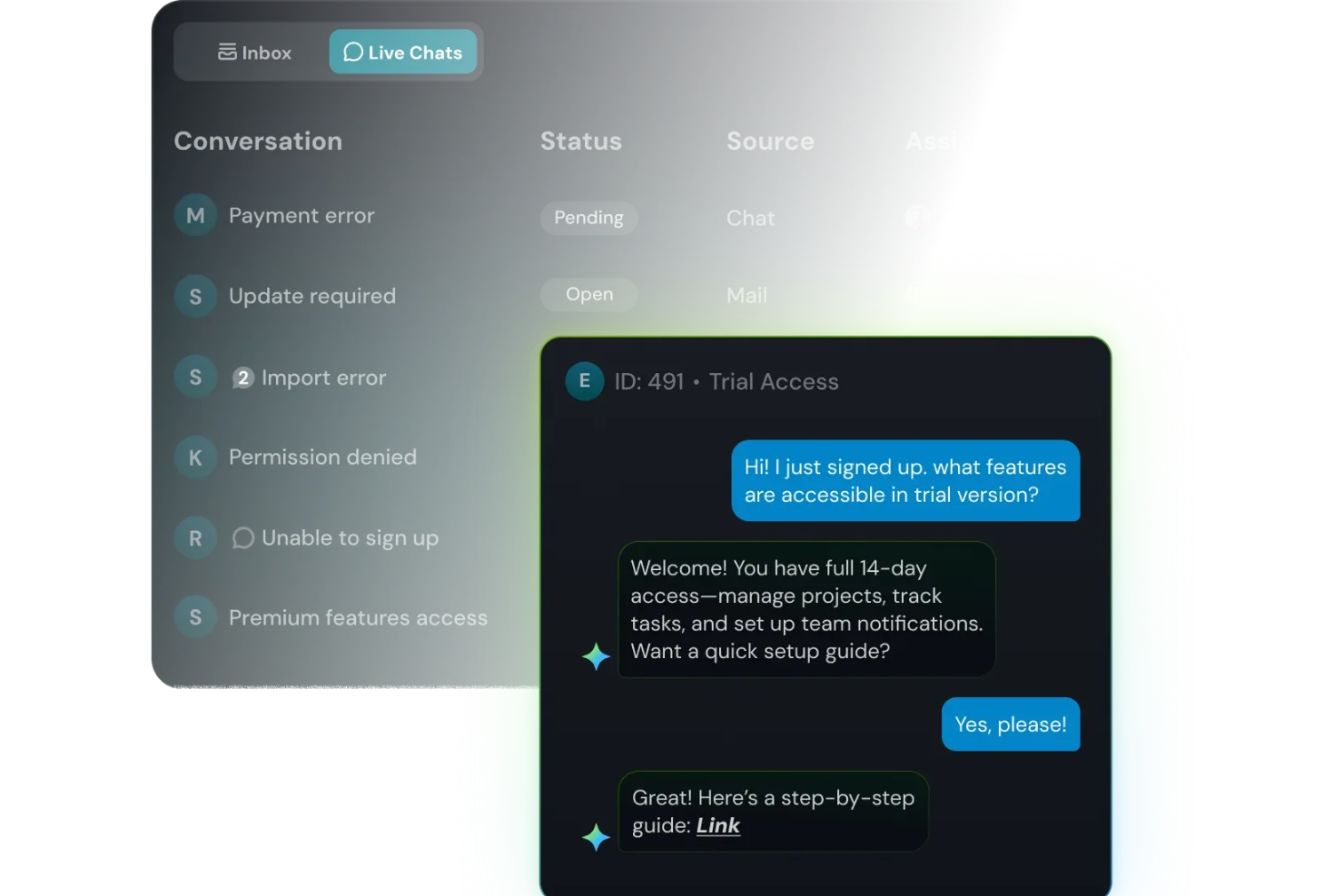
Lorsque le chat de votre site web est envahi de questions récurrentes et de clients impatients, SparrowDesk vous offre un moyen de garder des réponses rapides sans épuiser votre équipe. Il est conçu pour les responsables du support qui souhaitent confier les tâches routinières à l'IA pendant que les agents se concentrent sur des conversations nuancées, le tout dans une boîte de réception partagée couvrant le chat en direct et l'e-mail. Avec SparrowDesk, vous pouvez transformer le chat de votre site web en un mélange de réponses instantanées fournies par l’IA, d’assistance humaine et d’une visibilité claire sur les demandes récurrentes de vos clients.
Pourquoi j'ai choisi SparrowDesk
J'ai choisi SparrowDesk car il considère votre widget de site web comme la porte d’entrée d’un centre d’aide pensé d’abord pour l’IA, et non comme un canal isolé de plus. Luna, l’agent IA intégré, peut dévier et résoudre automatiquement une grande part des demandes routinières directement dans le chat, permettant à votre équipe de consacrer plus de temps aux conversations complexes plutôt qu’aux réinitialisations de mot de passe ou au suivi des commandes. Vos agents continuent de travailler dans une boîte de réception unifiée qui combine chat et e-mail, avec un copilote IA suggérant des réponses fidèles à votre image de marque et résumant les longs fils de discussion, afin qu’ils puissent avancer rapidement sans perdre le contexte.
Et comme le chat en direct, la boîte de réception partagée et la segmentation des contacts sont tous inclus dans le même forfait, c’est un excellent choix si vous souhaitez des conversations en temps réel étroitement liées au suivi des tickets et à l’historique client, plutôt que de les ajouter comme un outil séparé.
Fonctionnalités clés de SparrowDesk
En plus de son approche axée sur l’IA pour le chat en direct, SparrowDesk inclut plusieurs autres fonctionnalités pour aider votre équipe à gérer des conversations en temps réel à grande échelle.
- Accords sur les niveaux de service (SLA) : Établissez des objectifs clairs de temps de réponse et de résolution afin d’assurer un support dans les délais.
- Heures d’ouverture : Définissez les horaires de travail de votre équipe pour mieux gérer les attentes des clients et l’acheminement des tickets.
- Macros d’action rapide : Automatisez les tâches courantes grâce à des macros prédéfinies pour améliorer la productivité.
- Analyses interactives : Obtenez des informations sur les performances de l’équipe et les tendances clients via des tableaux de bord en temps réel.
Intégrations SparrowDesk
Les intégrations natives ne sont pas actuellement listées par SparrowDesk. Cependant, les capacités de sa plateforme suggèrent un potentiel d’intégrations personnalisées via les API.
Pros and Cons
Pros:
- La boîte de réception omnicanale centralise la communication sur toutes les plateformes.
- Le support multilingue répond à un public international.
- Le copilote IA assiste les agents avec des suggestions intelligentes de brouillons.
Cons:
- Le nombre limité d’intégrations natives peut freiner une connectivité fluide.
- La dépendance à l'IA peut ne pas convenir à tous les styles de service client.

Idéal pour le support client omnicanal

LiveAgent est un logiciel de support client qui propose une fonctionnalité de chat en direct pour les sites web, offrant ainsi un moyen simple et efficace aux équipes de communiquer en temps réel avec les clients.
Pourquoi j'ai choisi LiveAgent : La plateforme se distingue par son support omnicanal complet, intégrant dans une seule solution le chat en direct, la gestion des tickets, le centre d'appels, les réseaux sociaux et la base de connaissances. La possibilité de centraliser tous les canaux de communication dans une interface unique facilite la gestion et la réponse efficace aux demandes des clients, tout en offrant une expérience client unifiée.
En outre, la fonctionnalité de chat en direct permet une communication en temps réel avec les visiteurs du site web. Elle comprend un widget de chat rapide, facilement intégrable sur n'importe quel site. L'outil de chat en direct prend en charge les invitations proactives, les réponses prédéfinies et l'historique des conversations, permettant aux agents d'interagir avec les clients aussi rapidement que possible.
Fonctionnalités principales & intégrations :
Fonctionnalités : incluent un centre d'appels, un support client en libre-service, des rapports et analyses, un support multilingue et l'automatisation des flux de travail. Il propose également un système de tickets avec distribution automatique, étiquetage et champs personnalisés.
Intégrations : Actinic, ActiveCampaign, ChargeDesk, ClickUp, CS-Cart, Drupal, Expression Engine, Jira, Joomla, Klaus, Klaviyo, Nicereply, Opencart, Pipedrive, Post Affiliate Pro, Quriobot, Salesforce, et plus encore.
Pros and Cons
Pros:
- Fonctionnalités avancées d'automatisation
- Interface personnalisable pour l'identité visuelle
- Support multicanal
Cons:
- La fusion des tickets pourrait être améliorée
- Pourrait proposer plus d'intégrations tierces

Idéal pour l'automatisation du service client à grande échelle
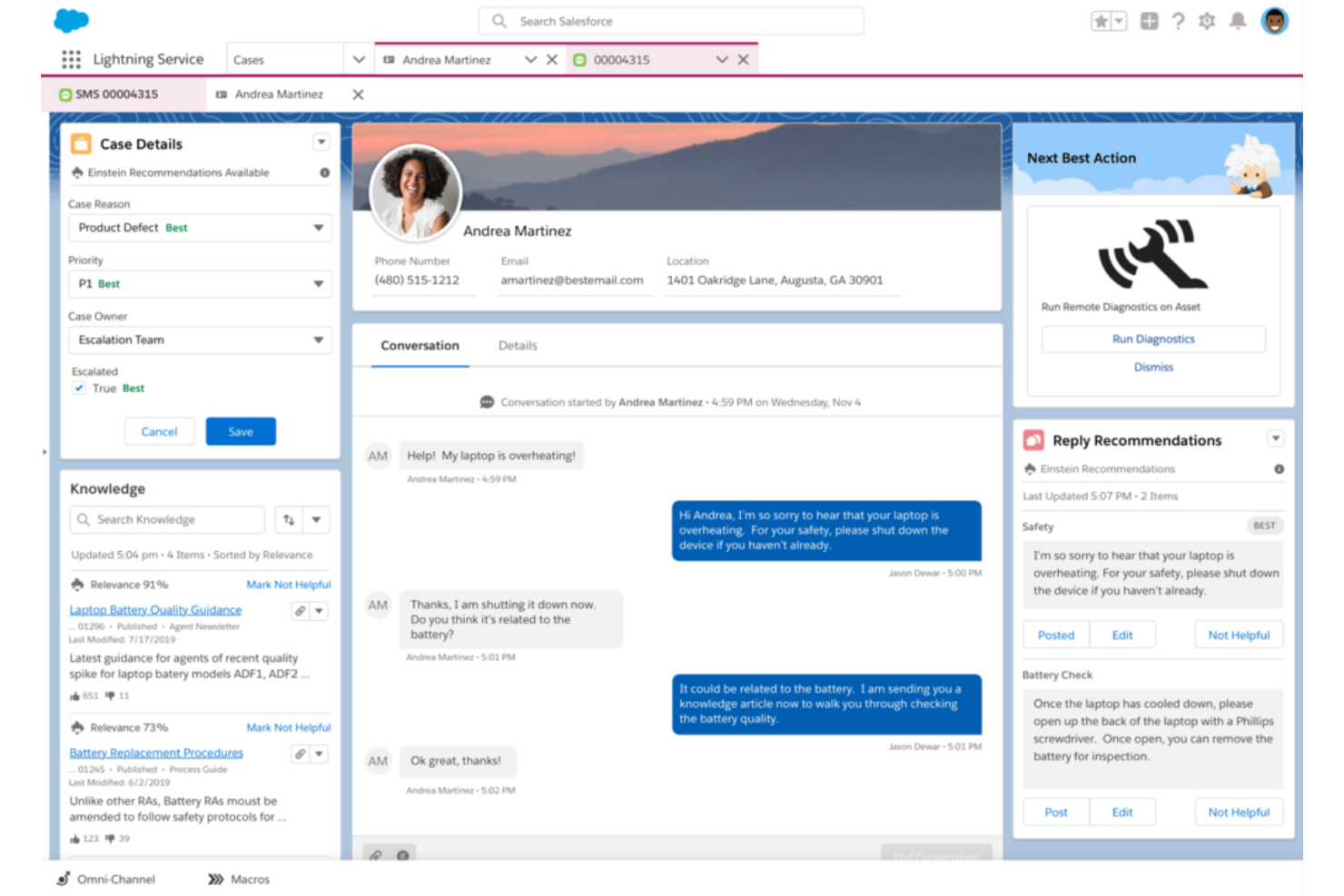
Salesforce Service Cloud est une solution complète de service client conçue pour faciliter les interactions entre les entreprises et leurs clients. Elle est particulièrement adaptée à la gestion des besoins de service client des grandes organisations, grâce à des outils qui permettent l'automatisation des processus de service, rationalisant ainsi les flux de travail et améliorant l'efficacité à grande échelle.
Pourquoi j'ai choisi Salesforce Service Cloud : J'ai sélectionné Salesforce Service Cloud pour cette liste en raison de sa réputation dans l'industrie et de ses fonctionnalités étendues, ce qui en fait une référence inégalée pour l'automatisation des processus de service client à grande échelle. Par exemple, Service Cloud exploite des capacités de routage intelligent pour diriger automatiquement les demandes des clients vers les agents ou équipes de support les plus appropriés. Il prend en compte des facteurs tels que les compétences des agents, leur disponibilité et leur charge de travail afin de garantir une affectation des dossiers à la fois efficace et efficiente.
Service Cloud intègre également des chatbots et des fonctionnalités d'intelligence artificielle (IA) pour automatiser les interactions client et fournir une assistance instantanée. L'automatisation alimentée par l'IA permet au système de comprendre l'intention du client, de suggérer des solutions pertinentes et de proposer des recommandations personnalisées, améliorant ainsi l'expérience du service client.
Fonctionnalités et intégrations remarquables :
Les fonctionnalités incluent l'automatisation de la gestion des dossiers, la gestion des SLA, l'automatisation des flux de travail et des processus, des outils de création de base de connaissances, la gestion des services sur le terrain, un support omnicanal et une console de service unifiée.
Les intégrations incluent l'ensemble de la suite Salesforce, Slack, Trello, Mailchimp, HubSpot CRM, Freshdesk, Twilio, Quickbase, Guru et Helpshift.
Pros and Cons
Pros:
- Centralise les interactions client et les données en un seul endroit
- Évolutif pour soutenir les grandes organisations
- Interface utilisateur (UI) dynamique et intuitive
Cons:
- Les mises à jour sont limitées et l'évolution est souvent lente
- La complexité des fonctionnalités peut nécessiter un temps d'apprentissage
- Dépendance à d'autres produits Salesforce pour une utilité maximale
New Product Updates from Agentforce Service (formerly Service Cloud)
Agentforce Service Keeps Full Agentforce Voice Transcripts After Calls
Agentforce Service now shows the full conversation history in post-call transcripts for Agentforce Voice calls within the Service Console, giving agents better context for follow-ups. For more information, visit Salesforce’s official site.
 .
.
Chatbase
Le meilleur pour la création facile de chatbots à partir de données personnalisées
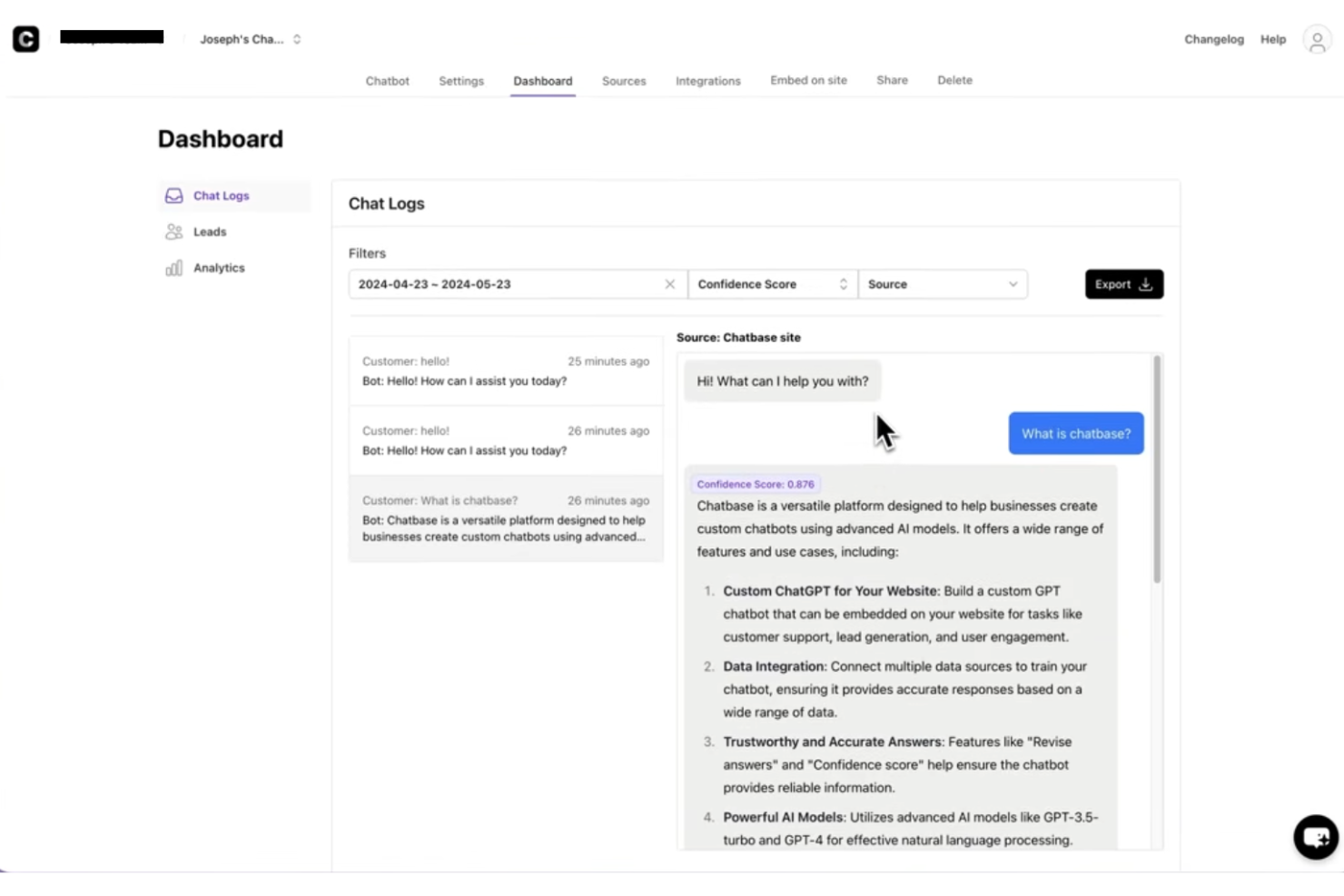
Chatbase est un logiciel de chat en direct alimenté par l'IA pour les sites web, qui vous permet de créer et déployer des chatbots entraînés sur vos propres données, avec intégration du widget au site et gestion de conversations clients multilingues.
À qui s'adresse Chatbase ?
Chatbase convient bien aux petites et moyennes entreprises ainsi qu'aux équipes SaaS qui souhaitent déployer des chatbots IA sur leurs sites web sans avoir besoin d'un développeur.
Pourquoi j'ai choisi Chatbase
Chatbase mérite sa place dans ma sélection grâce à la simplicité avec laquelle on peut créer un chatbot à partir de son propre contenu. J'ai téléchargé des PDFs, copié des URLs de sites et connecté des bases de connaissances pour concevoir un agent conversationnel qui répond vraiment comme le ferait mon équipe. C'est le cœur de la force de Chatbase : vous entraînez le bot sur vos données spécifiques, et il gère les conversations clients en fonction de ce contexte. J'apprécie également la fonctionnalité d'actions de l'agent IA, qui permet au chatbot de prendre des mesures comme collecter des leads ou transférer la conversation à un humain lorsqu'il atteint la limite de ses connaissances.
Fonctionnalités clés de Chatbase
- Transfert à un humain : Redirigez les conversations vers un agent en direct lorsque l'IA atteint ses limites ou qu'une réponse humaine est nécessaire.
- Rapports avancés : Suivez les données de conversation, la performance des agents et l'engagement client à travers un tableau de bord d'analyse intégré.
- Comparaison de modèles IA : Testez et échangez entre différents modèles d'IA pour trouver la configuration idéale adaptée à votre cas de support.
- Déploiement omnicanal : Déployez votre chatbot sur le chat du site, WhatsApp, Slack et d'autres canaux à partir d'une seule configuration.
Intégrations de Chatbase
Chatbase propose des intégrations natives avec Make, Zendesk, Notion, Slack, Stripe, Salesforce et plus encore. Une API est également disponible pour les intégrations personnalisées.
Pros and Cons
Pros:
- Inclut des analyses pour suivre la performance du chatbot
- Le design du widget est totalement personnalisable pour la marque
- L'agent IA peut effectuer la collecte de leads
Cons:
- La suppression du branding nécessite un abonnement haut de gamme
- Pas de fonctionnalité intégrée de transfert à un agent en direct

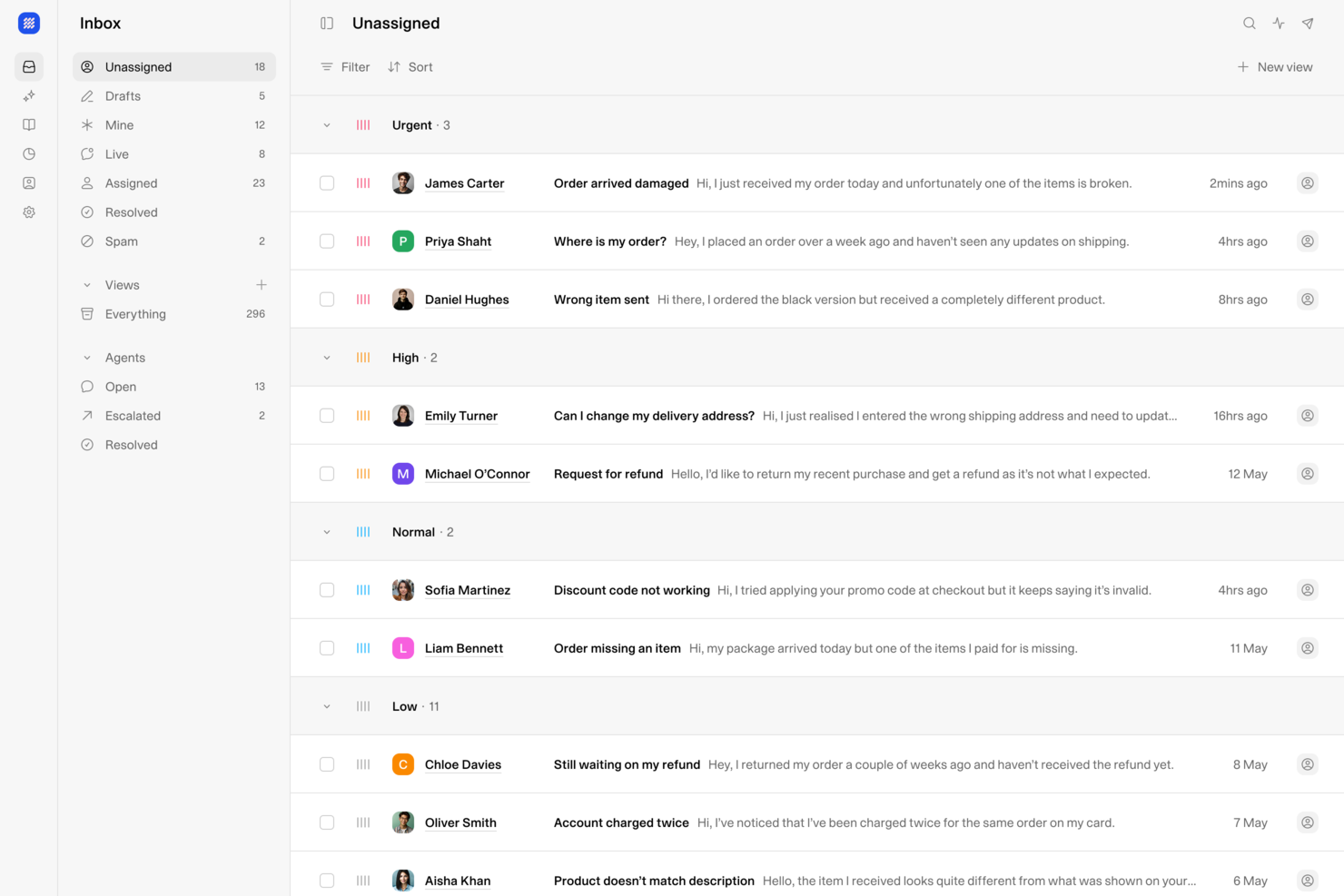
Weav est une plateforme d’assistance client et de chat en direct alimentée par l’IA, qui combine un widget chatbot pour site web, une boîte de réception unifiée humains-IA et une formation d’agent sans code pour gérer et résoudre automatiquement les demandes clients.
Pour qui Weav est-il le mieux adapté ?
Weav convient aux petites et moyennes entreprises qui souhaitent automatiser leur support client sur leur site web sans avoir à développer ou à maintenir une infrastructure de chatbot complexe.
Pourquoi j'ai sélectionné Weav
J’ai inclus Weav dans mes meilleures sélections car il permet de mettre en place un agent de chat entièrement automatisé simplement en synchronisant votre site ou en téléchargeant vos documents de support — aucune compétence en codage requise. L’IA s’entraîne directement sur votre contenu et commence à résoudre les demandes des clients en temps réel via un widget de chat sur votre site. J’apprécie également que lorsque les conversations dépassent le champ d’action de l’IA, Weav les transfère à un agent humain sans aucune configuration manuelle.
Fonctionnalités clés de Weav
- Boîte de réception unifiée : Gérez les discussions en direct et les conversations par e-mail depuis un seul tableau de bord agent.
- Personnalisation des réponses : Définissez le ton, la longueur des réponses et les phrases interdites de l’IA pour chaque interaction de chat.
- Tableau de bord analytique : Suivez les taux de résolution, le volume des conversations et l’activité des agents en un seul aperçu.
- Accès à l’API REST : Connectez Weav à des systèmes externes ou créez des parcours de support personnalisés via son API.
Intégrations Weav
Weav propose des intégrations natives avec Stripe et Google Drive. Il prend aussi en charge les actions personnalisées : vos agents IA peuvent appeler n’importe quelle API HTTPS tierce au cours d’une conversation pour récupérer ou mettre à jour des données dans des systèmes externes. Une API et des webhooks temps réel sont disponibles pour les intégrations personnalisées.
Pros and Cons
Pros:
- Places et agents IA illimités inclus
- Tarification à la résolution évitant les coûts par utilisateur
- Agents IA entraînés sur vos propres documents
Cons:
- Intégrations natives tierces très limitées
- Pas encore de prise en charge multicanal réseaux sociaux

Tidio
Idéal pour un service client assisté par l’IA
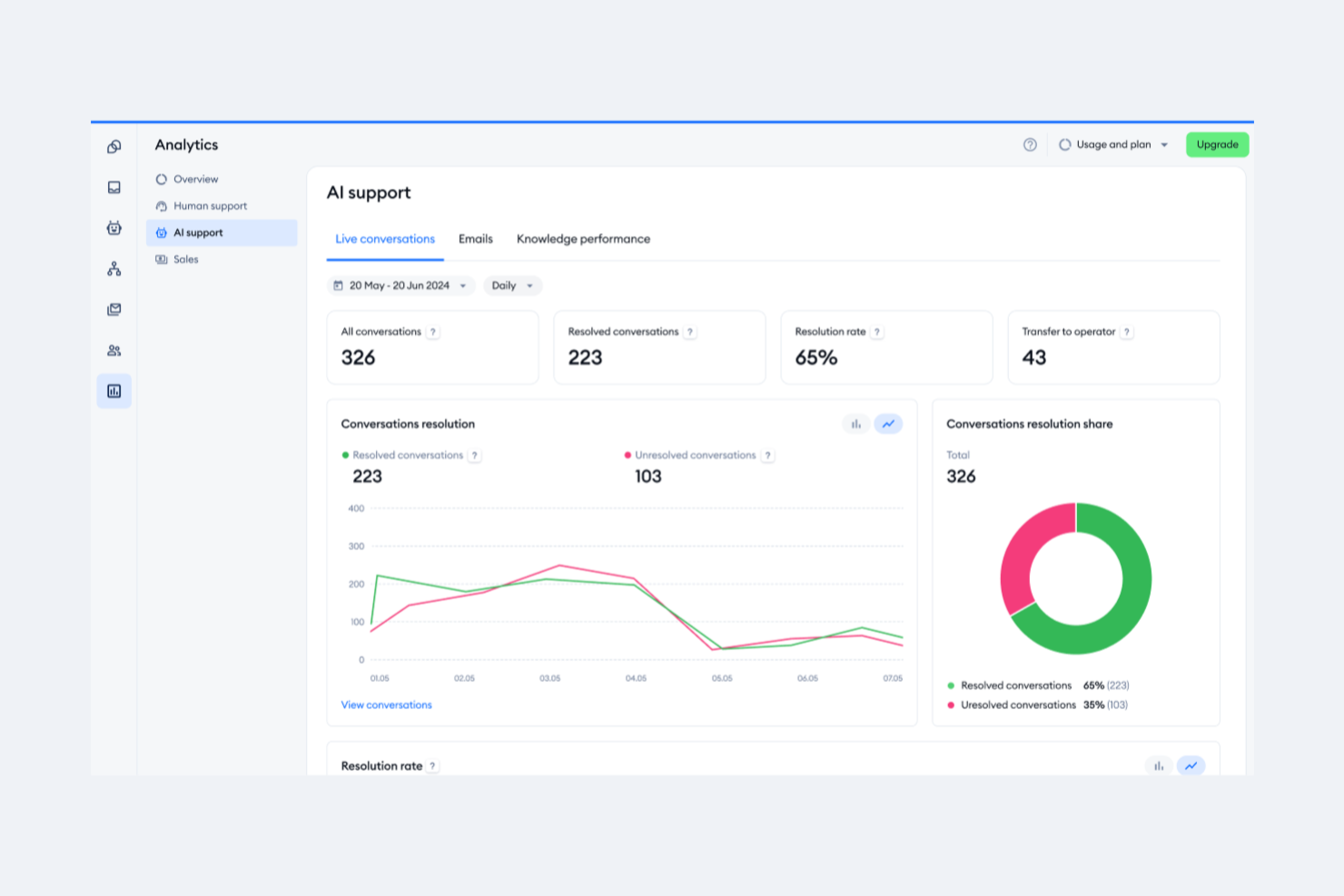
Tidio est un logiciel de chat en direct conçu pour aider les entreprises à fournir un support client en temps réel et à augmenter les ventes via leurs sites web. Il exploite l’IA pour assister les équipes du service client dans la gestion des demandes et de l’assistance.
Pourquoi j’ai choisi Tidio : La fonctionnalité phare de la plateforme, le chatbot Lyro AI, peut résoudre de manière autonome les demandes des clients dans plusieurs langues. Tidio excelle en tant qu’outil de service client alimenté par l’IA car il offre non seulement une assistance 24h/24, mais il aide aussi les entreprises à développer leurs opérations de support client avec des coûts prévisibles et à renforcer l’engagement des utilisateurs grâce à des expériences personnalisées et à l’automatisation.
En outre, le logiciel permet aux entreprises de gérer divers canaux de communication, y compris les e-mails, les chats en direct et les messages sur les réseaux sociaux, depuis un tableau de bord unique. Tidio propose également des outils pour suivre l’activité des visiteurs, personnaliser les communications et répondre rapidement avec des fonctionnalités telles que des réponses préenregistrées et l’aperçu de la saisie en direct.
Fonctionnalités remarquables et intégrations :
Fonctionnalités incluent le chat en direct et le helpdesk, l’analytique, les options de personnalisation, les appels vidéo, les applications mobiles et bureau, des parcours clients interactifs et des redirections intelligentes.
Intégrations incluent Shopify, WordPress, Squarespace, Weebly, WooCommerce, Google Analytics, Klaviyo, Zendesk, Salesforce, et bien d’autres.
Pros and Cons
Pros:
- Suivi des visiteurs
- Communication omnicanale
- Assistant chatbot IA
Cons:
- Limitations avec l’offre gratuite
- Peut nécessiter des ressources supplémentaires pour une gestion efficace

Front
Idéal avec onboarding personnalisable pour grandes équipes
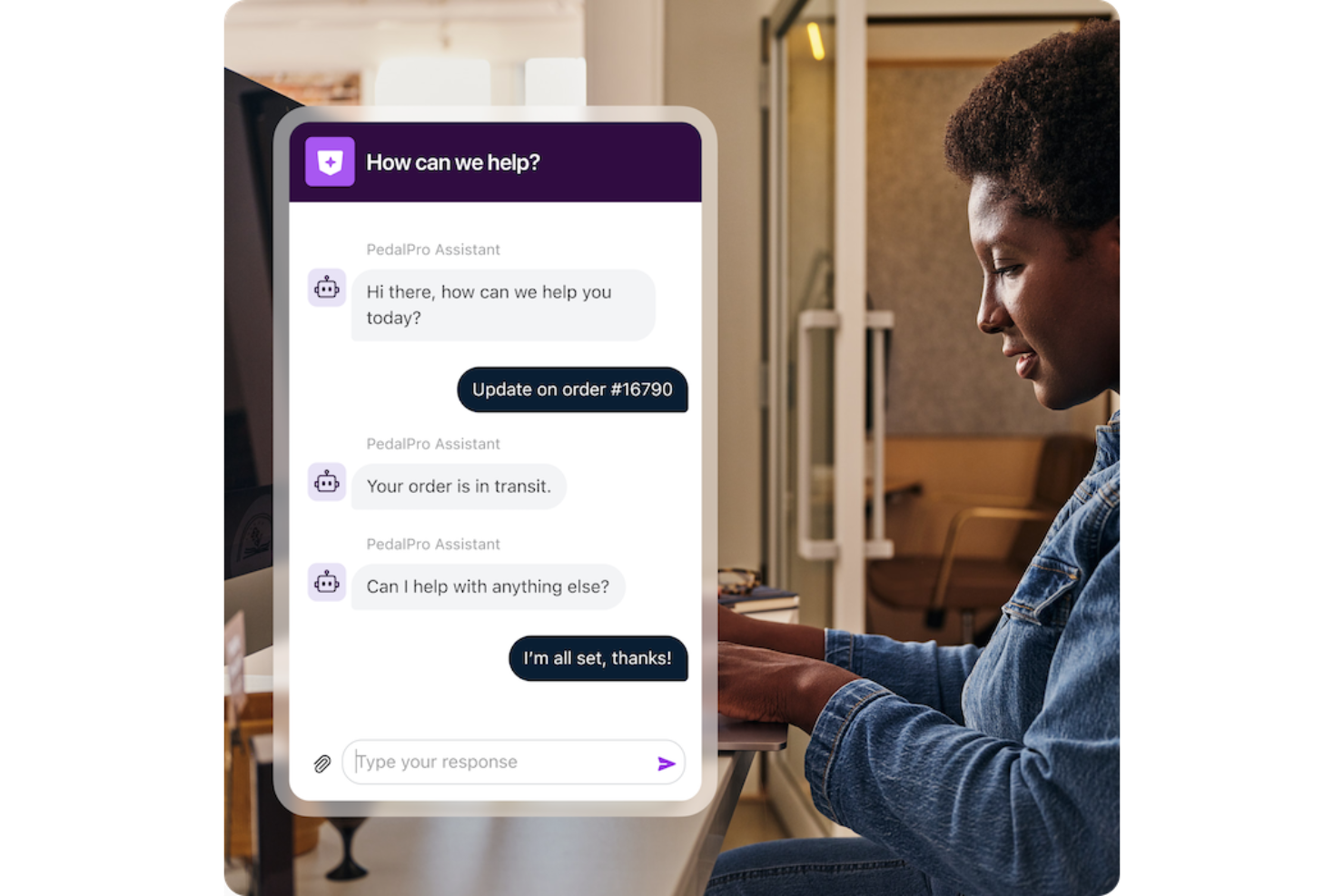
Front réunit le chat en direct, l’e-mail et d’autres canaux dans une seule boîte de réception collaborative pour les équipes en contact avec la clientèle. Si vous cherchez une solution permettant à votre équipe de gérer les conversations du site web aux côtés d’autres canaux, Front propose un espace de travail unifié avec des options d’automatisation et d’intégration. C’est un excellent choix pour les entreprises qui souhaitent rationaliser la communication client et garder chaque interaction organisée entre les différents services.
À qui s’adresse Front ?
Front convient particulièrement aux équipes de support client et d’opérations de taille moyenne à grande qui doivent gérer d’importants volumes de chats web et d’autres communications clients au sein d’un environnement collaboratif.
Pourquoi j’ai choisi Front
Pour les équipes devant intégrer rapidement et efficacement un grand nombre de nouveaux membres, Front se distingue grâce à ses options d’intégration personnalisables. J’ai choisi Front car il vous permet d’adapter les parcours d’intégration, les autorisations et les ressources de formation en fonction de la structure et des processus de votre équipe. La plateforme prend en charge l’accès basé sur les rôles et une gestion utilisateur détaillée, de sorte que vous pouvez doter les nouveaux agents des bons outils et informations dès le premier jour. Cette approche aide les grandes organisations à mettre en place leur chat en direct sur le site web rapidement, sans délais ni confusion.
Fonctionnalités principales de Front
D’autres fonctionnalités font également de Front un excellent choix pour les équipes de chat en direct :
- Widget de chat en direct : Ajoutez un widget de chat personnalisable à votre site pour engager vos visiteurs en temps réel.
- Boîte de réception partagée : Dirigez et assignez les messages entrants aux bons membres de l’équipe pour répondre plus rapidement.
- Messagerie omnicanale : Gérez les conversations e-mail, SMS, réseaux sociaux et chat web depuis une seule boîte de réception unifiée.
- Analyse et rapports : Suivez le volume de chat, les temps de réponse et la performance de l’équipe grâce à des outils d’analyse intégrés.
Intégrations Front
Les intégrations incluent Salesforce, HubSpot, Slack, Jira, Asana, Aircall, ClickUp, FullContact, Gainsight et Chatra.
Pros and Cons
Pros:
- Automatisation avancée des flux de travail pour le routage des conversations
- Boîte de réception partagée favorisant la collaboration sur les chats
- Analyses en temps réel pour le suivi des performances du chat
Cons:
- Pas d’offre gratuite à vie pour les petites équipes
- Nécessite des modules complémentaires pour SMS ou WhatsApp

Intercom
Idéal pour la messagerie client personnalisée
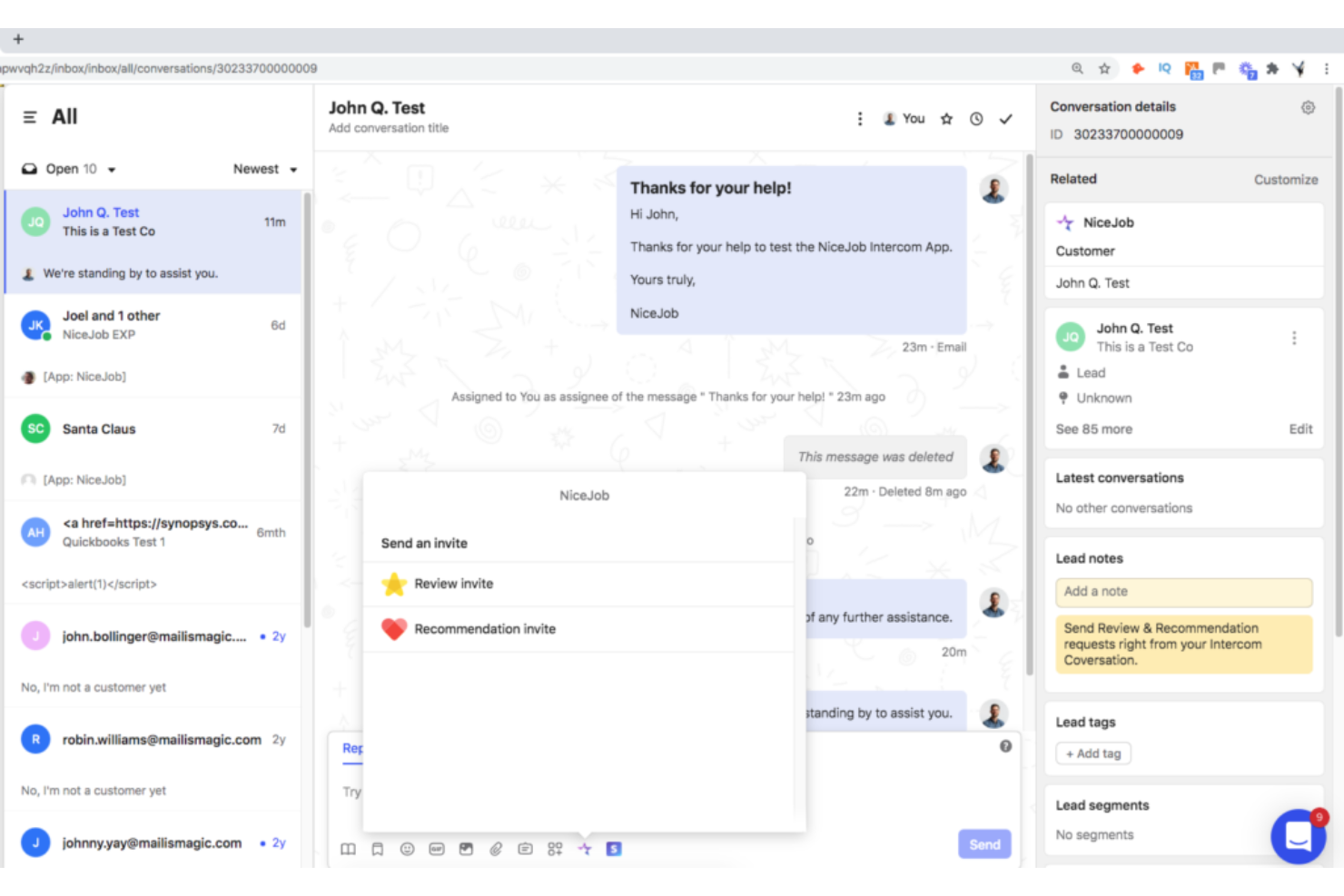
Intercom est une plateforme de gestion des relations conversationnelles qui excelle dans la messagerie client personnalisée sur différents points de contact. Elle permet aux entreprises d'envoyer des messages personnalisés et automatisés en fonction du comportement des utilisateurs, ce qui lui vaut sa distinction comme étant la meilleure pour la messagerie client personnalisée.
Pourquoi j'ai choisi Intercom : Intercom s'est imposé dans cette liste grâce à sa capacité à automatiser l'envoi de messages personnalisés selon les comportements et préférences individuels. En exploitant les données clients, telles que les comportements, la démographie ou les interactions passées, les entreprises peuvent segmenter leur audience et créer des messages adaptés qui résonnent auprès de segments de clientèle spécifiques. Cette approche ciblée favorise l'engagement et augmente les taux de conversion en délivrant un contenu personnalisé à chaque client ou groupe défini.
Intercom propose également des analyses détaillées et des rapports sur la performance des messages. Les entreprises peuvent suivre des indicateurs comme le taux d'ouverture, le taux de clics, le taux de conversion et l'engagement client avec les messages envoyés via la plateforme.
Fonctionnalités et intégrations remarquables :
Fonctionnalités comprennent le ciblage comportemental, la segmentation des clients, le chat en direct et le support conversationnel, la messagerie intégrée à l'application et une plateforme de messagerie automatisée.
Cet outil s'intègre facilement avec Slack, HubSpot, Salesforce et d'autres outils, permettant des flux de travail sans accroc et une productivité accrue.
Pros and Cons
Pros:
- Le logiciel est fréquemment mis à jour pour répondre aux attentes des clients
- Interface utilisateur attrayante et intuitive
- La conformité HIPAA rend la plateforme idéale pour les professionnels de santé
Cons:
- Recherche limitée
- Les fonctionnalités avancées sont facturées en supplément.
- Support utilisateur limité
Drift
Idéal pour le marketing conversationnel
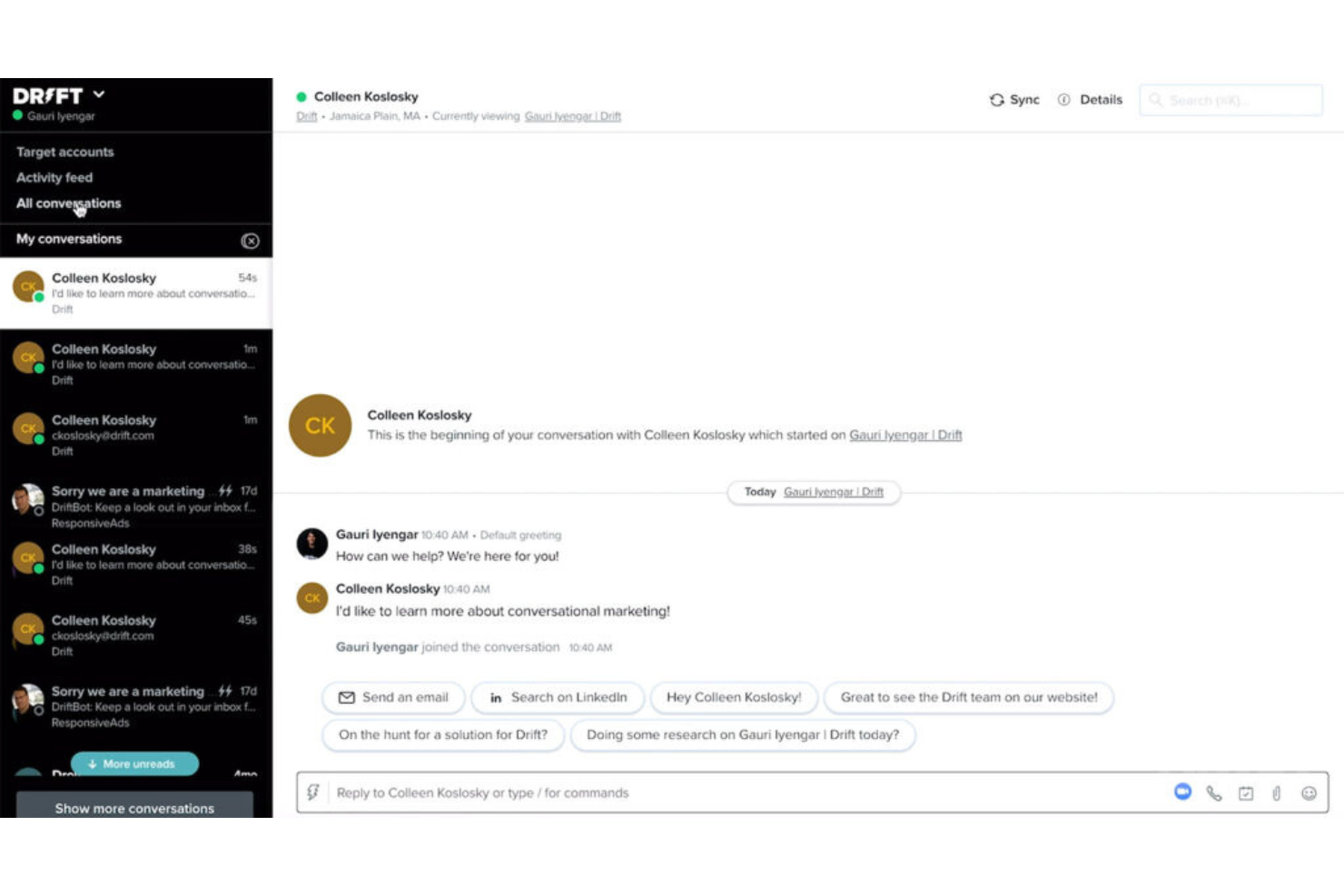
Drift est une plateforme de marketing conversationnel qui permet aux entreprises d'engager les visiteurs de leur site web avec des messages de chat personnalisés en temps réel, créant ainsi un environnement propice à des conversations significatives.
Pourquoi j'ai choisi Drift : Ce qui m'a marqué chez Drift, c'est son engagement à faire de la conversation une partie intégrante de sa stratégie marketing. Il ne s'agit pas seulement de marketing par e-mail basique ou de répondre aux questions des clients ; il s'agit de susciter des conversations par chat qui mènent les clients dans le tunnel de vente.
À cette fin, Drift inclut des campagnes de messages ciblés basées sur le comportement du visiteur, ses attributs ou des actions spécifiques effectuées sur le site web. Cette personnalisation permet de délivrer des messages et des offres pertinents aux visiteurs, augmentant ainsi l'engagement et les taux de conversion. Les messages peuvent être adaptés à des segments spécifiques ou à des visiteurs individuels afin de créer une expérience plus personnalisée.
Fonctionnalités et intégrations remarquables :
Fonctionnalités incluent la qualification et le routage des prospects, la planification de rendez-vous, des chatbots alimentés par l'IA et des capacités de chat en direct, ainsi que des outils d'analyse et de reporting pour suivre et mesurer l'efficacité des efforts de marketing conversationnel.
Intégrations incluent Salesforce, Salesloft, Databox, FullStory, Google Analytics, Google Workspace, HubSpot, Lokalise, Marketo et Slack
Pros and Cons
Pros:
- Outils de marketing conversationnel approfondis
- Chatbots puissants basés sur l'IA
- Playbooks d'expérience client personnalisables
Cons:
- Le routage des conversations et les notifications peuvent être lents
- Pas de formule gratuite disponible.
- Peut être intimidant pour les débutants en raison du grand nombre de fonctionnalités.
Autres logiciels de chat en direct pour les sites web
Voici quelques autres logiciels de chat en direct pour les sites web qui n’ont pas intégré ma sélection, mais qui méritent tout de même votre attention :
- HubSpot Service Hub
Idéal pour une intégration avec un CRM complet
- Sprinklr
Idéal pour l'engagement client sur les réseaux sociaux
- Crescendo
Idéal pour le coaching IA intégré dans les conversations clients
- Zendesk Support Suite
Idéal pour la gestion centralisée des demandes
- Zoho Desk
Idéal pour l'intégration avec les autres produits Zoho
- Gladly
Idéal pour une communication client unifiée
- Qualified
Idéal pour l’identification des visiteurs du site web
- 14.ai
Meilleur moteur de réponses conscient de l’intention
- SwiftCX
Idéal pour l’assistance client en direct avec IA
- Hiver
Idéal pour la gestion de volumes élevés de requêtes
- Birdeye
Idéal pour les retours clients et la gestion de la réputation
- LiveChat
Idéal pour des chats personnalisés à l’image de votre marque
- Nextiva
Idéal pour un service client axé sur la voix
- Alhena AI
Idéal pour un déploiement rapide et une précision accrue


Comment j'évalue les logiciels de chat en direct pour les sites web
Je divise mon évaluation en deux catégories : les capacités de base—chat en temps réel, routage et déclencheurs proactifs—et les différenciateurs qui permettent de recommander ou non un outil.
Fonctionnalités de base (Pré-requis pour cette liste)
Lorsque je sélectionne des outils pour ma liste, j'attribue à chacun une note de 0 (fonctionnalité absente) à 5 (excellent dans ce domaine) pour chaque fonctionnalité clé ci-dessous. Ensuite, je calcule le score total de l'outil en pourcentage. Chaque outil doit obtenir un score total minimum de 75 % pour être pris en compte dans la sélection.
- Widget de chat en temps réel : J’évalue la capacité du widget à gérer la personnalisation, les formulaires préchat, le partage de fichiers et la réactivité mobile afin d’offrir une expérience cohérente sur tous les appareils.
- Espace de travail & boîte de réception des agents : Un bon espace affiche instantanément les détails du visiteur, l’historique des échanges et les tags. Je recherche la gestion simultanée de plusieurs chats et la présence de notes internes pour la collaboration entre agents.
- Routage & assignation : Je vérifie si les chats sont dirigés selon le service, les compétences ou la disponibilité. Par exemple, les questions de facturation devraient atteindre votre équipe paiements, non le support général.
- Déclencheurs de chat proactifs : La configuration des déclencheurs est essentielle. Je recherche des conditions comportementales comme le temps passé sur une page panier ou les visites répétées, permettant à votre équipe d'engager les visiteurs avant qu'ils ne partent.
- Chatbot & automatisation : Qu’il s’agisse d’un parcours basé sur des règles ou d’un bot piloté par IA, j’évalue l'efficacité des réponses automatiques pour traiter les FAQ et transférer la main à un agent en direct si nécessaire.
- Intégrations CRM & helpdesk : Les données du chat doivent s'intégrer à votre environnement existant. Je vérifie les connexions natives avec des plateformes telles que Salesforce, HubSpot, Zendesk et Freshdesk.
Une fois que j'ai une liste d'outils répondant à ces critères, j'examine ce qui distingue chaque plateforme.
Facteurs de différenciation (Ce qui distingue les fournisseurs)
Voici comment je compare et différencie les fournisseurs :
Fonctionnalités remarquables
La messagerie omnicanale est un véritable atout. Lorsqu’un client commence sur le chat du site web puis poursuit sur WhatsApp, les agents doivent retrouver tout l’historique de la conversation dans une seule boîte de réception. J’évalue aussi l’assistance à la rédaction par IA : les outils qui suggèrent des réponses ou résument de longs échanges aident les agents à gérer un plus grand volume sans sacrifier la qualité. L’intégration de la base de connaissances compte aussi. Les meilleures solutions proposent des articles d’aide pertinents dans le chat et les flux de bot, permettant ainsi au client de s’auto-assister sans intervention d’agent.
Au-delà des fonctionnalités
La structure tarifaire a un impact majeur. Une tarification par agent peut vite exploser pour les équipes en croissance, alors j’examine si les fournisseurs proposent des modèles basés sur le volume ou la conversation en alternative. La sécurité et la conformité pèsent aussi : les équipes qui traitent des paiements ou des données de santé ont besoin d'une conformité GDPR, HIPAA ou PCI-DSS, ainsi que de la certification SOC 2. Je considère aussi la rapidité de mise en œuvre. Un outil disposant de plugins CMS pour Shopify ou WordPress et de modèles de bots préconfigurés vous permet d’être opérationnel plus vite qu’une solution qui exige beaucoup de développement.
Comment choisir un logiciel de chat en direct pour un site web
Il est facile de se perdre dans de longues listes de fonctionnalités et des structures tarifaires complexes. Pour vous aider à rester concentré tout au long de votre processus de sélection logicielle, qui vous est propre, voici une liste des facteurs à prendre en compte :
| Facteur | Éléments à prendre en compte |
|---|---|
| Évolutivité | Le logiciel évoluera-t-il avec votre entreprise ? Tenez compte du nombre d’utilisateurs, du volume de conversations et de votre expansion future. Recherchez des outils capables de gérer une demande accrue sans frais supplémentaires. |
| Intégrations | Se connecte-t-il à vos systèmes existants ? Vérifiez sa compatibilité avec votre CRM, votre messagerie électronique et les autres outils utilisés quotidiennement par votre équipe. Évitez les outils qui nécessitent des solutions de contournement complexes. |
| Personnalisation | Pouvez-vous adapter le logiciel à vos besoins ? Vérifiez si vous pouvez ajuster les widgets de chat, les flux de travail et les autorisations des utilisateurs afin de les adapter à vos processus. |
| Facilité d’utilisation | L’interface est-elle intuitive pour votre équipe ? Choisissez un logiciel qui réduit au minimum le temps de formation et facilite la prise en main des nouveaux utilisateurs. |
| Mise en œuvre et intégration | Combien de temps faudra-t-il pour démarrer ? Privilégiez un outil proposant des ressources d’intégration claires, une configuration rapide et une assistance pendant la phase de transition. |
| Coût | Le tarif correspond-il à votre budget ? Comparez les coûts aux fonctionnalités proposées. Tenez compte du coût total de possession, y compris les frais cachés et les modules complémentaires. |
| Mesures de sécurité | Vos données et les échanges avec vos clients sont-ils sécurisés ? Vérifiez la conformité aux normes de protection des données et la présence de fonctionnalités de chiffrement et de confidentialité. |
| Disponibilité de l’assistance | Pouvez-vous obtenir de l’aide lorsque vous en avez besoin ? Recherchez des options d’assistance disponibles 24 h/24 et 7 j/7, des délais de réponse courts et la possibilité de bénéficier de responsables de compte dédiés. |
Qu’est-ce qu’un logiciel de chat en direct pour les sites web ?
Les logiciels de chat en direct pour les sites web sont des outils qui permettent une communication en temps réel entre les entreprises et les visiteurs de leur site web. Les équipes du service client, les équipes commerciales et les professionnels du marketing utilisent couramment ces outils pour dialoguer avec les visiteurs, répondre aux questions et convertir les prospects. Des fonctionnalités telles que les widgets de chat, les réponses automatisées et les capacités d’intégration facilitent les interactions avec les clients, la communication efficace et l’intégration fluide aux flux de travail. Dans l’ensemble, ces outils renforcent l’engagement des clients et améliorent la prestation de services.
Fonctionnalités
Lorsque vous choisissez un logiciel de chat en direct pour les sites web, soyez attentif aux fonctionnalités clés suivantes :
- Communication en temps réel : Permet une interaction instantanée avec les visiteurs, renforçant l’engagement et la satisfaction des clients.
- Widgets de chat : Interfaces personnalisables qui s’adaptent à votre marque et s’intègrent parfaitement à votre site web.
- Réponses automatisées : Fournit des réponses rapides aux questions courantes, permettant à votre équipe de se consacrer aux demandes complexes.
- Suivi des visiteurs : Surveille le comportement des utilisateurs sur votre site, ce qui permet d’adapter les interactions en fonction des centres d’intérêt des visiteurs.
- Capacités d’intégration : Se connecte aux outils de CRM, de messagerie électronique et autres afin de simplifier les flux de travail et la gestion des données.
- Historique et transcriptions des conversations : Conserve les enregistrements des interactions passées afin de fournir un contexte et d’améliorer les communications futures.
- Chatbots pilotés par l’IA : Automatisent les conversations et traitent les demandes lorsque votre équipe n’est pas disponible, garantissant un engagement 24 h/24 et 7 j/7.
- Assistance multicanale : Gère les communications sur plusieurs plateformes, notamment les réseaux sociaux et la messagerie électronique, depuis une seule interface.
- Appel vidéo : Propose des options d’interaction en face à face pour un service client plus personnalisé.
- Mesures de sécurité : Protège les données et garantit le respect des normes de confidentialité, afin de sécuriser les interactions.
Avantages
La mise en œuvre d’un logiciel de chat en direct pour les sites web offre plusieurs avantages à votre équipe et à votre entreprise. Voici quelques-uns des bénéfices dont vous pouvez profiter :
- Amélioration de l’engagement des clients : La communication en temps réel maintient l’intérêt des visiteurs et augmente leur probabilité de devenir clients.
- Accroissement de l’efficacité : Les réponses automatisées et les chatbots pilotés par l’IA traitent les demandes courantes, libérant ainsi votre équipe pour les problèmes complexes.
- Amélioration du service client : L’historique et les transcriptions des conversations fournissent un contexte, permettant une assistance plus personnalisée et efficace.
- Meilleure intégration des données : Les capacités d’intégration assurent une circulation fluide des données entre votre logiciel de chat et les systèmes existants tels que le CRM.
- Disponibilité 24 h/24 et 7 j/7 : L’assistance multicanale et les chatbots garantissent que votre entreprise est toujours disponible pour aider les clients, quels que soient les fuseaux horaires.
- Assistance économique : Réduit le besoin d’une grande équipe d’assistance en automatisant de nombreuses interactions avec les clients.
- Interactions personnalisées : Le suivi des visiteurs et les widgets de chat personnalisables vous permettent d’adapter l’expérience aux besoins de chaque visiteur.
Coûts et tarifs
Le choix d’un logiciel de chat en direct pour les sites web nécessite de comprendre les différents modèles tarifaires et forfaits disponibles. Les tarifs vont des outils de chat en direct gratuits aux options payantes, les coûts variant selon les fonctionnalités, la taille de l’équipe, les modules complémentaires et d’autres facteurs. Le tableau ci-dessous récapitule les forfaits courants, leurs prix moyens et les fonctionnalités généralement incluses dans les solutions de logiciels de chat en direct pour les sites web :
Tableau comparatif des forfaits de logiciels de chat en direct pour les sites web
| Type de forfait | Prix moyen | Fonctionnalités courantes |
|---|---|---|
| Forfait gratuit | $0 | Fonctionnalités de chat de base, intégrations limitées et assistance standard. |
| Forfait personnel | $5-$25/utilisateur/mois | Historique des conversations illimité, widgets de chat personnalisables et rapports de base. |
| Forfait professionnel | $30-$60/utilisateur/mois | Analyses avancées, outils d’automatisation et assistance multicanale. |
| Forfait entreprise | $70+/utilisateur/mois | Chatbots pilotés par l’IA, intégration complète au CRM et gestion de compte dédiée. |
FAQ sur les logiciels de chat en direct pour les sites web
Voici quelques réponses aux questions courantes sur les logiciels de chat en direct pour les sites web :
Comment savoir si un logiciel de chat en direct convient à mon entreprise ?
Oui, les logiciels de chat en direct peuvent être utiles à la plupart des entreprises, en particulier celles qui disposent d’une présence en ligne. Tenez compte de vos besoins en matière d’interaction avec les clients et de la manière dont la communication en temps réel peut améliorer le service et les ventes. Si vous avez un site web et que vos clients posent fréquemment des questions ou ont besoin d’assistance, un logiciel de chat en direct peut renforcer l’engagement et la satisfaction.
Est-il difficile de configurer un logiciel de chat en direct ?
Non, la configuration d’un logiciel de chat en direct est généralement simple. La plupart des fournisseurs proposent des interfaces intuitives et des ressources telles que des tutoriels et des guides pour vous aider à démarrer. Selon la complexité de votre site web et vos besoins, une assistance technique minimale peut être nécessaire. Recherchez un logiciel offrant un accompagnement de démarrage de qualité afin de faciliter le processus.
Quel impact un logiciel de chat en direct peut-il avoir sur la productivité de mon équipe ?
Un logiciel de chat en direct peut accroître la productivité en automatisant les demandes courantes et en permettant à votre équipe de se concentrer sur les problèmes complexes. Des fonctionnalités telles que les chatbots et les réponses automatisées réduisent les délais de réponse et améliorent l’efficacité. En gérant plusieurs conversations simultanément, votre équipe peut servir davantage de clients en moins de temps.