

Le app softphone VoIP ti consentono di effettuare e ricevere chiamate aziendali direttamente dal computer o dal dispositivo mobile utilizzando un auricolare, trasformando qualsiasi schermo nella linea telefonica della tua azienda. Per i responsabili dell'assistenza e della CX, questo significa comunicazioni flessibili ed economiche senza dover gestire apparecchiature o configurazioni complesse.
Se stai cercando le soluzioni migliori per migliorare le conversazioni con i clienti, mantenere il team connesso e adattarti all'evoluzione della tua attività, questa guida ti aiuterà a confrontare le opzioni principali e a scegliere lo strumento giusto con sicurezza.
Perché fidarsi dei nostri consigli sui software
6,700+
Reviews
20
Industry experts
16+
Evaluation factors
14
Years
Il nostro team testa e recensisce software dal 2012. In quanto leader CX noi stessi, sappiamo quanto sia difficile — e importante — scegliere il software giusto.
Per questa guida, abbiamo valutato gli strumenti attraverso test pratici e ricerche indipendenti, assegnando un punteggio agli strumenti in base ai nostri criteri di selezione.
Le nostre recensioni riflettono il nostro giudizio editoriale umano, non un discorso di vendita.
 Gui DrusinaCreative Director
 Tim FisherVP of AI
Tabella comparativa delle app softphone VoIP
| Tool | Best For | Trial Info | Price | ||
|---|---|---|---|---|---|
| 1 | Ideale per l'analisi delle chiamate internazionali | Prova gratuita di 14 giorni | A partire da €19/utente/mese (con fatturazione annuale) | Website | |
| 2 | Ideale per numeri di telefono virtuali internazionali | Prova gratuita di 10 giorni | A partire da $18/utente/mese (con fatturazione annuale) | Website | |
| 3 | Ideale per l'instradamento delle chiamate basato su Freshworks | Prova gratuita di 14 giorni | A partire da $15/utente/mese (fatturato annualmente) | Website | |
| 4 | Ideale per le chiamate aziendali basate su Workspace | Piano gratuito disponibile | A partire da $10/utente/mese | Website | |
| 5 | Ideale per le comunicazioni dei team a contatto con i clienti | Demo gratuita disponibile | Da $15/utente/mese (con fatturazione annuale) | Website | |
| 6 | Ideale per note delle chiamate basate sull'IA | Prova gratuita di 14 giorni | A partire da $15/utente/mese (con fatturazione annuale) | Website | |
| 7 | Ideale per le comunicazioni aziendali su più dispositivi | Demo gratuita disponibile | Prezzo su richiesta | Website | |
| 8 | Ideale per i compositori per le vendite e i flussi di lavoro SMS | Prova gratuita di 14 giorni | A partire da $29/utente/mese (con fatturazione annuale) | Website | |
| 9 | Ideale per le chiamate delle piccole imprese e i telefoni da scrivania | Non disponibile | A partire da 19,95 $/utente/mese | Website | |
| 10 | Ideale per le chiamate aziendali basate su Zoom | Demo gratuita disponibile | A partire da $10.50/utente/mese | Website |


Recensioni delle app softphone VoIP
Di seguito trovi i miei riepiloghi dettagliati delle migliori app softphone VoIP entrate nella mia selezione. Le mie recensioni offrono uno sguardo approfondito alle funzionalità, alle integrazioni e ai migliori casi d’uso di ogni piattaforma, per aiutarti a trovare quella più adatta a te.
 Ideale per l'analisi delle chiamate internazionali
- Prova gratuita di 14 giorni
- A partire da €19/utente/mese (con fatturazione annuale)
Visit WebsiteCustomer Rating:4.4/5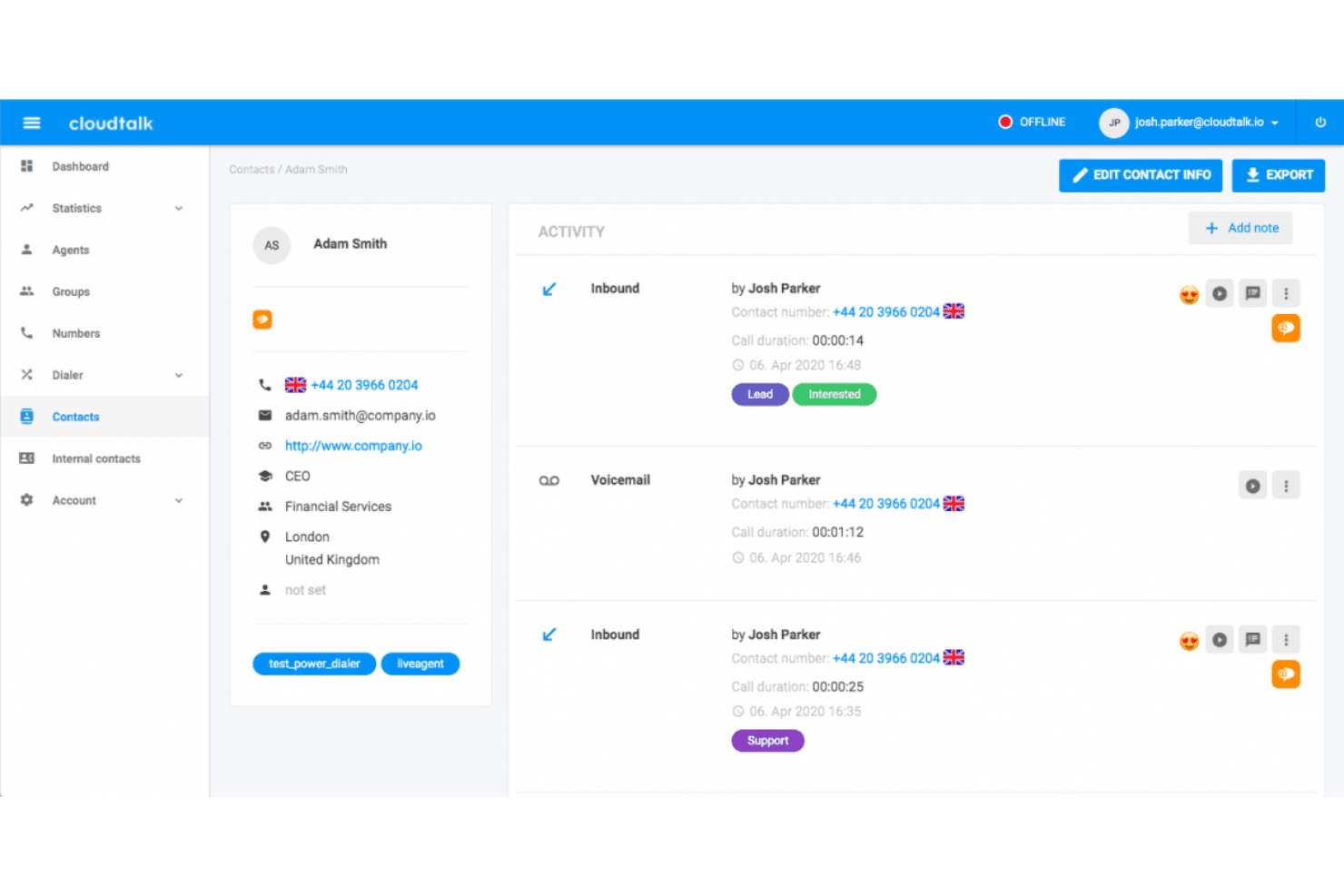
CloudTalk mostra un profilo dettagliato del contatto con la cronologia delle attività delle chiamate, i tag, i registri dei messaggi vocali e i record delle interazioni con gli agenti. CloudTalk è una piattaforma per telefoni software VoIP basata sul cloud che combina compositori basati sull'intelligenza artificiale, chiamate internazionali in oltre 160 Paesi, integrazioni CRM, analisi delle chiamate in tempo reale e messaggistica multicanale in un'unica interfaccia.
Per chi è più adatto CloudTalk?
CloudTalk è adatto ai team di vendita e assistenza in crescita che gestiscono volumi elevati di chiamate in più Paesi e necessitano di una visibilità dettagliata sulle prestazioni degli agenti.
Perché ho scelto CloudTalk
Ho incluso CloudTalk tra le mie scelte principali perché le sue analisi in tempo reale sono più approfondite rispetto a quelle della maggior parte dei telefoni software quando le chiamate coinvolgono più Paesi. Le dashboard personalizzate suddividono il volume e la durata delle chiamate, nonché l'attività degli agenti, per area geografica, coda o periodo di tempo, il tutto senza esportazioni manuali. Il livello di analisi intelligente delle conversazioni basato sull'intelligenza artificiale aggiunge inoltre la valutazione del sentiment e trascrizioni ricercabili, così posso verificare le prestazioni di agenti specifici nei diversi mercati internazionali.
Funzionalità principali di CloudTalk
- Compositore intelligente: Metti in coda più chiamate da elenchi e contatti per automatizzare i flussi di lavoro delle chiamate in uscita.
- Instradamento basato sulle competenze: Assegna le chiamate in arrivo agli agenti disponibili in base alle competenze o ai criteri linguistici.
- Progettista dei flussi di chiamata IVR: Crea menu interattivi multilivello con controlli di trascinamento per l'autonomia dell'utente o l'instradamento.
- App per telefono software su tutti i dispositivi: Accedi al telefono software tramite Mac, Windows, browser web, iOS e Android senza hardware aggiuntivo.
Integrazioni di CloudTalk
CloudTalk offre oltre 100 integrazioni native, tra cui Salesforce, HubSpot, Zendesk, Pipedrive, Intercom, Zoho CRM, Freshdesk, Gorgias, Slack, Microsoft Teams e Zapier. È disponibile un'API per le integrazioni personalizzate.
Pros and Cons
Pros:
- Analisi approfondite nelle code di chiamata internazionali
- Trascrizione basata sull'intelligenza artificiale disponibile in tutti i piani a pagamento
- Elevata disponibilità grazie alla ridondanza degli operatori globali
Cons:
- L'app mobile è meno affidabile rispetto alla versione per computer
- La qualità delle chiamate diminuisce in caso di connessioni di rete instabili
 Ideale per numeri di telefono virtuali internazionali
- Prova gratuita di 10 giorni
- A partire da $18/utente/mese (con fatturazione annuale)
Visit WebsiteCustomer Rating:4.4/5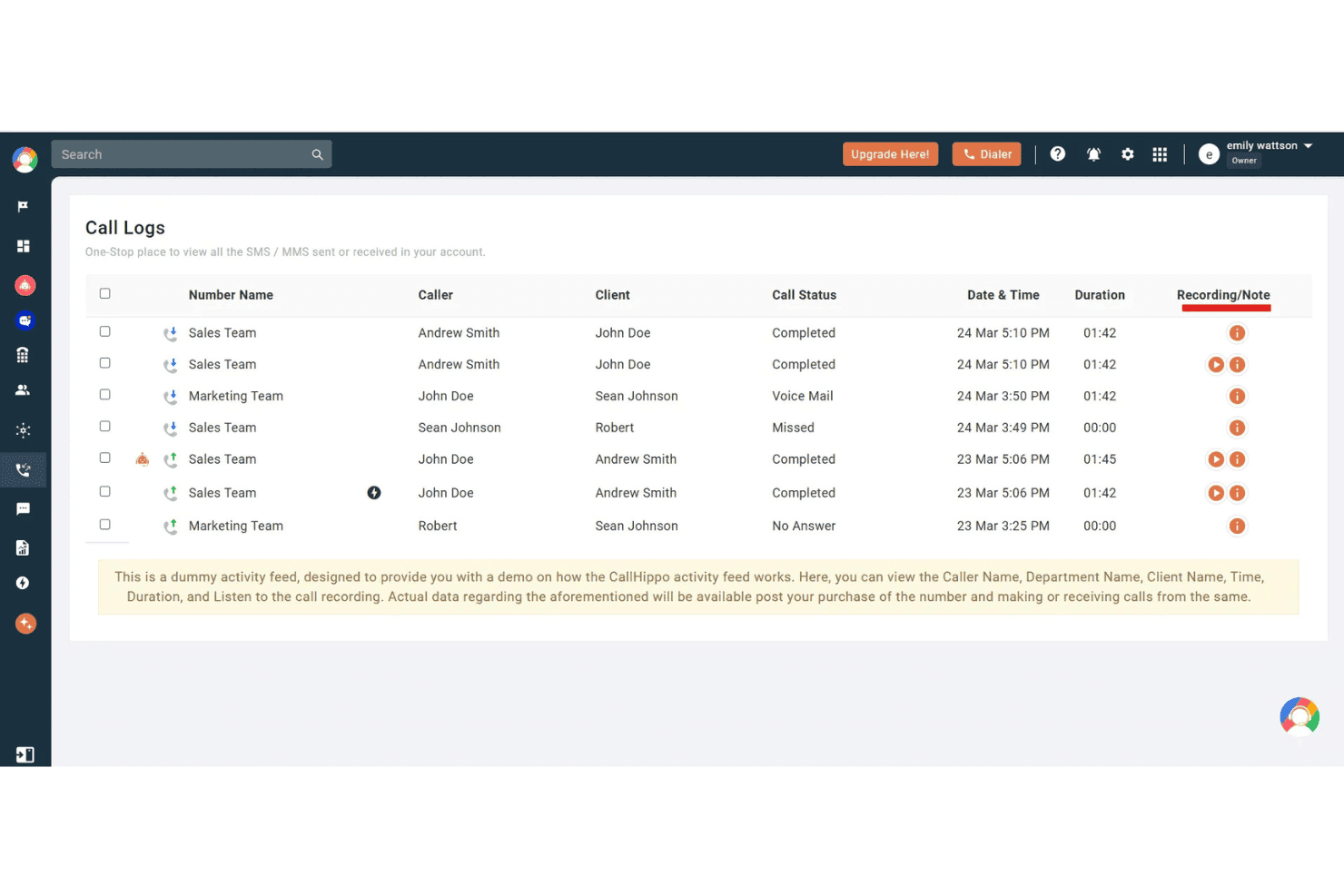
CallHippo mostra una dashboard dei registri delle chiamate con i dettagli del chiamante, lo stato della chiamata, la durata e le opzioni di registrazione per l'attività del team. CallHippo è una piattaforma di telefonia cloud con applicazioni softphone per web, desktop e dispositivi mobili. Offre numeri di telefono virtuali in oltre 150 Paesi, insieme a chiamate basate sull'intelligenza artificiale, messaggistica omnicanale e instradamento per contact center.
Per chi è più adatto CallHippo?
È una soluzione ideale per i team commerciali e di supporto di piccole e medie dimensioni che necessitano di una presenza telefonica locale in più Paesi senza un'infrastruttura complessa.
Perché ho scelto CallHippo
Ho incluso CallHippo tra le mie soluzioni preferite perché l'ampiezza della copertura dei numeri internazionali lo distingue dalla maggior parte delle applicazioni softphone. È possibile attivare numeri locali, gratuiti o mobili in oltre 150 Paesi in pochi minuti, mentre Smart DID Routing presenta automaticamente l'ID chiamante locale corretto in base al Paese di destinazione. Apprezzo anche la funzione AI Global Connect, che rileva il fuso orario locale di un contatto prima di effettuare la chiamata, evitando che le chiamate arrivino al di fuori dell'orario lavorativo.
Funzionalità principali di CallHippo
- Posta in arrivo omnicanale: Gestisci chiamate, SMS, WhatsApp, Telegram, email e messaggi chat da un'unica dashboard unificata.
- Controlli del call center: Utilizza menu IVR, instradamento intelligente delle chiamate, code di chiamata, inserimento nelle chiamate, modalità sussurro e monitoraggio per la formazione degli agenti in tempo reale.
- Integrazioni con CRM e help desk: Connetti direttamente Salesforce, HubSpot, Zoho, Zendesk, Freshdesk e altri strumenti per registrare l'attività delle chiamate.
- Dashboard di analisi in tempo reale: Monitora le metriche delle chiamate del team e degli agenti, gli indicatori KPI delle prestazioni e le tendenze storiche in una dashboard personalizzabile.
Integrazioni di CallHippo
CallHippo offre integrazioni native con Salesforce, HubSpot, Zoho CRM, Zendesk, Freshdesk, Pipedrive, Intercom, Shopify, Slack e Microsoft Teams. È disponibile un'API per le integrazioni personalizzate.
Pros and Cons
Pros:
- Numeri virtuali disponibili in oltre 150 Paesi
- Trascrizione basata sull'intelligenza artificiale e riepiloghi post-chiamata inclusi
- Monitoraggio delle chiamate in tempo reale con modalità sussurro e inserimento nella chiamata
Cons:
- Segnalati problemi di qualità delle chiamate con larghezza di banda ridotta
- L'app mobile è meno stabile del client web
 Ideale per l'instradamento delle chiamate basato su Freshworks
- Prova gratuita di 14 giorni
- A partire da $15/utente/mese (fatturato annualmente)
Visit WebsiteCustomer Rating:4.1/5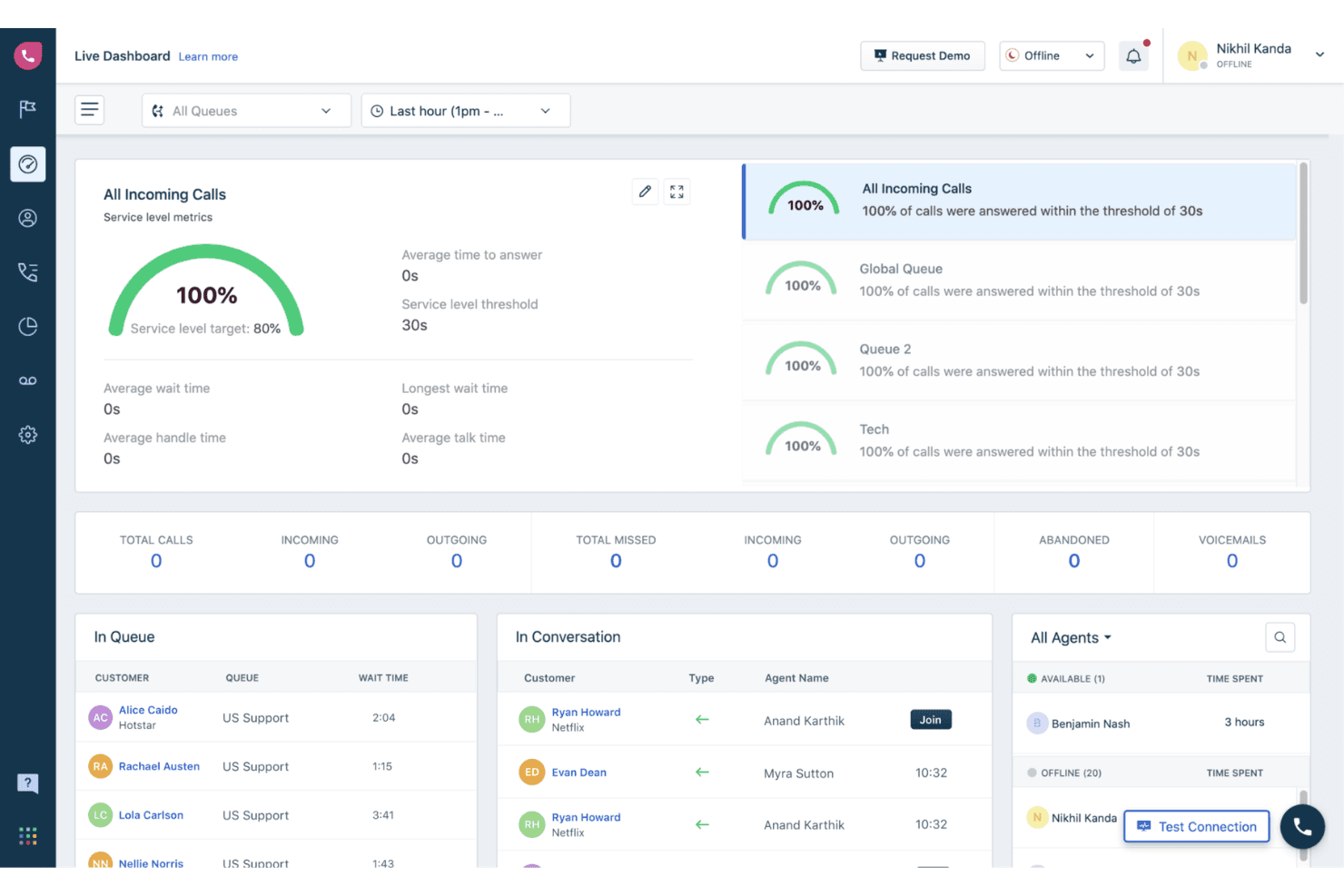
Freshcaller offre un pannello in tempo reale con metriche aggiornate, tra cui il monitoraggio del livello di servizio, le code delle chiamate, lo stato degli agenti e le conversazioni attive. Freshcaller è una soluzione per centri di contatto VoIP basata sul cloud che consente agli agenti di effettuare e ricevere chiamate tramite browser, app mobile o dispositivo SIP, con IVR multilivello, instradamento delle chiamate, registrazione e analisi in tempo reale integrati.
Per chi è più adatto Freshcaller?
Freshcaller è ideale per le squadre di assistenza che utilizzano già l'ecosistema Freshworks e hanno bisogno di una configurazione strettamente connessa tra centro di contatto e servizio di assistenza.
Perché ho scelto Freshcaller
Ho incluso Freshcaller tra le mie scelte principali perché il suo instradamento delle chiamate è progettato specificamente per le squadre che utilizzano Freshworks. Le chiamate in entrata possono essere instradate utilizzando condizioni direttamente collegate ai dati di Freshdesk o Freshsales, così l'agente giusto riceve la chiamata giusta in base al contesto del CRM. Mi affido anche alle sue regole intelligenti di escalation e alla possibilità di inserirsi nelle chiamate in corso, che consentono ai supervisori di intervenire nelle chiamate attive e fornire indicazioni agli agenti in tempo reale senza interrompere il cliente.
Funzionalità principali di Freshcaller
- Sistema IVR multilivello: Crea menu di chiamata personalizzati con opzioni nidificate per indirizzare i chiamanti alla destinazione desiderata.
- Registrazione delle chiamate con archiviazione: Registra automaticamente le chiamate e accedi alle registrazioni direttamente dal registro delle chiamate.
- Stato degli agenti in tempo reale: Visualizza la disponibilità degli agenti in tempo reale, inclusi gli stati pronto, occupato e non disturbare, per un instradamento più efficace.
- Copertura globale dei numeri telefonici: Accedi a numeri locali e gratuiti da oltre 90 paesi per una presenza internazionale.
Integrazioni di Freshcaller
Freshcaller offre integrazioni native con Freshdesk, Freshsales, Salesforce, HubSpot e Slack. È disponibile un'API per le integrazioni personalizzate.
Pros and Cons
Pros:
- L'instradamento IVR non richiede programmazione
- Possibilità di inserirsi e comunicare in modalità sussurro durante le chiamate attive
- Disponibilità degli agenti in tempo reale visibile tra le squadre
Cons:
- I pannelli dei report offrono opzioni di personalizzazione limitate
- Meno adatto alle infrastrutture tecnologiche non basate su Freshworks
Learn more about Freshcaller: Ideale per le chiamate aziendali basate su Workspace
- Piano gratuito disponibile
- A partire da $10/utente/mese
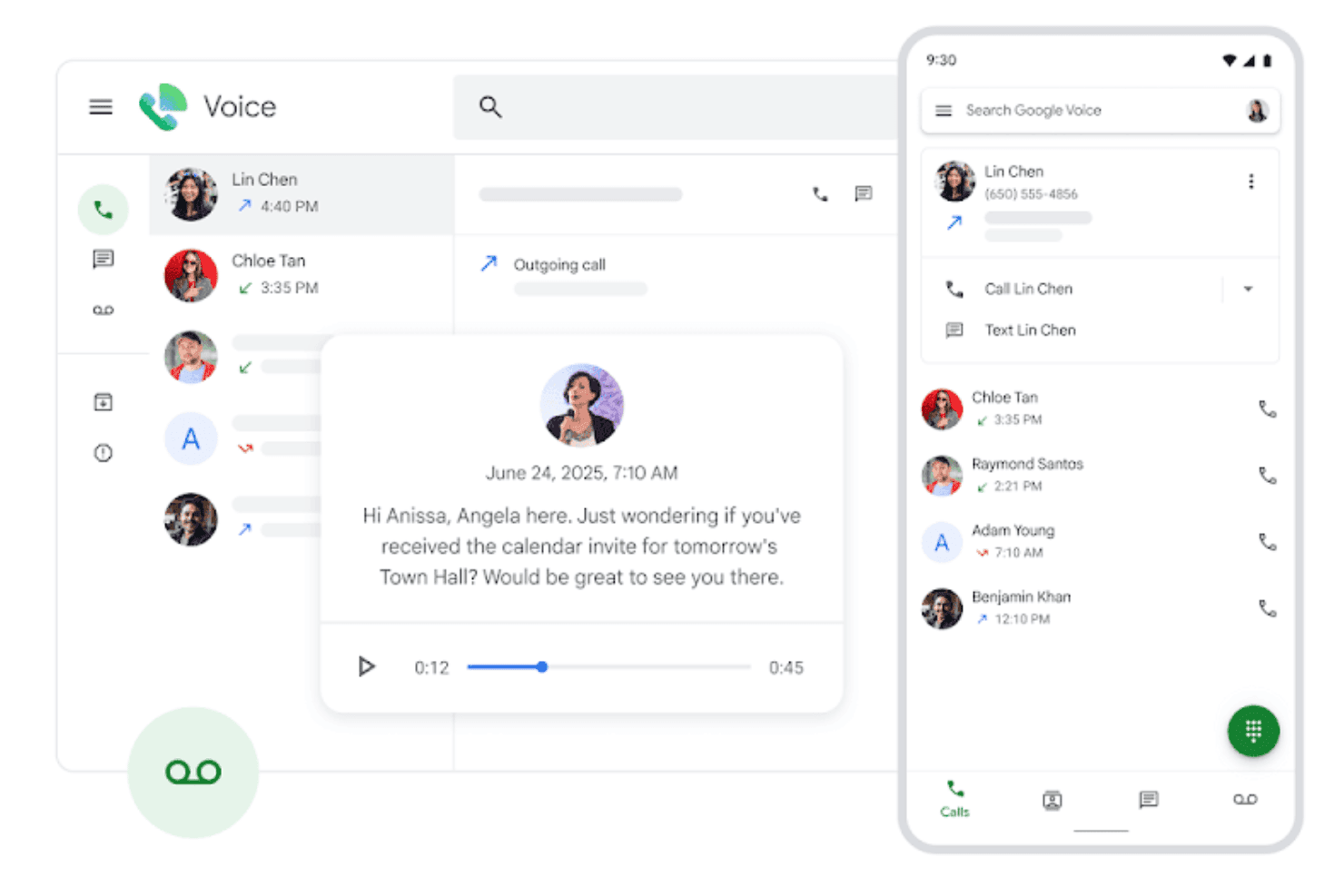
Google Voice mostra un'interfaccia unificata per gestire chiamate, messaggi vocali e interazioni con i contatti nelle visualizzazioni desktop e mobile. Google Voice è un telefono software VoIP basato sul cloud integrato nell'ecosistema Google Workspace, che offre chiamate, videochiamate, SMS, trascrizione dei messaggi vocali e filtraggio dello spam basato sull'intelligenza artificiale su dispositivi mobili, computer desktop e telefoni da scrivania.
Per chi è più adatto Google Voice?
Google Voice è una scelta naturale per le piccole imprese e i team distribuiti che utilizzano già Google Workspace e hanno bisogno di un sistema telefonico aziendale leggero, senza infrastrutture aggiuntive.
Perché ho scelto Google Voice
Ho incluso Google Voice tra le mie scelte principali perché è l'unico telefono software VoIP completamente nativo di Google Workspace. Le chiamate vengono instradate direttamente tramite Gmail, i messaggi vocali vengono trascritti automaticamente nella posta in arrivo e l'operatore automatico multilivello gestisce l'instradamento delle chiamate senza una piattaforma di amministrazione separata. Il mio team utilizza l'integrazione con Vault per conservare i registri delle chiamate nello stesso sistema di individuazione e conservazione delle email.
Funzionalità principali di Google Voice
- Chiamate su più dispositivi: Effettua e ricevi chiamate da dispositivi mobili, computer portatili o telefoni da scrivania supportati utilizzando un unico numero.
- Blocco delle chiamate indesiderate: Utilizza l'intelligenza artificiale di Google per rilevare e bloccare i chiamanti indesiderati prima che il telefono squilli.
- Integrazione SIP Link: Collega i servizi PSTN e i telefoni da scrivania esistenti a Google Voice tramite controllori di frontiera di sessione certificati.
- Instradamento tramite Google Calendar: Instrada le chiamate in entrata in base alle impostazioni dell'orario di lavoro di Google Calendar.
Integrazioni di Google Voice
Google Voice offre integrazioni native con le app di Google Workspace, tra cui Google Meet e Google Calendar, e mette a disposizione un'API per le integrazioni personalizzate.
Pros and Cons
Pros:
- Sincronizzazione nativa di Google Workspace tra tutte le app
- Trascrizione dei messaggi vocali basata sull'intelligenza artificiale inclusa
- Funziona su dispositivi mobili, computer desktop e telefoni da scrivania
Cons:
- Analisi delle chiamate limitate per i team dei centri di contatto
- Nessuna registrazione delle chiamate integrata nel piano base
Learn more about Google Voice: Ideale per le comunicazioni dei team a contatto con i clienti
- Demo gratuita disponibile
- Da $15/utente/mese (con fatturazione annuale)
Visit WebsiteCustomer Rating:4.5/5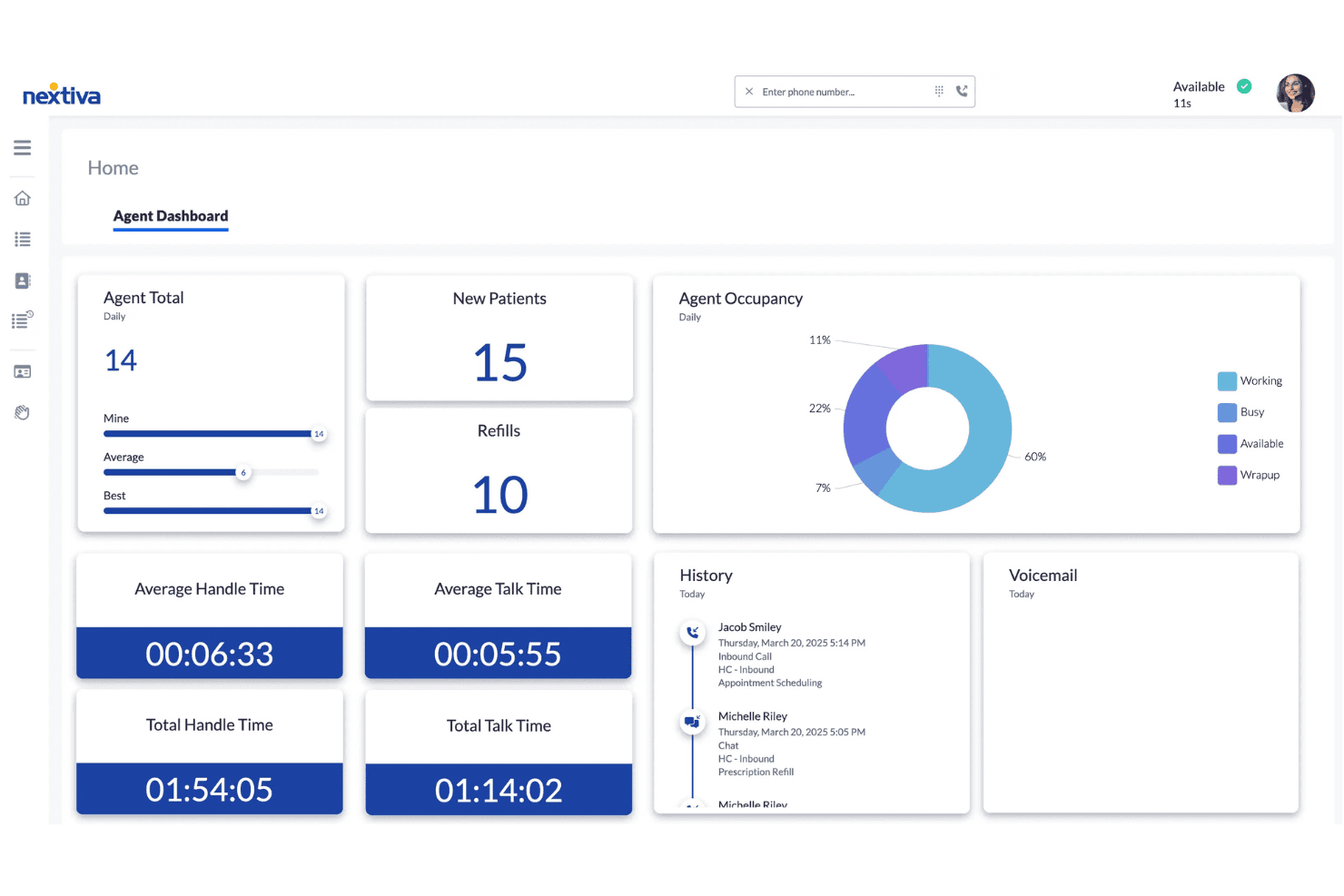
La dashboard degli agenti di Nextiva mostra metriche delle chiamate in tempo reale, grafici sull'occupazione, durate di gestione e cronologia delle interazioni per gli agenti del contact center. Nextiva è una piattaforma VoIP e per le comunicazioni unificate basata sul cloud, che combina chiamate tramite applicazione, SMS, videoriunioni, chat di gruppo e gestione delle chiamate basata sull'intelligenza artificiale nelle app per desktop e dispositivi mobili.
Per chi è più adatta Nextiva?
Nextiva è particolarmente adatta ai team di assistenza clienti e ai contact center che necessitano di un'unica piattaforma per voce, messaggistica e gestione delle chiamate assistita dall'intelligenza artificiale.
Perché ho scelto Nextiva
Ho scelto Nextiva come una delle migliori soluzioni perché l'app NextivaONE consente a tutto il mio team a contatto con i clienti di utilizzare voce, SMS e chat senza passare da uno strumento all'altro. L'agente vocale basato sull'intelligenza artificiale gestisce le chiamate in entrata 24 ore su 24, 7 giorni su 7, instradando le richieste e rispondendo alle domande frequenti prima che risponda un agente. Mi affido inoltre alla trascrizione e al riepilogo delle chiamate basati sull'intelligenza artificiale per esaminare rapidamente le interazioni con i clienti, senza dover riascoltare le registrazioni complete.
Funzionalità principali di Nextiva
- Risponditore automatico multilivello: Configura menu avanzati per l'instradamento delle chiamate in base ai diversi reparti o agli orari.
- Presenza e stato del team: Visualizza in tempo reale la disponibilità dei colleghi per trasferire le chiamate e coordinarti più facilmente.
- Analisi del contact center: Accedi a dashboard con metriche in tempo reale e storiche sulle prestazioni degli agenti e sull'attività delle chiamate.
- App per chiamate tramite browser e dispositivi mobili: Effettua e ricevi chiamate da browser web e dispositivi Windows, macOS, iOS e Android.
Integrazioni di Nextiva
Nextiva offre integrazioni native con Salesforce, HubSpot, Microsoft Teams, Google Workspace, Outlook e Microsoft Dynamics, oltre a fornire un'API per integrazioni personalizzate.
Pros and Cons
Pros:
- I riepiloghi delle chiamate generati dall'intelligenza artificiale riducono la documentazione manuale post-chiamata
- Voce, SMS e chat unificati in un'unica app
- Audio HD affidabile sui client desktop e mobili
Cons:
- L'app mobile interrompe occasionalmente le chiamate in caso di connessioni instabili
- Le dashboard dei report presentano una curva di apprendimento iniziale ripida
 Ideale per note delle chiamate basate sull'IA
- Prova gratuita di 14 giorni
- A partire da $15/utente/mese (con fatturazione annuale)
Visit WebsiteCustomer Rating:4.3/5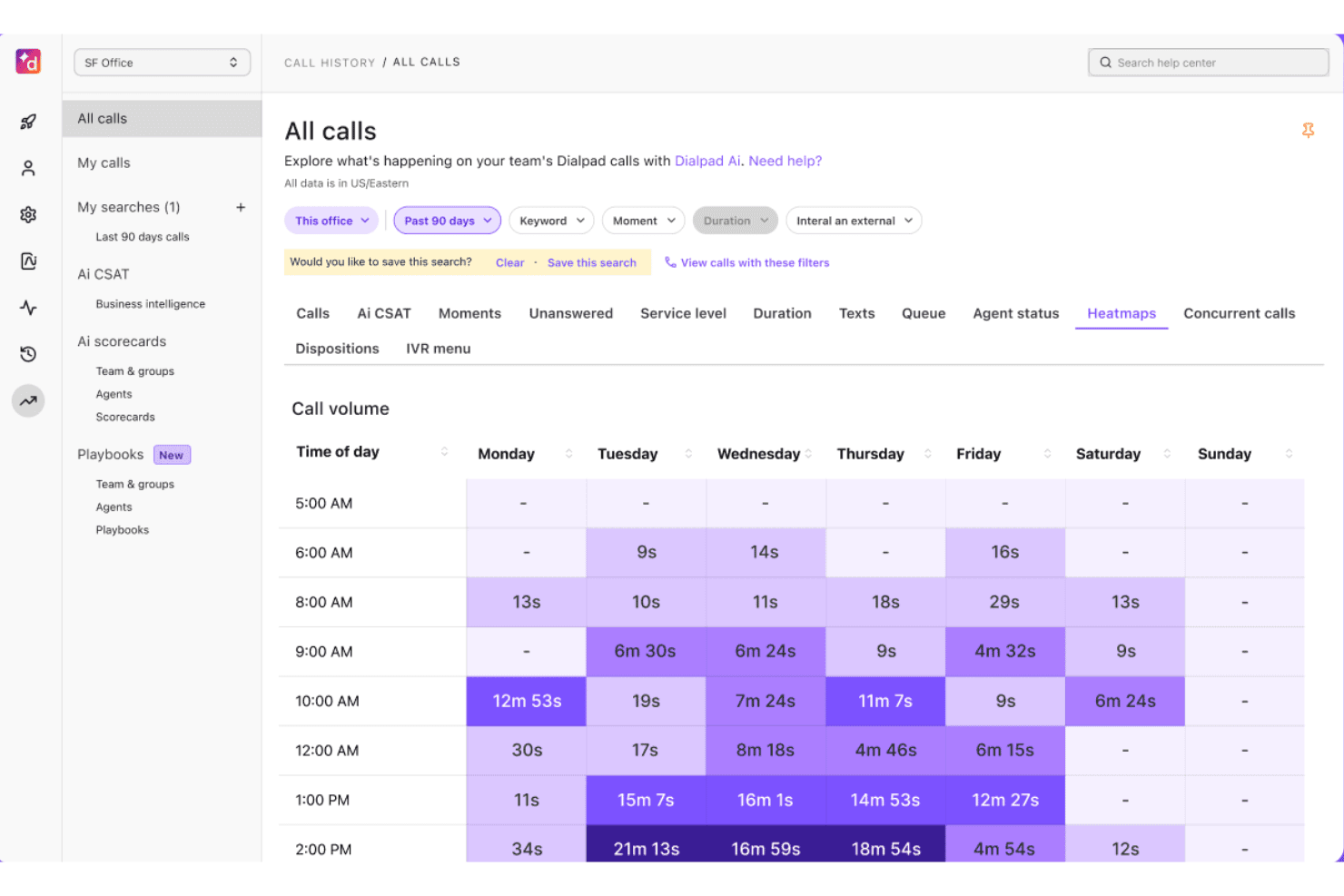
Dialpad offre una visualizzazione a mappa di calore del volume delle chiamate che mostra la durata delle chiamate per giorno e ora del giorno in un periodo di 90 giorni. Dialpad è una piattaforma di comunicazioni cloud nativa per l'IA che unifica chiamate vocali, SMS, messaggistica e riunioni video in un'unica app di telefonia software basata sul proprio modello linguistico di grandi dimensioni proprietario, DialpadGPT.
Per chi è più adatto Dialpad?
Dialpad è adatto ai team di supporto clienti e vendite di piccole e medie dimensioni, in particolare quelli che utilizzano Google Workspace, che necessitano di un sistema telefonico cloud con documentazione delle chiamate basata sull'IA integrata.
Perché ho scelto Dialpad
Dialpad si è guadagnato un posto nella mia selezione perché la funzione Riepiloghi IA genera automaticamente riepiloghi strutturati delle chiamate e attività da svolgere dopo ogni conversazione, grazie al suo modello proprietario DialpadGPT. La trascrizione in tempo reale funziona durante le chiamate, quindi nulla viene tralasciato anche nelle interazioni di supporto più dinamiche. Apprezzo inoltre il fatto che la valutazione automatica del CSAT venga eseguita sul 91% delle chiamate, fornendo al mio team dati coerenti sulle prestazioni successive alle chiamate senza alcun processo di revisione manuale.
Caratteristiche principali di Dialpad
- App di telefonia software su più dispositivi: Effettua e ricevi chiamate da computer, dispositivo mobile, tablet o web.
- Messaggistica di team unificata: Chatta e condividi file con i colleghi nella stessa app utilizzata per le chiamate.
- Integrazioni CRM native: Si connette direttamente a piattaforme come Salesforce, HubSpot e Zendesk.
- Presenza in tempo reale: Visualizza istantaneamente la disponibilità e lo stato degli agenti per ottimizzare l'instradamento delle chiamate e la collaborazione.
Integrazioni di Dialpad
Dialpad offre integrazioni native con Salesforce, HubSpot, Zendesk, Google Workspace, Microsoft 365, ServiceNow, Zoho CRM, Okta, Bullhorn e Clio. È disponibile un'API per le integrazioni personalizzate.
Pros and Cons
Pros:
- Riepiloghi delle chiamate generati dall'IA dopo ogni conversazione
- La trascrizione in tempo reale viene eseguita durante le chiamate dal vivo
- Funziona su computer, dispositivi mobili e browser web
Cons:
- Le funzionalità IA sono disponibili solo nei piani di livello superiore
- La qualità delle chiamate può diminuire in caso di connessioni instabili
 Ideale per le comunicazioni aziendali su più dispositivi
- Demo gratuita disponibile
- Prezzo su richiesta
Visit WebsiteCustomer Rating:4.2/5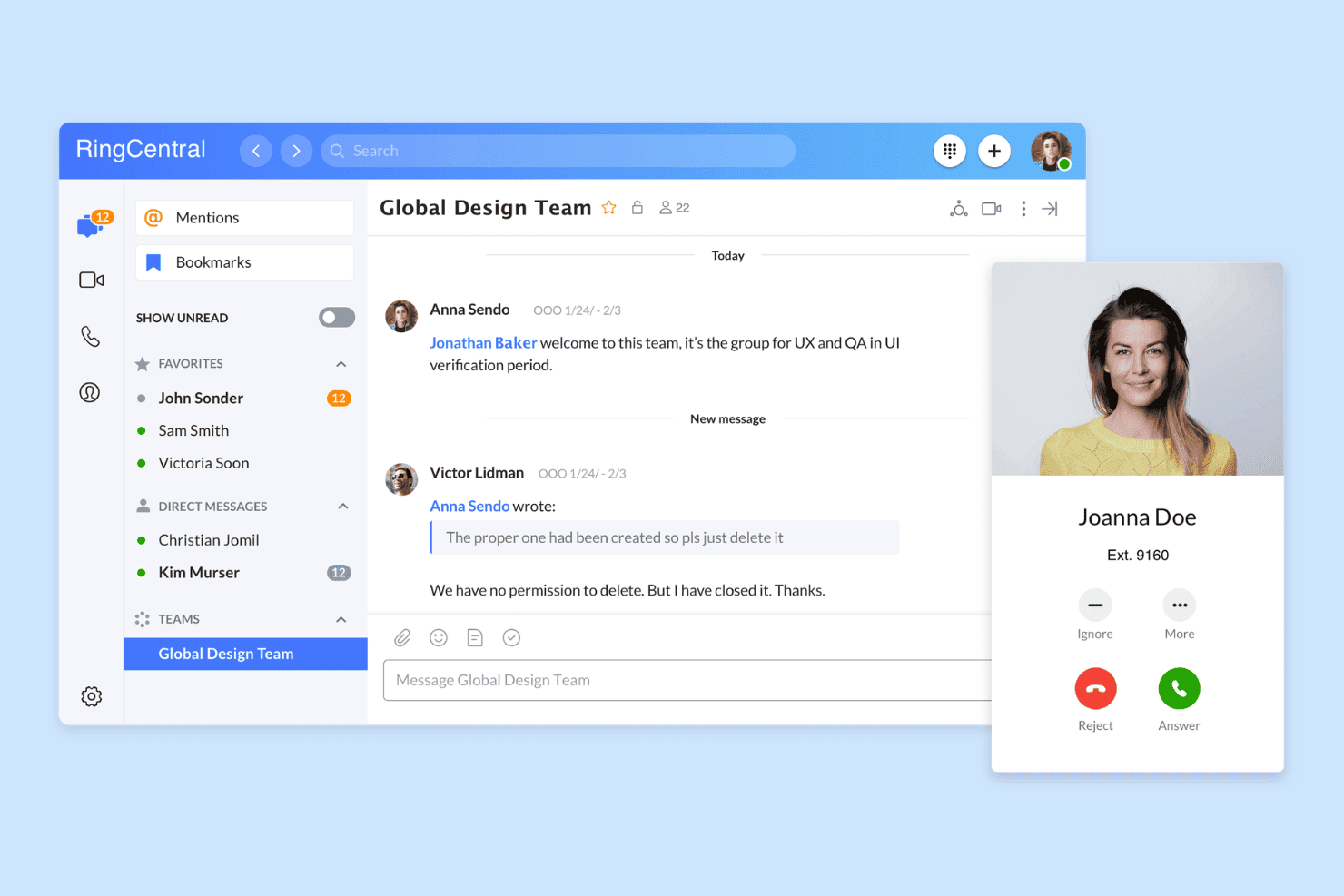
RingCentral offre un'interfaccia unificata per messaggistica e chiamate, con conversazioni della squadra, messaggi diretti e notifiche delle chiamate in arrivo in un'unica piattaforma. RingCentral è una piattaforma UCaaS basata sul cloud che combina chiamate VoIP, riunioni video, SMS aziendali e messaggistica della squadra in un'unica applicazione di telefonia software per desktop, dispositivi mobili e web.
Per chi è più adatto RingCentral?
È una soluzione particolarmente adatta alle aziende di medie dimensioni con squadre distribuite o da remoto che necessitano di un'unica piattaforma per gestire le comunicazioni vocali su più dispositivi e sedi.
Perché ho scelto RingCentral
RingCentral è entrato nella mia rosa di candidati soprattutto per la costanza con cui gestisce le chiamate vocali su ogni dispositivo della mia configurazione. Apprezzo in particolare la funzione di trasferimento della chiamata, che consente di trasferire una chiamata in corso dall'applicazione desktop per le chiamate all'app mobile a conversazione iniziata, senza alcuna interruzione. Anche lo stato di presenza si sincronizza in tempo reale tra desktop, dispositivi mobili e web, così la mia squadra vede sempre la disponibilità corretta, indipendentemente dal dispositivo utilizzato.
Funzionalità principali di RingCentral
- Riepiloghi delle chiamate basati sull'AI: Genera automaticamente riepiloghi ricercabili basati sull'AI per ogni chiamata, velocizzando la revisione e il controllo qualità.
- Messaggistica integrata della squadra: Offre conversazioni e messaggistica di gruppo integrate direttamente accanto alle funzioni di chiamata nell'applicazione di telefonia.
- Centro contatti omnicanale: Supporta voce, SMS, chat web e messaggistica sui social media in un unico pannello di controllo per le squadre dedicate all'esperienza cliente.
- Integrazioni CRM native: Si collega a Salesforce, HubSpot e Zendesk per recuperare le schede dei clienti e registrare automaticamente le attività.
Integrazioni di RingCentral
RingCentral offre integrazioni native con Salesforce, HubSpot, Zendesk, Microsoft Teams, Google Workspace, Slack e ServiceNow, oltre a fornire un'API per integrazioni personalizzate.
Pros and Cons
Pros:
- Il trasferimento della chiamata funziona in diretta durante la conversazione
- Stato di presenza sincronizzato in tempo reale su tutte le piattaforme
- La trascrizione basata sull'AI copre ogni chiamata registrata
Cons:
- L'app mobile consuma spesso la batteria più rapidamente
- L'interfaccia risulta caotica per chi usa solo le chiamate
Learn more about RingCentral: Ideale per i compositori per le vendite e i flussi di lavoro SMS
- Prova gratuita di 14 giorni
- A partire da $29/utente/mese (con fatturazione annuale)
Visit WebsiteCustomer Rating:4.1/5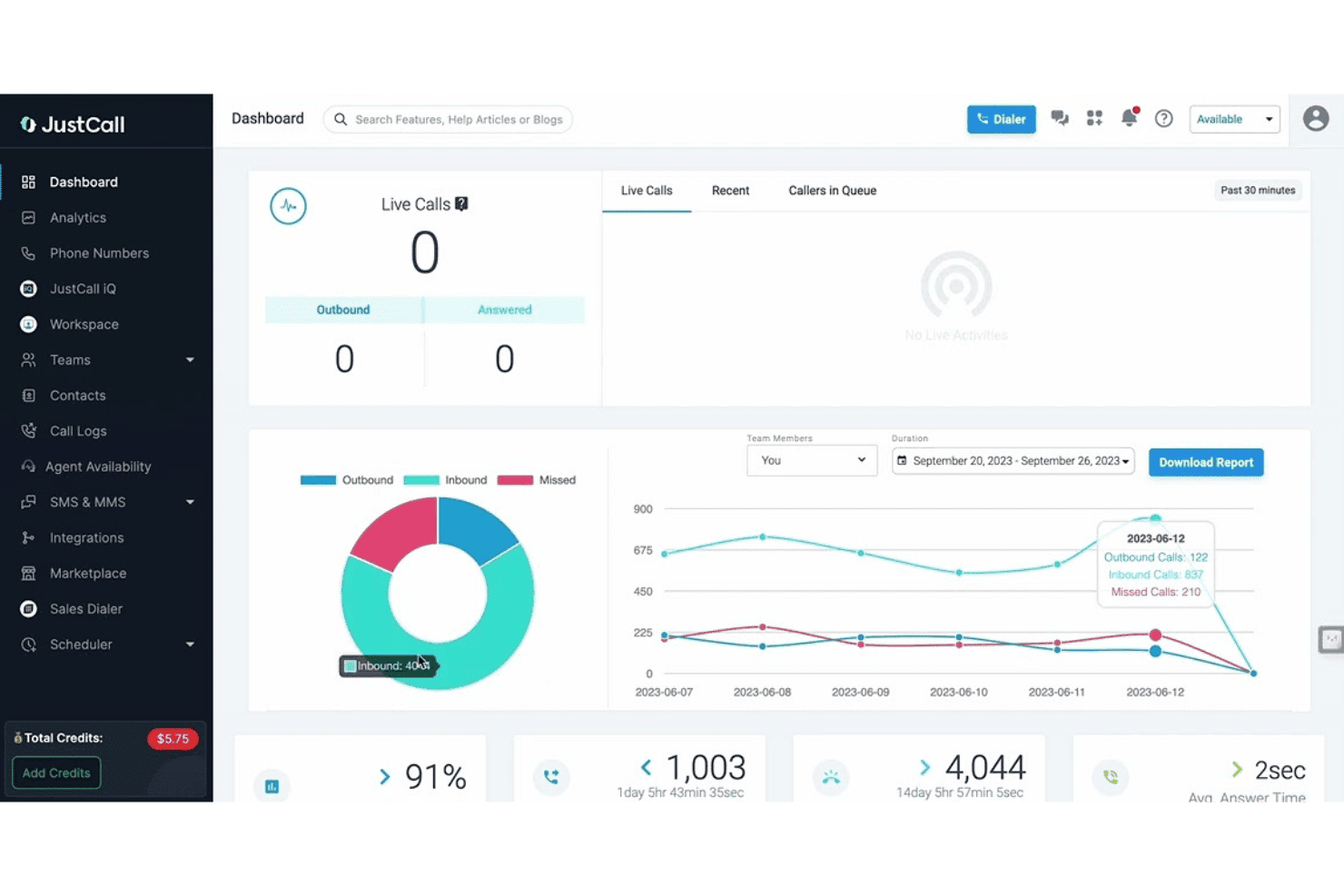
JustCall offre un cruscotto in tempo reale con monitoraggio delle chiamate attive, grafici di analisi delle chiamate e metriche sulle prestazioni del team, inclusa la suddivisione delle chiamate in entrata, in uscita e senza risposta. JustCall è una piattaforma di telefonia software VoIP basata sul cloud che combina chiamate vocali, messaggistica SMS e MMS, intelligenza artificiale per le conversazioni e funzionalità di composizione automatica multilinea su desktop, dispositivi mobili e web.
Per chi è più adatto JustCall?
JustCall è particolarmente adatto ai team di vendita in uscita e alle attività di assistenza clienti dalle PMI alle aziende del mercato medio che hanno bisogno di strumenti per voce, SMS e composizione in un unico posto.
Perché ho scelto JustCall
Ho scelto JustCall come uno dei migliori perché il suo compositore predittivo multilinea (fino a 10 linee simultanee) e il compositore dinamico lo distinguono davvero dalla maggior parte delle app di telefonia software che offrono solo la composizione con un clic. Mi piace anche il fatto che i flussi di lavoro e le automazioni SMS funzionino nativamente all'interno della stessa piattaforma, così il mio team può attivare sequenze automatizzate di ricontatto senza cambiare strumento. La funzionalità di composizione con presenza locale, che visualizza un numero corrispondente al prefisso telefonico del potenziale cliente, aggiunge un livello di funzionalità che la maggior parte delle app di telefonia software autonome ignora completamente.
Funzionalità principali di JustCall
- Presenza degli operatori in tempo reale: Visualizza lo stato di disponibilità degli operatori su web, desktop e dispositivi mobili per un instradamento efficiente.
- Integrazioni CRM native: Si collega nativamente a Salesforce, HubSpot, Zoho e Zendesk per la composizione con un clic e la registrazione automatica delle chiamate.
- Registrazione automatica delle chiamate: Acquisisce e memorizza ogni chiamata per una facile riproduzione e il controllo della qualità.
- Monitoraggio delle chiamate in tempo reale: Consente ai supervisori di ascoltare, parlare in modalità sussurro o inserirsi nelle chiamate in corso per attività di formazione e supervisione.
Integrazioni di JustCall
JustCall offre oltre 100 integrazioni native, tra cui Salesforce, HubSpot, Zoho CRM, Pipedrive, Zendesk, Freshdesk, Intercom, Help Scout, Slack e Microsoft Teams. È disponibile un'API per le integrazioni personalizzate.
Pros and Cons
Pros:
- Il compositore predittivo supporta fino a 10 linee
- I flussi di lavoro e le automazioni SMS funzionano nativamente
- Trascrizione IA di ogni chiamata registrata
Cons:
- La qualità delle chiamate nell'app mobile può essere incostante
- I cruscotti dei report offrono opzioni di personalizzazione limitate
 Ideale per le chiamate delle piccole imprese e i telefoni da scrivania
- Non disponibile
- A partire da 19,95 $/utente/mese
Visit WebsiteCustomer Rating:3/5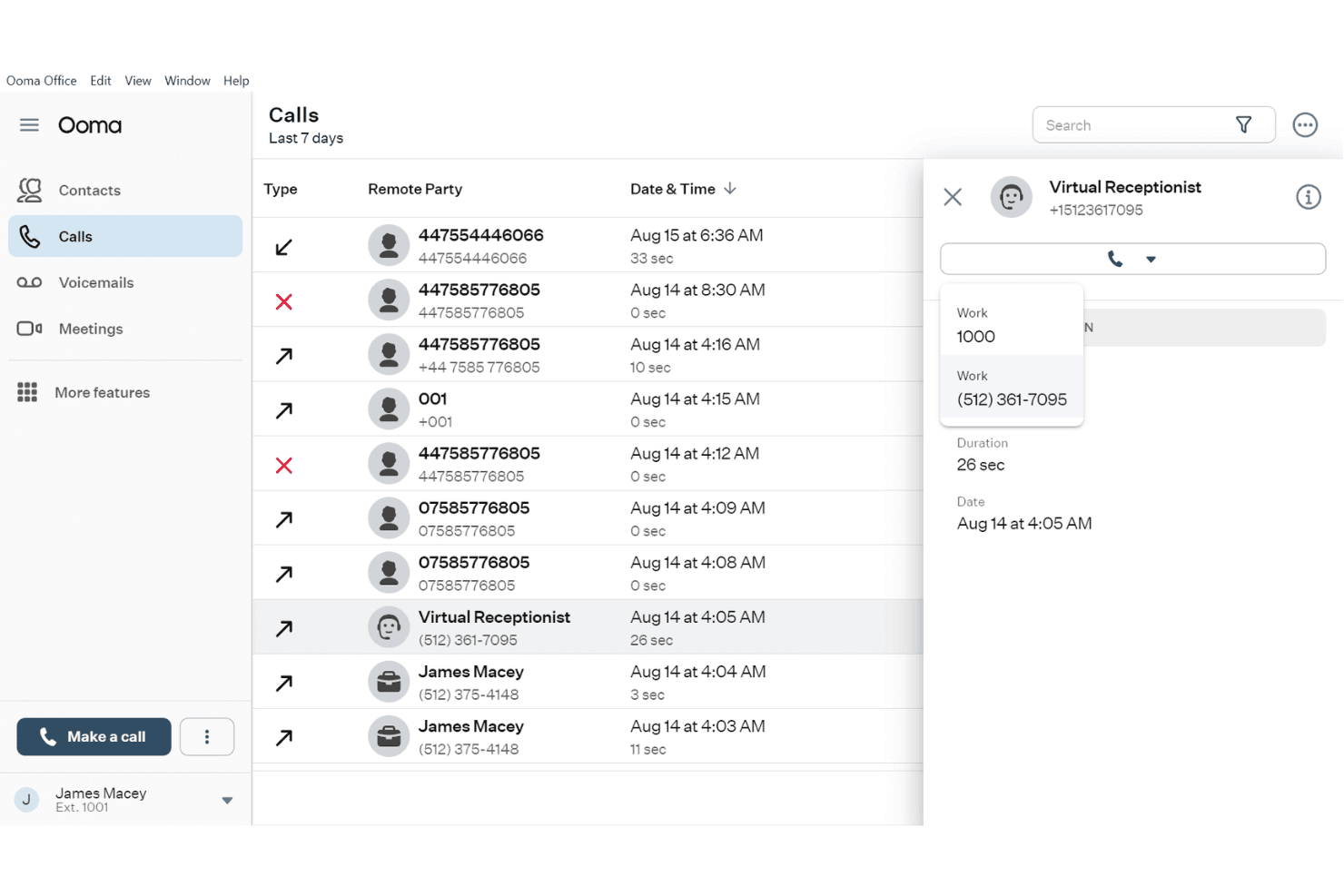
Ooma Office mostra un registro dettagliato della cronologia delle chiamate con i dati dei contatti, la durata delle chiamate e un pannello a discesa del Receptionist virtuale. Ooma Office è un sistema telefonico VoIP basato sul cloud per piccole imprese che combina un softphone desktop e mobile, controlli per la gestione delle chiamate, SMS, videoconferenze e integrazioni CRM in un'unica piattaforma.
Per chi è più adatto Ooma Office?
Ooma Office è una soluzione particolarmente adatta alle piccole e medie imprese che desiderano un sistema telefonico completo senza la complessità o i costi delle piattaforme VoIP aziendali.
Perché ho scelto Ooma Office
Ho scelto Ooma Office come una delle migliori soluzioni perché collega efficacemente i telefoni da scrivania e le applicazioni softphone in un modo che poche piattaforme dedicate alle PMI riescono a offrire. La funzione Trasferimento chiamata consente di trasferire una chiamata attiva dal telefono da scrivania al softphone mobile durante la conversazione, senza interromperla. Lo squillo simultaneo fa sì che le chiamate in arrivo raggiungano contemporaneamente sia il telefono da scrivania sia l'app softphone, così il mio team non perde mai una chiamata quando si sposta da un ambiente all'altro.
Funzionalità principali di Ooma Office
- Trascrizione e riepiloghi delle chiamate basati sull'AI: trascrizioni basate sull'AI e riepiloghi automatici delle chiamate nei piani Pro Plus.
- Integrazione CRM: si collega a piattaforme come Salesforce, HubSpot e Zoho per sincronizzare contatti e registri delle chiamate.
- Chat di team e stato di presenza: messaggistica di team integrata e indicatori dello stato di presenza in tempo reale per migliorare il coordinamento.
- Pannello di analisi delle chiamate: metriche dettagliate sulle chiamate e classifiche aiutano a monitorare l'attività degli agenti e del team.
Integrazioni di Ooma Office
Ooma Office offre integrazioni native con Salesforce, HubSpot, Zendesk, Zoho, Pipedrive, Microsoft Dynamics 365, SugarCRM e Google e Microsoft 365. Si collega inoltre a Zapier e fornisce un'API per integrazioni personalizzate.
Pros and Cons
Pros:
- Supporta i telefoni da scrivania fisici oltre al softphone
- Il Trasferimento chiamata sposta le chiamate in corso tra i dispositivi
- Include videoconferenze integrate su dispositivi mobili
Cons:
- La stabilità dell'app mobile ha frustrato alcuni utenti
- La trascrizione basata sull'AI richiede il piano Pro Plus, più costoso
Learn more about Ooma Office: Ideale per le chiamate aziendali basate su Zoom
- Demo gratuita disponibile
- A partire da $10.50/utente/mese
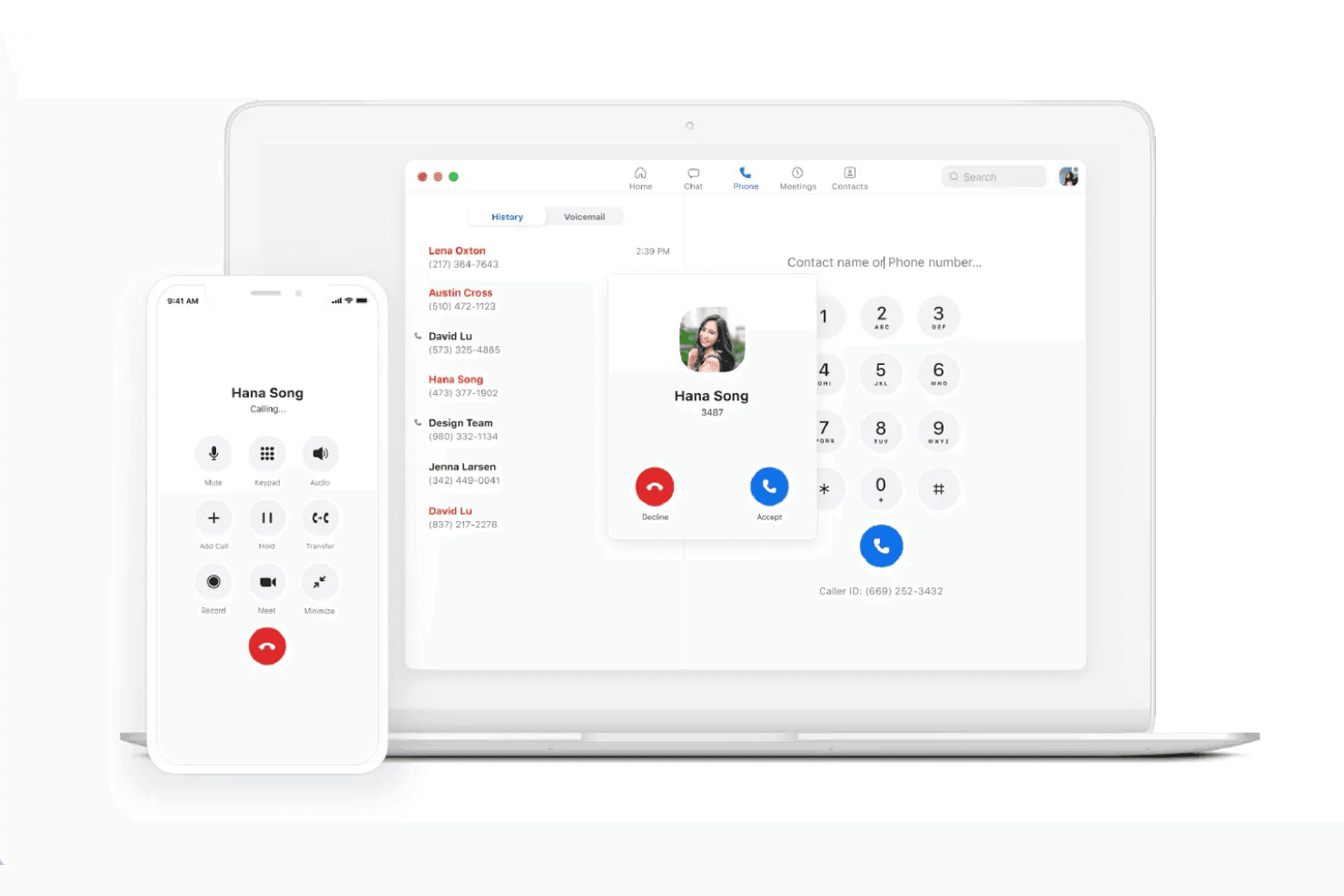
Zoom Phone mostra un'interfaccia per le chiamate in entrata di Hana Song sia sull'applicazione per computer sia su quella mobile, con cronologia delle chiamate, tastierino numerico e comandi di chiamata visibili. Zoom Phone è un telefono software VoIP basato sul cloud che riunisce le chiamate PSTN in entrata e in uscita, gli SMS/MMS, la trascrizione dei messaggi vocali, l'instradamento delle chiamate e i riepiloghi delle chiamate basati sull'IA su client per computer, dispositivi mobili e telefoni da scrivania.
Per chi è più adatto Zoom Phone?
È una scelta naturale per le squadre che utilizzano già Zoom Workplace e desiderano avere le chiamate vocali integrate nella stessa piattaforma delle riunioni e della chat.
Perché ho scelto Zoom Phone
Zoom Phone si è guadagnato un posto tra le migliori soluzioni della mia selezione per la sua stretta integrazione con il resto della suite Zoom Workplace. Apprezzo la possibilità per la mia squadra di trasferire una chiamata attiva dal computer al dispositivo mobile senza interromperla, una funzione importante nei giorni in cui qualcuno deve allontanarsi dalla propria scrivania durante una conversazione. Anche AI Companion offre un valore concreto, generando riepiloghi al termine delle chiamate ed estraendo direttamente dalle chiamate registrate le attività da svolgere.
Funzionalità principali di Zoom Phone
- Integrazioni con CRM e sistemi di assistenza: Si connette nativamente a Salesforce, HubSpot, Zendesk e Microsoft Teams per effettuare chiamate con un clic e registrare automaticamente l'attività delle chiamate.
- Presenza e messaggistica della squadra: Lo stato di presenza in tempo reale e la chat diretta consentono un coordinamento fluido della squadra all'interno dell'applicazione Zoom.
- Gestione delle code di chiamata: Consente agli amministratori di configurare code di chiamata e regole di instradamento per distribuire le chiamate in entrata tra operatori o reparti.
- Registrazione automatica delle chiamate: Acquisisce e archivia le chiamate per il controllo della qualità, la conformità normativa o la gestione delle prestazioni.
Integrazioni di Zoom Phone
Zoom Phone offre integrazioni native con Salesforce, HubSpot, Zendesk, Microsoft Teams, Google Workspace, Slack, ServiceNow e Okta, oltre a fornire un'API per le integrazioni personalizzate.
Pros and Cons
Pros:
- Trasferimento della chiamata dal computer al dispositivo mobile
- Riepiloghi delle chiamate tramite IA inclusi nativamente
- Integrato con riunioni e chat di Zoom
Cons:
- Richiede un piano Zoom Workplace esistente
- Monitoraggio limitato da parte dei supervisori senza il componente aggiuntivo del centro di contatto
Learn more about Zoom Phone:
Altre app softphone VoIP
Ecco alcune app softphone VoIP aggiuntive che non sono entrate nella mia selezione, ma che vale comunque la pena prendere in considerazione:
- 113CXIdeale per sistemi telefonici aziendali autogestiti
- 12AircallIdeale per le chiamate di vendita integrate con il CRM
- 13Five9Ideale per campagne del contact center in uscita
- 14TalkdeskIdeale per l'automazione dei contact center tramite IA
- 15CloudCallIdeale per le chiamate commerciali basate sul CRM
- 16Genesys Cloud CXIdeale per l'orchestrazione dell'esperienza aziendale
- 178x8 Contact CenterIdeale per centri di contatto omnicanale sicuri
- 18Vonage Contact CenterIdeale per i flussi del centro contatti Salesforce
Come valuto le app per softphone VoIP
Divido la mia valutazione in requisiti fondamentali, come le chiamate tra dispositivi diversi e le integrazioni con i CRM, e fattori distintivi che separano un semplice dialer da uno strumento su cui gli operatori faranno effettivamente affidamento.
Funzionalità fondamentali (requisiti minimi per questo elenco)
Quando seleziono gli strumenti per il mio elenco, assegno a ciascuno un punteggio su una scala da 0 (non offre la funzionalità) a 5 (eccelle in quest'area) per ogni funzionalità fondamentale elencata di seguito. Calcolo quindi il punteggio totale dello strumento in percentuale, utilizzando il 65% come parametro di riferimento per valutarne l'idoneità complessiva per l'elenco.
- Chiamate VoIP: verifico se gli operatori possono effettuare e ricevere chiamate in HD su desktop, dispositivi mobili e web, in modo che i team remoti non siano vincolati a un unico dispositivo.
- Controlli di gestione delle chiamate: messa in attesa, trasferimento assistito, conferenza e passaggio della chiamata sono tutti aspetti importanti. Valuto quanto agevolmente gli operatori possano reindirizzare o inoltrare una chiamata durante la conversazione.
- Integrazioni con CRM e help desk: le connessioni native a piattaforme come Salesforce o Zendesk dovrebbero mostrare schede a comparsa e registrare automaticamente le attività senza inserimento manuale.
- Registrazione delle chiamate e segreteria telefonica: cerco la registrazione automatica con archiviazione consultabile, poiché le revisioni QA e le sessioni di coaching dipendono dal facile recupero delle chiamate passate.
- Stato di presenza e disponibilità: gli indicatori di stato in tempo reale aiutano a instradare le chiamate agli operatori disponibili. Verifico se lo stato di presenza si sincronizza tra i team e si aggiorna automaticamente.
- Analisi e report delle chiamate: i pannelli di controllo dovrebbero includere il volume delle chiamate, le chiamate perse e le metriche a livello di operatore, così i responsabili dei team possono individuare le tendenze e affrontare le lacune nelle prestazioni.
Una volta ottenuto un elenco di strumenti che soddisfano i criteri, valuto ciò che distingue ciascuna piattaforma.
Fattori distintivi (ciò che differenzia i fornitori)
Ecco come confronto e metto a confronto i diversi fornitori:
Funzionalità distintive
La trascrizione delle chiamate tramite IA evita agli operatori di prendere appunti manualmente e offre ai supervisori riepiloghi delle chiamate consultabili, a cui possono fare riferimento durante le revisioni QA. Valuto anche gli strumenti di coaching, come l'ascolto discreto e l'intervento, che consentono ai responsabili dei team di guidare gli operatori durante le chiamate in corso senza che il cliente li senta. Le schede a comparsa del CRM sono un altro elemento distintivo: quando la cronologia di un cliente appare nel momento in cui la chiamata si connette, gli operatori saltano completamente il ripetitivo passaggio di verifica.
Oltre le funzionalità
La qualità della voce è più importante di quanto la maggior parte degli acquirenti si renda conto. Ad esempio, verifico il supporto per i codec HD e le opzioni di failover, perché una chiamata di assistenza interrotta può erodere rapidamente la fiducia del cliente. Oltre alla qualità delle chiamate, la sicurezza è un altro fattore fondamentale. Cerco la crittografia TLS/SRTP e certificazioni di conformità come HIPAA o SOC 2. Infine, confronto i modelli di prezzo, perché alcuni fornitori applicano un costo per utente, mentre altri concedono licenze in base al numero di chiamate simultanee.
Come scegliere le app softphone VoIP
Stai cercando di decidere quale app softphone VoIP offrirà valore al tuo team? Inizia considerando quali sono le tue esigenze prioritarie in termini di comunicazione, integrazione o supervisione:
| Se la tua priorità è... | Dai priorità a... |
|---|---|
| Se la tua priorità è...Ridurre la presa di appunti manuale | Dai priorità a...Trascrizione delle chiamate basata sull'AI |
| Se la tua priorità è...Integrare le chiamate con il tuo CRM | Dai priorità a...Connettori CRM nativi e finestre informative sullo schermo |
| Se la tua priorità è...Flessibilità degli operatori su più dispositivi | Dai priorità a...Compatibilità multipiattaforma (desktop, web, dispositivi mobili) |
| Se la tua priorità è...Monitoraggio degli operatori in tempo reale | Dai priorità a...Funzionalità per supervisori (sussurro, irruzione nella chiamata) |
| Se la tua priorità è...Sicurezza e conformità | Dai priorità a...Crittografia end-to-end, SOC 2, HIPAA |
Come valutare la tua selezione
- Richiedi una demo della trascrizione AI: chiedi un esempio o avvia una trascrizione dal vivo per verificarne l'accuratezza confrontando almeno 2 chiamate reali degli operatori entro una settimana.
- Collega il tuo CRM durante la prova: utilizza l'ambiente sandbox del tuo sistema per verificare le finestre informative sullo schermo e le funzionalità di registrazione automatica prima della distribuzione con dati reali dei clienti.
- Testa i flussi di trasferimento delle chiamate: esegui esercitazioni affiancate per gli operatori (passaggio della chiamata, trasferimento assistito, conferenza) e documenta i tempi di attesa sui diversi dispositivi.
- Richiedi documenti scritti sulla conformità: Richiedi ai team di sicurezza dei fornitori la documentazione sulla crittografia TLS/SRTP e la prova di certificazioni come SOC 2 o HIPAA.
- Valuta i compromessi per filtrare l'elenco: Decidi se la flessibilità (multipiattaforma, BYOD) è più importante per il tuo team rispetto ad analisi e reportistica avanzate: pochi fornitori eccellono raramente in entrambi gli aspetti.
Cosa sono le app di telefonia software VoIP?
Le app di telefonia software VoIP consentono di effettuare e ricevere chiamate telefoniche tramite Internet da un computer desktop, un browser web o un dispositivo mobile. Di conseguenza, i team possono effettuare chiamate aziendali senza dipendere da telefoni fissi fisici. Queste app offrono anche funzionalità come controlli delle chiamate, segreteria telefonica e integrazioni con CRM o sistemi di assistenza. In questo modo, gli operatori hanno accesso al contesto del cliente mentre gestiscono le conversazioni da sedi diverse.
Funzionalità delle app di telefonia software VoIP
Quando selezioni app di telefonia software VoIP, presta attenzione alle seguenti funzionalità chiave:
- Chiamate VoIP: Effettua e ricevi chiamate tramite Internet da qualsiasi computer desktop o dispositivo mobile, eliminando la necessità di un telefono fisico.
- Controlli per la gestione delle chiamate: Accedi a funzioni essenziali come messa in attesa, disattivazione del microfono, trasferimento, inoltro e conferenza per gestire senza problemi ogni conversazione in entrata o in uscita.
- Integrazione CRM: Collegati ai sistemi CRM per visualizzare i dettagli del chiamante, registrare automaticamente le attività e fornire agli operatori un contesto immediato durante ogni interazione.
- Registrazione delle chiamate e segreteria telefonica: Archivia chiamate e messaggi vocali per la formazione, il controllo della qualità e la conformità, con opzioni semplici per recuperarli e riprodurli.
- Presenza e disponibilità: Mostra lo stato degli operatori in tempo reale, ad esempio disponibile, occupato o impegnato in una chiamata, per instradare i contatti in entrata in modo più efficace ed evitare trasferimenti interrotti.
- Messaggistica del team: Abilita la chat integrata e la messaggistica diretta, così operatori e supervisori possono coordinarsi rapidamente senza uscire dall'ambiente dell'app di telefonia software.
- Analisi e reportistica delle chiamate: Monitora metriche come volume delle chiamate, tempi di attesa e chiamate perse tramite dashboard e report, così i responsabili possono controllare le prestazioni del team.
- Sicurezza e crittografia: Proteggi i dati vocali in transito e a riposo con la crittografia TLS o SRTP, supportando i requisiti di conformità del settore per le comunicazioni sensibili.
- Supporto per più dispositivi: Consenti agli utenti di passare facilmente da computer desktop a dispositivi mobili e web, offrendo un'esperienza flessibile ai team remoti e ibridi.
- Controlli per i supervisori: Offri funzionalità come monitoraggio delle chiamate, suggerimenti vocali riservati e inserimento nella chiamata, così i responsabili del team possono fornire assistenza o intervenire durante le chiamate in corso senza che il cliente ne sia consapevole.
Vantaggi delle app di telefonia software VoIP
L'implementazione di app di telefonia software VoIP offre diversi vantaggi al tuo team e alla tua azienda. Eccone alcuni:
- Maggiore flessibilità: Gli operatori possono rispondere alle chiamate ovunque si trovino utilizzando un computer desktop, un dispositivo mobile o un browser, rendendo possibile l'assistenza remota e ibrida.
- Comunicazioni riunite: Gestisci voce, segreteria telefonica e chat del team su un'unica piattaforma, così gli operatori non devono mai passare da uno strumento all'altro.
- Contesto più completo sul cliente: Le integrazioni con piattaforme CRM e di assistenza mostrano immediatamente i dettagli del chiamante, consentendo agli operatori di offrire un servizio personalizzato fin dal primo momento.
- Coaching e controllo della qualità migliori: Le funzionalità integrate di registrazione delle chiamate, monitoraggio e suggerimenti vocali riservati consentono ai supervisori di esaminare le chiamate e seguire gli operatori in tempo reale.
- Maggiore visibilità: Dashboard e analisi in tempo reale offrono ai responsabili una visione dello stato degli operatori, delle code di chiamata e delle prestazioni del team, tutto in un unico luogo.
- Sicurezza dei dati rafforzata: La crittografia TLS/SRTP e le funzionalità a supporto della conformità aiutano a proteggere le chiamate sensibili e i dati dei clienti.
- Risparmio sui costi e sull'hardware: Le app di telefonia software eliminano la necessità di telefoni fissi e costosi sistemi PBX, riducendo i costi iniziali e ricorrenti.
Costi e prezzi delle app di telefonia software VoIP
La selezione delle app telefoniche VoIP richiede la comprensione dei vari modelli di prezzo e dei piani disponibili. I costi variano in base alle funzionalità, alle dimensioni del team, agli strumenti aggiuntivi e ad altro ancora. La tabella seguente riassume i piani più comuni, i relativi prezzi medi e le funzionalità tipicamente incluse nelle soluzioni con app telefoniche VoIP:
Tabella di confronto dei piani per le app telefoniche VoIP
| Tipo di piano | Prezzo medio | Funzionalità comuni |
|---|---|---|
| Tipo di pianoPiano gratuito | Prezzo medio$0 | Funzionalità comuniSupporta le chiamate di base, offre la segreteria telefonica e fornisce una messaggistica istantanea del team limitata. |
| Tipo di pianoPiano personale | Prezzo medio$5-$15/user/month | Funzionalità comuniAggiunge il supporto per le app mobili e desktop, la gestione semplice delle chiamate e l'integrazione CRM di base. |
| Tipo di pianoPiano aziendale | Prezzo medio$15-$35/user/month | Funzionalità comuniInclude la registrazione delle chiamate, le integrazioni native, i pannelli di analisi e i controlli della presenza del team. |
| Tipo di pianoPiano per grandi aziende | Prezzo medio$35-$60/user/month | Funzionalità comuniOffre sicurezza avanzata, controlli per i supervisori, accesso alle API aperte e certificazioni di conformità. |
Domande frequenti sulle app softphone VoIP
\u003cspan data-slate-fragment=\u0022JTVCJTdCJTIyY2hpbGRyZW4lMjIlM0ElNUIlN0IlMjJ0ZXh0JTIyJTNBJTIySGVyZSUyMGFyZSUyMHNvbWUlMjBhbnN3ZXJzJTIwdG8lMjBjb21tb24lMjBxdWVzdGlvbnMlMjBhYm91dCUyMHZvaXAlMjBzb2Z0cGhvbmUlMjBhcHBzJTNBJTIyJTdEJTVEJTJDJTIydHlwZSUyMiUzQSUyMnAlMjIlMkMlMjJpZCUyMiUzQSUyMk41eXhwVlRxcTElMjIlN0QlNUQ=\u0022\u003eEcco alcune risposte alle domande comuni sulle app softphone VoIP:\u003c/span\u003e
È possibile utilizzare le app softphone VoIP su qualsiasi dispositivo?
\u003cspan data-slate-fragment=\u0022JTVCJTdCJTIyY2hpbGRyZW4lMjIlM0ElNUIlN0IlMjJ0ZXh0JTIyJTNBJTIyWWVzJTJDJTIwbW9zdCUyMHZvaXAlMjBzb2Z0cGhvbmUlMjBhcHBzJTIwc3VwcG9ydCUyMFdpbmRvd3MlMkMlMjBtYWNPUyUyQyUyMGlPUyUyQyUyMEFuZHJvaWQlMkMlMjBhbmQlMjBicm93c2VyLWJhc2VkJTIwYWNjZXNzJTIwd2l0aCUyMHB1c2glMjBub3RpZmljYXRpb25zJTIwZm9yJTIwaW5jb21pbmclMjBjYWxscy4lMjBUaGlzJTIwbGV0cyUyMGFnZW50cyUyMGFuZCUyMHN1cGVydmlzb3JzJTIwbWFrZSUyMGFuZCUyMHJlY2VpdmUlMjBjYWxscyUyMGZyb20lMjBkZXNrdG9wcyUyQyUyMGxhcHRvcHMlMkMlMjB0YWJsZXRzJTJDJTIwb3IlMjBzbWFydHBob25lcyUyMHdpdGhvdXQlMjBleHRyYSUyMGhhcmR3YXJlLiUyMiU3RCU1RCUyQyUyMnR5cGUlMjIlM0ElMjJwJTIyJTJDJTIyaWQlMjIlM0ElMjJzallZNTNfSWFWJTIyJTdEJTVE\u0022\u003eSì, la maggior parte delle app softphone VoIP supporta Windows, macOS, iOS, Android e l’accesso tramite browser con notifiche push per le chiamate in arrivo. In questo modo agenti e supervisori possono effettuare e ricevere chiamate da computer desktop, laptop, tablet o smartphone senza hardware aggiuntivo.\u003c/span\u003e
Le app softphone VoIP sono sufficientemente sicure per i dati sensibili?
\u003cspan data-slate-fragment=\u0022JTVCJTdCJTIyY2hpbGRyZW4lMjIlM0ElNUIlN0IlMjJ0ZXh0JTIyJTNBJTIyWWVzJTJDJTIwbGVhZGluZyUyMHNvbHV0aW9ucyUyMHVzZSUyMGVuY3J5cHRpb24lMjBwcm90b2NvbHMlMjBsaWtlJTIwVExTJTIwYW5kJTIwU1JUUCUyMHRvJTIwcHJvdGVjdCUyMGNhbGxzJTIwYW5kJTIwbWVzc2FnZXMuJTIwRm9yJTIwaW5kdXN0cmllcyUyMHdpdGglMjBzdHJpY3QlMjBjb21wbGlhbmNlJTIwbmVlZHMlMkMlMjBsb29rJTIwZm9yJTIwY2VydGlmaWNhdGlvbnMlMjBzdWNoJTIwYXMlMjBISVBBQSUyQyUyMFNPQyUyMDIlMkMlMjBvciUyMEdEUFIlMjBzdXBwb3J0LiUyMiU3RCU1RCUyQyUyMnR5cGUlMjIlM0ElMjJwJTIyJTJDJTIyaWQlMjIlM0ElMjJoR3VQa2xZWG1kJTIyJTdEJTVE\u0022\u003eSì, le soluzioni leader utilizzano protocolli di crittografia come TLS e SRTP per proteggere chiamate e messaggi. Per i settori con rigorosi requisiti di conformità, è consigliabile cercare certificazioni come HIPAA, SOC 2 o il supporto al GDPR.\u003c/span\u003e
Come si integrano le app softphone VoIP con gli strumenti CRM o di assistenza clienti?
\u003cspan data-slate-fragment=\u0022JTVCJTdCJTIyY2hpbGRyZW4lMjIlM0ElNUIlN0IlMjJ0ZXh0JTIyJTNBJTIyTW9zdCUyMGFwcHMlMjBwcm92aWRlJTIwcHJlLWJ1aWx0JTIwaW50ZWdyYXRpb25zJTIwb3IlMjBvcGVuJTIwQVBJcyUyMGZvciUyMHBvcHVsYXIlMjBDUk1zJTIwYW5kJTIwaGVscGRlc2slMjBwbGF0Zm9ybXMuJTIwVGhpcyUyMGxldHMlMjBjdXN0b21lciUyMGRhdGElMjBhbmQlMjBjYWxsJTIwYWN0aXZpdHklMjBzeW5jJTIwYXV0b21hdGljYWxseSUyQyUyMHNvJTIwYWdlbnRzJTIwc2VlJTIwY2FsbGVyJTIwaGlzdG9yeSUyMGFuZCUyMGxvZyUyMGV2ZXJ5JTIwY29udmVyc2F0aW9uLiUyMiU3RCU1RCUyQyUyMnR5cGUlMjIlM0ElMjJwJTIyJTJDJTIyaWQlMjIlM0ElMjJITEozYTN6b0VtJTIyJTdEJTVE\u0022\u003eLa maggior parte delle app offre integrazioni predefinite o API aperte per i CRM e le piattaforme di assistenza clienti più diffusi. Ciò consente di sincronizzare automaticamente i dati dei clienti e l’attività delle chiamate, così gli agenti possono visualizzare la cronologia del chiamante e registrare ogni conversazione.\u003c/span\u003e
Quale velocità di connessione Internet è necessaria per chiamate VoIP affidabili?
\u003cspan data-slate-fragment=\u0022JTVCJTdCJTIyY2hpbGRyZW4lMjIlM0ElNUIlN0IlMjJ0ZXh0JTIyJTNBJTIyQSUyMHN0YWJsZSUyMGJyb2FkYmFuZCUyMGNvbm5lY3Rpb24lMjB3aXRoJTIwYXQlMjBsZWFzdCUyMDEwMCUyMGticHMlMjBwZXIlMjBjb25jdXJyZW50JTIwY2FsbCUyMGlzJTIwZ2VuZXJhbGx5JTIwcmVxdWlyZWQuJTIwU2xvd2VyJTIwc3BlZWRzJTIwb3IlMjB1bnJlbGlhYmxlJTIwbmV0d29ya3MlMjBjYW4lMjBjYXVzZSUyMGNhbGwlMjBkcm9wcyUyQyUyMGNob3BweSUyMGF1ZGlvJTJDJTIwb3IlMjBsYXRlbmN5JTIwaXNzdWVzLiUyMiU3RCU1RCUyQyUyMnR5cGUlMjIlM0ElMjJwJTIyJTJDJTIyaWQlMjIlM0ElMjJhNjBpVU9IVmpaJTIyJTdEJTVE\u0022\u003eIn genere è necessaria una connessione a banda larga stabile con almeno 100 kbps per ogni chiamata simultanea. Velocità inferiori o reti inaffidabili possono causare interruzioni delle chiamate, audio disturbato o problemi di latenza.\u003c/span\u003e
Le app softphone VoIP possono sostituire i telefoni da scrivania tradizionali?
\u003cspan data-slate-fragment=\u0022JTVCJTdCJTIyY2hpbGRyZW4lMjIlM0ElNUIlN0IlMjJ0ZXh0JTIyJTNBJTIyWWVzJTJDJTIwdGhleSVFMiU4MCU5OXJlJTIwZGVzaWduZWQlMjB0byUyMGRvJTIwZXhhY3RseSUyMHRoYXQlMkMlMjBsZXR0aW5nJTIwdGVhbXMlMjBtYW5hZ2UlMjBhbGwlMjBpbmJvdW5kJTIwYW5kJTIwb3V0Ym91bmQlMjBjYWxscyUyMGRpZ2l0YWxseS4lMjBUaGlzJTIwcmVkdWNlcyUyMGhhcmR3YXJlJTIwY29zdHMlMjBhbmQlMjBnaXZlcyUyMHRlYW1zJTIwbW9yZSUyMGZsZXhpYmlsaXR5JTIwZm9yJTIwcmVtb3RlJTIwb3IlMjBoeWJyaWQlMjB3b3JrLiUyMiU3RCU1RCUyQyUyMnR5cGUlMjIlM0ElMjJwJTIyJTJDJTIyaWQlMjIlM0ElMjJ0ZEwta0QwQjJWJTIyJTdEJTVE\u0022\u003eSì, sono progettate esattamente per questo, consentendo ai team di gestire digitalmente tutte le chiamate in entrata e in uscita. Ciò riduce i costi dell’hardware e offre ai team maggiore flessibilità per il lavoro da remoto o ibrido.\u003c/span\u003e