

10 Best Customer Journey Mapping Tools in 2026

Best Customer Journey Mapping Tools Shortlist


The best customer journey mapping tools help CX, product, and marketing teams visualize how people move through your brand—across touchpoints, channels, and the moments that either strengthen or break the experience. The right platform makes it easier to pinpoint friction, align stakeholders, and translate journey insights into meaningful improvements.
Drawing on my experience working at the intersection of technology, AI innovation, and digital customer experience, I’ve tested and reviewed dozens of customer journey mapping tools to find the ones that deliver real value. Each platform in this guide was evaluated for its mapping capabilities, collaboration features, data integrations, analytics, usability, and overall ROI. Below, you’ll find my top picks and guidance on choosing the best fit for your team.
Why Trust Our Software Reviews
We’ve been testing and reviewing customer journey mapping software since 2021. As CX professionals ourselves, we know how critical and difficult it is to make the right decision when selecting software.
We invest in deep research to help our audience make better software purchasing decisions. We’ve tested more than 2,000 tools for different customer experience use cases and written over 1,000 comprehensive software reviews. Learn how we stay transparent & our software review methodology.
Best Customer Journey Mapping Tools Comparison Chart
This comparison chart summarizes basic details about each of my top journey mapping tool selections. You can view pricing details and the availability of free trials or demos side-by-side to help you find the best software for your budget and business needs.
| Tool | Best For | Trial Info | Price | ||
|---|---|---|---|---|---|
| 1 | Best for survey-driven journey insights | Free demo available | Pricing upon request | Website | |
| 2 | Best for journey maps with built-in collaboration features and integrations | Free trial + free plan available | From $9/month | Website | |
| 3 | Best for mapping multichannel journeys | 14-day free trial + free demo available | From $25/seat/month (billed annually) | Website | |
| 4 | Best for real-time collaboration on visualizing and improving customer experiences | Free plan available | From $3/editor/month (billed annually) | Website | |
| 5 | Best for identifying drop-off points | Free plan available | From $25/month (billed annually) | Website | |
| 6 | Best software for complex graphic design | 7-day free trial | From $31.49/month | Website | |
| 7 | Best for understanding journeys with session replays | Free plan + free demo available | Pricing upon request | Website | |
| 8 | Best for its support for multiple persona journey maps | Free plan + 14-day free trial available | From $38/user/month (billed annually) | Website | |
| 9 | Best for digital customer journey mapping | Free demo available | Pricing upon request | Website | |
| 10 | Best journey mapping tool for MacOS | 14-day free trial available | From $129.99/year | Website |
-

SupportYourApp
Visit WebsiteThis is an aggregated rating for this tool including ratings from Crozdesk users and ratings from other sites.4.7 -
Tidio
Visit WebsiteThis is an aggregated rating for this tool including ratings from Crozdesk users and ratings from other sites.4.7 -
Freshdesk
Visit WebsiteThis is an aggregated rating for this tool including ratings from Crozdesk users and ratings from other sites.4.4





Best Customer Journey Mapping Software Reviews
Here’s a brief description of each customer journey mapping software with an explanation of why I included it in this top 5 list:


Sogolytics is a customer experience and survey platform that helps you capture, analyze, and act on customer feedback. With tools that support journey mapping, you can identify how customer perceptions evolve at each stage and uncover trends that influence long-term satisfaction.
Why I picked Sogolytics: I included Sogolytics because of its ability to combine surveys with customer journey mapping. This makes it useful when you want direct input from customers alongside behavioral data. You can track customer reactions at different points in the journey, compare experiences across segments, and identify where improvements are needed. Its emphasis on data visualization and feedback analytics provides a practical way to understand how real customers are moving through your designed journeys.
Sogolytics Standout Features & Integrations
Features include survey-based journey mapping, feedback trend analysis, customizable reporting dashboards, advanced analytics tools, and flexible survey templates.
Integrations include Salesforce, HubSpot, Slack, Microsoft Dynamics CRM, Microsoft Teams, Zendesk, Google Sheets, Mailchimp, ActiveCampaign, Microsoft Excel, Trello, and Gmail.
Pros and Cons
Pros:
- Broad CRM and marketing integrations
- Customizable reports and dashboards
- Combines surveys with journey mapping
Cons:
- Advanced analytics can be complex
- Lacks visual whiteboard-style mapping
New Product Updates from Sogolytics

Sogolytics Launches AI-Powered Experience Navigator
Sogolytics introduces Experience Navigator, an AI-powered tool for building strategy and action plans. This update helps teams turn goals into tailored execution plans with relevant metrics and projects in minutes. For more information, visit Sogolytics’ official site.
 .
.
Best for journey maps with built-in collaboration features and integrations
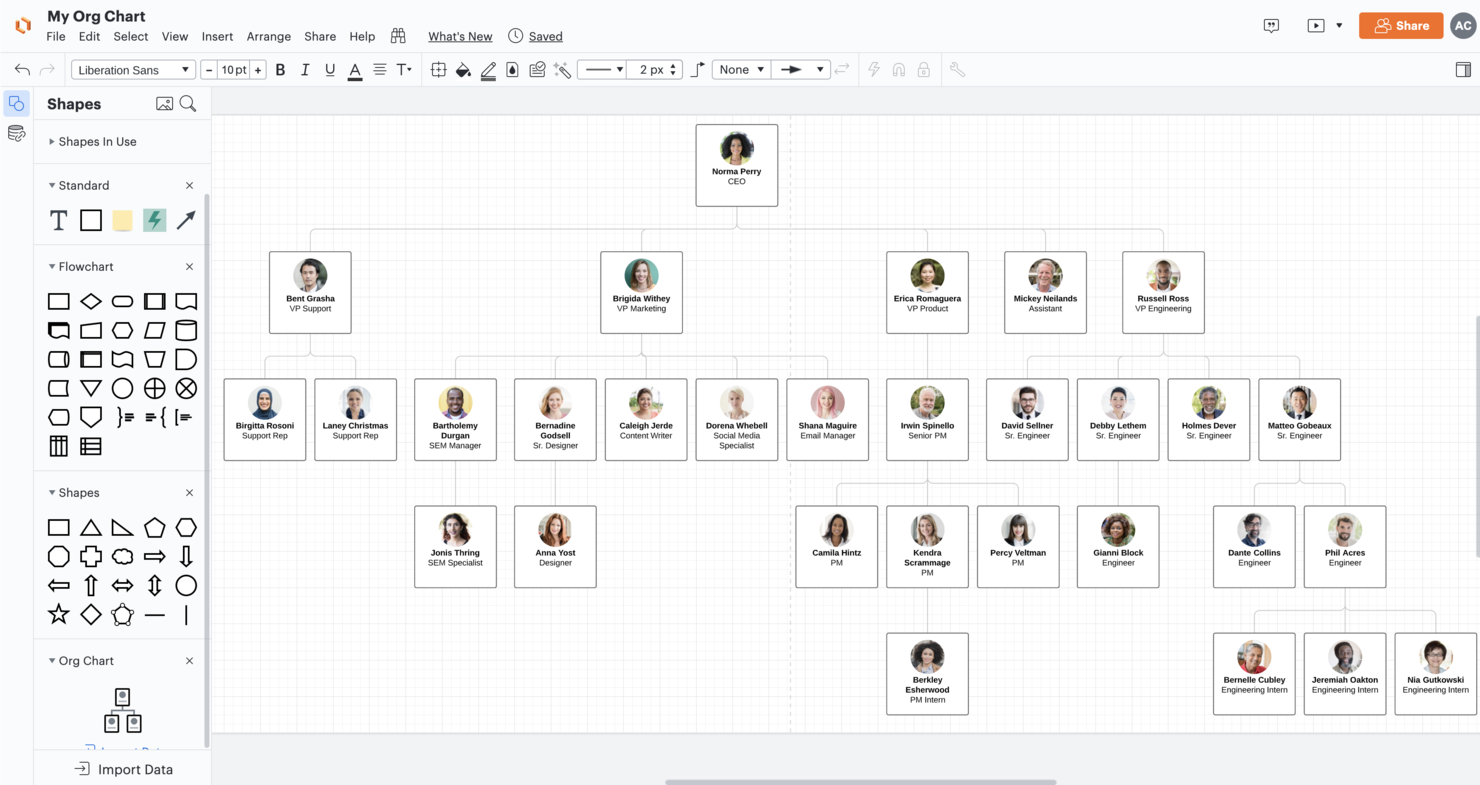
Lucidchart is a cloud-based diagramming application that helps you visually represent processes and systems.
Why I picked Lucidchart: Used by BP, L’Oréal, and BMW, Lucidchart simplifies customer journey mapping with a large library of templates, drag-and-drop functionality across an infinite canvas, real-time collaboration, in-app chat, automatic sync and save, and more. Being a web-based app, there are no downloads or installations needed and it works on any device, browser, or operating system.
Usability and value are two of Lucidchart’s biggest strengths. The low per-month cost combined with intelligent features and an intuitive interface make it one of the easiest wireframing tools to use. Features like comments, tasks, sharing, revision history, and embedding make collaboration simpler for remote and hybrid teams.
Lucidchart Standout Features & Integrations
Features include numerous templates, automated diagrams, a drag-and-drop editor, conditional formatting, and team collaboration features like real-time co-authoring, an in-app chat, shape-specific comments, and live cursors so you can see what portions of your journey map your other team members are working on.
Integrations are available with Microsoft Office, Atlassian, Salesforce, LinkedIn Sales Navigator, Slack, Amazon Web Services (AWS), Jive, GitHub, BambooHR, Quip and more—including many apps through Zapier. Lucidchart also has free add-ons for Google Docs, Sheets, and Slides, and works perfectly with Lucid's virtual whiteboarding product, Lucidspark, to boost collaboration throughout the entirety of your workflow.
Their free plan includes 100 templates and up to 3 editable documents. Or you can opt for their 7-day free trial to give it a test drive before you commit.
Pros and Cons
Pros:
- Offers data linking for dynamic visuals
- User-friendly interface
- Offers a wide range of templates
Cons:
- Lots of features creates a learning curve for beginners

Front brings shared inbox and workflow automation features to teams managing complex customer journeys across multiple channels. If you’re looking for a way to centralize customer conversations and coordinate responses, Front offers tools that help support, success, and operations teams stay aligned. Its focus on collaboration and integration makes it a strong fit for businesses that want to connect communication touchpoints and streamline customer experience processes.
Who Is Front Best For?
Front is a good fit for customer support and success teams in mid-sized to large businesses that need to manage high volumes of customer communications across multiple channels.
Why I Picked Front
For teams mapping complex customer journeys, I picked Front because its 160+ integrations make it easy to unify data and workflows from tools you already use. Connecting CRM, help desk, and collaboration platforms directly into your shared inbox means you can track every customer touchpoint without switching between systems. I appreciate how this level of integration supports a more complete view of the customer journey and helps teams coordinate responses in real time. This makes Front especially useful for organizations that rely on multiple platforms to manage customer experience.
Front Key Features
Some other features in Front support teams managing customer journeys across channels:
- Shared inbox management: Organize and assign customer messages from email, SMS, chat, and social media in one collaborative workspace.
- Automated workflow rules: Set up custom rules to route, tag, or escalate conversations based on message content or customer data.
- Analytics and reporting: Track team performance, response times, and conversation trends with built-in dashboards and exportable reports.
- Internal comments and mentions: Collaborate with teammates on customer conversations using private comments and @mentions within each thread.
Front Integrations
Integrations include HubSpot, Salesforce, Asana, Slack, Aircall, FullContact, ClickUp, Chatra, Gainsight, and WhatsApp.
Pros and Cons
Pros:
- SLA management tools help monitor journey milestones
- Shared inboxes enable collaborative customer journey tracking
- In-app guides accelerate onboarding for new users
Cons:
- Limited customization for customer data fields
- No built-in visual journey mapping tool

FigJam
Best for real-time collaboration on visualizing and improving customer experiences
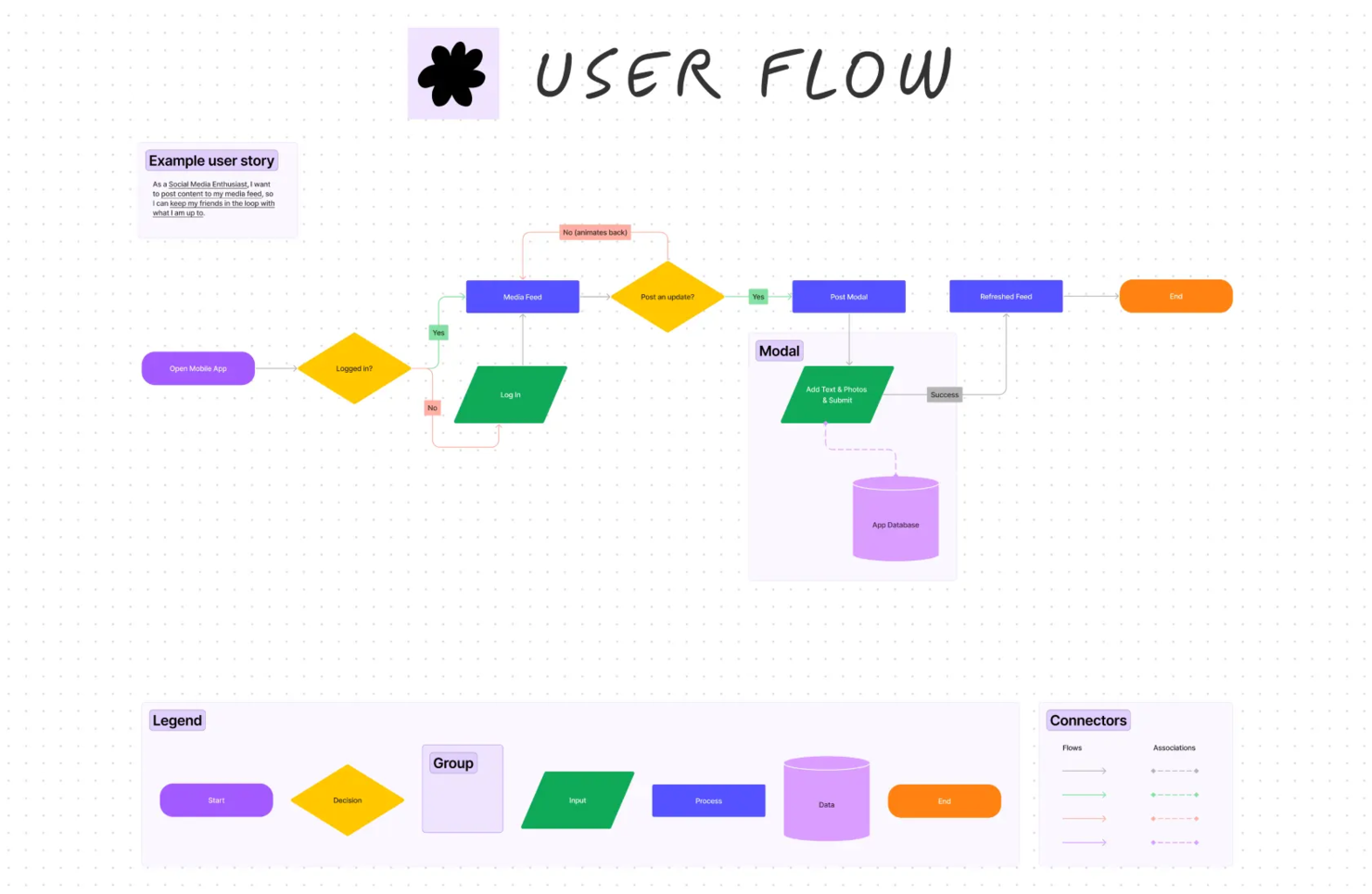
FigJam is a whiteboard tool developed by Figma. It's designed to make brainstorming, ideation, and mapping out customer journeys a whole lot easier.
Why I picked FigJam: It's collaborative, interactive, and it's got this real-time element that makes it feel like you're all working in the same room, even if you're miles apart. Plus, it's super intuitive to use. You don't need to be a tech wizard to get the hang of it.
The sticky notes are a game changer. You can jot down ideas, move them around, and group them together. The drawing tools are also very handy. You can sketch out ideas, create diagrams, and even add emojis. It's a fun, visual way to map out customer journeys. And let's not forget about the live cursor tracking. You can see where everyone is on the board and what they're doing in real-time, which can save the whole team time.
FigJam Standout Features & Integrations
Features include pre-built project management templates, audio and live chat, stamp and emoji reacts, external collaborator access, calendar and timeline widgets, bitmoji avatars, music player, and mobile app.
Integrations include Figma, Microsoft Teams, Asana, Jira, Mixpanel, and Github.
Pros and Cons
Pros:
- Includes 300+ templates
- Supports unlimited collaborators
- Includes a mobile app
Cons:
- Could use more native integrations


Mouseflow is a behavior analytics tool that helps you understand how visitors interact with your website. By providing insights into user behavior, it enables you to identify areas for improvement and enhance the overall user experience.
Why I picked Mouseflow: Mouseflow’s journey mapping tool makes it easy to see where visitors lose interest or leave your site. You can track drop-off rates at each step of the journey and analyze how effective your pages and marketing efforts are at keeping users engaged. This data helps you eliminate barriers that might be preventing users from completing actions like signing up or making a purchase.
Another useful feature is the ability to map out the most common paths users take after landing on a specific page. You can visualize up to 10 steps in each visitor’s journey and compare actual user behavior to the flow you originally designed. If visitors aren’t following the intended path, this insight allows you to adjust your content, navigation, or calls to action to better guide them.
Mouseflow Standout Features & Integrations
Features include heatmaps, alternative path detection, automatic funnel visualization, content interaction tracking, referral page analysis, focus step customization, navigation path comparison, drop-off point identification, distraction analysis, goal-based journey optimization, no-code setup, visitor segmentation, and historical data access.
Integrations include Google Analytics, HubSpot, Shopify, WordPress, Wix, Squarespace, Slack, Segment, Optimizely, and Sitejet.
Pros and Cons
Pros:
- Allows grouping of similar pages for deeper behavioral insights
- Automatically tracks visitor journeys
- Provides detailed drop-off analysis to optimize conversion rates
Cons:
- Does not include built-in A/B testing features
- Full journey mapping features limited to enterprise plan


InDesign is a page layout design software from Adobe, which means for a bit of a steep learning curve, you can unlock unlimited flexibility.
Why I picked InDesign: You can build, convert, edit, and collaborate on complex visual design projects. This robust tool has everything you need to build customer journey maps and much more, such as logo design, social media graphics, and media kits.
InDesign is a great “do anything” visual planning software that allows you to create custom size pages, insert anything from text to graphics, shapes, and stock images, and export in multiple formats, including interactive PDFs. However, if you are only looking for journey mapping, it’s likely too overbearing for your needs.
InDesign Standout Features & Integrations
Features include thousands of fonts, pen tools for freehand drawing, tables, buttons, forms, animations, and many ways to export your final product to picture and PDF formats.
Integrations can be custom-made using its APIs and SDKs. Native integrations include Pics.io, Slashdot, Canto, Brandfolder, and other software that is part of the Adobe Creative Suite.
InDesign is a great tool for diagramming if that is only one of your many graphic design needs.
Pros and Cons
Pros:
- Can be used for a wide range of design-related tasks beyond just journey mapping
- Supports interactive PDFs
- Well-known and respected design software
Cons:
- Could use more native integrations
- Each individual user requires a unique license


Fullstory is a digital experience analytics platform designed to help businesses gain deeper insights into how users interact with their websites and apps. By injecting digital behavioral data into analytics stacks, Fullstory helps technology leaders make more informed decisions by transforming each digital visit into actionable insights.
Why I picked Fullstory: I like its session replay feature, which allows you to see every interaction users have with your site, from clicks and scrolls to form fills and navigation patterns. You can watch these sessions in real time or review them later, providing a clear, visual understanding of where users drop off or experience frustration. Fullstory’s behavioral data platform plays a critical role here, providing you with quality behavioral data at scale.
Another key feature is Fullstory’s path analysis, which helps visualize and explore the common paths users take through your site. This makes it easy to identify which flows lead to conversion or which ones result in drop-offs. The platform also segments users based on behaviors and interactions, helping you understand the customer journeys that matter most. By delivering true behavioral insights, Fullstory enables businesses to detect malicious behaviors and fraud while identifying their highest-value customers and improving customer-centric strategies.
Fullstory Standout Features & Integrations
Features include heatmaps, event funnels, custom dashboards, error detection, frustration signals, user segments, collaboration tools, omnichannel data tracking, advanced search filters, and data export.
Integrations include Google Analytics, Segment, Optimizely, Slack, and Jira.
Pros and Cons
Pros:
- Detailed session replays
- Provides real-time analysis
- Offers a heatmap feature
Cons:
- Mobile analytics are a paid add-on
- Can produce large amounts of data, which can be overwhelming


Smaply is a customer journey mapping tool that helps you build journey maps, personas and analyze the customer experience. It lets you visualize pain points across maps and add details to each touchpoints, such as images, metrics, rich text and emotional journeys.
Why I picked Smaply:It's great for quickly visualizing each customer touchpoint with their various arc and lane tools and works well for geographically dispersed teams with realtime-collaboration and comments. Additionally, a valuable feature is that pain points, solutions and opportunities can be looked at in the Portfolio matrix – a graph where dots are sorted by impact, and feasibility. The customizability lets the user tailor the tool to specific needs of organizations
Smaply Standout Features & Integrations
Features include a variety of functionalities through their lanes and cards system, an icon library, and templates to get started.
Integrations include Google Analytics and CSV upload for metrics.
Smaply is free to use for three journey maps, in case you would like to give it a test run before making any purchasing decisions.
Pros and Cons
Pros:
- Single-sign on integrations are available
- GDPR compliant and ISO certified
- You can easily link to digital assets in an image repository
Cons:
- No free trial
- Limited native integrations


Totango is a customer success platform that can help you manage your customer experience and map your customer journey for digital products. You can use it to track product usage and adoption and measure the success of your customer success initiatives.
Why I Picked Totango: From the platform's dashboard, you can see which features are being used and which are not. It's alert tool notifies your team when specific events occur. This can be things like changes in usage patterns, customer engagement, or other factors. This helps you track your customer journey in real-time and address churn risk factors as they happen.
The software has detailed trend analysis tools so you can see how buying and usage patterns evolve over time. This can help you spot positive or negative responses to new features, product updates, and changes to your offer. You can also get detailed information about each customer, including demographic data, usage patterns, and more, which can help you develop customer personas.
Totango Standout Features & Integrations
Features include usage tracking, customer insights, customizable health scores, proactive alerts, trend analysis, adoption tracking, customer success management, segmentation and targeting, and reporting and analytics.
Integrations include Salesforce, Hubspot, Microsoft Dynamics, Marketo, Pardot, Zendesk, Freshdesk, Google Analytics, Adobe Analytics, Stripe, Recurly, Jira, Trello, and other popular tools.
Pros and Cons
Pros:
- Successplays feature helps standardize the user experience
- Includes customer health score tracking and analysis
- Easy and configurable journey mapping
Cons:
- Expensive compared to other journey mapping tools
- Logging updates on touchpoints takes many clicks


OmniGraffle is a visual communication software for MacOS to make PRO diagrams and helps professionals who need to organize or communicate visually.
Why I picked OmniGraffle: They have a library of stencils, templates, and icons to get you started. If you are brave and with a steady hand, you can try drawing using the pen tool. It also supports the Apple Pencil for even faster freehand diagramming. Basically, all the elements you need to build a customer journey map can be personalized to reflect your customer's experience.
OmniGraffle has advanced graphics features, like a rubber stamp for rapid copy-pasting and a layers tab for element grouping. Also, its projects can be exported to PNG, JPG, GIF, BMP, TIFF, PDF, EPS, and PSD. Finally, you can get this software in two ways, using their subscription plan or buying traditional licenses. Your choice.
OmniGraffle Standout Features & Integrations
Features include multi-layer support, infinite canvas, an extensive shape library, templates, style customization, magnets to connect shapes, and a selection tab to help you bulk edit or select items on your canvas.
Integrations include 1Password and the files app in iOS 11 and later.
Although this tool does not have an extensive knowledge base, you can find a guide on how to use the software on their website, and it also has a great customer service team if you need any troubleshooting.
Pros and Cons
Pros:
- Available as a monthly subscription or a standard license (one-time payment)
- Customer support is available by email, phone, or on a dedicated Slack channel
- Lots of training materials available online
Cons:
- Limited team collaboration features
- Not available on Windows devices
Other Customer Journey Mapping Tools
Here are a few more website mapping tools to define your customer journeys:
- Canvanizer
Free customer journey mapping tool
- A Whiteboard
For low-tech offices who don’t use SaaS
- Gliffy
Customer journey map for its Confluence integration
- Microsoft PowerPoint
For easy access and adoption
- Reveall
For joining journey mapping and product prioritization
- SurveySparrow
For journey mapping with feedback
- Woopra
Software for journey analytics reporting and web analytics
- Medallia
Employee experience (EX) mapping software
- Custellence
Tool for mapping empathy curve lanes
- NICE Satmetrix
AI-driven customer journey mapping software
- Optimove
AI bot for parsing large amounts of campaign data
- Salesforce Pardot
B2B customer journey mapping software
- Microsoft Visio
For those who are already in the Microsoft ecosystem
- Amperity
Software for breaking down heavily siloed customer data
- SuiteCX
Bets software for quick CX assessment to identify pain points
- Simplify
For collating a broad assortment of customer satisfaction feedback
- Journifica
For incorporating user research questions/answers
- Baghera
Smart persona mapping with psychological profiles
- Transformation.ai
Customer journey mapping tool for cloning, mapping, and reusing touchpoints
- CloudCherry
Software for mapping micro-journeys (social media interaction, for example)
- UXPressia CJM
Software for high-quality map exports with custom branding
- CFN Insight
For their customer engagement Score Card tool
- Kitewheel Customer Journey Hub
Software for integrating customer journey maps with marketing and sales
- Quadient Customer Journey Mapping
For complex stakeholder communications


How I Evaluate Customer Journey Mapping Tools
Customer journey mapping tools are where CX teams bring together research, feedback, and behavioral data to visualize what customers actually experience—whether that's a B2B onboarding flow, a retail purchase path, or a multi-channel support escalation. When I evaluate tools in this category, I look for a baseline of must-have capabilities that every pick needs to clear, and then I weigh the differentiators that actually determine which tool fits which team.
Core Functionality (Table Stakes for This List)
For customer journey mapping tools, the core functionality I test and evaluate is:
- Visual map builder: I look for a drag-and-drop canvas where you can lay out stages, touchpoints, and channels—like mapping a SaaS trial-to-paid flow across web, email, and sales calls.
- Persona support: Each journey should attach to a defined persona or segment. I check whether you can create multiple personas and run separate maps for each.
- Touchpoint & channel mapping: The tool needs to represent every interaction point across channels. A retail journey, for example, should span in-store, app, and support in one view.
- Emotion & experience tracking: I evaluate how the tool captures customer sentiment at each stage—star ratings, emoji scales, or satisfaction curves that surface friction visually.
- Templates & frameworks: Good starting templates for common scenarios like onboarding, purchase paths, or service blueprints cut setup time. I look for variety and flexibility here.
- Collaboration features: Journey mapping is cross-functional work. I check for real-time co-editing, commenting, and annotation so CX, product, and design teams can build together.
- Sharing & export options: Maps need to travel. I evaluate whether you can export to PDF, PNG, or PowerPoint and share via link—crucial for executive presentations and stakeholder reviews.
A tool has to deliver most of these capabilities to earn a spot on the list. From there, I consider what sets each tool apart.
Standout Features (What Separates the Picks)
When comparing customer journey mapping tools, I look for native integrations with CRMs and analytics platforms to bring real data into journey maps, not just assumptions. AI-assisted mapping and automated pain point detection stand out by uncovering friction you might miss in manual diagrams. I also consider whether a tool supports journey management at scale—letting teams orchestrate, monitor, and update dozens of journeys as their CX strategy evolves.
What I Weigh Beyond Features
Pricing models vary a lot in this space—per-seat, per-journey, and per-MAU structures each favor different team sizes and budgets, so I evaluate which model fits the buyer. I also consider how quickly a team can get value from the tool, especially whether template libraries and onboarding resources support CX teams still maturing their mapping practice. For tools that ingest behavioral data, I check privacy and compliance posture around GDPR and SOC 2, which matters most in regulated industries like healthcare and financial services.
What Are Customer Journey Mapping Tools?
Customer journey mapping tools are software platforms that visualize and analyze how customers interact with a brand across touchpoints. They support experience teams in identifying friction, aligning stakeholders, and improving journey outcomes.
How to Choose Customer Journey Mapping Tool
It’s easy to get bogged down in long feature lists and complex pricing structures. To help you stay focused as you work through your unique software selection process, here’s a checklist of factors to keep in mind:
| Factor | What to Consider |
|---|---|
| Scalability | Ensure the tool can grow with your business needs. Consider if it can handle increased data volumes and user numbers without losing performance. |
| Integrations | Check that the tool integrates with your existing systems like CRM, email, and analytics platforms to ensure smooth data flow and functionality. |
| Customizability | Look for options to tailor the tool to fit your specific processes and branding. This can include custom fields, layouts, and journey maps. |
| Ease of Use | Choose a tool with an intuitive interface that your team can quickly learn and adapt to. Consider the availability of training resources to aid onboarding. |
| Budget | Align the tool's cost with your budget. Consider the pricing structure, including any hidden fees or costs for additional features or users. |
| Security Safeguards | Evaluate the tool's data protection measures. Look for compliance with regulations like GDPR and features like encryption and user access controls. |
| Support Services | Consider the level of customer support provided. Look for 24/7 availability, live chat, and a comprehensive knowledge base to assist your team. |
| Feature Set | Identify essential features that meet your core needs, such as journey mapping, analytics, and reporting capabilities. Avoid paying for unnecessary extras. |
Trends in Customer Journey Mapping Tool
In my research, I sourced countless product updates, press releases, and release logs from different customer journey mapping tool vendors. Here are some of the emerging trends I’m keeping an eye on:
- AI-Driven Insights: Tools are incorporating AI to provide customer journey analytics and deeper insights into customer behaviors. This helps teams anticipate needs and personalize experiences. Some vendors now offer AI features that identify trends and suggest actions.
- Omnichannel Mapping: Mapping across multiple channels, including social media, email, and in-store interactions, helps businesses get a comprehensive view of the customer journey, ensuring consistent experiences.
- Real-Time Collaboration: Features that allow teams to work together on journey maps simultaneously foster better communication and faster decision-making. Some tools offer shared workspaces and live editing capabilities.
- Enhanced Visualization: New visualization options make it easier to interpret complex data. Interactive and customizable journey maps help teams quickly identify pain points and areas for improvement. Some tools now offer 3D mapping and dynamic visual elements.
- Customer Feedback Integration: Tools are integrating direct customer feedback into journey maps. This allows businesses to react quickly to customer needs and preferences. Features like built-in surveys and feedback collection are becoming common.
Features of Customer Journey Mapping Tools
When selecting customer journey mapping tools, keep an eye out for the following key features:
- Visualization tools: Create clear and interactive maps that help teams understand the customer journey at a glance.
- Touchpoint tracking: Monitor every interaction a customer has with your business to identify areas for improvement.
- Predictive analytics: Use AI-driven insights to forecast customer behavior and tailor experiences accordingly.
- Cross-Functional Collaboration: Enable teams to work together on journey maps simultaneously, improving communication and efficiency.
- Omnichannel mapping: Track customer journeys across multiple channels for a comprehensive view of interactions.
- Templates and libraries: Start with pre-built templates that can be tailored to fit specific business needs and branding.
- Feedback integration: Collect and incorporate customer feedback directly into journey maps to quickly adapt to customer needs.
- Centralized repository for CX assets: Store resources such as journey maps, personas, and related documents, in one easily accessible location.
- Standardization and branding: Create journey maps that align with your company's branding and ensure a consistent format across all projects.
- AI-powered analysis: Leverage artificial intelligence to analyze customer journey data, uncover trends, and generate actionable insights.
Benefits of Customer Journey Mapping Tools
Implementing customer journey mapping tools provides several benefits for your team and your business. Here are a few you can look forward to:
- Improved understanding: Visualizing the customer journey helps your team grasp customer needs and behaviors more clearly.
- Enhanced decision-making: Predictive analytics and real-time data provide insights that guide better business decisions.
- Increased collaboration: Real-time collaboration features allow teams to work together efficiently, fostering better communication.
- Consistent experiences: Omnichannel mapping ensures that customers receive a consistent experience across all customer journey touchpoints.
- Quick adaptation: Feedback integration allows your business to swiftly react to customer feedback and adjust strategies accordingly.
- Time savings: Customizable templates and interactive dashboards streamline processes, saving your team valuable time.
- Data protection: Built-in security safeguards protect sensitive customer information, ensuring compliance and trust.
Costs and Pricing of Customer Journey Mapping Tools
Selecting customer journey mapping tools requires an understanding of the various pricing models and plans available. Costs vary based on features, team size, add-ons, and more. The table below summarizes common plans, their average prices, and typical features included in customer journey mapping tools solutions:
Plan Comparison Table for Customer Journey Mapping Tools
| Plan Type | Average Price | Common Features |
|---|---|---|
| Free Plan | $0 | Basic journey mapping, limited touchpoint tracking, and community support. |
| Personal Plan | $5-$25/user/month | Journey mapping, touchpoint tracking, basic analytics, and limited customization options. |
| Business Plan | $30-$75/user/month | Advanced analytics, real-time collaboration, feedback integration, and customizable templates. |
| Enterprise Plan | $100-$200/user/month | Predictive analytics, omnichannel mapping, enhanced security, and dedicated support services. |
Customer Journey Mapping Tools FAQs
Do you have questions about the customer journey mapping process? These answers to frequently asked questions are a good place to start!
What is a customer journey map?
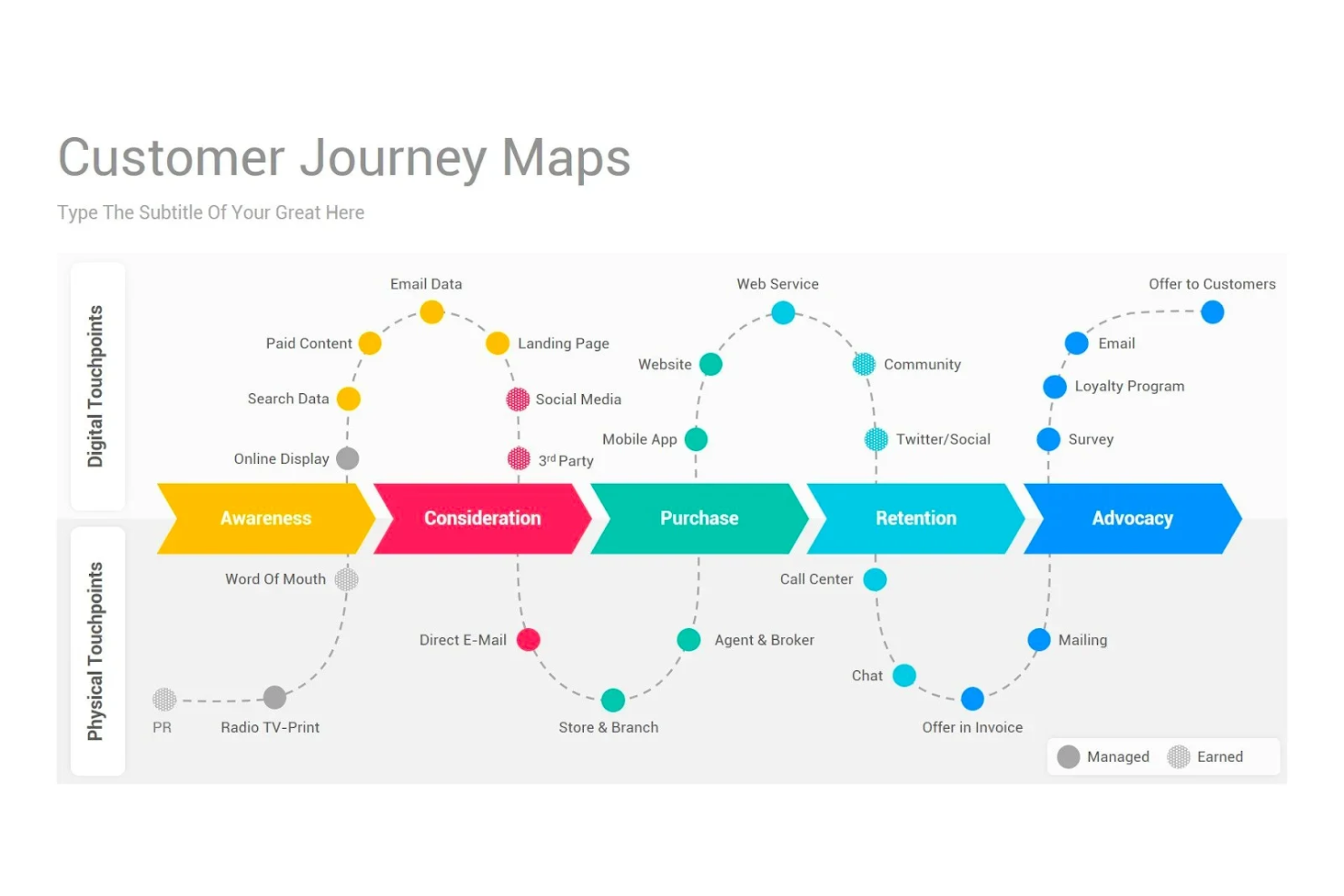
A customer journey map is a visual representation showing a customer’s experience with your brand from start to finish. It can be a complete buyer’s journey or one part of the customer experience, such as with a website customer journey map. Journey maps can be very simple, but they can quickly evolve into complex flowcharts with different entry points, exit points, goals, touchpoints, persona types, and types of interactions they have with your brand.
Customer journey maps can go by many other names, including a customer experience map, user experience map (UX map), or a customer persona map.
What is the purpose of customer journey mapping?
The goal of customer journey mapping is to understand and improve the customer experience. It outlines the steps people take to go from prospects to paying customers to brand promoters. This information helps you build a better customer experience, improving customer satisfaction and retention rates.
Here are some examples of how you can use your customer journey map:
- Align team members around core customer success factors and pain points.
- Create a customer experience management strategy, and get buy-in from stakeholders.
- Discover the most important metrics to track across each stage of the customer lifecycle.
- Implement smart automation to reduce team members’ manual workloads.
- Inform your CX team’s brainstorming and project planning sessions.
- Contribute customer insights to product prototyping and development.
How do you make a customer journey map?
There are many ways to create your customer journey map, whether using a freeform drawing tool or a more structured drag-and-drop software interface. Your method will depend on your business model, product type, and industry, among other factors.
For example, if you’re a fully-online brand you’ll have a digital customer journey map, while in-person experiences can be mapped where relevant. But here are some simple guidelines to follow:
- Track how customers discover, purchase, and use your products or services. You can use web analytics tools like Google Analytics and website heatmaps to understand your web traffic and conversion rates. You can also add a simple how did you discover [brand name]?’ question to your sign-up form.
- Collect customer feedback and conduct user research to understand how people learn to use your products, their favorite features, and things that cause friction or that they wish were included. This can be done with a customer experience survey or using product testing software.
- Analyze your customer churn and offboarding experience, too. It’s important to understand what drives customer engagement, but it’s as important to understand the keys to customer retention.
- Map it out! You can use a whiteboard, sticky notes, wireframing tool, or flowchart builder to outline your user journey. This can include stages like product discovery, purchase and onboarding, adoption and success, and offboarding or churn.
Some common customer journey mapping mistakes teams make are relying on unverified sources and taking their journey map as their single source of truth. Keep in mind that there are so many factors you might not be able to track, and get curious and creative on how to collect more authentic feedback. For example, you might consider looking to social media or online forums to see how people talk about your products.
What are the 5 customer journey stages?
The 5 stages of a customer journey map typically align with the key phases a customer goes through when interacting with a brand. These stages are:
- Awareness: The customer becomes aware of a need, problem, or opportunity and starts exploring potential solutions. This stage focuses on initial touchpoints, such as ads, social media, or word-of-mouth.
- Consideration: The customer researches options, compares products or services, and evaluates which best meets their needs. This includes engaging with websites, reviews, or sales teams.
- Purchase: The customer decides to buy, completes the transaction, and experiences the onboarding or delivery process. It’s crucial to ensure a seamless and satisfying purchasing experience.
- Retention: After purchase, the focus shifts to maintaining a positive relationship through excellent service, effective communication, and added value. This stage involves support, follow-ups, and loyalty programs.
- Advocacy: Satisfied customers become advocates, recommending the brand to others through reviews, testimonials, or word-of-mouth, contributing to long-term growth and trust-building.
These stages help businesses understand and improve the customer experience at every interaction.
What features should I look for when selecting customer journey mapping tools?
When selecting a customer mapping app, look for the following features:
- Lead-nurturing path templates
- Major and minor customer touchpoints
- Onstage/offstage map points
- New customer base development
- Templates for user path shape
- Emotions and motivations
How do these tools handle data from offline customer interactions?
Handling data from offline interactions is a challenge that many customer journey mapping tools address by allowing manual entry and integration with systems that capture offline interactions, such as in-store purchase data or call center logs. This means you can incorporate data from face-to-face interactions, phone calls, or physical mailers into your customer journey maps. The key is ensuring that all touchpoints, digital or offline, are accounted for to get a holistic view of the customer experience.
How can I calculate the ROI of using a customer journey mapping tool?
To demonstrate how much return on investment (ROI) your customer journey mapping tool provides, you need to show how it ads value, either by increasing revenue or through cost savings. You can do that easily by examining key metrics pre- and post-implementation of your customer journey mapping tool.
Here are several strategies you can use to demonstrate this:
- Define objectives and key performance indicators (KPIs): Establish clear goals and related KPIs for what you hope to achieve by implementing your new customer journey mapping tool. Your objective could be as simple as improving customer satisfaction or reducing your churn rates. To measure that, your KPIs could be your NPS (net promoter score) or CSAT (customer satisfaction score), or your customer retention rate over time.
- Calculate cost savings: Evaluate how the software has helped you optimize your processes, improve efficiency, and reduce manual effort. Then, calculate the cost savings resulting from these improvements.
- Measure revenue impact: Determine if key metrics like your customer conversion rates, upselling, and cross-selling opportunities have gone up or down since implementation. If they have gone up, the additional revenue generated can be attributed to the improved customer experience you’ve created.
- Gather qualitative feedback: Survey your customers and employees to ask for feedback on the changes you’ve made since implementing the tool. Use this feedback to supplement quantitative data for a more holistic view of the tool’s impact.
How can customer journey tools manage CX assets?
Customer journey tools are designed to streamline the management of CX assets, ensuring consistency, accessibility, and efficiency in crafting impactful journey maps.
- Templates and Libraries: Offer pre-designed templates and libraries that enable users to start mapping quickly and efficiently. These tools typically include customizable layouts and industry-specific options, allowing teams to focus on strategic insights and tailoring the journey to their unique business needs.
- Centralized Repository for CX Assets: Provide a single platform where all customer experience assets, such as personas, journey maps, and supporting documents, are stored securely. This ensures all stakeholders can access and collaborate on updated, accurate data in real time without confusion or redundancy.
- Standardization and Branding: Promote consistency in journey maps by offering standardized templates that adhere to organizational branding guidelines. This helps teams produce professional, cohesive visuals that align with the company’s identity, fostering better communication across departments.
- Integration with Other Tools: Enable seamless connections with platforms like CRM systems, digital asset management tools, and analytics software. These integrations enhance the mapping process by pulling in real-time data, automating updates, and providing a comprehensive view of the customer experience ecosystem.
What are 3 experience-led strategies for crafting a customer journey map?
- Adopt a Customer-Centric Perspective: Focus on understanding the journey from the customer’s point of view by leveraging feedback, personas, and real-world interactions. This ensures that the map reflects their actual needs, emotions, and pain points rather than internal assumptions.
- Leverage Data and Analytics: Use customer behavior data, such as touchpoint analytics, website heatmaps, and sales funnel metrics, to identify trends and gaps. This data-driven approach provides actionable insights to improve engagement and streamline the customer experience.
- Include Cross-Functional Collaboration: Involve teams from marketing, sales, customer service, and product development to build a comprehensive map. This collaboration ensures every department’s input is considered, creating a seamless and consistent experience across all customer interactions.
Are there industry-specific solutions for customer journey mapping tools?
Yes, many customer journey mapping tools provide industry-specific solutions designed to address the unique challenges and needs of different sectors. Tailored features are available for industries like healthcare, banking, and insurance, helping organizations streamline complex processes and enhance customer satisfaction.
Examples of Industry-Specific Solutions for Customer Journey Maps:
- Healthcare: Customer journey tools tailored for healthcare often include features for mapping patient experiences, such as appointment scheduling, treatment plans, and follow-up care. These solutions focus on enhancing patient satisfaction and streamlining touchpoints like telehealth and billing processes.
- Banking: Tools designed for banking help map complex customer journeys, such as opening accounts, applying for loans, or navigating financial services. They often integrate with CRM systems and security tools to address compliance needs while improving customer trust and engagement.
- Insurance: Insurance-focused solutions assist in tracking policyholder journeys, from initial inquiries to claims processing and renewals. They include specific touchpoints like agent interactions and underwriting processes, ensuring a smoother and more transparent experience.
- Retail and Ecommerce: These tools cater to mapping journeys across online and in-store experiences, focusing on personalization, omnichannel touchpoints, and real-time updates. Features like abandoned cart recovery and loyalty program integration help improve conversions and retention.
- B2B Services: B2B-specific tools address longer sales cycles, multiple decision-makers, and account-based marketing strategies. They enable mapping of multi-touchpoint journeys, such as consultations, RFP submissions, and contract negotiations, to improve alignment with business goals.
- Travel and Hospitality: For industries like travel and hospitality, journey mapping tools focus on customer interactions like booking, check-in, and post-stay feedback. They integrate with booking engines, review platforms, and loyalty programs to enhance the customer experience at every stage.
Find the Best Customer Journey Mapping Tool for Your Team
Having an understanding of customer behavior and customer pain points makes it easier for your team to develop new initiatives that will increase conversion rates and enhance the customer experience overall.
The platforms on this list offer analytics tools, visual representation of the user journey, automated workflows, buyer persona profiles, and impact maps featuring invaluable information about how your customers are currently interacting with your product.
Lastly, sign up for our newsletter to stay up-to-date on all the latest trends and insights in customer experience from leading industry experts.