


monday CRM Review: Pros, Cons, Features & Pricing


monday CRM is a customer relationship management (CRM) software that helps teams manage contacts, pipelines, and customer touchpoints in one place. It’s best suited for customer-facing teams in service, success, or account management roles, especially in fast-moving SaaS, tech, or B2B environments. Its biggest value is helping your team stay on top of follow-ups, handoffs, and ongoing customer relationships.
In this review, I’ll walk through monday CRM's key features, pros and cons, best and worst use cases, pricing, and more. Whether you're looking to improve your team's productivity or better understand customer needs, this review has the insights you need.
monday CRM Evaluation Summary
- From $12/user/month (billed annually)
- Free trial available
Why Trust Our Software Reviews
We’ve been testing and reviewing software since 2020. As CX leaders ourselves, we know how critical and difficult it is to make the right decision when selecting software.
We invest in deep research to help our audience make better software purchasing decisions. We’ve tested more than 2,000 tools for different CX use cases and written over 1,000 comprehensive software reviews. Learn how we stay transparent & our software review methodology.
monday CRM Overview
pros
-
You can build and adjust pipelines without needing technical help.
-
It’s easy to track tasks, emails, and contact history in one place.
-
Automation features save your team time on repetitive tasks and streamline daily work.
cons
-
It can feel overwhelming with too many features for new users.
-
Reporting feels limited if your team needs deeper performance or trend analysis.
-
You can't manage complex sales territories or multi-layered account hierarchies.
-

SupportYourApp
Visit WebsiteThis rating combines scores from multiple user review sites to reflect overall customer sentiment about the product.4.7 -
Tidio
Visit WebsiteThis rating combines scores from multiple user review sites to reflect overall customer sentiment about the product.4.7 -
Freshdesk
Visit WebsiteThis rating combines scores from multiple user review sites to reflect overall customer sentiment about the product.4.4





How We Test & Score Tools
We’ve spent years building, refining, and improving our software testing and scoring system. The rubric is designed to capture the nuances of software selection and what makes a tool effective, focusing on critical aspects of the decision-making process.
Below, you can see exactly how our testing and scoring works across seven criteria. It allows us to provide an unbiased evaluation of the software based on core functionality, standout features, ease of use, onboarding, customer support, integrations, customer reviews, and value for money.
Core Functionality (25% of final scoring)
The starting point of our evaluation is always the core functionality of the tool. Does it have the basic features and functions that a user would expect to see? Are any of those core features locked to higher-tiered pricing plans? At its core, we expect a tool to stand up against the baseline capabilities of its competitors.
Standout Features (25% of final scoring)
Next, we evaluate uncommon standout features that go above and beyond the core functionality typically found in tools of its kind. A high score reflects specialized or unique features that make the product faster, more efficient, or offer additional value to the user.
We also evaluate how easy it is to integrate with other tools typically found in the tech stack to expand the functionality and utility of the software. Tools offering plentiful native integrations, 3rd party connections, and API access to build custom integrations score best.
Ease of Use (10% of final scoring)
We consider how quick and easy it is to execute the tasks defined in the core functionality using the tool. High scoring software is well designed, intuitive to use, offers mobile apps, provides templates, and makes relatively complex tasks seem simple.
Onboarding (10% of final scoring)
We know how important rapid team adoption is for a new platform, so we evaluate how easy it is to learn and use a tool with minimal training. We evaluate how quickly a team member can get set up and start using the tool with no experience. High scoring solutions indicate little or no support is required.
Customer Support (10% of final scoring)
We review how quick and easy it is to get unstuck and find help by phone, live chat, or knowledge base. Tools and companies that provide real-time support score best, while chatbots score worst.
Customer Reviews (10% of final scoring)
Beyond our own testing and evaluation, we consider the net promoter score from current and past customers. We review their likelihood, given the option, to choose the tool again for the core functionality. A high scoring software reflects a high net promoter score from current or past customers.
Value for Money (10% of final scoring)
Lastly, in consideration of all the other criteria, we review the average price of entry level plans against the core features and consider the value of the other evaluation criteria. Software that delivers more, for less, will score higher.
Core Features
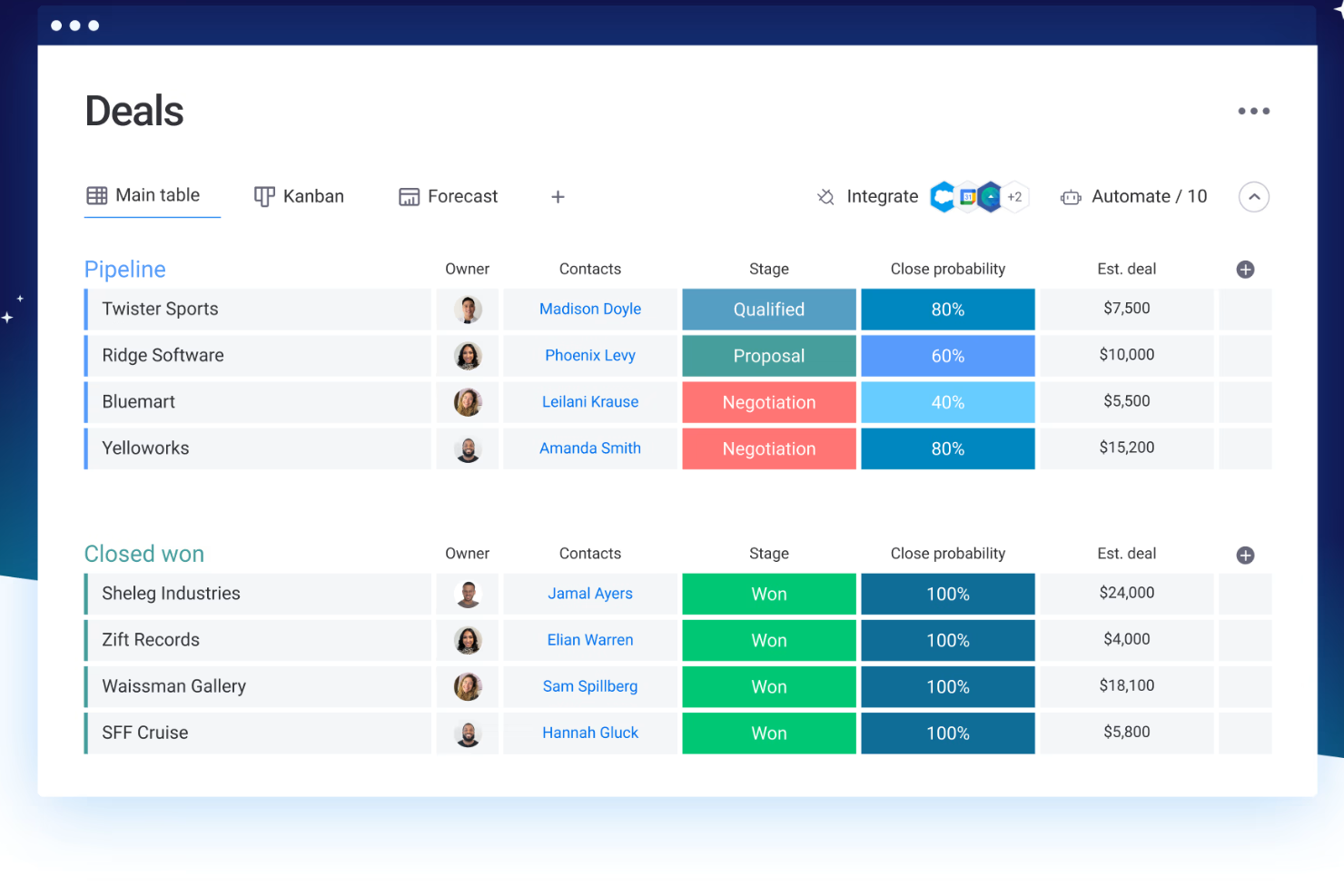
Contact Management: You can store and manage all your customer information in one place, making it easy to access and update. This feature helps your team keep track of interactions and build better customer relationships.
Pipeline Management: Track your sales process with visual pipelines that show where each deal stands. This helps your team prioritize tasks and focus on closing deals efficiently.
Task Management: Assign and manage tasks within your team to ensure everyone knows what needs doing and when. It keeps your projects on track and ensures accountability.
Automation: Automate repetitive tasks like follow-up emails and reminders, saving your team time for more important work. This feature boosts productivity and reduces errors.
Reporting and Analytics: Generate reports to analyze your team's performance and make data-driven decisions. It helps you understand your sales trends and improve strategies.
Customizable Dashboards: Create dashboards that fit your team's specific needs, displaying relevant data at a glance. This enhances your team's ability to monitor and react to key metrics quickly.

Ease of Use
monday CRM is known for its intuitive and user-friendly interface, making it easy for your team to get started without extensive training. The visual layout and drag-and-drop workflow builder simplify complex processes, allowing you to customize your workspace effortlessly.
Its responsive design ensures a smooth experience across devices, so your team can manage tasks on the go. Users often appreciate the straightforward navigation and clear organization of features, which enhances productivity and reduces the learning curve.

Integrations
monday CRM integrates natively with Slack, Google Workspace, Gmail, Microsoft Teams, Zoom, Outlook, Zoom, HubSpot, LinkedIn, Stripe, PandaDoc, Trello, and Salesforce. monday CRM also offers an API and connects with third-party integration tools like Zapier.
New Product Updates from monday CRM

monday CRM Adds Meta Conversions API Integration
monday CRM has added an easier way to connect Meta Conversions API so you can sync lead status back to Meta. This helps you improve targeting and conversion performance with minimal setup effort. Highlights include:
- Meta Conversions API Integration: Connect monday CRM with Meta to share lead status updates automatically.
- Lead Status Sync: Send CRM lead status changes back to Meta to improve campaign targeting and conversion tracking.
- Automation Recipe: Configure the integration quickly using the new built-in Meta automation recipe.
Visit monday CRM's official site for more details.
 for more details.
monday CRM Introduces Activity Tracker Widget
monday CRM introduces an Activity Tracker widget that provides real-time insights into activities such as emails sent and tasks completed. This improves visibility and enables users to filter data by person, deal, or account for better performance tracking. Highlights include:
- Real-Time Visibility: Users can view their activities in real time, enabling them to quickly assess and respond to current demands.
- Comprehensive Tracking: It allows tracking the number of activities completed and emails sent, ensuring all actions are accounted for.
- Advanced Filters: Users can filter activities by categories such as person, deal, or account, enabling precise performance metrics.
Visit monday CRM's official site for more details.
monday CRM Specs
- 2-Factor Authentication
- API
- Calendar Management
- Call Tracking
- Campaign Management
- Click-to-Dial
- Contact Management
- Contact Sharing
- Custom Data Forms
- Customer Management
- Dashboard
- Data Export
- Data Import
- Data Visualization
- Email Integration
- External Integrations
- File Sharing
- File Transfer
- Google Apps Integration
- Lead Management
- Lead Scoring
- Marketing Automation
- Mobile App
- Multi-User
- Notifications
- Pipeline Management
- Sales Automation
- Scheduling
- Social-Media Integration
- Task Scheduling/Tracking
- Third-Party Plugins/Add-Ons
Alternatives to monday CRM




monday CRM FAQs
How does monday CRM handle data security and compliance?
Can monday CRM handle multiple pipelines?
Is monday CRM good for customer support teams?
How customizable is monday CRM?
Can my team use monday CRM on mobile?
Does monday CRM work well for post-sale customer management?
How does monday CRM support collaboration between teams?
Can we migrate data into monday CRM?
What's Next?
Subscribe to our newsletter for the latest CX insights, how-to guides, strategies, and resources from top experts in the CX field.