

10 beste Tools zur Verwaltung von Kundeninteraktionen für 2026

10 Auswahlliste der besten Software zur Verwaltung von Kundeninteraktionen


Software zur Verwaltung von Kundeninteraktionen hilft CX- und Supportteams dabei, das Chaos über mehrere Kanäle hinweg – E-Mail, Chat, soziale Medien und Sprache – zu bewältigen, damit sie schneller antworten, besser zusammenarbeiten und konsistente, personalisierte Erlebnisse bieten können. Diese Plattformen zentralisieren Gespräche, automatisieren die Weiterleitung, stellen Kontext bereit und liefern klare Analysen, um Lösungszeiten, Zufriedenheit und Teameffizienz zu verbessern.
Ich habe diese Tools anhand der Tiefe der Zusammenarbeit, der Omnichannel-Abdeckung, der Automatisierung und künstlichen Intelligenz, der Berichte und Analysen, der Integrationen (CRM, E-Commerce, Telefonie), der Skalierbarkeit sowie des Preis-Leistungs-Verhältnisses geprüft und getestet. Dieser Leitfaden stellt die besten Lösungen, ihre passenden Einsatzbereiche und die jeweiligen Kompromisse vor, damit Sie eine Plattform auswählen können, die zur Größe, Branche und zum Supportmodell Ihres Teams passt.
Warum Sie unseren Software-Empfehlungen vertrauen können
Unser Team testet und bewertet Software seit 2012. Als CX-Führungskräfte selbst wissen wir, wie schwierig – und wichtig – es ist, die richtige Software auszuwählen.
Für diesen Leitfaden haben wir Tools mithilfe von praktischen Tests und unabhängiger Recherche bewertet und dabei unsere Bewertungskriterien angewendet.
Unsere Bewertungen spiegeln unser menschliches redaktionelles Urteilsvermögen wider, keine Verkaufsstrategie.
Zusammenfassung der besten Software zur Verwaltung von Kundeninteraktionen
Diese Vergleichstabelle fasst die Preisinformationen meiner besten Softwareauswahlen zur Verwaltung von Kundeninteraktionen zusammen, damit Sie die beste Lösung für Ihr Budget und Ihre geschäftlichen Anforderungen finden.
| Tool | Best For | Trial Info | Price | ||
|---|---|---|---|---|---|
| 1 | Am besten für die Zusammenarbeit von Teams mit gemeinsamem Posteingang | 30-tägige kostenlose Testversion verfügbar | Ab $14/user/month (jährlich abgerechnet) | Website | |
| 2 | Am besten für Marktplatz-Integrationen | 14-tägige kostenlose Testversion verfügbar | Ab $19/Benutzer/Monat (jährlich abgerechnet) | Website | |
| 3 | Am besten für kleine Teams | 15-tägige kostenlose Testphase + kostenloser Tarif + kostenlose Demo verfügbar | Ab $39.99/Nutzer/Monat (jährliche Abrechnung) | Website | |
| 4 | Am besten für Vertriebsteams geeignet | 14-tägige kostenlose Testversion + kostenlose Demo verfügbar | Ab $14/Nutzer/Monat (jährliche Abrechnung) | Website | |
| 5 | Am besten geeignet für Social-Media-Integration | Kostenlose Demo verfügbar | Preise auf Anfrage | Website | |
| 6 | Am besten für Großunternehmen geeignet | Kostenlose Demo + kostenloser 14-Tage-Test verfügbar | Ab$75/Benutzer/Monat, jährlich abgerechnet | Website | |
| 7 | Am besten geeignet für Einzelhandelsunternehmen | Kostenlose Demo verfügbar | Ab $150/Nutzer/Monat (jährliche Abrechnung, mindestens 10 Nutzer) | Website | |
| 8 | Am besten geeignet für Terminplanung | Kostenlose Demo verfügbar | Preis auf Anfrage | Website | |
| 9 | Am besten für Fertigungsunternehmen geeignet | Kostenlose Demo verfügbar | Ab $450/Monat | Website | |
| 10 | Am besten für Remote-Teams | Kostenlose Testversion verfügbar | Ab $25/Nutzer/Monat (jährlich abgerechnet) | Website |

Test der besten Software zur Verwaltung von Kundeninteraktionen
Nachfolgend finden Sie meine ausführlichen Zusammenfassungen der besten Softwarelösungen zur Verwaltung von Kundeninteraktionen, die es auf meine Auswahlliste geschafft haben. Meine Tests bieten einen detaillierten Einblick in die wichtigsten Funktionen, Vor- und Nachteile, Integrationen und idealen Anwendungsfälle jedes Tools, damit Sie die beste Lösung für Ihre Anforderungen finden.

Missive
Am besten für die Zusammenarbeit von Teams mit gemeinsamem Posteingang
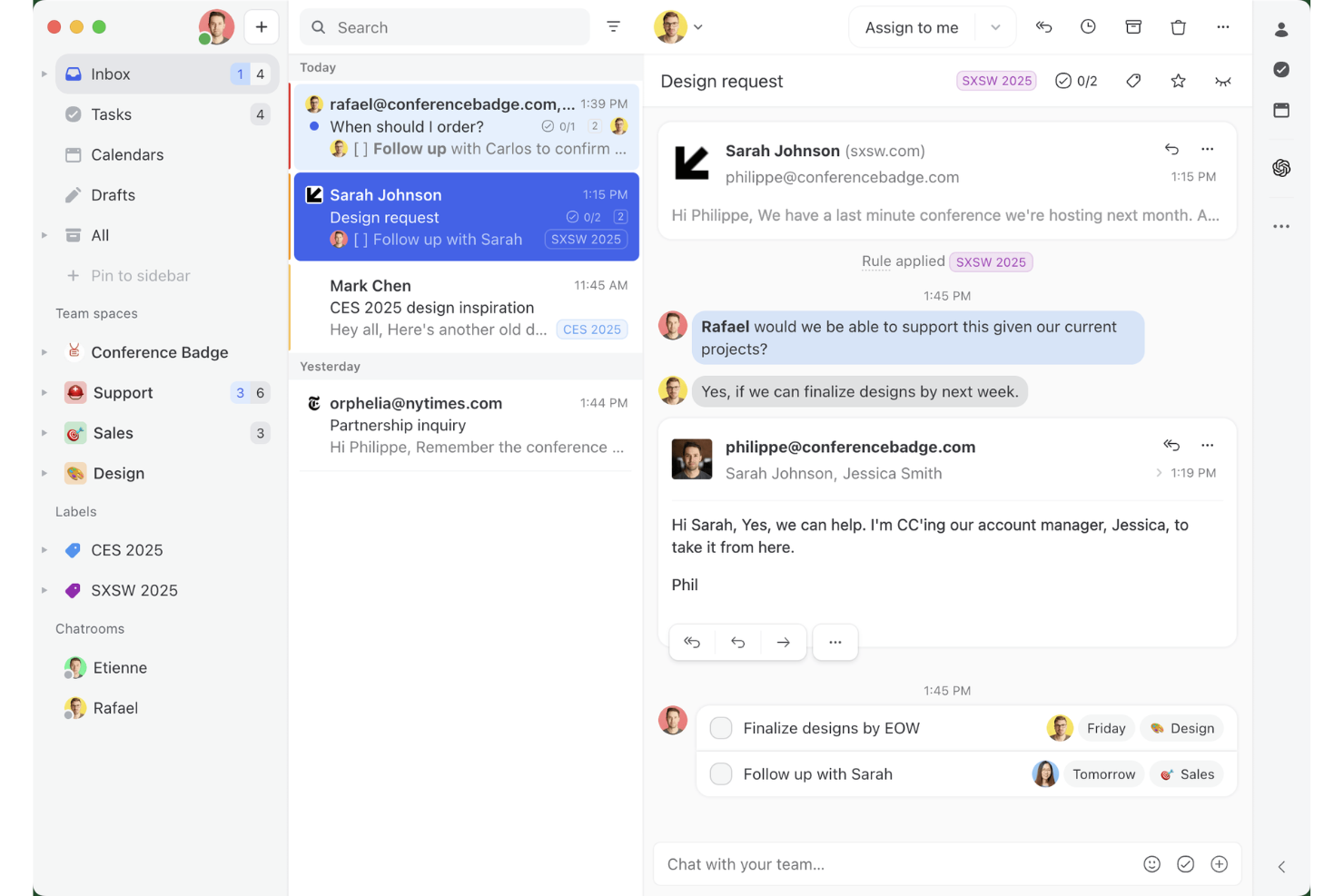
Missive ist eine Plattform für gemeinsame Posteingänge, die E-Mail, SMS, WhatsApp, Instagram-DMs, Facebook Messenger und Live-Chat in einer einzigen Oberfläche bündelt – mit integrierter Teamzusammenarbeit, regelbasierter Weiterleitung und Workflow-Automatisierung.
Für wen eignet sich Missive am besten?
Missive eignet sich besonders gut für kleine bis mittelgroße Kundensupportteams, die große Mengen an Kundenkonversationen über E-Mail, SMS und soziale Kanäle bearbeiten und intern zusammenarbeiten müssen, ohne den Gesprächsfaden zu verlieren.
Warum ich Missive ausgewählt habe
Missive steht auf meiner engeren Auswahl, weil die Plattform die Zusammenarbeit über einen gemeinsamen Posteingang in einer kanalübergreifenden Supportumgebung besonders gut ermöglicht. Mir gefällt besonders, dass Teammitglieder in internen Gesprächsfäden eine Kundenkonversation besprechen können, ohne dass der Kunde dies jemals sieht, und dass Zuweisungsregeln mit kreisförmiger oder auslastungsbasierter Weiterleitung die Warteschlangen ohne manuelle Überwachung in Bewegung halten. In der Praxis bedeutet das, dass mein Team E-Mail, SMS, WhatsApp und Instagram-DMs an einem Ort bearbeiten und gleichzeitig intern koordiniert bleiben kann.
Wichtige Funktionen von Missive
- KI-gestütztes Regelwerk: KI-Regeln analysieren eingehende Nachrichten auf Absicht und Dringlichkeit und versehen sie anschließend automatisch mit Labels, eskalieren sie oder erstellen Antwortentwürfe mithilfe von Claude-, GPT- oder Gemini-Modellen.
- Vorgefertigte Antworten mit Variablen: Vorgefertigte Antwortvorlagen unterstützen dynamische Variablen wie Kundennamen und Datum, sodass Mitarbeitende schnell einheitliche, personalisierte Antworten senden können.
- SOC-2-Typ-II-Konformität: Missive wird unabhängig geprüft und zertifiziert und bietet TLS-Verschlüsselung bei der Übertragung, Verschlüsselung gespeicherter Daten sowie optionales SAML-SSO im Business-Tarif.
- Shopify- und CRM-Seitenleistenintegrationen: Mitarbeitende können den Bestellverlauf eines Kunden in Shopify einsehen oder aktuelle CRM-Datensätze aus HubSpot, Salesforce oder Pipedrive direkt innerhalb einer Konversation abrufen.
- Missive-MCP-Server: Verbinden Sie externe KI-Werkzeuge wie Claude oder ChatGPT, um Kundeninteraktionsfäden abzufragen, Kalender zu prüfen und Antwortentwürfe zu erstellen – wobei vor dem Senden weiterhin eine Überprüfung durch Mitarbeitende erforderlich ist.
Missive-Integrationen
Missive bietet direkte Anbindungen an HubSpot, Salesforce, Pipedrive, Close, Daylite und Shopify sowie eine REST-API und Webhooks für benutzerdefinierte Verbindungen. Außerdem werden Make, Relay.app, Integrately, Lindy.ai, Zapier und der neue MCP-Server in den Productive- und Business-Tarifen unterstützt (erfordert die Aktivierung durch einen Administrator).
Pros and Cons
Pros:
- Interne Gesprächsfäden ermöglichen diskrete Teamgespräche
- Mehrkanal-Posteingang zentralisiert alle digitalen Konversationen
- KI-Regeln automatisieren Kennzeichnung, Weiterleitung und Antwortentwürfe
Cons:
- Keine integrierte Sprachfunktion oder Chatbot enthalten
- Keine Tools für CSAT- und Stimmungsanalysen
New Product Updates from Missive
Missive Adds Conversation Pins
Missive now lets you pin key links, decisions, and notes inside a conversation, keeping them accessible in a dedicated Pins section in the Details sidebar. For more information, visit Missive's official site.
 .
.
Am besten für Marktplatz-Integrationen
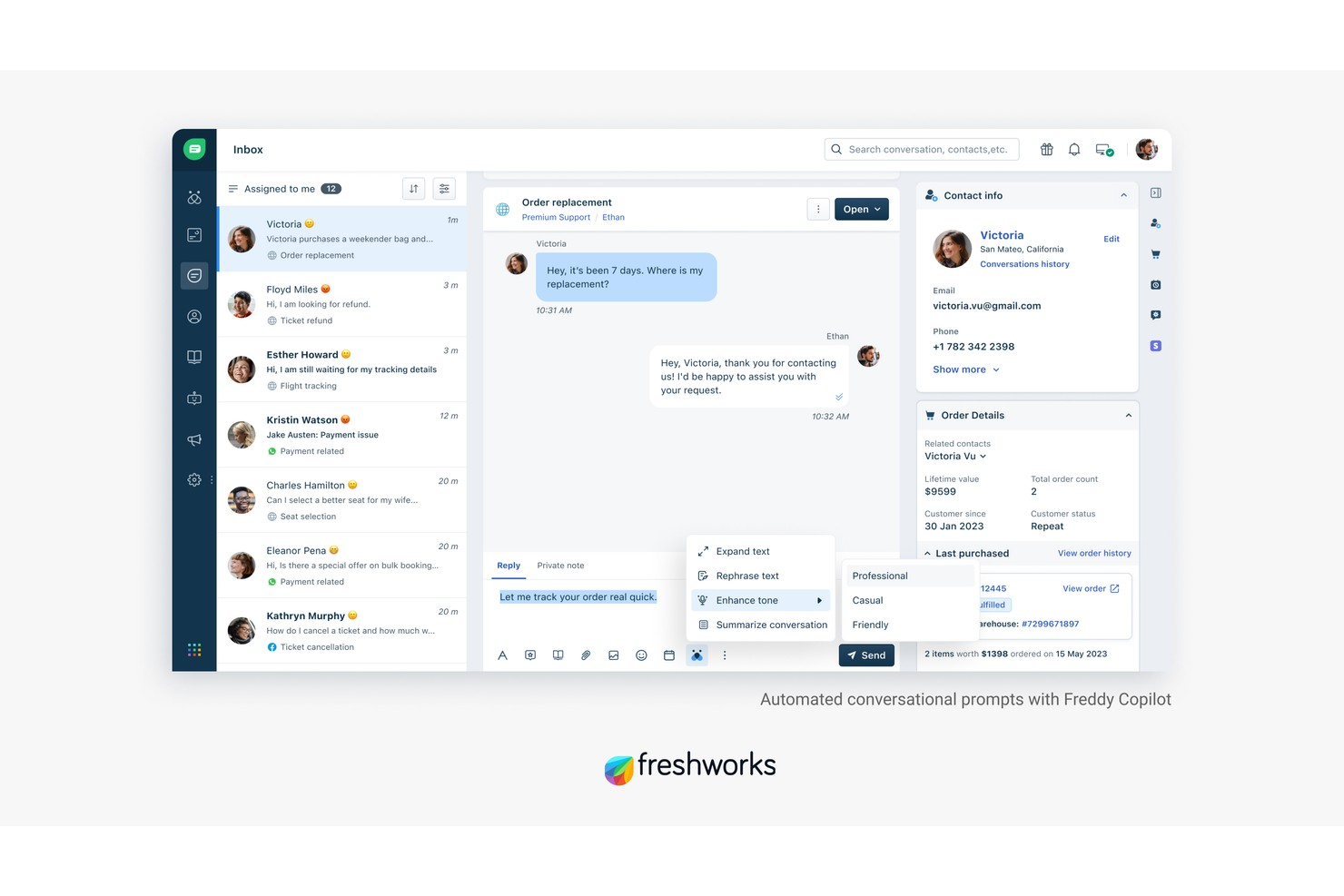
Freshdesk ist eine Plattform für das Management von Kundeninteraktionen, die E-Mail, Chat, Telefon und soziale Nachrichten in einem einzigen Omnichannel-Arbeitsbereich vereint – mit KI-gestützter Automatisierung, Ticketing und einem Marktplatz mit über 1.200 Apps, um Ihren Support-Stack zu verbinden.
Für wen ist Freshdesk am besten geeignet?
Freshdesk eignet sich besonders für Support-Teams mittlerer Größe und Unternehmen, die große Mengen an Kundenanfragen über mehrere Kanäle und Regionen hinweg verwalten.
Warum ich Freshdesk gewählt habe
Freshdesk verdient seinen Platz auf meiner Shortlist, weil die Tiefe seines Marktplatzes im Bereich Kundeninteraktionsmanagement kaum zu schlagen ist. Mit über 1.200 Apps kann ich Tools wie Jira, Slack, Shopify und Salesforce direkt in den Agenten-Arbeitsbereich integrieren, ohne eine eigene Middleware entwickeln zu müssen. Besonders gut gefallen mir die kuratierten App-Sammlungen, wie die E-Commerce- und Office 365-Pakete, die mir viel Zeit bei der Suche nach den passenden Integrationen sparen.
Wichtige Funktionen von Freshdesk
- Freddy AI Copilot: Unterstützt Support-Mitarbeiter in Echtzeit mit Antwortvorschlägen, Stimmungsanalyse und Gesprächszusammenfassungen direkt in der Ticket-Ansicht.
- Omnichannel-Ticketing: Bündelt Kundenunterhaltungen aus E-Mail, Chat, WhatsApp, Telefon und sozialen Kanälen in einem einzigen, einheitlichen Posteingang.
- Skill-basiertes Ticket-Routing: Weist eingehende Tickets automatisch Mitarbeitern zu, basierend auf Qualifikation, Arbeitslast oder Kanalerfahrung.
- Individuelle Analyse-Dashboards: Ermöglichen das Erstellen von Echtzeitberichten zur Nachverfolgung von CSAT-Werten, Ticketvolumina, SLA-Compliance und Mitarbeiter-Performance.
Freshdesk-Integrationen
Freshdesk bietet mehr als 1.200 Marktplatz-Integrationen über den Freshworks Marketplace, einschließlich Slack, Microsoft Teams, Salesforce, Jira, Shopify, Google Kalender, Google Analytics, Playvox und Aircall. Es ist auch bei Zapier verfügbar und stellt eine API für individuelle Integrationen bereit.
Pros and Cons
Pros:
- Omnichannel-Ticketing umfasst E-Mail, Chat und soziale Kanäle
- Eingebaute Gamification für die Ticketbearbeitung durch Mitarbeiter
- Bietet Parent-Child-Ticketing für komplexe Anfragen
Cons:
- Mobile App fehlt es an wichtigen Desktop-Funktionen
- Erweiterte Berichte erfordern höhere Tarifstufen
New Product Updates from Freshdesk

Freshdesk Adds Voice AI Agents in Freshcaller
Freshdesk introduces Voice AI Agents available through Freshcaller Marketplace apps to handle routine calls and reduce queues. This feature enables automated call handling with real-time, conversational support. For more information, visit Freshdesk's official site.

Am besten für kleine Teams
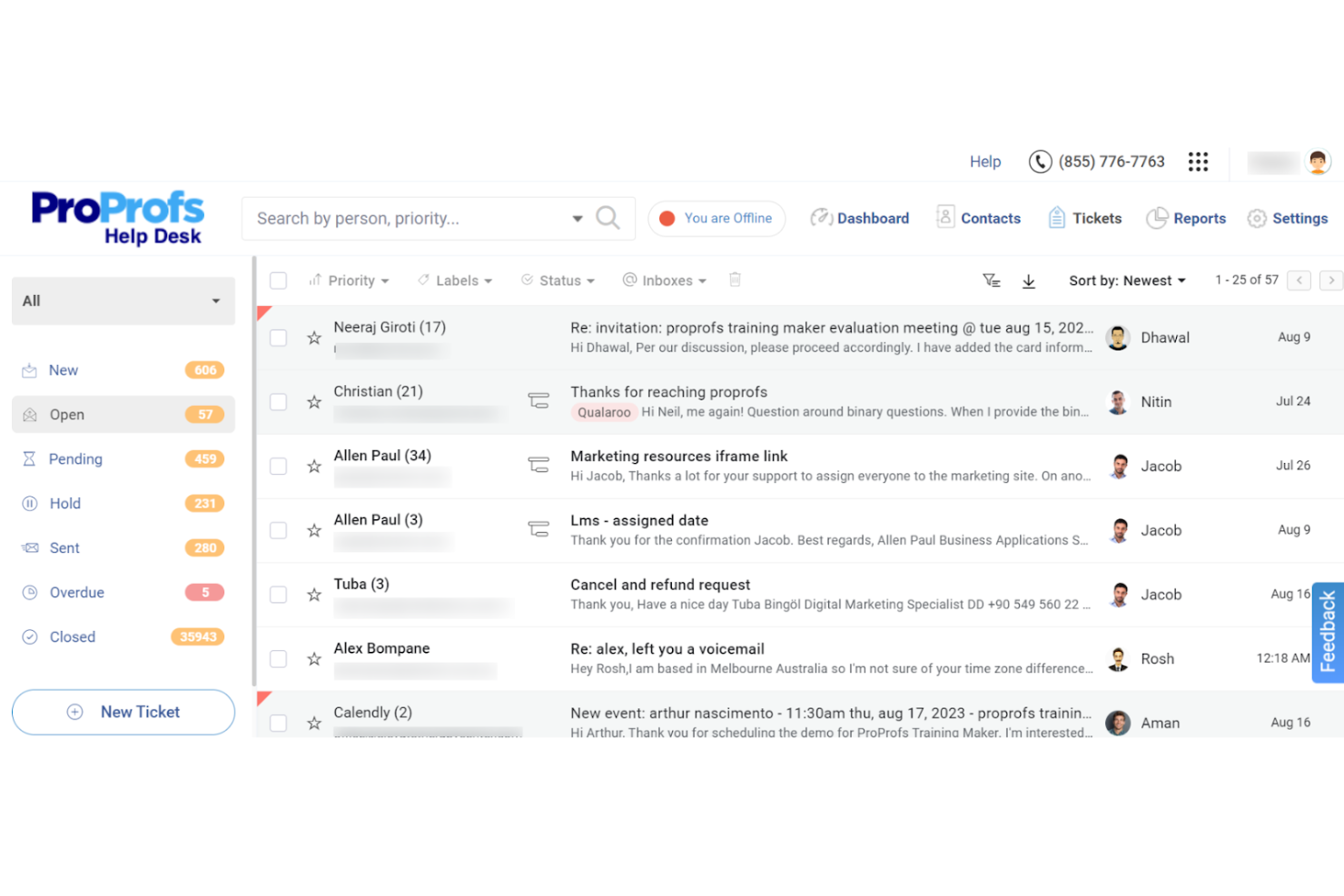
ProProfs Help Desk ist ein Tool für das Management von Kundeninteraktionen, das für kleine Teams entwickelt wurde. Es hilft dabei, Kundenkommunikation und Supportanfragen effizient zu verwalten. Zu den wichtigsten Funktionen gehören Ticketmanagement und Multichannel-Support, wodurch es sich ideal für Unternehmen eignet, die die Kundenbindung verbessern möchten.
Warum ich ProProfs Help Desk ausgewählt habe: Es ist speziell auf kleine Teams zugeschnitten und bietet Funktionen wie einen gemeinsamen Posteingang und vorgefertigte Antworten, die die Kommunikation vereinfachen. Das SLA-Management stellt pünktliche Antworten sicher, während individuelle Berichte Einblicke in die Teamleistung liefern. Der Fokus auf Zusammenarbeit zeigt sich besonders in den Team-Kollaborationsfunktionen, wodurch es für kleine Gruppen mit Bedarf an effizientem Interaktionsmanagement heraussticht.
Herausragende Funktionen & Integrationen:
Funktionen umfassen Ticketmanagement, das Kundenanfragen für eine effiziente Bearbeitung priorisiert. Multichannel-Support ermöglicht Interaktionen per E-Mail, Chat und Social Media und sorgt so für nahtlose Kommunikation. Kundenzufriedenheitsumfragen helfen, wertvolles Feedback zu sammeln, um hohe Servicestandards zu halten.
Integrationen umfassen Salesforce, Mailchimp, Trello, Slack, Google Analytics, Shopify, WordPress, Zendesk, Freshdesk und Zoho CRM.
Pros and Cons
Pros:
- Anpassbare Ticketansichten
- Unterstützung mehrerer Sprachen
- Automatisierte Ticketrouting-Funktion
Cons:
- Begrenzte erweiterte Funktionen
- Gelegentliche Leistungseinbußen

Am besten für Vertriebsteams geeignet
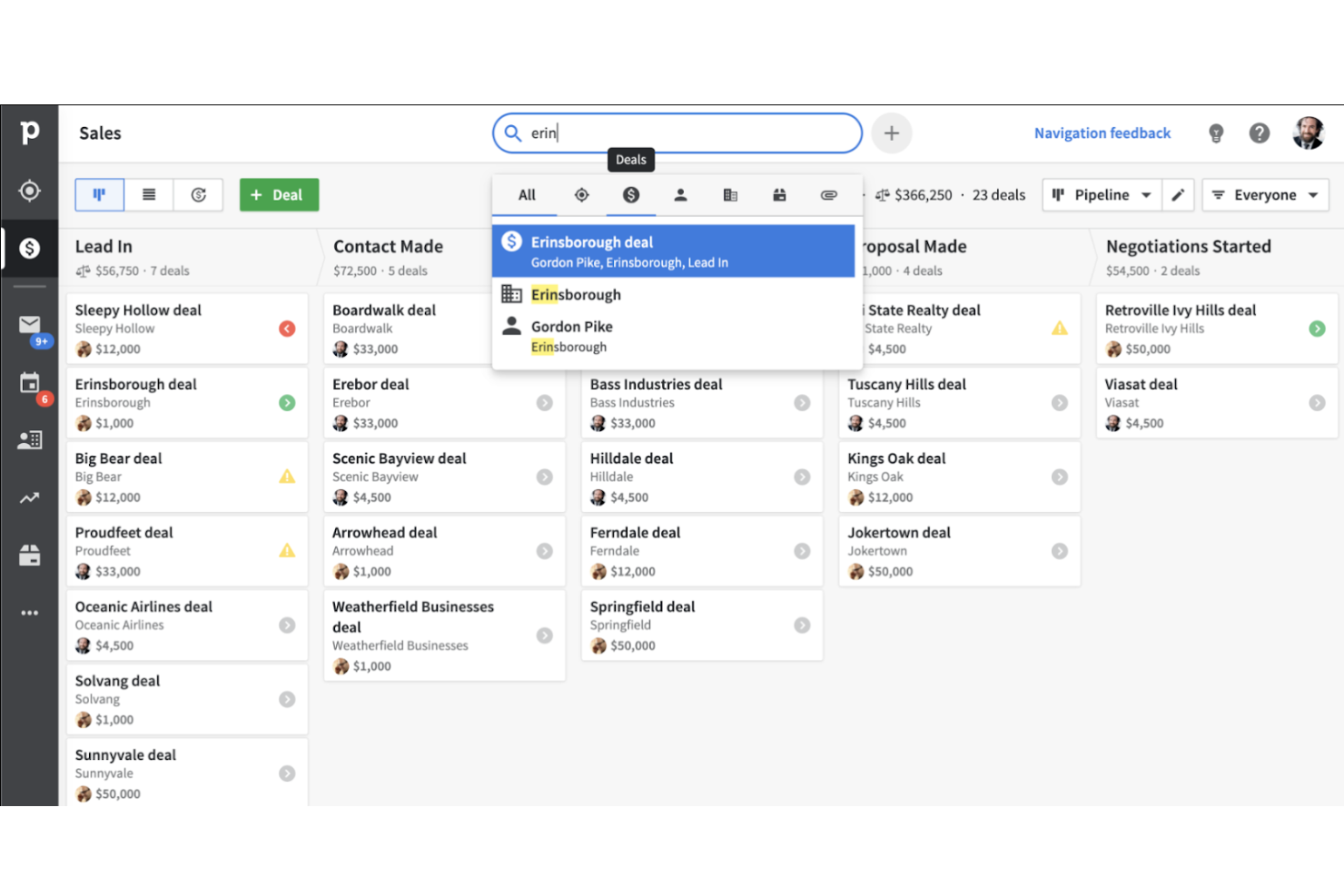
Pipedrive ist eine Kundenmanagement-Software, die speziell für Vertriebsteams entwickelt wurde. Sie unterstützt Vertriebsmitarbeitende dabei, Leads zu verfolgen, Vertriebspipelines zu verwalten und Abschlüsse effizient abzuwickeln, wobei der Schwerpunkt auf Vertriebsprozessmanagement und Organisation liegt.
Warum ich Pipedrive gewählt habe: Es wurde gezielt für Vertriebsteams entwickelt und bietet Funktionen wie Deal-Tracking, die Ihrem Team helfen, Vertriebsprozesse zu visualisieren. Die anpassbaren Pipelines von Pipedrive ermöglichen es, die Phasen individuell an Ihre Vertriebsstrategie anzupassen. Aktivitätserinnerungen sorgen dafür, dass Ihr Team keine Nachverfolgung verpasst. Dank der intuitiven Benutzeroberfläche können Vertriebsteams mit Pipedrive organisiert bleiben und sich ganz auf den Abschluss von Geschäften konzentrieren.
Hervorstechende Funktionen & Integrationen:
Funktionen beinhalten ein Insights-Dashboard, das Ihrem Team eine visuelle Übersicht über Leistungskennzahlen bietet. Die Umsatzprognose-Funktion hilft dabei, Einnahmen auf Basis aktueller Deals vorherzusagen. Zudem bietet Pipedrive Zielsetzungsfunktionen, mit denen Ihr Team Verkaufsziele festlegen und verfolgen kann.
Integrationen umfassen Google Workspace, Microsoft Outlook, Slack, Trello, Mailchimp, Zapier, QuickBooks, Xero, HubSpot und Asana.
Pros and Cons
Pros:
- Effektives Deal-Tracking
- Zuverlässiges Aktivitätserinnerungssystem
- Visuelle Leistungsübersichten
Cons:
- Einfache Berichtsfunktionen
- Gelegentliche Synchronisierungsprobleme mit E-Mails

Sprinklr
Am besten geeignet für Social-Media-Integration
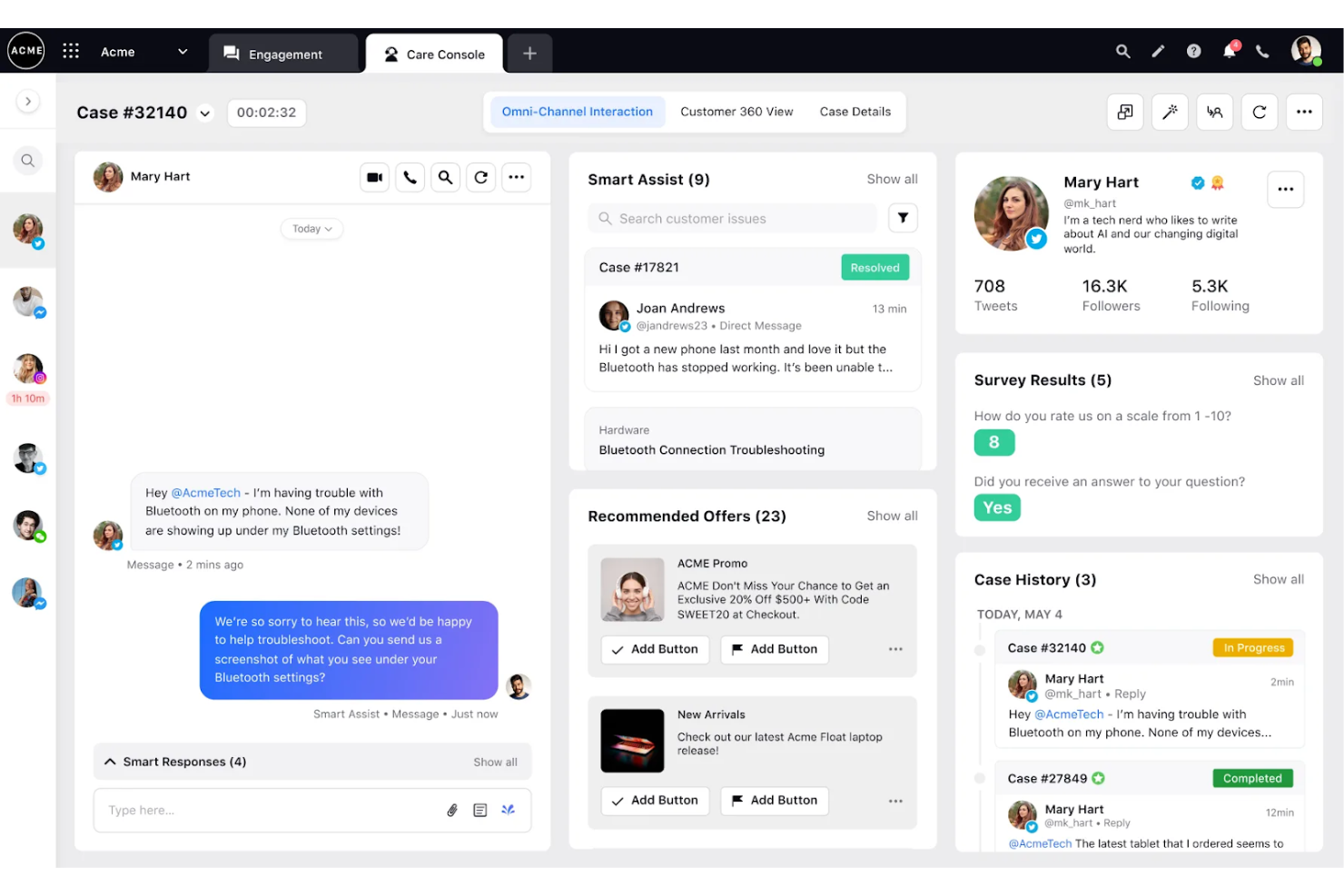
Sprinklr ist eine Plattform für das Management von Kundeninteraktionen, die für Unternehmen entwickelt wurde, die den Fokus auf Social Media Engagement legen. Sie unterstützt Teams dabei, Kundeninteraktionen über verschiedene Social-Media-Kanäle hinweg zu verwalten und verbessert so den Kundenservice und die Kundenbindung.
Warum ich Sprinklr gewählt habe: Es ist ideal für die Integration sozialer Medien und bietet Funktionen wie einheitliches Messaging, das Ihrem Team ermöglicht, alle sozialen Interaktionen an einem Ort zu verwalten. Durch Social Listening können Sie Kundenstimmungen effektiv beobachten. Die Analytik der Plattform liefert Einblicke in die Performance der sozialen Kanäle, um Ihre Strategien zu optimieren. Anpassbare Dashboards sorgen dafür, dass Ihr Team relevante Kennzahlen einfach verfolgen kann.
Hervorstechende Funktionen & Integrationen:
Funktionen beinhalten fortschrittliche Social Listening Tools, die Einblicke in Kundengespräche geben. Die Stimmungsanalyse der Plattform hilft Ihrem Team, Kundenemotionen zu verstehen und angemessen zu reagieren. Zusätzlich spart automatisierte Berichterstattung Zeit, indem detaillierte Leistungsanalysen ohne manuellen Aufwand bereitgestellt werden.
Integrationen umfassen Facebook, X, Instagram, LinkedIn, YouTube, WhatsApp, Salesforce, Microsoft Dynamics, Zendesk und ServiceNow.
Pros and Cons
Pros:
- Starker Fokus auf soziale Medien
- Exzellente Stimmungsanalyse
- Ausführliche Berichtsfunktionen
Cons:
- Einarbeitung für vollständige Nutzung erforderlich
- Nicht ideal für kleine Unternehmen
Genesys
Am besten für Großunternehmen geeignet
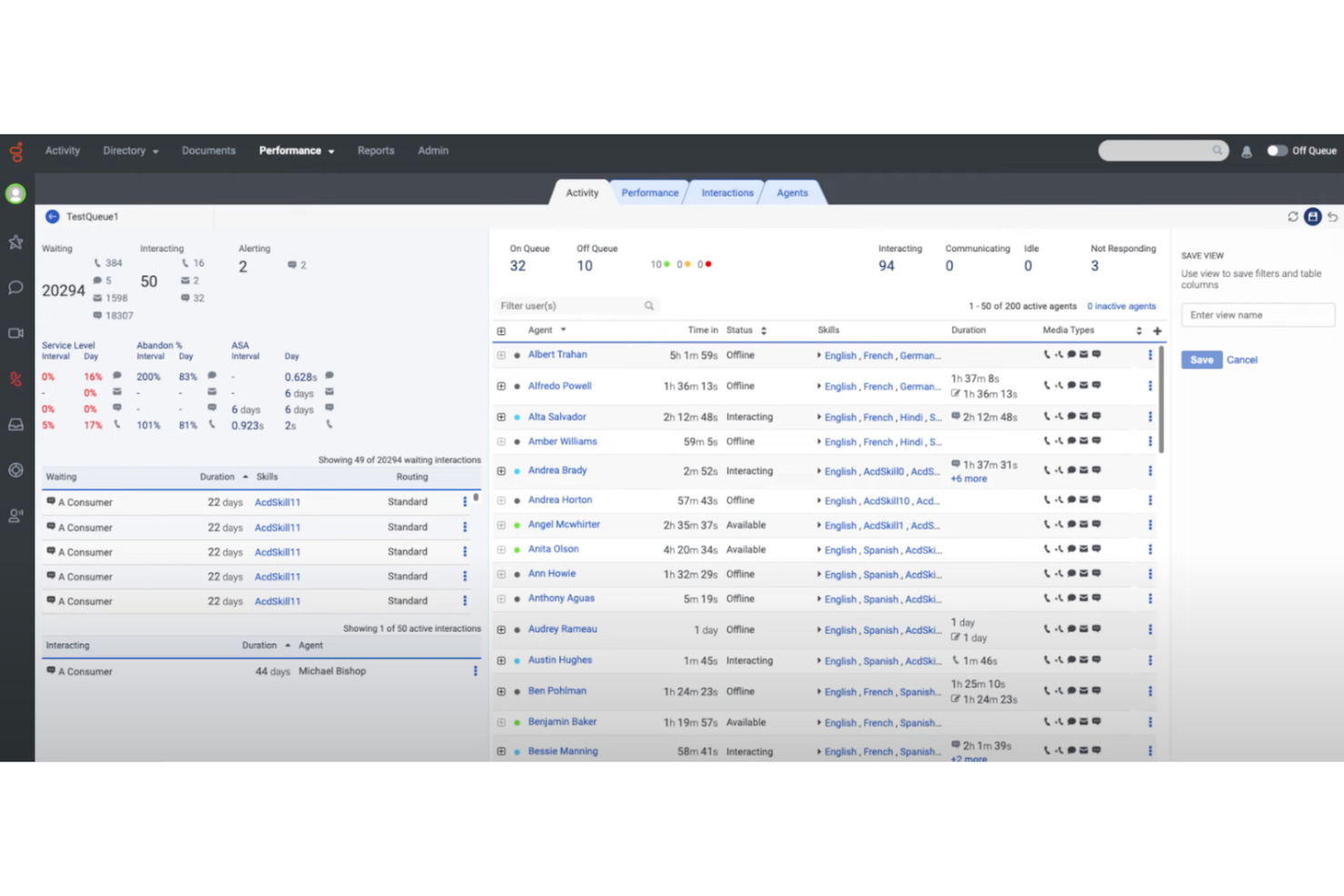
Genesys bietet Lösungen für das Management von Kundeninteraktionen im Bereich Kundenservice, Engagement und Kommunikation über mehrere Kanäle hinweg, um Kundenerlebnisse zu verbessern, und richtet sich dabei an Großunternehmen.
Warum ich Genesys ausgewählt habe: Es ist für große Unternehmen konzipiert und bietet Funktionen wie Omnichannel-Routing, das sicherstellt, dass Ihre Kunden jedes Mal mit dem richtigen Ansprechpartner verbunden werden. Die Tools zur Personaloptimierung helfen Ihnen, Ressourcen effizient zu verwalten und einzusetzen. Die Plattform unterstützt komplexe Workflows und eignet sich daher für groß angelegte Betriebsabläufe. Echtzeit-Analysen bieten Einblicke in Kundeninteraktionen, sodass Sie datenbasierte Entscheidungen treffen können.
Herausragende Funktionen & Integrationen:
Funktionen umfassen fortschrittliches Anruf-Routing, das Kunden schnell zur passenden Abteilung weiterleitet. Die Workforce-Management-Tools helfen Ihrem Team dabei, Schichten effizient zu planen und zu verwalten. Darüber hinaus bietet die Plattform Customer Journey Mapping, das es Ihnen ermöglicht, Kundenerfahrungen über sämtliche Kontaktpunkte hinweg zu visualisieren und zu verbessern, um Abwanderungen zu vermeiden.
Integrationen umfassen Salesforce, Microsoft Dynamics 365, Zendesk, ServiceNow, Google Cloud, Amazon Web Services, Twilio, Zoom, Slack und Oracle.
Pros and Cons
Pros:
- Starke Omnichannel-Fähigkeiten
- Detailliertes Customer Journey Mapping
- Umfangreiche Reporting-Optionen
Cons:
- Komplexer Einrichtungsprozess mit hoher Lernkurve für neue Nutzer
- Benötigt fortlaufenden technischen Support

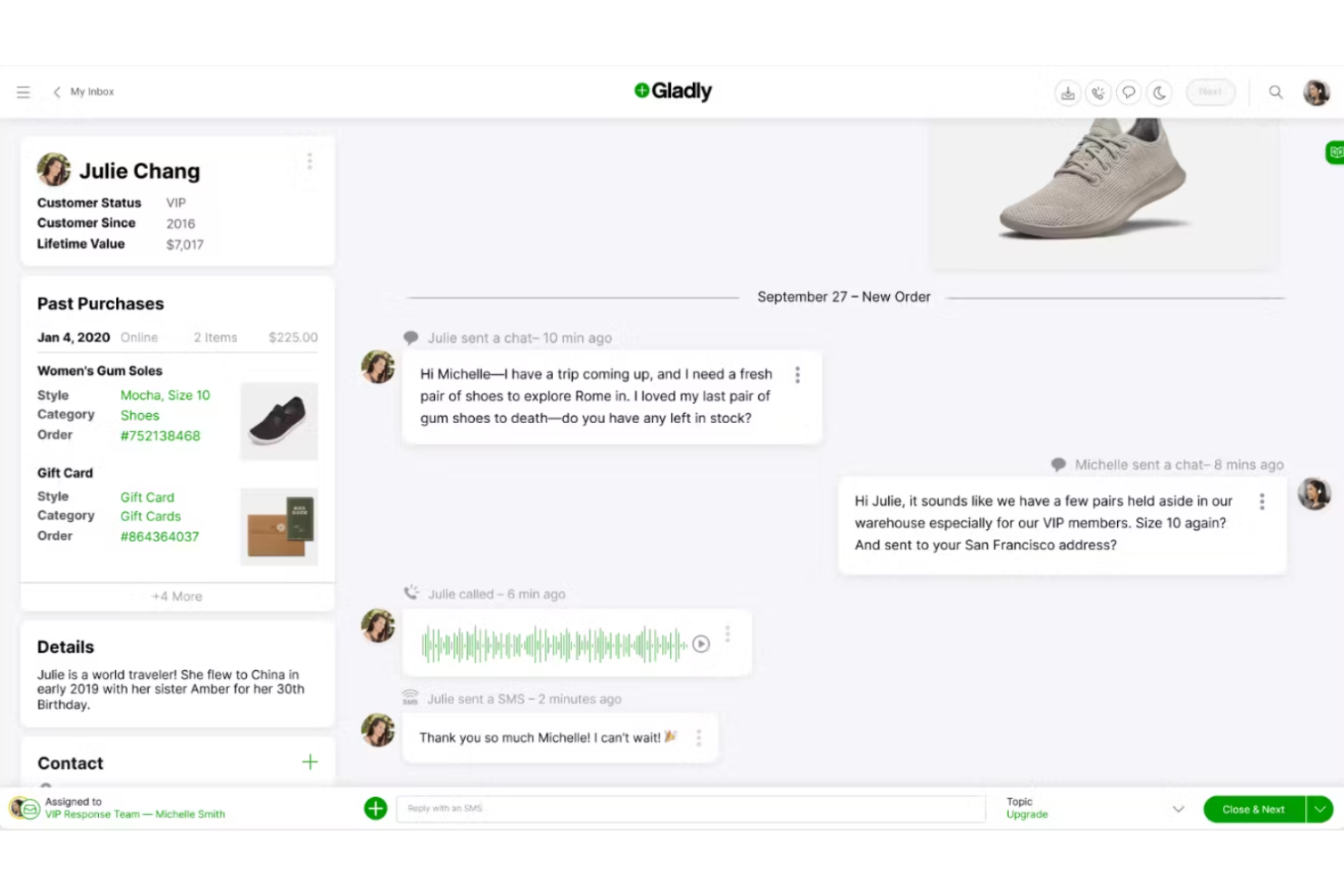
Gladly ist eine Plattform für das Management von Kundeninteraktionen, die speziell für Einzelhandelsunternehmen entwickelt wurde. Sie konzentriert sich darauf, den Kundenservice zu verbessern, indem sie einen einheitlichen Überblick über alle Kundeninteraktionen in verschiedenen Kanälen bietet und Teams dabei unterstützt, personalisierten Support zu leisten.
Warum ich Gladly gewählt habe: Es ist speziell auf Einzelhandelsunternehmen zugeschnitten und bietet eine einheitliche Kundenansicht, die alle Interaktionen zusammenfasst, wodurch Ihr Team personalisierten Service bieten kann. Die integrierten Chat- und Messaging-Funktionen ermöglichen die Kommunikation mit Kunden in Echtzeit. Mit der Kundentimeline kann Ihr Team frühere Interaktionen nachverfolgen, um die Bedürfnisse der Kunden besser zu verstehen. Durch den Fokus auf Kundenservice ist es ideal für den Einzelhandel, wo personalisierter Support entscheidend ist.
Herausragende Funktionen & Integrationen:
Funktionen beinhalten ein umfangreiches Self-Service-Portal, das Kunden dazu befähigt, eigenständig Antworten zu finden. Dank der Sprachfunktionen kann Ihr Team Telefongespräche effizient abwickeln. Außerdem bieten die Reporting-Tools Einblicke in die Leistung des Kundenservice, sodass Verbesserungsmöglichkeiten erkannt werden können.
Integrationen umfassen Salesforce, Shopify, Zendesk, Slack, Zapier, Magento, Google Calendar, Mailchimp, Twilio und Stripe.
Pros and Cons
Pros:
- Einheitliche Ansicht der Kundeninteraktionen
- Umfassende Kundentimeline
- Geeignet für Einzelhändler mit hohem Volumen
Cons:
- Höhere Kosten für kleine Unternehmen
- Nicht optimal für Branchen außerhalb des Einzelhandels

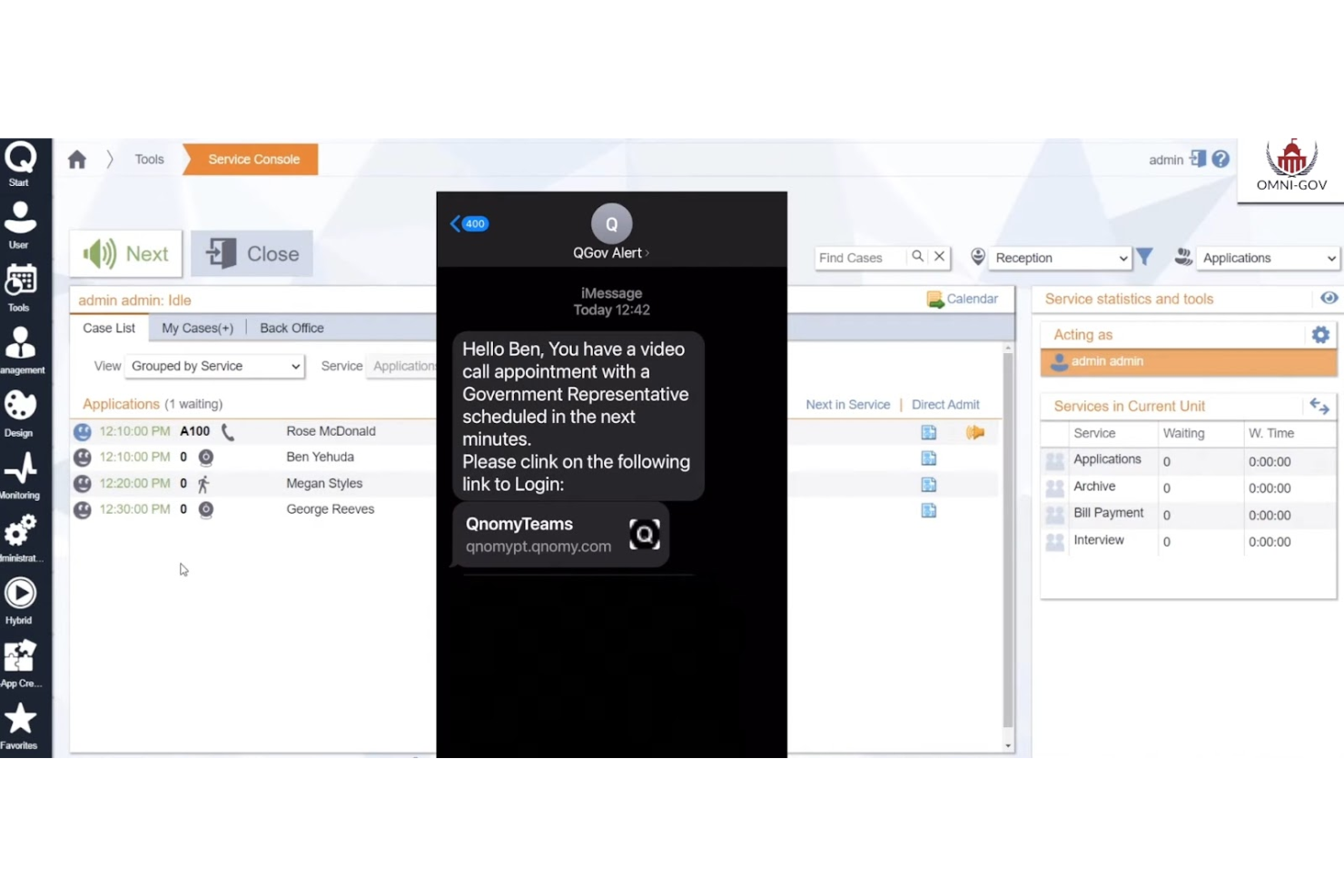
Q-nomy ist ein Tool für das Kundeninteraktionsmanagement mit Schwerpunkt auf Terminplanung und Steuerung des Kundenstroms. Es ist für Unternehmen konzipiert, die Kundentermine effizient verwalten müssen, und bietet sowohl dem Personal als auch den Kunden ein reibungsloses Erlebnis.
Warum ich Q-nomy gewählt habe: Es ist speziell auf die Terminplanung ausgerichtet und bietet Funktionen wie Online-Buchung und Warteschlangenmanagement, die auf Unternehmen mit hohem Kundenaufkommen zugeschnitten sind. Mit den Echtzeit-Analysen kann Ihr Team Zeitpläne überwachen und anpassen, um den Kundenfluss zu optimieren. Die Anpassungsoptionen ermöglichen es Ihnen, das System an Ihre spezifischen Anforderungen anzupassen. Mit dem Fokus auf die Verbesserung des Kundenerlebnisses sorgt Q-nomy für eine reibungslose und effiziente Terminverwaltung.
Herausragende Funktionen & Integrationen:
Funktionen umfassen das Echtzeit-Warteschlangenmanagement, mit dem Ihr Team den Kundenstrom im Blick behalten und Wartezeiten minimieren kann. Die Reporting-Tools des Systems liefern detaillierte Einblicke in Termintrends und Mitarbeiterleistung. Darüber hinaus ermöglicht die anpassbare Benutzeroberfläche die Gestaltung des Buchungsprozesses nach Ihren Unternehmensanforderungen.
Integrationen umfassen Salesforce, Microsoft Dynamics, SAP, Oracle, Google Calendar, Outlook, Zoom, Twilio, Slack und Mailchimp.
Pros and Cons
Pros:
- Starker Fokus auf Terminverwaltung
- Anpassbare Buchungsoptionen
- Geeignet für stark frequentierte Umgebungen
Cons:
- Komplexe Einrichtung und Konfiguration
- Nur für terminbasierte Unternehmen geeignet

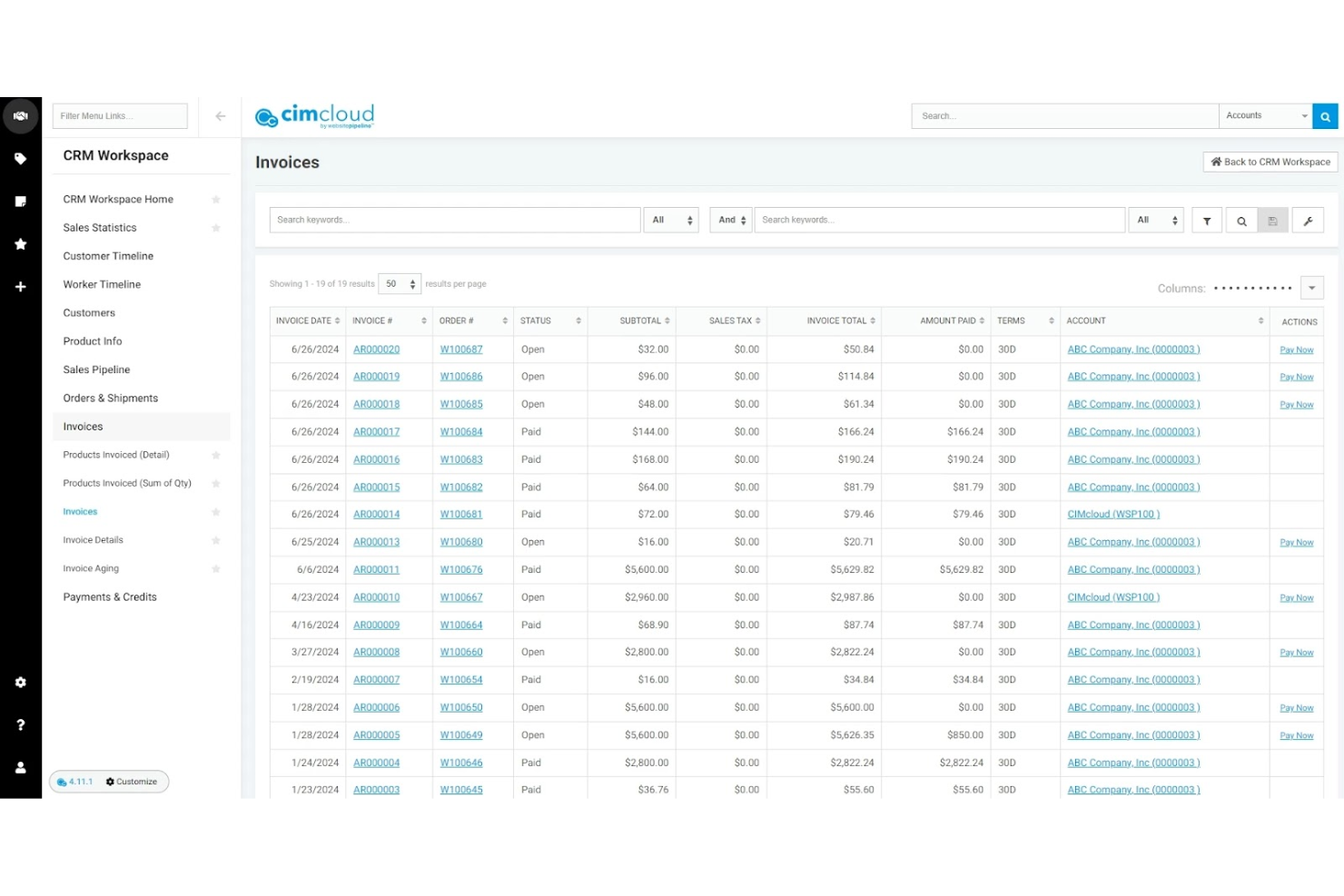
CIMcloud ist eine Kundeninteraktionsmanagement-Plattform, die speziell für Fertigungsunternehmen entwickelt wurde. Sie konzentriert sich darauf, Geschäftsprozesse wie Auftragsmanagement und Kundensupport zu optimieren, um die Effizienz in Produktionsumgebungen zu steigern.
Warum ich CIMcloud gewählt habe: Die Plattform richtet sich gezielt an Fertigungsunternehmen und bietet Funktionen wie Auftragsverfolgung und Bestandsmanagement, die auf die Anforderungen der Branche zugeschnitten sind. Die Kundenportale ermöglichen es Ihren Kunden, direkt auf Informationen zuzugreifen, was die Arbeitslast Ihres Teams reduziert. Die ERP-Integration der Plattform sorgt dafür, dass alle Ihre Geschäftsprozesse miteinander verbunden sind und unterstützt so reibungslose Abläufe. Anpassbare Dashboards liefern Einblicke in Leistungskennzahlen und helfen Ihrem Team, fundierte Entscheidungen zu treffen.
Herausragende Funktionen & Integrationen:
Funktionen umfassen ein Vertriebsportal, mit dem Ihr Vertriebsteam Bestellungen verwalten, Bestände nachverfolgen und Kundenanfragen effizient bearbeiten kann. Die Plattform bietet außerdem anpassbare Berichtstools, mit denen Sie Einblicke generieren können, die speziell auf die Bedürfnisse Ihres Unternehmens zugeschnitten sind. Darüber hinaus sorgt die benutzerfreundliche Oberfläche dafür, dass Ihr Team das System schnell übernehmen kann, ohne aufwendige Schulungen.
Integrationen umfassen QuickBooks, Salesforce, Microsoft Dynamics, Sage 100, UPS, FedEx, Shopify, Magento, PayPal und Authorize.Net.
Pros and Cons
Pros:
- Starkes Auftragsmanagement
- ERP-Integrationsmöglichkeiten
- Direkter Kundenportal-Zugang
Cons:
- Technischer Aufbau mit hoher Lernkurve erforderlich
- Begrenzte Anpassungsmöglichkeiten

Help Scout
Am besten für Remote-Teams
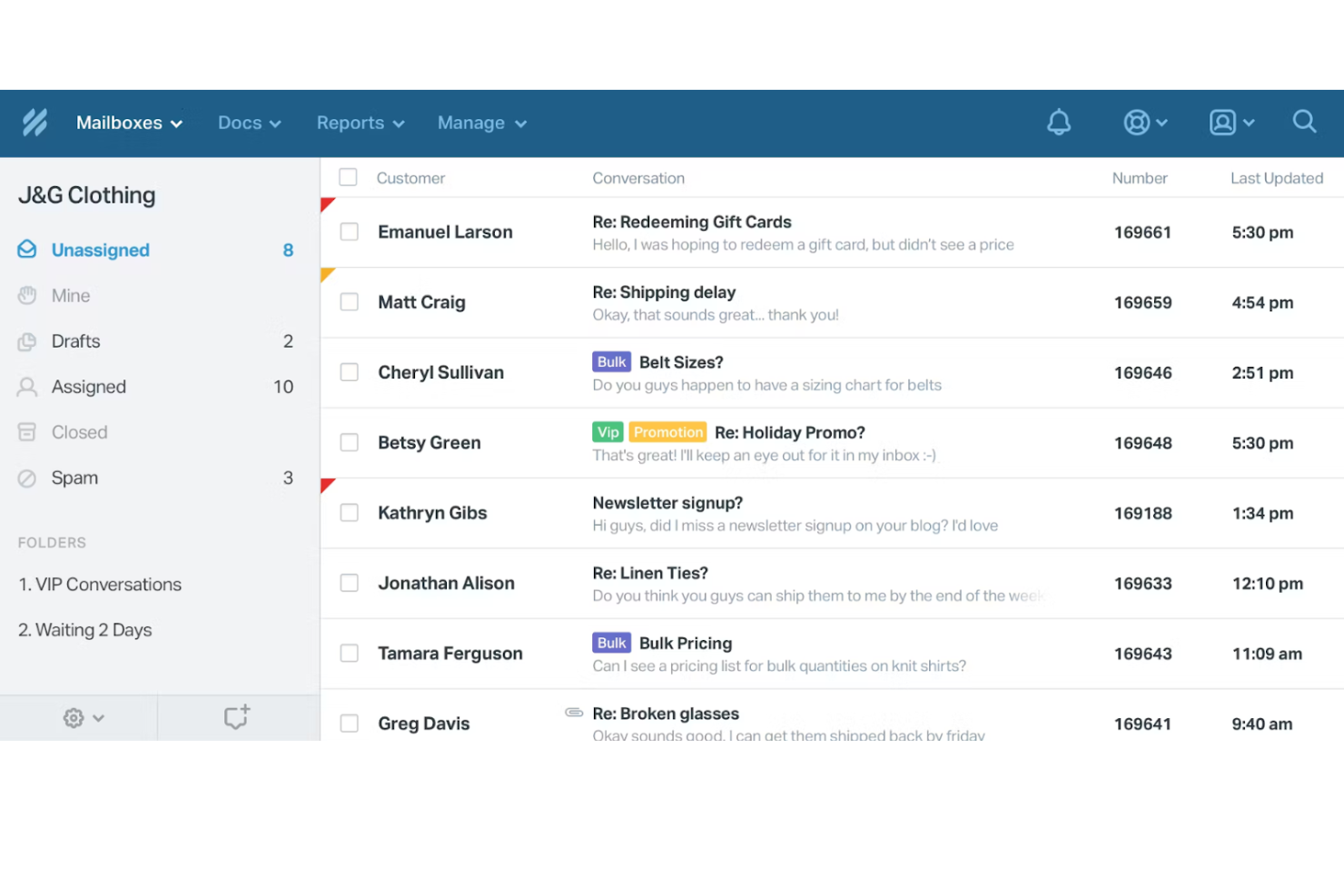
Help Scout ist ein cloudbasiertes System zur Verwaltung von Kundeninteraktionen, das speziell für Remote-Teams entwickelt wurde. Es erleichtert den Kundensupport, indem es geteilte Posteingänge und Wissensdatenbanken bereitstellt, die die Zusammenarbeit und Effizienz in verteilten Teams steigern.
Warum ich Help Scout gewählt habe: Es ist auf Remote-Teams zugeschnitten und bietet Funktionen wie gemeinsame Posteingänge, die es Ihrem Team erleichtern, Kundenanfragen gemeinsam zu bearbeiten. Die Kollisions-Erkennung des Tools verhindert doppelte Antworten und sorgt für eine klare Kommunikation. Mit der Wissensdatenbank kann Ihr Team hilfreiche Artikel für Kunden erstellen und organisieren. Dank seines Fokus auf Zusammenarbeit eignet sich Help Scout ideal für Teams, die an verschiedenen Standorten arbeiten.
Hervorzuhebende Funktionen & Integrationen:
Funktionen umfassen automatisierte Arbeitsabläufe, die Ihrem Team helfen, wiederkehrende Aufgaben zu vereinfachen und die Reaktionszeiten zu verbessern. Die Reporting-Funktionen des Tools bieten Einblicke in die Teamleistung und Kundenzufriedenheit. Außerdem geben die Kundenprofile von Help Scout Ihrem Team Kontext für jede Interaktion und ermöglichen so individuellere Unterstützung.
Integrationen umfassen Slack, HubSpot, Salesforce, Shopify, Mailchimp, Jira, WooCommerce, Zapier, Pipedrive und Trello.
Pros and Cons
Pros:
- Ideal für verteilte Teams
- Effektive Kollisions-Erkennung
- Individuell anpassbare automatisierte Arbeitsabläufe
Cons:
- Gelegentliche Probleme bei der Synchronisierung von E-Mails
- Für volle Funktionalität ist eine Internetverbindung erforderlich
New Product Updates from Help Scout

Help Scout Adds Automatic Conversation Reassignment
Help Scout can now automatically unassign conversations when the assigned teammate has been away long enough, keeping replies moving so others can pick them up. For more information, visit Help Scout's official site.
 .
.Weitere Software zur Verwaltung von Kundeninteraktionen
Hier finden Sie einige zusätzliche Optionen für Software zur Verwaltung von Kundeninteraktionen, die es nicht auf meine Auswahlliste geschafft haben, aber dennoch einen Blick wert sind:
- Front
Am besten für das Management gemeinsamer Postfächer geeignet
- Zendesk
Am besten für KI-gestützte Ticketautomatisierung
- Zoho Desk
Am besten für Workflow-Automatisierung
- Agentforce Service (formerly Service Cloud)
Am besten für CRM-Integration
- TaskRay
Am besten mit Salesforce-nativer Integration


Wie ich Software für das Kundeninteraktionsmanagement bewerte
Ich teile meine Bewertung in zwei Ebenen auf: die grundlegenden Anforderungen, die jede Plattform erfüllen muss – wie Omnichannel-Routing und eine einheitliche Interaktionshistorie – und die Unterscheidungsmerkmale, die zeigen, auf welche Tools sich CX-Teams tatsächlich verlassen werden.
Kernfunktionen (Grundvoraussetzungen für diese Liste)
Bei der Auswahl der Tools für meine Liste bewerte ich jedes einzelne auf einer Skala von 0 (bietet die Funktion nicht an) bis 5 (überragt in diesem Bereich) bezüglich jeder der unten aufgelisteten Kernfunktionen. Anschließend berechne ich die Gesamtpunktzahl des Tools als Prozentsatz. Jedes Tool muss eine Mindestpunktzahl von 75% erreichen, um in Betracht gezogen zu werden.
- Omnichannel-Kommunikationsunterstützung: Ich prüfe, ob eine Plattform E-Mail, Live-Chat, Sprache, SMS und soziale Kanäle in einem einzigen System zusammenführt, sodass Agenten während einer Unterhaltung nicht zwischen isolierten Tools hin- und herschalten müssen.
- Vereinheitlichte Kundeninteraktionshistorie: Jeder Kontaktpunkt – ein Chat von letzter Woche, ein Anruf vom letzten Monat, eine Social-Media-Nachricht von gestern – sollte in einer durchsuchbaren, chronologischen Zeitachse pro Kunde zusammengefasst werden.
- Intelligentes Routing & Warteschlangenmanagement: Ich bewerte, wie die Plattform eingehende Interaktionen verteilt. Dabei suche ich nach skills-basiertem Routing, SLA-bewusster Priorisierung und Warteschlangenverwaltung, die über einfache Rundlaufverteilung hinausgeht.
- Automatisierungs- & Workflow-Tools: Ich achte auf ausgelöste Workflows, Chatbot-Builder und Makrounterstützung, die es Teams ermöglichen, wiederkehrende Aufgaben wie Ticket-Tagging, Nachfassaktionen oder Eskalationen automatisch abzuwickeln.
- Interaktionsanalytik & Berichterstattung: Dashboards sollten Kennzahlen wie Erstreaktionszeit, Lösungsrate und Agentenauslastung anzeigen, mit ausreichend Filtermöglichkeiten, um die Leistung je nach Kanal, Team oder Zeitraum vergleichen zu können.
- CRM- & Drittanbieter-Integrationen: Die Plattform sollte mit weit verbreiteten CRMs wie Salesforce oder HubSpot verbunden werden können und offene APIs oder Webhooks bieten, damit Kundendaten im gesamten Technologiebestand synchron bleiben.
Sobald ich eine Liste von Tools habe, die diese Kriterien erfüllen, sehe ich mir an, was jede Plattform besonders macht.
Unterscheidungsmerkmale (Was Anbieter voneinander abhebt)
So vergleiche und unterscheide ich verschiedene Anbieter:
Herausragende Funktionen
Generative KI-Unterstützung ist ein großer Unterschiedsfaktor. Ich suche nach Plattformen, bei denen Agenten KI-erstellte Antworten und Zusammenfassungen von Gesprächen erhalten, die die Bearbeitungszeit in Stoßzeiten verkürzen. Proaktive Engagement-Auslöser sind ebenfalls ein echter Mehrwert. Eine Plattform, die z.B. einen Chat einleitet, wenn ein Kunde auf einer Checkout-Seite zögert, wird zu einem aktiven Bindungsinstrument. Ich bewerte auch Echtzeit-Stimmungsanalysen, die Vorgesetzten helfen, frustrierte Kunden zu erkennen und einzugreifen, bevor eine Routineanfrage zu einer Eskalation wird.
Mehr als nur Funktionen
Sicherheit und Compliance sind wichtig, wenn die Plattform mit sensiblen Kundendaten umgeht. Ich prüfe auf SOC 2 Typ II-Zertifizierung, Optionen für Datenresidenz sowie rollenbasierte Zugriffskontrollen, mit denen Sie die Agentensichtbarkeit je Team oder Region einschränken können. Auch die Implementierung und der Time-to-Value beeinflussen meine Bewertung. Eine Plattform mit vorgefertigten Workflow-Vorlagen und geführtem Onboarding macht ein CX-Team schneller einsatzbereit als eine, die wochenlange individuelle Konfiguration erfordert. Ich berücksichtige außerdem die Preisgestaltung, insbesondere ob KI-Funktionen und zusätzliche Kanäle gebündelt enthalten sind oder separat berechnet werden.
So wählen Sie Software zur Verwaltung von Kundeninteraktionen aus
Bei langen Funktionslisten und komplexen Preisstrukturen verliert man leicht den Überblick. Damit Sie sich bei der individuellen Auswahl Ihrer Software auf das Wesentliche konzentrieren können, finden Sie hier eine Checkliste mit Faktoren, die Sie berücksichtigen sollten:
| Faktor | Was Sie berücksichtigen sollten |
| Skalierbarkeit | Stellen Sie sicher, dass die Software mit Ihrem Unternehmen wachsen kann. Achten Sie auf Lösungen, die zunehmende Kundeninteraktionen und eine wachsende Teamgröße ohne Leistungseinbußen unterstützen. |
| Integrationen | Prüfen Sie, ob sich die Software in Ihre vorhandenen Tools wie CRM-Systeme, E-Mail-Plattformen und soziale Netzwerke integrieren lässt, um Ihre Arbeitsabläufe zu optimieren. |
| Anpassbarkeit | Überlegen Sie, wie weit Sie die Software an die Prozesse Ihres Teams anpassen können. Anpassbare Arbeitsabläufe und Dashboards können die Produktivität deutlich steigern. |
| Benutzerfreundlichkeit | Wählen Sie eine benutzerfreundliche Oberfläche, die den Schulungsaufwand minimiert. Ihr Team sollte das System schnell und effizient bedienen können. |
| Budget | Stimmen Sie die Preise der Software auf Ihr Budget ab. Bewerten Sie die Gesamtkosten einschließlich möglicher versteckter Gebühren und stellen Sie sicher, dass der Nutzen die Ausgaben rechtfertigt. |
| Sicherheitsvorkehrungen | Überprüfen Sie die Maßnahmen der Software zum Datenschutz. Stellen Sie sicher, dass sie Branchenstandards erfüllt und Funktionen wie Verschlüsselung und Zugriffskontrollen bietet. |
| Kundensupport | Achten Sie auf reaktionsschnelle Supportoptionen, darunter Live-Chat, Telefon und E-Mail. Stellen Sie sicher, dass eine Wissensdatenbank für die eigenständige Problemlösung verfügbar ist. |
| Berichtsfunktionen | Bewerten Sie die Qualität der Analyse- und Berichtstools. Sie benötigen Einblicke in Kundeninteraktionen, um fundierte Entscheidungen zu treffen und den Service zu verbessern. |
Trends bei Software zur Verwaltung von Kundeninteraktionen
Für meine Recherche habe ich unzählige Produktaktualisierungen, Pressemitteilungen und Versionsprotokolle verschiedener Anbieter von Software zur Verwaltung von Kundeninteraktionen ausgewertet. Hier sind einige der aufkommenden Trends, die ich im Auge behalte:
- KI-gestützte Einblicke: KI entwickelt sich weiter und bietet tiefere Einblicke in das Verhalten und die Präferenzen von Kunden. Dieser Trend hilft Unternehmen, Interaktionen zu personalisieren und Kundenbedürfnisse vorherzusagen. Anbieter wie Salesforce integrieren fortschrittliche KI-Tools, um die Entscheidungsfindung und Servicequalität zu verbessern.
- Kanalübergreifende Erlebnisse: Immer mehr Anbieter konzentrieren sich darauf, einheitliche Kundenerlebnisse über alle Kanäle hinweg bereitzustellen. Dieser Trend ist entscheidend, da Kunden einen konsistenten Service erwarten, unabhängig davon, ob sie soziale Medien, E-Mail oder das Telefon nutzen. Plattformen wie Freshdesk Omni übernehmen dabei mit integrierter kanalübergreifender Unterstützung eine führende Rolle.
- Integration von Sprach- und Videokommunikation: Der zunehmende Einsatz von Sprach- und Videokommunikation im Kundensupport sorgt für spürbare Veränderungen. Diese Funktionen ermöglichen persönlichere Interaktionen und schnellere Lösungen. Tools wie Zoom werden zunehmend in Kundenservice-Plattformen integriert, um diesen Trend zu unterstützen.
- Stimmungsanalyse: Die Stimmungsanalyse in Echtzeit entwickelt sich zu einem entscheidenden Faktor für das Verständnis der Kundenemotionen. Dies hilft Teams, besser zu reagieren und die Zufriedenheitswerte zu verbessern. Unternehmen wie Intercom nutzen die Stimmungsanalyse, um Interaktionen an die Stimmung der Kunden anzupassen.
- Abbildung der Kundenreise: Anbieter verbessern die Tools, mit denen sich die gesamte Kundenreise abbilden lässt. Dieser Trend hilft Unternehmen, jeden Kontaktpunkt zu visualisieren und zu optimieren und dadurch das gesamte Kundenerlebnis zu verbessern. Die Adobe Experience Cloud ist ein Beispiel für eine Plattform mit fortschrittlichen Funktionen zur Abbildung der Kundenreise.
Was ist Software für das Management von Kundeninteraktionen?
Software für das Management von Kundeninteraktionen hilft Unternehmen dabei, die Kommunikation mit Kunden über Kanäle wie E-Mail, Chat, soziale Medien und Telefon zu organisieren und zu verbessern. Sie zentralisiert Interaktionen, verfolgt Gespräche und nutzt Tools wie Automatisierung und KI, um die Reaktionsfähigkeit zu erhöhen, Erlebnisse zu personalisieren und Kundenbeziehungen zu stärken.
Funktionen von Software für das Management von Kundeninteraktionen
Achten Sie bei der Auswahl einer Software für das Management von Kundeninteraktionen auf die folgenden wichtigen Funktionen:
- Kanalübergreifende Unterstützung: Verwaltet Kundeninteraktionen über verschiedene Plattformen wie E-Mail, Chat und soziale Medien und gewährleistet eine konsistente Kommunikation.
- KI-gestützte Einblicke: Liefert datengestützte Einblicke in das Verhalten und die Präferenzen von Kunden, um Interaktionen zu personalisieren und die Entscheidungsfindung zu verbessern.
- Stimmungsanalyse: Analysiert Kundenemotionen in Echtzeit und ermöglicht es Teams, Antworten anzupassen und die Zufriedenheit zu verbessern.
- Automatisierte Ticketverwaltung: Vereinfacht die Zuweisung und Verwaltung von Kundenanfragen, spart Zeit und reduziert Fehler.
- Anpassbare Arbeitsabläufe: Ermöglicht es Ihnen, Prozesse an die spezifischen Anforderungen Ihres Teams anzupassen und so Produktivität und Effizienz zu steigern.
- Abbildung der Kundenreise: Visualisiert das gesamte Kundenerlebnis und hilft Unternehmen, jeden Kontaktpunkt zu optimieren und den Service zu verbessern.
- Berichte in Echtzeit: Bietet Einblicke in die Teamleistung und Kundeninteraktionen und ermöglicht fundierte Entscheidungen.
- Selbstbedienungsportal: Ermöglicht es Kunden, selbstständig Antworten zu finden, und reduziert dadurch die Arbeitsbelastung der Supportteams.
- Integration von Sprach- und Videokommunikation: Verbessert die Kommunikation, indem persönlichere Interaktionen und schnellere Lösungen über Sprach- und Videoanrufe ermöglicht werden.
- Wissensdatenbank: Bietet ein zentrales Archiv mit Artikeln und Anleitungen, sodass Kunden und Teammitglieder schnell auf Informationen zugreifen können.
Vorteile von Software für das Management von Kundeninteraktionen
Die Einführung einer Software für das Management von Kundeninteraktionen bietet Ihrem Team und Ihrem Unternehmen mehrere Vorteile. Hier sind einige, auf die Sie sich freuen können:
- Höhere Kundenzufriedenheit: Durch die Verwaltung von Interaktionen über mehrere Kanäle und die Personalisierung von Antworten kann Ihr Team zufriedene Kunden gewinnen.
- Höhere Effizienz: Die automatisierte Ticketverwaltung und anpassbare Arbeitsabläufe reduzieren manuelle Aufgaben, sodass sich Ihr Team auf wichtigere Anliegen konzentrieren kann.
- Datengestützte Entscheidungen: KI-gestützte Einblicke und Berichte in Echtzeit liefern wertvolle Daten, die Ihnen helfen, fundierte Geschäftsentscheidungen zu treffen.
- Verbesserte Teamzusammenarbeit: Funktionen wie gemeinsame Posteingänge und interne Kommentare ermöglichen es Ihrem Team, effektiv gemeinsam an Kundenanfragen zu arbeiten.
- Bessere Einblicke in Kunden: Die Stimmungsanalyse und die Abbildung der Kundenreise vermitteln ein tieferes Verständnis der Kundenbedürfnisse und -präferenzen.
- Kosteneinsparungen: Selbstbedienungsportale und Wissensdatenbanken ermöglichen es Kunden, selbstständig Lösungen zu finden, und reduzieren dadurch den Aufwand für Ihr Supportteam.
- Schnellere Problemlösung: Die Integration von Sprach- und Videokommunikation ermöglicht eine persönlichere und schnellere Kommunikation und beschleunigt dadurch die Problemlösung.
Kosten und Preise von Software für das Management von Kundeninteraktionen
Bei der Auswahl einer Software zur Verwaltung von Kundeninteraktionen ist ein Verständnis der verschiedenen verfügbaren Preismodelle und Tarife erforderlich. Die Kosten variieren je nach Funktionen, Teamgröße, Erweiterungen und weiteren Faktoren. Die folgende Tabelle fasst gängige Tarife, ihre durchschnittlichen Preise und typische Funktionen zusammen, die in Lösungen für Software zur Verwaltung von Kundeninteraktionen enthalten sind:
Vergleichstabelle der Tarife für Software zur Verwaltung von Kundeninteraktionen
| Tariftyp | Durchschnittlicher Preis | Übliche Funktionen |
| Kostenloser Tarif | $0 | Grundlegendes Ticketmanagement, E-Mail-Support und eingeschränkte Berichterstattung. |
| Persönlicher Tarif | $5-$25/ Benutzer/Monat | E-Mail-Support, grundlegende Analysen und eingeschränkte Integrationen. |
| Geschäftstarif | $30-$60/ Benutzer/Monat | Unterstützung über mehrere Kanäle, anpassbare Workflows und erweiterte Berichterstattung. |
| Unternehmenstarif | $70-$120/ Benutzer/Monat | Omnikanal-Support, KI-gestützte Einblicke, Stimmungsanalyse und vollständige Anpassungsmöglichkeiten. |
Häufig gestellte Fragen zur Software zur Verwaltung von Kundeninteraktionen
Hier finden Sie Antworten auf einige häufige Fragen zur Software zur Verwaltung von Kundeninteraktionen:
Was ist der Unterschied zwischen CRM und CIM?
CRM konzentriert sich auf die ganzheitliche Verwaltung von Kundenbeziehungen, während CIM auf die Verwaltung einzelner Interaktionen über verschiedene Kanäle hinweg ausgerichtet ist. CRM hilft Ihnen dabei, langfristige Beziehungen zu pflegen, während es bei CIM darum geht, bestimmte Kundeninteraktionen effizient zu bearbeiten.
Was sind die drei größten Herausforderungen im Kundenbeziehungsmanagement?
Zu den größten Herausforderungen gehören ein Mangel an Kommunikation, eine unzureichende Nutzung im gesamten Unternehmen und eine fehlende Technologieintegration. Diese Probleme können die effektive Implementierung von CRM-Systemen behindern und beeinflussen, wie gut Ihr Team Kundeninteraktionen verwalten kann.
Wie beurteilt man die Wirksamkeit einer CIM-Software?
Beurteilen Sie die Wirksamkeit einer CIM-Software, indem Sie ihre Auswirkungen auf die Kundenzufriedenheit, Reaktionszeiten und Teamproduktivität bewerten. Achten Sie auf Verbesserungen bei Kennzahlen zur Kundenbindung und berücksichtigen Sie das Feedback von Kunden und Teammitgliedern.
Warum ist Omnikanal-Support bei CIM-Software wichtig?
Omnikanal-Support ist entscheidend, da er eine konsistente Kommunikation über alle Kontaktpunkte mit Kunden hinweg gewährleistet. Er ermöglicht es Ihrem Team, Interaktionen per E-Mail, Chat, sozialen Medien und Telefon über eine einzige Plattform zu verwalten und so das Kundenerlebnis zu verbessern.
Wie können KI-gestützte Einblicke meinem Kundenservice-Team helfen?
KI-gestützte Einblicke können Kundendaten analysieren und umsetzbare Empfehlungen liefern. Dadurch kann Ihr Team Interaktionen personalisieren und Kundenbedürfnisse vorhersehen. Dies führt zu höherer Kundenzufriedenheit, besserer Kundenbindung und einer effizienteren Servicebereitstellung.
Was sollte ich bei der Auswahl einer CIM-Software für mein Unternehmen berücksichtigen?
Berücksichtigen Sie Faktoren wie Skalierbarkeit, Integrationsmöglichkeiten, Benutzerfreundlichkeit und Kosten. Stellen Sie sicher, dass die Software zu Ihren Unternehmenszielen passt und die spezifischen Anforderungen Ihres Teams bei der Verwaltung von Kundeninteraktionen unterstützt.
Wie geht es weiter?
Wenn Sie gerade Software zur Verwaltung von Kundeninteraktionen recherchieren, wenden Sie sich an einen SoftwareSelect-Berater und erhalten Sie kostenlos Empfehlungen.
Sie füllen ein Formular aus und führen ein kurzes Gespräch, in dem die Einzelheiten Ihrer Anforderungen besprochen werden. Anschließend erhalten Sie eine Auswahlliste von Softwarelösungen zur Prüfung. Die Berater unterstützen Sie sogar während des gesamten Kaufprozesses, einschließlich der Preisverhandlungen.