

10 meilleurs logiciels de support interne de 2026

10 Meilleures solutions de help desk interne - Liste


Avec autant de logiciels de help desk interne différents disponibles, il est difficile de trouver celui qui répond exactement à vos besoins. Vous savez que vous souhaitez un outil centralisant et facilitant la gestion des demandes et requêtes internes, mais il faut déterminer lequel est le plus adapté. Dans cet article, je vais vous aider à simplifier ce choix en partageant mes conseils sur les meilleurs logiciels de help desk interne pour suivre les demandes, optimiser la communication et améliorer l’efficacité opérationnelle de votre équipe.
Pourquoi faire confiance à nos recommandations de logiciels
Notre équipe teste et évalue des logiciels depuis 2012. En tant que leaders CX nous-mêmes, nous savons à quel point il est difficile — et important — de choisir le bon logiciel.
Pour ce guide, nous avons évalué les outils grâce à des tests pratiques et une recherche indépendante, en notant les outils selon nos critères de sélection.
Nos avis reflètent notre jugement éditorial humain, et non un argumentaire de vente.
Résumé des meilleurs logiciels de help desk interne
Ce tableau comparatif résume les informations tarifaires de mes principales sélections de logiciels de help desk interne afin de vous aider à trouver celui qui convient à votre budget et à votre entreprise.
| Tool | Best For | Trial Info | Price | ||
|---|---|---|---|---|---|
| 1 | Idéal pour le support informatique avec des outils de collaboration intégrés | Essai gratuit de 14 jours disponible | À partir de $19/utilisateur/mois (facturé annuellement) | Website | |
| 2 | Idéal pour la gestion des services informatiques axée sur l'IA | Essai gratuit de 14 jours | Tarification sur demande | Website | |
| 3 | Idéal pour une gestion des tickets et du support pilotée par l'IA | Démo gratuite + essai gratuit de 14 jours disponible | À partir de 19$/utilisateur/mois (facturé annuellement) | Website | |
| 4 | Meilleur système cloud pour personnaliser les services interservices | Essai gratuit de 15 jours + offre gratuite | À partir de $7/utilisateur/mois (facturé annuellement) | Website | |
| 5 | Idéal pour une mise en place facile | Offre gratuite disponible | À partir de $25/utilisateur/mois (facturé annuellement) | Website | |
| 6 | Idéal pour l’assistance multilingue clients et collaborateurs | Démo gratuite disponible | À partir de 24 $/utilisateur/mois (facturé annuellement) | Website | |
| 7 | Meilleur logiciel de help desk satellite pour gérer plusieurs marques à un seul endroit | Essai gratuit de 30 jours | À partir de 12 $/utilisateur/mois | Website | |
| 8 | Idéal pour la personnalisation sans code | Essai gratuit disponible | À partir de $26/utilisateur/mois (minimum de 3 utilisateurs) | Website | |
| 9 | Idéal pour un service automatisé qui permet rapidité et passage à l’échelle | Essai gratuit de 14 jours + démo offerte | À partir de $29/utilisateur/mois (facturation annuelle) | Website | |
| 10 | Meilleure assistance cloud pour une gestion IT à 360° | Démo gratuite | Contactez pour un devis | Website |


Avis détaillés sur les meilleurs logiciels de help desk interne
Voici mes résumés détaillés des meilleurs logiciels de help desk interne qui figurent dans ma sélection. Mes avis décrivent en détail les fonctionnalités clés, les avantages et inconvénients, les intégrations possibles et les cas d’utilisation idéaux pour chaque outil afin de vous aider à choisir la solution qui vous conviendra le mieux.
Idéal pour le support informatique avec des outils de collaboration intégrés
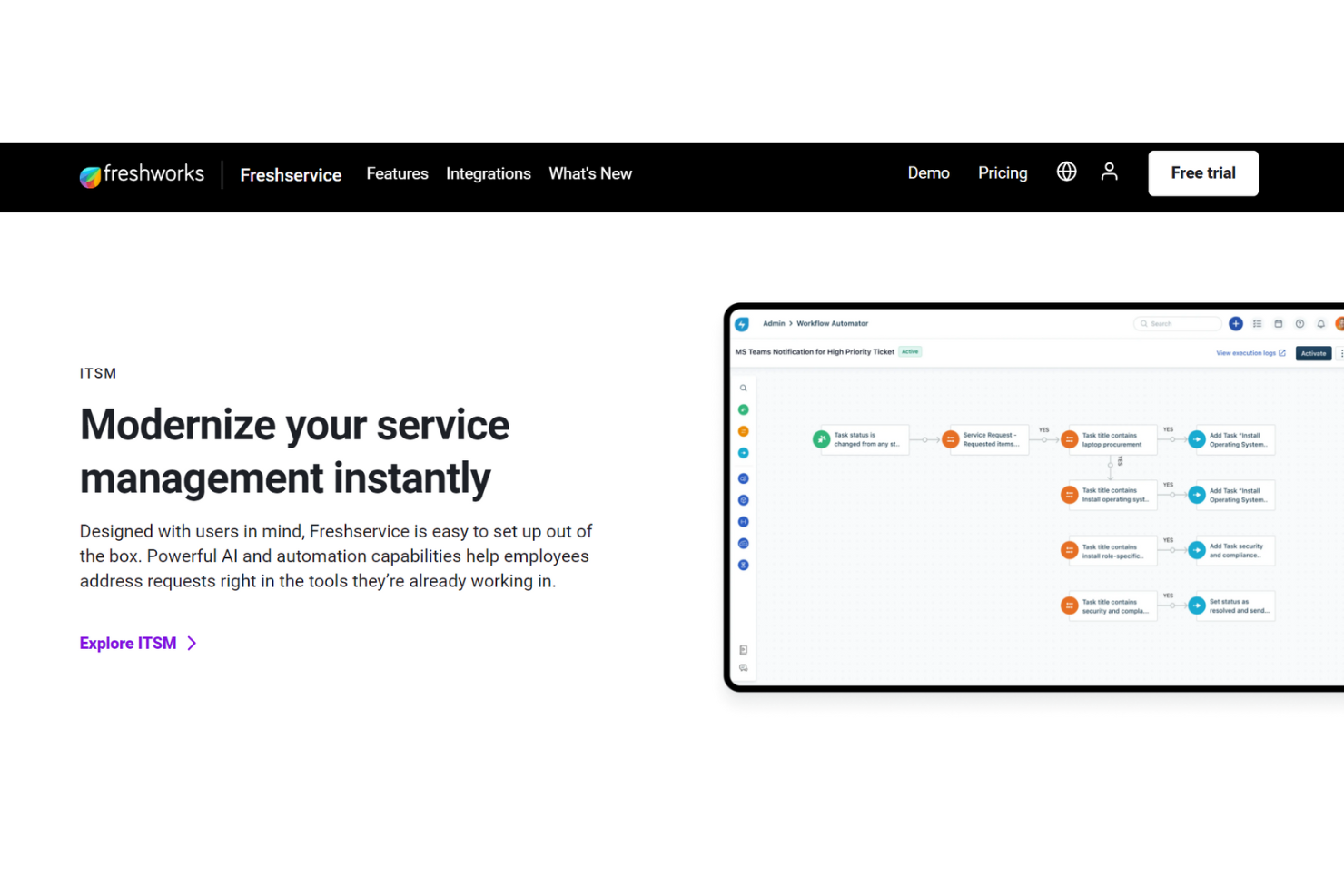
Ce logiciel de service d’assistance interne de Freshdesk vise à offrir un support de qualité client aux employés grâce à des outils de collaboration intégrés, une déviation intelligente des tickets par IA, et des portails de libre-service complets.
L’IA Freshservice est une fonctionnalité qui va au-delà des bases, avec une prestation de service rapide et une gestion des incidents couvrant l’enregistrement, la classification, la priorisation, l’investigation, la résolution et la clôture. Elle propose également des outils d’escalade si nécessaire. Freshservice permet un support interne multicanal pour toutes les équipes.
Les outils du service d’assistance interne sont catégorisés séparément des autres services Freshdesk et peuvent soutenir aussi bien les petites entreprises que les grandes organisations à différents niveaux. Ils proposent aussi une variété de modules complémentaires, notamment la gestion des SaaS, la gestion de projet et les agents d'affaires.
Fonctionnalités et intégrations phares de Freshservice
Fonctionnalités : gestion des changements, gestion des incidents, espaces de travail, gestion des connaissances, intégration des nouveaux employés, gestion des actifs. La gestion des services informatiques inclut le regroupement automatique des alertes, la gestion des astreintes et des règles de gestion intelligente des alertes.
Intégrations : Jira, Detailr, Google Hangouts, Instagram, Office 365 Calendar, Skype, TeamViewer, Trello, WhatsApp et YouTube. Freshservice propose des intégrations d’applications gratuites et payantes.
Pros and Cons
Pros:
- API et automatisation des flux de travail
- Outils flexibles et personnalisables
- Facile à utiliser
Cons:
- Interface utilisateur lente
- Manque certaines fonctionnalités côté agent
New Product Updates from Freshservice
 Experience)
Freshservice Introduces a Reimagined IT Asset Management (ITAM) Experience
Freshservice introduces a reimagined IT Asset Management (ITAM) experience with continuous infrastructure discovery, dependency mapping, IPAM, and Software License Management. This update helps teams improve asset visibility and manage connected IT environments more effectively. For more information, visit Freshservice’s official site.
SysAid
Idéal pour la gestion des services informatiques axée sur l'IA
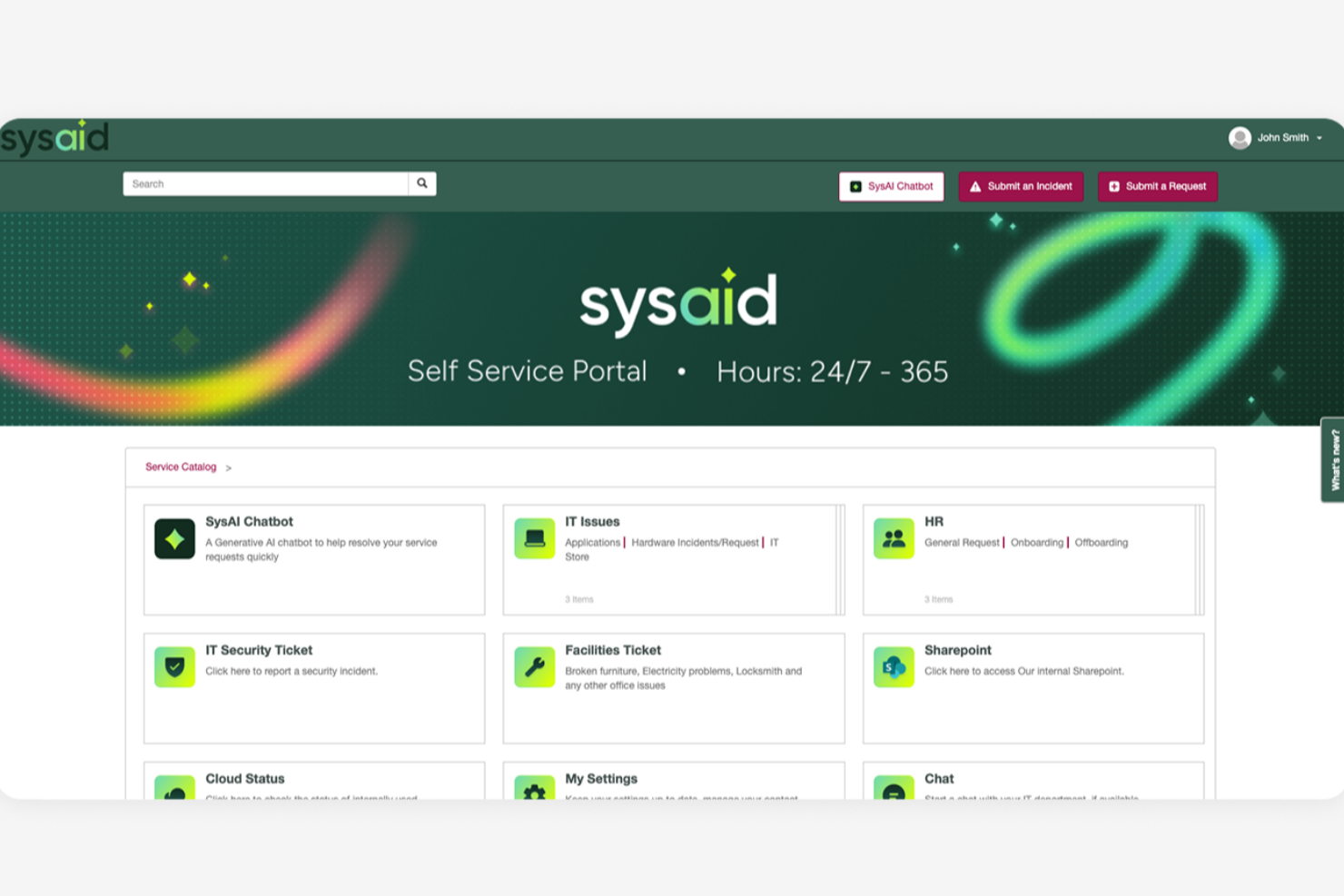
SysAid est une plateforme complète de gestion des services informatiques (ITSM) et de help desk conçue pour soutenir les opérations informatiques des organisations de toutes tailles. Elle offre un large éventail d'outils permettant aux équipes de gérer les services informatiques, les demandes d'assistance et l'infrastructure à partir d'un système centralisé.
Pourquoi j'ai choisi SysAid : J'ai choisi SysAid en raison de ses solides capacités d'automatisation des services informatiques, qui permettent de réduire la charge de travail manuelle pour les équipes IT. L'automatisation prend en charge des tâches telles que le routage des tickets, la priorisation, l'escalade et l'exécution des workflows, ce qui permet aux incidents et aux demandes de service de circuler plus efficacement dans le système. Cela donne aux équipes IT plus de temps pour se concentrer sur des tâches à plus forte valeur ajoutée ou stratégiques plutôt que sur des demandes de support répétitives.
SysAid inclut également des fonctionnalités d'auto-assistance qui permettent aux utilisateurs finaux de résoudre eux-mêmes les problèmes courants. Grâce à un portail en libre-service et une base de connaissances, les employés peuvent trouver des réponses, soumettre des demandes ou résoudre des problèmes sans contacter directement l'équipe IT, ce qui peut contribuer à réduire le volume global de tickets.
Fonctionnalités et intégrations remarquables de SysAid
Fonctionnalités : gestion des actifs, gestion des changements, gestion des problèmes, gestion des incidents, gestion des demandes de service, base de connaissances, rapports et analyses, gestion des niveaux de service, contrôle à distance, gestion des correctifs, découverte et surveillance du réseau, benchmarking IT, automatisation des workflows, catalogue de services et gestion des appareils mobiles.
Intégrations : Microsoft Active Directory, LDAP, Microsoft Azure, Microsoft 365, Google Workspace, Salesforce, Jira, Slack, Microsoft Teams, Zapier, Zoom, FreshBooks, QuickBooks, Dropbox, OneDrive, AWS et VMware.
Pros and Cons
Pros:
- Interface conviviale
- Capacités d'automatisation complètes
- Portail en libre-service disponible
Cons:
- La configuration peut prendre du temps
- Les rapports pourraient être plus personnalisables
New Product Updates from SysAid

SysAid Adds Bulk Contract Import
SysAid added bulk contract import to License Manager Essentials, letting admins upload a CSV template, validate entries, and create multiple contracts at once. For more information, visit SysAid's official site.

Idéal pour une gestion des tickets et du support pilotée par l'IA
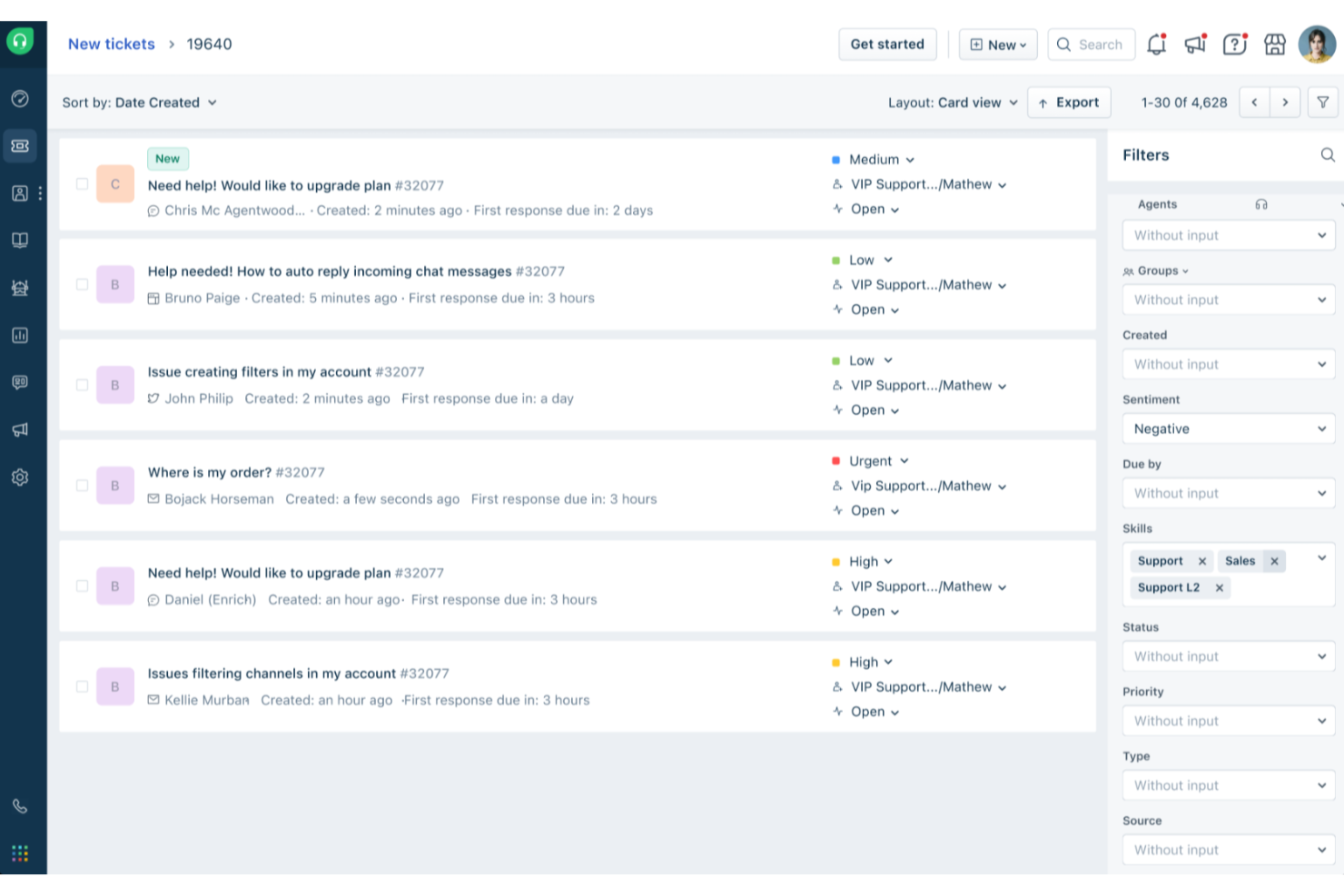
Freshdesk (un produit de Freshworks Inc.) est une plateforme de service d'assistance conçue pour soutenir les équipes qui gèrent des demandes de service à différentes échelles, incluant aussi bien des cas d'assistance client que de support interne. Elle propose des outils structurés aidant les équipes à organiser les demandes, suivre leur progression et maintenir la cohérence des opérations de support.
Pourquoi j'ai choisi Freshdesk : J'ai choisi Freshdesk pour sa capacité à gérer les tickets au sein d'équipes traitant un grand volume de demandes. La plateforme propose une automatisation intégrée et Freddy AI, qui peut aider à des tâches telles que la catégorisation et l'acheminement des tickets, contribuant ainsi à réduire les interventions manuelles pour les équipes de support interne.
Cette approche permet aux agents de consacrer plus de temps aux problèmes nécessitant une analyse approfondie ou une collaboration, plutôt qu'à des tâches administratives répétitives.
Fonctionnalités et intégrations remarquables de Freshdesk
Fonctionnalités : options de personnalisation, rapports et analyses, portails en libre-service, bases de connaissances, gestion des SLA, prise en charge multilingue, outils de collaboration et application mobile.
Intégrations : Salesforce, Shopify, Slack, Mailchimp, Microsoft Teams, WhatsApp et d'autres outils tiers couramment utilisés par les équipes de support et d'opérations.
Pros and Cons
Pros:
- Fonctionnalités de gestion des tickets solides
- Centre d'aide en libre-service
- Automatisation et gestion des flux de travail
Cons:
- Absence de rapports personnalisés
- La base de connaissances multilingue est réservée aux forfaits supérieurs
New Product Updates from Freshdesk

Freshdesk Adds Voice AI Agents in Freshcaller
Freshdesk introduces Voice AI Agents available through Freshcaller Marketplace apps to handle routine calls and reduce queues. This feature enables automated call handling with real-time, conversational support. For more information, visit Freshdesk's official site.

Meilleur système cloud pour personnaliser les services interservices

Zoho Desk est une plateforme cloud qui aide les équipes à gérer les opérations de support client entre différents services. Elle offre à votre entreprise un espace partagé pour traiter les demandes de service, organiser la communication et améliorer la gestion des réponses grâce à l'automatisation et aux données contextuelles. Elle est conçue pour aider les équipes à rester coordonnées et à fournir des solutions plus rapides et personnalisées.
Pourquoi j'ai choisi Zoho Desk : Vous pouvez adapter Zoho Desk aux processus internes de votre équipe, ce qui facilite l'alignement des flux de travail entre les différents services. La plateforme permet d'automatiser les tâches répétitives avec des plans types ('blueprints'), de personnaliser les modèles de tickets et de définir des accords de niveau de service selon vos politiques internes. Vous pouvez gérer des cycles d'approbation complexes, suivre les performances via des tableaux de bord et router les demandes selon le département ou les compétences de l'agent. Cette flexibilité aide votre équipe à traiter des tâches interservices tout en conservant visibilité et cohérence.
Fonctionnalités marquantes & intégrations :
Fonctionnalités : propriété partagée des tickets pour une résolution collaborative, suggestions de réponses basées sur l’IA avec Zia, et outils intégrés de personnalisation du centre d’aide. Vous pouvez configurer des centres d’aide multi-marques, créer des règles d’automatisation contextuelles et accéder à des analyses de performance montrant comment les efforts de service de votre équipe s’alignent avec les objectifs internes.
Intégrations : Zoho CRM, Zoho Books, Zoho Projects, Microsoft Teams, Slack, Google Workspace, Jira, Salesforce, Trello, Shopify et Zapier.
Pros and Cons
Pros:
- Permet de personnaliser facilement les flux de travail
- Prend en charge l’acheminement interne des tickets
- Propose des outils d'IA pour des réponses plus rapides
Cons:
- L’automatisation avancée requiert une formation
- Les outils d’intelligence artificielle nécessitent un ajustement pour rester précis

Hiver
Idéal pour une mise en place facile
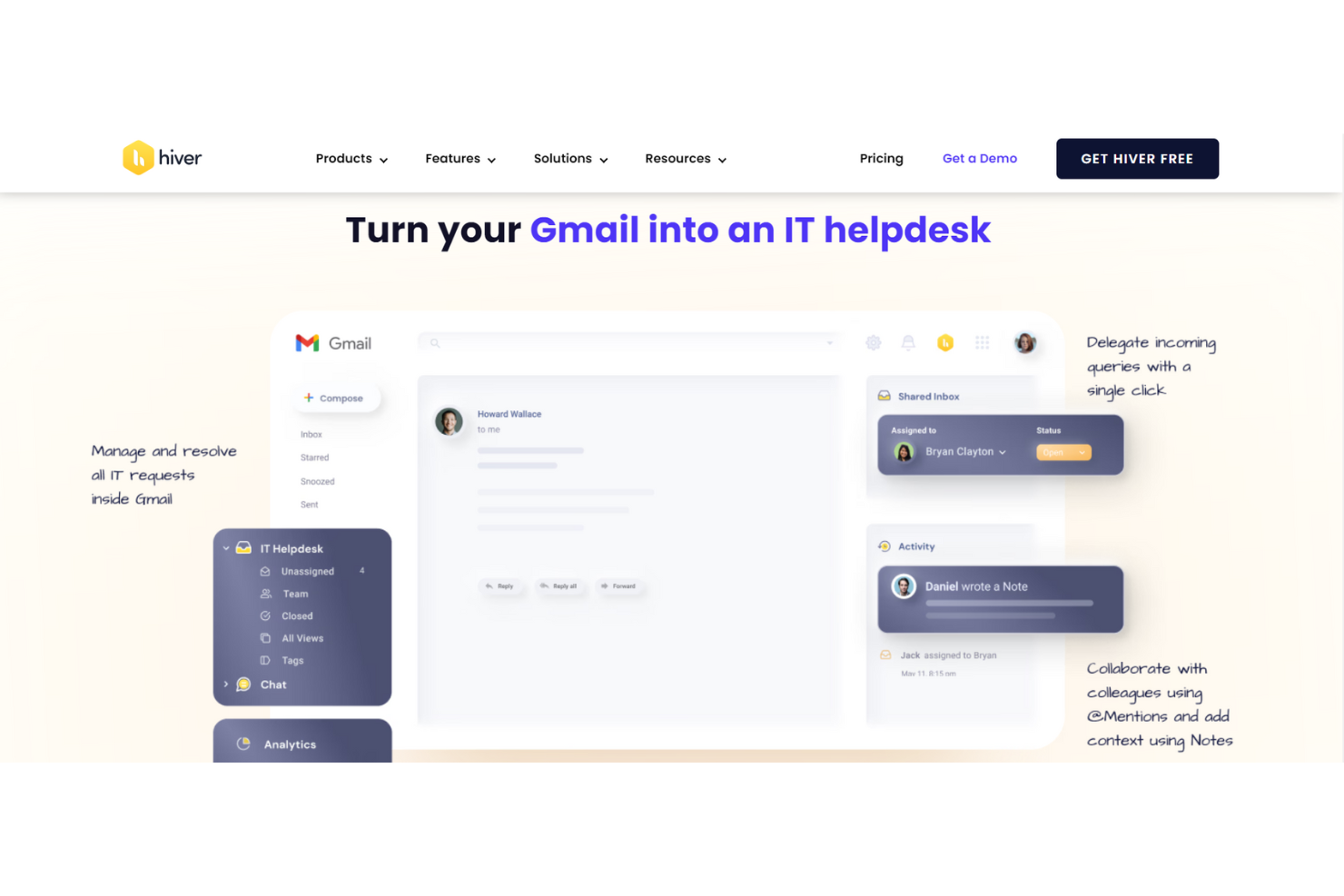
Hiver est une plateforme moderne de support interne alimentée par l'IA, conçue pour l’assistance au sein des équipes. Qu’il s’agisse de gérer les demandes informatiques des employés, les questions de ressources humaines ou de faciliter les validations financières, Hiver propose une boîte de réception partagée qui sert de point central à toutes les communications de support interne.
Pourquoi j'ai choisi Hiver : Hiver est pensé pour des équipes modernes et dynamiques qui souhaitent agir rapidement. Son interface, similaire à celle d’un client email déjà familière à beaucoup, réduit considérablement la courbe d’apprentissage. Il n’est pas nécessaire de suivre une formation approfondie pour commencer. L’implémentation de l’outil ne prend que quelques minutes. La boîte de réception partagée constitue le centre de gestion de toutes les demandes des employés, avec un suivi intégré des tickets pour éviter tout oubli. Les équipes peuvent également collaborer aisément grâce aux notes privées, aux @mentions et aux brouillons partagés, tout cela à l’intérieur de la même interface.
Fonctionnalités et intégrations remarquables de Hiver
Fonctionnalités qui incluent des workflows d’approbation facilitant la gestion des demandes nécessitant validation, comme les autorisations d’accès ou approbations budgétaires. Vous pouvez aussi définir des règles d’automatisation pour étiqueter, attribuer et hiérarchiser les tickets selon leur catégorie, permettant à votre équipe de rester organisée sans effort manuel. Le suivi des SLA garantit des réponses dans les délais, tandis qu’une base de connaissances intégrée permet de documenter les processus et politiques internes afin que les employés puissent trouver les réponses de façon autonome.
Intégrations qui comprennent Aircall, Asana, Jira, Okta, QuickBooks, Salesforce, Slack, WhatsApp, Zapier et plus de 100 autres plateformes.
Pros and Cons
Pros:
- Fonctionnalités de collaboration interne avancées
- Assistance clientèle humaine disponible 24h/24 et 7j/7 par chat ou email, sur tous les forfaits (y compris le gratuit)
- Fonctionnalités IA intégrées à toutes les étapes du parcours de support
Cons:
- L’expérience mobile est moins aboutie que sur ordinateur
- Par rapport à d'autres plateformes, Hiver propose moins d'intégrations tierces
New Product Updates from Hiver

Hiver Brings Chat Widget Support to Mobile Apps
Hiver now lets you embed the Hiver Chat Widget in iOS, Android, React Native, and Flutter apps so customers can start chats without leaving your app. For more information, visit Hiver's official site.

HappyFox
Idéal pour l’assistance multilingue clients et collaborateurs
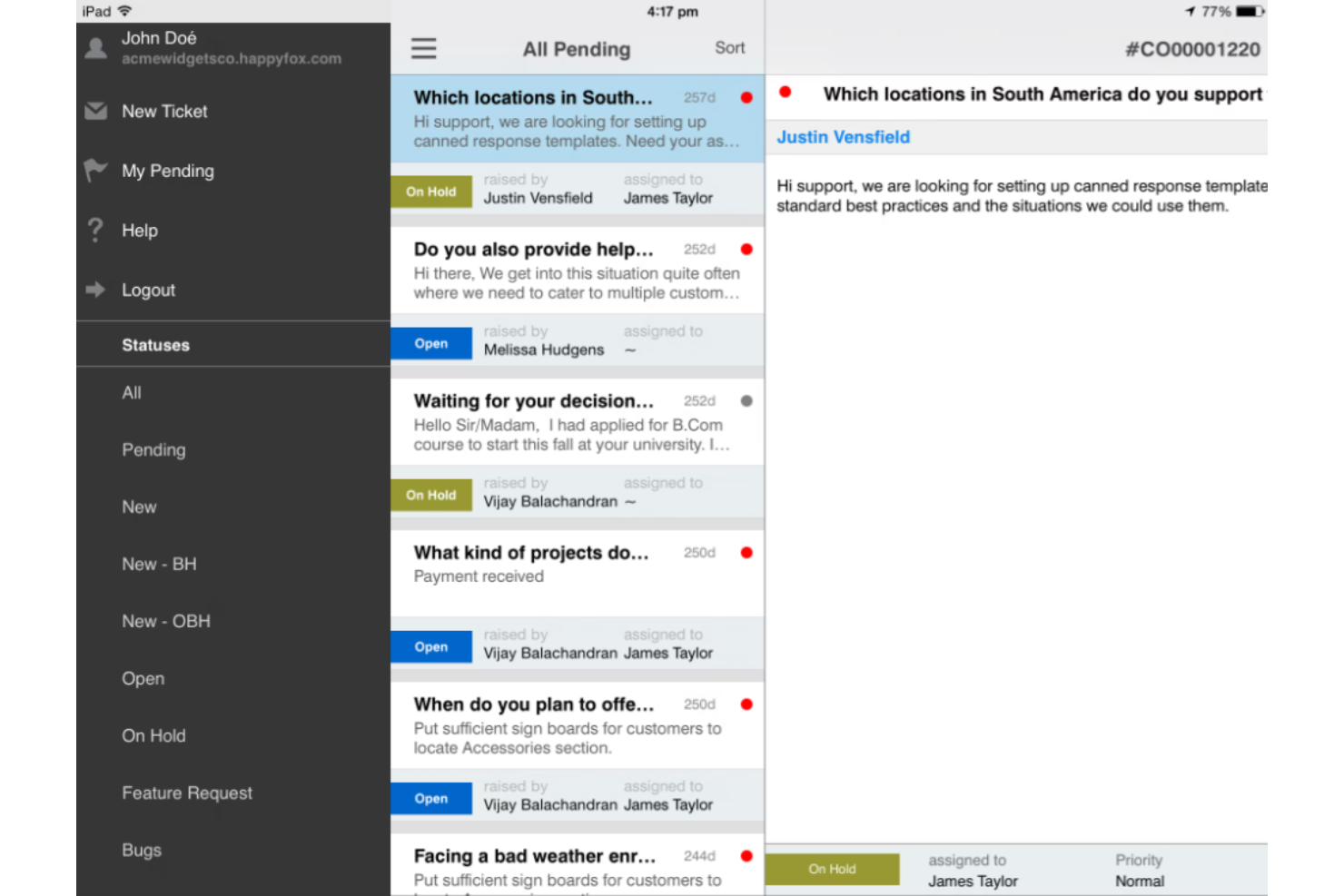
Le logiciel de support technique HappyFox intègre le service client et le support interne afin que votre entreprise puisse utiliser un seul outil pour gérer ces deux aspects de votre organisation.
Peu importe la langue parlée par votre équipe ou vos clients, HappyFox propose une assistance multilingue en 35 langues. Grâce à un système automatisé de gestion des tickets, les agents peuvent suivre les demandes d’assistance des utilisateurs finaux, créer des bases de connaissances internes et externes, et offrir une communication omnicanale par SMS, email, téléphone et réseaux sociaux.
HappyFox est une solution polyvalente qui propose des options adaptées aux petites et moyennes entreprises, aux grandes organisations et aux besoins des entreprises de niveau international dans de nombreux secteurs, notamment l’éducation, les services informatiques, le commerce de détail, le secteur associatif, les compagnies aériennes, la santé et l’immobilier. Des tarifs préférentiels sont proposés pour les organisations à but non lucratif et celles de l'éducation.
Fonctionnalités principales et intégrations de HappyFox
Fonctionnalités : système de gestion des tickets, actions prédéfinies, gestion des tâches, rapports de support technique, base de connaissances et automatisations. Les utilisateurs peuvent créer une FAQ personnalisée et une base de connaissances pour des besoins internes ou externes.
Intégrations : Azure, Asana, Jira, Microsoft Teams, Okta, Pipedrive, Salesforce, Slack, WhatsApp et Wrike. HappyFox est compatible avec de nombreuses applications pour la comptabilité, l’automatisation, la veille stratégique, les bots, la gestion de la relation client (CRM), la gestion de dispositifs et le marketing.
Pros and Cons
Pros:
- Évolutif avec la croissance de l’entreprise
- Solution personnalisable
- Outils conviviaux
Cons:
- Mise en œuvre exigeante
- Outils d’autoformation limités

Meilleur logiciel de help desk satellite pour gérer plusieurs marques à un seul endroit
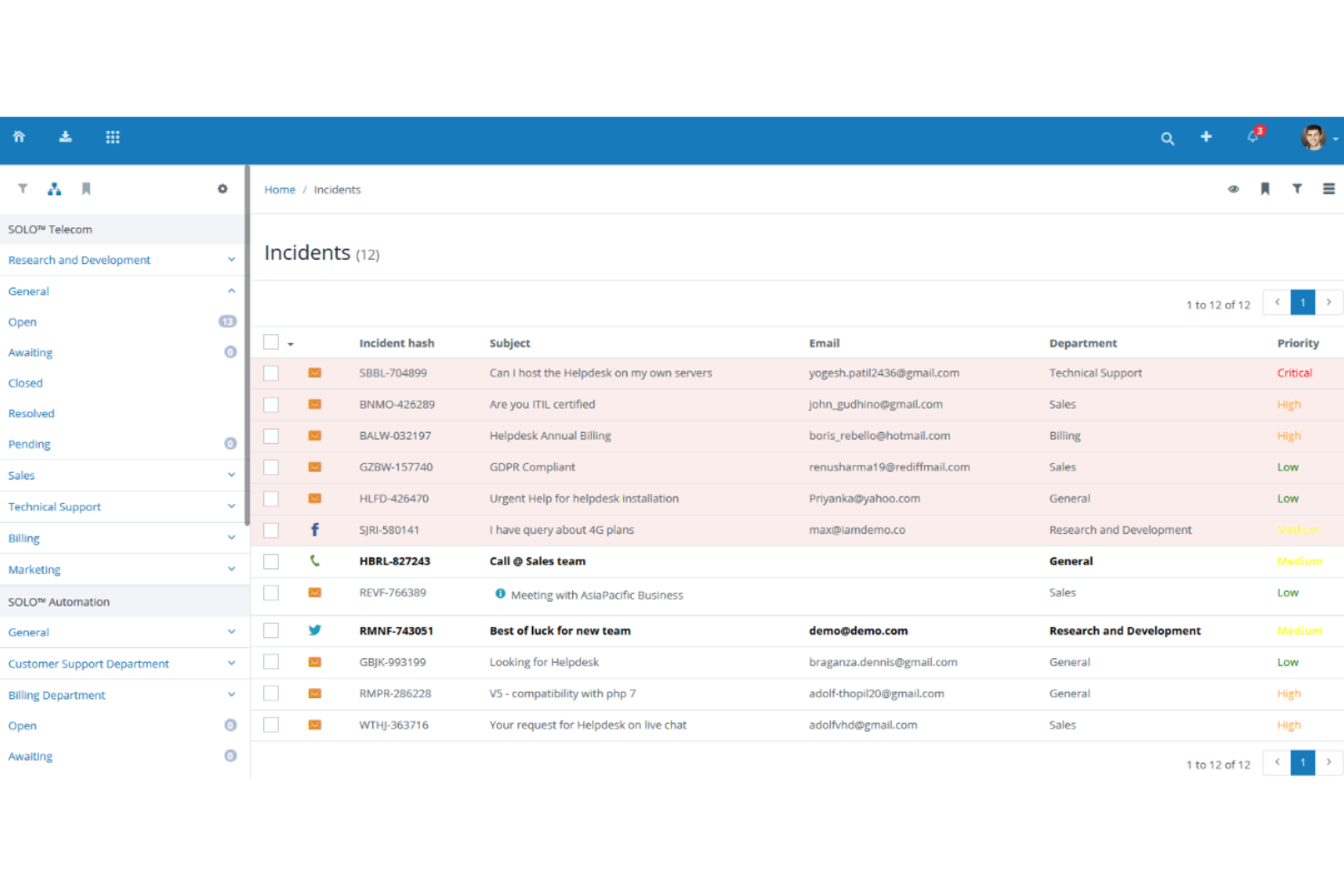
Vision Helpdesk propose quatre solutions de help desk distinctes, comprenant un système de ticketing de base pour les incidents ou demandes de service, un service desk ITIL/ITSM pour les besoins des équipes informatiques, un logiciel de chat en direct pour une communication en temps réel multi-entreprises, et une option de help desk satellite permettant de gérer plusieurs marques au même endroit.
Avec le help desk satellite, Vision Helpdesk offre des fonctionnalités de support client et de service desk informatique pour plusieurs produits, marques ou sociétés depuis un seul emplacement. Cependant, même lorsque le help desk gère plusieurs entreprises, le système assure une isolation complète pour chaque catégorie, utilisateur final et membre du personnel.
Vision Helpdesk prend en charge les licences cloud SaaS, la licence téléchargeable récurrente, ainsi qu'une licence téléchargeable à paiement unique afin de s'adapter aux besoins de votre entreprise. Chacune présente un système de tarification par paliers selon le nombre d'agents dans votre organisation.
Caractéristiques et intégrations de Vision Helpdesk
Fonctionnalités : gestion des incidents, prise en charge de plusieurs langues et fuseaux horaires, gestion des actifs CMDB, facturation des incidents et suivi du temps, générateur de formulaires et gestion des changements. Chaque type de help desk possède des fonctionnalités uniques.
Intégrations : 2SMS, Active Directory, Clickatell, Clientexec, Drupal, Facebook, Microsoft Office, PayPal, Twitter, et WHMCS. Vision Helpdesk dispose également d'applications pour iPhone et Android.
Pros and Cons
Pros:
- Beaucoup de rapports en temps réel
- Formation minimale requise
- Solution logicielle simple
Cons:
- La durée des rapports est limitée à trois mois
- Intégrations limitées
Idéal pour la personnalisation sans code
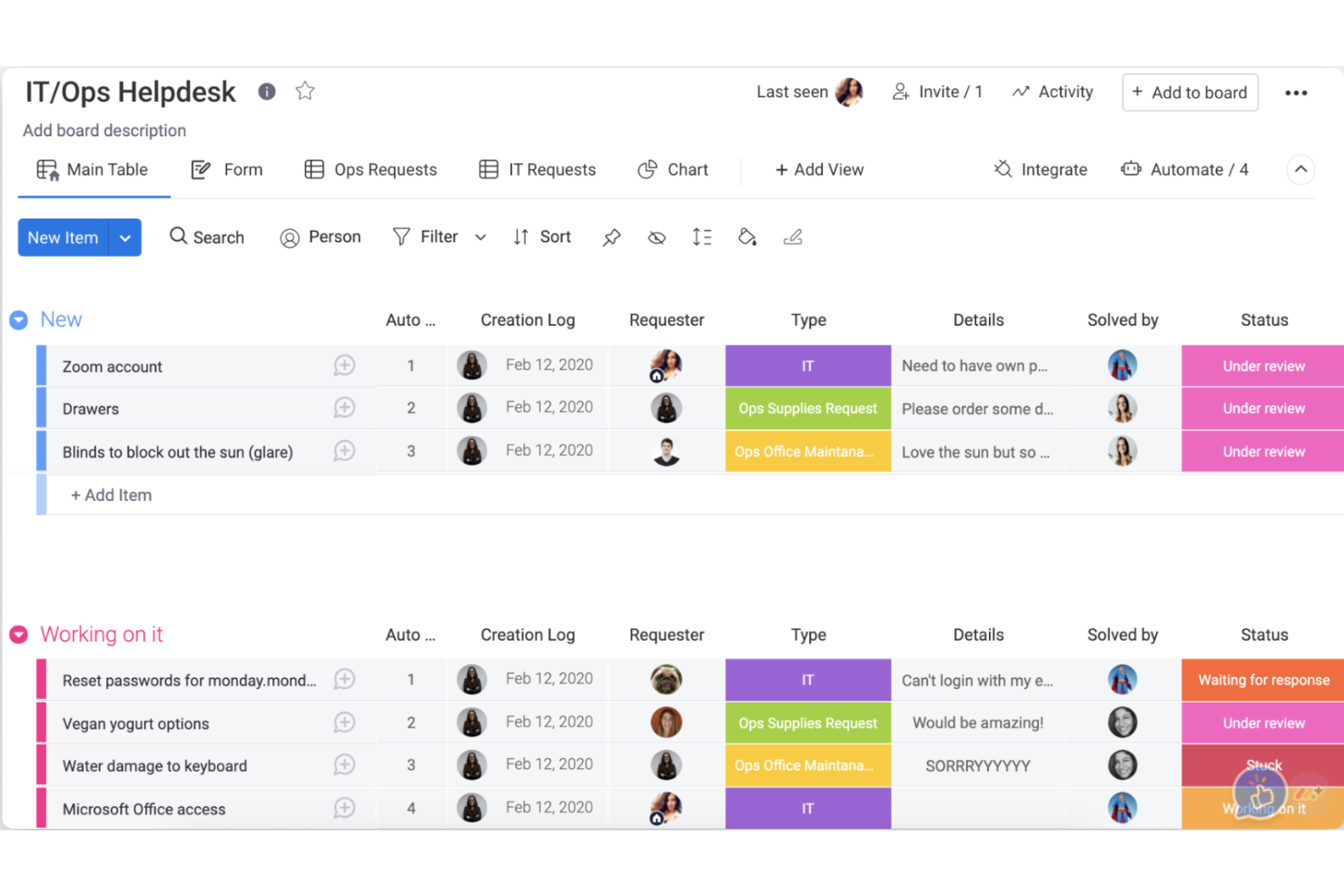
monday service est une plateforme de services personnalisable conçue pour gérer et automatiser les opérations et processus de service. Elle propose une gamme de solutions prêtes à l'emploi pour divers cas d'usage, notamment la gestion des tickets, le support multicanal et des automatisations pilotées par l’IA.
Pourquoi j’ai choisi monday service : La configuration sans code du logiciel permet aux utilisateurs de créer des flux de travail adaptés aux besoins spécifiques de leur équipe. Grâce à des processus personnalisables, vous pouvez concevoir des méthodes de travail qui correspondent au mode de fonctionnement de votre équipe. De plus, les tableaux de bord visuels vous aident à visualiser les demandes de support en temps réel et à prioriser les tâches en conséquence.
Fonctionnalités et intégrations remarquables de monday service
Fonctionnalités incluent des automatisations permettant à votre équipe de se concentrer sur la résolution des incidents plutôt que sur les tâches répétitives. Les notifications en temps réel tiennent les équipes informées, et les outils de reporting offrent des analyses de performance.
Intégrations incluent Slack, Zoom, Microsoft Teams, Google Drive, Dropbox, Jira, HubSpot, Salesforce, GitHub et Gmail.
Pros and Cons
Pros:
- Suivi visuel des demandes de support
- Flux de travail hautement personnalisables
- S'adapte facilement à la croissance des équipes
Cons:
- La configuration peut être longue
- Fonctionnalité limitée de l'application mobile

Intercom
Idéal pour un service automatisé qui permet rapidité et passage à l’échelle
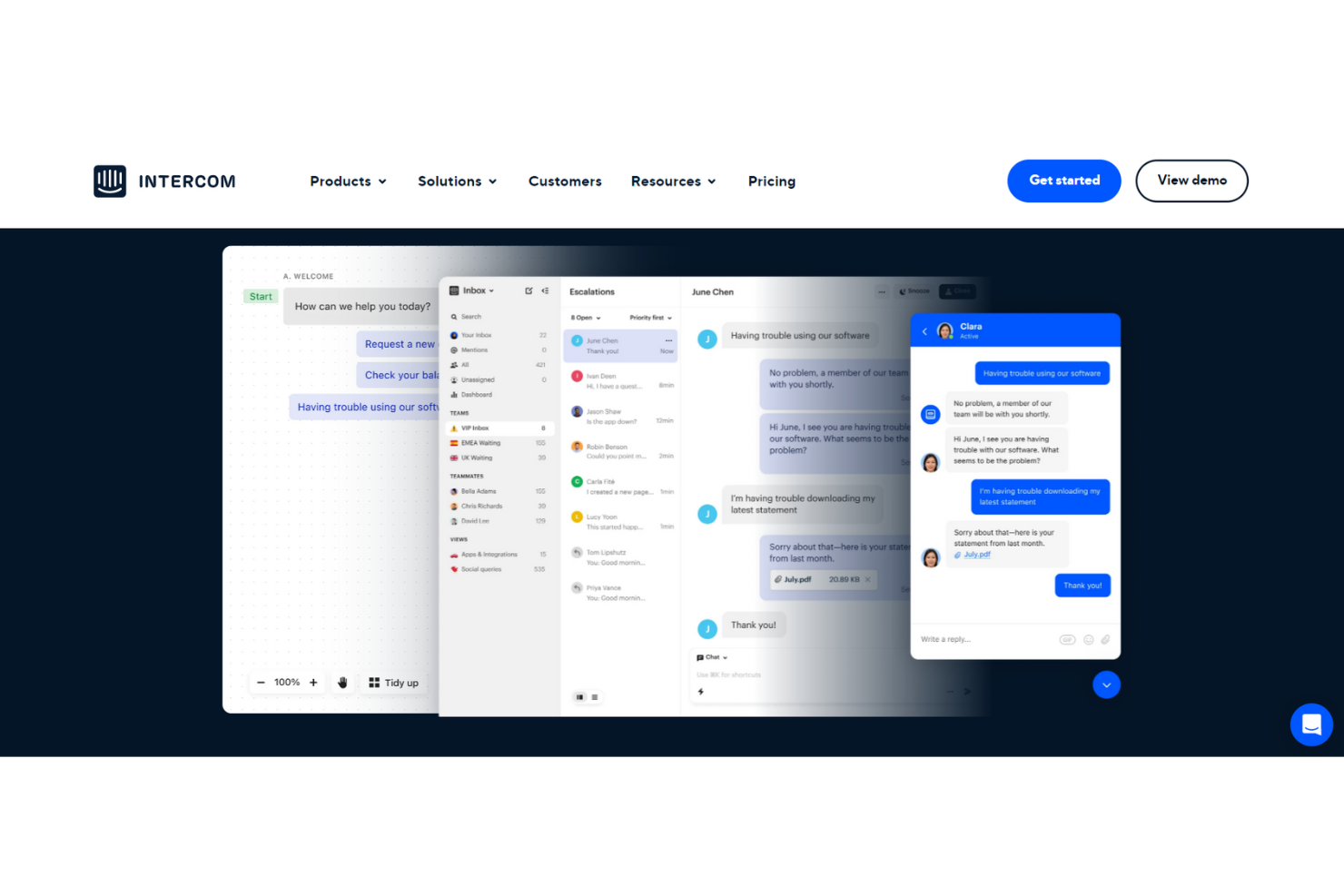
Intercom est une solution complète de service client et de support interne, offrant une expérience sans couture mêlant automatisation et assistance humaine. Cette plateforme propose des réponses automatisées permettant à votre équipe de se libérer des questions répétitives grâce à des chatbots et d'autres outils alimentés par l'IA.
Grâce à une automatisation avancée du support avec des robots de résolution disponibles 24/7, Intercom affirme pouvoir aider les équipes de service à résoudre 33 % des questions courantes. Les études de cas d’Intercom montrent également une amélioration de 44 % des temps de réponse des agents grâce à leurs solutions d’IA. Ce chatbot est disponible dans différentes langues et fuseaux horaires pour une couverture complète.
Intercom accompagne les entreprises de toutes tailles, y compris les startups en phase initiale qui peuvent bénéficier de l’Academy Early Stage avec une remise de 95 % sous conditions. La plateforme propose également des solutions pour les petites entreprises, les sociétés de taille moyenne et les grands groupes dans le commerce électronique, l’éducation, la santé et les services financiers.
Fonctionnalités et intégrations phares d’Intercom
Fonctionnalités : automatisation par l’IA, chatbots personnalisés, boîtes de réception partagées, outils d’assistance proactive, messagerie, communication par email et SMS, articles du centre d’aide, outils de gestion, enquêtes et messagerie transactionnelle.
Intégrations : Aircall Now, Delighted Inc., Google Calendar, Import, Instagram, Jira Cloud, Marketo, Salesforce, Stripe et WhatsApp.
Pros and Cons
Pros:
- Équipe de support efficace
- Navigation et outils intuitifs
- Rapide et facile à prendre en main
Cons:
- Coûteux si vous payez pour chaque service nécessaire
- Tarification à la carte pour les modules complémentaires

Meilleure assistance cloud pour une gestion IT à 360°
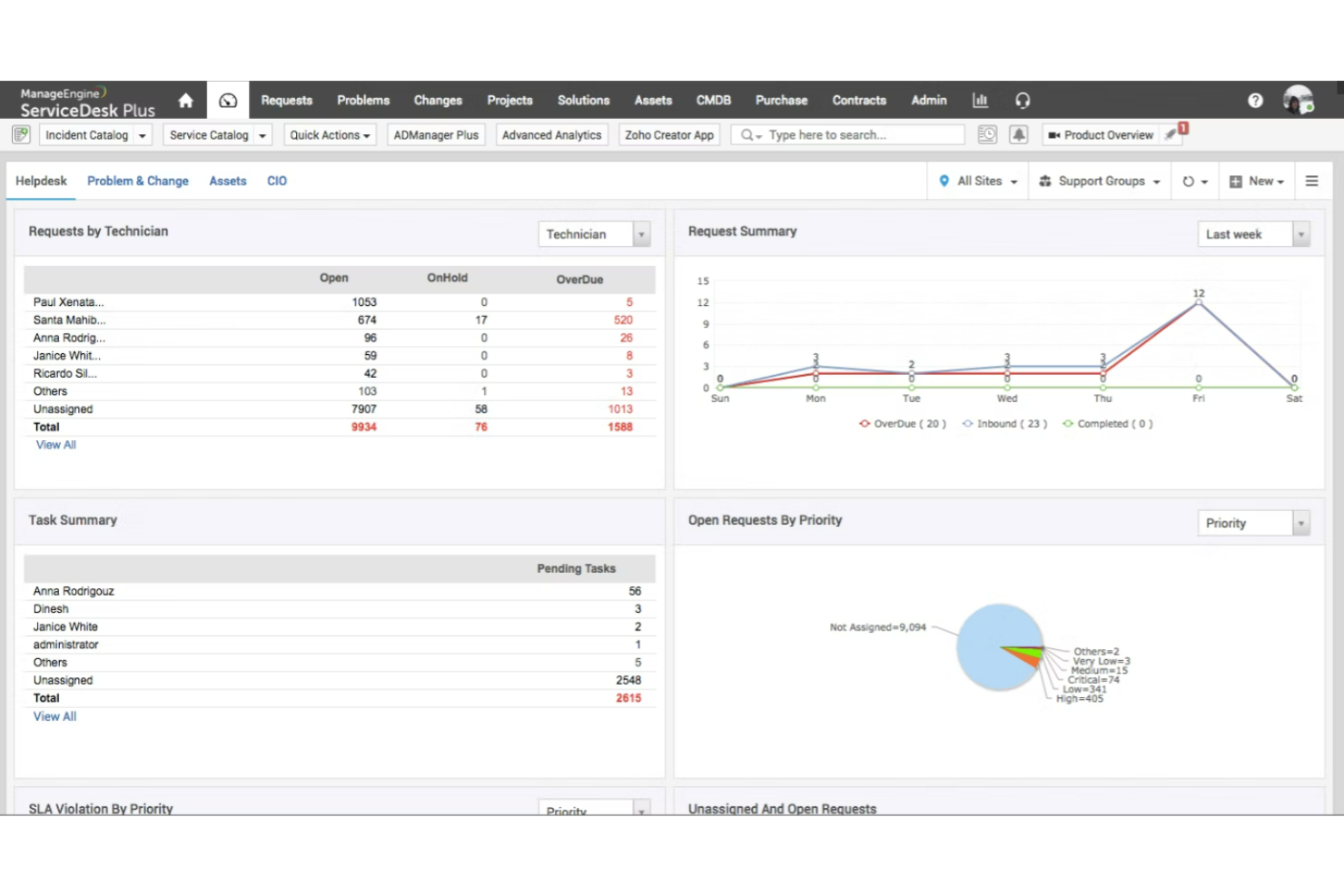
ServiceDesk Plus de ManageEngine est une solution logicielle qui combine la gestion des actifs informatiques et des services avec la CMDB pour offrir des capacités de niveau entreprise dans tous les départements, y compris la finance, les ressources humaines et les services généraux. Disponible sur site et dans le cloud, ServiceDesk Plus est adopté par des organisations du monde entier.
L’approche globale de ServiceDesk Plus met l'accent sur la sécurité grâce à leurs propres centres de données sans sous-traitants, des intégrations natives profondes avec un large éventail d’outils informatiques, et un modèle multi-instance pour une séparation claire des données et des processus. Cette solution de centre d’assistance interne est actuellement disponible en 23 langues.
ServiceDesk Plus propose des éditions flexibles pour s’adapter au niveau de maturité de votre entreprise. Choisissez parmi une plateforme qui fournit un centre d’assistance pour les équipes non informatiques, une option avec des fonctions ITAM, et une solution tout-en-un pour les entreprises.
Fonctionnalités et intégrations remarquables de ServiceDesk Plus
Fonctionnalités : gestion multi-instance, personnalisation avec peu de code, gestion des incidents, gestion des actifs, catalogue de services, gestion des versions informatiques, gestion des espaces, et gestion des changements.
Intégrations : Jira, Microsoft Outlook, Microsoft Teams, Office 365, TeamViewer, Zoho Cliq, Zoho Flow et Zoho Voice. Les développeurs peuvent utiliser des API publiques basées sur le web pour intégrer ServiceDesk Plus.
Pros and Cons
Pros:
- Service client de grande qualité
- Automatisations administratives puissantes
- Configurable à l’infini
Cons:
- Les personnalisations nécessitent un investissement
- Certaines fonctionnalités mineures manquantes
Autres solutions de help desk interne
Voici quelques autres logiciels de help desk interne qui ne figurent pas dans ma sélection principale mais qui méritent d’être découverts :
- Issuetrak
Idéal pour la soumission de tickets omnicanale
- InvGate Service Management
Idéal pour relier les tickets aux actifs
- Kayako
Idéal pour visualiser les interactions internes avec les collègues
- Guru
Idéal pour l'auto-assistance dans les flux de travail existants
- Document360
Idéal pour créer des arbres de décision
- LiveAgent
Idéal pour le support multilingue
- Help Scout
Idéal pour les équipes en croissance et les entreprises en phase de développement
- Zendesk
Idéal pour un support centralisé RH et IT
- Zoho Assist
Idéal pour la formation au support à distance
- Jitbit Helpdesk
Idéal pour une approche auto-hébergée et axée sur l'e-mail
- OneDesk
Idéal pour les besoins de support technique via le web, le cloud et l'app mobile


Comment j'évalue les logiciels de support interne
Je divise mon évaluation en deux niveaux : les exigences de base — gestion des tickets, routage, SLA et libre-service — et les éléments différenciateurs qui font qu’un outil est la bonne option pour les équipes CX.
Fonctionnalités essentielles (Pré-requis pour cette liste)
Lorsque je sélectionne des outils pour ma liste, je les note sur une échelle de 0 (fonctionnalité absente) à 5 (excellent dans ce domaine) pour chaque fonctionnalité clé listée ci-dessous. Ensuite, je calcule le score total de l’outil en pourcentage. Chaque outil doit atteindre un score total minimum de 65% pour être pris en compte.
- Système de gestion des tickets internes : Je vérifie si chaque outil propose une file d’attente interne dédiée afin que les demandes d’agents (réinitialisation de mot de passe, accès aux outils) restent séparées des tickets orientés client.
- Base de connaissances : La base de connaissances doit suggérer des réponses là où les agents travaillent déjà, par exemple en proposant un article sur le dépannage VPN lorsqu’un ticket de connectivité est ouvert.
- Routage et affectation : J’évalue la façon dont l’outil attribue les tickets à la bonne équipe interne, que ce soit via un routage basé sur les compétences (IT vs RH) ou une répartition équilibrée entre les équipes.
- Portail d’auto-assistance pour les employés : Un bon portail permet aux agents de soumettre des demandes, de parcourir un catalogue de services et de suivre le statut par eux-mêmes, sans devoir solliciter un manager sur Slack.
- SLA et automatisation des workflows : Je regarde si l’on peut définir des SLA internes par niveau de priorité et automatiser les escalades, par exemple en signalant un ticket lorsqu’un agent est bloqué depuis plus d’une heure.
- Rapports et analyses : Les tableaux de bord doivent suivre des KPI internes comme le temps de résolution par catégorie et les tendances des problèmes récurrents pour détecter les soucis systémiques avant qu’ils n’affectent la satisfaction client.
Une fois que j’ai une liste d’outils correspondant à ces critères, j’examine ce qui différencie chaque plateforme.
Éléments différenciateurs (Ce qui distingue les fournisseurs)
Voici comment je compare les différents fournisseurs :
Fonctionnalités remarquables
Les intégrations avec les outils collaboratifs (chat-ops) sont cruciales ici. Si les agents peuvent déposer un ticket depuis Slack ou Microsoft Teams sans changer d’outil, la résolution est plus rapide. J’évalue aussi les capacités de déviation par IA — les outils proposant automatiquement des articles de la base ou générant des réponses aux questions fréquentes comme « comment réinitialiser mon softphone » réduisent considérablement le volume de tickets. Un catalogue de demandes structuré est un autre facteur clé. Des formulaires prédéfinis pour des demandes de changement de file, d’accès ou de permutation de planning permettent d’organiser les soumissions et de limiter les échanges inutiles.
Au-delà des fonctionnalités
La profondeur des intégrations fait partie de mes premiers points de contrôle. Un support interne interfacé nativement avec votre plateforme CCaaS et votre HRIS permet aux agents d’avoir le contexte — fonction, localisation, manager — sans saisie manuelle. La structure tarifaire compte également lorsque l’on équipe un centre de contact de 200 personnes ; j’observe si le modèle facture par agent, par employé ou par demandeur. Le délai de retour sur investissement est aussi déterminant. Des modèles de support interne prêts à l’emploi et des outils de migration de boîte de réception peuvent faire la différence entre un déploiement en deux semaines et un projet s’étalant sur deux mois.
Comment choisir un logiciel de help desk interne
Il est facile de perdre de vue l’essentiel face à des listes de fonctionnalités interminables et des structures de prix complexes. Pour vous aider à rester concentré lors de votre recherche, voici une liste de contrôle de critères à considérer :
| Critère | Éléments à prendre en compte |
|---|---|
| Scalabilité | Le logiciel peut-il évoluer avec votre entreprise ? Analysez le nombre maximum d’utilisateurs supportés et sa capacité à traiter efficacement un volume croissant de tickets. |
| Intégrations | Peut-il se connecter à vos outils existants, comme le CRM ou la messagerie ? Vérifiez la présence d’intégrations natives pour éviter de lourds développements spécifiques. |
| Personnalisation | Peut-on adapter le logiciel à vos processus ? Cherchez la possibilité de modifier les champs de tickets, les tableaux de bord et les reportings pour correspondre à votre organisation. |
| Facilité d’utilisation | L’interface est-elle intuitive pour votre équipe ? Évitez les solutions trop complexes qui freineraient l’adoption et la productivité. |
| Mise en place et onboarding | En combien de temps pouvez-vous être opérationnel ? Évaluez la disponibilité de guides, tutoriels et du support pour faciliter la transition. |
| Coût | Le prix correspond-il à votre budget ? Comparez les différents modèles tarifaires et soyez attentif aux frais cachés comme les options supplémentaires ou le support avancé. |
| Sécurité | Respecte-t-il vos contraintes de sécurité ? Vérifiez la présence de fonctionnalités telles que chiffrement des données et contrôles d’accès pour la confidentialité des informations. |
| Disponibilité du support | Le support est-il facilement accessible ? Renseignez-vous sur les horaires, les délais de réponse et les canaux proposés comme le chat ou le téléphone. |
Qu’est-ce qu’un logiciel de help desk interne ?
Les logiciels de centre d'assistance interne sont des outils qui aident les entreprises à gérer et à résoudre les demandes d'assistance informatique internes. Les professionnels de l'informatique et les équipes de support client utilisent généralement ces outils pour améliorer leur efficacité et la rapidité de leurs réponses. La gestion des tickets, la création d'une base de connaissances et le support multicanal contribuent à organiser les demandes et à fournir des solutions rapides. Dans l'ensemble, ces outils renforcent la productivité des équipes et garantissent la cohérence du support au sein de l'organisation.
Fonctionnalités
Lors du choix d'un logiciel de centre d'assistance interne, veillez à rechercher les fonctionnalités clés suivantes :
- Gestion des tickets : Organise et hiérarchise les demandes d'assistance afin d'assurer une résolution rapide et un flux de travail efficace.
- Base de connaissances : Fournit un référentiel centralisé d'informations et de solutions pour les problèmes courants, réduisant ainsi les demandes répétitives.
- Support multicanal : Permet de gérer les demandes provenant de divers canaux de communication comme l'email, le chat et le téléphone en un seul endroit.
- Automatisation des flux de travail : Rationalise les tâches et processus répétitifs, libérant du temps pour les problèmes plus complexes.
- Tableaux de bord personnalisables : Offre des vues et indicateurs adaptés pour surveiller les performances et suivre les métriques clés du support.
- Capacités d'intégration : Se connecte aux systèmes existants tels que le CRM ou l'email pour offrir une expérience fluide.
- Mesures de sécurité : Protège les données sensibles grâce à des fonctionnalités comme le chiffrement et les contrôles d'accès.
- Rapports et analyses : Fournit des informations sur les opérations de support, aidant les équipes à identifier les tendances et à améliorer la qualité du service.
- Portails en libre-service : Permet aux utilisateurs de trouver des solutions de manière autonome, réduisant ainsi la charge des équipes de support.
- Accessibilité via application mobile : Permet aux équipes de support de gérer et de répondre aux demandes en déplacement, assurant un service continu.
Avantages
La mise en place d'un logiciel de centre d'assistance interne apporte plusieurs avantages à votre équipe et à votre entreprise. Voici quelques-uns dont vous pouvez bénéficier :
- Efficacité accrue : Automatise les tâches répétitives et organise les demandes pour aider votre équipe à résoudre les problèmes plus rapidement.
- Communication améliorée : Centralise les interactions issues de différents canaux, garantissant qu'aucune demande n'est oubliée et accélérant les temps de réponse.
- Productivité renforcée : Libère du temps aux membres de l'équipe pour se concentrer sur des problèmes complexes grâce à l'accès à des options de libre-service et à une base de connaissances pour les questions courantes.
- Meilleure sécurité des données : Protège les informations sensibles avec des fonctionnalités de sécurité telles que le chiffrement et les contrôles d'accès.
- Analyses pertinentes : Propose des insights basés sur les données concernant les opérations de support, facilitant la prise de décisions éclairée et l'amélioration des services.
- Scalabilité : Prend en charge la croissance des équipes et l'augmentation du volume des demandes, s'adaptant à l'évolution des besoins de l'entreprise.
- Autonomie des utilisateurs : Mets à disposition des outils comme les portails en libre-service, permettant aux utilisateurs de résoudre eux-mêmes leurs problèmes tout en réduisant la charge du personnel support.
Coûts & Tarification
Le choix d'un logiciel de centre d'assistance interne demande de bien comprendre les différents modèles et plans tarifaires existants. Les coûts varient en fonction des fonctionnalités, de la taille de l'équipe, des modules complémentaires, et plus encore. Le tableau ci-dessous résume les offres courantes, leurs prix moyens, ainsi que les fonctionnalités généralement incluses dans les solutions de centre d'assistance interne :
Tableau comparatif des offres pour les logiciels de centre d'assistance interne
| Type d'offre | Prix moyen | Fonctionnalités courantes |
|---|---|---|
| Offre gratuite | $0 | Gestion de tickets basique, rapports limités et support via la communauté. |
| Offre personnelle | $5-$25/user/month | Gestion de tickets, rapports de base, support par email et petite base de connaissances. |
| Offre business | $30-$60/user/month | Rapports avancés, support multicanal, intégrations et automatisation des tâches. |
| Offre entreprise | $70-$150/user/month | Tableaux de bord personnalisables, support prioritaire, sécurité avancée et analyses complètes. |
FAQ sur les logiciels de support interne
Voici quelques réponses aux questions fréquemment posées sur les logiciels de support interne :
Quelle est la différence entre un logiciel de support interne et externe ?
Le logiciel de support interne est conçu pour gérer et prendre en charge les demandes et problèmes informatiques internes d’une organisation, tandis que le logiciel de support externe se concentre sur le support client et le service auprès des personnes extérieures à l’entreprise. Les systèmes internes s’intègrent souvent avec des outils spécifiques à l’entreprise et gèrent les demandes des employés, alors que les systèmes externes sont orientés vers le service client, avec souvent des intégrations CRM et des portails dédiés aux clients.
Les logiciels de support interne peuvent-ils être utilisés par des équipes non-IT ?
Oui, les logiciels de support interne peuvent être adaptés pour une utilisation par des équipes non-informatiques comme les ressources humaines ou la gestion des installations. Ces équipes peuvent utiliser le logiciel pour gérer des demandes internes, telles que l’intégration de nouveaux employés ou la gestion des problèmes de maintenance des locaux. La flexibilité de ces outils permet à différents départements de personnaliser les flux de travail, assurant ainsi une gestion efficace des demandes au sein de l’organisation.
Est-il nécessaire de former le personnel à un nouveau logiciel de support ?
Oui, la formation est essentielle lors de la mise en place d’un nouveau logiciel de support afin d’assurer que votre équipe sache utiliser l’outil efficacement. Une bonne formation permet au personnel de comprendre comment enregistrer des demandes, gérer les tickets, et utiliser des fonctionnalités comme les rapports et l’analyse. Investir du temps dans la formation dès le départ favorise une meilleure adoption et rend votre équipe plus efficace sur le long terme.
Et ensuite :
Si vous êtes en train de rechercher un logiciel de support interne, contactez un conseiller SoftwareSelect pour obtenir gratuitement des recommandations personnalisées.
Vous remplissez un formulaire puis discutez brièvement afin qu’ils comprennent précisément vos besoins. Ensuite, vous recevrez une présélection de logiciels à examiner. Ils vous accompagneront même tout au long du processus d’achat, y compris lors des négociations tarifaires.