

Les 10 meilleurs logiciels de service client omnicanal pour 2026

Sélection des meilleurs logiciels de service client omnicanal


Les clients ne se limitent pas à un seul canal d'assistance. Ils peuvent commencer une conversation par chat en direct, poursuivre par e-mail, puis reprendre contact sur les réseaux sociaux. Les logiciels de service client omnicanal rassemblent ces interactions afin que votre équipe puisse les gérer sans perdre le contexte.
Comme l'a révélé une récente enquête de Gartner, pas moins de 93 % des clients ont déclaré un niveau de satisfaction client (CSAT) plus élevé lorsqu'ils pouvaient facilement passer d'un canal de service à un autre. J'ai testé et évalué de manière indépendante plusieurs de ces solutions. Ce guide vous aidera à réduire vos options et à trouver la plateforme adaptée à votre équipe d'assistance.
Pourquoi faire confiance à nos recommandations de logiciels
Notre équipe teste et évalue des logiciels depuis 2012. En tant que leaders CX nous-mêmes, nous savons à quel point il est difficile — et important — de choisir le bon logiciel.
Pour ce guide, nous avons évalué les outils grâce à des tests pratiques et une recherche indépendante, en notant les outils selon nos critères de sélection.
Nos avis reflètent notre jugement éditorial humain, et non un argumentaire de vente.
Tableau comparatif des logiciels de service client omnicanal
Ce tableau comparatif résume les informations tarifaires relatives à ma sélection des meilleurs logiciels de service client omnicanal :
| Tool | Best For | Trial Info | Price | ||
|---|---|---|---|---|---|
| 1 | Idéal pour l’automatisation de l’IA dans les secteurs réglementés | Essai gratuit de 30 jours | À partir de 31 $ par agent et par mois (facturé annuellement) | Website | |
| 2 | Idéal pour la collaboration interne du service client | Formule gratuite + essai gratuit de 7 jours + démonstration gratuite disponible | À partir de $25/utilisateur/mois (facturé annuellement) | Website | |
| 3 | Idéal pour centraliser les interactions clients | Essai gratuit de 14 jours disponible | À partir de 19 $ par utilisateur et par mois (facturation annuelle) | Website | |
| 4 | Idéal pour les boîtes de réception multicanales bien organisées | Essai gratuit de 15 jours disponible | À partir de $25/utilisateur/mois (facturé annuellement) | Website | |
| 5 | Idéal pour la communication B2B | Démo gratuite disponible | À partir de $45/mois (facturé annuellement) | Website | |
| 6 | Idéal pour un assistant optimisé par l'IA | Essai gratuit de 7 jours + forfait gratuit + démonstration gratuite | À partir de 24,17 $/mois (facturé annuellement) | Website | |
| 7 | Idéal pour la distribution automatisée des tickets | Essai gratuit de 30 jours disponible | À partir de $15/utilisateur/mois (facturé annuellement) | Website | |
| 8 | Idéal pour les communications client e-commerce unifiées | Essai gratuit de 14 jours | À partir de 39 $/agent/mois | Website | |
| 9 | Idéal pour une escalade intelligente par IA | Formule gratuite disponible | À partir de $32/mois (facturé annuellement) | Website | |
| 10 | Idéal pour les espaces de messagerie collaborative | Essai gratuit de 30 jours disponible | À partir de 14 $ par utilisateur et par mois (facturation annuelle) | Website |


Évaluation des meilleurs logiciels de service client omnicanal
Vous trouverez ci-dessous mes résumés détaillés des meilleurs logiciels de service client omnicanal qui ont intégré ma sélection. Mes évaluations proposent un examen approfondi des principales fonctionnalités, des avantages et inconvénients, des intégrations et des cas d’utilisation idéaux de chaque outil afin de vous aider à trouver celui qui vous convient le mieux.

Comm100
Idéal pour l’automatisation de l’IA dans les secteurs réglementés
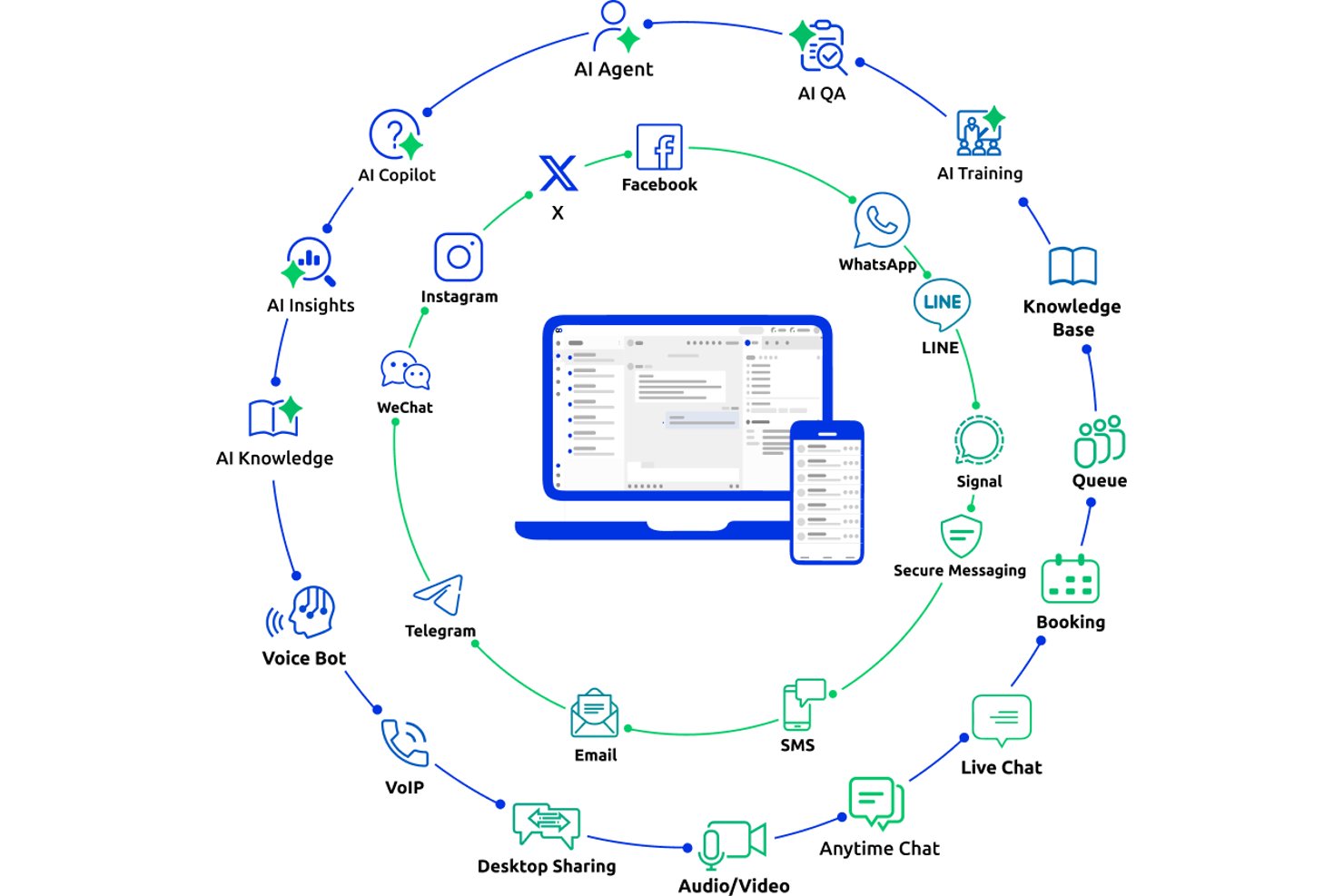
Comm100 est une plateforme de service client omnicanal qui unifie le chat en direct, les e-mails, la voix, les SMS et plus de 12 canaux sociaux et de messagerie au sein d’une console d’agent unique, avec une suite d’IA intégrée, une gestion des tickets intercanaux et la prise en charge d’un déploiement sur site.
À qui Comm100 convient-il le mieux ?
Comm100 convient particulièrement aux équipes des grandes entreprises et des entreprises de taille intermédiaire dans les secteurs de la santé, du gouvernement, de la finance et de l’enseignement supérieur qui ont besoin d’une automatisation du support pilotée par l’IA, avec des exigences strictes en matière de conformité et de souveraineté des données.
Pourquoi j’ai choisi Comm100
J’ai choisi Comm100 parmi les meilleures solutions, car sa gamme de fonctionnalités de conformité est véritablement rare à ce niveau : SOC 2 Type II, HIPAA avec BAA, PCI DSS, ISO 27001 et certification TX-RAMP, ainsi qu’un déploiement entièrement sur site pour les équipes ayant des exigences strictes en matière de souveraineté des données. J’apprécie également le fait que son agent IA résolve de manière autonome jusqu’à 80 % des demandes sur le chat, les SMS, les réseaux sociaux et la voix, un chiffre étayé par des études de cas concrètes provenant d’organisations comme Affaires mondiales Canada.
Fonctionnalités clés de Comm100
- Agent IA : utilise le traitement automatique du langage naturel pour répondre aux questions des clients à partir de sources de connaissances connectées.
- Actions personnalisées : configurez l’agent IA pour effectuer des tâches pendant les conversations, notamment prendre des rendez-vous, vérifier des soldes et déclencher des flux de travail personnalisés.
- Déploiement sur site : prend en charge le déploiement sur site pour les organisations ayant des exigences spécifiques en matière de résidence des données ou de réglementation.
- Tableau de bord de reporting : suivez les taux de résolution par le chatbot, les délais de réponse des agents et les scores de satisfaction client depuis un tableau de bord centralisé.
Intégrations de Comm100
Comm100 propose des intégrations documentées avec Salesforce, HubSpot, Microsoft Dynamics 365, Zendesk, ServiceNow, Twilio, Telnyx, Cisco UCCX/UCCE et Webex Contact Center. La plateforme prend également en charge Google Drive, SharePoint Online, Confluence Cloud, Calendly, Microsoft Bookings, une API ouverte, les webhooks et Zapier.
Pros and Cons
Pros:
- Prend en charge les tons configurables et les instructions en langage naturel
- Prend en charge la conformité SOC 2 Type II, HIPAA, ISO 27001 et GDPR
- Prise en charge native de Telegram, X, LINE et WeChat
Cons:
- Certains utilisateurs signalent des difficultés avec les intégrations CRM
- Les réponses de l’IA dépendent de la qualité des sources de connaissances connectées

Hiver
Idéal pour la collaboration interne du service client
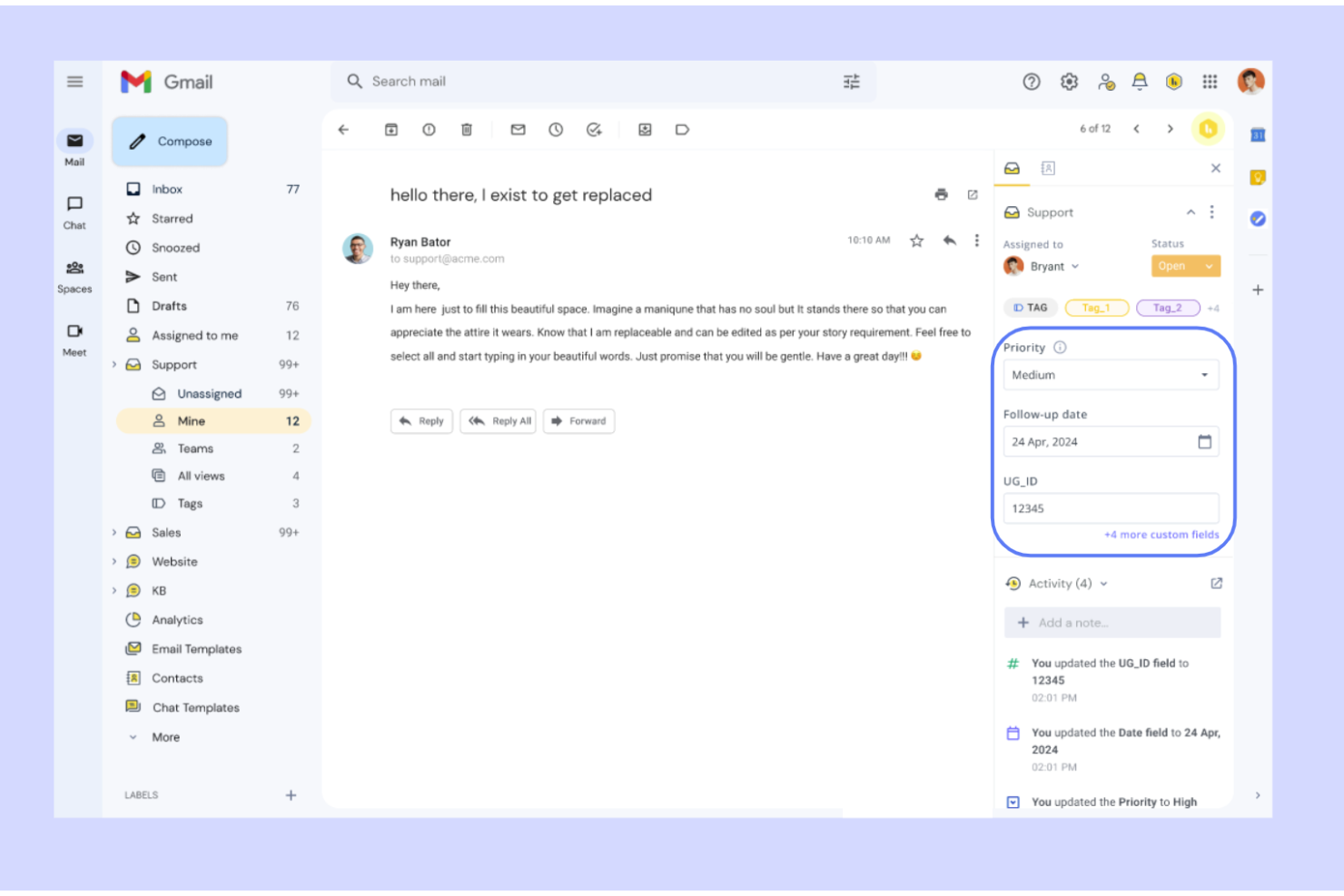
Hiver est une plateforme de service client omnicanale qui fonctionne nativement dans Gmail et Outlook, réunissant les e-mails, le chat en direct, la voix, WhatsApp, les SMS et les réseaux sociaux dans une seule boîte de réception avec des outils de gestion des tickets, d’automatisation et d’IA.
À qui Hiver convient-il le mieux ?
Hiver convient aux équipes d’assistance de petite à moyenne taille qui souhaitent un centre d’assistance collaboratif intégré à leur boîte de réception, sans la complexité d’une plateforme d’entreprise dédiée.
Pourquoi j’ai choisi Hiver
J’ai inclus Hiver dans mes meilleurs choix, car aucune autre plateforme omnicanale n’égale sa couche de collaboration interne. Les agents peuvent laisser des notes privées sur les conversations pour partager du contexte ou demander de l’aide, et s’assurer que le bon coéquipier est immédiatement mis dans la boucle. Ce que je trouve particulièrement utile, c’est que ces fonctionnalités sont intégrées nativement dans Gmail : il n’est donc pas nécessaire de changer de contexte lorsqu’un ticket en direct nécessite un deuxième avis ou une escalade.
Principales fonctionnalités de Hiver
- Boîte de réception omnicanale : Réunit les e-mails, le chat en direct, les SMS, WhatsApp, Slack, la voix et les messages des réseaux sociaux dans un espace de travail unique.
- Copilote IA : Rédige des réponses, résume les tickets et suggère les prochaines étapes aux agents sur les canaux connectés.
- Portail client : Offre aux clients un portail sécurisé et personnalisé pour suivre l’état de leurs tickets et envoyer de nouvelles demandes.
- Créateur de centre d’aide : Permet de créer et de gérer une base de connaissances publique avec des suggestions d’articles alimentées par l’IA.
Intégrations Hiver
Hiver propose des intégrations natives avec Aircall, Asana, Jira, Okta, QuickBooks, Salesforce, Slack, WhatsApp et Zapier, ainsi qu’avec plus de 100 autres plateformes.
Pros and Cons
Pros:
- Fonctionne nativement dans Gmail et Outlook
- Assistance client par de vraies personnes disponible 24 h/24, 7 j/7
- Couvre les e-mails, le chat, les SMS, WhatsApp et la voix
Cons:
- Moins d’intégrations tierces
- L’expérience mobile n’est pas aussi performante que celle sur ordinateur
New Product Updates from Hiver

Hiver Brings Chat Widget Support to Mobile Apps
Hiver now lets you embed the Hiver Chat Widget in iOS, Android, React Native, and Flutter apps so customers can start chats without leaving your app. For more information, visit Hiver's official site.

Idéal pour centraliser les interactions clients
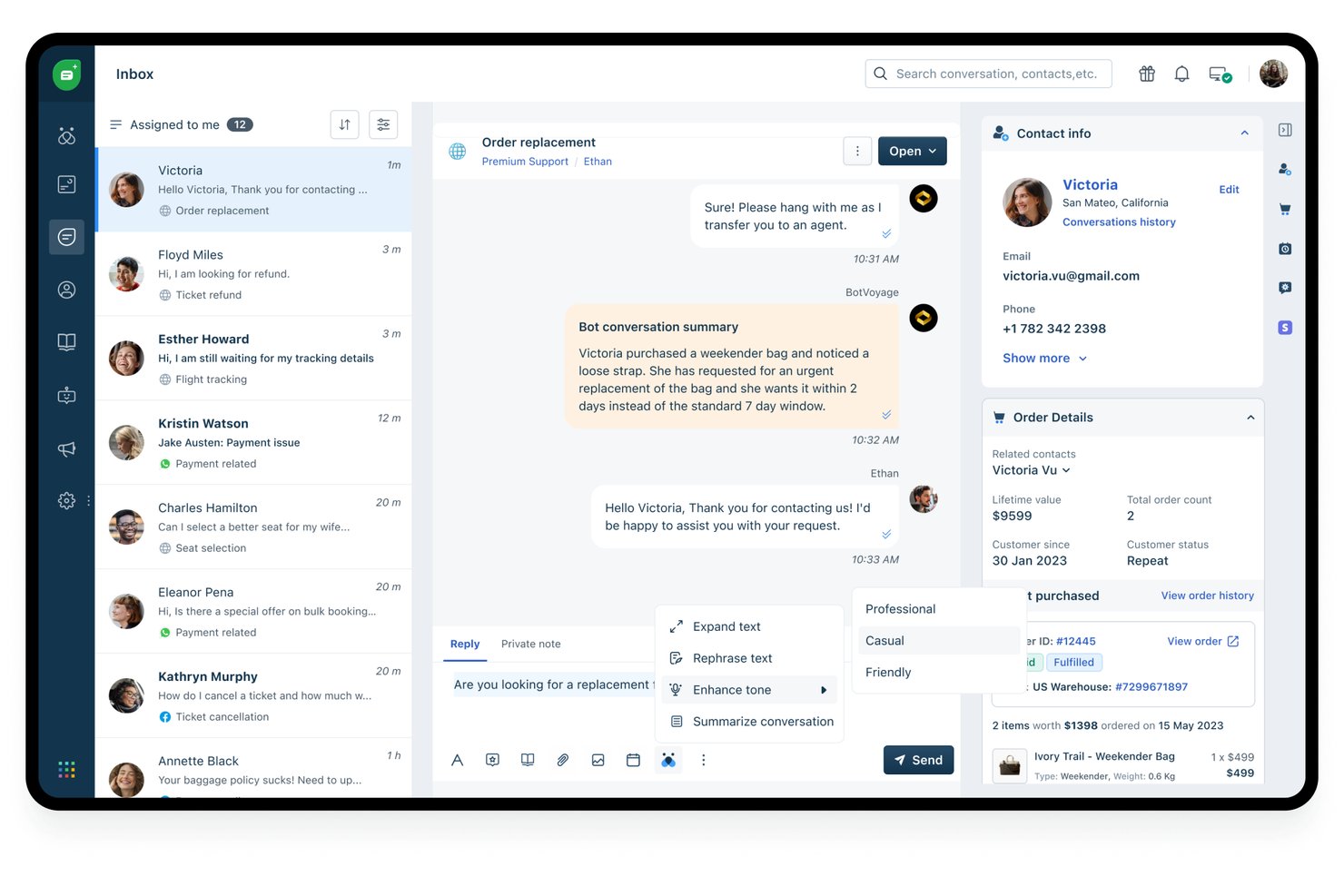
Freshdesk est une plateforme de service client omnicanal alimentée par l’IA qui unifie les canaux d’e-mail, de chat, de voix, des réseaux sociaux et de messagerie au sein d’un espace de travail unique pour les agents, avec une gestion intégrée des tickets, un routage intelligent et Freddy AI pour la résolution autonome et l’assistance aux agents.
À qui Freshdesk convient-il le mieux ?
Freshdesk convient particulièrement aux équipes de support des entreprises de taille moyenne et aux grandes entreprises qui gèrent d’importants volumes d’interactions clients sur plusieurs canaux numériques et vocaux.
Pourquoi j’ai choisi Freshdesk
Freshdesk figure dans ma sélection parce que le centre de commande rassemble toutes les conversations clients (e-mail, chat, WhatsApp, voix, Instagram) dans un seul espace de travail, sans obliger les agents à passer d’un outil à l’autre. J’apprécie tout particulièrement le fait que Freddy AI Agent soit intégré directement dans ce même espace de travail et puisse résoudre de manière autonome une part importante des demandes avant qu’elles ne parviennent à un agent humain. Mon équipe peut ainsi gérer davantage de demandes sans ouvrir d’onglets supplémentaires ni changer de plateforme en cours de conversation.
Fonctionnalités clés de Freshdesk
- Base de connaissances et portail client : Les agents et les clients accèdent directement aux articles, aux FAQ et aux forums depuis le centre d’aide.
- Tableau de bord d’analyse omnicanal : Suivez le CSAT, les SLA, les tendances des tickets et la productivité des agents sur tous les canaux connectés en temps réel.
- Routage fondé sur les compétences et les SLA : Attribue automatiquement les tickets aux agents en fonction de leur expertise et des accords de niveau de service.
- Service d’assistance multilingue : Permet d’accompagner les clients dans plusieurs langues grâce à des portails localisés et à des flux de travail adaptés aux agents.
Intégrations de Freshdesk
Freshdesk Omni propose plus de 100 intégrations natives, notamment avec Salesforce, HubSpot, Slack, Shopify, Microsoft Teams, Jira, Mailchimp, Zoom, Google Workspace et WhatsApp. Une API est disponible pour les intégrations personnalisées.
Pros and Cons
Pros:
- L’automatisation par scénarios réduit la charge des tâches manuelles
- Boîte de réception unifiée couvrant nativement plus de sept canaux
- Outils intégrés d’enquête CSAT et NPS
Cons:
- Les fonctionnalités avancées d’IA sont réservées aux niveaux supérieurs
- La configuration du canal vocal peut être complexe
New Product Updates from Freshdesk

Freshdesk Adds Voice AI Agents in Freshcaller
Freshdesk introduces Voice AI Agents available through Freshcaller Marketplace apps to handle routine calls and reduce queues. This feature enables automated call handling with real-time, conversational support. For more information, visit Freshdesk's official site.

Idéal pour les boîtes de réception multicanales bien organisées
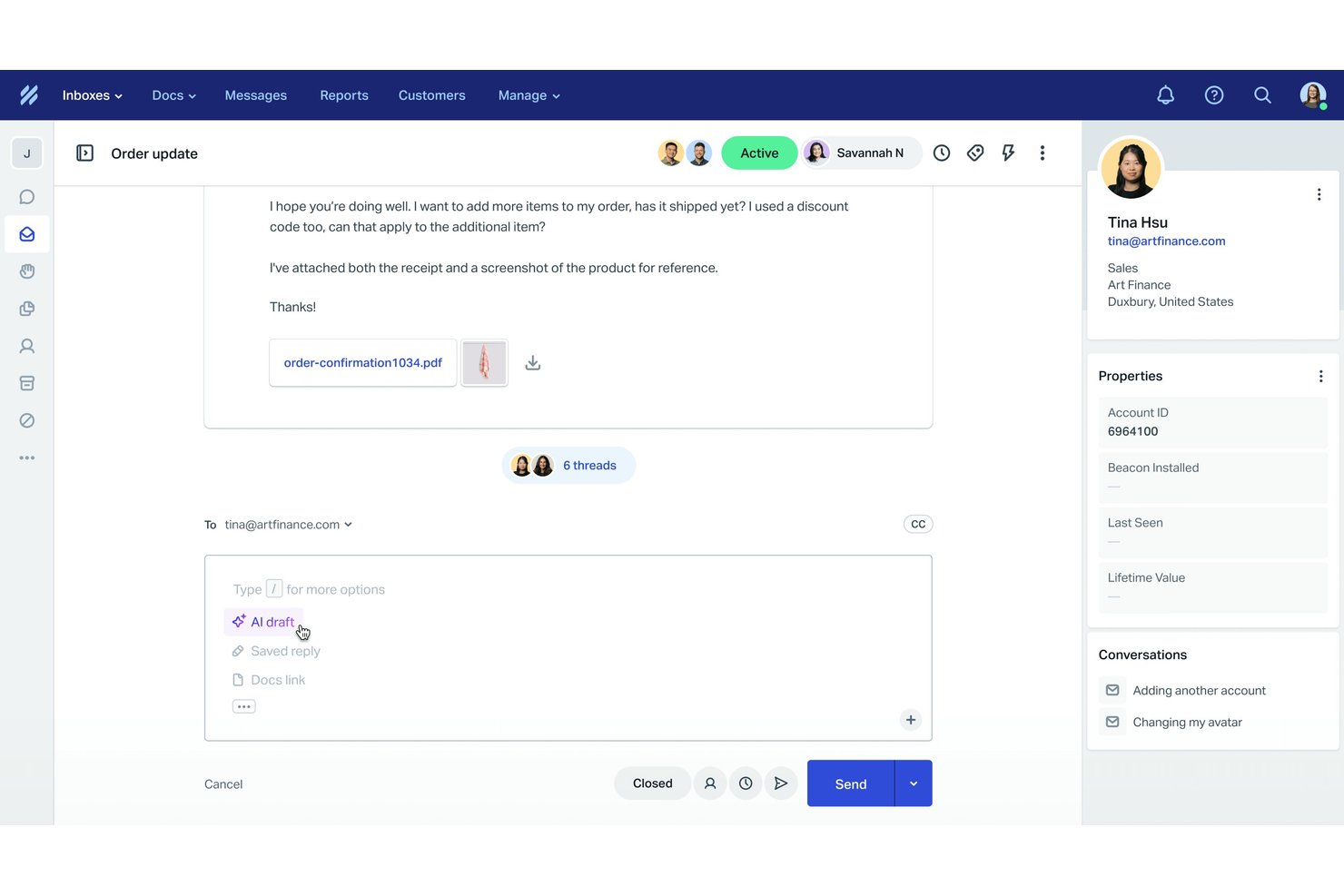
Help Scout est une plateforme de support client qui centralise les interactions par e-mail, chat en direct, messagerie sociale et base de connaissances dans un environnement de boîte de réception partagée pour les équipes de support.
À qui Help Scout convient-il le mieux ?
Help Scout convient particulièrement aux petites et moyennes entreprises dont les équipes de support se développent et qui doivent aller au-delà des boîtes de réception e-mail partagées.
Pourquoi j’ai choisi Help Scout
J’ai choisi Help Scout comme l’un des meilleurs outils, car aucun autre outil fondé sur une boîte de réception ne gère l’organisation multicanale aussi efficacement. La détection des collisions empêche deux agents de répondre simultanément au même client, tandis que les vues personnalisées permettent à mon équipe de trier les conversations par canal, étiquette ou statut en un coup d’œil. Beacon intègre le chat en direct et l’accès à la base de connaissances dans un seul hub intégrable, afin que les clients puissent trouver des réponses ou démarrer une conversation sans jamais quitter la page.
Principales fonctionnalités de Help Scout
- Outils de rédaction et de synthèse alimentés par l’IA : Les agents peuvent rapidement générer ou condenser des réponses sur différents canaux grâce à l’assistance intégrée de l’IA.
- Base de connaissances multicanale (Docs) : Créez, organisez et publiez des articles d’aide pour permettre aux utilisateurs de trouver eux-mêmes des réponses sur les canaux web et de chat.
- Automatisation avancée des flux de travail : Configurez des règles pour attribuer, étiqueter ou faire remonter les conversations en fonction du canal, de mots-clés ou des propriétés des clients.
- Enquêtes CSAT et NPS prêtes à l’emploi : Collectez, suivez et analysez la satisfaction client directement dans l’espace de travail des agents.
Intégrations de Help Scout
Help Scout propose des intégrations natives avec HubSpot, Salesforce, Slack, Mailchimp, Shopify, Jira et Aircall, se connecte à Zapier et dispose d’une API pour les intégrations personnalisées.
Pros and Cons
Pros:
- Outils d’IA intégrés pour répondre plus rapidement
- Intègre le chat et le libre-service au même endroit
- Regroupement facile des messages multicanaux
Cons:
- Aucun canal téléphonique natif
- Personnalisation limitée dans les niveaux inférieurs
New Product Updates from Help Scout

Help Scout Adds Automatic Conversation Reassignment
Help Scout can now automatically unassign conversations when the assigned teammate has been away long enough, keeping replies moving so others can pick them up. For more information, visit Help Scout's official site.
 .
.
Idéal pour la communication B2B
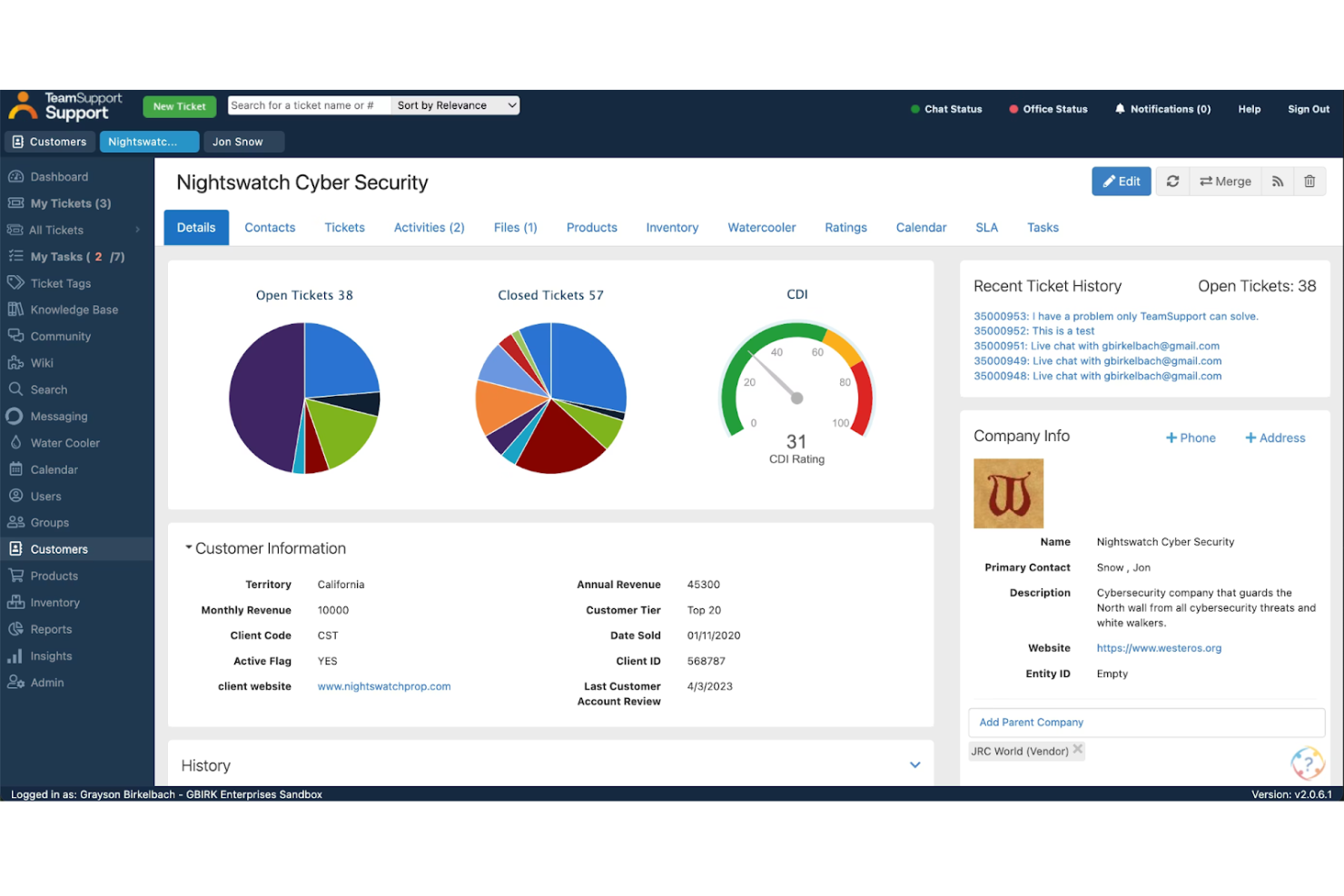
TeamSupport est une plateforme de support client axée sur le B2B qui unifie la gestion des tickets, le chat en direct, les SMS et la messagerie, tout en intégrant des informations client au niveau du compte et des outils assistés par l’IA dans un espace de travail unique pour les agents.
À qui TeamSupport convient-il le mieux ?
TeamSupport convient particulièrement aux entreprises technologiques et SaaS B2B de taille intermédiaire dont les équipes d’assistance gèrent des comptes regroupant plusieurs contacts plutôt que des consommateurs individuels.
Pourquoi j’ai choisi TeamSupport
TeamSupport figure dans ma sélection parce qu’aucun autre outil de support omnicanal que j’ai utilisé ne suit les communications au niveau du compte de la même manière. L’indice de détresse client surveille le sentiment et l’engagement dans chaque conversation, ce qui permet à mon équipe de repérer les comptes à risque avant qu’un renouvellement ne soit compromis. J’apprécie également le fait que les tickets soient regroupés par compte entre les différents canaux, et non uniquement par contact, afin que rien ne soit perdu lorsque plusieurs parties prenantes de la même entreprise sont impliquées.
Fonctionnalités clés de TeamSupport
- Messagerie et chat en direct : Communiquez avec les clients via le chat, les SMS, WhatsApp et Facebook Messenger depuis un espace de travail unique.
- Intégration aux systèmes d’entreprise : Connectez nativement Salesforce, HubSpot, Microsoft Teams et JIRA pour synchroniser les données et coordonner les flux de travail.
- Base de connaissances et portail client : Publiez des ressources pour les clients et présentez des articles pertinents aux agents directement dans l’interface d’assistance.
- Analyses et rapports avancés : Accédez à des tableaux de bord qui suivent le CSAT, les SLA et les performances des agents sur tous les canaux.
Intégrations de TeamSupport
TeamSupport propose des intégrations natives avec Salesforce, HubSpot, Jira, Microsoft Teams et Slack, ainsi qu’une API pour les intégrations personnalisées.
Pros and Cons
Pros:
- Informations en temps réel sur le sentiment
- Centre libre-service client personnalisable
- Automatisation des tickets basée sur l’IA
Cons:
- Prise en charge limitée des canaux de réseaux sociaux natifs
- Fonctionnalités limitées de l’application mobile

Tidio
Idéal pour un assistant optimisé par l'IA
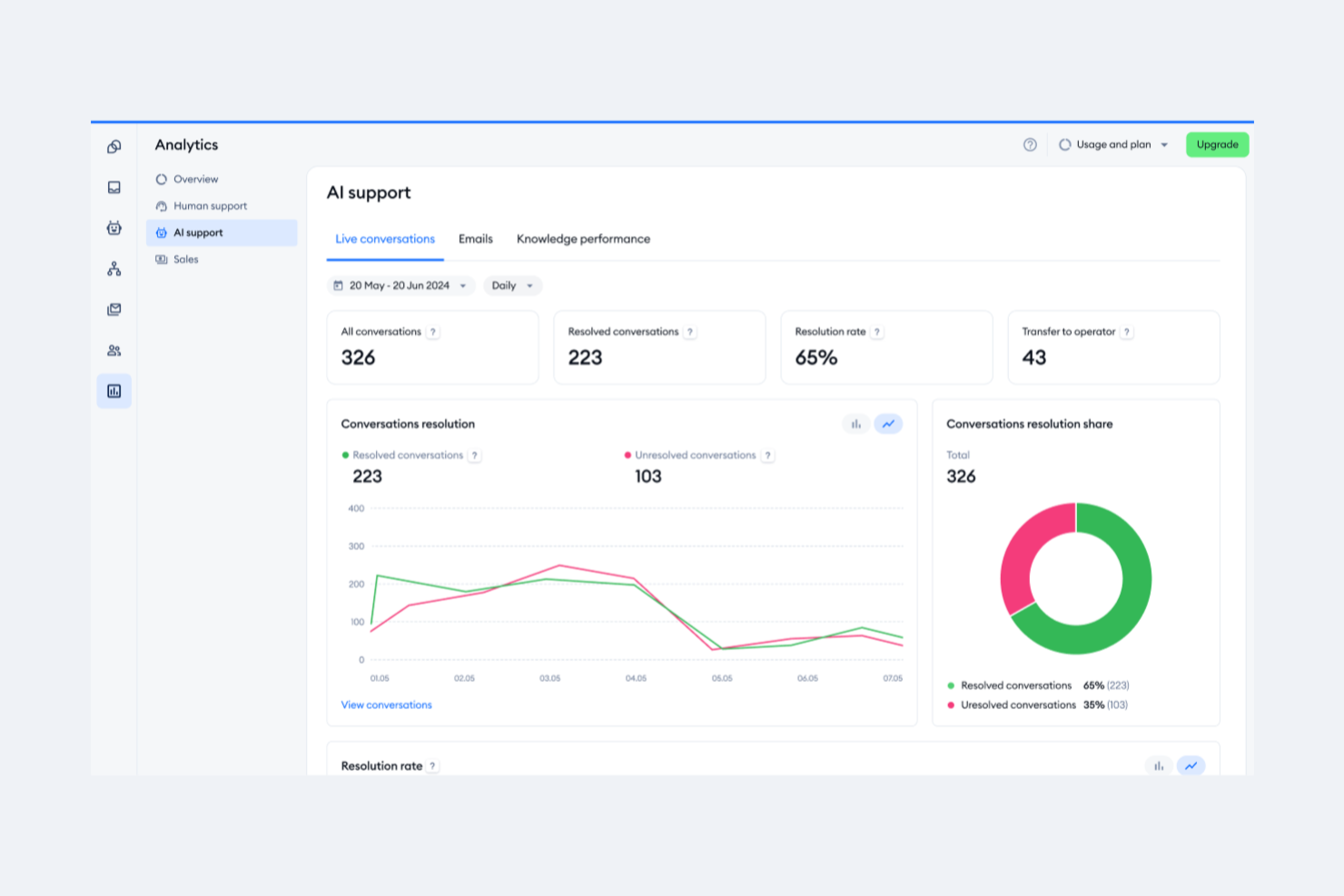
Tidio est une plateforme de service client qui combine chat en direct, gestion des tickets du service d'assistance, automatisation de chatbots sans code et agent IA dans une boîte de réception unifiée qui centralise les conversations provenant du chat web, des e-mails, de Facebook Messenger, d'Instagram et de WhatsApp.
À qui Tidio convient-il le mieux ?
Tidio convient particulièrement aux petites et moyennes entreprises de commerce électronique, notamment celles qui utilisent Shopify ou WooCommerce et qui ont besoin d'un outil unique pour gérer les conversations avec leurs clients sur les canaux de chat et les réseaux sociaux.
Pourquoi j'ai choisi Tidio
Tidio figure dans ma sélection parce que Lyro, son agent IA conversationnel, résout une grande partie des demandes des clients sans intervention d'un agent. J'apprécie le fait que Lyro s'appuie directement sur votre contenu d'aide existant pour rester précis sur chaque canal connecté, du chat web à WhatsApp. L'Assistant de réponse IA, qui utilise GPT-4 pour proposer des réponses suggérées, évite à mes agents de devoir partir de zéro dans une file d'attente à fort volume.
Fonctionnalités clés de Tidio
- Boîte de réception omnicanale : Réunit les conversations du chat en direct, des e-mails, de Facebook Messenger, d'Instagram et de WhatsApp dans un seul tableau de bord.
- Éditeur visuel de flux : Permet de créer des flux de travail de chatbot personnalisés grâce à une interface sans code reposant sur le glisser-déposer.
- Intégrations de commerce électronique : Se connecte directement à Shopify et WooCommerce pour récupérer les données de commande et mettre à jour les tickets.
- Prise en charge de plusieurs agents : Autorise jusqu'à 10 agents par espace de travail avec les forfaits standard, avec attribution des agents et gestion des autorisations.
Intégrations de Tidio
Tidio propose des intégrations natives avec Shopify, WooCommerce, WhatsApp, HubSpot, Google Analytics et Zapier. Une API est disponible pour les intégrations personnalisées.
Pros and Cons
Pros:
- Prend en charge 12 langues pour les équipes internationales
- Déploiement rapide avec une configuration minimale
- Boîte de réception unifiée couvrant le chat, les e-mails et les réseaux sociaux
Cons:
- Pas de prise en charge native du canal vocal
- Fonctionnalités limitées avec le forfait gratuit

Idéal pour la distribution automatisée des tickets
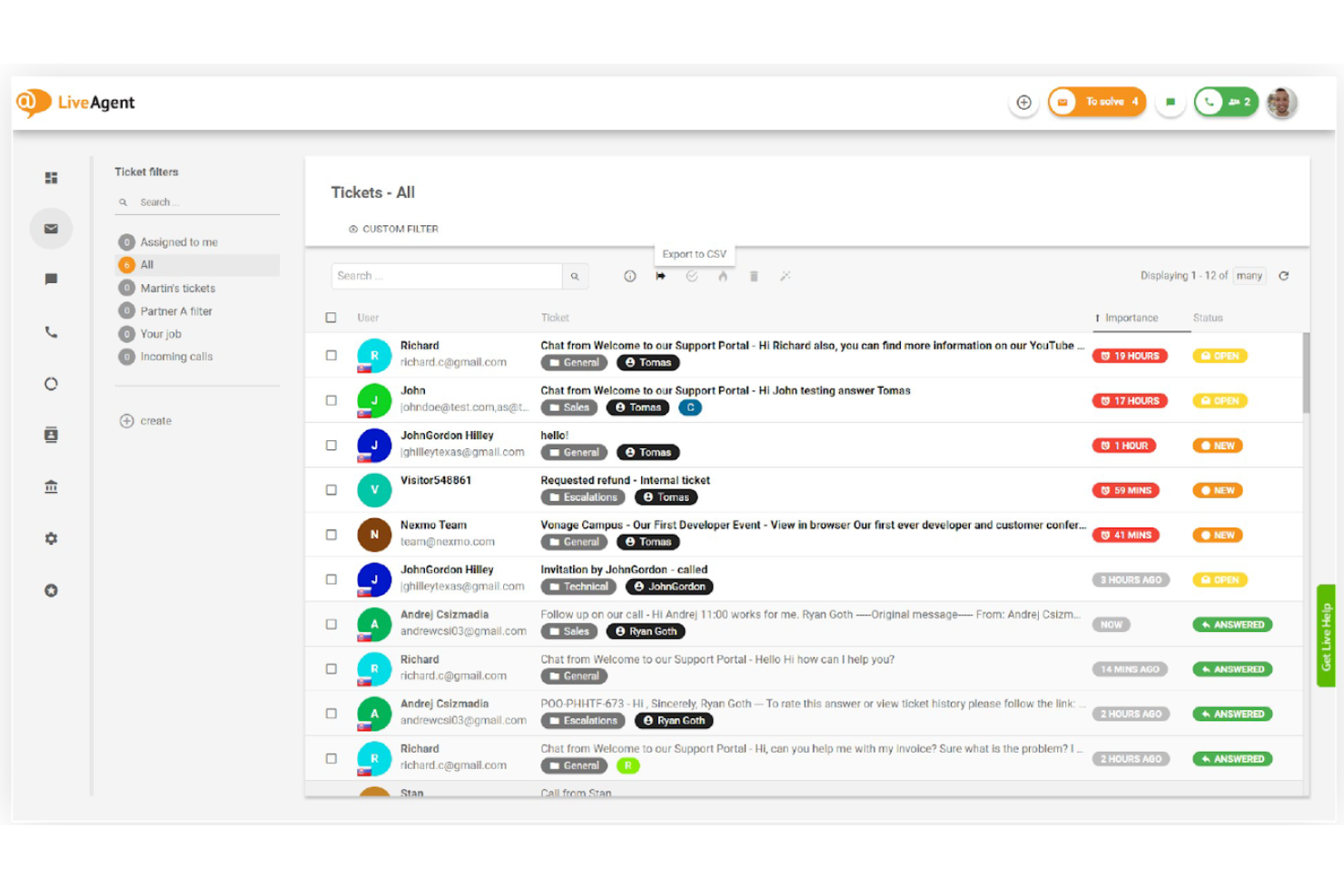
LiveAgent est une plateforme de centre d’assistance et de service client omnicanal qui unifie les canaux de messagerie électronique, de chat en direct, de téléphonie et de messagerie sociale dans un espace de travail unique pour les agents, avec une gestion intégrée des tickets, un centre d’appels natif et des outils d’automatisation.
À qui LiveAgent convient-il le mieux ?
LiveAgent convient particulièrement aux équipes d’assistance des PME et des entreprises de taille intermédiaire qui ont besoin d’une couverture multicanal — e-mail, chat, téléphone et réseaux sociaux — sans la complexité ni le coût des plateformes d’entreprise.
Pourquoi ai-je choisi LiveAgent ?
J’ai inclus LiveAgent dans ma sélection principale parce que sa distribution automatisée des tickets va bien au-delà d’une simple attribution à tour de rôle. Les tickets entrants sont automatiquement acheminés en fonction du service, des compétences de l’agent et de sa charge de travail actuelle, de sorte qu’une conversation concernant un problème de facturation n’atterrisse pas dans une file d’assistance technique. J’apprécie également le fait que les règles de SLA puissent déclencher des réaffectations automatiques lorsqu’un ticket reste trop longtemps sans activité, ce qui permet de maîtriser les délais de réponse sans aucune intervention manuelle.
Principales fonctionnalités de LiveAgent
- Flux de tickets hybride : Regroupe les conversations provenant des e-mails, du chat, du téléphone et des réseaux sociaux dans un ticket unique pour chaque client.
- Centre d’appels intégré : Fournit nativement au sein de la plateforme un SVI, la mise en file d’attente des appels, l’enregistrement des conversations et l’assistance téléphonique.
- Intégration de la base de connaissances : Propose des bases de connaissances internes et publiques avec des portails personnalisables et des outils en libre-service.
- Rapports multicanal : Fournit des tableaux de bord prédéfinis qui suivent les tickets, les agents, les SLA et les retours des clients sur tous les canaux pris en charge.
Intégrations de LiveAgent
LiveAgent propose des intégrations natives avec Slack, Facebook, Instagram, WhatsApp, Shopify, Salesforce, Google Analytics, Mailchimp et Zapier, ainsi qu’une API pour les intégrations personnalisées.
Pros and Cons
Pros:
- Centre d’appels intégré sans frais supplémentaires
- Inclut des outils d’IA pour aider à rédiger les réponses
- Automatisation robuste des SLA sur tous les canaux
Cons:
- Certains utilisateurs trouvent l’interface obsolète
- Les canaux de réseaux sociaux sont limités aux forfaits supérieurs

eDesk
Idéal pour les communications client e-commerce unifiées
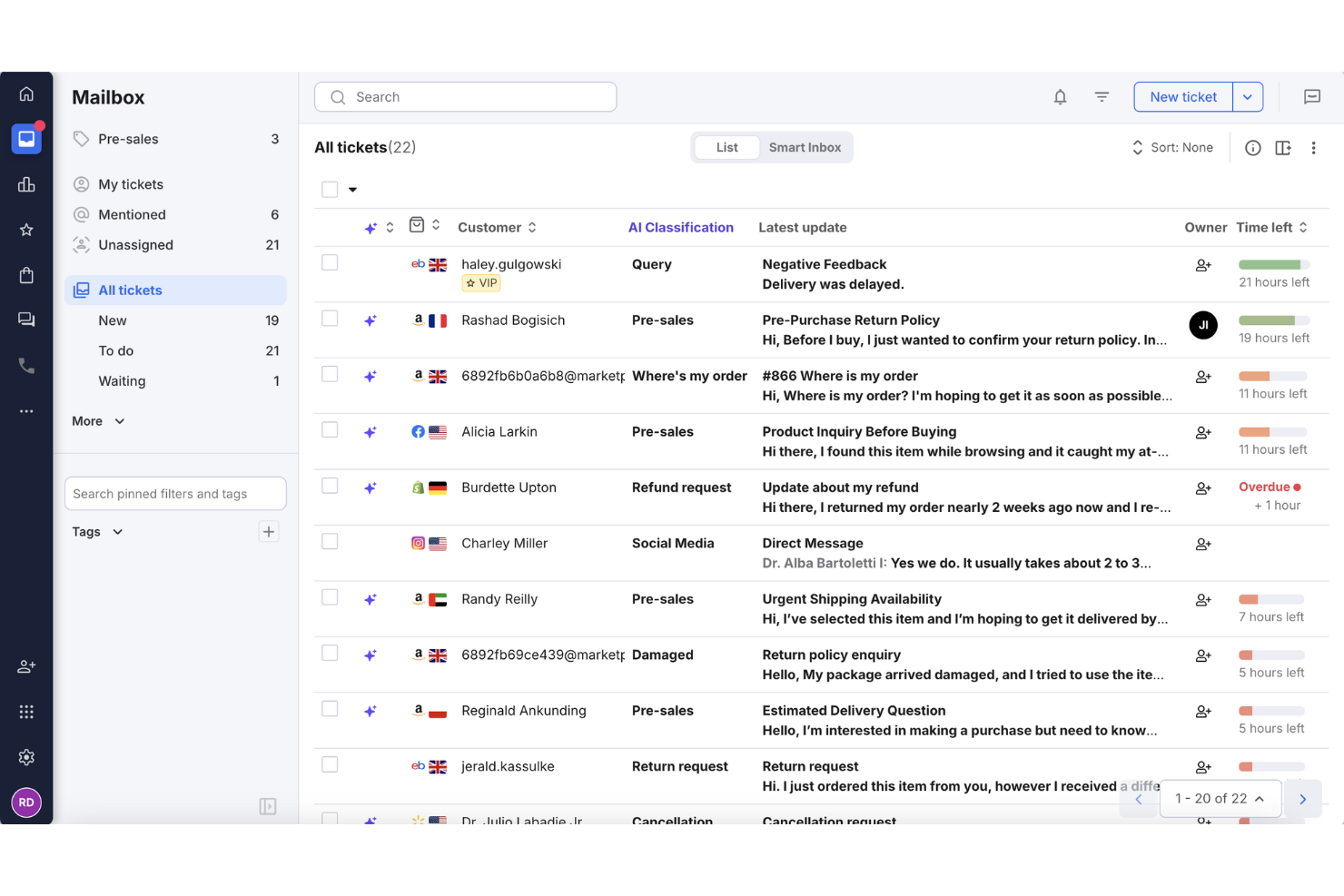
Pour les détaillants en ligne souhaitant améliorer leur support client, eDesk propose une solution de centre d'assistance pratique qui centralise les messages provenant de plusieurs canaux de vente. Conçu pour les équipes e-commerce, il automatise les tâches de support récurrentes et offre des outils de rapports pour suivre la performance des réponses. Grâce à des intégrations sur de nombreuses plateformes, eDesk aide les équipes à gérer les demandes clients plus efficacement et à maintenir des workflows de support cohérents.
Pourquoi j'ai choisi eDesk
J'ai choisi eDesk pour sa capacité à unifier les communications client du e-commerce à travers les marketplaces et les boutiques en ligne, ce qui aide les équipes à gérer le support sur plusieurs canaux de vente plus facilement. Ses outils d'automatisation réduisent la gestion manuelle des tâches de support routinières, permettant ainsi aux agents de se concentrer sur les demandes clients plus complexes. Les outils intégrés d'avant-vente aident également les équipes e-commerce à répondre aux questions sur les produits et à soutenir les décisions d'achat.
Fonctionnalités clés d'eDesk
En plus de ses capacités remarquables, eDesk propose d'autres fonctionnalités précieuses :
- Chatbot IA : Offre une assistance automatisée 24h/24 et 7j/7, engage les visiteurs et gère les demandes client.
- Gestion des avis : Automatise le processus de demande d'avis auprès des clients satisfaits afin d'améliorer la réputation de la marque.
- Analyse & rapports : Fournit des analyses en temps réel sur les indicateurs de support et les interactions clients, vous aidant à optimiser vos opérations.
- Support multilingue : Permet de gérer des opérations e-commerce internationales grâce à la prise en charge de plusieurs langues.
Intégrations d'eDesk
Les intégrations incluent Amazon, eBay, Walmart, Shopify, Magento, WooCommerce, Facebook, WhatsApp, Instagram et Google Shopping.
Pros and Cons
Pros:
- Intègre des données de commande enrichies pour un service client optimisé
- Conçu pour gérer de gros volumes de demandes e-commerce
- Des automatisations alimentées par l'IA améliorent l'efficacité des réponses
Cons:
- Principalement conçu pour l'e-commerce, moins flexible pour d'autres secteurs
- La personnalisation des rapports est limitée pour les analyses complexes
New Product Updates from eDesk
eDesk Adds Galeria and Kaufland Support in Spain and Netherlands
eDesk adds support for Galeria, Kaufland Spain, and Kaufland Netherlands marketplaces. These integrations bring more European buyer messages into eDesk with routing, templates, AI insights, and automated translation. For more information, visit eDesk’s official site.
 .
.
Chatbase
Idéal pour une escalade intelligente par IA
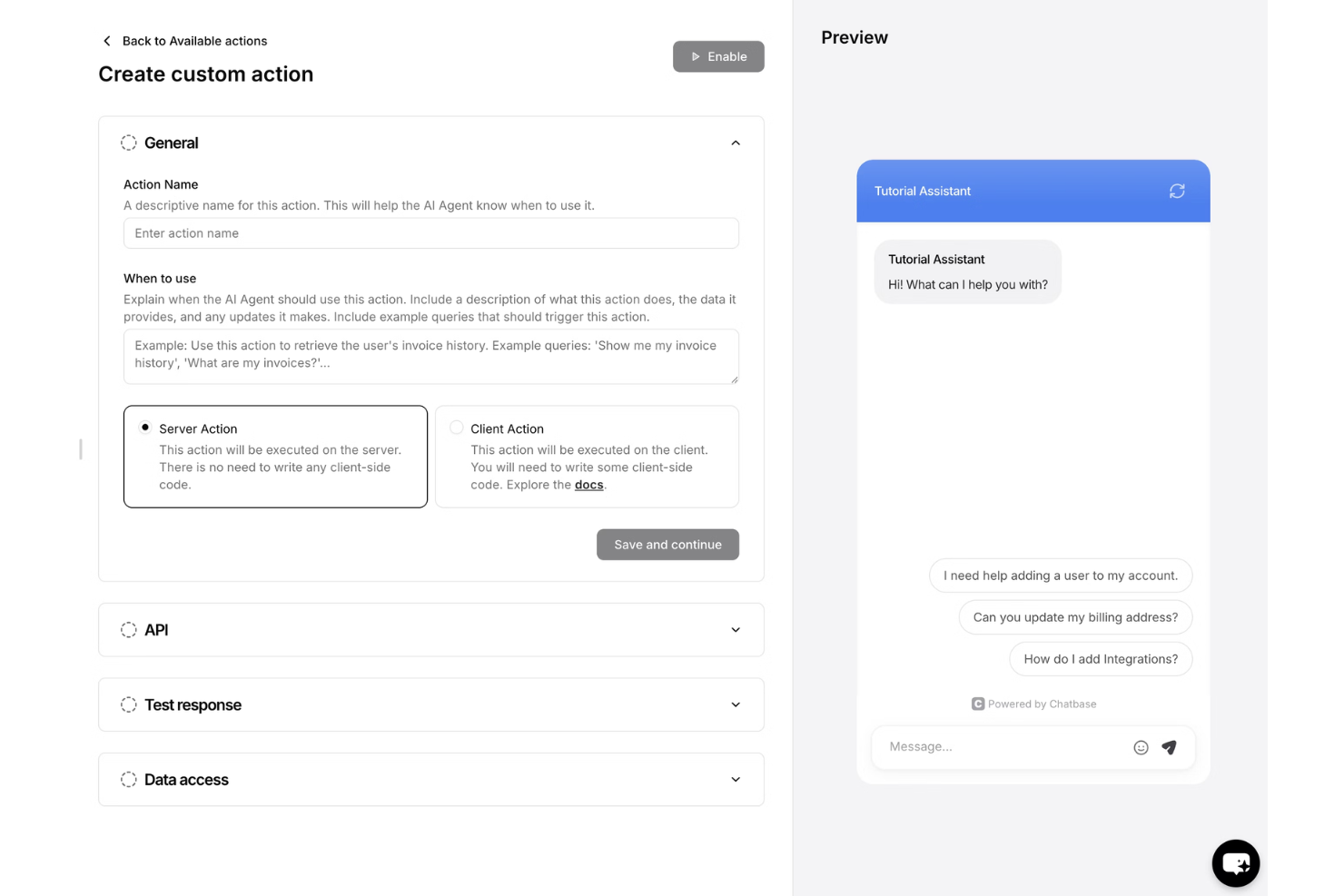
Chatbase est une plateforme alimentée par l’IA qui aide votre équipe à fournir un service client cohérent et omnicanal grâce à des agents virtuels intelligents. Elle déploie des agents d’assistance autonomes sur les canaux de chat, d’e-mail, vocaux et de messagerie sociale, avec un service d’assistance intégré pour la collaboration entre l’IA et les équipes humaines.
À qui Chatbase convient-il le mieux ?
Chatbase convient particulièrement aux petites et moyennes entreprises qui souhaitent déployer des agents d’assistance alimentés par l’IA sans équipe de développement.
Pourquoi j’ai choisi Chatbase
J’ai choisi Chatbase comme l’une des meilleures solutions parce que sa logique d’escalade par IA est réellement précise. Grâce à sa fonctionnalité de garde-fous, je peux définir exactement les sujets que l’agent traite et ceux qu’il transfère à un humain, par exemple en dirigeant directement les demandes de remboursement vers l’assistance à la facturation. Ce que j’apprécie particulièrement, c’est que le module de service d’assistance conserve l’intégralité du fil de conversation lorsque ce transfert se produit, afin que mes agents humains reprennent la conversation en cours avec tout le contexte nécessaire, plutôt que de repartir de zéro.
Principales fonctionnalités de Chatbase
- Déploiement multicanal : Lancez des agents d’assistance sur le chat du site web, l’e-mail, la voix, WhatsApp, Messenger, Instagram et Slack.
- Créateur de procédures : Créez des flux de travail étape par étape en langage courant pour automatiser les actions et les réponses des agents.
- Module de service d’assistance : Gérez les conversations avec les clients dans une boîte de réception partagée, avec attribution des agents et historique des conversations.
- Tableau de bord analytique : Suivez les sujets des conversations, le sentiment et les tendances sur tous les canaux pris en charge.
Intégrations de Chatbase
Chatbase propose des intégrations natives avec Shopify, Stripe, WhatsApp, Slack, Messenger et Notion. Une API est disponible pour les intégrations personnalisées.
Pros and Cons
Pros:
- Configuration facile des actions
- Déploie des agents sur plus de 7 canaux
- Automatise les réponses en plusieurs étapes sans code
Cons:
- Nécessite une formation pour être optimisé
- Prise en charge limitée des canaux vocaux natifs

Missive
Idéal pour les espaces de messagerie collaborative
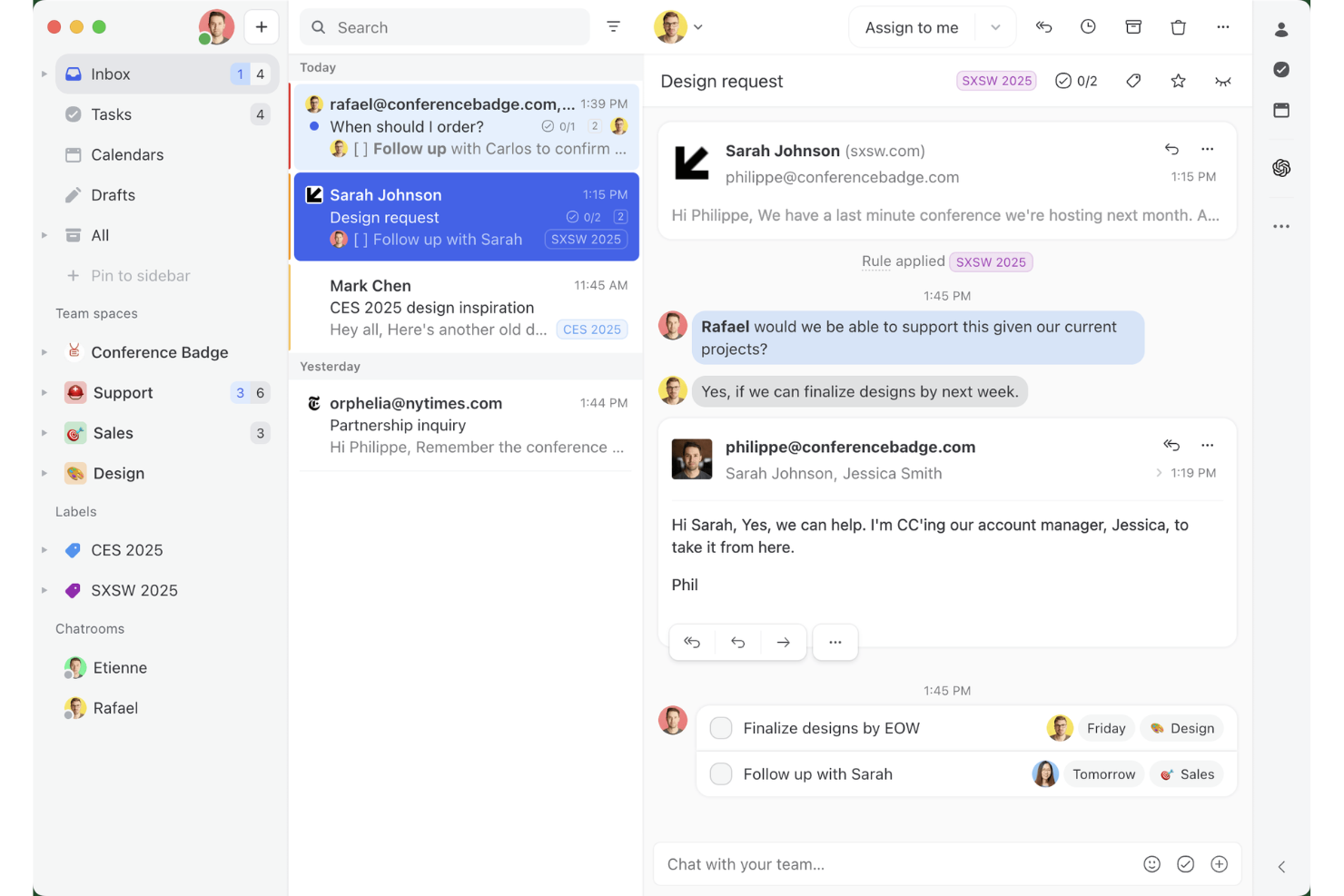
Missive est une boîte de réception collaborative omnicanale qui réunit les e-mails, les SMS, WhatsApp, Messenger, Instagram et le chat en direct dans un espace de travail partagé unique, avec une communication d'équipe intégrée, un routage assisté par l'IA et une automatisation intercanaux.
À qui Missive convient-il le mieux ?
Missive convient particulièrement aux équipes de PME et d'entreprises de taille intermédiaire qui gèrent des conversations clients par e-mail, SMS et réseaux sociaux, et qui souhaitent intégrer directement la collaboration à leur boîte de réception.
Pourquoi j'ai choisi Missive
J'ai inclus Missive dans ma sélection principale, car son modèle de boîte de réception collaborative propose une fonctionnalité que la plupart des outils omnicanaux n'offrent pas : il intègre les échanges entre membres de l'équipe directement dans le fil de conversation client, ce qui permet aux agents de faire intervenir un spécialiste ou de transmettre le dossier en cours de réponse sans basculer vers Slack. J'apprécie également la façon dont son routage alimenté par l'IA classe les messages entrants selon leur tonalité et leur langue sur tous les canaux connectés simultanément, qu'il s'agisse de WhatsApp, de SMS ou de messages privés Instagram. Cette cohérence des règles entre les canaux est véritablement rare à ce niveau de prix.
Fonctionnalités principales de Missive
- Réponses prédéfinies : Des modèles de réponse préconçus avec des champs variables permettent aux agents d'envoyer des messages cohérents et conformes à l'identité de la marque par e-mail, SMS et WhatsApp, sans devoir les réécrire depuis zéro.
- Fusion des conversations : Les fils de discussion d'un même client sur différents canaux peuvent être fusionnés manuellement en un seul, afin de conserver l'historique complet des échanges dans une vue unique.
- Règles d'attribution automatique : Les conversations sont distribuées entre les agents selon une logique de rotation, de moindre charge ou aléatoire, ce qui réduit le triage manuel pour les responsables d'équipe.
- Serveur MCP de Missive : Connectez des outils d'IA externes (comme Claude ou ChatGPT) pour interroger les fils du service client, consulter les calendriers et rédiger des réponses, tout en exigeant une vérification par un agent avant l'envoi.
Intégrations de Missive
Missive s'intègre à HubSpot, Salesforce, Shopify, Aircall, Dialpad, Twilio et Zapier. Son API REST et ses webhooks prennent en charge les intégrations personnalisées, tout comme son nouveau serveur MCP dans les offres Productive et Business (activation par un administrateur requise).
Pros and Cons
Pros:
- Tous les canaux réunis dans une seule boîte de réception
- Discussion d'équipe intégrée à chaque conversation
- Routage multicanal flexible alimenté par l'IA
Cons:
- Pas de chatbot d'IA intégré pour réduire le volume des demandes
- Aucune enquête native de satisfaction client
New Product Updates from Missive
Missive Adds Conversation Pins
Missive now lets you pin key links, decisions, and notes inside a conversation, keeping them accessible in a dedicated Pins section in the Details sidebar. For more information, visit Missive's official site.
 .
.Autres logiciels de service client omnicanal
Voici quelques autres options de logiciels de service client omnicanal qui n’ont pas intégré ma sélection, mais qui méritent tout de même votre attention :
- Front
Idéal pour le suivi de la qualité des messages
- Intercom
Idéal pour les startups
- Bright Pattern
Idéal pour les analyses pilotées par l’IA
- Talkdesk
Idéal pour les centres d'appels
- Kustomer
Idéal pour l'intégration CRM
- Assembled AI
Idéal pour les systèmes intelligents d'aiguillage des dossiers
- Sprinklr
Idéal pour l'assistance sur les réseaux sociaux
- Crescendo
Idéal pour générer des données conversationnelles exploitables
- Freshworks
Idéal pour la facilité d'utilisation
- Zendesk
Idéal pour la croissance


Comment j’évalue les logiciels de service client omnicanal
Lorsqu’un client commence une discussion et passe à un appel, je m’attends à ce qu’un seul dossier agent le suive — c’est mon critère de base avant de mesurer ce qui différencie une plateforme des autres.
Fonctionnalités de base (Critères indispensables pour cette liste)
Lorsque je sélectionne des outils pour ma liste, j’attribue à chacun une note de 0 (ne propose pas la fonctionnalité) à 5 (excelle dans ce domaine) pour chaque fonctionnalité essentielle ci-dessous. Ensuite, je convertis le score total de l’outil en pourcentage. Chaque solution doit obtenir un score total minimal de 75% pour être prise en compte.
- Boîte de réception multicanal : Je vérifie si les e-mails, chats, réseaux sociaux, SMS et appels arrivent tous dans un même espace de travail agent, afin que les conseillers n’aient pas à jongler entre les onglets du navigateur.
- Profil client unifié : Chaque outil doit afficher, en un coup d’œil, tout l’historique d’interactions d’un client sur les différents canaux, incluant tickets précédents, achats et notes.
- Routage et attribution omnicanaux : J’analyse comment les conversations sont attribuées — le logiciel propose-t-il un routage par compétences, des règles de priorité SLA et un équilibrage de charge entre les canaux ?
- Gestion de tickets multi-canaux : Un client débutant sur le chat et poursuivant par e-mail doit rester sur un même fil de ticket, avec tout le contexte accessible à chaque agent qui prend le dossier.
- Automatisation et assistance IA : J’évalue si les déclencheurs de workflows, les chatbots et les fonctionnalités IA telles que les suggestions de réponses ou le classement automatique fonctionnent sur tous les canaux connectés.
- Analyse omnicanale : Les tableaux de bord doivent agréger les indicateurs clés (CSAT, délai de première réponse, taux de résolution…) sur tous les canaux, et non les cloisonner.
Une fois la liste des outils répondant aux critères établie, j’examine ce qui différencie chaque plateforme.
Facteurs de différenciation (Ce qui distingue les éditeurs)
Voici comment je compare et distingue les solutions :
Fonctionnalités marquantes
L’envoi proactif de messages est un critère prioritaire pour moi. Les plateformes permettant de déclencher un chat ou un SMS suite à un abandon de panier ou lors d’étapes clés de l’onboarding font basculer le support d’une approche réactive à une approche stratégique. J’évalue également si une base de connaissances intégrée propose des articles suggérés par IA aux agents en cours de conversation, et si elle alimente un portail d’auto-assistance pour les clients. Pour les responsables de centres de contact gérant de grandes équipes, la présence d’outils natifs de gestion des effectifs (planification des plannings, prévisions de volumes) permet d’éviter d’avoir à investir dans une solution WFM distincte.
Au-delà des fonctionnalités
La profondeur d’intégration est l’un des premiers aspects que j’examine. Une plateforme qui se connecte nativement à votre CRM ou à votre solution e-commerce permet à un agent de consulter les statuts de commande ou les détails de compte sans quitter l’interface. J’étudie aussi de près le coût total de possession, notamment les éventuels frais supplémentaires liés à l’IA, à des canaux premium comme WhatsApp, ou à l’utilisation de l’API — des coûts pouvant vite augmenter selon le volume. Pour les équipes évoluant dans des secteurs réglementés comme la santé ou la finance, des certifications telles que HIPAA ou PCI-DSS peuvent rapidement réduire la liste de choix possibles.
Comment choisir un logiciel de service client omnicanal
Pour choisir un logiciel de service client omnicanal, concentrez-vous sur sa capacité à connecter vos principaux canaux d'assistance, les données clients et vos flux de travail. Il doit fournir aux agents le contexte dont ils ont besoin pour gérer les conversations sans obliger les clients à se répéter.
Tenez compte des facteurs suivants :
| Élément à prendre en compte | Priorités |
|---|---|
| Canal principal | Une prise en charge solide de vos canaux à plus fort volume. Si le téléphone génère la plupart des conversations, donnez la priorité aux fonctionnalités de centre de contacts. S'il s'agit de la messagerie, privilégiez WhatsApp, les SMS, les réseaux sociaux et le chat en direct. |
| Taille de l'équipe | Des fonctionnalités adaptées au fonctionnement de votre équipe. Les petites équipes peuvent n'avoir besoin que d'une boîte de réception unifiée et d'un routage simple. Les équipes plus importantes peuvent avoir besoin d'un routage fondé sur les compétences, de permissions, d'une assurance qualité, d'une gestion des effectifs et de rapports avancés. |
| Volume de clients | Une automatisation et un routage capables de gérer votre volume d'assistance. Les équipes traitant des volumes élevés doivent privilégier le routage automatisé, la gestion des files d'attente, l'IA et les outils qui réduisent les tâches répétitives des agents. |
| Complexité de l'assistance | Des outils pour gérer les transferts et les escalades. Si les dossiers passent régulièrement d'un agent ou d'un service à l'autre, privilégiez un contexte client partagé, la collaboration interne et les flux de travail d'escalade. |
| Secteur d'activité | Des fonctionnalités qui répondent aux exigences de votre secteur. Les équipes de commerce électronique peuvent avoir besoin de données de commande et d'intégrations commerciales, tandis que les secteurs réglementés peuvent nécessiter une sécurité, une conformité et des contrôles d'audit renforcés. |
Tendances des logiciels de service client omnicanal
Dans le cadre de mes recherches, j’ai consulté d’innombrables mises à jour de produits, communiqués de presse et journaux de publication provenant de différents fournisseurs de logiciels de service client multicanal. Voici quelques-unes des tendances émergentes que je surveille :
- Personnalisation basée sur l’IA : De nombreux fournisseurs utilisent l’IA pour proposer des interactions personnalisées avec les clients. Cette tendance s’accentue alors que les entreprises cherchent à adapter les expériences aux besoins individuels de chaque client. Par exemple, l’IA peut analyser l’intégralité de l’historique des interactions d’un client afin de suggérer des réponses personnalisées et d’assurer la continuité du service.
- Technologie de reconnaissance vocale : La reconnaissance vocale devient de plus en plus courante, permettant aux clients d’interagir avec les services sans les mains. Cette tendance améliore l’accessibilité et la commodité, certains fournisseurs intégrant des commandes vocales à leurs plateformes pour favoriser l’engagement client.
- Engagement client proactif : Les outils évoluent pour interagir avec les clients avant même qu’ils ne signalent un problème. Cette tendance consiste à utiliser l’analyse des données pour anticiper les besoins des clients et proposer des solutions de manière proactive, améliorant ainsi la satisfaction et réduisant le nombre de demandes d’assistance.
- Analyses omnicanales : Les fournisseurs s’attachent à fournir des informations permettant aux entreprises de comprendre le comportement et les préférences des clients sur différentes plateformes, afin d’affiner leurs stratégies et d’améliorer leurs services.
- Assistance par visioconférence : La visioconférence gagne du terrain en tant qu’outil d’assistance, offrant une approche plus personnalisée. Elle est utile pour les problèmes complexes nécessitant des explications visuelles, et certains fournisseurs intègrent cette fonctionnalité pour améliorer les interactions avec les clients.
Qu’est-ce qu’un logiciel de service client omnicanal ?
Un logiciel de service client omnicanal est un outil qui permet aux entreprises de gérer les interactions avec les clients de manière fluide sur plusieurs canaux de communication depuis une plateforme unique. Les professionnels du service client et les équipes d’assistance utilisent généralement ces outils pour améliorer les temps de réponse et fournir une assistance cohérente.
Des fonctionnalités telles que la personnalisation basée sur l’IA, l’engagement proactif et les analyses omnicanales contribuent à adapter les expériences client, à anticiper les besoins et à comprendre les comportements. Globalement, ces outils améliorent la satisfaction des clients en garantissant un service efficace et personnalisé sur tous les canaux.
Fonctionnalités des logiciels de service client omnicanal
Lorsque vous choisissez un logiciel de service client omnicanal, prêtez attention aux fonctionnalités clés suivantes :
- Personnalisation basée sur l’IA : Cette fonctionnalité utilise l’IA pour adapter les interactions en fonction des données client, améliorant ainsi l’expérience client en rendant les conversations plus pertinentes.
- Routage avancé des appels : Dirige les appels vers l’agent le plus approprié, améliorant les temps de réponse et garantissant que les clients obtiennent rapidement l’aide dont ils ont besoin.
- Analyses multicanales : Fournit des informations sur l’ensemble des canaux de communication, aidant les entreprises à comprendre le comportement des clients et à optimiser leurs stratégies de service.
- Engagement client proactif : Utilise les données pour anticiper les besoins des clients et proposer des solutions avant l’apparition des problèmes, réduisant ainsi le nombre de demandes d’assistance et augmentant la satisfaction.
- Chronologie client unifiée : Regroupe toutes les interactions issues de différents canaux dans une vue unique, donnant aux agents le contexte nécessaire pour fournir une assistance éclairée et personnalisée.
- Assistance par visioconférence : Offre une manière plus personnalisée d’aider les clients ; elle est particulièrement utile pour les problèmes complexes nécessitant des explications visuelles.
- Tableaux de bord personnalisables : Permet aux équipes d’adapter leur espace de travail à leurs besoins, améliorant ainsi leur efficacité et leur concentration.
- Automatisation des flux de travail : Simplifie les tâches répétitives, permettant à votre équipe de traiter des interactions client plus complexes.
- Prise en charge de plusieurs langues : Permet de communiquer avec une clientèle diverse, élargissant la portée du service et améliorant son accessibilité.
- Mesures de sécurité : Protège les données des clients en respectant les normes du secteur, tout en préservant la confiance et la fiabilité.
Avantages des logiciels de service client omnicanal
La mise en œuvre d’un logiciel de service client omnicanal, notamment de solutions de service client sur les réseaux sociaux, offre plusieurs avantages à votre équipe et à votre entreprise. Voici quelques-uns des bénéfices auxquels vous pouvez vous attendre :
- Satisfaction client améliorée : Les clients bénéficient d'une assistance rapide, pertinente et cohérente sur tous les canaux, ce qui améliore leur expérience globale et, par conséquent, leur fidélisation.
- Efficacité accrue : L'automatisation des flux de travail et le routage avancé des appels aident votre équipe à gérer davantage d'interactions avec moins d'efforts, ce qui stimule la productivité.
- Meilleures informations : Les analyses omnicanales offrent une vue complète du comportement des clients, permettant de prendre des décisions fondées sur les données afin d'améliorer la qualité du service.
- Personnalisation renforcée : Les fonctionnalités alimentées par l'IA adaptent les interactions aux préférences de chaque client, rendant les échanges plus pertinents et efficaces.
- Réduction des coûts : Les entreprises peuvent réduire leurs coûts opérationnels en diminuant le besoin de recourir à plusieurs plateformes et en optimisant l'allocation des ressources.
- Portée élargie : La prise en charge de plusieurs langues et les options de visioconférence vous permettent de vous connecter à un public plus large, élargissant ainsi votre clientèle.
- Sécurité renforcée : Le respect des normes du secteur garantit la protection des données clients, favorisant la confiance et la fiabilité.
Coûts et tarification des logiciels de service client omnicanal
Le choix d'un logiciel de service client omnicanal nécessite de comprendre les différents modèles tarifaires et forfaits disponibles. Les coûts varient en fonction des fonctionnalités, de la taille de l'équipe, des modules complémentaires et d'autres facteurs. Le tableau ci-dessous récapitule les forfaits courants, leurs prix moyens et les fonctionnalités généralement incluses dans les solutions de service client omnicanal :
Tableau comparatif des forfaits de logiciels de service client omnicanal
| Type de forfait | Prix moyen | Fonctionnalités courantes |
| Forfait gratuit | $0 | Gestion de tickets de base, assistance par e-mail et analyses limitées. |
| Forfait individuel | $5-$25/utilisateur/mois | Assistance par e-mail et chat, rapports de base et options de personnalisation limitées. |
| Forfait professionnel | $30-$75/ utilisateur/mois | Assistance multicanale, automatisation des flux de travail et outils de reporting avancés. |
| Forfait entreprise | $80-$150/ utilisateur/mois | Personnalisation complète, analyses alimentées par l'IA et gestion de compte dédiée. |
FAQ sur les logiciels de service client omnicanal
Voici les réponses aux questions fréquentes sur les logiciels de support client omnicanal :
Quelle est la différence entre le service client omnicanal et multicanal ?
Le service client multicanal propose une assistance sur plusieurs canaux, tandis que le service client omnicanal relie ces canaux pour offrir une expérience continue. Par exemple, avec un support multicanal, un client qui commence par une conversation en direct puis appelle peut devoir expliquer à nouveau son problème. Avec un support omnicanal, l’agent au téléphone peut consulter la conversation précédente et la reprendre là où elle s’est arrêtée.
Combien de canaux une plateforme de service client omnicanal doit-elle prendre en charge ?
Il n’y a pas de nombre idéal. Une plateforme omnicanale doit prendre en charge les canaux que vos clients utilisent réellement et les relier afin que les agents puissent passer d’une conversation à l’autre sans perdre le contexte. Pour de nombreuses entreprises, cela signifie commencer par l’e-mail, la conversation en direct, le téléphone et les réseaux sociaux ou applications de messagerie.
Quels canaux doivent être inclus dans une stratégie omnicanale ?
Examinez les moyens par lesquels les clients vous contactent déjà et donnez la priorité aux canaux qui enregistrent la plus forte demande. Pour de nombreuses équipes, cela inclut l’e-mail, le téléphone, la conversation en direct, les réseaux sociaux, les SMS et les applications de messagerie telles que WhatsApp — mais votre combinaison de canaux doit correspondre à vos clients.
Faut-il remplacer son CRM pour mettre en place un service client omnicanal ?
En général, non. Une bonne plateforme omnicanale doit s’intégrer à votre CRM existant afin que les agents puissent accéder aux données clients en parallèle des conversations de support. L’essentiel est la qualité de l’intégration : vérifiez quelles données sont synchronisées, si les mises à jour s’effectuent en temps réel et si les agents peuvent accéder aux informations dont ils ont besoin sans passer d’un système à l’autre.
Quel est le principal inconvénient des logiciels de service client omnicanal ?
Le principal inconvénient des logiciels omnicanaux réside dans la complexité de leur mise en œuvre. Ils nécessitent un système bien coordonné qui fonctionne sur plusieurs canaux. Une approche omnicanale peut être difficile à mettre en place dans les organisations où existent des silos de données. Garantir une expérience client cohérente partout peut s’avérer difficile, en particulier sans les technologies et les processus appropriés.
Comment mettre en place un service client omnicanal ?
Pour mettre en place un service client omnicanal, commencez par comprendre les attentes des clients et identifier les canaux que vous utiliserez (indice : examinez les canaux utilisés par vos clients). Investissez dans les technologies adaptées pour prendre en charge ces canaux et développez les compétences de votre équipe afin qu’elle puisse les gérer efficacement. Envisagez également de créer des options en libre-service et veillez à la sécurité des données clients tout au long du processus.
Quels sont les 4 C du service client omnicanal ?
Les 4 C du service client omnicanal sont l’expérience client, le contexte, le contenu et la collaboration. Ces éléments agissent ensemble pour créer une expérience client cohérente et attrayante sur tous les canaux, en veillant à ce que les interactions soient pertinentes et uniformes.
Comment les logiciels omnicanaux améliorent-ils la satisfaction client (CSAT) ?
Les logiciels de service omnicanal améliorent la satisfaction client en fournissant une assistance cohérente sur plusieurs canaux, ce qui permet des interactions plus personnalisées et efficaces. Des fonctionnalités telles que l’engagement proactif et les historiques clients unifiés garantissent que les clients reçoivent une aide rapide et pertinente, améliorant ainsi leur expérience globale.