

10 meilleurs logiciels de centre d’assistance simples de 2026 pour leur facilité d’utilisation

10 Sélection des meilleurs logiciels de service d’assistance simples


Dans l’univers trépidant du service client, vous jonglez souvent avec plusieurs tâches tout en vous efforçant de satisfaire vos clients. Je comprends ce défi. Un logiciel de service d’assistance simple peut faire la différence en organisant vos demandes et en améliorant vos délais de réponse.
J’ai consacré du temps à tester et à évaluer différentes options afin de vous proposer un point de vue impartial sur les meilleures solutions disponibles. Vous trouverez des informations sur les fonctionnalités, la convivialité et ce qui rend chaque outil unique.
Dans cet article, je vous présenterai mes meilleures sélections en mettant l’accent sur ce qui aide votre équipe à réussir. Que vous cherchiez à améliorer votre efficacité ou à renforcer votre communication, vous trouverez ici une solution adaptée.
Pourquoi faire confiance à nos recommandations de logiciels
Notre équipe teste et évalue des logiciels depuis 2012. En tant que leaders CX nous-mêmes, nous savons à quel point il est difficile — et important — de choisir le bon logiciel.
Pour ce guide, nous avons évalué les outils grâce à des tests pratiques et une recherche indépendante, en notant les outils selon nos critères de sélection.
Nos avis reflètent notre jugement éditorial humain, et non un argumentaire de vente.
Résumé des meilleurs logiciels de service d’assistance simples
Ce tableau comparatif récapitule les tarifs de mes meilleures sélections de logiciels de service d’assistance simples afin de vous aider à trouver la solution la mieux adaptée à votre budget et aux besoins de votre entreprise.
| Tool | Best For | Trial Info | Price | ||
|---|---|---|---|---|---|
| 1 | Meilleure solution d'assistance client pour des problématiques variées | Démo gratuite + essai gratuit de 14 jours disponible | À partir de $19/utilisateur/mois (facturé annuellement) | Website | |
| 2 | Idéal pour les équipes MSP et informatiques | Essai gratuit de 14 jours | À partir de $89/utilisateur/mois (facturé annuellement) | Website | |
| 3 | Meilleur logiciel de service d’assistance pour entreprises de toutes tailles | Essai gratuit de 15 jours + forfait gratuit | À partir de 7 $/utilisateur/mois (facturé annuellement) | Website | |
| 4 | Meilleur logiciel de centre d’assistance alimenté par l’IA | Essai gratuit de 14 jours + démo gratuite disponible | À partir de 19 $/agent/mois (facturé annuellement) | Website | |
| 5 | Idéal pour des fonctionnalités avancées de service d'assistance | Forfait gratuit disponible | À partir de $25/utilisateur/mois (facturé annuellement) | Website | |
| 6 | Idéal pour les clients de messagerie collaboratifs avec boîte de réception partagée | Essai gratuit de 30 jours | À partir de $24/user/month (facturé annuellement) | Website | |
| 7 | Idéal pour une organisation facile des tickets | Essai gratuit de 7 jours + formule gratuite disponible | À partir de $25/utilisateur/mois | Website | |
| 8 | Idéal pour la personnalisation alimentée par l’IA | Essai gratuit + démonstration gratuite disponible | À partir de $25/utilisateur/mois (facturé annuellement) | Website | |
| 9 | Idéal pour la gestion centralisée des messages e-commerce | Essai gratuit de 14 jours | À partir de $39/agent/mois | Website | |
| 10 | Idéal pour l'analyse des interactions clients | Formule gratuite disponible | À partir de 29 $/mois (facturation annuelle) | Website |


Avis sur les meilleurs logiciels de service d’assistance simples
Vous trouverez ci-dessous mes résumés détaillés des meilleurs logiciels de service d’assistance simples qui ont été retenus dans ma sélection. Mes avis présentent une analyse approfondie des principales fonctionnalités, des avantages et inconvénients, des intégrations et des cas d’utilisation idéaux de chaque outil afin de vous aider à trouver celui qui vous convient le mieux.

Meilleure solution d'assistance client pour des problématiques variées
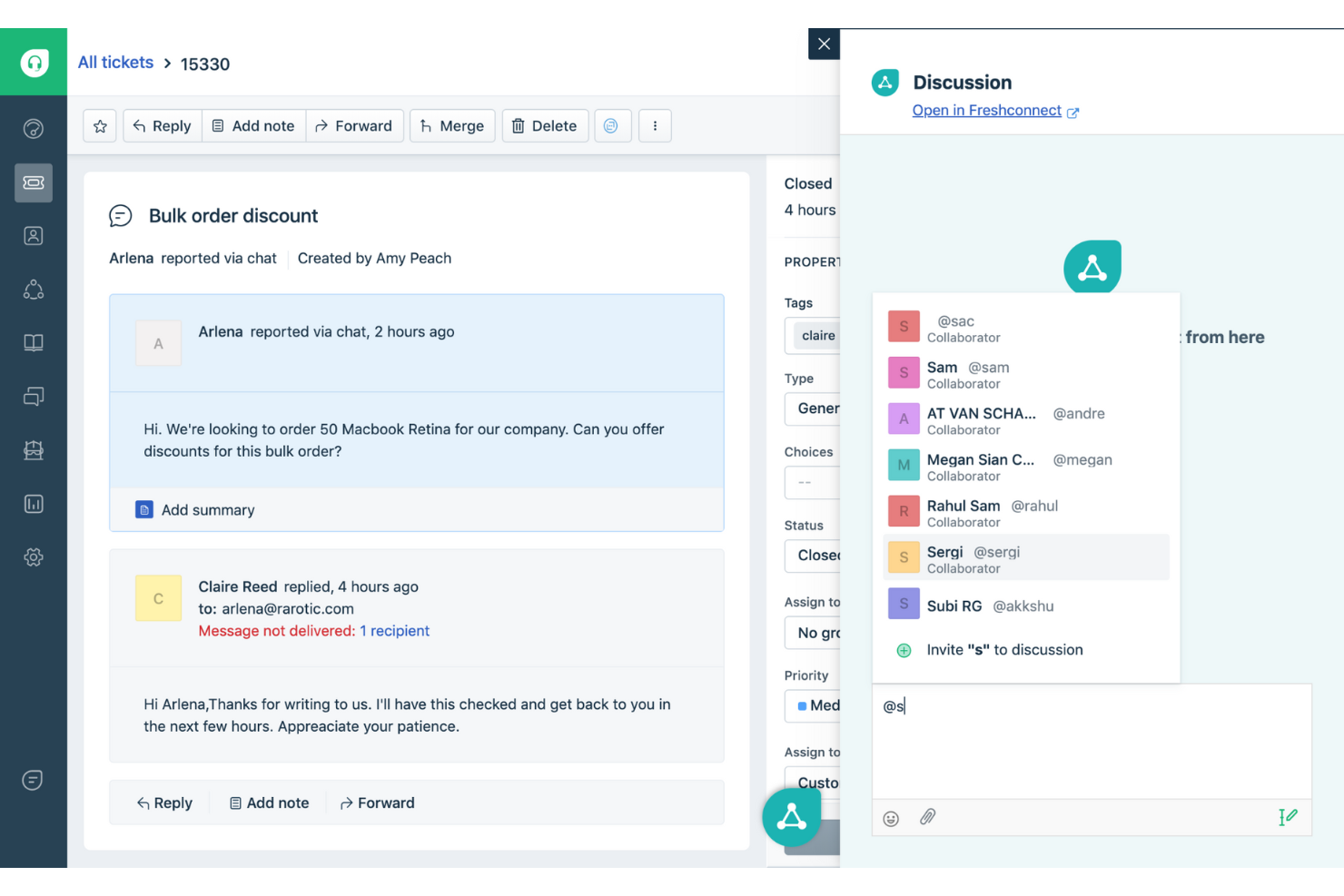
Freshdesk (un produit de Freshworks Inc.) est une plateforme de service d'assistance qui aide les équipes à gérer les demandes clients sur plusieurs canaux de communication. Elle peut être utilisée pour suivre et résoudre une large gamme de problèmes clients, y compris ceux nécessitant une coordination entre équipes ou des délais de résolution prolongés.
Pourquoi j'ai choisi Freshdesk : J'ai choisi Freshdesk pour sa gestion de l'automatisation des tickets dans les flux de travail du support. La plateforme comprend des outils pour automatiser la création, la catégorisation et l'acheminement des tickets, ce qui aide à réduire les étapes manuelles lors de la gestion des demandes entrantes. Freddy AI est disponible dans la plateforme pour aider à ces tâches d'automatisation dans le cadre du flux de travail existant. Cette configuration permet aux équipes de support de traiter les demandes sur différents canaux de manière plus structurée.
Fonctionnalités et intégrations remarquables de Freshdesk :
Les fonctionnalités remarquables incluent la gestion multicanale, qui permet aux équipes de traiter les conversations provenant de différents canaux dans un espace de travail unique. Freshdesk propose également un portail client où les utilisateurs peuvent consulter le statut de leurs tickets et accéder aux ressources d'assistance. Les options de configuration permettent aux équipes d'adapter les flux de travail et les interfaces en fonction des processus internes et des directives de l'image de marque.
Les intégrations incluent Google Analytics, Mailchimp, Microsoft Teams, Salesforce, Shopify, Slack, TeamViewer et WhatsApp. D'autres intégrations sont disponibles via la marketplace Freshdesk, couvrant des domaines tels que la productivité des agents, la communication, la génération de rapports et l'analyse de données.
Pros and Cons
Pros:
- Support omnicanal
- Personnalisation complète
- Peut être étendu
Cons:
- Pas de rapports avancés
- Légère courbe d'apprentissage
New Product Updates from Freshdesk

Freshdesk Adds Voice AI Agents in Freshcaller
Freshdesk introduces Voice AI Agents available through Freshcaller Marketplace apps to handle routine calls and reduce queues. This feature enables automated call handling with real-time, conversational support. For more information, visit Freshdesk's official site.

SuperOps
Idéal pour les équipes MSP et informatiques

SuperOps est une plateforme alimentée par l'IA conçue pour aider les équipes informatiques et les fournisseurs de services managés (MSP) à gérer les demandes de service, automatiser les flux de travail et améliorer les temps de réponse.
Pourquoi j'ai choisi SuperOps : SuperOps se distingue par ses fonctionnalités de gestion intelligente des tickets qui vous aident à hiérarchiser et résoudre les problèmes plus rapidement. Vous pouvez trier et attribuer les tickets par statut, priorité ou technicien à l'aide d'un tableau de type Kanban. La plateforme vous permet également de configurer des SLA automatisés et d'assigner les tickets en fonction des compétences et de la disponibilité des techniciens, garantissant que la bonne personne traite chaque problème rapidement.
Fonctionnalités et intégrations phares de SuperOps
Fonctionnalités : incluent un assistant IA intégré, Monica, qui propose des suggestions instantanées pour la résolution des tickets en analysant des incidents similaires passés et des contenus web pertinents. Elle comprend également des conversations parallèles permettant de gérer les échanges avec les clients et les fournisseurs dans la même fenêtre de ticket, réduisant ainsi le besoin de passer d'un outil à l'autre.
Intégrations : incluent ConnectWise, TeamViewer, Xero, Stripe, QuickBooks, SentinelOne, Lifecycle Manager, Guardz et Microsoft Azure.
Pros and Cons
Pros:
- Gère l'allocation des ressources et la disponibilité des techniciens
- Le suivi du temps intégré garantit un enregistrement précis du temps passé sur les tickets
- L'IA Monica aide à la résolution des tickets en suggérant des solutions
Cons:
- Bien qu'efficaces, les options de personnalisation peuvent être complexes à maîtriser
- Comparé à la concurrence, SuperOps propose moins d'intégrations tierces
New Product Updates from SuperOps

SuperOps Improves Ticket Visibility, Dynamic Forms, and Dashboard Views
SuperOps introduces improvements to ticket visibility, dynamic forms, and dashboard visualizations. These updates help technicians manage customer conversations, simplify ticket creation, and keep dashboard views consistent across teams. For more information, visit SuperOps' official site.
 .
.
Meilleur logiciel de service d’assistance pour entreprises de toutes tailles
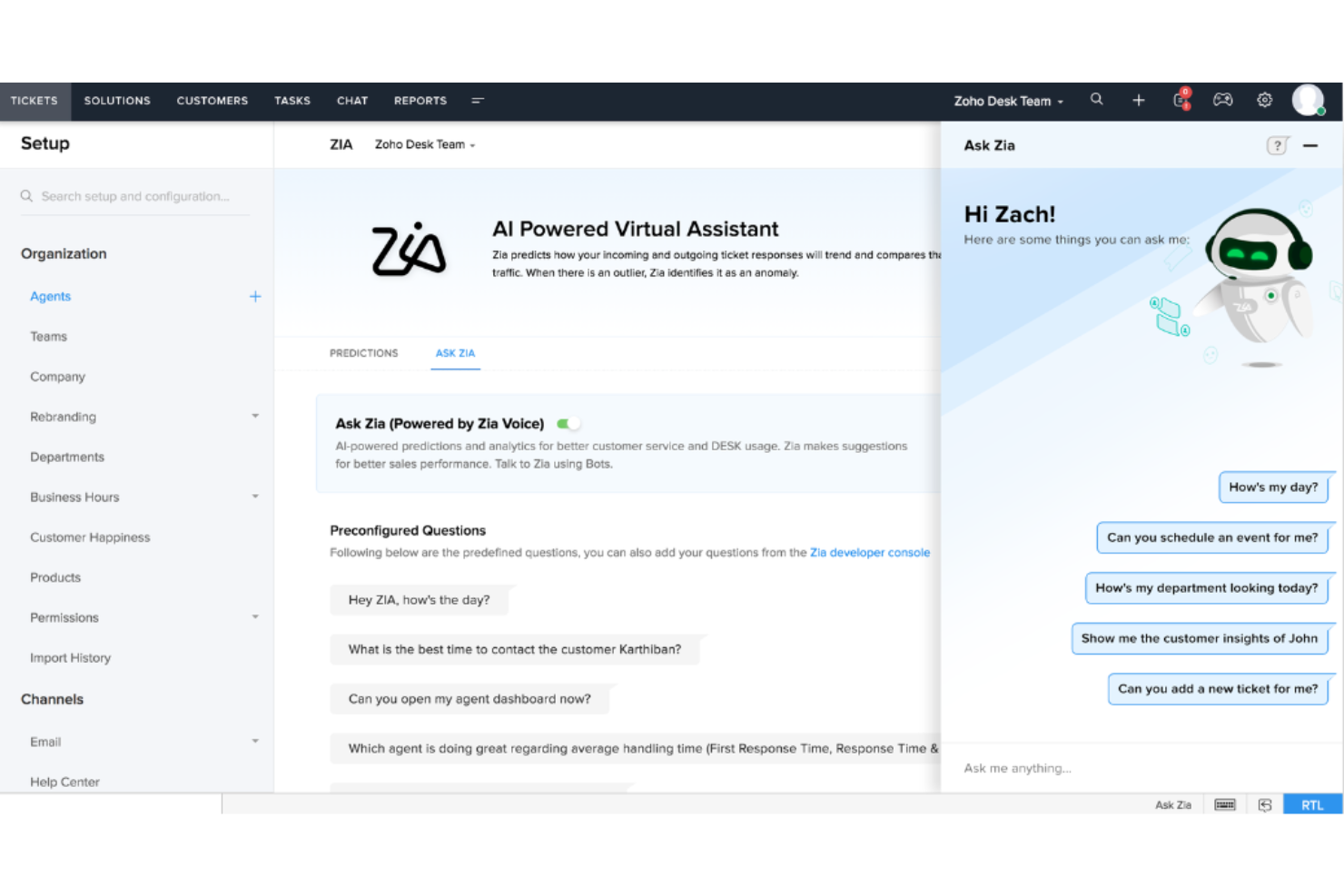
Zoho Desk est une solution de service d’assistance complète conçue pour les entreprises souhaitant simplifier le service client, améliorer la productivité des agents et instaurer des relations durables avec leurs clients.
Pourquoi j'ai choisi Zoho Desk : J'ai sélectionné Zoho Desk car il propose une large gamme de fonctionnalités qui optimisent les opérations de service client et aident les agents à travailler plus efficacement. En combinant de multiples canaux de support avec des outils d’intelligence artificielle, Zoho Desk permet des réponses rapides et personnalisées.
Fonctionnalités et intégrations remarquables de Zoho Desk :
Fonctionnalités remarquables incluent l’analyse des sentiments, qui aide les agents à comprendre le ressenti des clients et à repérer les axes d’amélioration. Zoho Desk propose aussi des accords de niveau de service (SLA) afin d’assurer une résolution rapide des problèmes et un support contextuel. Un éditeur de réponses avancé garantit une communication cohérente et professionnelle, tandis que des analyses intégrées offrent aux entreprises des informations précieuses pour optimiser leur performance en service client.
Zoho Desk s’intègre à plus de 200 applications, dont Asana, Clearbit, HubSpot, Jira, Mailchimp, Microsoft Teams, Pipedrive, Salesforce, Trello, ainsi que 45 applications natives comme Zoho Analytics.
Pros and Cons
Pros:
- Application mobile
- Espace de travail personnalisable
- Conforme à la protection des données
Cons:
- Personnalisation du chat en direct limitée
- Pas d’application de bureau

Zendesk
Meilleur logiciel de centre d’assistance alimenté par l’IA
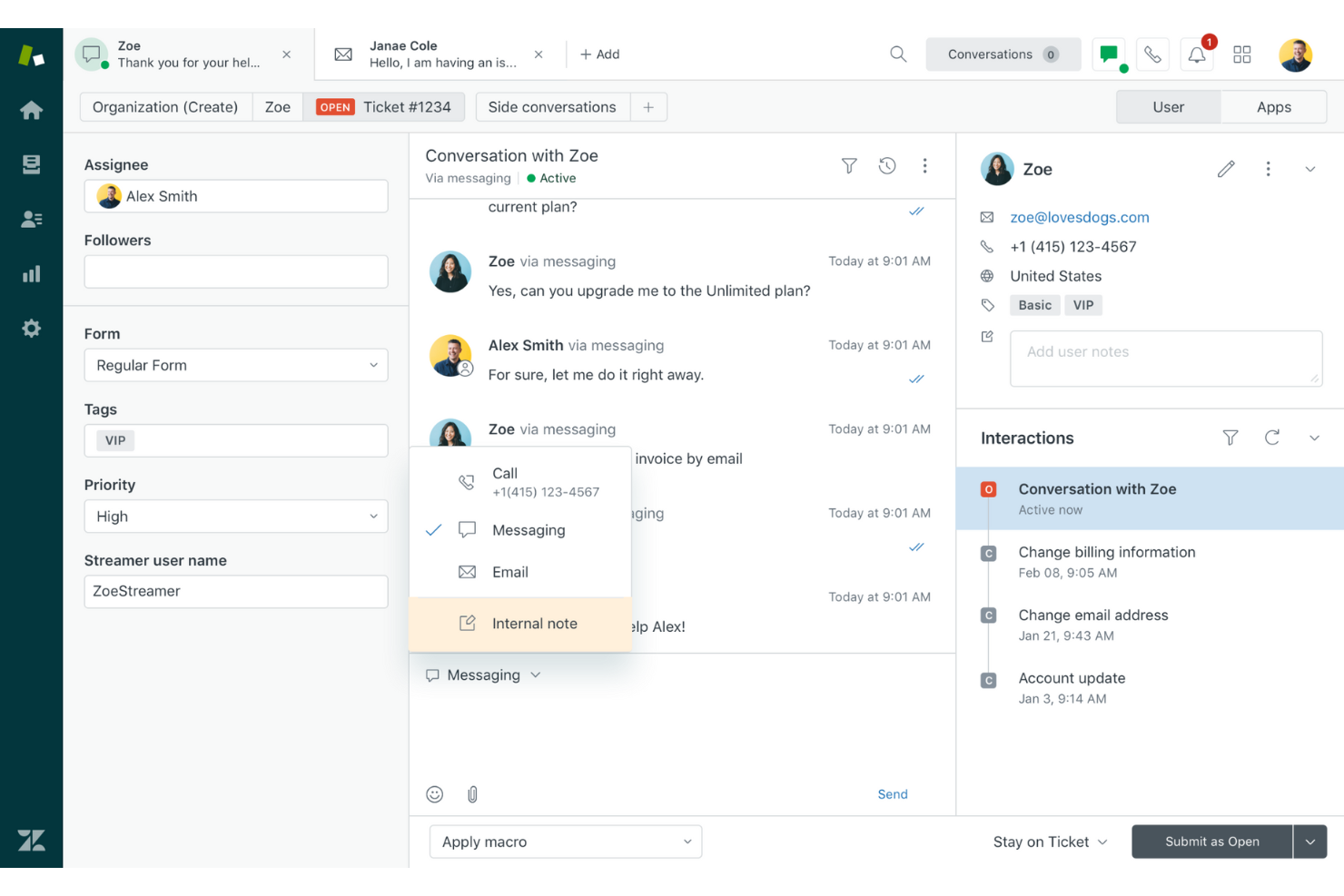
Zendesk propose une plateforme conviviale et personnalisable permettant aux entreprises d’améliorer l’expérience client grâce à l’IA et aux bots. Cette plateforme permet aux organisations de proposer des portails en libre-service, de recueillir des informations précieuses et de fournir des expériences personnalisées à leurs clients.
Pourquoi j’ai choisi Zendesk : J’ai choisi Zendesk pour son logiciel de service client qui offre un large éventail de fonctionnalités destinées à enrichir les interactions avec les clients. Ils disposent d’un espace de travail unifié pour les agents rendant la communication avec les clients simple, d’une automatisation par IA et bots qui améliore la productivité et d’options de libre-service afin que les clients puissent trouver des solutions à leur rythme.
Fonctionnalités et intégrations emblématiques de Zendesk
Fonctionnalités phares incluent un système complet de gestion des tickets permettant aux entreprises de traiter efficacement les demandes et problèmes des clients. Grâce aux fonctionnalités de messagerie et de chat en direct, l’engagement client en temps réel devient possible. De plus, un centre d’aide intégré et un forum communautaire permettent aux clients de trouver des solutions en libre-service et de participer activement aux discussions.
Zendesk s’intègre à plus de 1 200 applications. Les intégrations téléphonie et SMS comprennent l’IA pour le service client, Dialpad et Viibe et Ada pour l’assistance, Klaus et Nicereply pour l’analyse et les rapports, ainsi que des applications développées par Zendesk telles que Bookmarks et Print Ticket History.
Pros and Cons
Pros:
- Inclut des outils de productivité pour les agents
- Grand nombre d’intégrations
- Support client omnicanal
Cons:
- Les détails de l’essai gratuit ne sont pas transparents
- Courbe d’apprentissage légère
New Product Updates from Zendesk
Zendesk Adds Email AI Replies and Predictive Routing
Zendesk’s latest email AI agents update brings configurable knowledge and welcome replies and adds predictive routing for email tickets, so you can tailor your automated emails and get inquiries resolved faster. For more information, visit Zendesk’s official site.

Hiver
Idéal pour des fonctionnalités avancées de service d'assistance
Hiver est une solution de service d'assistance moderne pilotée par l'IA, conçue pour les équipes qui souhaitent une utilisation facile sans sacrifier les fonctionnalités avancées. Vous bénéficiez de toutes les fonctionnalités essentielles pour fournir un bon support client à partir d'une interface familière, semblable à un client email, ce qui élimine quasiment toute courbe d'apprentissage.
Pourquoi j'ai choisi Hiver : Les équipes peuvent gérer les demandes de tous les canaux, comme l'email, le chat en direct, WhatsApp, la voix, les SMS et les réseaux sociaux depuis un panneau situé sur le côté gauche de votre écran. Vous bénéficiez également d'une base de connaissances intégrée pour l'auto-assistance, d'analyses détaillées pour suivre la performance de l'équipe et d'outils de collaboration tels que des notes et brouillons partagés pour faciliter le travail en équipe. Le support de Hiver se distingue également. Quel que soit votre forfait (y compris le forfait gratuit), vous bénéficiez d'un support par email et chat, assuré par de vraies personnes, 24h/24 et 7j/7.
Fonctionnalités et intégrations remarquables de Hiver :
Fonctionnalités remarquables dont ses capacités avancées en IA, qui sont intégrées à chaque étape du parcours de support client. Par exemple, l'AI Copilot aide les agents à répondre aux clients via des réponses contextuelles, des brouillons de réponse, et plus encore, tandis que les agents IA vous aident à mettre en place des workflows autonomes pour traiter les FAQ, les relances et d'autres actions. Hiver propose également AI Insights, qui utilise les conversations pour anticiper les problèmes et les risques.
Intégrations incluent Aircall, Asana, Jira, Okta, QuickBooks, Salesforce, Slack, WhatsApp, Zapier et plus de 100 autres plateformes.
Pros and Cons
Pros:
- Permet de planifier des enquêtes CSAT pour évaluer la satisfaction client
- Support client assuré par de vraies personnes disponible 24/7 via chat ou email, sur tous les forfaits (y compris le gratuit)
- Fonctionnalités IA intégrées à toutes les étapes du parcours de support client
Cons:
- L'expérience mobile n'est pas aussi performante que sur ordinateur
- Comparé à certaines autres plateformes, Hiver propose moins d'intégrations tierces
New Product Updates from Hiver

Hiver Brings Chat Widget Support to Mobile Apps
Hiver now lets you embed the Hiver Chat Widget in iOS, Android, React Native, and Flutter apps so customers can start chats without leaving your app. For more information, visit Hiver's official site.

Missive
Idéal pour les clients de messagerie collaboratifs avec boîte de réception partagée
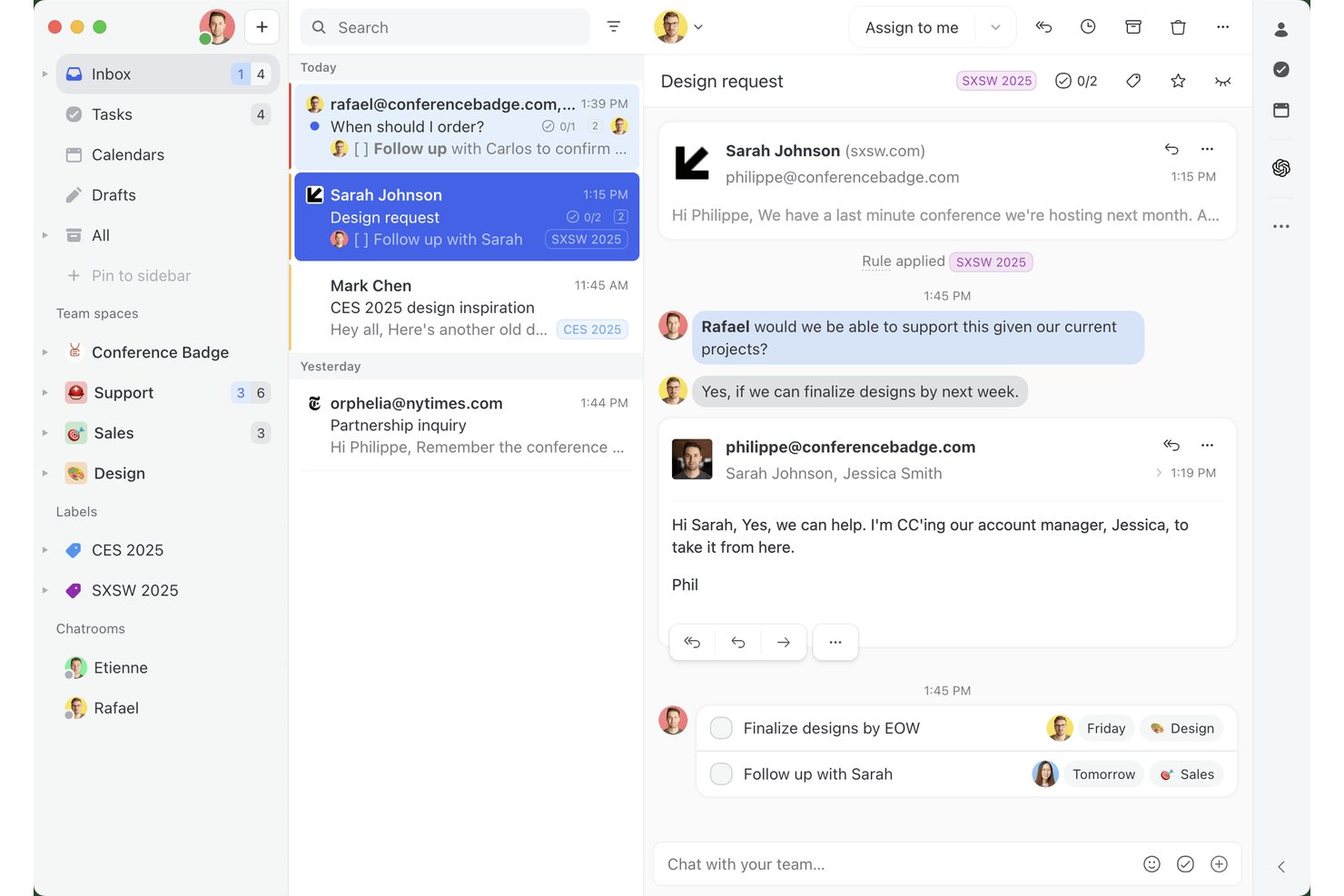
Missive est une plateforme de service d’assistance à boîte de réception partagée qui réunit les e-mails, les SMS, WhatsApp et la messagerie sociale dans un espace de travail collaboratif unique, avec automatisation intégrée, règles d’attribution et outils de communication d’équipe intégrés aux conversations.
À qui Missive convient-il le mieux ?
Missive convient particulièrement aux équipes d’assistance petites à moyennes qui gèrent des boîtes de réception partagées sur les e-mails, les SMS et les canaux sociaux, et qui ont besoin d’une collaboration étroite au sein des conversations sans la complexité d’un système traditionnel de gestion des tickets.
Pourquoi j’ai choisi Missive
J’ai choisi Missive comme l’une des meilleures solutions parce qu’elle considère la collaboration d’équipe comme une fonctionnalité essentielle, et non comme un ajout secondaire. Chaque conversation dispose d’un fil de discussion interne parallèle où les membres de l’équipe peuvent se mentionner avec @, rédiger des réponses ensemble en temps réel et transmettre le contexte sans se transférer des e-mails. J’apprécie particulièrement la détection des collisions, qui empêche deux agents d’envoyer des réponses en double au même client.
Principales fonctionnalités de Missive
- Boîte de réception unifiée omnicanale : Regroupe les e-mails, les SMS, WhatsApp Business, Messenger, Instagram et le chat en direct dans un espace de travail partagé unique.
- Moteur de règles d’IA : Trie, étiquette et achemine automatiquement les messages entrants en fonction de leur contenu grâce aux modèles OpenAI, Claude ou Gemini.
- Réponses prédéfinies : Modèles de réponse préconfigurés avec prise en charge des variables, que les agents peuvent insérer instantanément pour accélérer les réponses répétitives.
- Équilibrage de la charge de travail : Répartit automatiquement les conversations entrantes entre les agents disponibles selon des règles d’attribution à tour de rôle, à l’agent le moins occupé ou aléatoires.
Intégrations de Missive
Missive propose des intégrations natives avec Salesforce, HubSpot, Pipedrive, Shopify, Aircall, Asana, ClickUp, Trello, Todoist, GitHub et bien d’autres. La plateforme prend également en charge une API REST, les webhooks, Zapier et les intégrations MCP, notamment Notion.
Pros and Cons
Pros:
- Le chat intégré améliore la collaboration d’équipe
- La rédaction collaborative en temps réel évite les réponses en double
- Les règles d’automatisation incluent de puissantes options d’IA
Cons:
- Aucune base de connaissances intégrée disponible
- Ne propose pas d’enquêtes natives de satisfaction client
New Product Updates from Missive
Missive Adds Conversation Pins
Missive now lets you pin key links, decisions, and notes inside a conversation, keeping them accessible in a dedicated Pins section in the Details sidebar. For more information, visit Missive's official site.
 .
.
Tidio
Idéal pour une organisation facile des tickets
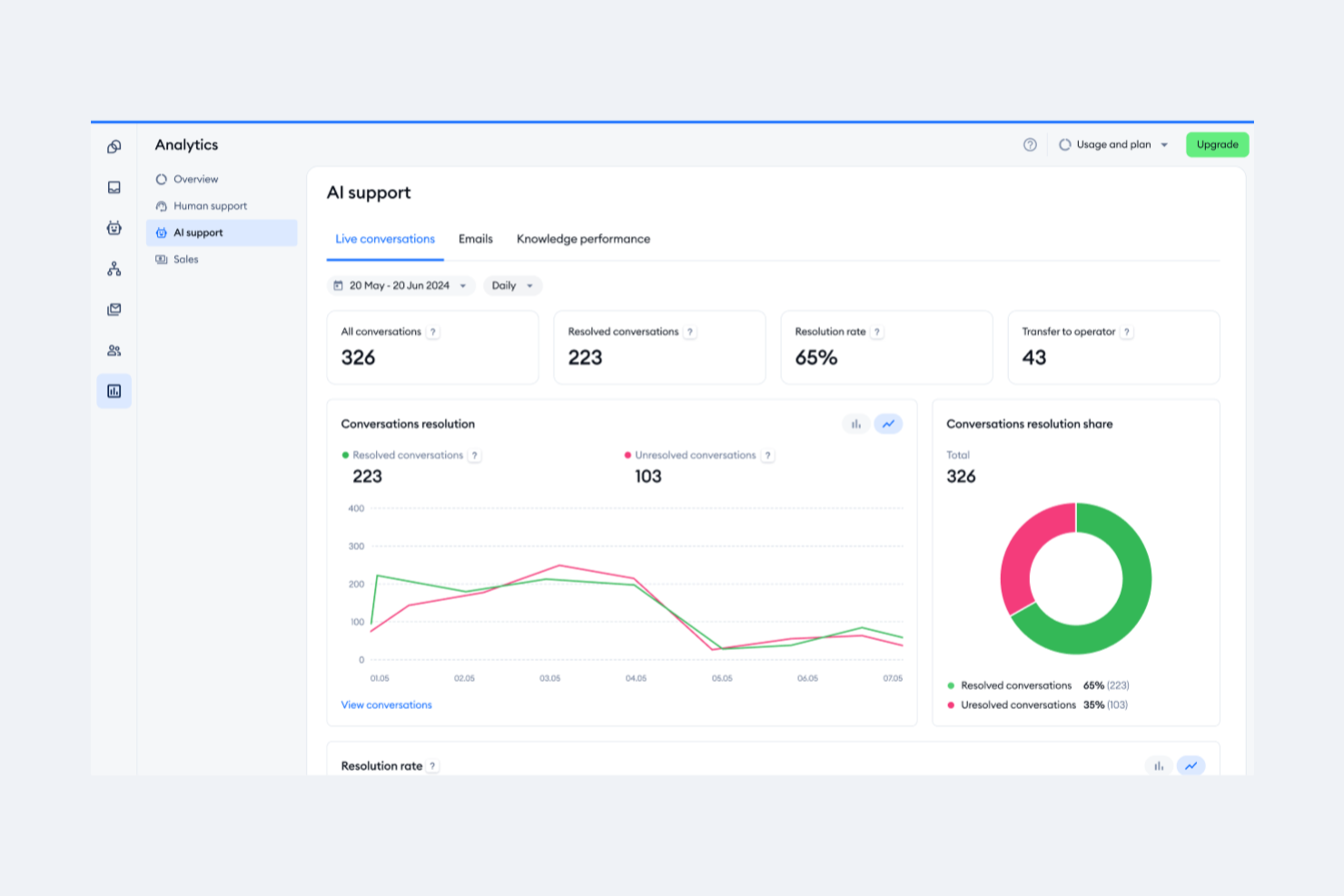
Tidio est une plateforme de service client alimentée par l’IA, conçue pour améliorer la façon dont vous interagissez avec vos clients. Elle propose des outils de communication en temps réel et des fonctionnalités de support automatisé qui facilitent la gestion des demandes clients.
Pourquoi j’ai choisi Tidio : Le système de gestion des tickets de Tidio est conçu pour garder votre support organisé. Vous pouvez transformer les emails, messages de chat et DMs de réseaux sociaux en tickets, les attribuer aux membres de l’équipe, et définir les priorités selon l’urgence. Le système permet également d’ajouter des notes internes et des étiquettes, ce qui aide votre équipe à rester alignée sur les problèmes des clients. J’apprécie aussi l’automatisation basée sur l’IA de Tidio, qui analyse les demandes entrantes et résout les problèmes courants en quelques secondes.
Fonctionnalités et intégrations remarquables de Tidio
Fonctionnalités : réponses prédéfinies permettant à votre équipe de répondre rapidement aux questions fréquentes, ce qui fait gagner du temps tout en maintenant la cohérence. L’aperçu en direct de la saisie montre ce que les clients tapent en temps réel, permettant aux agents de préparer leur réponse avant l’envoi du message.
Intégrations : Shopify, WordPress, Squarespace, WIX, Adobe Commerce, BigCommerce, WooCommerce, Google Analytics, Mailchimp, HubSpot et Zendesk.
Pros and Cons
Pros:
- Support multicanal, y compris pour les chats, emails et réseaux sociaux
- Lyro AI gère une part importante des demandes client
- Fournit des analyses sur la performance de l’équipe et la satisfaction des clients
Cons:
- De nombreuses fonctionnalités d’automatisation réservées aux offres supérieures
- Limitations lors de l’intégration avec certains outils tiers

Idéal pour la personnalisation alimentée par l’IA
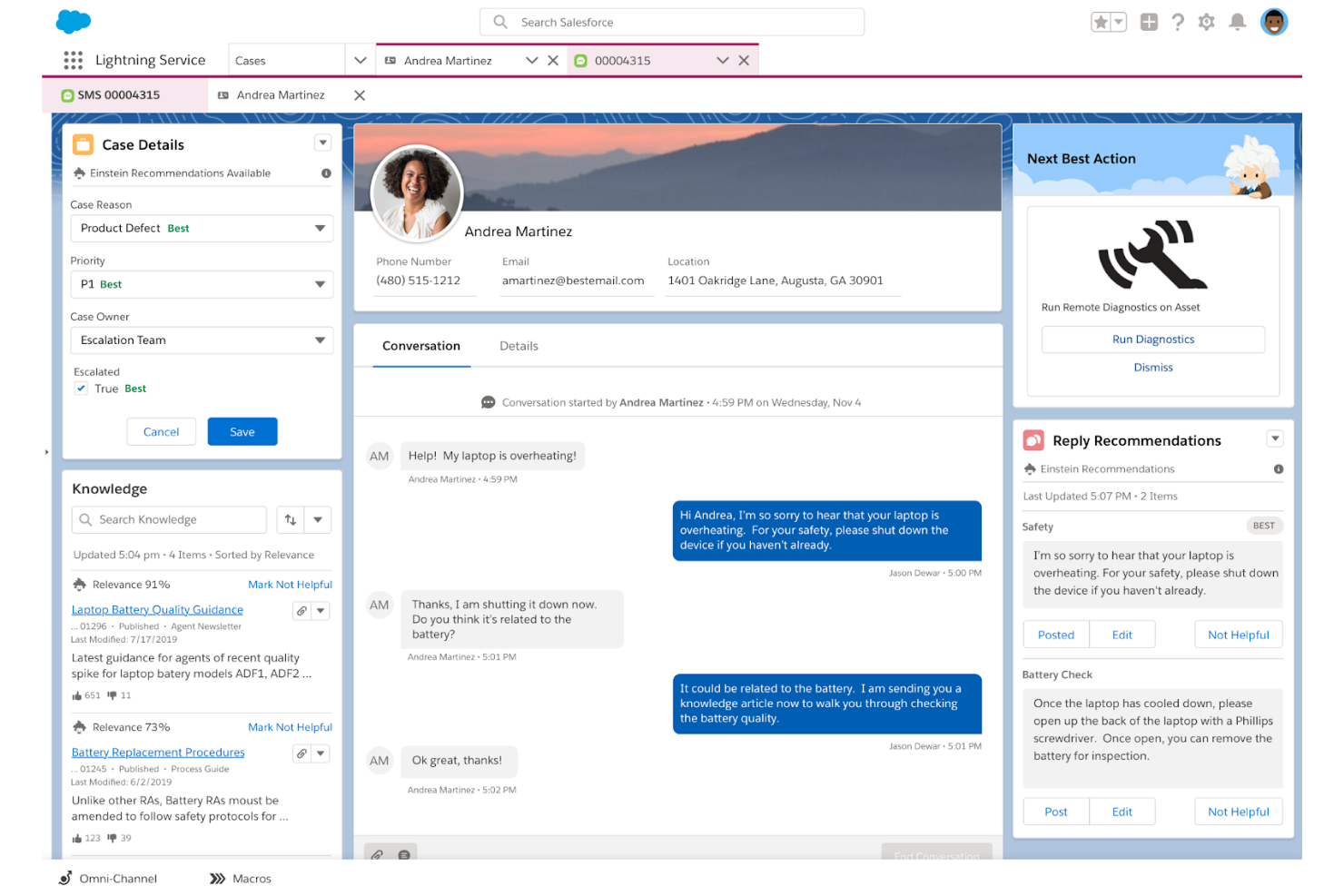
Salesforce Service Cloud est un logiciel de service client conçu pour aider les entreprises à offrir des expériences de support client supérieures grâce à l’IA. Il permet aux sociétés de gérer efficacement l’assistance client sur différents canaux, en utilisant l’automatisation et l’intelligence artificielle pour rationaliser les processus.
Pourquoi j’ai choisi Salesforce Service Cloud : Ce logiciel se distingue par ses capacités d’IA et d’automatisation, qui favorisent un flux de travail plus efficace et réduisent les tâches répétitives pour les agents. Ses chatbots et son triage automatique permettent non seulement de gagner du temps, mais aussi de s’assurer que les demandes des clients sont dirigées vers les agents les plus compétents, améliorant ainsi à la fois l’efficacité et la qualité du support. L’éditeur par glisser-déposer pour la création d’un centre d’auto-assistance permet aux clients de trouver des solutions de manière autonome, allégeant ainsi la charge de travail des équipes de support.
Fonctionnalités et intégrations clés de Salesforce Service Cloud
Fonctionnalités remarquables : une console de service unifiée offrant aux agents une vue à 360 degrés des données et interactions client. Cette vision globale permet de fournir un support plus personnalisé et contextualisé. La plateforme s’intègre également de manière transparente à d’autres produits Salesforce, créant ainsi un écosystème cohérent qui améliore le fonctionnement global de l’entreprise. Son application mobile garantit que les agents peuvent assurer le support en mobilité, tout en maintenant un niveau de service élevé.
Intégrations : Freshdesk, CloudTalk, Twilio, Brandwatch, Paligo, Mailchimp, HubSpot CRM, Trello, TeamViewer, Smartsheet, Klaviyo, Aircall, Gainsight et Conversocial.
Pros and Cons
Pros:
- Simplifie efficacement les procédures de support
- Personnalisable et adaptable aux besoins des utilisateurs
- Plusieurs niveaux de tarification pour accompagner les différentes phases de croissance
Cons:
- La mise en œuvre peut prendre du temps
- Certaines fonctionnalités d’ergonomie sont réservées aux offres supérieures
New Product Updates from Agentforce Service (formerly Service Cloud)
Agentforce Service Keeps Full Agentforce Voice Transcripts After Calls
Agentforce Service now shows the full conversation history in post-call transcripts for Agentforce Voice calls within the Service Console, giving agents better context for follow-ups. For more information, visit Salesforce’s official site.
 .
.
eDesk
Idéal pour la gestion centralisée des messages e-commerce
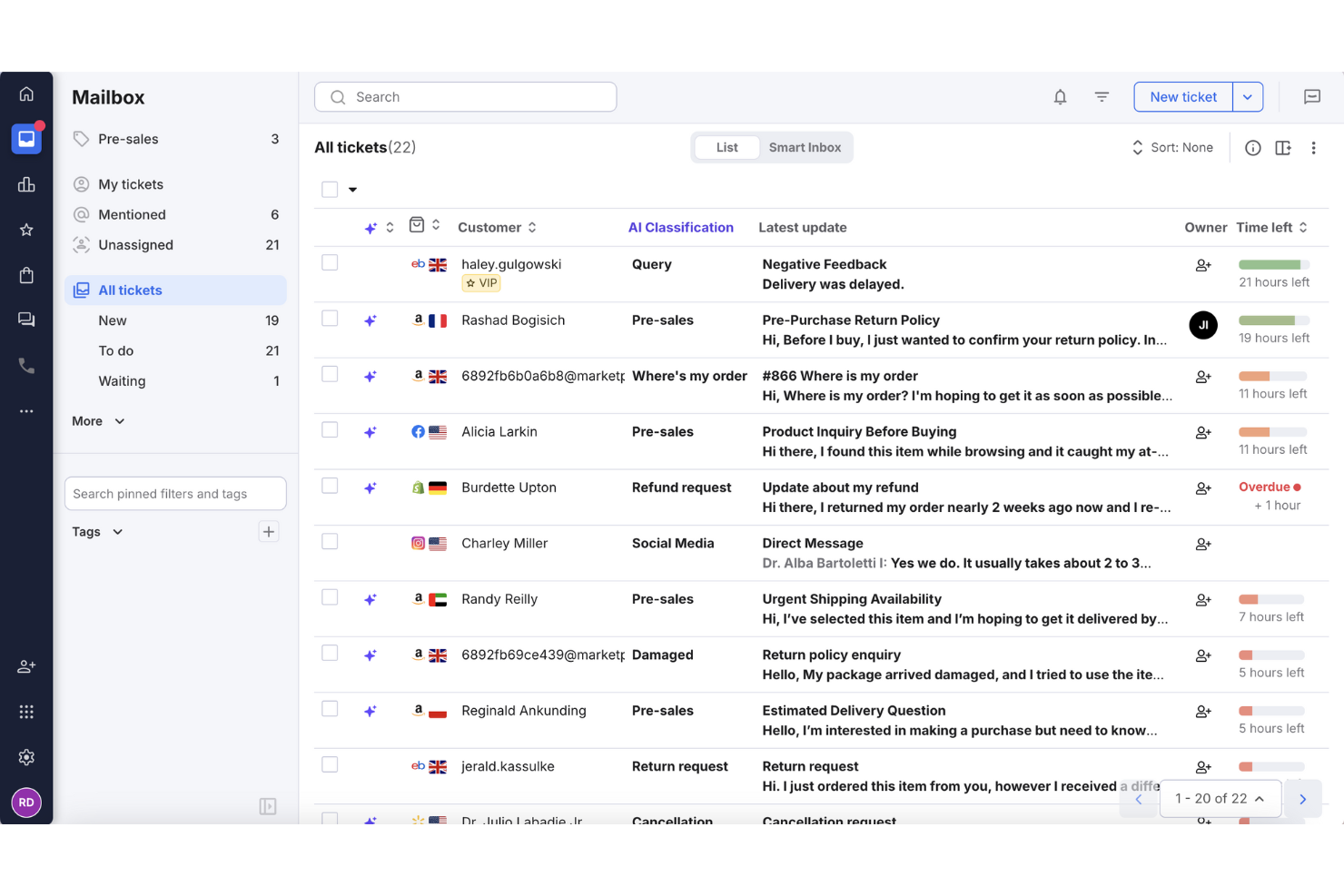
eDesk est conçu pour les entreprises de commerce électronique souhaitant améliorer leurs capacités de support client. Il répond au besoin crucial d'une communication efficace en offrant une plateforme alimentée par l'IA qui gère les interactions clients sur plusieurs canaux, permettant des réponses plus rapides et l'automatisation des tâches routinières. Cet outil est idéal pour les entreprises qui cherchent à augmenter la satisfaction client et à rationaliser leurs processus de support.
Pourquoi j'ai choisi eDesk
J'ai choisi eDesk car il aide les équipes e-commerce à gérer les messages clients issus de plusieurs canaux de vente en un seul endroit, ce qui facilite l'organisation du support et assure des délais de réponse cohérents. Son Agent IA peut automatiser jusqu'à 65% des tâches de support répétitives, permettant aux agents de se concentrer sur les problèmes de commande, les retours et d'autres préoccupations client plus complexes. Les outils de reporting intégrés aident également les équipes e-commerce à suivre la performance du support et à ajuster les flux de travail à partir de données réelles.
Fonctionnalités clés de eDesk
En plus de la gestion centralisée des messages e-commerce, eDesk propose :
- Chatbot IA : Offre un support client 24h/24 et 7j/7, garantissant que les questions trouvent réponse même en dehors des heures de bureau.
- Support avant-vente : Permet de prioriser les opportunités de vente en se concentrant sur les clients potentiels et leurs besoins.
- Collecte de retours : Recueille les avis des clients afin d'améliorer la qualité du service et d'appuyer les décisions de l'entreprise.
- Intégration avec plus de 300 plateformes : Se connecte aux principales places de marché et outils de communication, élargissant ainsi votre portée et votre efficacité.
Intégrations eDesk
Les intégrations comprennent Brightpearl, Klaviyo, ChannelAdvisor, StoreFeeder, VoloCommerce, Veeqo, Linnworks, ShipStation et Aftership.
Pros and Cons
Pros:
- Les automatisations alimentées par l'IA améliorent l'efficacité des réponses
- La gestion multi-canaux des messages améliore l'efficacité des réponses
- Les modèles permettent de gagner du temps sur les réponses répétées aux clients
Cons:
- Principalement conçu pour le e-commerce, moins flexible pour d'autres secteurs
- Des utilisateurs signalent des inexactitudes dans les données de commande et de livraison
New Product Updates from eDesk
eDesk Adds Galeria and Kaufland Support in Spain and Netherlands
eDesk adds support for Galeria, Kaufland Spain, and Kaufland Netherlands marketplaces. These integrations bring more European buyer messages into eDesk with routing, templates, AI insights, and automated translation. For more information, visit eDesk’s official site.
 .
.
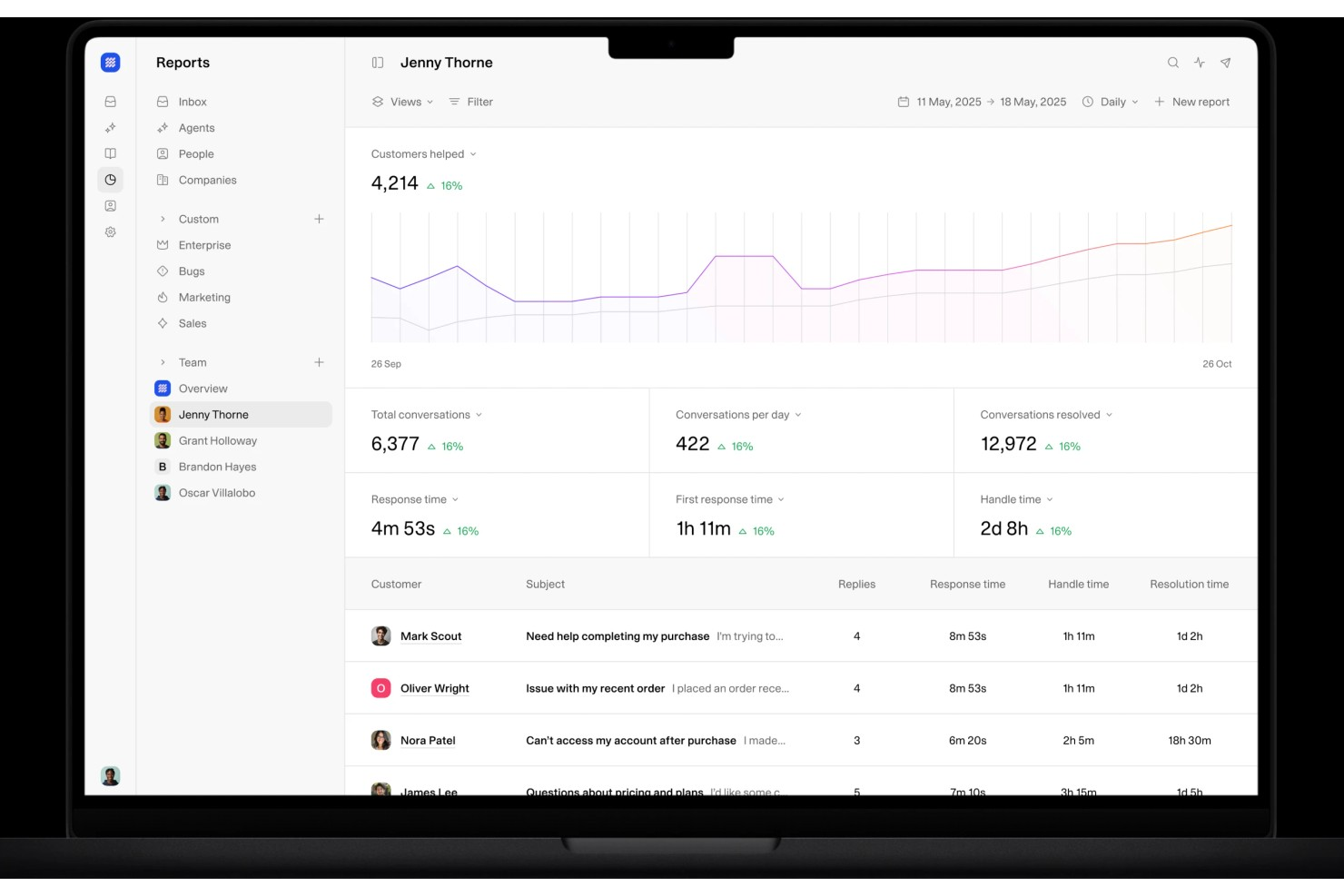
Weav est une plateforme de support client alimentée par l'IA qui combine une boîte de réception unifiée, des agents de chat intelligents, un routage automatisé des tickets et des analyses de conversations sur les emails, chats et canaux de support tiers.
À qui s'adresse Weav ?
Weav convient aux équipes de support client de petite à moyenne taille qui souhaitent automatiser les conversations avec des agents IA avant de les transmettre à des représentants humains.
Pourquoi j'ai choisi Weav
Les rapports de Weav sont ce qui m'a convaincu pour l'analyse des interactions clients. Le module de reporting suit là où les flux de support se dégradent, ce qui me permet de voir exactement quels types de conversations n'aboutissent pas et où les passages entre l'IA et les agents humains ont lieu le plus souvent. J'apprécie également que la boucle d'apprentissage continue de Weav réinjecte les données des tickets résolus dans son modèle d'entraînement, de sorte que les schémas d'interactions clients influencent directement la gestion des futures conversations.
Fonctionnalités clés de Weav
- Boîte de réception unifiée : Gérez les conversations clients issues des emails, du chat en direct et des canaux tiers connectés dans une vue partagée unique.
- Agents IA formés à la base de connaissances : Formez des agents IA directement sur votre documentation produit afin qu'ils puissent résoudre les questions fréquentes sans intervention humaine.
- Segments de contact personnalisés : Organisez vos contacts et entreprises à l'aide d'attributs et filtres personnalisés pour personnaliser les interactions de support.
- Rapports d'équipe et personnalisés : Suivez le volume des conversations, les temps de réponse et les taux de résolution grâce aux modèles de rapports intégrés ou personnalisés.
Intégrations avec Weav
Weav propose un ensemble plus restreint d'intégrations natives, notamment Stripe, Shopify et Google Drive, ainsi que des actions personnalisées permettant aux agents IA de se connecter à des API tierces lors des conversations. Une API REST et des webhooks en temps réel sont disponibles pour les intégrations personnalisées.
Pros and Cons
Pros:
- Outil de connaissances interne pour les agents
- Score de confiance automatisé intégré
- Des phrases interdites empêchent les réponses hors charte
Cons:
- Intégrations natives limitées
- La formule gratuite limite l’IA à 20 messages
Autres logiciels de service d’assistance simples
Voici quelques autres options de logiciels de service d’assistance simples qui n’ont pas été retenues dans ma sélection, mais qui méritent tout de même votre attention :
- monday service
Idéal pour des workflows de support simples et personnalisables
- Gorgias
Meilleur logiciel de support client pour le e-commerce
- Intercom
Meilleur logiciel d'assistance multilingue
- ProProfs Help Desk
Meilleur logiciel de support technique pour la gestion des tickets parent-enfant
- Issuetrak
Idéal pour la soumission omnicanal de tickets
- SysAid
Meilleur logiciel de centre d’assistance pour les services informatiques automatisés
- HappyFox Help Desk
Idéal pour le support client automatisé
- LiveAgent
Idéal pour les fonctionnalités de ludification
- Front
Idéal pour un support client personnalisé
- SAAS First
Meilleur chatbot d'assistance alimenté par IA
- LiveAgent
Idéal pour les fonctionnalités de ludification
- Help Scout
Idéal pour une gestion intuitive du service client
- Zoho Assist
Idéal pour fournir une assistance à distance
- SparrowDesk
Idéal pour la gestion des tickets assistée par IA


Comment j'évalue les logiciels de support technique
J'organise mon évaluation en deux niveaux : le socle que tout service d'assistance doit atteindre – gestion cohérente des tickets, couverture omnicanal, application des SLA – et les éléments différenciateurs qui déterminent l'adéquation.
Fonctionnalités essentielles (Critères de base pour cette liste)
Lors de la sélection des outils pour ma liste, j'attribue à chacun une note de 0 (ne propose pas la fonctionnalité) à 5 (excelle dans ce domaine) pour chaque fonctionnalité clé listée ci-dessous. Ensuite, je calcule le score total de l'outil sous forme de pourcentage. Chaque outil doit obtenir un score total minimum de 75 % pour être pris en considération.
- Gestion des tickets : J'examine comment chaque outil gère l'ensemble du cycle de vie du ticket—statuts, priorités, champs personnalisés, fusion, et historiques pour le suivi des escalades.
- Boîte de réception omnicanal : Chaque plateforme doit unifier e-mail, chat, réseaux sociaux et voix dans un seul espace de travail afin que les agents n'aient pas à jongler entre plusieurs onglets pour retrouver le contexte.
- Automatisation & règles d'acheminement : J'évalue la manière dont les tickets sont attribués – que ce soit via un système rotatif, basé sur les compétences, ou par l'escalade déclenchée par un SLA vers la bonne file d'attente.
- Base de connaissances & libre-service : Un centre d'aide intégré avec recherche, catégories et portail public est primordial. Des outils comme Zendesk et Freshdesk intègrent des suggestions d'articles basées sur l'intelligence artificielle.
- Rapports & analyses : Je vérifie la présence de tableaux de bord couvrant la conformité SLA, les scores CSAT et la charge de travail des agents afin que les responsables puissent identifier les goulots d'étranglement avant qu'ils ne s'aggravent.
- Outils de collaboration pour agents : Les notes internes, les @mentions et les discussions annexes aident les agents à solliciter leurs collègues sur des problèmes complexes sans quitter la vue du ticket.
Une fois ma liste d'outils répondant aux critères établie, j'étudie les éléments qui distinguent chaque plateforme.
Facteurs de différenciation (Ce qui distingue les fournisseurs)
Voici comment je compare différents fournisseurs :
Fonctionnalités remarquables
L'assistance des agents via l'IA est un facteur de différenciation majeur que j'analyse. Des outils comme Freshdesk et Zendesk offrent des suggestions de réponse et des résumés de ticket qui réduisent le temps de traitement lors des pics de volume. Les chatbots conversationnels sont aussi importants, surtout les interfaces sans code capables de traiter les questions courantes et de transmettre au bon agent avec tout le contexte nécessaire. Je recherche également une vue client 360° qui combine données CRM et commandes aux côtés du ticket actif, afin d'éviter que les agents ne demandent plusieurs fois les mêmes informations aux clients.
Au-delà des fonctionnalités
La profondeur d'intégration est l'un des premiers aspects que j'examine. Un support technique qui s'intègre nativement à votre CRM, votre plateforme e-commerce et à des outils de communication comme Slack ou Teams permet aux agents de tout gérer depuis un seul écran. La structure tarifaire est tout aussi importante : les modèles par agent peuvent vite devenir coûteux pour les équipes en croissance, c'est pourquoi je compare si les fournisseurs proposent des forfaits selon l'usage ou des offres par paliers évolutives, sans frais cachés. Enfin, j'évalue les certifications de sécurité comme SOC 2 et la conformité RGPD, notamment pour les équipes qui traitent des données client sensibles.
Comment choisir un logiciel de service d’assistance simple
Il est facile de se perdre dans de longues listes de fonctionnalités et des structures tarifaires complexes lorsque l’on compare les options de logiciels de service d’assistance. Pour vous aider à rester concentré tout au long de votre processus de sélection de logiciel, qui vous est propre, voici une liste de critères à garder à l’esprit :
| Facteur | Éléments à prendre en compte |
|---|---|
| Évolutivité | Vérifiez si le logiciel peut évoluer avec votre entreprise. Sera-t-il capable de gérer une augmentation du nombre de tickets ou d’utilisateurs sans coût ni complexité supplémentaires ? |
| Intégrations | Vérifiez s’il se connecte à vos outils existants, comme les systèmes CRM ou les plateformes de messagerie électronique. Des intégrations fluides peuvent faire gagner du temps et réduire les erreurs. |
| Personnalisation | Recherchez des options permettant d’adapter les flux de travail ou les tableaux de bord. Assurez-vous qu’il s’intègre aux processus de votre équipe sans nécessiter d’importantes ressources de développement. |
| Facilité d’utilisation | Évaluez si votre équipe peut apprendre rapidement à utiliser l’outil. Une interface conviviale réduit le temps de formation et favorise l’adoption. |
| Mise en œuvre et intégration | Évaluez le temps et les ressources nécessaires à la configuration. Un processus d’intégration fluide, accompagné d’une assistance adéquate, peut réduire au minimum les perturbations de vos activités. |
| Coût | Comparez les formules tarifaires à votre budget. Méfiez-vous des frais cachés ou des limitations des formules moins chères, comme les plafonds concernant le nombre d’utilisateurs ou les fonctionnalités. |
| Mesures de sécurité | Assurez-vous qu’il répond à vos normes de sécurité. Recherchez le chiffrement des données, les mises à jour régulières et la conformité aux réglementations comme le RGPD, le cas échéant. |
| Disponibilité de l’assistance | Déterminez le niveau d’assistance proposé. Une assistance disponible 24 h/24 et 7 j/7 peut être essentielle si vous exercez vos activités dans plusieurs fuseaux horaires ou si vous avez des besoins urgents. |
Qu’est-ce qu’un logiciel de centre d’assistance simple ?
Un logiciel de centre d’assistance simple est un outil conçu pour gérer et organiser efficacement les demandes d’assistance client. Les équipes d’assistance client et les professionnels des centres de services utilisent généralement ces outils pour améliorer la communication et résoudre rapidement les problèmes. Les fonctionnalités de gestion des tickets, d’intégration des e-mails et de suivi des communications avec les clients contribuent à organiser les demandes et à améliorer les délais de réponse. Dans l’ensemble, ces outils simplifient le processus d’assistance et permettent aux équipes de fournir plus facilement un service efficace.
Fonctionnalités
Lors du choix d’un logiciel de centre d’assistance simple, soyez attentif aux principales fonctionnalités suivantes :
- Gestion des tickets : organise les demandes des clients sous forme de tickets faciles à gérer, permettant un suivi et une résolution efficaces.
- Intégration des e-mails : se connecte à votre plateforme de messagerie électronique afin de centraliser les communications d’assistance et de tout regrouper au même endroit.
- Suivi des communications avec les clients : enregistre les interactions avec les clients et fournit un historique complet pour améliorer la qualité du service.
- Rapports et analyses : fournit des informations sur les performances de l’assistance et la satisfaction des clients, ce qui aide à identifier les points à améliorer.
- Assistance multicanale : permet de traiter les demandes des clients provenant de différents canaux, comme les e-mails, le chat et les réseaux sociaux.
- Flux de travail d’automatisation personnalisables : automatise les tâches répétitives et libère du temps pour que les agents d’assistance puissent se concentrer sur les problèmes complexes.
- Suggestions de réponses générées par l’IA : propose des réponses aux demandes courantes et accélère ainsi les délais de réponse.
- Fonctionnalités d’application mobile : permettent aux agents d’assistance de gérer les tickets où qu’ils soient, garantissant la continuité du service.
- Visites guidées interactives du produit : guident les utilisateurs à travers les fonctionnalités du logiciel et améliorent l’expérience d’intégration.
- Intégration des réseaux sociaux : se connecte aux plateformes sociales pour gérer les interactions avec les clients sur différents canaux.
Avantages
La mise en œuvre d’un logiciel de centre d’assistance simple présente plusieurs avantages pour votre équipe et votre entreprise. Voici quelques bénéfices dont vous pouvez profiter :
- Efficacité accrue : les fonctionnalités de gestion des tickets et d’automatisation réduisent le travail manuel et permettent à votre équipe de se concentrer sur des tâches plus complexes.
- Communication améliorée : la centralisation des interactions avec les clients grâce à l’intégration des e-mails contribue à maintenir une communication claire et cohérente.
- Satisfaction client accrue : des délais de réponse rapides et un suivi complet des communications contribuent à rendre les clients plus satisfaits.
- Prise de décision éclairée : les rapports et les analyses fournissent des informations sur les performances de l’assistance et vous aident à apporter des améliorations fondées sur les données.
- Présence multicanale : la prise en charge des demandes provenant de différents canaux vous permet d’être présent là où se trouvent vos clients.
- Flexibilité et mobilité : les fonctionnalités de l’application mobile permettent à votre équipe de gérer les tâches d’assistance depuis n’importe où, tout en assurant la continuité du service.
- Facilité d’intégration : les visites guidées interactives du produit et les ressources de formation simplifient la courbe d’apprentissage des nouveaux utilisateurs.
Coûts et tarifs
Le choix d’un logiciel de centre d’assistance simple nécessite de comprendre les différents modèles tarifaires et formules disponibles. Les coûts varient en fonction des fonctionnalités, de la taille de l’équipe, des modules complémentaires et d’autres facteurs. Le tableau ci-dessous présente les formules courantes, leurs prix moyens et les fonctionnalités généralement incluses dans les solutions logicielles de centre d’assistance simple :
Tableau comparatif des forfaits pour les logiciels de centre d’assistance simples
| Type de forfait | Prix moyen | Fonctionnalités courantes |
|---|---|---|
| Forfait gratuit | $0 | Gestion de base des tickets, intégration des e-mails et rapports limités. |
| Forfait personnel | $5-$25/utilisateur/mois | Gestion des tickets, intégration des e-mails, analyses de base et options de personnalisation limitées. |
| Forfait professionnel | $30-$60/utilisateur/mois | Gestion avancée des tickets, assistance multicanale, flux de travail personnalisables et rapports détaillés. |
| Forfait entreprise | $70-$120/utilisateur/mois | Analyses complètes, personnalisation intégrale, assistance multilingue et assistance client premium. |
FAQ sur les logiciels de centre d’assistance simples
Voici quelques réponses aux questions courantes sur les logiciels de centre d’assistance simples :
Comment un logiciel de centre d’assistance peut-il aider mon entreprise ?
L’utilisation d’un logiciel de centre d’assistance peut améliorer le service client et la communication. Il centralise les demandes et les tickets d’assistance, fluidifie les canaux de communication et offre des fonctionnalités de coordination d’équipe et de création de rapports. En définitive, il permet d’accroître la satisfaction client, d’améliorer la collaboration au sein de l’équipe et de renforcer la fidélité des clients.
Quelle est la différence entre un logiciel de centre d’assistance et un système de gestion des tickets ?
La migration peut être simple si le nouveau logiciel propose des outils d’importation des données ou une assistance à la migration. Avant de changer de solution, assurez-vous que le nouveau fournisseur prend en charge la migration des données depuis votre système actuel. Planifiez la transition afin de réduire les temps d’arrêt et impliquez votre équipe informatique pour gérer les aspects techniques. Cela contribue à maintenir la continuité du service pendant la migration.
Ai-je besoin de compétences techniques pour configurer un logiciel de centre d’assistance simple ?
Non, vous n’avez généralement pas besoin de compétences techniques pour utiliser la plupart des logiciels de centre d’assistance simples. De nombreuses solutions sont conçues pour être configurées facilement grâce à des tutoriels guidés ou des visites du produit. Toutefois, pour les configurations plus complexes, il peut être utile d’impliquer votre équipe informatique. Elle peut vous aider avec les intégrations et les personnalisations afin de garantir que le logiciel répond à vos besoins spécifiques.
Quels sont les éléments les plus importants d’un système de gestion des tickets d’assistance et pourquoi ?
Un système de gestion des tickets efficace doit comporter plusieurs fonctionnalités essentielles, notamment différentes catégories de tickets, une assistance sur plusieurs canaux, la prise en charge de plusieurs langues, une gestion efficace de la base de connaissances et des tableaux de bord informatifs pour les rapports de données.
Et ensuite :
Si vous êtes en train d’étudier les logiciels de centre d’assistance simples, contactez gratuitement un conseiller SoftwareSelect pour obtenir des recommandations.
Vous remplissez un formulaire et échangez brièvement avec un conseiller, qui examine en détail vos besoins. Vous recevez ensuite une liste restreinte de logiciels à étudier. Les conseillers vous accompagnent même tout au long du processus d’achat, notamment lors des négociations tarifaires.