

Les logiciels de centre d’appels entrants aident vos équipes d’assistance et de vente à gérer efficacement les appels entrants, à apporter des solutions rapides et à maintenir des interactions de qualité avec les clients. Les meilleures plateformes vous aident à gérer le volume d’appels, à acheminer les demandes et à améliorer l’expérience globale des appelants.
Si vos agents jonglent avec trop d’outils ou manquent des appels pendant les heures de pointe, il est temps de repenser votre environnement technologique. Le bon logiciel ne se contente pas de simplifier les flux de travail : il fournit aux agents le contexte et les outils nécessaires pour résoudre les problèmes dès le premier appel.
J’ai évalué ces outils de centre d’appels entrants en fonction de leurs performances dans des situations réelles : acheminement des appels, intégrations CRM, rapports et capacité à favoriser un parcours fluide et personnalisé pour l’appelant.
Qu’est-ce qu’un logiciel de centre d’appels entrants ?
Un logiciel de centre d’appels entrants est une plateforme qui gère et simplifie les appels entrants des clients pour les équipes d’assistance et de service. Il achemine intelligemment les appels, prend en charge les flux de travail des agents et aide les centres de contact à fournir des réponses rapides et cohérentes depuis un système centralisé.
Pourquoi faire confiance à nos recommandations de logiciels
6,700+
Reviews
20
Industry experts
16+
Evaluation factors
14
Years
Notre équipe teste et évalue des logiciels depuis 2012. En tant que leaders CX nous-mêmes, nous savons à quel point il est difficile — et important — de choisir le bon logiciel.
Pour ce guide, nous avons évalué les outils grâce à des tests pratiques et une recherche indépendante, en notant les outils selon nos critères de sélection.
Nos avis reflètent notre jugement éditorial humain, et non un argumentaire de vente.
 Gui DrusinaCreative Director
 Tim FisherVP of AI
Tableau comparatif des logiciels de centre d’appels entrants
| Tool | Best For | Trial Info | Price | ||
|---|---|---|---|---|---|
| 1 | Idéal pour le routage intelligent des appels | Démo gratuite disponible | À partir de $23/utilisateur/mois (facturé annuellement) | Website | |
| 2 | Idéal avec plus de 250 intégrations natives | Essai gratuit de 7 jours | À partir de $30/utilisateur/mois (facturé annuellement) | Website | |
| 3 | Idéal pour le guidage comportemental en temps réel | Démo gratuite disponible | Tarification sur demande | Website | |
| 4 | Idéal pour le support omnicanal | Démo gratuite disponible | À partir de 30 $/utilisateur/mois (facturé annuellement) | Website | |
| 5 | Idéal pour la mise à disposition rapide de numéros dans le monde entier | Essai gratuit de 14 jours | À partir de $25/utilisateur/mois (facturé annuellement) | Website | |
| 6 | Idéal pour les intégrations étendues avec les CRM et les applications professionnelles | Démo gratuite disponible | À partir de $25/utilisateur/mois | Website | |
| 7 | Idéal pour un déploiement rapide d’un système téléphonique infonuagique | Démo gratuite disponible | Tarification sur demande | Website | |
| 8 | Idéal pour une gestion sécurisée des appels, prête à répondre aux exigences de conformité | Démo gratuite disponible | À partir de $79/mois | Website | |
| 9 | Idéal avec des agents AI spécifiques à chaque secteur | Démo gratuite disponible | À partir de $85/utilisateur/mois | Website | |
| 10 | Idéal pour l’orchestration des conversations sur plusieurs canaux | Essai gratuit disponible | À partir de $35/utilisateur/mois | Website |


Présentation des 20 meilleurs logiciels de centre d’appels entrants
Voici une brève description de chaque logiciel de centre d’appels entrants, présentant le meilleur cas d’utilisation de chaque outil, certaines fonctionnalités remarquables et des captures d’écran donnant un aperçu de l’interface utilisateur.
 Idéal pour le routage intelligent des appels
- Démo gratuite disponible
- À partir de $23/utilisateur/mois (facturé annuellement)
Visit WebsiteCustomer Rating:4.5/5
Nextiva One centralise tous vos canaux de communication en un seul endroit Nextiva est une plateforme de communication dynamique conçue pour améliorer la manière dont les entreprises interagissent avec leurs clients. Elle est adaptée pour soutenir les opérations des centres d'appels entrants en fournissant une suite d'outils qui facilitent des interactions client efficaces et significatives.
Pourquoi j'ai choisi Nextiva : J'ai choisi Nextiva comme l'un des meilleurs logiciels pour centres d'appels entrants grâce à sa fonctionnalité de routage intelligent des appels. Cela garantit que les appels sont dirigés vers l'agent le plus approprié, ce qui peut améliorer la satisfaction client en résolvant les problèmes plus rapidement. De plus, les fonctionnalités d'enregistrement des appels et d'analyse de sentiment sont inestimables pour surveiller les performances et obtenir des informations sur l'expérience client.
Une autre raison pour laquelle Nextiva se démarque est sa puissance en matière de rapports et d'analyses. Ces outils permettent de comprendre les tendances des appels et de prendre des décisions éclairées pour améliorer votre service. La distribution automatique des appels réduit les temps d'attente, ce qui peut accroître l'efficacité de votre équipe et augmenter la satisfaction des clients.
Fonctionnalités et intégrations remarquables :
Fonctionnalités : tableaux de bord en temps réel qui offrent aux responsables des indications immédiates sur les indicateurs de performance, leur permettant d'ajuster à la volée. La fonctionnalité d'orchestration du parcours personnalise les interactions client, ce qui favorise une résolution plus rapide des problèmes. Les automatisations intelligentes réduisent les tâches répétitives, permettant à votre équipe de se concentrer sur les besoins clients plus complexes.
Intégrations : Salesforce, HubSpot, Slack, Microsoft Teams, Zendesk, Jira, monday.com, Twilio, Jotform, Lawmatics, ActiveCampaign et Pipedrive.
Pros and Cons
Pros:
- Les utilisateurs louent souvent la qualité d’appel claire et fiable
- Distribution automatique des appels et routage intelligent
- La possibilité de recevoir les messages vocaux par email est appréciée des utilisateurs
Cons:
- Certaines limitations avec certaines intégrations tierces
- Des problèmes de fiabilité de l'application mobile
 Idéal avec plus de 250 intégrations natives
- Essai gratuit de 7 jours
- À partir de $30/utilisateur/mois (facturé annuellement)
Visit WebsiteCustomer Rating:4.3/5
Obtenez une vue d'ensemble de votre activité d'appels et un score basé sur la satisfaction des clients. Aircall est une plateforme téléphonique professionnelle et de centre d'appels entrants basée sur le cloud, qui combine l'ACD, le SVI, la mise en file d'attente des appels, la surveillance en temps réel, la gestion des appels optimisée par l'IA et des intégrations CRM approfondies au sein d'un seul système piloté par un logiciel téléphonique.
À qui Aircall convient-il le mieux ?
Aircall convient aux équipes d'assistance et commerciales des petites et moyennes entreprises qui gèrent leurs opérations entrantes dans un CRM ou un centre d'assistance et qui ont besoin que leur système téléphonique fonctionne de manière native au sein de leur environnement existant.
Pourquoi j'ai choisi Aircall
Aircall figure dans ma sélection parce qu'aucun autre outil de centre d'appels entrants n'intègre la téléphonie native au CRM de manière aussi fluide. J'apprécie particulièrement le fait qu'une fiche HubSpot ou Salesforce s'affiche automatiquement dès qu'un appel arrive, afin que les agents disposent de tout le contexte nécessaire avant même de prononcer un mot. La synchronisation bidirectionnelle enregistre automatiquement chaque appel, résultat et étiquette, sans que les agents aient à mettre le CRM à jour manuellement. Je m'appuie également sur le logiciel téléphonique CTI Salesforce intégré, ce qui permet aux agents de gérer les appels entrants entièrement dans leur espace de travail habituel, sans changer d'onglet.
Principales fonctionnalités d'Aircall
- Agent vocal IA : Gère automatiquement les appels entrants en débordement et résout les demandes courantes des clients en assurant un transfert contextuel vers les agents en direct.
- Générateur de SVI multiniveau : Permet de concevoir des menus d'appel en plusieurs étapes à l'aide d'une interface visuelle intuitive et de la saisie DTMF.
- Module Analytics+ : Fournit un historique illimité des appels, un filtrage avancé, des tableaux de bord en temps réel et des analyses détaillées des files d'attente entrantes et des agents.
- Modes de surveillance des appels : Les superviseurs peuvent écouter les appels en direct, chuchoter des conseils aux agents ou intervenir pour assurer la qualité et le coaching en temps réel.
Intégrations Aircall
Aircall propose plus de 250 intégrations natives, notamment avec Salesforce, HubSpot, Zendesk, Intercom, Slack, Microsoft Teams, Freshdesk, Pipedrive, Zoho CRM et Shopify. Une API est disponible pour les intégrations personnalisées.
Pros and Cons
Pros:
- Configuration rapide sans dépendance au service informatique
- Surveillance des appels en direct avec chuchotement du superviseur
- Affichage de la fiche CRM à chaque appel entrant
Cons:
- Aucune gestion native des effectifs ni planification
- La profondeur des rapports est inférieure à celle des plateformes CCaaS dédiées
 Idéal pour le guidage comportemental en temps réel
- Démo gratuite disponible
- Tarification sur demande
Visit WebsiteCustomer Rating:5/5
Cresta propose une assistance agent en temps réel qui affiche des réponses générées par l'IA et des suggestions intelligentes afin d'aider les agents de centre d'appels entrants à traiter plus rapidement les demandes clients. Cresta est une plateforme logicielle de centre d'appels entrant alimentée par l'IA qui propose l'analyse des conversations en direct, l'assistance aux agents, l'automatisation et la gestion de la qualité dans une solution unique.
À qui s'adresse Cresta ?
Cresta est conçue pour les équipes de centres de contact en entreprise souhaitant utiliser l'IA pour stimuler la performance des agents et assurer la cohérence opérationnelle à grande échelle.
Pourquoi j'ai choisi Cresta
J'ai sélectionné Cresta parmi les meilleurs car j'utilise son guidage comportemental en temps réel pour faire apparaître des suggestions de coaching et des scripts adaptés pendant les appels, et la plateforme analyse automatiquement les conversations en direct pour recommander les prochaines meilleures actions et améliorer la qualité.
Principales fonctionnalités de Cresta
- Gestion automatisée de la qualité : L'IA examine et note les interactions client pour leur conformité et leur performance.
- Support omnicanal : Gère les interactions par téléphone, chat et e-mail au sein d'une plateforme unifiée.
- Accès facilité à la connaissance : Met à disposition des agents les documents et réponses pertinents pendant les conversations en direct.
- Automatisation du workflow post-appel : Génère automatiquement des résumés d'appel et les prochaines étapes après chaque interaction.
Intégrations Cresta
Cresta propose des intégrations natives avec Salesforce, Zendesk, ServiceNow, Twilio, Genesys, NICE, Five9, Amazon Connect, Slack et Microsoft Teams. Une API est disponible pour des intégrations personnalisées.
Pros and Cons
Pros:
- Coaching en temps réel lors des interactions clients en direct
- Surveillance et évaluation automatisées de la qualité des appels
- Analyses avancées de l'IA pour les superviseurs
Cons:
- Manque d'avis d'utilisateurs tiers transparents
- Non adapté aux petites entreprises
Learn more about Cresta: Idéal pour le support omnicanal
- Démo gratuite disponible
- À partir de 30 $/utilisateur/mois (facturé annuellement)
Visit WebsiteCustomer Rating:5/5
Visualisez les analyses des appels entrants et la performance des agents sur un tableau de bord centralisé. Pour ceux qui recherchent une solution de centre d'appels entrants, RingCentral Contact Center intègre des analyses pilotées par l'IA et une communication omnicanale. Cette plateforme cloud est idéale pour les entreprises cherchant à améliorer leur service client, offrant des fonctionnalités telles qu'un routage intelligent des appels et des analyses en temps réel. En prenant en charge plusieurs canaux de communication, RingCentral garantit que votre équipe peut interagir efficacement avec les clients, répondant ainsi aux défis liés aux interactions clientèle et à la productivité des agents.
Pourquoi j'ai choisi RingCentral Contact Center
J'ai choisi RingCentral Contact Center car il excelle dans la fourniture d'une expérience de support omnicanal complète, essentielle pour les centres d'appels entrants modernes. Grâce à sa capacité à connecter la voix et plus de 20 canaux numériques, votre équipe peut facilement gérer les interactions, que les clients vous contactent via les réseaux sociaux, l'e-mail ou le téléphone. L'intégration d'agents virtuels pilotés par l’IA améliore non seulement la satisfaction client en apportant des réponses immédiates, mais aide également à réduire les délais de réponse. De plus, les API ouvertes de la plateforme permettent une intégration sans effort avec les systèmes CRM existants, assurant à vos agents de disposer des outils nécessaires pour offrir un service personnalisé et efficace.
Principales fonctionnalités de RingCentral Contact Center
En plus de son solide support omnicanal, RingCentral Contact Center propose toute une gamme de fonctionnalités qui optimisent les opérations de votre centre d'appels entrants.
- Routage intelligent : Cette fonction dirige les appels et messages vers les agents les mieux qualifiés selon les besoins des clients et les compétences des agents, garantissant un traitement efficace des demandes.
- Automatisation : Exploitez des assistants virtuels et des options en libre-service pour gérer les interactions et réduire la charge de travail des agents, permettant à votre équipe de se concentrer sur les tâches plus complexes.
- Gestion des effectifs : Utilisez des outils de planification, de suivi des performances et de support des agents pour améliorer l'efficacité opérationnelle et garantir que votre équipe soit toujours prête.
- Fusion de profils clients : Offrez à vos agents une vue complète des interactions passées en fusionnant les profils clients, ce qui permet un service personnalisé et informé.
Intégrations de RingCentral Contact Center
Les intégrations incluent Salesforce, HubSpot, Zendesk, Microsoft Teams, Slack, Zoho CRM, ServiceNow, Google Workspace, Microsoft 365 et Oracle.
Pros and Cons
Pros:
- Offre une analyse des sentiments alimentée par l’IA pour de meilleurs insights clients
- Comprend un routage intelligent pour résoudre efficacement les problèmes client
- Propose une supervision des appels en temps réel pour améliorer la qualité du service
Cons:
- Prise en charge limitée de certains modèles de téléphones de bureau
- Toutes les intégrations souhaitées ne sont pas forcément disponibles nativement
Learn more about RingCentral Contact Center: Idéal pour la mise à disposition rapide de numéros dans le monde entier
- Essai gratuit de 14 jours
- À partir de $25/utilisateur/mois (facturé annuellement)
Visit WebsiteCustomer Rating:4.4/5
Surveillez les performances de chaque agent et de l’équipe dans son ensemble grâce au tableau de bord de rapports du logiciel. CloudTalk est une plateforme de centre d’appels entrants basée sur le cloud qui associe un SVI alimenté par l’IA, le routage basé sur les compétences, la gestion des files d’attente, la surveillance en direct et les intégrations CRM au sein d’un réseau mondial de numéros de téléphone couvrant plus de 160 pays.
À qui CloudTalk convient-il le mieux ?
CloudTalk convient particulièrement aux équipes d’assistance et de vente des PME et entreprises de taille intermédiaire qui ont besoin d’un système téléphonique cloud natif à déployer rapidement, sans les contraintes liées à l’infrastructure traditionnelle des centres de contact.
Pourquoi j’ai choisi CloudTalk
CloudTalk figure dans ma sélection finale grâce à la rapidité avec laquelle il permet de mettre en place une présence locale pour les appels entrants, partout où se trouvent vos clients. La mise à disposition d’un numéro local dans plus de 160 pays prend quelques minutes, et non plusieurs semaines. Je peux ainsi acheminer les appels entrants via un numéro local en Allemagne, au Brésil ou au Japon avant le lancement d’un nouveau marché, sans remplir de formalités ni attendre les opérateurs. En combinant cela avec le concepteur visuel de flux d’appels et les agents vocaux IA couvrant plus de 60 langues, la couverture des appels entrants peut s’étendre sans augmenter les effectifs.
Principales fonctionnalités de CloudTalk
- Surveillance et accompagnement des agents en direct : Les superviseurs peuvent écouter les appels en cours, parler discrètement à l’agent ou intervenir directement pour assurer la qualité en temps réel.
- Routage basé sur les compétences et les conditions : Les appels sont automatiquement acheminés vers les agents disponibles les plus appropriés selon des règles personnalisables.
- Intégrations CRM et plateformes d’assistance : Les intégrations natives relient les appels entrants aux plateformes CRM et de gestion des tickets afin de synchroniser automatiquement le contexte.
- Rapports en temps réel et historiques : Les tableaux de bord et tableaux muraux fournissent des informations en direct et historiques sur le volume d’appels, le statut des agents et les performances des files d’attente.
Intégrations de CloudTalk
CloudTalk propose plus de 100 intégrations natives, notamment avec HubSpot, Salesforce, Zendesk, Pipedrive, Intercom, Zoho CRM, Freshdesk, Microsoft 365, Google Workspace, Slack et Zapier. Une API est également disponible pour les intégrations personnalisées.
Pros and Cons
Pros:
- Configuration instantanée d’un numéro local dans plus de 160 pays
- Les agents vocaux IA réduisent automatiquement le volume des appels entrants
- Le concepteur visuel de flux simplifie la création de SVI complexes
Cons:
- Des baisses de qualité des appels ont été signalées dans certaines régions
- Personnalisation des analyses limitée par rapport aux solutions CCaaS concurrentes destinées aux grandes entreprises
 Idéal pour les intégrations étendues avec les CRM et les applications professionnelles
- Démo gratuite disponible
- À partir de $25/utilisateur/mois
Visit WebsiteCustomer Rating:4.8/5
Obtenez une vue d’ensemble en temps réel des performances de tous les agents. Squaretalk est une plateforme de centre de contacts dans le cloud qui combine l’ACD, l’IVR, le routage intelligent des appels, la gestion des files d’attente entrantes en temps réel et la messagerie omnicanale via la voix, WhatsApp, les e-mails et les SMS.
À qui Squaretalk convient-il le mieux ?
Squaretalk convient particulièrement aux équipes d’assistance clientèle des PME et des entreprises de taille intermédiaire, ainsi qu’aux activités de BPO qui ont besoin d’un centre d’appels entrants évolutif et connecté à un CRM, sans infrastructure complexe.
Pourquoi j’ai choisi Squaretalk
J’ai choisi Squaretalk comme l’une des meilleures solutions, car sa connectivité CRM va bien au-delà d’un simple bouton de numérotation en un clic. Les intégrations natives avec Salesforce, HubSpot, Zendesk et Pipedrive affichent le contexte complet de l’appelant dès qu’un appel entrant est connecté. J’apprécie particulièrement la fonctionnalité de synthèse des appels par IA, qui enregistre automatiquement un résumé structuré dans la fiche du CRM après chaque interaction, sans aucune saisie manuelle de la part des agents.
Principales fonctionnalités de Squaretalk
- Générateur visuel de flux d’appels IVR : Configurez des menus à plusieurs niveaux et une logique de routage grâce à une interface glisser-déposer.
- Fonctionnalité de rappel en file d’attente : Permettez aux appelants de demander un rappel plutôt que de patienter en ligne dans des files d’attente entrantes très sollicitées.
- Supervision discrète et écoute en direct : Les superviseurs peuvent guider discrètement les agents ou rejoindre des appels en cours à des fins d’assurance qualité.
- Boîte de réception omnicanale des agents : Gérez les conversations entrantes vocales, WhatsApp, par e-mail, SMS et chat dans un même espace de travail.
Intégrations de Squaretalk
Squaretalk propose des intégrations natives avec Salesforce, HubSpot, Zoho CRM, Zendesk, Pipedrive, Freshdesk et Microsoft Dynamics 365. Une API est disponible pour les intégrations personnalisées.
Pros and Cons
Pros:
- Forte connectivité CRM avec affichage natif des informations à l’écran
- La boîte de réception omnicanale couvre la voix, les SMS et WhatsApp
- La synthèse des appels par IA est enregistrée automatiquement après chaque interaction
Cons:
- Les options de personnalisation des rapports sont relativement limitées
- La complexité de la configuration augmente avec les configurations à files d’attente multiples
Learn more about Squaretalk: Idéal pour un déploiement rapide d’un système téléphonique infonuagique
- Démo gratuite disponible
- Tarification sur demande
Visit WebsiteCustomer Rating:4.4/5
Obtenez un aperçu visuel de la manière dont le système acheminera les appels vers votre équipe. GoTo Connect est un système téléphonique infonuagique et une plateforme de centre de contacts qui combinent l’ACD, le routage des appels basé sur les compétences, le RVI, la gestion omnicanale des files d’attente, l’enregistrement des appels, la surveillance en direct des agents et les intégrations CRM dans une interface unifiée.
À qui GoToConnect convient-il le mieux ?
GoTo Connect convient aux petites et moyennes entreprises qui ont besoin de déployer rapidement un centre d’appels entrants complet, sans une grande équipe informatique pour gérer la mise en œuvre.
Pourquoi j’ai choisi GoToConnect
GoTo Connect figure sur ma liste restreinte parce que l’offre Centre de contacts peut être opérationnelle en seulement une journée, ce qui est véritablement rare avec un tel niveau de fonctionnalités. J’apprécie le fait que l’éditeur visuel de plans de numérotation me permette de configurer un nombre illimité de standards automatiques, de files d’attente d’appels et de règles de routage sans écrire une seule ligne de code. Le routage basé sur les compétences, les annonces de position et le rappel automatique en file d’attente sont tous actifs dès le premier jour, et non enfouis derrière un long projet de mise en œuvre.
Principales fonctionnalités de GoToConnect
- Boîte de réception omnicanale : Les agents gèrent les appels entrants, les discussions, les SMS et les messages sur les réseaux sociaux depuis un espace de travail unifié.
- Tableau de bord de supervision en direct : Les superviseurs surveillent en temps réel le statut des agents, l’activité des files d’attente et les niveaux de service.
- Analyse des discussions optimisée par l’IA : Les analyses conversationnelles identifient automatiquement les tendances et le sentiment dans les interactions de discussion en direct.
- Surveillance des appels en temps réel : Les superviseurs peuvent écouter les appels actifs, parler discrètement aux agents ou y intervenir directement à des fins de contrôle qualité et de formation.
Intégrations de GoToConnect
GoTo Connect propose des intégrations natives avec Salesforce, HubSpot, Zendesk, ServiceNow, Microsoft Teams, Google Workspace et Outlook. Une API est disponible pour les intégrations personnalisées.
Pros and Cons
Pros:
- Déploiement rapide avec une intervention informatique minimale
- L’éditeur visuel de plans de numérotation simplifie la configuration du RVI
- Gestion omnicanale des files d’attente pour les communications vocales et numériques
Cons:
- Les analyses avancées nécessitent des forfaits de niveau supérieur
- Gestion des effectifs limitée par rapport aux plateformes CCaaS dédiées
Learn more about GoToConnect: Idéal pour une gestion sécurisée des appels, prête à répondre aux exigences de conformité
- Démo gratuite disponible
- À partir de $79/mois
Visit WebsiteCustomer Rating:4.5/5
Obtenez toutes les informations dont les équipes du service client, du marketing et des ventes ont besoin au même endroit. CTM est une plateforme de gestion des appels entrants hébergée dans le nuage qui combine le suivi des appels, le routage ACD, les menus SVI, l'intelligence conversationnelle et des contrôles de conformité comme le masquage des données conforme à HIPAA et PCI au sein d'un même système.
À qui CTM convient-il le mieux ?
CTM convient particulièrement aux équipes des secteurs réglementés comme la santé, le droit et les services financiers qui ont besoin d'une gestion conforme des appels intégrée à leurs opérations entrantes.
Pourquoi j'ai choisi CTM
CTM figure parmi les meilleurs outils de ma sélection, car il intègre la conformité directement dans le flux d'appels au lieu de l'ajouter après coup. J'apprécie particulièrement la fonctionnalité de masquage automatique, qui supprime en temps réel les données sensibles comme les numéros de carte bancaire et les numéros de sécurité sociale des transcriptions d'appels. Je m'appuie également sur ses enregistrements d'appels chiffrés et son authentification unique SAML, ainsi que sur ses certifications HIPAA et PCI intégrées directement à la plateforme.
Fonctionnalités clés de CTM
- Routeur intelligent : dirige dynamiquement les appels entrants vers les agents en fonction de règles personnalisées si/alors et de l'état des agents en temps réel.
- Menus SVI à plusieurs niveaux : permet aux appelants d'effectuer leurs démarches en libre-service ou d'atteindre des files spécialisées grâce à des arborescences vocales ou à touches personnalisables.
- Tableaux de bord des performances des agents en temps réel : les superviseurs peuvent suivre en direct l'état des agents, la durée des appels et la santé des files d'attente.
- Intégrations CRM natives : se connecte directement à Salesforce, HubSpot, Zoho et d'autres outils pour synchroniser automatiquement les données d'appel et les coordonnées.
Intégrations de CTM
CTM propose des intégrations natives avec Salesforce, HubSpot, Microsoft Dynamics 365, Pipedrive, Zoho CRM et Zendesk. Il fournit également une API pour les intégrations personnalisées.
Pros and Cons
Pros:
- Contrôles de conformité HIPAA et PCI intégrés
- Fonctionnalités d'écoute discrète et d'intervention en direct
- Intelligence conversationnelle pour évaluer la qualité des appels entrants
Cons:
- Aucune gestion intégrée des effectifs ni planification
- Le support omnicanal est en retrait par rapport aux plateformes CCaaS dédiées
Learn more about CTM (formerly CallTrackingMetrics): Idéal avec des agents AI spécifiques à chaque secteur
- Démo gratuite disponible
- À partir de $85/utilisateur/mois
Visit WebsiteCustomer Rating:4.4/5
Talkdesk offre une expérience unifiée aux agents grâce à son interface d'espace de travail Talkdesk est une plateforme de centre de contacts en nuage qui combine le routage des appels alimenté par l'AI, l'IVR, des tableaux de bord en temps réel, la gestion des effectifs et l'automatisation spécifique à certains secteurs au sein d'une solution entrante et omnicanale unique.
À qui Talkdesk convient-il le mieux ?
Talkdesk convient particulièrement aux équipes d'assistance des entreprises de taille intermédiaire et des grandes entreprises dans des secteurs réglementés ou à forte intensité de services, comme la santé, les services financiers, la vente au détail et l'assurance.
Pourquoi j'ai choisi Talkdesk
Talkdesk figure dans ma sélection parce qu'aucune autre plateforme ne propose des agents AI conçus spécifiquement pour certains secteurs avec un tel niveau d'approfondissement. J'apprécie particulièrement le fait qu'Autopilot, déployé dans un contexte médical, puisse gérer de manière autonome le routage des rendez-vous ou la vérification des assurances sans solliciter une file d'attente d'agents en direct. De plus, Talkdesk Navigator interprète l'intention de l'appelant au fil d'une conversation naturelle et prend des décisions de routage qu'un IVR fondé sur des règles ne peut pas reproduire.
Fonctionnalités clés de Talkdesk
- Concepteur d'IVR Studio : Créez des menus vocaux multiniveaux par glisser-déposer, avec prise en charge de la tonalité DTMF et de la reconnaissance vocale.
- Suite de gestion des effectifs : Prévoyez le volume d'appels, planifiez les agents et suivez le respect des plannings grâce aux outils WFM intégrés.
- Engagement numérique omnicanal : Gérez les interactions entrantes par téléphone, clavardage, SMS, réseaux sociaux et e-mail depuis un espace de travail unifié.
- Suivi et accompagnement en temps réel : Suivez l'activité des agents en direct et rejoignez les appels pour les superviser en écoute, en chuchotement ou en intervention.
Intégrations de Talkdesk
Talkdesk propose des intégrations natives avec Salesforce, HubSpot, Zendesk, Microsoft Teams, ServiceNow, Slack, Zoom, Microsoft 365 et Oracle Service Cloud. Une API est disponible pour les intégrations personnalisées.
Pros and Cons
Pros:
- Agents AI préconfigurés pour les secteurs réglementés
- Le routage alimenté par l'AI s'adapte à l'intention de l'appelant en direct
- La gestion native des effectifs inclut des prévisions intégrées
Cons:
- La configuration initiale par l'administrateur nécessite d'importantes compétences techniques
- Les options de création de rapports personnalisés sont limitées par défaut
Learn more about Talkdesk: 10Idéal pour l’orchestration des conversations sur plusieurs canaux
Twilio
- Essai gratuit disponible
- À partir de $35/utilisateur/mois
Visit WebsiteCustomer Rating:4.4/5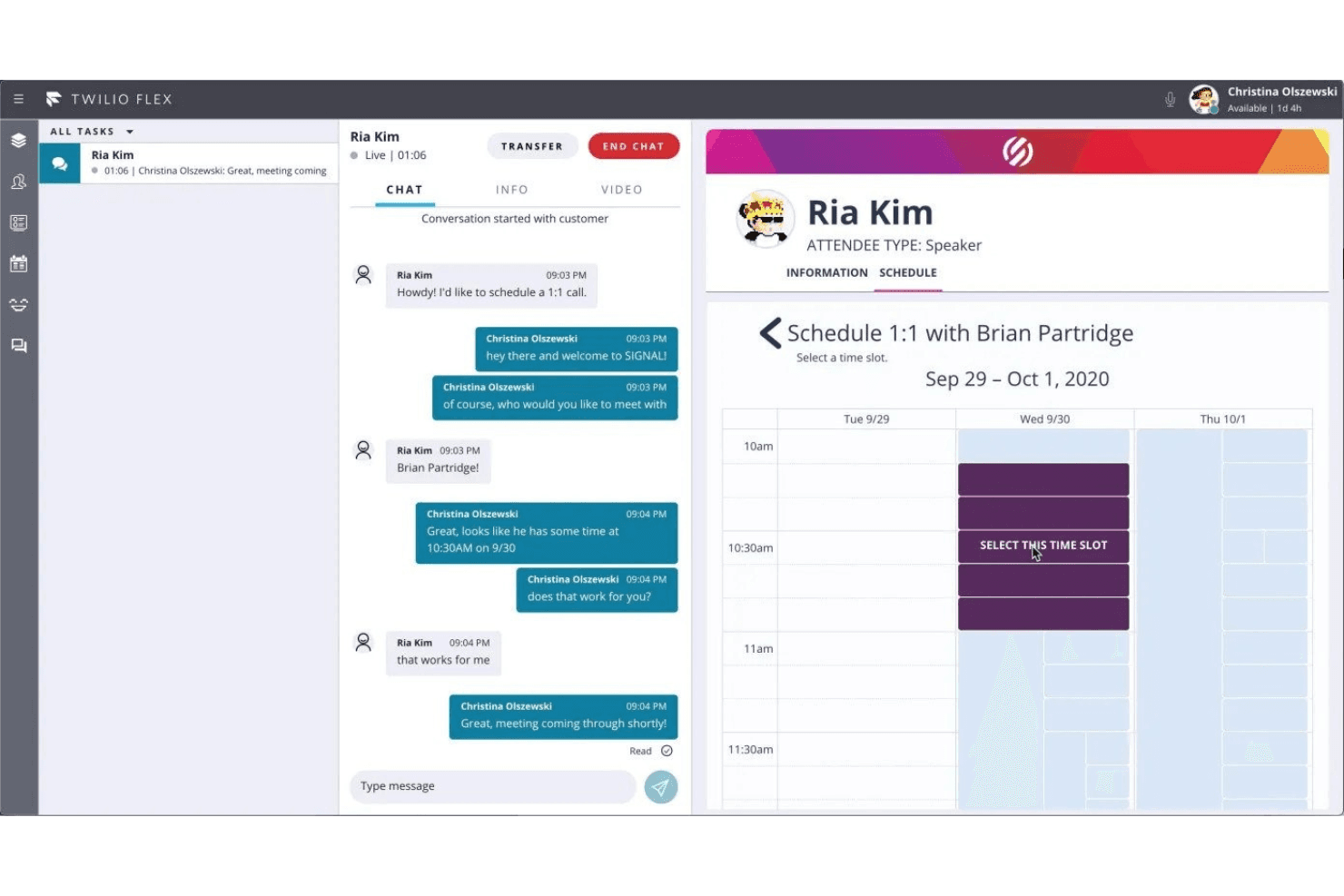
Utilisez la plateforme pour surveiller toutes les conversations, y compris les horaires des appels. Twilio Flex est une plateforme programmable de centre de contacts cloud qui gère le routage des appels entrants, l’IVR, la mise en file d’attente omnicanale, le suivi des agents en temps réel et l’orchestration des conversations pilotée par l’IA sur les canaux vocaux, SMS, WhatsApp et chat.
À qui Twilio est-il le mieux adapté ?
Twilio Flex convient particulièrement aux équipes de taille intermédiaire et aux grandes entreprises qui disposent de ressources internes en développement et qui ont besoin d’un centre de contacts entièrement personnalisable, conçu autour de leur environnement technique existant.
Pourquoi j’ai choisi Twilio
J’ai choisi Twilio comme l’une des meilleures solutions en raison de sa gestion du moment où un agent IA doit transmettre une conversation à un humain. Conversation Orchestrator et Conversation Relay fonctionnent ensemble afin que, lorsque l’intention d’un appelant dépasse ce que le libre-service peut résoudre, le transfert transmette l’intégralité du contexte de la conversation directement sur le poste de travail de l’agent. Agent Copilot affiche ensuite les réponses pertinentes et automatise la synthèse post-appel en temps réel, afin que les agents restent concentrés sur la conversation plutôt que de devoir prendre des notes à la hâte pendant l’appel.
Fonctionnalités clés de Twilio
- Poste de travail agent multicanal : Les agents gèrent les appels entrants, les SMS, WhatsApp et les conversations par chat depuis une interface unifiée unique.
- Créateur visuel d’IVR : Les outils glisser-déposer de Twilio Studio permettent aux équipes de concevoir et de lancer des flux IVR personnalisés sans coder.
- Enregistrement automatique des appels : Flex enregistre automatiquement les appels entrants des clients, avec un accès sécurisé et une fonction de lecture pour les contrôles qualité.
- Tableau de bord analytique en temps réel : Les superviseurs peuvent consulter instantanément le volume d’appels, l’état des files d’attente et l’activité des agents en temps réel grâce à des tableaux de bord configurables.
Intégrations de Twilio
Twilio Flex propose des intégrations natives avec Salesforce, Zendesk, Shopify, Google Dialogflow, Calabrio ONE et Segment. Une API est disponible pour les intégrations personnalisées.
Pros and Cons
Pros:
- Routage des appels et flux IVR hautement personnalisables
- Assistance aux agents optimisée par l’IA pendant les appels en direct
- Évolue facilement pour les équipes d’agents à distance réparties
Cons:
- Nécessite des ressources en développement pour la configuration et la maintenance
- La complexité de la configuration ralentit les délais de déploiement initiaux
Learn more about Twilio:
Autres logiciels de centre d’appels virtuel
- 11DialpadIdéal pour la création et l'automatisation d'agents IA sans code
- 12Zoho VoiceIdéal pour les PME ayant des besoins d’appels internationaux
- 13ConvosoLa meilleure technologie de centre de contact avec IA
- 14Five9Idéal pour les outils alimentés par l'IA
- 15Bitrix24Idéal pour la communication omnicanale
- 16Zendesk SuiteMeilleure plateforme complète de centre d’appels
- 17Salesforce Service Cloud VoiceIdéal pour l’analyse client
- 18Kixie PowercallIdéal pour la gestion des appels d'équipes à distance
- 19CallToolsIdéal pour la surveillance en temps réel
- 20LiveAgentIdéal pour des menus IVR personnalisables
- 213CXIdéal pour les équipes de service client à distance
- 22EtollfreeIdéal pour des numéros locaux et gratuits de qualité supérieure.
- 23Newfies-DialerIdéal pour l'intégration CRM.
- 24DextrMeilleure interface de supervision des agents.
Comment j'évalue les logiciels de centre d'appels entrants
Je divise mon évaluation en deux couches : les exigences de base—IVR, ACD, gestion des files d'attente—qu'un outil doit remplir pour être retenu, et les facteurs différenciateurs qui distinguent une plateforme d'une autre.
Fonctionnalités principales (critères incontournables pour cette liste)
Lorsque je sélectionne des outils pour ma liste, je note chacun sur une échelle de 0 (n'offre pas la fonctionnalité) à 5 (excellent dans ce domaine) pour chaque fonctionnalité principale énumérée ci-dessous. Ensuite, je calcule le score total de l'outil en pourcentage. Chaque outil doit atteindre un score total minimum de 65 % pour être pris en compte.
- ACD & Routage des appels : J'évalue la flexibilité de distribution des appels—si le logiciel prend en charge le routage en fonction des compétences, les niveaux de priorité et des conditions comme la préférence de langue ou le statut VIP.
- Concepteur de menus IVR : Un bon concepteur IVR vous permet de créer des menus à plusieurs niveaux de façon visuelle. Je recherche des éditeurs en glisser-déposer, la reconnaissance vocale, et les recherches dynamiques de données.
- Gestion des files d'attente entrantes : Je vérifie la présence d'options de rappel, de règles de débordement et d'annonces du temps d'attente—les fonctionnalités qui évitent aux appelants de raccrocher lors des pics d'activité.
- Rapports en temps réel & historiques : Les tableaux de bord en direct indiquant la profondeur de file d'attente et le statut des agents sont aussi essentiels que les rapports historiques. Je recherche les deux, ainsi que la possibilité de personnaliser les indicateurs clés.
- Enregistrement & supervision des appels : Au-delà de l'enregistrement basique, j'évalue si les superviseurs peuvent écouter, souffler ou intervenir sur les appels en direct pour le coaching et l'assurance qualité.
- Intégration CRM/Helpdesk : Les pop-ups d'écran qui affichent l'historique de l'appelant depuis des outils comme Salesforce, HubSpot ou Zendesk évitent que les agents demandent aux clients de se répéter.
Une fois que j'ai une liste d'outils répondant aux critères, j'examine ce qui distingue chaque plateforme.
Facteurs de différenciation (ce qui distingue les fournisseurs)
Voici comment je compare et contraste les différents fournisseurs :
Fonctionnalités remarquables
Les outils de gestion des effectifs font vraiment la différence lorsque vous devez planifier pour une volumétrie entrante imprévisible—je recherche la prévision intégrée et le suivi de la conformité aux plannings. L'assistant d'agent basé sur l'IA est un autre critère que j'examine de près, car les suggestions en temps réel et l'accès rapide aux connaissances pendant les appels peuvent réduire les temps de traitement. Je vérifie aussi si une plateforme propose des voicebots en libre-service capables de traiter les demandes courantes, comme le suivi de commande ou la confirmation de rendez-vous, sans transférer à un agent.
Au-delà des fonctionnalités
La conformité est un enjeu majeur—les équipes manipulant des paiements ou des appels sensibles santé nécessitent une couverture PCI-DSS ou HIPAA. J'examine donc les certifications et standards de chiffrement de chaque fournisseur. La flexibilité télécoms est un autre critère, notamment la prise en charge du BYOC ou du tronc SIP pour les équipes souhaitant conserver leurs contrats opérateurs. J'étudie aussi la rapidité de mise en service d'une plateforme, car certains fournisseurs proposent des modèles IVR prêts à l'emploi et un accompagnement guidé qui réduit le déploiement de plusieurs mois à quelques semaines.
Comment choisir un logiciel de centre d’appels entrants
Il est facile de se perdre dans de longues listes de fonctionnalités et des structures tarifaires complexes. Pour vous aider à rester concentré tout au long de votre processus personnalisé de sélection d’un logiciel, voici une liste de contrôle des facteurs à garder à l’esprit :
| Facteur | Points à prendre en compte |
|---|---|
| FacteurÉvolutivité | Points à prendre en compteLe logiciel évoluera-t-il avec votre entreprise ? Vérifiez s’il peut gérer davantage d’appels ou d’utilisateurs à mesure que votre équipe s’agrandit. Recherchez des solutions proposant des forfaits flexibles et favorisant la croissance. |
| FacteurIntégrations | Points à prendre en comptePeut-il se connecter à vos outils existants ? Assurez-vous que le logiciel s’intègre facilement à votre CRM, à votre service d’assistance ou à d’autres systèmes essentiels afin de simplifier les flux de travail. |
| FacteurPersonnalisation | Points à prendre en compteRépond-il à vos besoins spécifiques ? Vérifiez si vous pouvez adapter le logiciel à vos processus et à vos préférences. Évitez les systèmes rigides qui limitent l’adaptabilité. |
| FacteurFacilité d’utilisation | Points à prendre en compteEst-il facile à utiliser pour votre équipe ? Privilégiez les interfaces intuitives qui nécessitent peu de formation. Les systèmes complexes peuvent entraîner frustration et inefficacité. |
| FacteurMise en œuvre et intégration | Points à prendre en compteCombien de temps la configuration prendra-t-elle ? Tenez compte du temps et des ressources nécessaires pour mettre en œuvre la solution et former votre équipe. Recherchez des fournisseurs offrant une assistance solide pendant cette phase. |
| FacteurCoût | Points à prendre en compteLe logiciel respecte-t-il votre budget ? Comparez les modèles tarifaires, y compris les frais cachés ou les forfaits à plusieurs niveaux. Assurez-vous d’obtenir un bon rapport qualité-prix sans dépenser excessivement. |
| FacteurMesures de sécurité | Points à prendre en compteComment protège-t-il vos données ? Vérifiez les normes de chiffrement du logiciel et sa conformité aux réglementations sur la protection des données afin de protéger les informations sensibles. |
| FacteurDisponibilité de l’assistance | Points à prendre en compteL’aide est-elle accessible lorsque vous en avez besoin ? Vérifiez si le fournisseur propose une assistance 24 h/24 et 7 j/7 ou des responsables de compte dédiés pour résoudre rapidement les problèmes et assurer la fluidité des opérations. |
Fonctionnalités des logiciels de centre d’appels entrants
Lors du choix d’un logiciel de centre d’appels entrants, soyez attentif aux fonctionnalités clés suivantes :
- Distribution automatique des appels : Cette fonctionnalité garantit que les appels entrants sont dirigés vers le bon agent en fonction de ses compétences, de sa disponibilité et des besoins de l’appelant. Elle vous aide à réduire les temps d’attente et à mettre les appelants en relation avec la personne la mieux à même de les aider.
- Réponse vocale interactive : Les systèmes IVR accueillent les appelants avec un menu d’options, leur permettant de s’orienter eux-mêmes vers le bon service ou la bonne ressource. Cela fait gagner du temps à votre équipe, tout en permettant aux appelants d’obtenir rapidement des réponses — sans intervention humaine pour les questions courantes.
- Enregistrement des appels : Grâce à l’enregistrement des appels, vous pouvez conserver chaque conversation pour la consulter ultérieurement. Cela vous aide à améliorer le service client, à former votre équipe et à résoudre les litiges grâce à une trace fiable à consulter.
- Analyses et rapports en temps réel : Accédez à des tableaux de bord et à des rapports présentant le volume d’appels, les performances des agents, les temps d’attente et bien plus encore. Vous pouvez ainsi repérer les tendances, résoudre les goulots d’étranglement et accompagner votre équipe pour obtenir de meilleurs résultats.
- Intégration au CRM : Connectez votre logiciel de centre d’appels à votre système de gestion de la relation client. Lorsqu’un appel arrive, vous voyez les coordonnées de l’appelant, son historique et ses notes — vous pouvez ainsi accueillir chaque client comme une vieille connaissance.
- Écoute des appels et accompagnement discret : Écoutez les appels en direct et donnez des retours ou des conseils aux agents (sans que le client ne les entende). C’est comme avoir un coach sur le bord du terrain, qui aide les agents à gérer les situations délicates et à développer leurs compétences.
- Prise en charge multicanale : Allez au-delà des appels téléphoniques en gérant les discussions instantanées, les e-mails ou les SMS depuis la même plateforme. Vous pouvez interagir avec les clients sur leur canal préféré et garder toutes les conversations organisées.
- Mise en file d’attente des appels : Lorsque tous les agents sont occupés, les appelants ne sont ni perdus ni ignorés. La mise en file d’attente les place dans une liste, diffuse des messages ou de la musique d’attente et les informe de leur temps d’attente afin que personne ne se sente oublié.
- Notes et étiquettes d’appel : Les agents peuvent ajouter des notes et des étiquettes personnalisées à chaque appel. Il est ainsi plus facile de suivre les résultats des appels, de faire remonter les tickets et d’assurer le suivi des engagements pris envers les clients.
Fonctionnalités d’IA courantes des logiciels de centre d’appels entrants
Au-delà des fonctionnalités standard des logiciels de centre d’appels entrants présentées ci-dessus, nombre de ces solutions intègrent l’IA avec des fonctionnalités telles que :
- Routage des appels assisté par l’IA : Les algorithmes analysent les données client et le contexte de l’appel afin de mettre chaque appelant en relation avec l’agent le plus qualifié, ce qui améliore la rapidité de résolution et la satisfaction client.
- Assistants virtuels intelligents : Les robots pilotés par l’IA peuvent répondre aux questions courantes, traiter les demandes simples et guider les appelants dans les menus — ce qui permet à vos agents de se consacrer aux problèmes plus complexes.
- Analyse des sentiments en temps réel : L’IA évalue le ton et les mots utilisés au cours d’une conversation, signale les appelants frustrés ou désorientés afin que vous puissiez intervenir de manière proactive et améliorer la situation.
- Contrôle qualité assisté par l’IA : L’intelligence artificielle examine automatiquement les appels afin de vérifier leur conformité, le ton employé et le respect du script — en mettant en évidence les possibilités d’accompagnement et en garantissant des standards élevés.
- Analyses prédictives : L’IA repère les habitudes de comportement des appelants, prédit les périodes de forte activité et vous aide à optimiser les effectifs afin de fournir un service réactif de manière constante.
Avantages des logiciels de centre d’appels entrants
La mise en place d’un logiciel de centre d’appels entrants offre plusieurs avantages à votre équipe et à votre entreprise. En voici quelques-uns :
- Amélioration de l’expérience client : Les logiciels de centre d’appels aident à gérer et à acheminer efficacement les appels, afin que les clients soient rapidement mis en relation avec le bon agent.
- Meilleure collaboration au sein de l’équipe : L’intégration aux systèmes CRM permet de partager facilement les informations client entre les membres de l’équipe, améliorant ainsi la communication et la qualité du service.
- Accroissement de l’efficacité : Les fonctionnalités de distribution automatique des appels et de réponse vocale interactive (IVR) réduisent les temps d’attente et libèrent les agents afin qu’ils puissent traiter des demandes plus complexes.
- Analyses en temps réel : L’accès aux données d’appel et aux indicateurs de performance aide les responsables à prendre des décisions éclairées pour optimiser les opérations et améliorer la qualité du service.
- Évolutivité : Le logiciel peut facilement s’adapter à l’augmentation du volume d’appels, permettant aux entreprises de développer leurs capacités d’assistance client sans modifications importantes de leur infrastructure.
- Réduction des coûts : En automatisant les tâches courantes et en optimisant l’affectation des ressources, les logiciels de centre d’appels entrants peuvent réduire les coûts opérationnels.
- Flexibilité : Les fonctionnalités d’accès à distance permettent aux agents de travailler depuis n’importe où, offrant aux entreprises une solution de main-d’œuvre flexible.
Coûts et tarifs des logiciels de centre d’appels entrants
La sélection d’un logiciel de centre d’appels entrants nécessite de comprendre les différents modèles et forfaits tarifaires disponibles. Les coûts varient en fonction des fonctionnalités, de la taille de l’équipe, des modules complémentaires et de nombreux autres facteurs. Le tableau ci-dessous résume les forfaits courants, leurs prix moyens et les fonctionnalités généralement incluses dans les solutions logicielles de centre d’appels entrants :
Tableau comparatif des forfaits pour les logiciels de centre d’appels entrants
| Type de forfait | Prix moyen | Fonctionnalités courantes |
|---|---|---|
| Type de forfaitForfait gratuit | Prix moyen$0 | Fonctionnalités courantesGestion basique des appels, rapports limités et assistance de la communauté. |
| Type de forfaitForfait personnel | Prix moyen$10-$30/utilisateur/mois | Fonctionnalités courantesRoutage des appels, messagerie vocale, analyses de base et assistance par e-mail. |
| Type de forfaitForfait professionnel | Prix moyen$40-$70/utilisateur/mois | Fonctionnalités courantesRapports avancés, intégration CRM, enregistrement des appels et assistance clientèle 24 h/24, 7 j/7. |
| Type de forfaitForfait entreprise | Prix moyen$100+/utilisateur/mois | Fonctionnalités courantesTableau de bord personnalisable, responsable de compte dédié, accès à l’API et assistance premium. |
Questions fréquemment posées
Voici les réponses à certaines des questions fréquemment posées sur les logiciels de centre de contacts entrants.
Existe-t-il des logiciels de centre de contacts entrants gratuits ?
Oui, vous pouvez trouver des logiciels de centre de contacts avec des forfaits gratuits ou des périodes d’essai, même si ces options comportent souvent des limites concernant le nombre d’agents, les minutes ou les fonctionnalités avancées. Des fournisseurs comme Freshdesk, Bitrix24 et CloudTalk proposent des offres d’entrée de gamme ou des périodes de démonstration afin que vous puissiez évaluer si la plateforme répond à vos besoins. Les forfaits gratuits incluent généralement la gestion basique des appels, un SVI simple et des rapports limités.
À mesure que votre équipe s’agrandit ou que vos besoins deviennent plus complexes (par exemple si vous avez besoin d’analyses approfondies, d’intégrations CRM ou de fonctionnalités de conformité), vous devrez probablement passer à un forfait payant. Testez plusieurs options pour déterminer quelle version gratuite prend le mieux en charge les opérations quotidiennes de votre centre de contacts avant de vous engager dans un abonnement.
Qu’est-ce que le routage basé sur les compétences ?
Le routage basé sur les compétences est une fonctionnalité présente dans la plupart des systèmes modernes de centre de contacts entrants. Elle associe automatiquement les appels entrants à l’agent le mieux équipé pour répondre au problème du client, en fonction de son expérience, de sa maîtrise des langues ou de sa connaissance des produits. Par exemple, si un client a besoin d’une assistance technique en espagnol, le système dirige l’appel vers une personne possédant à la fois les compétences linguistiques et les compétences nécessaires au dépannage.
La mise en place d’un routage basé sur les compétences réduit les transferts d’appels, raccourcit les temps d’attente et diminue le nombre de clients frustrés. Elle vous aide à exploiter plus efficacement l’expertise de votre équipe, ce qui entraîne des taux plus élevés de résolution au premier appel et une amélioration globale de la satisfaction client. Lorsque vous examinez les différentes options logicielles, vérifiez s’il est facile de configurer des règles de routage personnalisées et de mettre à jour les profils des agents à mesure que votre entreprise évolue.
Comment améliorer les taux de résolution au premier appel grâce à un logiciel de centre de contacts entrants ?
Pour améliorer les taux de résolution au premier appel (FCR), utilisez un logiciel doté d’un routage intelligent des appels, d’un historique client unifié et d’outils de script contextuels. Assurez-vous que vos agents disposent d’un accès instantané aux interactions précédentes, aux guides produits et aux FAQ de dépannage grâce à une base de connaissances intégrée. Utilisez les enregistrements d’appels et les tableaux de bord analytiques pour identifier les tendances parmi les appels non résolus et proposer un accompagnement ciblé.
Des fonctionnalités proactives comme la surveillance en temps réel et l’assistance discrète permettent aux superviseurs de guider les appels sans perturber l’expérience client. Fournissez régulièrement des retours, facilitez les escalades et créez un référentiel des problèmes courants afin que votre équipe puisse résoudre davantage d’appels dès la première tentative. Donner la priorité au FCR lors des évaluations de performance encourage les agents à se concentrer sur la résolution des problèmes des clients dès le premier échange.
Quelles intégrations dois-je privilégier pour un logiciel de centre de contacts entrants ?
Privilégiez les intégrations qui comblent les lacunes entre votre centre de contacts et le reste de votre entreprise. Connectez votre plateforme de centre de contacts à votre CRM (Salesforce, HubSpot, Zoho) afin que les agents disposent toujours d’informations client à jour. Les intégrations avec les outils de service client (Zendesk, ServiceNow) simplifient la gestion des dossiers et le suivi des tickets. Recherchez des modules complémentaires omnicanaux qui permettent à votre équipe de gérer les e-mails, les discussions en direct et les messages sur les réseaux sociaux depuis le même tableau de bord, en unifiant tous les canaux de communication. Si votre centre de contacts fonctionne selon des indicateurs, associez-y des outils d’analyse pour créer des rapports personnalisés et un logiciel de gestion des effectifs pour optimiser la planification du personnel. Les bonnes intégrations réduisent la saisie manuelle, évitent les changements de contexte et vous offrent une visibilité en temps réel sur chaque point de contact.
Comment mesurer les performances des agents avec des outils de centre de contacts entrants ?
Les performances des agents se mesurent au mieux à l’aide d’un mélange d’indicateurs quantitatifs et qualitatifs, tous facilement suivis dans les logiciels modernes de centre de contacts entrants. Concentrez-vous sur la durée moyenne de traitement, la résolution au premier appel, le niveau de service et les scores de satisfaction client (CSAT) comme principaux KPI. La plupart des plateformes proposent des tableaux de bord en direct qui permettent de surveiller ces statistiques en temps réel, facilitant ainsi les retours rapides et les ajustements. Examinez régulièrement les enregistrements d’appels à des fins de coaching et félicitez les meilleurs éléments lors des réunions d’équipe afin de renforcer la motivation. Analysez les journaux d’appels pour repérer les goulots d’étranglement fréquents ou les occasions manquées. Fixez des références liées aux résultats de l’entreprise et fournissez aux agents des fiches d’évaluation ou des tableaux de bord afin qu’ils puissent suivre leurs progrès et prendre en main leur propre développement.
Quelle est la différence entre un logiciel de centre de contacts entrants et un logiciel de centre de contacts sortants ?
Les logiciels de centre de contacts entrants sont conçus pour gérer les demandes entrantes — assistance, renseignements ou gestion des commandes — et proposent des fonctionnalités telles que le serveur vocal interactif (SVI), le routage basé sur les compétences, la gestion des files d’attente et le suivi des dossiers. Les logiciels de centre de contacts sortants sont axés sur les appels sortants, couramment utilisés pour les ventes, la génération de prospects ou les campagnes de prospection client. Les plateformes sortantes incluent des fonctionnalités telles que la numérotation prédictive, les scripts d’appel et le suivi des campagnes.
Certaines solutions sont « mixtes », mais en tant que responsable d’un centre de contacts, vous devrez vous assurer que le logiciel choisi met l’accent sur les fonctionnalités entrantes pertinentes pour le flux de travail de votre équipe, telles que les rapports en temps réel et l’intégration CRM, plutôt que de se limiter à des outils d’appels sortants de masse.
Comment aborder la mise à l’échelle de mon centre de contacts avec un logiciel infonuagique ?
La mise à l’échelle avec un logiciel de centre de contacts infonuagique vous offre la flexibilité d’ajouter des agents, d’ouvrir de nouveaux sites ou de passer au travail à distance sans investissements informatiques initiaux importants.
- Commencez par choisir un fournisseur reconnu pour la fiabilité de sa disponibilité, la robustesse de ses outils de gestion des utilisateurs et la transparence de ses tarifs.
- À mesure que votre équipe s’agrandit, les solutions infonuagiques vous permettent d’intégrer de nouveaux agents depuis n’importe où et de leur fournir instantanément l’accès aux ressources partagées et aux scripts d’appel.
- Vous pouvez étendre la couverture pendant les heures de pointe, déployer des mises à jour et intégrer de nouveaux canaux de communication comme la discussion en ligne, le tout sans interrompre le service.
- Utilisez les fonctionnalités d’optimisation des effectifs pour établir des prévisions et des plannings précis.
- Enfin, exploitez les analyses intégrées pour surveiller les performances et vous adapter à mesure de votre croissance, en veillant à ce que la plateforme reste alignée sur l’évolution de vos objectifs commerciaux.