

Les logiciels de centre d’assistance en ligne aident les équipes d’assistance et de service client à gérer les tickets, à automatiser les flux de travail et à répondre plus rapidement. Ces outils sont conçus pour centraliser les communications avec les clients, réduire les tâches manuelles répétitives et fournir à votre équipe le contexte nécessaire pour résoudre efficacement les problèmes.
J’ai testé et évalué ces plateformes en fonction de leurs fonctionnalités d’automatisation, de leur interface utilisateur, de leurs intégrations, de leur évolutivité et de leur prise en charge des demandes multicanales. Ce guide présente les meilleurs logiciels de centre d’assistance en ligne pour différentes tailles d’équipe et différents modèles de service, afin que les tâches de service ne passent pas entre les mailles du filet.
Qu’est-ce qu’un logiciel de centre d’assistance en ligne ?
Un logiciel de centre d’assistance en ligne est une plateforme qui aide les équipes d’assistance à gérer, suivre et résoudre les problèmes des clients depuis un même endroit. Il centralise les communications, automatise les flux de travail liés aux tickets et est utilisé pour améliorer le temps de réponse, la cohérence et la qualité du service sur tous les canaux.
Pourquoi faire confiance à nos recommandations de logiciels
6,700+
Reviews
20
Industry experts
16+
Evaluation factors
14
Years
Notre équipe teste et évalue des logiciels depuis 2012. En tant que leaders CX nous-mêmes, nous savons à quel point il est difficile — et important — de choisir le bon logiciel.
Pour ce guide, nous avons évalué les outils grâce à des tests pratiques et une recherche indépendante, en notant les outils selon nos critères de sélection.
Nos avis reflètent notre jugement éditorial humain, et non un argumentaire de vente.
 Gui DrusinaCreative Director
 Tim FisherVP of AI
Résumé des meilleurs logiciels de centre d’assistance en ligne
| Tool | Best For | Trial Info | Price | ||
|---|---|---|---|---|---|
| 1 | Idéal pour le support des centres d'appels | Démo gratuite + essai gratuit de 14 jours disponible | À partir de 19 $/utilisateur/mois (facturation annuelle) | Website | |
| 2 | Idéal pour personnaliser les interactions grâce à l'IA | Essai gratuit + démo gratuite disponible | À partir de 25 $/utilisateur/mois (facturé annuellement) | Website | |
| 3 | Idéal pour unifier chat et email | Essai gratuit de 14 jours disponible | À partir de $16/utilisateur/mois (facturé annuellement) | Website | |
| 4 | Meilleur générateur de flux de travail automatisé | Essai gratuit de 15 jours + offre gratuite | Dès 7 $/utilisateur/mois (facturé annuellement) | Website | |
| 5 | Idéal pour centraliser les communications clients e-commerce | Essai gratuit de 14 jours | À partir de $39/agent/mois | Website | |
| 6 | Idéal avec l'accès invité pour la collaboration externe | Essai gratuit de 30 jours disponible | À partir de 14 $ par utilisateur et par mois (facturation annuelle) | Website | |
| 7 | Idéal pour un service client alimenté par l’IA | Essai gratuit de 7 jours + formule gratuite disponible | À partir de $25/utilisateur/mois | Website | |
| 8 | Idéal pour la collaboration en équipe | Plan gratuit + démo gratuite disponibles | À partir de 29$/utilisateur/mois | Website | |
| 9 | Idéal pour la gestion des tickets pilotée par l’IA | Essai gratuit disponible | À partir de 26 $/siège/mois (minimum de 3 sièges) | Website | |
| 10 | Idéal pour la gestion des interactions client | Essai gratuit de 15 jours + offre gratuite + démo gratuite disponible | À partir de $39.99/utilisateur/mois (facturé annuellement) | Website |


Présentation des 20 meilleurs logiciels de centre d’assistance en ligne
Vous pouvez utiliser les présentations succinctes de chaque outil ci-dessous pour comprendre en quoi chacun se distingue des autres logiciels de centre d’assistance en ligne.
 Idéal pour le support des centres d'appels
- Démo gratuite + essai gratuit de 14 jours disponible
- À partir de 19 $/utilisateur/mois (facturation annuelle)
Visit WebsiteCustomer Rating:4.4/5
Suivez la performance de l'équipe et la satisfaction client grâce à un tableau de bord et des rapports personnalisables. Freshdesk (un produit de Freshworks Inc.) est une plateforme de service d'assistance en ligne pouvant être utilisée par les organisations opérant dans un environnement de centre d'appels. Elle prend en charge la gestion des demandes clients sur plusieurs canaux au sein d'un système unique, aidant les équipes à gérer les conversations sans changer d'outil.
Pourquoi j'ai choisi Freshdesk : J'ai choisi Freshdesk pour l'ensemble des outils qu'il offre afin de soutenir les flux de travail des centres d'appels. La plateforme inclut une boîte de réception partagée, des outils de base de connaissances et une fonctionnalité de chat, ce qui permet aux équipes de gérer toutes les demandes entrantes en un même endroit. Elle offre également la gestion des appels entrants, permettant aux agents de prendre en charge les appels téléphoniques des clients directement depuis la plateforme. Pour les équipes dépendant de systèmes externes, Freshdesk propose une vaste gamme d'intégrations qui connectent l'assistance à distance aux activités existantes.
Freshdesk peut être configuré pour s'adapter à différents besoins opérationnels et est utilisé par des équipes de tailles variées. Il intègre Freddy AI, qui aide à automatiser la distribution des tickets selon des règles prédéfinies, réduisant la gestion manuelle des demandes entrantes. Les outils de reporting et d'analyse apportent une visibilité sur l'activité du support sur tous les canaux, tandis que les intégrations avec les réseaux sociaux permettent de convertir messages et mentions en tickets d'assistance.
Fonctionnalités et intégrations phares de Freshdesk
Fonctionnalités : boîte de réception partagée, détection de collision des agents, gestion des SLA, suggestions de champs de ticket, statuts de ticket personnalisés, collaboration d'équipe (huddles), tickets liés, propriété partagée, distribution des tickets, attribution intelligente des tickets et automatisation déclenchée à heure fixe.
Intégrations : Google Calendar, Slack, Mailchimp, Google Analytics, Office 365, Freshsales, Dropbox, HubSpot CRM, Microsoft Teams, Harvest, Zoho CRM, Pipedrive, Chargebee, 3CX, Asana, Magento et Zapier.
Freshdesk propose une formule gratuite pour un maximum de deux agents pendant six mois, avec des formules payantes à partir de 19 $ par utilisateur et par mois (facturation annuelle). Certaines formules incluent un essai gratuit de 14 jours.
Pros and Cons
Pros:
- Capacités d'automatisation impressionnantes
- Incroyablement intuitif et convivial
- Excellente organisation des e-mails de service client
Cons:
- L'intégration aux processus existants est fastidieuse
- Quelques problèmes techniques
Learn more about Freshdesk: Idéal pour personnaliser les interactions grâce à l'IA
- Essai gratuit + démo gratuite disponible
- À partir de 25 $/utilisateur/mois (facturé annuellement)
Visit WebsiteCustomer Rating:4.4/5
Clôturez les dossiers rapidement et gardez vos clients satisfaits grâce à l'automatisation et aux recommandations contextuelles. Salesforce Service Cloud aide les entreprises à offrir des expériences clients complètes grâce à l'intelligence artificielle.
Pourquoi j'ai choisi Salesforce Service Cloud : Le logiciel utilise l'intelligence artificielle et des outils d'automatisation des processus pour aider vos agents à éliminer les tâches répétitives et à se concentrer sur un support d'excellence. L'IA ne se contente pas d'aider vos agents à fournir un service client de haut niveau grâce à des outils tels que les chatbots et le tri automatique qui réduisent les temps de traitement. L'IA de Salesforce Service Cloud garantit également que les agents disposant de la bonne expertise traitent les demandes spécifiques des clients.
Salesforce Service Cloud convient aux organisations de toutes tailles et de divers secteurs qui ont besoin d'outils pour renforcer l'engagement client. Vous pouvez utiliser la plateforme pour offrir un support personnalisé à vos clients sur plusieurs canaux lorsque c'est nécessaire. Salesforce Service Cloud met aussi à disposition un éditeur par glisser-déposer permettant de créer un centre libre-service afin que les clients puissent s'aider eux-mêmes.
Fonctionnalités et intégrations phares de Salesforce Service Cloud
Fonctionnalités : automatisation intelligente des processus et flux de travail, gestion des dossiers, routage omnicanal, gestion des connaissances, rapports et analyses, outils de téléphonie et de voix, gestion des incidents de service client, assistance à distance et chat en temps réel.
Intégrations : Freshdesk, CloudTalk, Twilio, Brandwatch, Paligo, Mailchimp, HubSpot CRM, Trello, TeamViewer, Smartsheet, Klaviyo, Aircall, Gainsight et Conversocial.
Salesforce Service Cloud coûte à partir de 25 $/utilisateur/mois, facturé annuellement. Salesforce Service Cloud propose un essai gratuit de 30 jours pour les nouveaux abonnés.
Pros and Cons
Pros:
- Offre une vue unifiée des interactions
- Simplifie efficacement les procédures d'assistance
- S'adapte aux besoins des utilisateurs
Cons:
- Nécessite une formation supplémentaire pour l'utiliser
- Difficile à configurer
Learn more about Agentforce Service (formerly Service Cloud): Idéal pour unifier chat et email
- Essai gratuit de 14 jours disponible
- À partir de $16/utilisateur/mois (facturé annuellement)
Visit WebsiteCustomer Rating:4.6/5
SparrowDesk affiche aux agents une file d'attente de chat en direct unifiée, tout en guidant les clients dans des conversations assistées par IA en temps réel. SparrowDesk se distingue comme un logiciel de support client en ligne alimenté par l'IA, conçu pour les entreprises souhaitant optimiser leurs opérations de service client. Grâce à son interface intuitive et à des fonctionnalités avancées telles que des Agents IA, il peut résoudre automatiquement une grande partie des demandes clients, ce qui le rend particulièrement attractif pour les sociétés cherchant à rationaliser la communication et à augmenter leur productivité.
Pourquoi j'ai choisi SparrowDesk
J'ai choisi SparrowDesk pour sa capacité unique à intégrer directement des solutions assistées par l'IA dans l'environnement du support client. Ses Agents IA peuvent automatiquement résoudre la plupart des demandes clients via chat et email, répondant ainsi directement à la nécessité d'efficacité dans la gestion de volumes importants d'interactions. La boîte de réception omnicanale de la plateforme garantit que votre équipe peut centraliser les communications issues de diverses sources (chat et email) en un seul endroit, facilitant ainsi la cohérence et la précision des réponses. De plus, des fonctionnalités telles que les suggestions de réponses générées par l'IA permettent à votre équipe de fournir rapidement des réponses contextuelles, améliorant davantage la satisfaction client.
Fonctionnalités clés de SparrowDesk
En plus de ses capacités assistées par l'IA, j'ai également relevé plusieurs autres fonctionnalités qui font de SparrowDesk une solution convaincante pour le support client :
- Accords sur les niveaux de service (SLA) : Définissez des objectifs clairs de réponse et de résolution pour garantir un support rapide.
- Gestion des horaires de travail : Définissez les heures de service afin de gérer les attentes client et d'optimiser le routage des tickets.
- Vues et filtres personnalisés : Personnalisez les vues des agents afin de mieux prioriser et gérer les conversations.
- Macros d’action rapide : Automatisez les tâches courantes pour gagner du temps et fluidifier les workflows.
Intégrations SparrowDesk
Les intégrations natives ne sont pas actuellement listées par SparrowDesk.
Pros and Cons
Pros:
- Le générateur de workflows sans code automatise le routage et les notifications
- Les fonctionnalités Copilot résument les longues conversations dans la boîte de réception agent
- Agents IA conçus pour résoudre de manière autonome de nombreux tickets répétitifs
Cons:
- L'absence d'intégrations natives pourrait freiner une connectivité fluide
- Les canaux se concentrent actuellement sur l'email et le chat en direct, et non sur la voix ou les réseaux sociaux
Learn more about SparrowDesk: Meilleur générateur de flux de travail automatisé
- Essai gratuit de 15 jours + offre gratuite
- Dès 7 $/utilisateur/mois (facturé annuellement)
Visit WebsiteCustomer Rating:4.4/5
Créez des flux de travail automatisés pour les demandes récurrentes des clients, ce qui allège la charge manuelle de votre équipe et crée de la cohérence. Zoho Desk est un logiciel d'assistance en ligne qui prend en charge les opérations de service client omnicanal et peut centraliser vos emails, réseaux sociaux, chats web et appels vocaux en un seul endroit.
Pourquoi j'ai choisi Zoho Desk : Ce logiciel offre un ensemble complet de fonctionnalités pour la gestion du service d'assistance, incluant des ressources en libre-service et des outils de collaboration d'équipe. Mais ce qui le distingue vraiment, c'est sa capacité à automatiser vos flux de travail. Cela permet de standardiser vos protocoles de support, d'alléger la charge de travail manuelle de votre équipe et d'intégrer rapidement de nouveaux agents.
Le créateur de flux de travail se présente sous la forme d'une interface simple, en glisser-déposer. Vous pouvez définir des actions et des résultats spécifiques, selon des conditions précisées. Votre équipe suivra ainsi les mêmes bonnes pratiques pour les demandes clientes récurrentes, ce qui leur fera gagner du temps et garantira une expérience client homogène.
Fonctionnalités et intégrations remarquables de Zoho Desk
Fonctionnalités : gestion des tickets, auto-étiquetage des sollicitations, analyse de sentiment, notifications Zia, tableau de bord Zia, assistant de réponse, outils de libre-service, intégration CRM, fonctions personnalisées, SDK, marketplace et plateforme, API, rapports et tableaux de bord, suivi du temps, centre d'aide multi-marques, mappage de domaine, gestion des utilisateurs et des accès.
Intégrations : Twilio, RingCentral, Amazon Connect, Ozonetel, Exotel, Knowlarity, Jive, sipgate, JustCall, ringover et d'autres logiciels.
Zoho Desk est disponible à partir de 20 $ par utilisateur et par mois, avec un essai gratuit de 15 jours.
Pros and Cons
Pros:
- Interface propre, intuitive et facile à naviguer
- Système de ticketing personnalisable
- Application mobile pour l'accès en déplacement
Cons:
- Rapports limités sur les forfaits d'entrée de gamme
- Options de personnalisation limitées pour les portails client
Learn more about Zoho Desk: Idéal pour centraliser les communications clients e-commerce
- Essai gratuit de 14 jours
- À partir de $39/agent/mois
Visit WebsiteCustomer Rating:4.4/5
eDesk affiche les messages clients e-commerce issus de plusieurs canaux de vente simultanément. eDesk est conçu pour les entreprises de commerce électronique souhaitant améliorer leur service client grâce à des fonctionnalités avancées d'IA. En centralisant les interactions clients sur divers canaux, eDesk aide votre équipe à gérer les communications plus efficacement, permettant des temps de réponse plus rapides et une satisfaction client accrue. Cet outil est particulièrement utile pour les entreprises cherchant à intégrer leurs opérations de support avec les principales places de marché et à transformer les demandes en opportunités de vente.
Pourquoi j'ai choisi eDesk
J'ai choisi eDesk pour sa capacité à unifier les communications clients sur plusieurs plateformes, ce qui est essentiel pour les entreprises de commerce électronique aux canaux de vente variés. Les fonctionnalités d'automatisation par IA, telles que la catégorisation et l'analyse de sentiment, permettent à votre équipe de gérer les tâches de support plus efficacement. De plus, les outils de reporting en temps réel fournissent des informations sur les indicateurs de performance, vous permettant de prendre des décisions éclairées et d'améliorer le niveau de service.
Fonctionnalités clés d'eDesk
En plus de la centralisation des communications clients e-commerce, eDesk propose :
- Chatbot 24/7 : Offre une assistance continue à vos clients, assurant que leurs questions trouvent une réponse même en dehors des heures d'ouverture.
- Outils de retour clients : Recueille des retours précieux pour vous aider à améliorer vos services et vos produits.
- Collaboration d'équipe : Facilite la communication interne grâce à des fonctionnalités comme les notes internes et la gestion de la charge de travail.
- Workflows personnalisables : Vous permet de mettre en place des processus automatisés adaptés à vos besoins, améliorant ainsi la productivité.
Intégrations eDesk
Les intégrations incluent Brightpearl, Klaviyo, ChannelAdvisor, StoreFeeder, VoloCommerce, Veeqo, Linnworks, ShipStation, Aftership, et une API est disponible pour les intégrations personnalisées.
Pros and Cons
Pros:
- Des automatisations alimentées par l'IA améliorent l'efficacité des réponses
- Des modèles de réponses enregistrées accélèrent les échanges clients
- Des réponses du service client rapides et efficaces
Cons:
- Le reporting et l'analyse, bien que présents, peuvent être moins personnalisables que sur certains tableaux de bord d'entreprise
- Principalement conçu pour le commerce électronique, moins flexible pour d'autres secteurs
Learn more about eDesk: Idéal avec l'accès invité pour la collaboration externe
- Essai gratuit de 30 jours disponible
- À partir de 14 $ par utilisateur et par mois (facturation annuelle)
Visit WebsiteCustomer Rating:4.8/5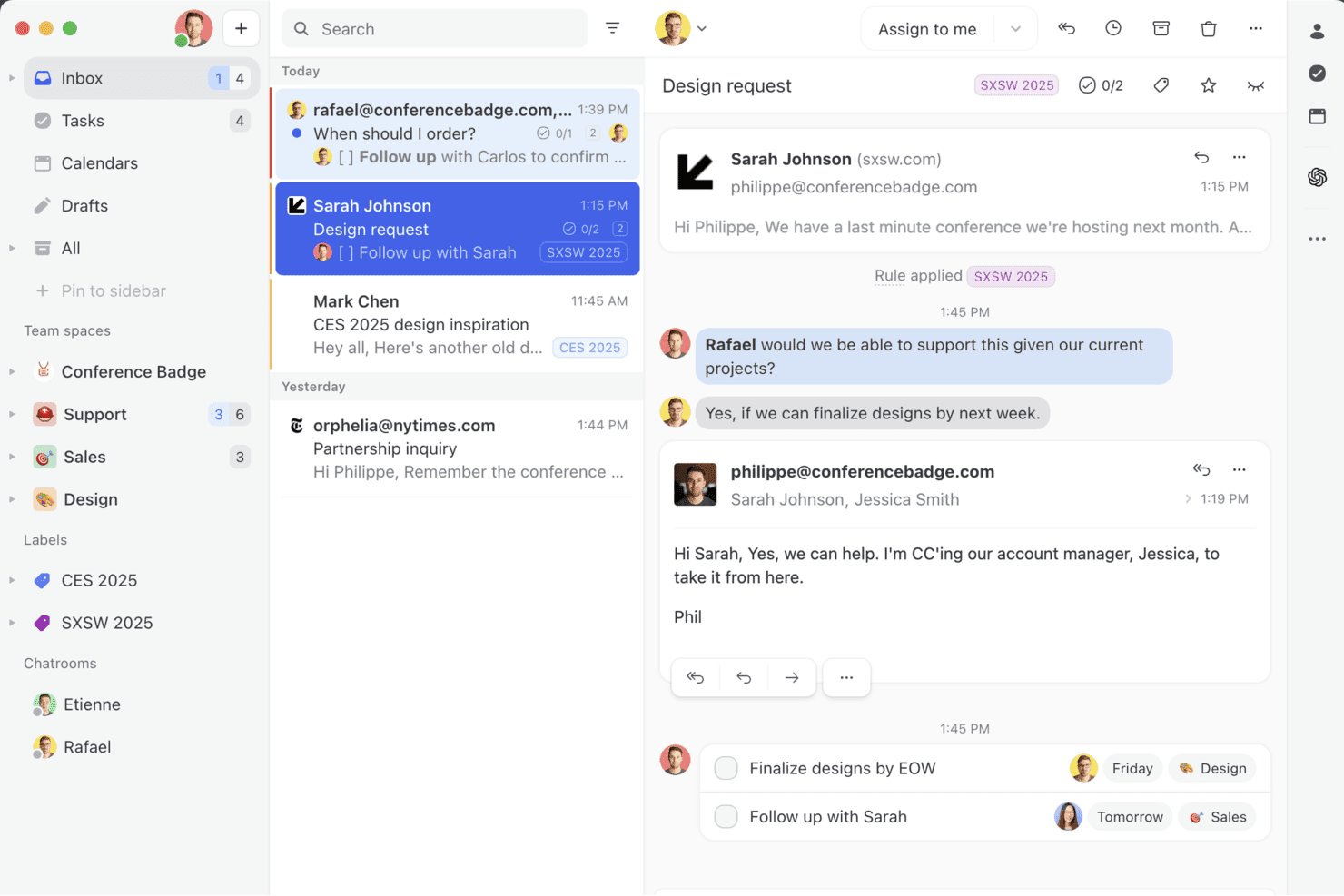
Missive réunit les e-mails, les discussions et les tâches de votre équipe dans une boîte de réception collaborative unique, afin que vous puissiez gérer les conversations, attribuer des tâches à vos coéquipiers et transformer les messages en actions sans quitter votre boîte de réception. Missive est une plateforme de boîte de réception partagée collaborative qui réunit les e-mails, les SMS, WhatsApp, Instagram, Messenger et le chat en direct dans un espace de travail d'équipe unique, avec une gestion intégrée des conversations, des règles d'automatisation et une rédaction assistée par l'IA.
À qui Missive convient-elle le mieux ?
Missive convient aux équipes qui impliquent régulièrement des collaborateurs externes — comme des prestataires, des clients ou des partenaires d'agence — dans des conversations avec les clients, sans leur ajouter de licence payante.
Pourquoi ai-je choisi Missive ?
J'ai inclus Missive dans ma sélection des meilleures solutions, car sa fonctionnalité d'accès invité résout un véritable problème : impliquer des collaborateurs externes, comme des prestataires ou des partenaires d'agence, dans des conversations clients en cours sans leur acheter de licence payante. J'apprécie également sa détection des collisions en temps réel, qui indique précisément qui rédige une réponse, afin que deux agents ne travaillent jamais en double sur la même conversation. Ajoutez à cela des fils de discussion internes associés à chaque conversation, et votre équipe peut résoudre les problèmes complexes sans encombrer le fil visible par le client.
Principales fonctionnalités de Missive
- Boîte de réception unifiée omnicanale : Regroupe les e-mails, les SMS, WhatsApp, Instagram, Messenger et le chat en direct dans une seule boîte de réception partagée pour toute l'équipe.
- Moteur de règles d'IA : Règles d'automatisation qui interprètent le contenu et l'intention des messages afin d'ajouter automatiquement des libellés, de rédiger des réponses ou de transmettre les conversations sans déclencheurs manuels.
- Réponses prédéfinies avec variables : Modèles de réponse préconfigurés qui insèrent dynamiquement les informations du contact ou de la conversation pour accélérer les réponses et les rendre cohérentes.
- Journal d'audit des conversations : Historique complet de chaque action effectuée sur une conversation, offrant aux responsables d'équipe une visibilité claire sur les responsabilités dans les boîtes de réception partagées.
- Serveur MCP de Missive : Connecte des outils d'IA externes, comme Claude ou ChatGPT, pour interroger les fils d'assistance en ligne, consulter les calendriers et rédiger des réponses, tout en exigeant une vérification par un agent avant l'envoi, ce qui garantit aux responsables d'équipe une visibilité claire sur les responsabilités dans les boîtes de réception partagées.
Intégrations de Missive
Missive propose des intégrations natives avec HubSpot, Salesforce, Pipedrive, Shopify, Aircall, Twilio, Asana, Google Drive et Dropbox. La plateforme fournit également un accès à une API REST et aux webhooks pour les intégrations personnalisées, prend en charge Zapier et inclut son nouveau serveur MCP dans les forfaits Productive et Business (activation par un administrateur requise).
Pros and Cons
Pros:
- Accès invité pour collaborer avec des parties prenantes externes
- Boîte de réception omnicanale couvrant les e-mails, les SMS, les discussions et les réseaux sociaux
- Rédaction en temps réel et fils de discussion internes
Cons:
- Aucune base de connaissances destinée aux clients incluse
- Aucune fonctionnalité dédiée aux SLA ou au CSAT
Learn more about Missive: Idéal pour un service client alimenté par l’IA
- Essai gratuit de 7 jours + formule gratuite disponible
- À partir de $25/utilisateur/mois
Visit WebsiteCustomer Rating:4.7/5
Le tableau de bord Tidio AI Support affiche des analyses sur les conversations, les taux de résolution et les performances des agents. Tidio est une plateforme conçue pour aider les équipes à gérer le support client à travers le chat, l'email et les réseaux sociaux dans une seule boîte de réception. Elle est conçue pour une installation rapide et prend en charge l'automatisation, la communication multilingue et l'analyse afin d'améliorer la façon dont les équipes de service priorisent et traitent les demandes. Tidio est utilisé par des entreprises de toutes tailles et propose plus de 120 intégrations, y compris des plateformes clés telles que Shopify, HubSpot et Salesforce.
Pourquoi j'ai choisi Tidio : Une des fonctionnalités qui m'a particulièrement marqué est l'agent IA Lyro. Il peut répondre aux questions récurrentes des clients, analyser et trier les e-mails entrants, et aider à acheminer les tickets sans intervention humaine. Ceci est particulièrement utile si votre équipe gère un grand volume de demandes de support et cherche à réduire les efforts manuels. Tidio propose également une communication multilingue, permettant aux équipes desservant une clientèle internationale de répondre en 12 langues, sans dépendre d’outils de traduction externes.
Fonctionnalités et intégrations phares de Tidio
Fonctionnalités : réponses prédéfinies, widget de chat en direct personnalisable, suivi des visiteurs, accès mobile pour les agents et boîte de réception collaborative pour la gestion des messages en équipe. Ces fonctionnalités permettent aux équipes de rester organisées et de répondre rapidement tout en maintenant une visibilité sur les conversations actives.
Intégrations : Shopify, WordPress, WooCommerce, Mailchimp, HubSpot, Salesforce, Zendesk, Zapier, WhatsApp, Messenger, Instagram et Google Analytics.
Pros and Cons
Pros:
- Regroupe chat, email et réseaux sociaux dans une seule boîte de réception
- Prise en charge de 12 langues pour les équipes internationales
- Déploiement rapide avec une configuration minimale
Cons:
- Pas de support téléphonique ; support en direct limité aux heures de bureau
- Fonctionnalités limitées dans la formule gratuite
Learn more about Tidio: Idéal pour la collaboration en équipe
- Plan gratuit + démo gratuite disponibles
- À partir de 29$/utilisateur/mois
Visit WebsiteCustomer Rating:4.6/5
La vue en liste des tickets d’HelpDesk offre un aperçu de tous les tickets de support client dans le compte de l’entreprise. HelpDesk fournit aux entreprises un ensemble de fonctionnalités robustes qui permettent aux équipes de collaborer et de gagner en efficacité.
Pourquoi j'ai choisi HelpDesk : La plateforme offre à votre organisation une solution de support clé en main, prête à l'emploi, permettant à vos équipes de collaborer efficacement sans complexifier les choses. HelpDesk propose des outils de gestion des tickets qui permettent à vos agents d’étiqueter les tickets de support client et de les regrouper selon des solutions communes, facilitant ainsi la collaboration et la résolution des demandes clients. Les outils d'automatisation du logiciel permettent de définir des règles de routage pour s'assurer que chaque ticket client arrive au bon agent.
HelpDesk convient aussi bien aux jeunes entreprises qu'aux grandes organisations souhaitant améliorer leur service client. Il utilise un tableau de bord unique pour créer des tickets à partir de demandes issues de diverses sources comme les e-mails entrants, formulaires de contact, chat en direct et d'autres canaux. HelpDesk propose également des fonctionnalités telles que l'attribution automatique des tâches, des flux de travail automatisés personnalisés, et des réponses prédéfinies pour optimiser les temps de réponse.
Fonctionnalités et intégrations phares de HelpDesk
Fonctionnalités : amélioration de texte par IA, champs personnalisés, modèles d'e-mails, flux de travail automatisés, gestion des tickets, actions groupées, réponses prédéfinies, détection des collisions, attribution des tickets ainsi que rapports et analyses.
Intégrations : LiveChat, Zapier, Shopify, Jira, HubSpot, Salesforce et GitHub.
HelpDesk est disponible à partir de 34$/utilisateur/mois en paiement mensuel, ou 29$/utilisateur/mois avec une facturation annuelle. HelpDesk propose un essai gratuit de 14 jours pour les nouveaux abonnés.
Pros and Cons
Pros:
- Fournit des rapports et analyses en temps réel
- L'interface utilisateur est très conviviale
- Suit efficacement les demandes et les relances
Cons:
- Quelques problèmes de connexion peuvent survenir
- Les fils d'e-mails multiples peuvent être désordonnés
Learn more about HelpDesk: Idéal pour la gestion des tickets pilotée par l’IA
- Essai gratuit disponible
- À partir de 26 $/siège/mois (minimum de 3 sièges)
Visit WebsiteCustomer Rating:4.6/5
Le tableau de bord de monday Service fournit une répartition des tickets et d’autres indicateurs importants liés à votre centre d’assistance. monday Service est une plateforme conçue pour aider les organisations à gérer et à suivre les requêtes d’assistance, à résoudre les problèmes et à analyser efficacement les indicateurs des tickets. Elle sert de centre complet pour traiter les demandes, fournir des mises à jour sur l’état des tickets et gérer les ressources d’assistance.
Pourquoi j’ai choisi monday Service : L’une de ses caractéristiques remarquables est l’automatisation intelligente alimentée par l’IA, qui permet d’optimiser les opérations de service de bout en bout. Cela inclut la classification automatique des tickets et l’acheminement intelligent des tickets, garantissant que les demandes d’assistance sont dirigées vers les membres de l’équipe appropriés sans délai. Le logiciel propose également des expériences en libre-service pour les clients, leur permettant de résoudre eux-mêmes les problèmes courants.
Fonctionnalités et intégrations phares de monday Service
Fonctionnalités : tableaux de bord visuels offrant des analyses en temps réel sur le statut des tickets, aidant les équipes à suivre les indicateurs de performance et à améliorer les délais de réponse. De plus, monday Service propose une assistance à la base de connaissances pour les agents, leur donnant un accès facile à l’information pertinente et aux solutions lors du traitement des demandes clients.
Intégrations : Slack, Microsoft Teams, Zendesk, Jira, Salesforce, Google Workspace, GitHub, Zoom, Outlook, HubSpot, Trello, Dropbox, et OneDrive.
Pros and Cons
Pros:
- Capacités de gestion des connaissances
- Routage automatisé des tickets
- Fonctionnalités de gestion des actifs
Cons:
- Personnalisation limitée des rapports
- Les fonctionnalités d’automatisation avancée nécessitent des abonnements de niveau supérieur
Learn more about monday service: Idéal pour la gestion des interactions client
- Essai gratuit de 15 jours + offre gratuite + démo gratuite disponible
- À partir de $39.99/utilisateur/mois (facturé annuellement)
Visit WebsiteCustomer Rating:4.7/5
Surveillez la performance quotidienne des agents ou de l'équipe et identifiez les axes d'amélioration. ProProfs Help Desk aide les entreprises à se concentrer sur l'amélioration des interactions avec les clients afin que chacun bénéficie d'une expérience positive.
Pourquoi j'ai choisi ProProfs Help Desk : La plateforme offre à votre entreprise des capacités de gestion des interactions client qui permettent à vos agents de répondre aux demandes, de fournir une assistance 24/7 et d'interagir avec eux. ProProfs Help Desk aide vos agents à faire preuve de réactivité, de personnalisation, d’empathie et d’assurance lors de leurs échanges avec les clients. Vous pouvez utiliser la plateforme pour avoir un aperçu des interactions et activités passées avec les clients afin que vos agents apportent une touche personnalisée aux futures conversations. Pour une gestion plus efficace des interactions client, vous pouvez utiliser les capacités de collaboration en équipe de ProProfs Help Desk pour aider vos agents à collaborer et satisfaire les clients.
ProProfs Help Desk convient aux organisations de toutes tailles qui ont besoin d'une solution adaptée aux besoins croissants de leurs clients dans leurs secteurs. Il s'agit d'un système de gestion des tickets basé sur le cloud, bien connu pour sa fonctionnalité de boîte de réception partagée, où vos agents peuvent accéder aux tickets, les consulter et les attribuer au bon membre de l’équipe tout en travaillant dans un espace collaboratif. Vos managers peuvent utiliser ProProfs Help Desk pour prioriser, étiqueter et marquer les tickets nécessitant une attention immédiate.
Fonctionnalités et intégrations remarquables de ProProfs Help Desk
Fonctionnalités : boîtes de réception partagées, modèles de notifications, disponibilité des agents personnalisable, exportation de tickets, gestion d’équipe, historique des tickets, rôles et autorisations, messagerie interne, support omnicanal, gestion des SLA, support chat en temps réel et réponses automatisées.
Intégrations : Salesforce et Microsoft Dynamics CRM.
Pros and Cons
Pros:
- Interface facile à utiliser
- Garantit d’excellentes expériences client
- Support client exceptionnel
Cons:
- Aucune API disponible
- Peu d'intégrations disponibles
Learn more about ProProfs Help Desk:
Autres options
Voici quelques options supplémentaires qui ne figurent pas dans la liste des meilleurs logiciels de centre d’assistance en ligne :
- 11IssuetrakIdéal pour la soumission de tickets omnicanal
- 12HubSpot Service HubMeilleures capacités CRM au sein d’une plateforme de help desk
- 13FrontMeilleur logiciel de boîte de réception partagée pour équipe
- 14FrontIdéal pour le routage et la catégorisation automatisés
- 15SAAS FirstIdéal pour les chatbots alimentés par l'IA
- 16HiverIdéal pour la gestion de boîtes de réception partagées
- 17Document360Idéal pour la réduction du volume de tickets d'assistance
- 18NinjaOneIdéal pour l'automatisation de la gestion des tickets
- 19LiveAgentIdéal pour la simplicité
- 20Help ScoutMeilleur logiciel de service client tout-en-un
Comment j’évalue les logiciels de service d’assistance en ligne
Je divise mon évaluation en deux niveaux : des critères de base que chaque outil doit remplir—gestion des tickets, suivi des SLA, réception multicanal—et des éléments différenciants qui distinguent une option d’une autre.
Fonctionnalités essentielles (incontournables pour cette liste)
Lorsque je sélectionne des outils pour ma liste, j’attribue à chacun une note de 0 (ne propose pas la fonctionnalité) à 5 (excelle dans ce domaine) pour chaque fonctionnalité majeure listée ci-dessous. J’en tire ensuite un pourcentage du score total de l’outil. Chaque outil doit obtenir un score total minimal de 75 % pour être considéré dans la sélection.
- Gestion des tickets : J’examine l’intégralité du cycle de vie du ticket—création, attribution, hiérarchisation, suivi du statut et résolution—et si les agents peuvent fusionner les doublons, scinder des demandes complexes ou ajouter des champs personnalisés pour s’adapter aux processus réels.
- Support multicanal : Chaque outil évalué doit unifier e-mail, chat, formulaires web, réseaux sociaux et appels téléphoniques dans une seule file d’attente, afin que les agents n’aient pas à jongler entre différentes plateformes pour répondre aux clients.
- Base de connaissances & libre-service : Je vérifie si la plateforme offre un centre d’aide public avec recherche, catégories et gestion des articles, pour que les clients résolvent les problèmes courants avant de soumettre un ticket.
- Automatisation & workflows : Ici, j’évalue les règles de routage, l’assignation automatique, les déclencheurs d’escalade et les macros—par exemple, le fait de taguer et d’assigner automatiquement les tickets de facturation à une équipe spécialisée selon des mots-clés dans l’objet.
- Gestion des SLA & reporting : Je m’assure de la présence de politiques SLA configurables selon les délais de réponse et de résolution, d’alertes en cas de dépassement et de tableaux de bord mettant en avant des KPI comme le délai de première réponse, l’arriéré de tickets et le score CSAT.
- Outils de collaboration pour agents : Fonctions telles que notes internes, @mentions, détection de collision et vues partagées sur les tickets—particulièrement importantes pour les équipes où un problème client peut nécessiter l’apport du support, de l’ingénierie ou des opérations.
Une fois que j’ai la liste des outils répondant à ces critères, j’étudie ce qui différencie chaque plateforme.
Facteurs différenciants (ce qui distingue les fournisseurs)
Voici comment je compare et distingue les différents fournisseurs :
Fonctionnalités remarquables
L’assistance dopée à l’IA est un grand différenciateur—les outils qui rédigent des réponses, résument de longs échanges ou détectent le ressenti des clients donnent aux agents un avantage certain lors des pics de volume. J’évalue également si la plateforme propose un panneau de contexte client à côté du ticket actif, remontant les interactions passées et les données CRM pour éviter que les agents ne demandent plusieurs fois les mêmes informations. Le chat en direct avec chatbot intégré compte aussi, notamment pour les équipes traitant des demandes avant-vente, où un bot peut qualifier la requête avant de la transmettre au bon agent.
Au-delà des fonctionnalités
L’écosystème d’intégration est l’un des premiers points que je vérifie—un service d’assistance qui se connecte nativement à votre CRM, plateforme ecommerce, Slack ou MS Teams évite aux agents de passer sans cesse d’un onglet à l’autre. J’analyse aussi l’adéquation de la plateforme à des structures d’équipe spécifiques, comme la prise en charge de portails multi-marques pour les entreprises gérant plusieurs gammes de produits à partir d’un seul compte. La transparence tarifaire compte également, en particulier lorsque les paliers par agent restent raisonnables, permettant à une équipe support de passer de cinq à cinquante agents sans être contrainte à migrer vers une plateforme onéreuse.
Comment choisir un logiciel de centre d’assistance en ligne
Il est facile de se perdre dans de longues listes de fonctionnalités et des structures tarifaires complexes. Pour vous aider à rester concentré tout au long de votre processus personnalisé de sélection d’un logiciel, voici une liste de critères à garder à l’esprit :
| Critère | Points à prendre en compte |
|---|---|
| CritèreÉvolutivité | Points à prendre en compteLe logiciel peut-il évoluer avec votre entreprise ? Tenez compte de l’expansion future et de la capacité de l’outil à gérer un volume accru. |
| CritèreIntégrations | Points à prendre en compteFonctionne-t-il avec vos outils existants ? Évaluez sa compatibilité avec vos systèmes actuels afin d’éviter les perturbations des flux de travail. |
| CritèrePersonnalisation | Points à prendre en comptePouvez-vous l’adapter à vos besoins ? Évaluez sa flexibilité pour l’adapter à vos processus et à votre image de marque. |
| CritèreFacilité d’utilisation | Points à prendre en compteEst-il facile à utiliser pour votre équipe ? Recherchez des interfaces intuitives afin de réduire le temps de formation et les erreurs. |
| CritèreMise en œuvre et intégration | Points à prendre en compteLe processus de configuration est-il fluide ? Vérifiez la disponibilité d’une assistance complète à l’intégration afin de réduire les temps d’arrêt pendant la transition. |
| CritèreCoût | Points à prendre en compteLe logiciel respecte-t-il votre budget ? Comparez les structures tarifaires et tenez compte des coûts cachés, comme les modules complémentaires ou les mises à niveau. |
| CritèreMesures de sécurité | Points à prendre en compteDes protections robustes sont-elles en place ? Vérifiez la conformité aux normes de protection des données, comme le RGPD ou HIPAA. |
| CritèreDisponibilité de l’assistance | Points à prendre en compteUne aide sera-t-elle disponible au moment où vous en aurez besoin ? Vérifiez que le fournisseur propose une assistance fiable et rapide, de préférence 24 h/24 et 7 j/7. |
Fonctionnalités des logiciels de centre d’assistance en ligne
Lorsque vous choisissez un logiciel de centre d’assistance en ligne, prêtez attention aux principales fonctionnalités suivantes :
- Accès mobile : garantit que les agents d’assistance peuvent gérer les tickets et répondre aux demandes des clients où qu’ils se trouvent à l’aide d’appareils mobiles.
- Gestion des tickets : centralise les demandes et les problèmes des clients dans un système unique, permettant un suivi et une résolution organisés.
- Flux de travail automatisés : simplifie les tâches répétitives en automatisant les processus, ce qui améliore l’efficacité et réduit les erreurs manuelles.
- Assistance multicanale : permet de gérer les interactions avec les clients sur différents canaux tels que les e-mails, le chat, le téléphone et les réseaux sociaux.
- Base de connaissances : fournit un portail en libre-service permettant aux clients de trouver des réponses aux questions fréquentes, réduisant ainsi le volume des tickets d’assistance.
- Analyses et rapports : fournit des informations sur les performances de l’équipe d’assistance et la satisfaction des clients grâce à des rapports détaillés et à l’analyse des données.
- Capacités d’intégration : permet une connexion fluide avec d’autres outils et plateformes, améliorant les fonctionnalités et la synchronisation des données.
- Interface personnalisable : permet d’adapter l’apparence et les fonctionnalités du logiciel afin de répondre aux besoins spécifiques de l’entreprise.
- Outils de collaboration : facilitent le travail d’équipe entre les agents d’assistance en permettant la communication et le partage d’informations au sein de la plateforme.
- Système de feedback client : recueille et analyse les retours des clients afin d’améliorer la qualité du service et la satisfaction client.
Avantages des logiciels de centre d’assistance en ligne
La mise en place d’un logiciel de centre d’assistance en ligne présente plusieurs avantages pour votre équipe et votre entreprise. Voici quelques-uns des avantages auxquels vous pouvez vous attendre :
- Amélioration de la gestion des tickets : Les logiciels de centre d’assistance en ligne organisent et hiérarchisent les demandes des clients, ce qui permet à votre équipe de traiter les requêtes plus efficacement.
- Délais de réponse plus courts : Les fonctionnalités d’automatisation permettent de répondre plus rapidement aux demandes des clients, réduisant les temps d’attente et améliorant la satisfaction client.
- Communication centralisée : Toutes les interactions avec les clients sont stockées au même endroit, garantissant que votre équipe dispose de l’ensemble du contexte de chaque problème.
- Disponibilité de l’assistance 24 h/24 et 7 j/7 : Grâce aux outils de centre d’assistance en ligne, votre équipe peut proposer une assistance permanente et aider les clients à tout moment.
- Fonctionnalités de reporting améliorées : Les outils d’analyse intégrés fournissent des informations sur les performances du service client et vous aident à identifier les points à améliorer.
- Options d’assistance évolutives : À mesure que votre entreprise se développe, le logiciel de centre d’assistance en ligne peut facilement prendre en charge davantage d’utilisateurs et un volume accru de tickets.
- Intégration d’une base de connaissances : Ces outils incluent souvent une fonctionnalité de base de connaissances, permettant aux clients de trouver eux-mêmes les réponses aux questions fréquentes.
Coûts et tarifs des logiciels de centre d’assistance en ligne
Le choix d’un logiciel de centre d’assistance en ligne nécessite de comprendre les différents modèles tarifaires et forfaits disponibles. Les coûts varient en fonction des fonctionnalités, de la taille de l’équipe, des modules complémentaires et d’autres facteurs. Le tableau ci-dessous récapitule les forfaits courants, leurs prix moyens et les fonctionnalités généralement incluses dans les solutions de logiciels de centre d’assistance en ligne :
Tableau comparatif des forfaits de logiciels de centre d’assistance en ligne
| Type de forfait | Prix moyen | Fonctionnalités courantes |
|---|---|---|
| Type de forfaitForfait gratuit | Prix moyen$0/user/month | Fonctionnalités courantesGestion basique des tickets, assistance par e-mail et intégrations limitées. |
| Type de forfaitForfait personnel | Prix moyen$5-$20/user/month | Fonctionnalités courantesGestion des tickets, rapports de base, assistance par e-mail et par chat. |
| Type de forfaitForfait professionnel | Prix moyen$21-$50/user/month | Fonctionnalités courantesRapports avancés, automatisation, assistance multicanale et image de marque personnalisée. |
| Type de forfaitForfait entreprise | Prix moyen$51-$100+/user/month | Fonctionnalités courantesFlux de travail personnalisés, assistance dédiée, analyses avancées et sécurité renforcée. |
FAQ sur les logiciels de centre d’assistance en ligne
Voici quelques questions fréquentes auxquelles nous répondons pour vous faciliter la tâche !
Choisir le meilleur logiciel de centre d’assistance en ligne pour votre équipe
La mise en œuvre d’une nouvelle plateforme de centre d’assistance constituera un investissement important pour votre équipe d’assistance client, vos clients et votre entreprise. Après avoir lu cette liste des meilleurs logiciels de centre d’assistance en ligne, vous constaterez que de nombreuses options proposent les mêmes fonctionnalités courantes. Malgré cela, vous devriez toujours prendre en compte les aspects que j’ai mentionnés plus haut et qui les rendent uniques malgré ces points communs.
N’oubliez pas que ne pas vous concentrer sur l’amélioration de l’expérience de vos clients avec votre entreprise peut coûter cher. Prendre le temps de prendre des décisions éclairées constituera donc un avantage considérable pour votre organisation et vos clients.
Quelle est la prochaine étape ?
Si vous êtes en train de rechercher un logiciel de centre d’assistance en ligne, contactez gratuitement un conseiller SoftwareSelect pour obtenir des recommandations.
Vous remplissez un formulaire et échangez brièvement avec un conseiller qui examine en détail vos besoins. Vous recevrez ensuite une sélection de logiciels à évaluer. Il vous accompagnera même tout au long du processus d’achat, notamment lors des négociations tarifaires.