
15 Best AI Customer Success Tools in 2026

AI Customer Success Tools Shortlist
Here’s my shortlist of the best AI customer success tools:


AI customer success tools and customer service software are platforms that use AI customer service to automate support tasks, analyze data, and help your support teams deliver proactive, personalized service. If you’re searching for ways to optimize workflows and manage more customer relationships without sacrificing quality, these tools can help you spot risks, surface valuable insights, and meet customer needs at every stage. In this list, you’ll find trusted AI solutions that address the real challenges of customer success—so you can choose the right platform to improve retention, satisfaction, and efficiency.
Why Trust Our Software Reviews
Best AI Customer Success Tools Summary
This comparison chart summarizes pricing details for my top AI Customer Success Tool selections to help you find the best one for your budget and business needs.
| Tool | Best For | Trial Info | Price | ||
|---|---|---|---|---|---|
| 1 | Best with real-time customer health scoring | Free demo available | Pricing upon request | Website | |
| 2 | Best for integrated renewal management | Free demo available | Pricing upon request | Website | |
| 3 | Best for enterprise workflow automation | Free demo available | Pricing upon request | Website | |
| 4 | Best for customizable workspace views | Free demo available | Pricing upon request | Website | |
| 5 | Best with modular success program templates | Free demo available | Pricing upon request | Website | |
| 6 | Best with collaborative customer portals | Free demo available | Pricing upon request | Website | |
| 7 | Best for AI-driven customer insights | Free demo available | Pricing upon request | Website | |
| 8 | Best with automated meeting summaries | Free demo available | Pricing upon request | Website | |
| 9 | Best for onboarding workflow automation | Free trial + free demo available | Pricing upon request | Website | |
| 10 | Best for proactive account risk alerts | Free demo available | Pricing upon request | Website |
-

SupportYourApp
Visit WebsiteThis is an aggregated rating for this tool including ratings from Crozdesk users and ratings from other sites.4.7 -
Freshdesk
Visit WebsiteThis is an aggregated rating for this tool including ratings from Crozdesk users and ratings from other sites.4.4 -
Zendesk
Visit WebsiteThis is an aggregated rating for this tool including ratings from Crozdesk users and ratings from other sites.4.3





AI Customer Success Tools Reviews
Below are my detailed summaries of the best AI customer success tools that made it onto my shortlist. My reviews offer a detailed look at the features, capabilities, and integrations of each platform to help you find the best one for you.

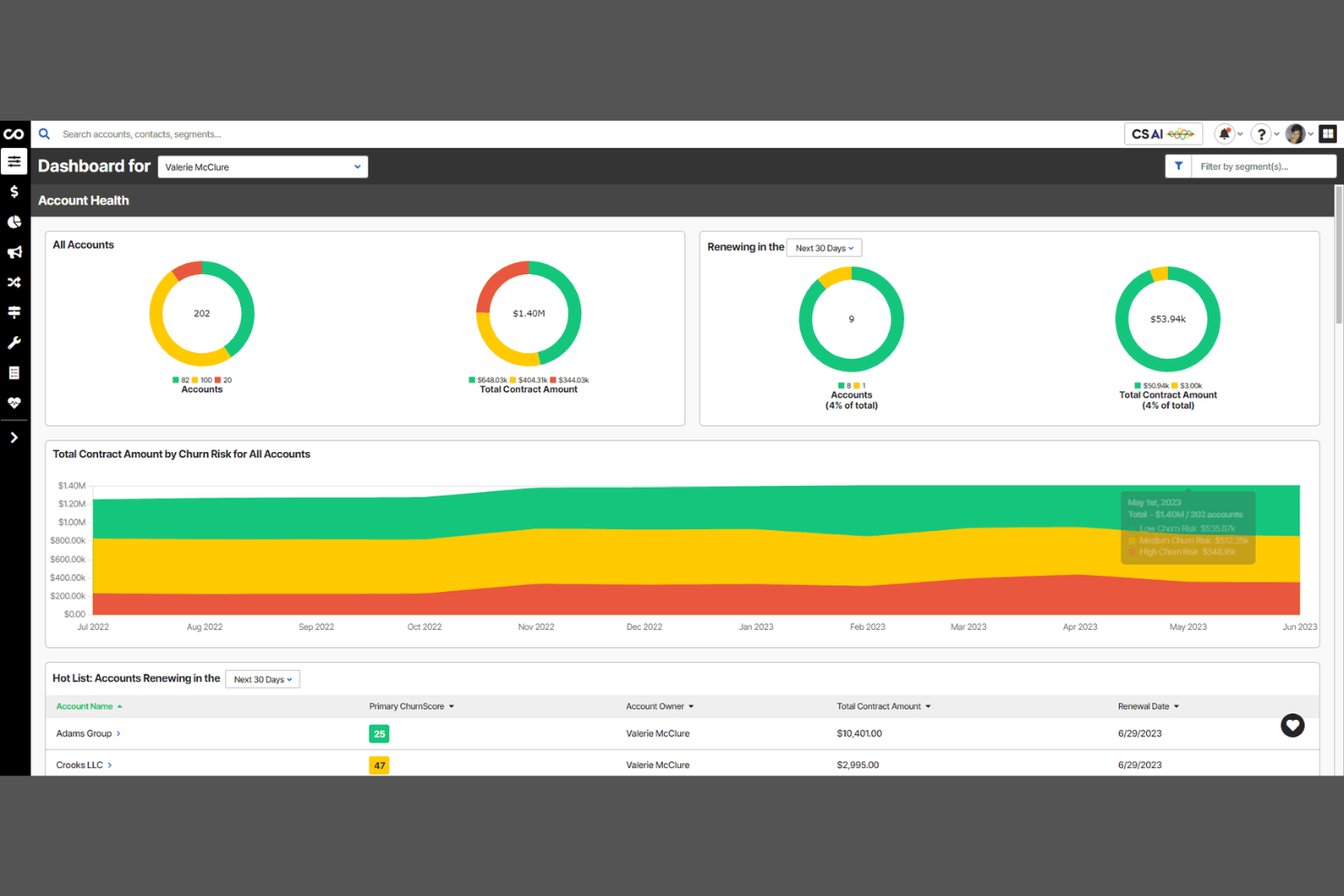
ChurnZero is an AI-powered customer success platform designed for SaaS businesses and subscription-based companies. It helps customer success teams monitor engagement, automate outreach, and identify churn risks using real-time data. If you need a solution that brings together customer insights and workflow automation, ChurnZero offers a focused set of tools for proactive account management.
Who Is ChurnZero Best For?
ChurnZero is a strong fit for SaaS customer success teams at small to mid-sized companies that need real-time visibility into customer health and engagement.
Why I Picked ChurnZero
I picked ChurnZero because its real-time customer health scoring stands out for teams that need immediate, actionable insights. The platform continuously updates health scores based on live product usage, engagement, and account milestones, so you can spot risks and opportunities as they happen. I also appreciate how ChurnZero’s AI-driven alerts and playbooks help customer success managers prioritize outreach and automate responses when customer health dips. This focus on up-to-the-minute data makes it a strong choice for SaaS companies that want to act quickly to reduce churn.
ChurnZero Key Features
Some other features in ChurnZero that are especially useful for AI-driven customer success teams include:
- Automated customer journeys: Build and trigger personalized workflows based on customer behavior and lifecycle stage.
- In-app messaging: Send targeted messages and announcements directly within your product to drive engagement.
- Task and activity management: Assign, track, and manage customer success tasks across your team from a centralized dashboard.
- Native CRM integrations: Connect with Salesforce and HubSpot to sync customer data and streamline account management.
ChurnZero Integrations
Integrations include Salesforce, HubSpot, Zendesk, Pendo, Mixpanel, Snowflake, and Slack.
Pros and Cons
Pros:
- Strong in-app communication
- Deep product usage tracking
- Generative AI for messaging
Cons:
- AI writing needs human review
- Integration setup takes time
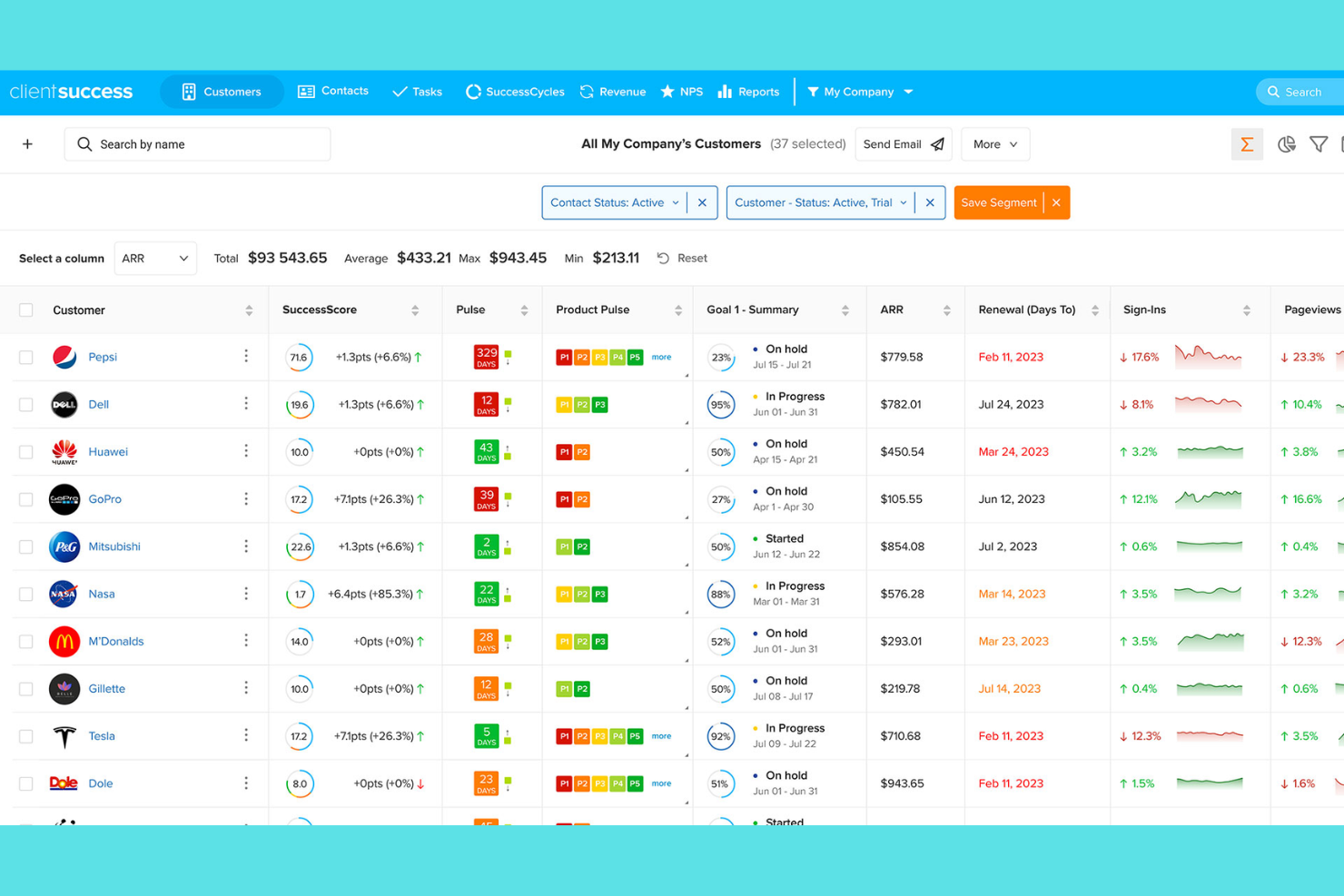
ClientSuccess offers a customer success platform designed for teams that want to unify account management, renewals, and customer health tracking in one place. It’s a strong fit for SaaS companies and customer success managers who need clear visibility into client relationships and proactive engagement tools. If you’re looking for a solution that combines automation with actionable insights, ClientSuccess brings these elements together in a single workspace.
Who Is ClientSuccess Best For?
ClientSuccess is a strong choice for SaaS customer success managers at mid-sized companies who need integrated renewal and account management tools.
Why I Picked ClientSuccess
What drew me to ClientSuccess is how it brings renewal management directly into the core of its customer success platform. The tool lets you track renewal dates, automate renewal workflows, and set up proactive alerts so your team never misses a key contract milestone. I also appreciate the way it ties renewal forecasting to real-time customer health scores, making it easier to prioritize outreach and reduce churn risk. For teams focused on maximizing retention and managing renewals at scale, these features make ClientSuccess a practical choice among AI-powered customer success tools.
ClientSuccess Key Features
Some other features that stand out for AI-driven customer success teams include:
- Automated customer health scoring: The platform uses real-time data to generate dynamic health scores for each account.
- Playbooks for customer journey management: Teams can create and deploy standardized workflows for onboarding, adoption, and expansion.
- Sentiment tracking from customer interactions: The tool analyzes notes and communications to surface trends in customer sentiment.
- Task and activity management: Assign, track, and manage tasks across your customer success team within the platform.
ClientSuccess Integrations
Integrations include Salesforce, HubSpot, Zendesk, Jira, Slack, Pendo, and Asana.
Pros and Cons
Pros:
- Great for mid-market teams
- Proactive account risk alerts
- Clean and intuitive interface
Cons:
- Reporting is less granular
- Limited custom data objects

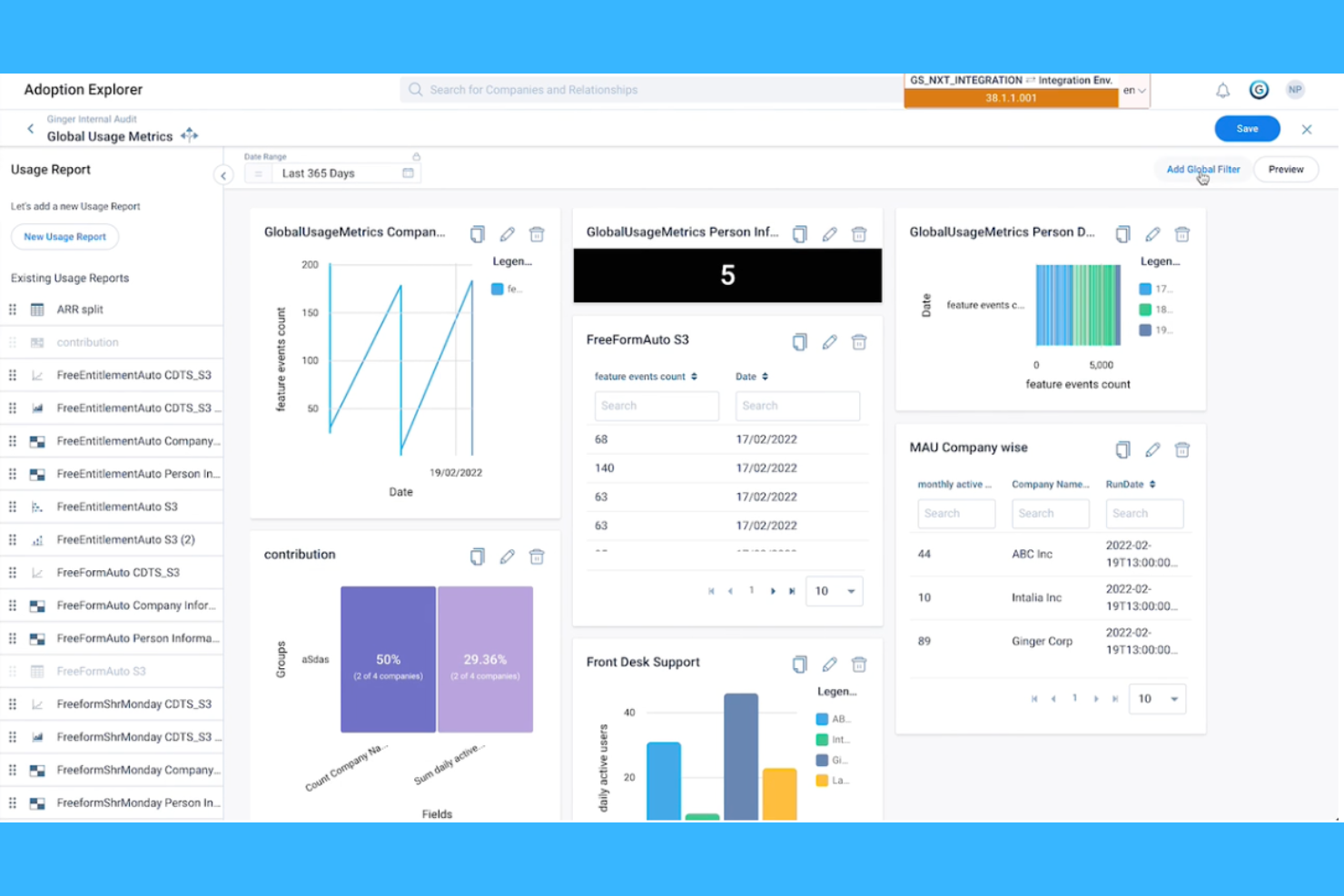
Gainsight is an AI-powered customer success platform designed for large organizations managing complex customer journeys. It’s a strong fit for teams that need to coordinate multiple touchpoints, automate repetitive tasks, and unify customer data across departments. If your business handles high volumes of accounts and wants to drive retention through data-driven insights, Gainsight offers a centralized solution.
Who Is Gainsight Best For?
Gainsight is a good fit for enterprise customer success teams in SaaS and B2B organizations that need to manage complex workflows and large account portfolios.
Why I Picked Gainsight
I chose Gainsight because it stands out for automating complex, enterprise-level customer success workflows. Its playbook automation lets teams trigger personalized actions based on customer health scores, product usage, or lifecycle stage, which is essential for scaling proactive engagement. I also like how Gainsight’s rule engine can automate alerts and task assignments across departments, reducing manual work and keeping everyone aligned. These features make it a strong choice for organizations that need to orchestrate large-scale customer success operations with AI-driven precision.
Gainsight Key Features
Some other features in Gainsight that are especially useful for customer success teams include:
- Customer health scoring: Gainsight uses AI to analyze multiple data sources and generate dynamic health scores for each account.
- Journey orchestration: Build and automate customer journeys with branching logic and personalized touchpoints.
- Survey and feedback management: Create, distribute, and analyze customer surveys directly within the platform.
- Renewal and expansion forecasting: Track renewal dates, expansion opportunities, and forecast revenue with built-in analytics.
Gainsight Integrations
Integrations include Salesforce, HubSpot, Zendesk, Jira, Snowflake, Mixpanel, and Slack.
Pros and Cons
Pros:
- Massive integration ecosystem
- Horizon AI auto-drafts emails
- Excellent revenue forecasting
Cons:
- Interface feels overwhelming
- Prohibitive cost for startups
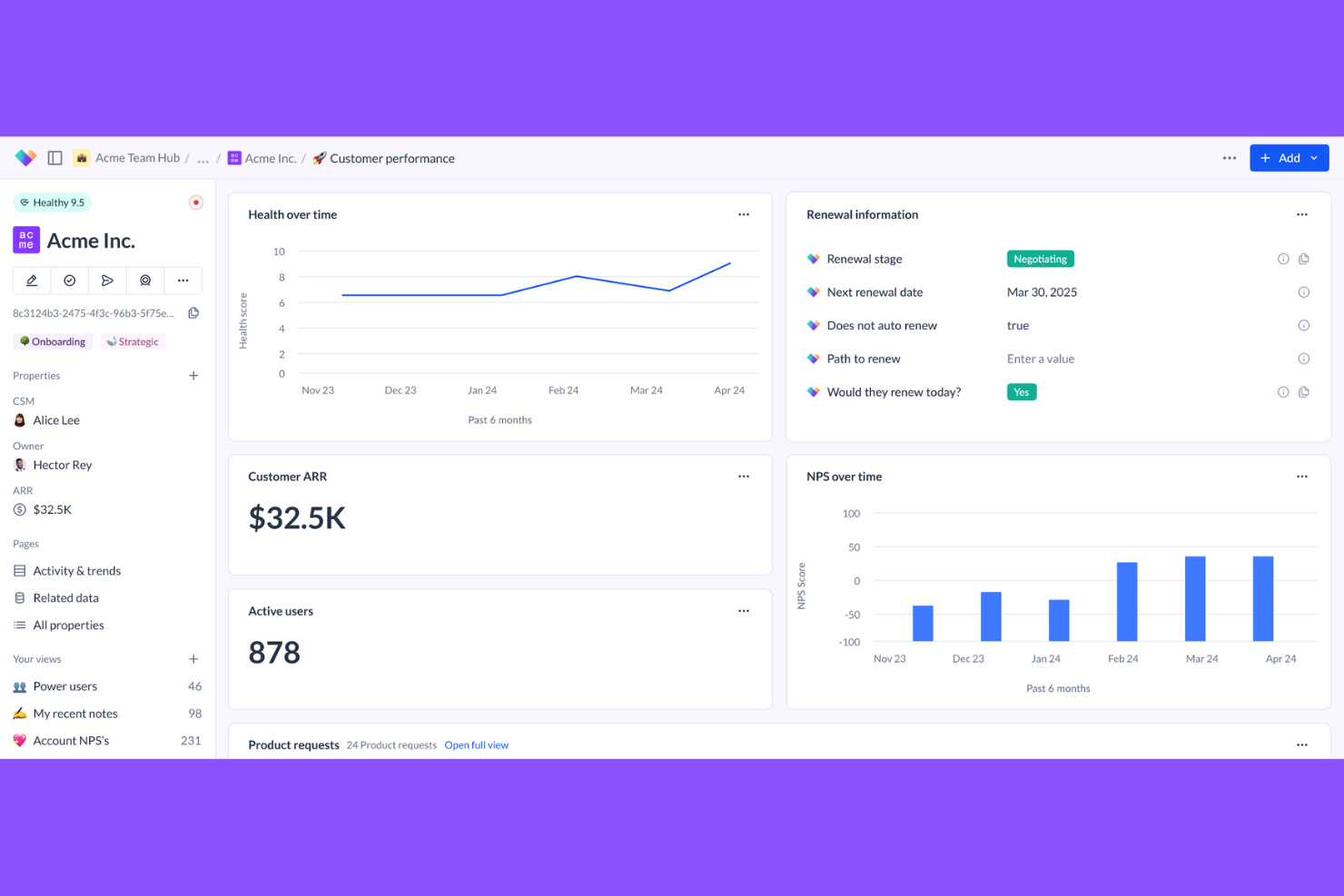
Vitally is a customer success platform designed for teams that want to centralize customer data and workflows in one place. It’s especially useful for SaaS companies and B2B organizations that need flexible tools to manage accounts, automate processes, and collaborate across departments. If you’re looking for a solution that brings together analytics, automation, and customer engagement, Vitally offers a focused approach for modern customer success teams.
Who Is Vitally Best For?
Vitally is a strong fit for SaaS customer success teams at mid-sized to large B2B companies that need flexible workspace customization and centralized account management.
Why I Picked Vitally
What drew me to Vitally is how it lets customer success teams design customizable workspace views tailored to their unique processes. You can create different dashboards, filtered lists, and account views for each team member or role, so everyone sees the data and tasks most relevant to them. This flexibility is especially valuable for AI-driven customer success operations that need to surface insights, automate workflows, and manage accounts at scale. By letting you adapt the workspace to your team’s needs, Vitally helps ensure that customer data, health scores, and engagement actions are always visible and actionable.
Vitally Key Features
Some other features in Vitally that stand out for AI customer success teams include:
- Automated playbooks: Build and trigger multi-step workflows based on customer data, health scores, or lifecycle events.
- Customer health scoring: Configure custom health models that use real-time data to flag at-risk or expansion-ready accounts.
- Collaboration notes and tasks: Assign tasks, leave notes, and track activity history across accounts for better team coordination.
- Native integrations: Connect directly with tools like Salesforce, HubSpot, Zendesk, and Slack to sync customer data and automate updates.
Vitally Integrations
Integrations include Salesforce, HubSpot, Zendesk, Intercom, Segment, Mixpanel, and Stripe.
Pros and Cons
Pros:
- Deep integrations with Hubspot
- Fast AI template generation
- Great for B2B SaaS teams
Cons:
- Analytics can be rigid
- Mobile experience is lacking
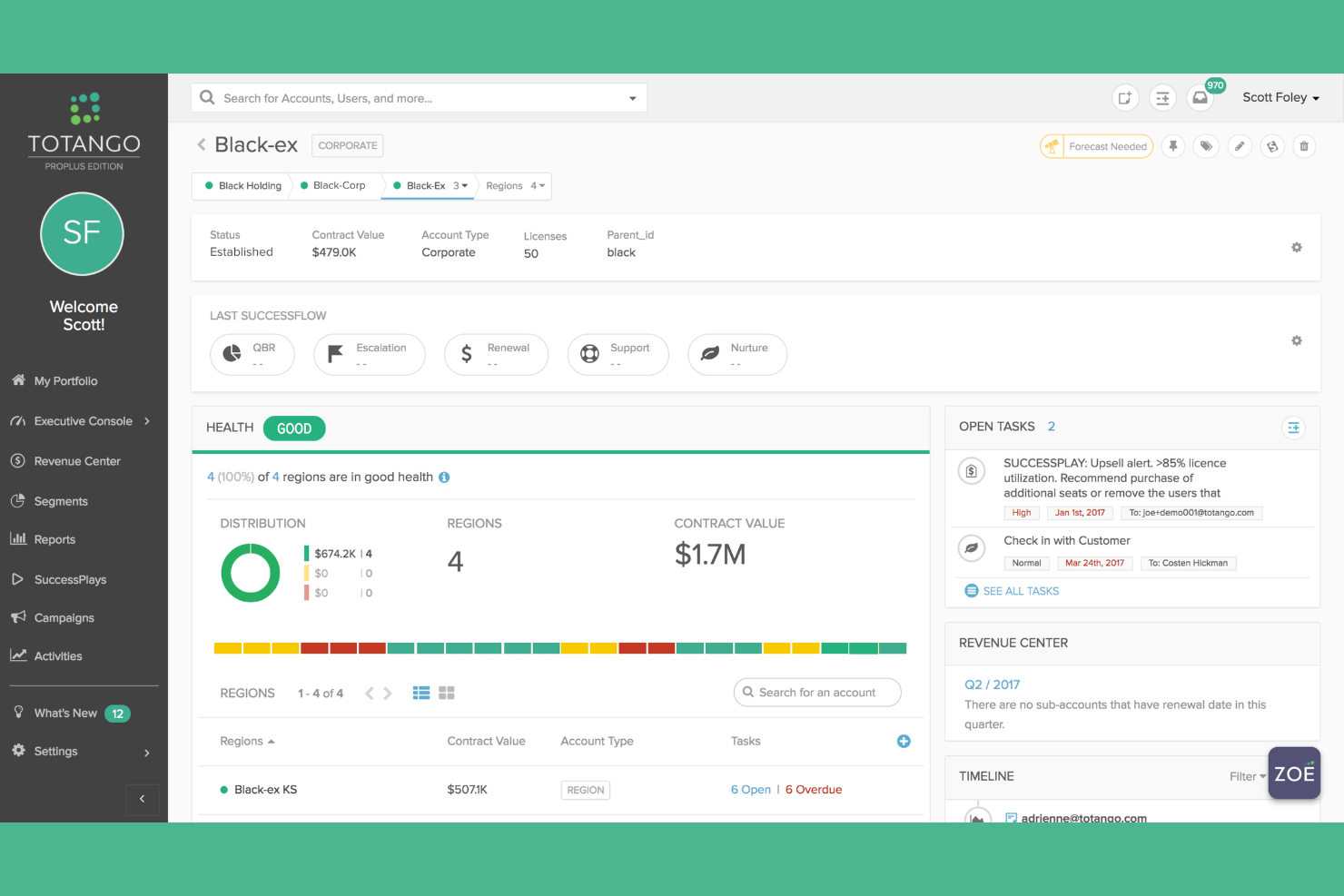
Totango is a customer success platform designed for teams that want to manage complex customer journeys with flexibility. It’s especially useful for SaaS businesses and enterprises that need to coordinate success programs across multiple products or segments. If you’re looking for a solution that combines AI-driven insights with structured workflows, Totango offers a modular approach to scaling customer success operations.
Who Is Totango Best For?
Totango is well suited for mid-sized to large SaaS companies with dedicated customer success teams managing complex, multi-stage customer journeys.
Why I Picked Totango
What stands out to me about Totango is its modular approach to building customer success programs. You can use pre-built SuccessBLOC templates to launch targeted workflows for onboarding, renewals, or product adoption, then customize each module to fit your team’s process. This structure makes it easy to scale and adapt your customer success strategy as your business grows or your customer segments evolve. For AI-driven teams, these modular templates help automate repetitive tasks and ensure consistency across every stage of the customer journey.
Totango Key Features
In addition to its modular program templates, Totango offers several other features that support AI-driven customer success teams:
- Customer health scoring: Totango uses real-time data to generate dynamic health scores for each account, helping teams prioritize outreach.
- Automated task assignment: The platform can automatically assign tasks to team members based on customer activity or lifecycle stage.
- 360-degree customer profiles: Teams get a unified view of each customer, including product usage, communications, and support history.
- Segmented customer journeys: You can create and manage distinct journeys for different customer segments, tailoring engagement strategies to each group.
Totango Integrations
Integrations include Salesforce, HubSpot, Zendesk, Snowflake, Segment, Jira, and Intercom.
Pros and Cons
Pros:
- Strong visual journey mapping
- Flexible health score modeling
- Fast out-of-the-box deployment
Cons:
- UI design feels a bit dated
- Premium support costs extra

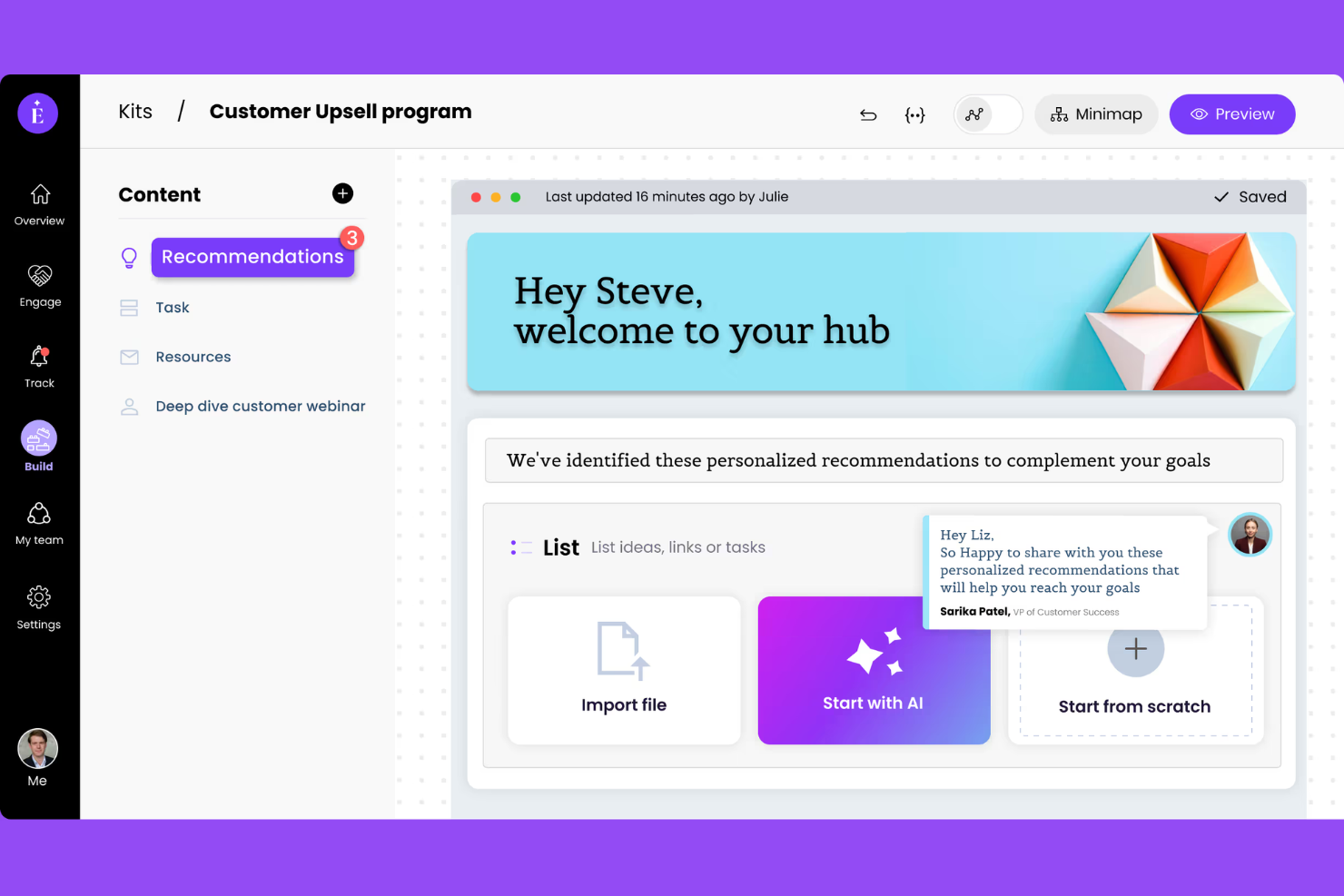
EverAfter gives support agents a way to build interactive, personalized portals for each client. The platform is a fit for SaaS companies, B2B teams, and ecommerce brands that want to centralize communication, resources, and project tracking. It helps resolve complex issues faster, reduces back-and-forth emails and SMS, and keeps everyone aligned throughout the customer journey.
Who Is EverAfter Best For?
EverAfter is a strong choice for customer success and account management teams at B2B SaaS companies that want to create collaborative, client-facing portals.
Why I Picked EverAfter
What stands out about EverAfter is how it lets you build collaborative customer portals that go far beyond static dashboards or document repositories. I picked this tool because it allows service teams to create interactive spaces where clients can access resources, track project milestones, and communicate directly with their account team—all in one place. The ability to personalize each portal for different customers and embed dynamic widgets, forms, and timelines makes it especially useful for managing complex B2B relationships. This approach helps teams keep customers engaged and aligned throughout the partnership.
EverAfter Key Features
Some other features that make EverAfter valuable for customer success teams include:
- Automated task management: Assigns, tracks, and updates tasks for internal teams and customers to boost agent productivity.
- Knowledge base integration: Embeds self-service options directly into each portal to encourage customer self-service.
- Custom branding: Lets you use a no-code editor to tailor the look and feel of each portal to match your company’s brand guidelines.
- Role-based permissions: Controls what each user or stakeholder can view or edit within the portal, ensuring secure collaboration.
EverAfter Integrations
Integrations include Salesforce, HubSpot, Zendesk, Slack, and Gong.
Pros and Cons
Pros:
- Acts as a copilot to reduce manual workload
- Automates scaled QBR creation
- Turns knowledge into AI agents
Cons:
- Setup takes heavy design logic
- Billed per customer user
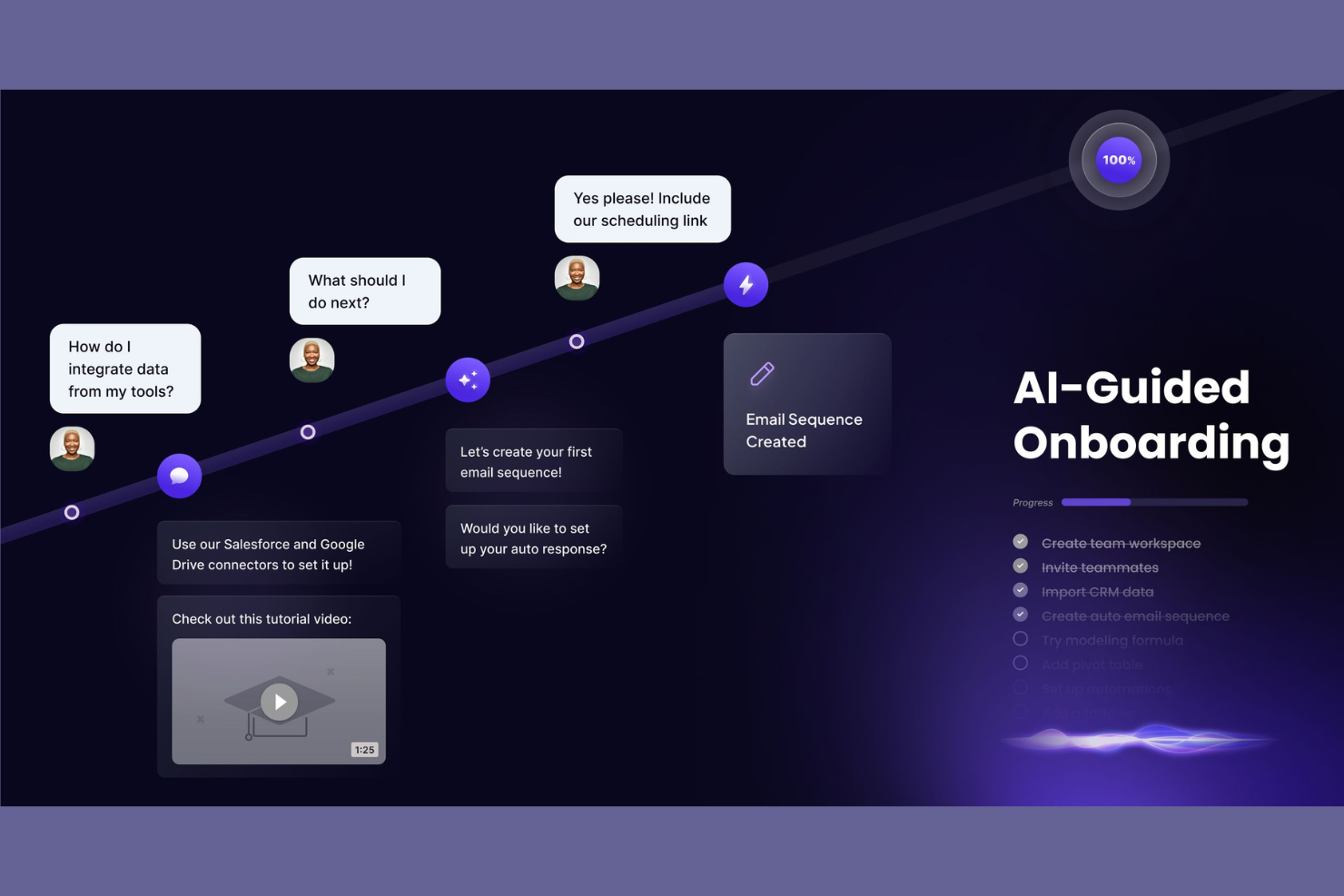
Berry AI CSM is designed for customer success teams that want to leverage AI for deeper customer understanding and engagement. The platform uses advanced analytics and automation to surface actionable insights from customer interactions. If you’re looking to move beyond basic health scores and manual tracking, Berry AI CSM offers a data-driven approach to customer success.
Who Is Berry AI CSM Best For?
Berry AI CSM is a strong fit for SaaS companies and customer success teams that want to use AI to analyze and act on customer data at scale.
Why I Picked Berry AI CSM
What stands out to me about Berry AI CSM is its focus on delivering actionable customer insights using AI. The platform analyzes customer conversations and engagement data to surface trends, risks, and opportunities that might otherwise go unnoticed. I like that it offers automated recommendations for next steps, helping teams prioritize outreach and interventions based on real-time signals. For anyone searching for AI customer success tools that go beyond basic reporting, Berry AI CSM’s insight-driven approach is a clear differentiator.
Berry AI CSM Key Features
Some other features that make Berry AI CSM useful for customer success teams include:
- Automated customer health scoring: The platform continuously updates customer health scores based on real-time engagement and behavioral data.
- Playbook automation: Teams can set up and trigger automated workflows for onboarding, renewals, and escalations.
- Sentiment analysis on support tickets: Berry AI CSM uses AI to analyze the tone and sentiment of customer support interactions.
- Customizable dashboards: Users can build dashboards to track KPIs, customer journeys, and team performance in one place.
Berry AI CSM Integrations
Integrations include Salesforce, HubSpot, Zendesk, Intercom, Slack, and Gong.
Pros and Cons
Pros:
- Available 24/7 for customers
- Retrains on new docs instantly
- Infinite product knowledge memory
Cons:
- Complex logic requires setup
- Customers may dislike chatbots

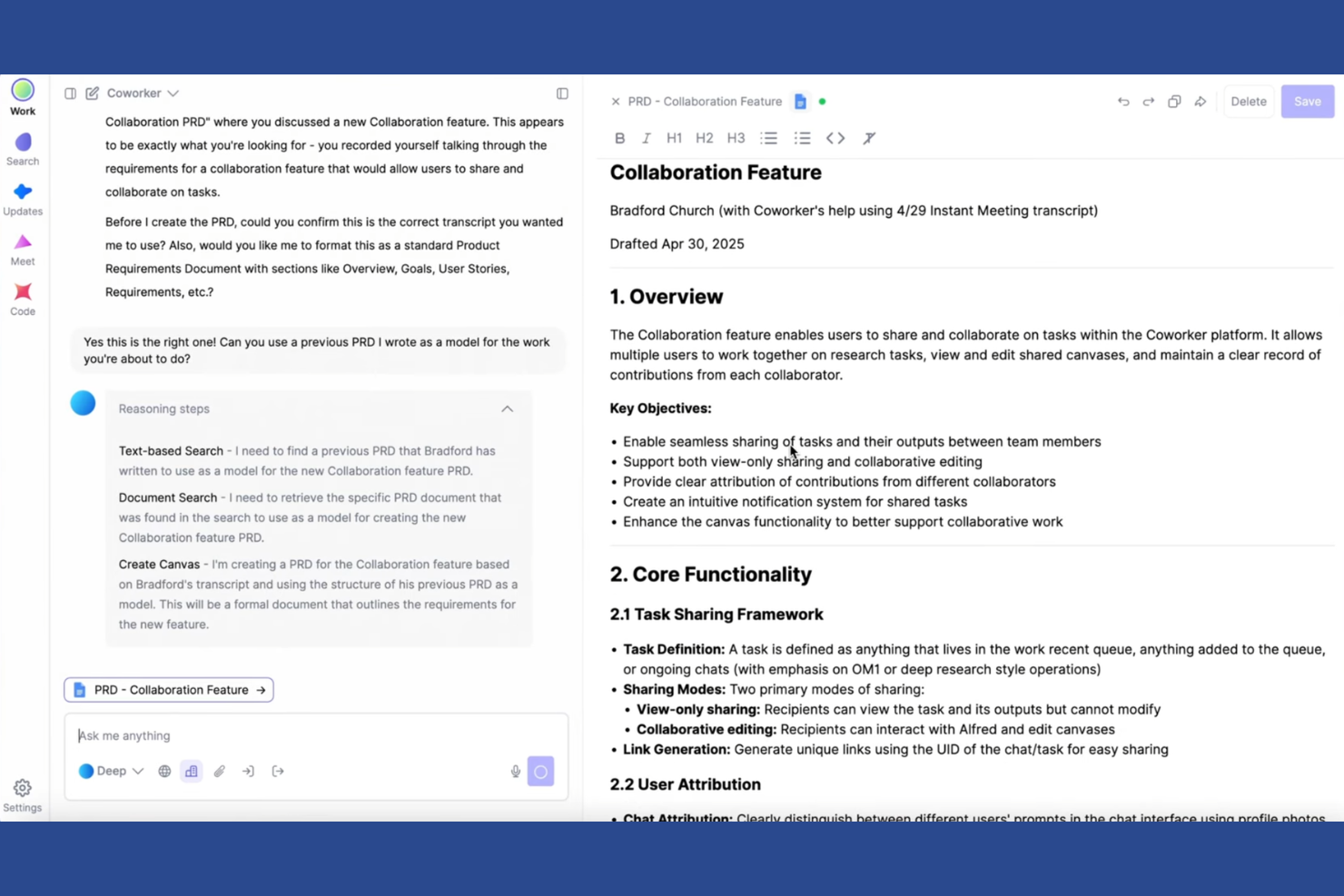
Coworker is an AI meeting assistant designed for teams that want to capture and organize insights from customer conversations. It’s especially useful for customer success professionals who need to keep track of action items, decisions, and follow-ups across multiple meetings. By automating note-taking and summarization, Coworker helps teams focus on building relationships instead of manual documentation.
Who Is Coworker Best For?
Coworker is a strong fit for customer success teams and client-facing professionals who need automated meeting documentation and follow-up tracking.
Why I Picked Coworker
What drew me to Coworker is its ability to automatically generate detailed meeting summaries, which is especially valuable for customer success teams managing multiple client conversations. The tool records meetings, transcribes discussions, and highlights key action items and decisions without manual effort. I appreciate that it organizes these summaries in a searchable format, making it easy to reference past conversations and ensure follow-ups don’t slip through the cracks. For anyone looking for AI customer success tools that reduce administrative work and improve meeting accountability, Coworker’s automated meeting summaries are a clear advantage.
Coworker Key Features
Some other features that make Coworker useful for customer success teams include:
- CRM integration: Connects meeting data directly to your CRM for unified customer records.
- Speaker identification: Distinguishes between different speakers in transcripts for clearer context.
- Automated task extraction: Identifies and logs action items from conversations automatically.
- Customizable summary templates: Lets you tailor meeting summaries to match your team’s workflow and reporting needs.
Coworker Integrations
Integrations include Salesforce, Slack, Gong, Zendesk, GitHub, and Google Workspace.
Pros and Cons
Pros:
- Drafts custom follow-up emails
- Identifies silent churn risks
- Auto-generates meeting prep
Cons:
- Setup requires data hygiene
- AI actions need monitoring
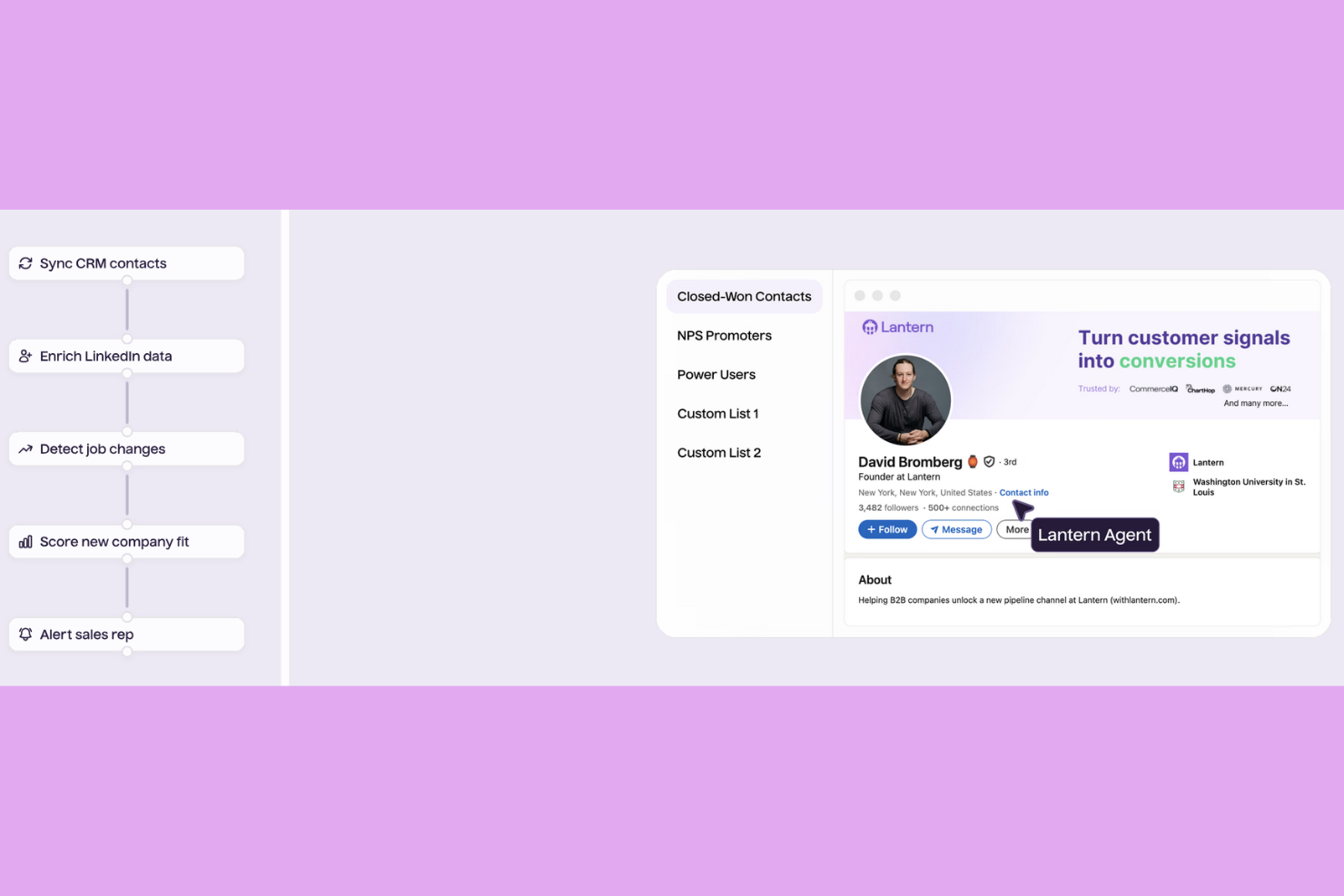
Lantern is designed for customer success and onboarding teams that want to automate and standardize their onboarding processes. The platform helps SaaS companies and service providers coordinate tasks, track progress, and ensure a consistent experience for every new customer. Lantern stands out for teams looking to reduce manual work and improve visibility across onboarding workflows.
Who Is Lantern Best For?
Lantern is a strong choice for onboarding and customer success teams at SaaS companies that need to automate and manage complex onboarding workflows.
Why I Picked Lantern
What drew me to Lantern is its clear focus on automating onboarding workflows, which is a major challenge for customer success teams handling multiple new accounts. Lantern lets you build customizable onboarding templates, assign tasks to both internal teams and customers, and track progress in real time. I appreciate how the platform uses automation to trigger reminders and next steps based on customer milestones, reducing manual follow-up. This approach helps teams deliver a consistent onboarding experience and ensures nothing falls through the cracks as customers move through each stage.
Lantern Key Features
Some other features that make Lantern valuable for customer success teams include:
- Customer portal: Gives customers a dedicated space to view onboarding tasks, timelines, and resources.
- Progress tracking dashboards: Visualizes onboarding status and task completion for both teams and customers.
- Automated notifications: Sends alerts and updates to stakeholders when tasks are due or completed.
- Document management: Allows teams to upload, share, and organize onboarding documents within the platform.
Lantern Integrations
Integrations include Salesforce, HubSpot, Zendesk, Amplitude, Front, and Slack.
Pros and Cons
Pros:
- Automates pipeline generation
- Boosts net dollar retention
- Tracks customer job changes
Cons:
- Limited core support features
- Focuses purely on expansion
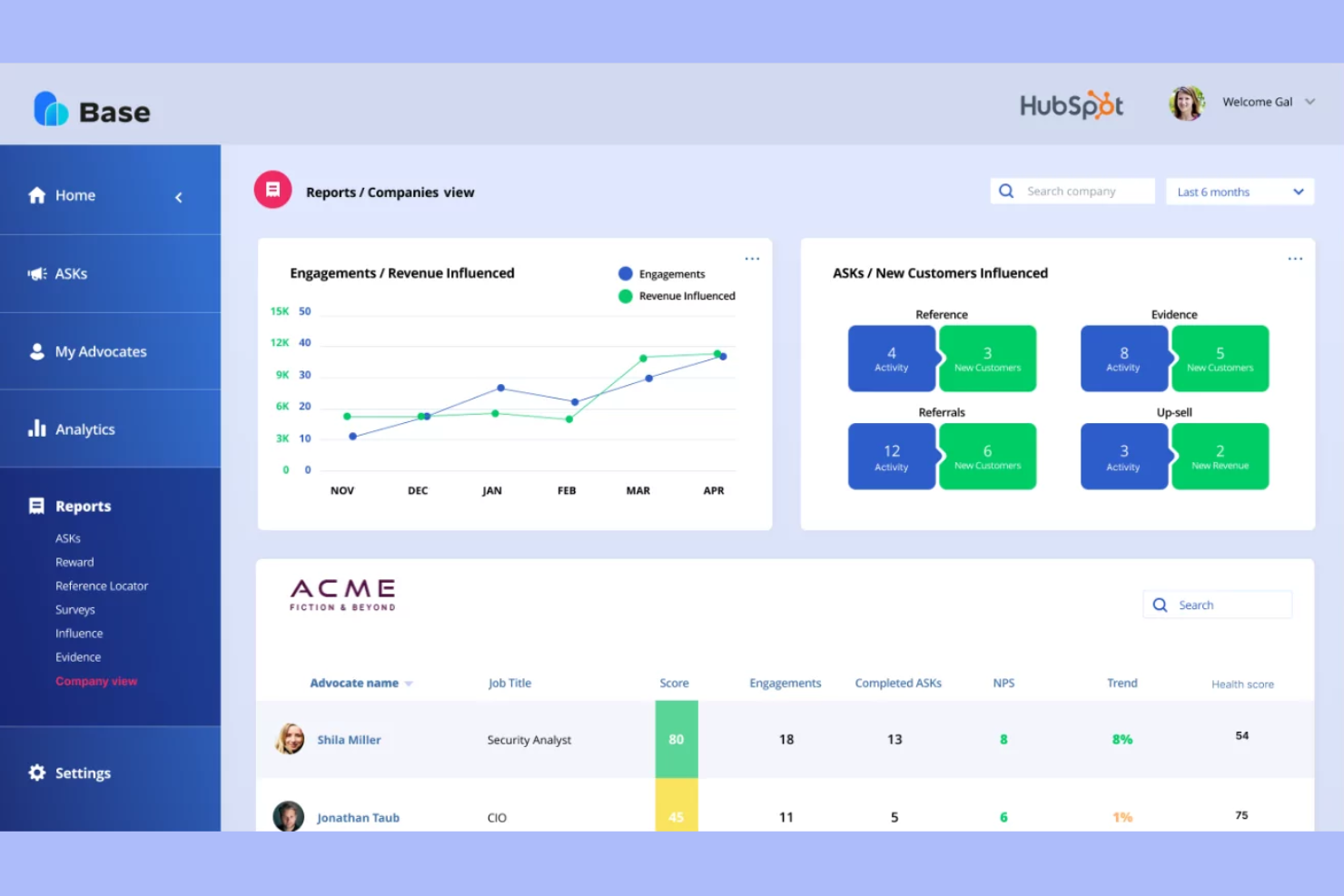
Base is an AI-driven customer success platform designed for teams that want to anticipate and address customer challenges before they escalate. It’s especially useful for SaaS companies and account managers who need early signals about customer health and engagement. With Base, you can centralize customer data and gain actionable insights to support retention and growth.
Who Is Base Best For?
Base is a strong fit for SaaS account managers and customer success teams at mid-sized to large B2B companies who need early warnings about account health risks.
Why I Picked Base
What stands out about Base is its focus on proactive account risk alerts, which is a key need for customer success teams managing large portfolios. The platform uses AI to analyze customer data and surface early warning signals when an account shows signs of churn risk or declining engagement. I like that Base provides clear, actionable alerts directly to account managers, so they can intervene before issues escalate. This approach helps teams prioritize outreach and maintain stronger customer relationships by addressing problems before they become critical.
Base Key Features
Some other features that make Base valuable for customer success teams include:
- Customer health scoring: Calculates dynamic health scores using multiple data sources to help teams monitor account status.
- Automated playbooks: Triggers recommended actions and workflows based on customer signals and lifecycle stage.
- 360-degree customer profiles: Consolidates all customer interactions, notes, and data into a single, accessible view.
- Collaboration tools: Enables team members to share updates, assign tasks, and coordinate follow-ups within the platform.
Base Integrations
Integrations include Salesforce, HubSpot, Slack, Zendesk, and Gong.
Pros and Cons
Pros:
- Proves direct revenue impact
- Turns feedback into campaigns
- Maps cross-journey engagement
Cons:
- Not a traditional support CRM
- Complex cross-team deployment
Other AI Customer Success Tools
Here are some additional ai customer success tools options that didn’t make it onto my shortlist, but are still worth checking out:
- Intercom
For conversational AI and bots
- Pylon
For automated routing in customer teams
- Front
For omnichannel support collaboration
- Zendesk
Ticketing system for managing customer queries
- Salesforce
For customizable CRM integrations


AI Customer Success Tools Selection Criteria
When selecting the best AI customer success tools to include in this list, I considered common buyer needs and pain points like automating repetitive customer success tasks and improving customer engagement with AI-driven insights. I also used the following framework to keep my evaluation structured and fair:
Core Functionality (25% of total score)
To be considered for inclusion in this list, each solution had to fulfill these common use cases:
- Manage customer onboarding workflows
- Track customer health, engagement and CSAT
- Automate routine communications to speed up resolution times
- Centralize customer data and activity
- Provide reporting and analytics dashboards
Additional Standout Features (25% of total score)
To help further narrow down the competition, I also looked for unique features, such as:
- AI-powered customer sentiment analysis
- Predictive churn modeling
- Automated playbooks and task suggestions
- Personalized customer journey mapping
- In-app customer feedback collection
Usability (10% of total score)
To get a sense of the usability of each system, I considered the following:
- Simple and user-friendly interface
- Customizable dashboards and views
- Minimal clicks to complete key actions
- Responsive design for all devices
- Clear navigation and labeling
Onboarding (10% of total score)
To evaluate the onboarding experience for each platform, I considered the following:
- Availability of step-by-step product tours
- Access to customer stories, case studies, and documentation
- Pre-built templates for common workflows
- Live chat or chatbot support during setup
- Webinars or onboarding sessions for new users
Customer Support (10% of total score)
To assess each software provider’s customer support services, I considered the following:
- Multiple support channels available
- Fast response times to inquiries
- Access to a knowledge base or help center
- Dedicated customer success manager options
- Community forums or user groups
Value For Money (10% of total score)
To evaluate the value for money of each platform, I considered the following:
- Transparent and flexible pricing plans
- Features included at each pricing tier
- Free trial or demo availability
- No hidden fees or surprise charges
- Discounts for annual or volume commitments
Customer Reviews (10% of total score)
To get a sense of overall customer satisfaction, I considered the following when reading customer reviews:
- Positive feedback on core functionality
- Reports of reliable uptime and performance
- Praise for customer support quality
- Comments on ease of implementation
- Noted impact on customer retention or success
How to Choose AI Customer Success Tools
It’s easy to get bogged down in long feature lists and complex pricing structures. To help you stay focused as you work through your unique software selection process, here’s a checklist of factors to keep in mind:
| Factor | What to Consider |
|---|---|
| Scalability | Will the tool support your customer base as it grows? Check for user limits, data caps, and pricing jumps as your team or client list expands. |
| Integrations | Does the tool connect natively with your CRM, help desk, analytics, or communication platforms? Gaps here can create manual workarounds. |
| Customizability | Can you tailor workflows, dashboards, and customer-facing elements to match your processes and branding? Rigid tools may limit adoption. |
| Ease of use | How quickly can your team learn and adopt the tool? Look for clear navigation, minimal training requirements, and intuitive workflows. |
| Implementation and onboarding | What resources and time are needed to get up and running? Consider migration support, onboarding help, and the availability of templates or guided setup. |
| Cost | Are pricing tiers transparent and predictable as you scale? Watch for hidden fees, required add-ons, or minimum contract terms. |
| Security safeguards | Does the tool meet your data privacy and security standards? Look for encryption, access controls, and compliance with relevant regulations. |
| Support availability | What support channels are offered, and during what hours? Consider if you need 24/7 help, dedicated account management, or self-service resources. |
What Are Customer Success Tools?
Customer success tools are software platforms designed to help businesses manage, track, and improve customer relationships throughout the entire lifecycle. These tools centralize customer data, automate routine communications, and provide insights into customer health and engagement. Teams use them to coordinate onboarding, monitor satisfaction, and proactively address issues, all with the goal of increasing retention and driving long-term value for both customers and the business.
Features of AI Customer Success Tools
When selecting ai customer success tools, keep an eye out for the following key features:
- Automated customer health scoring: Uses AI to analyze customer data and assign health scores, helping teams identify accounts at risk or ready for expansion.
- Predictive churn analysis: Leverages machine learning to forecast which customers are likely to churn, allowing for proactive outreach and retention efforts.
- Personalized onboarding workflows: Automates and customizes onboarding steps for each customer, ensuring a tailored experience and faster time to value.
- AI-driven task automation: Automatically assigns, tracks, and updates tasks based on customer activity, freeing up team members for higher-value work.
- Sentiment analysis: Analyzes customer communications and feedback to detect satisfaction levels, flagging potential issues before they escalate.
- In-app messaging and guidance: Delivers targeted messages, tips, or walkthroughs directly within your product to support users in real time.
- Centralized customer data hub: Aggregates data from multiple sources into a single view, giving teams a complete picture of each customer’s journey and interactions.
- Playbook automation: Provides AI-recommended actions and workflows for common scenarios, such as renewals, upsells, or support escalations.
- Integration with CRM and support tools: Connects seamlessly with existing systems to sync customer information, tickets, and activity history.
- Customizable reporting and analytics: Offers dashboards and reports that can be tailored to track KPIs, monitor trends, and measure the impact of customer success initiatives.
Benefits of AI Customer Success Tools
Implementing AI customer success tools provides several benefits for your team and your business. Here are a few you can look forward to:
- Proactive customer engagement: AI-driven alerts and health scores help your team reach out before issues escalate, improving retention.
- Faster onboarding and adoption: Automated workflows and personalized guidance speed up the onboarding process and help customers realize value sooner.
- Data-driven decision making: Centralized analytics and reporting provide actionable insights into customer behavior, satisfaction, and trends.
- Increased team efficiency: Task automation and AI-recommended actions reduce manual work, allowing your team to focus on high-impact activities.
- Personalized customer experiences: AI customizes communications and support based on each customer’s needs, driving satisfaction and loyalty.
- Early churn detection: Predictive analytics flag at-risk accounts, giving your team time to intervene and prevent customer loss.
- Seamless integration with existing tools: Native integrations ensure customer data flows smoothly between platforms, reducing silos and manual entry.
Costs and Pricing of AI Customer Success Tools
Selecting AI customer success tools requires an understanding of the various pricing models and plans available. Costs vary based on features, team size, add-ons, and more. The table below summarizes common plans, their average prices, and typical features included in ai customer success tools solutions:
Plan Comparison Table for AI Customer Success Tools
| Plan Type | Average Price | Common Features |
|---|---|---|
| Free Plan | $0 | Basic customer tracking, limited automation, single user access, and email support. |
| Personal Plan | $20-$75/user/month | Core automation features, basic analytics, limited integrations, and standard onboarding templates. |
| Business Plan | $80-$150/user/month | Advanced automation, health scoring, CRM integrations, customizable dashboards, and team collaboration tools. |
| Enterprise Plan | $150+/user/month | Predictive analytics, dedicated support, custom integrations, advanced security, and compliance features. |
AI Customer Success Tools FAQs
Here are some answers to common questions about ai customer success tools:
How do AI customer success tools improve retention rates?
AI customer success tools improve retention rates by identifying at-risk customers early through health scoring and predictive analytics. This allows your team to intervene proactively, address issues, and personalize outreach, which helps prevent churn and build stronger customer relationships.
Can AI customer success tools integrate with my existing CRM?
Yes, most AI customer success tools offer integrations with popular CRM platforms. These integrations sync customer data, automate updates, and provide a unified view of customer interactions, making it easier to manage relationships and track progress across systems.
What types of businesses benefit most from AI customer success tools?
Businesses with recurring revenue models, large customer bases, or complex onboarding processes benefit most from AI customer success tools. These tools help manage high volumes of interactions, automate routine tasks, and provide insights that are especially valuable for scaling teams.
Are AI customer success tools difficult to implement?
No, most AI customer success tools are designed for straightforward implementation, often with guided onboarding, templates, and support resources. However, the complexity can vary depending on your existing systems and the level of customization you require.
How secure is customer data in AI customer success tools?
Customer data security is a priority for reputable AI customer success tools. Look for solutions that offer encryption, access controls, and compliance with standards like GDPR or SOC 2. Always review a vendor’s security documentation before making a decision.