
18 CRM for Small Business for 2026

10 CRM for Small Business Shortlist
Here's my pick of the 10 best software from the 18 tools reviewed.


A CRM for small businesses is a customer relationship management platform and CRM software designed to help you organize contacts, track sales, and manage customer interactions as your business grows. If you’re searching for the best CRM for a small business or the best CRM software, you’re likely looking for a CRM system that fits your team’s size, budget, and workflow—without adding complexity or overhead.
Choosing the right CRM helps improve customer experience, streamline data management, and support every stage of the sales cycle. Many modern platforms are user-friendly, making it easier for teams to use CRM tools to manage leads, follow up with prospects, and maintain strong customer relationships. In this list, you’ll find a range of CRM options tailored for small businesses, with details on features and use cases to help you make an informed decision.
Why Trust Our Software Reviews
CRM for Small Business Summary
| Tool | Best For | Trial Info | Price | ||
|---|---|---|---|---|---|
| 1 | Best for action-focused contact management | 21-day free trial + free demo available | From $9.95/user/month (billed annually) | Website | |
| 2 | Best for integrated marketing and sales tools | Free plan available | From $20/seat/month (billed annually) | Website | |
| 3 | Best for visual deal tracking | 14-day free trial + free demo available | From $14/user/month (billed annually) | Website | |
| 4 | Best for managing simple sales pipelines | 15-day free trial + free plan available | From $7/user/month (billed annually) | Website | |
| 5 | Best for built-in email and payment features | 14-day free trial + free demo available | From $299/month (billed annually) | Website | |
| 6 | Best for Microsoft 365 integration | 30-day free trial available | From $65/user/month (billed annually) | Website | |
| 7 | Best for quick setup and minimal learning curve | 30-day free trial available | From $15/user/month | Website | |
| 8 | Best for AI-powered lead scoring | Free demo + 21-day free trial available | From $9/user/month (billed annually) | Website | |
| 9 | Best for advanced scalability options | Free trial + free plan available | From $25/user/month (billed annually) | Website | |
| 10 | Best for customizable automation workflows | Free plan + free demo + free trial available | From $14/user/month (billed annually) | Website |
-

SupportYourApp
Visit WebsiteThis is an aggregated rating for this tool including ratings from Crozdesk users and ratings from other sites.4.7 -
Freshdesk
Visit WebsiteThis is an aggregated rating for this tool including ratings from Crozdesk users and ratings from other sites.4.4 -
Hiver
Visit WebsiteThis is an aggregated rating for this tool including ratings from Crozdesk users and ratings from other sites.4.6




CRM for Small Business Reviews
Below are my detailed summaries of CRM for small businesses that made it onto my shortlist. My reviews offer a detailed look at the features, best use cases, and integrations of each platform to help you find the best one for you.
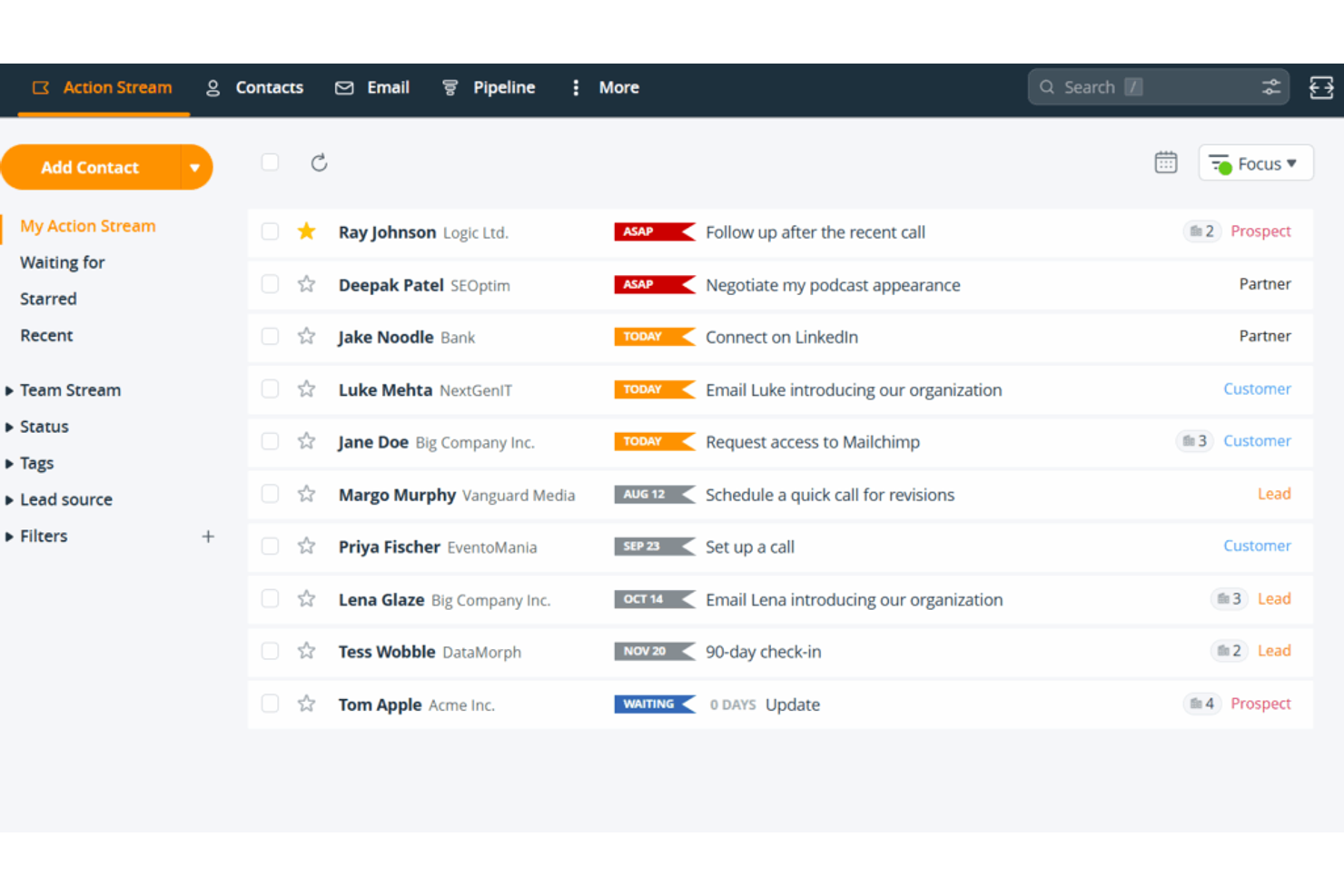
OnePageCRM takes a task-oriented approach to contact management, making it a fit for small businesses that want to turn every contact into an actionable next step. Sales teams and solo entrepreneurs who struggle to keep momentum with leads can use its action-focused interface to prioritize follow-ups. The tool is especially useful if you want a CRM that helps you stay organized by always knowing what to do next with each contact.
Why I Picked OnePageCRM
What drew me to OnePageCRM is its unique focus on turning contact management into a series of actionable steps. Instead of just storing contact information, the platform prompts you to assign a next action to every contact, so you always know what to do next. I appreciate how the Action Stream feature keeps your follow-up tasks front and center, helping small business teams avoid missed opportunities. This action-focused approach is especially helpful for sales-driven businesses that need a clear, organized way to keep leads moving forward.
OnePageCRM Key Features
In addition to its action-focused contact management, I also found these features useful:
- Sales pipeline management: Visualize and track deals as they move through customizable sales stages.
- Email sync and templates: Connect your email account to send, receive, and use templates directly from the CRM.
- Lead capture forms: Create web forms to capture leads and automatically add them to your contact list.
- Mobile app: Access contacts, update actions, and manage deals from your phone or tablet.
OnePageCRM Integrations
Integrations include Gmail, Outlook, Mailchimp, Zapier, Google Contacts, Google Calendar, Xero, Slack, and FreshBooks. OnePageCRM also offers an API for custom integrations.
Pros and Cons
Pros:
- Lead forms capture website contacts
- Email integration tracks messages in-app
- Pipeline view tracks deals by stage
Cons:
- Automation is basic and less customizable
- Bulk imports require manual mapping

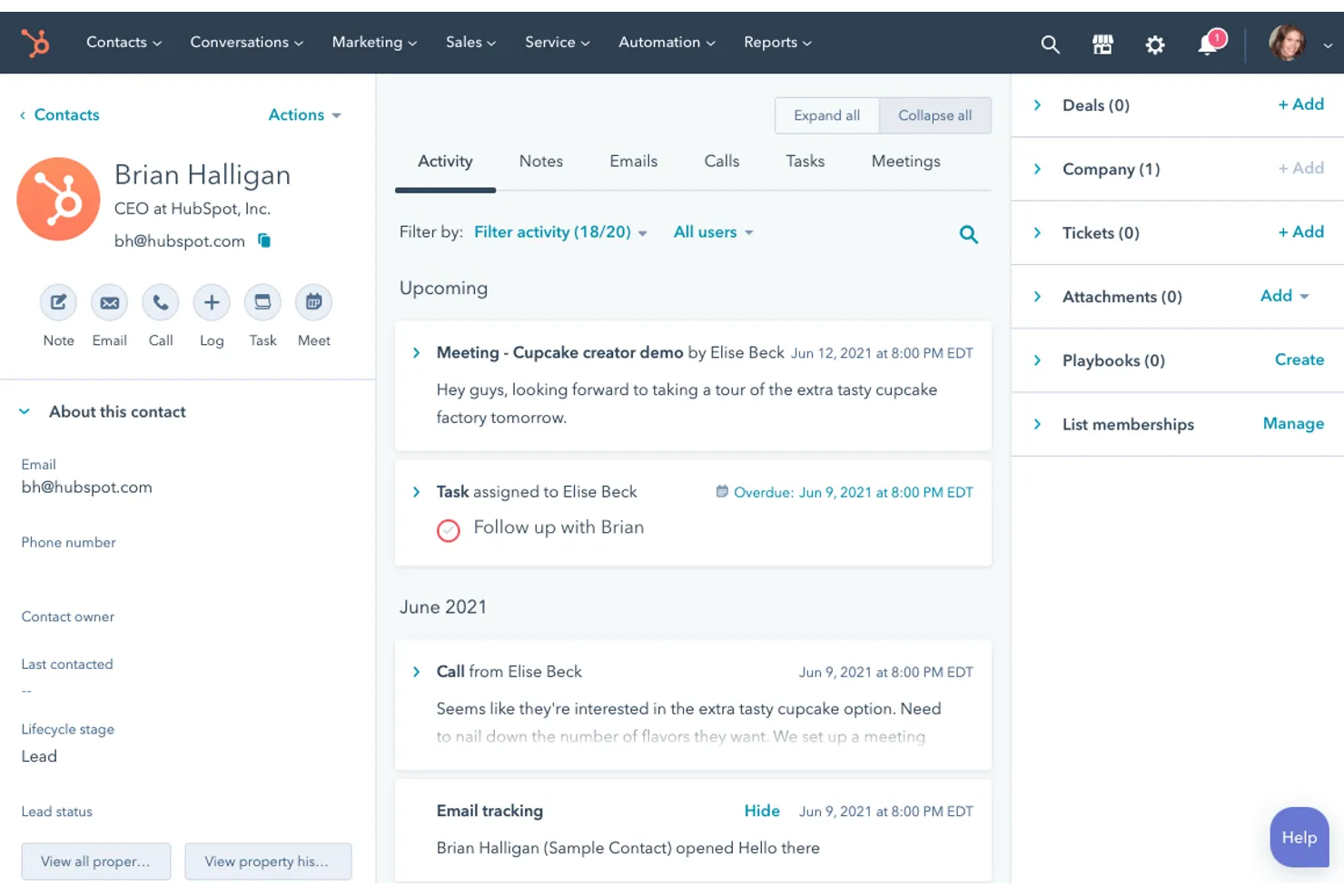
If your small business needs a CRM that brings marketing and sales together in one place, HubSpot is worth a close look. It’s a popular CRM software for small businesses designed for teams that want to manage contacts, automate marketing campaigns, and track deals without juggling multiple tools. HubSpot also includes strong lead management features that help teams capture, organize, and nurture prospects throughout the sales process. HubSpot stands out for its unified platform, making it easier to align your marketing and sales efforts as you grow.
Why I Picked HubSpot
What makes HubSpot a strong choice for small business CRM is how it combines marketing and sales tools in a single platform. You can manage email marketing, lead capture forms, and sales pipelines all from one dashboard, which helps teams avoid data silos. I like that HubSpot’s automation features let you set up workflows that nurture leads and move deals forward without manual effort. This integrated approach supports small businesses that want to align their marketing and sales activities as they grow.
HubSpot Key Features
Some other features make HubSpot a flexible option for small business CRM needs:
- Contact management: Store, organize, and segment all your customer and lead information in one place.
- Live chat: Add real-time chat to your website to connect with visitors and answer questions instantly.
- Custom reporting: Build and share reports on sales, marketing, and service metrics using drag-and-drop tools.
- Document tracking: Upload sales documents and see when prospects open or interact with them.
HubSpot Integrations
Integrations include Salesforce, Shopify, WordPress, Slack, Zoom, Microsoft Teams, Gmail, Outlook, Facebook Ads, Google Ads, and more. HubSpot also offers an API for custom integrations.
Pros and Cons
Pros:
- Email templates track outreach campaigns
- Pipeline uses drag-and-drop deals
- Marketing automation built into CRM
Cons:
- Deal stage customization is limited on lower plans
- Contact limits increase costs as you grow


If you’re looking for a CRM that puts deal visibility front and center, Pipedrive is built for you. Sales teams and small business owners who want to track opportunities visually can use its drag-and-drop pipelines to keep every deal moving. Pipedrive is especially useful for businesses that need to manage multiple sales stages and prioritize follow-ups without losing sight of what’s next.
Why I Picked Pipedrive
What sets Pipedrive apart for small businesses is its highly visual approach to deal tracking. The kanban-style pipeline lets you move deals through stages with a simple drag-and-drop, so you always know what’s in progress and what needs attention. I like that you can customize pipeline stages to match your unique sales process, making it easy to adapt as your business grows. Pipedrive’s activity reminders also help you stay on top of follow-ups, so deals don’t slip through the cracks.
Pipedrive Key Features
Some other features make Pipedrive a strong option for small business CRM needs:
- Email integration: Connect your email account to send, receive, and track messages directly within Pipedrive.
- Sales reporting: Access customizable reports to analyze sales performance and pipeline health.
- Product catalog: Store and manage a list of products or services to add to deals.
- Mobile app: Manage deals, contacts, and activities from anywhere using the dedicated mobile app.
Pipedrive Integrations
Integrations include Gmail, Outlook, Mailchimp, Trello, Slack, Zapier, Google Calendar, HubSpot, Zoom, and Microsoft Teams. Pipedrive also offers an open API for custom integrations.
Pros and Cons
Pros:
- Email sync tracks deal conversations
- Activity reminders support follow-ups
- Visual pipelines track deal progress
Cons:
- No built-in support ticketing
- Bulk imports need manual cleanup

Bigin is designed for small businesses that want a straightforward CRM platform for managing sales pipelines without extra complexity. It’s a good fit for teams or solo professionals who need to track deals, contacts, and activities in a simple, visual format. Bigin stands out for its focus on keeping pipeline management clear and easy, so you can spend less time on setup and more time closing deals.
Why I Picked Bigin
For small businesses that want to keep sales processes simple, Bigin offers a focused approach to pipeline management. The visual pipeline lets you drag and drop deals between stages, making it easy to see where every opportunity stands. I appreciate that Bigin includes built-in call logging and email tracking, so you can keep all your sales communications organized in one place. This tool is a good fit if you want to avoid the clutter of more complex CRMs and just need to manage deals from start to finish.
Bigin Key Features
Some other features make Bigin a practical choice for small business CRM needs:
- Customizable fields: Tailor deal, contact, and company records with fields that match your sales process.
- Workflow automation: Set up simple automations to assign tasks or update records based on triggers.
- Mobile app: Access your pipelines, contacts, and activities from anywhere using the dedicated mobile app.
- Web forms: Capture leads directly from your website and send them straight into your pipeline.
Bigin Integrations
Integrations include Zoho CRM, Zoho Desk, Zoho Campaigns, Zoho Books, Zoho Projects, Google Workspace, Mailchimp, QuickBooks, Microsoft Outlook, and Zapier.
Pros and Cons
Pros:
- Web forms capture leads automatically
- Built-in telephony logs CRM calls
- Visual pipeline simplifies deal tracking
Cons:
- User roles and permissions are basic
- No advanced marketing automation tools
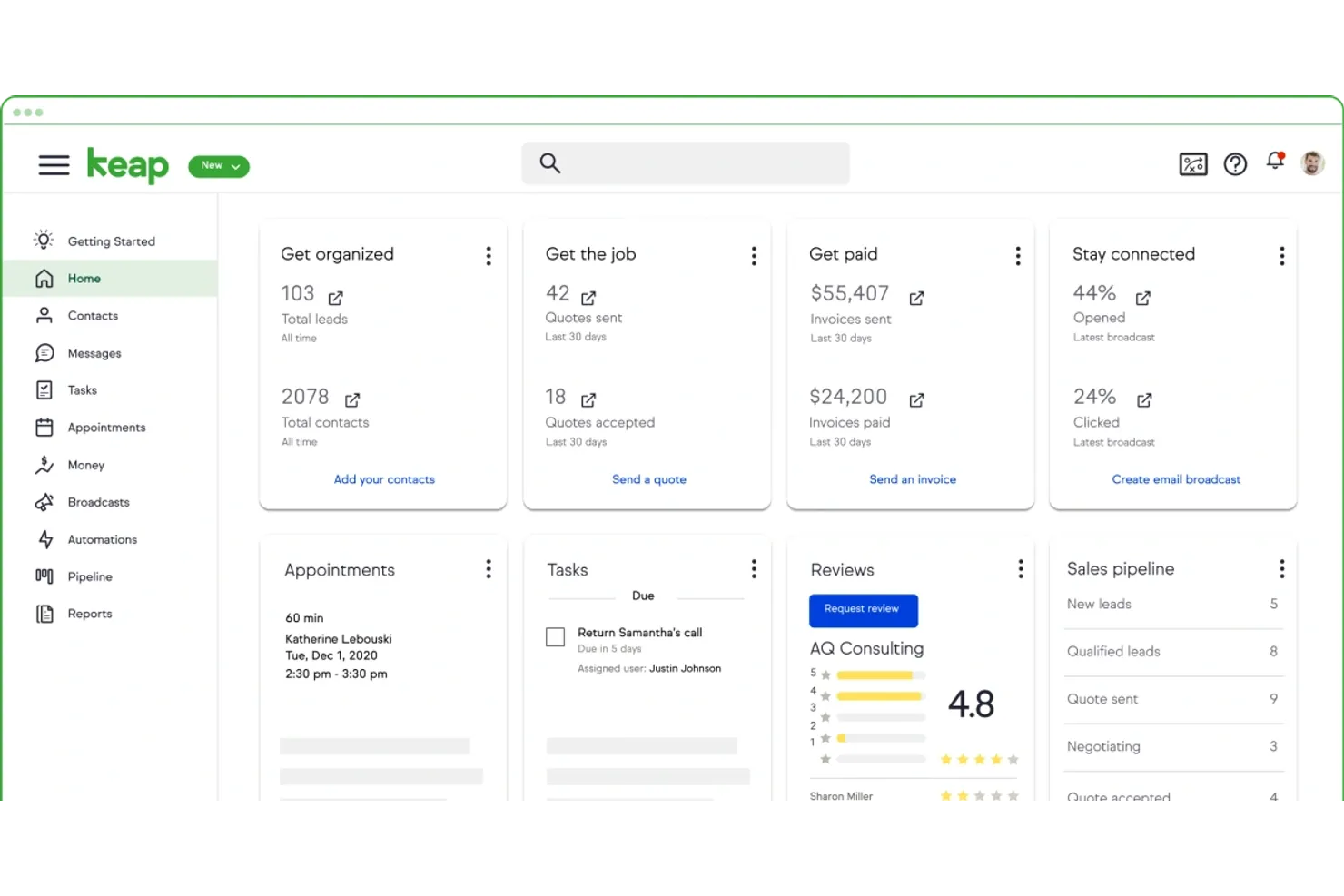
Keap CRM is designed for small businesses that want to manage customer relationships, email marketing, and payments in one place. If you’re looking for a CRM that combines sales automation with built-in invoicing and payment collection, this platform is worth considering. It’s especially useful for service-based businesses and entrepreneurs who want to streamline client communications and get paid faster.
Why I Picked Keap CRM
What drew me to Keap CRM for small businesses is its focus on combining email marketing and payment processing within the same platform. I picked it because you can send targeted email campaigns and automate follow-ups directly from your CRM, which helps keep client communications organized. The built-in invoicing and payment collection features let you create, send, and track invoices without switching tools. This makes Keap CRM a strong fit for small businesses that want to manage sales, marketing, and payments all in one place.
Keap CRM Key Features
Some other features that small business users may find helpful include:
- Appointment scheduling: Allow clients to book meetings directly through your calendar link.
- Lead capture forms: Create customizable forms to collect leads from your website or landing pages.
- Task automation: Set up automated reminders and follow-up tasks for your team.
- Contact segmentation: Organize contacts into lists based on tags, behaviors, or custom fields.
Keap CRM Integrations
Integrations include QuickBooks, Gmail, Outlook, Zapier, WordPress, Shopify, PayPal, Stripe, Google Calendar, and more.
Pros and Cons
Pros:
- Appointment links schedule client meetings
- Email marketing included without add-ons
- Built-in invoicing supports faster billing
Cons:
- Automation requires multiple setup steps
- Reporting lacks advanced analytics
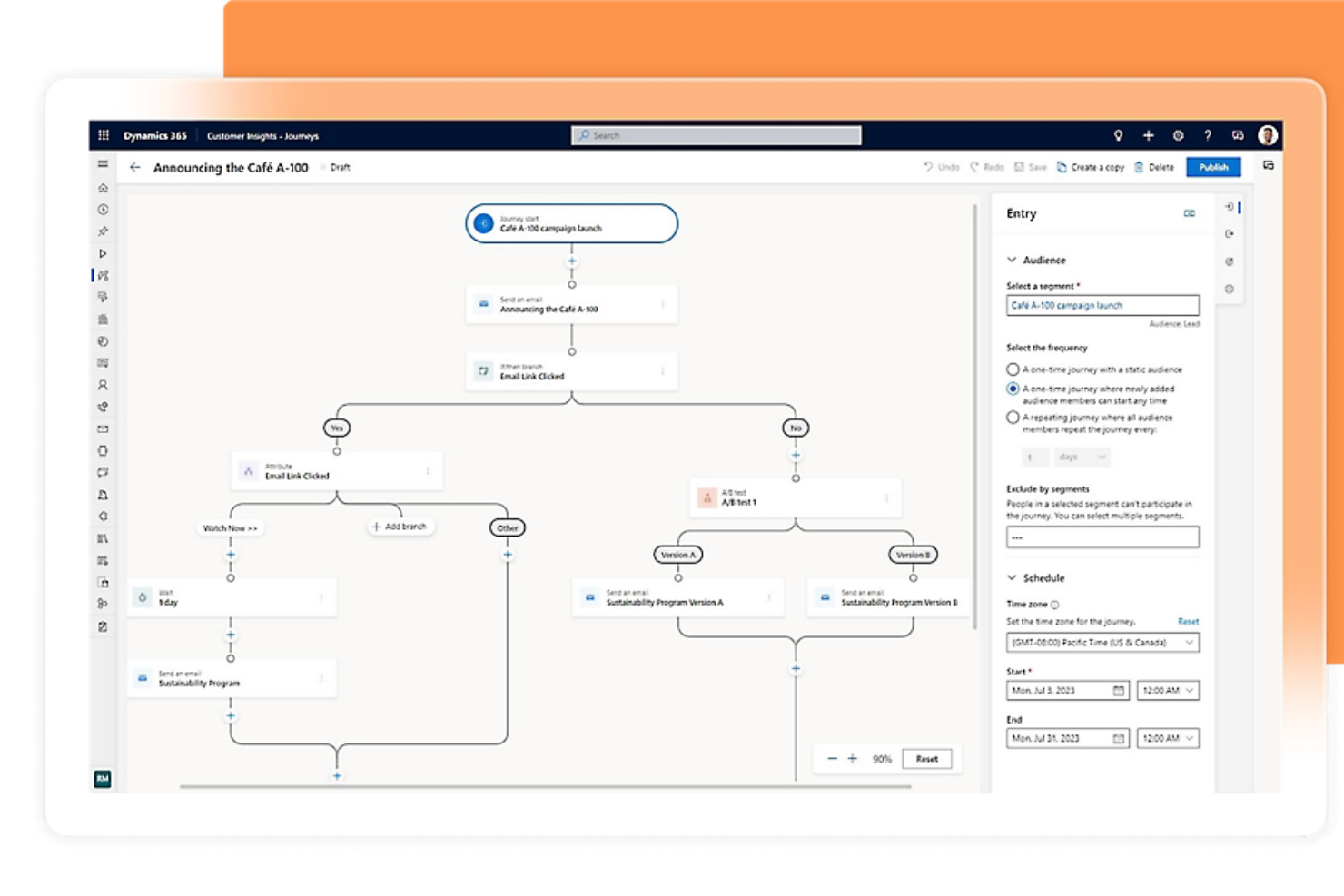
If your business already relies on Microsoft 365 tools, Microsoft Dynamics 365 CRM offers a familiar and deeply integrated experience. This CRM is a strong fit for small businesses that want to connect sales, customer service, and marketing with Outlook, Teams, and Excel. It’s especially useful for teams looking to automate processes and keep all customer data within the Microsoft ecosystem.
Why I Picked Microsoft Dynamics 365 CRM
For small businesses already using Microsoft 365, this CRM stands out because it connects directly with familiar tools like Outlook, Teams, and Excel. I picked Microsoft Dynamics 365 CRM since you can track emails, schedule meetings, and manage customer data without leaving your Microsoft apps. The platform also lets you automate sales and service workflows using Power Automate, which helps teams save time on repetitive tasks. This level of integration makes it easier for small businesses to keep all their customer interactions and processes in one connected environment.
Microsoft Dynamics 365 CRM Key Features
Some other features that small business teams may find valuable include:
- Custom dashboards: Build visual dashboards to track sales, service, or marketing metrics in real time.
- Case management: Manage customer service cases from creation to resolution within the CRM.
- Lead scoring: Prioritize leads using customizable scoring models based on engagement and data.
- Mobile app access: Use the dedicated mobile app to view and update customer records on the go.
Microsoft Dynamics 365 CRM Integrations
Integrations include Microsoft 365, LinkedIn Sales Navigator, Power BI, Azure DevOps, Outlook, SharePoint, and more. Microsoft Dynamics 365 CRM also offers an API for custom integrations.
Pros and Cons
Pros:
- Case management tracks service requests
- Lead scoring prioritizes follow-ups
- Custom dashboards track sales metrics
Cons:
- Reporting tools require extra training
- Interface updates disrupt team workflows
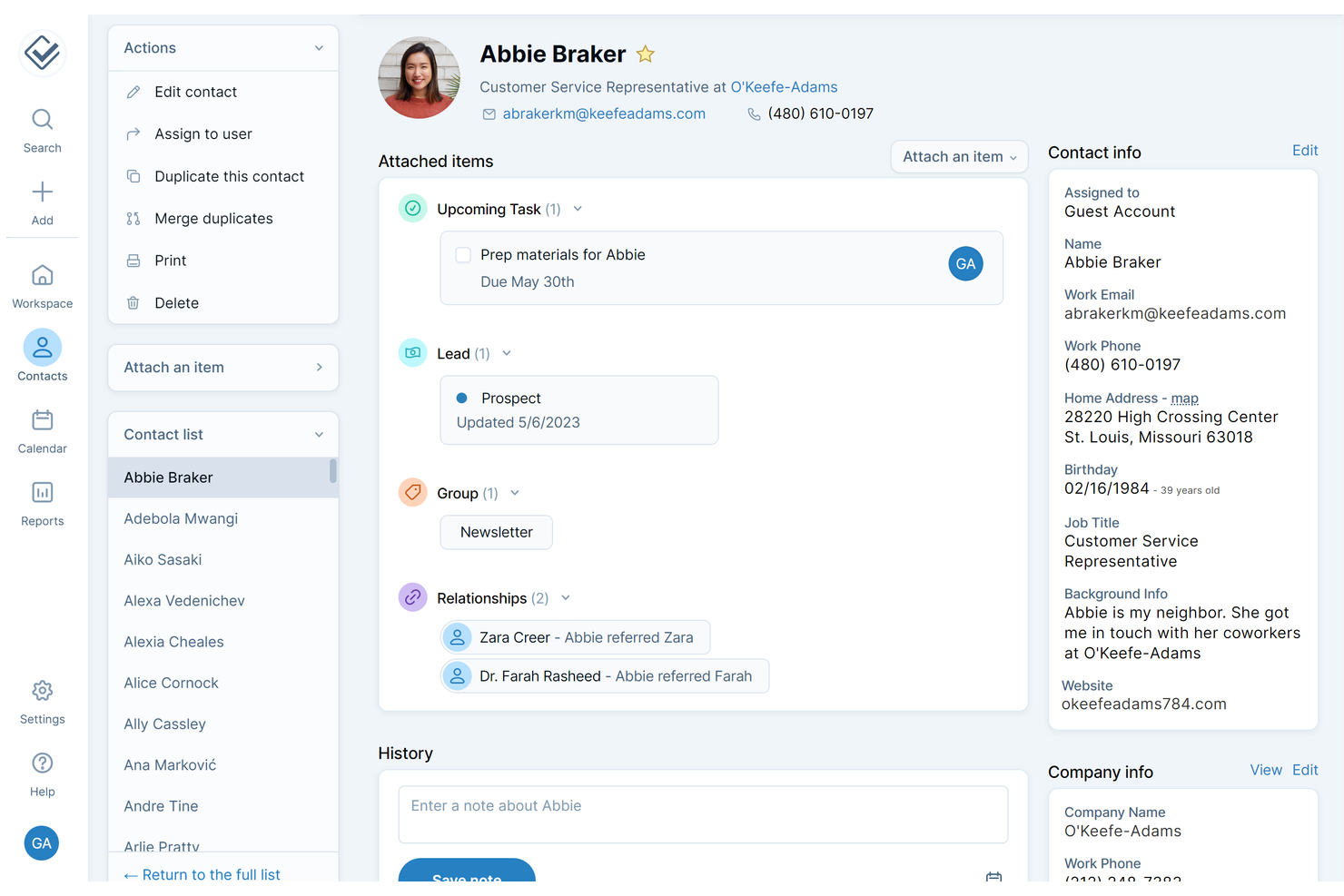
If you want a CRM that’s easy to set up and simple to use, Less Annoying CRM is worth a look. This platform is designed for small business owners and teams who don’t have time for complicated onboarding or steep learning curves. It helps you organize contacts, track follow-ups, and manage sales without overwhelming you with unnecessary features.
Why I Picked Less Annoying CRM
For small businesses that need to get up and running quickly, Less Annoying CRM stands out for its straightforward setup and minimal learning curve. I picked this tool because it lets you import contacts in just a few clicks and start tracking leads right away, without a lengthy onboarding process. The dashboard keeps your tasks and follow-ups front and center, so you always know what needs attention. Its simple pipeline view also makes it easy to see where every deal stands, which is helpful for teams that want clarity without extra complexity.
Less Annoying CRM Key Features
Some other features make Less Annoying CRM a practical choice for small business teams:
- Calendar integration: Sync your CRM events and tasks with Google Calendar to keep schedules aligned.
- Custom fields: Add fields to contact records so you can track information unique to your business.
- User permissions: Control what each team member can see or edit within the CRM.
- Daily agenda emails: Receive a summary of your tasks and appointments in your inbox every morning.
Less Annoying CRM Integrations
Integrations include Zapier, Mailchimp, Google Calendar, Google Contacts, Outlook Calendar, QuickBooks Sync, Google Forms Canvass, and more.
Pros and Cons
Pros:
- Daily agenda emails track tasks
- Contact management supports custom fields
- Flat monthly pricing simplifies budgeting
Cons:
- No built-in email marketing tools
- Reporting lacks advanced sales analytics
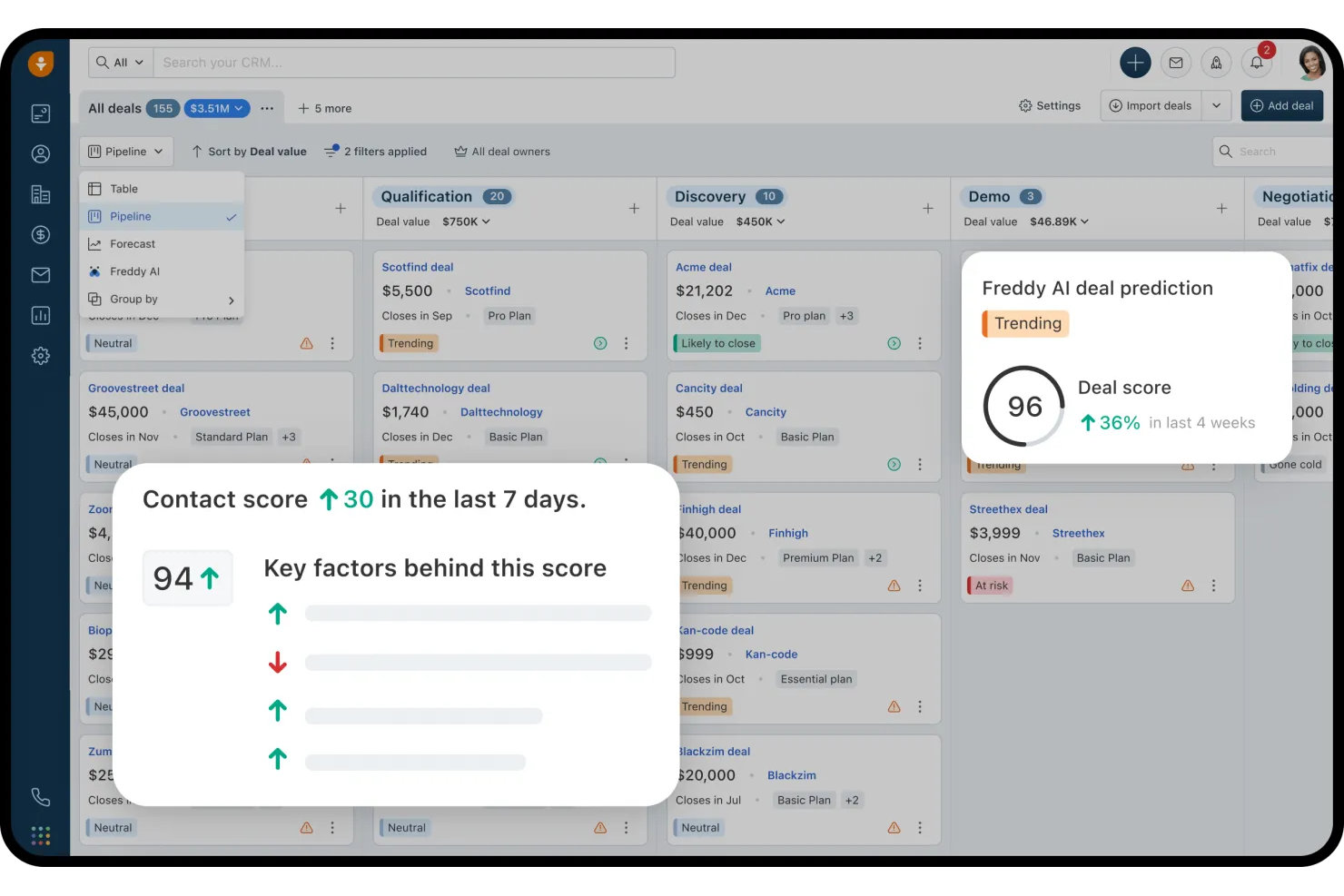
Freshsales is designed for small businesses that want to use AI to qualify and prioritize leads. Sales teams looking for smarter ways to focus their outreach will find the AI-powered lead scoring especially useful. The platform helps you identify high-potential prospects and manage your pipeline with less guesswork.
Why I Picked Freshsales
What sets Freshsales apart for small business CRM is its focus on AI-powered lead scoring. I picked this tool because it automatically analyzes lead behavior and engagement, then assigns scores to help your team focus on the most promising prospects. The built-in Freddy AI assistant also suggests next steps and highlights deals that need attention, so you can act quickly. This approach helps small sales teams prioritize their time and resources where they matter most.
Freshsales Key Features
Some other features that small business teams may find useful include:
- Built-in phone and email: Make calls and send emails directly from the CRM without switching tools.
- Visual sales pipeline: Drag and drop deals through customizable pipeline stages for easy tracking.
- Workflow automation: Set up automated actions for repetitive sales tasks and follow-ups.
- Contact and account management: Store, organize, and view all customer information in one place.
Freshsales Integrations
Integrations include Gmail, Outlook, Mailchimp, Zapier, QuickBooks, Shopify, Slack, Google Calendar, and more. Freshsales also offers an open API for custom integrations.
Pros and Cons
Pros:
- Automation handles repetitive sales tasks
- Visual pipeline simplifies deal tracking
- Built-in phone and email tools
Cons:
- Calendar and email syncing issues
- Email templates have limited formatting
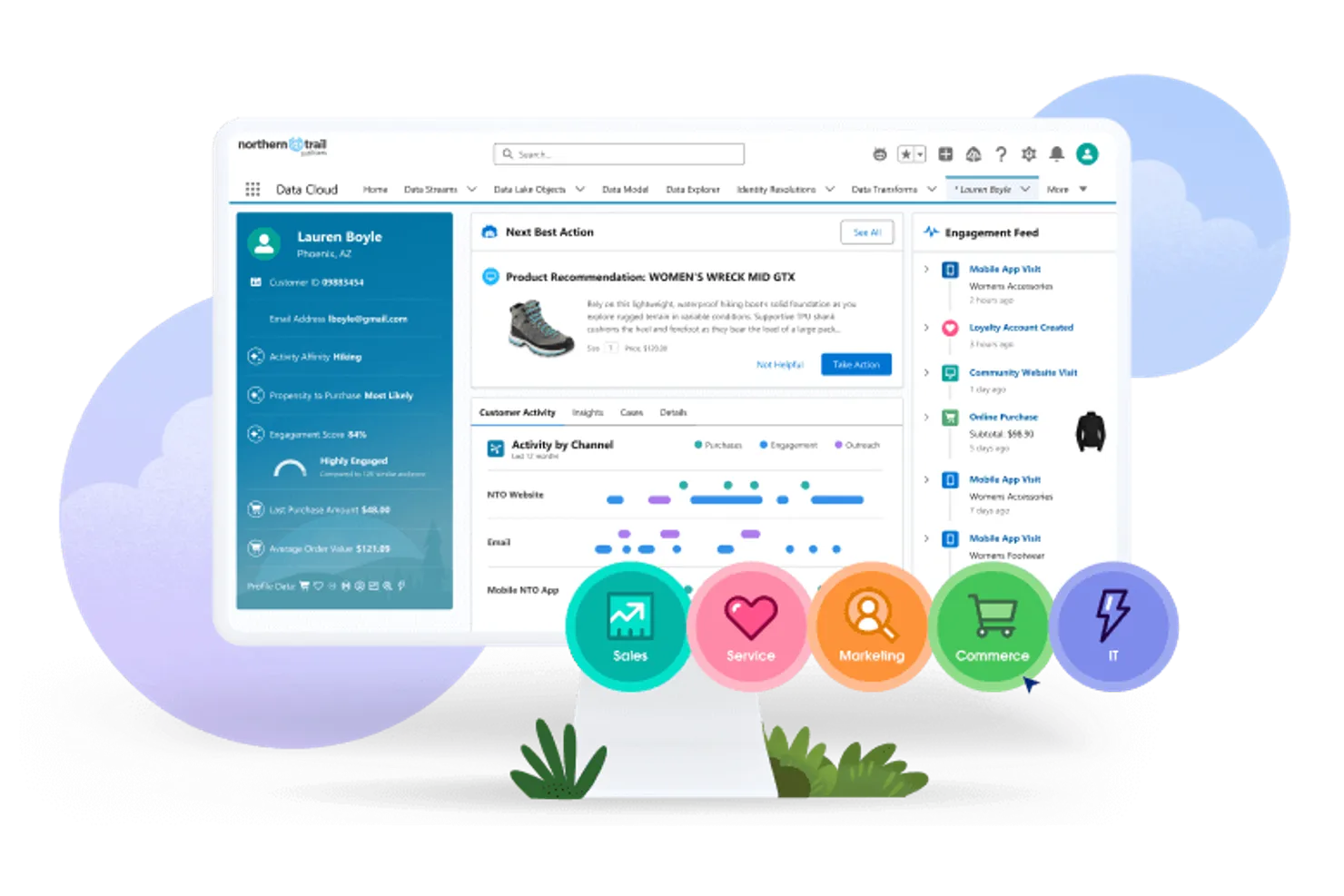
Salesforce CRM offers small businesses a platform that can grow and adapt as their needs change. If your team wants advanced customization, automation, and the ability to add new features as you scale, this tool stands out. It’s especially useful for businesses planning for long-term growth and needing a CRM that won’t limit their options down the road.
Why I Picked Salesforce CRM
What sets Salesforce CRM apart for small businesses is its ability to scale as your company grows. I picked it because you can start with core sales and contact management, then add advanced automation, analytics, and custom workflows as your needs evolve. The platform’s AppExchange marketplace lets you expand functionality with industry-specific apps and integrations. This flexibility makes Salesforce CRM a strong choice if you want a solution that won’t hold you back as your business becomes more complex.
Salesforce CRM Key Features
Some other features that small business teams may find valuable include:
- Opportunity management: Track sales opportunities, forecast revenue, and manage deal stages in one place.
- Case management: Organize and resolve customer service requests with built-in ticketing tools.
- Customizable dashboards: Build visual dashboards to monitor sales, service, and marketing metrics.
- Mobile app: Access CRM data, update records, and manage tasks from your phone or tablet.
Salesforce CRM Integrations
Integrations include Outlook, Gmail, Slack, Mailchimp, HubSpot, QuickBooks, DocuSign, Google Analytics, LinkedIn Sales Navigator, and Zoom.
Pros and Cons
Pros:
- Advanced reporting analyzes sales activity
- Role-based permissions control user access
- AppExchange offers thousands of integrations
Cons:
- Updates may require extra training
- Monthly costs are higher than small CRMs


Zoho CRM gives small businesses a way to build custom automation workflows that match their unique sales and service processes. It’s a strong fit for teams that want to automate repetitive tasks, manage leads, and personalize customer journeys without heavy IT involvement. If you need a CRM that adapts to your business rules and helps you scale your operations, Zoho CRM offers the flexibility to do just that.
Why I Picked Zoho CRM
What drew me to Zoho CRM for small businesses is its ability to let you design automation workflows that fit your exact sales and support processes. You can use the drag-and-drop workflow builder to automate lead assignments, follow-ups, and notifications based on your own rules. I appreciate that Zoho CRM also supports multi-step automations, so you can set up sequences that trigger across different modules like contacts, deals, and tasks. This level of customization helps small teams save time and reduce manual work as they grow.
Zoho CRM Key Features
Some other features make Zoho CRM a flexible option for small business teams:
- Sales forecasting: Generate sales projections based on your pipeline and historical data.
- Email integration: Connect your email accounts to send, receive, and track messages within the CRM.
- Custom dashboards: Build visual dashboards to monitor key metrics and team performance.
- Mobile app: Access customer data, update records, and manage tasks from your phone or tablet.
Zoho CRM Integrations
Integrations include Zoho Mail, Zoho Books, Zoho Desk, Zoho Campaigns, Google Workspace, Microsoft Office 365, Mailchimp, QuickBooks, Slack, and Zapier. Zoho CRM also offers an API for custom integrations.
Pros and Cons
Pros:
- Email tracking shows opens and clicks
- Custom modules tailor business data fields
- Automation builder supports multi-step workflows
Cons:
- Advanced features require higher-tier plans
- Support responses are inconsistent during peak hours
New Product Updates from Zoho CRM

Zoho CRM Makes System Dashboards Editable
Zoho CRM's system-defined dashboards are now editable, allowing customization of charts for better insights. For more information, visit Zoho CRM's official site.
 .
.Other CRM for small business
Here are some additional CRM for small business options that didn’t make it onto my shortlist, but are still worth checking out:
- Streak
For Gmail inbox workflow
- Insightly
For project management integration
- Agile CRM
For telephony and call tracking
- Nimble
For social media contact enrichment
- Vtiger
For built-in customer support features
- Capsule CRM
For managing long-term relationships
- Apptivo CRM
For customizable app modules
- Bitrix24 CRM
For team collaboration tools


CRM for Small Business Selection Criteria
When selecting the best CRM for small businesses to include in this list, I considered common buyer needs and pain points like managing customer relationships efficiently and tracking sales activities in one place. I also used the following framework to keep my evaluation structured and fair:
Core Functionality (25% of total score)
To be considered for inclusion in this list, each solution had to fulfill these common use cases:
- Store and organize contact information
- Track sales leads and opportunities
- Manage tasks and follow-ups
- Record communication history
- Generate basic sales reports
Additional Standout Features (25% of total score)
To help further narrow down the competition, I also looked for unique features, such as:
- AI-powered lead scoring
- Built-in phone and email tools
- Customizable sales pipelines
- Workflow automation for repetitive tasks
- Mobile app for on-the-go access
Usability (10% of total score)
To get a sense of the usability of each system, I considered the following:
- Simple and intuitive navigation
- Clean and modern interface design
- Minimal clicks to complete common tasks
- Clear labeling and helpful tooltips
- Responsive performance with minimal lag
Onboarding (10% of total score)
To evaluate the onboarding experience for each platform, I considered the following:
- Availability of step-by-step setup guides
- Access to training videos and webinars
- Interactive product tours for new users
- Pre-built templates for quick setup
- In-app chatbots or help widgets
Customer Support (10% of total score)
To assess each software provider’s customer support services, I considered the following:
- Multiple support channels like chat, email, and phone
- Fast response times during business hours
- Access to a searchable knowledge base
- Availability of onboarding or setup assistance
- Community forums or user groups
Value For Money (10% of total score)
To evaluate the value for money of each platform, I considered the following:
- Transparent and predictable pricing
- Features included at each pricing tier
- Free plan or trial availability
- No hidden fees or surprise charges
- Discounts for annual billing or nonprofits
Customer Reviews (10% of total score)
To get a sense of overall customer satisfaction, I considered the following when reading customer reviews:
- Positive feedback on core features
- Reports of reliable system uptime
- Comments on customer support quality
- User experiences with onboarding and training
- Feedback on pricing fairness and value
How to Choose CRM for a Small Business
It’s easy to get bogged down in long feature lists and complex pricing structures. To help you stay focused as you work through your unique software selection process, here’s a checklist of factors to keep in mind:
| Factor | What to Consider |
| Scalability | Will the CRM handle more users, contacts, and data as your business grows? Check user and record limits on each plan. |
| Integrations | Does the CRM connect natively to your existing tools (email, calendar, accounting, marketing)? List your must-have integrations before comparing options. |
| Customizability | Can you tailor fields, pipelines, and workflows to match your sales process? Avoid tools that lock you into rigid structures. |
| Ease of use | Will your team adopt the CRM quickly, or will it require extensive training? Test the interface with real users before committing. |
| Implementation and onboarding | How long will it take to get up and running? Look for migration support, setup guides, and onboarding resources that match your team’s technical comfort level. |
| Cost | Are the pricing tiers clear and predictable as you add users or features? Watch for hidden fees, required add-ons, or steep jumps between plans. |
| Security safeguards | Does the CRM offer role-based permissions, data encryption, and regular backups? Make sure it meets your industry’s data protection standards. |
| Support availability | Can you reach support when you need it (chat, phone, email)? Check support hours, response times, and whether onboarding help is included. |
What is CRM for Small Business?
A CRM for small businesses is a software platform that helps small companies organize customer information, track sales activities, and manage relationships in one place. These systems are designed to be accessible and affordable for smaller teams, offering tools for contact management, deal tracking, and communication history. Using a CRM for small businesses helps teams stay organized, follow up with leads, and build stronger customer relationships over time.
Features of CRM for Small Business
When selecting CRM for a small business, keep an eye out for the following key features:
- Contact management: Store, organize, and update customer and lead information in a centralized database, making it easy to access details and track interactions.
- Sales pipeline tracking: Visualize and manage deals as they move through different sales stages, helping your team prioritize and monitor progress.
- Task and activity management: Assign, schedule, and track follow-up tasks, calls, and meetings to ensure nothing falls through the cracks.
- Email integration: Connect your email account to send, receive, and log messages directly within the CRM, keeping all communication in one place.
- Calendar integration: Sync meetings, calls, and reminders with your calendar to coordinate schedules and avoid double-booking.
- Reporting and analytics: Generate sales, activity, and performance reports to monitor team productivity and identify trends or bottlenecks.
- Workflow automation: Set up rules to automate repetitive tasks like sending follow-up emails or updating deal stages, saving time and reducing manual work.
- Mobile access: Use mobile apps to view and update CRM data, manage tasks, and communicate with customers while away from your desk.
- Role-based permissions: Control access to sensitive information by assigning user roles and permissions, ensuring team members see only what they need.
- Document storage: Upload, organize, and share files such as proposals, contracts, and presentations within the CRM for easy reference and collaboration.
Benefits of CRM for Small Business
Implementing CRM for a small business provides several benefits for your team and your business. Here are a few you can look forward to:
- Centralized customer data: Keep all contact details, communication history, and sales activities in one place for easy access and better organization.
- Improved follow-up: Use task management and reminders to ensure every lead and customer receives timely attention, and nothing is overlooked.
- Greater sales visibility: Track deals and sales pipelines visually, helping your team prioritize opportunities and forecast revenue more accurately.
- Enhanced team collaboration: Share notes, documents, and updates within the CRM so everyone stays informed and aligned on customer interactions.
- Time savings through automation: Automate repetitive tasks like follow-up emails and deal updates, freeing up your team to focus on higher-value work.
- Better reporting and insights: Generate reports on sales performance and team activities to identify trends, measure success, and guide decision-making.
- Stronger data security: Control access to sensitive information with role-based permissions, protecting customer data and supporting compliance needs.
Costs and Pricing of CRM for Small Business
Selecting CRM for a small business requires an understanding of the various pricing models and plans available. Costs vary based on features, team size, add-ons, and more. The table below summarizes common plans, their average prices, and typical features included in crm for small business solutions:
Plan Comparison Table for CRM for Small Business
| Plan Type | Average Price | Common Features |
| Free Plan | $0 | Basic contact management, limited sales pipeline, simple task tracking, and basic reporting. |
| Personal Plan | $5-$25/user/month | Contact and deal management, email integration, calendar sync, and basic workflow automation. |
| Business Plan | $25-$50/user/month | Advanced reporting, customizable pipelines, workflow automation, integrations, and mobile access. |
| Enterprise Plan | $50-$100/user/month | Advanced security, role-based permissions, priority support, custom modules, and API access. |
CRM for Small Business FAQs
Here are some answers to common questions about CRM for small businesses:
How do I know if my small business needs a CRM?
If you’re struggling to keep track of customer information, follow-ups, or sales activities across spreadsheets or email, it’s time to consider a CRM. Even small teams benefit from having a single place to organize contacts, manage deals, and monitor communication history.
Can I migrate my existing customer data into a CRM for small business?
Yes, most CRM for small business solutions offer import tools for spreadsheets or other systems. Look for platforms with step-by-step migration guides, template files, and support resources to help you transfer your data accurately and securely.
What should I look for in a CRM for a small team with limited technical resources?
Prioritize ease of use, simple onboarding, and responsive customer support. Choose a CRM with an intuitive interface, clear setup instructions, and access to training materials, so your team can get started quickly without needing IT expertise.
Are there free CRM options suitable for small businesses?
Yes, many CRM vendors offer free plans with basic features like contact management and deal tracking. These plans often have user or feature limits, so review what’s included and make sure it covers your essential needs before committing.
How secure is customer data in a CRM for small business?
Most reputable CRM for small business platforms use encryption, regular backups, and role-based permissions to protect your data. Always review a vendor’s security documentation and confirm that their safeguards meet your industry’s requirements.