
23 Best Customer Review Management Software of 2026

20 Best Customer Review Management Software Shortlist
Here's my pick of the 20 best software from the 23 tools reviewed.


Customer review management software helps CX and marketing teams monitor, respond to, and analyze customer feedback across platforms. If you’re struggling to keep up with reviews scattered across Google, Yelp, and industry-specific sites, or your team’s wasting time on manual responses, you need a better system. The right tool will centralize review workflows, surface insights, and protect your brand reputation at scale.
In this article, I share my top picks for the best review management platforms to help you stay on top of customer sentiment, improve service quality, and turn feedback into a strategic asset.
Why Trust Our Reviews
We’ve been testing review management software since 2021. As CX professionals ourselves, we know how critical and difficult it is to make the right decision when selecting software.
We invest in deep research to help our audience make better software purchasing decisions. We’ve tested more than 2,000 tools for different customer experience use cases and written over 1,000 comprehensive software reviews. Learn how we stay transparent & our software review methodology.
The Best Customer Review Management Software Solutions Summary Table
| Tool | Best For | Trial Info | Price | ||
|---|---|---|---|---|---|
| 1 | Best for deep reputation insights | 7-day free trial + free demo available | From $55/user/month | Website | |
| 2 | Best for automating review management | Free demo available | Pricing upon request | Website | |
| 3 | Best for personalized review responses | 7-day free trial | From $8/month (billed annually) | Website | |
| 4 | Best for real-time sentiment analysis | 14-day free trial available | From $199/month (billed annually) | Website | |
| 5 | Best for AI review analytics & replies | Free 14-day trial available | From $20/user/month | Website | |
| 6 | Best for review generation | Free trial available | From $110/seat/month | Website | |
| 7 | Best for customer experience analytics | Free demo available | Pricing upon request | Website | |
| 8 | Best for AI-driven review automation | Free demo available | Pricing upon request | Website | |
| 9 | Best for integrated review management | 30-day free trial +free demo available | From $199/seat/month | Website | |
| 10 | Best for showcasing authentic reviews | Free trial available | From $79/month | Website | |
| 11 | Best for automating review collection | Free plan available | From $494/month | Website | |
| 12 | Best for automated review acquisition | Free Demo | Pricing Upon Request | Website | |
| 13 | Best for collecting authentic reviews | Free plan available | From $299/month/domain | Website | |
| 14 | Best for real-time feedback management | Free Trial | From $49.95/user/month | Website | |
| 15 | Best for multi-platform review management | Free demo available | Pricing upon request | Website | |
| 16 | Best for automated review requests | 7-day free trial | $49/month | Website | |
| 17 | Best for versatile review generation | 7-day free trial | From $69/month | Website | |
| 18 | Best for automated review collection | 14-day free trial + demo available | From $99/user/month | Website | |
| 19 | Best for enterprise review management | Free plan available | From $19.50/month (billed annually) | Website | |
| 20 | Best for multi-channel feedback collection | Free 14-day trial + free demo available | Pricing upon request | Website |

-

SupportYourApp
Visit WebsiteThis is an aggregated rating for this tool including ratings from Crozdesk users and ratings from other sites.4.7 -
Freshdesk
Visit WebsiteThis is an aggregated rating for this tool including ratings from Crozdesk users and ratings from other sites.4.4 -
Zendesk
Visit WebsiteThis is an aggregated rating for this tool including ratings from Crozdesk users and ratings from other sites.4.3





Best Review Management Software Reviews
Here’s a brief description of each customer review management system to showcase each tool’s best use case, some noteworthy features, and screenshots to give a snapshot of the user interface.

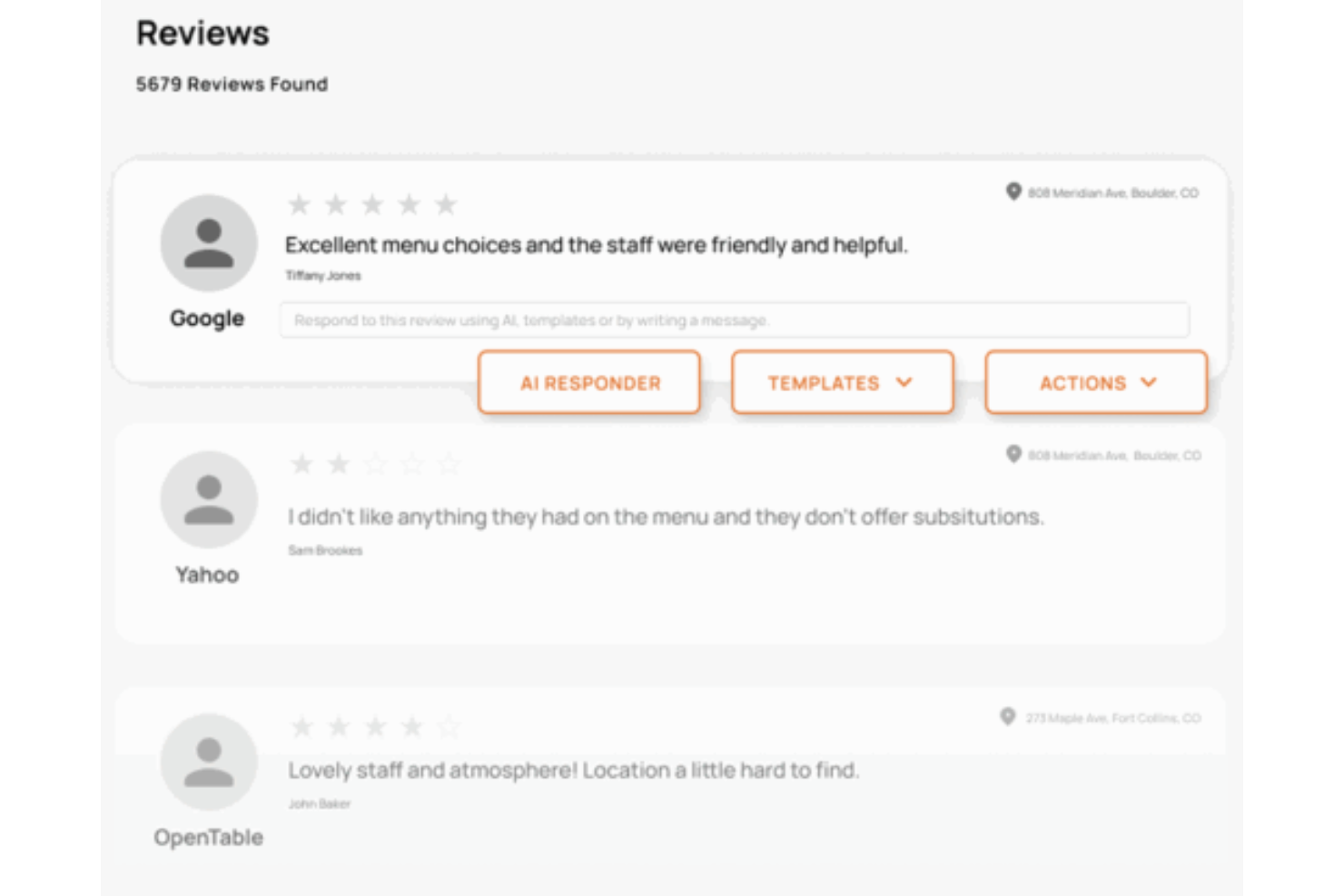
Alchemer helps customer experience teams and service leaders gather, analyze, and act on customer feedback and reviews to improve reputation and drive business decisions.
Who Is Alchemer Best For?
Alchemer is a strong fit for mid-size to enterprise businesses that need advanced feedback collection and in-depth analysis to understand and manage their customer reputation.
Why I Picked Alchemer
I picked Alchemer as one of the best because I love how it goes beyond surface-level star ratings to give you a genuinely layered view of your reputation. The Reputation Management dashboard pulls reviews from Google, Yelp, Facebook, and other platforms into one place, letting you drill down by region, location group, or individual store to track review volume trends, average ratings, response rates, and sentiment shifts all at once. On top of that, Alchemer Pulse uses AI built specifically for feedback analysis—not generic models—to surface recurring themes and aspect-based sentiment across open text comments, so I can see exactly what's driving a rating change rather than just that it happened. The combination of multi-location benchmarking and purpose-built AI text analysis is what makes Alchemer's reputation insights genuinely deep.
Alchemer Key Features
- AI-assisted review response generation: Generate on-brand review responses using AI that adapts to your brand voice, or choose from pre-approved templates for consistency across locations.
- Risk monitoring: Detect high-risk review content—such as safety, harassment, or discrimination mentions—and receive instant alerts so your team can act before issues escalate.
- Competitive intelligence: Compare your ratings, sentiment, and customer feedback against nearby competitors at the local level, with the ability to drill down by location or region.
- Multi-channel survey distribution: Send surveys via email, SMS, QR code, or link share to collect direct customer feedback across touchpoints and close the loop on review insights.
Alchemer Integrations
Integrations include Salesforce, HubSpot, Zendesk, Microsoft Dynamics 365, Slack, Google Sheets, Marketo, Shopify, Tableau, and Jira.
Pros and Cons
Pros:
- Automates workflows across 400+ apps
- Powerful AI-driven sentiment analysis
- Unifies public reviews and surveys
Cons:
- Advanced tools require enterprise plans
- Higher price point than basic tools
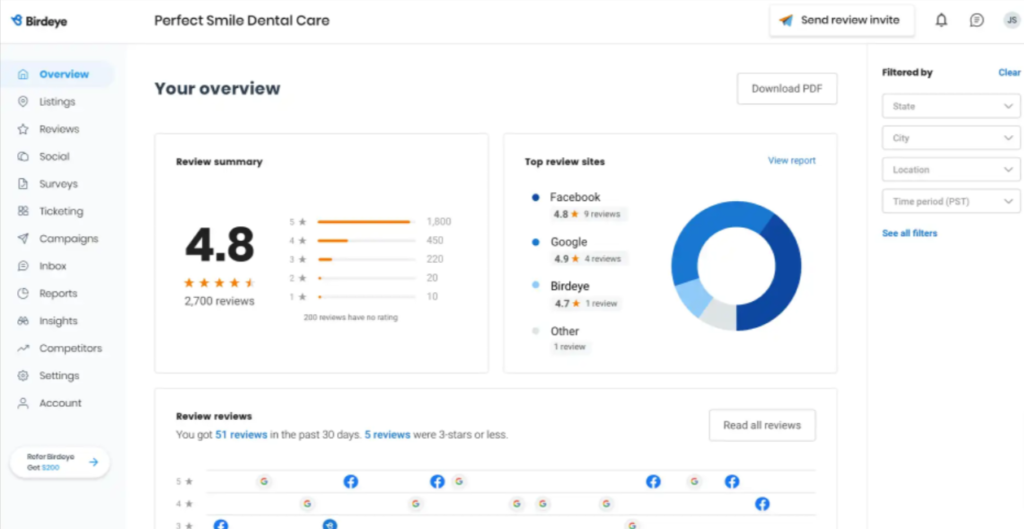
Birdeye helps businesses of all sizes manage, monitor, and respond to customer reviews across multiple platforms, making it easier for teams in retail, healthcare, and service industries to improve their online reputation and customer experience.
Who Is Birdeye Best For?
Birdeye is a strong fit for multi-location businesses in industries like healthcare, automotive, and hospitality that need centralized review management across many locations.
Why I Picked Birdeye
Birdeye earns its spot as one of the best on my shortlist because of how far it takes review automation. The Review Generation Agent runs A/B tests across subject lines, templates, and channels to figure out the best time and place to send review requests—no manual setup required. I also like the Review Response Agent, which reads sentiment, detects urgency, and even analyzes photos before crafting on-brand replies across all your locations. For teams managing reviews at scale, being able to monitor 200+ review sites from a single dashboard and auto-respond without sacrificing tone is genuinely hard to replicate elsewhere.
Birdeye Key Features
- Competitive benchmarking: Compare your review ratings and volume against local competitors across major review platforms.
- Review widgets: Embed live review feeds directly onto your website to display customer feedback to site visitors.
- Ticketing from reviews: Convert negative reviews into support tickets and assign them to team members for follow-up.
- Review insights: Use AI to surface recurring themes and sentiment trends across all your incoming reviews.
Birdeye Integrations
Integrations include Salesforce, HubSpot, QuickBooks Online, Zoho CRM, Square, Clio Manage, AthenaHealth, Dentrix, ServiceTitan, and Toast.
Pros and Cons
Pros:
- Effective AI features enhancing efficiency in handling customer feedback
- Automation capabilities through a robust API
- User-friendly interface simplifying review management and social media integration
Cons:
- AI features might have a learning curve for new users
- Limited customization in some features
New Product Updates from Birdeye
Birdeye Now Integrates With Cornerstone and PPMP
Birdeye now connects with Cornerstone and PPMP to automate review and survey requests, helping businesses and healthcare practices gather feedback without manual effort. For more information, visit Birdeye’s official site.
 .
.

RightResponse AI helps businesses and customer experience teams automate and personalize responses to online reviews, so they can manage reputation and engage with customers across multiple review platforms.
Who Is RightResponse AI Best For?
RightResponse AI is a good fit for small to mid-sized businesses that need to manage and respond to customer reviews across multiple platforms without a dedicated reputation management team.
Why I Picked RightResponse AI
I picked RightResponse AI as one of the best because of how it handles personalized review responses at scale. Its "fact-powered" response engine uses your business details, brand voice, and values to weave specifics into each reply instead of producing the same generic text other AI tools generate. I also like the review request side of things: you can attach job photos, include service dates, and reference the actual customer interaction, so requests feel like they came from a person, not a template. I haven't seen other tools handle both personalized outreach and responses this well.
RightResponse AI Key Features
- Sentiment analysis: Filters out vague or off-topic content to surface specific, experience-based feedback organized by topic and category.
- Competitor review analysis: Lets you run the same sentiment analysis on competitor reviews and compare results side by side in a shared dashboard.
- Multi-location sentiment tracking: Breaks down customer feedback by location, star rating, and time period to identify patterns across your entire operation.
- Google Maps rank tracking: Shows how your business ranks on Google Maps relative to competitors, with data to inform your reputation goals.
RightResponse AI Integrations
Native integrations are not currently listed.
Pros and Cons
Pros:
- Tracks local rankings to improve visibility
- Offers deep sentiment and competitor performance insights
- Generates personalized, on-brand review responses automatically
Cons:
- Usage-based pricing can get unpredictable
- Advanced analytics still limited in scope


Brand24 helps customer experience teams and marketing professionals monitor, analyze, and respond to online reviews and brand mentions across social media, review sites, and forums, making it easier to manage reputation and understand customer sentiment in one place.
Who Is Brand24 Best For?
Brand24 is a strong fit for mid-sized businesses and agencies that need to track and respond to customer feedback across multiple online channels.
Why I Picked Brand24
Brand24 earns its spot on my shortlist because of how well its real-time sentiment analysis works across a wide range of review and mention sources. I like that it automatically tags incoming mentions as positive, negative, or neutral, so my team can prioritize responses without manually reading through every comment. The Anomaly Detector is particularly useful—it flags sudden spikes in negative sentiment, which means I can catch a brewing reputation issue before it escalates. I also rely on the sentiment score trend charts to track how customer perception shifts over time after a product change or service update.
Brand24 Key Features
- Mention feed: Aggregates customer reviews and mentions from social media, news sites, blogs, podcasts, and review platforms into a single, filterable feed.
- Custom alert notifications: Sends real-time email or in-app alerts when new reviews or mentions match your tracked keywords or filters.
- Influence score: Assigns a score to each review source based on its reach, helping you prioritize responses to high-impact mentions.
- Topic analysis: Groups mentions by recurring themes, so you can identify what customers are consistently praising or criticizing.
Brand24 Integrations
Integrations include X (Twitter), Facebook, Instagram, YouTube, Spotify, LinkedIn, Reddit, Telegram, TripAdvisor, and AppStore.
Pros and Cons
Pros:
- User-friendly interface that is easy to navigate
- Offers comprehensive analytics and reporting features
- Effective in tracking brand mentions across various platforms
Cons:
- Limited integration options with other tools
- Some users report issues with data accuracy
New Product Updates from Brand24

Brand24 Enhances AVE Accuracy With Geo-Based Weighting
Brand24 has refined its AVE calculation to incorporate stronger geo-based weighting, providing more precise regional values. For more information, visit Brand24's official site.
 .
.

ReviewFlowz helps businesses and agencies monitor, analyze, and respond to customer reviews across multiple platforms, making it easier to manage online reputation and gain actionable insights from customer feedback.
Who Is ReviewFlowz Best For?
ReviewFlowz works well for SaaS companies and digital agencies that need a centralized way to track and respond to reviews across multiple platforms.
Why I Picked ReviewFlowz
ReviewFlowz stands out because its AI-powered features handle the two most time-consuming parts of review management: understanding what customers are saying and writing replies at scale. The AI analytics surface sentiment trends and recurring themes across review platforms, letting me spot patterns without manually reading through hundreds of reviews. The AI reply suggestions are context-aware and pull from the review content rather than generating generic responses.
ReviewFlowz Key Features
- Multi-platform review aggregation: Pulls in reviews from any review platform across every country and language into a single feed.
- Magic Links for review requests: Generates trackable links you can paste into existing CRM or email workflows to request reviews without a direct integration.
- Review leaderboards: Tracks which team members, locations, or products are generating the most reviews so you can use the data for recognition or performance goals.
- Website review widgets: Embeds a customizable review display on your website that updates automatically as new reviews come in.
ReviewFlowz Integrations
Integrations include Zendesk, Intercom, Slack, Microsoft Teams, ChatGPT, and Claude.
Pros and Cons
Pros:
- Supports multiple review sites
- Free tracking options available
- User-friendly interface for managing reviews
Cons:
- No support for social media
- Doesn't support listing management


Grade.us helps agencies, franchises, and local businesses automate review requests, monitor feedback across platforms, and manage their online reputation from a single dashboard.
Who Is Grade.us Best For?
Grade.us suits marketing agencies and multi-location businesses that need to manage and grow online reviews at scale.
Why I Picked Grade.us
Grade.us earns its spot on my shortlist because of how well it handles review generation at scale. I like that you can build automated email and SMS campaigns that send review requests at the right moment in the customer journey—right after a purchase or service interaction. The funnel-style approach is genuinely useful: it filters out unhappy customers before they reach a public review site, directing them to a private feedback form instead. That built-in triage helps teams focused on growing positive review volume.
Grade.us Key Features
- Review monitoring dashboard: Track and view incoming reviews from multiple platforms like Google and Facebook in one centralized feed.
- Review response tools: Reply to customer reviews directly from the Grade.us platform without switching between review sites.
- Reporting and analytics: Access review performance reports that track volume, ratings, and trends over time.
- White-label options: Rebrand the platform with your own agency logo and colors for client-facing review management.
Grade.us Integrations
Integrations include Google and Facebook, plus an API for custom connections.
Pros and Cons
Pros:
- Simple setup and easy multi-location management
- Automates review requests through email and SMS
- White-label options perfect for agency branding
Cons:
- Support response times can be inconsistent
- Reporting and analytics tools lack depth


ReviewTrackers helps businesses in retail, hospitality, healthcare, and service industries collect, monitor, and analyze customer reviews from multiple platforms to improve online reputation and understand customer sentiment.
Who Is ReviewTrackers Best For?
ReviewTrackers is a good fit for multi-location businesses that need centralized visibility into customer feedback across many review sites.
Why I Picked ReviewTrackers
ReviewTrackers earns its spot as one of the best on my shortlist because of how deeply it goes on customer experience analytics—something most review management tools treat as an afterthought. I particularly like the proprietary NLP engine, which automatically categorizes large volumes of unstructured review data and surfaces sentiment trends without requiring manual analysis. For a multi-location brand getting thousands of reviews a month, that kind of AI-driven keyword and sentiment classification means my team can spot a recurring service issue across locations in minutes rather than days. The competitor analysis layer is another feature I find genuinely useful—it applies the same NLP analysis to rival brands' reviews, so you can identify gaps in their customer experience and act on them.
ReviewTrackers Key Features
- Review request automation: Send automated review request campaigns via SMS or email to prompt customers to leave feedback after an interaction.
- Review response tools: Respond to reviews across multiple platforms directly from a centralized dashboard, with brand-approved response templates.
- Local listing management: Keep business information accurate and consistent across online directories and review sites from a single interface.
- Social media monitoring: Monitor and manage social mentions alongside reviews in a unified workflow to track brand conversations across channels.
ReviewTrackers Integrations
Integrations include Google My Business, Facebook, Brandwatch, and Hootsuite.
Pros and Cons
Pros:
- Comprehensive review management functionality
- The dashboard is intuitive and effective for managing and analyzing reviews across various platforms
- Users appreciate the straightforward onboarding process
Cons:
- Limited sentiment analysis features
- Initial setup can be cumbersome


Podium helps local businesses and multi-location brands collect, manage, and respond to customer reviews across platforms, so teams can boost their online reputation and engage with customers in real time.
Who Is Podium Best For?
Podium is a strong fit for local service businesses and multi-location brands—like auto dealerships, healthcare practices, and home services companies—that rely heavily on online reputation to drive new customers.
Why I Picked Podium
Podium is one of my top picks because I love how its AI Reputation Specialist handles the review workflow from start to finish. I use it to automatically send personalized review invites via SMS after a customer interaction, and the AI drafts responses to incoming reviews without me needing to write each one manually. The review automation layer sends follow-up reminders to customers who haven't responded, which increases the number of reviews my team collects. The all-in-one inbox also pulls in reviews from Google and Facebook, so I don't have to switch between platforms to manage feedback.
Podium Key Features
- Review monitoring dashboard: Track and view incoming reviews from Google and Facebook in a single centralized feed.
- SMS-based customer messaging: Send two-way text messages to customers directly from the Podium inbox to resolve issues or gather feedback.
- Webchat widget: Capture leads and customer inquiries from your website and route them into the same inbox as your review conversations.
- Reporting and analytics: View review volume, average star rating trends, and response rate data across locations over time.
Podium Integrations
Integrations include Google Reviews, Facebook Reviews, and Webchat.
Pros and Cons
Pros:
- Cloud-based software offers flexibility
- Helps manage customer feedback, allowing businesses to address customer concerns
- User-friendly interface simplifies communication with customers
Cons:
- Some users report issues with customer service responsiveness
- Difficult cancellation process


Sprout Social gives marketing and customer experience teams a single platform to monitor, manage, and respond to customer reviews across major social and review sites, helping businesses protect their reputation and improve customer satisfaction.
Who Is Sprout Social Best For?
Sprout Social is a strong fit for mid-size to enterprise marketing and CX teams that manage brand presence across multiple social and review platforms simultaneously.
Why I Picked Sprout Social
I picked Sprout Social as one of the best because of how tightly its review management is woven into the rest of the platform. Rather than treating reviews as a separate module, Sprout pulls in feedback from Google My Business, Facebook, TripAdvisor, Yelp, Trustpilot, Glassdoor, and both app stores into the same unified inbox my team uses for social engagement. That means I can respond to a one-star Google review and a Twitter DM in the same workflow, without switching tools. I also like the Reviews Overview Report, which tracks review volume and reply management trends across platforms and locations, so I can spot patterns in customer sentiment without manually pulling data.
Sprout Social Key Features
- Smart inbox: Consolidates review notifications and messages from multiple platforms into a single, filterable feed for faster triage.
- Automated review alerts: Sends real-time notifications when new reviews are posted, so your team can respond without manually checking each platform.
- Tagging and workflow assignment: Labels incoming reviews by topic or sentiment and routes them to the right team member for follow-up.
- Sentiment analysis: Automatically categorizes review content as positive, negative, or neutral to help you track shifts in customer perception over time.
Sprout Social Integrations
Integrations include Facebook, Instagram, LinkedIn, Twitter (X), Google My Business, Yelp, Trustpilot, Tripadvisor, HubSpot, and Zendesk.
Pros and Cons
Pros:
- Effectively supports managing multiple social media accounts
- Provides detailed insights for performance tracking
- Platform is easy to navigate and user-friendly
Cons:
- Hard to link branding posts to specific business outcomes
- Analytics Refresh Rate is a little slow
New Product Updates from Sprout Social

Sprout Social's New Design to Draft Integration
Sprout Social now allows designs from Canva and Adobe Express to be sent directly as draft posts. This update offers a more efficient way of integrating design tools with your social media management processes. For more information, visit Sprout Social's official site.
 .
.

Yotpo helps e-commerce brands and online retailers collect, manage, and display customer reviews to build trust, drive sales, and turn feedback into actionable insights.
Who Is Yotpo Best For?
Yotpo is a strong fit for mid-market and enterprise e-commerce brands that need a dedicated platform for review collection, display, and marketing.
Why I Picked Yotpo
I picked Yotpo as one of the best because its display toolkit goes beyond a basic star rating widget. The AI Reviews Summary feature reads all reviews for a product and surfaces the most common themes (e.g., "Highly Rated For: Quality 92%, Fit 88%"), giving shoppers a scannable snapshot without scrolling through hundreds of entries. I also like the shoppable galleries, which let you tag products in customer-submitted photos so a shopper can go from a real-world image to a product page in one click. Yotpo also syndicates reviews to Google Shopping, TikTok Shop, and major retailers like Target, so the authentic content your customers create doesn't just live on your site—it appears across the platforms shoppers use.
Yotpo Key Features
- Automated review request flows: Send timed post-purchase review request emails and SMS messages to prompt customers to leave feedback.
- Review moderation tools: Approve, reject, or flag incoming reviews from a central dashboard before they go live on your site.
- Q&A management: Let shoppers submit product questions publicly and allow your team or other customers to post answers directly on the product page.
- Ratings and reviews analytics: Track review volume, average ratings, and sentiment trends across your product catalog over time.
Yotpo Integrations
Integrations include Shopify, BigCommerce, Magento (Adobe Commerce), Salesforce Commerce Cloud, WooCommerce, Klaviyo, Gorgias, Attentive, Omnisend, and Mailchimp.
Pros and Cons
Pros:
- Customizable display options for reviews and content
- Effective AI-driven insights and analytics
- The ability to syndicate reviews across platforms
Cons:
- Implementation process lacks guidance and can be frustrating
- Users have reported technical issues, such as reviews not displaying correctly on websites

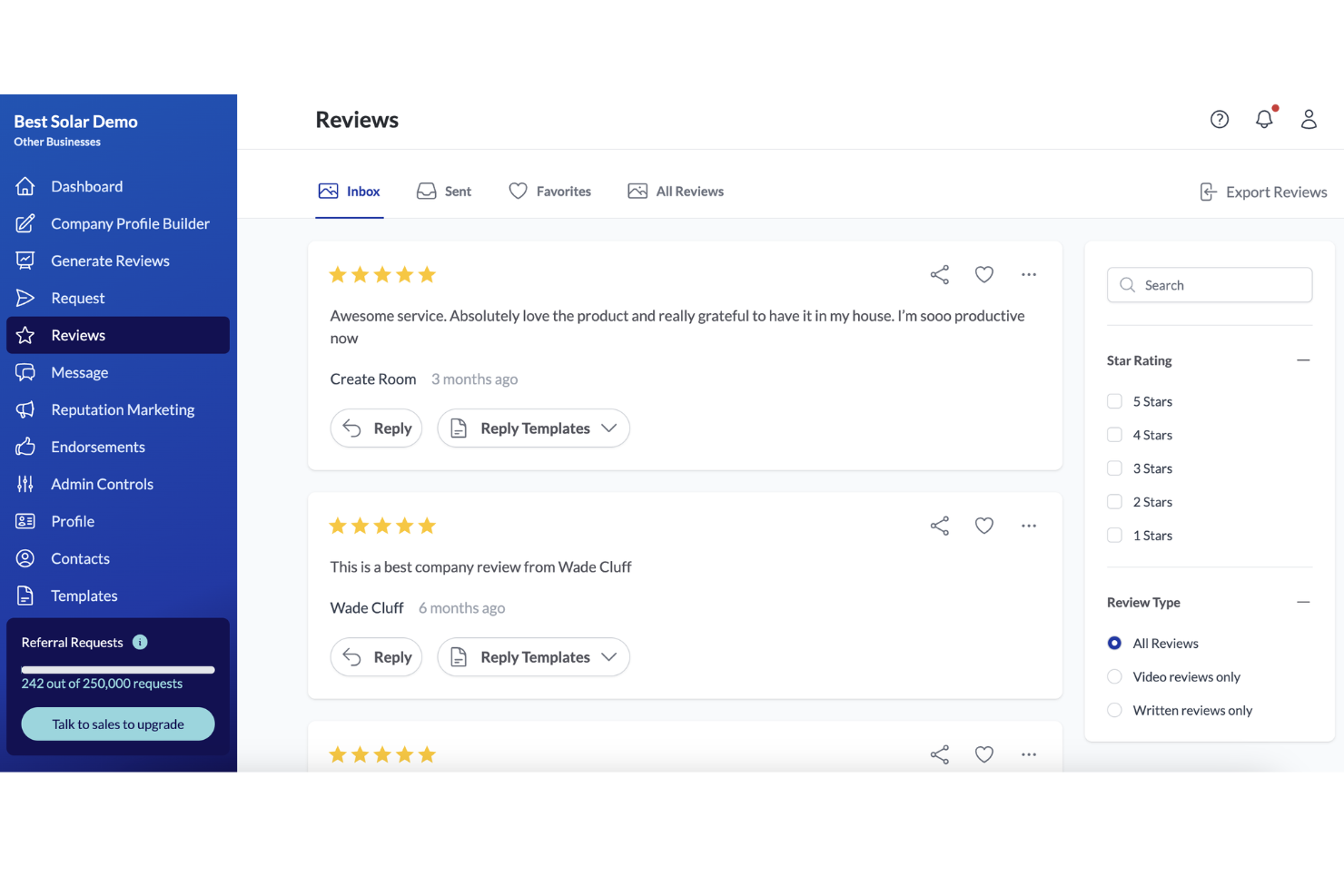
Snoball is a platform designed to help you manage customer reviews by automating the generation of referrals and enhancing your business's reputation. It connects with your existing CRM systems, making it easier for your team to leverage word-of-mouth marketing.
Why I Picked Snoball: I picked Snoball because it automates the collection of reviews and generation of referrals, which can transform your marketing strategy. By turning positive customer experiences into marketing assets, Snoball helps build trust with potential customers. The platform also provides a steady stream of reviews and video testimonials, significantly boosting your brand's reputation.
Another reason for choosing Snoball is its ability to create a marketing funnel built on trust, aiding in customer acquisition and boosting retention rates. With resources like a client success team and an on-demand learning center, you and your team can maximize results without feeling overwhelmed.
Standout Features & Integrations:
Features include a comprehensive marketing funnel that builds trust through customer experiences, resources like a client success team for expert advice, and an on-demand learning center to help you get the most out of the platform. These features work together to enhance collaboration among your marketing, sales, and finance teams, ultimately driving growth for your business.
Integrations include Salesforce, HubSpot, Adobe, Zoho CRM, Oracle, and others that might be supported but not explicitly listed.
Pros and Cons
Pros:
- Integrates smoothly with CRM and referral systems
- Excellent, responsive customer support team
- Simple, intuitive platform for easy review management
Cons:
- Some campaign updates need support assistance
- Analytics dashboard lacks depth and customization

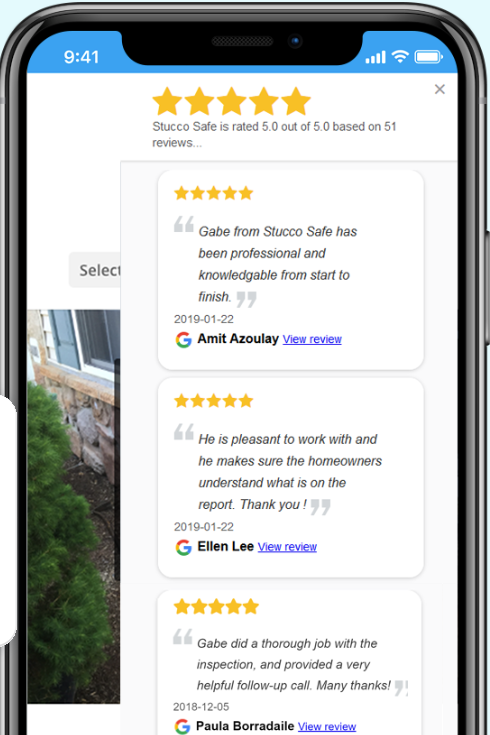
Rize Reviews helps businesses and agencies collect, monitor, and manage customer reviews across multiple platforms, which helps build trust and improve online reputation.
Who Is Rize Reviews Best For?
Rize Reviews is a good fit for local businesses and marketing agencies that need to generate and manage customer reviews at scale across multiple locations.
Why I Picked Rize Reviews
I picked Rize Reviews as one of the best because of how much of the review acquisition process it takes off your plate. The platform sends automated review requests via email, SMS, and QR codes — you can batch-send requests to up to 50 contacts at once, which saves time during high-volume campaigns. The API automation connects directly with your existing customer data systems so review requests go out automatically after a transaction, with no manual triggering needed. The location customization feature lets you tailor branding and messaging for each business location, so multi-location teams avoid sending generic outreach.
Rize Reviews Key Features
- Review monitoring dashboard: Track and view incoming reviews from multiple platforms in one centralized location.
- Real-time review alerts: Receive instant notifications when new reviews are posted so you can respond quickly.
- Review response management: Draft and publish responses to customer reviews directly from within the platform.
- Reporting and analytics: Access performance reports that track review volume, ratings trends, and campaign results over time.
Rize Reviews Integrations
Integrations include WordPress, Klaviyo, and Mailchimp, and an API is available for custom integrations.
Pros and Cons
Pros:
- Monitors and manages reviews across platforms
- Automated review requests via email and SMS
- Simple widget setup and easy integration
Cons:
- Advanced analytics require higher-tier plans
- Limited widget customization options available


Trustpilot Business gives ecommerce brands and service providers a platform to collect, manage, and display customer reviews, helping teams build trust and improve their online reputation through transparent feedback.
Who Is Trustpilot Business Best For?
Trustpilot Business is a strong fit for ecommerce and direct-to-consumer brands that rely on public-facing reviews to drive purchase decisions and build buyer confidence online.
Why I Picked Trustpilot Business
Trustpilot Business earns its spot as one of the best on my shortlist because of how seriously it takes review authenticity. I like that every review goes through automated fraud detection before it's published, which means the feedback my team sees—and that customers see—is genuinely verified. I also use the automated review invitation tools to consistently collect post-purchase feedback without manual follow-up, which keeps our review volume current and credible. Additionally, Trustpilot's open review system allows customers to leave feedback without being hand-picked by the business, which meaningfully differentiates it in building genuine trust.
Trustpilot Business Key Features
- Review response tools: Reply to customer reviews directly from the Trustpilot dashboard to manage public conversations in one place.
- Customizable review widgets: Embed star ratings and review feeds on your website to display social proof on product and landing pages.
- Review analytics dashboard: Track review volume, average ratings, and sentiment trends over time to monitor reputation performance.
- Google Seller Ratings integration: Sync your Trustpilot reviews with Google to display star ratings directly in paid search ads.
Trustpilot Business Integrations
Integrations include Dotdigital, Klevu, MoneyLion, Banks.com, and an API is available for custom integrations.
Pros and Cons
Pros:
- Competitor benchmarking and market insights features
- Automates review collection with smart integrations
- Robust filtering, export, and review-management tools
Cons:
- Limited control over review moderation
- Expensive plans with long-term contracts


Merchant Centric helps multi-location businesses and franchises monitor, analyze, and respond to customer reviews across major platforms, to manage online reputation and uncover actionable insights to improve customer experience.
Who Is Merchant Centric Best For?
Merchant Centric is a strong fit for multi-location brands and franchise operators who need centralized visibility into customer feedback across all their locations.
Why I Picked Merchant Centric
Merchant Centric earns its spot on my shortlist because of how well it handles real-time feedback management at scale. I particularly like the Spotlight Report feature, which delivers live updates on customer feedback across regions, districts, and individual locations—so field managers aren't waiting on weekly digests to act on emerging issues. The platform also sends alerts when reviews contain critical issues, which means my team can escalate and respond before a single negative review compounds into a reputation problem. The AI-powered sentiment analysis in the STARS platform connects customer feedback themes directly to revenue impact, giving context beyond a simple star rating.
Merchant Centric Key Features
- Full-service review response management: Merchant Centric's team replies to reviews on your behalf across platforms like Google, Yelp, Facebook, and TripAdvisor, using your brand's voice.
- Competitor tracking: Monitor the ratings, review volume, and customer feedback of selected competitors across major review sites with daily scans.
- Business listing management: Track and update business listings across multiple locations to keep brand information accurate on the sites customers visit most.
- First-party review collection: Gather reviews directly through location pages, giving you a channel for capturing customer feedback outside of third-party platforms.
Merchant Centric Integrations
No native integrations are listed.
Pros and Cons
Pros:
- Excellent onboarding and customer support team
- Strong sentiment tracking and analytics features
- Intuitive dashboard simplifies multi-location monitoring
Cons:
- Interface can feel dated compared to newer tools
- Limited in-platform review moderation options


Gominga helps brands and retailers manage, monitor, and respond to customer reviews across multiple online platforms, making it easier for marketing and customer experience teams to stay on top of feedback and protect their reputation.
Who Is Gominga Best For?
Gominga is a good fit for mid-size to enterprise brands and retailers that sell across multiple online channels and need a centralized way to manage reviews at scale.
Why I Picked Gominga
Gominga earns its spot on my shortlist because of how well it handles review management across different platform types—not just multiple review sites, but product reviews on Amazon, location reviews on Google, mobile app reviews on the Apple App Store and Google Play Store, and DTC webshop reviews, all from one dashboard. I like that my team can respond to reviews and Q&As directly within the platform using a ticket management system with templates and response tracking, so nothing slips through the cracks when volume spikes. The built-in sentiment analysis and competitive benchmarking also mean I'm not just reacting to reviews—I'm using them to spot trends and compare performance against competitors in the same category.
Gominga Key Features
- Multi-location management: Manage reviews across multiple store locations or regional profiles from a single account.
- Review alerts and notifications: Receive real-time alerts when new reviews are posted so your team can respond promptly.
- Reporting and analytics dashboard: Track review volume, average ratings, and response rates across platforms over time.
- API access: Connect Gominga to your existing tech stack to pull review data into your own reporting or CRM tools.
Gominga Integrations
Integrations include Amazon, Google, Apple App Store, Google Play Store, Amazon Appstore, Trustpilot, Bazaarvoice, Walmart, Yelp, and DTC webshops.
Pros and Cons
Pros:
- Strong integrations with major platforms
- Advanced sentiment analysis and reporting tools
- Centralized dashboard for all review channels
Cons:
- Reply editing options occasionally limited
- Dashboard visuals could be more intuitive


Score My Reviews is a customer review management software designed to help businesses gather and manage customer feedback. It automates the process of requesting reviews via email or text, making it easier for you to collect and showcase positive feedback.
Why I Picked Score My Reviews: I picked this because it lets you monitor all your online reviews in one place, making it simple to track customer opinions across various platforms. This feature helps you respond quickly to feedback, keeping your client relationships strong. Moreover, it provides an option to showcase positive reviews on your website, helping you build trust with potential customers.
Another reason for choosing Score My Reviews is its feature for managing negative feedback. You can redirect dissatisfied customers to a private feedback form, allowing you to address issues directly before they become public. This approach helps maintain a positive online presence and fosters customer trust and loyalty.
Standout Features & Integrations:
Features include automated review requests sent via email or text, simplifying the process for customers to leave feedback. The platform also allows you to display positive reviews on your website, enhancing your brand's credibility. Additionally, it enables you to handle negative feedback privately, ensuring any issues are resolved discreetly and effectively.
Integrations include Salesforce, HubSpot, Slack, Microsoft Teams, Zendesk, Jobber, Verified Reviews, Acuity Scheduling, Housecall Pro, Service Fusion, Convirza, and Google Forms.
Pros and Cons
Pros:
- The messaging feature encourages more customer responses
- The software supports multiple review platforms
- Automated review requests help save time by efficiently collecting feedback
Cons:
- Integration with certain platforms might require additional steps
- Customization options for review requests are limited


Review Tool is designed to help businesses manage their online reputation by generating and managing customer reviews. It offers a suite of features that make it easier for businesses to collect, monitor, and showcase reviews.
Why I Picked Review Tool: I picked Review Tool because it offers robust review generation capabilities. You can request reviews through text, MMS, and email, making it easy to reach your customers on their preferred platforms. This flexibility ensures you can gather feedback quickly and conveniently. Additionally, Review Tool provides detailed monitoring features, allowing you to track reviews across multiple platforms and receive alerts for negative feedback. This means you can respond promptly and maintain your business's reputation.
Another reason for choosing Review Tool is its ability to display reviews effectively. It offers web widgets that you can integrate into your business website, showcasing positive feedback directly to potential customers. This not only builds trust but also enhances your online presence. The tool also provides competitor insights, enabling you to analyze your competitors' reviews and ratings. This feature can help you identify areas for improvement and stay ahead in the market.
Standout Features & Integrations:
Features include the ability to manage unlimited users, which is great for teams that want to collaborate on managing reviews. The tool also offers competitor insights, allowing you to analyze your competitors' reviews and ratings to see where you stand. Additionally, Review Tool provides detailed reporting capabilities, giving you insights into your review performance and helping you make informed decisions.
Integrations include RightResponse AI, ReviewFlowz, InMoment, ReviewTrackers, Text Request, Podium, Reputation, Yext, ReviewInc, Swell, Broadly, and Okendo.
Pros and Cons
Pros:
- Tracks reviews and competitors across multiple sites
- Sends review requests via email and SMS
- Clean, easy-to-use interface for quick setup
Cons:
- Occasional lag or slow platform performance
- Limited customization for templates and workflows


Get More Reviews is a platform designed to help businesses gather authentic customer reviews, boosting their online visibility and sales. By using various tools, it enables companies to enhance their reputation and connect better with their audience.
Why I Picked Get More Reviews:
I picked Get More Reviews because it focuses on automating the review collection process, allowing you to gather feedback at the most optimal times. This automation means you can focus on other aspects of your business while still collecting valuable customer insights. Additionally, the platform offers SMS and email review requests, ensuring you can reach customers through their preferred communication channels.
Another reason is the inclusion of automated follow-up reminders, which help you maintain a consistent flow of reviews. This feature is essential for keeping your business relevant and visible to potential customers. The personalized support offered by the platform ensures that you have the guidance needed to maximize the benefits of these tools.
Standout Features & Integrations:
Features include the use of Tap Cards, which are physical cards that encourage customers to leave reviews by scanning a QR code. The white label option allows your business to customize the review request process, making it align with your brand's identity. The dashboard provides a centralized view where you can manage and analyze customer feedback, helping you understand trends and areas for improvement.
Integrations include Google My Business, Facebook, Yelp, TripAdvisor, Trustpilot, Amazon, eBay, Shopify, WooCommerce, and Slack.
Pros and Cons
Pros:
- Real-time alerts for negative feedback
- Automated SMS and email review requests
- Easy-to-use platform with simple setup
Cons:
- Pricing may be high for small teams
- Hard to manage or remove spam reviews

Jotform Enterprise is a cloud-based form automation platform that allows users to create, design, and publish various online forms across different channels and collect customer responses. The analytics and reporting features provide survey teams with actionable insights for generating leads, conducting market research, registering guests for events, managing job applications, and managing customer reviews.
In a conversation I had with Kumar Vaibhav Tanwar, Founder of Clickworthy Digital Marketing Agency, he highlighted some why the tool works well for his business: “Jotform became our no-drama intake step. It embeds fast, encrypts data, and our clients complete it on their phones without friction.”
Why I picked Jotform: The Card feature is a one-page-per-question survey format tailored to help users improve their survey response rates. The online survey platform offers a considerable selection of premade form templates that cover various applications, from online bookings and event registration to file upload and feedback templates. The feedback templates also cover many use cases, such as training sessions, appointment feedback, product reviews, and service reviews.
Standout Features and Integrations:
One of the core features is the easy-to-use form builder. Once you have chosen a pre-made survey template, you can use the form builder to customize the form to suit your requirements. The form builder has drag-and-drop functionality so modifying survey forms won’t require coding. You can set the form as a customer feedback survey to capture customer sentiment or reviews on a particular product or service.
The mobile forms module lets you collect meaningful data offline that they can conveniently manage using their smartphone or tablet. Additional features include encrypted forms, advanced security compliances, Single Sign-On (SSO), white labeling, multiple-user access, report generation, data analysis, and more.
Integrations: In addition to the prebuilt templates designed for capturing customer reviews, Jotform Enterprise also provides many apps and integrations, including Slack, Mailchimp, Google Calendar, Microsft OneDrive, Airtable, Google Drive, PayPal, Stripe, and Square.
Pros and Cons
Pros:
- Flexible logic for personalized review forms
- Integrates easily with CRM and analytics tools
- Intuitive drag-and-drop builder for quick setup
Cons:
- Branding customization locked behind higher tiers
- Free plan limits forms and submissions


SurveySparrow is a dynamic platform that specializes in customer review management, focusing on enhancing customer engagement and collecting valuable feedback. This tool offers a variety of features aimed at improving how businesses interact with their customers.
Why I Picked SurveySparrow: I picked SurveySparrow because it excels in capturing feedback through its multi-channel feedback collection feature. You can gather insights from your customers through email, social media, and even WhatsApp, making sure you're reaching them where they're most active. This flexibility ensures that you can maintain a continuous dialogue with your customers, which is essential for managing reviews and improving customer satisfaction.
Another reason SurveySparrow stands out is its AI-driven insights through the CogniVue tool. This feature analyzes large sets of data to provide actionable insights that can guide your business decisions. With these insights at your fingertips, you can address customer concerns more effectively and enhance your brand's reputation by making informed changes based on the feedback you receive.
Standout Features & Integrations:
Features include conversational surveys that can significantly boost response rates, helping you gather more comprehensive feedback from your customers. Additionally, the platform offers a reputation management tool that lets you manage online reviews across over 100 platforms, building trust and credibility for your brand. The ticketing system is another feature that stands out, allowing for quick issue resolution and more efficient feedback management.
Integrations include Salesforce, HubSpot, Slack, Microsoft Office 365, Google Sheets, Mailchimp, Zendesk, Intercom, Marketo, Trello, Eventbrite, and Gmail.
Pros and Cons
Pros:
- Integrates well with CRM and analytics tools
- Conversational surveys increase response engagement
- Clean, intuitive interface with quick setup
Cons:
- Reporting and exports lack depth
- Advanced features locked in higher plans
Other Review Management Software
Here are a few more review management solutions that didn’t make the top list.
- Bazaarvoice
For enterprise-level review collection and syndication
- AskNicely
For real-time reputation insights
- GatherUp
For consolidating feedback and reviews to increase sales


Related CX Software Reviews
If you still haven't found what you're looking for here, check out these related customer experience management tools that we've tested and evaluated.
- Customer Service Software
- Help Desk Software
- Call Center Software
- Customer Messaging Platform
- Digital Experience Platform
- Sentiment Analysis Tools
What is Review Management Software?
Review management software is a tool that helps businesses collect, monitor, and respond to customer reviews across multiple online channels. It streamlines reputation management and provides insights that improve customer experience and brand perception.
Selection Criteria for Review Management Software
Through extensive personal research and trial of customer review management tools, I've developed a criteria system to evaluate software based on several key aspects. Here’s a summary:
Core Functionality: 25% of total weighting score
- Efficiently gathering customer reviews from various platforms
- Providing detailed analytics and reporting on review data
- Facilitating swift and organized response to customer feedback
- Sentiment analysis
- Enabling review display on business websites or social media
Additional Standout Features: 25% of total weighting score
- Advanced AI for sentiment analysis or integrations with CRM systems.
- Innovative approaches to gathering and displaying reviews, like interactive review widgets or VR feedback sessions.
- Video responses to reviews or gamified feedback mechanisms.
Usability: 10% of total weighting score
- Interface design that balances power with simplicity.
- Interactive features like drag-and-drop elements for customizing review displays or setting up notification rules.
Onboarding: 10% of total weighting score
- The presence of comprehensive training materials, such as video tutorials and interactive product tours.
- Quick setup processes backed by resources like template libraries and automated workflow suggestions.
Customer Support: 10% of total weighting score
- Responsive support teams that offer multiple contact channels, including live chat and dedicated account managers.
- Extensive knowledge bases and community forums where users can find answers.
Value For Money: 10% of total weighting score
- Competitive pricing structures with flexible plans.
- ROI of features like advanced analytics and multi-platform management.
Customer Reviews: 10% of total weighting score
- High ratings in user satisfaction and ease of use.
- Feedback that highlights the effectiveness of specific features, such as real-time alerts or integration capabilities.
How to Choose Review Management Software
Choosing the right review management software can help you collect, manage, and respond to customer reviews across multiple platforms.
As you're shortlisting, trialing, and selecting review management software consider the following:
- What problem are you trying to solve - Start by identifying the review management gap you're trying to fill to clarify the features and functionality the review management software needs to provide.
- Who will need to use it - To evaluate cost and requirements, consider who'll use the software and how many licenses you'll need. Is it just the customer service team or the whole organization that will require access? Are you prioritizing ease of use for all, or speed for your review management software power users?
- What other tools it needs to work with - Clarify what tools you're replacing with one consolidated review management software., what tools are staying, and the tools you'll need to integrate with, such as accounting, CRM or HR software.
- What outcomes are important - Consider the result that the software needs to deliver to be considered a success. For example, an outcome could be the ability to get greater visibility into performance. The results you want to drive should define the review management software features you require.
- How it would work within your organization - Consider the software selection alongside your workflows and delivery methodology. Evaluate what's working well, and the areas that are causing issues that need to be addressed.
Trends in Customer Review Management Software
As review management software evolves, there is a broader shift towards more integrated, intelligent, and user-centric approaches. Here's what the latest product updates, press releases, and release logs from leading tools reveal about current trends and demands in the sector.
Unified Platforms for Multi-Channel Review Management
There's a clear trend towards solutions that offer comprehensive management of reviews across various platforms (social media, websites, third-party review sites) from a single dashboard.
This functionality addresses the challenge of fragmented review landscapes, making it easier for businesses to maintain a cohesive online presence.
AI Integration for Sentiment Analysis
The integration of artificial intelligence (AI) is pivotal, enhancing businesses' ability to track sentiment, detect fake reviews, and automate review management processes. This trend underscores the shift towards more sophisticated, automated systems that can provide deeper insights into customer feedback.
Deep Listening and Reputation Technology
AI's role extends to deep listening and reputation management, enabling more effective monitoring of customer concerns. This advancement signifies a move from traditional customer experience metrics to a trust-based relationship model.
Video Reviews and Visual Content
The anticipated increase in video reviews and visual content is setting a new standard for engaging customers and showcasing products or services more dynamically. This trend indicates a broader shift in consumer preferences towards richer, more engaging content formats.
Focus on Review Quality and Relevance
There's a growing emphasis on ensuring reviews provide valuable insights and reflect genuine customer experiences, optimized for local search rankings and strategic analysis. This trend highlights the increasing importance of quality and relevance in reviews, beyond mere positivity or volume.
Features of Review Management Software
When selecting review management software, keep an eye out for the following key features:
- Centralized review dashboard: Consolidates all of your online reviews from different platforms into one easy-to-use interface. This makes it simple to track and respond to customer feedback without the hassle of logging into multiple sites.
- Real-time alerts: Instantly notifies you whenever a new review is posted about your business. You can act fast, address concerns, and show customers that their voice matters.
- Response management tools: Lets you reply to reviews directly from the platform, so you can streamline communication, save time, and ensure no feedback slips through the cracks.
- Review request automation: Sends out automatic and customizable requests to customers for new reviews. This boosts your review volume and encourages more positive feedback from happy clients.
- Sentiment analysis: Breaks down what people are really saying—whether the tone is positive, neutral, or negative—so you can spot trends and areas for improvement without missing the forest for the trees.
- Reporting and analytics: Offers visual insights and detailed data about your review performance over time. You can see patterns, measure impact, and make smarter decisions to improve your reputation.
- Multi-location management: Enables you to handle reviews for several business locations from one place. This is huge for franchises or large organizations that need an organized way to compare and manage different spots.
- Integration with business tools: Connects with CRMs, marketing tools, and other software you already use, ensuring review-related tasks fit seamlessly into your daily routine.
- Moderation and filtering: Screens incoming reviews for inappropriate or off-topic content, helping you focus on what really matters and maintain a professional image.
Benefits of Review Management Software
Utilizing review management software can enable businesses to achieve an unparalleled level of efficiency and control in managing customer feedback, allowing them to concentrate more on strategic improvements and customer experience enhancement while minimizing manual oversight and maximizing overall reputation.
Here are five primary advantages of utilizing review management software for your organization:
- Improved Operational Efficiency: Automates the process of collecting and organizing reviews. By reducing the manual effort required to manage customer feedback, businesses can allocate resources more efficiently and focus on strategic activities.
- Enhanced Customer Insights: Offers deep analytics and sentiment analysis. This software provides businesses with actionable insights into customer preferences and pain points, enabling them to tailor their products, services, and customer experiences more effectively.
- Increased Online Visibility and SEO: Improves search engine rankings through optimized review management. Regularly updated, authentic customer reviews enhance a business's online presence, making it more visible to potential customers searching for related products or services.
- Increased Trust and Credibility: Facilitates transparent and responsive interaction with customer feedback. Promptly addressing customer reviews, especially negative ones, can significantly improve a brand's credibility and foster trust among current and prospective customers.
- Higher Conversion Rates: Leverages positive reviews to attract and reassure potential customers. Showcasing positive feedback on a company's website or social media platforms can influence purchasing decisions, leading to increased sales and customer loyalty.
Whether you aim to boost your online reputation, gain deeper customer insights, or drive higher conversion rates, review management software is a pivotal tool for achieving these objectives, propelling your organization towards its strategic goals with greater ease and effectiveness.
Cost & Pricing for Review Management Software
When considering review management software, understanding the variety of plan options and their pricing structures is essential for making an informed decision. Pricing and plans can vary significantly, offering a range of features tailored to different business needs, from small startups to large enterprises. Here's a breakdown of the common plan options.
| Plan Type | Average Price | Common Features |
|---|---|---|
| Free | $0 | Basic review aggregation, Limited reporting, Manual review responses |
| Basic | $50 - $100/month | Automated review requests, Multi-platform monitoring, Basic analytics, Email support |
| Professional | $100 - $250/month | Advanced analytics, Sentiment analysis, Integration with CRM systems, Priority email support |
| Enterprise | $250+/month | Customizable dashboards, API access, White-labeling options, Dedicated account manager, 24/7 support |
Choosing the right plan requires weighing your business's size, needs, and the specific features that will most benefit your review management strategy. The free plan is a good starting point for small businesses or those new to review management, while larger organizations or those needing advanced features should consider professional or enterprise options. Consider your budget and the value each plan brings to your customer engagement and reputation management efforts.
Review Management Software FAQs
Here are some answers to frequently asked questions on this topic:
How do I encourage customers to leave reviews?
Ask customers at the right moment—just after a positive experience is best. Use automated review requests via email or SMS and personalize the message to increase your response rate. Offer simple instructions, make the review process easy, and always thank respondents. CX leaders find the most success integrating these requests into their existing customer journey workflows.
Can review management tools filter out fake reviews?
Yes, many review management tools use AI and detection algorithms to flag or filter out fake reviews. These systems look for suspicious patterns, such as repeated language, abnormal posting frequency, or non-verified accounts. Make sure your chosen tool offers robust fraud detection and allows you to manually review flagged submissions so you keep your review data trustworthy.
Are there any compliance considerations with review management?
Yes, you must comply with regulations like the FTC’s guidelines on endorsements and online reviews. Always disclose incentives, avoid writing fake reviews, and never suppress genuine negative feedback. Review management tools can help you document compliance and automate disclosure messaging for your team to reduce risk.
What metrics should I track in review management software?
Focus on metrics like average star rating, review volume, response rate, response time, and sentiment trends. Monitoring these helps you spot issues early, measure improvements, and show ROI from review management. CX leaders often present these metrics to highlight service quality and inform broader customer experience strategies.
How quickly should my team respond to negative reviews?
Aim to respond within 24 hours to negative reviews—faster if possible. Prompt responses show you value customer feedback and can prevent issues from escalating. Set clear policies and use review management software to flag and assign new reviews so you never miss critical feedback.
How do I ensure review management tools align with my company’s brand voice?
No, brand voice consistency requires hands-on attention. Set up approved response templates and train your team to adapt messages as needed. Some review management tools let you set predefined guidelines or automate responses that match your tone, but regular audits are still important to maintain quality and authenticity.
What's Next?
You can sign up for our newsletter to receive tips and insights from the top thinkers in the customer experience world. You may also want to check out our article on customer experience software or find out what’s the best customer relationship management software today.
Finally, remember to come back often! We regularly publish articles to help you on your journey to a better customer experience.