
10 Free Call Center Software Picks for 2026

Free Call Center Software Shortlist
Here’s my shortlist of the best free call center software:


Free call center software gives your team access to essential call management, routing, and reporting features without upfront costs—either through a free plan or a time-limited free trial. If you’re searching for ways to handle high call volumes, support customers across channels, or test new workflows without committing budget, these solutions let you evaluate core capabilities risk-free.
In this list, you’ll find trusted free call center software options for 2026, with details on what each platform offers and how they fit different team needs.
Why Trust Our Software Reviews
Best Free Call Center Software Summary
This comparison chart summarizes pricing details for my top free call center software selections to help you find the best one for your budget and business needs.
| Tool | Best For | Trial Info | Price | ||
|---|---|---|---|---|---|
| 1 | Best for quick cloud setup | 14-day free trial + free demo available | From $15/agent/month (billed annually) | Website | |
| 2 | Best for high-volume outbound teams | Free to use | Free for download/use | Website | |
| 3 | Best for custom telephony solutions | Free forever | Free forever | Website | |
| 4 | Best for open-source system control | Free plan available | From $169/license | Website | |
| 5 | Best for multichannel ticket management | Free demo + 30-day free trial available | From €7/user/month (billed annually) | Website | |
| 6 | Best for predictive dialing needs | Free forever | Free forever | Website | |
| 7 | Best for unified communications features | Free to download | From $29/license | Website | |
| 8 | Best for built-in CRM integration | Free plan + 15-day free trial available | From $49/month (billed annually) | Website | |
| 9 | Best with real-time chat support | 30-day free trial | From $4/user/month (billed annually) | Website | |
| 10 | Best for browser-based calling | Free trial available | From $300/year (billed annually) | Website |
-

SupportYourApp
Visit WebsiteThis is an aggregated rating for this tool including ratings from Crozdesk users and ratings from other sites.4.7 -
Freshdesk
Visit WebsiteThis is an aggregated rating for this tool including ratings from Crozdesk users and ratings from other sites.4.4 -
Hiver
Visit WebsiteThis is an aggregated rating for this tool including ratings from Crozdesk users and ratings from other sites.4.6




Free Call Center Software Reviews
Below are my detailed summaries of the best free call center software that made it onto my shortlist. My reviews offer a detailed look at the features, best use cases, and integrations of each platform to help you find the best one for you.


Freshcaller is a cloud-based call center platform built for teams that want a quick setup without complex hardware or a long onboarding process. It supports small businesses and startups launching phone support fast, with essential call center features ready to use.
Why I Picked Freshcaller
For teams that want to get started with cloud-based calling right away, Freshcaller stands out for its quick setup and minimal technical requirements. I picked Freshcaller because its user-friendly interface lets you launch a virtual call center in minutes without physical phone lines.
The platform offers browser-based calling and lets you purchase or port numbers from within the dashboard, so you can start handling calls almost immediately. This makes it a strong choice for small businesses or remote teams that need a fast, flexible solution for inbound and outbound support.
Freshcaller Key Features
Some other features in Freshcaller help teams manage and optimize their call center operations:
- Call masking: Protect agent and customer privacy by hiding phone numbers during calls.
- Custom call flows: Design and automate call routing paths with a visual drag-and-drop editor.
- Call recording: Record and store calls for quality monitoring and training purposes.
- Holiday routing: Automatically adjust call handling rules based on holidays or special dates.
Freshcaller Integrations
Integrations include Freshdesk, Freshsales, Freshchat, Freshservice, Slack, Microsoft Teams, Shopify, Zapier, HubSpot, and more.
What's Free?
Freshcaller offers a free-forever plan for unlimited agents. The free tier includes basic inbound call management but limits features like call recording, advanced analytics, and most third-party integrations.
Pros and Cons
Pros:
- Holiday and after-hours routing options
- Call masking for privacy protection
- Visual call flow designer included
Cons:
- No outbound dialer in free plan
- Limited reporting and analytics features

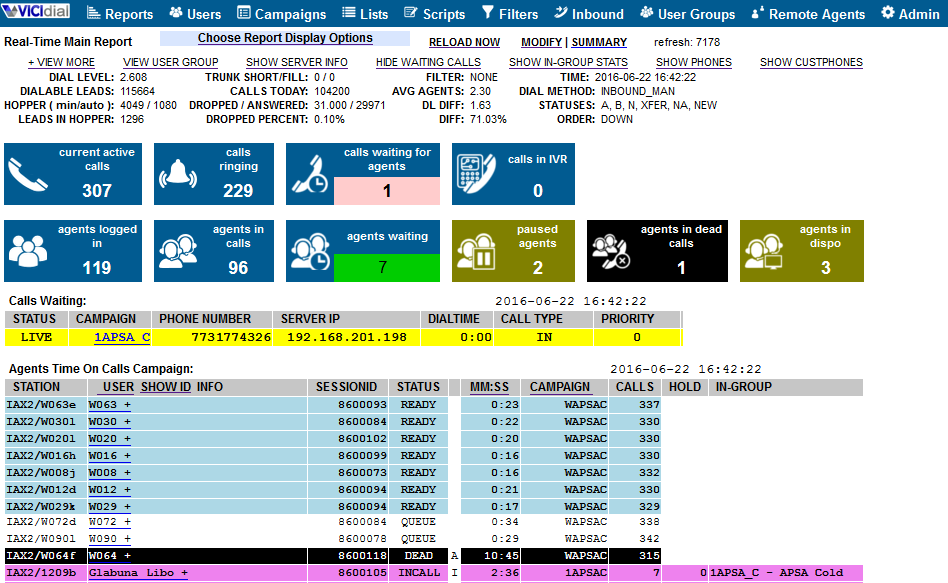
VICIdial is an open-source call center platform designed for teams that handle large volumes of outbound calls. It’s a strong fit for sales organizations, telemarketing agencies, and support centers that need advanced dialing and campaign management without upfront costs. If your team needs flexible outbound calling and real-time monitoring, VICIdial offers a feature set that’s hard to match in the free software space.
Why I Picked VICIdial
I chose VICIdial because it’s built to handle the demands of high-volume outbound teams. The platform supports predictive dialing, which helps maximize agent talk time and reach rates—key needs for outbound sales and telemarketing groups.
I also like that VICIdial offers real-time campaign monitoring and reporting, so supervisors can track performance and make quick adjustments. These features make it a strong option for teams that need to manage large-scale outbound campaigns without paying for a commercial solution.
VICIdial Key Features
Some other features in VICIdial help teams manage calls and agent activity more efficiently:
- Inbound call handling: Route incoming calls to available agents using customizable rules and queues.
- Call recording: Record calls automatically for quality assurance, training, or compliance needs.
- Web-based agent interface: Let agents log in and manage calls from any browser without installing extra software.
- Multi-campaign management: Run and monitor multiple outbound and inbound campaigns at the same time from a single dashboard.
VICIdial Integrations
Integrations are not publicly listed.
What's Free?
VICIdial is open-source software that’s free to download and use without user or campaign limits. You’ll need to provide your own server hosting and technical setup, and support is community-based unless you purchase paid services.
Pros and Cons
Pros:
- Predictive and manual dialing options included
- Supports unlimited agents and campaigns
- Open-source with no licensing fees
Cons:
- Limited built-in ticketing features
- Outdated user interface

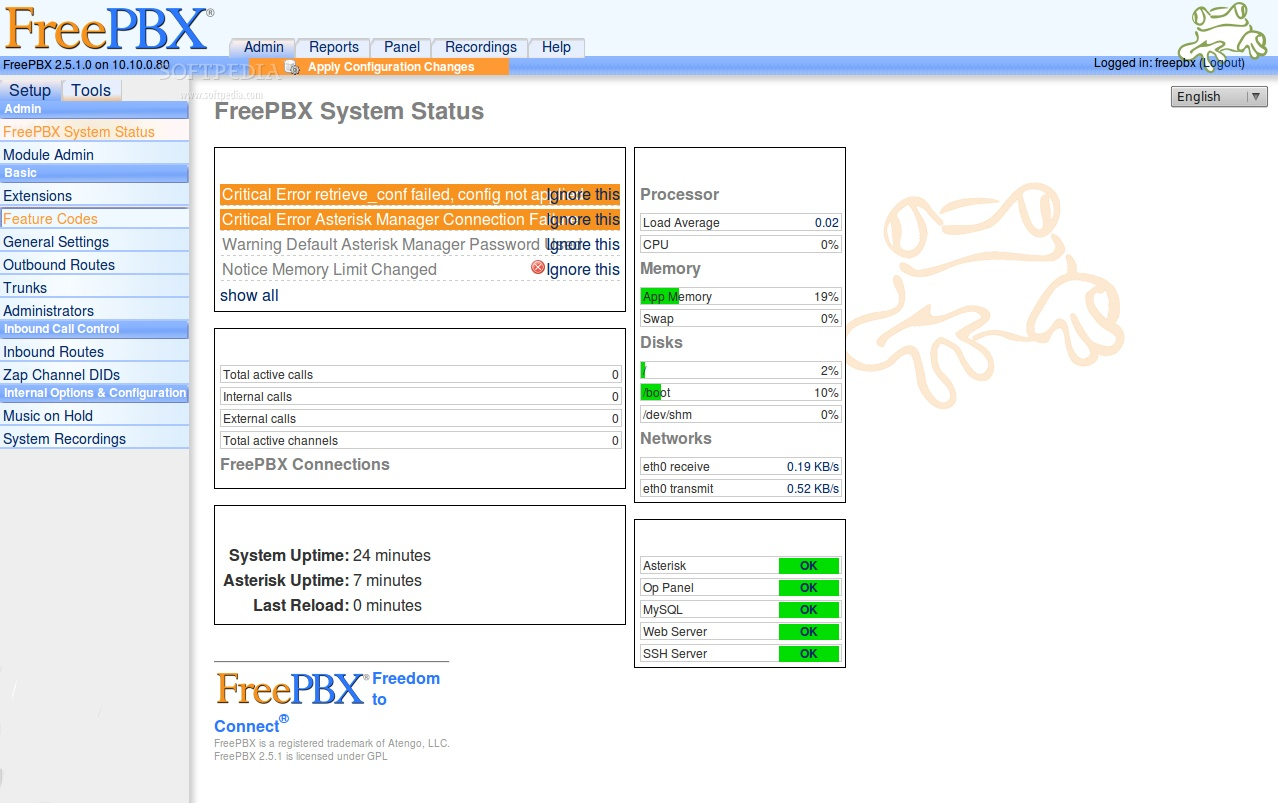
Asterisk is an open-source telephony platform designed for teams that want to build custom call center solutions from the ground up. It’s a strong fit for IT professionals and businesses with unique VOIP communication needs that can’t be met by out-of-the-box software. If your team needs full control over call routing, IVR, or integration with other systems, Asterisk gives you the flexibility to design exactly what you need.
Why I Picked Asterisk
What sets Asterisk apart is its flexibility for building custom telephony solutions that go far beyond standard call center software. I picked Asterisk because it lets you design your own call flows, AI-powered IVR menus, and routing logic, which is ideal for teams with unique requirements or complex workflows. The open-source framework means you can modify and extend the system to fit almost any business process or integration need. For organizations with technical resources, Asterisk offers a level of customization and control that’s hard to find in other free call center platforms.
Asterisk Key Features
Some other features in Asterisk help teams create a tailored call center environment:
- Call recording: Record inbound and outbound calls for quality assurance, training, or compliance needs.
- Voicemail management: Set up customizable voicemail boxes and notifications for missed calls.
- Call queuing: Place callers in queues with music, announcements, or a callback option until an agent is available.
- Conference calling: Host multi-party conference calls directly through the system.
Asterisk Integrations
Integrations are not publicly listed.
What's Free?
Asterisk is open-source software that’s free to download and use with no user or feature limits. You’ll need to provide your own server and handle setup, maintenance, and support on your own.
Pros and Cons
Pros:
- Highly customizable call routing and IVR
- Extensive documentation and user community
- Supports SIP, PRI, and analog telephony
Cons:
- Requires significant technical expertise to deploy
- No built-in agent interface or dashboard

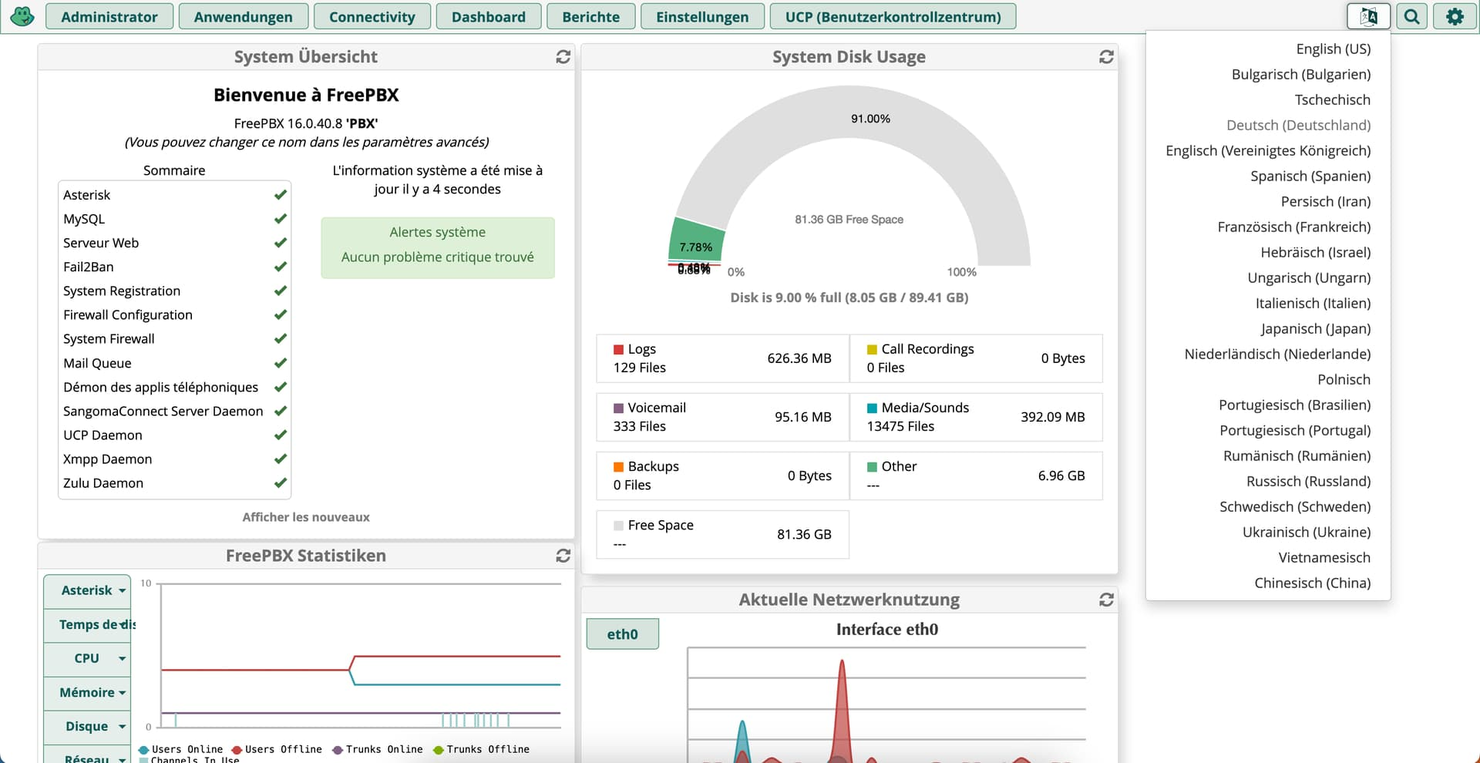
FreePBX is an open-source phone system platform designed for teams that want granular control over their call center setup. It’s a strong fit for IT professionals and businesses that need to customize call handling, extensions, and system behavior. If you’re looking for a solution that lets you manage every aspect of your telephony environment, FreePBX gives you the tools to do it.
Why I Picked FreePBX
What drew me to FreePBX is the level of system control it offers compared to other free call center solutions. With FreePBX, you can manage call routing, extension configuration, and IVR menus through a web-based interface, which gives you direct oversight of your telephony environment.
I like that it’s built for teams who want to customize every detail, from call queues to voicemail settings, without being locked into a vendor’s limitations. This makes FreePBX a strong choice for IT teams or businesses that need to adapt their call center setup as their needs evolve.
FreePBX Key Features
Some other features in FreePBX help teams build a more flexible and capable call center environment:
- Call recording: Record inbound and outbound calls for quality monitoring or compliance.
- Voicemail-to-email: Automatically send voicemail messages as audio files to designated email addresses.
- Call parking: Place calls on hold in a shared “parking lot” for pickup by any extension.
- Conference bridge: Set up multi-party conference calls directly from the system.
FreePBX Integrations
Integrations are not publicly listed.
What's Free?
FreePBX is open-source software that’s free to download and use with no user or feature limits. You’ll need to provide your own server and handle setup, maintenance, and support on your own.
Pros and Cons
Pros:
- No per-user or per-extension licensing fees
- Built-in call queue and ring group features
- Web-based admin interface for system management
Cons:
- Advanced features require paid modules
- Requires separate hardware or cloud hosting

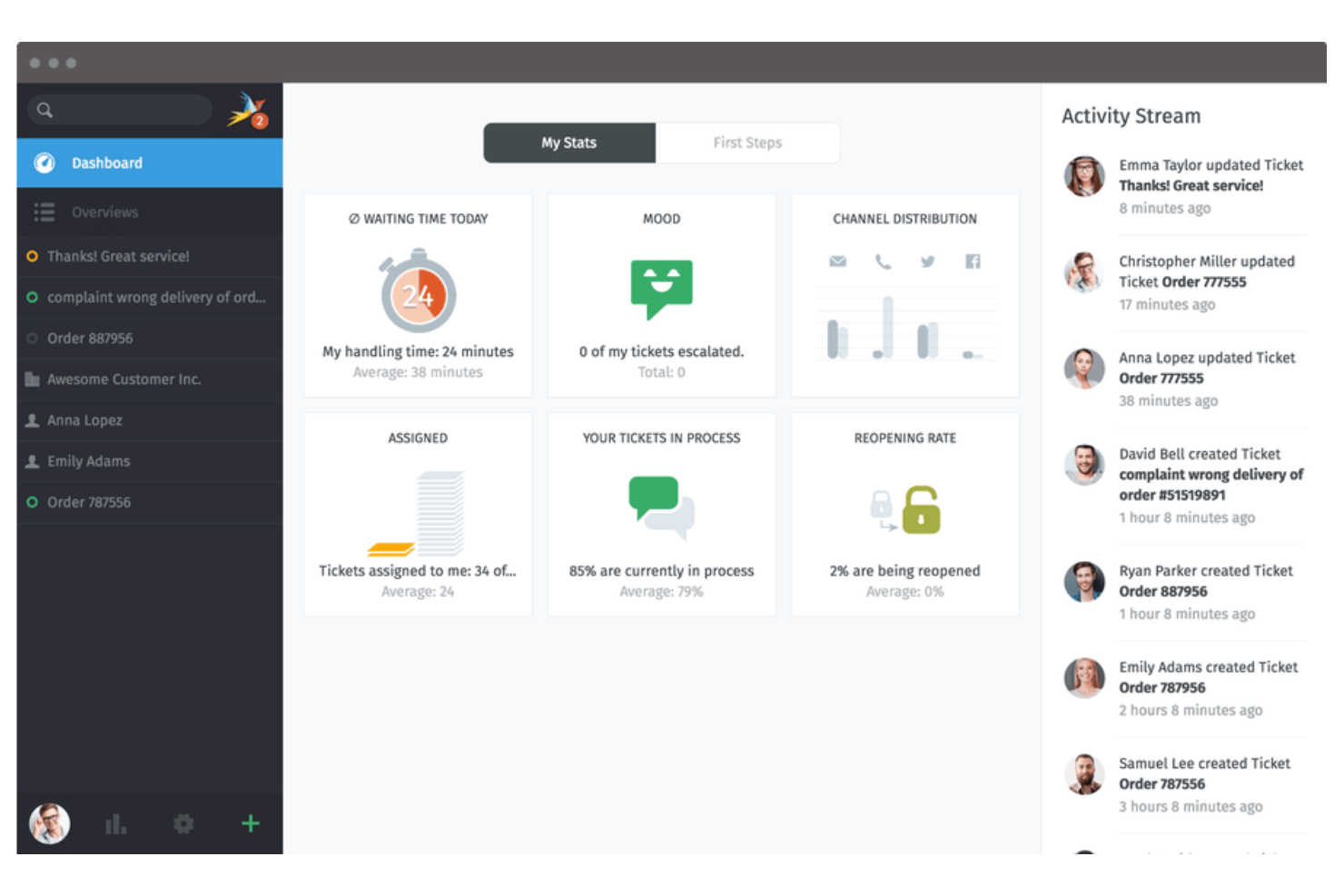
Zammad is a helpdesk and call center software designed for teams that need to manage customer conversations across multiple channels. It’s a strong fit for support teams in organizations that juggle email, phone, chat, and social media inquiries. If you’re looking for a flexible platform to centralize and organize customer interactions, Zammad offers a unified workspace to keep everything in sync.
Why I Picked Zammad
I chose Zammad because its multichannel ticket management stands out for teams handling customer requests from several sources. The platform lets you bring together phone, email, chat, and social media messages into a single ticketing system, so nothing slips through the cracks.
I appreciate how Zammad automatically links related conversations and updates tickets in real time as new messages arrive. This makes it much easier for support teams to track, prioritize, and resolve issues without switching between different tools.
Zammad Key Features
Some other features that make Zammad useful for call center teams include:
- Role-based permissions: Set granular access controls for agents, supervisors, and admins to manage sensitive customer data.
- Custom ticket fields: Add and configure custom fields to capture the information your team needs for each ticket.
- Knowledge base integration: Link a self-service knowledge base to help agents and customers find answers quickly.
- Audit trail: Track every change made to tickets and user accounts for accountability and compliance.
Zammad Integrations
Integrations include GitHub, GitLab, Checkmk, Clearbit, and more.
What's Free?
Zammad offers a free-forever open-source version that you can host on your own server. This version includes core ticketing and multichannel features, but some advanced features and official support are only available on paid cloud plans.
Pros and Cons
Pros:
- Role-based permissions for granular access control
- Real-time ticket updates and collaboration tools
- Built-in knowledge base for agent support
Cons:
- Advanced automation features require paid plans
- Fewer native CRM integrations

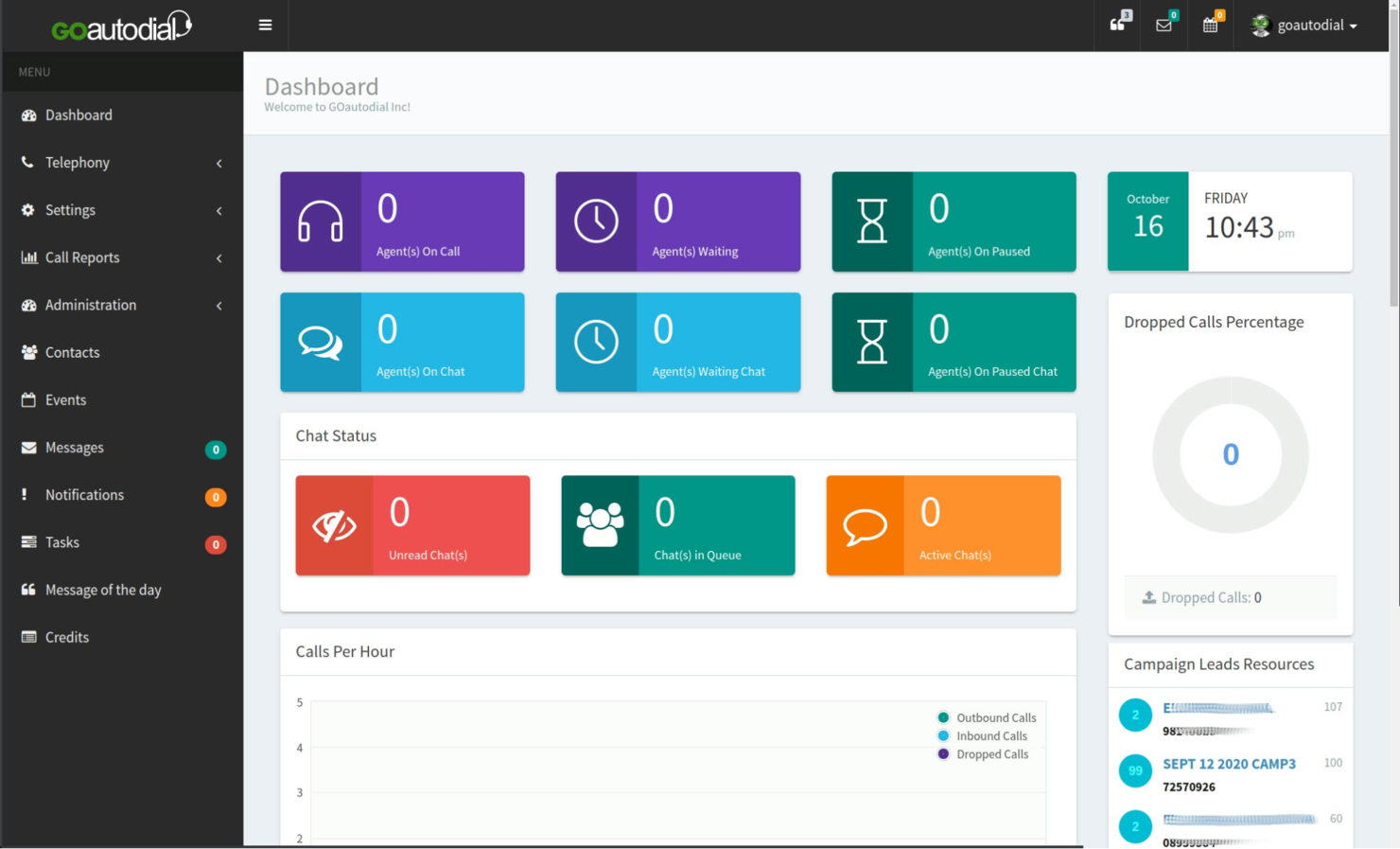
GOautodial is an open-source call center platform designed for teams that need predictive dialing capabilities. It’s a strong fit for outbound sales teams, telemarketing agencies, and support centers looking to automate high-volume calling. If you want to maximize agent talk time and reduce manual dialing, GOautodial offers features tailored to those needs.
Why I Picked GOautodial
What sets GOautodial apart for free call center software is its predictive dialing engine, which helps teams automate outbound calling and connect agents to live prospects more efficiently. I picked GOautodial because it lets you set up campaigns that automatically dial multiple numbers, detect voicemails, and route answered calls to available agents.
The platform also includes real-time monitoring tools, so supervisors can track agent performance and campaign progress as calls happen. For teams focused on outbound campaigns and maximizing agent productivity, GOautodial’s predictive dialing features are a strong fit.
GOautodial Key Features
Some other features in GOautodial help teams manage call center operations more efficiently:
- Inbound call routing: Direct incoming calls to the right agent or queue based on set rules.
- Call recording: Record and store calls with automated transcription for quality assurance and training.
- Web-based agent dashboard: Agents can access all call controls and information from a browser interface.
- Live call monitoring: Supervisors can listen in on calls in real time for coaching or compliance.
GOautodial Integrations
Integrations are available via REST API.
What's Free?
GOautodial offers a free-forever, open-source version that you can download and use without user limits. You’ll need to host and maintain the software yourself, and some advanced features or integrations may require manual setup or additional modules.
Pros and Cons
Pros:
- Real-time call monitoring and reporting
- Supports both inbound and outbound campaigns
- Predictive dialer included at no cost
Cons:
- Limited documentation for new users
- Requires manual server setup


Issabel is an open-source call center platform that combines voice, video, chat, and email in one system. It suits teams looking for free software with unified communications features managed through a single interface. Issabel supports organizations handling customer interactions across multiple channels without relying on separate tools.
Why I Picked Issabel
What drew me to Issabel for free call center software is its unified communications approach, which goes beyond just voice calls. Issabel combines voice, video conferencing, instant messaging, and email into a single platform, so your team can handle all customer interactions in one place.
I like that you can set up call queues, IVR menus, and even video calls without needing separate tools. For teams that want to centralize communications and reduce the hassle of juggling multiple systems, Issabel’s all-in-one design is a strong fit.
Issabel Key Features
Some other features in Issabel help teams manage call center operations more efficiently:
- Call recording: Record and store calls for quality assurance and training.
- Call detail reports: Access detailed logs and analytics for every call handled by your team.
- Agent management: Assign agents to queues, monitor their status, and manage permissions from a central dashboard.
- Voicemail-to-email: Automatically send voicemail messages to agents’ email inboxes for quick follow-up.
Issabel Integrations
Integrations are available via REST API.
What's Free?
Issabel is a free-forever, open-source platform with no user limits. You’ll need to handle your own hosting and setup, and some advanced features or integrations may require manual configuration.
Pros and Cons
Pros:
- Community-driven updates and resources
- Supports custom IVR and call queues
- Unified dashboard for voice, video, and chat
Cons:
- Outbound dialing features are limited
- Documentation can be inconsistent
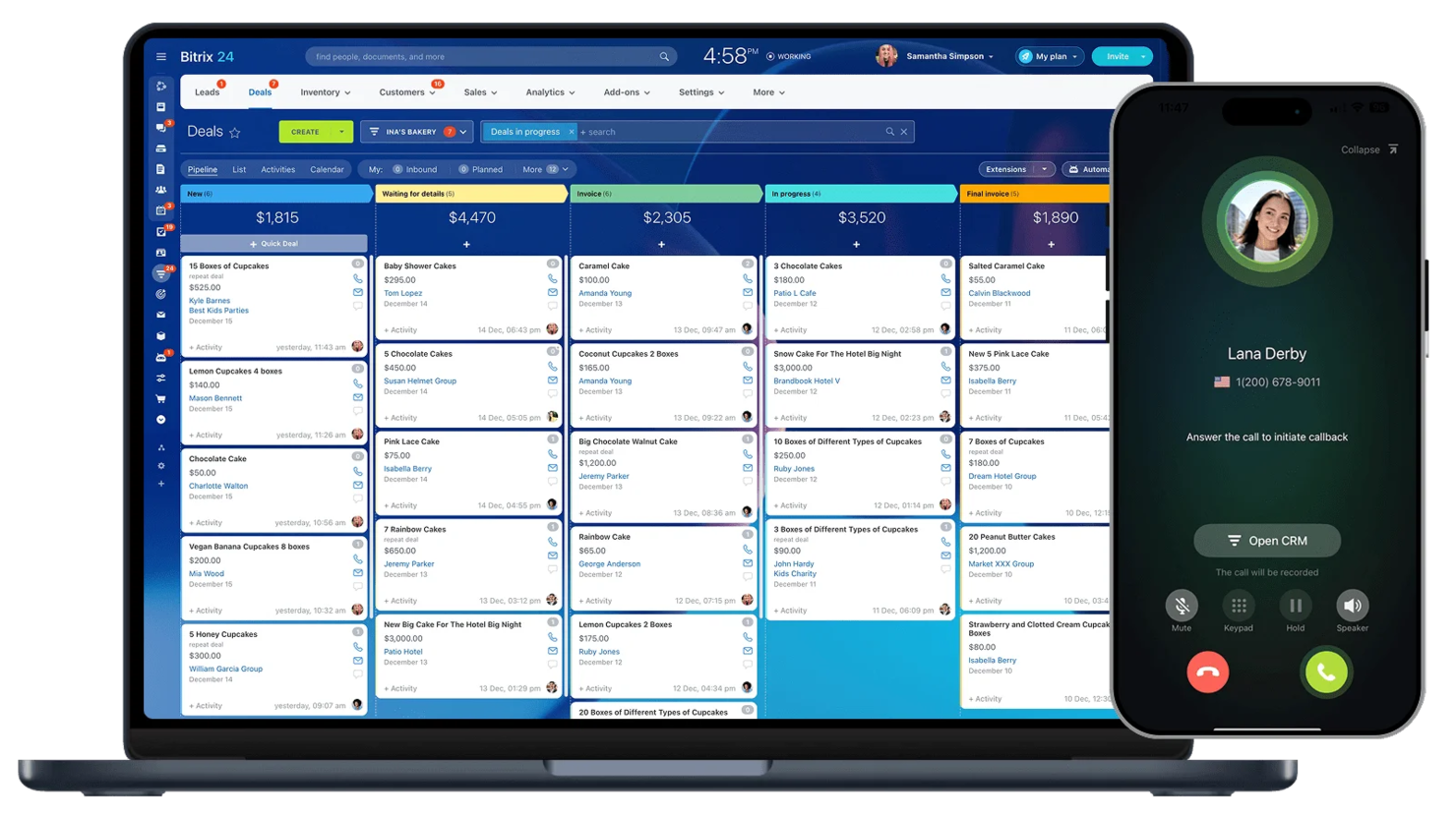
Bitrix24 is designed for teams that want free call center software with built-in CRM features. The platform helps manage customer communications and sales pipelines in one place. It supports small businesses and service teams tracking calls, contacts, and follow-ups without switching between multiple tools.
Why I Picked Bitrix24
What makes Bitrix24 stand out as free call center software is its built-in CRM integration, which lets your team manage customer interactions and sales activities in one place. I picked Bitrix24 because you can automatically log calls, link them to contacts, and track follow-ups directly from the same dashboard.
The free CRM features include call tracking, lead management, and customer history, so you always have context during conversations. For teams that want to connect call center activity with sales and support workflows, Bitrix24 offers a unified approach that’s hard to find in other free options.
Bitrix24 Key Features
Some other features in Bitrix24 help teams manage call center operations more efficiently:
- Call routing: Automatically direct incoming calls to the right agent or department based on set rules.
- Web phone: Make and receive calls with a custom caller ID directly from your browser without extra hardware.
- Call recording: Record and store calls for quality monitoring or training purposes.
- Team chat: Communicate with colleagues in real time using built-in chat channels.
Bitrix24 Integrations
Integrations include Gmail, Xero, Dropbox, Box, Mailchimp, and more.
What's Free?
Bitrix24 offers a free-forever plan. The free plan includes basic call center, CRM, chat, and video features, but limits cloud storage to 5GB and restricts some advanced telephony and integration options.
Pros and Cons
Pros:
- Call recording available
- Includes team chat and video calls
- Built-in CRM with call logging features
Cons:
- Call center analytics are basic
- Free plan limits cloud storage to 5GB


If you’re looking for a call center platform that brings together multiple support channels, LiveAgent is worth considering. It’s designed for teams that want to manage calls, emails, and chats from one dashboard. LiveAgent can help small businesses and support teams handle high volumes of customer inquiries without missing important conversations.
Why I Picked LiveAgent
I picked LiveAgent because its real-time chat support stands out for teams that need to respond quickly to customer inquiries. The platform’s live chat widget lets agents engage with website visitors instantly, which is essential for call centers that want to reduce wait times and boost satisfaction.
I also appreciate that LiveAgent combines chat with call and ticket management in one interface, so agents can switch between channels without losing context. This makes it a practical choice for support teams that prioritize fast, multichannel communication.
LiveAgent Key Features
Some other features that make LiveAgent useful for call center teams include:
- Call routing and IVR: Route incoming calls to the right agent or department using customizable interactive voice response menus.
- Ticket merging and splitting: Combine related tickets or split complex issues into separate tickets for better tracking and resolution.
- Internal chat for agents: Let agents using the auto dialer communicate with each other to coordinate responses..
- Customer portal: Provide customers with a self-service portal where they can track ticket status and access support resources.
LiveAgent Integrations
Integrations include ActiveCampaign, ClickUp, Drupal, Jira, Klaviyo, and more.
What's Free?
LiveAgent offers a free-forever plan with basic ticketing and live chat features. The free plan is limited to one agent and includes restricted access to integrations and advanced call center functions.
Pros and Cons
Pros:
- No outbound predictive dialer feature
- Customer portal for self-service ticket tracking
- Internal chat for agent collaboration
- Real-time chat and call handling included
Cons:
- Free plan limits the number of agents
New Product Updates from LiveAgent

LiveAgent Enhances Ticket Management and Integrations
LiveAgent introduces major improvements, including a more intuitive ticket field system, customizable spam thresholds, and Telegram integration to boost communication and efficiency. For more information, visit LiveAgent's official site.
 .
.
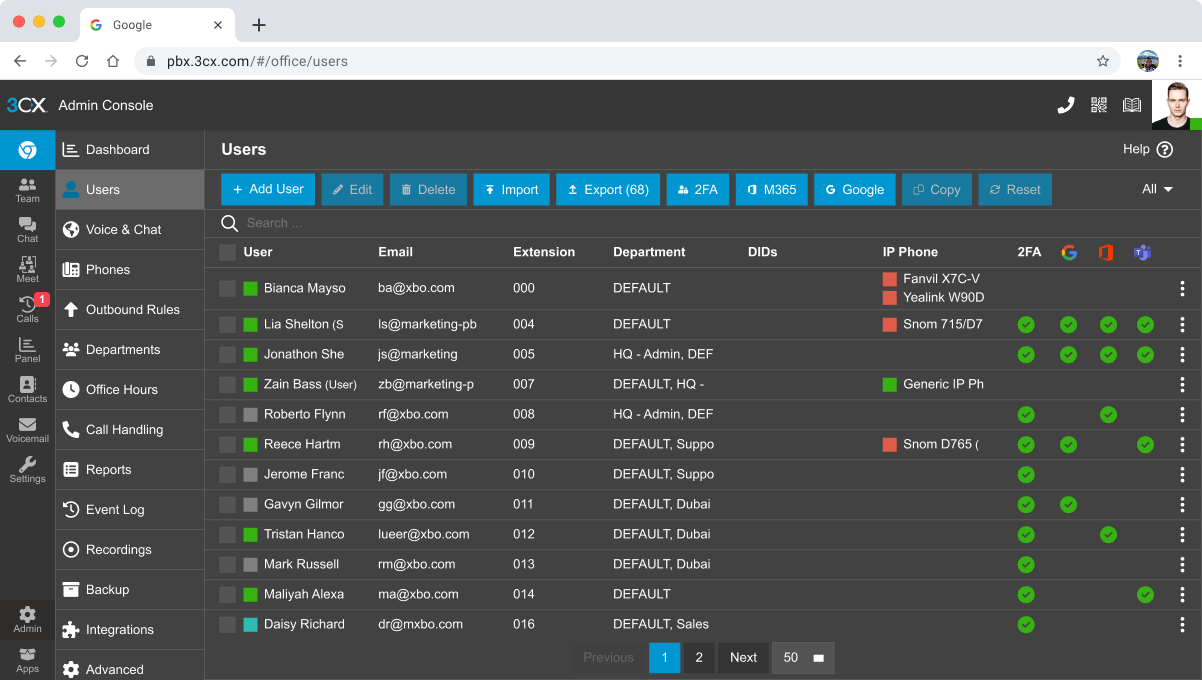

3CX is a browser-based call center platform designed for teams that want to improve the customer experience through flexible, remote-friendly calling. It supports distributed organizations and support teams managing calls, chats, and video meetings from anywhere.
Why I Picked 3CX
What stands out about 3CX is its browser-based calling, which means your team can handle calls, chats, and video meetings without installing any software. This is especially useful for remote or hybrid teams who need to access the call center from different devices and locations.
I like that 3CX offers a web client with features like call queues, live chat, and video conferencing all in one place. For businesses that want to avoid desktop installations and keep things simple, 3CX’s browser-first approach makes it a practical choice.
3CX Key Features
Some other features in 3CX help teams manage call center operations more efficiently:
- Call recording: Record inbound and outbound calls for quality monitoring or training purposes.
- Interactive Voice Response (IVR): Set up automated menus to route callers to the right department or agent.
- Call reporting and analytics: Access detailed reports on call volumes, wait times, and agent performance.
- Mobile apps: Use dedicated iOS and Android apps to handle calls and messages on the go.
3CX Integrations
Integrations include Salesforce, HubSpot, Zoho, Pipedrive, and more.
What's Free?
3CX offers a free-forever plan for up to 10 users. The free plan includes browser-based calling, live chat, and video meetings, but limits advanced features like CRM integrations, call recording storage, and reporting.
Pros and Cons
Pros:
- Browser-based calling with no desktop install
- Free plan supports up to 10 users
- Mobile apps for iOS and Android
Cons:
- Free plan lacks call recording storage
- Limited reporting features on free plan
Free Call Center Software Selection Criteria
When selecting the best free call center software to include in this list, I considered common buyer needs and pain points like handling high call volumes without extra cost and ensuring essential features are available on the free plan. I also used the following framework to keep my evaluation structured and fair:
Core Functionality (25% of total score)
To be considered for inclusion in this list, each solution had to fulfill these common use cases:
- Handle inbound and outbound calls
- Route calls to available agents
- Record call logs and histories
- Support multiple agents or users
- Provide basic call queue management
Additional Standout Features (25% of total score)
To help further narrow down the competition, I also looked for unique features, such as:
- Visual call flow designer
- Call masking for privacy
- Holiday and after-hours routing
- Browser-based calling with no hardware
- Integration with CRM or help desk tools
Usability (10% of total score)
To get a sense of the usability of each system, I considered the following:
- Simple and intuitive agent interface
- Easy access to call controls and logs
- Clear navigation for supervisors and admins
- Responsive design for different devices
- Minimal setup steps for new users
Onboarding (10% of total score)
To evaluate the onboarding experience for each platform, I considered the following:
- Availability of step-by-step setup guides
- Access to training videos and tutorials
- Interactive product tours or walkthroughs
- Prebuilt templates for call flows or routing
- In-app chatbots or onboarding support
Customer Support (10% of total score)
To assess each software provider’s customer support services, I considered the following:
- Availability of live chat or email support
- Access to a searchable knowledge base
- Community forums or user groups
- Response times for support requests
- Quality of troubleshooting resources
Value For Money (10% of total score)
To evaluate the value for money of each platform, I considered the following:
- Range of features included in the free plan
- Restrictions on users or call volume
- Upgrade options and pricing transparency
- Access to integrations on the free tier
- Comparison to paid competitors’ offerings
Customer Reviews (10% of total score)
To get a sense of overall customer satisfaction, I considered the following when reading customer reviews:
- Positive feedback on reliability and uptime
- Reports of helpful or responsive support
- Comments on feature limitations or gaps
- User experiences with onboarding and setup
- Overall satisfaction with the free plan
How to Choose Free Call Center Software
It’s easy to get bogged down in long feature lists and complex pricing structures. To help you stay focused as you work through your unique software selection process, here’s a checklist of factors to keep in mind:
| Factor | What to Consider |
|---|---|
| Scalability | Can the software handle your expected call volume and agent growth without forcing a paid upgrade? |
| Integrations | Does it connect natively to your CRM system, help desk, or other core tools you already use? |
| Customizability | Are you able to adjust call flows, routing, and agent roles to match your team’s processes? |
| Ease of use | Will agents and supervisors be able to learn and use the system quickly with minimal training? |
| Implementation and onboarding | How long will it take to get up and running, and what resources or support are available to help? |
| Cost | Are there hidden costs, such as charges for phone numbers, minutes, or essential add-ons? |
| Security safeguards | Does the platform offer call masking, data encryption, and access controls to protect information? |
| Support availability | What support channels are available on the free plan, and are response times acceptable for your needs? |
What Is Free Call Center Software?
Free call center software is a cloud-based or on-premise platform that lets teams manage inbound and outbound customer calls without upfront licensing fees. These solutions typically include core features like call routing, agent management, and basic reporting.
Free plans often come with user, feature, or integration limitations, making them best suited for small teams, startups, or organizations testing call center capabilities before committing to a paid solution.
Features
Let’s go over the features commonly found in call center software, and which ones are usually included in free vs. paid plans.
Typically Free Call Center Software Features
- Inbound call routing: Directs incoming calls to available agents based on preset rules, helping your contact center manage call flow and reduce wait times.
- Agent management: Lets you add, remove, and assign agents to queues or departments, so you can organize your team as needed.
- Call queuing: Places callers in a virtual line when all agents are busy, ensuring no calls are missed, and customers know their place in the queue.
- Basic call logs: Records essential details about each call, such as time, duration, and agent involved, for tracking and follow-up.
- Browser-based calling: Allows agents to make and receive calls directly from their web browser, removing the need for physical phones.
- Simple IVR menus: Offers basic interactive voice response menus to help route callers to the right department or agent.
- Call transfer: Enables agents to transfer live calls to another agent or department without disconnecting the customer.
- Basic reporting: Provides simple metrics like total calls, missed calls, and average wait times to help monitor performance.
Typically Paid Call Center Software Features
- Advanced analytics and reporting: Delivers in-depth insights into call trends, agent performance, and customer satisfaction, supporting data-driven decisions.
- Call recording: Automatically records calls for quality assurance, training, and compliance, with options for secure storage and retrieval.
- Omnichannel support: Integrates voice with channels like SMS, email, chat, and social media, allowing agents to manage all interactions in one place.
- Automated outbound dialing: Uses predictive or power dialers to automate campaigns for outbound call centers, increasing agent productivity.
- Custom call flow designer: Provides a visual interface to build complex call routing paths, including conditional logic and multi-level IVR.
- CRM software and help desk integrations: Connects with customer relationship management or ticketing systems to give agents context and centralize workflows.
- Call monitoring and whisper: Lets supervisors listen in on live calls and coach agents in real time without the customer hearing.
- Role-based permissions: Allows granular control over what different users can access or modify within the system, supporting security and compliance.
- API access: Offers developer tools for custom integrations and automation, enabling teams to tailor the platform to their needs.
Benefits
Implementing free call center software provides several benefits for your team and your business. Here are a few you can look forward to:
- No upfront costs: Start managing customer calls without paying for licenses or subscriptions, making it accessible for small teams and startups.
- Quick deployment: Set up cloud-based calling and agent management in minutes, so your team can begin handling calls right away.
- Scalable agent management: Add or remove agents as your needs change, without worrying about per-user fees or complex contracts.
- Essential call handling features: Access core tools like call routing, queuing, and basic reporting to support daily operations and customer service.
- Low-risk evaluation: Test workflows, integrations, and usability before committing to a paid solution, helping you make informed decisions.
- Remote work support: Enable agents to work from anywhere using browser-based calling and simple onboarding tools.
- Basic security safeguards: Benefit from features like call masking and access controls to help protect sensitive customer information.
Costs and Pricing
I realize you came to this article looking for the best call center software options that are available for free. However, since free plans only offer limited features, there's a good chance you'll need to scale your plan up in the future.
The table below summarizes common plans, their average prices, and typical features included in call center software:
Plan Comparison Table for Call Center Software
| Plan Type | Average Price | Common Features |
|---|---|---|
| Free Plan | $0 | Basic inbound call routing, agent and project management, call queuing, simple IVR, and basic reporting. |
| Personal Plan | $5-$25/user/month | All free features, call recording, limited analytics, basic integrations, and simple outbound calling. |
| Business Plan | $25-$60/user/month | All personal features, advanced analytics, CRM integrations, call monitoring, and custom call flows. |
| Enterprise Plan | $60-$120/user/month | All business features, omnichannel support, API access, advanced security, and dedicated support. |
Free Call Center Software FAQs
Here are some answers to common questions about free call center software:
Can free call center software handle both inbound and outbound calls?
Yes, most free call center software supports both inbound and outbound calls. However, outbound calling features may be limited or require manual dialing, and some platforms restrict the number of outbound minutes or campaigns on free plans.
Are there limits on the number of agents or users with free call center software?
Yes, free plans often cap the number of agents or users you can add. Some solutions allow unlimited agents but restrict access to advanced features, while others set a hard limit on users to encourage upgrades.
What happens to my data if I upgrade from a free to a paid plan?
Upgrading from a free to a paid plan usually preserves your existing data, including call logs, agent settings, and workflows. It’s a good idea to confirm data migration policies with the vendor before upgrading to avoid any surprises.
Can I integrate free call center software with my CRM or help desk tools?
Some free call center software offers basic integrations with popular CRMs or help desk platforms, but many reserve advanced or custom integrations for paid plans. Always check integration options before committing to a free solution.
Is free call center software secure enough for sensitive customer information?
Free call center software typically includes basic security features like call masking and access controls. For handling sensitive or regulated data, review the vendor’s security documentation and consider whether paid plans offer additional safeguards you might need.
What’s Next:
If you're in the process of researching free call center software, connect with a SoftwareSelect advisor for free recommendations.
You fill out a form and have a quick chat where they get into the specifics of your needs. Then you'll get a shortlist of software to review. They'll even support you through the entire buying process, including price negotiations.