

Managing a call center can be tough. You juggle customer demands, team performance, and the constant pressure to improve service. That's where blended call center software comes in. It helps you balance inbound and outbound calls, making your team's job easier and your customers happier.
I've spent time testing and reviewing these tools to give you an unbiased look at the best options out there. In this article, I'll share my top picks, focusing on what each does best and how they can fit your needs.
Whether you're looking to enhance efficiency or boost customer satisfaction, you'll find the right solution here. Let's dive in and find the perfect match for your team.
Why Trust Our Software Recommendations
6,700+
Reviews
20
Industry experts
16+
Evaluation factors
14
Years
Our team has been testing and reviewing software since 2012. As CX leaders ourselves, we know how difficult—and important—it is to choose the right software.
For this guide, we evaluated tools using hands-on testing and independent research, scoring tools using our selection criteria.
Our reviews reflect our human editorial judgment, not a sales pitch.
 Gui DrusinaCreative Director
 Tim FisherVP of AI
Blended Call Center Software Comparison Table
This comparison table summarizes pricing details for my top blended call center software selections:
| Tool | Best For | Trial Info | Price | ||
|---|---|---|---|---|---|
| 1 | Best for team collaboration | Free demo available | From $15/user/month (billed annually) | Website | |
| 2 | Best for real-time call monitoring | 14-day free trial | From €19/user/month (billed annually) | Website | |
| 3 | Best for building custom AI agents at scale | Free demo available | Pricing upon request | Website | |
| 4 | Best for remote teams | 7-day free trial + free demo available | From $15/user/month (billed annually) | Website | |
| 5 | Best for AI features | Free demo available | Pricing upon request | Website | |
| 6 | Best for sales teams | Free demo available | Pricing upon request | Website | |
| 7 | Best for small businesses | 14-day free trial + free demo available | Pricing upon request | Website | |
| 8 | Best for CRM integration | 14-day free trial | Pricing upon request | Website | |
| 9 | Best for call tracking | Free demo available | From $79/user/month (billed annually) | Website | |
| 10 | Best for enterprise solutions | Free demo available | From $119/seat/month | Website |


Best Blended Call Center Software Reviews
Below are my detailed summaries of the best blended call center software that made it onto my shortlist. My reviews offer a detailed look at the key features, pros & cons, integrations, and ideal use cases of each tool to help you find the best one for you.
 Best for team collaboration
- Free demo available
- From $15/user/month (billed annually)
Visit WebsiteCustomer Rating:4.5/5
Nextiva unified AI communications with voice, video, chat, and contact center tools. Nextiva is a cloud-based unified communication & AI-powered CXM platform for businesses of all sizes. It bundles VoIP phone service, video meetings, chat, SMS, and AI-driven contact center tools in one platform.
Why I picked Nextiva: The platform unifies all customer interactions across voice, video, chat, SMS, email, social, and more, giving teams a 360° customer view. Its AI-powered contact center and intelligent routing improve efficiency and support personalization at scale. The platform’s flexibility and scalability make it suitable for both small businesses and large enterprises.
Standout features & integrations:
Features include AI-driven call routing, real-time analytics, and unified communication tools that bring phone, video, messaging, and contact center operations together in one place. The platform’s automation and workflow tools help your team manage customer interactions efficiently and maintain consistent service quality.
Integrations include Salesforce, HubSpot, Zendesk, Zoho CRM, Microsoft Teams, Outlook, and Google Workspace.
Pros and Cons
Pros:
- Scalable for teams of all sizes
- AI-powered routing and analytics
- Unified voice and messaging platform
Cons:
- Pricing can be expensive in higher-tier plans
- May overwhelm very small teams
 Best for real-time call monitoring
- 14-day free trial
- From €19/user/month (billed annually)
Visit WebsiteCustomer Rating:4.4/5
CloudTalk offers a real-time call center dashboard for monitoring agent performance and call statistics. For businesses looking to improve how they manage calls, CloudTalk provides a solution for support and sales teams with real-time call monitoring. It helps teams handle inbound and outbound calls more effectively, making it suitable for organizations across different industries. Whether used in finance, real estate, or retail, CloudTalk supports clearer call management and day-to-day operations.
Why I Picked CloudTalk
I picked CloudTalk for its real-time call monitoring, which helps teams oversee live inbound and outbound calls as they happen. This makes it easier for supervisors to track call quality and step in when issues arise. Intelligent call routing and automated dialing also help agents handle calls more efficiently, supporting the day-to-day needs of blended call centers. These capabilities are crucial for businesses looking to improve their call center efficiency and customer engagement.
CloudTalk Key Features
In addition to real-time call monitoring, CloudTalk offers:
- Call Recording: Record calls for quality assurance and training to ensure consistent customer service standards.
- Interactive Voice Response (IVR): This tool helps in managing high call volumes by directing callers to the appropriate department or information.
- International SMS and WhatsApp Messaging: These features enable global communication, allowing you to reach customers worldwide.
CloudTalk Integrations
Integrations include HubSpot, Salesforce, Zoho, Zendesk, Odoo, Intercom, Salesloft, Outreach, Bullhorn, Monday, and Shopify.
Pros and Cons
Pros:
- Offers local, mobile, or toll-free numbers from over 140 countries
- Useful call analytics for tracking agent activity and call outcomes
- Integrates with popular CRMs to log calls automatically
Cons:
- Limited customization options in dashboards
- Occasional call connection issues reported by users
 Best for building custom AI agents at scale
- Free demo available
- Pricing upon request
Visit WebsiteCustomer Rating:5/5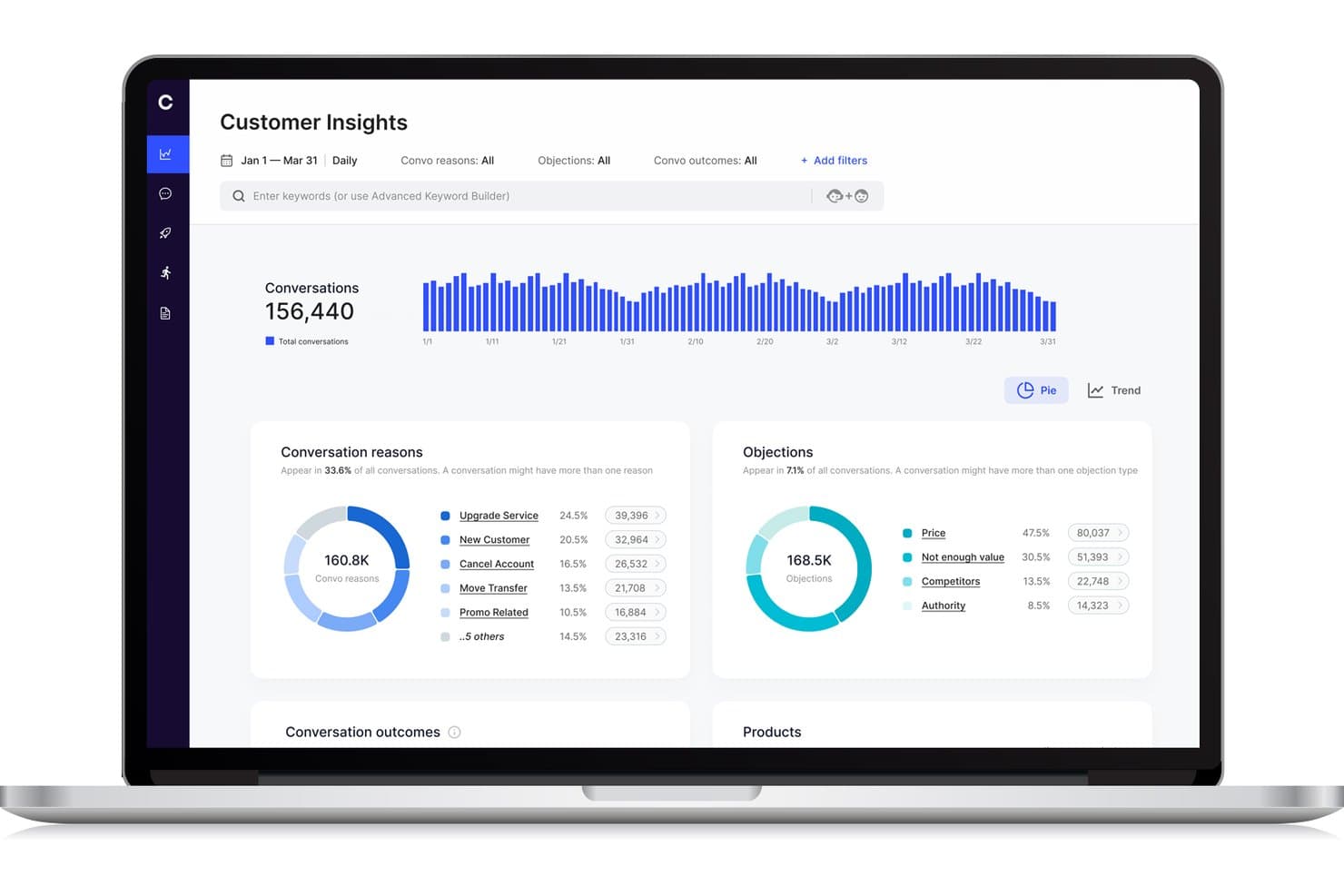
Cresta offers a Customer Insights dashboard that displays conversation reasons, objections, and trends across conversations for blended call center analytics. Cresta is an AI-powered contact center platform that unifies inbound and outbound operations through dynamic agent workflows, real-time conversation intelligence, and seamless integration with existing call center tools.
Who Is Cresta Best For?
Cresta suits enterprise contact centers needing scalable AI-driven call handling and dynamic agent workflows across complex, multi-channel environments.
Why I Picked Cresta
I picked Cresta as one of the best because I can build and deploy custom AI agents that handle blended call queues, automate dynamic agent assignment, and analyze every conversation in real time at enterprise scale.
Cresta Key Features
- Unified agent desktop: Agents manage all blended interactions from a single interface without switching tools.
- Real-time supervisor controls: Supervisors can monitor live activity and adjust agent workflows instantly.
- Skills-based routing: The system matches inbound and outbound contacts to agents based on defined skills and attributes.
- Customizable reporting dashboards: Users access blended analytics spanning agent occupancy, productivity, and campaign performance.
Cresta Integrations
Cresta offers native integrations with Salesforce, Twilio, Pipedrive, BigCommerce, Five9, Zendesk, and more. An API is available for custom integrations.
Pros and Cons
Pros:
- Dynamic queue blending across channels and teams
- Advanced conversation analytics for supervisors
- AI coaching during live calls and chats
Cons:
- Knowledge Assist needs ongoing model tuning
- Predictive dialer features not explicitly supported
Learn more about Cresta: Best for remote teams
- 7-day free trial + free demo available
- From $15/user/month (billed annually)
Visit WebsiteCustomer Rating:4.7/5
Ringover cloud communication boosts remote teamwork with calls and collaboration tools. Ringover is a cloud-based communication platform designed for businesses that need efficient call management and collaboration tools. It serves remote teams by offering features that enhance connectivity and productivity.
Why I picked Ringover: The platform is tailored for remote teams, providing tools that facilitate seamless communication. Its call management features help your team stay organized and efficient, even when working remotely. Ringover's collaboration tools ensure everyone stays connected and informed. The ability to make and receive calls from anywhere enhances flexibility and adaptability.
Standout features & integrations:
Features include call transfer and call queuing, which help your team manage high call volumes effectively. The platform offers call recording to ensure quality and compliance. Additionally, analytics provide insights into call performance and team productivity.
Integrations include Salesforce, HubSpot, Zoho CRM, Pipedrive, Slack, Zendesk, Freshdesk, monday.com, and Helpscout.
Pros and Cons
Pros:
- Supports high call volumes
- Flexible call management
- Strong integrations
Cons:
- Advanced features limited to higher plans
- Occasional connection issues


Talkdesk cloud contact center with AI insights, automation, and scalable customer support. Talkdesk is a cloud-based contact center platform that caters to businesses of all sizes that are looking to boost customer interactions. It offers a variety of communication solutions, focusing on improving customer experience and operational efficiency.
Why I picked Talkdesk: The platform's AI features are central to its value, providing tools that support predictive insights and automated workflows. Talkdesk's AI-powered virtual agents assist your team in handling repetitive tasks, freeing up time for more complex interactions. The real-time analytics offer deep insights into customer behavior and team performance. Its scalability ensures that as your business grows, Talkdesk can grow with you.
Standout features & integrations:
Features include call recording and monitoring, which help you maintain quality and compliance. The platform offers omnichannel support, enabling communication across multiple channels. Workforce management tools assist in optimizing agent schedules and productivity.
Integrations include Salesforce, Zendesk, Microsoft Teams, Slack, Zoom, HubSpot, and ServiceNow.
Pros and Cons
Pros:
- Rich analytics and reporting
- Strong CRM and third‑party integrations
- AI‑powered routing and automation
Cons:
- Expensive for small teams
- Interface can feel complex
Learn more about Talkdesk:

Convoso AI dialing boosts sales efficiency with real-time scoring and compliance. Convoso is an AI-driven call center software tailored for sales teams across industries like BPO, finance, and real estate. It enhances sales performance with features like real-time DID scoring and AI dialing optimization, boosting contact and conversion rates.
Why I picked Convoso: Convoso strengthens the performance of any outbound call center by optimizing phone calls through its AI-driven dialing capabilities. With tools such as a predictive dialer and auto dialer, teams can move through outbound campaigns more efficiently and concentrate on outgoing calls that are most likely to convert.
Real-time DID scoring helps you prioritize valuable prospects while tracking the metrics and KPIs that matter. Built on a scalable telephony infrastructure, the platform adapts as your team expands, and its compliance management helps you stay aligned with regulatory requirements. Additionally, forecasting features provide greater visibility into performance trends, allowing you to plan future campaigns with confidence.
Standout features & integrations:
Features include multimodal dialing that supports both inbound and outbound sales. Workflow automation helps your team manage tasks efficiently. Superior caller ID management ensures your calls are recognized and answered.
Integrations can be done through API and Zapier.
Pros and Cons
Pros:
- Real-time DID scoring
- High-speed scalability
- AI dialing optimization
Cons:
- Requires technical knowledge
- Complexity in setup
Learn more about Convoso: Best for small businesses
- 14-day free trial + free demo available
- Pricing upon request
Visit WebsiteCustomer Rating:4.3/5
Dialpad organizes customer conversations with integrated calling, messaging, and voicemail tools. Dialpad is an AI-powered customer communications platform tailored for small businesses seeking efficient customer service and sales solutions. It offers real-time AI tools that enhance productivity, including automated note-taking and insights.
Why I picked Dialpad: The platform's focus on small businesses makes it accessible and easy to implement. AI-driven features like automated note-taking help your team stay organized. Its scalability allows you to grow without worrying about technical limitations. With enterprise-grade security, Dialpad ensures your data is safe.
Standout features & integrations:
Features include AI-powered agents that can handle complex workflows such as refunds and rebookings while supporting high-volume customer engagement across multiple channels. Whether teams are managing inbound calls, responding to incoming calls from support queues, or interacting with customers through social media, the platform helps maintain a consistent, reliable experience.
As a blended contact center solution, it also ensures that phone calls and digital interactions receive the same level of attention. Behind the scenes, Dialpad provides enterprise-grade security and compliance, including HIPAA and SOC 2 certifications, to protect sensitive information.
Integrations include Salesforce, Microsoft Teams, Google Workspace, Zendesk, Slack, HubSpot, Zoho CRM, and ServiceNow.
Pros and Cons
Pros:
- Handles complex workflows
- Cloud-native and mobile-friendly
- Scalable to support growth
Cons:
- May require tech support
- Many advanced features require higher-tier plans


Pipedrive sales CRM simplifies pipelines with automation, reporting, and easy tracking. Pipedrive is a sales-focused CRM tool designed for small to medium-sized businesses. It helps teams manage leads and deals, providing a clear overview of sales activities and performance.
Why I picked Pipedrive: The tool is great for CRM integration, making it easy for your team to manage customer relationships. Its intuitive sales pipeline view helps you track deals and progress. Automation features reduce manual tasks, allowing your team to focus on selling. The reporting capabilities provide insights into sales performance, helping with decision-making.
Standout features & integrations:
Features include customizable pipelines that help you tailor the sales process to your needs. The activity reminders ensure your team never misses an important follow-up. Additionally, the goal-setting and tracking feature keeps your team aligned with business objectives.
Integrations include Mailchimp, Trello, Slack, Microsoft Teams, Zapier, Xero, Asana, QuickBooks, and HubSpot.
Pros and Cons
Pros:
- Customizable sales processes
- Strong reporting capabilities
- Automation reduces manual tasks
Cons:
- Requires ongoing management to optimize
- Advanced features can be complex
Learn more about Pipedrive: Best for call tracking
- Free demo available
- From $79/user/month (billed annually)
Visit WebsiteCustomer Rating:4.7/5
DialedIn cloud contact center improves productivity with routing, tracking, and analytics. DialedIn is a cloud-based contact center software designed for businesses in industries like healthcare, finance, and hospitality. It focuses on improving agent productivity and customer engagement through efficient call management.
Why I picked DialedIn: DialedIn's strength lies in its call tracking capabilities, which help your team manage and analyze calls effectively. Omnichannel communication ensures you can engage with customers through multiple platforms. The platform's in-depth analytics provide insights to improve operational efficiency.
Standout features & integrations:
Features include predictive dialing and skill-based routing enhance call handling, as well as automatic call distribution and interactive voice response. Predictive dialing helps your team reach more customers efficiently. Extensive analytics support decision-making and performance improvement.
Integrations include Salesforce, Microsoft Teams, HubSpot, Zoho, Slack, Zendesk, and Google Workspace.
Pros and Cons
Pros:
- Omnichannel communication support
- Efficient predictive dialing
- Strong predictive-dialer and blended inbound/outbound capabilities
Cons:
- Complexity in initial setup
- Limited customization options
Learn more about DialedIn: 10Best for enterprise solutions
Five9
- Free demo available
- From $119/seat/month
Visit WebsiteCustomer Rating:4.1/5
Five9 AI contact center for personalized support and seamless customer journeys. Five9 is a cloud-based contact center solution designed for enterprises aiming to enhance customer engagement. It provides AI-driven tools to personalize customer interactions and improve service delivery.
Why I picked Five9: Five9 delivers an AI-driven customer journey orchestration experience that supports a blended call center solution, helping teams manage both inbound and outbound interactions with clarity and efficiency. It helps with real-time insights, improving decision-making across ACD routing, call queues, and high-volume outreach. The platform also supports tools such as an intelligent dialer and automated callbacks, giving your team more control over performance and customer engagement.
Standout features & integrations:
Features include AI-driven customer journey orchestration, ensuring your team can manage interactions efficiently. The platform's human-centered AI empowers agents with real-time insights. Additionally, its open APIs allow for easy customization to fit your business needs.
Integrations include Salesforce, Zendesk, Microsoft Dynamics 365, Oracle, and ServiceNow.
Pros and Cons
Pros:
- Human-centered AI tools
- Customizable with open APIs
- Scalable for large enterprises
Cons:
- AI features might be overwhelming
- May not suit small businesses
Learn more about Five9:
Other Blended Call Center Software
Here are some additional blended call center software options that didn’t make it onto my shortlist, but are still worth checking out:
- 11LiveAgentBest for multi-channel support
- 12TCNBest for IVR systems
- 13iCallifyBest for startup companies
- 14RingCentralBest for mobile workforce management
- 153CXBest for small business setups
- 16SquaretalkBest for cloud-based call solutions
- 17Global Call ForwardingBest for international call routing
- 18VerintBest for workforce optimization
- 19VoiptimeBest for outbound call campaigns
Related Reviews
How I Evaluate Blended Call Center Software
I split my evaluation into two layers: the baseline every tool must clear—true inbound/outbound blending, a real dialer, unified agent desktop—and the differentiators that set great platforms apart.
Core Functionality (Table Stakes For This List)
When I'm selecting tools for my list, I rank each one on a scale from 0 (does not offer the functionality) to 5 (excels in this area) for each core functionality listed below. Then, I calculate the tool's total score into a percentage. Each tool needs to achieve a minimum total score of 65% to be considered for inclusion.
- Inbound/Outbound Blending: I check whether agents auto-shift between queues and campaigns based on live volume, or if someone has to manually toggle modes.
- Automated Outbound Dialer: The dialer modes matter here. I look for predictive, progressive, and preview options so teams can match pacing to campaign type.
- ACD & Skills-Based Routing: Routing should match callers to agents by skill, language, or priority level—not just push calls to whoever's next in line.
- Unified Agent Desktop: I evaluate whether agents handle inbound and outbound work from one screen with full context, or juggle separate tools mid-call.
- Real-Time Supervisor Controls: Supervisors need to monitor queues, adjust blend ratios, and reassign agents on the fly—especially during unexpected volume spikes.
- Blended Reporting & Analytics: I look for consolidated dashboards that track inbound SLAs alongside outbound campaign metrics and overall agent occupancy in one view.
Once I have a list of tools that meet this criteria, I consider what sets each platform apart.
Differentiating Factors (What Sets Vendors Apart)
Here's how I compare and contrast different vendors:
Standout Features
AI agent assist is a major differentiator. I look for real-time transcription and next-best-action prompts that help agents handle rapid context switches between inbound service calls and outbound campaign work. Built-in workforce management matters too—forecasting and scheduling for blended teams is a unique challenge, and platforms with native blended staffing models save a lot of headaches. Compliance tooling rounds things out, especially for outbound. Automated DNC list scrubbing and consent management keep campaigns running without legal risk.
Beyond Features
CRM and helpdesk integrations are one of the first things I check. Blended agents need real-time customer context when switching between inbound and outbound work, so native connectors to platforms like Salesforce, Zendesk, or HubSpot matter. Scalability is another big factor—seasonal campaigns can double seat counts overnight, and I look for platforms that handle that without lengthy procurement cycles. Pricing models also vary widely. I evaluate whether licensing is per-seat, concurrent, or usage-based, since blended teams with shift rotations can overpay on the wrong structure.
How to Choose Blended Call Center Software
It’s easy to get bogged down in long feature lists and complex pricing structures. To help you stay focused as you work through your unique software selection process, here’s a checklist of factors to keep in mind:
| Factor | What to Consider |
|---|---|
| FactorScalability | What to ConsiderWill the software grow with your business? Look for flexible user limits and features that support expansion without requiring a complete overhaul. |
| FactorIntegrations | What to ConsiderDoes it work with your current systems? Check for compatibility with essential tools like CRM, email, and communication platforms to avoid workflow disruptions. |
| FactorCustomizability | What to ConsiderCan you tailor it to fit your needs? Ensure the software allows adjustments in workflows, dashboards, and user permissions to match your team's specific processes. |
| FactorEase of use | What to ConsiderIs the interface intuitive? Test the user experience to ensure your team can navigate it without steep learning curves or extensive training. |
| FactorImplementation and onboarding | What to ConsiderHow long will it take to get up and running? Consider the setup time, available support, and training resources to ensure a smooth transition for your team. |
| FactorCost | What to ConsiderWhat’s the total cost of ownership? Evaluate the pricing structure, including hidden fees, to ensure alignment with your budget. Consider long-term costs beyond the initial investment. |
| FactorSecurity safeguards | What to ConsiderAre data protection measures adequate? Look for compliance with industry standards and encryption protocols to protect sensitive information. |
| FactorSupport availability | What to ConsiderWhen can you get help if needed? Check the provider's support hours, channels, and response times to ensure they meet your team's needs for assistance. |
What Is Blended Call Center Software?
Blended call center software is a tool that manages both inbound and outbound calls within a single platform. Customer service representatives, sales teams, and support staff generally use these tools to enhance communication efficiency and customer interaction. Call routing, real-time monitoring, and CRM integration features help with managing call flows and improving agent productivity. Overall, these tools increase operational efficiency and improve customer satisfaction.
Features
When selecting blended call center software, keep an eye out for the following key features:
- Call routing: Directs calls to the most appropriate agent, helping to reduce wait times and improve customer satisfaction.
- Real-time monitoring: Allows supervisors to listen in on calls and provide guidance, enhancing agent performance and training.
- CRM integration: Connects with customer relationship management tools to provide agents with detailed caller information and history.
- Omnichannel communication: Supports interactions across multiple channels like phone, email, and chat, ensuring a consistent customer experience.
- Predictive dialing: Automates outbound calling, increasing the number of calls made and improving agent efficiency.
- Analytics and reporting: Offers insights into call performance and agent productivity, aiding in informed decision-making.
- Interactive voice response (IVR): Guides callers through self-service options, reducing the need for agent intervention on routine queries.
- Customizable dashboards: Allows users to tailor their interface to display the most relevant information, improving workflow efficiency.
- Call recording: Records calls for quality assurance and compliance purposes, providing a reference for training and dispute resolution.
- Workforce management: Helps optimize scheduling and staffing to meet demand, ensuring that resources are used effectively.
Benefits
Implementing blended call center software provides several benefits for your team and your business. Here are a few you can look forward to:
- Improved efficiency: By handling inbound and outbound calls in one platform, your team can manage tasks more effectively and reduce idle time.
- Enhanced customer satisfaction: Features like call routing and IVR ensure customers reach the right agent quickly, leading to faster resolution times.
- Better decision-making: Analytics and reporting provide insights into performance, helping you make informed decisions to optimize operations.
- Increased flexibility: Omnichannel communication allows your team to interact with customers on their preferred platforms, enhancing engagement.
- Cost savings: Workforce management tools help you optimize staffing, ensuring resources are allocated efficiently and reducing unnecessary expenses.
- Scalability: The software can grow with your business, adapting to increased call volumes without needing major changes.
- Consistent quality: Call recording and real-time monitoring help maintain high service standards and provide valuable training resources.
Costs and Pricing
Selecting blended call center software requires an understanding of the various pricing models and plans available. Costs vary based on features, team size, add-ons, and more. The table below summarizes common plans, their average prices, and typical features included in blended call center software solutions:
Plan Comparison Table for Blended Call Center Software
| Plan Type | Average Price | Common Features |
|---|---|---|
| Plan TypeFree Plan | Average Price$0 | Common FeaturesBasic call handling, limited integrations, and minimal reporting. |
| Plan TypePersonal Plan | Average Price$5-$25/user/month | Common FeaturesCall routing, basic analytics, CRM integration, and essential support features. |
| Plan TypeBusiness Plan | Average Price$30-$75/user/month | Common FeaturesAdvanced call management, omnichannel support, workforce management, and enhanced reporting. |
| Plan TypeEnterprise Plan | Average Price$80-$150/user/month | Common FeaturesCustomizable dashboards, AI-driven insights, full CRM integration, and premium support services. |
Blended Call Center Software FAQs
Here are some answers to common questions about blended call center software:
How does blended call center software differ from traditional call center software?
Blended call center software manages both inbound and outbound calls in one platform, unlike traditional software that typically focuses on one type. This integration allows your team to switch between call types based on demand, improving efficiency. It also offers features like call routing and CRM integration, which traditional systems might lack. By using a blended approach, you can optimize resource allocation and enhance customer service.
Is it difficult to switch from traditional call center software to blended call center software?
No, switching can be straightforward with the right support. Many providers offer migration assistance and training to help your team adapt. Start by assessing your current setup and identifying key needs. Engage with the provider early to understand the transition process, and make sure to use available resources like training videos and support teams to ensure a smooth transition.
Can blended call center software integrate with existing business tools?
Yes, most blended call center software can integrate with popular business tools like CRMs, email platforms, and communication apps. Check for compatibility with your existing systems before purchasing. Integrations help centralize data and streamline workflows, making your team’s job easier. Evaluate the software’s API capabilities if you have custom tools to ensure seamless integration.
What kind of support can I expect during and after implementation?
You can expect various support options, including implementation guides, training sessions, and dedicated account managers. Many providers offer 24/7 support through multiple channels like chat, email, and phone. Utilize these resources to address any challenges during the setup phase and ongoing use. Having reliable support ensures that your team can resolve issues quickly and maintain productivity.