
14 Best Free Help Desk Software For CX Teams In 2026

Free Help Desk Software Shortlist
Here's my pick of the 10 best software from the 26 tools reviewed.


With so many different help desk software solutions available, figuring out which is the best fit for your needs is tough — especially if you're set on using free help desk software. You know you want software to help you manage essential support tasks and troubleshoot customer queries efficiently, but you need to figure out which system is best.
In this article, I'll help you make this choice easier by sharing my insights on the best free help desk software for handling customer support requests without impacting your bottom line.
Why Trust Our Software Reviews
Best Free Help Desk Software Summary
While all of the help desk software in my list have free offerings, they also have paid plans should you wish to upgrade. Here are the base costs for each of the tools that made it onto my shortlist:
| Tool | Best For | Trial Info | Price | ||
|---|---|---|---|---|---|
| 1 | Best for AI-powered ticket management | Free trial available | From $26/seat/month (3 seat minimum) | Website | |
| 2 | Best for collaborative customer service | 14-day free trial + free demo available | From $25/user/month (billed annually) | Website | |
| 3 | Best for omnichannel customer service software | 15-day free trial + free plan | From $7/user/month (billed annually) | Website | |
| 4 | Best for its mix of live support and chatbots | 7-day free trial available | From $24.17/month (billed annually) | Website | |
| 5 | Best for collaborative email management | 30-day free trial + free plan available | From $14/user/month (billed annually) | Website | |
| 6 | Best for turning Gmail into a help desk | Free plan available | From $25/user/month (billed annually) | Website | |
| 7 | Best for automated ticket quality assurance | 14-day free trial + free demo available | From $25/seat/month (billed annually) | Website | |
| 8 | Best for AI-driven ticket automation | 14-day free trial available | From $16/user/month (billed annually) | Website | |
| 9 | Best for its 15 years on the market | Free demo available | Pricing upon request | Website | |
| 10 | Best for multiple service level agreements | Free plan available | Free to use | Website |


-

SupportYourApp
Visit WebsiteThis is an aggregated rating for this tool including ratings from Crozdesk users and ratings from other sites.4.7 -
Freshdesk
Visit WebsiteThis is an aggregated rating for this tool including ratings from Crozdesk users and ratings from other sites.4.4 -
Hiver
Visit WebsiteThis is an aggregated rating for this tool including ratings from Crozdesk users and ratings from other sites.4.6




Best Free Help Desk Software Reviews
Here’s a brief description of each free help desk software to showcase each tool’s best use case, some noteworthy features, and screenshots to give a snapshot of the user interface.

monday Service is a versatile service management platform designed to improve service-related workflows across departments like IT, HR, legal, procurement, and customer support. It is highly customizable, allowing you to automate repetitive tasks through no-code automation so you can focus on more strategic activities.
Its AI-powered automation enhances ticket management by automatically tagging and routing tickets based on priority, department, and urgency, ensuring timely resolutions. The ability to customize workflows also makes it easy to adapt the platform to the specific needs of your CX team, making your processes more efficient.
With real-time communication features, you can comment on tickets, share files, and update each other on the progress of customer issues, ensuring everyone is aligned. The platform’s integrations with other tools, such as Slack, Microsoft Teams, and email, also help consolidate communication.
monday Service offers a 14-day free trial.


Front is a customer operations platform designed to facilitate team collaboration and manage communications across various channels. It stands out as a tool for collaborative customer service by combining the efficiency of a help desk with the personal touch of email, enabling teams to maintain strong customer relationships and improve operational efficiency.
I chose Front as a tool for 'free help desk software' because it offers a unique approach to managing customer interactions across various channels, including email, live chats, and SMS texts. Its collaborative hub stands out by enabling teams to work together seamlessly, which is essential for delivering exceptional customer service. I believe Front is best for collaborative customer service because it provides a single view of every customer, which is crucial for personal and efficient support.
Front provides a customer operations platform with a shared inbox that allows for team collaboration and efficient management of customer communications. It features omnichannel capabilities, enabling businesses to handle messages from various channels in one place. The platform also offers insights and analytics to track performance, automated workflows to save time, and a knowledge base to support customer self-service. Live chat functionality and integrations with other tools enhance the overall customer service experience.
Pricing for Front starts at $19/user/month for their Starter plan when billed annually, which supports up to 10 user seats.
New Product Updates from Front

Front Adds Asyntai, InstantDocs, and KnowBe4 Integrations
Front introduces integrations with Asyntai, InstantDocs, and KnowBe4, enhancing user experience and efficiency. For more information, visit Front's official site.
 .
.

Zoho Desk is a cloud-based help desk solution that helps you manage support tickets through a customer service portal. The software collects interactions received by email, phone, chat, social media, or forms. Features include ticket assignment, notification rules, service escalations, and time-based actions.
You can set workflow rules to reduce the need for human intervention, schedule reports, and measure customer happiness rates. A graphical dashboard makes it easy to analyze customer satisfaction levels. You can also customize the system by renaming tabs, adding new departments, or customizing email templates.
This tool integrates with business applications such as Google Workspace, ScreenMagic, Jira, Slack, and Salesforce.
ZohoDesk offers a free plan for up to three agents.


Tidio is a live chat software solution that helps customer experience teams cater to customer needs and queries. The cloud-based platform includes a ticketing system, knowledge base, chatbot builder, and live chat tool. It provides detailed insights into customer interactions, helping customer experience teams identify areas for improvement.
Tidio's platform is designed to help customer experience teams manage all aspects of the customer journey, from first contact to resolution. Its chatbots automate repetitive tasks such as providing information about product availability or answering FAQs, allowing users to provide 24/7 customer support.
Tidio also offers human agent assistance which helps resolve more complex issues. Its live chat feature can track data and analyze customer behavior, which can help you improve the customer experience. Additionally, you can use this feature to proactively reach out to customers and offer them help before they even have to ask for it. Finally, Tidio’s ticketing system allows you to prioritize inquiries and ensure that all customers receive a response on time.
Tidio offers 25+ integrations, including email integration, which is helpful for having multiple email inboxes. Integrations include Zendesk, Google Analytics, Pipedrive, Mailchimp, OpenCart, and thousands more through Zapier.
Pricing for Tidio starts at $25/month and offers a 7-day free trial.
New Product Updates from Tidio

Tidio Expands Lyro AI Across Email and Chat
Tidio expands Lyro AI to email ticketing and enhances its chatbot with Claude 3.0 integration. These updates improve automation across support channels and enhance AI-driven interactions. For more information, visit Tidio’s official site.
 .
.

Missive is a shared inbox platform that helps customer support teams manage conversations from multiple channels in one place. It combines email, chat, and tasks into a single workspace so your team can handle customer inquiries collaboratively without switching between tools. It’s especially useful for small CX teams that rely heavily on email but need visibility and accountability across messages.
The software supports team inboxes that let multiple users view, assign, and collaborate on customer conversations. You can also turn emails into tasks to track resolutions, ensuring that nothing slips through the cracks. Internal chat threads within email conversations make it easy to discuss customer issues without forwarding or copying messages elsewhere.
Missive’s automation tools help speed up repetitive actions, while AI features assist with drafting and organizing messages. You can also manage multiple accounts and communication channels, including SMS and social media, from a unified inbox. Security measures like SOC 2 compliance, single sign-on, and two-factor authentication provide an extra layer of data protection for your team and customers.
A 30-day free trial is available, and paid plans start from $14 per user per month (billed annually, minimum 5 seats).
New Product Updates from Missive

Missive Introduces MCP Integrations for AI Workflows
Missive introduces MCP integrations, enabling its AI to interact with external tools and systems. This update allows teams to automate workflows and access data across platforms directly within conversations. For more information, visit Missive’s official site.
 .
.

Hiver is software that adds help desk functionality to your Gmail inbox. This means you can run support without any extra software or tools. When you install the plugin, you see a set of extra options in your Gmail sidebar. Managers can use this to assign inbound messages to members of their support team.
They can also add notes to this contact to provide further details. Agents can easily see all their assigned tickets in the inbox. They can also collaborate on replies by leaving notes and tagging other team members. It’s also easy for agents to see when someone is working on a particular ticket, therefore reducing the chances of collisions. Once agents finish support, they can easily mark tickets as closed.
The tool also supports automation. You can assign tickets to particular agents when the message contains a keyword related to their area of expertise. Or you can use round-robin rules to evenly distribute tickets to active agents.
Pricing starts at $19 per agent per month. You need to sign up for the pro or elite plan to access advanced features like analytics or round robin ticket assignments.
New Product Updates from Hiver

Hiver Introduces AI-Powered Task Creation
Hiver introduces AI-powered task creation for email workflows. This update enables users to extract key details, summarize requests, and trigger actions automatically from incoming emails. For more information, visit Hiver’s official site.

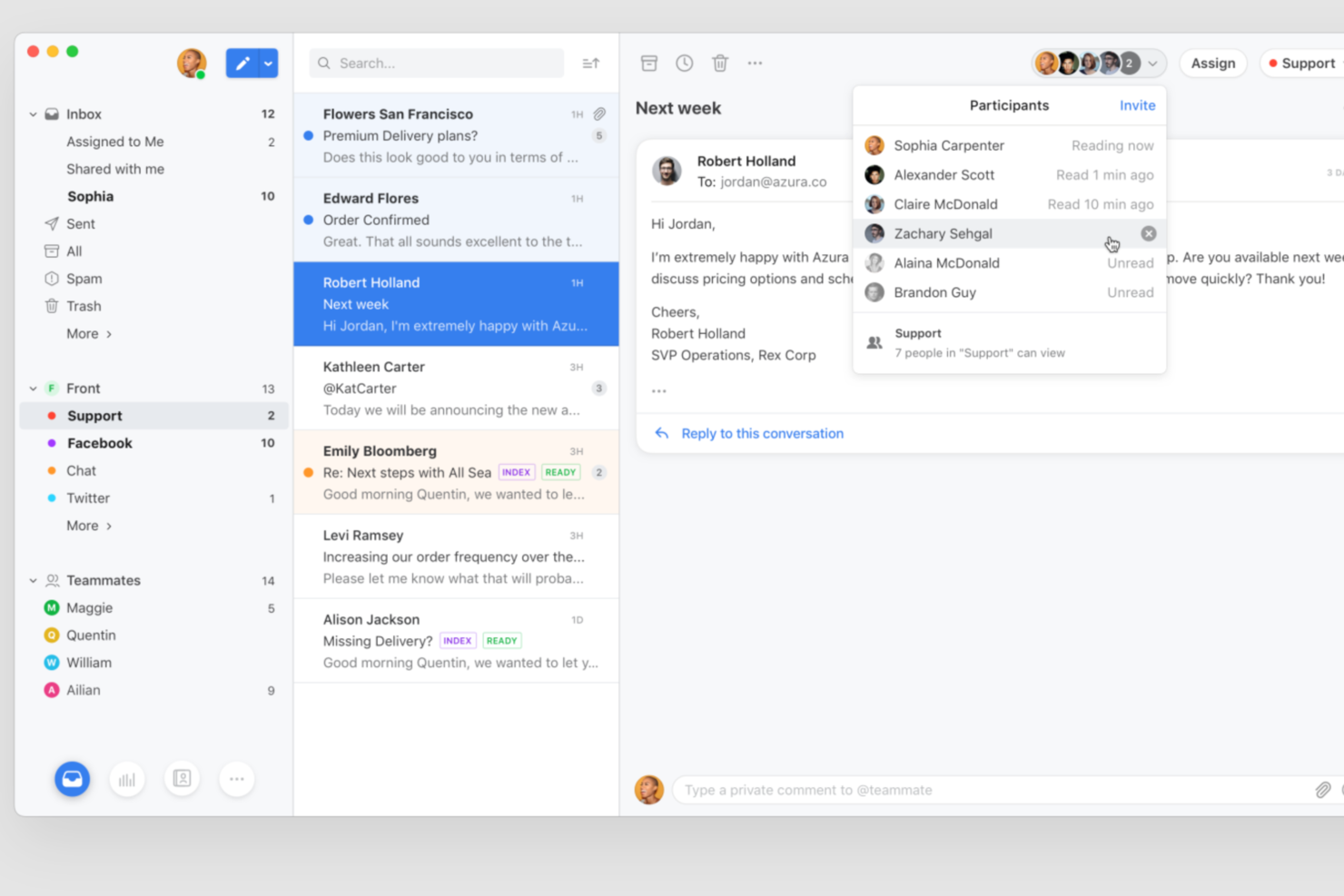
Front brings shared inbox and collaboration features to teams looking for a modern help desk solution. It’s designed for businesses that want to manage customer conversations across email, chat, and social channels in one place. If you need a tool that helps your team organize, assign, and respond to support requests efficiently, Front is worth considering.
Who Is Front Best For?
Front is a good fit for customer support and service teams in small to midsize businesses that need to manage high volumes of customer inquiries across multiple channels.
Why I Picked Front
Quality assurance is a top priority for support teams that want to maintain high standards across every customer interaction. I picked Front because it offers automated ticket quality assurance tools that review conversations for tone, completeness, and adherence to internal guidelines. With features like rule-based quality checks and conversation analytics, teams can quickly identify tickets that need attention or coaching. This automation helps ensure that every response meets your team’s standards without requiring manual review of every ticket.
Front Key Features
Some other features in Front that help teams manage support requests efficiently include:
- Shared inbox management: Organize and assign incoming messages from multiple channels to the right team members in one unified inbox.
- Collision detection: Get real-time alerts when another teammate is viewing or replying to the same conversation to avoid duplicate responses.
- Canned responses: Save and reuse message templates for common questions to speed up replies and maintain consistency.
- Analytics and reporting: Track metrics like response times, conversation volume, and team performance with built-in dashboards and reports.
Front Integrations
Integrations include Salesforce, Slack, Shopify, Aircall, Asana, Pipedrive, Twitter (X), Microsoft Outlook 365, Dialpad, and Todoist.
What's Free?
Front offers a free 14-day trial of its Professional plan. After the trial, continued use requires a paid subscription, and there is no free-forever plan available.
Pros and Cons
Pros:
- AI features for drafting, summarizing, and translation
- Automation rules for ticket routing and tagging
- Shared inbox supports real-time team collaboration
Cons:
- Voice support requires third-party integrations
- Ticketing lacks advanced sorting and export options

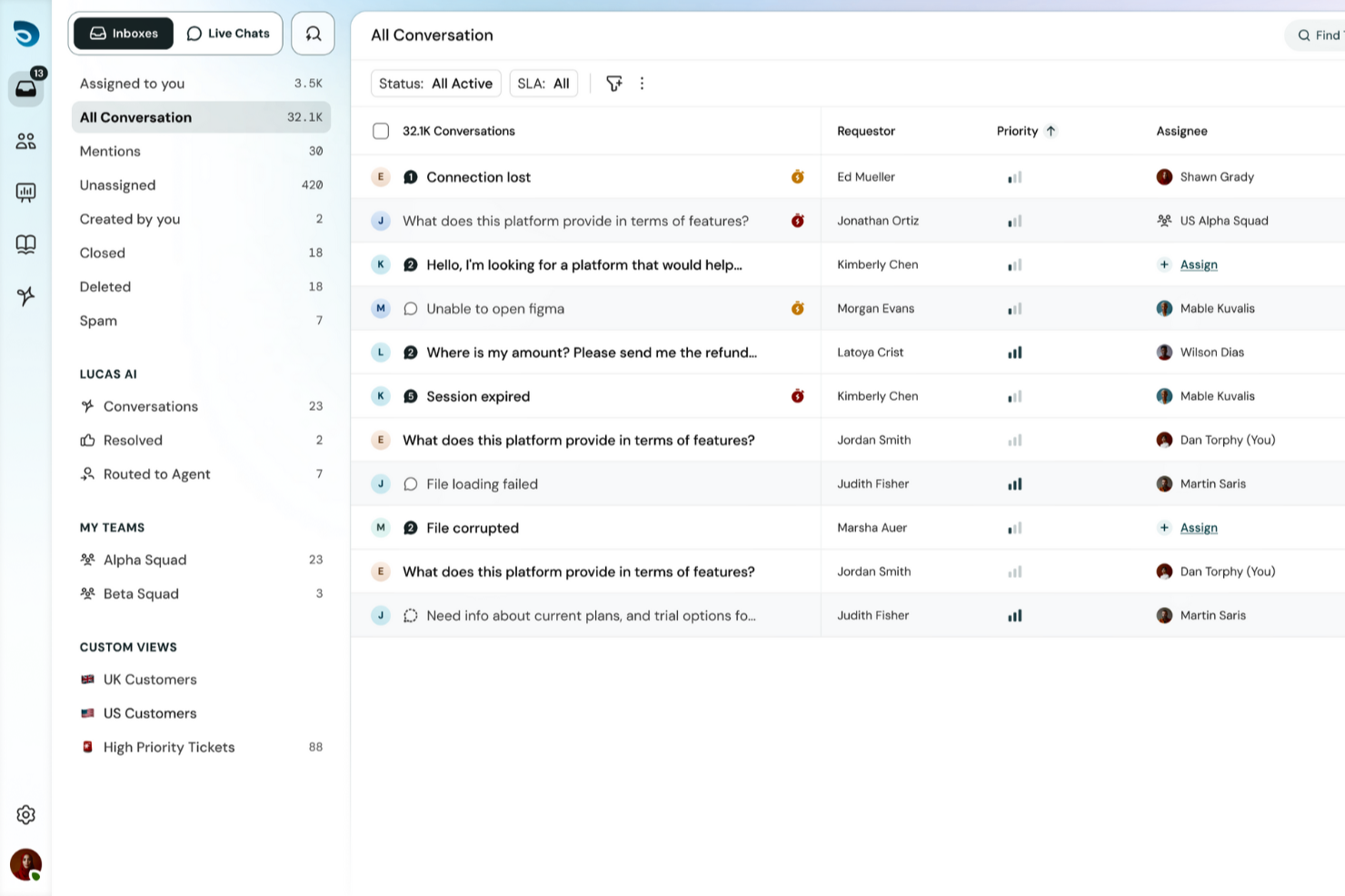
For those seeking a free help desk software solution, SparrowDesk offers an intriguing option with its AI-driven capabilities designed to automate a significant portion of support tickets. If you're a business aiming to enhance customer support efficiency, this platform provides a quick setup and powerful AI agents that can resolve queries instantly, helping you maintain consistency and improve response times. With SparrowDesk, you can tackle the challenges of managing customer interactions across various channels, ensuring a seamless experience for both your team and your customers.
Why I Picked SparrowDesk
I picked SparrowDesk for its unique ability to automate support tickets through AI agents, which is particularly appealing for those looking for free help desk software. This automation not only reduces the workload on your support team but also ensures that customer queries are handled swiftly and accurately. Additionally, the platform's omnichannel communication feature allows you to manage emails and chats within a single inbox, enhancing the efficiency of your support operations. These capabilities make SparrowDesk a strong contender for businesses aiming to streamline their customer support processes.
SparrowDesk Key Features
In addition to its automation and omnichannel communication, I also found the following features noteworthy:
- AI Copilot: Assists agents with instant summaries and context-aware replies, ensuring they have quick access to relevant information.
- Service Level Agreements (SLAs): Allows you to set and track performance metrics to ensure your team meets customer expectations.
- Multilingual Support: Provides the ability to communicate with customers in multiple languages, broadening your reach and improving customer satisfaction.
- Customizable Views: Enables you to tailor the dashboard to fit your specific needs, providing a personalized user experience.
SparrowDesk Integrations
Native integrations are not currently listed by SparrowDesk.
Pros and Cons
Pros:
- SLA tracking supports measurable support performance
- Omnichannel inbox centralizes customer conversations
- AI agents reduce manual ticket handling workload
Cons:
- Native integrations not publicly listed
- No free forever plan available


ServiceDesk Plus is the full-stack service management software for enterprises from ManageEngine. It provides a wide range of IT solutions that support IT service management (ITSM) workflows, no-code customizations, advanced reporting, native integrations, and smart automation.
One of the key features of ServiceDesk Plus is its 13 distinct ITIL4-compatible practices including incident management, change enablement, and request management to help you improve your operations. The software also comes with comprehensive problem management features that provide IT support teams the ability to categorize, analyze, and resolve issues, while also identifying issues that are similar or repetitive so they can close tickets at a much faster pace.
The platform’s change management system is another feature that is designed to help IT teams better implement IT modifications with reduced risk, thanks to more streamlined planning, approval, and implementation processes. ServiceDesk Plus also has an integrated knowledge management system, a virtual assistant feature, and AI capabilities.
On the client side, the platform offers self-service portals where people can create requests and follow up on the status. It also has a live chat for real-time support, a knowledge base where you can record solutions to common problems for users, and help desk mobile apps that can help you get support whenever you need it.
Other capabilities of ServiceDesk Plus include automatic ticket routing, and escalation rule creation to avoid SLA violations.

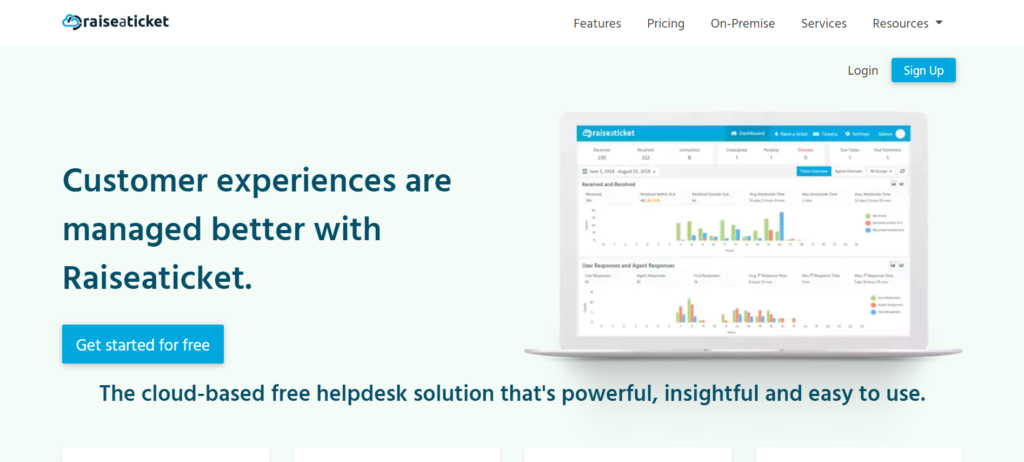
Raiseaticket is a cloud-based help desk platform that organizes communications between customers and support agents. The software offers workflows to eliminate cluttered mailboxes and unaddressed support request issues. It also provides data-driven performance insights, data summarization, and quantifiable metrics.
You can assign tickets to teams or agents, attach files, add notes, and track the time spent on each ticket. Both email and portal-originated communications can be managed through a unified system. Raiseaticket allows you to create different SLAs for different customers.
Raiseaticket offers a free plan that includes a comprehensive range of features.
Other Free Help Desk Software
Here are some additional help desk software options that also offer free plans or trials. While these tools didn’t make it onto my shortlist, they’re still worth checking out:
- ProProfs Help Desk
For a CX shared inbox
- Intercom
Chat widget for websites and apps
- Spiceworks Help Desk
Help desk software for IT teams
- HelpDesk
For collaboration features
- ManageEngine ServiceDesk Plus
For IT support
- Jira Service Management
For advanced customization options
- Odoo Helpdesk
For a kanban view of customer support activity
- Gladly
Help desk solution with advanced telephony features
- ngDesk
For combining sales, support, and marketing
- 14.ai
Intent-aware customer response engine
- Zoho Assist
For providing remote access support
- LiveChat
Free help desk software for call centers
- LiveAgent
For a popular chat widget
- Help Scout
For creating proactive contact automations
- Zendesk
Help desk with advanced service features
- Freshdesk
For integrated ticketing across email and social


Free Help Desk Software Selection Criteria
When selecting the best free help desk software to include in this list, I considered common buyer needs and pain points like budget constraints and ease of use. I also used the following framework to keep my evaluation structured and fair:
Core Functionality (25% of total score)
To be considered for inclusion in this list, each solution had to fulfill these common use cases:
- Ticket management
- Email integration
- Customer interaction tracking
- Knowledge base creation
- Multi-channel support
Additional Standout Features (25% of total score)
To help further narrow down the competition, I also looked for unique features, such as:
- AI-powered chatbot
- Customizable dashboards
- Social media integration
- Mobile app availability
- Multi-language support
Usability (10% of total score)
To get a sense of the usability of each system, I considered the following:
- Intuitive interface
- Easy navigation
- Minimal setup time
- Low learning curve
- Responsive design
Onboarding (10% of total score)
To evaluate the onboarding experience for each platform, I considered the following:
- Availability of training videos
- Interactive product tours
- Comprehensive templates
- Access to webinars
- Supportive chatbots
Customer Support (10% of total score)
To assess each software provider’s customer support services, I considered the following:
- Availability of live chat
- Email support
- Response time
- Community forums
- Knowledge base resources
Value For Money (10% of total score)
To evaluate the value for money of each platform, I considered the following:
- Cost-effectiveness compared to competitors
- Feature set offered for free
- Scalability of the free plan
- Upgrade options
- User limitations on the free plan
Customer Reviews (10% of total score)
To get a sense of overall customer satisfaction, I considered the following when reading customer reviews:
- User satisfaction ratings
- Commonly mentioned pros and cons
- Feedback on customer service
- Frequency of updates
- Ease of use feedback
How to Choose Free Help Desk Software
Complex feature lists and pricing structures can make it hard to figure out what you’re really getting from a free help desk software. To help you stay focused as you work through your software selection process, here are some factors to keep in mind:
| Factor | What to Consider |
|---|---|
| Free Offer Scope | Check what's included in the free plan. Ensure it covers essential features like ticketing and multi-channel support without hidden costs. |
| Scalability | Consider if the software can grow with your team. Look for options that offer seamless upgrades to paid plans as your needs expand. |
| Integrations | Verify compatibility with your existing tools like CRM or email. Seamless integration can save your team time and reduce manual work. |
| Ease of Use | Ensure the interface is intuitive and easy to navigate. A user-friendly design minimizes training time and helps your team get up to speed quickly. |
| Support Options | Evaluate the customer support available for free users. Look for live chat, email support, and comprehensive guides to assist your team when needed. |
| Customization | Determine the level of customization offered. Being able to tailor the software to your workflow can enhance productivity and fit your team's processes. |
| User Limitations | Check if there's a cap on the number of users in the free plan. Ensure it accommodates your team size without forcing an upgrade. |
| Security | Assess the security features provided. Ensure data protection measures like encryption and compliance with industry standards to safeguard customer data. |
What is Free Help Desk Software?
Free help desk software are cloud-based tools that help customer support teams organize, track, and resolve customer requests, but with no monthly costs.
These free SaaS solutions cover the basic help desk features you'd expect, including a ticketing system for tracking issues, basic automation abilities for repetitive tasks, and communication tools that help customer service teams collaborate on tickets or escalate them as needed. They're a cost-friendly way to improve the efficiency of your customer service operations without incurring more monthly costs.
Features
Let’s go over the features commonly found in help desk software, and which ones are usually included in free vs. paid plans.
Typically Free Help Desk Software Features
- Ticket management: Organizes customer inquiries into manageable tickets for easy tracking and resolution.
- Email integration: Connects your email with the help desk tool to streamline communication with customers.
- Knowledge base creation: Allows you to create a repository of FAQs and guides for self-service support.
- Multi-channel support: Enables handling inquiries from various channels like email, chat, and social media.
- Basic reporting: Provides insights into support performance with simple reports on ticket status and response times.
Typically Paid Help Desk Software Features
- Advanced analytics: Offers detailed insights into team performance and customer satisfaction metrics.
- AI-powered chatbot: Automates responses to common questions, freeing up support agents for complex issues.
- Customizable dashboards: Lets you tailor the interface to display key metrics and insights relevant to your team.
- Social media integration: Allows direct management of customer interactions on platforms like Facebook and Twitter.
- Multi-language support: Provides the ability to offer customer support in multiple languages, enhancing global reach.
Benefits
Implementing free help desk software provides several benefits for your team and your business. Here are a few you can look forward to:
- Cost-effective solution: Offers essential support features without the need for a budget, making it ideal for startups and small businesses.
- Improved organization: Ticket management helps keep customer inquiries organized, allowing your team to handle requests more efficiently.
- Enhanced communication: Email integration ensures all customer interactions are in one place, facilitating better communication.
- Self-service options: A knowledge base allows customers to find answers on their own, reducing the load on your support team.
- Quick setup: User-friendly interfaces and easy onboarding mean your team can start using the software with minimal training.
- Scalability: Many tools offer upgrade options, allowing you to scale as your business grows without losing initial data.
- Multi-channel support: Handling inquiries from different platforms ensures no customer query goes unnoticed, enhancing service quality.
Costs and Pricing
I realize you came to this article looking for the best help desk software options that are available for free. However, since free plans only offer limited features, there's a good chance you'll need to scale your plan up in the future.
The table below summarizes common plans, their average prices, and typical features included in help desk software solutions:
Plan Comparison Table for Help Desk Software
| Plan Type | Average Price | Common Features |
|---|---|---|
| Free Plan | $0 | Basic ticket management, email support, and a limited knowledge base. |
| Personal Plan | $5-$25/user/month | Advanced ticketing, basic reporting, and integrations with email and chat platforms. |
| Business Plan | $30-$60/user/month | Customizable dashboards, multi-channel support, and enhanced analytics and reporting capabilities. |
| Enterprise Plan | $70-$100/user/month | AI-powered features, advanced security options, and dedicated account management and support. |
Free Help Desk Software FAQs
Here are the answers to some FAQs about free help desk software.
Can free help desk software integrate with other tools?
Yes, many free help desk tools offer integrations with other software like email platforms and CRMs. These integrations help streamline your team’s workflow by connecting different systems, making it easier to manage customer interactions without switching between applications.
How does free help desk software work?
Free help desk software offers many of the same features as paid help desk software. These tools are often entry-level tiers of plans that extend into higher priced options as you add greater depth of functionality or users. Some of the tools on this list are freemium plans (meaning, free forever), while others offer a free trial for a set amount of time.
How secure is free help desk software?
Free help desk software often includes basic security features like data encryption and secure access controls. However, for more advanced security options, you might need to consider paid plans. Always check the provider’s security policies to ensure they meet your business’s requirements.
Is there a limit to the number of users on free plans?
Most free help desk software solutions have a cap on the number of users or agents. This limit varies by provider, so it’s important to check each tool’s specifications to ensure it suits your team’s size without requiring an upgrade.
What kind of support is available for free users?
Support for free users typically includes access to online resources like FAQs, knowledge bases, and community forums. Some providers might offer email support, but live chat and phone support are usually reserved for paid plans.
Are there customization options in free help desk software?
Free help desk software often provides basic customization options, such as modifying ticket fields or branding the interface. For more extensive customization, you might need to upgrade to a paid plan that allows deeper personalization to fit your business needs.
What's Next?
If you're in the process of researching free help desk software, connect with a SoftwareSelect advisor for free recommendations. You fill out a form and have a quick chat where they get into the specifics of your needs. Then you'll get a shortlist of software to review. They'll even support you through the entire buying process, including price negotiations
And if you found this article helpful, you might also like our blog posts on the best customer support software.