
28 Best Internal Help Desk Software Of 2026

10 Best Internal Help Desk Software Shortlist
Here's my pick of the 10 best software from the 28 tools reviewed.


With so many different internal help desk software available, finding the right one for your needs is tough. You know you want software to help you centralize and resolve your internal support requests and queries, but you need to figure out which system is best. In this article, I'll help you make this choice easier by sharing my insights on the best internal help desk software to track requests, streamline communication, and improve your operational efficiency.
Why Trust Our Software Reviews
Best Internal Help Desk Software Summary
This comparison chart summarizes pricing details for my top internal help desk software selections to help you find the best one for your budget and business needs.
| Tool | Best For | Trial Info | Price | ||
|---|---|---|---|---|---|
| 1 | Best for AI-driven ticketing and support | Free demo + 14-day free trial available | From $19/user/month (billed annually) | Website | |
| 2 | Best for AI-first IT service management | 14-day free trial | Pricing upon request | Website | |
| 3 | Best cloud-based system for customizing interdepartmental services | 15-day free trial + free plan | From $7/user/month (billed annually) | Website | |
| 4 | Best for easy setup | Free plan available | From $25/user/month (billed annually) | Website | |
| 5 | Best for connecting tickets to assets | 30-day free trial available | From $17/user/month | Website | |
| 6 | Best satellite help desk software for managing multiple brands in one location | 30-day free trial | From $12/user/month | Website | |
| 7 | Best for multilingual customer and colleague support | Free demo available | From $24/user/month (billed annually) | Website | |
| 8 | Best for automated service that allows users to speed and scale | Free 14-day trial + free demo available | From $29/user/month (billed annually) | Website | |
| 9 | Best cloud-based help desk for a 360° approach to IT service management | Free demo | Contact for quote | Website | |
| 10 | Best for self-hosted, email-first functionality | Free demo available | $29/month | Website |

-

SupportYourApp
Visit WebsiteThis is an aggregated rating for this tool including ratings from Crozdesk users and ratings from other sites.4.7 -
Freshdesk
Visit WebsiteThis is an aggregated rating for this tool including ratings from Crozdesk users and ratings from other sites.4.4 -
Hiver
Visit WebsiteThis is an aggregated rating for this tool including ratings from Crozdesk users and ratings from other sites.4.6


Best Internal Help Desk Software Review
Below are my detailed summaries of the best internal help desk software that made it onto my shortlist. My reviews offer a detailed look at the key features, pros & cons, integrations, and ideal use cases of each tool to help you find the best one for you.


Freshdesk (a product of Freshworks Inc.) is a help desk platform designed to support teams managing service requests at different scales, including both customer facing and internal support use cases. It provides structured tools that help teams organize requests, track progress, and maintain consistency across support operations.
Why I picked Freshdesk: I picked Freshdesk for how it supports ticket handling for teams managing high volumes of requests. The platform offers built in automation and Freddy AI, which can assist with tasks like categorizing and routing tickets, helping reduce manual effort for internal support teams.
This approach allows agents to spend more time on issues that require deeper investigation or collaboration, rather than repetitive administrative work.
Freshdesk Standout Features & Integrations
Features include customization options, reporting and analytics, self service portals, knowledge bases, SLA management, multi language support, collaboration tools, and a mobile app.
Integrations include Salesforce, Shopify, Slack, Mailchimp, Microsoft Teams, WhatsApp, and other third party tools commonly used across support and operations teams.
Pros and Cons
Pros:
- Automation and workflow management
- Self-service helpdesk
- Robust ticket management features
Cons:
- Multilingual knowledge base limited to higher-tier plans
- Lack of custom reports
New Product Updates from Freshdesk

Freshdesk Enhances Contact Data Management and Social Identity Fields
Freshdesk now lets you manage social handles and handle large contact lists with ease, streamlining customer profiles and data tasks. For more information, visit Freshdesk’s official site.


SysAid is a comprehensive IT Service Management (ITSM) and help desk software platform designed to support IT operations for organizations of various sizes. It provides a broad set of tools that help teams manage IT services, support requests, and infrastructure from a centralized system.
Why I picked SysAid: I picked SysAid because of its strong IT service automation capabilities, which help reduce the amount of manual work required from IT teams. Automation supports tasks such as ticket routing, prioritization, escalation, and workflow execution, allowing incidents and service requests to move through the system more efficiently. This gives IT teams more time to focus on higher-value or strategic work instead of repetitive support tasks.
SysAid also includes self-service functionality that helps end users resolve common issues on their own. Through a self-service portal and knowledge base, employees can find answers, submit requests, or reset issues without directly contacting the IT team, which can help reduce overall ticket volume.
SysAid Standout Features and Integrations
Features include asset management, change management, problem management, incident management, service request management, a knowledge base, reporting and analytics, service level management, remote control, patch management, network discovery and monitoring, IT benchmarking, workflow automation, a service catalogue, and mobile device management.
Integrations include Microsoft Active Directory, LDAP, Microsoft Azure, Microsoft 365, Google Workspace, Salesforce, Jira, Slack, Microsoft Teams, Zapier, Zoom, FreshBooks, QuickBooks, Dropbox, OneDrive, AWS, and VMware.
Pros and Cons
Pros:
- Self-service portal is available
- Comprehensive automation capabilities
- User-friendly interface
Cons:
- Reports could be more customizable
- Set up may require time
New Product Updates from SysAid

SysAid Adds Direct Knowledge Base Linking in Service Records
SysAid now allows linking knowledge base articles directly to service records, enhancing centralized access to information and speeding up issue resolution. For more information, visit SysAid's official site.
 .
.
Best cloud-based system for customizing interdepartmental services

Zoho Desk is a cloud-based platform that helps teams manage customer support operations across departments. It gives your business a shared space to handle service requests, organize communication, and improve response management through automation and contextual data. It’s built to help teams stay coordinated and deliver faster, more personalized resolutions.
Why I picked Zoho Desk: You can tailor Zoho Desk to fit your team’s internal service processes, making it easy to align workflows between departments. The platform lets you automate repetitive actions with blueprints, customize ticket layouts, and define service-level agreements to match your internal policies. You can manage complex approval cycles, track performance through dashboards, and route requests based on department or agent skill. This flexibility helps your team handle cross-department tasks while maintaining visibility and consistency.
Standout features & integrations:
Features include shared ticket ownership for collaborative resolution, AI-powered response suggestions with Zia, and built-in help center customization tools. You can set up multi-brand help centers, create context-aware automation rules, and access performance analytics that show how your team’s service efforts align with internal goals.
Integrations include Zoho CRM, Zoho Books, Zoho Projects, Microsoft Teams, Slack, Google Workspace, Jira, Salesforce, Trello, Shopify, and Zapier.
Pros and Cons
Pros:
- Offers AI tools for faster replies
- Supports internal ticket routing
- Lets you customize workflows easily
Cons:
- AI tools require fine-tuning to stay accurate
- Advanced automation needs training


Hiver is a modern AI-powered help desk platform that can be used for internal support across teams. Whether it’s handling employee IT requests, managing HR queries, or streamlining finance approvals, Hiver gives you a shared inbox that acts as a central hub for all internal support communication.
Why I picked Hiver: Hiver is designed for sleek, modern teams that want to move fast. Given that its email-like interface is familiar to most of us, there isn’t much of a learning curve to the tool. You don’t need extensive training to get started. Setting up the tool only takes a few minutes. It has a shared inbox that acts as the central hub for all employee queries, with built-in ticket tracking to ensure nothing falls through the cracks. Teams can also collaborate easily using private notes, @mentions, and shared drafts, all within the same interface.
Hiver Standout Features and Integrations
Features include approval workflows that make it easy to route requests that require sign-off, like access permissions or budget approvals. You can also set up automation rules to tag, assign, and prioritize tickets based on type, helping your team stay organized without manual effort. SLA tracking ensures timely responses, while a built-in knowledge base lets you document internal processes and policies so employees can find answers on their own.
Integrations include Aircall, Asana, Jira, Okta, QuickBooks, Salesforce, Slack, WhatsApp, and Zapier and 100+ other platforms.
Pros and Cons
Pros:
- AI features embedded at all stages of customer support journey
- Customer support from real humans available 24/7 via chat or email, across all plans (including free one)
- Strong internal collaboration features
Cons:
- Compared to some other platforms, Hiver offers fewer third party integrations
- Mobile experience isn’t as strong as the desktop one
New Product Updates from Hiver

Hiver Introduces AI-Powered Task Creation
Hiver introduces AI-powered task creation for email workflows. This update enables users to extract key details, summarize requests, and trigger actions automatically from incoming emails. For more information, visit Hiver’s official site.
 .
.

InvGate Service Management is an IT service management platform designed to streamline your organization's internal support processes. It offers tools for handling incidents, managing assets, and analyzing performance.
Why I picked InvGate Service Management: I chose InvGate Service Management because of its comprehensive ticket management system. This feature allows your team to organize work based on priority, SLA, and urgency, helping to prevent bottlenecks and ensure timely resolutions. Agents can quickly identify and address tasks that require immediate attention, which is crucial for maintaining smooth internal operations.
Another reason I picked InvGate is its integration with InvGate Asset Management. This connection lets your help desk team access real-time data on the hardware and software assets associated with each ticket. When someone submits an issue, agents can immediately see related asset details like device history, usage patterns, and potential configuration problems.
InvGate Service Management Standout Features & Integrations
Features include knowledge base creation, change management capabilities, service level agreement (SLA) management, gamification elements to motivate agents, workflow customization, approval management, time tracking, customer satisfaction surveys, task management, and multi-department support.
Integrations include FileWave, Lansweeper, Microsoft Teams, Microsoft Active Directory, Azure DevOps, Okta, Office 365, OpenAI, Outlook, and Jira.
Pros and Cons
Pros:
- Rule-based SLA configuration for tracking performance metrics
- Incorporates AI and low-code automation
- Provides a robust platform for incident management
Cons:
- Could offer more native integrations
- No social media ticket support
New Product Updates from InvGate Service Management
InvGate Service Management Enhances Workflows and Usability
InvGate Service Management introduces VSA access from the AI Hub, Microsoft Teams workflow task completion, expanded Okta workflow actions, and custom labels for workflow steps. These updates improve usability and streamline workflow execution across platforms. For more information, visit InvGate Service Management's official site.
 .
.
Best satellite help desk software for managing multiple brands in one location

Vision Helpdesk offers four distinct help desk solutions, including a basic help desk ticketing system for incident or service requests, ITIL/ITSM service desk for IT team needs, live chat software for real-time, multi-company communication, and a satellite help desk option for managing more than one brand in the same location.
With the satellite help desk, Vision Helpdesk offers customer support and IT service desk functionality for multiple products, brands, or companies in one place. However, even with the help desk managing more than one business, the system maintains complete isolation for each category, end user, and staff.
Vision Helpdesk supports SaaS cloud licensing, a recurring license download, and a one-time license download to suit your business needs. Each one has a tiered system based on the number of agents in your organization.
Vision Helpdesk Standout Features and Integrations
Features include incident management, multi-language and time zone capabilities, CMDB asset management, incident billing and time tracking, form builder, and change management. Each type of help desk has some unique features.
Integrations include 2SMS, Active Directory, Clickatell, Clientexec, Drupal, Facebook, Microsoft Office, PayPal, Twitter, and WHMCS. Vision Helpdesk also has iPhone and Android apps.
Pros and Cons
Pros:
- Tons of real-time reports
- Minimal training requirements
- Simple software solution
Cons:
- Report duration is up to three months
- Limited integrations


The HappyFox help desk software integrates customer service and internal support so your business can utilize one tool to manage both aspects of your organization.
No matter which language your team or your customers speak, HappyFox can help with multilingual support in 35 languages. With an automated ticket management system, agents can track support requests from end-users, create internal and external knowledge bases, and provide omnichannel communication through text, email, voice, and social media.
HappyFox is a versatile solution that can provide options for small and medium businesses, large organizations, and enterprise-level needs across a variety of industries, including education, IT services, retail, non-profit, airlines, healthcare, and real estate. They offer discounts for non-profit and educational organizations.
HappyFox Standout Features and Integrations
Features include ticketing system, canned actions, task management, help desk reports, knowledge base, and automations. Users can create a custom FAQ and knowledge base for internal and external needs.
Integrations include Azure, Asana, Jira, Microsoft Teams, Okta, Pipedrive, Salesforce, Slack, WhatsApp, and Wrike. HappyFox has integration compatibility with apps for accounting, automation, business intelligence, bots, CRM, device management, and marketing.
Pros and Cons
Pros:
- Scalable as businesses grow
- Customizable solution
- User-friendly tools
Cons:
- Intensive implementation requirements
- Limited self-training tools

Intercom
Best for automated service that allows users to speed and scale

Intercom is a complete customer service and internal help desk solution that delivers a seamless experience with a blend of automation and human support. This platform offers automated answers to free your team from repetitive questions with chatbots and other AI-powered tools.
With up-leveled support automation through the 24/7 resolution bots, Intercom claims it can help service teams resolve 33% of common questions. Intercom case studies also show that their AI solutions saw a 44% improvement in agent response times. This chatbot is available in different languages and time zones for comprehensive coverage.
Intercom supports companies of all sizes, including early-stage startups, which receive Early Stage Academy at a 95% discount if they qualify. This platform also has solutions for small, mid-market, and enterprise organizations in ecommerce, education, healthcare, and financial services.
Intercom Standout Features and Integrations
Features include AI automation, custom chatbots, shared inboxes, proactive support tools, messenger, email, and SMS communication, help center articles, management tools, surveys, and transactional messaging.
Integrations include Aircall Now, Delighted Inc., Google Calendar, Import, Instagram, Jira Cloud, Marketo, Salesforce, Stripe, and WhatsApp.
Pros and Cons
Pros:
- Great support team
- Intuitive navigation and tools
- Quick and easy to learn
Cons:
- Costly to pay for every service you need
- Piecemeal pricing for add-ons

Best cloud-based help desk for a 360° approach to IT service management

ServiceDesk Plus from ManageEngine is a software solution that combines IT asset and service management with CMDB to deliver enterprise-grade capabilities across all departments, including finance, HR, and facilities. Available on-premises and in the cloud, ServiceDesk Plus is trusted by organizations worldwide.
The holistic approach from ServiceDesk Plus focuses on security through their own data centers with no sub-processors, deep native integrations with a wide spectrum of IT tools, and multi-instance model for clear data and process segregation. This internal help desk solution is currently available in 23 languages.
ServiceDesk Plus delivers flexible editions to suit the maturity level of your business. Choose from a platform that provides a service desk for non-IT teams, an option with ITAM capabilities, and an all-in-one solution for enterprise businesses.
ServiceDesk Plus Standout Features and Integrations
Features include multi-instance management, low-code capabilities for customization, incident management, asset management, service catalog, IT release management, space management, and change management.
Integrations include Jira, Microsoft Outlook, Microsoft Teams, Office 365, TeamViewer, Zoho Cliq, Zoho Flow, and Zoho Voice. Developers can use public, web-based APIs to integrate with ServiceDesk Plus.
Pros and Cons
Pros:
- Great customer service
- Robust administrative automations
- Infinitely configurable
Cons:
- Custom configurations require an investment
- Missing some minor functionalities

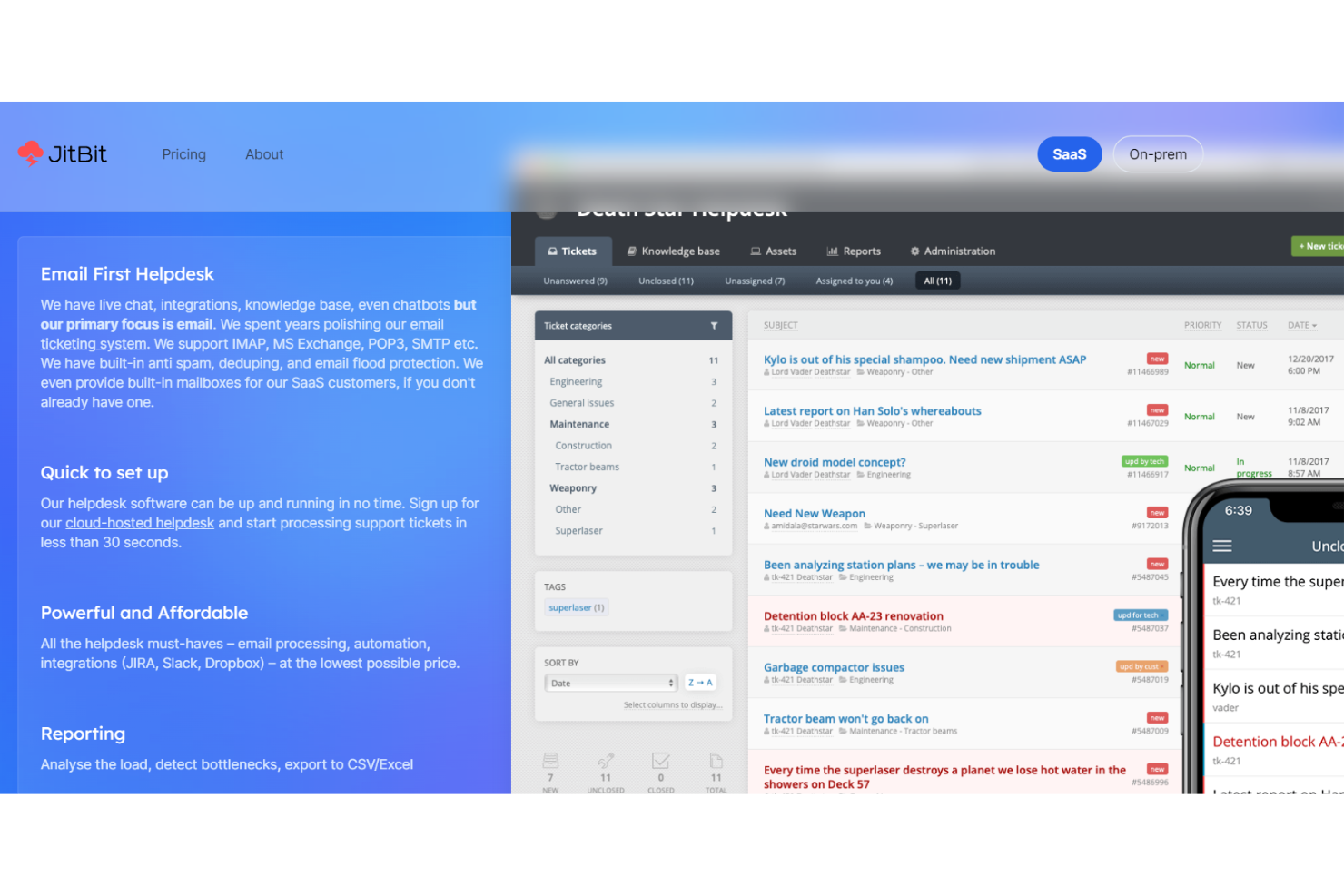
With the JitBit help desk software, companies can utilize a support system that has all the basic features you need, including ticket routing, filters, and categorization, as well as native Android and iPhone apps, multilingual capabilities, and automated/canned replies.
While JitBit has live chat, chatbots, and a variety of communication integrations, they primarily focus on email, polishing their email ticketing system to ensure it supports IMAP, POP3, MS Exchange, and SMTP. The platform also has built-in de-duping, anti-spam, and email flood protection.
JitBit has both SaaS and on-premise, self-hosting platform options that provide tiered selections for businesses of all sizes, including single-agent operations and enterprise-level organizations. They recommend SaaS for more versatility for your team members.
Jitbit Standout Features and Integrations
Features include SLA management, ticket collaboration, team mailbox, knowledge base management, customizable fields, email templates, user and role access management, real-time chat, reporting, and self-service portal.
Integrations include Asana, Basecamp, Dropbox for Business, GitHub, Google Drive, Jira Slack, Trello, WordPress, and Zapier. Jitbit offers over 500 applications.
Pros and Cons
Pros:
- Affordable SaaS option
- Intuitive user interface
- Simple platform with a short learning curve
Cons:
- No dashboard visibility
- Mobile app isn’t as functional as the desktop version
Other Internal Help Desk Software
Here are some additional internal help desk software options that didn’t make it onto my shortlist, but are still worth checking out:
- Kayako
For viewing internal interactions with colleagues
- Issuetrak
For omnichannel ticket submission
- Guru
For self-serve in existing workflows
- Document360
For building decision trees
- Freshservice
For IT support with integrated collaboration tools
- Zoho Assist
For remote support training
- LiveAgent
For multilingual support
- monday service
For no-code customization
- Help Scout
For growing teams and scaling businesses
- Zendesk
For centralized HR and IT support
- OneDesk
For help desk needs through web, cloud, and mobile app
- ProProfs Help Desk
Help desk platform for single-inbox ticket management
- Gorgias
Help desk for internal management of ecommerce businesses
- Front
Help desk software for centralizing messaging across all channels
- Jira Service Management
IT service solution to manage multiple departments
- Zoho Desk
Cloud-based system for customizing interdepartmental services
- HubSpot Help Desk
For organizing incoming tickets through chat and email
- Mojo IT Helpdesk
Service platform for centralizing IT and maintenance requests


Internal Help Desk Software Selection Criteria
When selecting the best internal help desk software to include in this list, I considered common buyer needs and pain points like improving ticket resolution time and integrating with existing systems. I also used the following framework to keep my evaluation structured and fair:
Core Functionality (25% of total score)
To be considered for inclusion in this list, each solution had to fulfill these common use cases:
- Ticket management
- Knowledge base creation
- Reporting and analytics
- Multi-channel support
- Automated workflows
Additional Standout Features (25% of total score)
To help further narrow down the competition, I also looked for unique features, such as:
- AI-driven ticket routing
- Customizable dashboards
- Self-service portals
- Advanced security options
- Mobile app accessibility
Usability (10% of total score)
To get a sense of the usability of each system, I considered the following:
- Intuitive interface design
- Ease of navigation
- Customization options
- Speed of task completion
- User feedback mechanisms
Onboarding (10% of total score)
To evaluate the onboarding experience for each platform, I considered the following:
- Availability of training videos
- Interactive product tours
- Access to onboarding templates
- Chatbot assistance
- Webinars and live demos
Customer Support (10% of total score)
To assess each software provider’s customer support services, I considered the following:
- 24/7 support availability
- Multiple support channels
- Response time
- Quality of support documentation
- Availability of a dedicated account manager
Value For Money (10% of total score)
To evaluate the value for money of each platform, I considered the following:
- Competitive pricing
- Features offered at each price tier
- Flexibility in pricing plans
- Discounts for annual subscriptions
- Free trial availability
Customer Reviews (10% of total score)
To get a sense of overall customer satisfaction, I considered the following when reading customer reviews:
- Overall satisfaction ratings
- Commonly mentioned pros and cons
- Feedback on customer support
- Comments on ease of use
- Frequency of software updates and improvements
How to Choose Internal Help Desk Software
It’s easy to get bogged down in long feature lists and complex pricing structures. To help you stay focused as you work through your unique software selection process, here’s a checklist of factors to keep in mind:
| Factor | What to Consider |
|---|---|
| Scalability | Can the software grow with your business? Consider how many users it can support and if it can handle an increasing number of tickets efficiently. |
| Integrations | Does it connect with your existing tools like CRM or email systems? Check for native integrations to avoid costly custom setups. |
| Customizability | Can you tailor the software to fit your workflows? Look for options to adjust ticket fields, dashboards, and reports to match your processes. |
| Ease of use | Is the interface intuitive for your team? Avoid tools with a steep learning curve that could slow down adoption and productivity. |
| Implementation and onboarding | How quickly can you get started? Evaluate the availability of guides, tutorials, and support to ease the transition. |
| Cost | Does the pricing fit your budget? Compare different pricing models and watch for hidden fees like add-ons or extra support charges. |
| Security safeguards | Does it meet your security standards? Look for features like data encryption and access controls to protect sensitive information. |
| Support availability | How accessible is help when you need it? Consider the vendor's support hours, response times, and available channels like chat or phone. |
What Is Internal Help Desk Software?
Internal help desk software is a tool that helps businesses manage and resolve internal IT support requests. IT professionals and customer support teams typically use these tools to improve efficiency and response times. Ticket management, knowledge base creation, and multi-channel support features help with organizing requests and providing quick solutions. Overall, these tools enhance team productivity and ensure consistent support within an organization.
Features
When selecting internal help desk software, keep an eye out for the following key features:
- Ticket management: Organizes and prioritizes support requests to ensure timely resolution and efficient workflow.
- Knowledge base: Provides a centralized repository of information and solutions for common issues, reducing repeat queries.
- Multi-channel support: Allows handling of requests from various communication channels like email, chat, and phone in one place.
- Automated workflows: Streamlines repetitive tasks and processes, freeing up time for more complex issues.
- Customizable dashboards: Offers tailored views and metrics to monitor performance and track key support metrics.
- Integration capabilities: Connects with existing systems such as CRM or email to provide a seamless experience.
- Security safeguards: Protects sensitive data with features like encryption and access controls.
- Reporting and analytics: Delivers insights into support operations, helping teams to identify trends and improve service quality.
- Self-service portals: Empowers users to find solutions independently, reducing the burden on support teams.
- Mobile app accessibility: Enables support teams to manage and respond to requests on-the-go, ensuring continuous service.
Benefits
Implementing internal help desk software provides several benefits for your team and your business. Here are a few you can look forward to:
- Improved efficiency: Automates repetitive tasks and organizes requests, helping your team resolve issues faster.
- Enhanced communication: Centralizes interactions from different channels, ensuring nothing gets missed and improving response times.
- Increased productivity: Frees up team members to focus on complex issues by providing self-service options and knowledge bases for common questions.
- Better data security: Protects sensitive information with security features like encryption and access controls.
- Insightful analytics: Offers data-driven insights into support operations, enabling informed decision-making and service improvements.
- Scalability: Supports growing teams and increasing request volumes, adapting to your business needs over time.
- User empowerment: Provides tools like self-service portals, allowing users to solve problems independently and reduce the load on support staff.
Costs & Pricing
Selecting internal help desk software requires an understanding of the various pricing models and plans available. Costs vary based on features, team size, add-ons, and more. The table below summarizes common plans, their average prices, and typical features included in internal help desk software solutions:
Plan Comparison Table for Internal Help Desk Software
| Plan Type | Average Price | Common Features |
|---|---|---|
| Free Plan | $0 | Basic ticket management, limited reporting, and community support. |
| Personal Plan | $5-$25/user/month | Ticket management, basic reporting, email support, and a small knowledge base. |
| Business Plan | $30-$60/user/month | Advanced reporting, multi-channel support, integrations, and automation features. |
| Enterprise Plan | $70-$150/user/month | Customizable dashboards, priority support, advanced security, and comprehensive analytics. |
Internal Help Desk Software FAQs
Here are some answers to common questions about internal help desk software:
What is the difference between internal and external help desk software?
Internal help desk software is designed to manage and support internal IT requests and issues within an organization, while external help desk software focuses on customer support and service for people outside the company. Internal systems often integrate with company-specific tools and handle employee queries, whereas external systems are tailored to customer service, often featuring CRM integrations and customer-facing portals.
Can internal help desk software be used by non-IT teams?
Yes, internal help desk software can be adapted for use by non-IT teams such as HR or facilities management. These teams can use the software to manage internal requests like onboarding new employees or handling office maintenance issues. The flexibility of these tools allows various departments to customize workflows, ensuring efficient request handling across the organization.
Is it necessary to train staff on new help desk software?
Yes, training is essential when implementing new help desk software to ensure your team can use the tool effectively. Proper training helps staff understand how to log requests, manage tickets, and utilize features like reporting and analytics. Investing time in training upfront can lead to better adoption, making your team more efficient in the long run.
What’s Next:
If you're in the process of researching internal help desk software, connect with a SoftwareSelect advisor for free recommendations.
You fill out a form and have a quick chat where they get into the specifics of your needs. Then you'll get a shortlist of software to review. They'll even support you through the entire buying process, including price negotiations.