

10 besten Tools zur Überwachung digitaler Erlebnisse für 2026

10 Die besten Tools zur Überwachung der digitalen Nutzererfahrung


Tools zur Überwachung der digitalen Nutzererfahrung (DEM) helfen Ihnen, in Echtzeit zu verfolgen und zu optimieren, wie Nutzer mit Ihren digitalen Kanälen interagieren. Wenn Sie mit Leistungsproblemen, Kundenabbrüchen oder einer eingeschränkten Sichtbarkeit digitaler Nutzerpfade zu tun haben, können DEM-Tools Ihnen helfen, Probleme schneller zu erkennen und reibungslosere, zuverlässigere Nutzererfahrungen zu schaffen.
In diesem Artikel greife ich auf meine persönlichen Erfahrungen bei der Recherche und beim Testen führender CX-Software zurück, um die besten Tools zur Überwachung der digitalen Nutzererfahrung zur Optimierung der Nutzerzufriedenheit und der digitalen Zuverlässigkeit zu bewerten.
Warum Sie unseren Software-Empfehlungen vertrauen können
Unser Team testet und bewertet Software seit 2012. Als CX-Führungskräfte selbst wissen wir, wie schwierig – und wichtig – es ist, die richtige Software auszuwählen.
Für diesen Leitfaden haben wir Tools mithilfe von praktischen Tests und unabhängiger Recherche bewertet und dabei unsere Bewertungskriterien angewendet.
Unsere Bewertungen spiegeln unser menschliches redaktionelles Urteilsvermögen wider, keine Verkaufsstrategie.
Die 20 besten Tools zur Überwachung der digitalen Nutzererfahrung: Preisvergleich
Diese Vergleichstabelle fasst grundlegende Informationen zu jeder meiner ausgewählten Top-Lösungen für die Überwachung der digitalen Nutzererfahrung zusammen. Sie können Preisinformationen sowie die Verfügbarkeit kostenloser Testversionen oder Demos direkt nebeneinander einsehen, um das beste Tool für Ihr Budget und Ihre geschäftlichen Anforderungen zu finden.
| Tool | Best For | Trial Info | Price | ||
|---|---|---|---|---|---|
| 1 | Am besten für Echtzeit-Website-Monitoring | Kostenlose Testversion + Demo verfügbar | Ab $9/Monat (jährliche Abrechnung) | Website | |
| 2 | Am besten für Full-Stack-Observability | 30-tägige kostenlose Testversion + kostenlose Demo + kostenloser Tarif verfügbar | Ab $199/Jahr | Website | |
| 3 | Am besten geeignet für gezielte Umfragen basierend auf spezifischen Auslösern | 14-tägige kostenlose Testphase + kostenloser Tarif + kostenlose Demo verfügbar | Ab $25/Monat (jährliche Abrechnung) | Website | |
| 4 | Am besten geeignet für Echtzeit-Einblicke in das Nutzerverhalten | Kostenlose Demo verfügbar | Preise auf Anfrage | Website | |
| 5 | Am besten für die Überwachung der Betriebszeit und Leistung von Webanwendungen geeignet | 30-tägige kostenlose Testversion + Demo verfügbar | Ab $10/Monat | Website | |
| 6 | Am besten für Echtzeit-Session-Replay | Kostenlose Demo verfügbar | Preise auf Anfrage | Website | |
| 7 | Am besten für Application Performance Management geeignet | Kostenlose Testversion verfügbar | Preis auf Anfrage | Website | |
| 8 | Am besten geeignet für Software-Analysen | Kostenloser Tarif + kostenlose Demo verfügbar | Preise auf Anfrage | Website | |
| 9 | Am besten geeignet für End-to-End-Diagnostik von Code bis zur Benutzersitzung | 14-tägige kostenlose Testphase + Demo verfügbar | Ab $40/100.000 Fehler/Monat (jährliche Abrechnung) | Website | |
| 10 | Am besten für das Customer Success Management geeignet | Kostenlose Demo verfügbar | Preis auf Anfrage | Website |
Übersicht über die 20 besten Tools zur Überwachung der digitalen Nutzererfahrung
Damit Sie das passende Tool zur Überwachung der digitalen Nutzererfahrung finden, habe ich detaillierte Zusammenfassungen meiner 20 besten Empfehlungen bereitgestellt und erläutert, warum ich jede Option in diese Liste aufgenommen habe. Außerdem habe ich ihre bemerkenswerten Funktionen, Vor- & Nachteile sowie die besten Einsatzmöglichkeiten hervorgehoben, damit Sie die beste Option für Ihre Anforderungen finden.
Darüber hinaus habe ich unten einige zusätzliche Optionen aufgeführt, falls Sie noch mehr Auswahlmöglichkeiten in Betracht ziehen möchten.

Site24x7
Am besten für Echtzeit-Website-Monitoring
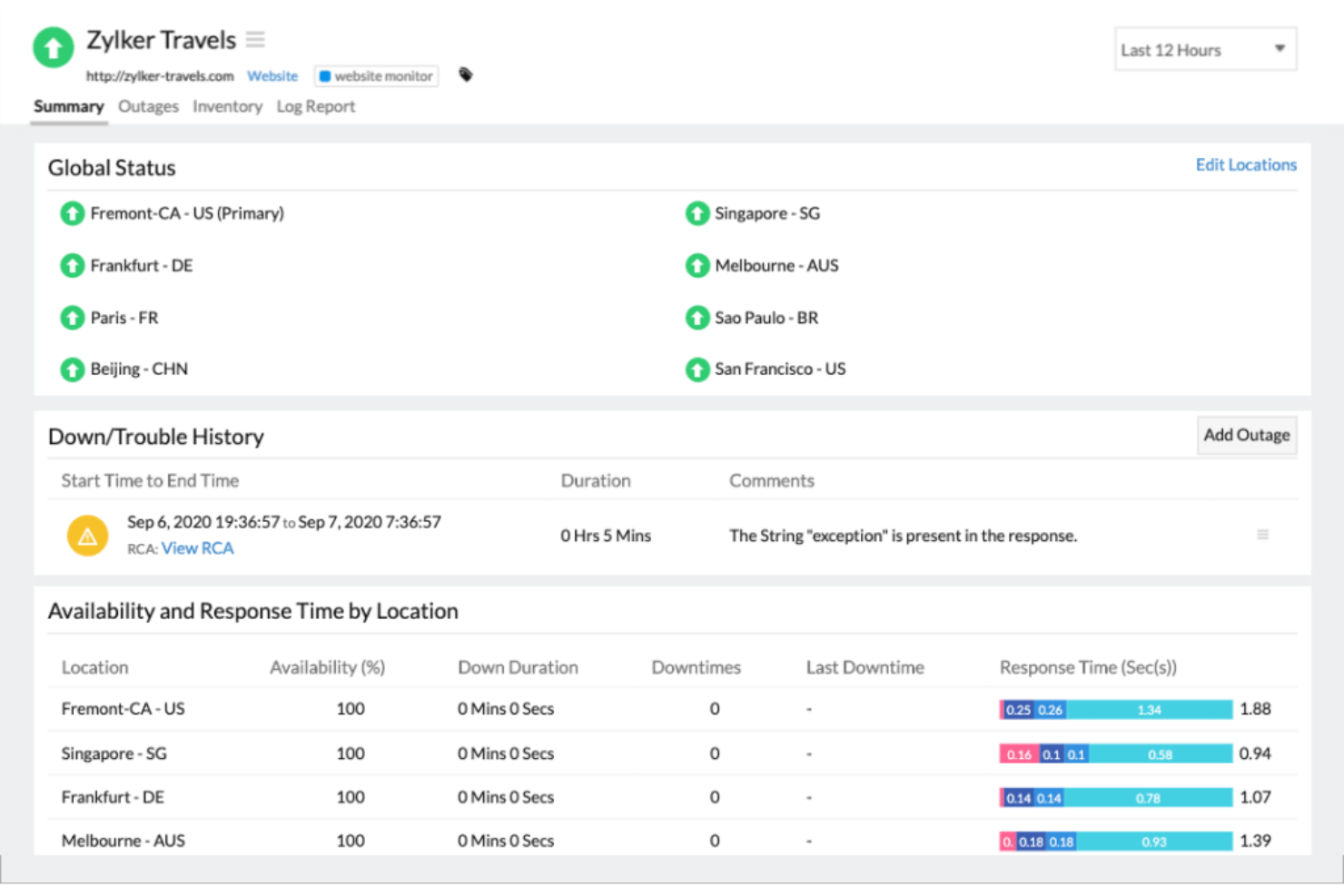
Site24x7 bietet eine dynamische Lösung, die speziell für Unternehmen entwickelt wurde, die Benutzerinteraktionen und Anwendungsleistung optimieren möchten. Dieses Tool liefert Echtzeit-Einblicke durch synthetisches und echtes Benutzer-Monitoring, adressiert Performance-Herausforderungen und sorgt für nahtlose digitale Abläufe. Dank umfassender Integrationsmöglichkeiten und dem Fokus auf Nutzerzufriedenheit hebt sich Site24x7 als vielseitige Wahl für IT-Teams hervor, die digitale Umgebungen proaktiv managen und verbessern möchten.
Warum ich Site24x7 gewählt habe
Ich habe Site24x7 aufgrund seiner unerreichten Echtzeit-Website-Monitoring-Fähigkeiten gewählt, die für Unternehmen, die optimale digitale Erlebnisse sicherstellen möchten, entscheidend sind. Die Funktion des synthetischen Monitorings ermöglicht es, Benutzerinteraktionen zu simulieren und Transaktionsabläufe zu überwachen, wodurch detaillierte Einblicke in Leistungsengpässe gewonnen werden. Darüber hinaus bietet das Echtzeit-Benutzer-Monitoring (RUM) eine umfassende Sicht auf die tatsächlichen Nutzererfahrungen auf Web- und Mobilplattformen, sodass Sie Probleme, die die Kundenzufriedenheit beeinträchtigen, gezielt beheben können. Mit dem globalen Monitoring von über 130 Standorten stellt Site24x7 sicher, dass die Verfügbarkeit und Leistung Ihrer Website kontinuierlich überwacht werden – ein unverzichtbares Werkzeug für alle, die ihre digitale Präsenz stärken möchten.
Site24x7 Hauptfunktionen
Zusätzlich zu den Echtzeit-Website-Monitoring-Fähigkeiten bietet Site24x7 eine Reihe von Funktionen, die das Monitoring des digitalen Erlebnisses verbessern.
- Log-Management: Zentralisiert die Protokollerfassung und -analyse und bietet einen effizienten Ansatz zur Fehlerbehebung und Identifizierung von Problemen innerhalb Ihrer digitalen Infrastruktur.
- Netzwerküberwachung: Bietet eine umfassende Überwachung der Netzwerkleistung, einschließlich Konfigurations- und IP-Management, sodass Ihr Netzwerk gesund und effizient bleibt.
- Application Performance Monitoring (APM): Liefert Einblicke in die Anwendungsintegrität und Benutzerpfade und unterstützt Sie dabei, Nutzererfahrungen auf verschiedenen Plattformen zu verstehen und zu verbessern.
- AIOps: Nutzt künstliche Intelligenz zur Anomalieerkennung und IT-Automatisierung, damit Ihr Team potenzielle Probleme proaktiv angehen kann, bevor sie sich auf das Nutzererlebnis auswirken.
Site24x7 Integrationen
Integration unter anderem mit ServiceNow, PagerDuty, Jira, Slack, Microsoft Teams, Zoho Flow, Zapier, Opsgenie, ManageEngine und Freshdesk.
Pros and Cons
Pros:
- All-in-One-Plattform für vielfältige Monitoring-Funktionen
- Benutzerfreundliche Oberfläche erleichtert Navigation und Dateninterpretation
- KI-gestützte Anomalieerkennung verbessert die proaktive Problemerkennung
Cons:
- Eingeschränkter Offline-Zugriff auf Monitoringdaten beeinträchtigt die Flexibilität
- Komplexe Datenaufbereitung kann für Nicht-Techniker herausfordernd sein
New Product Updates from Site24x7
Site24x7 Adds Compliance Reports and Domain Squatting Detection
Site24x7’s Digital Risk Analyzer now offers domain compliance assessment and squatting detection to help you validate security posture, compare domains, and spot impersonation risks faster. For more information, visit Site24x7’s official site.
 .
.
Am besten für Full-Stack-Observability
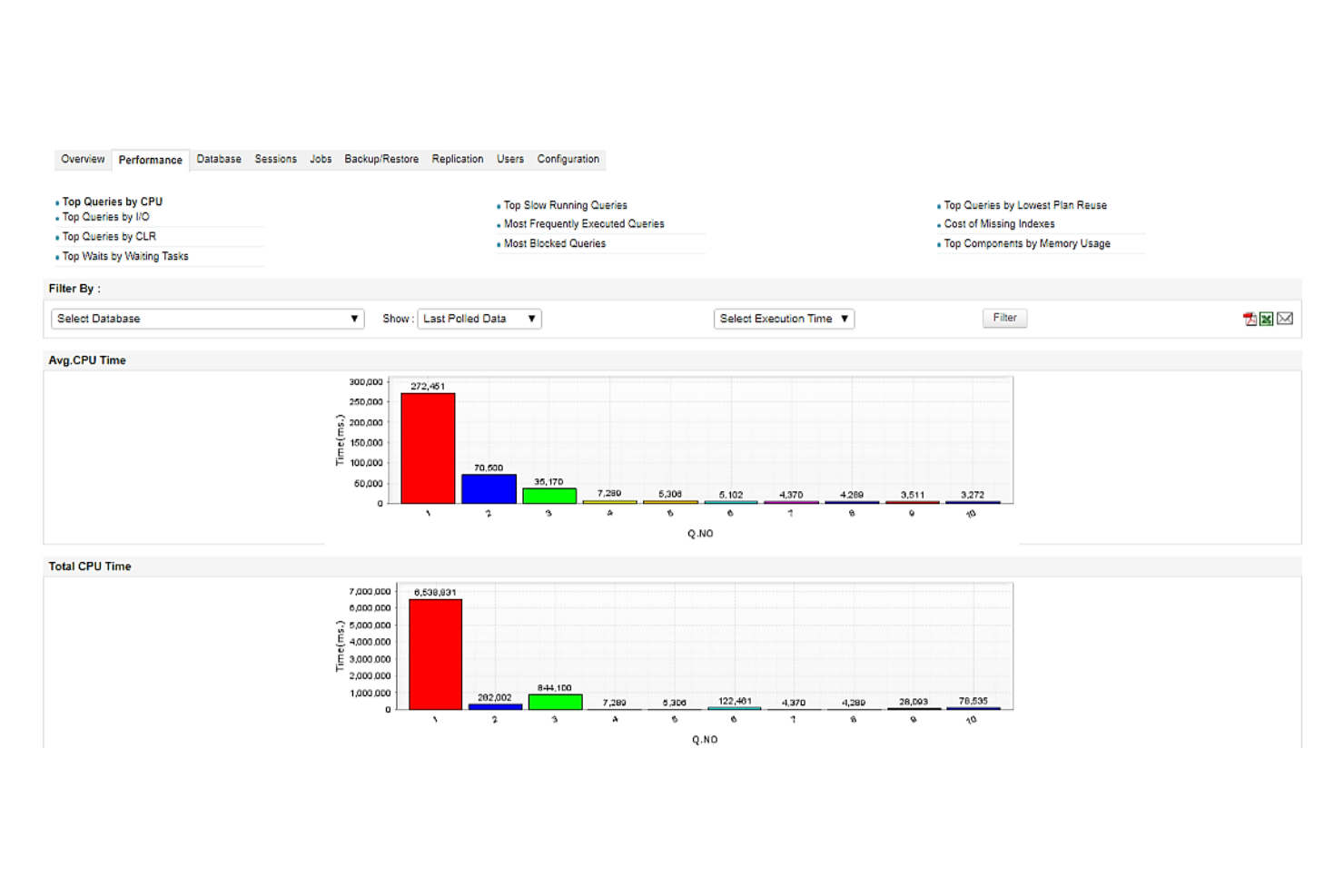
ManageEngine Applications Manager ist eine umfassende IT-Infrastruktur- und Anwendungs-Performance-Monitoring-Lösung (APM), die für die Überwachung digitaler Nutzererlebnisse entwickelt wurde. Sie ermöglicht es Unternehmen, Anwendungen, Server, Datenbanken, Container und mehr zu überwachen—und so optimale Leistung und reibungslose Endnutzererfahrungen sicherzustellen. Die Plattform bietet tiefe Diagnosen, Einblicke in das tatsächliche Nutzerverhalten und Multi-Layer-Observability für über 150 unterstützte Technologien.
Warum ich ManageEngine Applications Manager ausgewählt habe: Ich habe mich für ManageEngine Applications Manager entschieden, weil es eine End-to-End-Transparenz über die Anwendungsperformance bietet. Die Kombination aus synthetischem Transaktionsmonitoring, Real-User-Monitoring (RUM) und KI-gestützten Smart-Alerts ermöglicht IT-Teams, Leistungsprobleme proaktiv zu erkennen und zu beheben. Besonders hervorzuheben ist auch die robuste Unterstützung containerisierter Umgebungen, ERP-Systeme und Cloud-nativer Architekturen.
Hervorstechende Funktionen: Das Application Performance Monitoring bietet detaillierte Diagnosen über gängige Technologie-Stacks hinweg, sodass Teams die Gesundheit der Anwendungen aufrechterhalten und Engpässe beheben können. Das Real-User-Monitoring erfasst echte Endnutzerinteraktionen, um die Zufriedenheit zu messen und Latenzen zu identifizieren. Synthetisches Monitoring simuliert Nutzerreisen, um proaktiv Probleme an globalen Endpunkten zu erkennen.
Zielbranchen: Unternehmens-IT, Banken, Gesundheitswesen, E-Commerce, öffentlicher Sektor und Telekommunikation.
Besonderheiten: Full-Stack-Observability, Anwendungsleistungsüberwachung, Cloud- und Container-Monitoring, Analysen der digitalen Nutzererfahrung und KI-gesteuerte Alarmierung.
Pros and Cons
Pros:
- Überwacht Microservices wie Docker, Kubernetes
- Integrierte Berichtswerkzeuge
- Ermöglicht die Konfiguration von Alarmen auf verschiedenen Ebenen
Cons:
- Ersteinrichtung und Konfiguration können komplex sein
- Veraltete, umständliche Benutzeroberfläche
New Product Updates from ManageEngine Applications Manager
ManageEngine Applications Manager Adds AppLogs Alerting and Query Tools
ManageEngine Applications Manager adds AppLogs Alerting, advanced query operators, and new AppLogs Explorer visualizations. These updates help teams monitor log activity, refine searches, and analyze trends more efficiently. For more information, visit ManageEngine Applications Manager’s official site.
 .
.
Am besten geeignet für gezielte Umfragen basierend auf spezifischen Auslösern
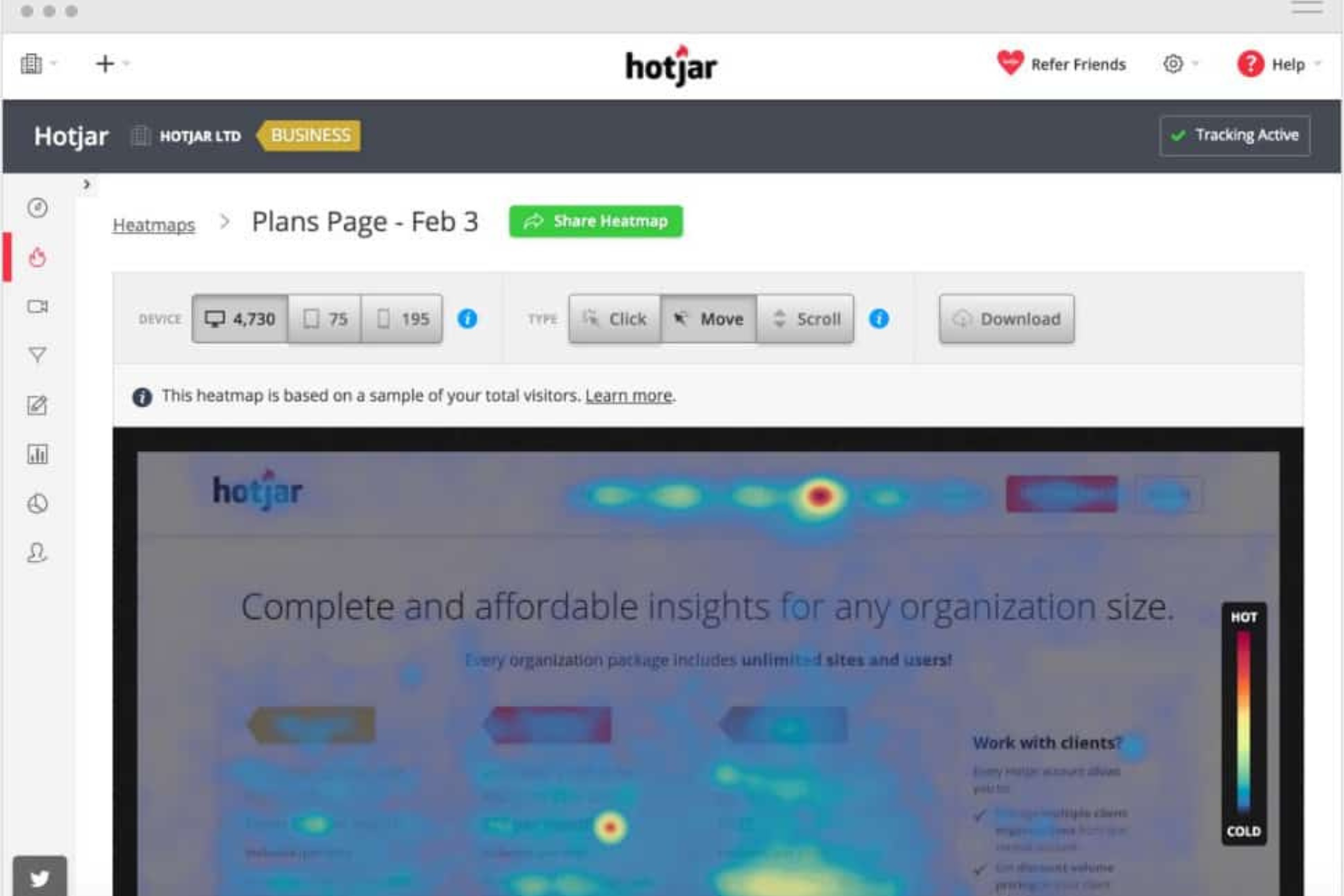
Mouseflow ist ein Tool zur Verhaltensanalyse, das Unternehmen dabei hilft, Nutzungstrends zu erkennen und auszuwerten. Durch die Erfassung detaillierter Nutzerdaten ermöglicht Mouseflow Einblicke, wie Nutzer mit Websites und Anwendungen interagieren. Es bietet eine Vielzahl von Funktionen, einschließlich Session Replay, Heatmaps, Trichteranalysen, Formularanalysen und Tools für Nutzerfeedback.
Warum ich Mouseflow gewählt habe: Das Nutzerfeedback-Tool ist darauf ausgelegt, in Echtzeit Rückmeldungen von Benutzern über gezielte Umfragen und Befragungen einzuholen. Mit dieser Funktion können Unternehmen wertvolle Einblicke direkt von ihrer Zielgruppe sammeln, was das Verständnis für die Bedürfnisse und Vorlieben der Benutzer erleichtert. Die intuitive Benutzeroberfläche von Mouseflow ermöglicht die Erstellung verschiedener Umfragearten, darunter Multiple-Choice-Fragen, Bewertungsskalen und offene Fragen.
Mir gefällt außerdem, dass das Nutzerfeedback-Tool von Mouseflow Umfragen basierend auf dem Nutzerverhalten auslösen kann. Das bedeutet, dass Unternehmen Umfragen so einrichten können, dass sie zu bestimmten Momenten während der Nutzerreise erscheinen — etwa nach dem Abschluss eines Kaufs oder wenn ein Warenkorb abgebrochen wird.
Was gibt es kostenlos? Mouseflow bietet einen kostenlosen Tarif, der viele der Kernfunktionen enthält. Darüber hinaus gibt es eine 14-tägige Testphase, die sowohl Basis- als auch erweiterte Funktionen umfasst, wie 500 Sitzungen, 1 Website-Projekt und Zugriff auf Heatmaps, Trichter, Formulare und Feedback.
Herausragende Funktionen & Integrationen:
Funktionen umfassen Session Replay, Heatmaps, Trichteranalysen, Formular-Analysen, Seiten-zu-Seiten-Tracking, Fehlerverfolgung, Mapping der Nutzerreise, Feedback-Widgets, Klick- und Scroll-Tracking, erweiterte Filterfunktionen, Echtzeitüberwachung und Optionen zum Datenexport.
Integrationen umfassen Omniconvert, Adobe Target, AB Tasty, Convert Experiences, BigCommerce, WooCommerce, Shopify, Intercom, HubSpot, Google Analytics, Google Tag Manager, Zendesk, WordPress, Wix, Kissmetrics und weitere.
Pros and Cons
Pros:
- Gute Sitzungsaufzeichnung und Heatmap-Funktionen
- Aussagekräftige Formularanalysen
- Möglichkeit, das Verhalten über die gesamte Nutzerreise hinweg zu verfolgen
Cons:
- Fehlende A/B-Testfunktionen
- Könnte mehr Anpassungsmöglichkeiten bieten

Am besten geeignet für Echtzeit-Einblicke in das Nutzerverhalten
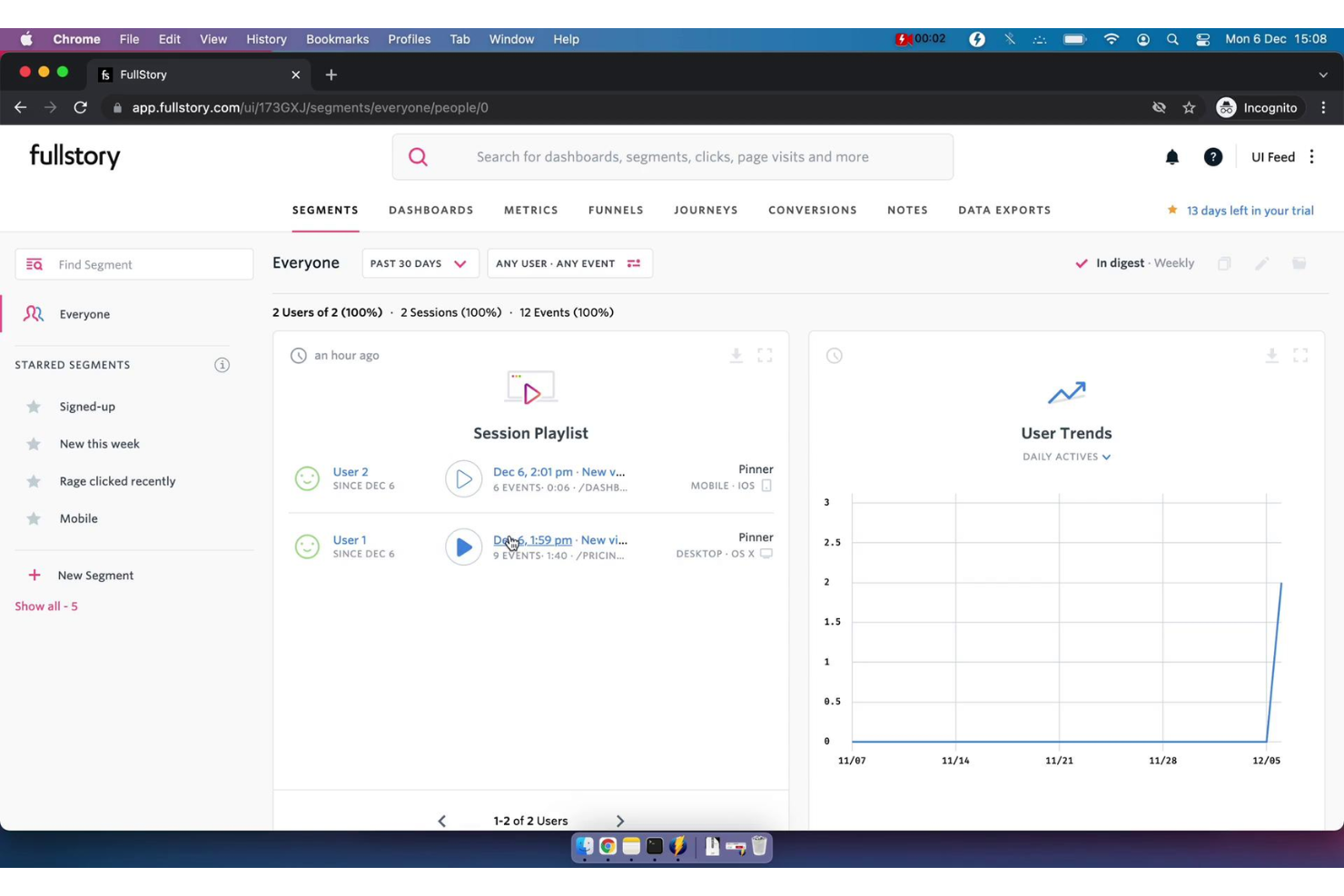
FullStory ist eine Plattform zur Analyse von Verhaltensdaten, die Unternehmen Einblicke in Nutzerinteraktionen und -stimmungen durch Echtzeit-Datenvisualisierung bietet. Sie hilft Technologieverantwortlichen, bessere, fundiertere und kundenorientierte Entscheidungen zu treffen, indem sie digitale Verhaltensdaten in den Analytics-Stack integriert und qualitativ hochwertige Verhaltensdaten in großem Umfang bereitstellt.
Warum ich FullStory gewählt habe: Meiner Meinung nach sticht FullStory durch sein fortschrittliches Funktionspaket hervor, das darauf ausgelegt ist, das Benutzererlebnis zu verbessern und umsetzbare Erkenntnisse zu liefern. Eines der wichtigsten Merkmale ist die Produktanalyse, die es Unternehmen ermöglicht, mithilfe intuitiver Dashboards und Funnel-Analysen tief in Nutzerinteraktionen einzutauchen. Indem jeder digitale Besuch in verwertbare Erkenntnisse umgewandelt wird, ermöglicht es Unternehmen, näher an ihre Kunden heranzurücken und Verhaltensweisen wie Betrug oder die Aktivitäten von umsatzstarken Kunden effektiver zu erkennen.
Eine weitere herausragende Lösung ist die Verhaltensanalyse. Diese Funktion bietet eine Überwachung der Nutzerinteraktionen in Echtzeit und einen detaillierten Einblick, wie Nutzer sich durch digitale Produkte bewegen und damit interagieren. Solche Erkenntnisse sind entscheidend, um Nutzerfrustrationen zu erkennen und zu beheben, was wiederum zu höheren Konversionsraten und einer verbesserten Kundenzufriedenheit führen kann.
Hervorstechende Funktionen & Integrationen:
Funktionen umfassen Produktanalysen, Mobile Analytics, Verhaltensanalysen, Sitzungswiedergabe, Heatmaps, Funnels und Konversionen, Journey Mapping und direkten Datenzugriff.
Integrationen umfassen Slack, HubSpot, Google Sheets, Intercom, Jira, CopperCRM, Notion, monday.com und Pipedrive.
Pros and Cons
Pros:
- Fortgeschrittene Sitzungswiedergabe
- Datenanalysen und Berichte
- Effektive Unterstützung für Produktteams
Cons:
- Ungenaue Einschätzung von Funktionspotenzialen
- Schwierigkeiten bei der Sitzungsfindung
- Begrenzter Datentransfer

Pingdom
Am besten für die Überwachung der Betriebszeit und Leistung von Webanwendungen geeignet
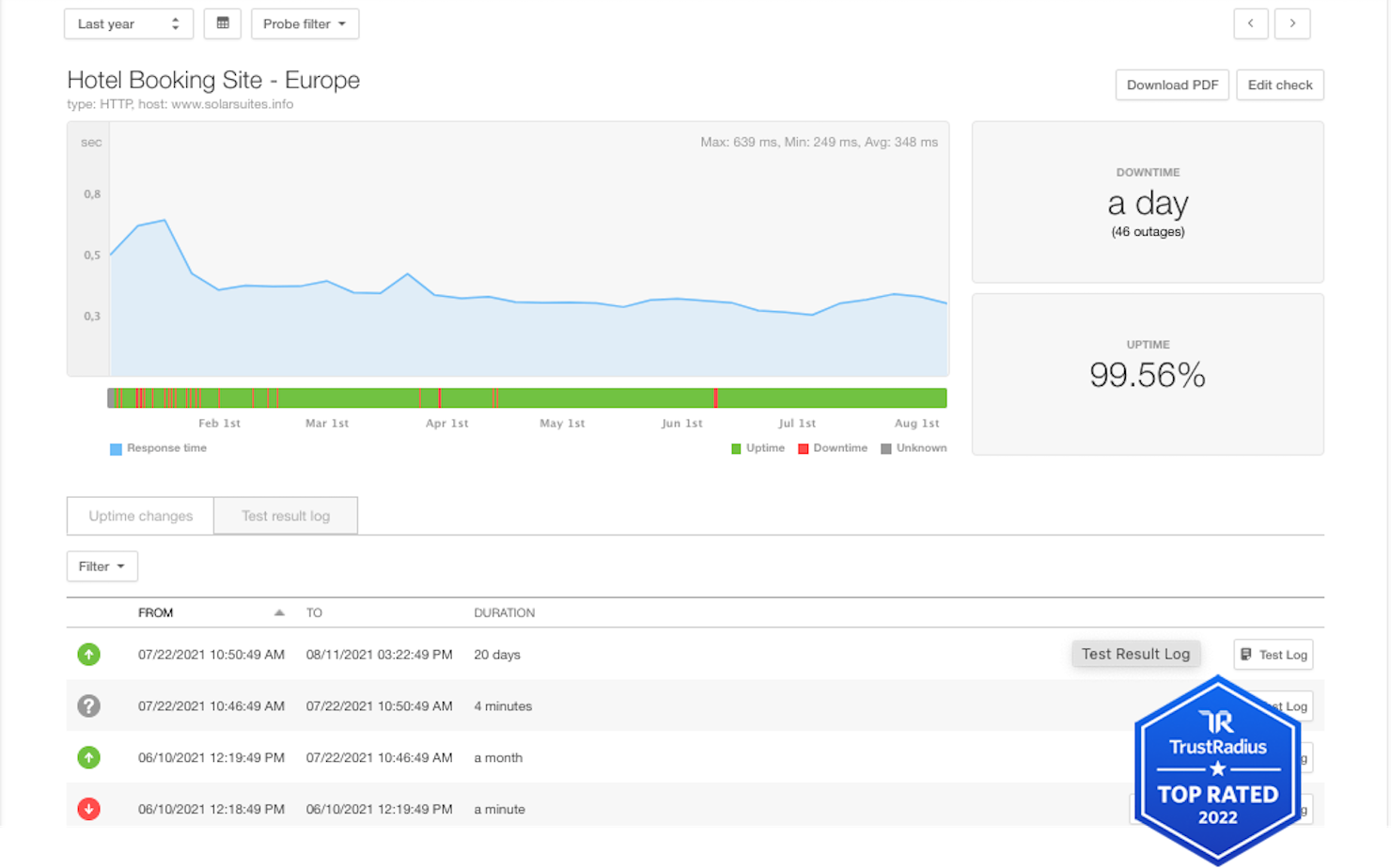
Pingdom bietet Ihrem Team Einblick in die Verfügbarkeit und Leistung von Webanwendungen, Servern und Endpunkten auf der ganzen Welt. Es hilft Ihnen, Ausfallzeiten zu erkennen, die Ladeleistung von Seiten zu messen und Warnmeldungen zu senden, wenn die Benutzererfahrung beeinträchtigt wird.
Warum ich Pingdom ausgewählt habe: Ich habe Pingdom ausgewählt, weil Betriebszeit und Antwortzeit grundlegende Bestandteile des digitalen Erlebnisses sind und dieses Tool eine praxisnahe Leistungsüberwachung von mehreren globalen Standorten aus ermöglicht. Wenn Ihre Website oder Webanwendung die erste Anlaufstelle für Ihre Kunden ist, ist es entscheidend, sofort zu wissen, wenn sie langsamer wird oder ausfällt.
Herausragende Funktionen & Integrationen
Zu den Funktionen gehören synthetische Prüfungen von Webseiten in kurzen Intervallen, die Überwachung der Ladegeschwindigkeit durch echte Nutzer (RUM), globale Warnmeldungen zur Benachrichtigung von Teams über Verfügbarkeitsprobleme sowie Dashboards zur Darstellung von Leistungstrends, die Verlangsamungen Regionen oder Geräten zuordnen.
Zu den Integrationen gehören Slack, PagerDuty, E-Mail-/SMS-Warnmeldungen, API-Zugriff und die Verbindung zur Protokollverwaltung von SolarWinds.
Pros and Cons
Pros:
- Synthetische Prüfungen erkennen Ausfallzeiten und Verlangsamungen
- Warnschwellen lassen sich einfach festlegen und relevante Teams benachrichtigen
- Die Überwachung durch echte Nutzer liefert zusätzlichen Kontext zur tatsächlichen Leistung
Cons:
- Tiefgehende Diagnosen auf Code-Ebene (APM) sind nicht enthalten
- Benutzerdefinierte Dashboards und Visualisierungsoptionen können etwas grundlegend wirken

Glassbox
Am besten für Echtzeit-Session-Replay
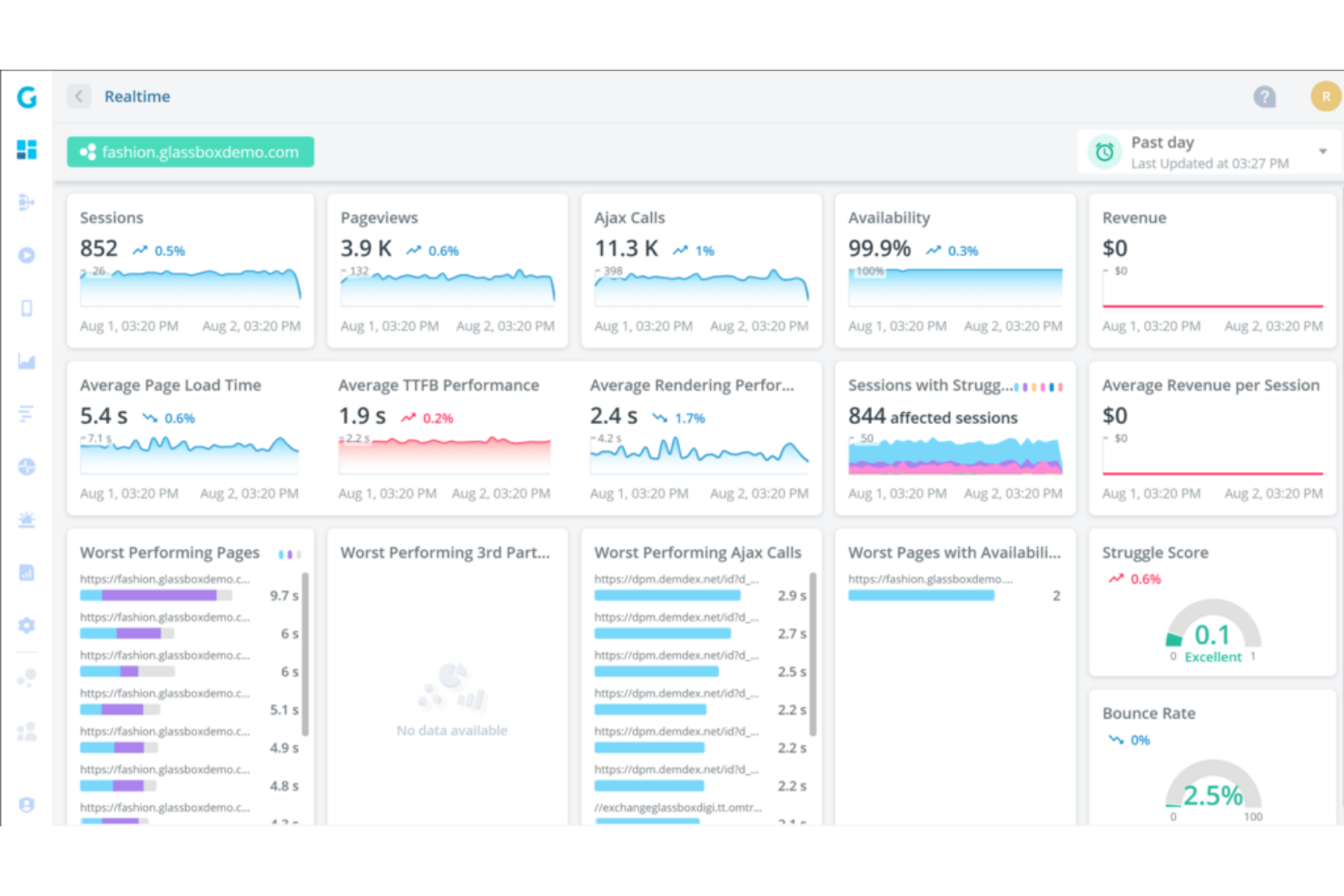
Glassbox ist eine Plattform zur Analyse digitaler Nutzererlebnisse, die Echtzeit-Aufzeichnungen von Sitzungen bereitstellt, um Unternehmen beim Verstehen des Nutzerverhaltens zu unterstützen. Die Fähigkeit, detaillierte Einblicke in Kundeninteraktionen auf Apps und Websites zu bieten, macht sie zu einem unverzichtbaren Tool für Unternehmen, die den Fokus auf die Optimierung der Kundenerfahrung legen.
Warum ich Glassbox gewählt habe: Ich habe Glassbox aufgrund seiner starken Möglichkeiten ausgewählt, Nutzersitzungen beim Interagieren mit einer Website oder mobilen App aufzuzeichnen. Die Session-Replay-Funktion ermöglicht es Unternehmen anschließend, diese Sitzungen optisch nachzuvollziehen – mit einer pixelgenauen Wiedergabe der Benutzeraktionen, einschließlich Mausbewegungen, Klicks, Formulareingaben und Scrollverhalten.
Session-Replay ist außerdem in Echtzeit verfügbar, sodass Unternehmen die Nutzer-Sessions verfolgen können, während sie stattfinden. Durch das Beobachten, wie Nutzer in Echtzeit mit einer Website oder App interagieren, können Unternehmen wertvolle Informationen über Engagement, Interessen und die Interaktion mit bestimmten Elementen oder Funktionen sammeln. Diese Fähigkeit zur Aufdeckung von Verhaltensmustern hebt Glassbox von vielen anderen Werkzeugen am Markt ab.
Herausragende Funktionen & Integrationen:
Funktionen umfassen User-Journey-Mapping, Kollaborations- und Sharing-Funktionen, Analyse von Conversion-Funnels sowie Identifikation und Behebung von Problemen. Glassbox sorgt zudem für Datenschutz und Compliance, indem Unternehmen sensible Informationen während der Sitzungswiedergabe ausblenden oder ausschließen können.
Integrationen beinhalten Adobe Analytics, Google Analytics, GetFeedback, SurveyMonkey, Qualtrics, Medallia, Jira, Slack, Adobe Target und Optimizely.
Pros and Cons
Pros:
- Funnels sind durchsuchbar und einfach zu bedienen
- Business-Flow-Funktion hilft bei der Verfolgung von KPIs
- Bietet leistungsstarke Analysen
Cons:
- Keine transparente Preisstruktur
- Möglicherweise nicht für kleinere Unternehmen skalierbar
- Erfordert eine gewisse Einarbeitung zur vollständigen Nutzung aller Funktionen

Am besten für Application Performance Management geeignet
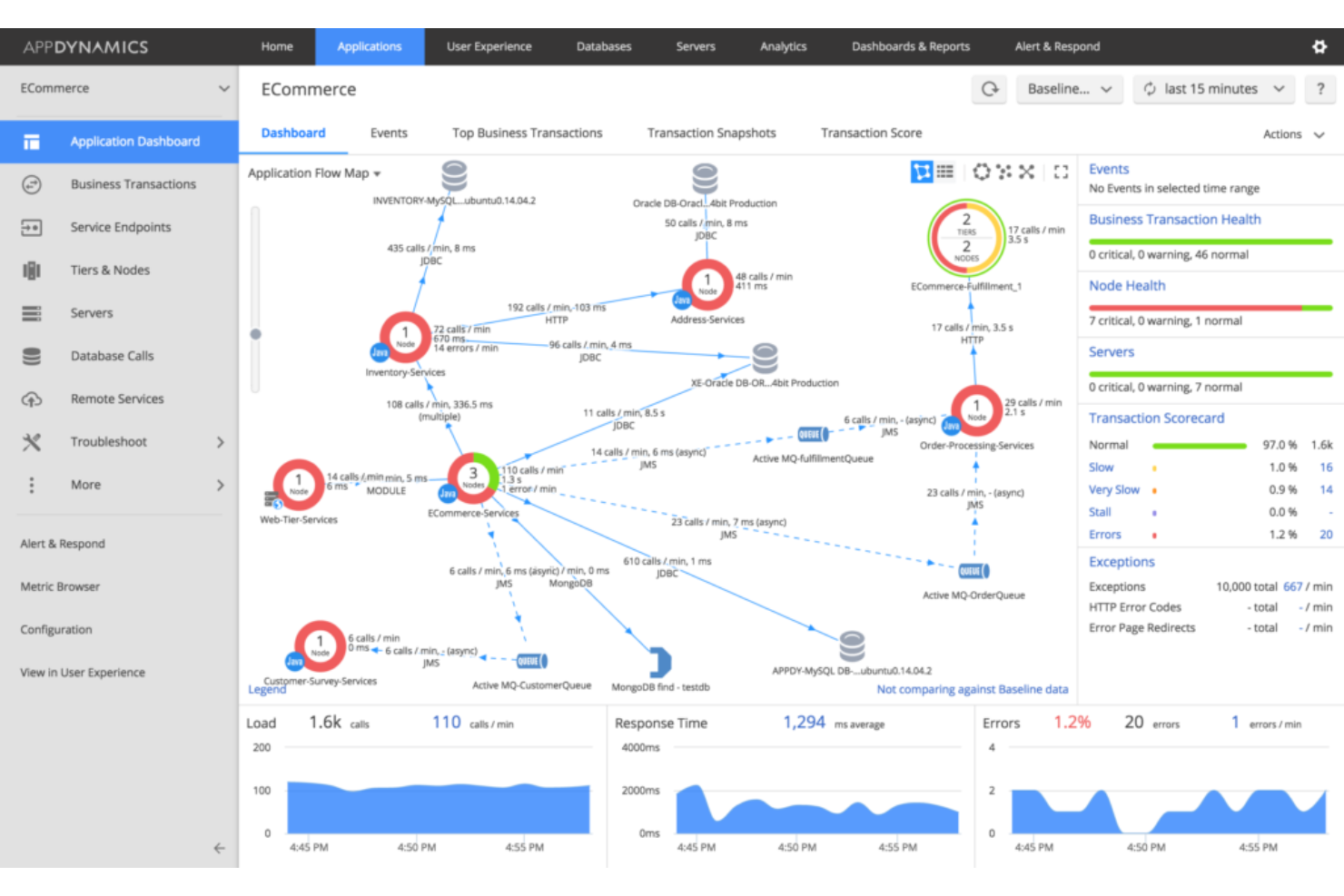
AppDynamics, ein Teil von Cisco, ist ein DEM-Lösungsanbieter, der sich auf die Überwachung von Endbenutzern (EUM) und die Nachverfolgung von Geschäftsprozessen konzentriert. Außerdem bietet es ein umfassendes Application Performance Management (APM), um Unternehmen dabei zu unterstützen, die optimale Anwendungsleistung sicherzustellen.
Warum ich AppDynamics gewählt habe: AppDynamics steht auf meiner Liste wegen seines umfassenden Schwerpunkts auf Application Performance Management (APM) und seinem klaren Fokus auf die Endbenutzererfahrung sowie Trendanalysen. AppDynamics bietet beispielsweise Echtzeit-Einblicke in Anwendungsleistungsmetriken, Transaktionsverfolgung, Diagnosen auf Code-Ebene und Datenbanküberwachung. Dadurch können Organisationen Leistungsengpässe, ineffizienten Code und datenbankbezogene Probleme identifizieren, die die Anwendungsleistung beeinflussen.
AppDynamics ist außerdem dafür ausgelegt, groß angelegte, verteilte Umgebungen zu verwalten. Es kann Anwendungen server-, container- und cloudübergreifend überwachen, einschließlich Web-, Mobil- und Desktopplattformen. Das verschafft Einblick in die Leistung verteilter Komponenten und ermöglicht Unternehmen, die Leistung in komplexen und dynamischen Architekturen zu optimieren.
Hauptfunktionen & Integrationen:
Funktionen umfassen Ende-zu-Ende-Transaktionsverfolgung, Benachrichtigungen und proaktive Problemidentifikation, Cloud- und Microservice-Überwachung sowie dynamische Baseline-Bildung. AppDynamics ermöglicht außerdem die Überwachung und Nachverfolgung wichtiger Geschäftsprozesse innerhalb von Anwendungen. Es kann Einblicke in den Transaktionsfluss, Antwortzeiten und Leistungsmetriken liefern.
Integrationen umfassen Medallia, Moogsoft Platform, Contentsquare, Zenduty, SquaredUp, ThousandEyes, Sainapse, Squadcase, Atlassian und Slack.
Pros and Cons
Pros:
- Einfache, übersichtliche Benutzeroberfläche
- Bietet anpassbare Alarm-Schwellenwerte
- Stellt leicht verständliche Grafiken und visuelle Daten bereit
Cons:
- Kann für Einsteiger komplex sein
- Die Nachverfolgung von Geschäftsprozessen kann langsam sein
- Fortgeschrittene Funktionen erfordern eine steile Lernkurve

Am besten geeignet für Software-Analysen
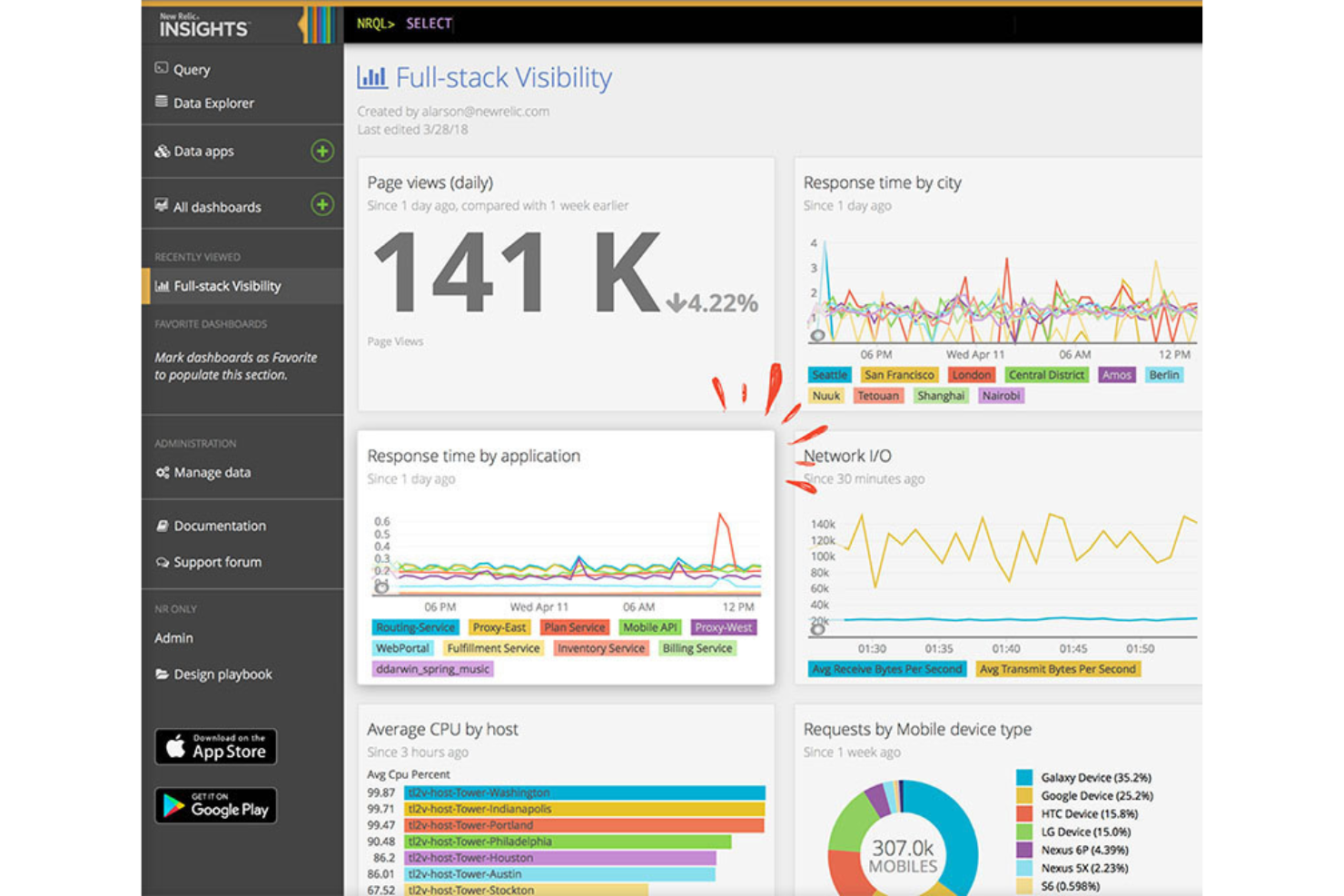
New Relic ist eine Observability-Plattform, die vollständige Transparenz über den gesamten Stack und umfassende Software-Analysen ermöglicht. Mit einem datengesteuerten Ansatz hilft sie Unternehmen, die Leistung ihrer Software zu verstehen und zu verbessern. Aufgrund ihrer tiefgreifenden Analysefähigkeiten ist New Relic ideal für alle, die Einblicke in ihre Softwaresysteme suchen.
Warum ich New Relic ausgewählt habe: New Relic steht auf dieser Liste wegen seiner umfassenden Fähigkeit, Softwaredaten zu erfassen, zu analysieren und zu interpretieren. Besonders hervorzuheben ist der 360-Grad-Blick auf die Softwareleistung, der entscheidend ist, um Probleme zu identifizieren und das Nutzererlebnis zu verstehen. Beispielsweise ermöglicht die verteilte Tracing-Funktion von New Relic, Anfragen nachzuverfolgen, während sie verschiedene Dienste und Komponenten in einem verteilten System durchlaufen. Das bietet vollständige Transparenz über Anfragepfade, Latenzzeiten und Abhängigkeiten.
New Relic bietet außerdem Überwachungsfunktionen für mobile Anwendungen, mit denen Sie die Leistung und das Nutzererlebnis Ihrer mobilen Apps auf verschiedenen Plattformen und Geräten überwachen können. Sie können Metriken wie App-Abstürze, Reaktionszeiten und Nutzerinteraktionen verfolgen, um die Performance und Benutzerfreundlichkeit Ihrer mobilen Anwendungen zu optimieren.
Herausragende Funktionen & Integrationen:
Funktionen beinhalten Echtzeit-Analysen, End-to-End-Transaktions-Tracking, synthetische Überwachung, Infrastrukturüberwachung, Application Performance Monitoring (APM) sowie anpassbare Dashboards. Es gibt zudem Funktionen für Softwarediagnose wie Fehlerverfolgung, Performance-Insights und Datenvisualisierung.
Integrationen gibt es unter anderem für AWS, Microsoft Azure, Google Cloud Platform (GCP), Kubernetes, Prometheus, Cassandra, Elasticsearch, HiveMQ, Kafka und Linux.
Pros and Cons
Pros:
- Workload-Funktionen helfen, Dienste effizient zu gruppieren
- Bietet Echtzeitdaten für sofortige Einblicke
- Skalierbar für kleine Teams und große Unternehmen
Cons:
- Offizielle Dokumentation ist begrenzt
- Erfordert gewisse technische Kenntnisse für die optimale Nutzung
- Die Benutzeroberfläche kann für Einsteiger komplex sein

Raygun
Am besten geeignet für End-to-End-Diagnostik von Code bis zur Benutzersitzung
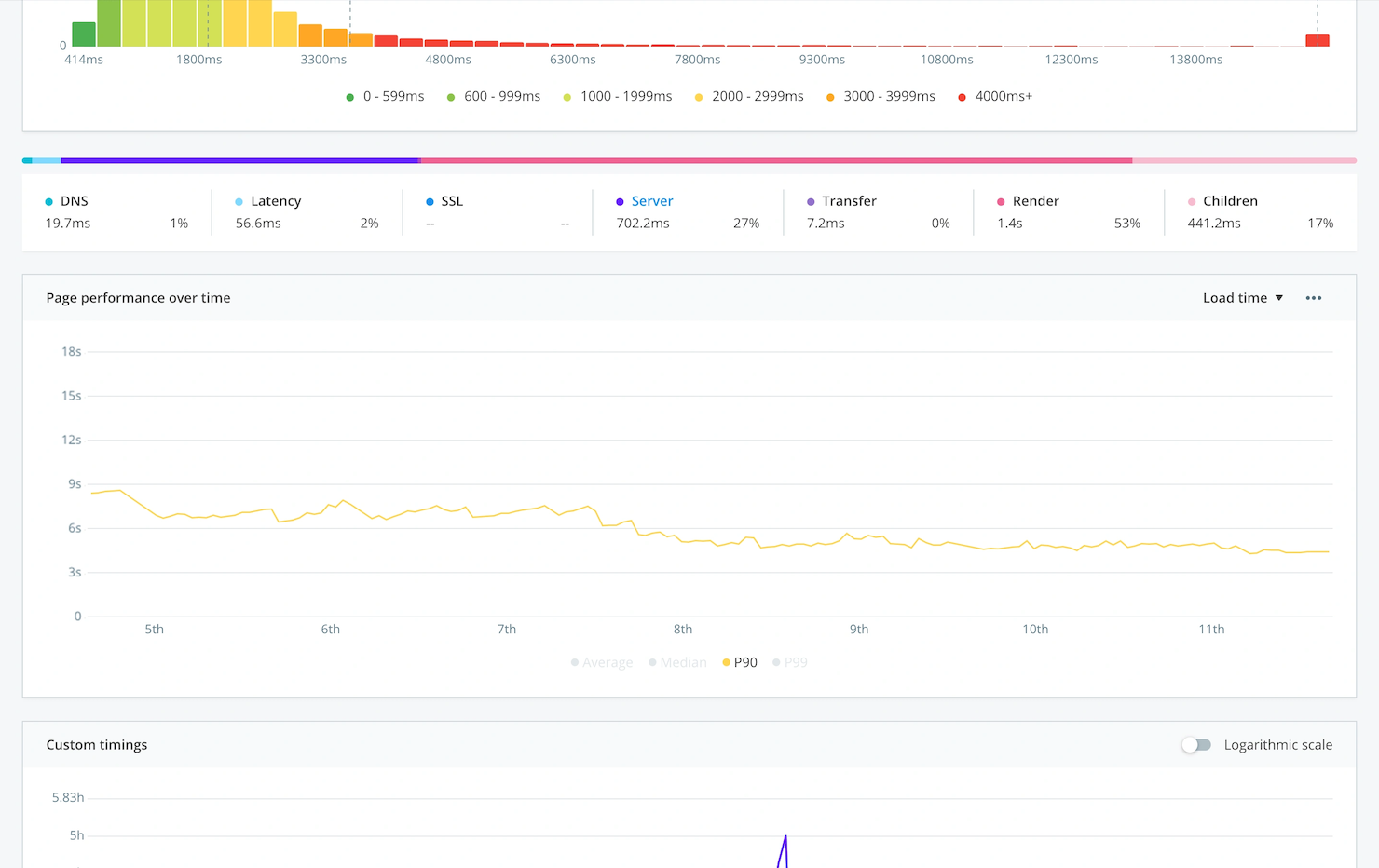
Raygun hilft Ihrem Team, Softwareleistungsprobleme in Anwendungen, Services und Benutzersitzungen zu erkennen, zu diagnostizieren und zu beheben. Es hebt Fehler, Verlangsamungen und Abstürze in Echtzeit hervor, sodass Sie die Ursachen nachvollziehen und die Benutzererfahrung verbessern können.
Warum ich Raygun gewählt habe: Ich habe Raygun gewählt, weil es Application Performance Monitoring (APM) und Fehlerverfolgung in einem Tool vereint – ideal, wenn Entwicklungs- und Betriebsteams gemeinsam für die Nutzererfahrung verantwortlich sind. Es bietet Diagnostik über den gesamten Lebenszyklus hinweg – von Codefehlern, Sitzungsverfolgung bis zur Release-Überwachung – und ermöglicht so eine schnellere Problemlösung.
Herausragende Funktionen & Integrationen:
Funktionen beinhalten plattformübergreifendes Crash- und Fehlerreporting, Sitzungsverfolgung, mit der sich die Nutzerreise bis zum Fehler nachvollziehen lässt, Erfassung von Leistungsmetriken (wie langsame Anfragen oder Speichernutzung) und Release-/Deployment-Tracking, sodass Sie wissen, wann Probleme anfingen.
Integrationen umfassen GitHub, GitLab, Jira, Slack, Azure DevOps, AWS, SAML SSO, Webhooks und REST API.
Pros and Cons
Pros:
- Erfasst Fehler auf Code-Ebene und Kontext von Benutzersitzungen
- Spürt Leistungsprobleme über Backend, Browser und Mobilgeräte hinweg auf
- Integriert sich eng in Entwicklungstools und Benachrichtigungsabläufe
Cons:
- UX- und Dashboard-Design wirken eher entwicklerorientiert und weniger benutzerfreundlich
- Erweiterte Einrichtung und Feinabstimmung können Entwicklerressourcen erfordern

Totango
Am besten für das Customer Success Management geeignet
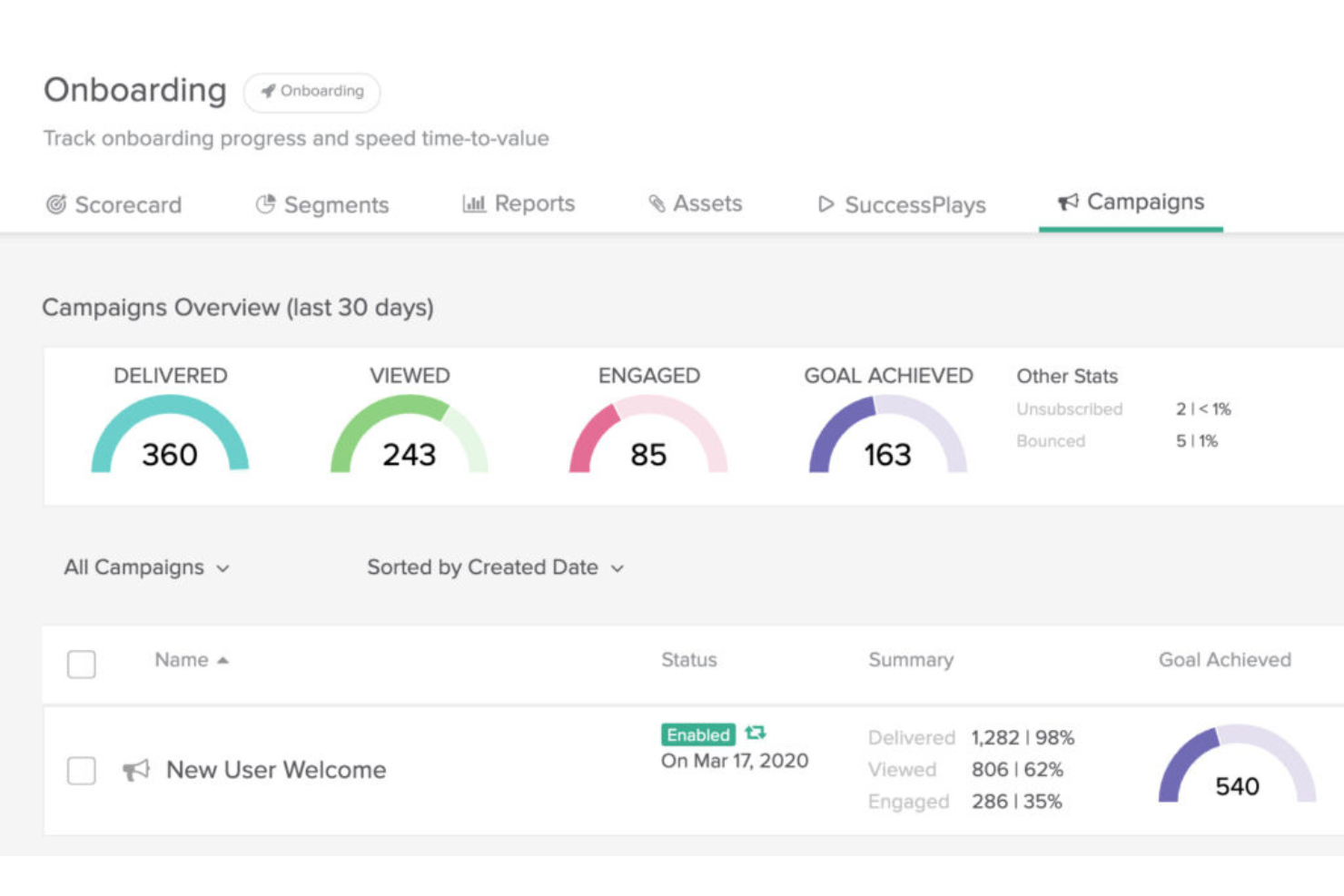
Totango ist eine Customer Success Plattform, die darauf ausgelegt ist, Echtzeit-Einblicke in das Kundenverhalten zu liefern. Sie unterstützt Unternehmen beim Customer Success Management, indem sie die Kundenbindung fördert, die Abwanderung reduziert und den Kundenertragswert maximiert.
Warum ich Totango gewählt habe: Ich habe Totango für diese Liste ausgewählt, weil es komplexe Customer Success-Prozesse mit einem proaktiven und zielorientierten Ansatz zur Verwaltung von Kundenbeziehungen vereinfacht. Totango stellt beispielsweise Werkzeuge zur Verfügung, mit denen Unternehmen proaktiv mit Kunden in Kontakt treten können. Dadurch werden personalisierte und automatisierte Kommunikationsmöglichkeiten wie In-App-Nachrichten, E-Mails und Benachrichtigungen ermöglicht, um Kundenbeziehungen zu pflegen, Support zu leisten und gewünschte Handlungen zu fördern.
Totango ermöglicht es Unternehmen zudem, die Gesundheit und das Engagement ihrer Kunden zu überwachen. Es verfolgt verschiedene Kennzahlen und Signale, um die Kundenzufriedenheit, die Produktakzeptanz und Nutzungsmuster zu bewerten. Dies hilft Organisationen, gefährdete Kunden zu identifizieren und proaktiv Maßnahmen zu ergreifen, um Abwanderung zu verhindern und Upselling-Möglichkeiten zu nutzen.
Hervorstechende Funktionen & Integrationen:
Funktionen umfassen Kundensegmentierung, rollenspezifische Erfolgsmessungen, Customer Success Workflows und Playbooks, Funktionen für das Management des Kundenlebenszyklus, visuelle Dashboards und benutzerdefinierte Berichte. Totango erleichtert außerdem die Zusammenarbeit von Customer Success Teams durch eine zentrale Plattform zum Teilen von Kundeninformationen, Aufgaben und Notizen.
Integrationen umfassen Salesforce, Microsoft Outlook, Slack, HubSpot, Jira, Monday, Tableau, Stripe, Zoom und Google Analytics.
Pros and Cons
Pros:
- Benutzerfreundliche, intuitive Oberfläche
- Hilft dabei, Kundeninformationen und Aktivitäten im Blick zu behalten
- Automatisierte Prozesse verschaffen dem Team Freiräume für andere Aufgaben
Cons:
- Keine transparente Preisgestaltung
- Hohes Maß an Anpassbarkeit kann zu Komplexität führen
- Kunden-Health-Parameter sind nicht kombinierbar
Weitere Tools zur Überwachung der digitalen Nutzererfahrung
Nachfolgend finden Sie eine Liste weiterer Lösungen zur Überwachung der digitalen Nutzererfahrung, die ich für diese Liste in Betracht gezogen habe. Auch wenn sie es nicht in meine Top 20 geschafft haben, sind sie dennoch einen Blick wert. Vielleicht ist eines davon das richtige Tool für Sie!
- Germain UX
Am besten geeignet zur Beobachtung echter Endnutzer-Schritte, Erlebnisse und Engpässe
- Elastic
Am besten geeignet für Protokolldatenanalyse und -visualisierung
- Contentsquare
Am besten für Customer Journey Analytics
- ControlUp
Am besten für das Monitoring von IT-Infrastrukturen geeignet
- eG Innovations
Am besten geeignet für das Nachverfolgen der Endbenutzererfahrung
- Compass
Am besten zur Überwachung der digitalen Adoption geeignet
- LiveAgent
Am besten geeignet für Echtzeit-Besucherüberwachung
- Sentry
Am besten für Fehlerverfolgung in Echtzeit
- Dynatrace
Am besten geeignet für KI-gestützte Einblicke
- Zoho Pagesense
Am besten zur Conversion-Optimierung geeignet
- Apica
Am besten geeignet zum Testen und Überwachen der Leistung von Webanwendungen
- BMC TrueSight
Am besten geeignet für AIOps-gesteuerte Automatisierung und Kostenprognose
- Riverbed SteelCentral
Am besten geeignet für durchgängige Transparenz bei Netzwerk- und Anwendungsleistung
- Splunk APM
Am besten geeignet für die Analyse und Visualisierung von Anwendungsleistungsdaten


So bewerte ich Tools für das Monitoring digitaler Erlebnisse
Tools für das Monitoring digitaler Erlebnisse sind das Mittel der Wahl für SRE-Teams, wenn ein Anstieg bei Warenkorbabbrüchen auf langsame API-Aufrufe zurückgeführt werden muss oder wenn IT-Teams nachweisen müssen, dass Verzögerungen bei Zoom-Anrufen eines Mitarbeiters im Homeoffice auf ein Netzproblem am letzten Übergabepunkt und nicht auf eine VPN-Fehlkonfiguration zurückzuführen sind. Bei der Bewertung von Tools in diesem Bereich unterscheide ich zwischen zwei Ebenen: den grundlegenden Fähigkeiten, die jedes Tool abdecken muss, um in diese Liste aufgenommen zu werden, und den Alleinstellungsmerkmalen, die die Tools voneinander unterscheiden.
Kernfunktionen (Grundvoraussetzungen für diese Liste)
Für Tools im Bereich Monitoring digitaler Erlebnisse prüfe und bewerte ich insbesondere folgende Kernfunktionen:
- Reales Nutzer-Monitoring: Ich überprüfe, ob das Tool tatsächliche Sitzungsdaten wie Seitenladezeiten, Interaktionsverzögerungen und Abstürze sowohl über Web- als auch Mobilkanäle erfasst.
- Synthetisches Monitoring: Skriptgesteuerte Transaktionsprüfungen aus verteilten Standorten sind wichtig. Ich bewerte, wie gut ein Tool mehrstufige Abläufe wie Anmeldungen oder Bezahlvorgänge simuliert, bevor Nutzer davon betroffen sind.
- Analyse des Netzwerkpfads: Wenn App-Verzögerungen bei Remote-Mitarbeitern zum Beispiel durch DNS, ISP oder VPN verursacht werden könnten, muss das Tool jeden Hop nachverfolgen können. Ich achte auf Transparenz bis zur letzten Meile der Konnektivität.
- Visualisierung durchgängiger Nutzerreisen: Ich prüfe, ob das Tool die Anfrage eines Nutzers vom Browser über CDN, API und Microservices in einer konsistenten Ansicht abbilden kann.
- Erlebnis-Scoring: Rohe Metriken reichen nicht aus. Ich suche nach zusammengesetzten Scores wie Apdex, die Backend-Verzögerungen mit Frontend-Auswirkungen wie steigenden Absprungraten korrelieren.
- Alarmierung und Anomalie-Erkennung: Ich achte auf Alarmsysteme, die relative Veränderungen der User Experience im Vergleich zu normalen Mustern erkennen und nicht nur auf statische Grenzwert-Benachrichtigungen.
- Multi-Channel-Abdeckung: Ein Tool, das nur Webseiten überwacht, führt zu blinden Flecken. Ich prüfe, ob mindestens mobile Apps, SaaS-Plattformen und API-Endpunkte unterstützt werden.
Ein Tool muss die meisten dieser Funktionen abdecken, um auf diese Liste zu kommen. Anschließend betrachte ich die Besonderheiten der einzelnen Tools.
Herausragende Merkmale (Was die Tools unterscheidet)
KI-gestützte Ursachenanalyse sticht hervor – insbesondere bei Tools, die Anomalien über Microservices- oder Netzwerkschichten hinweg mit einem wahrscheinlichen einzelnen Auslöser verknüpfen können. Integrationen mit ITSM-Systemen und CI/CD-Pipelines sind für mich unverzichtbar, wenn Teams geschlossene Incident-Workflows oder die direkte Zuordnung von Experience-Änderungen zu Deployments wünschen. Fortschrittlicher Support für die Employee Experience – etwa durch Endgeräte-Analysen bei SaaS und VDI – schafft zusätzlichen Nutzen für IT-Teams bei der Fehlersuche bei internen Produktivitätsproblemen.
Was ich über die Funktionen hinaus berücksichtige
Das Preismodell spielt hier eine größere Rolle als in den meisten anderen Kategorien. Ich prüfe, ob ein Anbieter pro Host, pro Session oder pro GB Telemetrie abrechnet, weil Teams mit hohem Traffic bei nutzungsbasierten Preismodellen unerwartete Kosten treffen können. Die Flexibilität bei der Bereitstellung ist ebenfalls entscheidend – regulierte Branchen wie das Gesundheitswesen oder der Finanzsektor benötigen oft On-Premises- oder regional beschränkte Datenhaltung, deshalb prüfe ich, ob nur SaaS bereitgestellt wird. Ich achte außerdem darauf, ob das Tool sowohl für die Überwachung von Kundenerlebnissen als auch für die Employee Experience geeignet ist, da dies bestimmt, welche Teammitglieder tatsächlichen Nutzen daraus ziehen.
So wählen Sie Tools zur Überwachung der digitalen Nutzererfahrung aus
Bei langen Funktionslisten und komplexen Preisstrukturen verliert man leicht den Überblick. Damit Sie sich bei der Auswahl der passenden Software auf Ihre individuellen Anforderungen konzentrieren können, finden Sie hier eine Checkliste mit den wichtigsten Faktoren:
| Faktor | Was Sie beachten sollten |
|---|---|
| Skalierbarkeit | Kann das Tool mit Ihrem Unternehmen wachsen? Berücksichtigen Sie zukünftiges Wachstum, Nutzergrenzen und die Möglichkeiten zur Datenverarbeitung. Achten Sie auf Tools, die sich problemlos skalieren lassen. |
| Integrationen | Funktioniert es mit Ihren bestehenden Systemen? Stellen Sie sicher, dass es sich nahtlos mit Ihren aktuellen Tools verbinden lässt, um Unterbrechungen Ihrer Arbeitsabläufe zu vermeiden. |
| Anpassbarkeit | Kann das Tool an Ihre Anforderungen angepasst werden? Achten Sie auf Optionen zur Anpassung von Dashboards, Berichten und Benachrichtigungen an die Arbeitsabläufe Ihres Teams. |
| Benutzerfreundlichkeit | Ist die Benutzeroberfläche intuitiv? Wählen Sie Tools, die nur eine minimale Schulung erfordern, damit sich Ihr Team auf die Überwachung statt auf das Erlernen des Systems konzentrieren kann. |
| Implementierung und Einführung | Wie lange dauert die Einrichtung? Schätzen Sie den Zeit- und Ressourcenaufwand ein, der erforderlich ist, um das Tool effektiv in Betrieb zu nehmen. Achten Sie auf optimierte Prozesse. |
| Kosten | Passt das Tool in Ihr Budget? Bewerten Sie Anschaffungskosten, Abonnementgebühren und versteckte Kosten. Vergleichen Sie den Nutzen mit dem Preis. |
| Sicherheitsvorkehrungen | Sind Ihre Daten und Abläufe geschützt? Prüfen Sie Verschlüsselung, Compliance-Standards und frühere Sicherheitsvorfälle. |
| Verfügbarkeit des Supports | Ist schnell Hilfe verfügbar? Stellen Sie sicher, dass umfassende Supportoptionen vorhanden sind, beispielsweise Unterstützung rund um die Uhr oder feste Kundenbetreuer, um Probleme schnell zu lösen. |
Was ist ein Tool zur Überwachung der digitalen Nutzererfahrung?
Tools zur Überwachung der digitalen Nutzererfahrung sind Plattformen, die in Echtzeit verfolgen und analysieren, wie Nutzer mit digitalen Diensten interagieren. Sie helfen dabei, Leistungsprobleme zu erkennen, das Nutzerverhalten zu messen und die End-to-End-Erfahrung über Websites, Apps und Backend-Systeme hinweg zu optimieren.
Funktionen von Werkzeugen zur Überwachung der digitalen Nutzererfahrung
Achten Sie bei der Auswahl von Werkzeugen zur Überwachung der digitalen Nutzererfahrung auf die folgenden wichtigen Funktionen:
- Überwachung in Echtzeit: Erhalten Sie sofort Einblicke in die Interaktionen und Erfahrungen Ihrer Benutzer, während diese stattfinden, damit Sie Probleme erkennen können, bevor sie zu größeren Schwierigkeiten werden. Diese Funktion hilft Ihnen, Verlangsamungen oder Ausfälle schnell zu identifizieren und proaktiv zu reagieren.
- Leistungsanalysen für Endbenutzer: Sehen Sie, wie echte Menschen Ihre digitalen Plattformen erleben – bis hin zu Ladezeiten, Fehlern und Problemen bei der Navigation. So können Sie gezielte Verbesserungen vornehmen, die sich tatsächlich auf Ihre Benutzer auswirken.
- Synthetische Transaktionsüberwachung: Simulieren Sie rund um die Uhr das Benutzerverhalten, indem Sie skriptbasierte Aktionen wie Anmeldungen oder Käufe ausführen, um Leistungsengpässe zu erkennen – selbst wenn alle anderen schlafen.
- Überwachung über mehrere Kanäle: Verfolgen Sie die Benutzererfahrungen über Web-, Mobil- und Desktop-Plattformen hinweg und erhalten Sie so einen ganzheitlichen Überblick über jeden Kontaktpunkt. Damit haben Sie eine zentrale Sicht auf die gesamte digitale Reise.
- Warnungen und Benachrichtigungen: Erhalten Sie rechtzeitig Warnungen, wenn die Benutzererfahrungen hinter Ihren Vergleichswerten zurückbleiben. So sind Sie stets einen Schritt voraus und können Probleme beheben, bevor Ihre Benutzer sie überhaupt bemerken.
- Ursachenanalyse: Untersuchen Sie Probleme schnell anhand detaillierter Diagnosen und ermitteln Sie genau, wo etwas schiefgelaufen ist – ganz gleich, ob es sich um eine Störung des Servers oder ein unzuverlässiges Netzwerk handelt.
- Anpassbare Dashboards: Erstellen Sie eigene Ansichten mit den für Sie relevanten Kennzahlen. Erkennen Sie Trends, verfolgen Sie KPIs und teilen Sie Ergebnisse mit Ihrem Team – alles über ein einziges, leicht verständliches Dashboard.
Übliche KI-Funktionen von Werkzeugen zur Überwachung der digitalen Nutzererfahrung
Über die oben aufgeführten Standardfunktionen von Werkzeugen zur Überwachung der digitalen Nutzererfahrung hinaus integrieren viele dieser Lösungen KI-Funktionen wie:
- Anomalieerkennung: Erkennen Sie automatisch ungewöhnliche Muster im Benutzerverhalten oder in Leistungskennzahlen, damit Ihnen Probleme nicht entgehen, die bei herkömmlicher Überwachung möglicherweise unbemerkt bleiben.
- Prädiktive Analysen: Prognostizieren Sie künftige Leistungsprobleme oder Ausfallzeiten, bevor sie sich auf Ihre Benutzer auswirken, indem Sie KI zur Analyse von Trends und Nutzungsmustern einsetzen.
- Automatisierte Problembewertung: Lassen Sie die KI die Dringlichkeit und wahrscheinliche Ursache von Problemen bewerten, damit Sie die Behebung anhand der geschäftlichen Auswirkungen statt nach bloßem Ermessen priorisieren können.
- Intelligente Bewertung der Benutzererfahrung: Die KI bewertet Benutzersitzungen und weist ihnen Erfahrungswerte zu, sodass Sie sich auf die Bereiche Ihrer digitalen Präsenz konzentrieren können, die am dringendsten verbessert werden müssen.
- Proaktive Empfehlungen: Erhalten Sie KI-gestützte Vorschläge zur Optimierung Ihrer digitalen Plattformen – von der Beschleunigung langsamer Seiten bis zur Überarbeitung verwirrender Navigationspfade.
Vorteile von Werkzeugen zur Überwachung der digitalen Nutzererfahrung
Die Implementierung von Werkzeugen zur Überwachung der digitalen Nutzererfahrung bietet Ihrem Team und Ihrem Unternehmen mehrere Vorteile. Hier sind einige davon:
- Verbesserte Benutzererfahrung: Durch die Erfassung von Echtzeitdaten zu Benutzerinteraktionen helfen diese Werkzeuge dabei, von Benutzern festgestellte Probleme zu identifizieren und zu beheben und dadurch deren Gesamterfahrung zu verbessern.
- Datenbasierte Entscheidungsfindung: Diese Werkzeuge liefern Erkenntnisse und Analysen, die strategische Entscheidungen unterstützen, sodass Sie Verbesserungen anhand des tatsächlichen Benutzerverhaltens und der tatsächlichen Bedürfnisse priorisieren können.
- Verbesserte Zusammenarbeit: Mit Funktionen, die Teamarbeit fördern, ermöglichen Werkzeuge zur Überwachung der digitalen Nutzererfahrung mehreren Benutzern, zur Problemlösung und Planung beizutragen, sodass unterschiedliche Perspektiven berücksichtigt werden.
- Skalierbarkeit und Flexibilität: Wenn Ihr Unternehmen wächst, können sich diese Werkzeuge anpassen, um eine steigende Anzahl von Benutzern und komplexere Umgebungen zu verwalten und dabei ihre Wirksamkeit beizubehalten.
- Integration in bestehende Systeme: Durch die Verbindung mit anderen Plattformen wie CRMs oder Projektmanagementwerkzeugen sorgen sie für einen reibungslosen Datenfluss und eine gute Zugänglichkeit und tragen so zur Konsistenz zwischen den Systemen bei.
- Benutzerzentriertes Design: Diese Werkzeuge konzentrieren sich darauf, die Bedürfnisse der Benutzer zu verstehen, und helfen dabei, Feedback zu sammeln und fundierte Entscheidungen zu treffen, die den Erwartungen der Kunden entsprechen.
- Proaktive Problemlösung: Sie ermöglichen es Teams, potenzielle Probleme zu erkennen und zu beheben, bevor sie sich auf die Benutzer auswirken, wodurch Ausfallzeiten reduziert und die Zuverlässigkeit verbessert werden.
Kosten und Preise von Werkzeugen zur Überwachung der digitalen Nutzererfahrung
Die Auswahl von Werkzeugen zur Überwachung der digitalen Nutzererfahrung erfordert ein Verständnis der verschiedenen verfügbaren Preismodelle und Tarife. Die Kosten variieren je nach Funktionen, Teamgröße, Zusatzoptionen und weiteren Faktoren. Die folgende Tabelle fasst gängige Tarife, ihre durchschnittlichen Preise und die typischerweise enthaltenen Funktionen von Lösungen zur Überwachung der digitalen Nutzererfahrung zusammen:
Vergleichstabelle der Tarife für Tools zur Überwachung des digitalen Erlebnisses
| Tariftyp | Durchschnittlicher Preis | Übliche Funktionen |
|---|---|---|
| Kostenloser Tarif | $0 | Grundlegende Überwachung, begrenzte Datenaufbewahrung und Unterstützung durch die Community. |
| Persönlicher Tarif | $5-$15/Benutzer/Monat | Erweiterte Überwachung, anpassbare Benachrichtigungen und E-Mail-Unterstützung. |
| Geschäftstarif | $20-$50/Benutzer/Monat | Erweiterte Analysen, Tools für die Teamzusammenarbeit und telefonische Unterstützung. |
| Unternehmenstarif | $100-$300/Benutzer/Monat | Vollständige Anpassungsmöglichkeiten, eigener Kundenbetreuer und Unterstützung rund um die Uhr. |
Überwachung des digitalen Erlebnisses: Häufig gestellte Fragen
\u003cspan style=\u0022font-weight: 400\u0022\u003eDie Überwachung des digitalen Erlebnisses kann eine große Aufgabe sein und enorme Mengen an Daten, Diagrammen und Erkenntnissen umfassen. Wenn Sie bei einigen Grundlagen noch Hilfe benötigen – das ist völlig in Ordnung! Ich habe einige häufig gestellte Fragen zur Überwachung des digitalen Erlebnisses und zu Tools für die Überwachung des digitalen Erlebnisses zusammengestellt, damit Sie den Einstieg finden. \u003c/span\u003e
Worauf sollte ich bei der Auswahl eines Tools zur Überwachung des digitalen Erlebnisses für meine Organisation achten?
Bei der Bewertung von Tools zur Überwachung des digitalen Erlebnisses sollten Sie zunächst prüfen, ob die Plattform alle Ihre wichtigen digitalen Kanäle abdeckt – etwa Websites, mobile Apps und Cloud-Dienste. Sie benötigen Echtzeitüberwachung, Analysen der Nutzerreise und übersichtliche Visualisierungsfunktionen für schnelle Erkenntnisse. Eine starke Integration in Ihre bestehenden CX-, IT- und Analysesysteme ist entscheidend, um Datensilos zu vermeiden. Bewerten Sie auch die Benutzerfreundlichkeit; eine komplexe Oberfläche kann Ihr Team ausbremsen. Bevorzugen Sie schließlich Tools mit zuverlässiger Unterstützung, umfangreichen Anpassungsmöglichkeiten und der nötigen Skalierbarkeit, um mit den Anforderungen Ihrer Organisation mitzuwachsen.
Wie können Tools zur Überwachung des digitalen Erlebnisses helfen, die Kundenabwanderung zu reduzieren?
Mit Tools zur Überwachung des digitalen Erlebnisses können Sie Probleme erkennen, auf die Kunden stoßen – etwa lange Ladezeiten oder fehlerhafte Funktionen –, bevor sie große Teile Ihrer Zielgruppe beeinträchtigen. Indem Sie frühzeitig auf diese Probleme hingewiesen werden, können Sie Beschwerden schnell bearbeiten und die allgemeine Kundenzufriedenheit verbessern. Viele Tools bieten Berichte, die Muster hinter wiederkehrenden Problemen aufdecken und Ihnen helfen, Reibungspunkte proaktiv zu beseitigen. Indem Sie kontinuierlich ein reibungsloses digitales Erlebnis bieten, steigern Sie die Loyalität und verringern die Wahrscheinlichkeit, dass Kunden zu einem Wettbewerber wechseln.
Gibt es kostenlose Tools zur Überwachung des digitalen Erlebnisses?
\u003cspan style=\u0022font-weight: 400\u0022\u003eJa, mehrere Anbieter bieten kostenlose Tarife oder Testversionen an. New Relic stellt beispielsweise eine kostenlose Stufe mit eingeschränkten Funktionen bereit, während Tools wie Dynatrace eine zeitlich begrenzte kostenlose Testversion anbieten. Diese Optionen eignen sich hervorragend, um das Tool zu testen und herauszufinden, ob es Ihren Anforderungen entspricht, bevor Sie sich für einen kostenpflichtigen Tarif entscheiden.\u003c/span\u003e
Können Tools zur Überwachung des digitalen Erlebnisses in bestehende CX- und Analyseplattformen integriert werden?
Ja, die meisten renommierten Lösungen zur Überwachung des digitalen Erlebnisses sind für eine nahtlose Integration in bestehende CX-, Analyse- und IT-Service-Management-Plattformen ausgelegt. Viele bieten vorgefertigte Konnektoren für beliebte Tools wie Salesforce, Google Analytics und Slack oder stellen offene APIs für benutzerdefinierte Integrationen bereit. So können Sie Daten zum Nutzerverhalten mit umfassenderen Geschäftskennzahlen kombinieren und eine einheitliche Ansicht für alle Beteiligten schaffen. Vergewissern Sie sich vor der Entscheidung, dass das Tool die von Ihnen benötigten Integrationen unterstützt, und erkundigen Sie sich nach zusätzlichen Kosten oder technischen Anforderungen.
Wie schnell kann mein Team mit Tools zur digitalen Überwachung Probleme erkennen und beheben?
Ein gutes Tool zur digitalen Überwachung verkürzt die Zeit Ihres Teams zur Erkennung und Behebung von Problemen erheblich. Echtzeit-Dashboards, Aufzeichnungen von Nutzersitzungen und automatisierte Benachrichtigungen informieren Ihr Team, sobald die Leistung nachlässt oder Fehler auftreten. So können Sie Probleme oft beheben, bevor die meisten Kunden sie überhaupt bemerken. Fortschrittliche Plattformen helfen Ihnen außerdem, die Ursachen zu ermitteln, beschleunigen dadurch die Fehlerbehebung und reduzieren Ausfallzeiten. Mit der Zeit ermöglichen es Ihnen die gesammelten Daten, digitale Kontaktpunkte zu optimieren und das erneute Auftreten ähnlicher Probleme zu verhindern.
Welche typischen Herausforderungen gibt es bei der Implementierung von Software zur Überwachung des digitalen Erlebnisses?
Bei der Einführung können Hindernisse auftreten, etwa die Anbindung des Tools an ältere Anwendungen, die Abbildung komplexer Nutzerreisen oder die Sicherstellung der vollständigen Einhaltung von Datenschutzbestimmungen. Auch die Schulung von Teammitgliedern in neuen Arbeitsabläufen kann ressourcenintensiv sein. Häufig stellt sich heraus, dass das Abrufen von Daten aus allen relevanten Quellen (Websites, mobile Anwendungen, APIs) eine spezielle Konfiguration erfordert.
Um den Prozess zu erleichtern, arbeiten Sie bei der Einführung eng mit Ihrem Anbieter zusammen und nutzen Sie dessen Anleitungen oder Ressourcen für den Kundenerfolg. Klare Ziele und die frühzeitige Einbindung von IT-, CX- und Geschäftsverantwortlichen tragen dazu bei, eine erfolgreiche Implementierung sicherzustellen.
Weitere Bewertungen von Software für das digitale Erlebnis
Die Verwaltung des digitalen Kundenerlebnisses umfasst viele bewegliche Teile. Wenn Sie weitere oder andere Tools benötigen, um die digitalen Erlebnisse Ihrer Kunden zu verwalten – oder einfach sehen möchten, was es sonst noch gibt –, können Sie sich gerne einige unserer anderen Artikel zu diesem Thema ansehen:
- Plattformen für digitale Erlebnisse
- Software für das Kundenerlebnismanagement
- Werkzeuge für Usability-Tests im UX-Bereich
- Software für UX-Tests
- Software zur Sitzungsaufzeichnung
Abschließende Gedanken
Nach der Lektüre dieses Artikels hoffe ich, dass Sie verstehen, dass der Markt für Tools zur Überwachung digitaler Erlebnisse eine äußerst vielfältige Auswahl bietet, wobei jedes Tool ganz eigene Stärken hat, sei es bei detaillierten Analysen, KI-gestützten Erkenntnissen oder einer detaillierten Protokollanalyse. Daher sollte der erste Schritt bei Ihrer Suche nach einem Tool zur Überwachung digitaler Erlebnisse darin bestehen, genau zu bestimmen, was Sie benötigen.
Suchen Sie nach weiteren Testberichten, Tipps und Tricks zu Tools für das Kundenerlebnis oder nach fachkundiger Beratung? Melden Sie sich für unseren Newsletter an, um Zugang zu den neuesten Brancheneinblicken zu erhalten.