

10 beste Software für eingehende Anrufe im Callcenter im Jahr 2026

10 Auswahl der besten Software für eingehende Anrufe


Software für eingehende Anrufe unterstützt Ihre Support- und Vertriebsteams dabei, eingehende Anrufe effizient zu bearbeiten, schnelle Lösungen bereitzustellen und hochwertige Kundeninteraktionen aufrechtzuerhalten. Die besten Plattformen helfen Ihnen, Anrufvolumen zu verwalten, Anfragen weiterzuleiten und das gesamte Anruferlebnis zu verbessern.
Wenn Ihre Mitarbeitenden mit zu vielen Tools jonglieren oder während Stoßzeiten Anrufe verpassen, ist es an der Zeit, Ihren Technologie-Stack zu überdenken. Die richtige Software optimiert nicht nur Arbeitsabläufe, sondern stattet Mitarbeitende auch mit dem Kontext und den Tools aus, die sie benötigen, um Probleme bereits beim ersten Anruf zu lösen.
Ich habe diese Tools für eingehende Anrufe anhand ihrer Leistung in der Praxis bewertet: Anrufweiterleitung, CRM-Integrationen, Berichte und die Frage, wie gut sie eine reibungslose, personalisierte Reise für Anrufer unterstützen.
Was ist Software für eingehende Anrufe?
Software für eingehende Anrufe ist eine Plattform, die eingehende Kundenanrufe für Support- und Serviceteams verwaltet und optimiert. Sie leitet Anrufe intelligent weiter, unterstützt die Arbeitsabläufe der Mitarbeitenden und hilft Contact-Centern, über ein zentralisiertes System schnelle und konsistente Antworten bereitzustellen.
Warum Sie unseren Software-Empfehlungen vertrauen können
Unser Team testet und bewertet Software seit 2012. Als CX-Führungskräfte selbst wissen wir, wie schwierig – und wichtig – es ist, die richtige Software auszuwählen.
Für diesen Leitfaden haben wir Tools mithilfe von praktischen Tests und unabhängiger Recherche bewertet und dabei unsere Bewertungskriterien angewendet.
Unsere Bewertungen spiegeln unser menschliches redaktionelles Urteilsvermögen wider, keine Verkaufsstrategie.
Zusammenfassung der besten Software für eingehende Anrufe
| Tool | Best For | Trial Info | Price | ||
|---|---|---|---|---|---|
| 1 | Am besten mit mehr als 250 direkten Integrationen | 7-tägige kostenlose Testversion | Ab $30/Nutzer/Monat (jährlich abgerechnet) | Website | |
| 2 | Am besten mit Verhaltenssteuerung in Echtzeit | Kostenlose Demo verfügbar | Preis auf Anfrage | Website | |
| 3 | Am besten für Omnichannel-Support | Kostenlose Demo verfügbar | Ab $30/Nutzer/Monat (jährliche Abrechnung) | Website | |
| 4 | Am besten für die schnelle Bereitstellung globaler Telefonnummern | 14-tägige kostenlose Testversion | Ab $25/Nutzer/Monat (jährlich abgerechnet) | Website | |
| 5 | Am besten für umfangreiche Integrationen mit CRM- und Geschäftsanwendungen geeignet | Kostenlose Demo verfügbar | Ab $25/Benutzer/Monat | Website | |
| 6 | Am besten geeignet für die schnelle cloudbasierte Bereitstellung eines Telefonsystems | Kostenlose Demo verfügbar | Preis auf Anfrage | Website | |
| 7 | Am besten geeignet für sichere, compliancebereite Anrufverwaltung | Kostenlose Demo verfügbar | Ab $79/Monat | Website | |
| 8 | Am besten mit branchenspezifischen KI-Agenten | Kostenlose Demo verfügbar | Ab $85/Nutzer/Monat | Website | |
| 9 | Am besten für kanalübergreifende Gesprächsorchestrierung | Kostenlose Testversion verfügbar | Ab $35/Nutzer/Monat | Website | |
| 10 | Am besten mit No-Code-Erstellung und Automatisierung von KI-Agenten | Kostenlose Demo verfügbar | Ab $80/Benutzer/Monat (jährliche Abrechnung) | Website |

Überblick über die 20 besten Softwares für eingehende Anrufe
Hier finden Sie eine kurze Beschreibung jeder Software für eingehende Anrufe, einschließlich des jeweils besten Einsatzbereichs, einiger bemerkenswerter Funktionen und Screenshots, die einen Eindruck von der Benutzeroberfläche vermitteln.
Aircall
Am besten mit mehr als 250 direkten Integrationen
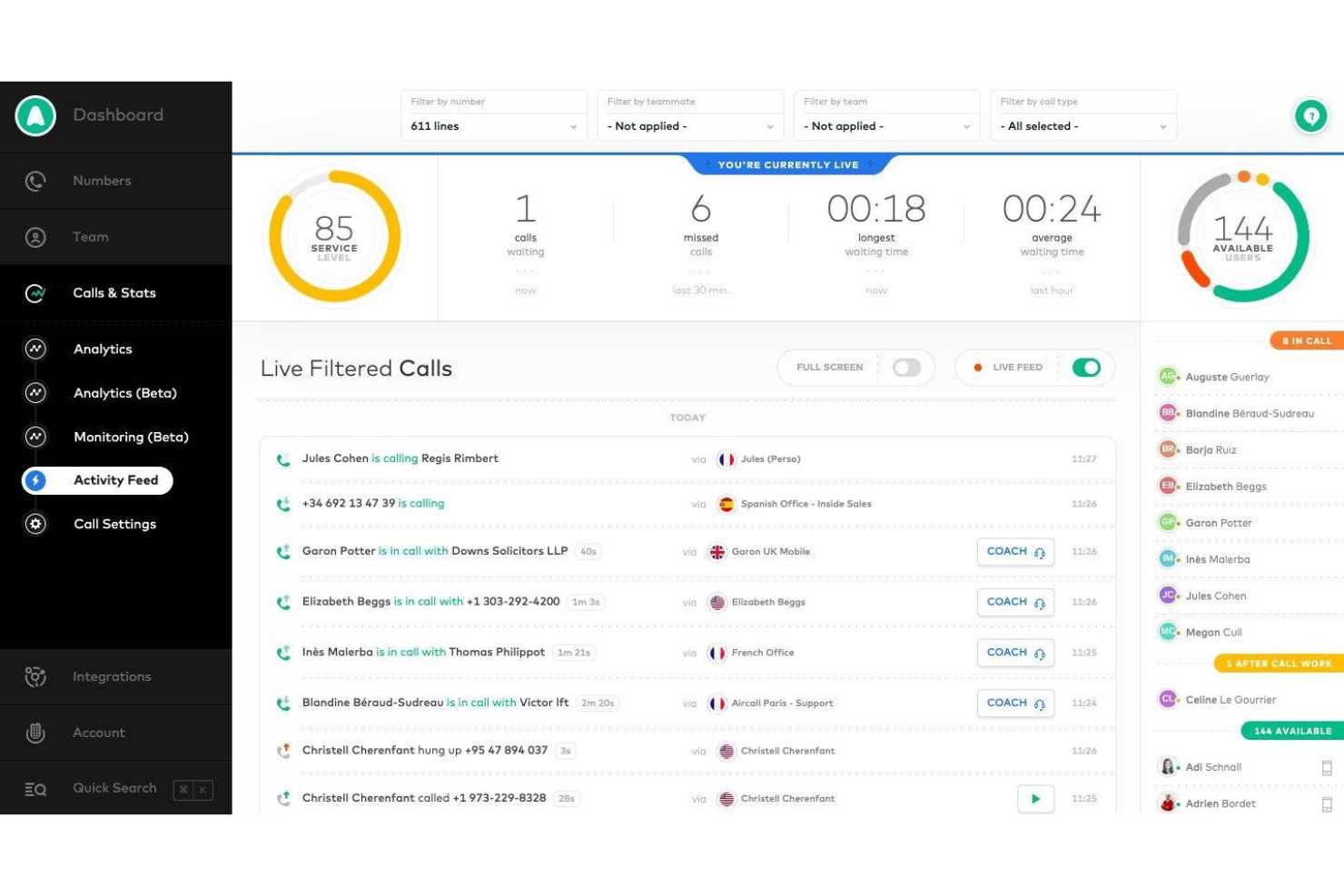
Aircall ist eine cloudbasierte Geschäftstelefonie- und Plattform für eingehende Callcenter-Anrufe, die ACD, IVR, Anrufwarteschlangen, Echtzeitüberwachung, KI-gestützte Anrufbearbeitung und umfassende CRM-Integrationen in einem einheitlichen, von einer Softphone-Anwendung gesteuerten System vereint.
Für wen eignet sich Aircall am besten?
Aircall eignet sich für kleine bis mittelständische Support- und Vertriebsteams, die ihre Abläufe für eingehende Anrufe innerhalb eines CRM- oder Kundendienstsystems betreiben und benötigen, dass ihr Telefonsystem nativ in den vorhandenen Technologie-Stack integriert ist.
Warum ich Aircall ausgewählt habe
Aircall steht auf meiner engeren Auswahl, weil kein anderes Callcenter-Tool für eingehende Anrufe eine so nahtlos in das CRM integrierte Telefonie bietet. Ich schätze besonders, dass ein HubSpot- oder Salesforce-Datensatz automatisch eingeblendet wird, sobald ein Anruf eingeht, sodass Agenten bereits vor dem ersten Wort den vollständigen Kontext haben. Die bidirektionale Synchronisierung protokolliert jeden Anruf, jedes Ergebnis und jedes Tag automatisch, ohne dass Agenten das CRM manuell aktualisieren müssen. Außerdem nutze ich die eingebettete Salesforce-CTI-Telefonanwendung, mit der Agenten eingehende Anrufe vollständig innerhalb ihres bestehenden Arbeitsbereichs bearbeiten können, ohne zwischen Tabs wechseln zu müssen.
Die wichtigsten Funktionen von Aircall
- KI-Sprachagent: Bearbeitet automatisch weitere eingehende Anrufe bei Überlastung und löst routinemäßige Kundenanfragen mit kontextbezogener Übergabe an menschliche Agenten.
- Tool zur Erstellung mehrstufiger IVR-Menüs: Ermöglicht die Gestaltung mehrstufiger Anrufmenüs über eine intuitive visuelle Benutzeroberfläche und mit DTMF-Eingabe.
- Analytics+-Modul: Bietet eine unbegrenzte Anrufhistorie, erweiterte Filter, Echtzeit-Dashboards und detaillierte Analysen für Warteschlangen mit eingehenden Anrufen und Agenten.
- Anrufüberwachungsmodi: Vorgesetzte können laufende Anrufe zu Qualitätssicherungszwecken und für Echtzeit-Coaching mithören, den Agenten unbemerkt unterstützen oder sich in laufende Gespräche einschalten.
Aircall-Integrationen
Aircall bietet mehr als 250 direkte Integrationen, darunter Salesforce, HubSpot, Zendesk, Intercom, Slack, Microsoft Teams, Freshdesk, Pipedrive, Zoho CRM und Shopify. Für individuelle Integrationen steht eine API zur Verfügung.
Pros and Cons
Pros:
- Schnelle Einrichtung ohne Abhängigkeit von der IT
- Live-Anrufüberwachung mit Unterstützung durch Vorgesetzte
- CRM-Bildschirmeinblendung bei jedem eingehenden Anruf
Cons:
- Keine native Personalverwaltung und keine native Einsatzplanung
- Die Berichtstiefe bleibt hinter dedizierten CCaaS-Plattformen zurück

Cresta
Am besten mit Verhaltenssteuerung in Echtzeit
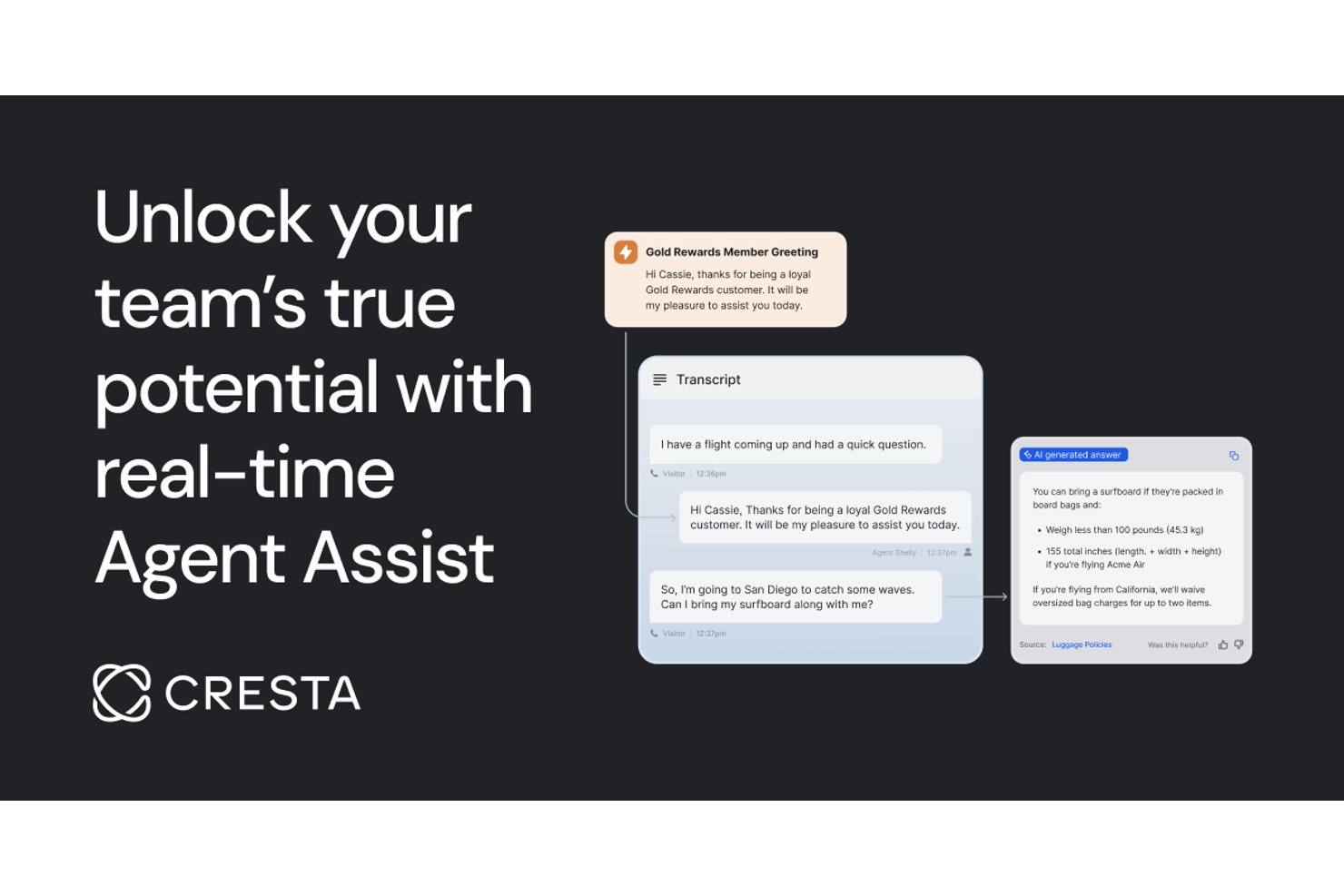
Cresta ist eine KI-gestützte Inbound-Callcenter-Softwareplattform, die Live-Konversationsanalyse, Agentenunterstützung, Automatisierung und Qualitätsmanagement in einer einzigen Lösung bietet.
Für wen ist Cresta am besten geeignet?
Cresta ist für Enterprise-Contact-Center-Teams entwickelt, die KI nutzen möchten, um die Leistung der Agenten und die betriebliche Konsistenz im großen Maßstab zu steigern.
Warum ich Cresta ausgewählt habe
Ich habe Cresta als eine der besten Lösungen ausgewählt, da ich die Verhaltenssteuerung in Echtzeit nutze, um Coaching-Hinweise und angepasste Skripte während laufender Gespräche einzublenden und die Plattform automatisch Live-Konversationen analysiert, um die nächsten besten Maßnahmen zu empfehlen und Qualitätsverbesserungen freizuschalten.
Wichtige Funktionen von Cresta
- Automatisiertes Qualitätsmanagement: KI überprüft und bewertet Kundeninteraktionen auf Einhaltung und Leistung.
- Omnikanal-Support: Verwaltet Sprach-, Chat- und E-Mail-Interaktionen in einer einheitlichen Plattform.
- Wissensbereitstellung: Stellt relevante Dokumente und Antworten für Agenten während laufender Gespräche bereit.
- Automatisierung der Nachbearbeitung: Erstellt automatisch Zusammenfassungen und nächste Schritte nach jeder Interaktion.
Cresta-Integrationen
Cresta bietet native Integrationen mit Salesforce, Zendesk, ServiceNow, Twilio, Genesys, NICE, Five9, Amazon Connect, Slack und Microsoft Teams. Eine API ist für benutzerdefinierte Integrationen verfügbar.
Pros and Cons
Pros:
- Echtzeit-Coaching während laufender Kundengespräche
- Automatisierte Überwachung und Bewertung der Gesprächsqualität
- Fortgeschrittene KI liefert Einblicke für Supervisoren
Cons:
- Fehlende transparente Nutzerbewertungen von Drittanbietern
- Nicht für kleine Unternehmen zugeschnitten
Am besten für Omnichannel-Support
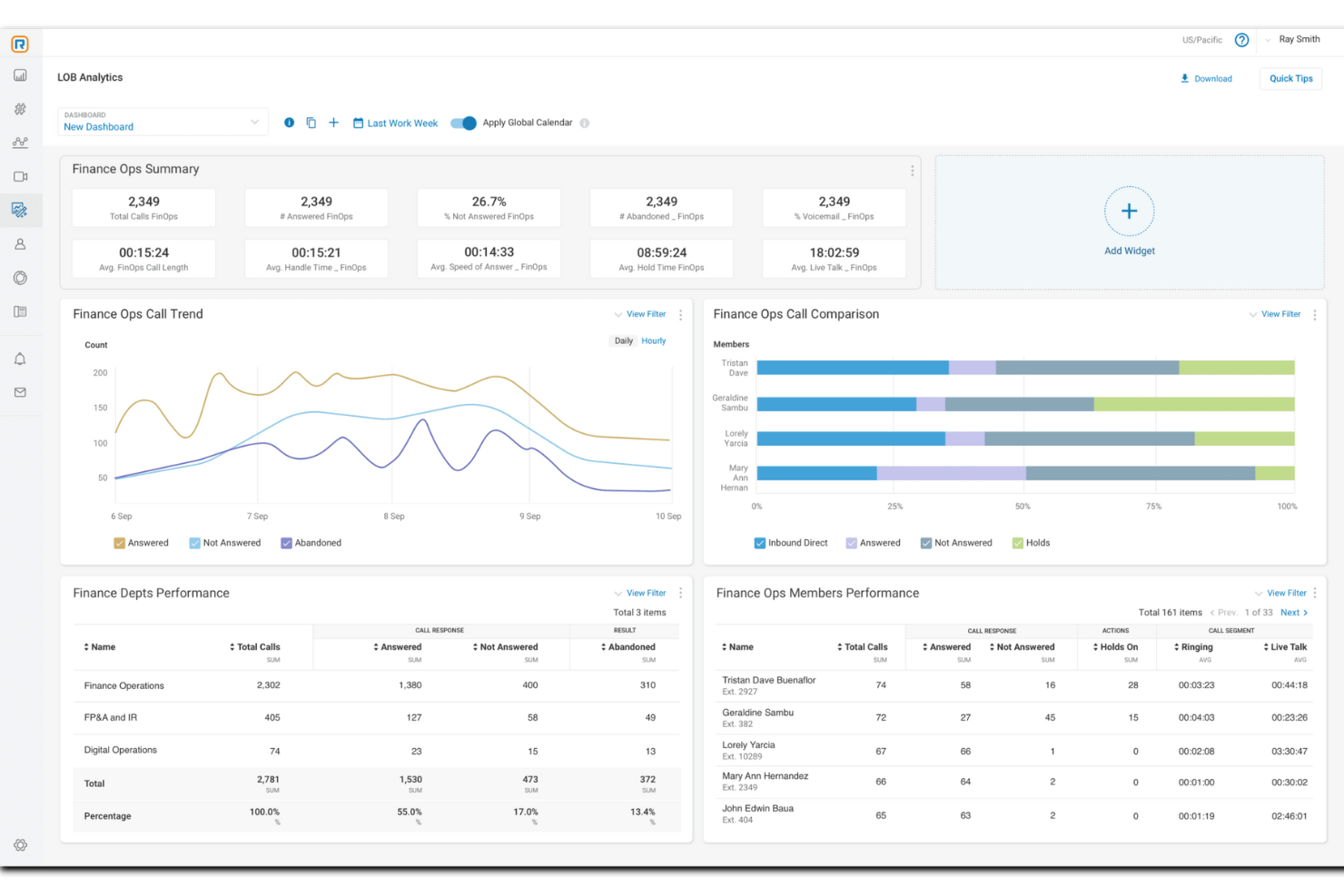
Für diejenigen, die eine Inbound-Callcenter-Lösung suchen, integriert RingCentral Contact Center KI-gesteuerte Einblicke und Omnichannel-Kommunikation. Diese cloudbasierte Plattform ist ideal für Unternehmen, die den Kundenservice verbessern möchten, und bietet Funktionen wie intelligente Anrufweiterleitung und Echtzeit-Analysen. Durch die Unterstützung mehrerer Kommunikationskanäle stellt RingCentral sicher, dass Ihr Team effektiv mit Kunden interagieren kann, wodurch Herausforderungen bei der Kundenkommunikation und der Produktivität der Mitarbeitenden angegangen werden.
Warum ich mich für RingCentral Contact Center entschieden habe
Ich habe mich für RingCentral Contact Center entschieden, weil es ein umfassendes Omnichannel-Support-Erlebnis bietet – unerlässlich für moderne Inbound-Callcenter. Mit der Möglichkeit, über Sprache und mehr als 20 digitale Kanäle zu kommunizieren, kann Ihr Team Interaktionen einfach verwalten, egal ob Kunden sich via Social Media, E-Mail oder Telefon melden. Die Integration von KI-gestützten virtuellen Agenten verbessert nicht nur die Kundenzufriedenheit durch sofortige Antworten, sondern unterstützt auch bei der Verkürzung der Reaktionszeiten. Darüber hinaus ermöglichen die offenen APIs der Plattform eine nahtlose Integration in bestehende CRM-Systeme, sodass Ihre Mitarbeitenden die Werkzeuge erhalten, die sie für einen personalisierten und effektiven Service benötigen.
Wesentliche Funktionen von RingCentral Contact Center
Neben dem starken Omnichannel-Support bietet RingCentral Contact Center eine Reihe von Funktionen, die den Betrieb Ihres Inbound-Callcenters verbessern.
- Intelligente Weiterleitung: Diese Funktion leitet Anrufe und Nachrichten abhängig von Kundenbedürfnissen und Kompetenzen der Mitarbeitenden an die geeignetsten Personen weiter und stellt so eine effiziente Bearbeitung der Anfragen sicher.
- Automatisierung: Nutzen Sie virtuelle Assistenten und Self-Service-Optionen, um Interaktionen zu verwalten und die Arbeitsbelastung der Mitarbeitenden zu reduzieren, sodass sie sich auf komplexere Aufgaben konzentrieren können.
- Workforce-Management: Verwenden Sie Tools für Einsatzplanung, Leistungsüberwachung und Unterstützung der Mitarbeitenden, um die operative Effizienz zu erhöhen und Ihr Team stets optimal vorzubereiten.
- Kundenprofil-Zusammenführung: Stellen Sie Ihren Mitarbeitenden eine umfassende Übersicht vergangener Interaktionen zur Verfügung, indem Sie Kundenprofile zusammenführen – das ermöglicht einen personalisierten und informierten Kundenservice.
RingCentral Contact Center Integrationen
Integrationen umfassen Salesforce, HubSpot, Zendesk, Microsoft Teams, Slack, Zoho CRM, ServiceNow, Google Workspace, Microsoft 365 und Oracle.
Pros and Cons
Pros:
- Bietet KI-gestützte Sentiment-Analyse für bessere Kundeneinblicke
- Enthält intelligente Weiterleitung zur effizienten Lösung von Kundenanfragen
- Bietet Echtzeit-Call-Monitoring zur Steigerung der Servicequalität
Cons:
- Unterstützung für bestimmte Tischtelefonmodelle ist eingeschränkt
- Nicht alle gewünschten Integrationen sind nativ verfügbar

Am besten für die schnelle Bereitstellung globaler Telefonnummern
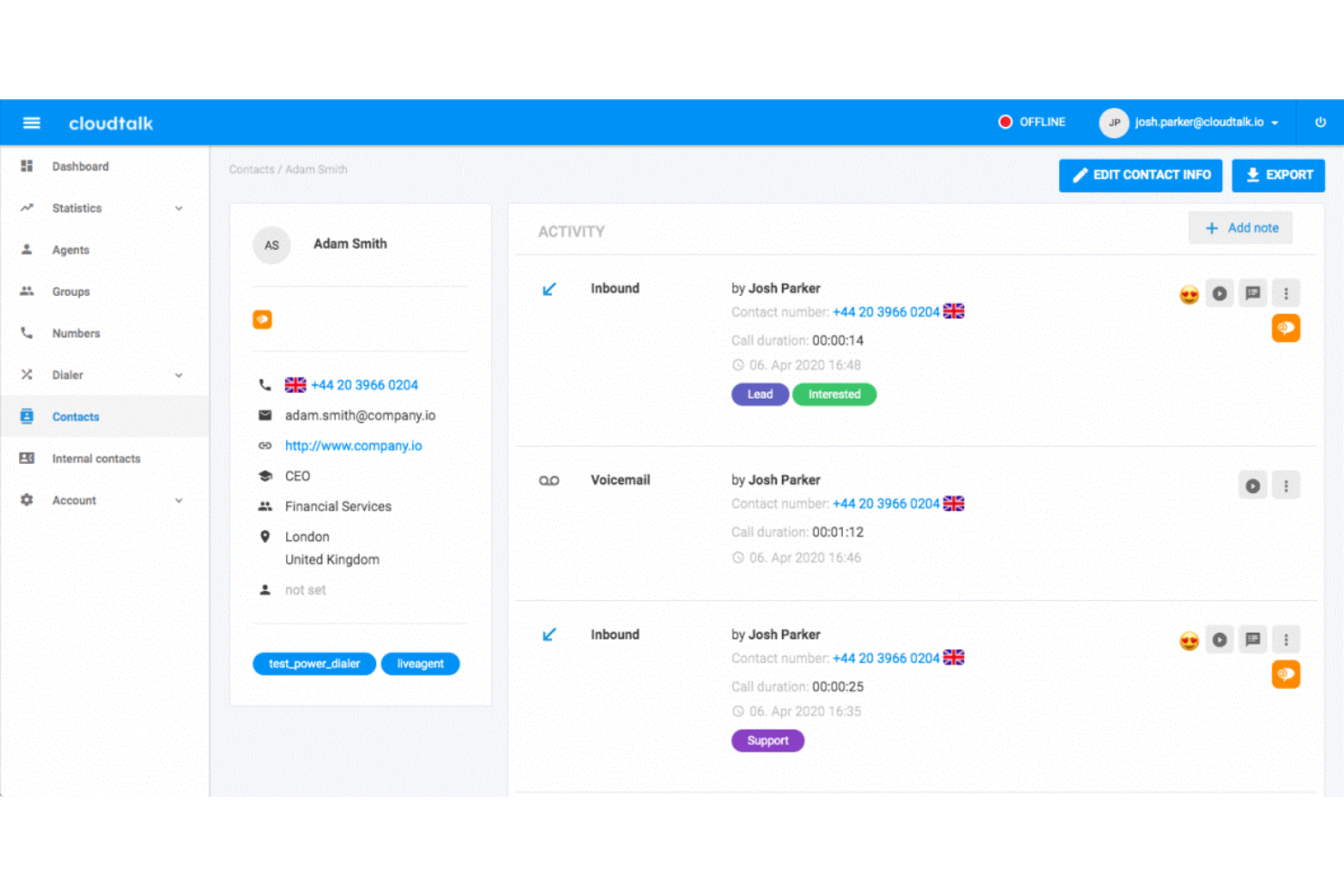
CloudTalk ist eine cloudbasierte Plattform für eingehende Anrufe, die KI-gestützte IVR, fähigkeitsbasierte Weiterleitung, Warteschlangenverwaltung, Echtzeitüberwachung, CRM-Integrationen und ein globales Telefonnummernnetz in mehr als 160 Ländern kombiniert.
Für wen ist CloudTalk am besten geeignet?
CloudTalk eignet sich hervorragend für Support- und Vertriebsteams in kleinen und mittleren Unternehmen sowie im gehobenen Mittelstand, die ein schnell einsetzbares, cloudnatives Telefonsystem ohne den Aufwand einer herkömmlichen Contact-Center-Infrastruktur benötigen.
Warum ich CloudTalk ausgewählt habe
CloudTalk steht auf meiner Auswahlliste, weil sich damit schnell eine lokale Präsenz für eingehende Anrufe dort aufbauen lässt, wo sich die Kunden befinden. Die Bereitstellung einer lokalen Nummer in einem von mehr als 160 Ländern dauert Minuten statt Wochen. Dadurch kann ich eingehende Anrufe bereits vor der Erschließung eines neuen Marktes über eine lokale Nummer in Deutschland, Brasilien oder Japan weiterleiten, ohne Formulare einreichen oder auf Netzbetreiber warten zu müssen. In Kombination mit dem visuellen Anrufablauf-Designer und KI-Sprachagenten in mehr als 60 Sprachen lässt sich die Abdeckung für eingehende Anrufe erweitern, ohne zusätzliches Personal einzustellen.
Wichtige Funktionen von CloudTalk
- Echtzeitüberwachung und Coaching von Agenten: Vorgesetzte können laufende Gespräche mithören, den Agenten Hinweise geben oder sich in Gespräche einschalten, um die Qualität in Echtzeit zu sichern.
- Fähigkeits- und bedingungsbasierte Weiterleitung: Anrufe werden anhand anpassbarer Regeln automatisch an die jeweils am besten geeigneten verfügbaren Agenten weitergeleitet.
- CRM- und Helpdesk-Integrationen: Native Integrationen verknüpfen eingehende Anrufe mit CRM- und Ticketsystemen und synchronisieren den Kontext automatisch.
- Echtzeit- und historische Berichte: Übersichtsseiten und Anzeigebildschirme liefern Live- und historische Einblicke in Anrufvolumen, Agentenstatus und Warteschlangenleistung.
CloudTalk-Integrationen
CloudTalk bietet mehr als 100 native Integrationen, darunter HubSpot, Salesforce, Zendesk, Pipedrive, Intercom, Zoho CRM, Freshdesk, Microsoft 365, Google Workspace, Slack und Zapier. Für individuelle Integrationen steht außerdem eine API zur Verfügung.
Pros and Cons
Pros:
- Sofortige Einrichtung lokaler Nummern in mehr als 160 Ländern
- KI-Sprachagenten reduzieren das Aufkommen eingehender Anrufe automatisch
- Der visuelle Ablaufdesigner vereinfacht komplexe IVR-Konfigurationen
Cons:
- In einigen Regionen wurden Einbußen bei der Gesprächsqualität gemeldet
- Die Anpassungsmöglichkeiten der Analysen sind im Vergleich zu konkurrierenden Unternehmens-CCaaS-Lösungen begrenzt

Am besten für umfangreiche Integrationen mit CRM- und Geschäftsanwendungen geeignet
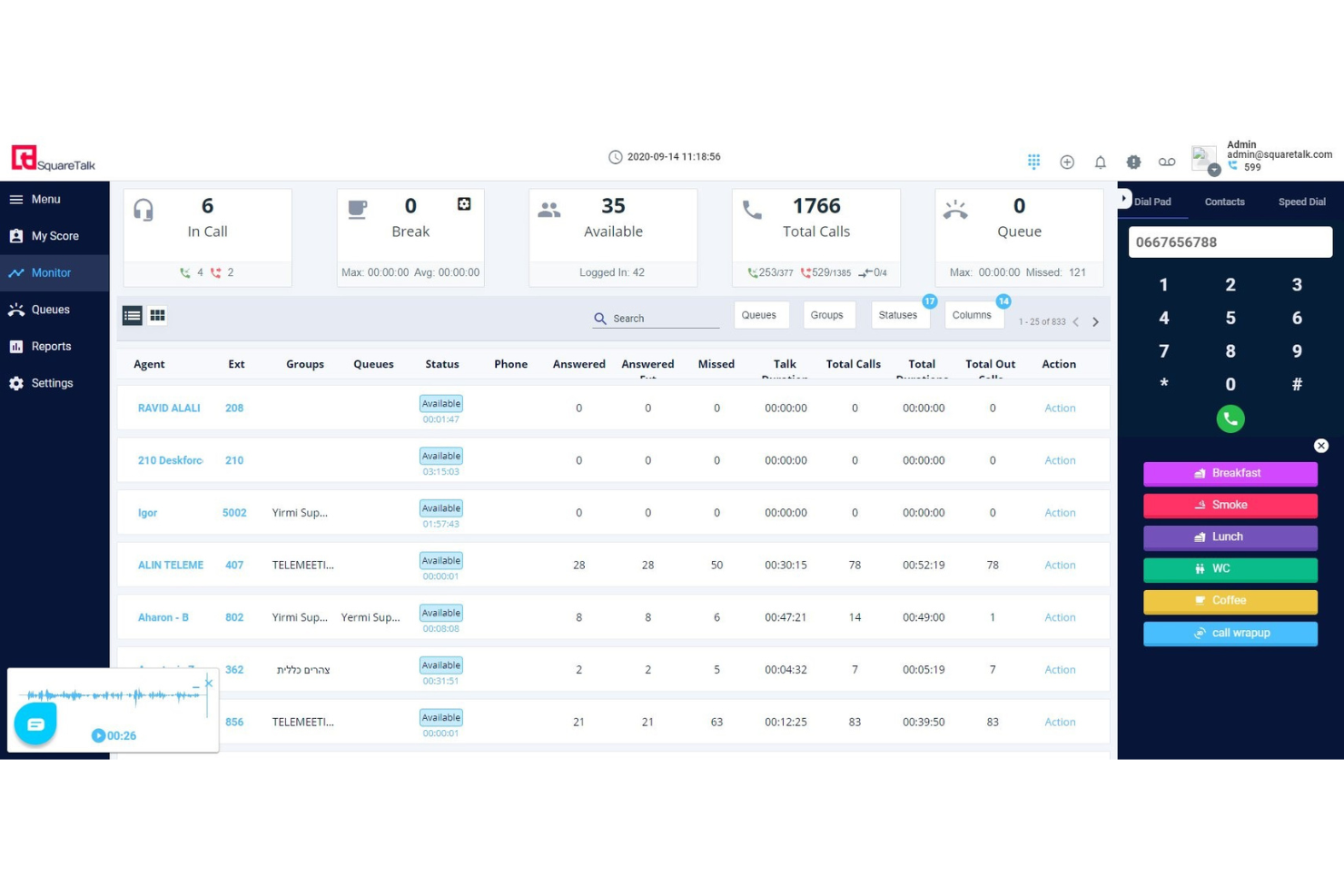
Squaretalk ist eine cloudbasierte Kontaktcenter-Plattform, die ACD, IVR, intelligente Anrufweiterleitung, die Verwaltung eingehender Warteschlangen, Echtzeitüberwachung und kanalübergreifende Nachrichten über Sprache, WhatsApp, E-Mail und SMS kombiniert.
Für wen ist Squaretalk am besten geeignet?
Squaretalk eignet sich besonders für Kundensupport-Teams in kleinen und mittleren Unternehmen sowie im mittleren Marktsegment und für BPO-Betriebe, die ein skalierbares, CRM-verbundenes Callcenter für eingehende Anrufe ohne komplexe Infrastruktur benötigen.
Warum ich Squaretalk ausgewählt habe
Ich habe Squaretalk als eine der besten Lösungen ausgewählt, weil die CRM-Anbindung weit über eine einfache Schaltfläche zum Wählen per Mausklick hinausgeht. Direkte Integrationen mit Salesforce, HubSpot, Zendesk und Pipedrive zeigen den vollständigen Kontext des Anrufers an, sobald ein eingehender Anruf verbunden wird. Besonders gut gefällt mir die Funktion zur AI-Anrufzusammenfassung, die nach jeder Interaktion automatisch eine strukturierte Zusammenfassung ohne erforderliche manuelle Eingabe durch die Agenten im CRM-Datensatz protokolliert.
Die wichtigsten Funktionen von Squaretalk
- Visueller IVR-Anrufablauf-Builder: Konfigurieren Sie mehrstufige Menüs und Weiterleitungslogik über eine Ziehen-und-Ablegen-Oberfläche.
- Rückruffunktion für Warteschlangen: Ermöglichen Sie Anrufern, einen Rückruf anzufordern, anstatt in ausgelasteten eingehenden Warteschlangen zu warten.
- Flüster- und Aufschaltungsüberwachung: Vorgesetzte können Agenten unbemerkt coachen oder zur Qualitätssicherung an laufenden Anrufen teilnehmen.
- Kanalübergreifender Posteingang für Agenten: Bearbeiten Sie eingehende Sprach-, WhatsApp-, E-Mail-, SMS- und Chat-Konversationen in einem einzigen Arbeitsbereich.
Integrationen von Squaretalk
Squaretalk bietet direkte Integrationen mit Salesforce, HubSpot, Zoho CRM, Zendesk, Pipedrive, Freshdesk und Microsoft Dynamics 365. Für benutzerdefinierte Integrationen steht eine API zur Verfügung.
Pros and Cons
Pros:
- Starke CRM-Anbindung mit nativen Bildschirmanzeigen
- Kanalübergreifender Posteingang für Sprache, SMS und WhatsApp
- AI-Anrufzusammenfassungen werden nach jeder Interaktion automatisch protokolliert
Cons:
- Die Möglichkeiten zur Anpassung von Berichten sind relativ begrenzt
- Die Einrichtung wird bei Konfigurationen mit mehreren Warteschlangen komplexer
New Product Updates from Squaretalk
Squaretalk Adds TradeCore Integration for Brokerage Workflows
Squaretalk adds a TradeCore integration that connects customer conversations with BrokerIQ CRM workflows. This helps brokerage teams trigger AI-driven follow-ups, tasks, and other actions from calls and messages. For more information, visit Squaretalk’s official site.
 .
.
Am besten geeignet für die schnelle cloudbasierte Bereitstellung eines Telefonsystems

GoTo Connect ist ein cloudbasiertes Telefonsystem und eine Kontaktcenter-Plattform, die ACD, kompetenzbasiertes Anrufrouting, IVR, die Verwaltung von Warteschlangen über mehrere Kanäle, Gesprächsaufzeichnung, die Live-Überwachung von Agenten und CRM-Integrationen in einer einheitlichen Oberfläche vereint.
Für wen ist GoToConnect am besten geeignet?
GoTo Connect eignet sich für kleine bis mittelständische Unternehmen, die schnell ein voll ausgestattetes eingehendes Callcenter einrichten möchten, ohne dass ein großes IT-Team die Einführung verwalten muss.
Warum ich GoToConnect ausgewählt habe
GoTo Connect verdient einen Platz auf meiner Auswahlliste, weil die Kontaktcenter-Stufe bereits innerhalb eines Tages in Betrieb genommen werden kann – das ist bei dieser Funktionsvielfalt wirklich selten. Mir gefällt, dass ich mit dem visuellen Wählplan-Editor unbegrenzt viele automatische Vermittlungen, Anrufwarteschlangen und Routingregeln konfigurieren kann, ohne eine einzige Codezeile zu schreiben. Kompetenzbasiertes Routing, Positionsansagen und der automatische Rückruf aus der Warteschlange sind ab dem ersten Tag verfügbar und nicht hinter einem langwierigen Implementierungsprojekt verborgen.
Die wichtigsten Funktionen von GoToConnect
- Posteingang für mehrere Kanäle: Agenten verwalten eingehende Anrufe, Chats, SMS und soziale Nachrichten in einem einheitlichen Arbeitsbereich.
- Echtzeitübersicht für Vorgesetzte: Vorgesetzte überwachen den Agentenstatus, die Warteschlangenaktivität und die Servicelevel in Echtzeit.
- KI-gestützte Chatanalyse: Gesprächsanalysen erkennen Trends und die Stimmung in Echtzeit-Chat-Interaktionen automatisch.
- Echtzeitüberwachung von Anrufen: Vorgesetzte können aktive Gespräche mithören, den Agenten dezent Hinweise geben oder sich zuschalten, um Qualität und Coaching zu verbessern.
GoToConnect-Integrationen
GoTo Connect bietet native Integrationen mit Salesforce, HubSpot, Zendesk, ServiceNow, Microsoft Teams, Google Workspace und Outlook. Für benutzerdefinierte Integrationen ist eine API verfügbar.
Pros and Cons
Pros:
- Schnelle Bereitstellung mit minimalem IT-Aufwand
- Visueller Wählplan-Editor vereinfacht die Einrichtung von IVR
- Verwaltung von Warteschlangen über mehrere Kanäle für Sprach- und digitale Kanäle
Cons:
- Erweiterte Analysen erfordern höherstufige Tarife
- Begrenztes Personalmanagement im Vergleich zu spezialisierten CCaaS-Plattformen

Am besten geeignet für sichere, compliancebereite Anrufverwaltung

CTM ist eine cloudbasierte Plattform zur Verwaltung eingehender Anrufe, die Anrufverfolgung, ACD-Routing, IVR-Menüs, Gesprächsintelligenz und Compliance-Kontrollen wie HIPAA- und PCI-Redaktion in einem einzigen System kombiniert.
Für wen ist CTM am besten geeignet?
CTM eignet sich besonders für Teams in regulierten Branchen wie dem Gesundheitswesen, der Rechtsberatung und Finanzdienstleistungen, die eine konforme Anrufbearbeitung in ihre Abläufe für eingehende Anrufe integrieren müssen.
Warum ich mich für CTM entschieden habe
CTM gehört zu den besten Lösungen auf meiner Auswahlliste, weil die Plattform Compliance direkt in den Anrufablauf integriert, anstatt sie nachträglich hinzuzufügen. Besonders gefällt mir die automatische Redaktion, die vertrauliche Daten wie Kreditkartennummern und Sozialversicherungsnummern in Echtzeit aus Gesprächstranskripten entfernt. Außerdem verlasse ich mich auf die verschlüsselten Gesprächsaufzeichnungen und SAML SSO sowie auf die HIPAA- und PCI-Zertifizierungen, die direkt in die Plattform integriert sind.
Die wichtigsten Funktionen von CTM
- Intelligenter Router: Leitet eingehende Anrufe anhand benutzerdefinierter Wenn-Dann-Regeln und des Echtzeitstatus der Agenten dynamisch an die passenden Agenten weiter.
- Mehrstufige IVR-Menüs: Ermöglichen Anrufern die Selbstbedienung oder den Zugang zu spezialisierten Warteschlangen über anpassbare Sprach- oder Tastenfeld-Eingabestrukturen.
- Echtzeit-Dashboards zur Agentenleistung: Vorgesetzte können den Status der Agenten, die Anrufdauer und den Zustand der Warteschlangen live überwachen.
- Native CRM-Integrationen: Stellen direkte Verbindungen zu Salesforce, HubSpot, Zoho und anderen Systemen her, um Anrufdaten und Kontaktdetails automatisch zu synchronisieren.
CTM-Integrationen
CTM bietet native Integrationen mit Salesforce, HubSpot, Microsoft Dynamics 365, Pipedrive, Zoho CRM und Zendesk. Außerdem stellt die Plattform eine API für benutzerdefinierte Integrationen bereit.
Pros and Cons
Pros:
- Integrierte HIPAA- und PCI-Compliance-Kontrollen
- Mithören und Einschalten in laufende Gespräche in Echtzeit
- Gesprächsintelligenz zur Qualitätsbewertung eingehender Anrufe
Cons:
- Kein integriertes Personalmanagement oder Planung
- Omnichannel-Unterstützung bleibt hinter dedizierten CCaaS-Plattformen zurück

Talkdesk
Am besten mit branchenspezifischen KI-Agenten

Talkdesk ist eine cloudbasierte Contact-Center-Plattform, die KI-gestützte Anrufweiterleitung, IVR, Echtzeit-Dashboards, Workforce-Management, branchenspezifische Automatisierung und mehr in einer einzigen Lösung für eingehende und Omnichannel-Kommunikation vereint.
Für wen ist Talkdesk am besten geeignet?
Talkdesk eignet sich besonders für mittelständische und große Support-Teams in regulierten oder serviceintensiven Branchen wie Gesundheitswesen, Finanzdienstleistungen, Einzelhandel und Versicherungen.
Warum ich mich für Talkdesk entschieden habe
Talkdesk verdient seinen Platz auf meiner Auswahlliste, weil keine andere Plattform speziell entwickelte KI-Agenten für bestimmte Branchen in dieser Tiefe anbietet. Ich finde es großartig, wie Autopilot im Gesundheitswesen eingesetzt werden kann, um beispielsweise die Terminweiterleitung oder Versicherungsüberprüfung autonom zu übernehmen, ohne eine Warteschlange für Live-Agenten zu berühren. Darüber hinaus erkennt Talkdesk Navigator die Absicht des Anrufers durch natürliche Gespräche und trifft Weiterleitungsentscheidungen, die eine regelbasierte IVR nicht nachbilden kann.
Die wichtigsten Funktionen von Talkdesk
- Studio-IVR-Designer: Erstellen Sie mehrstufige Sprachmenüs per Drag-and-drop mit DTMF- und Spracherkennung.
- Workforce-Management-Suite: Prognostizieren Sie das Anrufaufkommen, planen Sie Agenten ein und überwachen Sie die Einhaltung mit integrierten WFM-Tools.
- Omnichannel-Digital-Engagement: Verwalten Sie eingehende Sprach-, Chat-, SMS-, Social-Media- und E-Mail-Interaktionen über einen einheitlichen Arbeitsbereich.
- Echtzeitüberwachung und Coaching: Verfolgen Sie die Aktivitäten von Agenten in Echtzeit und schalten Sie sich zum Mithören, Flüstern oder Eingreifen in Gespräche auf.
Talkdesk-Integrationen
Talkdesk bietet native Integrationen mit Salesforce, HubSpot, Zendesk, Microsoft Teams, ServiceNow, Slack, Zoom, Microsoft 365 und Oracle Service Cloud. Für benutzerdefinierte Integrationen steht eine API zur Verfügung.
Pros and Cons
Pros:
- Vorgefertigte KI-Agenten für regulierte Branchen
- KI-gestützte Weiterleitung passt sich der Absicht des Anrufers in Echtzeit an
- Das native Workforce-Management umfasst integrierte Prognosen
Cons:
- Die anfängliche Administratorkonfiguration erfordert erheblichen technischen Aufwand
- Die Optionen für benutzerdefinierte Berichte sind standardmäßig begrenzt

Twilio
Am besten für kanalübergreifende Gesprächsorchestrierung

Twilio Flex ist eine programmierbare cloudbasierte Kontaktcenter-Plattform, die die Weiterleitung eingehender Anrufe, IVR, kanalübergreifende Warteschlangen, die Überwachung von Agenten in Echtzeit und die KI-gestützte Gesprächsorchestrierung über Sprachkanäle, SMS, WhatsApp und Chat abwickelt.
Für wen ist Twilio am besten geeignet?
Twilio Flex eignet sich besonders für mittelständische und große Unternehmen, die über interne Entwicklerressourcen verfügen und ein vollständig anpassbares Kontaktcenter benötigen, das sie auf ihre bestehende Systemlandschaft ausrichten können.
Warum ich Twilio ausgewählt habe
Ich habe Twilio als eine der besten Lösungen ausgewählt, weil die Plattform den Moment besonders gut handhabt, in dem ein KI-Agent an einen Menschen eskalieren muss. Conversation Orchestrator und Conversation Relay arbeiten zusammen, sodass bei einer Überschreitung der Fähigkeiten der Selbstbedienung zur Lösung der Absicht eines Anrufers die vollständige Gesprächshistorie direkt an den Agenten-Desktop übergeben wird. Agent Copilot stellt anschließend relevante Antworten bereit und automatisiert die Nachbereitung des Gesprächs in Echtzeit, sodass sich Agenten auf das Gespräch konzentrieren können, anstatt während des Anrufs hektisch Notizen zusammenzusuchen.
Wichtige Funktionen von Twilio
- Mehrkanal-Agenten-Desktop: Agenten bearbeiten eingehende Anrufe, SMS, WhatsApp und Chat über eine einzige, einheitliche Oberfläche.
- Visueller IVR-Editor: Mit den Ziehen-und-Ablegen-Werkzeugen in Twilio Studio können Teams individuelle IVR-Abläufe ohne Programmierung entwerfen und bereitstellen.
- Automatische Anrufaufzeichnung: Flex zeichnet eingehende Kundenanrufe automatisch auf und bietet sicheren Zugriff sowie Wiedergabe für die Qualitätssicherung.
- Echtzeit-Analyseübersicht: Vorgesetzte können Anrufvolumen, Warteschlangenstatus und Agentenaktivität über konfigurierbare Übersichten sofort in Echtzeit einsehen.
Twilio-Integrationen
Twilio Flex bietet integrierte Anbindungen an Salesforce, Zendesk, Shopify, Google Dialogflow, Calabrio ONE und Segment. Für individuelle Integrationen steht eine API zur Verfügung.
Pros and Cons
Pros:
- Hochgradig anpassbare Anrufweiterleitung und IVR-Abläufe
- KI-gestützte Agentenunterstützung während laufender Anrufe
- Skaliert problemlos über verteilte Teams mit im Homeoffice arbeitenden Agenten
Cons:
- Erfordert Entwicklerressourcen für Konfiguration und Wartung
- Die Komplexität der Einrichtung verlangsamt die Zeitpläne für die Erstbereitstellung

Dialpad
Am besten mit No-Code-Erstellung und Automatisierung von KI-Agenten

Dialpad ist eine KI-native Cloud-Kontaktcenter-Plattform, die die Weiterleitung eingehender Anrufe, die Warteschlangenverwaltung, Echtzeit-Coaching für Agenten, die Aufzeichnung von Anrufen und die automatisierte Qualitätsbewertung über Sprach- und digitale Kanäle hinweg übernimmt.
Für wen ist Dialpad am besten geeignet?
Dialpad eignet sich besonders für mittelständische Kontaktcenter-Teams, die eine einheitliche Sprach- und Digital-Support-Plattform nutzen möchten, ohne mehrere Anbieter verwalten zu müssen.
Warum ich Dialpad ausgewählt habe
Ich habe Dialpad in meine Top-Auswahl aufgenommen, weil der No-Code-Builder für KI-Agenten Betriebsteams von Kontaktcentern ermöglicht, autonome Sprachagenten bereitzustellen, ohne die Entwicklung einzubeziehen. Ich kann Agenten so konfigurieren, dass sie Aufgaben wie die Anrufweiterleitung anhand der Absicht des Anrufers oder die Abfrage von Bestellungen übernehmen, bevor ein Live-Agent überhaupt abnimmt. DialpadGPT, das mit über 10 Milliarden Geschäftsgesprächen trainiert wurde, treibt außerdem die Echtzeitkarten des KI-Live-Coachs an, die Agenten während eines Gesprächs relevante Antworten anzeigen.
Wichtige Funktionen von Dialpad
- Omnichannel-Arbeitsbereich für Agenten: Unterstützt Anrufe, SMS, Chat und digitale Kanäle in einer einzigen Oberfläche zur Bearbeitung eingehender Interaktionen.
- Zusatzmodul für Workforce Management: Ermöglicht Vorgesetzten, die Nachfrage zu prognostizieren, Agenten einzuplanen und die Einhaltung von Schichtplänen direkt innerhalb der Plattform zu verwalten.
- Anrufaufzeichnung und Live-Überwachung: Bietet kontinuierliche Aufzeichnung sowie Funktionen zum Mithören, Einflüstern und Einschalten zur Qualitätssicherung.
- Bidirektionale CRM-Integrationen: Synchronisiert Anrufdaten, Transkripte und Notizen automatisch mit Salesforce, HubSpot, Zendesk und anderen Plattformen.
Dialpad-Integrationen
Dialpad bietet native Integrationen mit Salesforce, HubSpot, Zendesk, ServiceNow, Zoho CRM, Slack, Microsoft Teams, Google Workspace, Microsoft 365 und Okta. Für benutzerdefinierte Integrationen ist eine API verfügbar.
Pros and Cons
Pros:
- KI-Coaching in jeden Live-Anruf integriert
- Echtzeittranskription für alle eingehenden Anrufe
- Nativ integrierter No-Code-Builder für KI-Agenten
Cons:
- Workforce Management ist ein kostenpflichtiges Zusatzmodul
- Benutzerdefinierte Berichtoptionen sind eingeschränkt
Andere Software für virtuelle Callcenter
- Zoho Voice
Am besten geeignet für KMU mit globalen Telefonieanforderungen
- Convoso
E KI-Contact-Center-Technologie
- Five9
Am besten für KI-gestützte Werkzeuge
- Bitrix24
Am besten für Omnikanal-Kommunikation
- Zendesk Suite
E umfassende Callcenter-Plattform
- Salesforce Service Cloud Voice
Am besten geeignet für Kundeninformationen
- Kixie Powercall
Ideal für die Verwaltung von Remote-Team-Anrufen
- CallTools
Am besten für Echtzeitüberwachung
- LiveAgent
Am besten geeignet für anpassbare IVR-Menüs
- Nextiva
Am besten für intelligente Anrufweiterleitung
- 3CX
Am besten für Kundenserviceteams im Homeoffice
- Etollfree
Ideal für hochwertige lokale und gebührenfreie Nummern.
- Newfies-Dialer
Am besten für CRM-Integration geeignet.
- Dextr
E Oberfläche für Agenten-Supervisoren.


Wie ich Inbound-Callcenter-Software bewerte
Inbound-Callcenter-Software ist das Bindeglied zwischen einer Support-Hotline mit hohem Aufkommen und den Mitarbeitenden, die sie betreuen – sei es ein Gesundheitsnetzwerk, das Patientenanrufe an das richtige klinische Team weiterleitet, oder eine Einzelhandelsmarke, die täglich Tausende von Bestellungen entgegennimmt. Wenn ich Tools in diesem Bereich bewerte, prüfe ich zunächst, ob eine Plattform die grundlegenden Anforderungen erfüllt, die jede ernsthafte Lösung mitbringen muss. Danach schaue ich mir an, was eine Auswahl für bestimmte Teams und Anwendungsfälle besonders macht.
Kernfunktionen (Grundvoraussetzung für diese Liste)
Bei Inbound-Callcenter-Software teste und bewerte ich die folgenden Kernfunktionen:
- Automatische Anrufverteilung: Ich prüfe, wie flexibel Anrufe an Agents weitergeleitet werden – zum Beispiel nach Fähigkeiten, Uhrzeit oder Prioritätswarteschlangen – und ob sich die Regeln spontan anpassen lassen.
- IVR & Self-Service: Hier kommt es auf den Callflow-Builder an. Ich achte auf visuelle Editoren ohne Programmieraufwand, damit Ihr Team Menüs selbstständig aktualisieren kann.
- Anrufwarteschlangen & Rückrufoptionen: Wartende Anrufer sollten über die voraussichtliche Wartezeit und ihre Position informiert werden. Ich bewerte zudem, ob die Plattform geplante Rückrufe ermöglicht.
- Echtzeit- & Verlaufsberichte: Dashboards sollten live die Warteschlangentiefe und den Agentenstatus anzeigen. Ich prüfe, ob vordefinierte Berichte zu AHT, FCR, Abbruchrate und ASA vorhanden sind.
- Agenten-Desktop & Screen-Pops: Beim Verbindungsaufbau sollte der Agent sofort die Historie und CRM-Daten des Anrufers sehen.
- Anrufaufzeichnung & -überwachung: Über die Basisaufnahme hinaus suche ich nach Supervisor-Tools wie Silent Monitoring, Flüstermodus für Coaching und Barge-in für Live-Eingriffe.
- CRM- & Helpdesk-Integrationen: Native Anbindungen an Plattformen wie Salesforce, HubSpot, Zendesk und ServiceNow sind unverzichtbar. Ich bewerte, ob die Synchronisation bidirektional erfolgt.
Ein Tool muss die meisten dieser Funktionen bieten, um auf die Liste zu kommen. Anschließend schaue ich, was die einzelnen Lösungen voneinander unterscheidet.
Herausragende Funktionen (Was die Kandidaten unterscheidet)
Bei der Auswahl achte ich auf echte Omnichannel-Fähigkeiten – gilt die gleiche Routing-Logik und das Reporting für Anrufe, Chats und Social Messaging, oder sind digitale Kanäle nur angeflanscht? Außerdem bewerte ich KI-gestützte Agenten-Assistenz, die in Echtzeit Vorschläge macht und Nachbearbeitungen automatisiert. Besonders punkten Plattformen mit branchenspezifischen Compliance-Funktionen, wie PCI DSS- oder HIPAA-Unterstützung für regulierte Teams.
Was ich über Funktionen hinaus bewerte
Ich prüfe, wie gut jede Plattform bei saisonalen Spitzen skalieren kann – denn ein Einzelhandelsteam, das in den Feiertagen die Agentenzahl verdoppelt, hat ganz andere Anforderungen als ein kontinuierliches Support-Team im Gesundheitswesen. Auch das Preismodell zählt: Verbrauchsbasierte Abrechnung eignet sich bei schwankendem Volumen, Sitzplatzlizenzen eher für stabile Teams. Außerdem berücksichtige ich die Implementierungsdauer und wie viel Unterstützung durch Profis nötig ist, um live zu gehen, ohne bestehende Kundenprozesse zu stören.
So wählen Sie Software für eingehende Anrufe aus
Es ist leicht, sich in langen Funktionslisten und komplexen Preisstrukturen zu verlieren. Damit Sie sich bei der Bearbeitung Ihres individuellen Softwareauswahlprozesses auf das Wesentliche konzentrieren können, finden Sie hier eine Checkliste mit Faktoren, die Sie berücksichtigen sollten:
| Faktor | Was ist zu beachten? |
|---|---|
| Skalierbarkeit | Wächst die Software mit Ihrem Unternehmen? Prüfen Sie, ob sie mit der Erweiterung Ihres Teams mehr Anrufe oder Benutzer bewältigen kann. Achten Sie auf Lösungen mit flexiblen Tarifen und Unterstützung für Wachstum. |
| Integrationen | Kann die Software mit Ihren bestehenden Tools verbunden werden? Stellen Sie sicher, dass sie sich nahtlos in Ihr CRM, Ihren Helpdesk oder andere wichtige Systeme integrieren lässt, um Arbeitsabläufe zu optimieren. |
| Anpassbarkeit | Erfüllt die Software Ihre spezifischen Anforderungen? Prüfen Sie, ob Sie die Software an Ihre Prozesse und Präferenzen anpassen können. Vermeiden Sie starre Systeme, die die Anpassungsfähigkeit einschränken. |
| Benutzerfreundlichkeit | Ist die Software für Ihr Team einfach zu bedienen? Entscheiden Sie sich für intuitive Benutzeroberflächen, die nur eine minimale Schulung erfordern. Komplizierte Systeme können zu Frustration und Ineffizienz führen. |
| Implementierung und Einführung | Wie lange dauert die Einrichtung? Berücksichtigen Sie den Zeit- und Ressourcenaufwand für die Implementierung und Schulung Ihres Teams. Achten Sie auf Anbieter, die in dieser Phase umfassenden Support anbieten. |
| Kosten | Passt die Software in Ihr Budget? Vergleichen Sie Preismodelle einschließlich versteckter Gebühren oder gestaffelter Tarife. Stellen Sie sicher, dass Sie einen angemessenen Gegenwert erhalten, ohne zu viel auszugeben. |
| Sicherheitsmaßnahmen | Wie schützt die Software Ihre Daten? Überprüfen Sie die Verschlüsselungsstandards der Software und ihre Einhaltung von Datenschutzbestimmungen, um sensible Informationen zu schützen. |
| Verfügbarkeit des Supports | Ist Hilfe verfügbar, wenn sie benötigt wird? Prüfen Sie, ob der Anbieter rund um die Uhr Support oder dedizierte Account-Manager bereitstellt, um Probleme schnell zu lösen und einen reibungslosen Betrieb zu gewährleisten. |
Funktionen von Software für eingehende Anrufe
Bei der Auswahl einer Software für eingehende Anrufe sollten Sie auf die folgenden wichtigen Funktionen achten:
- Automatische Anrufverteilung: Diese Funktion stellt sicher, dass eingehende Anrufe anhand von Fähigkeiten, Verfügbarkeit und den Bedürfnissen der Anrufer an den richtigen Agenten weitergeleitet werden. Sie hilft Ihnen, Wartezeiten zu verkürzen und Anrufer mit der Person zu verbinden, die ihnen am besten helfen kann.
- Interaktive Sprachsteuerung: IVR-Systeme begrüßen Anrufer mit einem Menü aus Optionen, über das sie sich selbst an die richtige Abteilung oder Ressource weiterleiten können. Das spart Ihrem Team nicht nur Zeit, sondern ermöglicht es Anrufern auch, schnell Antworten zu erhalten – ohne dass bei routinemäßigen Fragen ein Mitarbeiter benötigt wird.
- Anrufaufzeichnung: Mit der Anrufaufzeichnung können Sie jedes Gespräch zur späteren Überprüfung aufzeichnen. Dies hilft Ihnen, den Kundenservice zu verbessern, Ihr Team zu schulen und Streitigkeiten anhand einer zuverlässigen Aufzeichnung zu klären.
- Analysen und Berichte in Echtzeit: Greifen Sie auf Dashboards und Berichte zu, die Anrufvolumen, Agentenleistung, Wartezeiten und mehr anzeigen. So können Sie Trends erkennen, Engpässe beheben und Ihr Team für bessere Ergebnisse schulen.
- CRM-Integration: Verbinden Sie Ihre Callcenter-Software mit Ihrem Kundenbeziehungsmanagementsystem. Wenn ein Anruf eingeht, sehen Sie die Daten, den Verlauf und die Notizen des Anrufers – so begrüßen Sie jeden Kunden wie einen alten Freund.
- Anrufüberwachung und Flüster-Coaching: Hören Sie bei laufenden Anrufen mit und geben Sie Agenten Feedback oder Ratschläge, ohne dass der Kunde dies hört. Das ist so, als hätten Sie einen Coach an der Seitenlinie, der Agenten dabei hilft, schwierige Situationen zu bewältigen und ihre Fähigkeiten weiterzuentwickeln.
- Unterstützung für mehrere Kanäle: Gehen Sie über Telefonanrufe hinaus, indem Sie Chats, E-Mails oder Textnachrichten über dieselbe Plattform verwalten. Sie können Kunden über ihren bevorzugten Kanal erreichen und jedes Gespräch organisiert halten.
- Anrufwarteschlangen: Wenn alle Agenten beschäftigt sind, gehen Anrufer nicht verloren und werden nicht ignoriert. Durch Anrufwarteschlangen werden sie eingereiht, erhalten Wartemeldungen oder Musik und bleiben über ihre Wartezeit informiert, sodass sich niemand vergessen fühlt.
- Anrufnotizen und Markierungen: Agenten können jedem Anruf individuelle Notizen und Markierungen hinzufügen. Dadurch lassen sich Anrufergebnisse leichter nachverfolgen, Tickets eskalieren und gegenüber Kunden gemachte Zusagen weiterverfolgen.
Häufige KI-Funktionen von Software für eingehende Callcenter-Anrufe
Zusätzlich zu den oben aufgeführten Standardfunktionen von Software für eingehende Callcenter-Anrufe integrieren viele dieser Lösungen KI mit Funktionen wie:
- KI-gestützte Anrufweiterleitung: Algorithmen analysieren Kundendaten und den Kontext des Anrufs, um jeden Anrufer mit dem am besten qualifizierten Agenten zu verbinden. Dadurch werden die Lösungsgeschwindigkeit und die Kundenzufriedenheit verbessert.
- Intelligente virtuelle Assistenten: KI-gesteuerte Bots können routinemäßige Fragen beantworten, einfache Anfragen bearbeiten und Anrufer durch Menüs führen – so haben Ihre Agenten mehr Zeit für komplexere Anliegen.
- Echtzeit-Sentimentanalyse: KI bewertet den Tonfall und die verwendeten Wörter in einem Gespräch und kennzeichnet frustrierte oder verwirrte Anrufer, damit Sie proaktiv eingreifen und die Situation verbessern können.
- KI-gestützte Qualitätsüberwachung: Künstliche Intelligenz überprüft Anrufe automatisch auf Compliance, Tonfall und die Einhaltung von Gesprächsskripten. Dabei werden Coaching-Möglichkeiten hervorgehoben und hohe Standards sichergestellt.
- Prädiktive Analysen: KI erkennt Muster im Verhalten von Anrufern, sagt Stoßzeiten voraus und hilft Ihnen, die Personalplanung zu optimieren, um konstant schnellen Service zu bieten.
Vorteile von Software für eingehende Callcenter-Anrufe
Die Implementierung von Software für eingehende Callcenter-Anrufe bietet Ihrem Team und Ihrem Unternehmen mehrere Vorteile. Hier sind einige, auf die Sie sich freuen können:
- Verbesserte Kundenerfahrung: Callcenter-Software hilft dabei, Anrufe effizient zu verwalten und weiterzuleiten, sodass Kunden schnell mit dem richtigen Agenten verbunden werden.
- Verbesserte Zusammenarbeit im Team: Die Integration in CRM-Systeme ermöglicht den nahtlosen Austausch von Kundeninformationen zwischen Teammitgliedern und verbessert dadurch die Kommunikation und Servicebereitstellung.
- Höhere Effizienz: Automatisierte Anrufverteilung und interaktive Sprachsteuerungsfunktionen (IVR) verkürzen Wartezeiten und entlasten Agenten, sodass sie komplexere Anfragen bearbeiten können.
- Analysen in Echtzeit: Der Zugriff auf Anrufdaten und Leistungskennzahlen hilft Managern, fundierte Entscheidungen zu treffen, um Abläufe zu optimieren und die Servicequalität zu verbessern.
- Skalierbarkeit: Die Software kann wachsende Anrufvolumen problemlos bewältigen und ermöglicht es Unternehmen, ihre Kundenservicekapazitäten ohne wesentliche Änderungen an der Infrastruktur zu erweitern.
- Kosteneinsparungen: Durch die Automatisierung routinemäßiger Aufgaben und die Optimierung der Ressourcenverteilung kann Software für eingehende Callcenter-Anrufe die Betriebskosten senken.
- Flexibilität: Dank des Fernzugriffs können Agenten von überall aus arbeiten, wodurch Unternehmen eine flexible Option für ihre Belegschaft erhalten.
Kosten und Preise von Software für eingehende Callcenter-Anrufe
Die Auswahl einer Software für eingehende Anrufe im Callcenter erfordert ein Verständnis der verschiedenen verfügbaren Preismodelle und Tarife. Die Kosten variieren je nach Funktionen, Teamgröße, Zusatzoptionen und weiteren Faktoren. Die folgende Tabelle fasst gängige Tarife, ihre durchschnittlichen Preise und typische enthaltene Funktionen von Softwarelösungen für eingehende Anrufe im Callcenter zusammen:
Vergleichstabelle der Tarife für Callcenter-Software für eingehende Anrufe
| Tarifart | Durchschnittlicher Preis | Übliche Funktionen |
|---|---|---|
| Kostenloser Tarif | $0 | Grundlegende Anrufbearbeitung, eingeschränkte Berichterstattung und Community-Support. |
| Persönlicher Tarif | $10-$30/Benutzer/Monat | Anrufweiterleitung, Voicemail, grundlegende Analysen und E-Mail-Support. |
| Geschäftstarif | $40-$70/Benutzer/Monat | Erweiterte Berichterstattung, CRM-Integration, Anrufaufzeichnung und Kunden-Support rund um die Uhr. |
| Unternehmenstarif | $100+/Benutzer/Monat | Anpassbares Dashboard, persönlicher Kundenbetreuer, API-Zugriff und Premium-Support. |
Das fragen auch andere
Hier finden Sie Antworten auf einige häufig gestellte Fragen zu Software für eingehende Anrufe im Callcenter.
Gibt es kostenlose Software für eingehende Anrufe im Callcenter?
Ja, Sie können \u003ca href=\u0022https://thecxlead.com/tools/best-free-call-center-software/\u0022\u003eCallcenter-Software mit kostenlosen Tarifen\u003c/a\u003e oder Testversionen finden, wobei diese Optionen häufig Einschränkungen bei der Anzahl der Agentenplätze, den Minuten oder den erweiterten Funktionen mit sich bringen. Anbieter wie Freshdesk, Bitrix24 und CloudTalk bieten Einsteigertarife oder Demozeiträume an, damit Sie prüfen können, ob die Plattform Ihren Anforderungen entspricht. Kostenlose Tarife umfassen in der Regel die grundlegende Anrufbearbeitung, einfache IVR und eingeschränkte Berichte.
Wenn Ihr Team wächst oder Ihre Anforderungen komplexer werden (beispielsweise wenn Sie detaillierte Analysen, CRM-Integrationen oder Compliance-Funktionen benötigen), müssen Sie wahrscheinlich auf einen kostenpflichtigen Tarif upgraden. Testen Sie mehrere Optionen, um herauszufinden, welche kostenlose Version Ihre täglichen Callcenter-Abläufe am besten unterstützt, bevor Sie sich für ein Abonnement entscheiden.
Was ist kompetenzbasiertes Routing?
Kompetenzbasiertes Routing ist eine Funktion der meisten modernen Systeme für eingehende Anrufe im Callcenter. Sie ordnet eingehende Anrufe automatisch dem Agenten zu, der aufgrund seiner Erfahrung, Sprachkenntnisse oder Produktkenntnisse am besten für das Anliegen des Kunden geeignet ist. Wenn ein Kunde beispielsweise technischen Support auf Spanisch benötigt, leitet das System den Anruf an eine Person weiter, die sowohl über die erforderlichen Sprachkenntnisse als auch über die nötigen Fähigkeiten zur Fehlerbehebung verfügt.
Die Einführung eines kompetenzbasierten Routings reduziert Anrufweiterleitungen, verkürzt Wartezeiten und führt zu weniger frustrierten Kunden. Es hilft Ihnen, das Fachwissen Ihres Teams effizienter einzusetzen, was zu höheren Lösungsquoten beim Erstkontakt und einer insgesamt besseren Kundenzufriedenheit führt. Prüfen Sie bei der Bewertung von Softwareoptionen, wie einfach sich individuelle Routingregeln einrichten und Agentenprofile aktualisieren lassen, wenn sich Ihr Unternehmen weiterentwickelt.
Wie kann ich mit Software für eingehende Anrufe im Callcenter die Lösungsquote beim Erstkontakt verbessern?
Um die Lösungsquote beim Erstkontakt (FCR) zu erhöhen, sollten Sie Software mit intelligentem Anrufrouting, einer einheitlichen Kundenhistorie und kontextbezogenen Skriptwerkzeugen einsetzen. Stellen Sie sicher, dass Ihre Agenten über eine integrierte Wissensdatenbank sofort auf frühere Interaktionen, Produktleitfäden und FAQs zur Fehlerbehebung zugreifen können. Nutzen Sie \u003ca href=\u0022https://thecxlead.com/tools/best-call-center-recording-software/\u0022\u003eAnrufaufzeichnungen\u003c/a\u003e und Analyse-Dashboards, um Muster bei ungelösten Anrufen zu erkennen und gezieltes Coaching anzubieten.
Proaktive Funktionen wie Echtzeitüberwachung und das Einflüstern für Agenten ermöglichen es Vorgesetzten, Anrufe zu unterstützen, ohne das Kundenerlebnis zu beeinträchtigen. Geben Sie regelmäßig Feedback, ermöglichen Sie einfache Eskalationen und erstellen Sie ein Verzeichnis häufig auftretender Probleme, damit Ihr Team mehr Anrufe bereits beim ersten Versuch lösen kann. Wenn Sie die FCR bei Leistungsbeurteilungen priorisieren, konzentrieren sich Agenten stärker darauf, Kundenprobleme von Anfang an zu lösen.
Welche Integrationen sollte ich für Software für eingehende Anrufe im Callcenter priorisieren?
Priorisieren Sie Integrationen, die Datenlücken zwischen Ihrem Callcenter und dem übrigen Unternehmen schließen. Verbinden Sie Ihre Callcenter-Plattform mit Ihrem CRM (Salesforce, HubSpot, Zoho), damit Agenten stets über aktuelle Kundeninformationen verfügen. Helpdesk-Integrationen (Zendesk, ServiceNow) vereinfachen die Fallverwaltung und Ticketverfolgung. Achten Sie auf Omnichannel-Erweiterungen, mit denen Ihr Team E-Mails, Live-Chats und Nachrichten aus sozialen Netzwerken über dasselbe Dashboard bearbeiten kann, sodass alle Kommunikationsbereiche zusammengeführt werden. Wenn Ihr Callcenter kennzahlenbasiert arbeitet, binden Sie Analysetools für individuelle Berichte und Software zur Personalplanung zur Optimierung der Personaleinsatzplanung ein. Die richtigen Integrationen reduzieren manuelle Eingaben, verhindern den Wechsel zwischen Kontexten und verschaffen Ihnen in Echtzeit Einblick in jeden Kontaktpunkt.
Wie messe ich die Leistung von Agenten mit Werkzeugen für eingehende Anrufe im Callcenter?
Die Leistung von Agenten lässt sich am besten anhand einer Kombination aus quantitativen und qualitativen Kennzahlen messen, die sich in moderner Software für eingehende Anrufe im Callcenter problemlos verfolgen lassen. Konzentrieren Sie sich als wichtigste KPIs auf die durchschnittliche Bearbeitungszeit, die Lösungsquote beim Erstkontakt, das Servicelevel und die Kundenzufriedenheitswerte (CSAT). Die meisten Plattformen bieten Live-Dashboards, über die Sie diese Kennzahlen in Echtzeit überwachen können, sodass schnelles Feedback und Kurskorrekturen möglich sind. Prüfen Sie regelmäßig Anrufaufzeichnungen zum Coaching und würdigen Sie besonders leistungsstarke Mitarbeiter in Teammeetings, um die Motivation zu steigern. Analysieren Sie Anrufprotokolle, um häufige Engpässe oder verpasste Chancen zu erkennen. Legen Sie Vergleichswerte fest, die an Geschäftsergebnisse geknüpft sind, und stellen Sie Agenten Bewertungskarten oder Dashboards zur Verfügung, damit sie ihren Fortschritt verfolgen und ihre eigene Entwicklung selbstständig vorantreiben können.
Was ist der Unterschied zwischen Software für eingehende und ausgehende Anrufe im Callcenter?
Software für eingehende Anrufe im Callcenter ist für die Bearbeitung eingehender Anfragen – Support, Auskünfte oder Auftragsverwaltung – ausgelegt und bietet Funktionen wie interaktive Sprachdialogsysteme (IVR), kompetenzbasiertes Routing, Warteschlangenverwaltung und Fallverfolgung. Software für ausgehende Anrufe im Callcenter konzentriert sich auf ausgehende Anrufe und wird häufig für Vertrieb, Leadgenerierung oder Kampagnen zur Kundenansprache eingesetzt. Plattformen für ausgehende Anrufe umfassen Funktionen wie vorausschauendes Wählen, Anrufskripte und Kampagnenverfolgung.
Einige Lösungen sind „kombiniert“. Als Leiter eines Callcenters sollten Sie jedoch sicherstellen, dass die von Ihnen ausgewählte Software die für den Arbeitsablauf Ihres Teams relevanten Funktionen für eingehende Anrufe hervorhebt, beispielsweise Echtzeitberichte und CRM-Integration, und nicht nur Werkzeuge für umfangreiche ausgehende Anrufe.
Wie sollte ich die Skalierung meines Callcenters mit cloudbasierter Software angehen?
Die Skalierung mit cloudbasierter Callcenter-Software gibt Ihnen die Flexibilität, Agenten hinzuzufügen, neue Standorte zu eröffnen oder auf Remote-Arbeit umzustellen, ohne große anfängliche IT-Investitionen.
\u003cul\u003e
\t\u003cli\u003eBeginnen Sie mit der Auswahl eines Anbieters, der für zuverlässige Verfügbarkeit, leistungsfähige Werkzeuge zur Benutzerverwaltung und transparente Preise bekannt ist.\u003c/li\u003e
\t\u003cli\u003eWenn Ihr Team wächst, ermöglichen Cloud-Lösungen die Einarbeitung neuer Agenten von überall aus und bieten sofortigen Zugriff auf gemeinsam genutzte Ressourcen und Anrufskripte.\u003c/li\u003e
\t\u003cli\u003eSie können die Abdeckung zu Spitzenzeiten ausweiten, Aktualisierungen einführen und neue Kommunikationskanäle wie Webchat integrieren, ohne den Service zu unterbrechen.\u003c/li\u003e
\t\u003cli\u003eNutzen Sie Funktionen zur Workforce-Optimierung für eine genaue Prognose und Einsatzplanung.\u003c/li\u003e
\t\u003cli\u003eNutzen Sie schließlich integrierte Analysen, um die Leistung zu überwachen und Anpassungen vorzunehmen, während Sie wachsen. So stellen Sie sicher, dass die Plattform weiterhin zu Ihren sich wandelnden Geschäftszielen passt.\u003c/li\u003e
\u003c/ul\u003e
Nutzen Sie Software für eingehende Anrufe im Callcenter zur Verbesserung des Kundenservice
Die Kunden von heute erwarten ausgezeichneten Support über mehrere Kanäle wie E-Mail, Live-Chat und Telefon. Das kann für ein Supportteam überwältigend sein – insbesondere, wenn diese Kanäle auf separaten Softwaresystemen laufen, die nicht integriert sind.
Jedes Jahr verlieren Unternehmen aufgrund eines mangelhaften Kundenservice $75 Milliarden. Der Einsatz der richtigen Callcenter-Software kann Ihnen dabei helfen, nicht zu dieser Statistik beizutragen. Software für Inbound-Callcenter bündelt Ihre Omnichannel-Serviceaktivitäten auf einer Plattform, was zu einem besseren Erlebnis für Ihre Kunden und Mitarbeitenden führen kann.
Software für Inbound-Callcenter ist für den erfolgreichen Betrieb eines Unternehmens unabhängig von seiner Größe erforderlich. Dennoch können Sie je nach Ihren Anforderungen zwischen Callcenter-Software für kleine Unternehmen und Unternehmenssoftware wählen. Die beste Callcenter-Software kann Ihrem Unternehmen Geld sparen und die Quantität und Qualität der Kundenkommunikation steigern. Außerdem erhalten Sie dadurch sofortigen Zugriff auf Kundeninformationen.
Wenn Sie nach weiteren Möglichkeiten suchen, das Erlebnis Ihrer Kunden mit Ihrem Unternehmen zu verbessern, abonnieren Sie den CX-Lead-Newsletter. Hier erfahren Sie die neuesten Nachrichten und erhalten Informationen zu Software, die Ihrem Unternehmen zum Erfolg verhelfen kann.