

Als Manager für Kundenerlebnisse stehen Sie täglich vor der Herausforderung, Ihr Team effizient zu halten und gleichzeitig die Kundenzufriedenheit sicherzustellen. Mobile Helpdesk-Software kann dabei entscheidend sein, da Ihr Team unabhängig vom jeweiligen Standort schnell und effektiv reagieren kann.
Aus meiner Erfahrung beim Testen und Bewerten von Software weiß ich, welchen Unterschied das richtige Tool machen kann. Ich habe verschiedene Optionen unabhängig geprüft und bewertet, um Ihnen die besten vorzustellen. In diesem Artikel präsentiere ich meine persönliche Auswahl und gebe Ihnen unvoreingenommene Einblicke, damit Sie die perfekte Lösung für Ihre Anforderungen finden.
Warum Sie unseren Software-Empfehlungen vertrauen können
6,700+
Reviews
20
Industry experts
16+
Evaluation factors
14
Years
Unser Team testet und bewertet Software seit 2012. Als CX-Führungskräfte selbst wissen wir, wie schwierig – und wichtig – es ist, die richtige Software auszuwählen.
Für diesen Leitfaden haben wir Tools mithilfe von praktischen Tests und unabhängiger Recherche bewertet und dabei unsere Bewertungskriterien angewendet.
Unsere Bewertungen spiegeln unser menschliches redaktionelles Urteilsvermögen wider, keine Verkaufsstrategie.
 Gui DrusinaCreative Director
 Tim FisherVP of AI
Vergleichstabelle der besten mobilen Helpdesk-Software
Diese Vergleichstabelle fasst die Preisdetails meiner besten mobilen Helpdesk-Software-Auswahl zusammen.
| Tool | Best For | Trial Info | Price | ||
|---|---|---|---|---|---|
| 1 | Am besten geeignet, um E-Mails in Aufgaben umzuwandeln | 30-tägige kostenlose Testversion verfügbar | Ab 14 $/Nutzer/Monat (jährliche Abrechnung) | Website | |
| 2 | Am besten geeignet, um individuelle KI-Chatbots zu erstellen | Kostenloser Plan verfügbar | Ab $32/Monat (jährliche Abrechnung) | Website | |
| 3 | Am besten für KI-gestützten Kundensupport | 7-tägige kostenlose Testversion + kostenloser Tarif verfügbar | Ab $25/Nutzer/Monat | Website | |
| 4 | Am besten für kleine Teams geeignet | 14-tägige kostenlose Testversion | Preise auf Anfrage | Website | |
| 5 | Am besten mit teamübergreifenden Kollaborationstools | 14-tägige kostenlose Testversion | Ab $25/Nutzer/Monat (jährlich abgerechnet) | Website | |
| 6 | Am besten geeignet für Einfachheit | Kostenloser Plan + kostenlose Demo verfügbar | Ab $29/Nutzer/Monat | Website | |
| 7 | Am besten für mehrsprachigen Support geeignet | Kostenlose Demo verfügbar | Ab $24/Nutzer/Monat (jährliche Abrechnung) | Website | |
| 8 | Am besten für ITIL-Konformität | 30-tägige kostenlose Testversion | Ab $12/Benutzer/Monat | Website | |
| 9 | Am besten für Projektintegration | 30-tägige kostenlose Testversion + kostenloser Tarif + kostenlose Demo verfügbar | Ab $10.99/Nutzer/Monat (jährlich abgerechnet) | Website | |
| 10 | Am besten für Skalierbarkeit | 15-tägige kostenlose Testversion | Ab $49/Monat (jährliche Abrechnung) | Website |


Testberichte zur besten mobilen Helpdesk-Software
Nachfolgend finden Sie meine ausführlichen Zusammenfassungen der besten mobilen Helpdesk-Software, die es in meine Auswahlliste geschafft hat. Meine Testberichte bieten einen detaillierten Überblick über die wichtigsten Funktionen, Vor- & Nachteile, Integrationen und idealen Anwendungsfälle jedes Tools, damit Sie die beste Lösung für sich finden.
 Am besten geeignet, um E-Mails in Aufgaben umzuwandeln
- 30-tägige kostenlose Testversion verfügbar
- Ab 14 $/Nutzer/Monat (jährliche Abrechnung)
Visit WebsiteCustomer Rating:4.8/5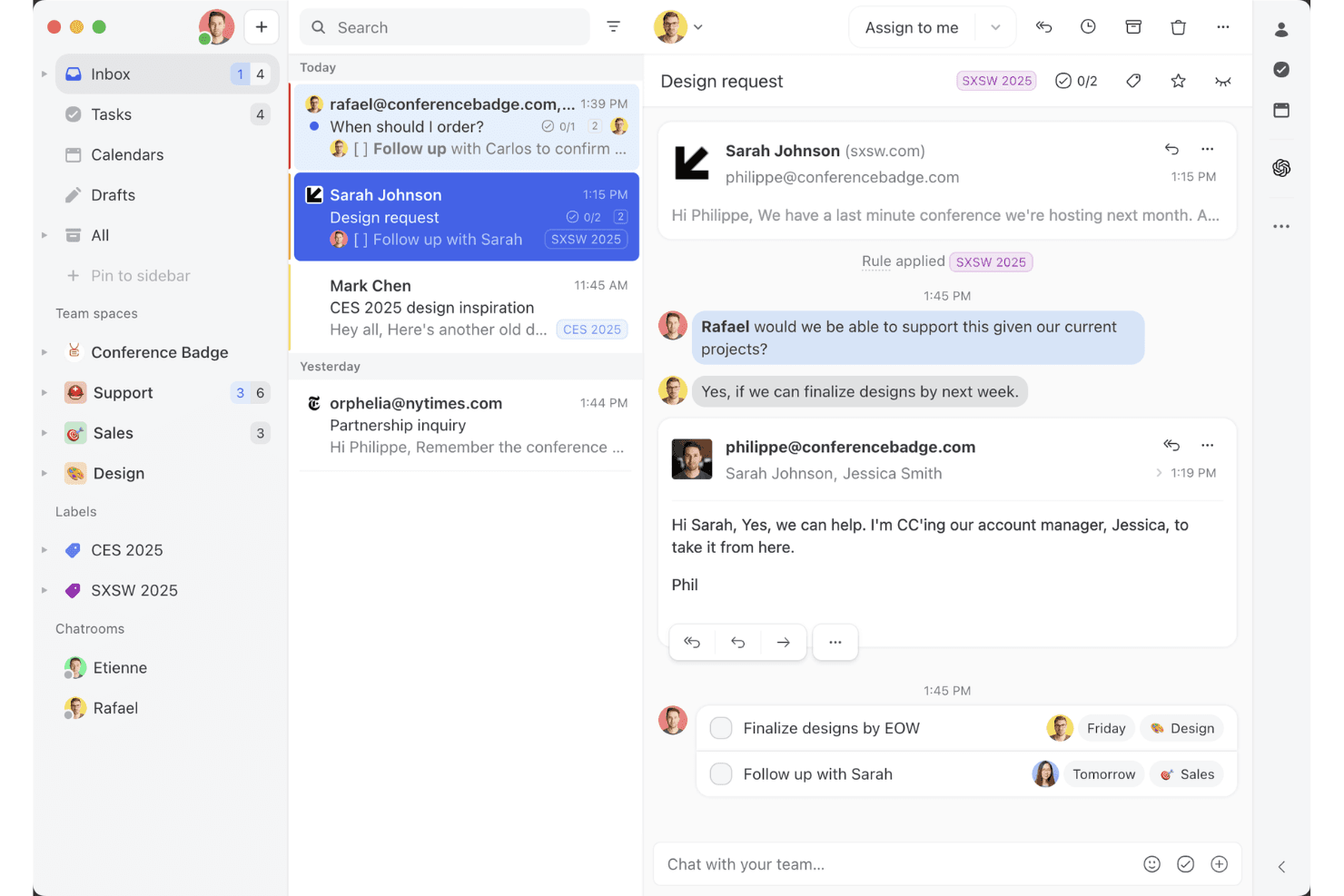
Die Ansicht des gemeinsamen Missive-Postfachs zeigt, wie Teams in einem Arbeitsbereich an E-Mail-Threads zusammenarbeiten, Aufgaben zuweisen und Kundenkonversationen verwalten können. Missive ist ein kollaboratives Postfach- und mobiles Kundendienst-Tool, das E-Mail, WhatsApp, SMS, Instagram und Live-Chat in einer einzigen Oberfläche vereint und integrierte Funktionen zur Aufgabenerstellung, Zuweisungsregeln und Teamkommunikation bietet.
Für wen ist Missive am besten geeignet?
Missive eignet sich besonders für ortsunabhängig und dezentral arbeitende Kundenservice-Teams, die E-Mail-, WhatsApp- und Social-Media-Konversationen über ein einziges mobiles Postfach verwalten müssen.
Warum ich Missive ausgewählt habe
Ich habe Missive als eines der besten Tools ausgewählt, weil es dein Postfach tatsächlich in eine Aufgaben-Engine verwandelt. Sobald eine E-Mail eingeht, kannst du sie sofort in eine zugewiesene Aufgabe mit Fälligkeitsdatum umwandeln, Teammitglieder über interne Kommentare einbinden und sie über automatische Zuweisungsregeln weiterleiten – alles über die mobile App. Außerdem gefällt mir, dass E-Mail, WhatsApp Business, Instagram und SMS in einem einheitlichen mobilen Postfach zusammengeführt werden, sodass nichts übersehen wird, wenn dein Team ortsunabhängig arbeitet.
Die wichtigsten Funktionen von Missive
- Vereinheitlichtes Postfach für mehrere Kanäle: Führt E-Mail, WhatsApp Business, Instagram, Facebook Messenger, SMS und Live-Chat in einer einzigen mobilen Oberfläche zusammen.
- Missive-MCP-Server: Verbindet externe KI-Anwendungen (wie Claude oder ChatGPT) mit mcp.missiveapp.com, um dein mobiles Postfach abzufragen, Termine zu prüfen und Antworten zu entwerfen – wobei vor dem Versand weiterhin eine menschliche Überprüfung erforderlich ist.
- Automatische Zuweisungsregeln: Leitet eingehende Konversationen mithilfe von Round-Robin-, Auslastungs- oder absenderbasierten Regeln automatisch an Mitarbeitende weiter.
- Konfigurierbare Push-Benachrichtigungen: Ermöglicht dir, Benachrichtigungseinstellungen pro Postfach und Ereignistyp festzulegen, einschließlich einer zeitgesteuerten Schlummerfunktion für die Betreuung außerhalb der Arbeitszeiten.
- SLA-Erinnerungen und Eskalationsregeln: Löst automatische Benachrichtigungen und Eskalationen aus, wenn Konversationen über einen festgelegten Schwellenwert hinaus unbeantwortet bleiben.
Missive-Integrationen
Missive lässt sich mit HubSpot, Salesforce, Pipedrive, Aircall, Dialpad, Asana, ClickUp, Trello, Twilio und WhatsApp Business integrieren. Außerdem bietet es eine REST-API, Webhooks, Zapier und seinen neuen MCP-Server (mcp.missiveapp.com) zur Verbindung externer KI-Clients (verfügbar in den Tarifen Productive und Business und von einem Administrator aktivierbar).
Pros and Cons
Pros:
- Echtes mobiles Postfach für alle Kanäle
- Wandelt E-Mails sofort in umsetzbare Aufgaben um
- Push-Benachrichtigungen umfassen SLA-Erinnerungen und Eskalationen
Cons:
- Keine native Wissensdatenbank für Mitarbeitende
- Eingeschränkter Offline-Zugriff und eingeschränkte Synchronisierung auf Mobilgeräten
Learn more about Missive: Am besten geeignet, um individuelle KI-Chatbots zu erstellen
- Kostenloser Plan verfügbar
- Ab $32/Monat (jährliche Abrechnung)
Visit WebsiteCustomer Rating:4.4/5
Chatbase bietet eine mobile Playground-Oberfläche, auf der Agenten hinsichtlich Trainingsstatus, Zeit des letzten Trainings und Modellgröße überwacht werden können. Chatbase ist ein No-Code-Builder für KI-Chatbots, mit dem Sie eigene KI-Agenten erstellen können, die auf Ihren eigenen Daten – Dokumenten, URLs und Texten – trainiert sind, und diese auf verschiedenen Web- und mobilen Kundenservice-Kanälen einsetzen können.
Für wen ist Chatbase am besten geeignet?
Chatbase eignet sich gut für kleine bis mittelgroße Unternehmen sowie Entwickler, die KI-gestützten Support zu ihrem Produkt hinzufügen möchten, ohne einen Chatbot von Grund auf neu zu erstellen.
Warum ich Chatbase ausgewählt habe
Ich habe Chatbase als eines der besten ausgewählt, weil es eine vollständige No-Code-Umgebung bietet, um einen individuellen KI-Support-Agenten auf Basis Ihrer eigenen Geschäftsdaten zu entwickeln. Besonders gefällt mir die Modellvergleichsfunktion, mit der Sie verschiedene LLM-Konfigurationen testen können, um herauszufinden, was für Ihren speziellen Support-Anwendungsfall am besten funktioniert. Das Einrichten von Eskalationsregeln in natürlicher Sprache bedeutet außerdem, dass ich festlegen kann, wann der KI-Agent an einen Menschen übergibt, ohne eine einzige Codezeile zu schreiben.
Chatbase: Hauptfunktionen
- Omnikanal-Bereitstellung: Setzen Sie Ihren KI-Agenten gleichzeitig auf Ihrer Website, in WhatsApp, Slack und per E-Mail ein – alles über eine zentrale Plattform.
- Echtzeit-Datensynchronisierung: Verbinden Sie Ihren Agenten mit Ihrem CRM, Bestellmanagement und Helpdesk-Tools, um während Unterhaltungen Live-Kundendaten abzurufen.
- Erweiterte Berichterstattung: Verfolgen Sie die Leistung Ihres Agenten dank detaillierter Analysen zu Kundeninteraktionen, Lösungsraten und Engagement-Daten.
- Mehrsprachige Unterstützung: Erkennt und antwortet automatisch in über 80 Sprachen mithilfe integrierter Spracherkennung und generativer KI-Übersetzung.
Chatbase-Integrationen
Chatbase bietet native Integrationen mit WhatsApp, Slack, Instagram, Facebook Messenger, Zendesk, Salesforce, Shopify, Stripe, Notion, Calendly und Cal.com. Es verbindet sich mit Zapier und Make und stellt zudem eine API für individuelle Integrationen bereit.
Pros and Cons
Pros:
- Trainierter Agent lässt sich in wenigen Minuten bereitstellen
- Unterstützt nativ über 80 Sprachen
- Mehrere KI-Modelloptionen verfügbar
Cons:
- Kein visueller Konversationsablauf-Builder
- Kreditbasiertes Messaging kann die Kosten ansteigen lassen
Learn more about Chatbase: Am besten für KI-gestützten Kundensupport
- 7-tägige kostenlose Testversion + kostenloser Tarif verfügbar
- Ab $25/Nutzer/Monat
Visit WebsiteCustomer Rating:4.7/5
Tidio-Dashboard mit Echtzeit-Chats und KI-gesteuerten Automatisierungstools, die Teams beim Kundenservice auf mobilen Geräten unterstützen. Tidio vereint KI-gesteuerte Automatisierung mit Live-Chat und mobiler Erreichbarkeit, um ein umfassendes Helpdesk-Erlebnis zu bieten. Entwickelt für E-Commerce und Dienstleister, ermöglicht es Ihrem Team, Kundenunterhaltungen in Echtzeit über mehrere Kanäle hinweg zu verwalten – von mobilen Geräten oder dem Desktop aus.
Warum ich Tidio ausgewählt habe: Ich habe Tidio gewählt, weil es intelligente Automatisierung mit mobilem Fokus kombiniert. Der Lyro AI Agent automatisiert Kundeninteraktionen, bearbeitet Tickets und häufig gestellte Fragen ohne manuellen Aufwand – ideal, um schnelle Reaktionszeiten zu gewährleisten, selbst wenn Ihr Team unterwegs ist. Mir gefällt außerdem, wie die Analysetools Einblicke in die Performance ermöglichen und helfen, Engagement-Strategien zu optimieren und die Servicequalität auf Basis von Echtzeitdaten zu verbessern.
Herausragende Tidio-Funktionen & Integrationen:
Funktionen sind unter anderem KI-Chatbots, automatisiertes Ticketing und Multichannel-Support-Tools für eine einheitliche Kundenverwaltung. Sie können das Besucherverhalten überwachen, Chat-Widgets individuell gestalten und Unterhaltungen über die mobile App steuern.
Integrationen umfassen Shopify, WordPress, WooCommerce, Mailchimp, HubSpot, Slack, Zendesk, Salesforce, Google Analytics, ActiveCampaign, Pipedrive und Zapier.
Pros and Cons
Pros:
- Benutzerfreundliche Oberfläche für Einsteiger
- Leistungsstarke Automatisierung und KI-Chatbots
- Starke Integrationen mit E-Commerce-Plattformen
Cons:
- Höhere Kosten für Premium-Features
- Eingeschränkte Offline-Funktionalität
Learn more about Tidio: Am besten für kleine Teams geeignet
- 14-tägige kostenlose Testversion
- Preise auf Anfrage
Visit WebsiteCustomer Rating:4.8/5
Cayzu vereinfacht Kundenanfragen für kleine bis mittelgroße Unternehmen. Cayzu ist eine cloudbasierte Helpdesk-Software, die sich an kleine bis mittelgroße Unternehmen richtet. Sie hilft Ihrem Team, Kundenanfragen effizient über ihre mobile Plattform zu verwalten.
Warum ich Cayzu gewählt habe: Es ist speziell für kleine Teams entwickelt, die eine einfach zu bedienende Lösung benötigen. Funktionen wie Multi-Brand-Support und ein Self-Service-Portal machen es vielseitig für wachsende Unternehmen. Die benutzerfreundliche mobile App ermöglicht es Ihrem Team, Helpdesk-Tickets auch unterwegs zu bearbeiten. Die Möglichkeit, Ihr Dashboard und Ihre Berichte individuell anzupassen, hilft Ihnen, Ihre Leistung mühelos im Blick zu behalten.
Hervorstechende Funktionen & Integrationen:
Funktionen umfassen ein Self-Service-Portal, vorgefertigte Antworten und Multi-Brand-Support. Ihr Team kann den internen Chat für schnelle Kommunikation nutzen. Die Software bietet außerdem anpassbare Dashboards, die auf Ihre Geschäftsanforderungen zugeschnitten werden können.
Integrationen beinhalten Slack, Dropbox, Google Drive, Facebook, X, Mailchimp, FreshBooks, Salesforce, HubSpot und Zoho CRM.
Pros and Cons
Pros:
- Mobilfreundliche Oberfläche
- Anpassbare Berichte
- Self-Service-Portal verfügbar
Cons:
- Wenige fortgeschrittene Funktionen
- Begrenzte Anpassungsmöglichkeiten
Learn more about Cayzu: Am besten mit teamübergreifenden Kollaborationstools
- 14-tägige kostenlose Testversion
- Ab $25/Nutzer/Monat (jährlich abgerechnet)
Visit WebsiteCustomer Rating:4.7/5
Front zeigt priorisierte Kundensupport-Tickets mit Kennzeichnungen wie SLA, VIP und Dringend über mehrere Kommunikationskanäle an. Front vereint Nachrichten, Zusammenarbeit und Ticketmanagement in einer einzigen mobilfreundlichen Plattform. Es ist für Teams konzipiert, die Kundenkommunikation über verschiedene Kanäle verwalten und dabei unterwegs verbunden bleiben müssen. Wenn Sie ein Helpdesk suchen, das gemeinsame Postfächer mit Teamarbeit in Echtzeit verbindet, bietet Front eine flexible Lösung für schnelle Support-Teams.
Für wen ist Front am besten geeignet?
Front eignet sich besonders für Kundenservice- und Supportteams in mittelständischen bis großen Unternehmen, die ein hohes Volumen an Kundenanfragen über mehrere Kanäle hinweg managen.
Warum ich Front ausgewählt habe
Für mobile Helpdesk-Teams, die nahtlos zusammenarbeiten müssen, überzeugt Front mit seinen Kollaborations-Tools zur teamübergreifenden Zusammenarbeit. Ich habe Front gewählt, weil Agenten ihre Kollegen mit internen Kommentaren und gemeinsamen Entwürfen einbinden können, sodass alle auf dem gleichen Stand bleiben, ohne die App wechseln zu müssen. Die Möglichkeit, Unterhaltungen zuzuweisen, Kollegen zu markieren und Postfächer direkt über die mobile App gemeinsam zu verwalten, verhindert, dass der Support abgeschottet ist – selbst wenn Teams remote oder verteilt arbeiten. Diese Funktionen helfen, Kundenanliegen schnell und mit dem Input der richtigen Personen zu lösen.
Wichtigste Funktionen von Front
Weitere Funktionen in Front, die mobile Helpdesk-Teams unterstützen:
- Mobile Push-Benachrichtigungen: Erhalten Sie Echtzeit-Benachrichtigungen über neue Nachrichten, Zuweisungen oder Erwähnungen direkt auf Ihr Mobilgerät.
- Omnichannel-Postfach: Verwalten Sie E-Mails, SMS, Chat- und Social-Media-Konversationen in einem einzigen, zentralen Posteingang.
- Analyse-Dashboard: Greifen Sie von überall, auch mobil, auf Konversationsmetriken und Teamleistungsdaten zu.
- Automatisierte Routing-Regeln: Richten Sie Regeln ein, um eingehende Anfragen automatisch nach individuellen Kriterien zuzuweisen oder zu priorisieren.
Front-Integrationen
Integrationen umfassen Salesforce, HubSpot, Asana, Slack, Shopify, Twilio, Zoom, Pipedrive, Trello und Jira.
Pros and Cons
Pros:
- Echtzeit-Analysen zur Leistungsüberwachung von Agenten
- Interne Kommentare ermöglichen schnelle Teamzusammenarbeit
- 160+ native Integrationen mit Geschäftsanwendungen
Cons:
- Kein Offline-Modus für die mobile App
- Erweiterte Automatisierung erfordert höherwertige Tarife
Learn more about Front: Am besten geeignet für Einfachheit
- Kostenloser Plan + kostenlose Demo verfügbar
- Ab $29/Nutzer/Monat
Visit WebsiteCustomer Rating:4.6/5
HelpDesk bietet eine einfache und effiziente Support-Lösung für kleine und mittelgroße Unternehmen. HelpDesk ist eine unkomplizierte mobile Helpdesk-Software, die speziell für kleine und mittelgroße Unternehmen entwickelt wurde, die eine benutzerfreundliche Lösung suchen. Sie hilft Teams, Kundenanfragen effizient zu verwalten, ohne unnötige Komplexität.
Warum ich HelpDesk ausgewählt habe: Es bietet eine übersichtliche und intuitive Benutzeroberfläche, wodurch es für Teams zugänglich ist, die Wert auf einfache Bedienung legen. Die Software enthält alle wesentlichen Funktionen für das Ticket-Management, sodass Ihr Team Supportanfragen zügig bearbeiten kann. Automatisierungsregeln helfen dabei, sich wiederholende Aufgaben zu vereinfachen und die Produktivität zu steigern. Mit der mobilen App bleibt Ihr Team jederzeit verbunden und reaktionsfähig – unabhängig vom Standort.
Hervorstechende Funktionen & Integrationen:
Funktionen beinhalten Automatisierungsregeln, eine übersichtliche Oberfläche und grundlegende Ticketverwaltung. Ihr Team kann die mobile App nutzen, um stets in Verbindung und ansprechbar zu bleiben. Die Software stellt zudem ein zentrales Postfach bereit, um alle Kundenanfragen zu verwalten.
Integrationen umfassen Slack, Microsoft Teams, Zapier, Google Workspace, Shopify, Mailchimp, Salesforce, HubSpot, Trello und Asana.
Pros and Cons
Pros:
- Wesentliche Ticket-Management-Funktionen
- Automatisierungsregeln für Aufgaben
- Zentrales Postfach für Anfragen
Cons:
- Eingeschränkter Funktionsumfang mit Basis-Reporting
- Volle Nutzung erfordert Internetzugang
Learn more about HelpDesk: Am besten für mehrsprachigen Support geeignet
- Kostenlose Demo verfügbar
- Ab $24/Nutzer/Monat (jährliche Abrechnung)
Visit WebsiteCustomer Rating:4.5/5
HappyFox unterstützt mehrsprachigen Kundenservice mit einer mobilen Helpdesk-Lösung. HappyFox ist eine mobile Helpdesk-Lösung, die für Unternehmen entwickelt wurde, die Support in mehreren Sprachen verwalten müssen. Sie richtet sich an Teams, die den Kundenservice in sprachlich vielfältigen Umgebungen verbessern möchten.
Warum ich HappyFox gewählt habe: Die Lösung bietet mehrsprachigen Support, was für Unternehmen, die international tätig sind, unerlässlich ist. Die Software ermöglicht es Ihrem Team, Tickets in verschiedenen Sprachen zu bearbeiten und gewährleistet so eine effektive Kommunikation mit Kunden weltweit. Mit der mobilen App können Supportaufgaben effizient von überall aus verwaltet werden. Anpassbare Ticketkategorien und Automatisierungsregeln helfen, Ihren Workflow zu optimieren.
Hervorzuhebende Funktionen & Integrationen:
Funktionen umfassen anpassbare Ticketkategorien, Automatisierungsregeln und mehrsprachigen Support. Ihr Team kann Supportaufgaben mit der mobilen App effizient verwalten. Die Software bietet außerdem detaillierte Berichte zur Leistungsüberwachung.
Integrationen sind unter anderem Slack, Salesforce, Shopify, QuickBooks, Zapier, Microsoft Teams, Google Workspace, Jira, Trello und Asana.
Pros and Cons
Pros:
- Automatisierung für optimierte Aufgaben
- Mobile App für weltweiten Zugriff
- Detaillierte Berichtswerkzeuge
Cons:
- Komplizierte Einrichtung für neue Nutzer und manche Funktionen können überfordernd wirken
- Eingeschränkte Offline-Funktionalität
 Am besten für ITIL-Konformität
- 30-tägige kostenlose Testversion
- Ab $12/Benutzer/Monat
Visit WebsiteCustomer Rating:4.6/5
Vision Helpdesk bietet mobiles IT-Service-Management auf ITIL-Basis für Unternehmen. Vision Helpdesk ist eine mobile Helpdesk-Lösung, die für Unternehmen entwickelt wurde, die IT-Service-Management benötigen. Sie unterstützt ITIL-Prozesse und ist somit ideal für IT-Teams, die ein strukturiertes Service-Management suchen.
Warum ich Vision Helpdesk ausgewählt habe: Es bietet ITIL-konforme Funktionen wie Incident Management, Problem Management und Change Management, die für IT-Abteilungen unerlässlich sind. Mit der Satellite-Helpdesk-Funktion können Sie mehrere Unternehmen oder Abteilungen auf einer einzigen Plattform verwalten. Die Automatisierungstools helfen, Aufgaben zu optimieren und die Effizienz zu steigern. Die Möglichkeit, benutzerdefinierte Workflows zu erstellen, stellt sicher, dass sich die Software an Ihre spezifischen Geschäftsanforderungen anpassen kann.
Hervorstechende Funktionen & Integrationen:
Funktionen umfassen Incident Management, Problem Management und Change Management. Ihr Team kann die Satellite-Helpdesk-Funktion nutzen, um mehrere Abteilungen zu verwalten. Die Software bietet zudem Automatisierungstools zur Steigerung der Arbeitseffizienz.
Integrationen beinhalten Slack, Microsoft Teams, Zapier, Jira, Salesforce, FreshBooks, QuickBooks, Trello, Asana und Zoho Desk.
Pros and Cons
Pros:
- ITIL-konforme Prozesse
- Unterstützt mehrere Abteilungen
- Satellite-Helpdesk-Funktion
Cons:
- Kann für neue Nutzer komplex sein
- Begrenzte Offline-Funktionalität
Learn more about Vision Helpdesk: Am besten für Projektintegration
- 30-tägige kostenlose Testversion + kostenloser Tarif + kostenlose Demo verfügbar
- Ab $10.99/Nutzer/Monat (jährlich abgerechnet)
Visit WebsiteCustomer Rating:4.4/5
Teamwork.com integriert Helpdesk und Projektmanagement für optimierte Arbeitsabläufe. Teamwork.com ist eine Helpdesk-Software mit Schwerpunkt auf der Integration von Projektmanagement-Funktionen. Sie ist ideal für Teams, die Kundenservice mit Projektarbeitsabläufen in Einklang bringen müssen.
Warum ich Teamwork.com ausgewählt habe: Es bietet eine einzigartige Kombination aus Helpdesk- und Projektmanagement-Funktionen und eignet sich daher besonders für kollaborative Teams. Die Software ermöglicht es, Tickets direkt mit Projekten zu verknüpfen, um eine bessere Koordination zu erreichen. Mit Funktionen wie Zeiterfassung und Aufgabenmanagement bleibt Ihr Team organisiert und effizient. Es ist eine hervorragende Wahl für Unternehmen, die Support- und Projektaufgaben miteinander verbinden möchten.
Hervorstechende Funktionen & Integrationen:
Funktionen umfassen Zeiterfassung, Aufgabenverwaltung und Ticket-Verknüpfung. Ihr Team kann Aufgaben mithilfe anpassbarer Dashboards einfach priorisieren. Die Software bietet außerdem Reporting-Tools, mit denen Sie die Teamleistung analysieren können.
Integrationen umfassen Slack, HubSpot, QuickBooks, Zapier, Xero, Microsoft Teams, Google Drive, Dropbox, Trello und Asana.
Pros and Cons
Pros:
- Ausführliche Berichtsfunktionen
- Unterstützt Zeiterfassung
- Verknüpft Tickets mit Projekten
Cons:
- Kann für neue Benutzer überwältigend sein
- Erfordert Internetverbindung mit eingeschränkter Offline-Funktionalität
Learn more about Teamwork.com: 10Am besten für Skalierbarkeit
BoldDesk
- 15-tägige kostenlose Testversion
- Ab $49/Monat (jährliche Abrechnung)
Visit WebsiteCustomer Rating:4.6/5
BoldDesk bietet skalierbare, flexible Helpdesk-Lösungen für Unternehmen jeder Größe. BoldDesk ist eine mobile Helpdesk-Software, die für Unternehmen jeder Größe entwickelt wurde und skalierbare Support-Lösungen bietet. Sie richtet sich an Teams, die eine flexible Plattform benötigen, um mit ihren Kundenservice-Anforderungen zu wachsen.
Warum ich BoldDesk ausgewählt habe: Die Software stellt skalierbare Funktionen bereit, die sich dem Wachstum Ihres Teams anpassen und ist daher ideal für expandierende Unternehmen. Die Software umfasst anpassbare Workflows und umfassende Berichtswerkzeuge zur Leistungsüberwachung. Mit der mobilen App kann Ihr Team Support-Tickets effizient von überall aus verwalten. Dank der Automatisierungsfunktionen kann Ihr Team manuelle Aufgaben reduzieren und den Fokus auf exzellenten Kundenservice legen.
Herausragende Funktionen & Integrationen:
Funktionen umfassen anpassbare Workflows, umfassende Berichtstools und Automatisierungsfunktionen. Ihr Team kann die Leistung mit detaillierten Analysen verfolgen. Die Software bietet außerdem eine mobile App, um Support-Tickets unterwegs zu verwalten.
Integrationen umfassen Slack, Microsoft Teams, Salesforce, Google Workspace, Zapier, Jira, Trello, Asana, Mailchimp und Shopify.
Pros and Cons
Pros:
- Wächst mit dem Unternehmenswachstum mit
- Mobile App für Ticketverwaltung
- Automatisierung zur Reduzierung manueller Aufgaben
Cons:
- Erfordert eine anfängliche Einrichtung zur Anpassung
- Möglicherweise ist eine Schulung für die optimale Nutzung erforderlich
Learn more about BoldDesk:
Weitere mobile Helpdesk-Software
Hier finden Sie einige weitere Optionen für mobile Helpdesk-Software, die es nicht in meine Auswahlliste geschafft haben, aber dennoch einen Blick wert sind:
- 11DeskproAm besten geeignet für Anpassungsfähigkeit
- 12HubSpot Help DeskAm besten für CRM-Integration
- 13JitbitAm besten für schnelle Einrichtung
- 14HiverAm besten für Gmail-Nutzer
- 15GivaAm besten geeignet für Gesundheitskonformität
- 16ZendeskAm besten geeignet für Ticket-Bearbeitung unterwegs
- 17OneDeskAm besten geeignet für Aufgabenmanagement
So bewerte ich Mobile Help Desk Software
Ich teile meine Bewertung in grundlegende Kriterien – wie native iOS/Android-Apps und Echtzeit-Push-Benachrichtigungen – und Besonderheiten, die Tools für Außendienstteams von einfachen Desktop-Portierungen abheben.
Kernfunktionen (Grundvoraussetzung für diese Liste)
Wenn ich Tools für meine Liste auswähle, bewerte ich jedes einzelne auf einer Skala von 0 (bietet die Funktion nicht) bis 5 (hervorragend in diesem Bereich) hinsichtlich jeder unten aufgeführten Kernfunktion. Anschließend rechne ich die Gesamtpunktzahl des Tools in einen Prozentsatz um. Jedes Tool muss eine Mindestgesamtbewertung von 65 % erreichen, um berücksichtigt zu werden.
- Native Mobile Apps: Ich überprüfe, ob der Anbieter spezielle iOS- und Android-Apps anbietet, die für die Ticketbearbeitung entwickelt wurden, und nicht nur eine angepasste Browseransicht, die auf einen kleinen Bildschirm gezwängt wurde.
- Umfassendes Ticket-Management: Agenten sollten Tickets aus der App heraus erstellen, zuweisen, eskalieren und schließen können—also dieselben Kern-Workflows abbilden wie am Desktop.
- Push-Benachrichtigungen & -Alarme: Ich bewerte, wie detailliert Agenten Push-Alarme konfigurieren können, z. B. nach SLA-Verstoß, neuer Zuweisung oder Kundenantwort filtern.
- Multi-Channel-Postfachzugriff: Ob Live-Chat, E-Mail oder Social-Media-Nachrichten – ich achte auf einen einheitlichen mobilen Posteingang, damit Agenten während der Schicht nicht zwischen verschiedenen Apps wechseln müssen.
- Offline-Zugriff & Synchronisierung: Außendiensttechniker arbeiten oft in Gebieten mit schwachem Empfang. Deshalb prüfe ich, ob Agenten Tickets offline anzeigen und aktualisieren können, mit automatischer Synchronisierung beim Wiederverbinden.
- Mobiles Wissensmanagement: Ich achte auf durchsuchbaren Wissensdatenbank-Zugang und Textbausteine innerhalb der App, damit Agenten während eines Anrufs oder vor Ort schnell Lösungsschritte anzeigen können.
Nachdem ich eine Liste der Tools erstellt habe, die diese Kriterien erfüllen, prüfe ich, was jede Plattform besonders auszeichnet.
Unterscheidungsmerkmale (Was Anbieter voneinander abhebt)
So vergleiche und kontrastiere ich verschiedene Anbieter:
Herausragende Funktionen
KI-gestützte Vorschläge machen einen echten Unterschied, wenn Agenten mit dem Handy arbeiten – Tools, die relevante Wissensdatenbank-Artikel anzeigen oder Antworten direkt im Ticket empfehlen, sparen Zeit an besonders arbeitsreichen Tagen. Ich achte auch auf native Kamera- und GPS-Integration, damit Außendienstmitarbeiter Fotos und Standortdaten direkt aus der App anhängen können. Kollaborationsfunktionen wie @Mentions und interne Notizen innerhalb der App sind ebenfalls wichtig, vor allem bei Schichtübergaben, wo Kontext zwischen den Agenten nicht verloren gehen darf.
Mehr als nur Funktionen
Mobile Sicherheit ist eines der ersten Bewertungskriterien – MDM-Kompatibilität und Remote-Wipe-Funktionen sind relevant, wenn Agenten von privaten oder gemeinsam genutzten Geräten auf Kundendaten zugreifen. Außerdem prüfe ich, ob mobiler Zugriff im Basispreis enthalten ist oder hinter einer Premium-Stufe versteckt wird, da manche Anbieter Mobile als Zusatzoption sehen und so die Pro-Agent-Kosten für verteilte Teams erhöhen. Auch die Performance bei geringer Bandbreite ist ein wichtiger Punkt, besonders für Außendienstteams in Lagerhallen, Kellern oder ländlichen Gebieten, wo die Verbindung oft abbricht.
So wählen Sie eine mobile Helpdesk-Software aus
Bei langen Funktionslisten und komplexen Preisstrukturen verliert man leicht den Überblick. Damit Sie sich bei der Auswahl der für Sie passenden Software auf das Wesentliche konzentrieren können, finden Sie hier eine Checkliste mit den wichtigsten Faktoren:
| Faktor | Was Sie beachten sollten |
| Skalierbarkeit | Stellen Sie sicher, dass die Software mit Ihrem Unternehmen wachsen kann. Kann sie ein zunehmendes Ticketvolumen bewältigen, wenn Ihr Team wächst? |
| Integrationen | Prüfen Sie, ob die Software eine Verbindung zu den Tools herstellt, die Ihr Team bereits verwendet, etwa CRM-Systemen oder Messaging-Apps. |
| Anpassbarkeit | Achten Sie auf Möglichkeiten, Workflows und Dashboards an Ihre spezifischen Anforderungen und Prozesse anzupassen. |
| Benutzerfreundlichkeit | Bewerten Sie die Benutzeroberfläche. Ist sie für Ihr Team intuitiv bedienbar, ohne dass umfangreiche Schulungen erforderlich sind? |
| Budget | Prüfen Sie, ob die Preise mit Ihrem Finanzplan übereinstimmen. Gibt es versteckte Kosten oder Premiumfunktionen? |
| Sicherheitsvorkehrungen | Vergewissern Sie sich, dass Maßnahmen zum Datenschutz vorhanden sind. Entspricht die Software Vorschriften wie der DSGVO? |
| Supportoptionen | Berücksichtigen Sie den verfügbaren Umfang des Kundensupports. Gibt es einen Support rund um die Uhr oder persönliche Unterstützung? |
| Mobile Funktionen | Stellen Sie sicher, dass die mobile App den vollständigen Funktionsumfang bietet. Kann Ihr Team Aufgaben unterwegs effektiv verwalten? |
Trends bei mobiler Helpdesk-Software
Für meine Recherche habe ich unzählige Produktupdates, Pressemitteilungen und Versionsprotokolle verschiedener Anbieter mobiler Helpdesk-Software ausgewertet. Hier sind einige der aufkommenden Trends, die ich im Auge behalte:
- KI-gestützte Einblicke: KI-Helpdesk-Tools werden verwendet, um Kundeninteraktionen zu analysieren und umsetzbare Erkenntnisse zu liefern. Dies hilft Teams, Bedürfnisse vorherzusehen und Reaktionszeiten zu verbessern. Einige Anbieter integrieren KI, um prädiktive Analysen und Sentiment-Analysen anzubieten.
- Spracherkennung: Sprachbefehle werden immer häufiger eingesetzt, sodass Support-Teams Helpdesk-Software freihändig bedienen können. Dieser Trend ist für Außendienstmitarbeiter wertvoll, die schnell auf Informationen zugreifen müssen, ohne zu tippen.
- Erweiterte Realität (AR): AR wird integriert, um Supportprozesse insbesondere in technischen Bereichen zu unterstützen. Support-Teams können AR verwenden, um Kunden durch komplexe Fehlerbehebungen zu führen, indem sie Anweisungen in reale Ansichten einblenden.
- Omnichannel-Support: Immer mehr Anbieter bieten echten Omnichannel-Support an und integrieren soziale Medien, Chat, SMS und E-Mail in einer Plattform. Dies gewährleistet ein konsistentes Kundenerlebnis über alle Kommunikationskanäle hinweg.
- Self-Service-Portale: Verbesserte Self-Service-Optionen gewinnen an Bedeutung und ermöglichen es Kunden, Probleme selbst zu lösen. Anbieter erweitern Wissensdatenbanken und integrieren Chatbots, um Nutzer durch häufig auftretende Probleme zu führen.
Was ist eine mobile Helpdesk-Software?
Mobile Helpdesk-Software ist ein Tool, mit dem Support-Teams Kundenanfragen und -probleme auf mobilen Geräten verwalten können. Diese Tools werden häufig von Kundenservice-Mitarbeitern, IT-Fachleuten und Support-Teams eingesetzt, die Kundenprobleme unterwegs effizient lösen müssen. Ticketverwaltung, Echtzeitbenachrichtigungen und mobiler Zugriff ermöglichen schnelle Reaktionszeiten und eine effektive Kommunikation. Insgesamt helfen diese Tools Unternehmen dabei, ein hohes Maß an Kundenzufriedenheit aufrechtzuerhalten, indem sie zeitnahe und leicht zugängliche Supportleistungen bereitstellen.
Funktionen mobiler Helpdesk-Software
Achten Sie bei der Auswahl einer mobilen Helpdesk-Software auf die folgenden wichtigen Funktionen:
- Ticketverwaltung: Organisiert und verfolgt Kundenanfragen, sodass Support-Teams Probleme effizient lösen können.
- Echtzeitbenachrichtigungen: Informieren Ihr Team über neue Tickets und Aktualisierungen und gewährleisten schnelle Antworten.
- Mobiler Zugriff: Ermöglicht Support-Teams, Aufgaben von überall aus zu verwalten, und erhöht dadurch Flexibilität und Reaktionsfähigkeit.
- KI-gestützte Einblicke: Liefert Analysen und Prognosen, um Strategien für den Kundenservice zu verbessern.
- Spracherkennung: Ermöglicht eine freihändige Bedienung, was für Support-Mitarbeiter im Außendienst nützlich ist.
- Erweiterte Realität: Unterstützt bei komplexen Fehlerbehebungen, indem Anweisungen in reale Ansichten eingeblendet werden.
- Omnichannel-Support: Integriert mehrere Kommunikationskanäle, um ein konsistentes Kundenerlebnis zu bieten.
- Self-Service-Portale: Befähigen Kunden, Probleme eigenständig zu lösen, und reduzieren dadurch die Arbeitsbelastung der Support-Teams.
- Anpassbare Workflows: Ermöglichen Teams, Prozesse an ihre spezifischen Anforderungen anzupassen und die Effizienz zu steigern.
- Sicherheitsvorkehrungen: Schützen sensible Kundendaten und gewährleisten die Einhaltung von Vorschriften.
Vorteile mobiler Helpdesk-Software
Die Einführung einer mobilen Helpdesk-Software bietet Ihrem Team und Ihrem Unternehmen mehrere Vorteile. Hier sind einige, auf die Sie sich freuen können:
- Verbesserte Reaktionszeit: Echtzeitbenachrichtigungen und mobiler Zugriff stellen sicher, dass Ihr Team Kundenanfragen schnell bearbeiten kann.
- Höhere Kundenzufriedenheit: Omnichannel-Support und Self-Service-Portale bieten Kunden mehrere Möglichkeiten, Hilfe zu erhalten, und verbessern dadurch ihr Erlebnis.
- Mehr Flexibilität: Der mobile Zugriff ermöglicht Ihrem Team, von überall aus zu arbeiten, und berücksichtigt unterschiedliche Arbeitsweisen und Anforderungen.
- Bessere Ressourcenverteilung: KI-gestützte Einblicke helfen Ihrem Team, sich auf Bereiche zu konzentrieren, die die meiste Aufmerksamkeit benötigen, und optimieren so den Ressourceneinsatz.
- Höhere Effizienz: Anpassbare Workflows und Automatisierung reduzieren manuelle Aufgaben und ermöglichen es Ihrem Team, mehr Tickets effektiv zu verwalten.
- Höhere Datensicherheit: Sicherheitsvorkehrungen schützen Kundeninformationen und gewährleisten die Einhaltung von Datenschutzbestimmungen.
- Geringere Arbeitsbelastung: Self-Service-Portale befähigen Kunden, Probleme selbst zu lösen, und entlasten dadurch Ihr Support-Team.
Kosten und Preise mobiler Helpdesk-Software
Bei der Auswahl einer mobilen Helpdesk-Software ist es wichtig, die verschiedenen verfügbaren Preismodelle und Tarife zu verstehen. Die Kosten variieren je nach Funktionen, Teamgröße, Zusatzoptionen und weiteren Faktoren. Die folgende Tabelle fasst gängige Tarife, ihre durchschnittlichen Preise und typische enthaltene Funktionen von Lösungen für mobile Helpdesk-Software zusammen:
Vergleichstabelle der Tarife für mobile Helpdesk-Software
| Tarifart | Durchschnittlicher Preis | Übliche Funktionen |
| Kostenloser Tarif | $0 | Grundlegende Ticketverwaltung, begrenzte Supportkanäle und grundlegende Berichterstattung. |
| Persönlicher Tarif | $5-$25/ Nutzer/Monat | Ticketverwaltung, mobiler Zugriff, grundlegende Integrationen und standardmäßige Berichterstattung. |
| Geschäftstarif | $30-$60/ Nutzer/Monat | Erweiterte Ticketing-Funktionen, Automatisierung, benutzerdefinierte Workflows und Analysen. |
| Unternehmenstarif | $70-$100/ Nutzer/Monat | Vollständige Anpassungsmöglichkeiten, bevorzugter Support, KI-Einblicke und umfassende Sicherheit. |
Häufig gestellte Fragen zu mobiler Helpdesk-Software
Hier finden Sie Antworten auf einige häufig gestellte Fragen zu mobiler Helpdesk-Software:
Was ist der Unterschied zwischen Software-Support und einem Helpdesk?
Software-Support befasst sich in der Regel mit komplexeren technischen Problemen und erfordert spezialisiertes Fachwissen, während ein Helpdesk grundlegende Kundenanfragen und Fehlerbehebungen bearbeitet. Wenn Ihr Team häufig mit tiefgreifenden Softwareproblemen zu tun hat, benötigen Sie möglicherweise beide Dienste, um umfassenden Support zu gewährleisten.
Was ist das häufigste Problem im IT-Helpdesk?
Zu den häufigsten Problemen gehören E-Mail-bezogene Schwierigkeiten, Hardwarefehler und Zugriffsprobleme bei gemeinsam genutzten Ressourcen. Diese Herausforderungen können die Effizienz Ihres Teams beeinträchtigen. Daher kann zuverlässige Helpdesk-Software, die diese Probleme priorisiert und nachverfolgt, entscheidend für die Aufrechterhaltung der Produktivität sein.
Wie funktioniert Helpdesk-Software?
Helpdesk-Software ermöglicht es Ihrem Team, Supportanfragen systematisch anzunehmen, zu verfolgen und zu beantworten. Sie umfasst häufig Funktionen wie Wissensdatenbanken, Self-Service-Portale und Berichtstools, um den Supportprozess zu optimieren. Wenn Sie Ihre spezifischen Anforderungen kennen, können Sie die passende Software auswählen.
Welche Helpdesk-Software ist die beste?
Die beste Helpdesk-Software hängt von den Anforderungen Ihrer Organisation ab. Berücksichtigen Sie Faktoren wie Ticketverwaltung, Benutzerfreundlichkeit und Integrationsmöglichkeiten. Zu den beliebten Optionen gehören Help Scout für den Kundenservice und Zendesk für große Unternehmen, wobei beide jeweils besondere Stärken bieten.
Wie kann mobile Helpdesk-Software die Teameffizienz steigern?
Mobile Helpdesk-Software steigert die Effizienz, indem sie Ihrem Team ermöglicht, Supportaufgaben unterwegs zu verwalten. Funktionen wie Echtzeitbenachrichtigungen und mobiler Zugriff sorgen für schnelle Antworten, während die Automatisierung den manuellen Arbeitsaufwand reduziert und Ihrem Team hilft, sich auf wichtigere Aufgaben zu konzentrieren.
Kann Helpdesk-Software in andere Geschäftstools integriert werden?
Ja, die meisten Helpdesk-Softwarelösungen bieten Integrationen mit anderen Geschäftstools wie CRMs, Anwendungen für die Zusammenarbeit und Projektmanagementsoftware. Diese Vernetzung hilft Ihrem Team, einen einheitlichen Workflow aufrechtzuerhalten, und stellt sicher, dass Kundendaten plattformübergreifend konsistent sind.