

Online-Kundendienstsoftware unterstützt Support- und Serviceteams dabei, Tickets zu verwalten, Arbeitsabläufe zu automatisieren und schneller zu antworten. Diese Tools zentralisieren die Kundenkommunikation, reduzieren manuelle Routineaufgaben und geben Ihrem Team den nötigen Kontext, um Probleme effizient zu lösen.
Ich habe diese Plattformen anhand von Automatisierung, Benutzeroberfläche, Integrationen, Skalierbarkeit und der Unterstützung mehrkanaliger Anfragen getestet und bewertet. Dieser Leitfaden stellt die beste Online-Kundendienstsoftware für verschiedene Teamgrößen und Servicemodelle vor, damit Serviceaufgaben nicht unter den Tisch fallen.
Was ist Online-Kundendienstsoftware?
Online-Kundendienstsoftware ist eine Plattform, die Supportteams dabei unterstützt, Kundenprobleme an einem zentralen Ort zu verwalten, nachzuverfolgen und zu lösen. Sie zentralisiert die Kommunikation, automatisiert Ticket-Arbeitsabläufe und wird eingesetzt, um Reaktionszeit, Konsistenz und Servicequalität über verschiedene Kanäle hinweg zu verbessern.
Warum Sie unseren Software-Empfehlungen vertrauen können
6,700+
Reviews
20
Industry experts
16+
Evaluation factors
14
Years
Unser Team testet und bewertet Software seit 2012. Als CX-Führungskräfte selbst wissen wir, wie schwierig – und wichtig – es ist, die richtige Software auszuwählen.
Für diesen Leitfaden haben wir Tools mithilfe von praktischen Tests und unabhängiger Recherche bewertet und dabei unsere Bewertungskriterien angewendet.
Unsere Bewertungen spiegeln unser menschliches redaktionelles Urteilsvermögen wider, keine Verkaufsstrategie.
Zusammenfassung der besten Online-Kundendienstsoftware
| Tool | Best For | Trial Info | Price | ||
|---|---|---|---|---|---|
| 1 | Am besten für Callcenter-Support geeignet | Kostenlose Demo + 14-tägige Testphase verfügbar | Ab $19/Nutzer/Monat (jährliche Abrechnung) | Website | |
| 2 | Am besten geeignet, um Interaktionen mit KI zu personalisieren | Kostenlose Testversion + kostenlose Demo verfügbar | Ab $25/User/Monat (jährliche Abrechnung) | Website | |
| 3 | Am besten geeignet zur Vereinheitlichung von Chat und E-Mail | 14-tägige kostenlose Testphase verfügbar | Ab $16/Nutzer/Monat (jährliche Abrechnung) | Website | |
| 4 | Bester automatisierter Workflow-Builder | 15-tägige kostenlose Testversion + Gratis-Tarif | Ab $7/Nutzer/Monat (jährliche Abrechnung) | Website | |
| 5 | Ideal für einheitliche Kundenkommunikation im E-Commerce | 14-tägige kostenlose Testphase | Ab $39/Agent/Monat | Website | |
| 6 | Am besten für die Zusammenarbeit mit externen Personen über Gastzugänge | 30-tägige kostenlose Testversion verfügbar | Ab 14 $/Benutzer/Monat (jährliche Abrechnung) | Website | |
| 7 | Am besten geeignet für KI-gestützten Kundenservice | 7-tägige kostenlose Testphase + kostenloser Tarif verfügbar | Ab $25/Nutzer/Monat | Website | |
| 8 | Am besten für Teamzusammenarbeit | Kostenloser Tarif + kostenlose Demo verfügbar | Ab $29/Nutzer/Monat | Website | |
| 9 | Am besten für KI-gesteuertes Ticketmanagement | Kostenlose Testversion verfügbar | Ab $26/Sitz/Monat (mindestens 3 Sitze) | Website | |
| 10 | Am besten für das Management von Kundeninteraktionen | 15-tägige kostenlose Testversion + kostenloser Plan + kostenlose Demo verfügbar | Ab $39,99/Nutzer/Monat (jährliche Abrechnung) | Website |


Übersicht über die 20 besten Online-Kundendienstsoftwarelösungen
Anhand der einfachen Übersichten zu den einzelnen Tools können Sie nachvollziehen, wodurch sich jedes Tool von anderer Online-Kundendienstsoftware unterscheidet.
 Am besten für Callcenter-Support geeignet
- Kostenlose Demo + 14-tägige Testphase verfügbar
- Ab $19/Nutzer/Monat (jährliche Abrechnung)
Visit WebsiteCustomer Rating:4.4/5
Überwachen Sie die Teamleistung und Kundenzufriedenheit mit einem anpassbaren Dashboard und Berichten. Freshdesk (ein Produkt von Freshworks Inc.) ist eine Online-Helpdesk-Plattform, die von Organisationen betrieben werden kann, die in einem Callcenter-Umfeld arbeiten. Sie unterstützt die Bearbeitung von Kundenanfragen über mehrere Kanäle hinweg in einem einzigen System, wodurch Teams Gespräche verwalten können, ohne zwischen verschiedenen Tools wechseln zu müssen.
Warum ich Freshdesk ausgewählt habe: Ich habe Freshdesk aufgrund des umfangreichen Werkzeugsets ausgewählt, das es zur Unterstützung von Callcenter-Workflows bietet. Die Plattform umfasst eine gemeinsame Inbox, Wissensdatenbank-Tools und Chat-Funktionen, die es Teams ermöglichen, eingehende Anfragen zentral zu verwalten. Außerdem wird die eingehende Telefonie unterstützt, sodass Mitarbeitende Kundentelefonate direkt über die Plattform entgegennehmen können. Für Teams, die auf externe Systeme angewiesen sind, bietet Freshdesk eine breite Palette an Integrationen, um das Helpdesk mit bestehenden Arbeitsabläufen zu verbinden.
Freshdesk kann flexibel an unterschiedliche betriebliche Anforderungen angepasst werden und wird von Teams verschiedenster Größen genutzt. Inklusive ist Freddy AI, die bei der automatischen Zuweisung von Tickets nach vordefinierten Regeln unterstützt und so hilft, das manuelle Sortieren eingehender Anfragen zu reduzieren. Berichts- und Analysewerkzeuge geben Einblicke in die Support-Aktivitäten über alle Kanäle hinweg, während Social-Media-Integrationen ermöglichen, Nachrichten und Erwähnungen in Support-Tickets umzuwandeln.
Herausragende Funktionen und Integrationen von Freshdesk
Funktionen umfassen eine Team-Inbox, Erkennung von Mehrfachbearbeitung, SLA-Management, Ticketfeld-Vorschläge, benutzerdefinierte Ticketstatus, Team-Huddles, verknüpfte Tickets, gemeinsame Eigentümerschaft, Ticket-Verteilung, intelligente Ticket-Zuweisung sowie zeitgesteuerte Automatisierung.
Integrationen umfassen Google Calendar, Slack, Mailchimp, Google Analytics, Office 365, Freshsales, Dropbox, HubSpot CRM, Microsoft Teams, Harvest, Zoho CRM, Pipedrive, Chargebee, 3CX, Asana, Magento und Zapier.
Freshdesk bietet einen kostenlosen Tarif für bis zu zwei Mitarbeitende für sechs Monate an. Die kostenpflichtigen Tarife starten bei $19 pro Nutzer und Monat bei jährlicher Abrechnung. Für ausgewählte Pläne gibt es außerdem eine 14-tägige kostenlose Testphase.
Pros and Cons
Pros:
- Beeindruckende Automatisierungsfunktionen
- Außerordentlich intuitiv und benutzerfreundlich
- Ausgezeichnete Organisation von Kundendienst-E-Mails
Cons:
- Die Integration in bestehende Prozesse ist aufwendig
- Einige technische Probleme
Learn more about Freshdesk: Am besten geeignet, um Interaktionen mit KI zu personalisieren
- Kostenlose Testversion + kostenlose Demo verfügbar
- Ab $25/User/Monat (jährliche Abrechnung)
Visit WebsiteCustomer Rating:4.4/5
Schließen Sie Fälle schnell ab und steigern Sie die Kundenzufriedenheit durch Automatisierung und kontextbezogene Empfehlungen. Salesforce Service Cloud hilft Unternehmen, umfassende Kundenerlebnisse durch den Einsatz von künstlicher Intelligenz zu bieten.
Warum ich Salesforce Service Cloud ausgewählt habe: Die Software nutzt künstliche Intelligenz und Prozessautomatisierung, damit Ihre Mitarbeitenden wiederkehrende Aufgaben eliminieren und sich auf erstklassigen Support konzentrieren können. Die KI unterstützt Ihre Mitarbeitenden nicht nur bei exzellentem Kundenservice, sondern geht mit Funktionen wie Chatbots und automatischem Routing, die Bearbeitungszeiten verkürzen, noch einen Schritt weiter. Die KI von Salesforce Service Cloud sorgt außerdem dafür, dass Kundenanfragen von den passenden Fachkräften bearbeitet werden.
Salesforce Service Cloud eignet sich für Organisationen jeder Größe und verschiedenster Branchen, die Tools zur Stärkung der Kundenbindung benötigen. Sie können die Plattform verwenden, um personalisierten Support für Ihre Kunden über verschiedene Kanäle hinweg bereitzustellen, wann immer es nötig ist. Mit dem Drag-and-Drop-Editor von Salesforce Service Cloud können Sie zudem ein Self-Service-Center erstellen, sodass sich Ihre Kunden eigenständig helfen können.
Salesforce Service Cloud: Herausragende Funktionen und Integrationen
Funktionen umfassen intelligente Automatisierungen und Workflows, Fallmanagement, Omnichannel-Routing, Wissensmanagement, Berichterstattung und Analytics, Telefonie- und Sprachtools, Management von Kundenservice-Vorfällen, Fernunterstützung und Echtzeit-Chat.
Integrationen umfassen Freshdesk, CloudTalk, Twilio, Brandwatch, Paligo, Mailchimp, HubSpot CRM, Trello, TeamViewer, Smartsheet, Klaviyo, Aircall, Gainsight und Conversocial.
Salesforce Service Cloud kostet ab $25/User/Monat, jährlich abgerechnet. Neukunden erhalten eine kostenlose 30-tägige Testversion.
Pros and Cons
Pros:
- Bietet eine einheitliche Ansicht von Interaktionen
- Vereinfacht Support-Prozesse effektiv
- Anpassbar an die Bedürfnisse der Nutzer
Cons:
- Erfordert zusätzliche Schulung zur Nutzung
- Herausfordernd in der Einrichtung
Learn more about Agentforce Service (formerly Service Cloud): Am besten geeignet zur Vereinheitlichung von Chat und E-Mail
- 14-tägige kostenlose Testphase verfügbar
- Ab $16/Nutzer/Monat (jährliche Abrechnung)
Visit WebsiteCustomer Rating:4.6/5
SparrowDesk zeigt Agenten eine einheitliche Live-Chat-Warteschlange und leitet Kunden gleichzeitig in Echtzeit durch KI-gestützte Konversationen. SparrowDesk zeichnet sich als KI-gestützte Online-Helpdesk-Software aus, die speziell für Unternehmen entwickelt wurde, die ihren Kundensupport optimieren möchten. Mit ihrem intuitiven Design und fortschrittlichen Funktionen wie KI-Agenten kann sie einen Großteil der Kundenanfragen automatisch lösen, was sie besonders attraktiv für Unternehmen macht, die ihre Kommunikation effizienter gestalten und die Produktivität steigern wollen.
Warum ich SparrowDesk gewählt habe
Ich habe mich für SparrowDesk entschieden, weil es einzigartige Möglichkeiten bietet, KI-gesteuerte Lösungen direkt in die Helpdesk-Umgebung zu integrieren. Die KI-Agenten können die meisten Kundenanfragen über Chat und E-Mail automatisch lösen, was gezielt den Bedarf an Effizienz bei der Bearbeitung hoher Anfragevolumina adressiert. Der Omnichannel-Posteingang der Plattform stellt sicher, dass Ihr Team die Kommunikation aus verschiedenen Kanälen (Chat und E-Mail) zentral bündeln kann, wodurch eine konsistente und präzise Kundenbetreuung erleichtert wird. Zusätzlich unterstützen Funktionen wie KI-generierte Antwortvorschläge Ihr Team dabei, schnelle und kontextbezogene Reaktionen zu geben, was die Kundenzufriedenheit weiter erhöht.
SparrowDesk Hauptfunktionen
Zusätzlich zu den KI-gestützten Funktionen habe ich noch weitere Features entdeckt, die SparrowDesk zu einer überzeugenden Wahl für Helpdesk-Software machen:
- Service Level Agreements (SLA): Legen Sie klare Ziele für Reaktions- und Lösungszeiten fest, um einen zeitnahen Support zu gewährleisten.
- Geschäftszeitenverwaltung: Definieren Sie Arbeitszeiten, um Kundenerwartungen zu steuern und die Ticketzuweisung zu optimieren.
- Individuelle Ansichten & Filter: Personalisieren Sie die Agentenansicht zur besseren Priorisierung und zum effektiven Management von Konversationen.
- Schnellaktions-Makros: Automatisieren Sie gängige Aufgaben, um Zeit zu sparen und Arbeitsabläufe zu optimieren.
SparrowDesk Integrationen
Von SparrowDesk werden derzeit keine nativen Integrationen gelistet.
Pros and Cons
Pros:
- No-Code-Workflow-Builder automatisiert Routing und Benachrichtigungen
- Copilot-Funktionen fassen lange Konversationen direkt im Agenten-Posteingang zusammen
- KI-Agenten zur automatischen Lösung vieler wiederkehrender Tickets
Cons:
- Begrenzte native Integrationen könnten eine nahtlose Konnektivität erschweren
- Kanäle konzentrieren sich derzeit auf E-Mail und Live-Chat, nicht auf Sprache oder soziale Medien
Learn more about SparrowDesk: Bester automatisierter Workflow-Builder
- 15-tägige kostenlose Testversion + Gratis-Tarif
- Ab $7/Nutzer/Monat (jährliche Abrechnung)
Visit WebsiteCustomer Rating:4.4/5
Erstellen Sie automatisierte Workflows für häufige Kundenanfragen, verringern Sie den manuellen Aufwand Ihres Teams und schaffen Sie Konsistenz. Zoho Desk ist eine Online-Helpdesk-Software, die Omnichannel-Kundendienst unterstützt und Ihre E-Mails, Social Media, Webchat und Sprachgespräche zentral an einem Ort bündelt.
Warum ich Zoho Desk ausgewählt habe: Diese Software bietet ein umfassendes Funktionspaket für die Helpdesk-Verwaltung, darunter Self-Service-Ressourcen und Werkzeuge zur Teamzusammenarbeit. Was jedoch besonders hervorsticht, ist die Möglichkeit, Ihre Workflows zu automatisieren. So können Sie Supportprozesse standardisieren, den manuellen Aufwand Ihres Teams reduzieren und neue Agenten schnell einarbeiten.
Der Workflow-Builder ist eine einfache Drag-and-Drop-Oberfläche. Sie können bestimmte Aktionen und Ergebnisse festlegen, die von festgelegten Bedingungen abhängen. Ihr Team kann so für häufige Kundenanfragen auf denselben Satz an Best Practices zurückgreifen, spart dadurch Zeit und sorgt für ein konsistentes Kundenerlebnis.
Herausragende Funktionen und Integrationen von Zoho Desk
Funktionen umfassen Ticketverwaltung, automatisches Ticket-Tagging, Stimmungsanalyse, Zia-Benachrichtigungen, Zia-Dashboard, Antwortassistent, Self-Service-Tools, CRM-Integration, benutzerdefinierte Funktionen, SDKs, Marktplatz und Plattform, APIs, Berichte und Dashboards, Zeiterfassung, Multi-Brand-Helpcenter, Domain-Mapping sowie Benutzer- und Zugriffsverwaltung.
Integrationen umfassen Twilio, RingCentral, Amazon Connect, Ozonetel, Exotel, Knowlarity, Jive, sipgate, JustCall, ringover und weitere Software-Optionen.
Zoho Desk kostet ab $20 pro Nutzer und Monat und bietet eine kostenlose 15-tägige Testversion an.
Pros and Cons
Pros:
- Klares, intuitives Interface, einfach zu bedienen
- Anpassbares Ticketsystem
- Mobile App für den Zugriff unterwegs
Cons:
- Eingeschränkte Berichte bei niedrigeren Tarifen
- Begrenzte Branding-Möglichkeiten für Kundenportale
Learn more about Zoho Desk: Ideal für einheitliche Kundenkommunikation im E-Commerce
- 14-tägige kostenlose Testphase
- Ab $39/Agent/Monat
Visit WebsiteCustomer Rating:4.4/5
eDesk zeigt E-Commerce-Kundennachrichten aus mehreren Vertriebskanälen gemeinsam an. eDesk ist für E-Commerce-Unternehmen konzipiert, die ihren Kundenservice durch fortschrittliche KI-Funktionen verbessern möchten. Durch die Zentralisierung von Kundeninteraktionen über verschiedene Kanäle hilft eDesk Ihrem Team, die Kommunikation effektiver zu verwalten, was schnellere Reaktionszeiten und eine höhere Kundenzufriedenheit ermöglicht. Dieses Tool ist besonders vorteilhaft für Unternehmen, die ihre Support-Operationen mit großen Marktplätzen integrieren und Anfragen in Verkaufschancen umwandeln möchten.
Warum ich eDesk ausgewählt habe
Ich habe eDesk ausgewählt, weil es die Fähigkeit besitzt, Kundenkommunikation über mehrere Plattformen zu vereinen – ein entscheidender Vorteil für E-Commerce-Unternehmen mit vielfältigen Vertriebskanälen. Die KI-gestützten Automatisierungsfunktionen wie Kategorisierung und Stimmungsanalyse helfen Ihrem Team, Support-Aufgaben effizienter zu bearbeiten. Darüber hinaus bieten Echtzeit-Reporting-Tools Einblicke in Leistungskennzahlen, sodass Sie fundierte Entscheidungen treffen und den Service verbessern können.
Wichtige Funktionen von eDesk
Neben der einheitlichen Kundenkommunikation für E-Commerce bietet eDesk:
- 24/7-Chatbot: Bietet kontinuierlichen Support für Ihre Kunden, sodass deren Anfragen auch außerhalb der Geschäftszeiten bearbeitet werden.
- Kundenfeedback-Tools: Sammelt wertvolle Erkenntnisse von Kunden, um Ihnen bei der Verbesserung Ihrer Dienstleistungen und Produkte zu helfen.
- Teamkollaboration: Erleichtert die interne Kommunikation mit Funktionen wie internen Notizen und Arbeitslastmanagement.
- Anpassbare Workflows: Ermöglicht Ihnen, automatisierte Prozesse passend zu Ihren Geschäftsanforderungen einzurichten und so die Produktivität zu steigern.
eDesk-Integrationen
Integrationen umfassen Brightpearl, Klaviyo, ChannelAdvisor, StoreFeeder, VoloCommerce, Veeqo, Linnworks, ShipStation, Aftership und es ist eine API für individuelle Integrationen verfügbar.
Pros and Cons
Pros:
- KI-basierte Automatisierungen verbessern die Antwort-Effizienz
- Vorlagen für gespeicherte Antworten beschleunigen Kundenreaktionen
- Schnelle und hilfreiche Antworten des Kundensupports
Cons:
- Berichtswesen und Analysen sind vorhanden, aber weniger anpassbar als bei manchen Enterprise-Dashboards
- Vor allem für E-Commerce entwickelt, weniger flexibel für andere Branchen
Learn more about eDesk: Am besten für die Zusammenarbeit mit externen Personen über Gastzugänge
- 30-tägige kostenlose Testversion verfügbar
- Ab 14 $/Benutzer/Monat (jährliche Abrechnung)
Visit WebsiteCustomer Rating:4.8/5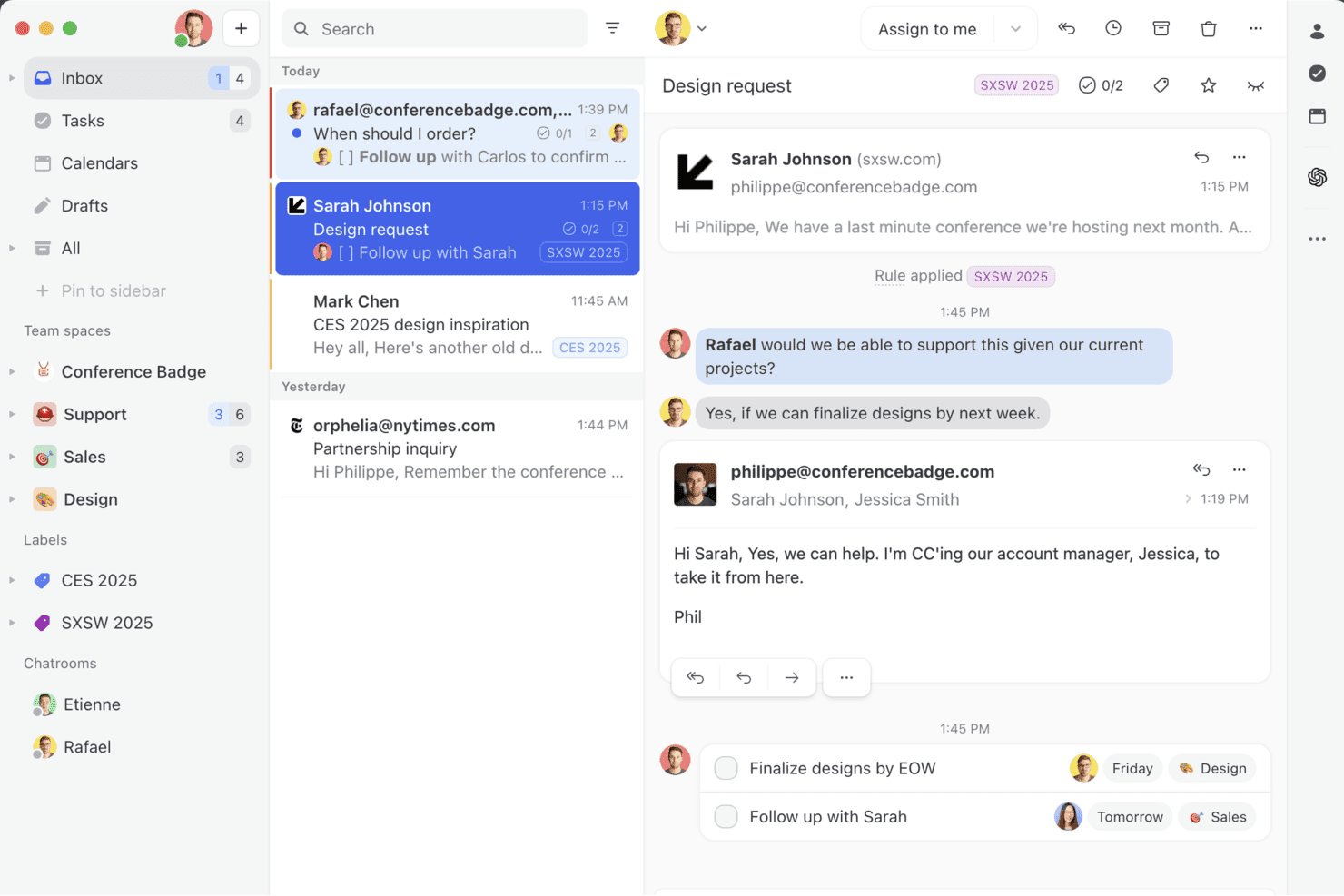
Missive vereint die E-Mails, Chats und Aufgaben deines Teams in einem kollaborativen Posteingang – so kannst du Unterhaltungen verwalten, Teammitglieder zuweisen und Nachrichten in Aktionen umwandeln, ohne deinen Posteingang zu verlassen. Missive ist eine kollaborative Plattform für einen gemeinsamen Posteingang, die E-Mail, SMS, WhatsApp, Instagram, Messenger und Live-Chat in einem Team-Arbeitsbereich vereint – mit integrierter Gesprächsverwaltung, Automatisierungsregeln und KI-gestützter Texterstellung.
Für wen eignet sich Missive am besten?
Missive eignet sich für Teams, die regelmäßig externe Mitarbeitende – etwa Auftragnehmer, Kunden oder Agenturpartner – in Kundenunterhaltungen einbinden möchten, ohne kostenpflichtige Benutzerplätze hinzuzufügen.
Warum ich Missive ausgewählt habe
Ich habe Missive in meine Top-Auswahl aufgenommen, weil die Gastzugangsfunktion ein echtes Problem löst: Externe Mitarbeitende wie Auftragnehmer oder Agenturpartner können in laufende Kundenunterhaltungen einbezogen werden, ohne ihnen einen kostenpflichtigen Benutzerplatz kaufen zu müssen. Außerdem gefällt mir, dass die Echtzeit-Erkennung der parallelen Bearbeitung genau anzeigt, wer gerade eine Antwort verfasst, sodass zwei Agenten niemals doppelte Arbeit an derselben Unterhaltung erledigen. In Kombination mit internen Threads, die an jede Unterhaltung angehängt werden können, kann dein Team komplexe Anliegen lösen, ohne den kundenorientierten Gesprächsverlauf zu überladen.
Wichtige Funktionen von Missive
- Omnichannel-Posteingang: Bündelt E-Mail, SMS, WhatsApp, Instagram, Messenger und Live-Chat in einem einzigen gemeinsamen Teamposteingang.
- KI-Regelwerk: Automatisierungsregeln, die Nachrichteninhalt und Absicht interpretieren, um Unterhaltungen ohne manuelle Auslöser automatisch zu kennzeichnen, Antwortentwürfe zu erstellen oder weiterzuleiten.
- Vorformulierte Antworten mit Variablen: Vorgefertigte Antwortvorlagen, die Kontakt- oder Gesprächsdetails dynamisch einfügen und dadurch schnellere, konsistente Antworten ermöglichen.
- Prüfpfad für Unterhaltungen: Ein vollständiges Protokoll jeder in einer Unterhaltung ausgeführten Aktion, das Teamleitern klare Verantwortlichkeiten über gemeinsame Posteingänge hinweg bietet.
- Missive-MCP-Server: Verbindet externe KI-Tools wie Claude oder ChatGPT, um Online-Helpdesk-Unterhaltungen abzufragen, Kalender zu prüfen und Antworten zu entwerfen – wobei vor dem Senden weiterhin eine Überprüfung durch einen Agenten erforderlich ist. Dadurch erhalten Teamleiter klare Verantwortlichkeiten über gemeinsame Posteingänge hinweg.
Missive-Integrationen
Missive bietet native Integrationen mit HubSpot, Salesforce, Pipedrive, Shopify, Aircall, Twilio, Asana, Google Drive und Dropbox. Außerdem stehen eine REST-API und Webhook-Zugriff für benutzerdefinierte Integrationen zur Verfügung. Missive unterstützt Zapier und umfasst in den Tarifen Productive und Business seinen neuen MCP-Server (erfordert die Aktivierung durch einen Administrator).
Pros and Cons
Pros:
- Gastzugang für die Zusammenarbeit mit externen Beteiligten
- Omnichannel-Posteingang für E-Mail, SMS, Chat und soziale Netzwerke
- Echtzeit-Funktionen zum Verfassen und interne Threads
Cons:
- Keine kundenorientierte Wissensdatenbank enthalten
- Keine speziellen Funktionen für SLA oder CSAT
Learn more about Missive: Am besten geeignet für KI-gestützten Kundenservice
- 7-tägige kostenlose Testphase + kostenloser Tarif verfügbar
- Ab $25/Nutzer/Monat
Visit WebsiteCustomer Rating:4.7/5
Das Tidio KI-Support-Dashboard zeigt Analysen zu Gesprächen, Lösungsraten und Agentenleistung an. Tidio ist eine Plattform, die Teams dabei unterstützt, den Kundensupport über Chat, E-Mail und soziale Medien in einem einzigen Posteingang zu verwalten. Sie ist auf eine schnelle Einrichtung ausgelegt und bietet Automatisierung, mehrsprachige Kommunikation sowie Analysen, um Serviceteams dabei zu helfen, Anfragen besser zu priorisieren und zu bearbeiten. Tidio wird von Unternehmen jeder Größe genutzt und unterstützt mehr als 120 Integrationen, einschließlich wichtiger Plattformen wie Shopify, HubSpot und Salesforce.
Warum ich Tidio gewählt habe: Ein besonderes Merkmal ist der Lyro KI-Agent. Er kann auf wiederkehrende Kundenfragen antworten, eingehende E-Mails scannen und vorsortieren sowie Tickets ohne Zutun eines Agenten weiterleiten. Das ist besonders hilfreich, wenn Ihr Team viele Supportanfragen bearbeitet und manuelle Aufwände reduzieren möchte. Tidio bietet zudem mehrsprachige Kommunikation, sodass Teams internationale Kunden in bis zu 12 Sprachen beantworten können, ohne auf externe Übersetzungstools zurückgreifen zu müssen.
Hervorstechende Funktionen und Integrationen von Tidio
Funktionen umfassen vorgefertigte Antworten, ein individuell anpassbares Live-Chat-Widget, Besucherverfolgung, mobilen Zugriff für Agenten und einen gemeinsamen Posteingang für die teambasierte Nachrichtenbearbeitung. Diese Funktionen helfen Teams dabei, organisiert zu bleiben und schnell zu reagieren, während sie den Überblick über aktive Gespräche behalten.
Integrationen sind u. a. Shopify, WordPress, WooCommerce, Mailchimp, HubSpot, Salesforce, Zendesk, Zapier, WhatsApp, Messenger, Instagram und Google Analytics.
Pros and Cons
Pros:
- Vereint Chat, E-Mail und soziale Kanäle in einem Posteingang
- Unterstützt 12 Sprachen für globale Teams
- Schnell einsatzbereit mit minimalem Setup
Cons:
- Kein Telefonsupport; Live-Support nur während der Geschäftszeiten
- Begrenzter Funktionsumfang im kostenlosen Tarif
Learn more about Tidio: Am besten für Teamzusammenarbeit
- Kostenloser Tarif + kostenlose Demo verfügbar
- Ab $29/Nutzer/Monat
Visit WebsiteCustomer Rating:4.6/5
Die Ticketlistenansicht von HelpDesk bietet einen Überblick über alle Kundensupport-Tickets im Unternehmenskonto. HelpDesk bietet Unternehmen eine robuste Funktionspalette, die Teams dabei unterstützt, gemeinsam zu arbeiten und effizienter zu werden.
Warum ich HelpDesk ausgewählt habe: Die Plattform bietet Ihrer Organisation ein sofort einsatzbereites Helpdesk-System, mit dem Ihre Teams effektiv zusammenarbeiten können, ohne die Dinge zu verkomplizieren. HelpDesk stellt Tools zur Verwaltung von Tickets zur Verfügung, die es Ihren Mitarbeitenden ermöglichen, Kundensupport-Tickets zu markieren und nach gemeinsamen Lösungen zu gruppieren, sodass sie gemeinsam an Anfragen arbeiten und diese schneller lösen können. Mit den Automatisierungstools der Software können Sie Regeln für die Ticketweiterleitung festlegen, sodass Kundenanfragen beim richtigen Mitarbeitenden landen.
HelpDesk eignet sich hervorragend für Start-ups bis hin zu Großunternehmen, die eine Plattform zur Verbesserung des Kundenservices benötigen. Mithilfe eines zentralen Dashboards können Tickets anhand von Anforderungen aus Quellen wie eingehenden E-Mails, Kontaktformularen, Live-Chat und weiteren Kanälen erstellt werden. HelpDesk bietet außerdem Funktionen wie automatisierte Aufgabenverteilung, individuelle automatisierte Workflows und vorgefertigte Antworten zur Optimierung der Reaktionszeiten.
Herausragende Funktionen und Integrationen von HelpDesk
Funktionen umfassen KI-Textoptimierung, benutzerdefinierte Felder, E-Mail-Vorlagen, automatisierte Workflows, Ticketmanagement, Massenaktionen, vorgefertigte Antworten, Kollisionsvermeidung, Ticketzuweisung sowie Berichte und Analysen.
Integrationen umfassen LiveChat, Zapier, Shopify, Jira, HubSpot, Salesforce und GitHub.
HelpDesk kostet ab $34/Nutzer/Monat bei monatlicher Zahlung oder $29/Nutzer/Monat bei jährlicher Abrechnung. HelpDesk bietet neuen Kunden eine kostenlose 14-tägige Testphase.
Pros and Cons
Pros:
- Bietet Echtzeitberichte und -einblicke
- Die Benutzeroberfläche ist sehr benutzerfreundlich
- Verfolgt Anfragen effektiv und sorgt für Nachverfolgung
Cons:
- Mitunter können Verbindungsprobleme auftreten
- Mehrere E-Mail-Konversationen sind unübersichtlich
Learn more about HelpDesk: Am besten für KI-gesteuertes Ticketmanagement
- Kostenlose Testversion verfügbar
- Ab $26/Sitz/Monat (mindestens 3 Sitze)
Visit WebsiteCustomer Rating:4.6/5
Das Dashboard von monday Service bietet eine Übersicht über Tickets und weitere wichtige Kennzahlen, die sich auf Ihren Helpdesk beziehen. monday Service ist eine Plattform, die Organisationen dabei unterstützt, Supportanfragen zu verwalten und nachzuverfolgen, Probleme zu lösen und Ticket-Kennzahlen effizient zu analysieren. Sie dient als umfassende Zentrale für die Bearbeitung von Anfragen, Statusaktualisierungen und das Management von Support-Ressourcen.
Warum ich mich für monday Service entschieden habe: Eines der herausragenden Merkmale ist die intelligente Automatisierung mit KI-Unterstützung, die hilft, Serviceprozesse von Anfang bis Ende zu optimieren. Dazu gehören automatische Ticketklassifizierung und intelligente Ticketweiterleitung, die sicherstellen, dass Support-Tickets ohne Verzögerung an die zuständigen Teammitglieder geleitet werden. Die Software bietet außerdem Self-Service-Optionen, mit denen Kunden häufige Probleme selbstständig lösen können.
Herausragende Funktionen und Integrationen von monday Service
Funktionen umfassen visuelle Dashboards, die Echtzeit-Einblicke in den Status von Tickets liefern und Teams dabei helfen, Leistungskennzahlen im Blick zu behalten und die Reaktionszeiten zu verbessern. Zudem unterstützt monday Service die Wissensdatenbank für Agenten, sodass diese bei der Bearbeitung von Kundenanfragen einfach auf relevante Informationen und Lösungen zugreifen können.
Integrationen umfassen Slack, Microsoft Teams, Zendesk, Jira, Salesforce, Google Workspace, GitHub, Zoom, Outlook, HubSpot, Trello, Dropbox und OneDrive.
Pros and Cons
Pros:
- Wissensmanagement-Fähigkeiten
- Automatisierte Ticketweiterleitung
- Asset-Management-Funktionen
Cons:
- Begrenzte Anpassung von Berichten
- Vollständige Automatisierungsfunktionen nur in höheren Tarifstufen verfügbar
Learn more about monday service: Am besten für das Management von Kundeninteraktionen
- 15-tägige kostenlose Testversion + kostenloser Plan + kostenlose Demo verfügbar
- Ab $39,99/Nutzer/Monat (jährliche Abrechnung)
Visit WebsiteCustomer Rating:4.7/5
Überwachen Sie die tägliche Leistung von Mitarbeitenden oder Teams und identifizieren Sie Verbesserungsmöglichkeiten. ProProfs Help Desk hilft Unternehmen, sich darauf zu konzentrieren, das Kundenerlebnis zu verbessern, sodass alle eine positive Erfahrung machen.
Warum ich ProProfs Help Desk ausgewählt habe: Die Plattform bietet Ihrem Unternehmen Möglichkeiten zum Management von Kundeninteraktionen, sodass Ihre Mitarbeitenden auf Kundenanfragen reagieren, rund um die Uhr Unterstützung bieten und mit ihnen in Kontakt treten können. ProProfs Help Desk unterstützt Ihre Mitarbeitenden dabei, bei Kundeninteraktionen Schnelligkeit, Individualisierung, Empathie und Sicherheit zu zeigen. Sie können die Plattform nutzen, um einen Überblick über vergangene Kundeninteraktionen und -aktivitäten zu erhalten, damit Ihre Mitarbeitenden zukünftige Gespräche persönlicher gestalten können. Für ein effektiveres Management der Kundeninteraktionen können Sie die Teamzusammenarbeit von ProProfs Help Desk einsetzen, damit Ihre Mitarbeitenden zusammenarbeiten und Kunden zufriedenstellen können.
ProProfs Help Desk ist für Organisationen jeder Größe geeignet, die eine Lösung benötigen, die auf die wachsenden Anforderungen ihrer Kunden in ihren Branchen eingeht. Es handelt sich um ein cloudbasiertes Ticketing-System, das besonders für seine gemeinsame Postfachfunktion bekannt ist, in der Ihre Mitarbeitenden Tickets abrufen, einsehen und an das richtige Teammitglied zuweisen können, während sie in einem kollaborativen Bereich arbeiten. Ihre Manager können ProProfs Help Desk nutzen, um Tickets zu priorisieren, zu kennzeichnen und zu markieren, die einer sofortigen Bearbeitung bedürfen.
Hervorstechende Funktionen und Integrationen von ProProfs Help Desk
Funktionen umfassen unter anderem gemeinsame Posteingänge, Benachrichtigungsvorlagen, anpassbare Erreichbarkeit der Mitarbeitenden, Ticket-Export, Teammanagement, Tickethistorie, Rollen und Berechtigungen, interner Chat, Omnichannel-Support, SLA-Management, Echtzeit-Chat-Support und automatisierte Antworten.
Integrationen gibt es unter anderem mit Salesforce und Microsoft Dynamics CRM.
Pros and Cons
Pros:
- Benutzerfreundliche Oberfläche
- Sorgt für exzellente Kundenerfahrungen
- Hervorragender Kundensupport
Cons:
- Keine API verfügbar
- Wenige Integrationen
Learn more about ProProfs Help Desk:
Weitere Optionen
Hier sind einige weitere Optionen, die es nicht in die Liste der besten Online-Kundendienstsoftware geschafft haben:
- 11IssuetrakAm besten geeignet für Omnichannel-Ticketübermittlung
- 12HubSpot Service HubBeste CRM-Funktionen innerhalb einer Helpdesk-Plattform
- 13FrontBeste Software für geteilte Team-Posteingänge
- 14FrontAm besten geeignet für automatisierte Weiterleitung und Kategorisierung
- 15SAAS FirstAm besten geeignet für KI-gesteuerte Chatbots
- 16HiverAm besten geeignet für das Management gemeinsamer Posteingänge
- 17Document360Am besten zur Ticketablenkung geeignet
- 18NinjaOneAm besten für Ticket-Automatisierung
- 19LiveAgentAm besten geeignet für Einfachheit
- 20Help ScoutBeste All-in-One-Helpdesk-Software
Wie ich Online-Helpdesk-Software bewerte
Ich teile meine Bewertung in zwei Ebenen auf: Grundlegende Kriterien, die jedes Tool erfüllen muss – Ticketmanagement, SLA-Überwachung, Multi-Channel-Intake – und Unterscheidungsmerkmale, die eine Option von der anderen abheben.
Kernfunktionen (Grundvoraussetzungen für diese Liste)
Bei der Auswahl der Tools für meine Liste bewerte ich jedes einzelne auf einer Skala von 0 (bietet die Funktion nicht) bis 5 (hervorragend in diesem Bereich) für jede der unten aufgeführten Kernfunktionen. Anschließend rechne ich die Gesamtpunktzahl des Tools in einen Prozentsatz um. Jedes Tool muss eine Mindestgesamtpunktzahl von 75 % erreichen, um in Betracht gezogen zu werden.
- Ticketmanagement: Ich betrachte den gesamten Ticket-Lebenszyklus – Erstellung, Zuweisung, Priorisierung, Statusverfolgung und Lösung – und prüfe, ob Agenten Duplikate zusammenführen, komplexe Anfragen aufteilen oder benutzerdefinierte Felder hinzufügen können, um reale Arbeitsabläufe abzubilden.
- Multi-Channel-Support: Jedes Tool, das ich bewerte, sollte E-Mail-, Chat-, Webformular-, Social-Media- und Telefonanfragen in einer einzigen Warteschlange bündeln, damit Agenten nicht zwischen Plattformen wechseln müssen, um Kunden zu antworten.
- Wissensdatenbank & Self-Service: Ich prüfe, ob die Plattform ein öffentlich zugängliches Helpcenter mit Suchfunktion, Kategorien und Artikelverwaltung bietet, das Kunden zur Lösung häufiger Probleme nutzen können, bevor sie ein Ticket einreichen.
- Automatisierung & Workflows: Hier bewerte ich Routingregeln, automatische Zuweisungen, Eskalationstrigger und Makros – zum Beispiel das automatische Taggen und Zuweisen von Abrechnungstickets an ein spezialisiertes Team basierend auf Schlagwörtern in der Betreffzeile.
- SLA-Management & Reporting: Ich achte auf konfigurierbare SLA-Richtlinien, die sich an Antwort- und Lösungszeiten orientieren, Warnungen bei Verstößen und Dashboards, die KPIs wie Erstantwortzeit, Ticketrückstand und CSAT-Werte sichtbar machen.
- Tools zur Agentenzusammenarbeit: Funktionen wie interne Notizen, @Mentions, Kollisions-Erkennung und gemeinsame Ticketansichten sind hier wichtig – insbesondere für Teams, bei denen eine einzelne Kundenanfrage Input von Support, Entwicklung und Betrieb erfordert.
Wenn ich eine Liste von Tools habe, die diese Kriterien erfüllen, schaue ich mir an, was jede Plattform einzigartig macht.
Unterscheidungsmerkmale (Was Anbieter voneinander unterscheidet)
So vergleiche und bewerte ich verschiedene Anbieter:
Hervorstechende Funktionen
KI-gestützte Assistenz ist ein großer Unterschied – Tools, die Antworten verfassen, lange Threads zusammenfassen oder Kundensentiment erkennen, verschaffen Agenten einen echten Vorteil in Hochlastzeiten. Ich prüfe auch, ob eine Plattform ein Kundenkontext-Panel neben dem aktiven Ticket anzeigt und dabei vergangene Interaktionen und CRM-Daten einblendet, damit Agenten Kunden nicht regelmäßig um Wiederholungen bitten müssen. Live-Chat mit integrierten Chatbots ist ebenfalls bedeutsam, insbesondere für Teams, die Vorverkaufsanfragen bearbeiten, bei denen ein Bot die Anfrage vorqualifizieren kann, bevor sie an den richtigen Agenten weitergeleitet wird.
Mehr als Funktionen
Das Integrationsökosystem ist eines der ersten Dinge, die ich prüfe – ein Helpdesk, das sich nahtlos mit Ihrem CRM, Ihrer E-Commerce-Plattform und Slack oder MS Teams verbindet, verhindert ständiges Hin- und Herwechseln zwischen Tabs. Zudem bewerte ich, wie gut eine Plattform zu bestimmten Teamstrukturen passt, zum Beispiel, ob sie Multi-Brand-Portale unterstützt, damit Unternehmen mehrere Produktlinien aus einem Konto heraus verwalten können. Preistransparenz ist ebenfalls relevant, besonders die Frage, ob nutzerbasierte Tarife bei einem Wachstum des Supportteams von fünf auf fünfzig Agenten vernünftig skalieren, ohne einen teuren Plattformwechsel zu erzwingen.
So wählen Sie eine Online-Kundendienstsoftware aus
Bei langen Funktionslisten und komplexen Preisstrukturen verliert man leicht den Überblick. Damit Sie sich bei der Auswahl der passenden Software auf Ihre individuellen Anforderungen konzentrieren können, finden Sie hier eine Checkliste mit Faktoren, die Sie berücksichtigen sollten:
| Faktor | Was zu beachten ist |
|---|---|
| FaktorSkalierbarkeit | Was zu beachten istKann die Software mit Ihrem Unternehmen wachsen? Berücksichtigen Sie die zukünftige Expansion und ob das Tool ein höheres Volumen bewältigen kann. |
| FaktorIntegrationen | Was zu beachten istFunktioniert die Software mit Ihren vorhandenen Tools? Prüfen Sie die Kompatibilität mit den aktuellen Systemen, um Unterbrechungen der Arbeitsabläufe zu vermeiden. |
| FaktorAnpassbarkeit | Was zu beachten istKönnen Sie die Software an Ihre Anforderungen anpassen? Bewerten Sie die Flexibilität bei der Anpassung an individuelle Prozesse und Ihren Markenauftritt. |
| FaktorBenutzerfreundlichkeit | Was zu beachten istIst die Software für Ihr Team einfach zu bedienen? Achten Sie auf intuitive Benutzeroberflächen, um Schulungsaufwand und Fehler zu minimieren. |
| FaktorImplementierung und Einarbeitung | Was zu beachten istWie reibungslos verläuft die Einrichtung? Achten Sie auf umfassende Unterstützung bei der Einarbeitung, um Ausfallzeiten während der Umstellung zu reduzieren. |
| FaktorKosten | Was zu beachten istPasst die Software in Ihr Budget? Vergleichen Sie die Preisstrukturen und berücksichtigen Sie versteckte Kosten wie Zusatzmodule oder Upgrades. |
| FaktorSicherheitsvorkehrungen | Was zu beachten istSind robuste Schutzmaßnahmen vorhanden? Stellen Sie die Einhaltung von Datenschutzstandards wie DSGVO oder HIPAA sicher. |
| FaktorVerfügbarkeit des Supports | Was zu beachten istIst Hilfe verfügbar, wenn sie benötigt wird? Vergewissern Sie sich, dass der Anbieter zuverlässigen und zeitnahen Support anbietet, vorzugsweise rund um die Uhr. |
Funktionen von Online-Kundendienstsoftware
Achten Sie bei der Auswahl einer Online-Kundendienstsoftware auf die folgenden wichtigen Funktionen:
- Mobiler Zugriff: Ermöglicht Supportmitarbeitern, Tickets zu verwalten und Kundenanfragen von überall aus über mobile Geräte zu beantworten.
- Ticketverwaltung: Zentralisiert Kundenanfragen und Probleme in einem einzigen System und ermöglicht so eine strukturierte Nachverfolgung und Lösung.
- Automatisierte Arbeitsabläufe: Vereinfacht sich wiederholende Aufgaben durch die Automatisierung von Prozessen, wodurch die Effizienz verbessert und manuelle Fehler reduziert werden.
- Unterstützung über mehrere Kanäle: Ermöglicht die Bearbeitung von Kundeninteraktionen über verschiedene Kanäle wie E-Mail, Chat, Telefon und soziale Medien.
- Wissensdatenbank: Bietet ein Selbstbedienungsportal, in dem Kunden Antworten auf häufige Fragen finden können, wodurch das Volumen der Supporttickets reduziert wird.
- Analysen und Berichte: Liefert durch detaillierte Berichte und Datenanalysen Einblicke in die Leistung des Supportteams und die Kundenzufriedenheit.
- Integrationsmöglichkeiten: Ermöglicht eine nahtlose Verbindung mit anderen Tools und Plattformen und verbessert dadurch die Funktionalität und Datensynchronisierung.
- Anpassbare Benutzeroberfläche: Bietet die Möglichkeit, das Erscheinungsbild und die Funktionen der Software an spezifische Geschäftsanforderungen anzupassen.
- Werkzeuge für die Zusammenarbeit: Fördert die Teamarbeit unter Supportmitarbeitern, indem Kommunikation und Informationsaustausch innerhalb der Plattform ermöglicht werden.
- Kundenfeedbacksystem: Sammelt und analysiert Kundenfeedback, um die Servicequalität und Kundenzufriedenheit zu verbessern.
Vorteile von Online-Helpdesk-Software
Die Implementierung von Online-Helpdesk-Software bietet Ihrem Team und Ihrem Unternehmen mehrere Vorteile. Hier sind einige davon, auf die Sie sich freuen können:
- Verbesserte Ticketverwaltung: Online-Helpdesk-Software organisiert und priorisiert Kundenanfragen, sodass Ihr Team Anfragen effizienter bearbeiten kann.
- Schnellere Antwortzeiten: Automatisierungsfunktionen ermöglichen schnellere Antworten auf Kundenanfragen, verkürzen Wartezeiten und steigern die Kundenzufriedenheit.
- Zentralisierte Kommunikation: Alle Kundeninteraktionen werden an einem Ort gespeichert, sodass Ihr Team Zugriff auf den vollständigen Kontext jedes Problems hat.
- Supportverfügbarkeit rund um die Uhr: Mit Online-Helpdesk-Tools kann Ihr Team rund um die Uhr Support anbieten und Kunden jederzeit helfen.
- Erweiterte Berichtsfunktionen: Integrierte Analysen liefern Einblicke in die Leistung des Kundenservice und helfen Ihnen, Verbesserungsmöglichkeiten zu erkennen.
- Skalierbare Supportoptionen: Wenn Ihr Unternehmen wächst, kann Online-Helpdesk-Software problemlos mehr Benutzer und ein höheres Ticketaufkommen aufnehmen.
- Integration einer Wissensdatenbank: Diese Tools enthalten häufig eine Wissensdatenbank, in der Kunden selbst Antworten auf häufige Fragen finden können.
Kosten und Preise von Online-Helpdesk-Software
Bei der Auswahl von Online-Helpdesk-Software ist es wichtig, die verschiedenen verfügbaren Preismodelle und Tarife zu verstehen. Die Kosten variieren je nach Funktionen, Teamgröße, Zusatzoptionen und weiteren Faktoren. Die folgende Tabelle fasst gängige Tarife, ihre durchschnittlichen Preise und die typischen enthaltenen Funktionen von Online-Helpdesk-Softwarelösungen zusammen:
Vergleichstabelle für Tarife von Online-Helpdesk-Software
| Tarifart | Durchschnittlicher Preis | Häufige Funktionen |
|---|---|---|
| TarifartKostenloser Tarif | Durchschnittlicher Preis$0/user/month | Häufige FunktionenGrundlegende Ticketverwaltung, E-Mail-Support und eingeschränkte Integrationen. |
| TarifartPersönlicher Tarif | Durchschnittlicher Preis$5-$20/user/month | Häufige FunktionenTicketverwaltung, grundlegende Berichte sowie E-Mail- und Chatsupport. |
| TarifartGeschäftstarif | Durchschnittlicher Preis$21-$50/user/month | Häufige FunktionenErweiterte Berichte, Automatisierung, Unterstützung über mehrere Kanäle und individuelles Branding. |
| TarifartUnternehmenstarif | Durchschnittlicher Preis$51-$100+/user/month | Häufige FunktionenIndividuelle Arbeitsabläufe, dedizierter Support, erweiterte Analysen und verbesserte Sicherheit. |
Häufig gestellte Fragen zur Online-Helpdesk-Software
Hier finden Sie einige häufig gestellte Fragen und Antworten zu Ihrer Unterstützung!
Die beste Online-Helpdesk-Software für Ihr Team auswählen
Die Implementierung einer neuen Helpdesk-Plattform wird eine erhebliche Investition für Ihr Kundensupportteam, Ihre Kunden und Ihr Unternehmen darstellen. Nachdem Sie diese Liste der besten Online-Helpdesk-Software gelesen haben, werden Sie feststellen, dass viele Optionen dieselben allgemeinen Funktionen bieten. Dennoch sollten Sie stets die oben aufgeführten Aspekte berücksichtigen, die sie trotz dieser Gemeinsamkeiten einzigartig machen.
Denken Sie daran, dass die Kosten dafür, dass Sie sich nicht auf die Verbesserung der Erfahrungen Ihrer Kunden mit Ihrem Unternehmen konzentrieren, hoch sein können. Sich also die Zeit zu nehmen, fundierte Entscheidungen zu treffen, wird für Ihre Organisation und Ihre Kunden von großem Nutzen sein.
Wie geht es weiter?
Wenn Sie gerade Online-Helpdesk-Software recherchieren, wenden Sie sich für kostenlose Empfehlungen an einen SoftwareSelect-Berater.
Sie füllen ein Formular aus und führen ein kurzes Gespräch, in dem auf die Besonderheiten Ihrer Anforderungen eingegangen wird. Anschließend erhalten Sie eine Auswahlliste von Software, die Sie prüfen können. Sie werden sogar während des gesamten Kaufprozesses unterstützt, einschließlich der Preisverhandlungen.