

Los sistemas de monitorización de centros de llamadas ayudan a los responsables de CX y a los gerentes de equipos a abordar retos como equilibrar la satisfacción del cliente con el rendimiento de los agentes, detectar oportunidades de formación en tiempo real y optimizar las operaciones en todos los canales. Con la plataforma adecuada, puedes mejorar la calidad del servicio, reducir las ineficiencias y proporcionar a los agentes de tu centro de llamadas las herramientas que necesitan para ofrecer experiencias excelentes de forma constante.
He revisado y probado estos sistemas basándome en su funcionalidad, facilidad de uso, integraciones, escalabilidad y relación calidad-precio. En este artículo, te presentaré mis principales opciones, qué hace destacar a cada una y cómo elegir la que mejor se adapte al tamaño, presupuesto y objetivos de tu equipo.
Por qué confiar en nuestras recomendaciones de software
6,700+
Reviews
20
Industry experts
16+
Evaluation factors
14
Years
Nuestro equipo lleva probando y evaluando software desde 2012. Como líderes de CX, sabemos lo difícil —y lo importante— que es elegir el software adecuado.
Para esta guía, evaluamos las herramientas mediante pruebas prácticas e investigación independiente, puntuando las herramientas según nuestros criterios de selección.
Nuestras reseñas reflejan nuestro criterio editorial humano, no un discurso de ventas.
 Gui DrusinaCreative Director
 Tim FisherVP of AI
Tabla comparativa de sistemas de monitorización de centros de llamadas
Esta tabla comparativa resume los detalles de precios de mis principales selecciones de sistemas de monitorización de centros de llamadas.
| Tool | Best For | Trial Info | Price | ||
|---|---|---|---|---|---|
| 1 | Ideal para análisis de llamadas impulsados por IA | Prueba gratuita de 14 días | Desde $25/usuario/mes (facturado anualmente) | Website | |
| 2 | Mejor con orquestación de flujos de trabajo de IA sin código | Demostración gratuita disponible | Precio a consultar | Website | |
| 3 | La mejor para análisis de rendimiento | Demo gratuita disponible | Desde $15/mes (facturado anualmente) | Website | |
| 4 | Mejor para conocimientos impulsados por IA | Demostración gratuita | Desde $85/usuario/mes | Website | |
| 5 | Ideal para transcripciones en tiempo real | Prueba gratuita de 14 días + demo gratuita | Desde $80/usuario/mes (facturado anualmente) | Website | |
| 6 | Ideal para startups y PYMEs | Demostración gratuita + prueba gratuita de 10 días disponible | Desde $1/usuario/mes (facturado anualmente) | Website | |
| 7 | Mejor para grandes empresas | Demostración gratuita | Desde $110/usuario/mes | Website | |
| 8 | Mejor para capacidades analíticas | Demostración gratuita disponible | Disponible bajo petición | Website | |
| 9 | Mejor para equipos remotos | Prueba gratuita de 14 días + plan gratuito + demo gratis disponible | Desde $15/agente/mes (facturación anual) | Website | |
| 10 | La mejor opción para equipos pequeños y medianos | Prueba gratuita + demo gratis disponible | Desde $19/agente/mes (facturación anual) | Website |


Análisis de los mejores sistemas de monitorización de centros de llamadas
A continuación encontrarás mis resúmenes detallados de las mejores herramientas de monitorización de centros de llamadas que han llegado a mi lista final. Mis análisis ofrecen una visión detallada de las características principales, ventajas y desventajas, integraciones y casos de uso ideales de cada herramienta para ayudarte a encontrar la mejor opción para ti.
 Ideal para análisis de llamadas impulsados por IA
- Prueba gratuita de 14 días
- Desde $25/usuario/mes (facturado anualmente)
Visit WebsiteCustomer Rating:4.4/5
El panel de CloudTalk proporciona una visión clara de la actividad de llamadas y del desempeño de los agentes en tiempo real. CloudTalk es un sistema de monitoreo de centros de llamadas basado en la nube que ayuda a los equipos de ventas y soporte a gestionar llamadas de manera eficiente. Combina análisis impulsados por IA, monitoreo en tiempo real y funciones de llamadas globales para mejorar la visibilidad sobre el rendimiento de los agentes y la calidad general de las llamadas.
Por qué elegí CloudTalk: Elegí CloudTalk por sus avanzados análisis impulsados por IA que te ayudan a evaluar el desempeño de los agentes y el sentimiento del cliente sin revisión manual. Funciones como resúmenes de llamadas generados por IA, análisis de sentimiento y extracción de temas convierten datos complejos de llamadas en retroalimentación procesable para que puedas formar a tu equipo de manera más efectiva.
También me gusta cómo CloudTalk facilita operaciones globales, permitiéndote obtener números locales en más de 160 países y utilizar identificadores de llamadas de marca para fortalecer tu presencia local. Combinado con una calidad de llamada confiable y paneles de monitoreo intuitivos, es una excelente opción para equipos que necesitan escala e inteligencia en su sistema de centro de llamadas.
Funciones destacadas e integraciones
Las funciones incluyen monitoreo de llamadas en tiempo real, etiquetado y transcripción de llamadas por IA, y protección contra spam para mantener la integridad de las llamadas. Los gerentes también pueden utilizar la escucha en vivo y paneles analíticos para el seguimiento del desempeño y la formación.
Las integraciones incluyen HubSpot, Pipedrive, Zoho CRM, Salesforce, MS Dynamics, OdooCRM, Intercom, Zendesk, Salesloft, Outreach, Bullhorn, Monday.com y MS Teams.
Pros and Cons
Pros:
- Ofrece análisis de llamadas impulsados por IA
- Disponibilidad de números internacionales
- Interfaz fácil de usar
Cons:
- Curva de aprendizaje para herramientas avanzadas
- Problemas ocasionales con la app móvil
 Mejor con orquestación de flujos de trabajo de IA sin código
- Demostración gratuita disponible
- Precio a consultar
Visit WebsiteCustomer Rating:5/5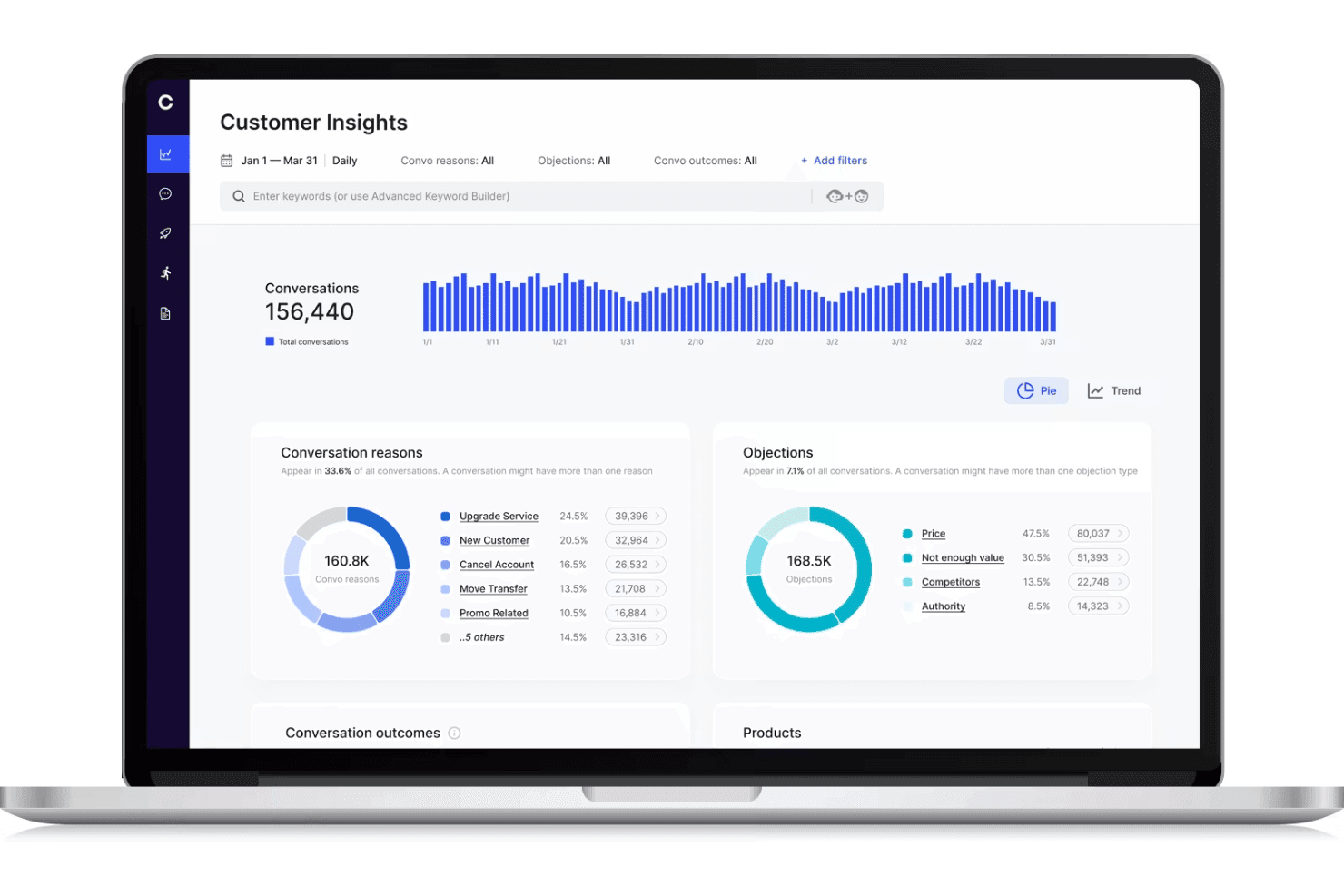
Cresta muestra un panel de monitoreo de centro de llamadas con análisis de conversaciones de clientes, seguimiento de objeciones y tendencias de conversación. Cresta es una plataforma de monitoreo de centros de llamadas impulsada por IA que ofrece inteligencia conversacional en tiempo real, orquestación de flujos de trabajo y gestión automática de calidad para canales de voz y digitales.
¿Para quién es mejor Cresta?
Equipos de soporte empresarial y centros de contacto que buscan un monitoreo de calidad impulsado por IA y automatización de flujos de trabajo escalable en múltiples canales.
Por qué elegí Cresta
Elegí Cresta como uno de los mejores porque su orquestación de flujos de trabajo de IA sin código permite a mi equipo crear y actualizar automatizaciones de coaching y cumplimiento en tiempo real rápidamente. Utilizo las herramientas de arrastrar y soltar de Cresta para automatizar el monitoreo de calidad y activar intervenciones proactivas durante las llamadas.
Funciones clave de Cresta
- Transcripción en tiempo real: Convierte las llamadas y chats en texto al instante para análisis y registro.
- Puntuación automática de calidad: Evalúa el 100% de las interacciones con clientes según criterios personalizados sin revisión manual.
- Monitoreo multicanal: Supervisa canales de voz, chat y digitales desde una sola interfaz centralizada.
- Paneles de supervisión: Permite a los supervisores acceder a métricas de rendimiento en vivo e históricas, transcripciones e interacciones marcadas.
Integraciones de Cresta
Cresta ofrece integraciones nativas con Salesforce, Twilio, Pipedrive, BigCommerce, Five9, Zendesk y más. Hay una API disponible para integraciones personalizadas.
Pros and Cons
Pros:
- Coaching en tiempo real para agentes en llamadas en vivo
- Puntuación automática de calidad en todos los canales
- Seguimiento de guiones y monitoreo de cumplimiento
Cons:
- La orientación de la IA puede requerir intervenciones manuales
- Knowledge Assist requiere ajustes continuos del modelo
Learn more about Cresta: La mejor para análisis de rendimiento
- Demo gratuita disponible
- Desde $15/mes (facturado anualmente)
Visit WebsiteCustomer Rating:4.8/5
El panel de Squaretalk rastrea el volumen de llamadas, la actividad de los agentes y las métricas de rendimiento en tiempo real. Squaretalk es un sistema de monitoreo de centros de llamadas diseñado para apoyar a los equipos de atención al cliente y realizar un seguimiento de la actividad diaria de las llamadas, con un enfoque en la analítica de rendimiento. Ofrece herramientas de monitoreo en tiempo real que ayudan a los supervisores a visualizar métricas de llamadas, actividad de los agentes y rendimiento de las colas. Ya sea que gestiones un equipo pequeño o una operación más grande, Squaretalk también incluye opciones de informes e integraciones con herramientas existentes para ayudar a los equipos a revisar el rendimiento del centro de llamadas y gestionar las operaciones.
Por qué elegí Squaretalk
Elegí Squaretalk por sus análisis de rendimiento, que ayudan a rastrear la actividad de llamadas, la productividad de los agentes y el rendimiento de las colas. También incluye herramientas de monitoreo en tiempo real que permiten a los supervisores revisar las llamadas en vivo e identificar problemas en el momento en que ocurren. Los paneles muestran las métricas de las llamadas en un solo lugar, facilitando la revisión de tendencias y la evaluación del desempeño del equipo.
Características clave de Squaretalk
Además de la analítica de rendimiento, Squaretalk ofrece:
- Informes personalizables: Personaliza los informes para rastrear las métricas que sean más relevantes para tu negocio.
- Capacidades de integración: Conéctate sin problemas con herramientas existentes para optimizar flujos de trabajo y mejorar la productividad.
- Paneles intuitivos: Visualiza fácilmente los datos y obtén información sobre el desempeño de los agentes y las interacciones con los clientes.
- Automatización de flujos de trabajo: Automatiza tareas repetitivas para que tu equipo pueda centrarse en cuestiones más complejas.
Integraciones de Squaretalk
Las integraciones incluyen Zoho, Salesforce, Freshworks CRM, Pipedrive, Antelope CRM y WhatsApp Business.
Pros and Cons
Pros:
- Los marcadores predictivos aumentan la productividad y eficiencia de los agentes
- Las herramientas analíticas integrales proporcionan conocimiento valioso para la toma de decisiones
- Ofrece transcripciones potenciadas con IA, resúmenes y análisis de sentimientos
Cons:
- Los flujos de trabajo avanzados requieren tiempo para configurarse correctamente
- Pueden presentarse problemas de conectividad o lentitud bajo uso intensivo
Learn more about Squaretalk: Mejor para conocimientos impulsados por IA
- Demostración gratuita
- Desde $85/usuario/mes
Visit WebsiteCustomer Rating:4.4/5
Talkdesk utiliza IA para ofrecer datos y conocimientos que mejoran las interacciones con los clientes. Talkdesk es un sistema de monitoreo de centros de llamadas diseñado para empresas que buscan obtener información avanzada mediante tecnología de IA. Es ideal para equipos que desean mejorar las interacciones con los clientes utilizando conocimientos basados en datos para la toma de decisiones.
Por qué elegí Talkdesk: Talkdesk ofrece conocimientos impulsados por IA que ayudan a tu equipo a tomar decisiones informadas. La herramienta proporciona análisis en tiempo real y análisis de sentimiento, lo que te permite comprender las emociones de los clientes durante las llamadas.
Incluye funciones como la gestión automatizada de calidad y la previsión predictiva para mejorar la prestación del servicio. Estas capacidades lo convierten en una excelente opción para equipos enfocados en aprovechar la IA para mejorar la experiencia del cliente.
Características destacadas e integraciones:
Características incluyen grabación y transcripción de llamadas, lo que garantiza que dispongas de un registro completo de las interacciones con los clientes. El software también ofrece paneles personalizables, para que puedas adaptar la vista a las necesidades de tu equipo. Además, proporciona herramientas de gestión de personal para optimizar la programación y asignación de recursos.
Integraciones incluyen Salesforce, Zendesk, Slack, Microsoft Teams, Google Workspace, Shopify, HubSpot, ServiceNow, Okta y Zoom.
Pros and Cons
Pros:
- Ofrece análisis de sentimiento en tiempo real
- Proporciona gestión automatizada de calidad
- Incluye herramientas de previsión predictiva
Cons:
- Requiere capacitación continua para el personal
- Puede requerir soporte de TI para la integración
Learn more about Talkdesk: Ideal para transcripciones en tiempo real
- Prueba gratuita de 14 días + demo gratuita
- Desde $80/usuario/mes (facturado anualmente)
Visit WebsiteCustomer Rating:4.3/5
Dialpad ofrece transcripción de llamadas en tiempo real para mejorar la comunicación del equipo. Dialpad es un sistema de monitoreo de centros de llamadas que atiende a empresas que necesitan servicios de transcripción de llamadas en tiempo real. Está diseñado para equipos que desean mejorar su comunicación capturando y analizando llamadas a medida que ocurren.
Por qué elegí Dialpad: Dialpad ofrece transcripciones en tiempo real que ayudan a tu equipo a captar detalles importantes durante las llamadas. Esta función es invaluable para la formación y el control de calidad, ya que permite revisar las conversaciones al instante.
La plataforma también incluye enrutamiento de llamadas y análisis para ayudar a tu equipo a gestionar y comprender los datos de llamadas. Su enfoque en los conocimientos en tiempo real lo hace ideal para equipos que buscan mejorar la eficiencia de la comunicación.
Características destacadas e integraciones:
Características incluyen transcripción de buzón de voz, que convierte mensajes de voz en texto para una revisión sencilla. La plataforma proporciona análisis de llamadas para ofrecerte información sobre el rendimiento del equipo y las interacciones con los clientes. Además, ofrece una función inteligente de enrutamiento de llamadas para asegurar que las llamadas lleguen rápidamente a los miembros correctos del equipo.
Integraciones incluyen Salesforce, Slack, Microsoft Teams, Google Workspace, HubSpot, Zendesk, ServiceNow, Okta, LinkedIn y Zoho CRM.
Pros and Cons
Pros:
- Proporciona transcripciones de llamadas en tiempo real
- Ofrece enrutamiento inteligente de llamadas
- Incluye transcripción de buzón de voz
Cons:
- Ocasionales errores de transcripción
- Puede ser complejo para usuarios nuevos
 Ideal para startups y PYMEs
- Demostración gratuita + prueba gratuita de 10 días disponible
- Desde $1/usuario/mes (facturado anualmente)
Visit WebsiteCustomer Rating:4.4/5
CallHippo proporciona herramientas esenciales de llamadas para startups y equipos en crecimiento. CallHippo es un sistema de monitoreo de centros de llamadas diseñado para startups y pequeñas y medianas empresas. Ofrece funciones esenciales de gestión de llamadas que ayudan a los equipos a administrar las interacciones con los clientes de manera eficiente.
Por qué elegí CallHippo: CallHippo está pensado para startups y PYMEs, ofreciendo funciones esenciales sin complejidad innecesaria. Incluye herramientas como números de teléfono virtuales y grabación de llamadas, que son fundamentales para equipos pequeños.
La plataforma es fácil de configurar, por lo que tu equipo puede empezar a utilizarla rápidamente. Su asequibilidad y su enfoque en funcionalidades clave la convierten en una opción inteligente para empresas pequeñas que buscan crecer.
Funciones destacadas e integraciones:
Funciones incluyen analíticas de llamadas que te brindan información sobre el desempeño y las tendencias de las llamadas. La plataforma también ofrece desvío de llamadas, para que tu equipo pueda dirigir las llamadas a la persona adecuada fácilmente. Además, proporciona funciones de buzón de voz para que ninguna consulta de cliente quede sin respuesta.
Integraciones incluye Zoho CRM, Slack, HubSpot, Pipedrive, Zendesk, Salesforce, Shopify, Zapier, Freshdesk e Intercom.
Pros and Cons
Pros:
- Proceso de configuración sencillo
- Ofrece números de teléfono virtuales
- Proporciona grabación de llamadas esencial
Cons:
- Puede haber caídas ocasionales de llamadas
- Requiere una conexión a internet estable
 Mejor para grandes empresas
- Demostración gratuita
- Desde $110/usuario/mes
Visit WebsiteCustomer Rating:4.3/5
NICE CXone ayuda a grandes empresas con herramientas escalables para la interacción con el cliente. NICE CXone es una plataforma integral para centros de contacto, diseñada para grandes empresas que buscan mejorar las interacciones con los clientes. Atiende a empresas que requieren una solución escalable para gestionar operaciones complejas de centros de llamadas de forma eficiente.
Por qué elegí NICE CXone: NICE CXone está creado para grandes empresas que necesitan una solución escalable para manejar altos volúmenes de llamadas. Ofrece funciones como distribución automática de llamadas y gestión de fuerza laboral, que son cruciales para equipos grandes.
La plataforma proporciona análisis en tiempo real para ayudar a tu equipo a tomar decisiones basadas en datos. Su enfoque en la escalabilidad y la eficiencia la hace ideal para grandes organizaciones que buscan optimizar sus operaciones de centro de contacto.
Características destacadas e integraciones:
Características incluyen enrutamiento omnicanal, que permite a tu equipo gestionar interacciones con clientes a través de diversos canales de manera fluida. La plataforma también ofrece herramientas de gestión de calidad para asegurar altos estándares de servicio. Además, proporciona marcación predictiva para optimizar la eficiencia de las llamadas y reducir los tiempos de espera.
Integraciones incluyen Salesforce, Microsoft Dynamics, Zendesk, ServiceNow, Oracle, SAP, Google Cloud, Amazon Web Services, Zoom y Genesys.
Pros and Cons
Pros:
- Ofrece marcación predictiva
- Soporta enrutamiento omnicanal
- Incluye herramientas de gestión de calidad
Cons:
- Se necesita experiencia técnica para la configuración
- Requiere actualizaciones ocasionales de funcionalidades
Learn more about NiCE CXone: Mejor para capacidades analíticas
- Demostración gratuita disponible
- Disponible bajo petición
Visit WebsiteCustomer Rating:4.2/5
Calabrio ONE mejora el rendimiento del centro de llamadas con conocimientos impulsados por analítica. Calabrio ONE es un conjunto de herramientas de optimización de fuerza laboral diseñado para centros de llamadas que buscan aprovechar la analítica para mejorar el rendimiento. Está dirigido a equipos que desean potenciar la toma de decisiones a través de conocimientos e información impulsados por los datos.
Por qué elegí Calabrio ONE: Calabrio ONE destaca en capacidades analíticas, proporcionando herramientas que ayudan a tu equipo a comprender mejor las interacciones con los clientes. Ofrece funciones de análisis de voz y gestión de calidad, lo que te permite obtener información sobre el sentimiento del cliente.
La plataforma también incluye herramientas de gestión de la fuerza laboral para optimizar la programación y asignación de recursos. Estas características lo hacen perfecto para equipos enfocados en utilizar la analítica para impulsar mejoras en el rendimiento.
Características destacadas e integraciones:
Características incluyen herramientas de informes avanzados que proporcionan un análisis en profundidad de las operaciones del centro de llamadas. El software también ofrece análisis de la voz del cliente para ayudarte a comprender las necesidades y preferencias de los clientes. Además, soporta la gestión del rendimiento con dashboards personalizables para rastrear los indicadores clave de manera efectiva.
Las integraciones incluyen Salesforce, Microsoft Dynamics, Cisco, Avaya, Genesys, Amazon Connect, Five9, RingCentral, NICE y Zoom.
Pros and Cons
Pros:
- Ofrece análisis de voz
- Proporciona herramientas de informes en profundidad
- Incluye funciones de gestión del rendimiento
Cons:
- Puede ser complejo para principiantes
- Requiere tiempo para una implementación completa
Learn more about Calabrio ONE: Mejor para equipos remotos
- Prueba gratuita de 14 días + plan gratuito + demo gratis disponible
- Desde $15/agente/mes (facturación anual)
Visit WebsiteCustomer Rating:4.1/5
Freshcaller apoya equipos remotos con herramientas para una gestión eficiente de llamadas. Freshcaller es un sistema de monitoreo de centros de llamadas en la nube diseñado para equipos remotos. Ayuda a las empresas a gestionar llamadas de manera eficiente con funciones que respaldan fuerzas laborales distribuidas.
Por qué elegí Freshcaller: Freshcaller está diseñado para apoyar equipos remotos, ofreciendo soluciones en la nube que no requieren infraestructura física. Proporciona funciones como enmascaramiento de llamadas y portabilidad de números, esenciales para operaciones a distancia.
Freshcaller también ofrece colas de llamadas y enrutamiento para asegurar que tu equipo gestione las llamadas de manera eficiente. Su enfoque en la accesibilidad remota lo convierte en una excelente opción para empresas con equipos distribuidos.
Funciones destacadas e integraciones:
Funciones incluyen grabación de llamadas, lo que ayuda a mantener un registro de todas las conversaciones para garantizar la calidad. El sistema también ofrece monitoreo de llamadas en tiempo real, permitiendo que los supervisores escuchen y brinden retroalimentación inmediata. Esto asegura mayores tasas de resolución y el cumplimiento de los estándares de calidad. Además, soporta IVR multinivel para dirigir a los clientes al departamento correcto sin dificultades.
Integraciones incluyen Freshdesk, Slack, HubSpot, Salesforce, Zendesk, Shopify, Google Contacts, Office 365, Pipedrive y Zapier.
Pros and Cons
Pros:
- Compatible con entornos de trabajo remoto
- Ofrece funciones de enmascaramiento de llamadas
- IVR multinivel disponible
Cons:
- Análisis avanzados limitados
- Problemas ocasionales de calidad de llamadas
Learn more about Freshcaller: 10La mejor opción para equipos pequeños y medianos
Zendesk
- Prueba gratuita + demo gratis disponible
- Desde $19/agente/mes (facturación anual)

Zendesk ayuda a los equipos pequeños a gestionar llamadas y realizar el seguimiento de las interacciones con los clientes. Zendesk es un sistema de monitoreo de centro de llamadas diseñado para empresas que buscan ofrecer experiencias personalizadas al cliente. Es ampliamente utilizado por equipos pequeños y medianos para gestionar llamadas de manera eficiente y hacer un seguimiento de las interacciones con los clientes.
Por qué elegí Zendesk: Zendesk está adaptado para equipos pequeños y medianos, con funciones como enrutamiento de llamadas y análisis impulsados por inteligencia artificial. Te permite gestionar llamadas en un solo lugar, dando a tu equipo el contexto completo para cada interacción.
El sistema ofrece herramientas como IVR y enrutamiento grupal para ayudar a un servicio al cliente más rápido. Los agentes de IA de Zendesk ayudan a resolver las llamadas con rapidez, lo que lo hace ideal para equipos pequeños que buscan aumentar la eficiencia sin complejidad excesiva.
Características destacadas e integraciones:
Características incluyen monitoreo de llamadas que realiza un seguimiento de todas las conversaciones, permitiendo identificar tendencias de rendimiento. Los agentes de IA brindan información instantánea, ayudando a tu equipo a resolver las llamadas más rápido. El sistema también ofrece resúmenes posteriores a la llamada directamente en tu espacio de trabajo para agilizar el flujo de trabajo.
Integraciones incluyen Salesforce, Slack, Shopify, Mailchimp, Google Analytics, HubSpot, Microsoft Teams, Jira, Trello y Asana.
Pros and Cons
Pros:
- Ofrece monitoreo de llamadas en tiempo real
- Resúmenes de llamadas con inteligencia artificial
- Opciones flexibles de enrutamiento de llamadas
Cons:
- Algunas funciones requieren compras adicionales
- Ocasionalmente se reporta lentitud en el sistema
Learn more about Zendesk:
Otros sistemas de monitorización de centros de llamadas
Estas son algunas opciones adicionales de sistemas de monitorización de centros de llamadas que no llegaron a mi lista final, pero que aún merece la pena consultar:
- 11Twilio FlexMejor para la personalización
- 12PlayvoxIdeal para el compromiso laboral
- 13ComputerTalk iceMejor para integración con Microsoft
- 14LiveAgentMejor para soporte multicanal
- 15Zoho DeskMejor para usuarios preocupados por el presupuesto
Cómo evalúo los sistemas de monitoreo de centros de llamadas
Divido mi evaluación en requisitos básicos—como supervisión en vivo y grabación de llamadas—y los factores diferenciadores, como la capacitación con IA y la gestión de calidad omnicanal, que distinguen las buenas herramientas de las excelentes.
Funcionalidad principal (Requisitos mínimos para esta lista)
Cuando selecciono las herramientas para mi lista, califico cada una en una escala del 0 (no ofrece la funcionalidad) al 5 (destaca en esta área) para cada funcionalidad principal que se detalla a continuación. Luego, calculo la puntuación total de la herramienta en porcentaje. Cada herramienta necesita alcanzar un puntaje total mínimo del 65% para ser considerada para inclusión.
- Grabación y almacenamiento de llamadas: Verifico si las grabaciones son automáticas, se pueden buscar y están acompañadas de controles de retención—especialmente para equipos que revisan llamadas durante disputas o escaladas.
- Monitoreo de llamadas en vivo: Los supervisores necesitan como mínimo opciones de escucha, susurro y entrada. Analizo lo sencillo que es para un gerente intervenir en una llamada en vivo para guiar a un agente durante la conversación.
- Puntuación y evaluaciones de calidad: Las hojas de evaluación personalizables son importantes aquí. Evalúo si la herramienta permite a los analistas de calidad crear formularios de evaluación vinculados a tipos específicos de llamadas, como consultas de facturación vs. quejas.
- Análisis de voz e interacción: Las buenas herramientas van más allá de la transcripción. Busco detección de palabras clave y análisis de sentimiento que ayuden a los equipos a identificar patrones en miles de llamadas.
- Paneles de rendimiento e informes: Evalúo si los paneles ofrecen vistas en tiempo real e históricas, y si los supervisores pueden filtrar por agente, equipo o cola sin tener que construir informes desde cero.
- Controles de cumplimiento y seguridad: Funciones como la redacción PCI, acceso por roles y almacenamiento cifrado son factores clave, especialmente para equipos que gestionan datos sensibles de clientes en sectores regulados.
Una vez tengo una lista de herramientas que cumplen los criterios, considero qué distingue a cada plataforma.
Factores diferenciadores (Qué distingue a los proveedores)
Así es como comparo y contrasto diferentes proveedores:
Características destacadas
El monitoreo omnicanal es un gran diferenciador. Los equipos que gestionan chat, correo electrónico y voz necesitan visibilidad de calidad en todos los canales, no solo en llamadas telefónicas. También busco herramientas de capacitación con IA que ofrezcan recomendaciones específicas para los agentes, ya que ahorran a los supervisores horas de revisión manual. La reproducción de la trayectoria del cliente añade otra capa. Permite a los evaluadores ver toda la secuencia de interacciones que tuvo un cliente antes de una llamada, aportando un contexto mucho más rico a los puntajes de calidad.
Más allá de las características
Evalúo hasta qué punto cada herramienta se conecta con el conjunto tecnológico más amplio. Un sistema de monitoreo que se integra con tu plataforma CCaaS, CRM y herramientas de gestión de personal mantiene los datos de calidad donde realmente trabajan los supervisores. El cumplimiento normativo y la gobernanza de datos también tienen un peso importante—verifico que la herramienta ofrezca reglas configurables de grabación y controles de residencia de datos, ya que los equipos en sectores regulados necesitan un control detallado sobre dónde y por cuánto tiempo se almacenan las grabaciones. La transparencia de precios también es importante. Los costes de almacenamiento y cargos adicionales por módulos de analítica pueden incrementar silenciosamente el coste total de propiedad.
Cómo elegir un sistema de monitorización de centros de llamadas
Con tantos sistemas de monitorización de centros de llamadas en el mercado, es fácil quedarse atascado comparando listas de funcionalidades o confundirse con los distintos niveles de precios. En lugar de perderte entre tanta información, céntrate en estos factores, que realmente influirán en la capacidad de tu equipo para monitorizar las llamadas de forma eficaz y mejorar la calidad del servicio.
| Factor | Qué debes tener en cuenta |
|---|---|
| FactorEscalabilidad | Qué debes tener en cuenta¿La herramienta crecerá junto con las necesidades de tu empresa? ¿Puede gestionar un mayor volumen de llamadas, nuevos agentes o una expansión multicanal a medida que crece tu negocio? |
| FactorIntegraciones | Qué debes tener en cuenta¿El sistema de monitorización se conecta sin problemas con tu CRM, mesa de ayuda y herramientas de colaboración para que no se creen silos en los flujos de trabajo? |
| FactorPersonalización | Qué debes tener en cuenta¿Puedes adaptar los paneles, informes y flujos de trabajo de monitorización de llamadas para que se ajusten a tus métricas de rendimiento y necesidades de formación? |
| FactorFacilidad de uso | Qué debes tener en cuenta¿La interfaz es lo bastante intuitiva para que supervisores y agentes la adopten rápidamente sin una formación extensa? |
| FactorImplementación e incorporación | Qué debes tener en cuenta¿Cuánto tardará en configurarse? Ten en cuenta el tiempo y los recursos necesarios para una implementación completa y si el proveedor ofrece asistencia durante esta fase. |
| FactorCoste | Qué debes tener en cuenta¿Se ajusta a tu presupuesto? Además de las cuotas de suscripción, ¿existen costes adicionales por funciones como la grabación de llamadas o el análisis? Compara los modelos de precios con las funciones que realmente necesitas. |
| FactorMedidas de seguridad | Qué debes tener en cuenta¿Están protegidos tus datos y llamadas? Busca funciones como el cifrado y el cumplimiento de los estándares del sector para proteger la información confidencial. |
| FactorDisponibilidad del soporte | Qué debes tener en cuenta¿Puedes recibir ayuda cuando la necesites? Comprueba si el proveedor ofrece soporte las 24 horas del día, los 7 días de la semana, y varias opciones de contacto, como teléfono, chat y correo electrónico, para resolver los problemas rápidamente. |
¿Qué es un sistema de monitorización de centros de llamadas?
Un sistema de monitorización de centros de llamadas es un software que realiza el seguimiento, graba y analiza las llamadas de los clientes para que los gerentes puedan mejorar el rendimiento de los agentes y la calidad del servicio. Con funciones como la monitorización en directo, la grabación de llamadas y el análisis, estos sistemas proporcionan la información práctica necesaria para formar a los agentes del centro de contacto, garantizar la coherencia y ofrecer mejores experiencias a los clientes.
Características de un sistema de supervisión de centros de llamadas
Al seleccionar un software de supervisión de la calidad de un centro de llamadas, presta atención a las siguientes características clave:
- Grabación de llamadas: Captura y almacena las conversaciones de las llamadas con fines de garantía de calidad y formación.
- Supervisión en directo: Permite a los responsables del centro de llamadas escuchar las llamadas en curso y proporcionar comentarios y asistencia en tiempo real a los agentes.
- Funciones de análisis: Proporciona información sobre el rendimiento, ayudando a los equipos a tomar decisiones basadas en datos para mejorar la eficiencia del centro de llamadas.
- Paneles personalizables: Permiten a los usuarios adaptar la interfaz para mostrar las métricas y la información más relevantes según sus necesidades específicas.
- Distribución automática de llamadas: Dirige las llamadas entrantes a los agentes más adecuados, reduciendo el tiempo medio de gestión y los tiempos de espera.
- Gestión de la calidad: Ofrece herramientas para evaluar y mejorar el rendimiento de los agentes, garantizando unos estándares de servicio elevados.
- Compatibilidad omnicanal: Gestiona las interacciones con los clientes a través de varios canales, como teléfono, correo electrónico y chat, desde una única plataforma.
- Marcación predictiva: Automatiza las llamadas salientes y optimiza la disponibilidad de los agentes marcando números según algoritmos predictivos.
- Análisis de sentimiento: Analiza las emociones de los clientes durante las llamadas para proporcionar información sobre su satisfacción y las áreas de mejora.
- Gestión de la plantilla: Ayuda a optimizar los horarios y los recursos de los agentes para adaptarlos a las necesidades del centro de llamadas y mejorar la productividad.
Ventajas de un sistema de supervisión de centros de llamadas
La implementación de un sistema de supervisión de centros de llamadas ofrece varias ventajas para tu equipo y tu empresa. Estas son algunas de las que puedes esperar:
- Mejora del rendimiento de los agentes: Con la supervisión y los comentarios en directo, los agentes reciben orientación en tiempo real para mejorar sus habilidades y la calidad del servicio.
- Mayor satisfacción del cliente: La gestión de la calidad y el análisis de sentimiento garantizan que las interacciones con los clientes cumplan unos estándares elevados, lo que se traduce en clientes más satisfechos.
- Decisiones basadas en datos: Las funciones de análisis proporcionan información sobre las operaciones del centro de llamadas, ayudando a los responsables a tomar decisiones fundamentadas para aumentar la eficiencia.
- Gestión eficiente de las llamadas: Funciones como la distribución automática de llamadas y la marcación predictiva garantizan que las llamadas se dirijan y gestionen rápidamente, reduciendo los tiempos de espera.
- Optimización de recursos: Las herramientas de gestión de la plantilla ayudan a adaptar los horarios de los agentes a la demanda, mejorando la productividad y reduciendo los costes.
- Información personalizada: Los paneles personalizables permiten a los equipos centrarse en las métricas más importantes y adaptar la información a sus objetivos específicos.
- Garantía de calidad constante: Las herramientas de grabación de llamadas y gestión de la calidad mantienen un nivel de servicio uniforme, generando confianza en los clientes.
Costes y precios de un sistema de supervisión de centros de llamadas
Para seleccionar un sistema de supervisión de centros de llamadas es necesario comprender los distintos modelos de precios y planes disponibles. Los costes varían según las funciones, el tamaño del equipo, los complementos y otros factores. La siguiente tabla resume los planes habituales, sus precios medios y las funciones que suelen incluir las soluciones de sistemas de supervisión de centros de llamadas:
Tabla comparativa de planes para un sistema de supervisión de centros de llamadas
| Tipo de plan | Precio medio | Funciones habituales |
|---|---|---|
| Tipo de planPlan gratuito | Precio medio$0 | Funciones habitualesSupervisión básica de llamadas, análisis limitados e informes esenciales. |
| Tipo de planPlan personal | Precio medio$15-$30/usuario/mes | Funciones habitualesGrabación de llamadas, supervisión en directo y análisis básicos. |
| Tipo de planPlan empresarial | Precio medio$50-$75/usuario/mes | Funciones habitualesAnálisis avanzados, distribución automática de llamadas y paneles personalizables. |
| Tipo de planPlan para empresas | Precio medio$100-$150/usuario/mes | Funciones habitualesCompatibilidad omnicanal, marcación predictiva y herramientas integrales de gestión de la calidad. |
Preguntas frecuentes sobre el sistema de supervisión de centros de llamadas
Estas son algunas respuestas a preguntas frecuentes sobre los sistemas de supervisión de centros de llamadas:
¿Cuál es la regla 80/20 en un centro de llamadas?
La regla 80/20 en un centro de llamadas significa que el 80 por ciento de las llamadas deben responderse en un plazo de 20 segundos. Este estándar ayuda a garantizar tiempos de respuesta rápidos y mejora la satisfacción del cliente. Es un criterio de referencia habitual para establecer objetivos de rendimiento en las operaciones de los centros de llamadas.
¿Cómo funciona la supervisión de llamadas?
La supervisión de llamadas consiste en observar y escuchar las llamadas, ya sea en tiempo real o mediante grabaciones. Se utiliza para evaluar el rendimiento de los agentes, asignar puntuaciones de calidad y mejorar el servicio al cliente. Al supervisar las llamadas, puedes proporcionar comentarios a los agentes e identificar áreas para la formación y el desarrollo.
¿Cuáles son los 5 indicadores clave de rendimiento de un centro de llamadas?
Los indicadores clave de rendimiento (KPI) de un centro de llamadas incluyen las puntuaciones de satisfacción del cliente, la tasa de resolución en la primera llamada, el tiempo de primera respuesta, la tasa de utilización de los agentes y la tasa de abandono de llamadas. Estas métricas te ayudan a evaluar la eficacia de las operaciones de tu centro de llamadas e identificar áreas de mejora.
¿Cuáles son las 7 habilidades importantes que debe tener todo agente de un centro de llamadas?
Entre las habilidades esenciales de los agentes de los centros de llamadas se incluyen la escucha activa, la comunicación eficaz, la empatía, la resolución de problemas, el conocimiento del producto, la gestión del tiempo y la capacidad para realizar varias tareas a la vez. Estas habilidades permiten a los agentes gestionar las consultas de los clientes de forma eficiente y ofrecer un servicio de alta calidad.
¿Cómo puede la supervisión de los centros de llamadas mejorar la calidad del servicio?
La supervisión de los centros de llamadas te permite revisar las interacciones y proporcionar comentarios específicos a los agentes. Al identificar los puntos fuertes y las áreas de mejora, puedes adaptar los programas de formación y mejorar la calidad general del servicio. El proceso de supervisión también ayuda a mantener unos estándares de servicio coherentes en todo el equipo.
¿Qué herramientas se utilizan habitualmente para supervisar los centros de llamadas?
Entre las herramientas habituales para supervisar los centros de llamadas se incluyen los programas de grabación de llamadas, los sistemas de supervisión en directo, las plataformas de análisis y las herramientas de gestión de la calidad. Las herramientas adecuadas de supervisión de centros de llamadas te ayudan a realizar un seguimiento del rendimiento, analizar los datos y garantizar que tu equipo cumpla las expectativas de servicio y resuelva rápidamente los problemas de los clientes.