

10 meilleurs logiciels de satisfaction client en 2026

10 Sélection des meilleurs logiciels de satisfaction client


Les logiciels de satisfaction client aident les équipes CX à mesurer, analyser et améliorer la manière dont les clients perçoivent leur expérience. Si vous avez du mal à interpréter des indicateurs CSAT peu clairs, à obtenir suffisamment de retours ou à réduire le délai entre les informations recueillies et les actions mises en place, un logiciel de satisfaction client peut vous aider à transformer des retours précieux en actions concrètes.
Dans cet article, je vous présente mes recommandations concernant les meilleurs logiciels de satisfaction client afin de vous aider à comprendre les besoins, les expériences et les attentes de vos clients, pour les garder satisfaits et engagés.
Qu’est-ce qu’un logiciel de satisfaction client ?
Un logiciel de satisfaction client est un outil utilisé pour recueillir et analyser les retours des clients afin de mesurer et d’améliorer leur niveau de satisfaction à l’égard de leur expérience. Il permet de faire émerger des informations utiles pour améliorer les produits, perfectionner les services et renforcer les relations avec les clients. Ces objectifs sont atteints grâce à des fonctionnalités telles que la collecte de retours, l’analyse des sentiments et les analyses intégrées.
Pourquoi faire confiance à nos recommandations de logiciels
Notre équipe teste et évalue des logiciels depuis 2012. En tant que leaders CX nous-mêmes, nous savons à quel point il est difficile — et important — de choisir le bon logiciel.
Pour ce guide, nous avons évalué les outils grâce à des tests pratiques et une recherche indépendante, en notant les outils selon nos critères de sélection.
Nos avis reflètent notre jugement éditorial humain, et non un argumentaire de vente.
Les 10 meilleurs logiciels de satisfaction client : tableau comparatif rapide
Ce tableau comparatif résume les informations essentielles concernant chacun des logiciels de satisfaction client que j’ai sélectionnés. Vous pouvez consulter côte à côte les tarifs ainsi que la disponibilité d’essais gratuits ou de démonstrations afin de trouver le logiciel le mieux adapté à votre budget et aux besoins de votre entreprise.
| Tool | Best For | Trial Info | Price | ||
|---|---|---|---|---|---|
| 1 | Idéal pour la surveillance en ligne en temps réel | Essai gratuit de 14 jours | À partir de 149 $/utilisateur/mois (facturé annuellement) | Website | |
| 2 | Idéal pour le suivi du parcours client avec NPS | Essai gratuit de 14 jours + démo gratuite disponible | Tarification sur demande | Website | |
| 3 | Meilleures enquêtes automatisées avec analyses en temps réel | Essai gratuit de 14 jours + démo gratuite disponible | Tarifs sur demande | Website | |
| 4 | Idéal pour les flux de travail de retours évolutifs | Essai gratuit de 7 jours + démonstration gratuite disponible | À partir de $55/utilisateur/mois | Website | |
| 5 | Meilleurs sondages CSAT et workflow de suivi | Essai gratuit de 10 jours disponible | À partir de $55.99/mois | Website | |
| 6 | Idéal pour l'automatisation par IA des tâches répétitives | Essai gratuit de 14 jours | À partir de 39 $/agent/mois | Website | |
| 7 | Idéal pour des informations clients alimentées par l'IA | Démo gratuite disponible | Tarif sur demande | Website | |
| 8 | Idéal pour des enquêtes de satisfaction client personnalisables | Démo gratuite disponible | À partir de $18/mois | Website | |
| 9 | Idéal pour les petites entreprises | Formule gratuite disponible | À partir de $30/utilisateur/mois (facturé annuellement) | Website | |
| 10 | Idéal pour l’acheminement des demandes clients entre équipes | Essai gratuit de 14 jours + démo gratuite disponible | À partir de 25 $/utilisateur/mois (facturé annuellement) | Website |


Présentation des 10 meilleurs logiciels de satisfaction client
Voici mon évaluation des meilleurs logiciels de satisfaction client que vous pouvez utiliser aujourd’hui, accompagnée d’une brève description de leurs principales fonctionnalités et d’une courte explication de leur présence dans cette sélection.

Brand24
Idéal pour la surveillance en ligne en temps réel
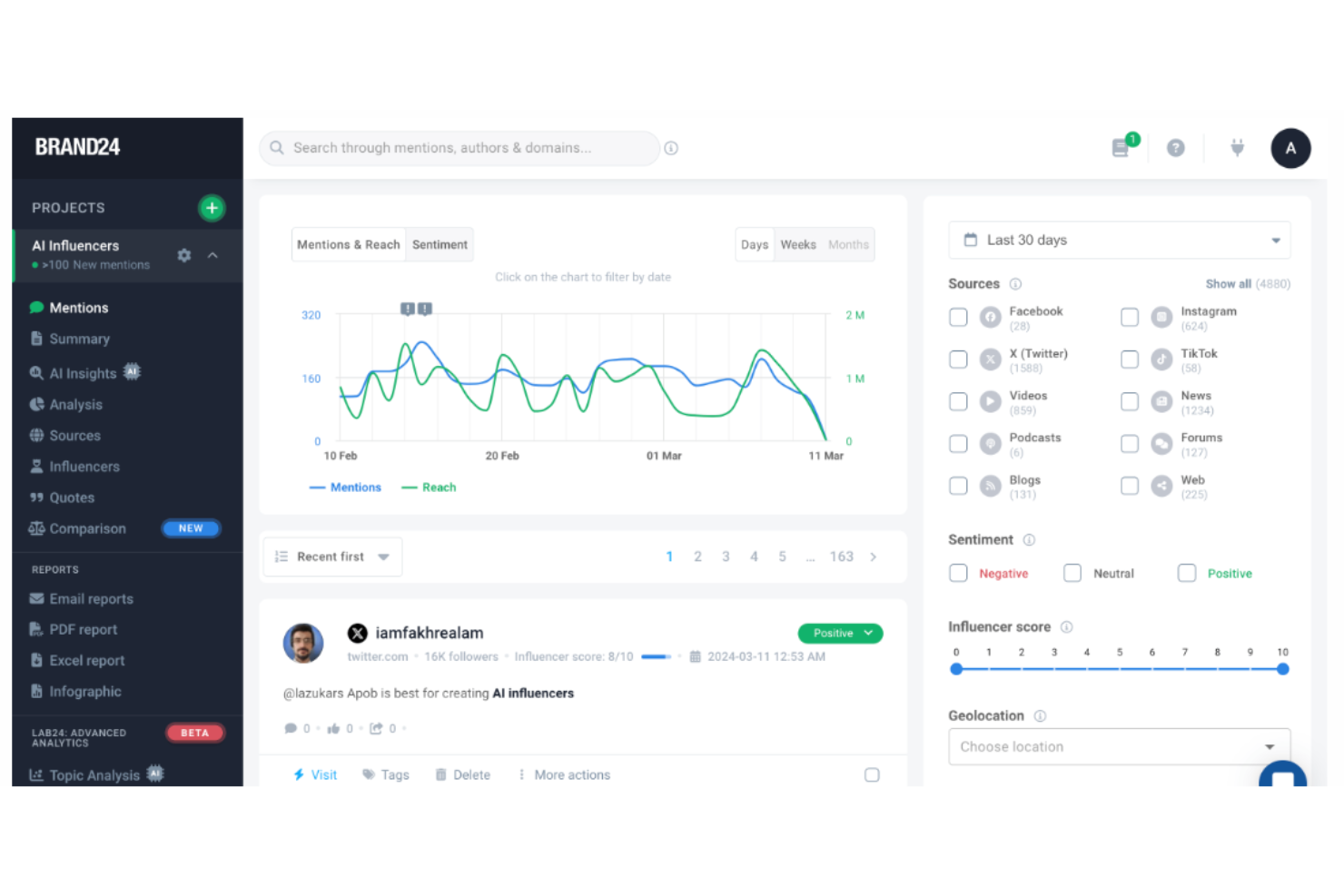
Brand24 est un puissant outil d'écoute sociale alimenté par l'IA qui aide les entreprises à surveiller et analyser leur présence et leur réputation en ligne. L'outil offre également des ressources et un soutien pour aider les entreprises à optimiser leurs efforts sur les réseaux sociaux et leur marketing en ligne, avec pour objectif final d'améliorer la satisfaction client et la réputation de la marque.
Pourquoi j'ai choisi Brand24 : Brand24 aide les entreprises à suivre les mentions de leur marque sur diverses plateformes en ligne, en fournissant des alertes en temps réel et une analyse de sentiment. L'outil est conçu pour les professionnels du marketing et les entreprises de toutes tailles, proposant des fonctionnalités telles que le scoring des influenceurs, l'analyse des concurrents et des rapports personnalisables.
La plateforme fournit des données pour la réputation de marque, le marketing, le marketing d'influence, les études de marché et les relations publiques. Dans l'ensemble, Brand24 est apprécié pour la rapidité de transmission des données et la finesse de son analyse de sentiment, ce qui le rend particulièrement adapté aux entreprises qui privilégient l'engagement client immédiat.
Fonctionnalités phares et intégrations de Brand24 :
Fonctionnalités phares : analyse avancée des sentiments pour segmenter les mentions en ligne en catégories positives, négatives ou neutres, fonctionnalités de rapports automatisés et suivi de la portée, qui aide les utilisateurs à évaluer leurs efforts marketing et à se comparer aux concurrents en suivant la portée des mentions de leur marque. Les utilisateurs peuvent également mesurer et rapporter leur couverture RP en créant des rapports fournissant des indicateurs puissants et fiables.
Intégrations : Slack, Trackdesk, LinkedIn, Spotify, Telegram, Instagram, Facebook, Reddit, TikTok, YouTube, X (anciennement Twitter) et Tripadvisor.
Pros and Cons
Pros:
- Facile à configurer et à utiliser
- Fournit des alertes en temps réel et des filtres personnalisables
- Prend en charge plusieurs langues
Cons:
- L'application mobile peut être difficile à utiliser
- Peut ne pas être abordable pour les petites entreprises
New Product Updates from Brand24

Brand24 Adds TikTok Video Transcriptions for Mention Tracking
Brand24 now detects keywords spoken in TikTok videos, not just in descriptions, and collects matching videos as mentions with spoken fragments and timestamps shown. For more information, visit Brand24's official site.

Idéal pour le suivi du parcours client avec NPS
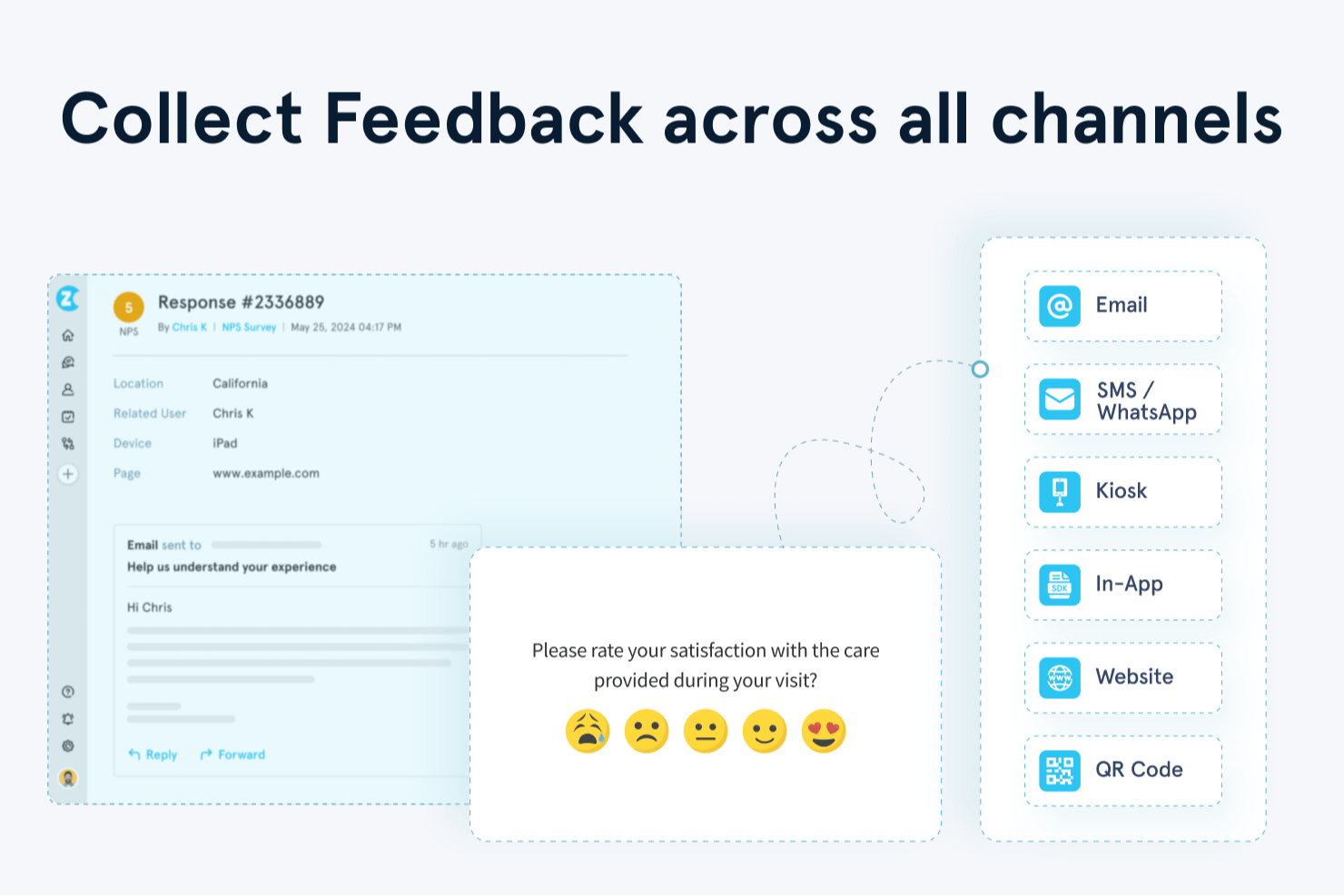
Zonka Feedback est une plateforme de feedback client alimentée par l'IA qui collecte, centralise et analyse les réponses aux enquêtes NPS, CSAT et CES via l'email, les SMS, WhatsApp, le web, l'application et les bornes interactives.
À qui s'adresse Zonka Feedback ?
Les équipes Expérience Client (CX) et Voix du Client (VoC) des entreprises de taille moyenne menant des programmes de feedback sur des points de contact physiques et digitaux trouveront Zonka particulièrement adapté.
Pourquoi j'ai choisi Zonka Feedback
J'ai choisi Zonka Feedback car sa fonctionnalité de suivi des contacts et du parcours utilisateur permet de relier les réponses NPS à des points de contact spécifiques dans le parcours client. Je peux donc voir exactement où la satisfaction chute, que ce soit après l'onboarding, après un ticket de support ou lors du renouvellement. Je compte également sur son analyse d'impact par IA qui relie les thèmes des retours clients aux variations du score NPS, ce qui me permet d'identifier les enjeux qui influencent réellement les résultats.
Fonctionnalités clés de Zonka Feedback
- Créateur d'enquêtes omnicanal : Créez des enquêtes CSAT, NPS et CES pour l'email, SMS, WhatsApp, le web et les bornes, avec logiques conditionnelles et options de personnalisation.
- Plateforme centralisée de feedback : Centralisez les retours issus des enquêtes, tickets d'assistance, chats en direct et avis en ligne sur une seule interface.
- Tableaux de bord par rôle : Fournissez des analyses en temps réel adaptées aux dirigeants, agents de première ligne ou analystes VoC grâce à des widgets personnalisables.
- Contrôles de conformité : Prise en charge de la conformité GDPR et HIPAA, de la certification ISO, et configuration de la résidence des données pour une gestion sécurisée des données clients.
Intégrations de Zonka Feedback
Zonka Feedback propose des intégrations natives avec Salesforce, HubSpot, Zendesk, Intercom, Freshdesk, Jira, Slack, Microsoft Teams, Google Sheets et Mailchimp. Il prend également en charge Zapier et dispose d'une API pour des intégrations personnalisées.
Pros and Cons
Pros:
- Feedback basé sur le parcours, associé aux étapes de vie du client
- Analyse textuelle en temps réel sur plusieurs langues
- Workflows automatisés de gestion de tickets et de clôture de dossiers
Cons:
- Les options de conception des enquêtes peuvent sembler limitées
- Inclus à partir des forfaits d'entrée de gamme

Meilleures enquêtes automatisées avec analyses en temps réel
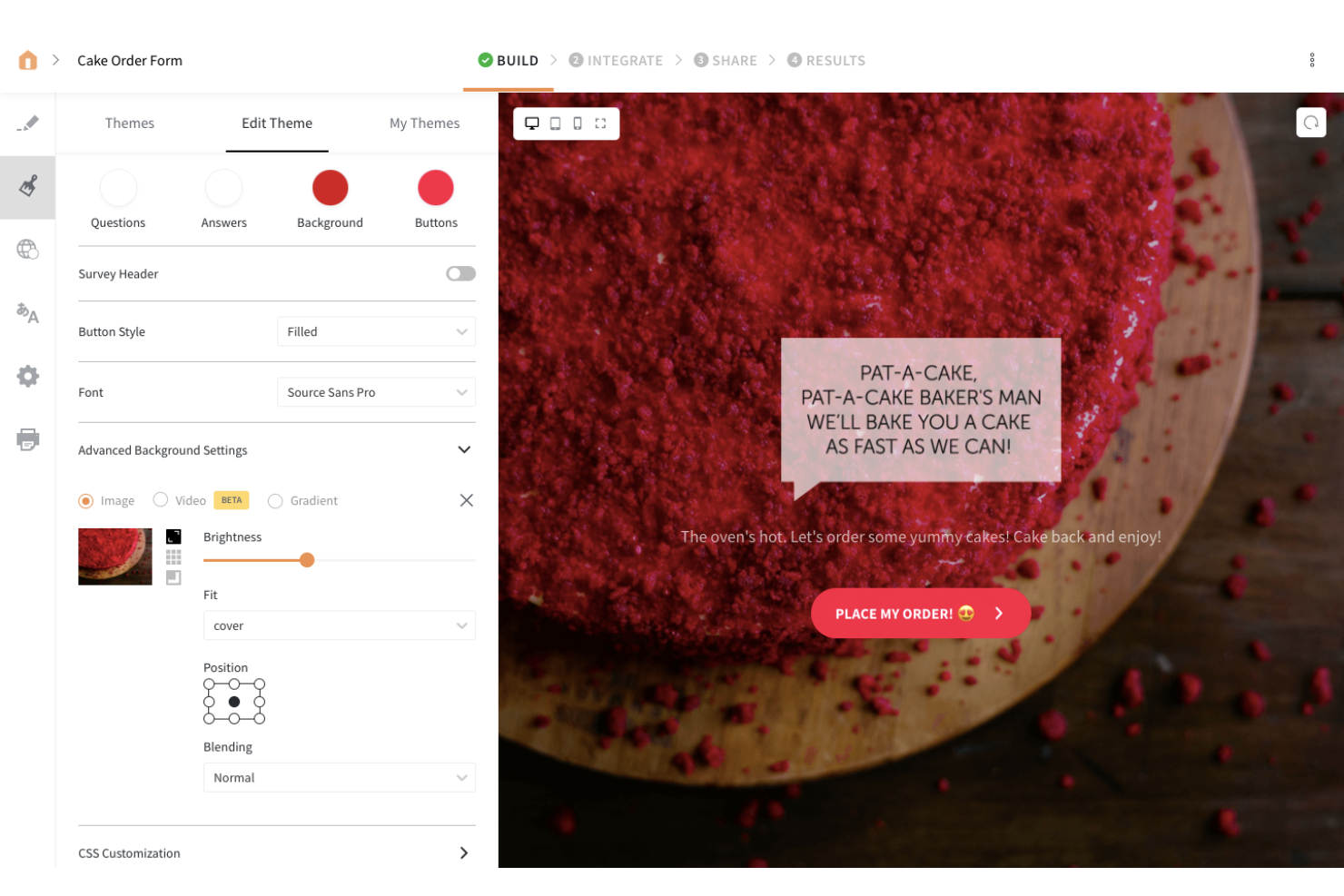
SurveySparrow est un outil de sondage en ligne qui vous permet de recueillir les retours de votre équipe et de vos clients. La plateforme vous permet de diffuser vos enquêtes sur plusieurs canaux, notamment les réseaux sociaux et les forums, vous offrant ainsi des informations précieuses sur vos utilisateurs.
Pourquoi j'ai choisi SurveySparrow : SurveySparrow figure dans ma liste grâce à son créateur d'enquêtes simple et intuitif. Le créateur utilise une fonctionnalité de glisser-déposer pour vous aider à personnaliser vos questionnaires, et vous pouvez partager chaque enquête créée sur les réseaux sociaux ou les forums afin de recueillir les retours de vos utilisateurs.
Fonctionnalités clés et intégrations de SurveySparrow :
Fonctionnalités clés : enquêtes mobile-first, enquêtes vidéo, enquêtes par chat et enquêtes hors ligne. J'apprécie les enquêtes intelligentes de SurveySparrow. Ce type de questionnaire vous permet d'utiliser la logique conditionnelle pour n'afficher que les questions pertinentes aux répondants, ce qui vous permet de recueillir des réponses adaptées à chaque segment de clientèle.
Intégrations : plateformes sociales, CRM et outils d'engagement client, tels que Facebook, Salesforce, Intercom, Aweber, Google Contacts, HubSpot, WordPress, MailChimp, Rybbon, Zendesk et Slack. Vous pouvez accéder à encore plus d’intégrations via Zapier. SurveySparrow propose également une API REST pour permettre des intégrations personnalisées selon vos besoins.
Pros and Cons
Pros:
- La plateforme est facile à prendre en main
- Le design des enquêtes rend l'expérience agréable pour les répondants
- Les enquêtes audio transcrivent automatiquement les réponses des participants
Cons:
- Personnalisation de la police limitée
- Les enquêtes ne collectent pas de réponses partielles si le répondant quitte avant d'avoir tout rempli

Alchemer
Idéal pour les flux de travail de retours évolutifs
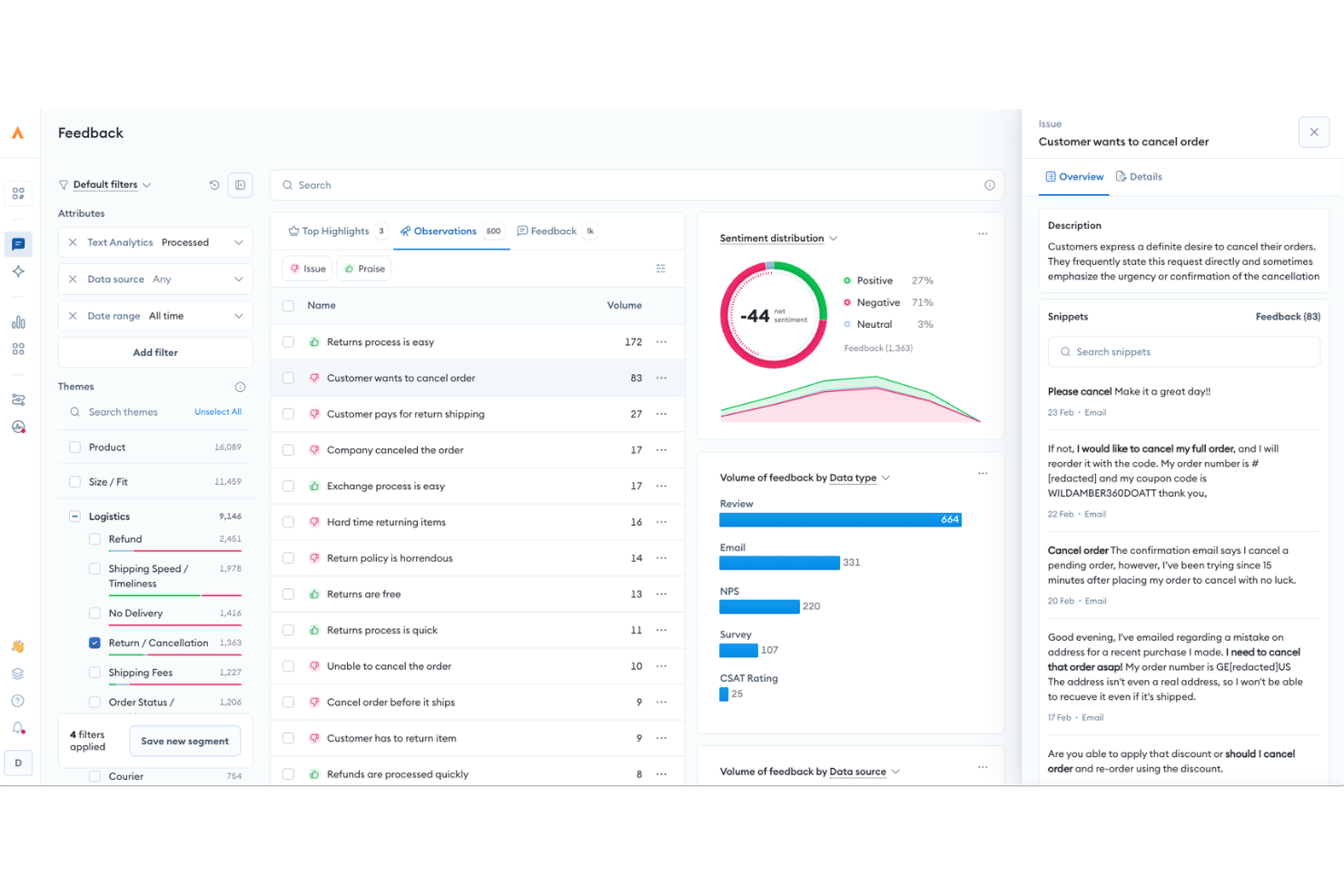
Alchemer est une plateforme de gestion des retours qui combine la distribution d’enquêtes, l’analyse des sentiments, l’automatisation en boucle fermée et plus de 400 intégrations pour prendre en charge les programmes CSAT, NPS et VoC tout au long du parcours client.
À qui Alchemer convient-il le mieux ?
Alchemer convient aux équipes CX et VoC des entreprises de taille intermédiaire et des grandes entreprises qui gèrent des programmes structurés de collecte de retours sur plusieurs canaux et systèmes métier.
Pourquoi j’ai choisi Alchemer
J’ai inclus Alchemer dans ma sélection principale, car son générateur de flux de travail Connect sans code change réellement la façon dont les retours circulent au sein d’une architecture CX. Je peux configurer une règle qui achemine directement une réponse NPS d’un détracteur vers Zendesk sous forme de ticket d’assistance, ou qui déclenche une alerte Slack à l’intention d’un responsable de la réussite client, sans écrire une seule ligne de code. La synchronisation bidirectionnelle avec Salesforce est une autre fonctionnalité sur laquelle je compte : j’importe les données du CRM dans les enquêtes pour les personnaliser, puis je renvoie automatiquement les résultats afin de mettre à jour les fiches de contact.
Principales fonctionnalités d’Alchemer
- Analyse des retours alimentée par l’IA : utilise le traitement automatique du langage pour évaluer automatiquement les sentiments, détecter les thèmes et regrouper les sujets dans les réponses ouvertes aux enquêtes.
- Distribution d’enquêtes omnicanale : prend en charge l’envoi d’enquêtes par e-mail, SMS, fenêtres intégrées aux applications, liens web, codes QR et modes kiosque/hors ligne.
- Tableaux de bord de rapports personnalisables : fournit des tableaux de bord en temps réel avec une segmentation avancée, des options d’exportation et des rapports partageables personnalisables.
- Autorisations basées sur les rôles : permet aux administrateurs d’attribuer des autorisations spécifiques et des accès aux données à différentes équipes ou différents services.
Intégrations d’Alchemer
Alchemer propose plus de 400 intégrations natives, notamment avec Salesforce, Zendesk, HubSpot, ServiceNow, Jira, Tableau, Slack, Shopify, Power BI et Google Sheets, ainsi qu’une API pour les intégrations personnalisées.
Pros and Cons
Pros:
- Logique et embranchements d’enquête hautement personnalisables
- Prend en charge les programmes VoC complexes sur plusieurs points de contact
- Automatisation en boucle fermée efficace pour le suivi des détracteurs
Cons:
- L’interface de rapports semble dépassée par rapport à celle des concurrents
- Les flux de travail avancés nécessitent un temps de configuration important

Meilleurs sondages CSAT et workflow de suivi
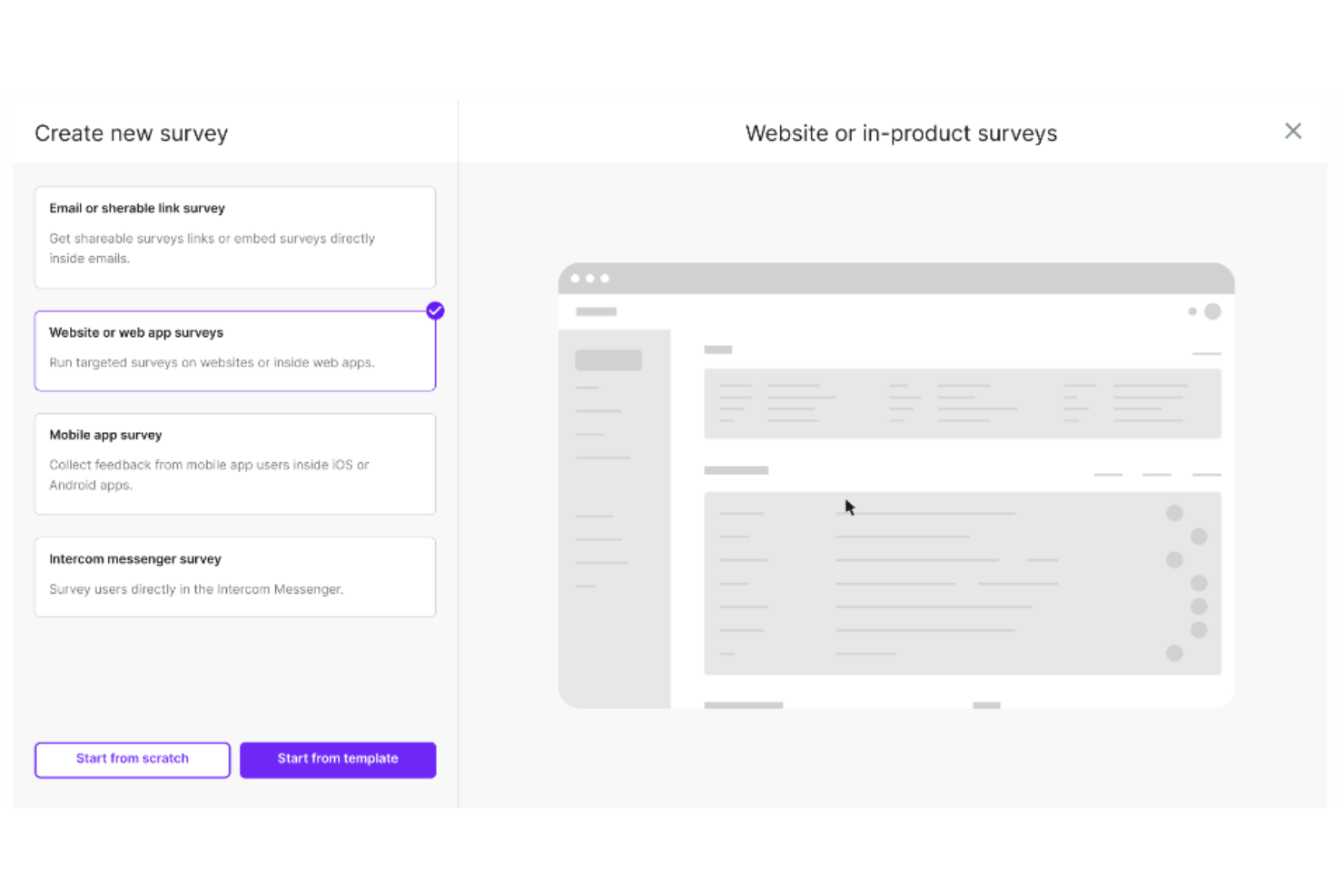
Survicate est un outil de sondage conçu pour collecter les retours des clients et des visiteurs de sites web. Son objectif est d'aider les entreprises à comprendre les préférences des clients, à améliorer les produits et services, et à prendre des décisions éclairées sur la base des retours récoltés.
Pourquoi j'ai choisi Survicate : J'ai sélectionné Survicate pour cette liste car il permet aux entreprises de mener des enquêtes sur plusieurs canaux, notamment par e-mail, sur le web, sur mobile et en application, afin de recueillir des insights auprès des clients et des visiteurs. Les enquêtes Survicate permettent de mesurer des indicateurs clés de satisfaction comme le Net Promoter Score (NPS), le Customer Satisfaction Score (CSAT) et le Customer Effort Score (CES). Elles peuvent également être personnalisées avec différents modèles et mettre en avant des logos, couleurs de marque et messages personnalisés pour maintenir la cohérence de la marque à travers les enquêtes.
J'apprécie aussi le fait que les workflows de suivi de Survicate déclenchent automatiquement des actions en fonction des réponses aux enquêtes CSAT, permettant aux entreprises d'interagir rapidement avec les clients insatisfaits, d'escalader les problèmes auprès des équipes de support, ou de lancer des suivis personnalisés pour améliorer la fidélisation et la satisfaction des clients.
Fonctionnalités remarquables et intégrations de Survicate
Les fonctionnalités incluent un créateur d'enquêtes par glisser-déposer, un centre de retours centralisé, la collecte automatisée des retours, des analyses en temps réel pour comprendre d'un coup d'œil les réponses aux enquêtes, et l'intégration d'enquêtes par e-mail. J'apprécie également que Survicate utilise un ciblage avancé pour afficher les enquêtes au moment où les utilisateurs sont le plus susceptibles d'y répondre, par exemple après une action spécifique réalisée sur le site ou à un moment clé du parcours client.
Les intégrations incluent ActiveCampaign, Drip, Amplitude, HubSpot, Intercom, Mailchimp, Salesforce, FullStory, Zendesk et Microsoft Teams.
Pros and Cons
Pros:
- Facile à configurer et à utiliser
- Capable de capturer les réponses partielles
- Collecte des retours en temps réel
Cons:
- L'aspect visuel des sondages peut manquer de cohérence
- Limite maximale de réponses mensuelles
New Product Updates from Survicate

Survicate MCP Support Now Available
Survicate now supports MCP, letting teams use AI tools like Claude, ChatGPT, and Slack to explore survey results, analyze responses and insights, and draft new surveys. For more information, visit Survicate's official site.
 .
.
eDesk
Idéal pour l'automatisation par IA des tâches répétitives
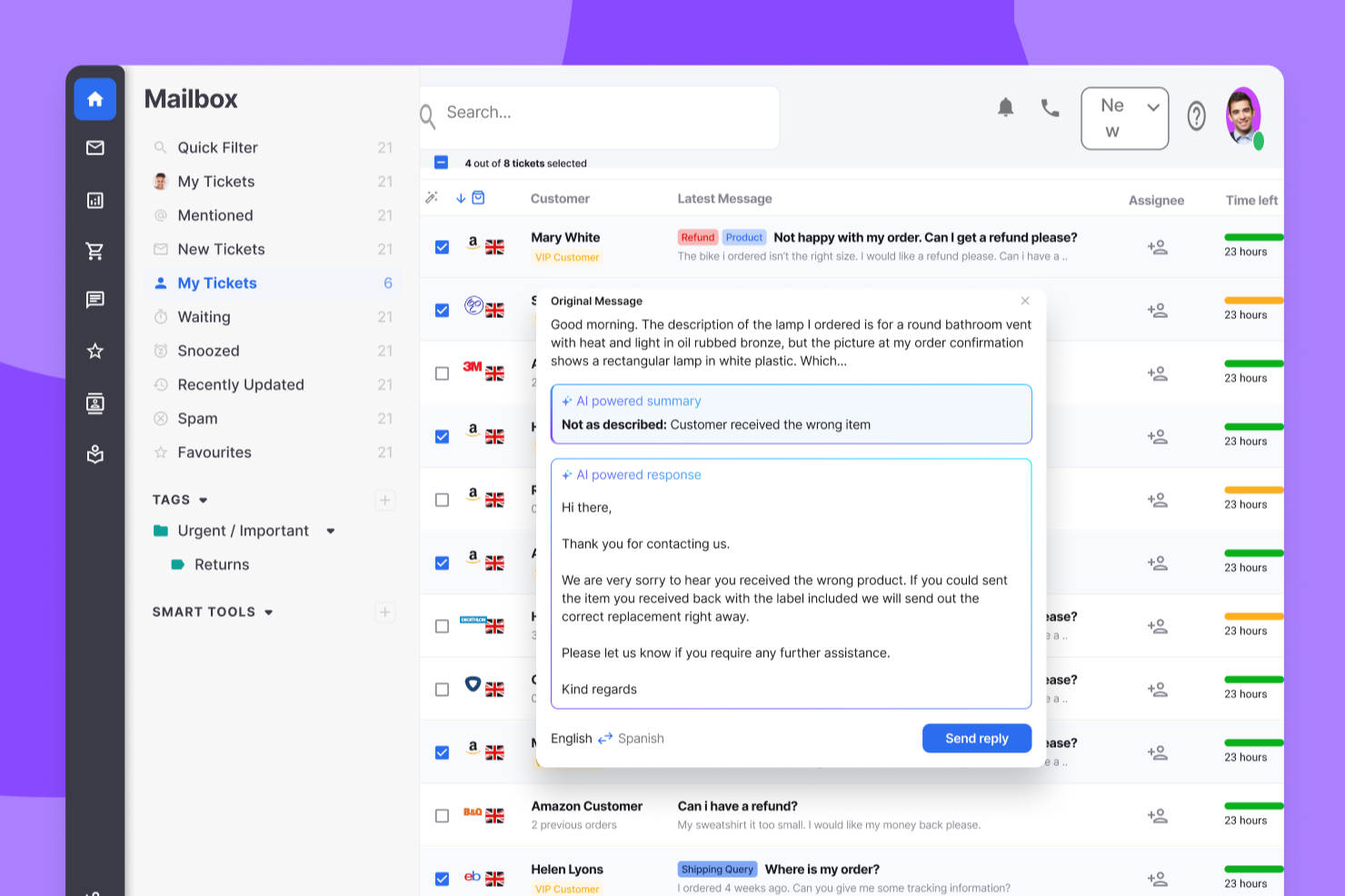
eDesk est une plateforme de support client pilotée par l'IA conçue pour les entreprises de commerce électronique. Elle aide les équipes à rationaliser les opérations de support et à améliorer la satisfaction client en centralisant toutes les interactions clients en un seul endroit. eDesk est destinée aux détaillants en ligne et aux équipes de service client qui ont besoin de temps de réponse plus rapides et d'un engagement client plus cohérent. En réduisant la communication fragmentée et les processus inefficaces, elle permet aux équipes de traiter les demandes plus efficacement et de transformer les conversations de support en opportunités de vente.
Pourquoi j'ai choisi eDesk
J'ai choisi eDesk pour sa capacité à regrouper toutes les conversations clients dans une boîte de réception unifiée, ce qui facilite la gestion et la priorisation des demandes d'assistance. Son automatisation par IA prend en charge les tâches routinières, permettant ainsi aux équipes de support de consacrer plus de temps à la résolution de problèmes complexes et de répondre plus rapidement. Le support par chatbot 24/7 garantit également que les clients peuvent obtenir de l'aide à tout moment, ce qui améliore la satisfaction générale et encourage la fidélité.
Fonctionnalités clés d'eDesk
En plus de ses fonctionnalités phares, eDesk propose plusieurs autres fonctionnalités qui peuvent grandement bénéficier à votre équipe :
- Support avant-vente : Cette fonctionnalité permet à votre équipe de gérer les demandes de clients potentiels, aidant ainsi à les convertir en ventes.
- Gestion des avis : eDesk facilite la collecte et l'analyse des retours clients, vous permettant d'apporter des améliorations éclairées à votre service.
- Rapports en temps réel : Grâce à cette fonctionnalité, vous obtenez des informations sur les opérations de support, vous permettant d'optimiser les processus et d'améliorer la satisfaction client.
- Base de connaissances : eDesk offre un référentiel centralisé d'informations, aidant votre équipe à réduire les demandes clients et à améliorer l'efficacité du service.
Intégrations eDesk
Les intégrations incluent Amazon, eBay, Walmart, Shopify, Magento, WooCommerce, Facebook, WhatsApp et Etsy.
Pros and Cons
Pros:
- Boîte de réception unifiée sur tous les canaux de vente
- L'automatisation par IA réduit la charge de travail des réponses
- Excellentes intégrations aux places de marché e-commerce
Cons:
- Le coût augmente rapidement pour les équipes
- Courbe d'apprentissage de l'interface pour les débutants
New Product Updates from eDesk
eDesk Adds Galeria and Kaufland Support in Spain and Netherlands
eDesk adds support for Galeria, Kaufland Spain, and Kaufland Netherlands marketplaces. These integrations bring more European buyer messages into eDesk with routing, templates, AI insights, and automated translation. For more information, visit eDesk’s official site.
 .
.
Velaris
Idéal pour des informations clients alimentées par l'IA
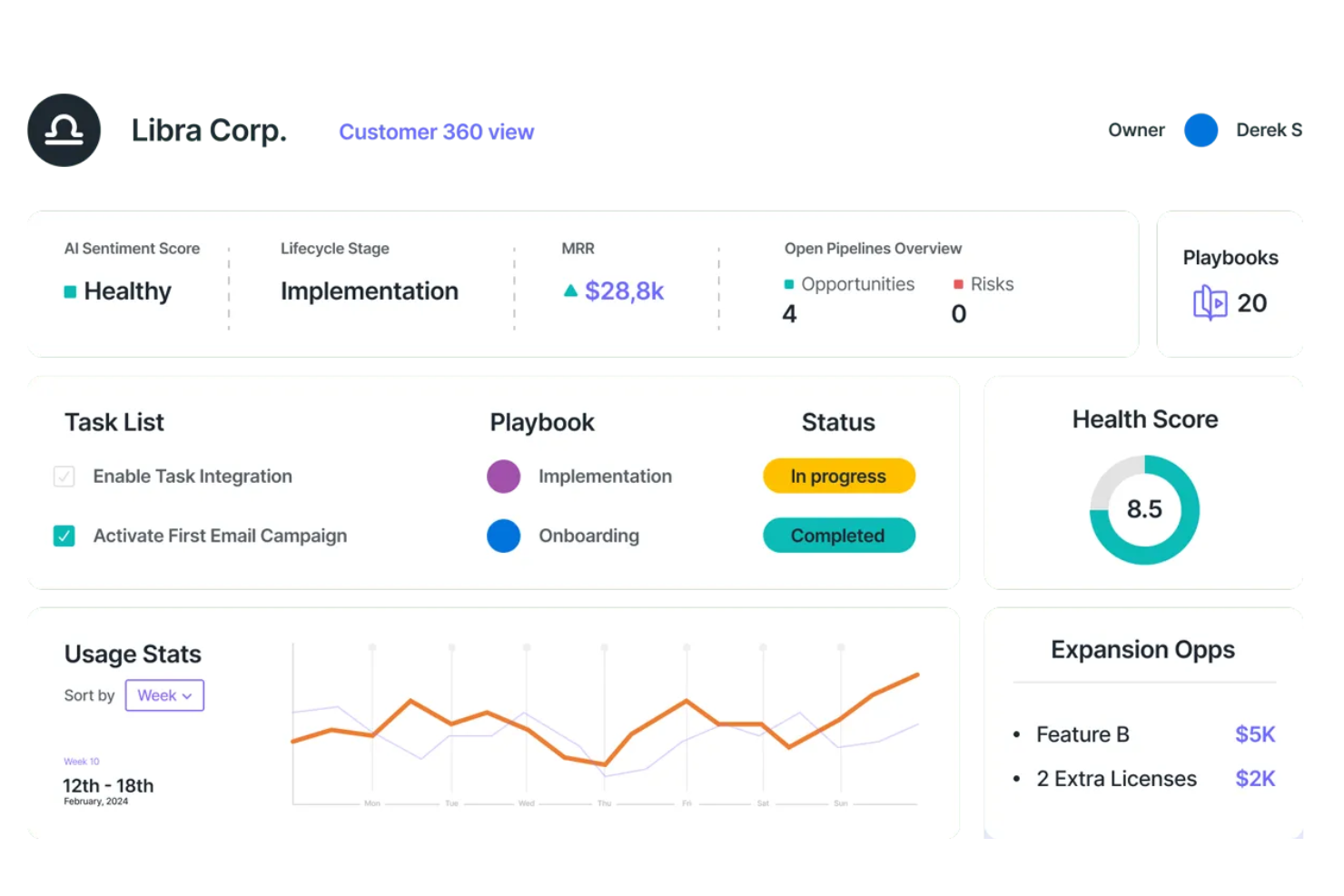
Velaris est une plateforme complète de réussite client conçue pour aider les entreprises SaaS à prospérer en engageant de manière proactive leurs clients et en veillant à ce qu'ils atteignent les résultats souhaités. L'outil propose des fonctionnalités telles que des données et analyses, de l'automatisation et de la collaboration afin de fournir des informations exploitables aux équipes de réussite client.
Pourquoi j'ai choisi Velaris : Velaris propose des analyses basées sur l'IA, offrant des insights approfondis sur le comportement et la satisfaction des clients. La capacité de la plateforme à centraliser toutes les données clients dans une interface unique et intuitive permet aux entreprises d'obtenir une vue à 360 degrés de leurs clients.
L'intégration de l'analyse des sentiments permet en outre aux entreprises d'évaluer l'état d'esprit des clients et de résoudre les problèmes avant qu'ils ne s'aggravent, garantissant ainsi un service plus personnalisé et efficace. De plus, Velaris propose des plans de réussite personnalisables et des playbooks, qui standardisent les processus et assurent la cohérence dans les interactions avec les clients.
Fonctionnalités et intégrations remarquables de Velaris :
Fonctionnalités remarquables : un créateur d'automatisations qui permet aux entreprises de concevoir des flux de travail automatisés et flexibles grâce à une interface intuitive de glisser-déposer. En outre, l'IA Copilot exploite l'intelligence artificielle pour fournir une gestion proactive de la réussite client, notamment avec l'analyse des sentiments et la création automatique de tâches à fort impact.
Les intégrations : Slack, Microsoft Teams, Intercom, MailChimp, Outlook, Google Drive, HubSpot, Jira et Salesforce.
Pros and Cons
Pros:
- Permet aux utilisateurs de gérer toutes les informations clients en un seul endroit
- Fonctionnalités de collaboration pour engager les clients
- Analyses alimentées par l'IA pour offrir des informations précieuses
Cons:
- Pourrait offrir davantage d'intégrations
- La configuration initiale peut être complexe

Idéal pour des enquêtes de satisfaction client personnalisables
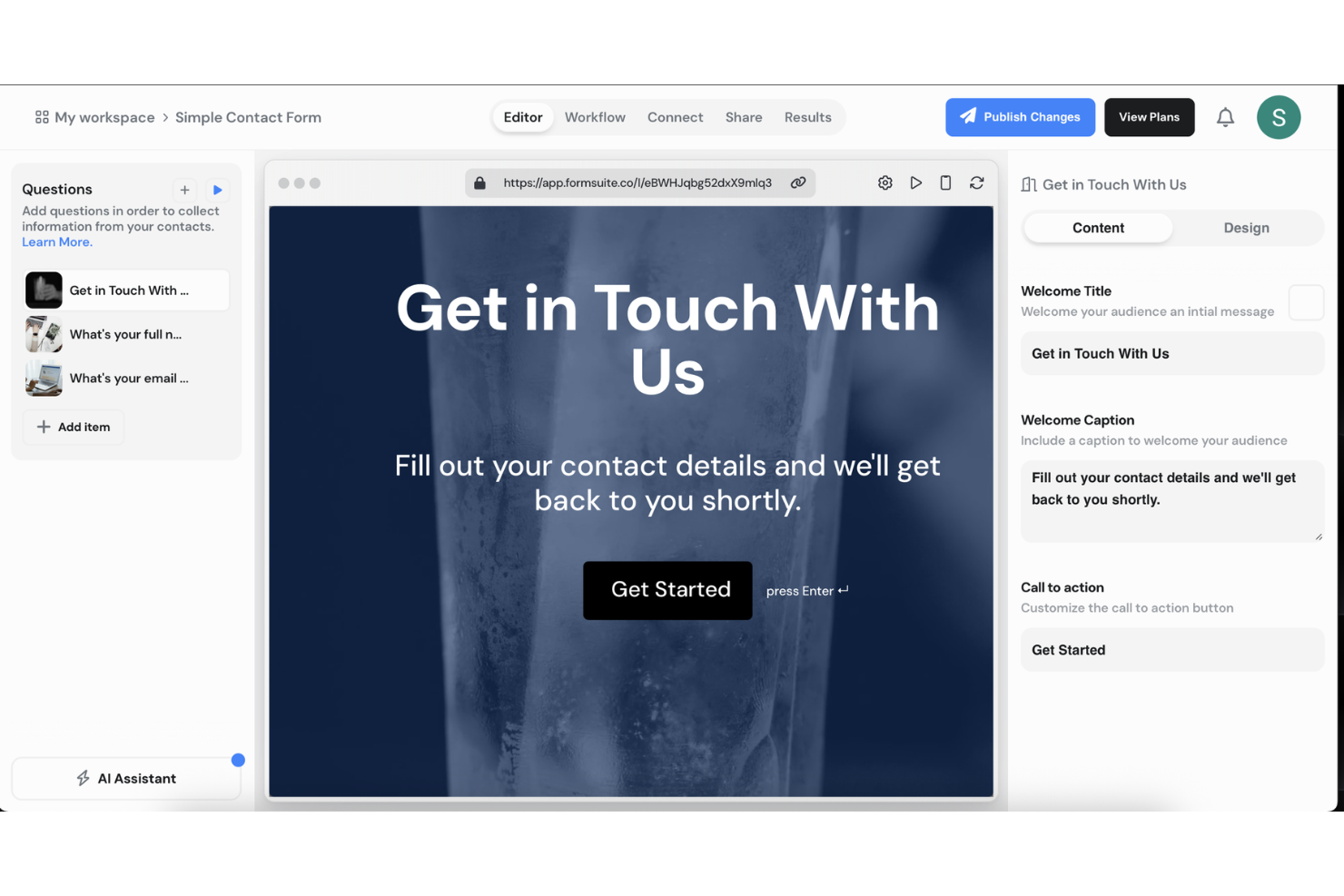
Formsuite est une plateforme d'enquêtes et de retour d'information conçue pour collecter et analyser les données de satisfaction client. Elle prend en charge les enquêtes NPS, CSAT et CES avec une logique conditionnelle, une analyse des réponses assistée par l'IA, et des alertes automatiques en cas de faibles scores de satisfaction.
À qui s'adresse Formsuite ?
Formsuite convient particulièrement aux petites et moyennes équipes qui ont besoin d'outils flexibles et sans code pour mesurer la satisfaction client, sans devoir mettre en place une plateforme complète de gestion de l'expérience client.
Pourquoi j'ai choisi Formsuite
J'ai choisi Formsuite car il offre un haut niveau de contrôle sur le design tout en prenant en charge des indicateurs de satisfaction structurés. Les équipes peuvent entièrement personnaliser l'apparence des enquêtes pour les adapter à leur marque, avec une option de marque blanche sur les formules supérieures. Combiné à la logique conditionnelle et aux synthèses automatisées par IA, cela facilite la collecte de données CSAT ou NPS et la compréhension rapide des facteurs qui influent sur les réponses positives ou négatives.
Fonctionnalités clés de Formsuite
- Modèles NPS, CSAT & CES : Formats d'enquêtes intégrés pour suivre la fidélité, la satisfaction et l'effort.
- Logique conditionnelle : Ajuste dynamiquement les questions de suivi selon les scores de satisfaction.
- Analyse des réponses par IA : Détecte automatiquement le ressenti et met en avant les thèmes récurrents.
- Alertes pour détracteurs : Envoie des notifications lorsqu'un faible score de satisfaction est soumis.
Intégrations Formsuite
Formsuite se connecte à des outils tels que Google Sheets, Slack, Google Analytics et Stripe. Il s'intègre principalement à des plateformes tierces via Zapier et prend en charge les webhooks pour des flux de travail personnalisés.
Pros and Cons
Pros:
- La logique conditionnelle améliore la pertinence des questions de suivi
- Synthèses de sentiment assistées par IA qui réduisent l'analyse manuelle
- Personnalisation poussée du design des enquêtes et options de marque blanche
Cons:
- Pas d'outils de gestion de tickets ou de support client intégrés
- Requiert Zapier pour la plupart des intégrations tierces

Idéal pour les petites entreprises
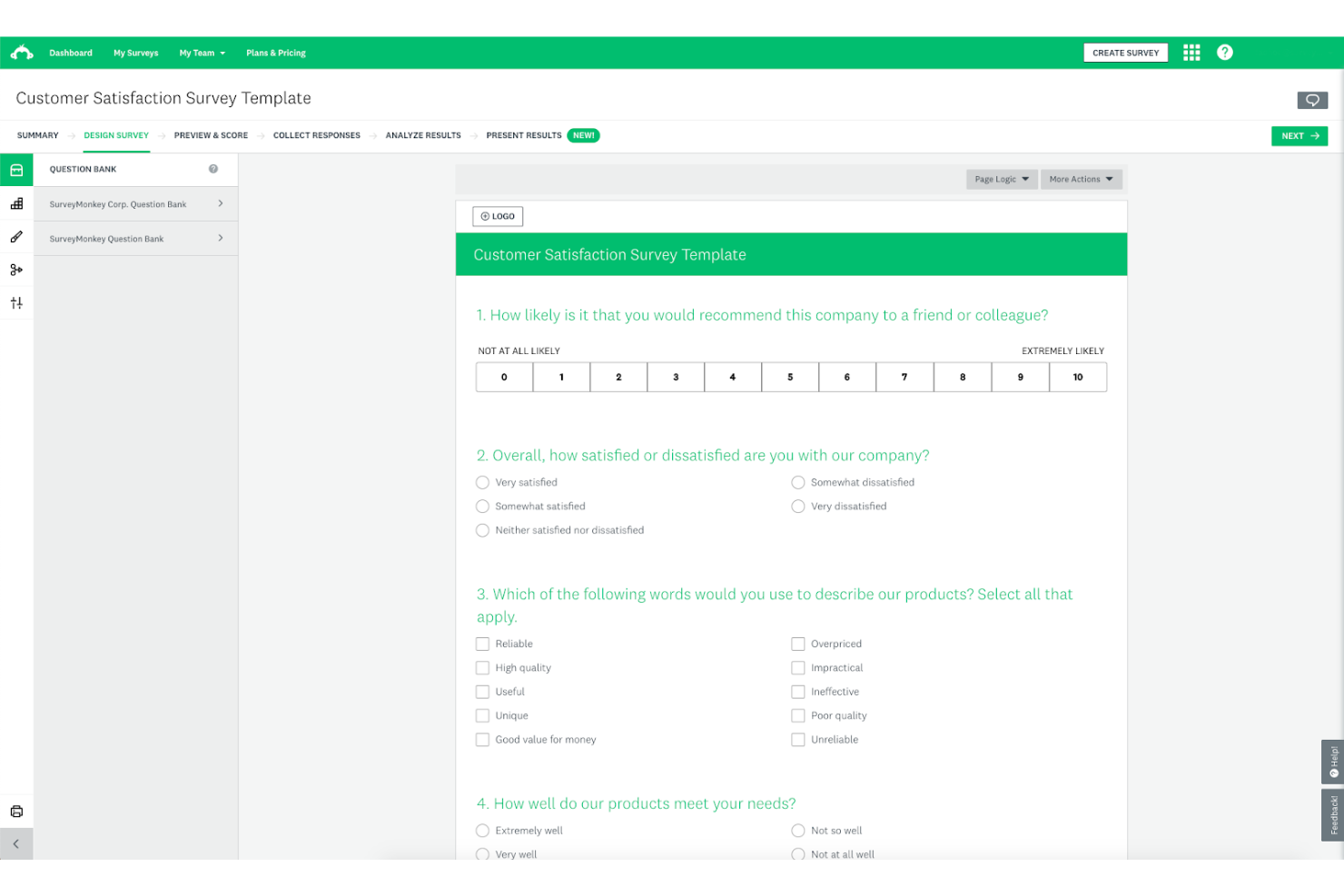
SurveyMonkey est une solution de gestion des enquêtes et des retours qui vous permet de collecter et d’analyser les retours afin d’améliorer votre produit. La plateforme propose une large gamme de modèles d’enquêtes, vous permettant de commencer facilement à collecter des informations clients.
Pourquoi j’ai choisi SurveyMonkey : J’ai choisi SurveyMonkey pour mon top 10 car il propose une formule gratuite et une sélection de modèles d’enquêtes de satisfaction client, ce qui le rend idéal pour les petites entreprises qui débutent dans la collecte de retours clients. La plateforme possède une interface épurée et est facile à utiliser, vous n’avez donc pas besoin d’être un spécialiste expérimenté de l’expérience client pour identifier des informations exploitables.
Malgré son design ludique, SurveyMonkey est un outil robuste de collecte de retours qui peut aider les entreprises de toutes tailles à mieux connaître leurs utilisateurs.
Fonctionnalités et intégrations clés de SurveyMonkey :
Fonctionnalités clés : sondages en ligne, évaluation du score CSAT, collecte des réponses sur plusieurs canaux et logique avancée d’enquête. J’apprécie le fait que SurveyMonkey permette d’exporter vos résultats dans des formats de données compatibles avec des programmes de présentation comme Microsoft PowerPoint ou Google Slides, car cela facilite grandement la mise en valeur du travail réalisé par les utilisateurs novices.
Intégrations : systèmes CRM, plateformes d’email marketing et solutions d’automatisation marketing, telles que Salesforce, HubSpot, Microsoft Dynamics, Mailchimp, Constant Contact, Marketo, Pardot, Tableau, Power BI et Google Analytics. SurveyMonkey propose également une API REST afin que vous puissiez mettre en place des intégrations personnalisées supplémentaires en fonction de vos besoins.
Pros and Cons
Pros:
- Outil flexible et personnalisable
- Permet d’inviter des membres de l’équipe à analyser les retours
- Bonnes options de personnalisation de la marque
Cons:
- Les modèles d’enquêtes gratuits offrent des options limitées de personnalisation du design
- La configuration d’enquêtes avec logique avancée pourrait être plus simple

Front
Idéal pour l’acheminement des demandes clients entre équipes
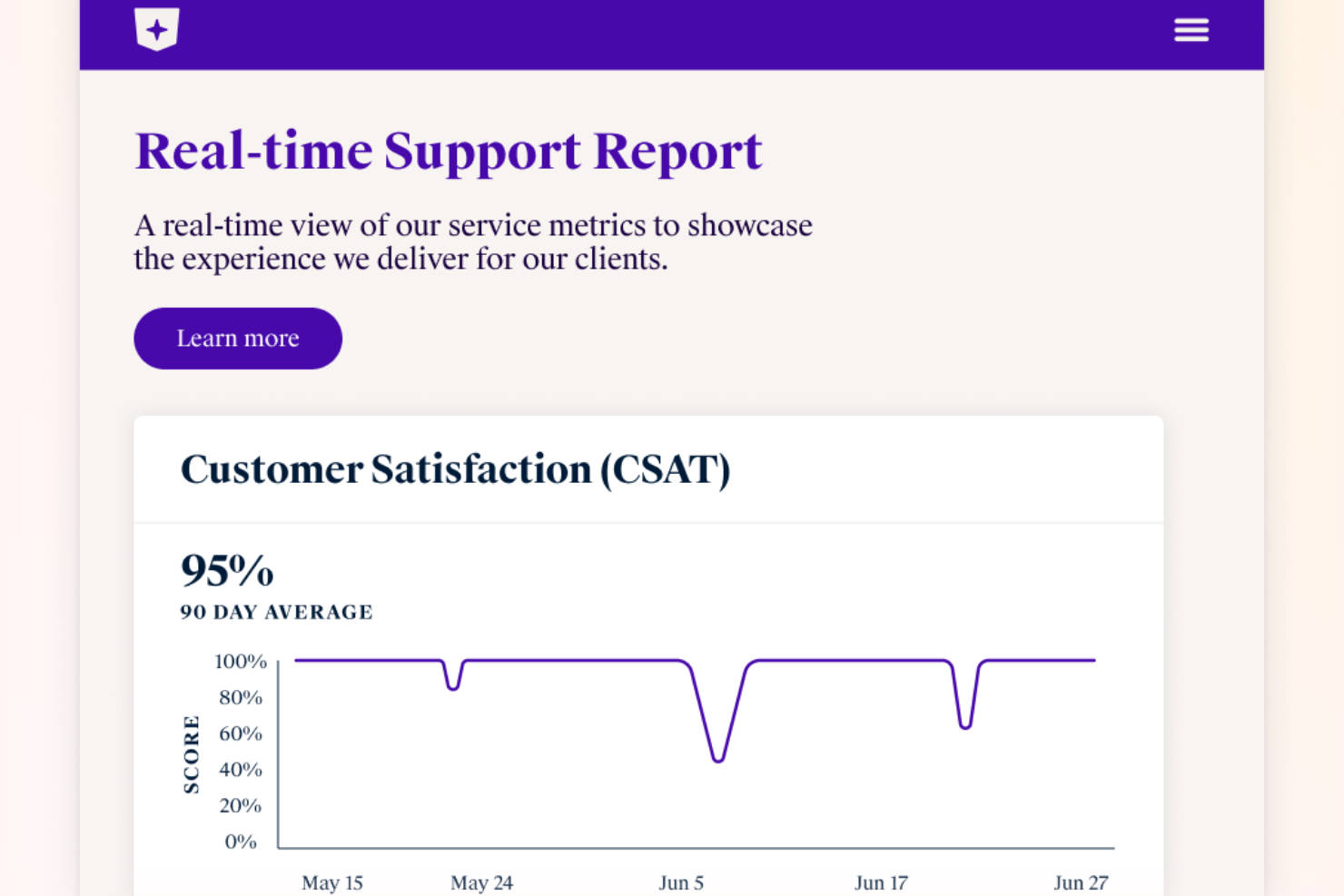
Front réunit les conversations clients provenant de l’email, du chat, du SMS et plus encore dans un espace de travail collaboratif unique. Cette plateforme est conçue pour les équipes qui doivent gérer un grand volume de demandes clients tout en conservant une approche personnalisée. Si vous recherchez une solution qui aide votre équipe à répondre plus rapidement et à travailler ensemble sur les problématiques clients, Front est conçu pour répondre à ces besoins.
Pour qui Front est-il le mieux adapté ?
Front est un excellent choix pour les équipes de support et de succès client dans les entreprises de taille moyenne à grande qui doivent gérer un volume élevé de communications clients de manière collaborative.
Pourquoi j’ai choisi Front
Pour les équipes qui doivent orienter les demandes clients entre plusieurs départements, Front offre un avantage clair. J’ai choisi Front car sa boîte de réception partagée permet d’assigner, d’escalader et de collaborer sur les messages en temps réel, afin qu’aucune demande ne passe inaperçue. Les règles automatisées et les workflows de la plateforme aident à diriger chaque demande client vers la bonne personne ou l’équipe, selon le sujet, l’urgence ou des critères personnalisés. Cette approche permet de maintenir tout le monde aligné et de garantir des réponses rapides et précises, même lorsque les demandes concernent plusieurs équipes.
Fonctionnalités clés de Front
D’autres fonctionnalités de Front aident les équipes à offrir une expérience client cohérente et de haute qualité :
- Analyses et rapports : Suivez les temps de réponse, le volume des conversations et les performances de l’équipe grâce à des tableaux de bord intégrés et des rapports exportables.
- Historique des messages clients : Visualisez une chronologie complète de chaque interaction client sur tous les canaux, pour que votre équipe ait toujours le contexte nécessaire.
- Commentaires internes : Collaborez avec vos collègues sur les messages clients grâce à des commentaires privés qui restent invisibles pour le client.
- Intégration de la base de connaissances : Accédez et partagez des articles d’aide directement depuis la boîte de réception pour fournir des réponses rapides et précises.
Intégrations de Front
Les intégrations incluent Salesforce, HubSpot, Asana, Slack, Microsoft Dynamics 365, Aircall, Twilio, ClickUp, Zendesk Sell, GitHub, Zoom, et bien d’autres.
Pros and Cons
Pros:
- Outils d’enquête CSAT et d’analytique intégrés
- Boîte de réception multicanale pour email, SMS et chat
- Commentaires internes pour discussions d’équipe privées
Cons:
- Retards occasionnels de synchronisation avec des CRM externes
- Pas de fonction d’appel vocal intégrée
Autres options
Voici d’autres excellentes solutions de satisfaction client que j’ai découvertes au cours de mes recherches. Même si elles ne figurent pas dans ma sélection des 10 meilleurs outils, je vous recommande également de les examiner :
- Pendo
Idéal pour évaluer la satisfaction client directement dans l'application
- Totango
Idéal pour les scale-ups SaaS
- Qualtrics XM Frontline Digital
Idéal pour la détection automatisée des abandons
- Delighted
Idéal pour les enquêtes CSAT conçues pour le mobile
- GetFeedback
Idéal pour le suivi des retours clients
- Simplesat
Idéal pour des tableaux de bord faciles à suivre
- Kimola Analytics
Idéal pour la collecte d'avis externes
- InputKit
Idéal pour gérer les clients insatisfaits
- Creatio CRM
Idéal pour les retours clients automatisés
- Hiver
Idéal pour intégrer des enquêtes CSAT
- LiveAgent
Idéal pour la communication multicanale
- Sogolytics
Idéal pour le tableau de bord CSAT et les analyses
- Product Fruits
Idéal pour interroger directement les utilisateurs depuis votre application ou site web
- Nextiva
Idéal pour l’analyse du ressenti client
- Zendesk
Idéal pour le suivi CSAT intégré


Comment j’évalue les logiciels de satisfaction client
J’examine chaque plateforme selon deux axes : les exigences de base comme des moteurs d’enquêtes multi-métriques et l’alerte en boucle fermée, ainsi que les différenciateurs qui font passer un bon outil au bon outil pour vos besoins.
Fonctionnalités de base (exigences minimales pour cette liste)
Ces capacités de base servent de critères d’admission pour figurer dans ma liste de logiciels de satisfaction client :
- Moteur d’enquêtes multi-métriques : Je vérifie si chaque plateforme prend en charge nativement CSAT, NPS et CES avec des logiques conditionnelles ; pas simplement des étoiles de notation greffées sur un créateur de formulaires.
- Distribution multicanal : Les enquêtes doivent atteindre les clients là où ils se trouvent, donc j’évalue la couverture des canaux : e-mail, SMS, in-app, interception web et chat.
- Tableaux de bord de retours en temps réel : Je recherche des tableaux de bord en direct avec segmentation et analyse approfondie, et non des exports statiques qui forcent les équipes à attendre le rapport du lundi.
- Analyse de texte et de sentiment : Les réponses ouvertes sont la véritable source d’insight, donc la détection par IA des sentiments et thèmes est un aspect central de mon évaluation.
- Automatisation du workflow en boucle fermée : Quand un client laisse une mauvaise note, le suivi est crucial. J’évalue la gestion par chaque outil des alertes, de la création de tickets et de l’attribution des responsables.
- Intégrations CRM & helpdesk : Un retour enfermé dans un silo perd sa valeur. Je recherche des connexions natives avec des plateformes comme Salesforce, Zendesk et HubSpot.
Je note chaque fournisseur sur une échelle de 0 (fonctionnalité absente) à 5 (excellente maîtrise) pour chaque critère.
Les fournisseurs doivent atteindre une note moyenne minimale pour être retenus sur ma liste. Ensuite, j’étudie ce qui distingue chaque plateforme.
Facteurs différenciants (ce qui distingue les fournisseurs)
Après avoir composé ma liste, voilà comment je compare les différents fournisseurs :
Fonctionnalités remarquables
L’analyse prédictive du churn se distingue lorsque les équipes souhaitent être alertées de façon proactive sur les comptes à risque, plutôt qu’un simple suivi réactif. Les déclencheurs de feedback basés sur le parcours client sont aussi indispensables pour relier la satisfaction aux différentes phases du cycle de vie, comme l’onboarding ou le renouvellement : cela aide à identifier précisément quand et où la friction survient. Les outils de benchmark, avec comparaisons intégrées au secteur ou à la segmentation, offrent un contexte essentiel pour visualiser comment les scores d’une marque se situent par rapport aux organisations similaires.
Au-delà des fonctionnalités
La transparence des modèles tarifaires est essentielle : j’analyse si les fournisseurs facturent par utilisateur, par réponse ou par enquête, car une tarification au volume peut vite devenir problématique pour les équipes qui sollicitent des retours en continu. La sécurité des données et la conformité sont aussi cruciales, notamment pour les secteurs de la santé ou de la finance où les certifications HIPAA ou SOC2 et la résidence des données régionale sont requis. J’examine également la connectivité au stack technique : APIs ouvertes, intégrations natives aux data warehouses comme Snowflake, en plus des connexions CRM classiques.
Facilité d’utilisation
Améliorer la satisfaction client n’est pas une tâche facile – mais cela ne signifie pas que l’application sur laquelle vous comptez doit également être difficile à utiliser. J’ai sélectionné des logiciels faciles à utiliser, afin que vous et votre équipe puissiez recueillir les retours et agir en conséquence sans difficulté.
Intégrations logicielles
Il est presque impossible d’évaluer la satisfaction de vos clients en s’appuyant sur les données fournies par un seul outil. C’est pourquoi les solutions que j’ai retenues proposent plusieurs intégrations ainsi qu’un accès à une API, afin que vous puissiez les intégrer à votre écosystème applicatif.
Rapports et informations exploitables
Disposer d’un outil performant pour recueillir les données clients est une bonne chose, mais cela ne suffit pas pour évaluer précisément la satisfaction client. Toutefois, les outils présentés dans mon analyse transforment vos données en rapports clairs, afin que vous puissiez obtenir des informations exploitables et mettre rapidement en œuvre des solutions.
Analyse des sentiments
La capacité à détecter le sentiment qui se cache derrière les retours d’un utilisateur peut grandement contribuer à réduire votre taux d’attrition, car elle vous permet d’identifier rapidement les clients insatisfaits et de prendre des mesures pour remédier à leur situation.
Tarifs
Les logiciels de satisfaction client sont proposés dans différentes gammes de prix. Toutefois, je n’ai inclus que des outils dont je suis convaincu qu’ils vous aideront à atteindre vos objectifs et qu’ils vous offriront un bon retour sur investissement.
Questions fréquentes
Vous souhaitez en savoir plus sur les logiciels de satisfaction client ? Voici quelques questions fréquemment posées — avec leurs réponses, bien sûr :
Quelle est la différence entre un logiciel de satisfaction client, un logiciel d’expérience client et un logiciel de réussite client ?
Il est indéniable qu’il existe un certain chevauchement entre ces types de solutions. Cependant, leur principale différence réside dans ce qu’elles sont conçues pour mesurer :
- Les logiciels de satisfaction client sont conçus pour mesurer le degré de satisfaction de vos utilisateurs à l’égard de votre produit pendant qu’ils l’utilisent.
- Les logiciels d’expérience client sont conçus pour mesurer les sentiments de l’utilisateur à l’égard de votre produit tout au long du parcours client — depuis le moment où il a entendu parler de votre solution jusqu’à l’acquisition, l’intégration, l’utilisation et, finalement, la résiliation ou sa transformation en ambassadeur.
- Les logiciels de réussite client sont conçus pour mesurer dans quelle mesure vos clients peuvent utiliser votre produit pour atteindre leurs objectifs — ils servent donc davantage à déterminer si votre solution favorise efficacement la réussite client, d’où leur nom.
Quels indicateurs clés devez-vous suivre pour surveiller la satisfaction client ?
Bien qu’il existe plusieurs indicateurs de satisfaction client que vous pouvez suivre, vous ne pouvez pas vous tromper en vous limitant aux KPI les plus utilisés par les équipes de réussite client :
- Score de satisfaction client (CSAT)
- Net Promoter Score (NPS)
- Taux de résiliation des clients
- Valeur vie client (CLV)
Comment réaliser un audit de l’expérience client ?
La réalisation d’un audit de l’expérience client est un processus complexe qui comporte plusieurs étapes, notamment :
- Définir vos objectifs : vous devez avoir des objectifs précis en tête, comme réduire le taux de résiliation ou augmenter le nombre de promoteurs.
- Collecter les données : envoyez des enquêtes, interrogez vos clients, suivez les mots-clés sur les réseaux sociaux, etc., afin de recueillir un grand nombre de données utilisateur.
- Analyser les données : recherchez les tendances et les valeurs aberrantes. Découvrez ce que vos clients attendent de votre produit et dans quels domaines vous ne parvenez pas à leur apporter de la valeur.
- Choisir les domaines à améliorer : aucune entreprise au monde ne peut tout résoudre en même temps. Sélectionnez les domaines à améliorer que vous souhaitez traiter en fonction de vos besoins — importance, contraintes de temps, budget, disponibilité de l’équipe, etc.
- Mesurer vos résultats : suivez l’impact de vos changements sur l’expérience client et prenez des notes détaillées.
- Réévaluer : un audit de l’expérience client unique est utile, mais cette valeur diminue avec le temps. Vous devez toujours réévaluer la situation et identifier de nouvelles possibilités d’amélioration grâce à d’autres audits.
Autres évaluations de logiciels axés sur le client
Voici d’autres types de logiciels axés sur le client que vous pourriez envisager si vous souhaitez réellement améliorer votre satisfaction client :
- Logiciels de gestion de l’expérience client
- Logiciels de réussite client
- Logiciels de retours clients
- Plateformes de connaissance client
- Plateformes d’engagement client
Dernières réflexions
Les logiciels de satisfaction client peuvent vous aider à mieux comprendre vos clients, ce qui peut à son tour contribuer à une base d’utilisateurs plus satisfaite et à un produit plus rentable. Comme l’a déclaré Bernard Marr, auteur à succès international et conseiller stratégique en affaires et en technologies auprès des gouvernements et des entreprises :
« La technologie des données disponible aujourd’hui offre aux entreprises des capacités sans précédent pour comprendre leurs clients. En combinant des données transactionnelles, démographiques et comportementales provenant de sources internes et externes, nous pouvons prédire plus précisément ce que veulent les clients et nous assurer d’être au bon endroit, au bon moment, pour leur fournir ce dont ils ont besoin. »
Abonnez-vous à la newsletter de CX Lead si vous souhaitez recevoir directement dans votre boîte de réception des conseils pour optimiser votre produit afin d’améliorer la satisfaction client.