
30 Best Cloud Helpdesk Software Reviewed For 2026

10 Best Cloud Helpdesk Software Shortlist
Here's my pick of the 10 best software from the 30 tools reviewed.


As a customer experience manager, you know the daily challenges of keeping your team efficient and your customers happy. Cloud helpdesk software can be a lifesaver, helping you manage tickets, track issues, and improve response times. In my experience, the right software makes all the difference.
I've tested and reviewed various solutions to bring you an unbiased look at the best options available. You're about to discover which tools can help your team excel and meet your customer service goals. In this article, I'll break down the top picks, highlighting their strengths and what makes them stand out. Let's find the perfect fit for your needs.
Why Trust Our Software Reviews
We’ve been testing and reviewing customer experience software since 2020. As customer experience managers ourselves, we know how critical and difficult it is to make the right decision when selecting software. We invest in deep research to help our audience make better software purchasing decisions.
We’ve tested more than 2,000 tools for different customer experience use cases and written over 1,000 comprehensive software reviews. Learn how we stay transparent & check out our software review methodology.
The Best Cloud Helpdesk Software Summary
| Tool | Best For | Trial Info | Price | ||
|---|---|---|---|---|---|
| 1 | Best for AI-powered helpdesk analytics | Free demo + 14-day free trial available | From $19/user/month (billed annually) | Website | |
| 2 | Best for hands-on IT service management | 14-day free trial | Pricing upon request | Website | |
| 3 | Best for AI-powered customer support | Free trial + free demo available | From $25/user/month (billed annually) | Website | |
| 4 | Best for AI-first automated ticket resolution | 14-day free trial available | From $16/user/month (billed annually) | Website | |
| 5 | Best with an automated workflow builder | 15-day free trial + free plan | From $7/user/month (billed annually) | Website | |
| 6 | Best for multilingual help desk conversations | 7-day free trial + free plan available | From $25/user/month | Website | |
| 7 | Best for multi-channel ecommerce support management | 14-day free trial | From $39/agent/month | Website | |
| 8 | Best for help desk collaboration | Free plan available | From $25/user/month (billed annually) | Website | |
| 9 | Best for task automation and management | 14-day free trial + free demo available | From $25/user/month (billed annually) | Website | |
| 10 | Best for centralized, omnichannel ticketing and customer data | Free trial + free demo available | From $19/agent/month (billed annually) | Website |


-

SupportYourApp
Visit WebsiteThis is an aggregated rating for this tool including ratings from Crozdesk users and ratings from other sites.4.7 -
Freshdesk
Visit WebsiteThis is an aggregated rating for this tool including ratings from Crozdesk users and ratings from other sites.4.4 -
Hiver
Visit WebsiteThis is an aggregated rating for this tool including ratings from Crozdesk users and ratings from other sites.4.6


Overviews Of The 10 Best Cloud Helpdesk Software
Here’s a brief description of each cloud helpdesk software that showcases each tool’s best use case, their noteworthy features, and some pros and cons. I’ve also included screenshots to give you a visual of their user interface too.


Freshdesk (a product of Freshworks Inc.) is a cloud based customer support platform developed by Freshworks. It provides tools that help businesses manage customer inquiries and monitor support activity across channels. The platform includes analytics that teams can use to review interaction data and track trends related to support quality.
Freshdesk’s ticketing system converts inquiries from email, phone, chat, social media, and web forms into tickets, allowing teams to manage requests within a single workflow. Automation tools can be used to assign tickets based on predefined conditions, escalate unresolved issues, and send follow up notifications, helping teams manage workloads more consistently. Freddy AI is available within the platform to assist with these workflows, such as supporting ticket handling and analysis within existing processes.
Freshdesk also includes a self service portal that allows customers to search for information through a knowledge base and community forums. These resources give customers the option to find answers independently and can help reduce the number of requests that require direct agent involvement.
Freshdesk Standout Features and Integrations
Features include workflow automation, collaboration tools, a mobile app, community forums, live chat, customization options, multi language support, API access, ticket dispatch, satisfaction surveys, time tracking, and ticket merging.
Integrations include Mailchimp, Microsoft Teams, Salesforce, Shopify, Slack, WhatsApp, and additional tools available through the Freshdesk marketplace.
Pros and Cons
Pros:
- Reporting and analytics features
- Customizable support portal
- Robust ticket management features
Cons:
- May take time to full learn all the features
- Multilingual knowledge base limited to higher-tier plans
New Product Updates from Freshdesk

Freshdesk Enhances Contact Data Management and Social Identity Fields
Freshdesk now lets you manage social handles and handle large contact lists with ease, streamlining customer profiles and data tasks. For more information, visit Freshdesk’s official site.


SysAid is an AI-first help desk software built specifically for IT teams. It supports ticket management, issue resolution, and asset management, while also offering automation tools to help you streamline and standardize service desk processes.
One of the things that stood out to me about this platform is its self-service automation capabilities. This includes automated password resets and one-click issue submissions, which allow employees to resolve common IT issues on their own. As a result, your IT team can spend less time handling repetitive requests and more time focusing on technical and strategic work.
While SysAid offers a cloud-based option, it can also be deployed as an on-premise solution, which may be important if you have stricter infrastructure or data requirements. Technical support and training are provided to help onboard your team efficiently. Beyond IT support, the platform can also be used by HR teams or healthcare providers that need structured service management workflows.
SysAid Standout Features and Integrations
Features include task and ticket automation, automated escalation, a self-service portal, knowledge base, drag-and-drop workflow builder, asset management, audit trails, project management, and problem management.
Integrations include Azure, Google Workspace, Jira, Microsoft Teams, Office 365, OneLogin SSO, Oomnitza, Slack, Worksafe App, and Zapier.
Pros and Cons
Pros:
- Integrates with IT service management (ITSM)
- Includes task automation
- Easy to implement
Cons:
- Pricing not transparent
- Restricted customizations
New Product Updates from SysAid

SysAid Adds Direct Knowledge Base Linking in Service Records
SysAid now allows linking knowledge base articles directly to service records, enhancing centralized access to information and speeding up issue resolution. For more information, visit SysAid's official site.
 .
.

Salesforce Service Cloud is a customer service software and support application that provides businesses with a platform for one-to-one marketing relationships with every customer across multiple channels and devices. It enables organizations to deliver smarter, faster, and more personalized service by managing customer cases and conversations.
The platform provides a suite of tools that enable businesses to manage customer support interactions across various channels. For example, it offers case management capabilities, allowing support agents to track and resolve customer issues. Salesforce Service Cloud also includes a knowledge base for storing and retrieving solutions to common problems, which can be used by both customers and support staff.
Additionally, Salesforce Service Cloud features automation of routine tasks, such as case routing and escalation, to improve the efficiency of support teams. The tool also uses AI technology to provide predictive insights by analyzing customer data, historical interactions, and contextual information to identify patterns, trends, and potential issues, enabling businesses to anticipate customer needs, optimize service operations, and proactively address customer concerns.
Salesforce Service Cloud Standout Features and Integrations
Features include self-service communities, service contract and entitlements management tools, and service analytics. Salesforce Service Cloud also integrates with social media channels in order to monitor and respond to customer inquiries, comments, and complaints on social platforms.
Integrations include SurveyMonkey, Tableau, Genesys, Trello, Mailchimp, Freshdesk, HubSpot CRM, and the Salesforce suite, including Sales Cloud and Marketing Cloud.
Pros and Cons
Pros:
- Helps personalize customer interactions
- Easy-to-use system
- Provides efficient case management
Cons:
- Challenges in integrating with third-party systems
- Steep learning curve for new users


SparrowDesk is designed for support teams who face a steady stream of customer queries and are seeking an AI-enriched help desk that doesn’t force them to juggle multiple tools. If you’re managing customer service in a growing business—whether in SaaS, e-commerce, fintech or another fast-moving space—you’ll appreciate how SparrowDesk pulls email and live-chat into one inbox and deploys its AI agent “Luna” to take on routine tickets so your team can focus on more complex issues.
Why I Picked SparrowDesk
I picked SparrowDesk for its exceptional ability to automate customer service through AI-driven solutions tailored for cloud helpdesk environments. With its Luna AI agent capable of resolving the majority of inquiries, your team can focus on more complex customer needs. Additionally, the omnichannel inbox unifies communications from various platforms, ensuring no customer message is missed. The smart AI Copilot further assists agents by providing real-time suggestions, boosting response accuracy and speed.
SparrowDesk Key Features
In addition to its AI-driven automation, SparrowDesk offers a suite of features that enhance its utility as a cloud helpdesk software:
- Service Level Agreements (SLA): Set clear response and resolution targets to maintain high customer service standards.
- Business Hours Management: Configure operational hours to align customer expectations and streamline ticket routing.
- Quick-Action Macros: Automate repetitive tasks to save time and improve workflow efficiency.
- Interactive Analytics: Utilize real-time dashboards to gain insights into team performance and customer interaction trends.
SparrowDesk Integrations
Native integrations are not currently listed by SparrowDesk.
Pros and Cons
Pros:
- No code workflow builder automates routing and notifications
- Copilot features summarize long conversations inside the agent inbox
- AI agents designed to auto resolve many repetitive tickets
Cons:
- Limited native integrations could hinder seamless connectivity
- Channels currently focus on email and live chat, not voice or social


Zoho Desk is a help desk software that facilitates omni-channel customer service operations. You can connect multiple communication lines to the system, including email, social media, web chat, and voice calling. It stands out for its ability to craft automated workflows, supporting your team by reducing their manual workload. I added it to my list after evaluating its ability to simplify customer service operations and enhance agent productivity.
The software's automated workflows allow you to create best practices for your agents for responding to common requests. This is helpful for ensuring a consistent experience for customers, and also to get new hires up to speed quickly. The workflow builder is a user-friendly, drag-and-drop interface. You can set up specific actions and outcomes, dependent on specified conditions.
Additionally, the platform provides other key features to support your customer support team. These include self-service resources, team collaboration tools, reporting, and integration with other business tools.
Zoho Desk Standout Features and Integrations
Features include ticket management, auto-tag tickets, sentiment analysis, Zia notifications, Zia dashboard, reply assistant, self-service tools, CRM integration, custom functions, SDKs, marketplace and platform, APIs, reports and dashboards, time tracking, multi-brand help center, domain mapping, and user and access management.
Integrations include Twilio, RingCentral, Amazon Connect, Ozonetel, Exotel, Knowlarity, Jive, sipgate, JustCall, ringover, and other software options.
Pros and Cons
Pros:
- Integration with other Zoho apps
- Clean, intuitive interface that is easy to navigate
- Extensive customization options
Cons:
- Limited branding options for customer portals
- Limited reporting on lower tier plans


Tidio is a cloud-based helpdesk platform built to centralize customer support across live chat, email, and social channels. It offers AI-driven automation, a multichannel inbox, and ticketing tools to help teams manage high volumes of support requests with minimal manual input.
Tidio connects incoming messages from forms, chats, and DMs into one dashboard, where you can assign tickets, apply tags, and set priorities. You can use Lyro AI to automatically respond to common inquiries, escalate unresolved cases, or trigger workflows based on ticket content. The platform supports multilingual conversations and offers prebuilt integrations with over 120 tools.
Tidio's cloud-based nature means you can get started quickly—without a full migration—and support customers from anywhere. That flexibility makes it a solid fit for growing teams who want automation without losing control of customer conversations.
Tidio Standout Features and Integrations
Features include shared inbox ticketing, automated email triage, canned responses, priority tagging, multichannel messaging (chat, email, social), and AI escalation rules. Tidio also includes analytics tools for tracking resolution time and support volume trends.
Integrations include Shopify, WordPress, Squarespace, WIX, BigCommerce, WooCommerce, Google Analytics, Mailchimp, HubSpot, Salesforce, Zendesk, and over 120 more tools via Zapier.
Pros and Cons
Pros:
- Includes a free plan for small teams
- AI chatbot supports 12 languages
- Supports email, chat, Messenger, Instagram, and WhatsApp
Cons:
- Limited customization for chatbot flows
- Higher-tier plans may be expensive for small businesses

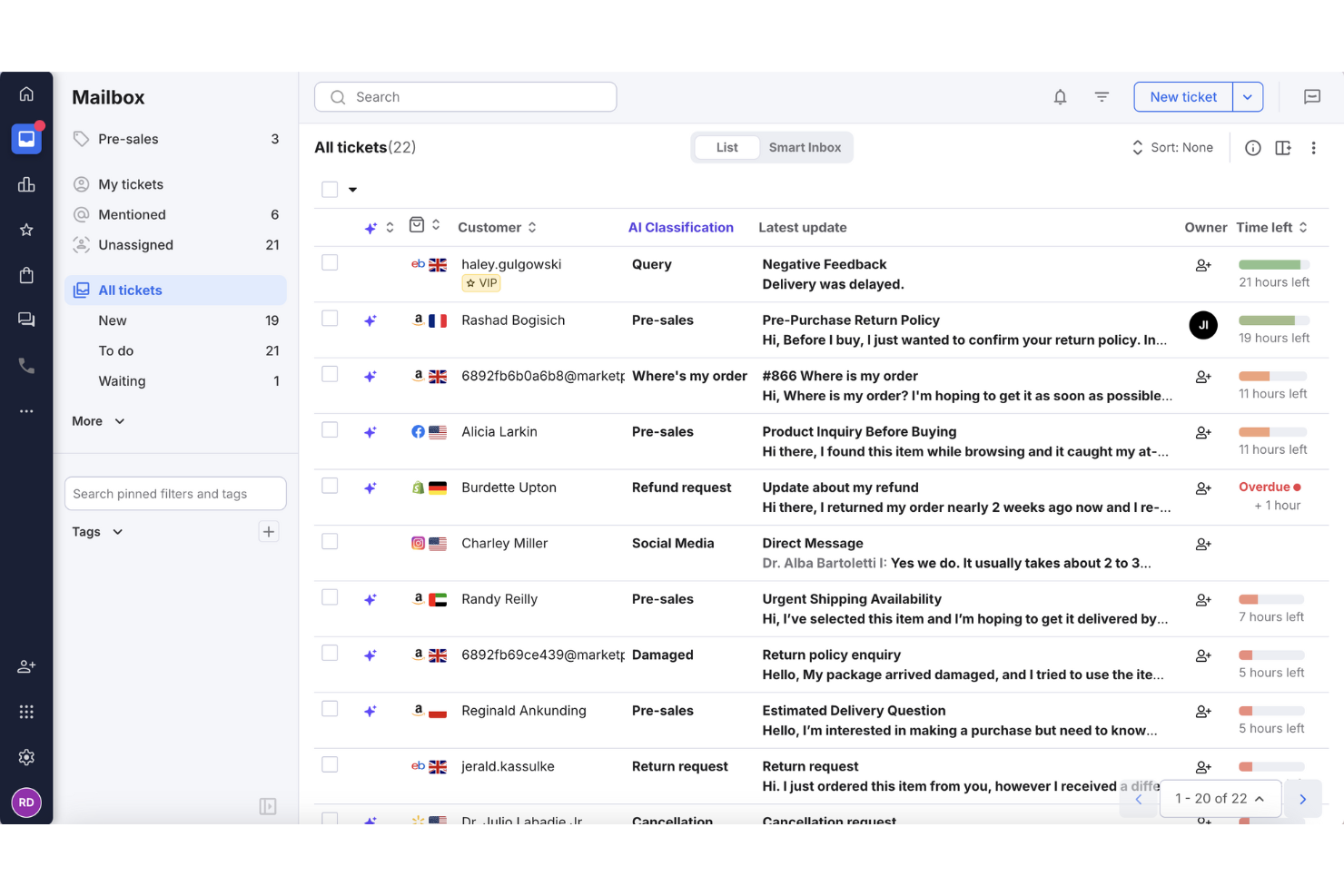
If managing customer interactions across multiple online sales channels feels overwhelming, eDesk might just be what you need. Tailored for ecommerce businesses, eDesk centralizes customer communications and automates tasks, addressing the complexities of multi-channel support. Its AI-driven features and extensive integrations aim to enhance your support team's efficiency and boost customer satisfaction.
Why I Picked eDesk
I picked eDesk for its ability to handle ecommerce-specific challenges within cloud helpdesk software. Its unified inbox brings together messages from multiple channels into a more manageable workspace. The AI agent also helps automate routine support tasks, reducing your team’s manual workload. These features support more efficient communication and smoother task handling in customer support operations.
eDesk Key Features
In addition to multi-channel ecommerce support management, eDesk offers:
- AI-Powered Automation: Automates repetitive tasks such as ticket routing and response suggestions, freeing up your team for more complex issues.
- Real-Time Reporting: Offers insights into your support operations to help make data-driven decisions.
- 24/7 Chatbot: Provides continuous support to customers visiting your webstore, ensuring no query goes unanswered.
- Feedback Management: Allows you to send review requests to customers, helping you gather valuable feedback and improve service quality.
eDesk Integrations
Integrations include Amazon, eBay, Walmart, Shopify, WooCommerce, BigCommerce, Magento, Facebook, Instagram, and WhatsApp.
Pros and Cons
Pros:
- Integrates rich order data for enhanced customer service
- Organized ticket views improve daily workflow efficiency
- Automation and templates reduce repetitive support tasks
Cons:
- Reporting and analytics, while present, can be less customizable than more enterprise dashboards
- Primarily built for ecommerce, less flexible for other industries


Hiver is a modern AI-powered cloud help desk software. It has the look and feel of your email inbox, with a panel on the left to manage all support channels, like email, live chat, WhatsApp, voice, SMS, and social media. Since the interface is so familiar to most of us, you have to spend no time learning a new tool from scratch.
Why I Picked Hiver: Hiver brings together all the capabilities you’d want from a cloud-based help desk platform. It simplifies ticket management so every customer query is tracked, assigned, and resolved without anything slipping through the cracks. Teams can collaborate seamlessly with internal notes, shared drafts, and @mentions, making it easy to deliver consistent responses without juggling multiple tools.
For real-time interactions, Hiver includes live chat so you can engage website visitors instantly. A built-in knowledge base empowers customers to find answers on their own. Detailed analytics give managers a clear view of performance, response times, and customer satisfaction trends.
Hiver Standout Features and Integrations
Features include Hiver AI, which embeds AI capabilities across all touchpoints of the customer support journey. For example, AI Copilot helps agents respond to customers through contextual answers, reply drafts, and more, while AI Agents help you set up autonomous workflows to handle FAQs, follow-ups, and other actions. It also has AI Insights that use conversations to forecast issues and risks.
Integrations include Aircall, Asana, Jira, Okta, QuickBooks, Salesforce, Slack, WhatsApp, and Zapier and 100+ other platforms.
Pros and Cons
Pros:
- AI features embedded at all stages of customer support journey
- Customer support from real humans available 24/7 via chat or email, across all plans (including free one)
- Strong internal collaboration features
Cons:
- Compared to some other platforms, Hiver offers fewer third party integrations
- Mobile experience isn’t as strong as the desktop one
New Product Updates from Hiver

Hiver Introduces AI-Powered Task Creation
Hiver introduces AI-powered task creation for email workflows. This update enables users to extract key details, summarize requests, and trigger actions automatically from incoming emails. For more information, visit Hiver’s official site.


Front is a customer service platform that offers a wide range of tools from omnichannel inbox management, to live chat with AI chatbots, and workflow automation.
Front provides businesses with the ability to enhance team collaboration and provide valuable insights through analytics. This supports businesses in delivering exceptional customer service at scale. It distinguishes itself with its practical AI capabilities that offer real-time collaboration and automation, which enables teams to deliver top-quality service that is both fast and intuitive.
Front is ideally suitable for businesses seeking to maintain high service quality while managing high email volumes and aiming for high customer satisfaction rates.
Front Standout Features and Integrations
Features include real-time collaboration, automation, live AI chat, shared inboxes, email templates, automated rules, internal comments, message assignments, active reminders, integrated calendars, real-time analytics, and multi-channel communication.
Integrations include over 110 systems, including Facebook, WhatsApp, Twitter, Salesforce, Slack, Asana, Zoom, Gmail, Shopify, and more.
Pros and Cons
Pros:
- Easy collaboration
- Centralized communication
- Task automation
Cons:
- Slow processing times for large scale use
- Moderate learning curve
New Product Updates from Front

Front Adds Asyntai, InstantDocs, and KnowBe4 Integrations
Front introduces integrations with Asyntai, InstantDocs, and KnowBe4, enhancing user experience and efficiency. For more information, visit Front's official site.
 .
.
Zendesk
Best for centralized, omnichannel ticketing and customer data

Zendesk is n AI-powered, cloud-based help desk software that assists businesses in managing and resolving customer inquiries and issues by providing a centralized platform for businesses to engage with their customers across various channels.
Zendesk's fully integrated ticketing system supports customer submissions from multiple different channels, including email, chat, phone, and social media messages, and automatically creates a ticket for each request. The ticketing system also uses CSAT ratings, service level agreements, time tracking, and routing to ensure that you and your team are providing a high quality customer experience.
Zendesk offers its own CRM platform, Sunshine, designed to help businesses centralize and manage customer data and provide a unified view of customer interactions. This includes a customer data platform (CDP) that allows businesses to aggregate, store, and manage customer data from multiple sources, such as support tickets, chat conversations, emails, and social media interactions. This unified customer profile helps organizations gain a comprehensive understanding of their customers' preferences, history, and behavior and utilize it to create high-quality customer experiences.
Features include knowledge base management tools, live chat, call center software, and customer analytics functionalities.
Integrations include Asana, Google Workspace, HubSpot, Jira, Microsoft Dynamics, Salesforce, Shopify, Slack, Trello, Zoom, and over 1200 more options on the Zendesk Marketplace.
Pros and Cons
Pros:
- Automation capabilities for streamlining processes
- Quick implementation and affordable pricing
- User-friendly interface and easy task management
Cons:
- Individual licenses required for adding new agents
- Limited customization options
Other Options
Here are a few more worthwhile options that didn’t make the best cloud helpdesk software list:
- HappyFox
For customer self-service
- SolarWinds Service Desk
For an IT-focused help desk
- Deskpro Draft
For a cloud-based or on-premise helpdesk
- Bitrix24
For businesses that need a free helpdesk solution
- Issuetrak
For omnichannel ticketing
- Front
For building better customer relationships
- Spiceworks Cloud Help Desk
For server and website monitoring
- ManageEngine
For IT management and data security
- Genesys Cloud CX
For transforming the customer experience
- SAAS First
AI support chatbot
- Supportbench
For custom structure and scalability
- NinjaOne
For single-pane IT management
- Freshservice
For AI-driven IT service management
- Zoho Assist
For secure remote unattended IT support
- LiveAgent
For multi-channel, customer-focused care solutions
- monday service
For customizable ticketing system
- Help Scout
For increasing agent productivity
- UJET
For smartphone-era support and CRM integrations
- Raiseaticket
For organizing cloud-based helpdesks
- Freshworks
For empowering agents and creating a positive work environment


Cloud Helpdesk Software Selection Criteria
When selecting the best cloud helpdesk software to include in this list, I considered common buyer needs and pain points like ticket management efficiency and customer support scalability. I also used the following framework to keep my evaluation structured and fair:
Core Functionality (25% of total score)
To be considered for inclusion in this list, each solution had to fulfill these common use cases:
- Manage customer support tickets
- Provide multi-channel support
- Automate repetitive tasks
- Track and analyze performance metrics
- Offer a knowledge base for self-service
Additional Standout Features (25% of total score)
To help further narrow down the competition, I also looked for unique features, such as:
- AI-driven analytics
- Customizable dashboards
- Advanced reporting capabilities
- Integration with CRM systems
- Mobile app functionality
Usability (10% of total score)
To get a sense of the usability of each system, I considered the following:
- Intuitive user interface
- Easy navigation
- Minimal learning curve
- Customization options
- Consistency in design
Onboarding (10% of total score)
To evaluate the onboarding experience for each platform, I considered the following:
- Availability of training videos
- Interactive product tours
- Access to chatbots and live support
- Comprehensive documentation
- Webinars and workshops
Customer Support (10% of total score)
To assess each software provider’s customer support services, I considered the following:
- Availability of 24/7 support
- Response time to inquiries
- Access to a dedicated account manager
- Multi-channel support options
- Quality of technical assistance
Value For Money (10% of total score)
To evaluate the value for money of each platform, I considered the following:
- Competitive pricing
- Flexible subscription plans
- Transparency in pricing structure
- Inclusions in the base package
- Cost-benefit ratio
Customer Reviews (10% of total score)
To get a sense of overall customer satisfaction, I considered the following when reading customer reviews:
- Overall satisfaction rating
- Feedback on customer support
- Ease of implementation
- Feature effectiveness
- Comparison with competitors
How to Choose Cloud Helpdesk Software
It’s easy to get bogged down in long feature lists and complex pricing structures. To help you stay focused as you work through your unique software selection process, here’s a checklist of factors to keep in mind:
| Factor | What to Consider |
|---|---|
| Scalability | Ensure the software can grow with your business. Look for solutions that can handle increasing ticket volumes and support expansion into new markets. |
| Integrations | Check if the tool integrates with your existing systems like CRM, email, and chat platforms to create a unified support experience for your team. |
| Customizability | Consider how easily you can tailor the software to fit your team's workflows and processes, including custom fields, priorities, and ticket views. |
| Ease of Use | Evaluate the user interface and how intuitive it is for your team. A simple, easy-to-navigate design can reduce training time and improve efficiency. |
| Budget | Assess the total cost, including subscription fees and any additional charges. Compare it against your budget to ensure the tool offers good value. |
| Security Safeguards | Look for features like data encryption, access controls, and compliance with industry standards to protect sensitive customer information. |
Trends in Cloud Helpdesk Software
In my research, I sourced countless product updates, press releases, and release logs from different cloud helpdesk software vendors. Here are some of the emerging trends I’m keeping an eye on:
- AI-driven support: AI is enhancing customer interactions by providing quick, accurate responses. Tools like chatbots and virtual assistants are becoming more sophisticated, helping teams manage high volumes of queries efficiently.
- Omni-channel capabilities: Users expect support across multiple channels, including social media, live chat, and email. Vendors are integrating these channels to provide a consistent experience, allowing agents to switch seamlessly between them.
- Self-service portals: Companies are focusing on empowering customers by offering self-service options. These portals provide access to FAQs, knowledge bases, and community forums, reducing the burden on support teams.
- Sentiment analysis: Analyzing customer sentiment from interactions helps teams prioritize issues and improve service quality. Vendors are incorporating sentiment analysis tools to give insights into customer emotions.
- Remote support tools: With remote work on the rise, vendors are adding features to help teams collaborate and resolve issues from anywhere. This includes shared dashboards, screen sharing, and remote control capabilities.
What Is Cloud Helpdesk Software?
Cloud helpdesk software is a tool that helps businesses manage customer support requests efficiently through a cloud-based platform. It's typically used by customer support teams, IT professionals, and service managers to enhance communication and resolve issues quickly.
Ticket management, omni-channel capabilities, and self-service portals help with organizing queries, providing consistent support, and empowering users to find solutions independently. Overall, these tools improve customer satisfaction and team productivity by streamlining the support process.
Features of Cloud Helpdesk Software
When selecting cloud helpdesk software, keep an eye out for the following key features:
- Ticket management: Organizes and tracks customer inquiries, ensuring no requests are overlooked and allowing for efficient resolution.
- Omni-channel capabilities: Provides support across multiple channels like email, chat, and social media, ensuring a consistent experience for customers.
- AI-driven support: Uses AI to offer quick responses and handle high query volumes, freeing up human agents for more complex issues.
- Self-service portals: Empowers customers to find solutions on their own through FAQs and knowledge bases, reducing the workload on support teams.
- Sentiment analysis: Analyzes customer interactions to gauge emotions, helping teams prioritize and improve service quality.
- Remote support tools: Facilitates collaboration and issue resolution for teams working remotely, using features like screen sharing and remote control.
- Customizability: Allows teams to tailor the software to fit specific workflows and processes, enhancing overall efficiency.
- Advanced reporting: Provides insights into performance metrics, enabling data-driven decisions to enhance support services.
- Integration capabilities: Connects with existing systems like CRM and email, creating a unified support environment for better efficiency.
- Security safeguards: Protects sensitive customer information with features like data encryption and access controls, ensuring compliance with industry standards.
- Device compatibility and accessibility: Cloud software should be compatible with a range of devices and OSs, from smart phones to laptops and more.
Benefits of Cloud Helpdesk Software
Implementing cloud helpdesk software provides several benefits for your team and your business. Here are a few you can look forward to:
- Improved efficiency: Centralizes ticket management and automates repetitive tasks, allowing your team to resolve issues faster.
- Enhanced customer satisfaction: Offers omni-channel support and self-service options, providing customers with convenient ways to get help.
- Data-driven insights: Advanced reporting and sentiment analysis give you valuable information to refine your support strategies.
- Scalability: Adapts to growing business needs, handling increased ticket volumes and expanding support capabilities as required.
- Remote collaboration: Supports remote work with tools like screen sharing, helping teams work together from anywhere to solve customer issues.
- Customizable workflows: Lets you tailor processes to match your team's specific needs, improving operational efficiency.
- Secure data management: Protects customer information with security safeguards, ensuring trust and compliance with industry standards.
Cloud Helpdesk Software Implementation Best Practices
Setting up new cloud help desk software can be tough. Here are my best help desk implementation tips:
- Develop an Implementation Plan: Set clear objectives, timelines, and responsibilities. Identify key stakeholders for decision-making.
- Customize for Business Needs: Configure workflows, automation rules, and ticket categories to fit existing support processes. Avoid unnecessary complexity.
- Migrate Data Carefully: Plan for a smooth data transfer from legacy systems. Clean and map old data to match the new system's structure.
- Train Staff and Encourage Adoption: Provide hands-on training and documentation for agents. Address concerns and highlight key benefits to encourage usage.
- Monitor Performance and Gather Feedback: Track key metrics like ticket resolution time, customer satisfaction, and agent productivity. Regularly collect user feedback.
- Optimize and Scale: Continuously refine workflows and automation based on performance insights. Ensure the system adapts to evolving business needs.
Costs and Pricing of Cloud Helpdesk Software
Selecting cloud helpdesk software requires an understanding of the various pricing models and plans available. Costs vary based on features, team size, add-ons, and more. The table below summarizes common plans, their average prices, and typical features included in cloud helpdesk software solutions:
Plan Comparison Table for Cloud Helpdesk Software
| Plan Type | Average Price | Common Features |
|---|---|---|
| Free Plan | $0 | Basic ticketing, email support, and limited reporting. |
| Personal Plan | $5-$25/user/month | Ticket management, basic automation, and self-service portal. |
| Business Plan | $30-$60/user/month | Multi-channel support, advanced analytics, and integration capabilities. |
| Enterprise Plan | $70-$120/user/month | Customizable workflows, AI-driven support, and enhanced security features. |
Other Questions People Ask
If you’re looking for an introduction to helpdesk software, these are the most frequently asked questions that will help keep you informed.
How does cloud-based helpdesk software work?
Cloud-based helpdesk software utilizes external servers (the cloud) to store and manage customer-related or business data. With cloud access, your team can access all the necessary information over a web browser or internet-enabled device instead of dealing with the burden of self-hosting.
You should note that there is a technical difference between helpdesk software and customer support software. Most helpdesk software is primarily focused on internal staff operational support whereas customer support software is centered on customer relationship management (CRM). However, many companies are integrating both into one system or using the terms interchangeably.
What are some industry use cases of cloud help desk software?
Cloud help desk software is used across various industries to streamline customer support, IT management, and service requests. Here are some key industry use cases:
- IT & Tech Support: Manages IT tickets, resolves technical issues, and automates troubleshooting for employees and customers.
- E-commerce & Retail: Handles customer inquiries, order tracking, and return processing efficiently.
- Healthcare: Supports patient inquiries, appointment scheduling, and IT issues in medical facilities.
- Education: Assists students and faculty with tech support, course enrollment, and administrative queries.
- Finance & Banking: Provides customer service for account issues, fraud reporting, and loan processing.
- Manufacturing: Manages supplier communication, equipment maintenance requests, and operational support.
- Hospitality & Travel: Handles booking inquiries, customer complaints, and travel assistance in real-time.
- Government & Public Services: Supports citizen inquiries, document processing, and IT service management.
Cloud help desk software enhances efficiency, automates workflows, and improves customer satisfaction across industries.
How does cloud help desk software handle security and data management?
Cloud help desk software ensures security and data management through several key features:
- Data Encryption: Protects sensitive information by encrypting data both in transit and at rest.
- Access Controls: Implements role-based access to ensure only authorized users can view or modify data.
- Multi-Factor Authentication (MFA): Adds an extra layer of security by requiring multiple verification steps.
- Regular Backups: Automatically backs up data to prevent loss in case of system failures or cyberattacks.
- Compliance Standards: Adheres to industry regulations like GDPR, HIPAA, and SOC 2 to maintain data privacy.
- Audit Logs: Keeps track of user activities and system changes for accountability and security monitoring.
- Threat Detection: Uses AI and automated monitoring to identify and prevent suspicious activities.
- Data Redundancy: Stores copies of data across multiple locations to ensure availability even during outages.
These security measures help businesses keep their customer and internal data safe while ensuring smooth operations.
Is cloud help desk software ITIL and ITSM compliant?
es, most cloud help desk software solutions are ITIL (Information Technology Infrastructure Library) and ITSM (IT Service Management) compliant to support efficient IT service management. Here’s how they align with these frameworks:
- Incident Management: Tracks and resolves IT issues efficiently, ensuring minimal downtime.
- Problem Management: Identifies root causes of recurring issues to prevent future incidents.
- Change Management: Helps plan, review, and implement IT changes with minimal risk.
- Asset Management: Maintains a record of IT assets, ensuring proper tracking and utilization.
- Service Request Management: Automates and organizes user requests for faster resolution.
- Knowledge Management: Stores solutions and guides to empower users with self-service options.
- Compliance & Reporting: Provides audit trails and reports to meet ITIL and ITSM standards.
Most leading cloud help desks, like ServiceNow, Freshservice, and Zendesk, follow these best practices to improve IT support efficiency.
Stay Informed
I’m confident that this list contains the best possible cloud-based helpdesk software solutions. But before you decide which one is right for you, I would recommend defining your needs as an organization and planning for the future.
After you’ve narrowed down your essential requirements, you can test out a few of these services through their demo and trial offers. Use your experience in the trial offers to get a better idea of the pros and cons of each software and narrow down your own list.
If you’re looking for other tools to complete your workflow or integrate with your cloud helpdesk software, make sure to stay in the loop when you subscribe to The CX Lead newsletter today!