

10 Best Customer Engagement Platforms Reviewed for 2026

10 Best Customer Engagement Platform List


Customer engagement platforms help you build consistent, personalized interactions across the entire customer journey. The best platforms can help you drive retention, streamline communication, and turn engagement into a proactive strategy.
If your team is juggling multiple systems, or if your customers are slipping through the cracks between channels, you're not alone. Engagement isn't just about volume—it's about timing, context, and the ability to act in the moment.
I have vetted the best customer engagement platforms so you can find a solution that fits your CX ecosystem, scales with your needs, and helps your team foster loyalty and create meaningful connections.
Why Trust Our Software Recommendations
Our team has been testing and reviewing software since 2012. As CX leaders ourselves, we know how difficult—and important—it is to choose the right software.
For this guide, we evaluated tools using hands-on testing and independent research, scoring tools using our selection criteria.
Our reviews reflect our human editorial judgment, not a sales pitch.
The Best Customer Engagement Platform Summary Table
| Tool | Best For | Trial Info | Price | ||
|---|---|---|---|---|---|
| 1 | Best for 360-degree customer view | 14-day free trial | From $40/user/month (billed annually) | Website | |
| 2 | Best for customer ticket management & NPS surveys | 14-day free trial + free plan + free demo available | Pricing upon request | Website | |
| 3 | Best for actionable customer engagement insights | 7-day free trial + free demo available | From $55/user/month | Website | |
| 4 | Best for boosting user activation rates | 14-day free trial | From $174/month (billed annually) | Website | |
| 5 | Best for granular audience segmentation | Free demo available | Pricing upon request | Website | |
| 6 | Best for global rewards distribution | Free plan + free demo available | Free to use + 3% fee for credit card purchases | Website | |
| 7 | Best for AI support engagement | Free plan available; 7-day free trial | From $24.17/month (billed annually) | Website | |
| 8 | Best for unified omnichannel customer service | Free demo available | Pricing upon request | Website | |
| 9 | Best for gamification | 14-day free trial | Pricing upon request | Website | |
| 10 | Best for ease-of-use | Free plan + 30-day free trial + free demo available | Pricing upon request | Website |


Overviews of the 20 Best Customer Engagement Platforms
Here’s a brief description of each customer engagement software to showcase each tool’s best use case, some noteworthy features, and screenshots to give a preview of the interface.

Best for 360-degree customer view
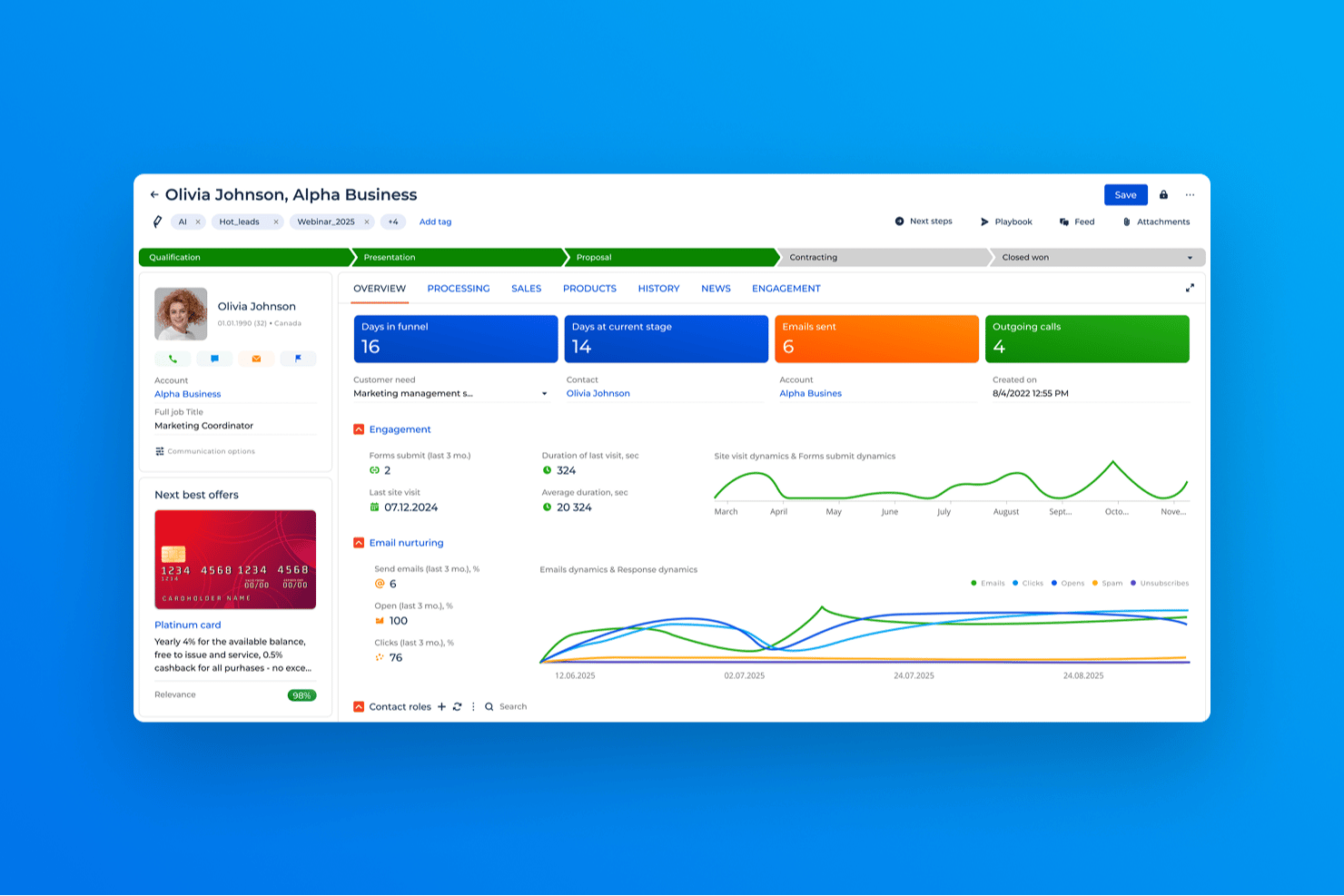
Creatio CRM is a no-code customer engagement platform that unifies sales, marketing, and service operations with omnichannel journey orchestration, AI-driven automation, and centralized customer data management across the full customer lifecycle.
Who Is Creatio CRM Best For?
Creatio CRM suits mid-market and enterprise teams in finance, telecom, retail, and healthcare that need a deeply customizable, unified CRM across sales, marketing, and service.
Why I Picked Creatio CRM
I picked Creatio CRM as one of the best because its 360-degree customer view genuinely pulls together every interaction, from marketing campaign responses to open service cases, into a single actionable profile. I love that the AI-powered CRM agents surface next-best-action recommendations directly from that unified data. That means my team can personalize outreach based on a customer's real-time status across every touchpoint, not just their last purchase.
Creatio CRM Key Features
- Low-code journey builder: Design and automate complex customer journeys visually, without engineering resources.
- Marketplace connectors: Extend functionality and integrate with popular business systems through a wide marketplace of prebuilt apps.
- Advanced segmentation: Build dynamic audience segments using behavioral, demographic, and transactional data.
- Omnichannel service console: Manage customer conversations across email, chat, phone, and social platforms from a unified interface.
Creatio CRM Integrations
Creatio CRM offers native integrations with Microsoft 365, Shopify, WooCommerce, PayPal, and more, and connects with Zapier and Make. An open API is available for custom integrations. Marketplace connectors extend compatibility with ERP, marketing, and communications systems.
Pros and Cons
Pros:
- Unified profile consolidates data across all touchpoints
- AI agents surface next-best-action in real time
- No-code workflow builder accelerates journey creation
Cons:
- Initial setup complexity for enterprise-scale deployments
- Reporting customization requires technical configuration
New Product Updates from Creatio CRM

Creatio CRM Adds AI, WhatsApp, Analytics, and Design Updates
Creatio CRM adds expanded AI app development tools, native WhatsApp support, new analytics, and visual design tools. These updates extend app building, customer communication, reporting, and customization workflows. For more information, visit Creatio CRM’s official site.

Best for customer ticket management & NPS surveys
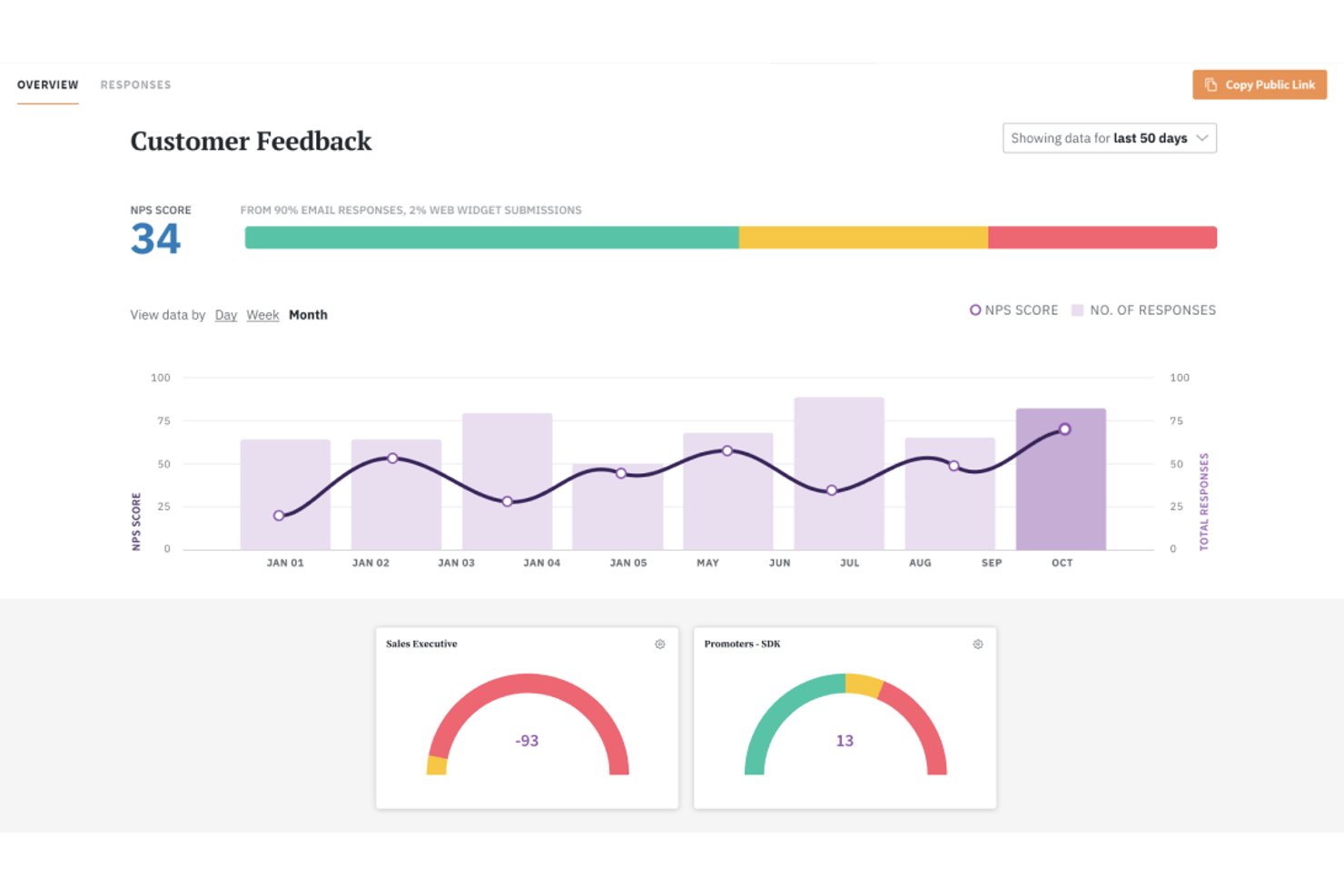
SurveySparrow is a conversational experience management platform that combines NPS, CSAT, and CES surveys with omnichannel feedback collection, AI-powered analytics, reputation management, and ticket management to close the customer feedback loop.
Who Is SurveySparrow Best For?
CX and customer success teams at mid-market companies that need to collect, track, and act on customer feedback at scale.
Why I Picked SurveySparrow
I picked SurveySparrow because its ticket management feature converts a low NPS score directly into an assignable support ticket, so a detractor response triggers a trackable resolution workflow rather than sitting in a spreadsheet. I also like how recurring NPS surveys run automatically, meaning my team tracks loyalty trends continuously. The echoAI feature adds mid-conversation follow-ups to clarify ambiguous feedback before it's lost.
SurveySparrow Key Features
- Reputation management: Monitor and manage online reviews from over 100 platforms within a single dashboard.
- Conversational survey design: Build surveys with a chat-like interface designed to boost response rates.
- Multi-channel feedback collection: Distribute surveys via email, WhatsApp, SMS, web embed, and kiosk mode.
- Executive dashboards: Access real-time analytics and customizable charts for tracking feedback trends and key metrics.
SurveySparrow Integrations
SurveySparrow offers native integrations with HubSpot, Salesforce, Slack, Google Sheets, Intercom, Zendesk, Freshdesk, Webhooks, and Microsoft Teams. It also connects with Zapier and provides an API for custom integrations.
Pros and Cons
Pros:
- Chat-style surveys boost completion rates
- Converts survey responses into support tickets
- Recurring NPS surveys run on autopilot
Cons:
- Reporting customization is restricted on lower tiers
- Limited outbound messaging beyond surveys

Alchemer
Best for actionable customer engagement insights
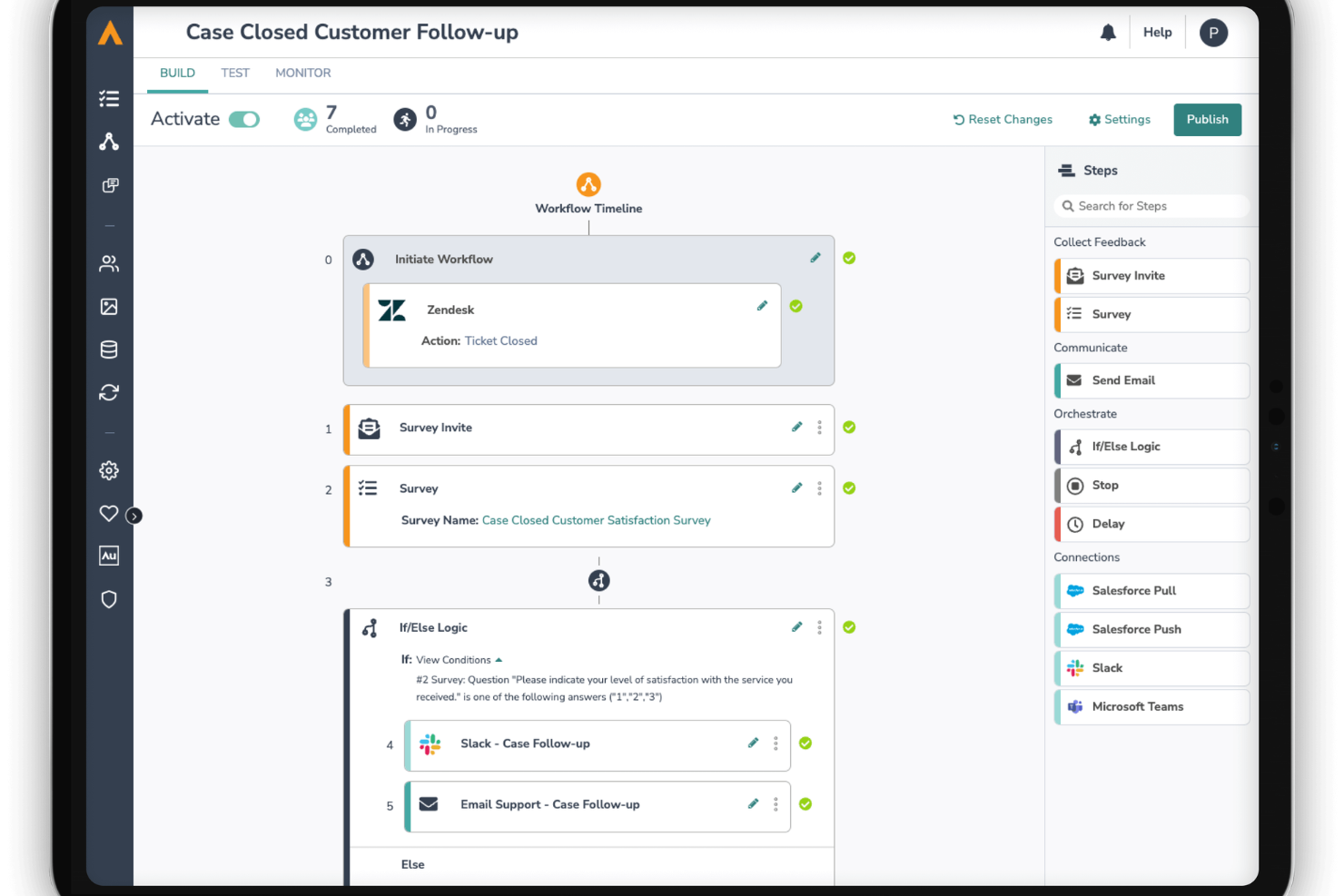
Alchemer is a Voice of Customer platform that combines omnichannel survey distribution, in-app feedback capture, text analytics, and automated workflows to collect and act on customer and employee insights.
Who Is Alchemer Best For?
Alchemer suits CX and research teams at mid-size to enterprise organizations that need to run structured VoC programs and route feedback directly into existing business workflows.
Why I Picked Alchemer
I've included Alchemer in my top picks because it goes beyond collecting feedback and actually closes the loop on customer engagement. I love how Alchemer Digital captures in-the-moment signals as customers interact with your app or website, and Alchemer Pulse surfaces sentiment themes from open-text responses without manual tagging. From there, automated workflows push those insights directly into Salesforce or Slack so my team can act before a customer disengages.
Alchemer Key Features
- Visual workflow builder: Drag-and-drop interface to automate feedback routing and follow-up actions.
- Role-based access controls: Define user permissions for survey building, data access, and administration.
- 400+ software integrations: Connect survey data directly to Salesforce, HubSpot, Tableau, and Microsoft Teams.
- Advanced branching logic: Tailor question pathways based on respondent answers using complex skip patterns.
Alchemer Integrations
Alchemer offers over 400 native integrations, including Salesforce, HubSpot, Microsoft Teams, Tableau, ServiceNow, Zendesk, Jira, Marketo, Slack, and Microsoft 365. An API is available for custom integrations.
Pros and Cons
Pros:
- Highly customizable survey and feedback workflows
- Deep text analytics surfaces sentiment themes
- Closes the feedback loop automatically
Cons:
- Not built for real-time journey orchestration
- Limited native outbound messaging channel support
Best for boosting user activation rates
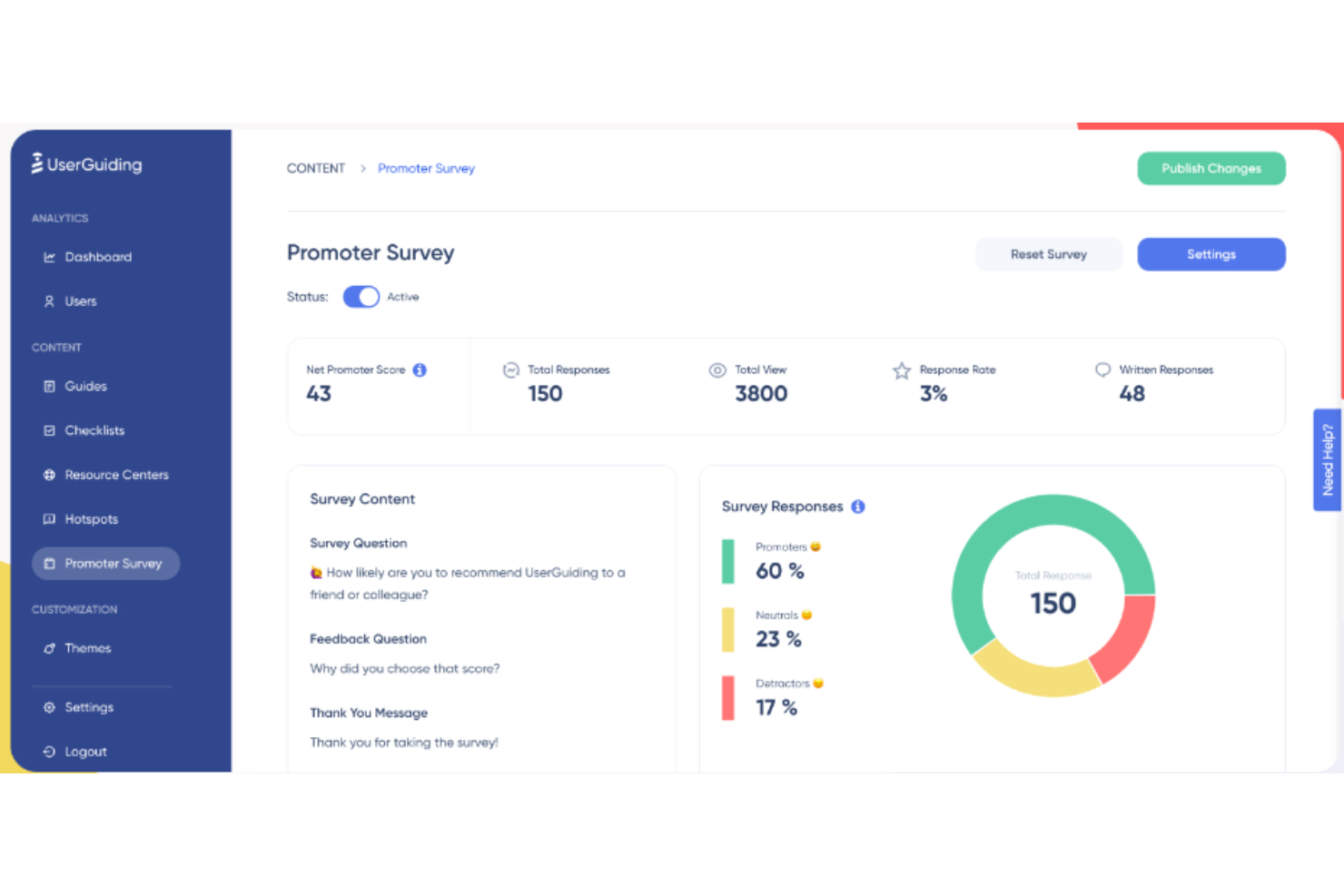
UserGuiding is a no-code digital adoption platform that delivers in-app onboarding flows, tooltips, checklists, resource centers, and NPS surveys to guide users through your product.
Who Is UserGuiding Best For?
UserGuiding fits SaaS product and customer success teams at small to mid-sized companies that want to improve user activation without relying on engineering resources.
Why I Picked UserGuiding
I picked UserGuiding as one of the best because its activation-focused toolkit goes beyond basic product tours. I use Goal Tracking and A/B Testing together to pinpoint which onboarding flows actually move users to their first key action, not just which ones get opened. Onboarding Checklists are particularly strong here — they create a structured path to activation that keeps users progressing without hand-holding from the customer success team.
UserGuiding Key Features
- Resource center: Centralizes product guides, FAQs, and documentation within your web app for self-serve support.
- AI assistant: Uses AI-driven responses to help users find answers and resolve issues directly in-app.
- NPS and in-app surveys: Collects user feedback and measures satisfaction using built-in survey tools.
- Session replay: Records real user sessions so teams can watch user interactions and spot experience issues.
UserGuiding Integrations
UserGuiding offers native integrations with HubSpot, Intercom, Mixpanel, Segment, and Google Analytics. An API is available for custom integrations.
Pros and Cons
Pros:
- In-app surveys collect feedback without third-party tools
- Activation checklists guide users to key actions
- No-code onboarding flows launch without engineering
Cons:
- Analytics depth falls short of enterprise needs
- Limited cross-channel messaging beyond in-app

Netmera
Best for granular audience segmentation
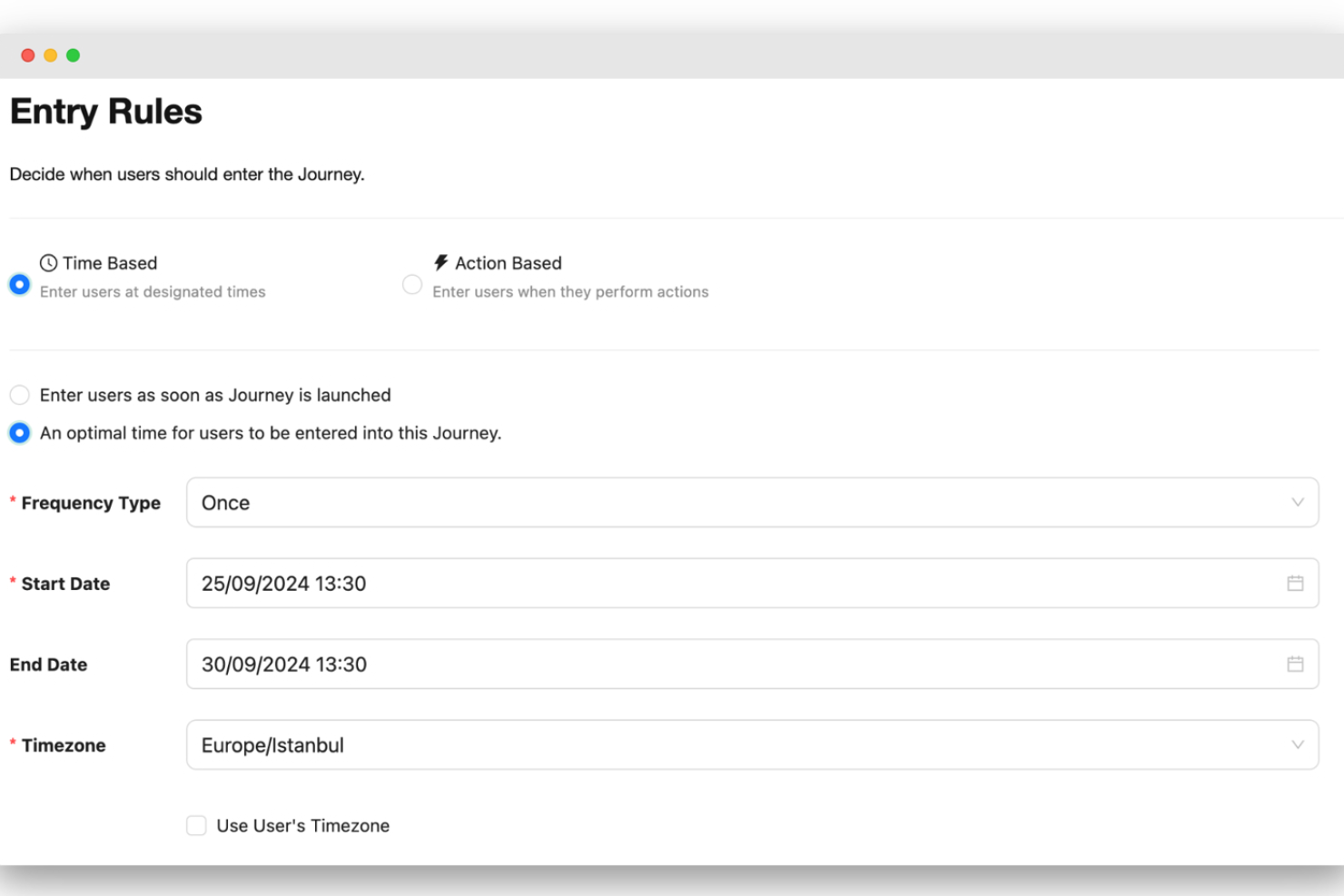
Netmera is an omnichannel customer engagement platform that combines a built-in CDP, AI-driven segmentation, multi-channel messaging (push, email, SMS, WhatsApp, in-app, and web), and no-code journey orchestration in a single interface.
Who Is Netmera Best For?
Netmera is a strong fit for enterprise teams in banking, telco, retail, and media who need to manage high-volume, behavior-driven engagement across mobile and web.
Why I Picked Netmera
I picked Netmera as one of the best because its segmentation depth genuinely stands out in a crowded space. I especially like Tagless Data Capture, which automatically collects behavioral events without manual tagging, giving you richer signal to build segments from day one. Combine that with Predictive AI that flags churn risk and purchase intent in real time, and you can reach the right customer at exactly the right moment in their loyalty journey.
Netmera Key Features
- Omnichannel campaign orchestration: Manage email, SMS, mobile push, WhatsApp, in-app, and web campaigns from a single interface.
- Visual journey builder: Design and automate multi-step customer journeys with drag-and-drop logic across all channels.
- Real-time analytics dashboards: Monitor campaign performance, channel effectiveness, and customer engagement outcomes in one place.
- Data privacy and compliance controls: Built-in support for GDPR, ISO certifications, and granular consent management tools.
Netmera Integrations
Netmera offers native integrations with Whatspp, Mixpanel, SAP Marketing, Twilio, and more, . An API is available for custom integrations.
Pros and Cons
Pros:
- AI-powered churn prediction and send-time optimization
- Built-in CDP with tagless data capture
- Deep behavioral segmentation with real-time triggers
Cons:
- Limited self-serve onboarding documentation available
- Reporting interface can feel dated

Best for global rewards distribution
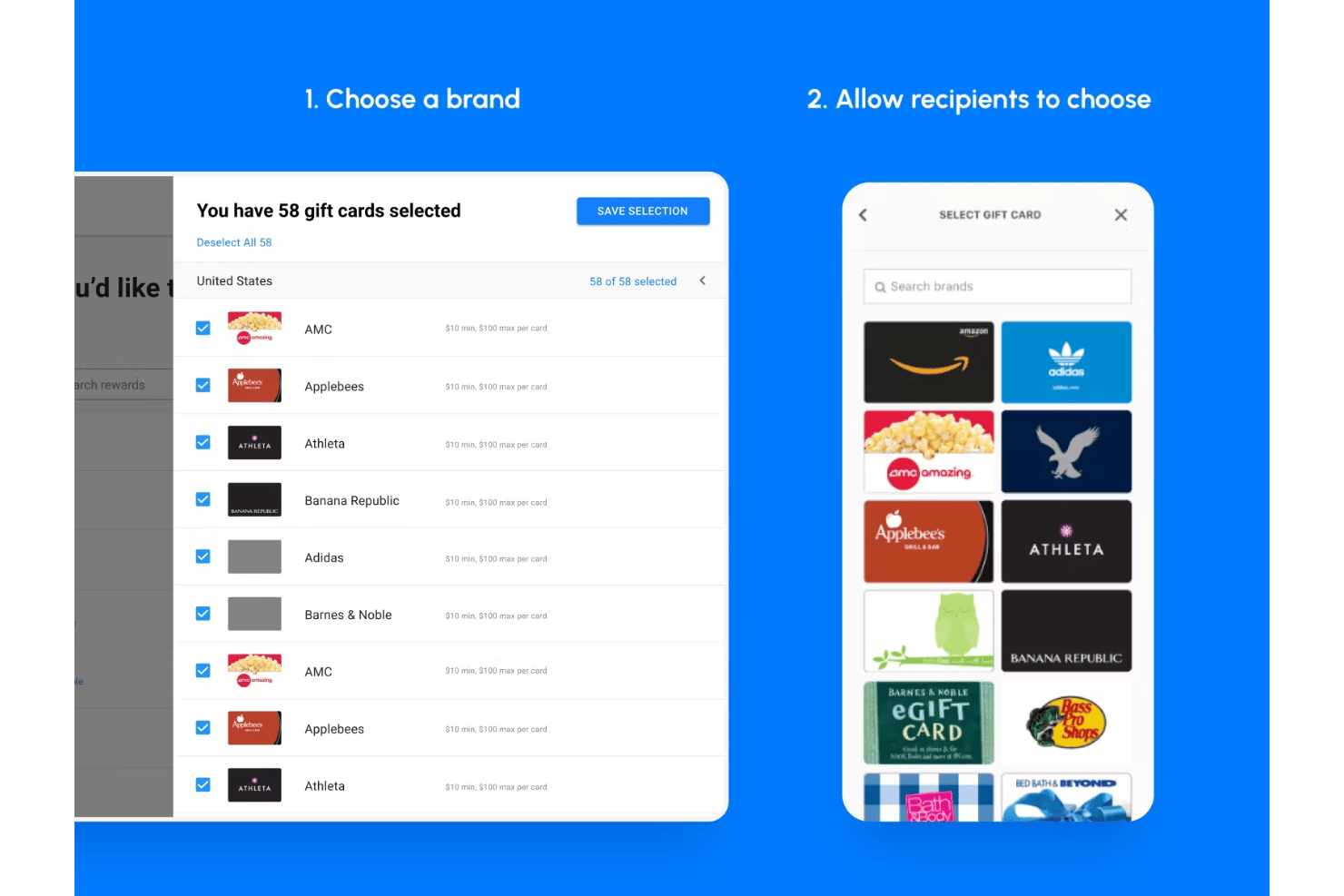
Tremendous is a global rewards and incentives distribution platform that lets businesses send gift cards, prepaid cards, and monetary payouts to customers, referral participants, and research respondents across 200+ countries.
Who Is Tremendous Best For?
Tremendous suits marketing and research teams at mid-to-large companies that run high-volume referral, loyalty, or incentive programs across multiple countries.
Why I Picked Tremendous
Tremendous earns its spot on my shortlist because of its reach: 2,500+ reward options delivered across 200+ countries, with automatic currency conversion built in. I love that recipients choose their own payout format, whether that's an Amazon gift card, a Visa prepaid card, or a PayPal transfer. In practice, my team can run a single global loyalty campaign without building separate reward catalogs per region.
Tremendous Key Features
- Bulk reward sending: Upload a spreadsheet or use the API to deliver rewards to hundreds or thousands of recipients at once.
- White-label branding: Customize reward emails, landing pages, and communications with your company’s brand imagery and messaging.
- Order tracking dashboard: Monitor the status and redemption of all rewards with real-time visibility into spend, delivery, and usage.
- Fraud prevention controls: Set spend limits, require approvals, and use automated checks to help reduce the risk of fraudulent payouts.
Tremendous Integrations
Tremendous offers native integrations with Salesforce, HubSpot, Friendbuy, Qualtrics, and Zapier, and provides an API for custom integrations.
Pros and Cons
Pros:
- Real-time redemption tracking across all campaigns
- Handles massive reward volumes without delays
- Recipients choose from 2,500+ reward options
Cons:
- Limited native customer segmentation capabilities
- Not built for ongoing engagement journeys

Tidio
Best for AI support engagement
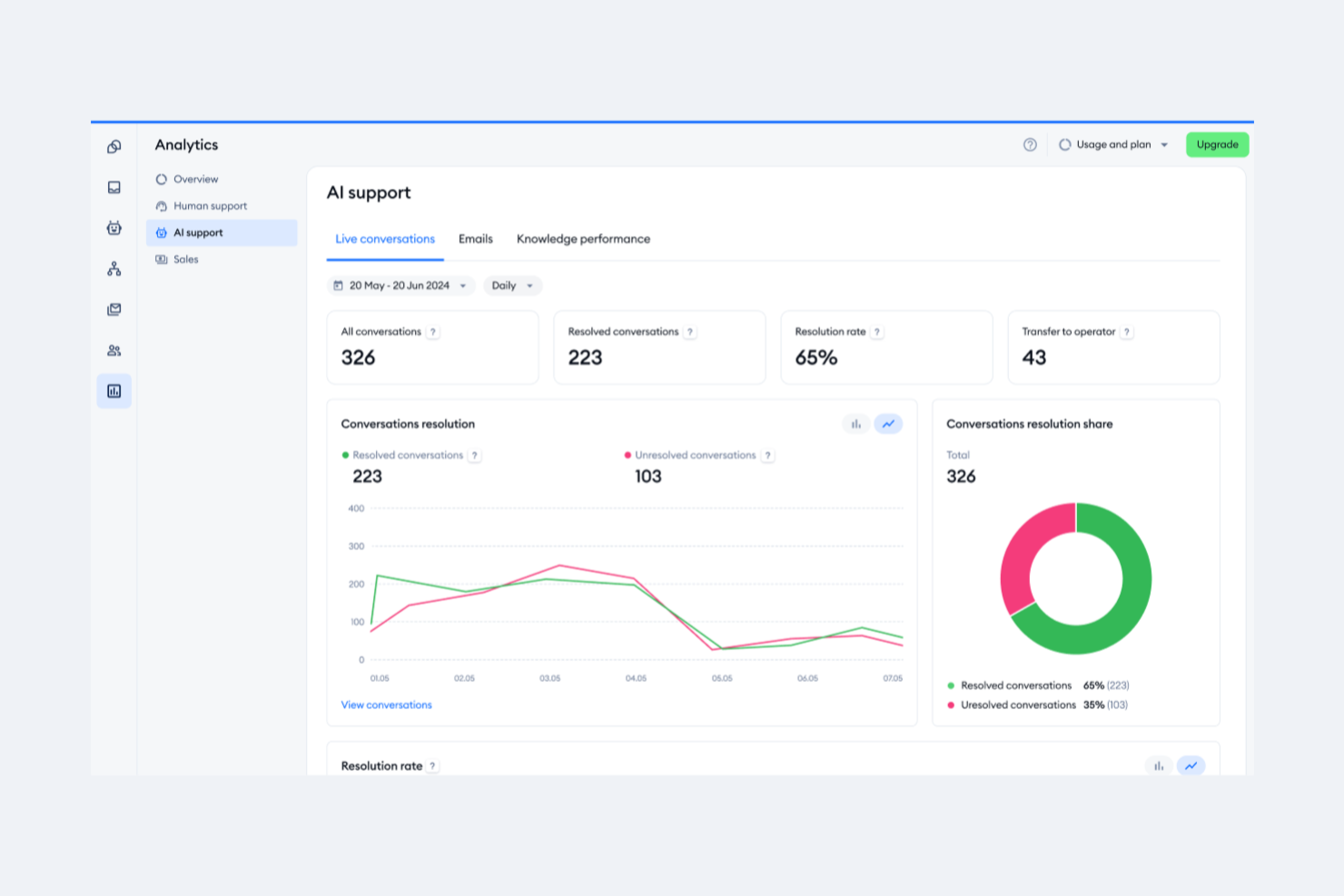
Tidio is a customer support platform combining live chat, help desk ticketing, no-code automation, and an AI agent (Lyro) to manage and respond to customer conversations across web chat, email, and social messaging channels.
Who Is Tidio Best For?
Tidio is a strong fit for SMB and mid-market ecommerce teams that need to automate customer support without building out a large agent team.
Why I Picked Tidio
I've included Tidio in my top picks because of Lyro, its Claude-powered AI agent that resolves up to 67% of customer conversations without any human involvement. What I like is that Lyro pulls answers directly from your existing help content, so responses stay brand-consistent rather than fabricated. When Lyro hits the edge of its knowledge, it hands the conversation off to a live agent cleanly, keeping customer trust intact throughout the interaction.
Tidio Key Features
- Unified multichannel inbox: Manage conversations from web chat, email, Messenger, Instagram, and WhatsApp in a single dashboard.
- Visual automation workflows: Build chatbots and automated flows with a drag-and-drop editor to engage site visitors.
- Shopify integration: Connect store data to enable agents to view orders, carts, and customer details directly in the chat interface.
- Visitor insights panel: Track visitor location, time on site, and page history to inform live and automated interactions.
Tidio Integrations
Tidio offers native integrations with Shopify, WordPress, Wix, BigCommerce, Messenger, Instagram, and WhatsApp. It connects with Zapier and provides an API for custom integrations.
Pros and Cons
Pros:
- Multichannel inbox unifies social and live chat
- Chatbot triggers respond to real-time visitor actions
- Lyro AI resolves chats without human agents
Cons:
- Lyro AI conversation limits restrict high-volume use
- Analytics depth falls short for enterprise teams

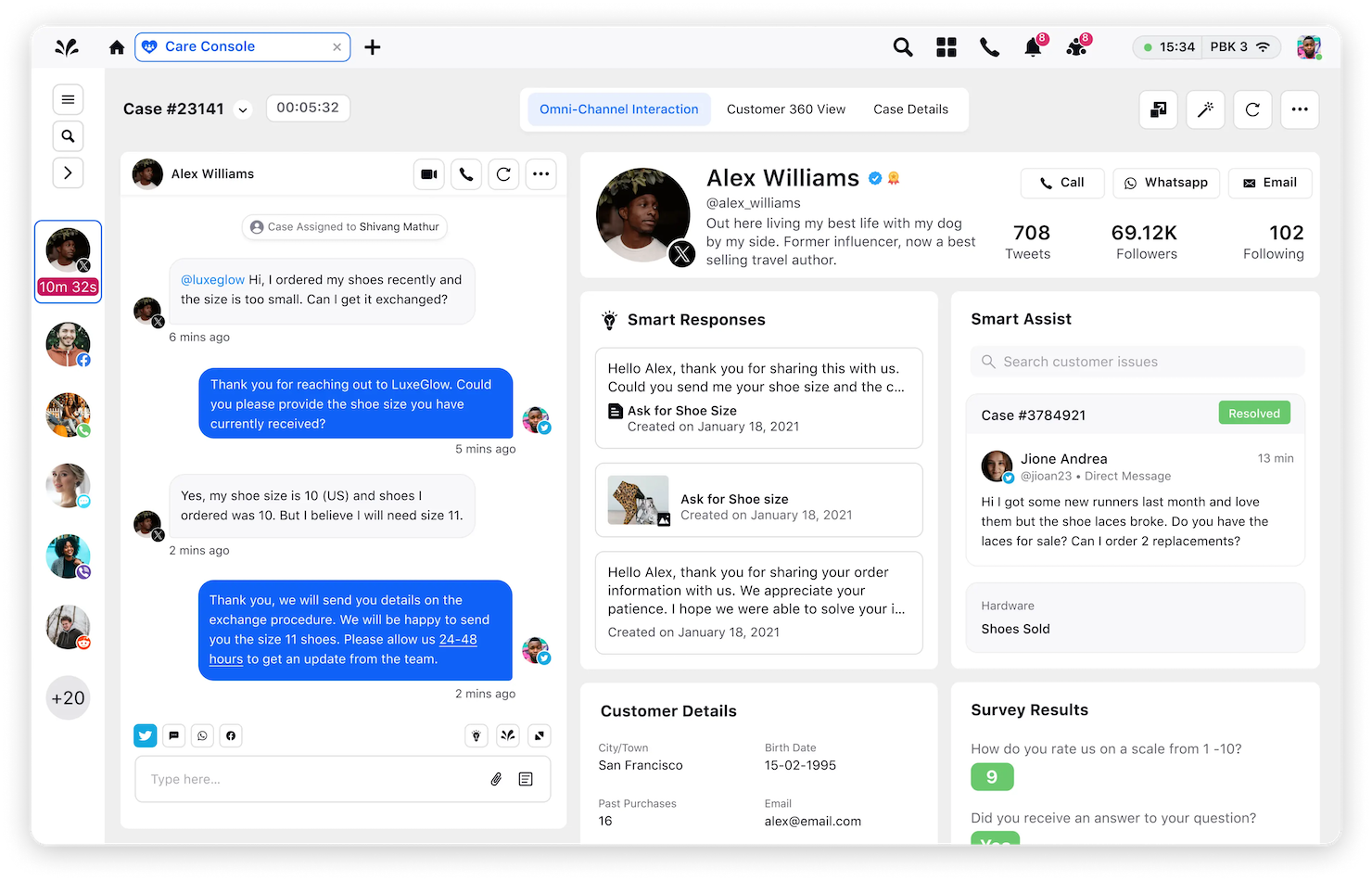
Sprinklr Service helps your support and marketing teams manage conversations across social media, messaging apps, and other channels. It solves the challenge of juggling multiple customer touchpoints by bringing them into a single inbox. Your team can centralize interactions and deliver consistent responses.
Why I Picked Sprinklr Service: I picked Sprinklr Service because it excels at unified customer engagement. It combines AI‑powered case management, intelligent conversation routing, and real‑time sentiment analysis so you can prioritize the most important issues. Customizable dashboards let you track key customer service metrics and agent performance. Automation workflows and a built‑in knowledge base reduce manual tasks and keep your team focused on relationships.
Standout Features & Integrations
Features include an omnichannel inbox that collects messages from social, email, voice, and messaging apps, AI‑driven ticket routing with sentiment analysis, customizable dashboards for reporting, and automation tools for creating workflows and knowledge articles.
Integrations include Salesforce, Zendesk, ServiceNow, Slack, Microsoft Teams, Google Workspace, HubSpot Marketing Hub, HubSpot Sales Hub, Jira, and Tableau, and an API is available.
Pros and Cons
Pros:
- Centralized social media management, intuitive scheduling
- In-depth analytics and robust feature set
- Intuitive UI with wide range of integrations
Cons:
- Time-consuming setup with complex deployment process
- Overwhelming feature set requiring hands-on training

Braze
Best for gamification
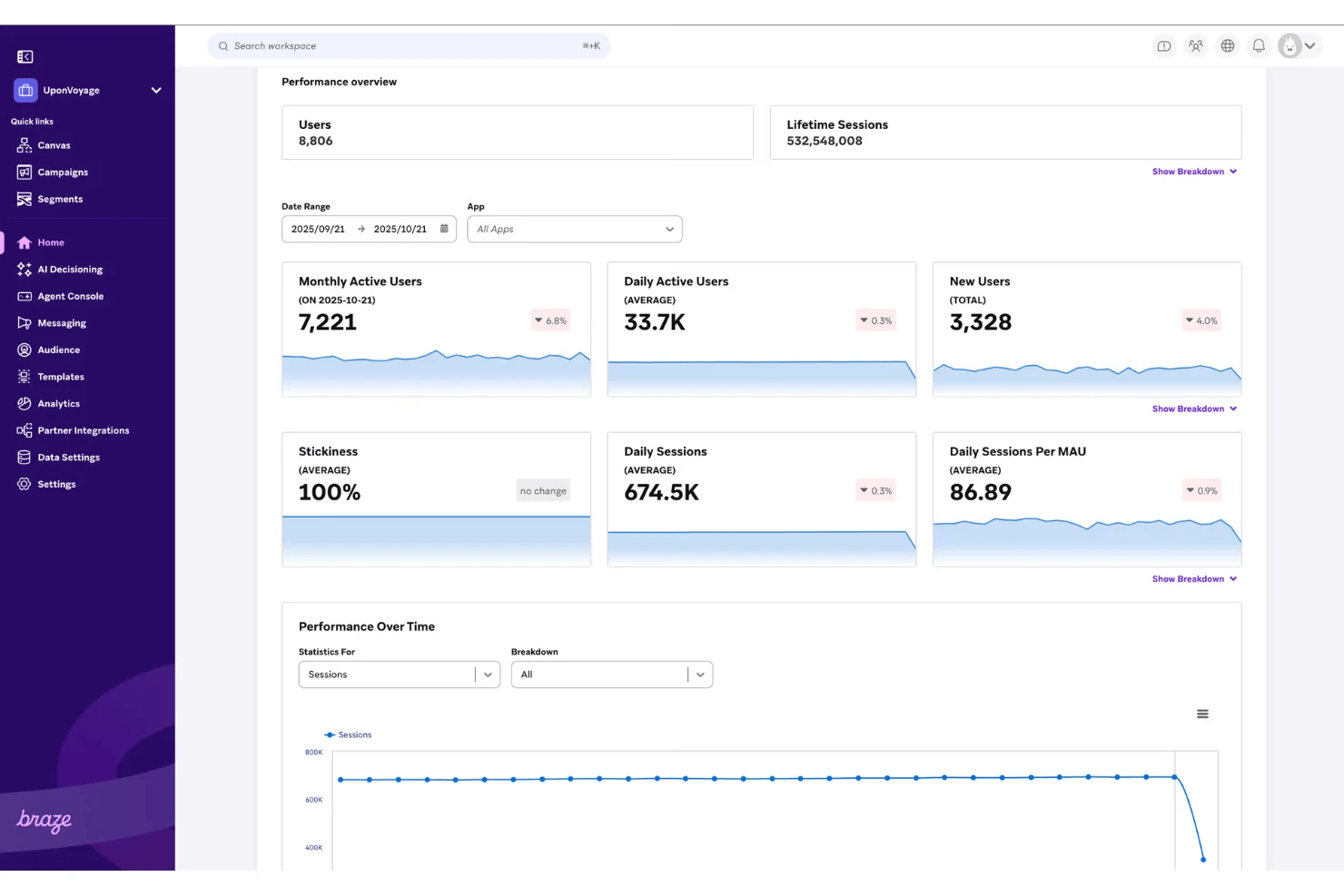
Braze is a customer engagement platform that combines cross-channel messaging, journey orchestration, customer data unification, AI-driven personalization, and real-time analytics into a single solution for B2C brands.
Who Is Braze Best For?
Braze is a strong fit for mid-market and enterprise B2C brands that have in-house developer resources and run mobile-first or product-led growth strategies.
Why I Picked Braze
I've included Braze in my top picks because of how Canvas and Liquid Personalization work together to power real gamification mechanics. In practice, I can use Canvas to trigger reward sequences after specific user actions, then deliver those rewards through Content Cards or webhooks in real time. Snoonu used exactly this setup for a Spin-the-Wheel campaign that drove a 39% increase in repeat orders.
Braze Key Features
- Omnichannel messaging suite: Supports email, push, SMS, in-app messages, WhatsApp, and web messaging from a single platform.
- Customer data platform capabilities: Builds unified customer profiles with real-time data ingestion and native identity resolution.
- Visual journey orchestration: Drag-and-drop builder lets teams automate multi-step customer journeys across segments and channels.
- Experimentation and optimization tools: Enables multivariate testing, journey experiments, and engagement tracking in one workflow.
Braze Integrations
Braze provides native integrations with Salesforce, Snowflake, Amplitude, Segment, Mixpanel, Looker, Shopify, and mParticle. An API is available for custom integrations.
Pros and Cons
Pros:
- Built-in AI optimizes message send times
- Real-time event triggers fire in milliseconds
- Native gamification mechanics built into Canvas
Cons:
- Steep onboarding for non-technical CX teams
- Requires developer support for full setup

Pendo
Best for ease-of-use
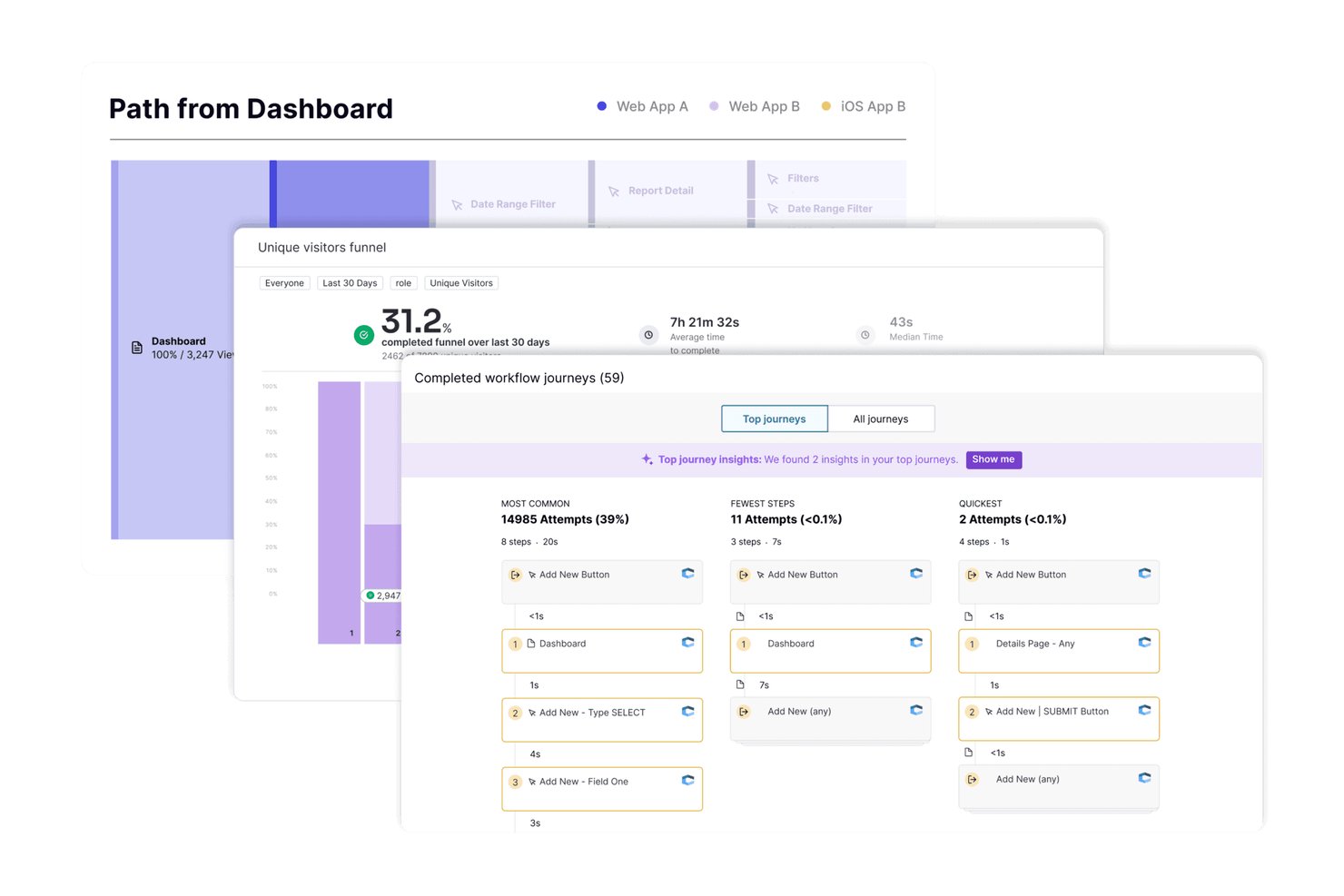
Pendo is a product experience platform that combines in-app analytics, behavioral segmentation, guided walkthroughs, in-app messaging, and user feedback tools to drive customer engagement directly within digital products.
Who Is Pendo Best For?
Pendo is a strong fit for customer success and product teams at SaaS companies looking to drive in-app engagement and feature adoption without relying on engineering resources.
Why I Picked Pendo
I picked Pendo as one of the best because its no-code guide builder lets my team launch in-app walkthroughs, tooltips, and NPS surveys without any engineering support. I've built post-NPS workflows that automatically route detractor feedback into recovery sequences while nudging promoters toward referral moments. Pendo's retroactive analytics also means I can analyze user behavior from day one, even for guides created after the initial install.
Pendo Key Features
- Session replay: View recordings of user sessions to analyze real customer interactions and behaviors in your product.
- Sentiment surveys: Launch in-app NPS, PMF, and CSAT surveys to collect user sentiment at key journey points.
- Orchestrate module: Build multi-step in-app journeys with triggers, delays, and conditional flows for more personalized engagement.
- Data sync integrations: Export event data to data warehouses and connect with systems like Salesforce and HubSpot via paid add-ons.
Pendo Integrations
Pendo offers native integrations with Salesforce and HubSpot, as well as data sync capabilities for Snowflake and Amazon Redshift. An API is available for custom integrations.
Pros and Cons
Pros:
- In-app NPS triggers automated detractor follow-up sequences
- Retroactive analytics captures behavior from day one
- No-code guide builder needs no engineering support
Cons:
- Session replay requires a paid add-on
- Weak cross-channel journey orchestration beyond in-app
Other Options
Here’s a few more that didn’t make the top list.
- MoEngage
Customer journey orchestration
- Sprout Social
For AI-driven social media engagement
- Qualtrics Customer Experience
For customer surveys
- twik
For chat automation
- Medallia
For real-time customer feedback insights
- Annex Cloud
For omnichannel loyalty and advocacy
- Front
For efficient team communication
- Zingle
Workflow automation
- PUG's Picnic
For gamified customer engagement & loyalty
- Birdeye
Competitive benchmarking
- Zendesk
For AI-powered customer engagement
- Zoho SalesIQ
Knowledge base creation
- Augeo
For enterprises


How I Evaluate Customer Engagement Platforms
Customer engagement platforms are how e-commerce brands and SaaS teams coordinate behavior-triggered messaging across email, SMS, push, and in-app from one place. I evaluate these tools in two layers: what earns a platform a spot on this list, and what actually separates one pick from another.
Core Functionality (Table Stakes for This List)
For customer engagement platforms, the core functionality I test and evaluate is:
- Omnichannel messaging: I check whether the platform coordinates email, SMS, push, and in-app messages from one place rather than siloing each channel separately.
- Customer data unification: Real-time profile building matters. I look for platforms that merge behavioral, transactional, and demographic data into a single user view.
- Audience segmentation: Dynamic segments that update based on live behavior are essential. Think "users who abandoned cart in the last hour" refreshing automatically.
- Journey orchestration: I evaluate the visual journey builder for branching logic, trigger flexibility, and cross-channel steps within a single automated workflow.
- Personalization: Beyond first-name merge tags, I look for dynamic content blocks, product recommendations, and send-time optimization driven by user data.
- Event tracking: The platform needs SDKs or APIs that capture real-time user actions like feature usage, page views, or purchase events without a heavy developer lift.
- A/B testing: I check whether you can test subject lines, content variants, channel selection, and journey paths with built-in statistical significance reporting.
- Campaign analytics: Engagement metrics at the campaign, journey, and channel levels are baseline. I look for conversion attribution and cohort-level drill-downs.
A tool has to deliver most of these capabilities to earn a spot on the list. From there, I consider what sets each tool apart.
Standout Features (What Separates the Picks)
When selecting customer engagement platforms, I look for AI-driven capabilities like predictive segmentation and next-best-action recommendations that add true intelligence to campaigns. Warehouse-native integrations—such as direct sync with Snowflake or BigQuery—matter for teams that want to activate rich data without heavy engineering. I also consider whether the platform supports multi-brand or multi-region operations with advanced permissioning for complex organizations.
What I Weigh Beyond Features
Implementation complexity is a big one. Some platforms require months of SDK integration and data pipeline work, so I evaluate how much engineering effort your team actually needs to go live. I also consider pricing models closely, since MAU-based billing plus per-message SMS costs can escalate fast at scale. Compliance readiness matters too—I check for SOC 2 Type II, GDPR tooling like automated DSARs, and data residency options, especially for teams with customers in the EU.
What are Customer Engagement Platforms?
Customer engagement platforms (CEPs) are tools that support customer engagement by enabling businesses to connect with customers across multiple channels in a consistent, personalized, and timely way. They help unify communication, automate interactions, and track behavior to support better customer experiences and stronger relationships.
How Does a Customer Engagement Platform Work?
A customer engagement platform connects customer data with the channels you use to communicate with them. In practice, the process usually looks like this:
1. Collect customer data → Behavior, transactions, support history, preferences, and other signals enter the platform.
2. Build customer profiles → The platform connects those signals to create a more complete view of each customer.
3. Identify audiences or triggers → Customers can be segmented by attributes or behavior, or enter journeys when something happens.
4. Deliver interactions → Messages and experiences are delivered through channels such as email, SMS, push notifications, in-app messaging, or chat.
5. Measure the response → Engagement, conversions, retention, and other outcomes feed back into the platform to inform future interactions.
Sales Engagement vs. Customer Engagement Platforms
The main difference is who you’re engaging and at what stage of the relationship. Sales engagement platforms primarily help sales teams communicate with prospects and move opportunities toward a sale, while customer engagement platforms manage interactions across the broader customer lifecycle.
| Comparison Point | Sales Engagement Platform | Customer Engagement Platform |
|---|---|---|
| Primary audience | Prospects and leads | Prospects and existing customers |
| Primary goal | Generate responses and move deals forward | Build engagement, retention, and customer value |
| Common users | SDRs, BDRs, and sales teams | Marketing, CX, customer success, and lifecycle teams |
| Typical channels | Email, phone, LinkedIn, SMS | Email, SMS, push, in-app, chat, WhatsApp |
| Core workflows | Prospecting, outreach sequences, follow-ups | Customer journeys, personalization, lifecycle messaging |
| Typical metrics | Replies, meetings, opportunities, pipeline | Engagement, conversion, retention, churn, CLV |
There is some overlap, particularly around email, SMS, automation, and personalization. The deciding factor is usually the lifecycle stage: if your main goal is turning prospects into customers, look toward sales engagement software; if you’re managing engagement across acquisition, onboarding, retention, and loyalty, a customer engagement platform is the better fit.
Which Customer Engagement Platform Fits Your Business?
The best platform depends on how you engage customers, not just how many features it offers. Use your business model and primary communication channels to narrow the field.
| Use Case | Best Fit For | Channels to Prioritize | What to Look For | Examples From This List |
|---|---|---|---|---|
| Ecommerce | Online retailers and DTC brands | Email, SMS, push | Purchase data, abandoned-cart journeys, product recommendations, loyalty integrations | Annex Cloud, twik, Tremendous, Birdeye |
| Mobile-first | Apps, marketplaces, and digital services | Push, in-app, SMS, WhatsApp | Real-time behavioral triggers, mobile journeys, deep linking, location/contextual messaging | Braze, MoEngage, Netmera, Pendo, UserGuiding |
| Conversational engagement | Businesses with high-touch customer interactions | Live chat, WhatsApp, SMS | Two-way messaging, conversation history, routing, automation, human handoff | Front, Tidio, Zendesk, Zoho SalesIQ, Zingle, Sprinklr Service |
| All-in-one / mid-market | Growing businesses consolidating engagement tools | Email, SMS, chat, web | Multi-channel automation, segmentation, CRM integrations, reporting | Creatio CRM, SurveySparrow, Alchemer, Sprout Social, Augeo |
| Enterprise omnichannel | Large businesses with complex customer journeys | Email, SMS, push, WhatsApp, web, app | Journey orchestration, governance, advanced personalization, scale, data integrations | Qualtrics Customer Experience, Medallia, PUG's Picnic |
How to Implement a Customer Engagement Platform
A successful rollout depends on getting your customer data, channels, and workflows in order before you start automating journeys. Use this checklist to plan the implementation:
| ✓ | Before going live with your customer engagement platform… |
|---|---|
| ☐ | Define your first use cases. Start with a few high-value journeys, such as onboarding, cart recovery, renewals, or re-engagement. |
| ☐ | Audit your customer data. Identify which CRM, product, support, ecommerce, and behavioral data the platform needs and resolve major gaps or duplicates. |
| ☐ | Connect your core systems. Set up integrations and confirm customer identities and events are syncing correctly between platforms. |
| ☐ | Set channel rules and permissions. Confirm consent, opt-outs, frequency limits, and regional requirements before activating email, SMS, push, or WhatsApp. |
| ☐ | Build and test your journeys. Check triggers, segmentation, personalization, channel handoffs, and fallback paths before sending to customers. |
| ☐ | Set your baseline metrics. Record current conversion, retention, engagement, or service metrics so you can measure the platform’s impact later. |
| ☐ | Roll out gradually. Launch with a limited audience or journey, fix issues, and expand once the data and workflows are working as expected. |
How to Choose a Customer Engagement Platform
It’s easy to get bogged down in long feature lists and complex pricing structures. To help you stay focused as you work through your unique software selection process, here’s a checklist of factors to keep in mind:
| Factor | What To Consider |
|---|---|
| Scalability | Ensure the platform can grow with your business. Check if it handles increased customer interactions without compromising performance. |
| Integrations | Look for seamless integration with your existing systems like CRM and email marketing tools to streamline processes. |
| Customizability | Your team should be able to tailor the platform to fit your specific workflows and branding needs. |
| Ease of Use | Opt for a user-friendly interface that reduces training time and boosts productivity for your team. |
| Budget | Evaluate the total cost, including hidden fees, to ensure it aligns with your financial plan. |
| Security Safeguards | Verify robust security measures to protect sensitive customer data and comply with industry regulations. |
| Support Options | Choose a platform that offers reliable customer support, including live chat, phone, or email assistance. |
| Analytics | Ensure it provides comprehensive analytics to track engagement and make data-driven decisions. |
Trends for Customer Engagement Platforms in 2026
Customer engagement platforms are evolving to meet the dynamic needs of businesses and their customers. Here are some key trends to watch in 2026.
- AI That Can Take Action: AI is moving beyond generating responses and recommendations. Customer engagement platforms are increasingly using it to handle routine requests, make decisions based on customer context, and complete multi-step actions—with humans stepping in where needed
- Conversations That Carry Across Channels: Customers expect to move between chat, email, SMS, voice, and other channels without starting over. Platforms are getting better at carrying customer history and context between those interactions, making omnichannel engagement feel like one continuous conversation.
- Real-Time Customer Data: The emphasis is shifting from simply collecting customer data to making it usable immediately. Unified, continuously updated customer profiles can help teams respond to behavior as it happens rather than relying on delayed segments and batch updates.
- Two-Way Engagement: Customer engagement is becoming less campaign-driven and more conversational. Customers increasingly expect brands to respond to them, but many businesses still struggle to support reliable two-way interactions across channels.
- More Focus on AI Governance and Trust: As AI takes on more customer-facing work, data quality, privacy, permissions, explainability, and oversight matter more. For buyers, the question is increasingly not just “Does this platform have AI?” but “Can we trust it with customer interactions and data?”
Features of Customer Engagement Platform
When selecting a customer engagement platform, keep an eye out for the following key features:
- Omnichannel communication: Connect with your customers wherever they are—be it email, chat, social media, or SMS. This feature makes it easy for you to have seamless conversations, no matter which channels your customers prefer.
- Personalization tools: Tailor your messages, offers, and interactions based on each customer’s behaviors and preferences. Personalization makes your outreach feel thoughtful rather than generic, turning simple contact into meaningful engagement.
- Automated workflows: Set up triggers and actions so that repetitive tasks—like sending welcome emails or following up on recent purchases—happen without your continual input. This saves you time and keeps your communication timely.
- Unified customer profiles: Access a 360-degree view of each customer with all their data, interactions, and history in one place. This helps you really understand your audience and respond to them as individuals, not just another entry on a spreadsheet.
- Segmentation and targeting: Easily group customers based on demographics, behaviors, or history. This lets you craft campaigns that actually resonate, instead of blasting out the same generic message to everyone.
- Real-time analytics and reporting: Dive into up-to-the-minute engagement stats to see what’s working (and what’s not). These insights help you make smarter decisions and fine-tune your approach without playing the guessing game.
- Integration capabilities: Connect seamlessly with your existing CRM, marketing, and analytics tools. Integration means you won’t be jumping between tabs or duplicating data—everything works smoothly together.
- Feedback and survey tools: Gather customer opinions and experiences directly through your platform. This feature empowers you to act on real feedback, rather than assumptions, and show your audience you’re listening.
Common Customer Engagement Platform AI Features
Beyond the standard customer engagement platform features listed above, many of these solutions are incorporating AI with features like:
- Predictive analytics: Use AI to analyze patterns in customer data and anticipate future behaviors or needs. This lets you proactively reach out with offers or support before your customers even ask.
- AI-powered chatbots: Provide instant, 24/7 customer support by automatically responding to common questions and issues. These bots free up your team for more complex interactions and ensure customers always get quick answers.
- Natural language processing (NLP): Understand and interpret customer messages automatically, even if they’re misspelled or phrased uniquely. NLP helps you respond more intelligently and create more natural interactions.
- Sentiment analysis: Detect the emotions behind customer messages using AI, whether someone is happy, frustrated, or confused. This lets you prioritize responses or escalate issues to a human when needed, showing customers you truly care.
- Content recommendation engines: Dynamically suggest products, articles, or resources to customers based on their behavior and preferences. You guide them to what’s most relevant, making their experience smoother and more personalized.
Benefits of Customer Engagement Platforms
The benefits of customer engagement platforms can be significant for businesses looking to improve their interactions with customers. Here are the primary benefits that potential buyers should consider:
- Enhanced Customer Experience: Provides personalized and consistent communication across all channels, improving overall customer satisfaction.
- Increased Efficiency: Automates repetitive tasks and workflows, allowing your team to focus on strategic activities.
- Data-Driven Decisions: Delivers real-time analytics and insights, enabling informed decision-making and strategy adjustments.
- Improved Customer Retention: Builds stronger relationships through targeted engagement, leading to higher customer loyalty and retention rates.
- Scalability: Adapts to your growing business needs, ensuring continuous support and engagement as your customer base expands.
Using a customer engagement platform can transform how you interact with your customers, making your business more efficient and customer-focused. These benefits highlight the value and impact of implementing such a platform.
Costs And Pricing Of Customer Engagement Platforms
Customer engagement platforms typically offer a range of pricing plans to accommodate businesses of various sizes and needs. Understanding these plans and their costs can help you make an informed decision. Here are the common plan options and their pricing details.
| Plan Type | Average Price | Common Features |
|---|---|---|
| Free | $0 | Basic engagement tools, limited channels, minimal analytics |
| Basic | $50/month | Core features, omnichannel communication, basic automation |
| Standard | $150/month | Advanced automation, customer journey mapping, integrations |
| Professional | $300/month | Real-time analytics, AI-powered insights, segmentation |
| Enterprise | Custom Pricing | Full feature set, dedicated support, advanced security |
Frequently Asked Questions
Common questions about customer engagement platforms:
What does customer engagement mean?
Why is customer engagement important?
What is the difference between a CRM and a customer engagement platform?
Is compliance ensured in customer engagement platforms?
What should I look for when comparing customer engagement software?
How Should You Measure the ROI of a Customer Engagement Platform?
The Takeaway
The right customer engagement platform depends on your business model, team size, and the channels your customers actually use.
- Small teams: Prioritize easy setup, straightforward automation, and strong support for the few channels you use most.
- Mid-market teams: Look for deeper segmentation, multi-channel journeys, integrations, and reporting that can support growing customer volumes.
- Enterprise teams: Focus on scalability, governance, unified customer data, advanced personalization, and complex journey management.
- Ecommerce businesses: Prioritize email and SMS, purchase-based triggers, abandoned-cart journeys, product recommendations, and retention tools.
- Mobile-first businesses: Look for strong push and in-app messaging, real-time behavioral triggers, and mobile journey capabilities.
You don’t need the platform with the longest feature list. Choose the one that best matches how your customers engage today while giving you enough room to expand your channels and journeys as your needs grow.
If you want to learn about other software that can help your business grow, subscribe to The CX Lead newsletter.