
24 Best CX Software Platforms Compared For 2026

12 Best CX Software Shortlist
After a meticulous review, I’ve curated this list of the top 12 CX software, each selected to tackle your unique challenges head-on.


With so many different customer experience management solutions available, figuring out which is right for you is tough. You know you want to manage and standardize your customer journey, but need to figure out which tool is best. I've got you! In this post I'll help make your choice easy, sharing my personal experiences using dozens of different CX tools with large teams and projects, with my picks of the best CX software available.
What Is a CX Software?
CX software, or customer experience software, is a digital tool that helps you improve interactions with your customers. Industries of all types use these platforms to manage, analyze, and optimize every touchpoint along the customer journey. Small businesses and large-scale enterprises alike can use these tools to build strong customer relationships, enhance satisfaction, and drive loyalty.
By capturing and analyzing customer feedback, CX software aids in understanding customer needs, ensuring prompt resolution of pain points, and personalizing interactions. This strategic use of technology ultimately influences customer perception of a brand, playing a crucial role in business growth and sustainability.
Compare Specs
| Tool | Best For | Trial Info | Price | ||
|---|---|---|---|---|---|
| 1 | Best for large-scale feedback analysis | Free demo available | Pricing upon request | Website | |
| 2 | Best for personalized customer surveys | Free trial + free plan + free demo available | From $39/month (billed annually) | Website | |
| 3 | Best AI-driven customer insights | Free demo available | Pricing upon request | Website | |
| 4 | Best AI support agent | 7-day free trial available | From $24.17/month (billed annually) | Website | |
| 5 | Best for end-to-end customer experiences | Free plan available | From $25/user/month (billed annually) | Website | |
| 6 | Best for dynamic mind maps | 7-day free trial + free plan available | From $9/month (1 user, billed annually) | Website | |
| 7 | Best for real-time customer health scoring | Free trial available | From $115/month | Website | |
| 8 | Best for automating repetitive frontline support | Free plan available | From $16/month (billed annually) | Website | |
| 9 | Best for intuitive user onboarding | Free plan + free demo available | From $174/month (billed annually) | Website | |
| 10 | Best for conversational surveys | Free 14-day trial + free demo available | Pricing upon request | Website |


-

SupportYourApp
Visit WebsiteThis is an aggregated rating for this tool including ratings from Crozdesk users and ratings from other sites.4.7 -
Freshdesk
Visit WebsiteThis is an aggregated rating for this tool including ratings from Crozdesk users and ratings from other sites.4.4 -
Hiver
Visit WebsiteThis is an aggregated rating for this tool including ratings from Crozdesk users and ratings from other sites.4.6




Overviews Of The 12 Best CX Software

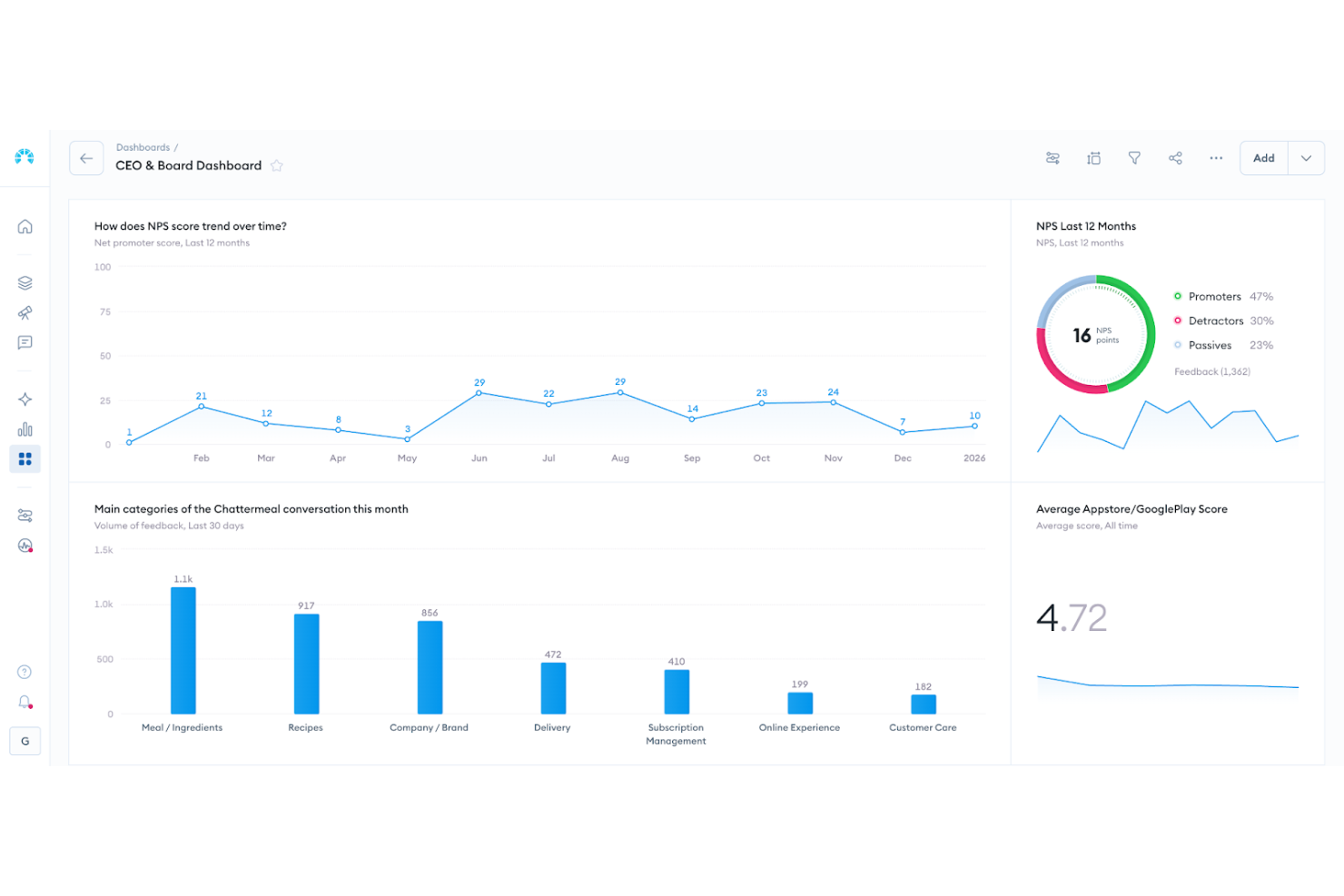
Chattermill is a voice of customer analytics platform built for businesses looking to strengthen their customer experience strategies. It supports organizations that want to unlock the full value of customer feedback through AI-driven analysis. By centralizing feedback from surveys, reviews, support interactions, and other channels, Chattermill helps teams surface key themes, detect emerging issues, and ensure important insights don’t get lost in fragmented data.
Why I Picked Chattermill
I picked Chattermill because it excels in transforming customer feedback into actionable insights, a crucial aspect for any CX software. Its AI-powered analytics stand out, allowing your team to categorize and interpret vast amounts of feedback efficiently. Furthermore, its ability to detect trends and pinpoint issues affecting business metrics like NPS and CSAT ensures you stay ahead of customer needs and expectations. This focus on actionable insights is vital for those looking to enhance their customer experience framework.
Chattermill Key Features
In addition to its powerful analytics, Chattermill offers several other features that enhance its utility as a CX tool.
- Customer Feedback Analytics: This feature allows you to centralize feedback from various channels into a single platform for comprehensive analysis.
- Product Experience Analytics: Gain insights into how customers interact with your products, helping you identify areas for improvement.
- Support Data Analytics: Analyze customer support interactions to uncover trends and areas that require attention.
- Social CX Analytics: Monitor and analyze social media interactions to understand customer sentiments and engagement.
Chattermill Integrations
Integrations include Zendesk, Trustpilot, Qualtrics, Intercom, Salesforce, HubSpot, Slack, Google Analytics, Shopify, and Freshdesk.
Pros and Cons
Pros:
- Industry specific sentiment models
- AI powered theme tagging
- Real time sentiment tracking
Cons:
- May require enterprise onboarding
- Pricing not publicly available


Sogolytics is a robust online survey and feedback management platform designed to help organizations gather, analyze, and act on feedback from customers, employees, and other stakeholders. With an intuitive interface and powerful analytics, Sogolytics makes it easy to create customized surveys that capture critical insights.
Why I Picked Sogolytics:
SogoCX, part of the Sogolytics platform, focuses on improving customer satisfaction and loyalty by providing an interactive dashboard that tracks customer interactions and feedback across multiple touchpoints. It allows businesses to identify trends, measure key drivers of customer sentiment, and take proactive steps to enhance the overall customer journey. Features like automated reminders and personalized survey invitations help increase response rates, ensuring that feedback is both plentiful and representative.
Standout Features & Integrations:
Sogolytics's advanced survey design capabilities include features such as customizable themes, advanced branching, and skip logic, allowing for highly personalized and engaging surveys. Furthermore, its powerful analytics engine provides real-time reporting, conditional formatting, and cross-tab analysis to help users decipher complex data.
Integrations include Salesforce, Microsoft Office, Google Workspace, Zapier, Tableau, HubSpot, and Slack.
Pros and Cons
Pros:
- Multi-channel distribution
- Good data collection and analysis features
- Wide range of advanced question types
Cons:
- Some advanced analytics require a deeper level of technical knowledge
- Free version may be too basic for some users


Unwrap is an advanced customer intelligence platform designed to transform how businesses gather and utilize customer feedback. It is particularly appealing to industries such as retail, travel, and software, where understanding customer sentiments can directly impact product development and customer satisfaction.
Why I Picked Unwrap
I picked Unwrap for its ability to deliver proactive insights with AI that enhance customer experience management. One standout feature is the Auto Tagger, which automatically organizes feedback into categories, saving your team time and reducing manual errors. Additionally, the natural language query Assistant allows you to extract information quickly without navigating complex systems, making it easy to get answers on the fly. These features align perfectly with your needs for a data-driven approach to understanding customer sentiments and improving service delivery.
Unwrap Key Features
In addition to the features mentioned above, Unwrap offers:
- Customizable Dashboards: These allow your team to visualize data in ways that best suit your business needs, making it easier to track key performance indicators.
- Real-time Alerts: This feature ensures you are immediately notified of critical feedback, enabling prompt action when necessary.
- Responder Tool: Facilitates seamless customer engagement by allowing you to address feedback directly from the platform.
- SupportIQ: Provides a comprehensive overview of performance metrics, helping you evaluate and improve customer support efforts.
Unwrap Integrations
Integrations include Salesforce, Zendesk, Intercom, Slack, HubSpot, Mailchimp, Google Analytics, Asana, Trello, and Jira.
Pros and Cons
Pros:
- Automates categorization of unstructured feedback into meaningful groups with NLP.
- AI tools surface emerging trends without manually scanning large datasets.
- Sentiment analysis helps teams quantify how users feel over time.
Cons:
- Occasional gaps in native platform integrations compared to competitors.
- Feedback taxonomy setup may require extra effort to customize.


Tidio is a customer experience platform that combines live chat, AI-powered automation, and multichannel communication tools to help businesses deliver faster, more personalized support. It enables real-time conversations with customers across various channels like websites, email, and social media, all managed from a single dashboard.
Why I picked Tidio:
I like its Lyro AI agent, which can handle the majority of routine customer inquiries using natural language processing and your existing support content. It understands context and intent, providing accurate responses and escalating complex issues to human agents when necessary. Additionally, Tidio has a visual automation builder that lets you create custom chatbot workflows without coding. With over 40 pre-designed templates, you can set up automated responses for common scenarios like cart abandonment or lead qualification. These flows can be triggered by user behavior, such as page visits or scroll depth, enabling proactive engagement.
Standout Features & Integrations:
Other features include a unified inbox that consolidates messages from live chat, email, and social media platforms, allowing your team to manage all customer interactions in one place. The platform also offers real-time visitor tracking, enabling you to see which pages customers are browsing and initiate chats based on their behavior.
Integrations include Shopify, WordPress, Squarespace, WIX, Adobe Commerce, BigCommerce, WooCommerce, Google Analytics, Mailchimp, HubSpot, and Zendesk.
Pros and Cons
Pros:
- Multichannel support, including for chats, emails, and social media
- Lyro AI handles a significant portion of customer inquiries
- Provides insights into team performance and customer satisfaction
Cons:
- Many automation features limited to higher tier plans
- Limitations when integrating with certain third-party tools


Hiver is a modern AI-powered customer service software designed to enhance your team's ability to deliver exceptional customer experiences. By providing an array of features tailored for managing customer inquiries and interactions, Hiver helps streamline communication and improve response times.
Why I Picked Hiver:
With Hiver, businesses can manage customer experience end-to-end, from the first interaction to resolution and feedback. You can manage customer queries from all channels, including email, live chat, WhatsApp, voice, SMS, and social media, all from a single, unified inbox. A built-in knowledge base lets you create and publish help articles so customers can find answers on their own. To measure how well your team is doing, Hiver also includes CSAT surveys that help you track customer satisfaction and identify areas for improvement.
Standout Features & Integrations:
Hiver's most standout feature is Hiver AI, which embeds AI capabilities across all touchpoints of the customer support journey. For example, AI Copilot helps agents respond to customers through contextual answers, reply drafts, and more, while AI Agents help you set up autonomous workflows to handle FAQs, follow-ups, and other actions. It also has AI Insights that use conversations to forecast issues and risks.
Hiver integrates with Aircall, Asana, Jira, Okta, QuickBooks, Salesforce, Slack, WhatsApp, and Zapier and 100+ other platforms.
Pros and Cons
Pros:
- AI features embedded at all stages of customer support journey
- Customer support from real humans available 24/7 via chat or email, across all plans (including free one)
- Strong internal collaboration features
Cons:
- Compared to some other platforms, Hiver offers fewer third party integrations
- Mobile experience isn’t as strong as the desktop one
New Product Updates from Hiver

Hiver Introduces AI-Powered Task Creation
Hiver introduces AI-powered task creation for email workflows. This update enables users to extract key details, summarize requests, and trigger actions automatically from incoming emails. For more information, visit Hiver’s official site.

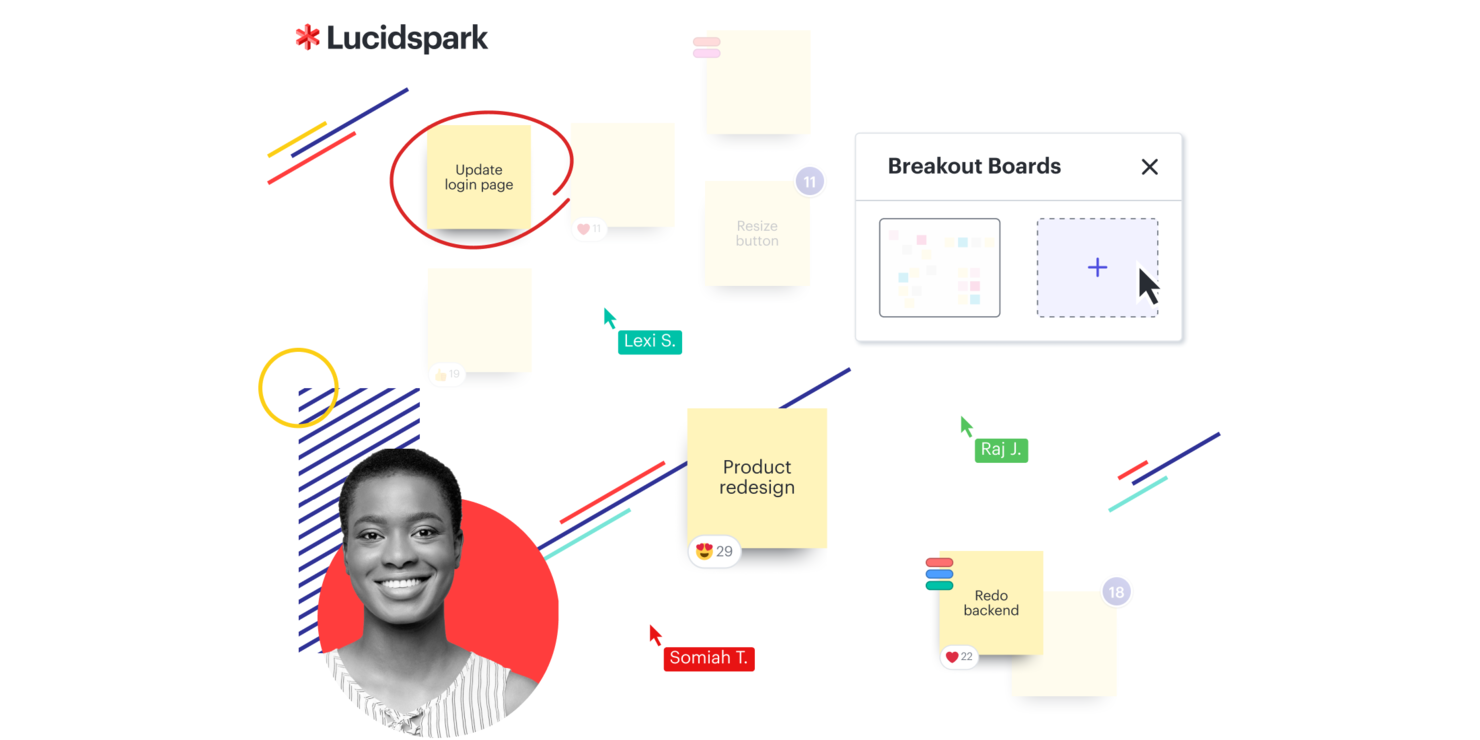
Lucidspark is a virtual whiteboard built to support team collaboration and idea organization. For businesses focused on improving customer experience, it supports brainstorming, project planning, and agile development. The platform helps teams move from ideation to execution while addressing common challenges in collaboration and decision-making.
Why I Picked Lucidspark
I picked Lucidspark because it supports the kind of collaboration needed for customer experience improvement. Its infinite canvas lets teams map ideas and strategies visually, which helps keep communication clear. Dynamic mind maps make it easy to organize and connect thoughts during ideation. Integrations with tools like Slack help keep everyone aligned and informed, reducing friction in project management.
Lucidspark Key Features
In addition to its collaborative foundation, Lucidspark offers several other features that enhance its utility as a CX software:
- Facilitator Controls: These tools allow you to manage discussions and workshops effectively, ensuring everyone stays on track.
- Lucid Cards: This feature lets you organize and prioritize tasks, making project management more streamlined.
- Dynamic Tables: You can use these to create structured, visual representations of data, aiding in decision-making.
- AI Capabilities: These enhance brainstorming sessions by suggesting ideas and connections, sparking creativity.
Lucidspark Integrations
Integrations include Microsoft Graph, Slack, Google Sheets, ServiceNow, Microsoft Teams, Google Drive, Google Meet, Okta, Jira, and Asana.
Pros and Cons
Pros:
- Integrates with Google Drive and Jira
- Real-time collaboration for teams
- Kanban workflow templates available for teams
Cons:
- Annual billing required for access
- Team plans start from $10 monthly per user

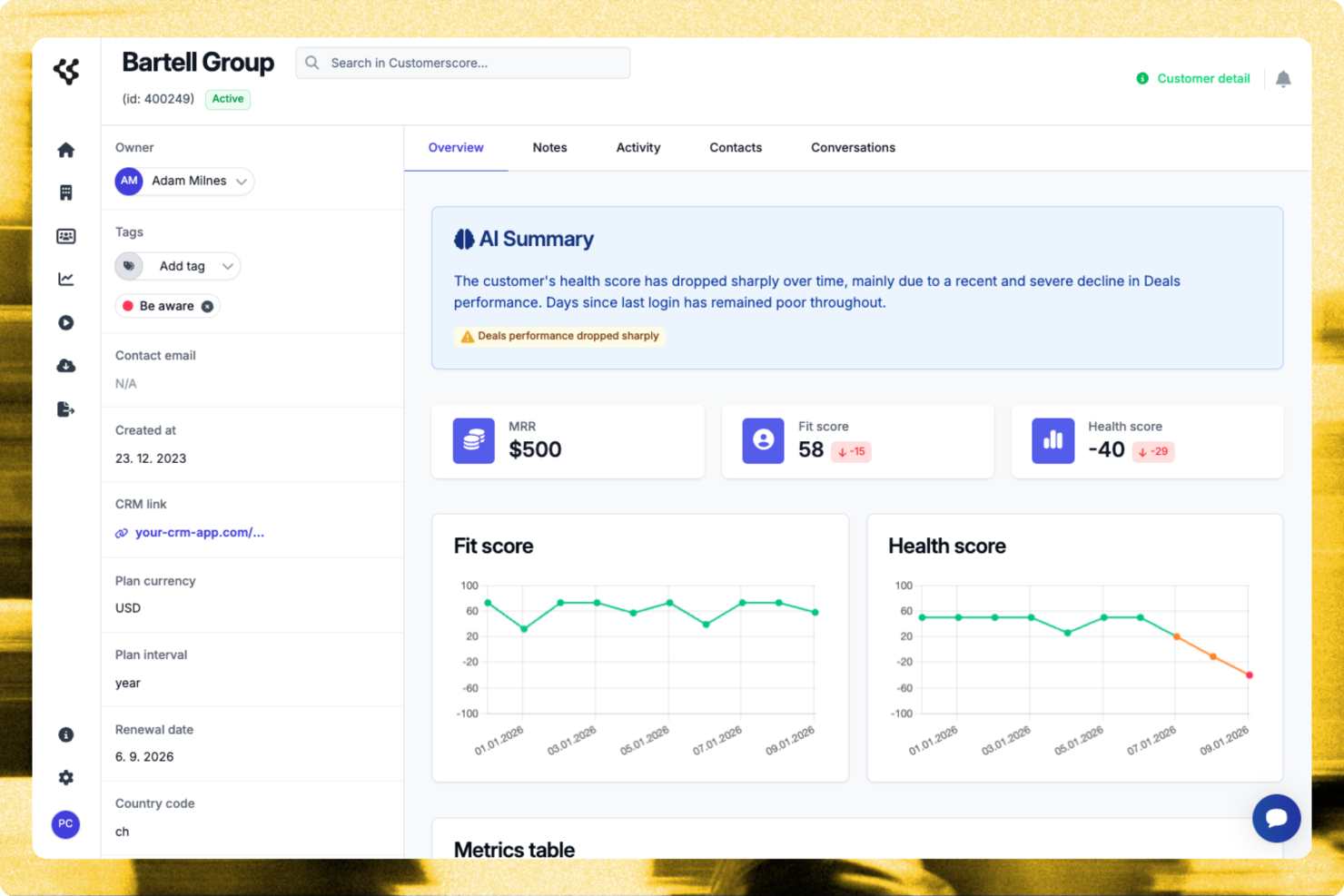
For those managing SaaS businesses and seeking to optimize customer relationships, Customerscore.io offers a focused solution to reduce churn and increase upsell opportunities. Designed with customer success teams in mind, this platform delivers actionable insights into customer behaviour, helping you identify growth-ready accounts and potential churn risks. By integrating with tools like Stripe and HubSpot, Customerscore.io enables seamless data consolidation, allowing your team to make informed decisions that drive retention and revenue growth.
Why I Picked Customerscore.io
I picked Customerscore.io for its unique ability to provide real-time customer health scoring using AI, a feature that stands out in the realm of cx software. This tool excels by offering automated workflows through its playbooks, enabling you to engage with customers proactively based on their behaviour. Additionally, the platform's predictive analytics identifies churn risks early on, allowing your team to take timely actions to retain valuable customers. By focusing on these aspects, Customerscore.io addresses the critical need for actionable insights and efficient customer management in today's competitive SaaS environment.
Customerscore.io Key Features
In addition to its real-time AI-driven customer health scoring, Customerscore.io offers several other valuable features:
- Visual Dashboards: These provide a comprehensive view of customer status, churn risk, and upsell readiness, enabling your team to make data-driven decisions.
- Automated Campaigns: Manage over 1,000 customers with automated workflows, saving time and resources while maintaining personalized engagement.
- Churn Risk Alerts: Receive early warnings about potential churn, allowing your team to take proactive measures to retain customers.
- Growth Opportunity Identification: Quickly identify accounts ready for upsell, helping your team maximize revenue potential.
Customerscore.io Integrations
Integrations include Stripe, HubSpot, Salesforce, Google Analytics, Intercom, Zendesk, Mailchimp, Slack, Segment, and Mixpanel.
Pros and Cons
Pros:
- Strong native CRM integrations
- Actionable upsell opportunity insights
- Clear churn risk visibility
Cons:
- Learning curve for analytics
- Pricing not publicly disclosed


Quidget is an AI-powered chatbot designed to enhance customer support by automating repetitive frontline inquiries. It learns from your existing content, such as your website and FAQs, to provide accurate answers around the clock. This ensures your customers receive timely assistance without adding to your team's workload.
Why I picked Quidget:
One standout feature of Quidget is its human handoff capability. While it efficiently manages routine inquiries, Quidget recognizes when a question requires human intervention and escalates it to your team, ensuring customers receive the appropriate level of support.
Standout Features & Integrations:
I also like Quidget's support for over 45 languages. This feature allows your business to communicate effectively with a global audience without the need for additional language training. The platform also offers a no-code setup, enabling you to get it up and running in minutes without any coding knowledge.
Integrations include Euphoric.ai, Calendly, Zendesk, WhatsApp, and Slack.
Pros and Cons
Pros:
- Easy to set up and customize
- Handles numerous requests efficiently
- Convenient chatbot flow builder interface
Cons:
- Limited analytics features
- Could offer more direct integrations
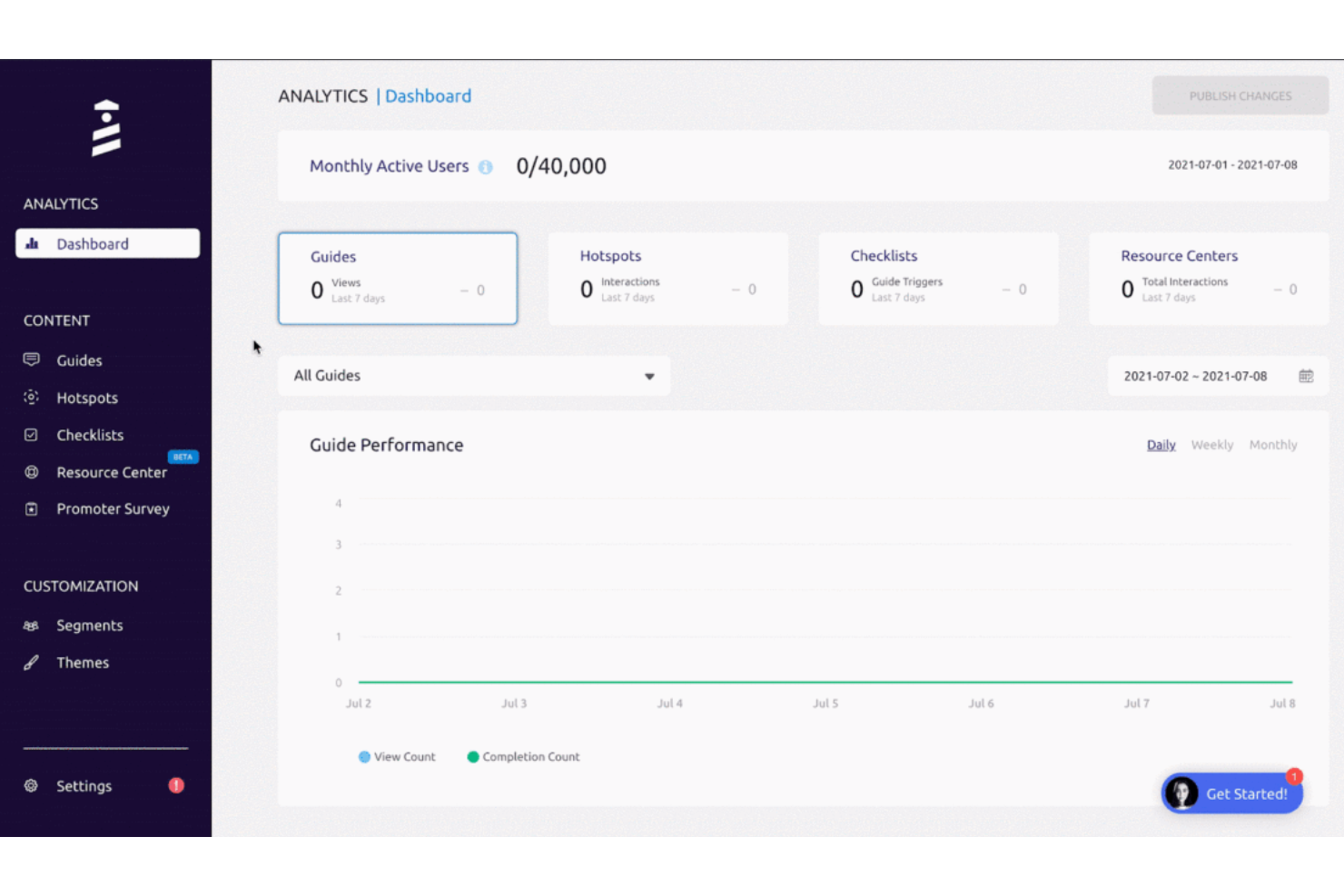
UserGuiding is a platform designed to assist businesses in crafting a personalized and engaging onboarding experience for their users. It seeks to improve how your audience interacts with your site or product by providing interactive elements that teach them about different product features and functions.
Why I Picked UserGuiding:
This platform is a unique CX software that focuses on the user's onboarding. Using UserGuiding's no-code features, you can craft intuitive user journeys that improve your customers' ability to use your product. You can even segment your audiences to tailor the onboarding user experience. The platform also comes with robust analytics, so you can evaluate the effectiveness of your support content.
Standout Features & Integrations:
UserGuiding offers product tours and onboarding checklists to lead customers through the product's features and functionalities. It also has in-app and NPS surveys to allow you to gather insights about user satisfaction, loyalty, and areas for improvement. You can even create your own resource center without any coding experience necessary.
UserGuiding integrates with Intercom, Segment, Slack, Google Analytics, Google Tag Manager, HubSpot, and more.
Pros and Cons
Pros:
- Collects feedback through in-app and NPS surveys.
- Flexible targeting with segmentation
- Create guides without the need for coding
Cons:
- Limited integrations
- Adjusting settings and customizing the look can be challenging


For businesses seeking to elevate their customer experience strategies, SurveySparrow provides an intuitive platform that transforms feedback into actionable insights. Whether you're in retail, healthcare, or any industry reliant on customer satisfaction, SurveySparrow can help you engage your audience more effectively. This tool is designed to address the challenge of collecting meaningful feedback and translating it into strategies that improve customer loyalty and business growth.
Why I Picked SurveySparrow
I picked SurveySparrow because it pairs conversational, one-question-at-a-time surveys, so you can manage your entire voice-of-customer strategy from one place. The platform's AI-driven insights via CogniVue provide businesses with the data needed to make informed decisions quickly. Additionally, the ticketing system helps in resolving customer issues promptly, ensuring that feedback is not just collected but acted upon effectively.
SurveySparrow Key Features
In addition to its conversational surveys and AI-driven insights, SurveySparrow also offers:
- NPS® Surveys: Gauge customer loyalty and satisfaction with Net Promoter Score surveys that are easy to deploy and analyze.
- Multi-Channel Distribution: Reach your audience through various channels, including email, social media, and SMS, to maximize survey participation.
- Reputation Management: Monitor and manage online reviews to build and maintain your brand's reputation effectively.
- White Label Surveys: Customize surveys with your branding to ensure a consistent and professional appearance.
SurveySparrow Integrations
Integrations include Slack, HubSpot, Salesforce, Mailchimp, Google Analytics, Microsoft Dynamics 365, Shopify, Stripe, Zendesk, and Intercom. SurveySparrow also offers API access for custom integrations, allowing you to tailor the platform to fit your specific needs.
Pros and Cons
Pros:
- Supports multiple question types for diverse feedback collection.
- Provides AI-driven insights for actionable decision-making.
- Offers easy sharing options across web, mobile, and email.
Cons:
- Mobile or offline survey coverage may require additional configuration in service-field scenarios.
- Limited data export options, affecting flexibility in reporting.

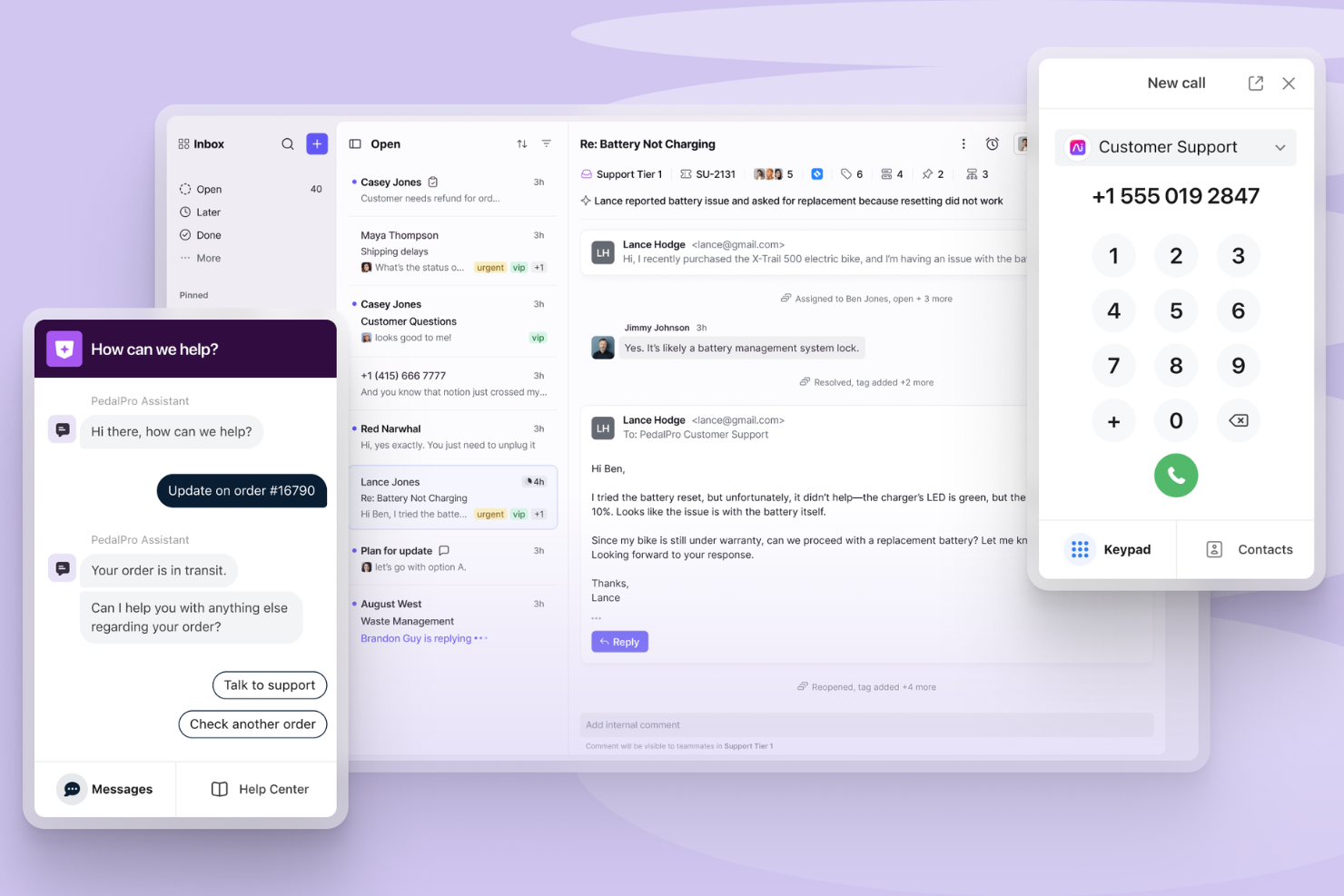
Front brings together customer conversations from email, chat, SMS, and social media into a single collaborative inbox. It’s designed for teams that need to manage high volumes of customer interactions while keeping internal communication organized and transparent. If you’re looking for a cx software solution that helps your team respond faster and work together on customer issues, Front offers a focused approach to shared inbox management and workflow automation.
Who Is Front Best For?
Front is a good fit for customer support and success teams at midsize to large businesses that need to manage high volumes of multi-channel customer communications collaboratively.
Why I Picked Front
For teams that need to coordinate across multiple departments, Front stands out with its AI-powered workflow capabilities. I picked Front because it uses AI to automatically triage, assign, and prioritize customer messages, which helps teams avoid bottlenecks and ensures the right people respond quickly. The platform’s collaborative inbox lets multiple teams work together on complex customer issues without losing context or duplicating work. Its AI-driven suggestions and automated routing make it especially useful for organizations managing high volumes of customer interactions across different channels.
Front Key Features
Some other features in Front that support customer experience teams include:
- Shared drafts and comments: Collaborate on replies and leave internal notes directly within customer conversations.
- Multi-channel inbox: Manage email, SMS, live chat, and social media messages from a single unified inbox.
- Analytics and reporting: Track team performance, response times, and customer interaction trends with built-in analytics tools.
- Customizable workflows: Set up rules and automations to match your team’s unique processes and escalation paths.
Front Integrations
Integrations include Salesforce, HubSpot, Asana, Slack, Microsoft Dynamics 365, Aircall, Twilio, ClickUp, Zendesk Sell, GitHub, Zoom, and more.
Pros and Cons
Pros:
- SLA tracking and reporting are built-in
- Omnichannel support includes email, chat, and SMS
- AI features automate complex customer workflows
Cons:
- Limited customization for ticket forms and fields
- Advanced AI features require higher-tier plans

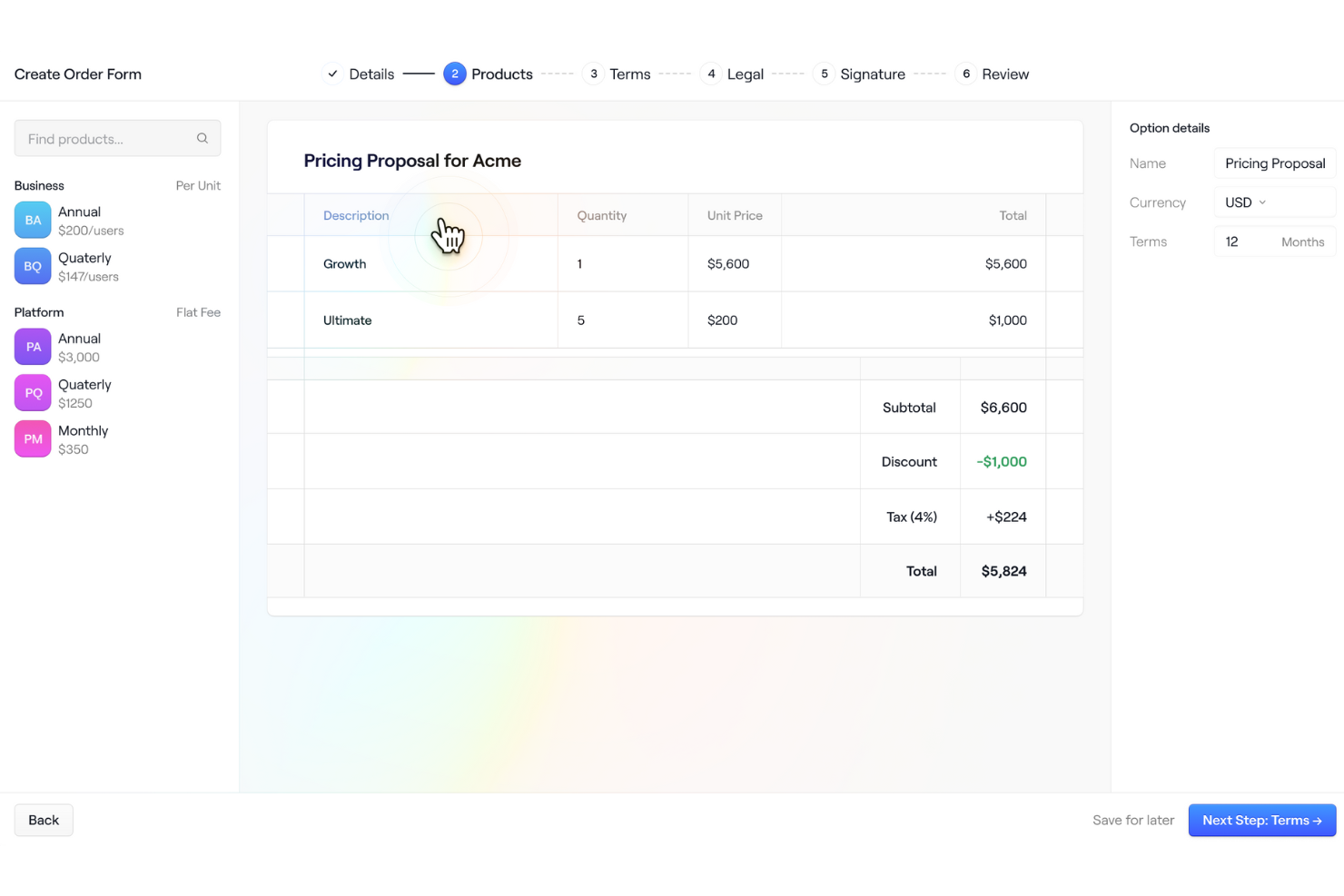
Dock is a sales and customer onboarding software that helps CX teams set new users up for success. The platform's client portals bring together documents, proposals, and other useful items for easy access.
Why I picked Dock:
I decided to include this software on my list not only because of its useful customer portals, but also because of its customizable templates for quotes, proposals, and order forms. Your team can standardize your processes and offer a more consistent customer experience by establishing your own templated documents.
Standout Features & Integrations:
Dock stands out for how quotes can be easily turned into signable order forms and the platform also facilitates approval features for custom orders, large deals, and discounts. After a deal closes, this information syncs with your CRM, providing better sales visibility across the organization.
Integrations include HubSpot, Salesforce, Slack, Zoom, Airtable, Pandadoc, Typeform, and more.
Pros and Cons
Pros:
- Wide range of templates for standardizing sales processes
- Engagement analytics to target the best leads
- Digital sales room for a unified customer experience
Cons:
- HubSpot and Salesforce integration only available on higher-tier plans
- Order forms are priced as an add-on to your existing plan
Other CX SoftwareOther CX Software
Below is a list of additional CX software that I shortlisted, but did not make it to the top 12. Definitely worth checking them out.
- Nextiva
For AI-powered customer experience management
- Uservoice
For gathering and analyzing customer feedback
- Salesforce Financial Services Cloud
For large-scale organizations needing diverse customer management tools
- ZOHO CRM Plus
For integrated customer experience management across various touchpoints
- Guru
For centralizing knowledge for CX teams
- Freshdesk
For improving self-service customer solutions
- Qualtrics CustomerXM
For robust data analytics
- HubSpot Service Hub
For integrating customer service with sales and marketing efforts
- Medallia Experience Cloud
For comprehensive customer journey mapping
- LiveAgent
For multichannel customer support management


Selection Criteria for CX Software
Having spent countless hours evaluating dozens of customer experience management software solutions, I can attest to the fact that not all tools are created equal. In my quest for the best, I was specifically looking for software that excelled in core functionality, key features, and usability. Below, I delve into these criteria in more detail.
Core Functionality
For any customer experience management tool, there are a few functions that should be non-negotiable:
- Customer Journey Mapping: The tool should allow you to visually represent the steps customers go through when engaging with your company.
- Feedback Collection: The ability to collect feedback from various channels such as emails, surveys, social media, etc., is crucial.
- Data Analysis: A robust analytics capability is necessary for making sense of the feedback data.
- Reporting: The tool should be able to generate comprehensive reports to share insights with your team.
Key Features
When selecting a customer experience management tool, there are specific features that make a real difference:
- Multi-Channel Support: This allows for the collection of feedback from various sources for a holistic view of the customer experience.
- Integration: The tool should seamlessly integrate with other software such as your CRM or helpdesk.
- Customizability: You should be able to tailor surveys, dashboards, and reports to suit your specific needs.
- Real-Time Alert: Immediate notifications for customer feedback can help you act promptly and resolve issues faster.
Usability
Finally, the user experience of the tool itself is a major consideration. Here's what I was looking for:
- Intuitive Interface: A good customer experience management tool should be easy to navigate, with a clean design and clearly marked functions.
- Quick Onboarding: The tool should allow for a quick setup process, with straightforward instructions and ideally, templates to get started faster.
- Scalability: The tool should be able to grow with your business, handling increased data volume without compromising performance.
- Reliable Support: Access to prompt and helpful customer support ensures any technical hitches do not disrupt your customer experience tracking.
Most Asked Questions Regarding CX Software
What are the benefits of using customer experience (CX) software?
Using CX software offers numerous advantages to businesses:
- Improved Understanding of Customers: By gathering and analyzing feedback, CX tools provide insights into what customers like or dislike about your services or products. This knowledge helps to improve offerings and ultimately enhance customer retention and satisfaction.
- Efficient Feedback Collection: CX software automates the process of gathering customer feedback across multiple channels, which saves time and increases the reach of your feedback efforts.
- Proactive Problem Solving: With real-time alerts, CX tools allow businesses to quickly identify and resolve issues before they escalate, thereby preventing customer dissatisfaction.
- Data-Driven Decision Making: The data and analytics provided by CX software aid in making informed, strategic business decisions.
- Enhanced Customer Loyalty: By prioritizing customer experience and making improvements based on customer feedback, businesses can increase customer loyalty and retention.
How much does CX software cost?
The cost of CX software varies significantly depending on the complexity of the tool, the number of users, and the specific features required. Some platforms offer free versions, but these typically come with limitations.
What are the typical pricing models for CX software?
Most CX software uses either a per-user/month pricing model or a flat rate/month model. With per-user/month pricing, you pay a specific amount for each user who will be using the software. Flat rate pricing, on the other hand, means you pay a single monthly fee for the software, regardless of the number of users.
What's the typical range of pricing for CX software?
Prices for CX software can start from as low as $10/user/month and can go up to several hundred dollars per month for more advanced, enterprise-level solutions.
What is the cheapest and most expensive CX software?
Among the tools listed, Freshdesk offers one of the cheapest starting prices at $15/user/month. On the other end of the spectrum, Qualtrics CustomerXM is one of the more expensive options, with pricing available only upon request due to its highly customizable nature.
Are there any free CX software options?
Yes, some CX software offers free options. For example, Freshdesk provides a free tier with limited functionality. Wootric also offers a free plan but with limitations on the number of surveys you can send per month.
More Help Desk Software Reviews
- Help Desk Software
- Helpdesk Knowledge Bases
- Customer Service Ticketing Software
- Online Help Desk Software
Summary
To conclude, choosing the right Customer Experience (CX) software depends significantly on the specific needs of your business, and there's no one-size-fits-all solution. Each software comes with a unique set of features and capabilities aimed at different use cases, so understanding your own requirements is key.
Key Takeaways
- Assess Your Needs Start by identifying the core functionalities that your business requires. This could be anything from sentiment analysis to ticketing systems or omnichannel support. The best CX software for you will effectively address these needs.
- Consider Usability While features are important, the software should also be easy to use. A good CX platform will have an intuitive user interface and reliable customer support, ensuring you can make the most of the tool without unnecessary friction.
- Think about Future Scalability Finally, consider the scalability of the software. As your business grows, your CX needs might evolve. The software you choose should be able to scale with your business and adapt to changing customer expectations.
What Do You Think?
If you know of any other CX tools that you believe should be on this list, I'd love to hear your thoughts and experiences. Your feedback is invaluable in helping to make this guide as comprehensive and helpful as possible, so please don't hesitate to get in touch!