
18 Best Free Survey Tools Of 2026 For Collecting Feedback

10 Best Free Survey Tools Shortlist
Here's my pick of the 10 best software from the 18 tools reviewed.


Navigating the world of survey tools can be overwhelming. With so many options, you might wonder which ones truly meet your needs without breaking the bank. That's where free survey tools come in, offering practical solutions for gathering insights without the hefty price tag.
In my experience, I've found that these tools can alleviate your team's challenges by providing easy data collection and analysis. They help you understand your audience better, make informed decisions, and save valuable time.
In this article, I'll share my top picks for the best free survey tools. You'll discover features, benefits, and what sets each tool apart, helping you choose the right fit for your team.
Why Trust Our Software Reviews
Best Free Survey Tools Summary
This comparison chart summarizes basic details about each of my top survey tools that offer free plans. View the pertinent details side-by-side to help you find the best tool for your budget and business needs.
| Tool | Best For | Trial Info | Price | ||
|---|---|---|---|---|---|
| 1 | Best for in-depth surveys | Free trial + free plan + free demo available | From $39/month (billed annually) | Website | |
| 2 | Best for creating simple surveys | Free plan available | From $15/month (billed annually) | Website | |
| 3 | Best for creating engaging surveys | Free plan available | From $32/month | Website | |
| 4 | Best survey tool for analytics | 30-day free trial + free plan available | Pricing upon request | Website | |
| 5 | Best survey tool with custom conditional logic | Free with Google Account | From $7/user/month (billed annually) | Website | |
| 6 | Best for a wide range of question types | Free plan available | From $7.42/month (billed annually) | Website | |
| 7 | Best for unlimited surveys across 30+ languages | Free plan available | From $20/month | Website | |
| 8 | Best for collecting and exporting feedback from various sources | 30-day free trial + free plan available | From $25/month | Website | |
| 9 | Best for privacy-focused surveys | Free plan available | From $20/month | Website | |
| 10 | Best for a large collection of pre-built survey templates | Free plan available | From $19.50/month (billed annually) | Website |
-

SupportYourApp
Visit WebsiteThis is an aggregated rating for this tool including ratings from Crozdesk users and ratings from other sites.4.7 -
Freshdesk
Visit WebsiteThis is an aggregated rating for this tool including ratings from Crozdesk users and ratings from other sites.4.4 -
Zendesk
Visit WebsiteThis is an aggregated rating for this tool including ratings from Crozdesk users and ratings from other sites.4.3





Best Free Survey Tools
Here are my detailed summaries of the best free survey tools that made it into my top 10 selections. I’ve explained why I included each system in this list and highlighted each tool’s key features and pros and cons. I’ve also clearly explained which features are free, and which aren’t, since these survey providers offer paid plans with more advanced features too.


Sogolytics is a comprehensive platform that primarily focuses on the provision of advanced survey tools and data analysis capabilities for businesses.
Why I picked Sogolytics: The SogoSurvey features include pre-designed templates, step-by-step wizards, and versatile question types. Additionally, you can quickly send invitations directly to email addresses without using the setup wizard. Sogolytics provides detailed reports on bounced emails and allows you to generate short URL links for social media sites like Twitter.
Sogolytics Standout Features and Integrations:
Standout features include multilingual surveys, with the ability to translate content into up to 40 different languages. It also provides a survey template bank, which is a collection of commonly used survey formats that users can preview and adopt for their own projects.
Free integrations include Delicious, Digg, Pinterest, Reddit, StumbleUpon, and Tumblr.
What’s Free: The free plan includes all fundamental question types for creating simple surveys, supports multilingual surveys, offers a built-in poll tool, provides basic real-time reports, and also includes access to a survey template bank.
Pros and Cons
Pros:
- Fast support
- Tons of free features
- User-friendly
Cons:
- No NPS on free plan
- Customization restricted on free plan
New Product Updates from Sogolytics

Sogolytics Launches AI-Powered Experience Navigator
Sogolytics introduces Experience Navigator, an AI-powered tool for building strategy and action plans. This update helps teams turn goals into tailored execution plans with relevant metrics and projects in minutes. For more information, visit Sogolytics’ official site.
 .
.
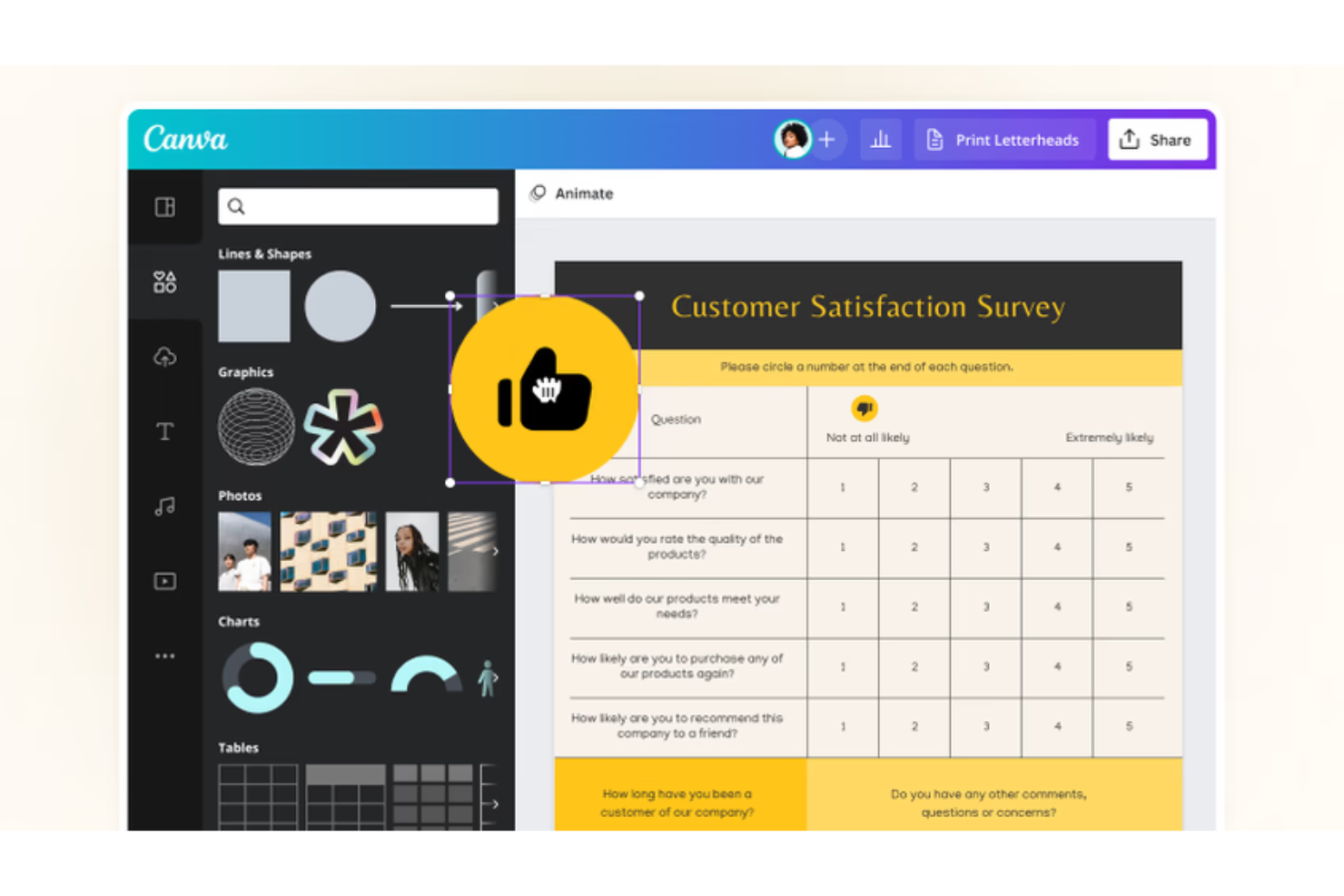
Canva's free survey form builder allows you to easily create visually appealing surveys for various purposes.
Why I picked Canva: I chose Canva because its survey maker provides various question formats, including yes-or-no, multiple-choice, Likert scale, and open-ended questions. The tool is excellent for collaboration and sharing, enabling real-time teamwork and feedback gathering.
You can collaborate with teammates on survey creation and editing while sharing surveys with others for valuable input or pretesting. Lastly, Canva's customizable designs allow you to add personalized survey questions and adjust colors and fonts. You can create surveys that reflect your brand or theme, ensuring a cohesive and tailored survey experience.
Canva Standout Features and Integrations:
Canva’s biggest standout feature is its wide range of survey templates, which are already formatted and ready to use. Canva also offers visually attractive elements like free illustrations, stock images, and icons that users can add to their surveys to make them more engaging and visually appealing.
Free integration with Canva’s worksuite.
What’s Free: In Canva's free plan, users have access to thousands of free templates, a drag-and-drop editor, customization options, editing existing files, professional styles, print designs with free delivery, stunning charts and infographics, sharing options, mobile and desktop apps, and community and learning resources.
Pros and Cons
Pros:
- Includes collaboration tools
- Mobile app
- User friendly
Cons:
- Limited integrations
- No data analysis


Opinion Stage offers a user-friendly platform that enables users to easily set up engaging and fun interactive content.
Why I picked Opinion Stage: Its easy-to-use platform lets users quickly create engaging content that captivates their audience. Opinion Stage excels in integrating seamlessly into any website and offers flexibility in sharing content across social media platforms and via email.
With its conversational and visual approach, the tool enhances user engagement, encourages thoughtful responses, and increases conversions. The platform also provides valuable analytics and tracking features to help users optimize their interactive content and maximize submissions, leads, and revenue.
Opinion Stage Standout Features and Integrations:
Standout features include fully responsive layouts that automatically optimize content to fit the screen of any device or browser. With its core customization options, users can personalize their content's appearance and branding, aligning it with their brand identity.
Free integrations include Google Sheets, Mailchimp, Facebook Ads, Google Ads, and Slack. You can also connect Opinion Stage to a paid Zapier account to unlock additional integrations.
What’s Free: Opinion Stage is free with no time limit. You can create quizzes, polls, surveys, and forms, and receive up to 25 responses per month. It provides core features such as unlimited creation of feature-rich interactive content, conversion-optimized templates, fully responsive layouts, and the ability to embed on websites.
Pros and Cons
Pros:
- Wide variety of templates
- Customizable
- Easy to use
Cons:
- Limited integrations
- No lead generation on free plan


Qualtrics is an online tool that allows you to create, distribute, and analyze surveys to gather valuable insights.
Why I picked Qualtrics Surveys: With Qualtrics' free survey maker, users can create dynamic and personalized surveys using intricate question logic, including skip, display, and branch logic. The survey flow editor offers an intuitive way to control the flow of questions, allowing for a fully customized survey experience.
Additionally, the ExpertReview feature offers pre-built templates and recommendations to guide you in creating your survey. It also includes a survey expert feature that ensures you ask the appropriate questions every time.
Qualtrics Surveys Standout Features and Integrations:
Standout features include over 50 pre-built survey templates designed by industry experts to cover various use cases and scenarios. With easy collaboration features, multiple team members can collaborate on survey creation, editing, and reviewing for a streamlined process. The platform also provides diverse options for survey distribution and analysis of results. Surveys can be distributed through various channels, and the online reporting capabilities enable efficient summary report generation. For advanced analysis, users can export survey data in various formats like CSV, TSV, Excel, XML, and SPSS.
Free integrations include Apple messages and Quantum Metric.
What’s Free: The free plan for Qualtrics Surveys includes a survey maker for creating three active surveys with up to eight question types, plus choice randomization, and skip, display, and branch logic. It provides access to 50+ survey templates, a survey flow editor, collaboration features, contact management, multiple survey distribution channels, a question library, basic result reports, advanced report building, data export capabilities, and support through email and chat.
Pros and Cons
Pros:
- Easy to use
- Customization and branding options
- Email and chat support
Cons:
- Limited customization on free plan
- Access to 75+ languages is limited to their paid plans

Google Forms is a free tool for creating online forms and surveys, which is useful for collecting feedback, conducting research, organizing events, and gathering data. It's included in the Google Workspace suite.
Why I picked Google Forms: Google Forms is a survey tool that is intelligently designed and offers real-time analysis capabilities. Its response validation function ensures accurate and quality responses by setting rules for email formatting and number ranges. This feature saves you time by reducing manual data cleaning and ensures the integrity of your data.
The real-time response analysis feature provides immediate insights through automatic summaries and charts, allowing you to monitor your survey's progress in real-time. Additionally, Google Forms offers custom conditional logic, which presents or hides questions based on previous answers, creating a more personalized interaction for respondents and simplifying the completion process.
Google Forms Standout Features and Integrations:
The biggest standout feature for Google Forms is its intuitive drag-and-drop interface. Users can easily structure their forms with various question types and organize them to fit their needs. The platform also boasts a range of customization options, including color selection, image addition, and font adjustments, making it easy to personalize forms to match your branding or organizational style.
Additionally, Google Forms offers real-time collaboration, allowing multiple people to simultaneously work on the same form. This streamlines the creation process and aligns with other Google Workspace tools.
Free integrations include Google Sheets, Google Drive, Google Docs, Google Slides, Google Sites, Google Calendar, and Google Analytics. You can also connect Google Forms to a paid Zapier account to unlock additional integrations.
What’s Free: The free personal plan offers easy form creation with multiple question types, a drag-and-drop interface, customization options, real-time response analysis, collaboration tools, response validation, diverse sharing options, stringent security measures, and seamless integration with Google Sheets.
Pros and Cons
Pros:
- User-friendly
- Customization options
- Mobile friendly
Cons:
- No live customer support on free plan
- No centralized admin on free plan
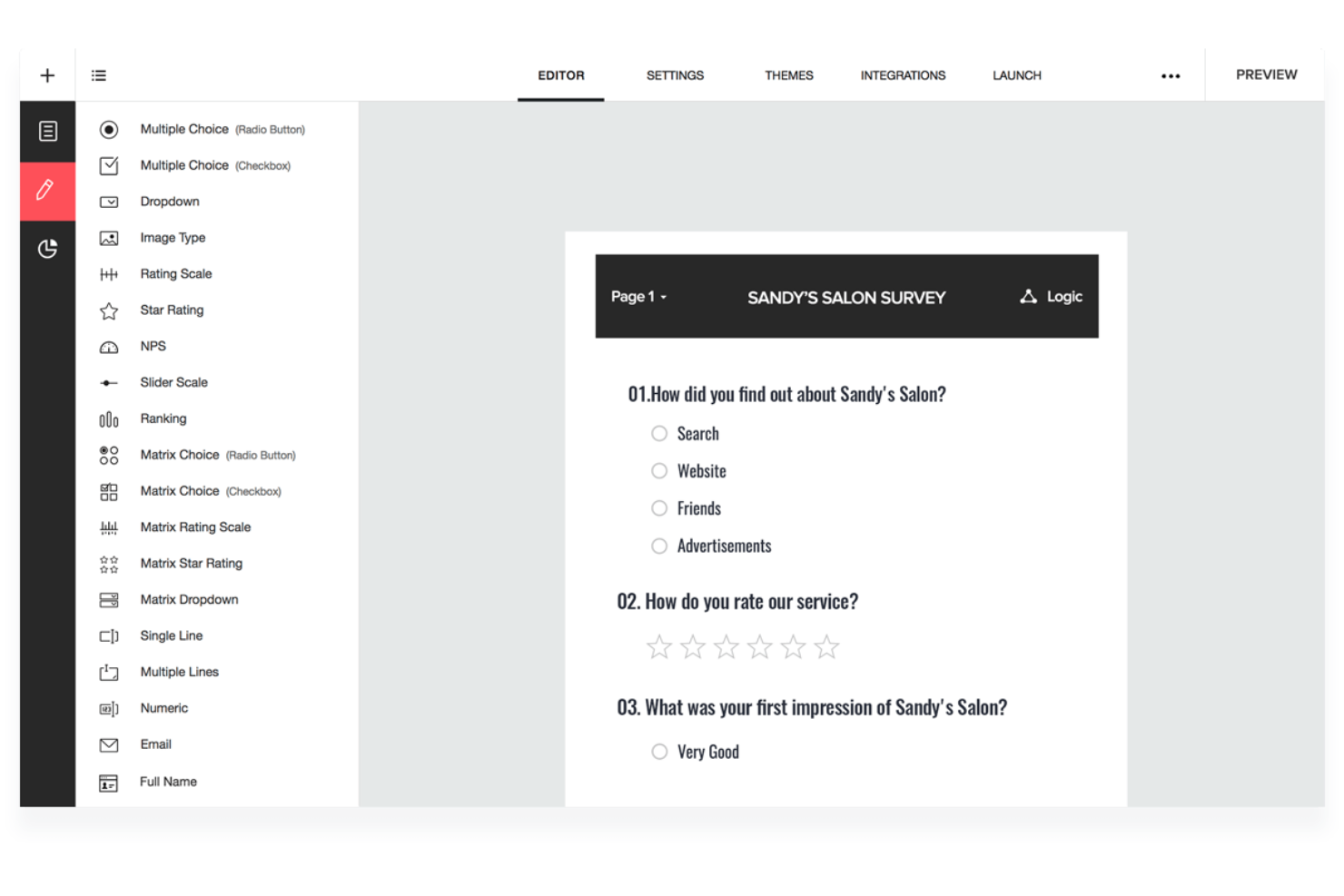
Zoho Survey is an online survey and questionnaire creation tool. It allows users to easily create surveys for various purposes such as customer satisfaction, feedback, market research, HR evaluations, and more.
Why I picked Zoho Survey: Zoho Survey stands out with its extensive range of question types, skip logic, and piping features, allowing for dynamic and personalized surveys tailored to specific needs. The tool also offers customizable themes to maintain brand consistency, easy survey distribution through social media and email campaigns, real-time results and reporting for prompt analysis, collaborative features for team collaboration, and strong security and compliance measures ensuring data protection.
Zoho Survey Standout Features and Integrations:
Standout features include an easy-to-use interface for creating and managing over 25 question types, including multiple-choice, rating scales, and open-ended questions. Additionally, the platform is optimized for mobile devices, ensuring that surveys are user-friendly on all screen sizes.
Free integrations include Facebook, Gsuite Marketplace, Mailchimp, Zoho Analytics, Zoho Campaigns, and Zoho Recruit.
What’s Free: The free plan includes unlimited surveys with up to 10 questions and 100 responses each, in-mail and pop-up survey options, the ability to embed surveys in a website, over 250 templates, survey creation in 26 languages, scoring, HTTPS encryption, social sharing, password protection, unlimited collectors per survey, real-time responses, and the option to export results as PDFs.
Pros and Cons
Pros:
- Security compliant
- Mobile app
- You can build surveys in 26 languages
Cons:
- No customization on free plan
- Webhook integration available on paid plans


SurveyPlanet is an online survey tool that allows users to create and distribute unlimited surveys and responses.
Why I picked SurveyPlanet: With SurveyPlanet, you can create as many surveys as you need with no restrictions on the number of questions or responses. One unique feature is the ability to conduct surveys anonymously, ensuring the privacy of respondents and promoting honest feedback.
In addition, SurveyPlanet offers support for over 30 languages, allowing you to create surveys in a variety of languages. You can also choose between two different survey display styles to best fit your needs. The tool's sharing capabilities are also extensive, including direct sharing on social networks, making it easy to reach a wide audience.
SurveyPlanet Standout Features and Integrations:
Standout features include pre-written survey templates for different topics, making it easy for users to create surveys quickly and efficiently. The platform also allows users to duplicate surveys with just one click, saving time and making survey replication effortless.
Customization options include welcome and success messages and basic survey themes to add a personal touch. The platform also boasts robust management capabilities, such as deleting unwanted participants, archiving surveys for future reference, and generating basic in-app reports for analyzing results.
Free integrations include Google Analytics, KISSmetrics, Optimizely, Segment, and Woopra.
What’s Free: Unlimited surveys, questions, and responses, customizable welcome messages, two survey player types, social network sharing, and anonymous survey capabilities. The plan ensures SSL security, no data-mining, allows email sharing, survey embedding, and provides 90+ pre-written surveys. You get basic survey themes, 30+ language options, in-app reporting, deletion of unwanted participants, survey archiving, and categorization.
Pros and Cons
Pros:
- Easy to use
- Surveys can be archived
- SSL security
Cons:
- Limited integrations
- Limited customization


Crowdsignal provides a platform to collect feedback and responses from various sources, allowing users to analyze and export the data.
Why I picked Crowdsignal: Crowdsignal has impressive features that ensure the authenticity of responses by limiting double voting and spam. With the option to set restrictions based on password, IP, and email, along with Captcha protections, your data's integrity is maintained. Upgrading to benefit from this feature is required.
Interactive email surveys are also possible with Crowdsignal, allowing recipients to conveniently respond directly from their inboxes, which improves response rates and engagement. Additionally, Crowdsignal's mobile compatibility allows for on-site or in-person feedback collection. With its user-friendly interface and comprehensive feedback management tools, Crowdsignal is an exceptional choice for businesses seeking efficient and interactive feedback solutions.
Crowdsignal Standout Features and Integrations:
Standout features include collecting data from different sources and exporting it in different formats. It's easy to use, and editing surveys is quick and simple. With 14 types of questions and forms, including multiple choice and Likert scales, you can create all kinds of surveys, polls, quizzes, and forms in minutes. While there are some limitations to the data export options, it's still easy to share and analyze your results.
Free Integrations: There are no free integrations.
What’s Free: The free version of Crowdsignal offers unlimited questions, surveys, polls, and ratings, allowing you to gather valuable feedback without limitations. You can collect up to 2,500 signals, utilize poll embedding and media embeds for interactive content, and have a maximum file size of 1MB for uploads. However, please note that the free version includes Crowdsignal branding and has limited data export capabilities.
Pros and Cons
Pros:
- Supports up to 2,500 responses
- Easy to use
- Mobile friendly
Cons:
- No integration with Google Sheets in free plan
- No collaboration tools in their free plan

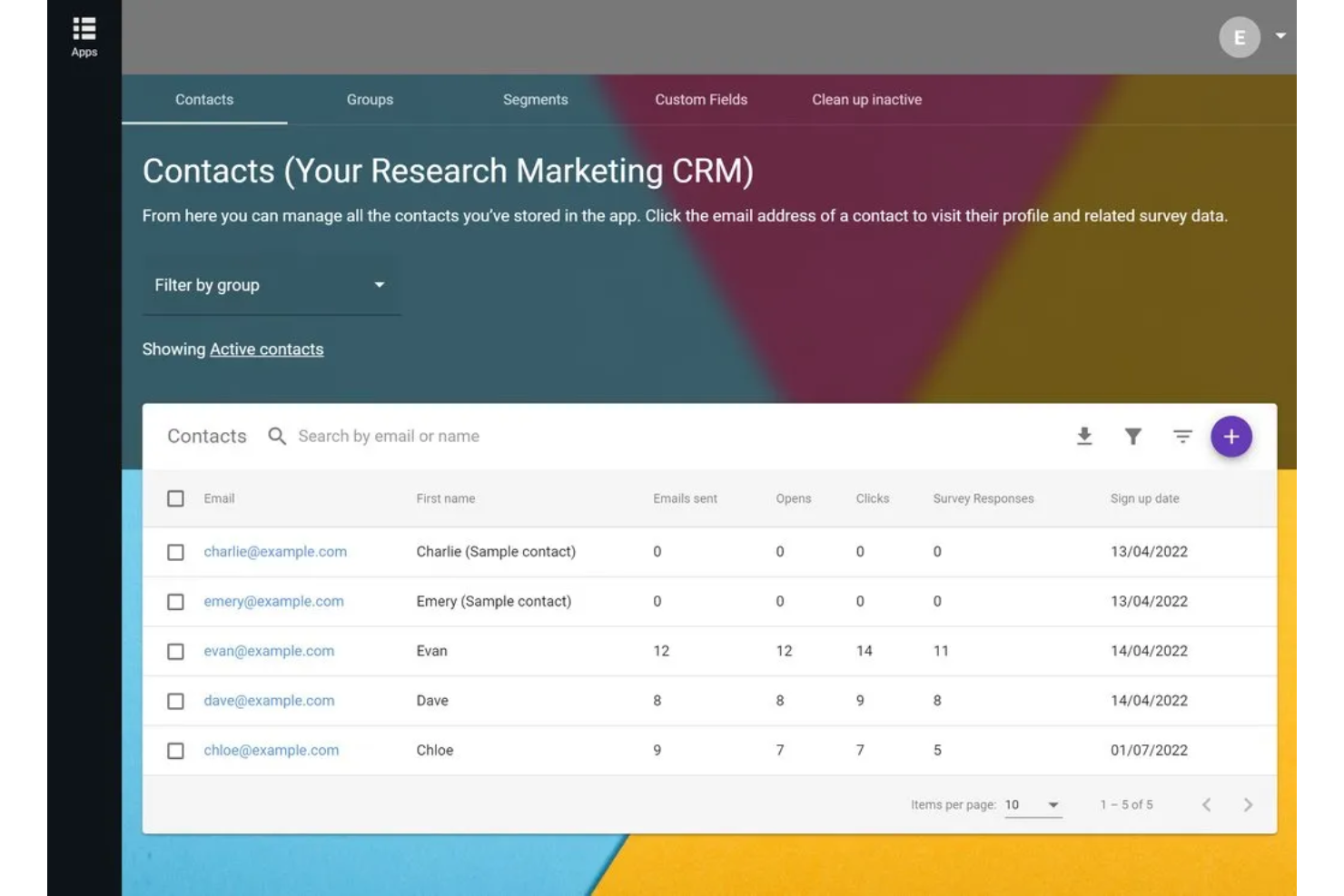
FreeOnlineSurveys allows users to create and conduct surveys, quizzes, and forms.
Why I picked FreeOnlineSurveys: I chose FreeOnlineSurveys because it prioritizes privacy and data protection. To ensure the security of survey participants' data, it employs measures such as pseudonymization of respondent IP addresses, absence of tracking cookies, and separate storage of respondent personally identifiable information (PII).
FreeOnlineSurveys also offers an AI question prediction feature that analyzes question text in real-time and suggests suitable question types. This streamlines the survey creation process and ensures well-structured surveys for effective data collection.
FreeOnlineSurveys Standout Features and Integrations:
Standout features include personalization options using logic and piping. You can customize pages, insert text, and add fields. You will also receive email or Slack notifications when responses come in. Their A/B testing feature helps you find the most effective content, and survey tracking helps you manage your data. Finally, there are comprehensive reports and data analysis tools for easy result interpretation.
Free integrations include Slack.
What’s Free: The free plan includes privacy-focused design, all question types, logic, piping, A/B testing, and up to 1,000 responses. It also features AI question prediction for efficient survey design.
Pros and Cons
Pros:
- All question types included in free plan
- Free forever plan
- Mobile option
Cons:
- No quiz scoring on free plan
- No exit pages on free plan

Jotform Enterprise is a versatile product that's all about creating and managing online surveys and forms. Whether you need to whip up a quick customer feedback survey, a registration form for an event, or a detailed questionnaire, Jotform Enterprise has got you covered.
Why I picked Jotform Enterprise: I included Jotform in this list because the scale of their free template library is super impressive. They have over 10,000 templates ready-to-go for pretty much any purpose you can think of. Key templates to note include their Customer Satisfaction Service Survey, New Customer Registration Form, Market Research Survey, and numerous others.
Another reason I included Jotform Enterprise in this list is that they have a very generous free plan - which is definitely a big plus.
Jotform Enterprise Standout Features and Integrations:
One of Jotform Enterprise's biggest standout features is its drag-and-drop form builder. You don't need any technical skills to create a survey - you just pick the elements you want to include, drag them into your survey, and drop them where you want them to go. It's that easy. And if you want to get a bit more advanced, you can customize your surveys with conditional logic, so you can show or hide fields based on the answers to previous questions.
Another feature that I really appreciate is the ability to collaborate with other team members. You can easily share forms and data with your colleagues, and you can even assign different levels of access to different people. This makes it a great tool for teams that need to work together on form creation and data management.
Free integrations include Airtable, Asana, Dropbox, Google Drive, Google Sheets, Mailchimp, Microsoft Teams, Salesforce, Slack, Trello, and numerous others.
What's Free: Jotform's free plan includes 5 surveys with 100 monthly submissions, 1,000 monthly views, and up to 100 MB of space. You can also include up to 100 fields per survey, which is a very generous amount. Their free plan only covers 1 user per team, and includes the Jotform branding. If you want to customize the branding to match your company style, you'll need to scale up to one of their paid plans.
Pros and Cons
Pros:
- Can collect up to 10 signed documents per month on the free plan
- Large volume of templates
- Easy to use
Cons:
- Custom branding is not available in their free plan
- HIPAA compliance features are limited to their Gold plan, or above
Other Free Survey Option Tools
Beyond the top picks, numerous other survey tools excel in different areas, each tailored to complement specific needs. These options shine individually, offering standout features that make them distinct, allowing you to choose one that best aligns with your objectives.
- Survicate
Survey for comprehensive customer insight
- Mailchimp
Free survey tool with unlimited responses
- SurveyLegend
For customizing surveys
- SurveyMonkey
For targeted responses
- Checkbox
For cloud-hosted surveys
- SurveySparrow
For creating recurring or automated surveys
- Typeform
For personalized surveys
- Slido
For interactive meetings and events


Related Reviews
There are many survey tools to choose from depending on your specific needs and goals. To help you find the best option, I’ve put together a list of top survey tool reviews that cover a variety of online software options.
- Best Online Survey Software
- Best Survey Maker Tools for Customer Feedback
- Best Survey Analysis Software
- Best Net Promoter Score Software & NPS Survey Tools
- Best Customer Feedback Software
- Best Voice of Customer (VOC) Software for Customer Analytics
Free Survey Tool Selection Criteria
When selecting the best free survey tools to include in this list, I considered common buyer needs and pain points like ease of use and data privacy. I also used the following framework to keep my evaluation structured and fair:
Core Functionality (25% of total score)
To be considered for inclusion in this list, each solution had to fulfill these common use cases:
- Create surveys quickly
- Collect responses efficiently
- Analyze survey data
- Export survey results
- Customize survey templates
Additional Standout Features (25% of total score)
To help further narrow down the competition, I also looked for unique features, such as:
- Advanced data analytics
- Multilingual support
- Offline survey capabilities
- Integration with CRM tools
- Customizable branding options
Usability (10% of total score)
To get a sense of the usability of each system, I considered the following:
- Intuitive interface design
- Simple navigation structure
- Minimal learning curve
- Responsive design for mobile use
- Clear instructions and tooltips
Onboarding (10% of total score)
To evaluate the onboarding experience for each platform, I considered the following:
- Availability of training videos
- Access to interactive product tours
- Comprehensive onboarding guides
- Supportive chatbots and help desk
- Webinars and live training sessions
Customer Support (10% of total score)
To assess each software provider’s customer support services, I considered the following:
- 24/7 customer support availability
- Multi-channel support options
- Prompt response times
- Knowledgeable support staff
- Access to a comprehensive FAQ
Value For Money (10% of total score)
To evaluate the value for money of each platform, I considered the following:
- Competitive pricing structures
- Transparent pricing information
- Features offered in free plans
- Cost effectiveness of paid plans
- Discounts for annual billing
Customer Reviews (10% of total score)
To get a sense of overall customer satisfaction, I considered the following when reading customer reviews:
- Overall satisfaction ratings
- Feedback on ease of use
- Comments on customer support
- Reports on reliability and uptime
- Notable pros and cons mentioned
How to Choose Free Survey Tool
It’s easy to get bogged down in long feature lists and complex pricing structures. To help you stay focused as you work through your unique software selection process, here’s a checklist of factors to keep in mind:
| Factor | What to Consider |
|---|---|
| Scalability | Can the tool grow with your needs? Consider whether it supports increasing numbers of surveys and responses as your team or project expands. |
| Integrations | Does it connect with your existing systems? Ensure it integrates with your CRM, email, or data analysis tools to streamline your workflow. |
| Customizability | Can you tailor the tool to your needs? Look for options to customize survey templates and branding to reflect your organization's style and requirements. |
| Ease of use | Is the tool user-friendly? Evaluate how intuitive the interface is and whether your team can quickly learn to navigate and use all functionalities without extensive training. |
| Implementation and onboarding | How quickly can you get started? Assess the setup process, available training resources, and support to ensure a smooth transition and quick adoption by your team. |
| Cost | Does the pricing fit your budget? Compare the costs of different plans, including any hidden fees, and consider the value offered at each price point. |
| Security safeguards | How is your data protected? Examine the security measures in place, such as encryption and data access controls, to ensure your data and respondents' information are secure. |
| Support availability | Is help available when you need it? Check the availability of customer support, preferred contact methods, and response times to ensure you can resolve issues quickly. |
What Are Free Survey Tools?
Free survey tools are online platforms that allow users to create, distribute, and analyze surveys without cost. Professionals like marketers, researchers, educators, and HR teams use these tools to gather feedback, conduct research, and make data-driven decisions. Customizable templates, real-time analytics, and integration capabilities help with efficient data collection and analysis. Overall, these tools provide a cost-effective way to gain insights and improve decision-making.
Features
When selecting free survey tools, keep an eye out for the following key features:
- Customizable templates: Create surveys that match your brand's style, helping maintain consistency and professionalism.
- Real-time analytics: Access immediate insights into survey responses, enabling quick data-driven decisions.
- Integration capabilities: Connect with other software like CRM or email platforms to streamline your workflow and enhance productivity.
- Conditional logic: Tailor questions based on previous answers, making surveys more relevant and engaging for respondents.
- Multilingual support: Reach a global audience by offering surveys in multiple languages, expanding your data collection reach.
- Data export options: Easily export survey results in various formats for further analysis and sharing with stakeholders.
- Secure data storage: Protect respondent information with encryption and strong data security measures, ensuring privacy compliance.
- Mobile-friendly design: Allow respondents to complete surveys on any device, increasing response rates and accessibility.
- Collaboration tools: Enable team members to work together on survey creation and analysis, fostering teamwork and efficiency.
Benefits
Implementing free survey tools provides several benefits for your team and your business. Here are a few you can look forward to:
- Cost-effective data collection: Gather insights without financial investment, allowing you to allocate resources elsewhere.
- Improved decision-making: Real-time analytics provide immediate insights, helping you make informed decisions quickly.
- Enhanced reach: Multilingual support and mobile-friendly design expand your audience, increasing the diversity and volume of responses.
- Increased efficiency: Integration capabilities streamline workflows by connecting surveys with existing tools, saving time and effort.
- Greater flexibility: Customizable templates and conditional logic let you tailor surveys to specific needs, making them more relevant and engaging.
- Secure data handling: Strong data security measures protect sensitive information, ensuring compliance with privacy regulations.
- Collaborative work environment: Collaboration tools foster teamwork by enabling multiple users to contribute to survey creation and analysis.
Costs & Pricing
Selecting free survey tools requires an understanding of the various pricing models and plans available. Costs vary based on features, team size, add-ons, and more. The table below summarizes common plans, their average prices, and typical features included in free survey tools solutions:
Plan Comparison Table for Free Survey Tools
| Plan Type | Average Price | Common Features |
|---|---|---|
| Free Plan | $0 | Basic survey creation, limited templates, and basic analytics. |
| Personal Plan | $5-$25/user/month | Customizable templates, conditional logic, and email support. |
| Business Plan | $30-$75/user/month | Advanced analytics, integration capabilities, and priority support. |
| Enterprise Plan | $100+/user/month | Unlimited surveys, multilingual support, custom branding, and dedicated account management. |
Free Survey Tools FAQs
Here are some answers to common questions about free survey tools:
What are some limitations of free survey tools?
Yes, free survey tools often come with limitations like restricted access to advanced features, limited number of responses or questions, and basic analytics. These tools may not offer integrations with other software or provide comprehensive customer support. If your team needs more robust capabilities, consider upgrading to a paid plan that offers additional features and support tailored to your specific requirements.
Can I use free survey tools for commercial purposes?
Yes, you can use free survey tools for commercial purposes, but it’s important to check the terms of service for each platform. Some tools may have restrictions on the number of surveys or responses you can collect for free. Always ensure the features available meet your business needs, and consider upgrading if you require more extensive capabilities for your commercial projects.
How can I ensure data privacy with free survey tools?
Ensuring data privacy with free survey tools involves checking the platform’s privacy policy and data protection measures. Look for tools that offer data encryption and comply with regulations like GDPR. Use secure links for survey distribution and limit access to sensitive data within your team. If data privacy is a major concern, consider a paid plan with enhanced security features.
Are there any restrictions on survey distribution with free tools?
Yes, free survey tools may have restrictions on survey distribution, such as limits on the number of email invitations or responses. Some platforms might not allow you to integrate with email marketing tools or restrict the number of surveys you can send out simultaneously. To bypass these limitations, assess your distribution needs and consider upgrading to a plan that aligns with your requirements.
What’s Next:
If you're in the process of researching free survey tools, connect with a SoftwareSelect advisor for free recommendations.
You fill out a form and have a quick chat where they get into the specifics of your needs. Then you'll get a shortlist of software to review. They'll even support you through the entire buying process, including price negotiations.