
20 Best Help Desk Software For Support Teams in 2026

10 Best Online Help Desk Software Shortlist
Here's my pick of the 10 best software from the 20 tools reviewed.


Online help desk software helps support and service teams manage tickets, automate workflows, and respond faster. These tools are built to centralize customer communication, reduce manual busywork, and give your team the context they need to solve issues efficiently.
I've tested and reviewed these platforms based on automation, UI, integrations, scalability, and support for multi-channel requests. This guide breaks down the best online help desk software for different team sizes and service models, so service tasks don't slip through the cracks.
What Is Online Help Desk Software?
Online help desk software is a platform that helps support teams manage, track, and resolve customer issues from one place. It centralizes communication, automates ticket workflows, and is used to improve response time, consistency, and service quality across channels.
Table of Contents
- Best Software Shortlist
- What Is Online Help Desk Software?
- Why Trust Us
- Compare Specs
- Overviews Of The 20 Best Online Help Desk Software
- Other Options
- Selection Criteria
- How to Choose
- Features of Online Help Desk Software
- FAQs
- What Is Online Help Desk Software?
- Why Trust Our Reviewers
- Overviews Of The 20 Best Online Help Desk Software
- Online Help Desk Software Selection Criteria
- How to Choose An Online Help Desk Software
- Features of Online Help Desk Software
- Benefits of Online Help Desk Software
- Costs and Pricing of Online Help Desk Software
- Choosing the Best Online Help Desk Software For Your Team
- What's Next?
Why Trust Our Software Reviews
The Best Online Help Desk Software Summary
| Tool | Best For | Trial Info | Price | ||
|---|---|---|---|---|---|
| 1 | Best for call center support | Free demo + 14-day free trial available | From $19/user/month (billed annually) | Website | |
| 2 | Best for personalizing interactions with AI | Free trial + free demo available | From $25/user/month (billed annually) | Website | |
| 3 | Best for unifying chat and email | 14-day free trial available | From $16/user/month (billed annually) | Website | |
| 4 | Best automated workflow builder | 15-day free trial + free plan | From $7/user/month (billed annually) | Website | |
| 5 | Best for shared inbox management | Free plan available | From $25/user/month (billed annually) | Website | |
| 6 | Best for automated routing and categorization | 14-day free trial + free demo available | From $25/user/month (billed annually) | Website | |
| 7 | Best for unified ecommerce customer communications | 14-day free trial | From $39/agent/month | Website | |
| 8 | Best for AI-powered customer service | 7-day free trial + free plan available | From $25/user/month | Website | |
| 9 | Best for customer interaction management | 15-day free trial + free plan + free demo available | From $39.99/user/month (billed annually) | Website | |
| 10 | Best for team collaboration | Free plan + free demo available | From $29/user/month | Website |

-

SupportYourApp
Visit WebsiteThis is an aggregated rating for this tool including ratings from Crozdesk users and ratings from other sites.4.7 -
Freshdesk
Visit WebsiteThis is an aggregated rating for this tool including ratings from Crozdesk users and ratings from other sites.4.4 -
Hiver
Visit WebsiteThis is an aggregated rating for this tool including ratings from Crozdesk users and ratings from other sites.4.6


Overviews Of The 20 Best Online Help Desk Software
You can use the simple overviews of each tool below to understand how each tool stands out from other online help desk software.


Freshdesk (a product of Freshworks Inc.) is an online help desk platform that can be used by organizations operating in a call center environment. It supports the handling of customer inquiries across multiple channels within a single system, helping teams manage conversations without switching between tools.
Why I picked Freshdesk: I picked Freshdesk for the set of tools it provides to support call center workflows. The platform includes a shared inbox, knowledge base tools, and chat functionality, which allow teams to manage incoming requests in one place. It also includes support for inbound calling, allowing agents to handle customer phone calls directly through the platform. For teams that rely on external systems, Freshdesk offers a broad range of integrations that can connect the help desk with existing workflows.
Freshdesk can be configured to fit different operational requirements and is used by teams of varying sizes. It includes Freddy AI, which can assist with automating ticket routing based on predefined rules, helping reduce manual sorting of incoming requests. Reporting and analytics tools provide visibility into support activity across channels, while social media integrations allow messages and mentions to be converted into support tickets.
Freshdesk Standout Features and Integrations
Features include a team inbox, agent collision detection, SLA management, ticket field suggestions, custom ticket statuses, team huddles, linked tickets, shared ownership, ticket dispatch, intelligent ticket assignment, and time triggered automation.
Integrations include Google Calendar, Slack, Mailchimp, Google Analytics, Office 365, Freshsales, Dropbox, HubSpot CRM, Microsoft Teams, Harvest, Zoho CRM, Pipedrive, Chargebee, 3CX, Asana, Magento, and Zapier.
Freshdesk offers a free plan for up to two agents for six months, with paid plans starting at $19 per user per month when billed annually. Select plans include a 14 day free trial.
Pros and Cons
Pros:
- Impressive automation capabilities
- Incredibly intuitive and user-friendly
- Excellent customer service email organization
Cons:
- Integrating with existing processes is tedious
- Some technical issues
New Product Updates from Freshdesk

Freshdesk Enhances Contact Data Management and Social Identity Fields
Freshdesk now lets you manage social handles and handle large contact lists with ease, streamlining customer profiles and data tasks. For more information, visit Freshdesk’s official site.


Salesforce Service Cloud helps businesses provide complete customer experiences by using artificial intelligence.
Why I picked Salesforce Service Cloud: The software uses artificial intelligence and process automation tools to help your agents eliminate repetitive tasks and focus on providing excellent support. The AI goes beyond helping your agents provide high-level customer service thanks to the AI tools such as chatbots and automatic triaging that reduces handle times. Salesforce Service Cloud’s AI also ensures agents with the right expertise handle specific customer queries.
Salesforce Service Cloud is suitable for organizations of all sizes across various industries that need tools to strengthen customer engagement. You can use the platform to provide personalized support to customers across multiple channels whenever needed. Salesforce Service Cloud also provides a drag-and-drop editor that allows you to build a self-service center to enable customers to help themselves.
Salesforce Service Cloud Standout Features and Integrations
Features include intelligent automation and workflows, case management, omnichannel routing, knowledge management, reporting and analytics, telephony and voice tools, customer service incident management, remote assistance, and real-time chat.
Integrations include Freshdesk, CloudTalk, Twilio, Brandwatch, Paligo, Mailchimp, HubSpot CRM, Trello, TeamViewer, Smartsheet, Klaviyo, Aircall, Gainsight, and Conversocial.
Salesforce Service Cloud costs from $25/user/month, billed annually. Salesforce Service Cloud offers a free 30-day trial for new subscribers.
Pros and Cons
Pros:
- Provides a unified view of interactions
- Effectively simplifies support procedures
- Adaptable to users’ needs
Cons:
- Requires additional training to use
- Challenging to set up


SparrowDesk stands out as an AI-powered online help desk software tailored for businesses seeking to enhance their customer support operations. With its intuitive design and advanced features like AI Agents, it can automatically resolve a significant portion of customer inquiries, making it particularly appealing to companies aiming to streamline communication and increase productivity.
Why I Picked SparrowDesk
I picked SparrowDesk for its unique ability to integrate AI-driven solutions directly into the help desk environment. Its AI Agents can automatically resolve most of customer inquiries via chat and email, which directly addresses the need for efficiency in handling high volumes of customer interactions. The platform's omnichannel inbox ensures that your team can unify communications from multiple sources (chat and email) in one place, making it easier to maintain consistency and accuracy in customer responses. Additionally, features like AI-generated reply suggestions help your team provide quick and context-aware responses, further enhancing customer satisfaction.
SparrowDesk Key Features
In addition to its AI-driven capabilities, I also found several other features that make SparrowDesk a compelling choice for help desk software:
- Service Level Agreements (SLA): Establish clear response and resolution targets to ensure timely support.
- Business Hours Management: Define working hours to manage customer expectations and streamline ticket routing.
- Custom Views & Filters: Personalize agent views for better prioritization and management of conversations.
- Quick-Action Macros: Automate common tasks to save time and streamline workflows.
SparrowDesk Integrations
Native integrations are not currently listed by SparrowDesk.
Pros and Cons
Pros:
- AI agents designed to auto resolve many repetitive tickets
- Copilot features summarize long conversations inside the agent inbox
- No code workflow builder automates routing and notifications
Cons:
- Channels currently focus on email and live chat, not voice or social
- Limited native integrations could hinder seamless connectivity


Zoho Desk is an online help desk software that supports omni-channel customer service operations and can centralize your email, social media, web chat, and voice calling in one place.
Why I picked Zoho Desk: This software offers a comprehensive feature set for help desk management, including self-service resources and team collaboration tools. But what really stands out about it is its capacity for automating your workflows. This allows you to standardize your support protocols, alleviate your team's manual workload, and onboard new agents quickly.
The workflow builder is a simple, drag-and-drop interface. You can set up specific actions and outcomes, dependent on specified conditions. Your team will have the same set of best practices to follow for common customer requests, saving them time and creating consistency in the customer experience.
Zoho Desk Standout Features and Integrations
Features include ticket management, auto-tag tickets, sentiment analysis, Zia notifications, Zia dashboard, reply assistant, self-service tools, CRM integration, custom functions, SDKs, marketplace and platform, APIs, reports and dashboards, time tracking, multi-brand help center, domain mapping, and user and access management.
Integrations include Twilio, RingCentral, Amazon Connect, Ozonetel, Exotel, Knowlarity, Jive, sipgate, JustCall, ringover, and other software options.
Zoho Desk costs from $20 per user, per month, and a 15-day free trial is available.
Pros and Cons
Pros:
- Mobile app for on-the-go access
- Customizable ticketing system
- Clean, intuitive interface, easy to navigate
Cons:
- Limited branding options for customer portals
- Limited reporting on lower tier plans


Hiver is an AI-powered customer service platform designed to enhance your team's ability to manage and resolve customer inquiries.
Why I Picked Hiver: One of Hiver's most stand out features is its shared inbox capability. This allows your team to centralize all customer communications, ensuring that no inquiry is overlooked. With shared inboxes, you can easily assign ownership to specific team members, making it a breeze to track who is handling what, thereby improving accountability and response times.
Another reason I chose Hiver is for its ability to automate ticket routing and categorization, helping your team spends less time on administrative tasks and more time addressing customer needs. With these capabilities, your team can easily manage high volumes of helpdesk inquiries without compromising on quality.
Hiver Standout Features and Integrations
Features include a detailed analytics suite, self-service options such as AI chatbots and a customer portal, an intuitive knowledge base, omnichannel inboxes, and customer portal access.
Integrations include Zapier, Salesforce, HubSpot, Slack, Microsoft Teams, monday.com, ClickUp, Asana, Google Sheets, Pipedrive, Trello, and Zendesk Sell.
Pros and Cons
Pros:
- Rule customization for automatic email tagging
- Seamless Gmail integration
- Enhances team collaboration
Cons:
- Not ideal for large businesses
- Initial setup can be complicated
New Product Updates from Hiver

Hiver Introduces AI-Powered Task Creation
Hiver introduces AI-powered task creation for email workflows. This update enables users to extract key details, summarize requests, and trigger actions automatically from incoming emails. For more information, visit Hiver’s official site.
 .
.

Front is a customer service software with omnichannel help desk management capabilities. It centralizes your customer communications from email, live chat, and SMS in a single place.
Why I picked Front: I chose to include this platform on my list because of its automation features. Not only does it bring together your comms in a shared collaborative inbox, it can also automatically categorize and route incoming requests to the most suitable agent. This helps create a consistent and exceptional customer experience, providing the best possible support from the outset.
To avoid the need to jump in between customer communications and personal threads, the software provides in-discussion private chats. Team members can tag each other and send hidden direct messages right from within the conversation with the customer, helping to keep support active, contextual, and efficient.
Front Standout Features and Integrations
Features include omnichannel communication, collaborative inbox, workflow automation, knowledge base, live chat, chatbots, GDPR and SOC II compliance, custom roles and permissions, and analytics and reporting tools.
Integrations include WhatsApp, Dialpad, Twilio, Intercom, Facebook, Instagram, Slack, Twitter, Asana, HubSpot, Jira, and Salesforce, among others. An API is also available to build custom integrations with.
Pricing for Front starts at $19 per user, per month when billed annually, and a 7 day free trial is available.
Pros and Cons
Pros:
- Easy customization and automation
- Multi-channel integration
- Enhances team collaboration
Cons:
- Merging threads can be tricky
- Large feature set creates learning curve for new users
New Product Updates from Front

Front Adds Asyntai, InstantDocs, and KnowBe4 Integrations
Front introduces integrations with Asyntai, InstantDocs, and KnowBe4, enhancing user experience and efficiency. For more information, visit Front's official site.
 .
.
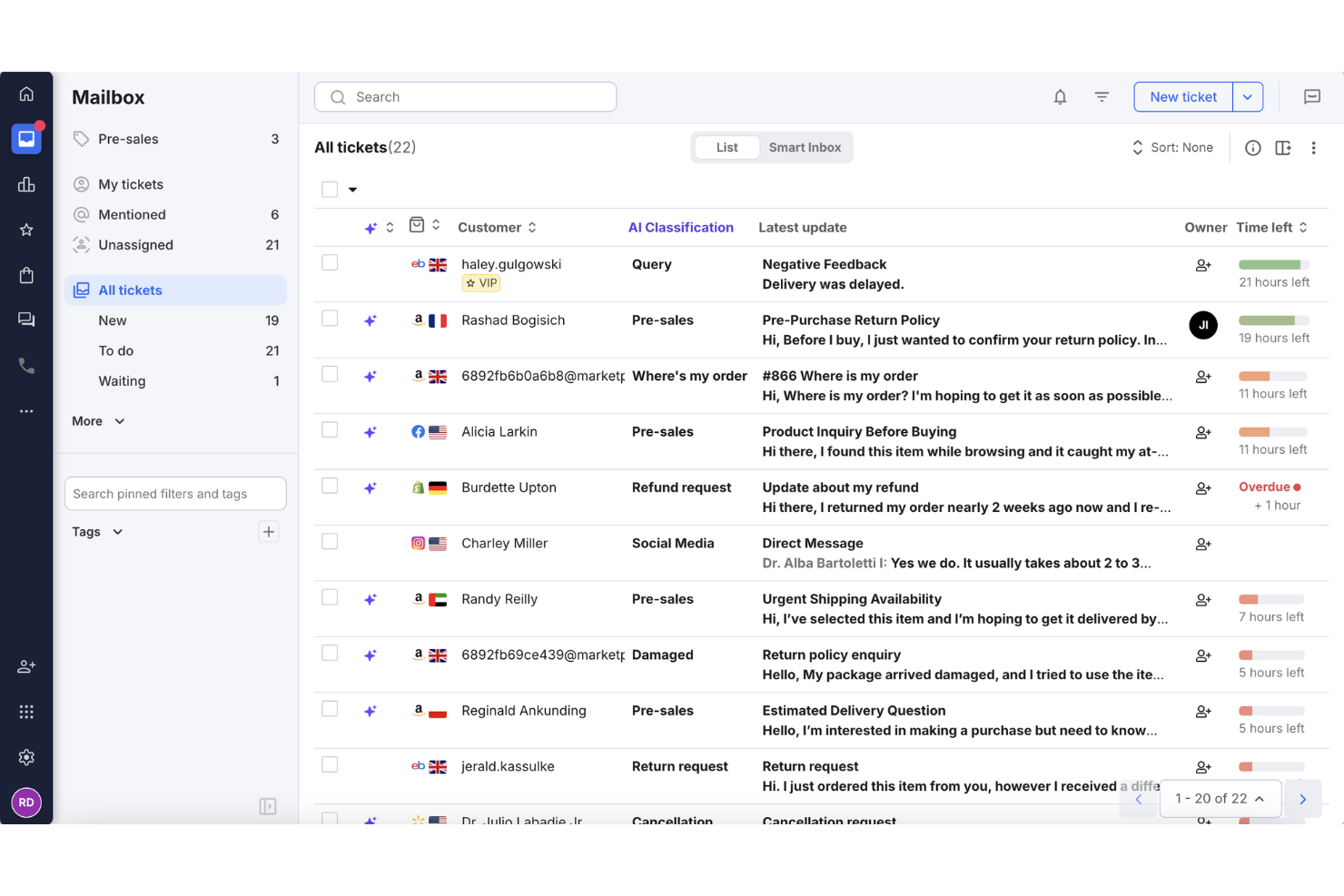
eDesk is designed for ecommerce businesses looking to enhance their customer support through advanced AI capabilities. By centralizing customer interactions across various channels, eDesk helps your team manage communications more effectively, enabling quicker response times and improved customer satisfaction. This tool is especially beneficial for businesses aiming to integrate their support operations with major marketplaces and convert inquiries into sales opportunities.
Why I Picked eDesk
I picked eDesk for its ability to unify customer communications across multiple platforms, which is crucial for ecommerce businesses with diverse sales channels. The AI automation features, such as categorization and sentiment analysis, help your team manage support tasks more efficiently. Furthermore, real-time reporting tools provide insights into performance metrics, enabling you to make informed decisions and improve service levels.
eDesk Key Features
In addition to unified ecommerce customer communications, eDesk offers:
- 24/7 Chatbot: Offers continuous support to your customers, ensuring their queries are addressed even outside business hours.
- Customer Feedback Tools: Gathers valuable insights from customers to help you improve your services and products.
- Team Collaboration: Facilitates internal communication with features like internal notes and workload management.
- Customizable Workflows: Allows you to set up automated processes tailored to your business needs, enhancing productivity.
eDesk Integrations
Integrations include Brightpearl, Klaviyo, ChannelAdvisor, StoreFeeder, VoloCommerce, Veeqo, Linnworks, ShipStation, Aftership, and an API is available for custom integrations.
Pros and Cons
Pros:
- Fast and helpful customer support responses
- Saved reply templates speed up customer responses
- AI-powered automations improve response efficiency
Cons:
- Primarily built for ecommerce, less flexible for other industries
- Reporting and analytics, while present, can be less customizable than more enterprise dashboards


Tidio is a platform designed to help teams manage customer support across chat, email, and social media in a single inbox. It’s built for fast setup and supports automation, multilingual communication, and analytics to improve how service teams prioritize and handle requests. Tidio is used by businesses of all sizes and supports over 120 integrations, including key platforms like Shopify, HubSpot, and Salesforce.
Why I picked Tidio: One of the features that stood out to me is the Lyro AI Agent. It can respond to repetitive customer questions, scan and triage incoming emails, and help route tickets without agent input. This can be especially helpful if your team handles a high volume of support requests and needs a way to reduce manual effort. Tidio also includes multilingual communication, so teams serving international customers can respond in up to 12 languages without relying on external translation tools.
Tidio Standout Features and Integrations
Features include canned responses, a customizable live chat widget, visitor tracking, mobile access for agents, and a collaborative inbox for team-based message handling. These features help teams stay organized and respond quickly while maintaining visibility into active conversations.
Integrations include Shopify, WordPress, WooCommerce, Mailchimp, HubSpot, Salesforce, Zendesk, Zapier, WhatsApp, Messenger, Instagram, and Google Analytics.
Pros and Cons
Pros:
- Quick to deploy with minimal setup
- Supports 12 languages for global teams
- Combines chat, email, and social channels in one inbox
Cons:
- Limited feature set on the free plan
- No phone support; live support limited to business hours


ProProfs Help Desk helps businesses focus on enhancing customer interactions so everyone has a positive experience.
Why I picked ProProfs Help Desk: The platform provides your business with customer interaction management capabilities that enable your agents to respond to customer queries, offer 24/7 assistance, and connect with them. ProProfs Help Desk helps your agents offer promptness, personalization, empathy, and assurance when interacting with customers. You can use the platform to get an overview of past customer interactions and activities so your agents can provide a personal touch to future conversations. For more effective customer interaction management, you can use ProProfs Help Desk’s team collaboration capabilities to help your agents work together and make customers happy.
ProProfs Help Desk works for organizations of all sizes that need a solution catered to the growing needs of customers within their industries. It’s a cloud-based ticketing system that is well known for its shared inbox feature, where your agents can access, view, and assign tickets to the right team member while working in a collaborative space. Your managers can use ProProfs Help Desk to prioritize, label, and mark tickets that require immediate attention.
ProProfs Help Desk Standout Features and Integrations
Features include shared inboxes, notification templates, customizable agent availability, ticket exporting, team management, ticket history, roles and permissions, internal chat, omnichannel support, SLA management, real-time chat support, and automated responses.
Integrations include Salesforce and Microsoft Dynamics CRM.
Pros and Cons
Pros:
- Easy-to-use interface
- Ensures excellent customer experiences
- Incredible customer support
Cons:
- No API is available
- A small number of integrations


HelpDesk provides businesses with a robust feature set that enables teams to collaborate and become more efficient.
Why I picked HelpDesk: The platform provides your organization with a ready-to-use, out-of-the-box help desk platform that helps your teams collaborate effectively without overcomplicating things. HelpDesk offers ticket management tools that allow your agents to tag customer support tickets and group them based on common solutions, so your agents can work together and resolve customers’ inquiries. The software’s automation tools allow you to establish ticket routing rules that ensure customer tickets go to the right agent.
HelpDesk works well for startup businesses to enterprise-level organizations that need a platform to help them improve customer service. It uses a single dashboard to create tickets from requests from sources such as incoming emails, contact forms, live chat, and other channels. HelpDesk also provides features like automated task assignments, custom automated workflows, and canned responses to optimize response times.
HelpDesk Standout Features and Integrations
Features include AI text enhancements, custom fields, email templates, automated workflows, ticket management, bulk actions, canned responses, collision detection, ticket assignment, and reports and analytics.
Integrations include LivEchat, Zapier, Shopify, Jira, HubSpot, Salesforce, and GitHub.
HelpDesk costs from $34/user/month when paying monthly or $29/user/month when billed annually. HelpDesk offers a free 14-day trial for new subscribers.
Pros and Cons
Pros:
- Provides real-time reports and insights
- The user interface is very user-friendly
- Effectively tracks and follows up on requests
Cons:
- Some connection problems can occur
- Multiple email threads are messy
Other Options
Here are a few more options that didn’t make the best online help desk software list:
- Issuetrak
For omnichannel ticket submission
- Front
Shared team inbox software
- HubSpot Service Hub
CRM capabilities within a help desk platform
- SAAS First
For AI-powered chatbots
- NinjaOne
For ticketing automation
- Document360
For ticket deflection support
- Zoho Assist
For secure remote support with session recording
- LiveAgent
For simplicity
- monday service
For AI-driven ticket management
- ManageEngine ServiceDesk Plus
For IT service management


Online Help Desk Software Selection Criteria
When selecting the best online help desk software to include in this list, I considered common buyer needs and pain points like ease of integration with existing systems and the ability to handle high volumes of tickets efficiently. I also used the following framework to keep my evaluation structured and fair:
Core Functionality (25% of total score)
- Ticket management
- Knowledge base creation
- Multi-channel support
- SLA management
- Reporting and analytics
Additional Standout Features (25% of total score)
- AI-powered chatbots
- Customizable workflows
- Omnichannel integration
- Customer feedback tools
- Mobile app support
Usability (10% of total score)
- Intuitive user interface
- Easy navigation
- Customizable dashboards
- Minimal learning curve
- Responsive design
Onboarding (10% of total score)
- Availability of training videos
- Interactive product tours
- Access to templates
- Live chat support during setup
- Webinars for new users
Customer Support (10% of total score)
- 24/7 availability
- Multi-language support
- Dedicated account manager
- Fast response times
- Comprehensive help center
Value For Money (10% of total score)
- Competitive pricing plans
- Transparent pricing structure
- Free trial availability
- Discounts for long-term contracts
- Feature-rich plans at lower tiers
Customer Reviews (10% of total score)
- Overall satisfaction ratings
- Feedback on ease of use
- Comments on feature reliability
- User experiences with customer support
- Value for money perceptions
How to Choose An Online Help Desk Software
It’s easy to get bogged down in long feature lists and complex pricing structures. To help you stay focused as you work through your unique software selection process, here’s a checklist of factors to keep in mind:
| Factor | What to Consider |
|---|---|
| Scalability | Can the software grow with your company? Consider future expansion and whether the tool can handle increased volume. |
| Integrations | Does it work with your existing tools? Evaluate compatibility with current systems to avoid workflow disruptions. |
| Customizability | Can you tailor it to fit your needs? Assess the flexibility in adapting to unique processes and branding. |
| Ease of use | Is it user-friendly for your team? Look for intuitive interfaces to minimize training time and errors. |
| Implementation and onboarding | How smooth is the setup process? Check for comprehensive onboarding support to reduce downtime during transition. |
| Cost | Is it within your budget? Compare pricing structures, and consider hidden costs like add-ons or upgrades. |
| Security safeguards | Are there robust protections in place? Confirm compliance with data protection standards, like GDPR or HIPAA. |
| Support availability | Will help be there when needed? Verify the vendor offers reliable and timely support, preferably 24/7. |
Features of Online Help Desk Software
When selecting online help desk software, keep an eye out for the following key features:
- Mobile access: Ensures that support agents can manage tickets and respond to customer inquiries from anywhere using mobile devices.
- Ticket management: Centralizes customer queries and issues into a single system, allowing for organized tracking and resolution.
- Automated workflows: Streamlines repetitive tasks by automating processes, which improves efficiency and reduces manual errors.
- Multi-channel support: Enables handling of customer interactions across various channels such as email, chat, phone, and social media.
- Knowledge base: Provides a self-service portal for customers to find answers to common questions, reducing the volume of support tickets.
- Analytics and reporting: Offers insights into support team performance and customer satisfaction through detailed reports and data analysis.
- Integration capabilities: Allows seamless connection with other tools and platforms, enhancing functionality and data synchronization.
- Customizable interface: Provides the ability to tailor the software’s appearance and functionalities to suit specific business needs.
- Collaboration tools: Facilitates teamwork among support agents by enabling communication and information sharing within the platform.
- Customer feedback system: Collects and analyzes customer feedback to improve service quality and customer satisfaction.
Benefits of Online Help Desk Software
Implementing online help desk software provides several benefits for your team and your business. Here are a few you can look forward to:
- Improved ticket management: Online help desk software organizes and prioritizes customer inquiries, making it easier for your team to handle requests efficiently.
- Faster response times: Automation features enable quicker responses to customer queries, reducing wait times and enhancing customer satisfaction.
- Centralized communication: All customer interactions are stored in one place, ensuring your team has access to the full context of each issue.
- 24/7 support availability: With online help desk tools, your team can offer round-the-clock support, helping customers at any time.
- Enhanced reporting capabilities: Built-in analytics provide insights into customer service performance, helping you identify areas for improvement.
- Scalable support options: As your business grows, online help desk software can easily accommodate more users and increased ticket volumes.
- Knowledge base integration: These tools often include a knowledge base feature, allowing customers to find answers to common questions on their own.
Costs and Pricing of Online Help Desk Software
Selecting online help desk software requires an understanding of the various pricing models and plans available. Costs vary based on features, team size, add-ons, and more. The table below summarizes common plans, their average prices, and typical features included in online help desk software solutions:
Plan Comparison Table for Online Help Desk Software
| Plan Type | Average Price | Common Features |
|---|---|---|
| Free Plan | $0/user/month | Basic ticketing, email support, and limited integrations. |
| Personal Plan | $5-$20/user/month | Ticket management, basic reporting, and email and chat support. |
| Business Plan | $21-$50/user/month | Advanced reporting, automation, multi-channel support, and custom branding. |
| Enterprise Plan | $51-$100+/user/month | Custom workflows, dedicated support, advanced analytics, and enhanced security. |
Online Help Desk Software FAQs
Here are a few popular questions answered for your convenience!
How do I choose the best online help desk software for my support team?
Can online help desk software integrate with my existing CRM or communication tools?
What are some best practices for rolling out new help desk software to a support team?
How does automation improve my team’s efficiency with online help desk software?
How can I measure the ROI of online help desk software?
Choosing the Best Online Help Desk Software For Your Team
Implementing a new help desk platform will be a significant investment for your customer support team, customers, and business. After reading this list of the best online help desk software, you’ll find that many options offer the same common features. Even so, you should always consider the aspects I listed above that make them unique despite these commonalities.
Remember, the cost of not focusing on enhancing your customer’s experience with your business can be high. So, taking the time to make informed decisions will be a significant benefit for your organization and customers.
What's Next?
If you're in the process of researching online help desk software, connect with a SoftwareSelect advisor for free recommendations.
You fill out a form and have a quick chat where they get into the specifics of your needs. Then you'll get a shortlist of software to review. They'll even support you through the entire buying process, including price negotiations.