

10 Best Small Business Contact Center Software in 2026

Small Business Contact Center Software Shortlist


Small business contact center software helps your team manage customer calls, chats, and emails from one platform, making it easier to deliver fast, consistent support. If you’re searching for the best tools to handle growing customer inquiries, keep your team organized, and improve response times, you’re in the right place. In this guide, you’ll find top-rated contact center solutions designed for small businesses, with features that fit your budget and scale as you grow. Use this list to compare options and find the right fit for your team’s needs in 2026.
Why Trust Our Software Recommendations
Our team has been testing and reviewing software since 2012. As CX leaders ourselves, we know how difficult—and important—it is to choose the right software.
For this guide, we evaluated tools using hands-on testing and independent research, scoring tools using our selection criteria.
Our reviews reflect our human editorial judgment, not a sales pitch.
Small Business Contact Center Software Comparison Table
The table below compares pricing details for my top small business contact center software selections.
| Tool | Best For | Trial Info | Price | ||
|---|---|---|---|---|---|
| 1 | Best for simple setup with call analytics | Free demo available | From $15/user/month (billed annually) | Website | |
| 2 | Best for scalable VoIP and call routing | 14-day free trial | From $25/user/month (billed annually) | Website | |
| 3 | Best for global customer service operations | Free demo available | From $25/user/month | Website | |
| 4 | Best for fast-deploy contact centers | Free demo available | Pricing upon request | Website | |
| 5 | Best for AI-powered contact centers | Free demo available | Pricing upon request | Website | |
| 6 | Best for customizable cloud contact centers | Free plan available | Pricing upon request | Website | |
| 7 | Best for unified business communications | Free demo available | Pricing upon request | Website | |
| 8 | Best for all-in-one help desk and calling | 30-day free trial | From $15/user/month (billed annually) | Website | |
| 9 | Best for omnichannel support with voice | 14-day free trial | From $19/user/month (billed annually) | Website | |
| 10 | Best for flexible web-based PBX systems | Free plan available | From €175/year (billed annually) | Website |

Small Business Contact Center Software Reviews
Below are my detailed summaries of the best small business contact center software that made it onto my shortlist. My reviews offer a detailed look at the features, pricing, and integrations of each platform to help you find the best one for you.

Nextiva
Best for simple setup with call analytics
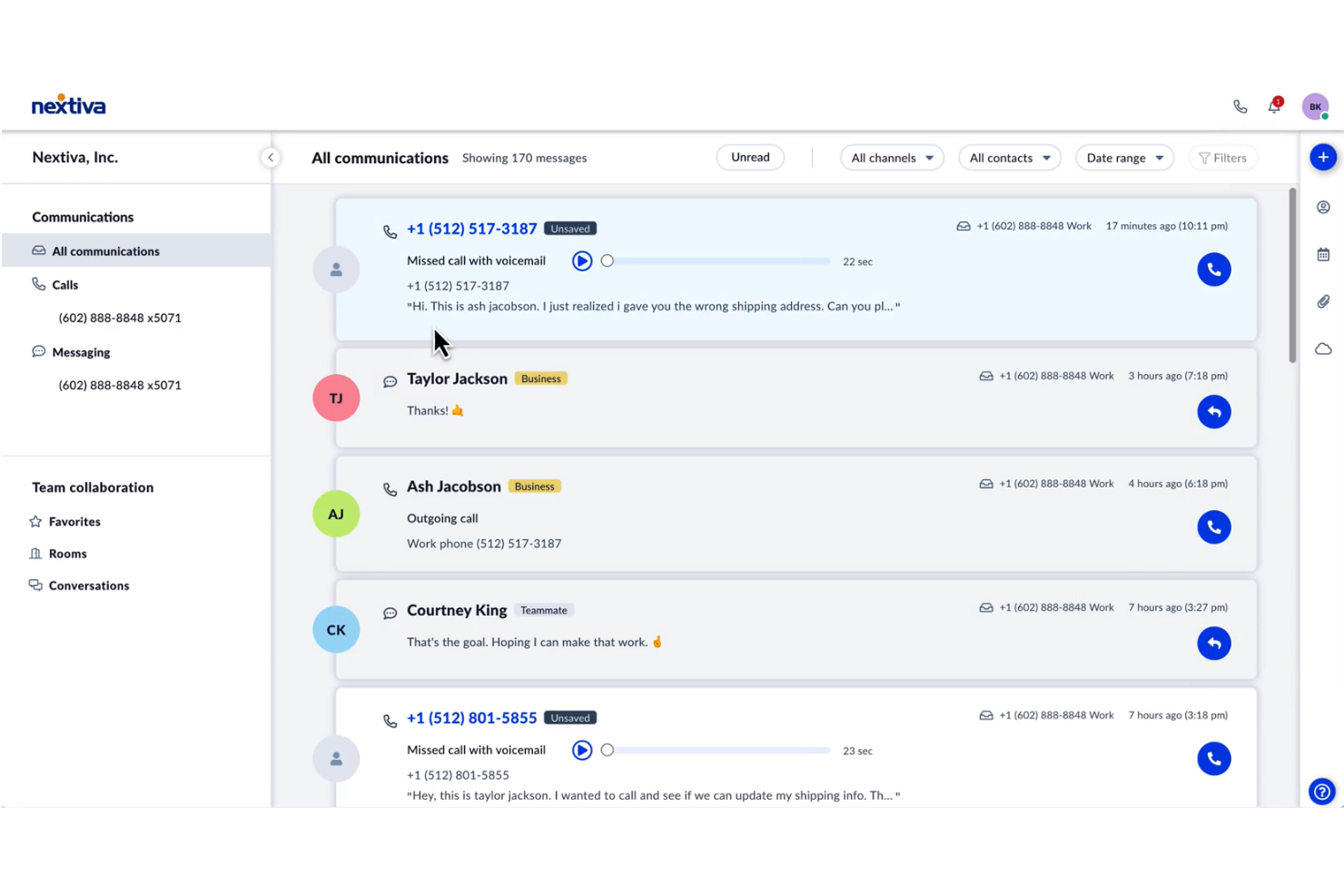
Nextiva is a cloud-based contact center platform for small businesses that combines voice, SMS, video, and team collaboration tools with advanced call routing, analytics, and customer engagement features.
Who Is Nextiva Best For?
Nextiva is a strong choice for small business teams that need unified voice, SMS, and collaboration tools in one platform.
Why I Picked Nextiva
I picked Nextiva as one of the best because I can manage calls, SMS, and team messaging from a single dashboard without juggling multiple apps. I like that my team can set up advanced call routing and IVR menus without IT support. The built-in analytics help me track agent performance and customer satisfaction in real time.
Nextiva Key Features
- Call recording: Automatically records inbound and outbound calls for quality assurance and training.
- Voicemail to email: Sends voicemail messages as audio files directly to your email inbox.
- Call pop: Displays caller details and history before you answer the call.
- Auto attendant: Answers and routes calls based on customizable menu options.
Nextiva Integrations
Nextiva offers native integrations with Salesforce, HubSpot, and Zendesk, and provides an API for custom integrations.
Pros and Cons
Pros:
- No per-user licensing on standard plan
- Visual call flow designer is intuitive
- Includes SMS and live chat channels
Cons:
- Changes may require support intervention
- Admin settings are fragmented

Best for scalable VoIP and call routing
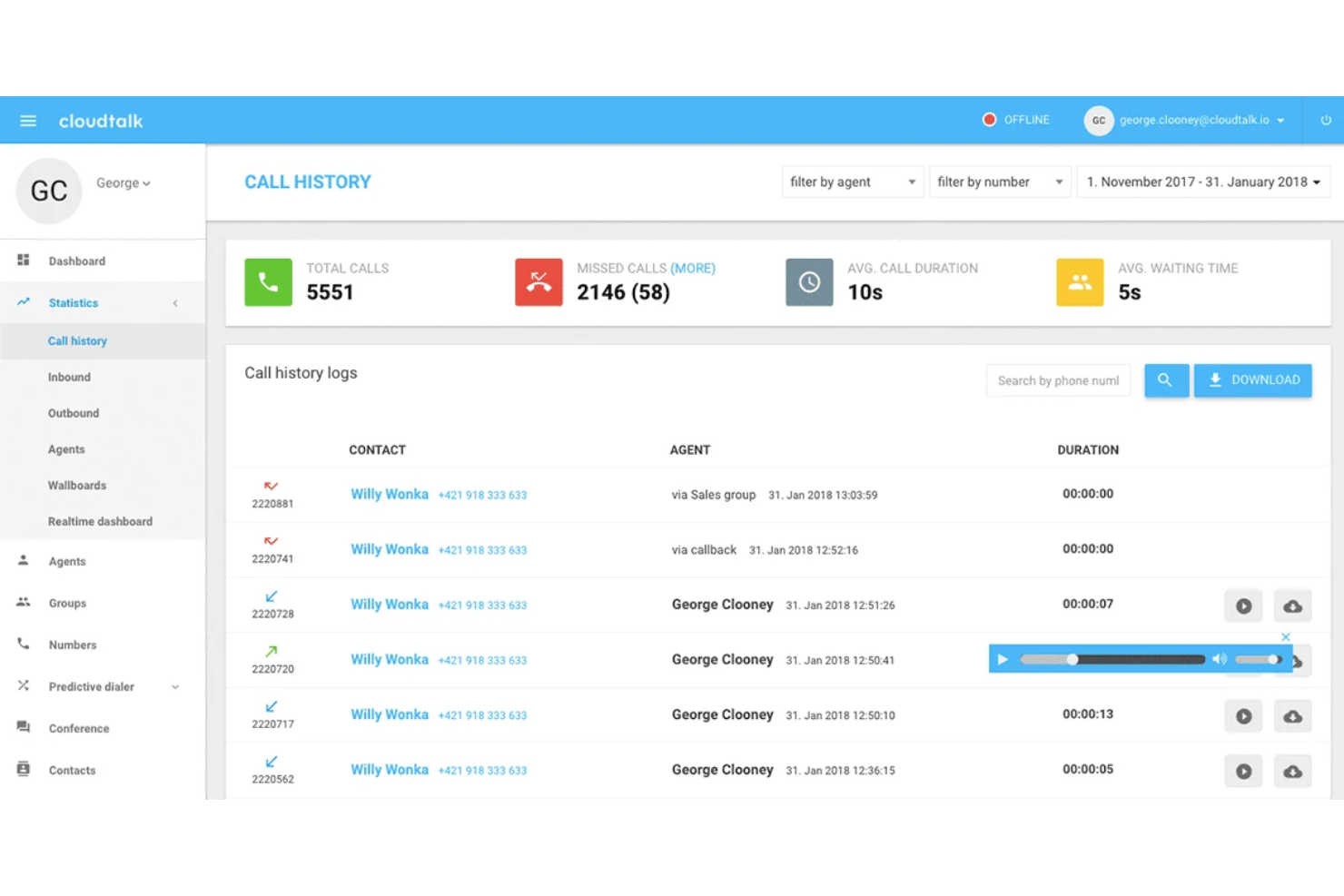
CloudTalk is a cloud-based contact center platform for small businesses that brings together advanced call routing, real-time analytics, call recording, and integrations with popular CRMs and help desk tools.
Who Is CloudTalk Best For?
CloudTalk is a strong fit for distributed sales and support teams in small to midsize businesses that need advanced call management and analytics.
Why I Picked CloudTalk
I picked CloudTalk as one of the best because I can set up advanced call routing rules for distributed teams and track performance with real-time analytics dashboards. My team uses the smart dialer and call tagging to prioritize and organize outbound campaigns. I also like having call recordings and agent statistics available in one place.
CloudTalk Key Features
- Voicemail transcription: Converts voicemails to text for quick review and follow-up.
- Interactive voice response (IVR): Lets you build custom call menus to route callers efficiently.
- Click-to-call browser extension: Enables one-click calling directly from your CRM or help desk.
- SMS messaging: Allows agents to send and receive text messages within the platform.
CloudTalk Integrations
CloudTalk offers 100+ native integrations, including Salesforce, HubSpot, Pipedrive, Zendesk, Shopify, Slack, and Zapier. An API is also available for custom integrations.
Pros and Cons
Pros:
- Global calling with local numbers in 160+ countries
- Smart routing and dialers improve call efficiency
- Easy setup with intuitive, user-friendly interface
Cons:
- Number provisioning delays for less common regions
- Analytics require manual filtering for actionable insights
New Product Updates from CloudTalk
CloudTalk Adds Campaign Statistics to MCP
CloudTalk adds campaign statistics to MCP with funnel, call, conversion, disposition, and duration metrics. This helps reporting assistants review campaign performance using read-only aggregate data. For more information, visit CloudTalk’s official site.
 .
.
Best for global customer service operations

Squaretalk is a cloud-based contact center platform that combines voice calling, SMS, and WhatsApp messaging with IVR, call routing, predictive dialing, and real-time analytics in a single browser-based interface.
Who Is Squaretalk Best For?
Squaretalk is a strong fit for small to mid-sized businesses running outbound sales or customer support teams that need multi-channel communication without the complexity or cost of enterprise-level solutions.
Why I Picked Squaretalk
I've included Squaretalk in my top picks because it's genuinely built for teams operating across borders. Local virtual numbers in 150+ countries enable your agents to call from a local number in any market you serve, making a significant difference in answer rates when callers recognize the area code. On top of that, AI-powered call transcription works across 100+ languages, so QA and compliance reviews don't fall apart the moment a non-English call comes in.
Squaretalk Key Features
- Predictive dialer: Automatically dials multiple numbers at once and connects agents only when a live person answers.
- IVR call routing: Routes inbound callers through a customizable menu to reach the right agent or queue.
- Real-time monitoring dashboard: Tracks live agent activity, queue status, and call metrics across your contact center.
- Omnichannel messaging: Manages SMS and WhatsApp conversations alongside voice calls from one interface.
Squaretalk Integrations
Squaretalk integrates with Pipedrive, Zendesk, HubSpot CRM, Freshdesk, Salesforce, Zoho CRM, and WhatsApp. It also connects with monday.com and Sedric.ai. Squaretalk also offers an API for custom integrations.
Pros and Cons
Pros:
- Local numbers in 150+ destinations
- Predictive dialer boosts agent productivity
- Exceptional call quality across regions
Cons:
- Mobile app lacks full desktop functionality
- No built-in live chat or email ticketing
New Product Updates from Squaretalk
Squaretalk Adds TradeCore Integration for Brokerage Workflows
Squaretalk adds a TradeCore integration that connects customer conversations with BrokerIQ CRM workflows. This helps brokerage teams trigger AI-driven follow-ups, tasks, and other actions from calls and messages. For more information, visit Squaretalk’s official site.
 .
.
Best for fast-deploy contact centers

Bright Pattern is a cloud-based contact center platform for small and midsize businesses that brings together voice, chat, SMS, email, and messaging channels with built-in AI, automation, and quality management tools.
Who Is Bright Pattern Best For?
Bright Pattern is a strong choice for midsize businesses that need omnichannel customer support with AI-driven automation.
Why I Picked Bright Pattern
I picked Bright Pattern as one of the best because I can manage voice, chat, SMS, and messaging channels from a single interface with built-in AI and automation. I like that my team can use AI-powered quality management to monitor and improve agent performance in real time. The workflow automation tools let us route and resolve customer issues faster without manual intervention.
Bright Pattern Key Features
- Omnichannel desktop: Agents handle all channels from a single interface.
- CRM integrations: Connects with Salesforce, Zendesk, ServiceNow, and Microsoft Dynamics.
- Customizable IVR: Build and manage interactive voice response flows.
- Real-time dashboards: Monitor live metrics and agent activity across channels.
Bright Pattern Integrations
Bright Pattern offers native integration with Salesforce, Zendesk, ServiceNow, Microsoft Teams, Google Contacts, and Zapier. An API is available for custom integrations.
Pros and Cons
Pros:
- Drag-and-drop workflows simplify configuration
- True omnichannel handles all channels in one platform
- AI improves routing and agent productivity
Cons:
- Email channel features are less developed
- UI customization lacks granularity

Talkdesk
Best for AI-powered contact centers
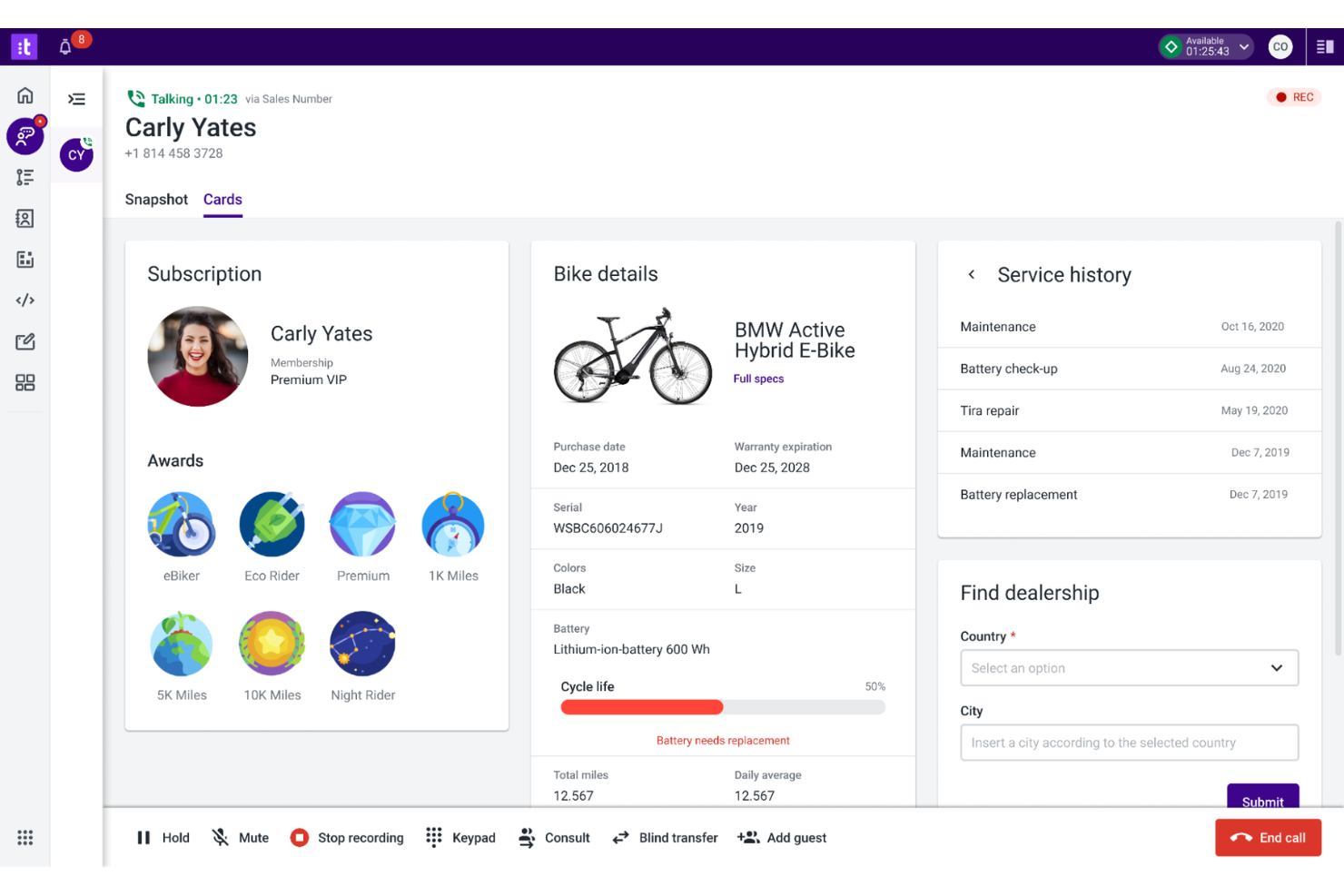
Talkdesk is a cloud-based contact center platform for small businesses that combines voice, digital channels, automation, and AI-driven tools to help teams manage customer interactions and simplify support operations.
Who Is Talkdesk Best For?
Talkdesk is a strong fit for small and midsize businesses that want AI-powered automation and omnichannel support in their contact center.
Why I Picked Talkdesk
I picked Talkdesk as one of the best because I can automate repetitive tasks and route calls using AI-powered workflows, which saves my team time during busy periods. I like that I can set up voice, chat, and SMS channels in one place and use real-time speech analytics to monitor customer sentiment. The drag-and-drop interface lets me quickly adjust call flows as my business grows.
Talkdesk Key Features
- Customizable dashboards: Build real-time dashboards to track agent and queue performance.
- Call recording: Record and store calls for quality assurance and training.
- CRM integrations: Connect with Salesforce, Zendesk, and Microsoft Dynamics 365.
- Automated outbound dialing: Launch outbound campaigns with automated dialing and call scheduling.
Talkdesk Integrations
Talkdesk offers native integration with Salesforce, Zendesk, Slack, Microsoft Teams, ServiceNow, Google Workspace, and Zapier. An API is available for custom integrations.
Pros and Cons
Pros:
- Real-time speech analytics for quality monitoring
- Visual call flow designer is easy to use
- Includes AI-powered virtual agent for self-service
Cons:
- No pipeline tracking for B2B sales
- Reporting dashboards lack B2B customization

Vonage
Best for customizable cloud contact centers
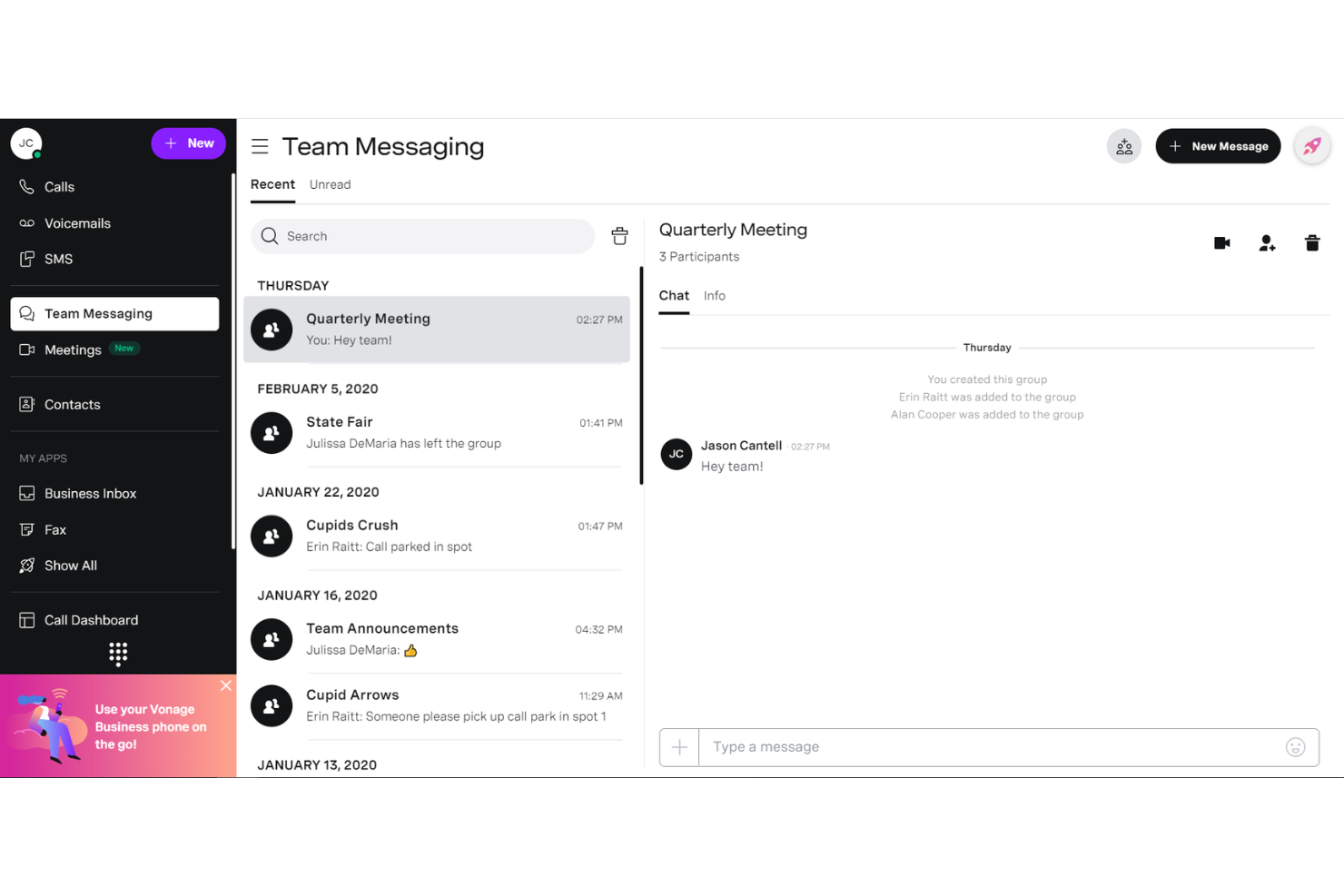
Vonage is a cloud-based contact center platform for small businesses that brings together voice, video, chat, and advanced routing to help teams manage customer interactions across multiple channels.
Who Is Vonage Best For?
Vonage is a strong choice for small and midsize businesses that need flexible, cloud-based contact center capabilities with deep CRM integration.
Why I Picked Vonage
I picked Vonage as one of the best because I can connect my contact center directly to Salesforce and Microsoft Dynamics, letting my team see customer data and call controls inside the CRM. I like that I can set up voice, video, and chat channels in one place and use skills-based routing to get customers to the right agent. The platform’s flexibility means I can add or remove channels as my business needs change.
Vonage Key Features
- Call recording: Automatically records and stores calls for quality and compliance.
- Real-time analytics dashboard: Displays live metrics on agent and queue performance.
- IVR designer: Lets you build custom interactive voice response menus.
- Omnichannel messaging: Supports customer conversations across SMS, social, and web chat.
Vonage Integrations
Vonage offers native integration with Salesforce, Microsoft Teams, Zendesk, ServiceNow, HubSpot, Zoho CRM, and Zapier. An API is available for custom integrations.
Pros and Cons
Pros:
- Email sync logs all communications
- Case management handles service workflows
- Custom pipelines support flexible sales processes
Cons:
- Setup and changes often require IT involvement
- Call quality and spam labeling can affect outreach


GoTo Connect is a cloud-based contact center platform for small businesses that combines business phone, video meetings, SMS, and call routing with easy setup and management from a single dashboard.
Who Is GoTo Connect Best For?
GoTo Connect is a strong fit for small businesses that want an all-in-one cloud phone and contact center solution.
Why I Picked GoTo Connect
I picked GoTo Connect as one of the best because I can manage calls, video meetings, and SMS from a single dashboard without switching tools. I like that my team can set up call flows and auto-attendants visually, which saves us time. I also use the analytics dashboard to monitor call volume and agent activity in real time.
GoTo Connect Key Features
- Call recording: Automatically records inbound and outbound calls for quality and compliance.
- Voicemail to email: Sends voicemail messages directly to your email inbox as audio files.
- Ring groups: Routes incoming calls to multiple agents or departments simultaneously.
- Call whisper: Lets supervisors coach agents during live calls without the customer hearing.
GoTo Connect Integrations
GoTo Connect offers native integrations with Salesforce, Zoho CRM, Microsoft Teams, Slack, HubSpot, and Zapier, and provides an API for custom integrations.
Pros and Cons
Pros:
- No per-user licensing on the standard plan
- Visual call flow designer is intuitive
- Includes SMS and live chat channels
Cons:
- No gamification for agent performance
- Locked into GoTo’s VoIP

Best for all-in-one help desk and calling
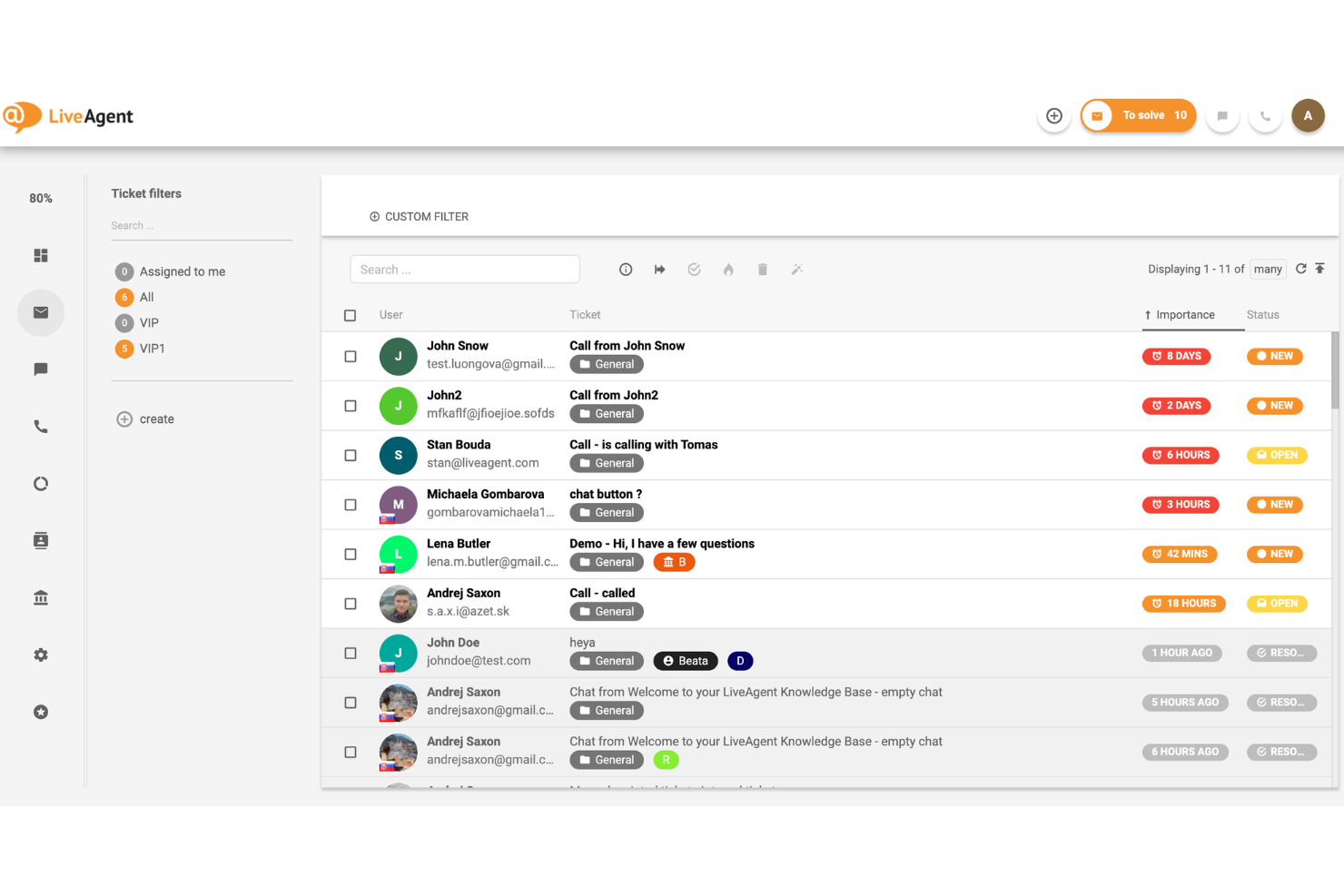
LiveAgent is a contact center software for small businesses that combines voice, live chat, email, and social messaging with ticketing, call routing, and unlimited call recordings in one platform.
Who Is LiveAgent Best For?
Small business support teams that need an affordable, all-in-one contact center with unlimited call recordings.
Why I Picked LiveAgent
I picked LiveAgent as one of the best because I can set up unlimited call recordings without worrying about storage limits or extra fees. My team uses the built-in ticketing and call routing to keep every customer conversation organized. I also like that we can manage calls, chats, and emails from a single dashboard.
LiveAgent Key Features
- Omnichannel inbox: Manage tickets from email, chat, calls, and social media in one place.
- IVR designer: Build custom interactive voice response menus for call routing.
- Real-time chat widget: Add live chat to your website for instant support.
- Call transfers: Transfer calls between agents or departments with a single click.
LiveAgent Integrations
LiveAgent offers 200+ native integrations, including Slack, Shopify, Mailchimp, Facebook, WooCommerce, Salesforce, and Zapier. An API is also available for custom integrations.
Pros and Cons
Pros:
- Real-time chat widget for websites
- Built-in IVR and call routing tools
- Unlimited call recordings with no storage cap
Cons:
- Reporting lacks advanced customization options
- No built-in workforce management features

Zendesk
Best for omnichannel support with voice
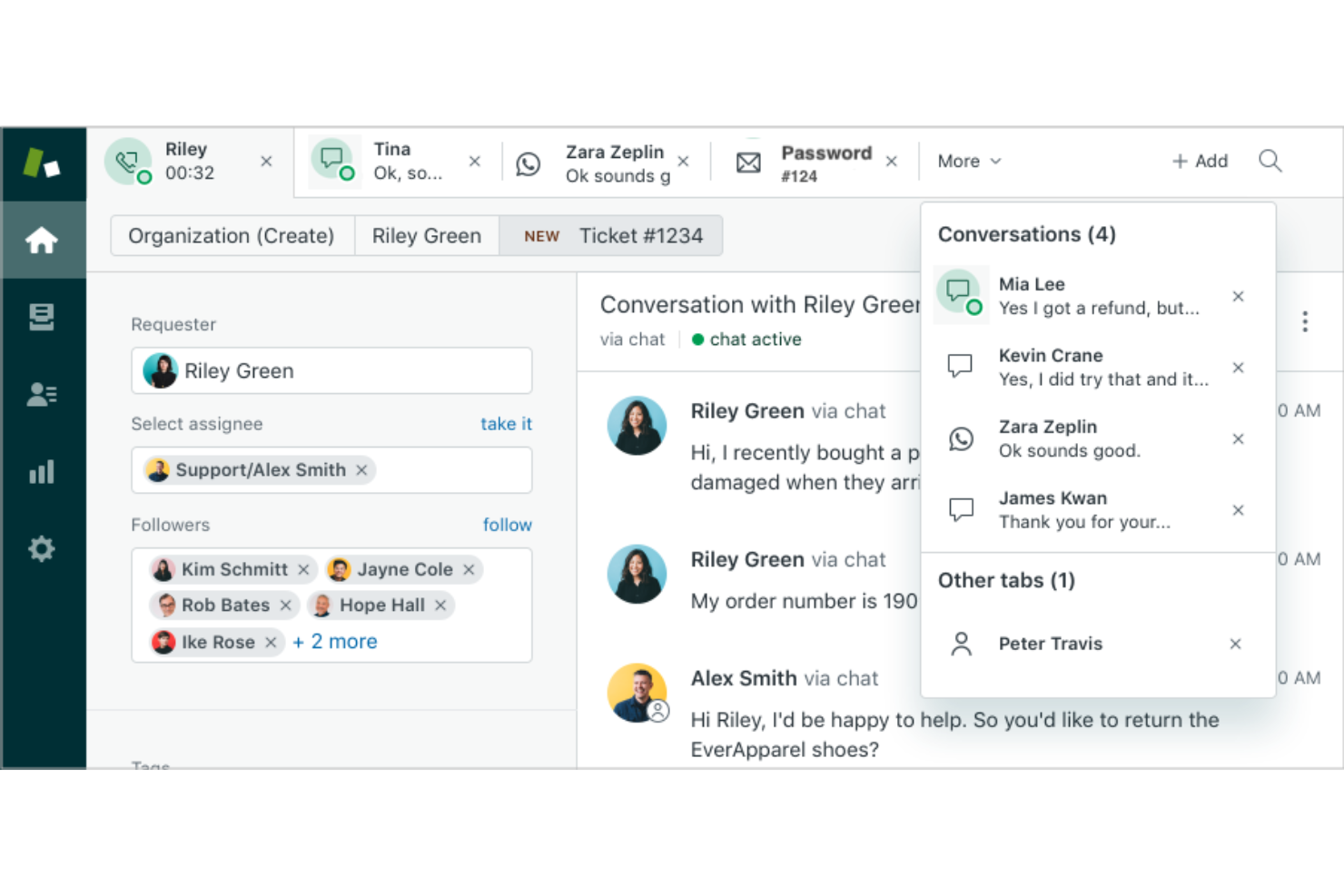
Zendesk is a cloud-based contact center platform for small businesses that brings together voice, chat, email, and social channels with ticketing, automation, and reporting in one unified workspace.
Who Is Zendesk Best For?
Customer service teams at growing companies that need omnichannel support and automation.
Why I Picked Zendesk
I picked Zendesk as one of the best because I can manage voice, chat, email, and social messaging all in one place. I like how the integrated voice channel lets my team handle calls alongside tickets and chats, so nothing slips through the cracks. The automation tools help us route calls and follow up automatically, which keeps our response times consistent.
Zendesk Key Features
- Customizable IVR menus: Set up interactive voice response menus to direct callers to the right team.
- Call recording: Record inbound and outbound calls for quality assurance and training.
- Real-time analytics dashboard: Monitor call volume, wait times, and agent activity as it happens.
- Voicemail transcription: Automatically convert voicemails into text for quick review and follow-up.
Zendesk Integrations
Zendesk offers 1,300+ native integrations, including Salesforce, Slack, Shopify, Mailchimp, Jira, Trello, and Zapier. An API is also available for custom integrations.
Pros and Cons
Pros:
- Automation for call routing and follow-up
- Built-in call recording and voicemail transcription
- Omnichannel ticketing unifies all customer interactions
Cons:
- Occasional delays syncing with external CRMs
- Voice features require higher-tier plans
New Product Updates from Zendesk
Zendesk Adds Email AI Replies and Predictive Routing
Zendesk’s latest email AI agents update brings configurable knowledge and welcome replies and adds predictive routing for email tickets, so you can tailor your automated emails and get inquiries resolved faster. For more information, visit Zendesk’s official site.

3CX
Best for flexible web-based PBX systems
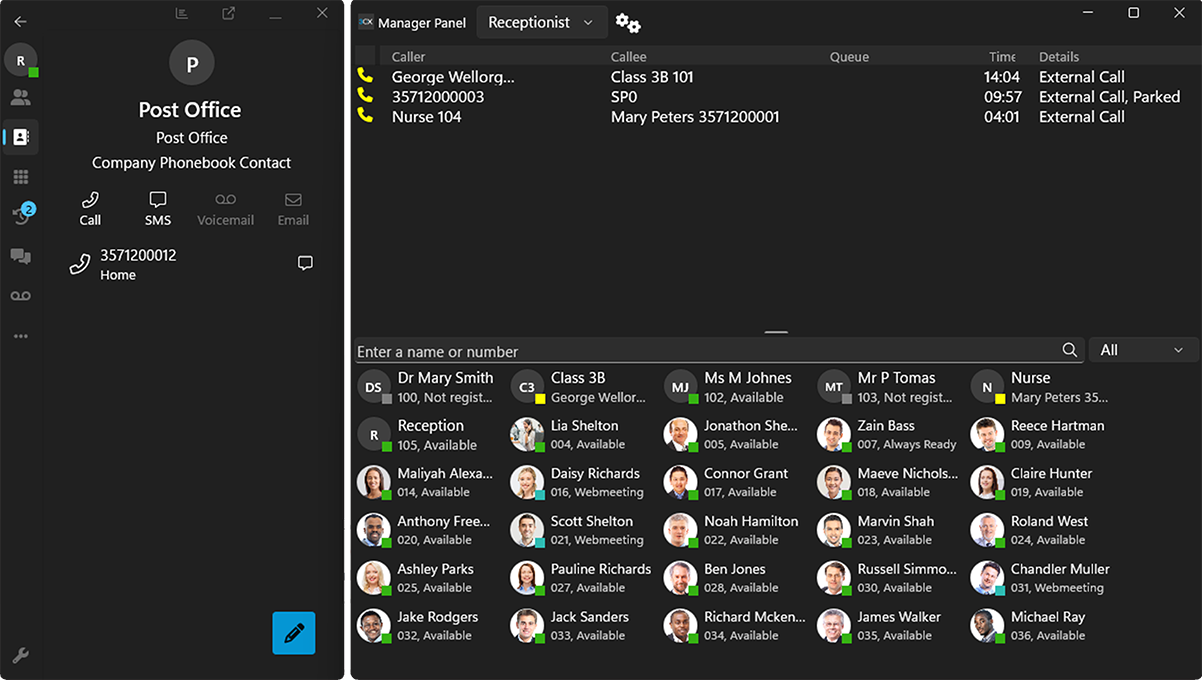
3CX is a business phone system and contact center platform for small businesses that combines voice, video, live chat, and SMS with flexible deployment options and built-in call management features.
Who Is 3CX Best For?
3CX is a strong fit for small businesses and IT teams that want unified communications with flexible on-premise or cloud deployment.
Why I Picked 3CX
I picked 3CX as one of the best because I can deploy it on-premise or in the cloud, which gives my team flexibility for compliance and control. I like using the built-in live chat and SMS features alongside voice and video calls. My team is able to manage call queues and set up IVR menus without extra add-ons.
3CX Key Features
- Call recording: Automatically records inbound and outbound calls for quality monitoring.
- Web conferencing: Hosts video meetings directly from the 3CX interface.
- CRM integration: Connects with Salesforce, HubSpot, and other popular CRMs.
- Call reporting: Generates detailed reports on call activity and agent performance.
3CX Integrations
3CX offers native integrations with Salesforce, HubSpot, Microsoft 365, Zendesk, Freshdesk, Zoho CRM, Vtiger, and Zapier. An API is also available for custom integrations.
Pros and Cons
Pros:
- IVR and call queue management built-in
- Native live chat and SMS channels included
- Flexible on-premise or cloud deployment options
Cons:
- Advanced features require higher-tier plans
- Mobile app can be unreliable for calls
Other Small Business Contact Center Software
Here are some additional small business contact center software options that didn’t make it onto my shortlist, but are still worth checking out:
- Aircall
For easy cloud calling for small teams
- Intercom
For conversational customer messaging
- Sprinklr
For AI-driven omnichannel support
- Kixie
For sales-focused calling automation
- Ringover
For calling, SMS, and video
- Five9
For intelligent call routing
- Dialpad
For AI-powered call coaching
- HubSpot Service Hub
For CRM-integrated support tools
- Freshcaller
For cloud-based business calling
- Front
For collaborative shared inboxes
- Zoho Desk
For context-aware customer support


How I Evaluate Small Business Contact Center Software
I evaluate each platform in two layers: the baseline capabilities a five-person support team needs on day one, and the differentiators that set a tool apart for growing businesses.
Core Functionality (Table Stakes For This List)
When I'm selecting tools for my list, I rank each one on a scale from 0 (does not offer the functionality) to 5 (excels in this area) for each core functionality listed below. Then, I calculate the tool's total score into a percentage. Each tool needs to achieve a minimum total score of 65% to be considered for inclusion.
- Omnichannel Interaction Handling: I look for a unified agent workspace where voice, email, live chat, SMS, and social messages share the same customer thread—so agents aren't toggling between tabs mid-conversation.
- ACD & IVR Routing: Skills-based routing and multi-level IVR menus matter here, especially for small teams where one agent may handle billing while another covers technical questions.
- Cloud-Native, SMB-Friendly Deployment: Each platform should offer per-seat pricing with low minimums and quick self-serve setup, so a five-person team can go live without an IT department or lengthy procurement cycle.
- Reporting & Analytics: Real-time dashboards that surface wait times, abandonment rates, and agent availability are what I check for—metrics a support lead actually monitors throughout the day.
- Call Recording & Monitoring: I evaluate whether the tool supports recording, live listen, whisper, and barge, since these are the coaching tools a team lead relies on to ramp up new agents quickly.
- CRM & Helpdesk Integrations: Native connectors to popular platforms like Salesforce, HubSpot, or Zendesk should surface customer context as a screen pop, giving agents order history and past tickets before they say hello.
Once I have a list of tools that meet the criteria, I consider what sets each platform apart.
Differentiating Factors (What Sets Vendors Apart)
Here's how I compare and contrast different vendors:
Standout Features
AI-powered features like call summarization and chatbot deflection can free up a small team to focus on complex issues instead of repetitive questions. I also evaluate whether a platform combines UCaaS and CCaaS, since a three-person support team benefits from having their business phone system and contact center in one place. Self-service admin tools matter just as much—a no-code IVR builder means the owner can update holiday routing without filing a support ticket.
Beyond Features
Pricing transparency is a big one—I check whether a vendor bundles core features into each tier or charges extra for essentials like call recording and IVR. Implementation speed also matters for small teams. A platform that offers guided onboarding and prebuilt templates can get a team live in days rather than weeks. I also evaluate scalability: if your holiday season doubles call volume, you need to add seats on demand and scale back without penalty afterward.
How to Choose Small Business Contact Center Software
It’s easy to get bogged down in long feature lists and complex pricing structures. To help you stay focused as you work through your unique software selection process, here’s a checklist of factors to keep in mind:
| Factor | What to Consider |
|---|---|
| Scalability | Will the software support your growth plans? Check user limits, channel expansion, and pricing as your team or call volume increases. |
| Integrations | Does it connect natively to your CRM, helpdesk, or productivity tools? Avoid solutions that require workarounds for your core systems. |
| Customizability | Can you tailor workflows, routing, and reporting to your business needs? Look for flexible settings, not just out-of-the-box templates. |
| Ease of use | Will agents and admins pick it up quickly? Test the interface for clarity and simplicity—complex tools can slow down onboarding and daily work. |
| Implementation and onboarding | How long will it take to get up and running? Ask about migration support, training resources, and typical time to first value. |
| Cost | Are all costs clear, including setup, seats, and add-ons? Compare the total cost of ownership, not just monthly fees. |
| Security safeguards | Does the platform meet your data protection standards? Look for encryption, access controls, and compliance with regulations like GDPR. |
| Support availability | What support channels and hours are offered? Consider if you need 24/7 help or dedicated onboarding assistance for your team. |
What Is Small Business Contact Center Software?
Small business contact center software is a platform that helps teams manage customer communication across channels like phone calls, chat, email, and SMS from a single interface. These call center solutions centralize interactions and support the full customer journey. They include features like ACD (call distribution), call queuing, intelligent routing, and callback options to handle inbound calls more efficiently. Many platforms also use chatbots to automate responses and improve service speed. By streamlining operations and automating workflows, this software helps small teams deliver a better customer experience while managing high volumes of interactions effectively.
Features of Small Business Contact Center Software
When selecting small business contact center software, keep an eye out for the following key features:
- Omnichannel support: Manage customer conversations across phone, email, chat, and SMS from one unified dashboard, so agents never miss a message and customers can reach you on their preferred channel.
- Automatic call routing: Direct incoming calls to the right agent or department based on rules you set, reducing wait times and improving first-contact resolution.
- Call recording: Record and store calls for quality assurance, training, and compliance, with easy access to playback and download options.
- Real-time analytics: Monitor call volumes, agent performance, and customer satisfaction with live dashboards and customizable reports to spot trends and make data-driven decisions.
- CRM integration: Sync customer data and interaction history with your CRM, giving agents context for every conversation and enabling personalized service.
- Interactive voice response (IVR): Let callers interact with a menu system to self-serve or reach the right team, streamlining call flows and reducing manual transfers.
- Agent collaboration tools: Enable agents to chat internally, share notes, or escalate issues within the platform, supporting teamwork and faster problem-solving.
- Customizable workflows: Adapt call handling, ticketing, and follow-up processes to match your business needs, ensuring consistency and efficiency.
- Security and compliance controls: Protect sensitive customer data with encryption, access permissions, and compliance features for regulations like GDPR or HIPAA.
- Mobile access: Allow agents and managers to handle calls, view analytics, and respond to customers from mobile devices, supporting remote and flexible work.
Benefits of Small Business Contact Center Software
Implementing small business contact center software provides several benefits for your team and your business. Here are a few you can look forward to:
- Centralized communication: Manage all customer interactions from one platform, reducing confusion and missed messages across channels.
- Faster response times: Automatic call routing and omnichannel support help your team resolve customer issues more quickly.
- Improved customer satisfaction: Real-time analytics and CRM integration enable more personalized and effective service.
- Better team collaboration: Built-in collaboration tools and shared dashboards make it easier for agents to work together and solve problems.
- Scalability for growth: Flexible workflows and integrations allow your contact center to expand as your business grows.
- Improved data security: Security controls and compliance features help protect sensitive customer information and meet regulatory requirements.
- Actionable insights: Reporting and analytics features provide visibility into performance trends, helping you make informed decisions to improve service quality.
Costs and Pricing of Small Business Contact Center Software
Selecting small business contact center software requires an understanding of the various pricing models and plans available. Costs vary based on features, team size, add-ons, and more. The table below summarizes common plans, their average prices, and typical features included in small business contact center software solutions:
Plan Comparison Table for Small Business Contact Center Software
| Plan Type | Average Price | Common Features |
|---|---|---|
| Free Plan | $0 | Basic call handling, limited channels, minimal reporting, and community support. |
| Personal Plan | $10-$25/user/month | Multi-channel support, call recording, simple analytics, and email support. |
| Business Plan | $30-$60/user/month | Omnichannel routing, CRM integration, advanced analytics, IVR, and team collaboration tools. |
| Enterprise Plan | $70-$120/user/month | Custom workflows, API access, improved security, compliance features, priority support, and onboarding assistance. |
Small Business Contact Center Software FAQs
Here are some answers to common questions about small business contact center software:
What’s the difference between contact center software and a traditional phone system?
Contact center software goes beyond basic calling by supporting multiple channels like chat, email, and SMS, plus features like call routing, analytics, and CRM integration. Traditional phone systems usually only handle voice calls and lack these advanced tools.
Can small business contact center software integrate with my existing CRM?
Yes, most platforms integrate with CRM tools to improve customer relationships and provide context during interactions. Many CCaaS solutions are built to connect smoothly with your existing systems.
How long does it take to set up small business contact center software?
Setup time varies, but most cloud-based platforms can be deployed quickly with just an internet connection. Some providers, including platforms like RingCentral, offer fast onboarding for startup teams and growing businesses.
Is small business contact center software secure?
Yes, reputable vendors include security features like authentication, encryption, and access controls to protect customer data and communications.
Do I need IT staff to manage small business contact center software?
No, many of the best call center software options are designed to be easy to use without dedicated IT teams. However, some technical knowledge can help when configuring advanced features like routing or integrations.
What happens if my team grows or my needs change?
Most platforms are scalable, allowing you to add users, channels, and phone numbers as needed. They also help teams optimize operations and improve customer experience as your business evolves.