
20 Best Spiceworks Alternatives Reviewed in 2026

Best Spiceworks Alternatives Shortlist
Here's my pick of the 10 best software from the 20 tools reviewed.


Help desk software helps IT and CX teams manage support tickets, track assets, and keep response times tight. But if you’ve outgrown Spiceworks—maybe you’ve hit limits on scalability, integrations, or reporting—it may be time to explore alternatives. The right help desk solution can streamline collaboration, automate workflows, and give you the visibility you need to keep your team and end users happy.
I’ve reviewed and tested the top Spiceworks alternatives based on functionality, ease of use, scalability, integrations, and value for money. This guide breaks down the best options for different needs, from AI-driven automation to free, lightweight tools, so you can confidently choose the platform that aligns with your team’s size, budget, and service goals.
What Is Spiceworks?
Spiceworks is an IT help desk platform built for IT teams to manage tickets, track assets, and monitor network performance, all in one place. It’s designed to streamline technical support by centralizing communication, automating routine tasks, and improving visibility across devices and incidents. With tools for ticketing, reporting, and asset tracking, Spiceworks helps IT and CX teams stay organized, resolve issues faster, and maintain control over their infrastructure without heavy setup or cost.
Best Spiceworks Alternatives Summary
This comparison chart summarizes pricing details for my top Spiceworks alternative selections to help you find the best one for your budget and business needs.
| Tool | Best For | Trial Info | Price | ||
|---|---|---|---|---|---|
| 1 | Best for Microsoft Teams integration | 21-day free trial + free plan + free demo available | From $12/agent/month (billed annually) | Website | |
| 2 | Best for AI-powered integration | 14-day free trial | Pricing upon request | Website | |
| 3 | Best for real-time collaboration | 14-day free trial | From $24/agent/month (billed annually) | Website | |
| 4 | Best for omnichannel ticket submission | Free plan available | Free to use | Website | |
| 5 | Best for task management | Free trial available | From $478/user/annually | Website | |
| 6 | Best for free and simple use | Free plan + free demo available | From $29.99/10 users/month (billed annually) | Website | |
| 7 | Best for shared inboxes | 14-day free trial + free demo available | From $25/seat/month (billed annually) | Website | |
| 8 | Best for process automation | Free demo available | Pricing upon request | Website | |
| 9 | Best for email management | 21-day free trial | From $699 (billed annually) | Website | |
| 10 | Best for data control and security | 14-day free trial | From $15/user/month (billed annually) | Website |
Why Trust Our Software Reviews
We’ve been testing and reviewing customer experience software since 2020. As customer experience managers ourselves, we know how critical and difficult it is to make the right decision when selecting software. We invest in deep research to help our audience make better software purchasing decisions.
We’ve tested more than 2,000 tools for different customer experience use cases and written over 1,000 comprehensive software reviews. Learn how we stay transparent and check out our software review methodology.
-

SupportYourApp
Visit WebsiteThis is an aggregated rating for this tool including ratings from Crozdesk users and ratings from other sites.4.7 -
Hiver
Visit WebsiteThis is an aggregated rating for this tool including ratings from Crozdesk users and ratings from other sites.4.7 -
Freshdesk
Visit WebsiteThis is an aggregated rating for this tool including ratings from Crozdesk users and ratings from other sites.4.4





Best Spiceworks Alternatives Reviews
Below are my detailed summaries of the best Spiceworks alternatives that made it onto my shortlist. My reviews offer an in-depth look at the key features, pros and cons, integrations, and ideal use cases of each tool to help you find the best one for you.

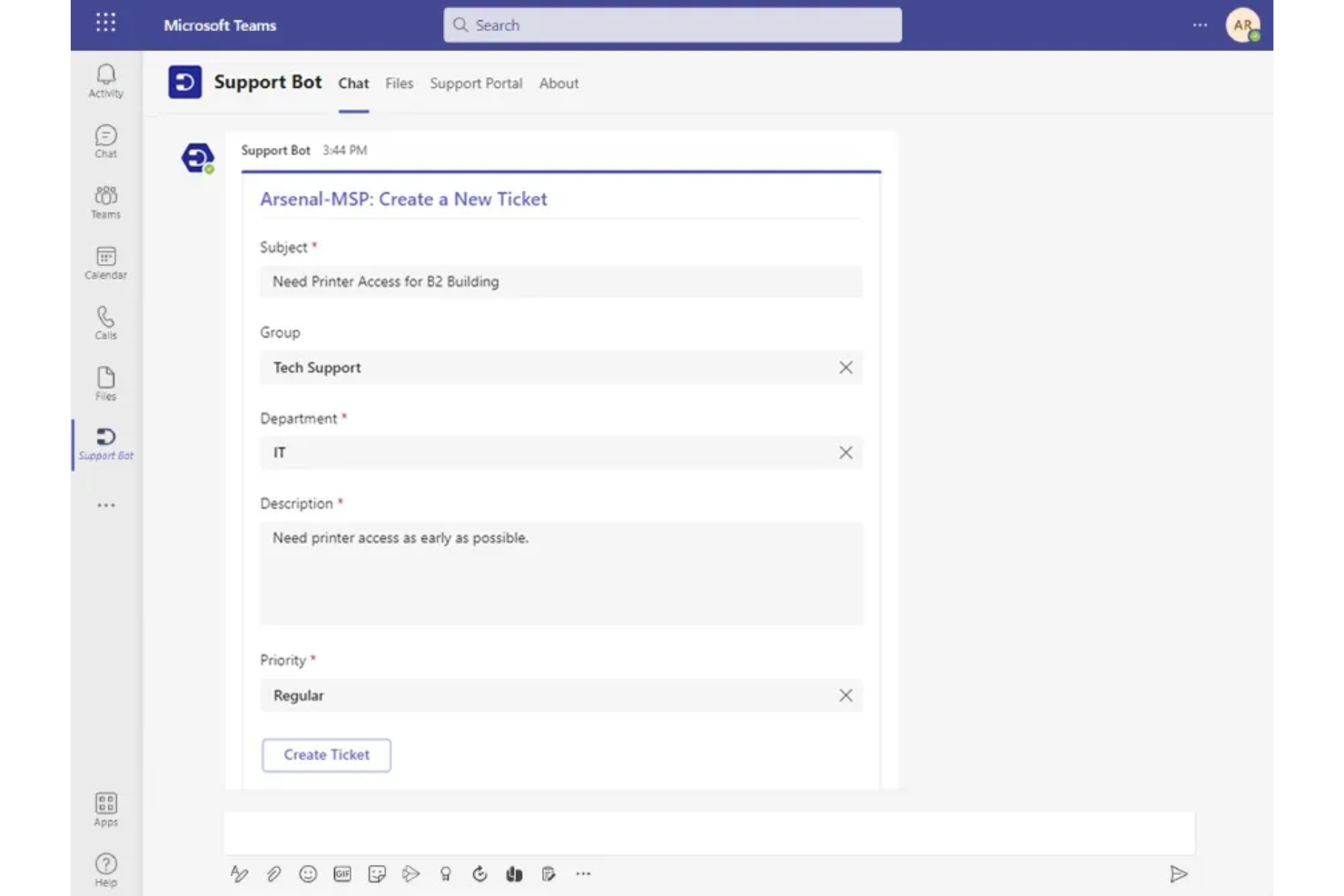
Desk365 is a help desk solution designed to help teams manage customer support more efficiently. Integrating with Microsoft Teams provides a way to manage tickets, making it suitable for IT departments and service desks that want to automate repetitive tasks. By simplifying ticket creation and management, Desk365 helps reduce fragmented communication and allows teams to focus on resolving support requests.
Why I Picked Desk365
I picked Desk365 as a notable alternative to Spiceworks for its integration with Microsoft Teams, which lets your team manage tickets directly from chat. This feature works alongside its AI-based ticketing system, which automates repetitive tasks. Desk365 also offers customizable ticket fields and forms, enabling teams to adjust workflows to their support processes.
Desk365 Key Features
In addition to its robust Microsoft Teams integration, Desk365 offers:
- AI Agents: Automate repetitive tasks and provide intelligent responses to common queries, reducing the workload on your team.
- Unified Inbox: Manage support requests from multiple channels in one place, simplifying ticket tracking and resolution.
- Customizable SLAs: Set specific timeframes for ticket resolution to ensure service standards are consistently met.
- Knowledge Base: Create and share solution articles to empower users with self-service options and reduce ticket volume.
Desk365 Integrations
Integrations include Microsoft Teams, Microsoft 365, Azure Active Directory, Power Automate, and Microsoft Outlook. Desk365 also supports custom integrations through APIs and webhooks.
Pros and Cons
Pros:
- Workflow customization allows teams to configure ticket fields and routing rules
- Native Microsoft Teams integration enables ticket management directly within Teams
- Customizable ticket workflows support different operational support processes
Cons:
- Admin portal theme customization options are limited
- Reporting capabilities may be limited for teams needing advanced analytics

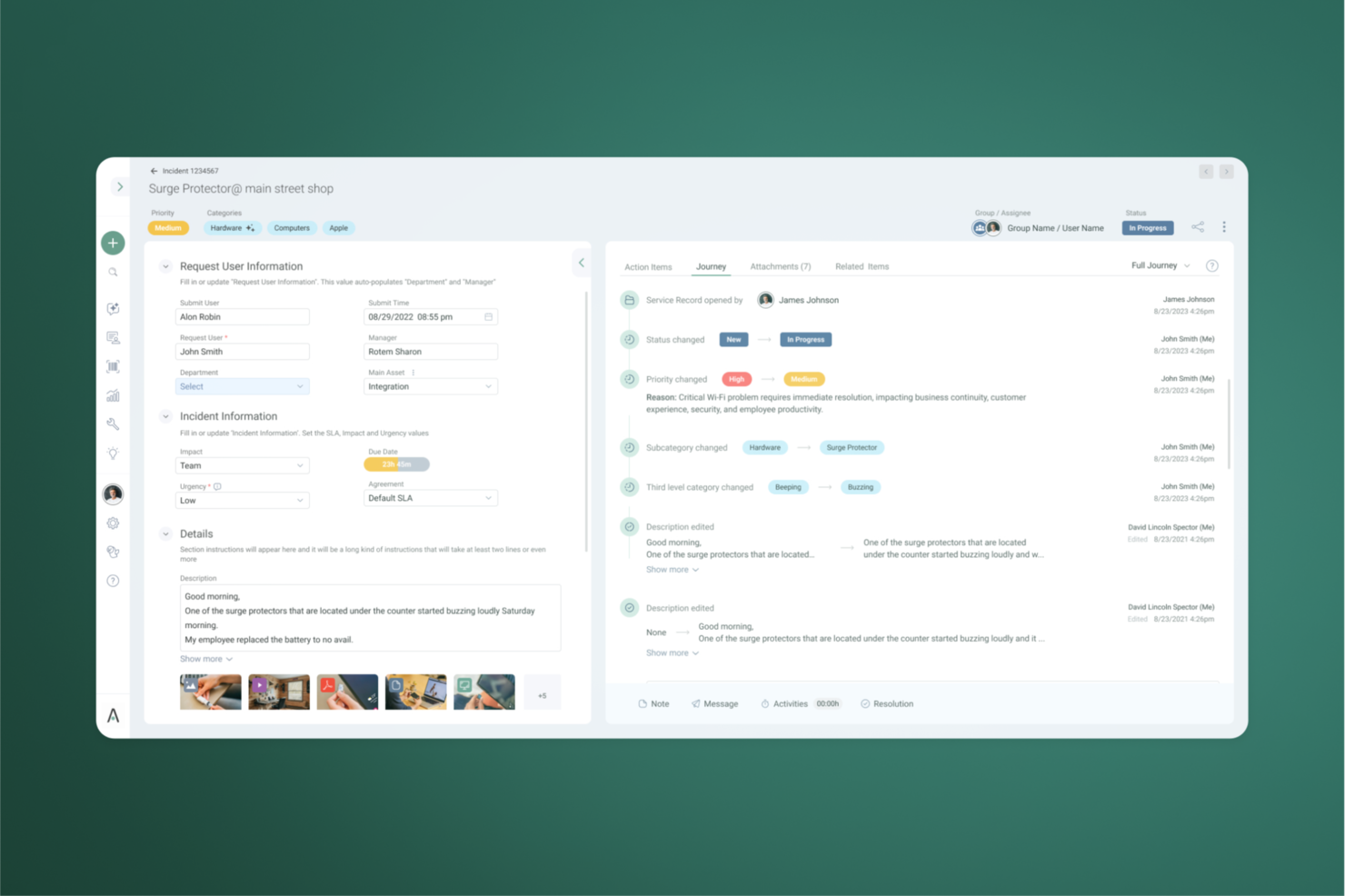
SysAid is an AI-first ITSM and Help Desk platform designed to automate IT operations and accelerate service delivery. It serves as a command center where your team can manage tickets, assets, and workflows within a single, unified environment. By combining Agentic AI with service desk tools, it allows your organization to shift from manual firefighting to a strategic, proactive service model.
Why I Picked SysAid
I picked SysAid because it offers a unique blend of automation and integration capabilities that cater to the needs of those seeking a Spiceworks alternative. SysAid's automation features, such as automatic service record creation and syncing engineering escalations, directly address the need to reduce manual tasks and improve operational efficiency. Additionally, its integration with over 1,000 applications via Workato enhances its flexibility, allowing your team to connect with your existing tool stack.
SysAid Key Features
In addition to its automation and integration capabilities, I also found other features that make SysAid a strong contender in the ITSM space:
- Self-Service Portal: Provides a user-friendly interface for end-users to log tickets and request services, reducing the IT team's workload.
- AI-Powered Analytics: Offers insights into ticket trends and SLA performance, helping you make informed decisions to improve service delivery.
- Change Management: Facilitates the tracking and implementation of IT changes, ensuring minimal disruption to operations.
- Asset Management: Enables comprehensive tracking of IT assets, ensuring accurate inventory and compliance with organizational policies.
SysAid Integrations
Integrations include Salesforce, Zoom, Asana, HubSpot, Jira, Azure DevOps, Slack, and other applications through Workato.
Pros and Cons
Pros:
- Standardizes workflows to ensure global compliance
- Quick onboarding with minimal learning curve
- User-friendly interface simplifies IT service management
Cons:
- Requires significant configuration time
- Technical support may be slow
New Product Updates from SysAid

SysAid Adds Direct Knowledge Base Linking in Service Records
SysAid now allows linking knowledge base articles directly to service records, enhancing centralized access to information and speeding up issue resolution. For more information, visit SysAid's official site.
 .
.

HappyFox is a cloud-based help desk software designed for businesses aiming to improve customer support efficiency and collaboration. It's primarily used by customer service teams seeking to manage tickets and enhance communication.
Why HappyFox is a good Spiceworks alternative: HappyFox excels in real-time collaboration, allowing your team to work together seamlessly on support tickets. Its intuitive interface helps your team navigate the software effortlessly, improving response times. The software's automation capabilities reduce repetitive tasks, freeing up your team's time for more complex issues. With a focus on collaborative ticket management, HappyFox ensures your team stays connected and informed.
Standout features & integrations:
Features include a comprehensive ticketing system, canned responses, and task management. You can set up automated workflows to handle repetitive tasks efficiently. The software also offers a self-service knowledge base, helping customers find answers independently.
Integrations include Slack, Shopify, Salesforce, QuickBooks, Google Workspace, Microsoft Teams, Mailchimp, Zapier, Trello, and Jira.
Pros and Cons
Pros:
- Effective task management
- Self-service knowledge base
- Automation of repetitive tasks
- Intuitive user interface
- Strong real-time collaboration
Cons:
- Limited offline capabilities
- No mobile app customization
- May need training for new users
- Requires customization for advanced needs
- Limited reporting features


Raiseaticket is a free, cloud-based help desk software designed to enhance customer support experiences. Its primary users are businesses seeking to streamline communication between customers and support teams.
Why Raseaticket is a good Spiceworks alternative: Raiseaticket offers a customizable ticketing system that supports multi-channel communication, allowing your team to manage tickets from various sources efficiently. Tailored Service Level Agreements (SLAs) ensure you meet your specific business requirements. Real-time notifications keep your team informed about ticket statuses, enhancing response times. Its compliance with GDPR makes it suitable for businesses that need secure and compliant support solutions.
Standout features & integrations:
Features include customizable ticketing, real-time notifications, and tailored SLAs. You can enhance customer interactions with multi-channel communication. The platform's intuitive interface helps your team collaborate effectively.
Integrations include Slack, Microsoft Teams, Google Workspace, Salesforce, Mailchimp, Jira, Trello, Zapier, QuickBooks, and Freshdesk.
Pros and Cons
Pros:
- Easy to set up
- GDPR compliant
- Real-time notifications
- Supports multi-channel communication
- Customizable ticketing system
Cons:
- Limited customization for advanced needs
- No mobile app support
- Requires manual ticket sorting
- Limited automation options
- Basic reporting features

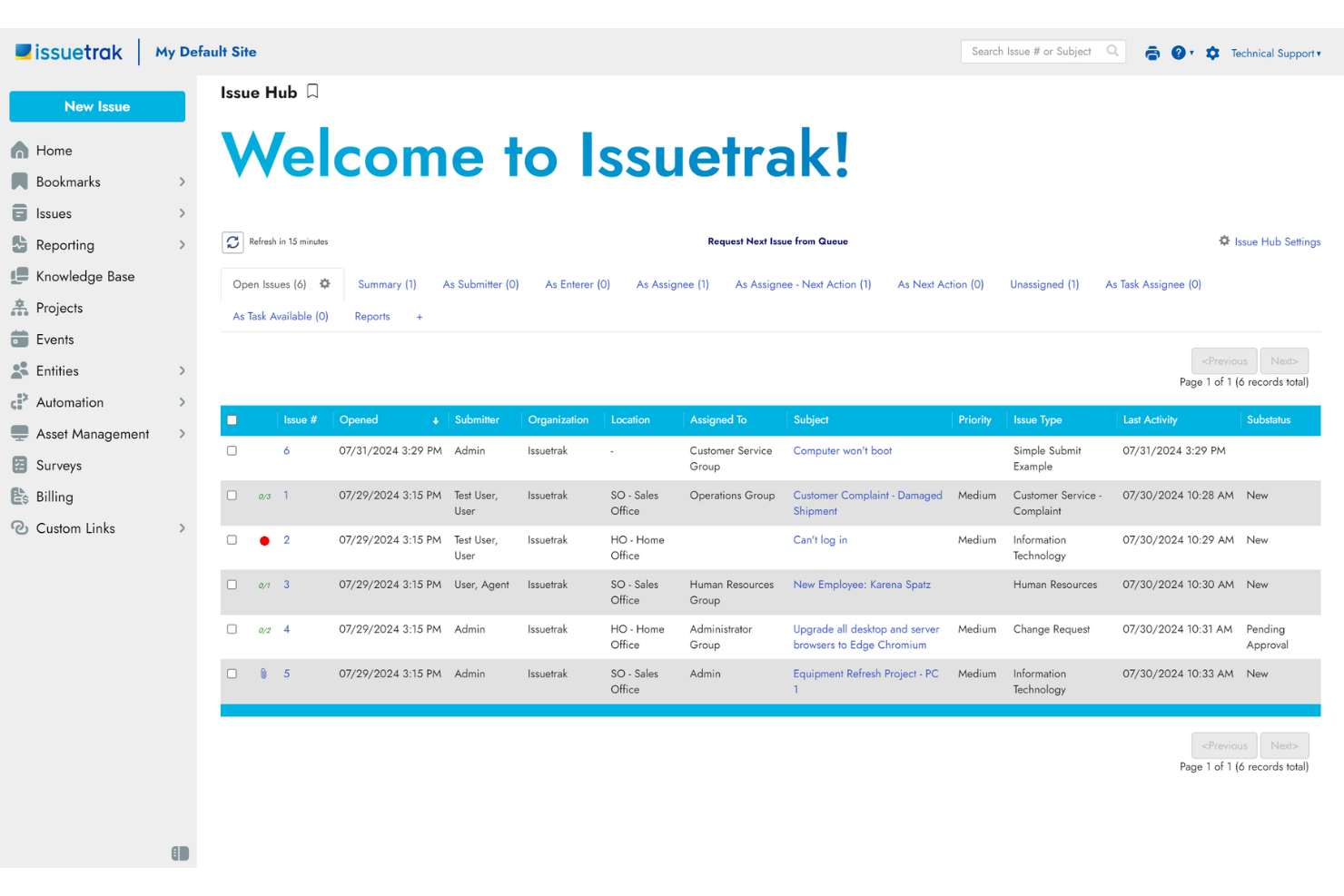
Issuetrak is a help desk software designed for organizations to manage customer support inquiries and internal issues efficiently. It enables your team to track, prioritize, and resolve tasks, enhancing overall productivity.
Why Issuetrak is a good Spiceworks alternative: Issuetrak provides task management capabilities that let your team create workflows and automate processes. With task assignments, custom forms, and automatic ticket routing, you can ensure tasks are handled promptly and accurately. The platform’s flexibility allows you to tailor workflows to match your organization’s specific needs. Its reporting tools offer insights into task progress and team performance, helping you make informed decisions.
Standout features & integrations:
Features include omnichannel ticket creation, letting users submit tickets via email, web forms, and chat. The knowledge base helps your team document solutions and share information easily. Customizable dashboards give a clear view of key metrics and ongoing tasks.
Integrations include Microsoft 365, Google Analytics, Gmail, Salesforce, Power BI, and thousands more through Zapier. You can also access the Issuetrak API for even more connections.
Pros and Cons
Pros:
- Scalable for various business sizes
- Customizable user permissions
- Detailed reporting capabilities
- Comprehensive task automation
- Flexible deployment options
Cons:
- Customization can be time-consuming
- Advanced features may require training
- Limited mobile application features
- User interface may appear dated
- Initial setup can be complex


Hesk is a free help desk software designed for small to medium-sized businesses, providing tools to manage customer support inquiries and maintain an integrated knowledge base. It enables your team to organize, track, and resolve customer issues efficiently without incurring additional costs.
Why Hesk is a good Spiceworks alternative: Hesk offers a straightforward, user-friendly interface that simplifies the setup and management of your help desk operations. Its integrated knowledge base reduces the number of support requests by empowering customers with self-help resources. With features like ticket prioritization, categorization, and detailed reporting, your team can stay on top of customer inquiries effectively. Additionally, Hesk's customizable fields and statuses allow you to tailor the system to your specific support processes.
Standout features & integrations:
Features include canned responses that let your team reply faster to common questions. Email piping converts customer emails into support tickets automatically. A mobile-friendly interface ensures you can manage support tasks from any device.
Integrations include Slack, Zapier, Microsoft Teams, Google Workspace, Salesforce, Mailchimp, Trello, Jira, Freshdesk, and Zendesk.
Pros and Cons
Pros:
- Responsive design for mobile use
- Integrated knowledge base
- Customizable ticket categories
- Unlimited staff and customer accounts
- Easy to install and configure
Cons:
- Requires manual updates for self-hosted version
- Basic user interface design
- No built-in live chat support
- Limited reporting capabilities
- Lacks advanced automation features


Front is a customer service platform designed for teams to manage and respond to customer communications across various channels. It enables your team to collaborate in real-time, ensuring efficient handling of inquiries and support requests.
Why Front is a good Spiceworks alternative: Front centralizes emails, SMS, social media messages, and live chats into a single shared inbox, allowing your team to manage all customer interactions from one place. Its real-time collaboration features, such as internal comments and assignments, help your team work together efficiently on customer inquiries. With customizable workflows and automated routing, messages are directed to the right team members promptly. Its analytics provide insights into team performance and customer satisfaction, aiding in continuous improvement.
Standout features & integrations:
Features include shared inboxes, internal commenting, and real-time notifications. You can assign and track tasks within email threads, improving accountability. The software also offers analytics to help your team monitor performance and optimize workflows.
Integrations include Salesforce, Slack, Microsoft 365, Google Workspace, Asana, Trello, HubSpot, Shopify, GitHub, and Intercom.
Pros and Cons
Pros:
- Detailed analytics and reporting
- AI-powered automation
- Customizable workflows
- Real-time team collaboration
- Centralized communication channels
Cons:
- Customization options can be overwhelming
- Mobile app has fewer features
- Limited offline functionality
- Initial setup may require time
- Higher cost for advanced features


OTRS is a help desk software solution tailored for businesses looking to automate their service management processes. It's commonly used by IT service teams and customer support departments to enhance efficiency and service delivery.
Why OTRS is a good Spiceworks alternative: OTRS offers advanced process automation capabilities that can significantly improve your team's workflow compared to Spiceworks. Its ticketing system is highly customizable, allowing you to adapt processes to fit your organization's needs. The software supports detailed reporting, helping you gain insights into performance metrics. With features like automated notifications and escalations, OTRS ensures timely responses to customer inquiries.
Standout features & integrations:
Features include a customizable ticketing system, automated notifications, and detailed reporting. You can set up automated workflows to streamline your service management processes. The software's escalation management feature ensures that critical issues are addressed promptly.
Integrations include Microsoft Active Directory, Microsoft Exchange, LDAP, Nagios, Jira, Salesforce, Slack, Google Workspace, Amazon Web Services, and Microsoft Azure.
Pros and Cons
Pros:
- Supports ITIL practices
- Escalation management
- Detailed reporting capabilities
- Advanced process automation
- Highly customizable ticketing system
Cons:
- Complex for small teams
- May need customization for specific needs
- Limited mobile app features
- Steep learning curve
- Requires technical setup


HelpSpot is a help desk software designed to manage customer inquiries efficiently, primarily used by customer support teams. It focuses on organizing and responding to support tickets through a centralized system.
Why HelpSpot is a good Spiceworks alternative: HelpSpot excels in managing email-based support, making it a strong choice for teams heavily reliant on email communication. Its email integration allows your team to handle support requests directly from their inboxes. The software's customizable ticket fields help you tailor it to fit your specific workflow. With automated response templates, you can ensure faster, more consistent communication with customers.
Standout features & integrations:
Features include a knowledge base, time tracking, and reporting capabilities. You can create a self-service portal to reduce the number of incoming tickets. The software also offers mobile access, letting your team manage tickets on the go.
Integrations include Slack, Zapier, Salesforce, HubSpot, Mailchimp, Microsoft Teams, Google Workspace, QuickBooks, Zendesk, and Freshdesk.
Pros and Cons
Pros:
- Self-service portal available
- Supports mobile access
- Automated response templates
- Customizable ticket fields
- Strong email management
Cons:
- Limited customization options
- Requires technical knowledge
- Basic reporting tools
- Limited automation features
- Complex setup process


Helpy Pro is a versatile help desk software designed for customer support teams across various industries, focusing on secure ticket management and customer interaction. It serves organizations that prioritize data privacy and regulatory compliance.
Why Helpy Pro is a good Spiceworks alternative: Helpy Pro offers self-hosted deployment options, giving you greater control over your data compared to Spiceworks. Its compliance with GDPR and HIPAA ensures your team meets strict data security standards. Multi-channel ticketing helps manage customer inquiries efficiently, and the self-service help center empowers users to find solutions independently. Helpy's focus on security and privacy makes it a solid choice for industries like healthcare and finance.
Standout features & integrations:
Features include support ticketing, live chat, and a self-service help center. Helpy's robust security measures protect customer data, ensuring compliance with data privacy regulations. You can choose between self-hosted and SaaS deployment options for flexible implementation.
Integrations include Slack, Zapier, Salesforce, Mailchimp, Google Analytics, Stripe, QuickBooks, FreshBooks, Trello, and Shopify.
Pros and Cons
Pros:
- Customizable help center
- Multi-channel ticketing support
- GDPR and HIPAA compliance
- Self-hosted deployment option
- Strong data security measures
Cons:
- Limited automation capabilities
- No mobile app available
- Basic reporting features
- Requires technical setup for self-hosting
- Limited customization options
Other Spiceworks Alternatives
Here are some additional Spiceworks alternatives that didn’t make it onto my shortlist, but are still worth checking out:
- Alloy Software
For integrated IT solutions
- BOSSDesk
For AI-driven workflow automation
- Hiver
For AI-driven omnichannel inbox
- ManageEngine ServiceDesk Plus
For ITIL certification
- NinjaOne
For automated endpoint management
- Pylon
For small business integration
- N-able
For asset management
- Cayzu
For cloud-based help desk
- ConnectWise
For managed service providers
- Deskpro
For customizable interface


Spiceworks Alternatives Selection Criteria
When selecting the best Spiceworks help desk alternatives to include in this list, I considered common buyer needs and pain points related to help desk software products, like scalability and integration capabilities. I also used the following framework to keep my evaluation structured and fair:
Core Functionality (25% of total score)
To be considered for inclusion in this list, each solution had to fulfill these common use cases:
- Ticket management
- Email integration
- Reporting and analytics
- Knowledge base management
- User role management
Additional Standout Features (25% of total score)
To help further narrow down the competition, I also looked for unique features, such as:
- AI-driven automation
- Multi-language support
- Customizable dashboards
- Mobile app support
- Social media integration
Usability (10% of total score)
To get a sense of the usability of each system, I considered the following:
- Intuitive interface
- Easy navigation
- Customization options
- Accessibility features
- User feedback mechanisms
Onboarding (10% of total score)
To evaluate the onboarding experience for each platform, I considered the following:
- Availability of training videos
- Interactive product tours
- Ready-to-use templates
- Access to webinars
- Supportive chatbots
Customer Support (10% of total score)
To assess each software provider’s customer support services, I considered the following:
- 24/7 support availability
- Multiple support channels
- Response time
- Knowledgeable support staff
- Access to a support community
Value For Money (10% of total score)
To evaluate the value for money of each platform, I considered the following:
- Pricing transparency
- Flexible pricing plans
- Features offered at each pricing tier
- Free trial availability
- Cost compared to benefits
Customer Reviews (10% of total score)
To get a sense of overall customer satisfaction, I considered the following when reading customer reviews:
- Overall satisfaction ratings
- Commonly reported issues
- Praise for specific features
- Feedback on customer support
- Recommendations for improvement
Why Look for a Spiceworks Alternative?
While Spiceworks help desk is a good solution, users may seek out alternatives for a variety of reasons. You might be looking for a Spiceworks alternative because…
- You're seeking better scalability for your team
- Your team needs advanced reporting tools
- You’re facing device or dashboard integration problems
- You need more customization options
- Your team wants mobile app access
- You need faster customer support response times
If any of these sound like you, you’ve come to the right place. My list contains several help desk software options that are better suited for teams facing these challenges with Spiceworks and looking for alternative solutions.
Spiceworks Key Features
Here are some of the key features of Spiceworks, to help you contrast and compare what alternative IT help desk solutions offer:
- Customizable ticketing portals: Let your team tailor the ticketing system to fit your needs.
- Mobile app access: Manage tickets on the go with mobile access.
- Automated responses: Save time with pre-set replies to common inquiries.
- Personalized knowledge base: Build a repository of solutions for easy access by your team.
- Advanced reporting capabilities: Generate detailed reports to track performance and efficiency.
- Supportive community: Access help from a community of over eight million experts.
- Task management: Track, prioritize, and manage tasks within the platform.
- No extensive setup required: Start using the platform without complex installation.
- Free cloud-based tool: Use the software without cost, regardless of the size of your business.
What's Next?
Subscribe to our newsletter for the latest CX insights, how-to guides, strategies, and resources from top experts in the CX field.