
14 Best Vonage Alternatives in 2026

Vonage Alternatives Shortlist
Here’s my shortlist of the best Vonage alternatives:


The best Vonage alternatives offer reliable phone service, flexible integrations, and pricing that fits your business as it grows. If you’re searching for Vonage alternatives, you likely need a UCaaS solution that’s easy to set up, scales with your team, and connects smoothly with your existing tools. Choosing the right business communications platform can help you handle high call volumes, support remote or hybrid teams, and deliver consistent customer experiences. In this guide, you’ll find a carefully selected list of top Vonage alternatives, with a focus on features, integrations, and use cases that matter most for customer experience professionals.
What Is Vonage?
Vonage Business is a communications platform and cloud PBX that enables businesses to make and receive phone calls over the internet instead of traditional lines. As a leading VoIP provider, it offers features like call routing, voicemail, virtual numbers, and integrations with CRM and help desk tools. Vonage is used by customer experience teams to manage operations, support remote work, and connect with customers across multiple channels. Its flexibility and scalability make it popular with both early-stage startups and established SMBs.
Best Vonage Alternatives Summary
This comparison chart summarizes pricing details for my top Vonage alternative selections to help you find the best software for your budget and business needs.
| Tool | Best For | Trial Info | Price | ||
|---|---|---|---|---|---|
| 1 | Best for mobile-first customer interactions | Free demo available | From $65/user/month | Website | |
| 2 | Best for outbound dialing capabilities | Free demo available | From $119/user/month | Website | |
| 3 | Best for instant number provisioning | 14-day free trial + free demo available | From $29/user/month (billed annually) | Website | |
| 4 | Best with AWS ecosystem compatibility | Free plan available | Pay-as-you-go model | Website | |
| 5 | Best for AI-powered customer journeys | Free demo available | Pricing upon request | Website | |
| 6 | Best for ticketing system integration | Free trial + free demo available | From $19/agent/month (billed annually) | Website | |
| 7 | Best for industry-specific automation | Free demo available | From $85/user/month | Website | |
| 8 | Best for omnichannel analytics | Free demo available | Pricing upon request | Website | |
| 9 | Best for hybrid workforce support | 15-day free trial + free plan available | From $12/user/month (billed annually) | Website | |
| 10 | Best for quick CRM integrations | 7-day free trial available | From $30/license/month (billed annually) | Website |
Why Trust Our Software Reviews
We’ve been testing and reviewing software since 2020. As CX leaders ourselves, we know how critical and difficult it is to make the right decision when selecting software.
We invest in deep research to help our audience make better software purchasing decisions. We’ve tested more than 2,000 tools for different CX use cases and written over 1,000 comprehensive software reviews. Learn how we stay transparent & our software review methodology.
-

SupportYourApp
Visit WebsiteThis is an aggregated rating for this tool including ratings from Crozdesk users and ratings from other sites.4.7 -
Hiver
Visit WebsiteThis is an aggregated rating for this tool including ratings from Crozdesk users and ratings from other sites.4.7 -
Freshdesk
Visit WebsiteThis is an aggregated rating for this tool including ratings from Crozdesk users and ratings from other sites.4.4





Vonage Alternatives Reviews
Below are my detailed summaries of the best Vonage alternatives that made it onto my shortlist. My reviews offer a detailed look at the features, integrations, and best use cases of each software to help you find the best one for you.

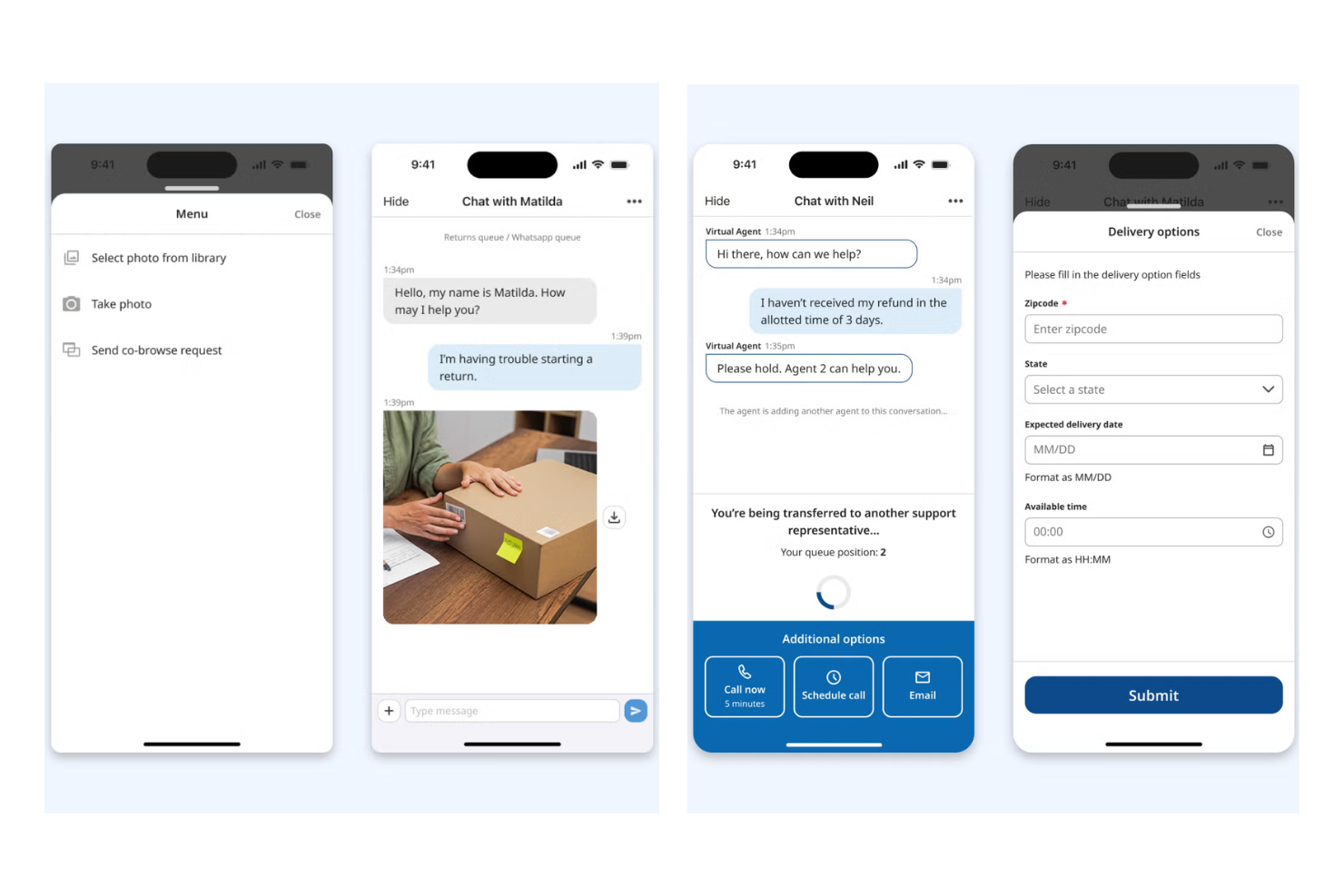
UJET is a cloud contact center platform designed for businesses that want to unify digital and voice support in a single, mobile-friendly solution. It’s a strong fit for teams needing advanced automation, AI-powered routing, and deep CRM integrations to modernize customer interactions.
Who Is UJET Best For?
UJET suits enterprise contact centers and support teams in industries like retail, finance, and healthcare that require secure, omnichannel customer engagement.
Why UJET Is a Good Vonage Alternative
I picked UJET for its mobile-first approach, which lets my team handle support interactions directly within a branded mobile app—no third-party interface required. I appreciate how UJET's in-app support lets customers share photos, videos, and screenshots mid-conversation, giving agents real context without back-and-forth. In practice, that means my team can resolve issues faster by seeing exactly what the customer sees. For contact centers moving beyond basic VoIP, UJET's AI-driven routing and omnichannel agent desktop make it a genuinely capable upgrade.
UJET Key Features
- Real-time sentiment analysis: Detects customer emotion during calls to help agents adjust their approach mid-interaction.
- Virtual agent: Handles routine customer inquiries automatically using AI-powered self-service flows before escalating to a live agent.
- Omnichannel agent desktop: Consolidates voice, chat, SMS, and email interactions into a single agent workspace.
- CRM screen pop: Automatically surfaces relevant customer data from connected CRMs when an interaction begins.
UJET Integrations
Integrations include Salesforce, Zendesk, Kustomer, ServiceNow, Microsoft Dynamics, and Shopify.
Pros and Cons
Pros:
- Modern architecture
- In-app visual menus
- No stored user data
Cons:
- Pricey for small organizations
- Learning curve
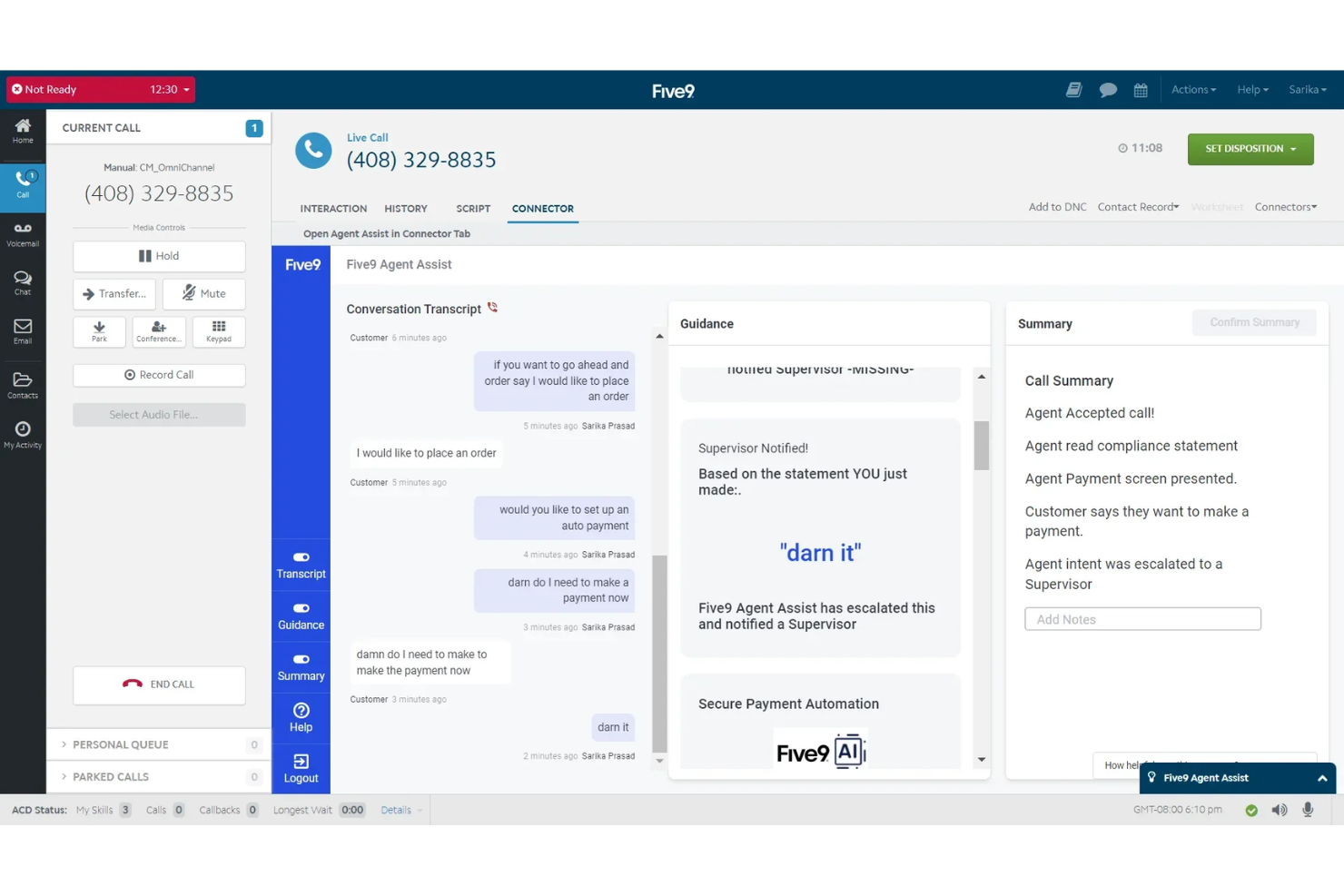
Five9 is a cloud-based contact center platform designed for businesses that need advanced call routing, predictive dialing, and real-time analytics. It’s a strong choice for sales teams, support centers, and organizations looking to optimize outbound and inbound communications.
Who Is Five9 Best For?
Five9 is a strong fit for midsize and large sales or support teams that need advanced outbound dialing and call management capabilities.
Why Five9 Is a Good Vonage Alternative
Five9's outbound dialing capabilities go well beyond a basic auto-dialer. I picked it because it offers four distinct dialing modes—predictive, power, progressive, and preview—so my team can match the dialing approach to the campaign type rather than forcing every outreach into a one-size-fits-all workflow. For high-volume sales campaigns, I use the predictive dialer to maximize agent talk time by automatically filtering out unanswered calls, voicemails, and busy signals. What I also appreciate is the built-in compliance tooling: Five9's Certified Caller (STIR/SHAKEN) validation and DNC list management mean my team isn't scrambling to bolt on third-party tools to stay compliant with FCC regulations on outbound calls.
Five9 Key Features
- Agent Assist: A real-time AI tool that surfaces relevant information and suggested responses to agents during live customer interactions.
- Interaction analytics: A speech and text analysis tool that reviews recorded customer conversations to identify trends, sentiment, and compliance gaps.
- Workforce management: A scheduling and forecasting tool that helps supervisors align agent staffing levels with predicted contact volume.
- Intelligent Virtual Agent (IVA): An AI-driven self-service tool that handles routine inbound inquiries over voice and digital channels without live agent involvement.
Five9 Integrations
Integrations include Salesforce, ServiceNow, Microsoft Teams, Oracle, Zendesk, Zoom Phone, Microsoft Dynamics 365, NetSuite, Slack, and Google Workspace.
Pros and Cons
Pros:
- Good workforce tools
- Reliable voice tech
- Strong CRM plugins
Cons:
- Clunky mobile app
- Slower onboarding

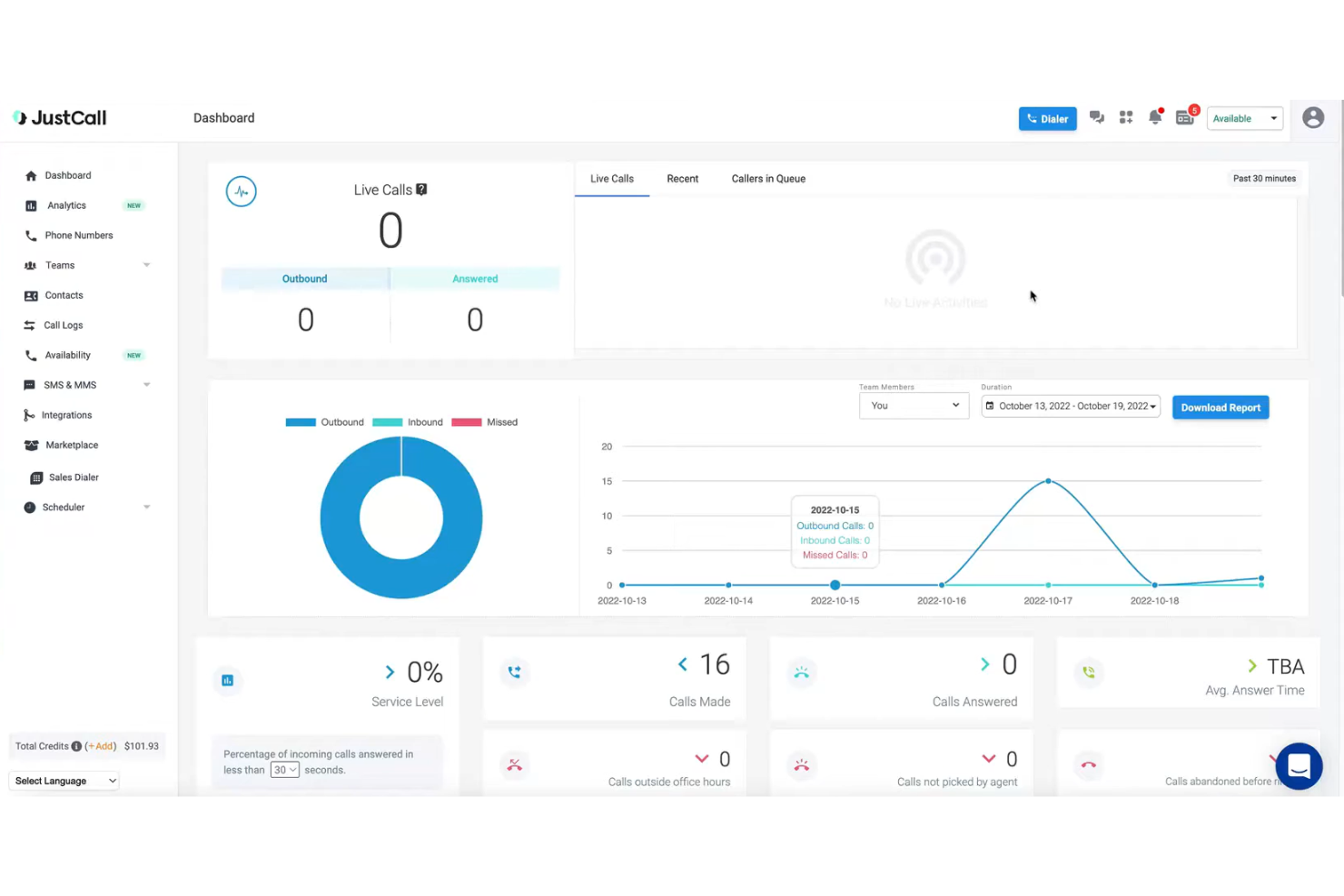
JustCall is a cloud-based VoIP platform designed for sales and support teams that need fast access to global phone numbers and advanced calling features. It’s a strong fit for businesses seeking integrated SMS, multiple dialer options, and deep CRM connectivity to manage high call volumes.
Who Is JustCall Best For?
Sales and support teams in small to midsize businesses needing global calling, SMS, and CRM integrations for customer communications.
Why JustCall Is a Good Vonage Alternative
I picked JustCall primarily because of how fast you can get a number up and running. Unlike Vonage, which can involve longer provisioning timelines and admin overhead, JustCall lets me activate local or toll-free numbers from 70+ countries in seconds—no waiting, no back-and-forth with support. I also appreciate the country coverage feature, where I simply select a country and area code and I'm ready to make and receive calls. For teams expanding into new markets or needing to spin up regional lines quickly, that kind of instant access is hard to match.
JustCall Key Features
- Sales dialer: Offers auto, predictive, power, and parallel dialer options to automate outbound calling campaigns.
- Live call monitoring: Listen to active calls in real time, whisper to agents during a call, or join the conversation directly.
- SMS workflows: Trigger automated text messages based on specific conditions, such as appointment reminders or follow-up sequences.
- Call scoring: Automatically or manually score calls to evaluate agent performance and identify coaching opportunities.
JustCall Integrations
Integrations include Salesforce, HubSpot, Pipedrive, ActiveCampaign, Slack, Intercom, Help Scout, Zendesk, Zoho CRM, and monday.com.
Pros and Cons
Pros:
- Great for small ops
- Simple integrations
- Very budget friendly
Cons:
- Slow tech support
- Poor mobile app

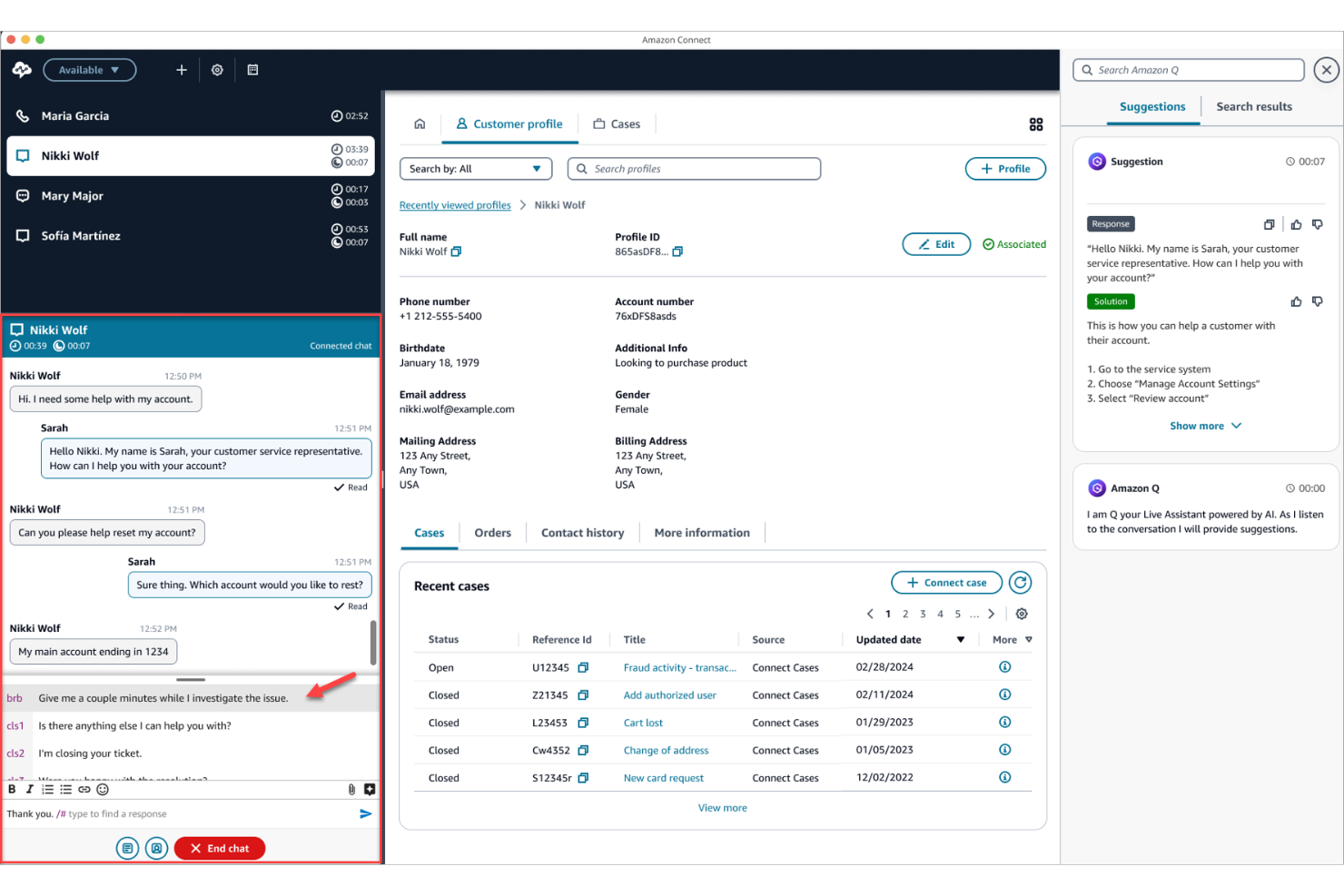
Amazon Connect is a cloud-based contact center platform built on AWS, designed for businesses that want to manage customer interactions at scale. It appeals to organizations seeking flexible, pay-as-you-go pricing and seamless integration with other AWS services for unified communications.
Who Is Amazon Connect Best For?
Amazon Connect suits enterprises and technology teams that already use AWS and need a scalable, cloud-based contact center solution.
Why Amazon Connect Is a Good Vonage Alternative
I picked Amazon Connect because it plugs directly into the AWS ecosystem, which means my team doesn't need to manage separate infrastructure for contact center operations. I use Amazon Lex to build conversational IVR flows that handle routine inquiries without live agents, and those bots connect natively to Lambda functions for real-time data lookups. I also appreciate that Amazon Connect integrates with Amazon S3 and Kinesis for call recording storage and real-time contact data streaming—something that's hard to replicate without building custom pipelines elsewhere. For teams already running workloads on AWS, that native connectivity removes a significant layer of integration complexity.
Amazon Connect Key Features
- Drag-and-drop workflow designer: A visual tool for building IVR flows, chatbot experiences, and agent step-by-step guides across channels.
- Skills-based routing: Routes contacts to agents based on availability, skillset, customer sentiment, and interaction history.
- Screen recording: Records agent screens alongside audio during customer interactions for quality monitoring and performance evaluation.
- Contact forecasting: Uses AI to generate short- and long-term contact volume predictions to support agent scheduling and capacity planning.
Amazon Connect Integrations
Integrations include Salesforce, Zendesk, ServiceNow, Slack, Microsoft Teams, and AWS ecosystem tools.
Pros and Cons
Pros:
- Rapid deployment
- Global scalability
- Highly programmable
Cons:
- Lacks out-of-box CRM
- Hidden AWS costs

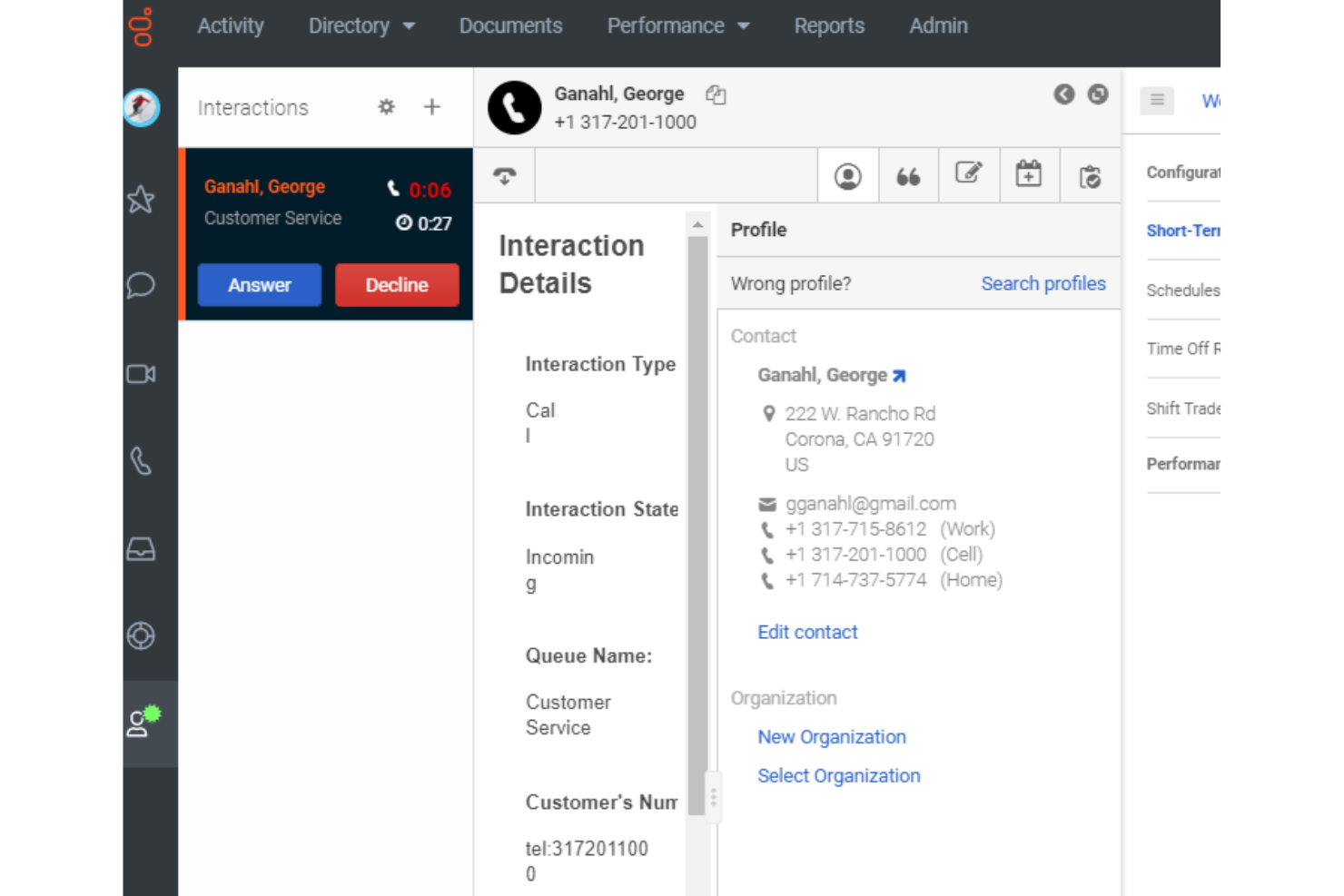
Genesys Cloud CX is a cloud-based contact center platform designed for organizations that want to unify voice, chat, and digital channels in one place. It appeals to teams seeking advanced automation, omnichannel routing, and real-time analytics to improve customer engagement.
Who Is Genesys Cloud CX Best For?
Large enterprises and global contact centers that need to manage complex, high-volume customer interactions across multiple channels.
Why Genesys Cloud CX Is a Good Vonage Alternative
What draws me to Genesys Cloud CX as a Vonage alternative is how deeply AI is woven into the platform rather than bolted on as an add-on. I use Predictive Routing to automatically match customers with the agent best suited to their needs—not just by availability, but by optimizing for a specific KPI like first-call resolution. That's a level of routing intelligence Vonage simply doesn't offer.
I also rely on the Agent Copilot feature, which surfaces relevant knowledge articles in real time during live calls and then auto-generates a post-call summary using generative AI—cutting the time my agents spend on wrap-up work. For teams managing high interaction volumes across voice and digital channels, Genesys Cloud CX's native AI Studio lets my team build and adjust AI-powered flows without needing a data science team behind every change.
Genesys Cloud CX Key Features
- Omnichannel routing: Routes customer interactions across voice, chat, email, and social channels from a single unified queue.
- Workforce engagement management: Includes scheduling, quality management, and performance tracking tools built directly into the platform.
- Customer journey management: Connects data across touchpoints to track and orchestrate end-to-end customer journeys in real time.
- AppFoundry® Marketplace: Provides access to pre-integrated third-party apps that extend the platform's native capabilities.
Genesys Cloud CX Integrations
Integrations include Salesforce, Microsoft Dynamics 365, Zendesk, ServiceNow, Adobe, and AWS.
Pros and Cons
Pros:
- Advanced analytics
- True omnichannel
- Rich voice features
Cons:
- Overkill for SMBs
- Longer deployment

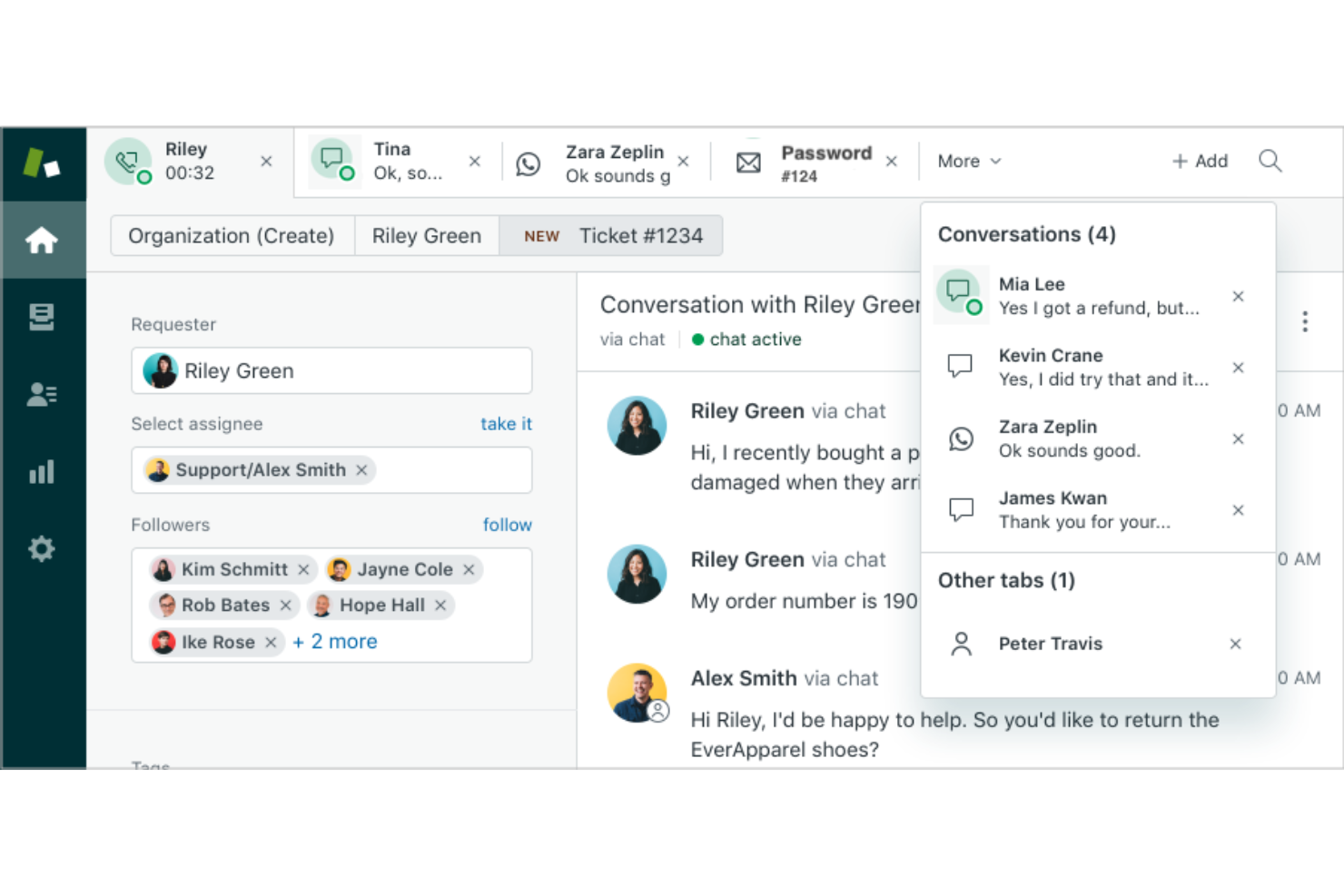
Zendesk Talk brings voice capabilities directly into the Zendesk platform, letting support teams manage calls alongside tickets and chats. It’s a strong fit for businesses that want to unify customer conversations and streamline agent workflows within a single workspace.
Who Is Zendesk Talk Best For?
Support teams at midsize to large companies that already use Zendesk and need integrated voice and ticket management.
Why Zendesk Talk Is a Good Vonage Alternative
I picked Zendesk Talk because it embeds voice directly into the Zendesk ticketing system, so every call automatically generates a ticket with a full transcript and recording attached. I appreciate that agents never have to switch tools—call context, customer history, and follow-up tasks all live in one place. My team can use IVR routing to direct callers based on queue size and business hours, reducing wait times without manual intervention. For teams already running support through Zendesk, this level of native integration is hard to match elsewhere.
Zendesk Talk Key Features
- Warm transfer: Pass calls to another agent with a private briefing before the customer connects.
- Call blocking: Identify and block unwanted or spam numbers directly within the platform.
- Voicemail transcription: Convert voicemail messages into text and attach them to the relevant ticket.
- Real-time dashboard: Monitor live call queues, agent availability, and wait times from a single view.
Zendesk Talk Integrations
Integrations include Slack, Shopify, Pipedrive, Trustpilot, Harvest, ChannelReply, Sprout Social, Azure DevOps, Maestro QA, and SweetHawk Suite.
Pros and Cons
Pros:
- Simple routing
- Easy for agents
- Unified ticketing
Cons:
- Pricey toll rates
- Lacks advanced PBX

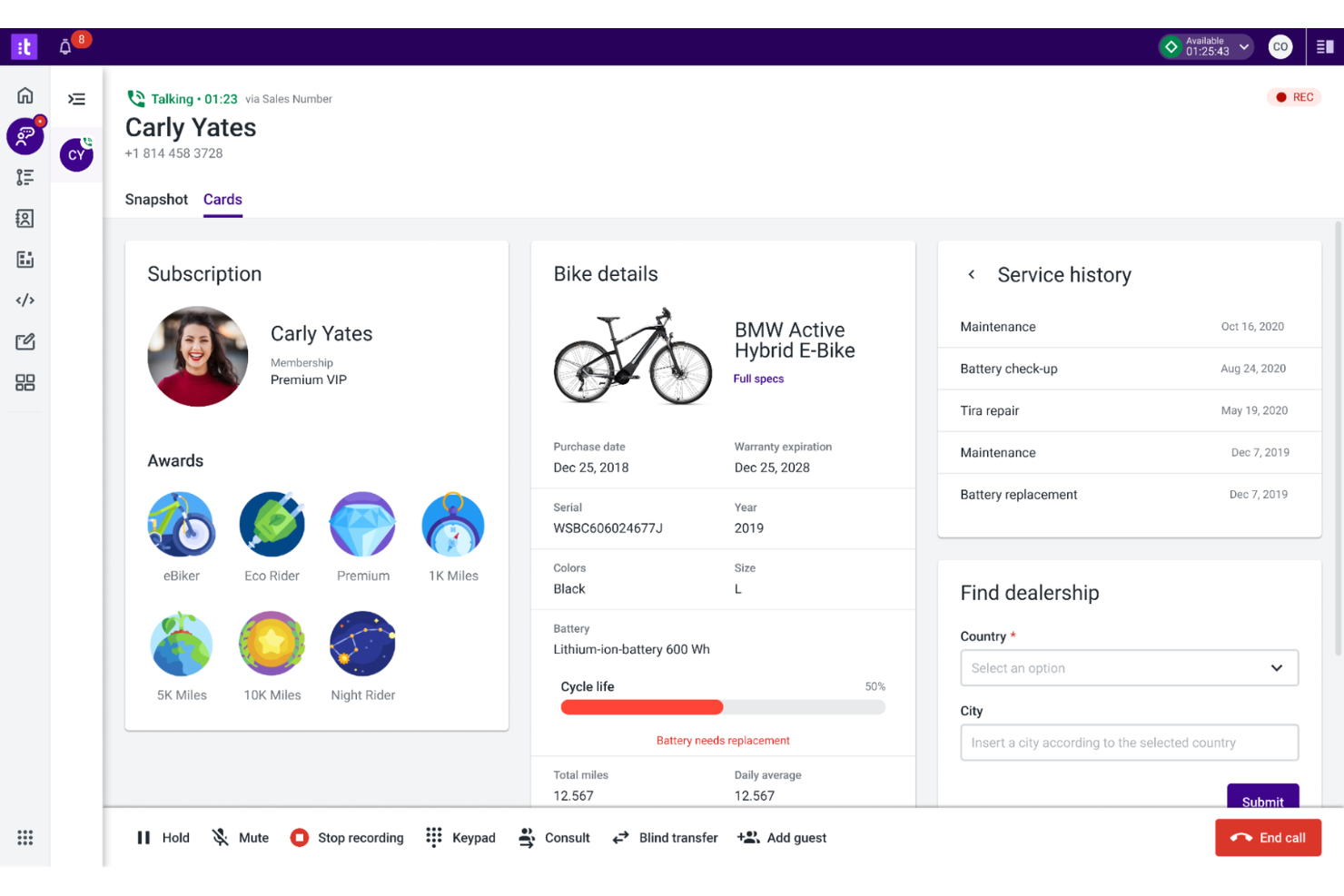
Talkdesk offers a cloud-based contact center platform designed for organizations that need advanced automation and integration with industry-specific workflows. It’s a strong fit for businesses in regulated sectors or those seeking to tailor their customer communications with specialized features.
Who Is Talkdesk Best For?
Talkdesk suits midsize to large enterprises in healthcare, finance, retail, and other regulated industries that require customizable contact center automation.
Why Talkdesk Is a Good Vonage Alternative
What drew me to Talkdesk is its Talkdesk Industry Experience Clouds™, which go well beyond generic contact center functionality. These are pre-built integrations with core business systems specific to industries like healthcare, financial services, and retail—so my team isn't starting from scratch when building out workflows. For example, in a healthcare environment, Talkdesk connects directly with patient management systems to support use cases like self-service appointment scheduling via Talkdesk Autopilot. I also appreciate the multi-agent orchestration layer, which lets AI agents work together across channels and systems in real time rather than operating in silos. For teams in regulated industries, the platform's compliance coverage—HIPAA, PCI-DSS, SOC2 Type II, and GDPR—means I don't have to bolt on third-party tools to meet those requirements.
Talkdesk Key Features
- Call barging: Lets supervisors join live calls to speak directly with both the agent and the customer.
- Local presence dialing: Automatically selects an outbound number matching the recipient's area or country code to increase answer rates.
- Voice-to-case: Automatically creates and routes support tickets from call interactions that require follow-up.
- No-code flow builder: Lets admins design and adjust call routing and IVR flows using a visual, click-based interface without developer support.
Talkdesk Integrations
Integrations include Salesforce, Zendesk, Microsoft Teams, Slack, ServiceNow, and Shopify.
Pros and Cons
Pros:
- 100% uptime SLA
- Industry templates
- Strong automation
Cons:
- Add-ons cost extra
- Less API access
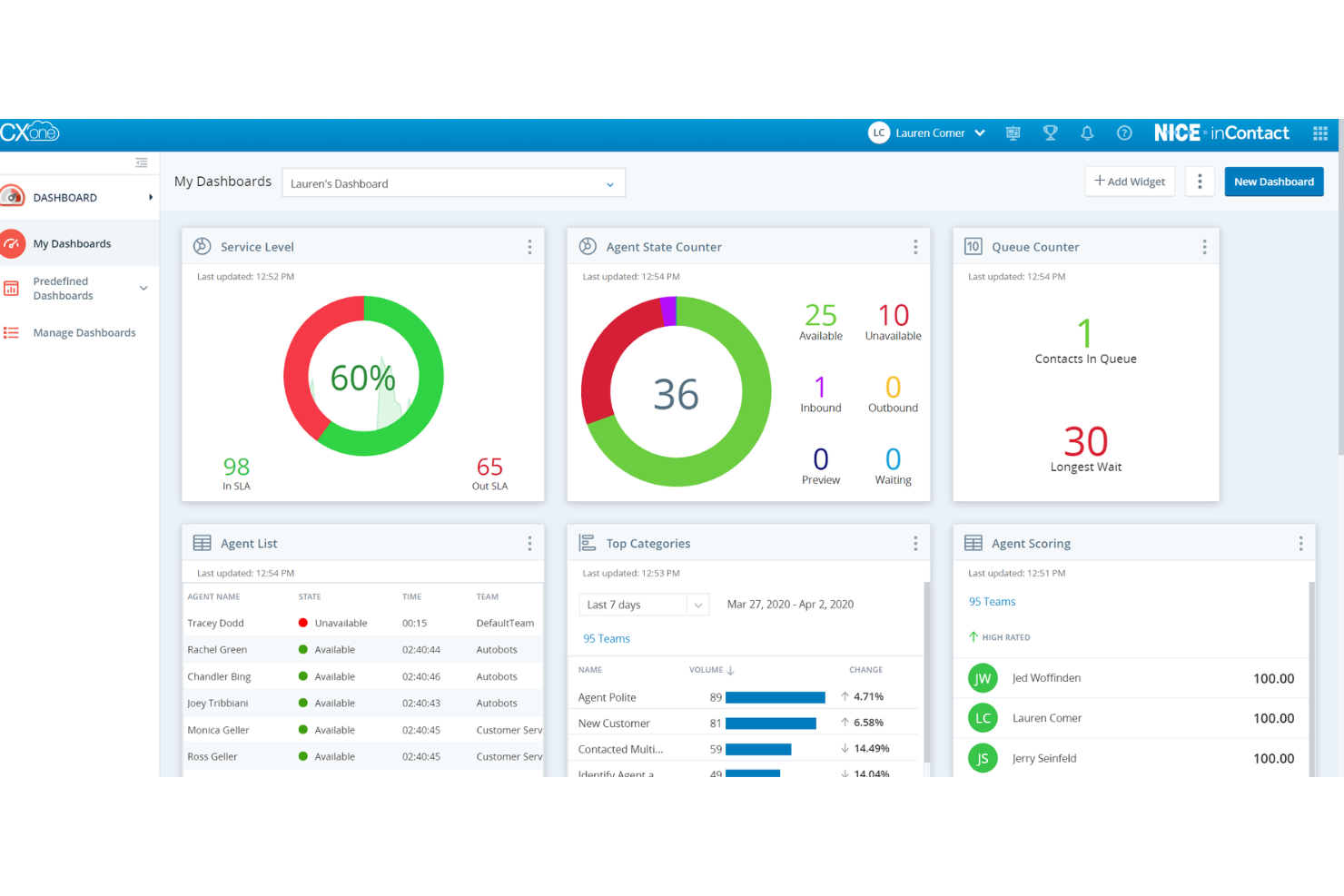
CXone Mpower is a cloud-based contact center platform designed for organizations that need advanced voice and digital channel management. It appeals to teams seeking unified agent desktops, AI-powered routing, and deep analytics to improve customer interactions and operational efficiency.
Who Is CXone Mpower Best For?
CXone Mpower suits mid-sized to large enterprises with complex customer service operations that require unified voice and digital engagement.
Why CXone Mpower Is a Good Vonage Alternative
I picked CXone Mpower because its omnichannel analytics go well beyond basic reporting—the platform captures intent, sentiment, and outcome data across every voice and digital interaction, then surfaces that intelligence in real time. What makes this particularly useful is Interaction Analytics, which analyzes 100% of interactions rather than a sampled subset, so my team isn't making decisions based on incomplete data. I also appreciate how CXone AI Routing uses that same interaction data to make predictive routing decisions—not just skills-based matching, but predictions about which agent is most likely to achieve the best CSAT or resolution outcome for a specific customer.
CXone Mpower Key Features
- Omnichannel routing: Directs customer contacts across voice and digital channels to the right agent based on skills, availability, and customer context.
- Workforce management: Uses AI-based forecasting and scheduling to align agent staffing with predicted contact volumes across short- and long-term planning horizons.
- Quality management: Evaluates 100% of customer interactions using AI to identify coaching opportunities and compliance gaps.
- Outbound engagement: Automates proactive outreach across voice and digital channels using predictive dialing and AI-driven campaign management.
CXone Mpower Integrations
Integrations include Salesforce, Microsoft Dynamics, Zendesk, ServiceNow, Oracle, and Bullhorn.
Pros and Cons
Pros:
- Handles high volume
- Strong AI insights
- High reliability
Cons:
- Complex contracts
- Slow UI updates
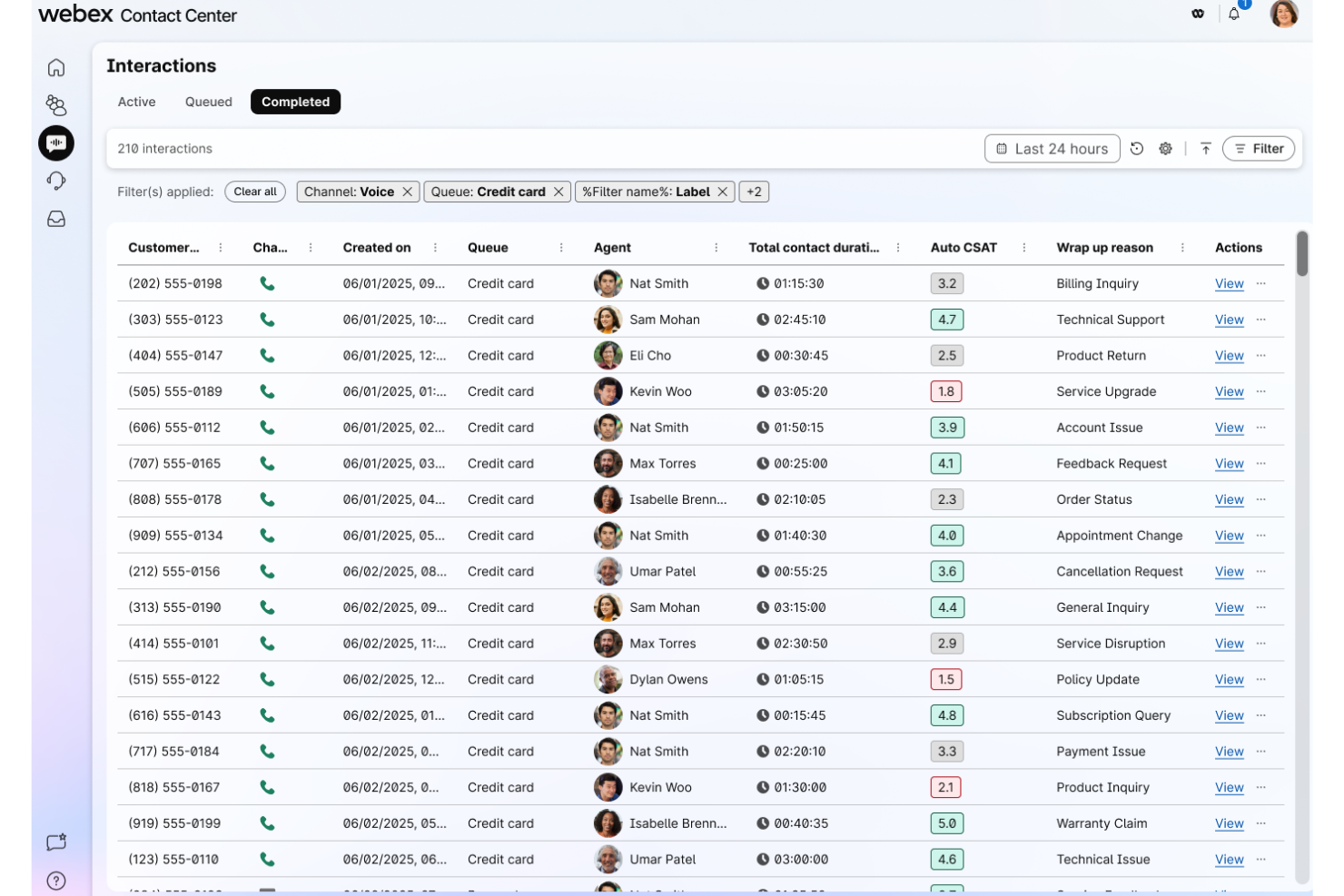
For teams seeking a cloud-based contact center that supports both remote and on-site agents, Webex Contact Center offers unified voice, chat, and collaboration tools. It’s a strong choice for organizations needing advanced call routing and integrated agent management beyond basic VoIP.
Who Is Webex Contact Center Best For?
Contact center leaders in regulated industries who need secure, scalable communications for teams working across multiple locations.
Why Webex Contact Center Is a Good Vonage Alternative
Hybrid workforce support is where Webex Contact Center genuinely stands apart. I like that the Cisco AI Assistant is embedded directly into the agent desktop—when a remote agent picks up a transferred call, they get an AI-generated handoff summary so they're not starting from scratch. My team also uses the integrated collaboration tools to escalate complex calls to subject matter experts without leaving the contact center interface. For organizations managing agents across home offices and physical sites, that level of built-in coordination is hard to match.
Webex Contact Center Key Features
- AI-generated response suggestions: Surfaces reply recommendations for agents in real time, pulling from customer context and knowledge base data.
- Voice and digital AI agents: Deploys self-service bots across both voice and digital channels to handle customer inquiries without agent involvement.
- Supervisor tools: Gives supervisors live visibility into agent activity and interaction queues to monitor and manage team performance.
- Extended security and privacy controls: Applies Cisco-backed security protocols across all contact center interactions and data handling.
Webex Contact Center Integrations
Integrations include Salesforce, Microsoft Dynamics, Zendesk, ServiceNow, Microsoft Teams, and Webex Suite.
Pros and Cons
Pros:
- Stable performance
- Strong security
- High video quality
Cons:
- Not purely cloud
- Costly hardware
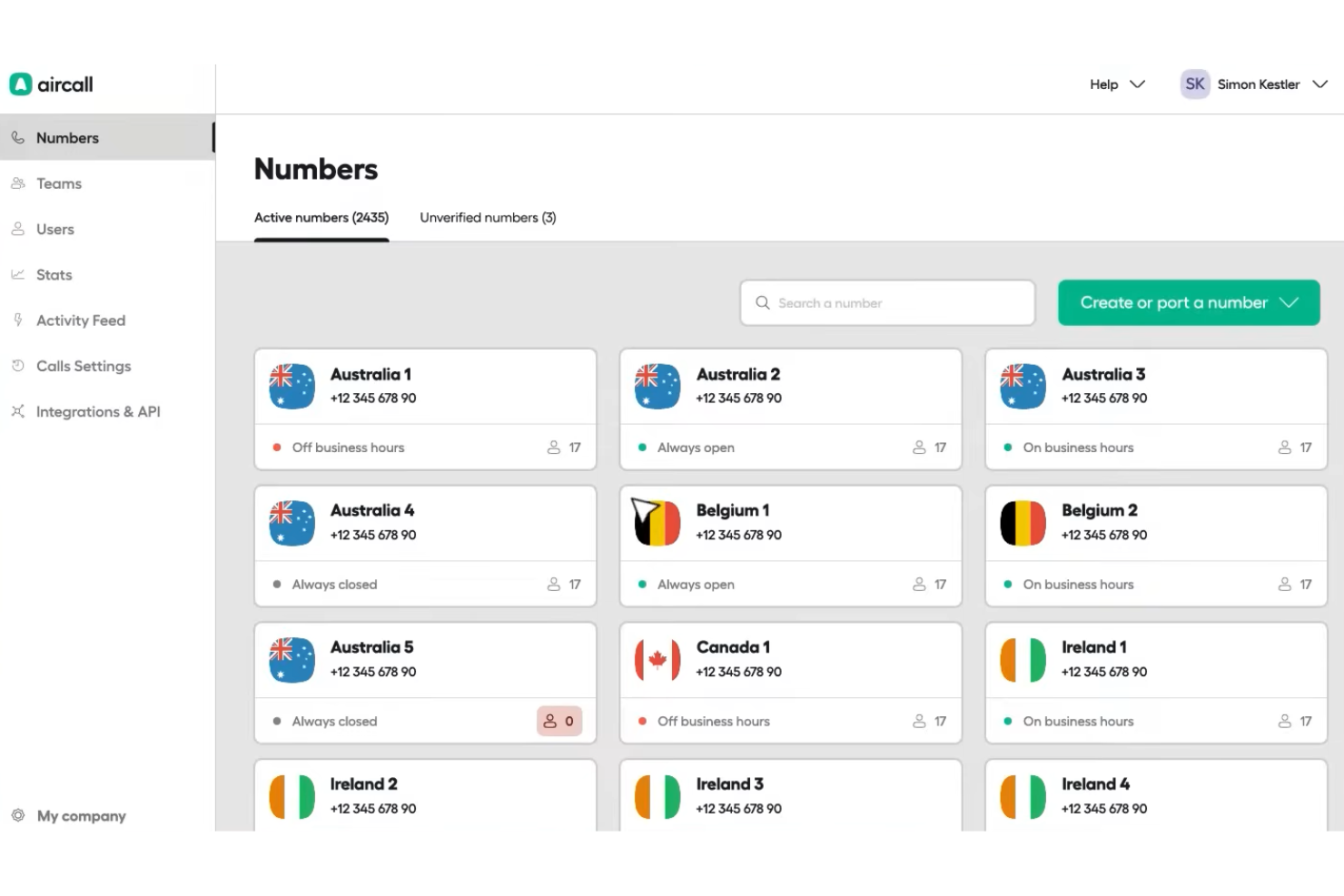
Aircall is a cloud-based VoIP software designed for teams that need flexible calling and collaboration features. It’s a strong fit for customer support and sales teams looking to centralize voice communications and connect calls with their existing business tools.
Who Is Aircall Best For?
Customer-facing teams in small to midsize businesses that want to integrate voice calls with their CRM and help desk platforms.
Why Aircall Is a Good Vonage Alternative
I picked Aircall because of how quickly it connects with CRM tools like HubSpot and Salesforce—calls are automatically logged, and contact records surface in real time during live conversations. I appreciate that Aircall's Power Dialer lets my team queue up call lists and move through them without manually dialing each number, which is a real advantage for high-volume outbound support. I also like the shared call inbox, where my team can assign calls, leave comments, and follow up collaboratively without switching between platforms.
Aircall Key Features
- Call routing: Direct incoming calls to the right agent or team using custom routing rules and IVR menus.
- Call recording: Automatically record calls for quality monitoring and agent coaching.
- Live call monitoring: Listen in on active calls or whisper guidance to agents without the customer hearing.
- Analytics dashboard: Track call volume, wait times, missed calls, and agent activity across your team.
Aircall Integrations
Integrations include Salesforce, HubSpot, Zendesk, Pipedrive, Intercom, Freshdesk, Slack, monday.com, Shopify, and Microsoft Teams.
Pros and Cons
Pros:
- Clear tier pricing
- Easy shared inboxes
- Sleek desktop app
Cons:
- Limited video calls
- Occasional lag
Other Vonage Alternatives
Here are some additional Vonage alternatives options that didn’t make it onto my shortlist, but are still worth checking out:


Vonage Alternatives Selection Criteria
When selecting the best Vonage alternatives to include in this list, I considered common buyer needs and pain points related to VoIP software products, like reliable call quality and integration with existing business tools. I also used the following framework to keep my evaluation structured and fair:
Core Functionality (25% of total score)
To be considered for inclusion in this list, each solution had to fulfill these common use cases:
- Make and receive calls over the internet
- Route calls to the right agent or department
- Record calls for quality and compliance
- Support voicemail and call forwarding
- Provide call analytics and reporting
Additional Standout Features (25% of total score)
To help further narrow down the competition, I also looked for unique features, such as:
- AI-powered call transcription
- In-app customer support tools
- Omnichannel messaging integration
- Real-time sentiment analysis
- Advanced mobile app capabilities
Usability (10% of total score)
To get a sense of the usability of each system, I considered the following:
- Simple and intuitive user interface
- Easy access to core features
- Minimal setup steps for new users
- Clear navigation and labeling
- Responsive design for mobile and desktop
Onboarding (10% of total score)
To evaluate the onboarding experience for each platform, I considered the following:
- Availability of training videos and guides
- Step-by-step product tours
- Pre-built templates for quick setup
- Access to onboarding webinars
- In-app chatbots for real-time help
Customer Support (10% of total score)
To assess each software provider’s customer support services, I considered the following:
- 24/7 live support availability
- Multiple support channels offered
- Fast response times to inquiries
- Access to a searchable help center
- Proactive customer success outreach
Value For Money (10% of total score)
To evaluate the value for money of each platform, I considered the following:
- Transparent and predictable pricing
- Features included at each pricing tier
- No hidden fees or surprise charges
- Flexible contract and billing options
- Discounts for annual commitments
Customer Reviews (10% of total score)
To get a sense of overall customer satisfaction, I considered the following when reading customer reviews:
- Consistency of positive feedback
- Reports of technical issues or downtime
- Quality of customer support experiences
- Ease of implementation and adoption
- Value delivered relative to cost
Why Look for a Vonage Alternative?
While Vonage is a good choice of VoIP software, there are a number of reasons why some users seek out alternative solutions. You might be looking for an all-in-one Vonage alternative because…
- You experience too many dropped calls and need better uptime guarantees
- You require a smoother user experience with greater ease of use
- You want better international calling rates to support your global reach
- You need tighter integrations between softphones and traditional desk phones
- You require industry-specific compliance certifications
- You want more granular call routing controls
If any of these sound like you, you’ve come to the right place. My list contains several VoIP software options that are better suited for teams facing these challenges with Vonage and looking for alternative solutions.
Vonage Key Features
Here is a look at the feature set that Vonage offers, to help you contrast and compare what alternative solutions provide (for more details, consult their official FAQs to gauge the platform's learning curve):
- Call routing: Directs incoming calls to the right person or department using customizable rules, reducing wait times and improving customer satisfaction.
- Virtual receptionist: Answers and routes calls automatically with interactive voice menus, helping businesses manage high call volumes without extra staff.
- Voicemail to email: Sends voicemail messages as audio files to your email inbox, making it easy to access and respond to messages from anywhere.
- Call recording: Records inbound and outbound calls for training, compliance, and quality assurance, with secure storage and easy playback.
- Mobile app: Lets users make and receive business calls, check voicemail, and manage settings directly from their mobile devices, supporting remote and hybrid work.
- Team messaging: Provides instant messaging and group chat within the platform, allowing teams to communicate and collaborate without switching tools.
- Video conferencing: Supports HD video meetings with screen sharing and chat, enabling remote collaboration and virtual customer interactions.
- CRM integrations: Connects with popular CRM systems like Salesforce and HubSpot, allowing automatic call logging and access to customer data during calls.
- Analytics and reporting: Offers dashboards and detailed reports on call activity, agent performance, and customer interactions to inform business decisions.
- API access: Allows developers to build custom integrations and workflows, extending Vonage’s capabilities to fit unique business needs.