

10 beste Software-Tools für Kundenzufriedenheit im Jahr 2026

10 Auswahl der besten Software für Kundenzufriedenheit


Software für Kundenzufriedenheit hilft CX-Teams dabei, zu messen und zu analysieren, wie Kunden ihre Erfahrungen wahrnehmen, und diese zu verbessern. Wenn Sie mit unklaren CSAT-Kennzahlen, einer geringen Menge an Feedback oder verzögerten Prozessen von der Erkenntnis zur Umsetzung zu kämpfen haben, kann Software für Kundenzufriedenheit Ihnen dabei helfen, wertvolles Feedback in konkrete Maßnahmen umzuwandeln.
In diesem Artikel teile ich meine Erkenntnisse zur besten Software für Kundenzufriedenheit, damit Sie die Bedürfnisse, Erfahrungen und Erwartungen Ihrer Kunden verstehen und sie zufrieden und engagiert halten können.
Was ist Software für Kundenzufriedenheit?
Software für Kundenzufriedenheit ist ein Tool, das zum Sammeln und Analysieren von Kundenfeedback verwendet wird, um zu messen und zu verbessern, wie zufrieden Kunden mit ihren Erfahrungen sind. Sie wird eingesetzt, um Erkenntnisse zu gewinnen, die Produktverbesserungen, optimierte Services und stärkere Kundenbeziehungen vorantreiben. Dies wird durch Funktionen wie das Sammeln von Feedback, Stimmungsanalyse und integrierte Analysen ermöglicht.
Warum Sie unseren Software-Empfehlungen vertrauen können
Unser Team testet und bewertet Software seit 2012. Als CX-Führungskräfte selbst wissen wir, wie schwierig – und wichtig – es ist, die richtige Software auszuwählen.
Für diesen Leitfaden haben wir Tools mithilfe von praktischen Tests und unabhängiger Recherche bewertet und dabei unsere Bewertungskriterien angewendet.
Unsere Bewertungen spiegeln unser menschliches redaktionelles Urteilsvermögen wider, keine Verkaufsstrategie.
Die 10 besten Softwarelösungen für Kundenzufriedenheit: Schnelle Vergleichstabelle
Diese Vergleichstabelle fasst grundlegende Informationen zu jeder meiner Top-Auswahlen für Software zur Kundenzufriedenheit zusammen. Sie können Preisinformationen sowie die Verfügbarkeit kostenloser Testversionen oder Demos direkt miteinander vergleichen, um die beste Software für Ihr Budget und Ihre geschäftlichen Anforderungen zu finden.
| Tool | Best For | Trial Info | Price | ||
|---|---|---|---|---|---|
| 1 | Am besten für die Überwachung in Echtzeit online | 14-tägige kostenlose Testphase | Ab $149/Benutzer/Monat (jährlich abgerechnet) | Website | |
| 2 | Am besten für Customer Journey Tracking mit NPS geeignet | 14-tägige kostenlose Testversion + kostenlose Demo verfügbar | Preis auf Anfrage | Website | |
| 3 | Beste automatisierte Umfragen mit Einblicken in Echtzeit | 14-tägige kostenlose Testversion + kostenlose Demo verfügbar | Preise auf Anfrage | Website | |
| 4 | Am besten geeignet für skalierbare Feedback-Workflows | 7-tägige kostenlose Testversion + kostenlose Demo verfügbar | Ab 55 $/Nutzer/Monat | Website | |
| 5 | Beste CSAT-Umfragen und Follow-up-Workflows | Kostenlose 10-tägige Testversion verfügbar | Ab $55.99/Monat | Website | |
| 6 | Am besten geeignet für KI-Automatisierung bei Routinetätigkeiten | 14-tägige kostenlose Testversion | Ab $39/Agent/Monat | Website | |
| 7 | Am besten geeignet für KI-gestützte Kundeneinblicke | Kostenlose Demo verfügbar | Preise auf Anfrage | Website | |
| 8 | Ideal für anpassbare Kundenzufriedenheitsumfragen | Kostenlose Demo verfügbar | Ab $18/Monat | Website | |
| 9 | Am besten für kleine Unternehmen geeignet | Kostenloser Tarif verfügbar | Ab $30/Nutzer/Monat (jährliche Abrechnung) | Website | |
| 10 | Am besten für abteilungsübergreifendes Routing von Kundenanfragen | 14-tägige kostenlose Testphase + kostenlose Demo verfügbar | Ab $25/Nutzer/Monat (jährlich abgerechnet) | Website |


Übersicht über die 10 besten Softwarelösungen für Kundenzufriedenheit
Hier finden Sie meine Bewertung der besten Softwarelösungen für Kundenzufriedenheit, die Sie heute nutzen können, sowie kurze Beschreibungen ihrer wichtigsten Funktionen und eine kurze Erklärung, warum sie auf dieser Liste stehen.

Brand24
Am besten für die Überwachung in Echtzeit online
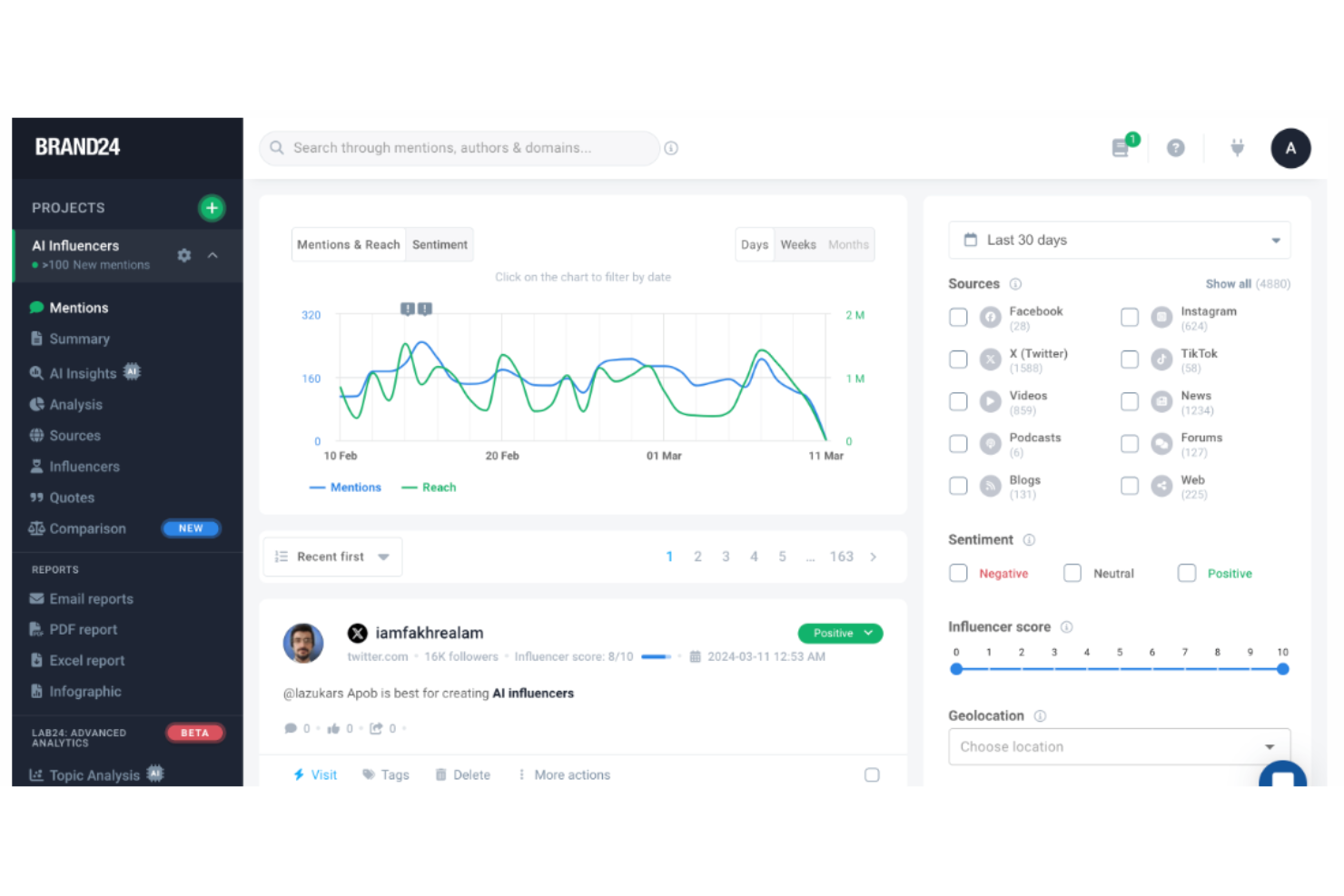
Brand24 ist ein leistungsstarkes KI-basiertes Social Listening-Tool, das Unternehmen dabei unterstützt, ihre Online-Präsenz und ihren Ruf zu überwachen und zu analysieren. Das Tool stellt außerdem Ressourcen und Unterstützung zur Verfügung, damit Unternehmen das Beste aus ihren Social-Media- und Online-Marketing-Aktivitäten herausholen können, mit dem Ziel, die Kundenzufriedenheit und den Markenruf zu verbessern.
Warum ich Brand24 gewählt habe: Brand24 hilft Unternehmen, Markenerwähnungen auf verschiedenen Online-Plattformen zu verfolgen und liefert Echtzeit-Benachrichtigungen sowie Stimmungsanalysen. Das Tool richtet sich an Marketingfachleute und Unternehmen jeder Größe und bietet Funktionen wie Influencer-Bewertung, Wettbewerbsanalyse und anpassbare Berichte.
Die Plattform liefert Daten zum Markenruf, Marketing, Influencer-Marketing, zur Marktforschung und Öffentlichkeitsarbeit. Insgesamt wird Brand24 für die schnelle Datenübermittlung und die differenzierte Stimmungsanalyse gelobt, was es besonders für Unternehmen empfiehlt, die Wert auf unmittelbares Kundenengagement legen.
Brand24: Herausragende Funktionen und Integrationen:
Herausragende Funktionen sind unter anderem eine fortschrittliche Stimmungsanalyse, mit der Online-Erwähnungen in positive, negative oder neutrale Kategorien segmentiert werden, automatisierte Berichterstattung und Reichweitenmessung, womit Nutzer ihre Marketingmaßnahmen auswerten und im Vergleich zum Wettbewerb die Reichweite ihrer Markenerwähnungen verfolgen können. Nutzer können zudem ihre PR-Berichterstattung messen und dokumentieren, indem sie Berichte mit aussagekräftigen und zuverlässigen Kennzahlen erstellen.
Integrationen beinhalten Slack, Trackdesk, LinkedIn, Spotify, Telegram, Instagram, Facebook, Reddit, TikTok, YouTube, X (ehemals Twitter genannt) und Tripadvisor.
Pros and Cons
Pros:
- Einfach einzurichten und zu verwenden
- Stellt Echtzeit-Benachrichtigungen und anpassbare Filter bereit
- Bietet Mehrsprachenunterstützung
Cons:
- Mobile App kann schwierig zu bedienen sein
- Für kleine Unternehmen möglicherweise nicht erschwinglich
New Product Updates from Brand24

Brand24 Adds TikTok Video Transcriptions for Mention Tracking
Brand24 now detects keywords spoken in TikTok videos, not just in descriptions, and collects matching videos as mentions with spoken fragments and timestamps shown. For more information, visit Brand24's official site.

Am besten für Customer Journey Tracking mit NPS geeignet
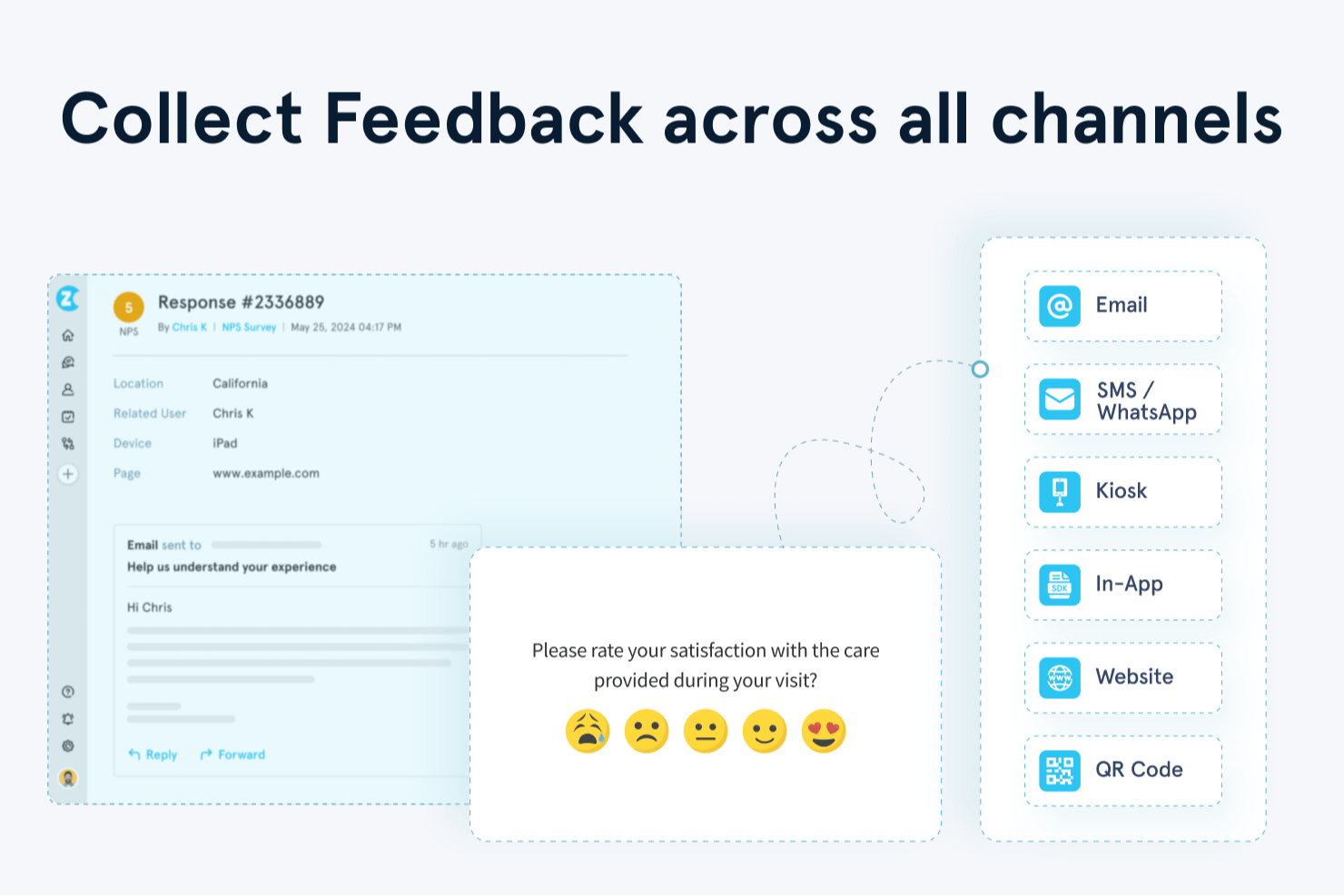
Zonka Feedback ist eine KI-gestützte Kundenfeedback-Plattform, die NPS-, CSAT- und CES-Umfrageantworten über E-Mail, SMS, WhatsApp, Web, In-App und Kiosks zentral sammelt, auswertet und analysiert.
Für wen ist Zonka Feedback am besten geeignet?
CX- und VoC-Teams in mittelständischen Unternehmen, die Feedbackprogramme sowohl über physische als auch digitale Kontaktpunkte laufen lassen, finden in Zonka eine passende Lösung.
Warum ich Zonka Feedback gewählt habe
Ich habe Zonka Feedback ausgewählt, weil seine Funktion zur Kontakt- und Nutzerreisen-Verfolgung NPS-Antworten direkt bestimmten Kontaktpunkten im Kundenlebenszyklus zuordnet. So kann ich genau sehen, wo die Zufriedenheit sinkt, sei es nach dem Onboarding, nach einem Support-Ticket oder bei der Verlängerung. Außerdem verlasse ich mich auf die KI-Impact-Analyse, die Feedbackthemen direkt mit Änderungen am NPS-Score verknüpft, sodass ich weiß, welche Probleme wirklich entscheidend sind.
Zonka Feedback Schlüsselfunktionen
- Omnichannel-Umfrage-Builder: Erstellen Sie CSAT-, NPS- und CES-Umfragen für E-Mail, SMS, WhatsApp, Web und Kiosks mit Logikverzweigungen und eigenem Branding.
- Zentralisiertes Feedback-Hub: Bündeln Sie Rückmeldungen aus Umfragen, Helpdesk-Tickets, Live-Chats und Online-Bewertungen auf einer Plattform.
- Rollenbasierte Dashboards: Stellen Sie maßgeschneiderte Echtzeit-Insights für Führungskräfte, Mitarbeiter im Kundenkontakt oder VoC-Analysten mit anpassbaren Widgets bereit.
- Compliance-Kontrollen: Unterstützt DSGVO- und HIPAA-Compliance, ISO-Zertifizierung sowie konfigurierbare Datenresidenz für eine sichere Verwaltung von Kundendaten.
Zonka Feedback Integrationen
Zonka Feedback bietet native Integrationen mit Salesforce, HubSpot, Zendesk, Intercom, Freshdesk, Jira, Slack, Microsoft Teams, Google Sheets und Mailchimp. Außerdem wird Zapier unterstützt und eine API für individuelle Integrationen bereitgestellt.
Pros and Cons
Pros:
- Reisebasiertes Feedback, das Lebenszyklusphasen zugeordnet ist
- Echtzeit-Textanalyse in mehreren Sprachen
- Automatisierte Ticket- und Fallabschluss-Workflows
Cons:
- Designoptionen für Umfragen können begrenzt wirken
- Ab günstigeren Tarifen enthalten

Beste automatisierte Umfragen mit Einblicken in Echtzeit
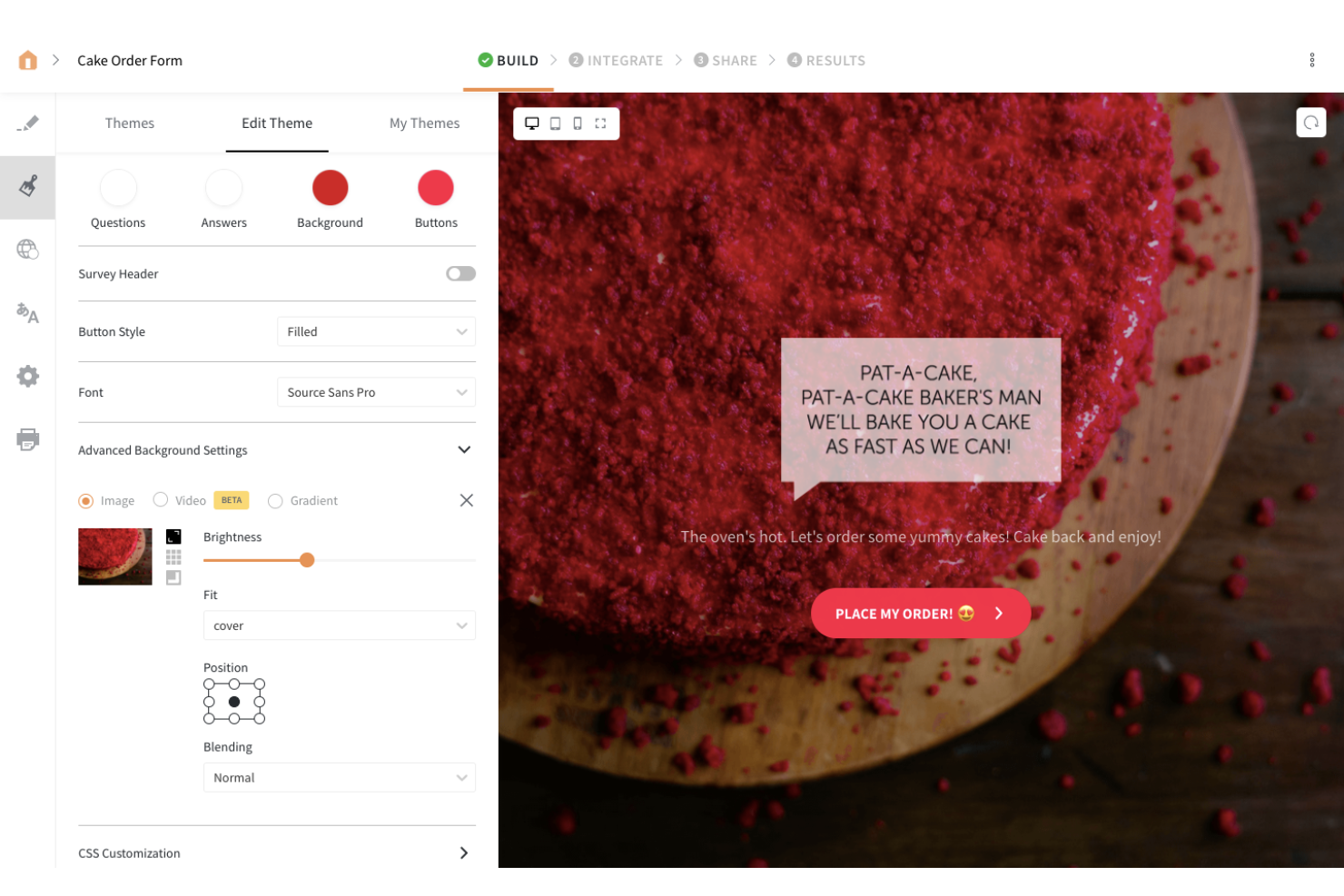
SurveySparrow ist ein Online-Umfragetool, mit dem Sie Feedback von Ihrem Team und Ihren Kunden einholen können. Die Plattform ermöglicht es Ihnen, Ihre Umfragen über verschiedene Kanäle zu verbreiten, darunter soziale Medien und Foren, sodass Sie wertvolle Einblicke in Ihre Nutzer gewinnen können.
Warum ich SurveySparrow ausgewählt habe: SurveySparrow steht auf meiner Liste, weil der Umfrage-Editor einfach und übersichtlich gestaltet ist. Der Editor verwendet eine Drag-and-Drop-Funktionalität, mit der Sie Ihre Umfragen ganz nach Ihren Wünschen personalisieren können. Jede erstellte Umfrage lässt sich zudem in sozialen Netzwerken oder Foren teilen, um Feedback von Ihren Nutzer:innen einzuholen.
SurveySparrow – Herausragende Funktionen und Integrationen:
Herausragende Funktionen sind unter anderem mobil-optimierte Umfragen, Video-Umfragen, Chat-Umfragen und Offline-Umfragen. Mir gefallen besonders die intelligenten Umfragen von SurveySparrow. Bei dieser Umfrageart können Sie Verzweigungslogik nutzen, sodass den Teilnehmer:innen nur relevante Fragen angezeigt werden und Sie Antworten erhalten, die speziell auf jedes Kundensegment zugeschnitten sind.
Integrationen umfassen Plattformen aus den Bereichen Soziale Medien, CRM- und Kundenerfolgslösungen wie Facebook, Salesforce, Intercom, Aweber, Google Contacts, HubSpot, WordPress, MailChimp, Rybbon, Zendesk und Slack. Über Zapier können Sie auf weitere Integrationen zugreifen. SurveySparrow bietet zudem eine REST API, mit der Sie bei Bedarf eigene Integrationen realisieren können.
Pros and Cons
Pros:
- Die Plattform ist einfach zu bedienen
- Das Umfragedesign sorgt für ein sehr gutes Teilnahmeerlebnis
- Audio-Umfragen transkribieren automatisch die Antworten der Teilnehmer:innen
Cons:
- Begrenzte Schriftarten-Personalisierung
- Umfragen speichern keine Teilantworten, wenn Teilnehmer:innen vorzeitig abbrechen

Alchemer
Am besten geeignet für skalierbare Feedback-Workflows
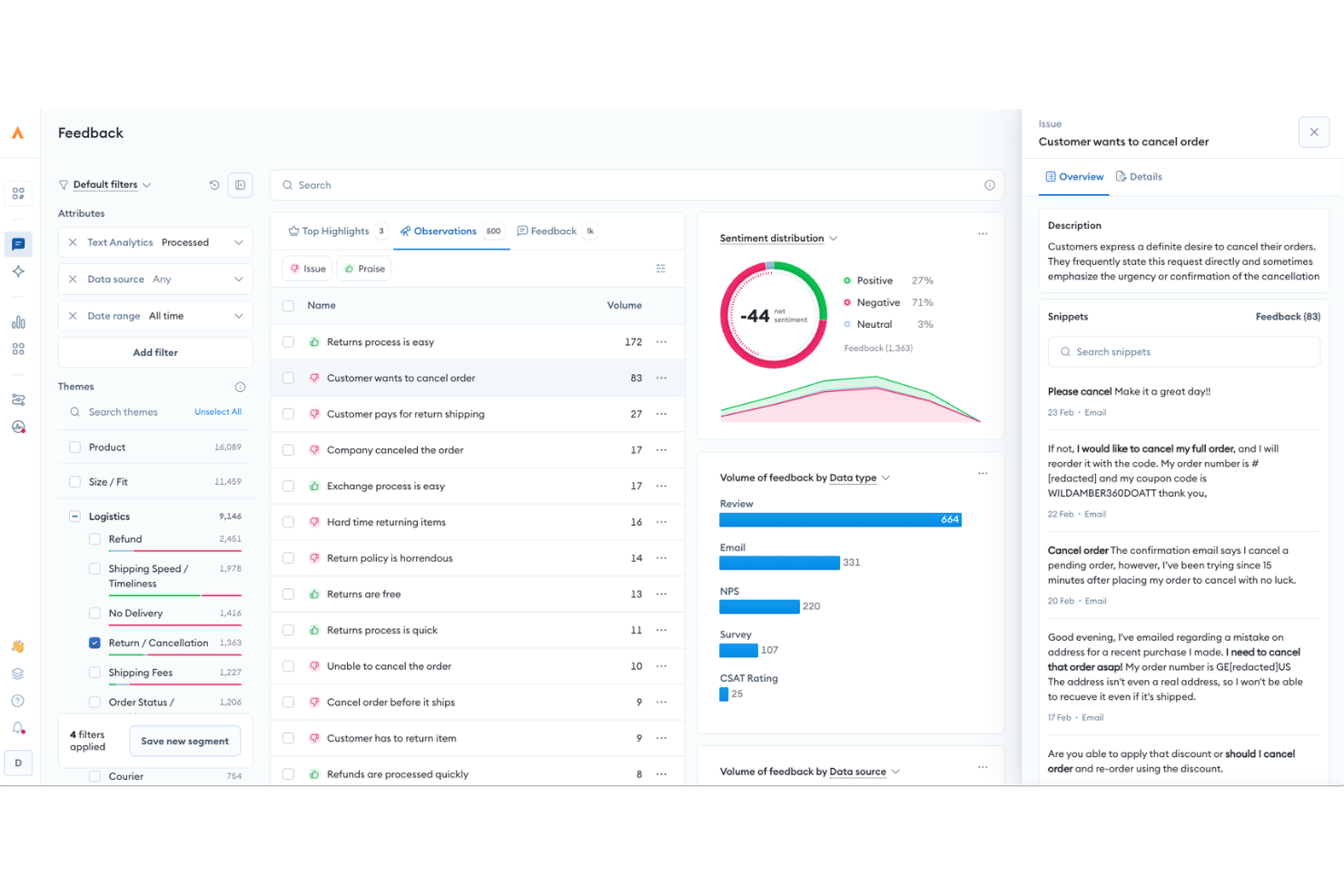
Alchemer ist eine Plattform für Feedbackmanagement, die Umfrageverteilung, Sentimentanalyse, Automatisierung geschlossener Feedbackschleifen und mehr als 400 Integrationen kombiniert, um CSAT-, NPS- und VoC-Programme entlang der gesamten Kundenreise zu unterstützen.
Für wen ist Alchemer am besten geeignet?
Alchemer eignet sich für CX- und VoC-Teams im gehobenen Mittelstand und in Großunternehmen, die strukturierte Feedbackprogramme über mehrere Kanäle und Geschäftssysteme hinweg durchführen.
Warum ich Alchemer ausgewählt habe
Ich habe Alchemer in meine Top-Auswahl aufgenommen, weil der No-Code-Workflow-Builder Connect die Art und Weise, wie Feedback durch einen CX-Technologie-Stack fließt, tatsächlich verändert. Ich kann eine Regel einrichten, die eine negative NPS-Antwort direkt als Support-Ticket an Zendesk weiterleitet oder eine Slack-Benachrichtigung an einen Kundenbetreuungsmanager sendet, ohne eine einzige Codezeile zu schreiben. Die bidirektionale Salesforce-Synchronisierung ist eine weitere Funktion, auf die ich mich verlasse: Ich übernehme CRM-Daten in Umfragen, um diese zu personalisieren, und übertrage die Ergebnisse anschließend zurück, um Kontaktdatensätze automatisch zu aktualisieren.
Die wichtigsten Funktionen von Alchemer
- KI-gestützte Feedbackanalyse: Verwendet die Verarbeitung natürlicher Sprache zur automatisierten Sentimentbewertung, Themenerkennung und Themenclusterung bei offenen Umfrageantworten.
- Omnichannel-Umfrageverteilung: Unterstützt die Bereitstellung von Umfragen per E-Mail, SMS, In-App-Aufforderungen, Weblinks, QR-Codes sowie im Kiosk- und Offline-Modus.
- Anpassbare Berichtsdashboards: Bietet Echtzeit-Dashboards mit erweiterter Segmentierung, Exportoptionen und anpassbaren, teilbaren Berichten.
- Rollenbasierte Berechtigungen: Ermöglicht Administratoren, verschiedenen Teams oder Abteilungen bestimmte Berechtigungen und Datenzugriffe zuzuweisen.
Alchemer-Integrationen
Alchemer bietet mehr als 400 native Integrationen, darunter Salesforce, Zendesk, HubSpot, ServiceNow, Jira, Tableau, Slack, Shopify, Power BI und Google Sheets, und stellt eine API für benutzerdefinierte Integrationen bereit.
Pros and Cons
Pros:
- Hochgradig anpassbare Umfragelogik und Verzweigungen
- Unterstützt komplexe VoC-Programme über mehrere Kontaktpunkte hinweg
- Leistungsstarke Automatisierung geschlossener Feedbackschleifen für die Nachverfolgung negativer Bewertungen
Cons:
- Die Benutzeroberfläche der Berichte wirkt im Vergleich zu Wettbewerbern veraltet
- Erweiterte Workflows erfordern erheblichen Konfigurationsaufwand

Beste CSAT-Umfragen und Follow-up-Workflows
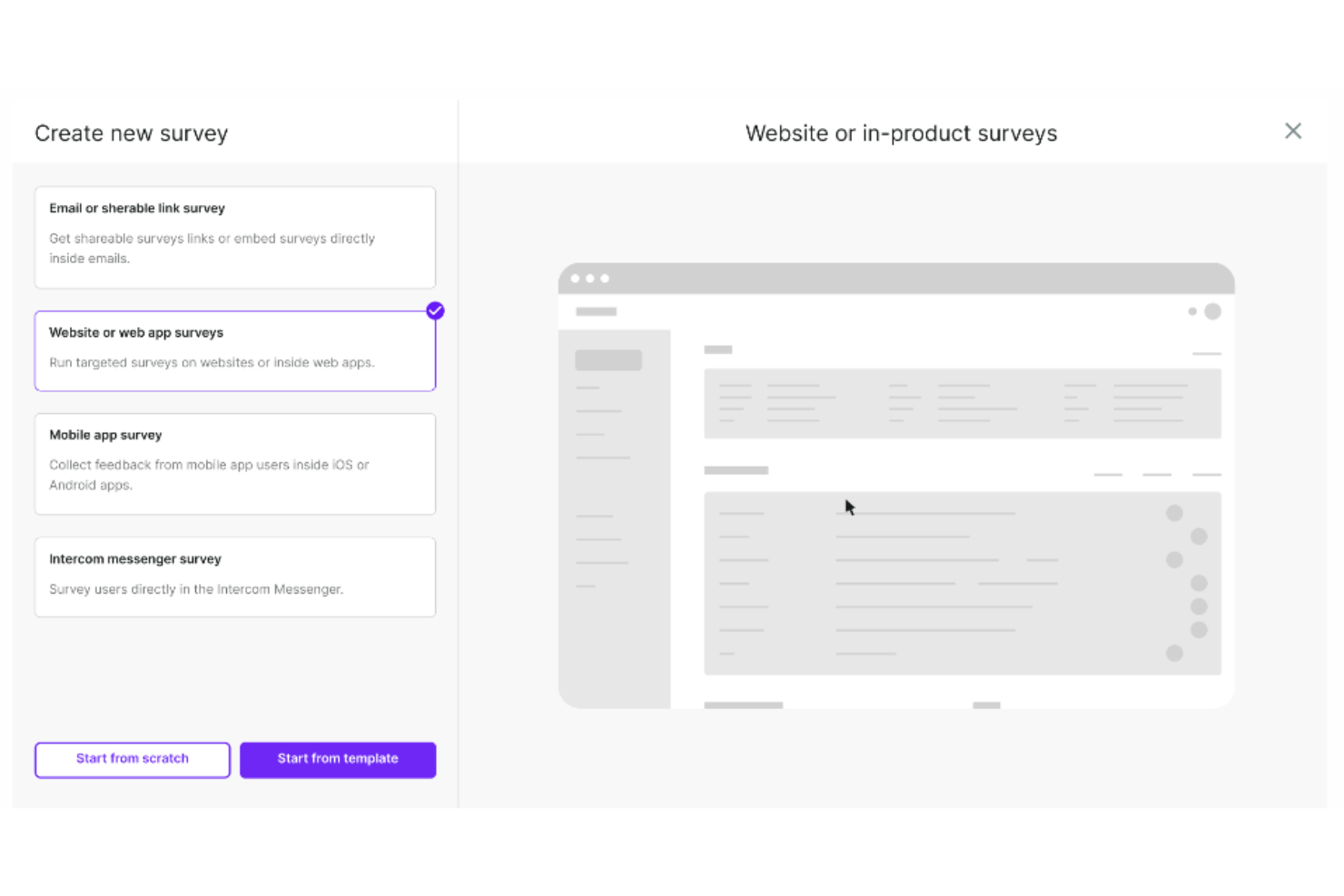
Survicate ist eine Umfragesoftware, die entwickelt wurde, um Feedback von Kunden und Website-Besuchern zu sammeln. Ziel ist es, Unternehmen dabei zu unterstützen, Kundenpräferenzen zu verstehen, Produkte und Dienstleistungen zu verbessern und fundierte Entscheidungen auf Basis des gesammelten Feedbacks zu treffen.
Warum ich Survicate ausgewählt habe: Ich habe Survicate in diese Liste aufgenommen, weil Unternehmen damit Umfragen über verschiedene Kanäle wie E-Mail, Web, Mobil und In-App durchführen können, um wertvolle Einblicke von Kunden und Website-Besuchern zu gewinnen. Survicate-Umfragen können zur Messung wichtiger Zufriedenheitskennzahlen wie Net Promoter Score (NPS), Customer Satisfaction Score (CSAT) und Customer Effort Score (CES) genutzt werden. Sie lassen sich zudem mit verschiedenen Vorlagen anpassen und können mit individuellen Logos, Markenfarben und Nachrichten versehen werden, um ein einheitliches Markenbild in allen Umfragen sicherzustellen.
Mir gefällt außerdem, dass Survicates automatische Folge-Workflows Aktionen basierend auf CSAT-Umfrageantworten auslösen. So können Unternehmen schnell mit unzufriedenen Kunden in Kontakt treten, Probleme an Support-Teams eskalieren oder personalisierte Nachfassaktionen anstoßen, um die Kundenbindung und -zufriedenheit zu steigern.
Herausragende Funktionen und Integrationen von Survicate
Funktionen sind ein Drag-and-Drop-Editor zur Erstellung von Umfragen, ein zentrales Feedback-Hub, automatisierte Feedbacksammlung, Echtzeit-Analysen, um Umfrageantworten schnell zu verstehen, sowie E-Mail-Einbettung. Besonders gefällt mir, dass Survicate fortschrittliches Targeting nutzt, um Umfragen genau dann anzuzeigen, wenn Nutzer am ehesten antworten, z. B. nach einer bestimmten Aktion auf einer Website oder zu einem bestimmten Punkt in der Customer Journey.
Integrationen umfassen ActiveCampaign, Drip, Amplitude, HubSpot, Intercom, Mailchimp, Salesforce, FullStory, Zendesk und Microsoft Teams.
Pros and Cons
Pros:
- Einfach einzurichten und zu verwenden
- Kann auch Teilantworten erfassen
- Ermöglicht das Sammeln von Feedback in Echtzeit
Cons:
- Das Design der Umfragen kann uneinheitlich sein
- Begrenzte maximale Anzahl an Antworten pro Monat
New Product Updates from Survicate

Survicate MCP Support Now Available
Survicate now supports MCP, letting teams use AI tools like Claude, ChatGPT, and Slack to explore survey results, analyze responses and insights, and draft new surveys. For more information, visit Survicate's official site.
 .
.
eDesk
Am besten geeignet für KI-Automatisierung bei Routinetätigkeiten

eDesk ist eine KI-gesteuerte Kundenservice-Plattform, die speziell für E-Commerce-Unternehmen entwickelt wurde. Sie hilft Teams dabei, Supportprozesse zu optimieren und die Kundenzufriedenheit zu steigern, indem alle Kundeninteraktionen an einem Ort zentralisiert werden. eDesk richtet sich an Online-Händler und Kundendienstteams, die schnellere Reaktionszeiten und eine konsistentere Kundenbetreuung benötigen. Durch die Reduzierung fragmentierter Kommunikation und ineffizienter Arbeitsabläufe unterstützt eDesk Teams dabei, Anfragen effektiver zu bearbeiten und Supportgespräche in Verkaufschancen umzuwandeln.
Warum ich eDesk ausgewählt habe
Ich habe eDesk wegen der Möglichkeit gewählt, alle Kundengespräche in einem einzigen, einheitlichen Posteingang zu bündeln, was das Management und die Priorisierung von Supportanfragen erleichtert. Die KI-Automatisierung übernimmt Routinetätigkeiten, sodass Support-Teams mehr Zeit für die Lösung komplexer Probleme aufwenden und schneller antworten können. Der 24/7-Chatbot-Support stellt zudem sicher, dass Kunden jederzeit Hilfe erhalten können, was die Zufriedenheit verbessert und wiederkehrende Kunden fördert.
eDesk Hauptfunktionen
Neben seinen herausragenden Funktionen bietet eDesk weitere Möglichkeiten, die Ihr Team erheblich unterstützen können:
- Pre-Sales-Support: Mit dieser Funktion kann Ihr Team Anfragen potenzieller Kunden bearbeiten und so zu Käufen führen.
- Feedback-Management: eDesk erleichtert die Sammlung und Analyse von Kundenfeedback, sodass Sie gezielt Verbesserungen an Ihrem Service vornehmen können.
- Echtzeit-Berichte: Mit dieser Funktion erhalten Sie Einblicke in Ihre Supportabwicklung, wodurch Sie Prozesse optimieren und die Kundenzufriedenheit steigern können.
- Wissensdatenbank: eDesk stellt ein zentrales Informationsarchiv bereit, das Ihrem Team hilft, Kundenanfragen zu reduzieren und die Serviceeffizienz zu erhöhen.
eDesk Integrationen
Integrationen umfassen Amazon, eBay, Walmart, Shopify, Magento, WooCommerce, Facebook, WhatsApp und Etsy.
Pros and Cons
Pros:
- Einheitlicher Posteingang über alle Vertriebskanäle
- KI-Automatisierung reduziert die Antwortbelastung
- Starke Integrationen mit E-Commerce-Marktplätzen
Cons:
- Preisgestaltung steigt schnell bei größeren Teams
- Benutzeroberfläche erfordert Einarbeitungszeit für Anfänger
New Product Updates from eDesk
eDesk Adds Galeria and Kaufland Support in Spain and Netherlands
eDesk adds support for Galeria, Kaufland Spain, and Kaufland Netherlands marketplaces. These integrations bring more European buyer messages into eDesk with routing, templates, AI insights, and automated translation. For more information, visit eDesk’s official site.
 .
.
Velaris
Am besten geeignet für KI-gestützte Kundeneinblicke
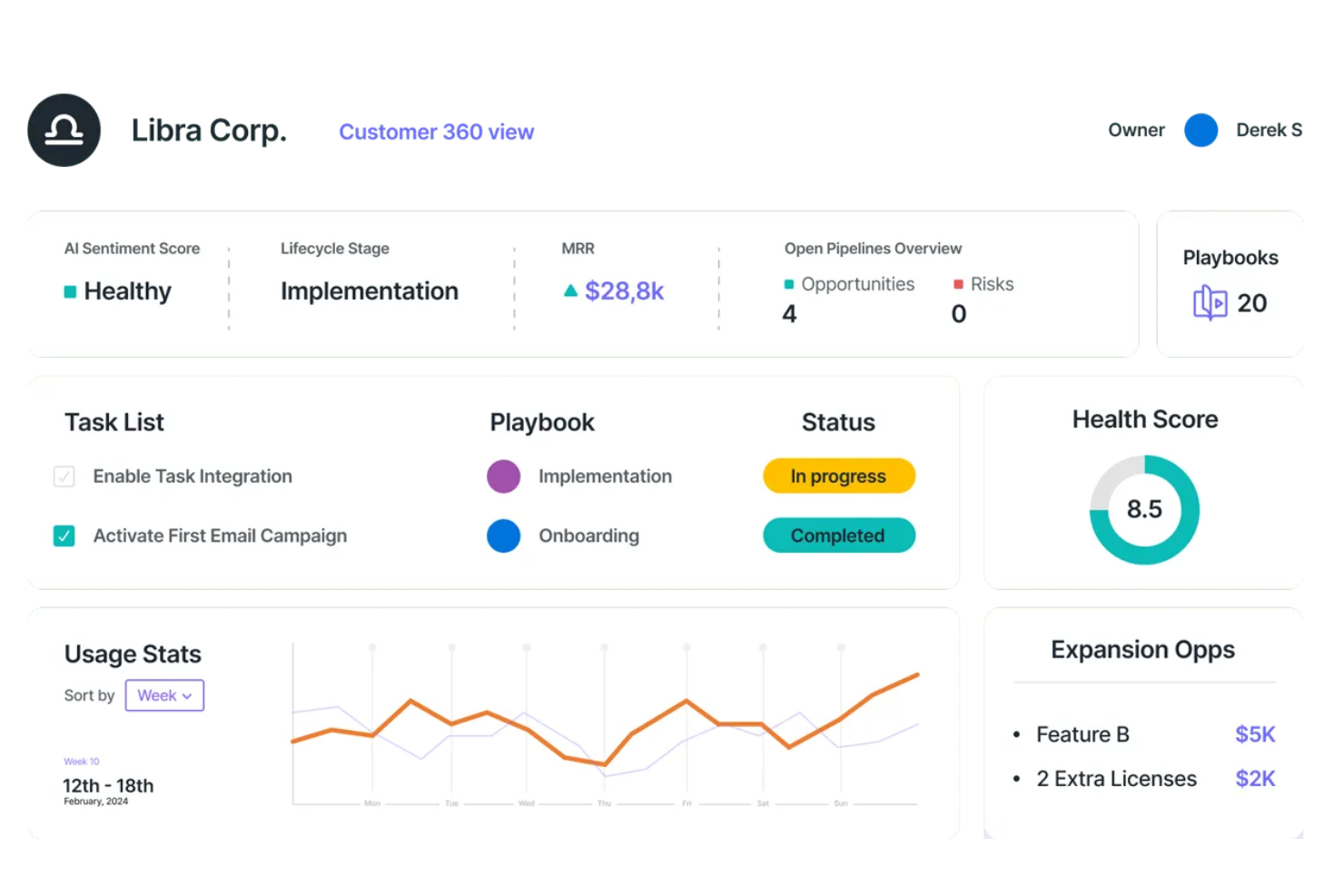
Velaris ist eine umfassende Customer Success Plattform, die darauf ausgelegt ist, SaaS-Unternehmen durch proaktive Kundenbindung und die Sicherstellung der gewünschten Kundenergebnisse zum Erfolg zu führen. Das Tool bietet Funktionen wie Daten und Analysen, Automatisierung und Zusammenarbeit, um verwertbare Einblicke für Customer Success Teams bereitzustellen.
Warum ich Velaris ausgewählt habe: Velaris bietet KI-gestützte Analysen, die tiefgehende Einblicke in das Kundenverhalten und die Kundenzufriedenheit ermöglichen. Die Fähigkeit der Plattform, alle Kundendaten in einer einzigen, intuitiven Benutzeroberfläche zusammenzuführen, erlaubt Unternehmen eine 360-Grad-Sicht auf ihre Kunden.
Die Einbindung von Stimmungsanalysen ermöglicht es Unternehmen zudem, Kundenstimmungen zu erkennen und Probleme zu adressieren, bevor sie eskalieren, was ein personalisierteres und effektiveres Kundenerlebnis gewährleistet. Zusätzlich bietet Velaris anpassbare Erfolgspläne und Playbooks, die Prozesse standardisieren und für Konsistenz in der Kundeninteraktion sorgen.
Herausragende Funktionen und Integrationen von Velaris:
Herausragende Funktionen sind u. a. ein Automatisierungs-Builder, mit dem Unternehmen flexible Workflows zur Automatisierung dank einer intuitiven Drag-and-drop-Oberfläche erstellen können. Außerdem nutzt der KI-Copilot künstliche Intelligenz, um proaktives Customer Success Management zu ermöglichen, inklusive Stimmungsanalysen und automatischer Erstellung von Aufgaben mit großer Wirkung.
Integrationen umfassen Slack, Microsoft Teams, Intercom, MailChimp, Outlook, Google Drive, HubSpot, Jira und Salesforce.
Pros and Cons
Pros:
- Ermöglicht die Verwaltung aller Kundeninformationen an einem Ort
- Zusammenarbeitsfunktionen zur Interaktion mit Kunden
- KI-gestützte Analysen für wertvolle Einblicke
Cons:
- Könnte mehr Integrationen bieten
- Die Ersteinrichtung kann komplex sein

Ideal für anpassbare Kundenzufriedenheitsumfragen

Formsuite ist eine Umfrage- und Feedback-Plattform, die zur Erfassung und Analyse von Kundenzufriedenheitsdaten entwickelt wurde. Sie unterstützt NPS-, CSAT- und CES-Umfragen mit bedingter Logik, KI-gestützter Antwortanalyse und automatisierten Benachrichtigungen bei niedrigen Zufriedenheitswerten.
Für wen ist Formsuite am besten geeignet?
Formsuite eignet sich besonders für kleine bis mittelgroße Teams, die flexible No-Code-Tools benötigen, um die Kundenzufriedenheit zu messen, ohne eine umfassende CX-Management-Plattform einzuführen.
Warum habe ich Formsuite ausgewählt?
Ich habe Formsuite gewählt, weil es ein hohes Maß an Designkontrolle bietet und gleichzeitig strukturierte Zufriedenheitsmetriken unterstützt. Teams können das Erscheinungsbild der Umfragen vollständig an ihre Marke anpassen, einschließlich White-Labeling in höheren Preistarifen. In Kombination mit bedingten Verzweigungen und KI-gestützten Zusammenfassungen ermöglicht dies die einfache Erfassung von CSAT- oder NPS-Daten und ein schnelles Verständnis der Ursachen für positive oder negative Rückmeldungen.
Wichtige Funktionen von Formsuite
- NPS-, CSAT- & CES-Vorlagen: Integrierte Umfrageformate zur Nachverfolgung von Loyalität, Zufriedenheit und Aufwand.
- Bedingte Logik: Passt Folgefragen dynamisch anhand der Zufriedenheitswerte an.
- KI-Antwortanalyse: Erkennt automatisch die Stimmung und hebt wiederkehrende Themen hervor.
- Detraktor-Benachrichtigungen: Sendet Mitteilungen, wenn niedrige Zufriedenheitswerte eingereicht werden.
Formsuite-Integrationen
Formsuite verbindet sich mit Tools wie Google Sheets, Slack, Google Analytics und Stripe. Es integriert sich vorrangig über Zapier mit Drittanbieter-Plattformen und unterstützt Webhooks für individuelle Workflows.
Pros and Cons
Pros:
- Bedingte Logik erhöht die Relevanz von Folgefragen
- KI-gestützte Stimmungszusammenfassungen reduzieren manuellen Analyseaufwand
- Starke Anpassungsmöglichkeiten für Umfragedesign und White-Label-Optionen
Cons:
- Kein integriertes Ticketing oder Tools für Support-Workflows
- Abhängigkeit von Zapier für die meisten Drittanbieter-Integrationen

Am besten für kleine Unternehmen geeignet
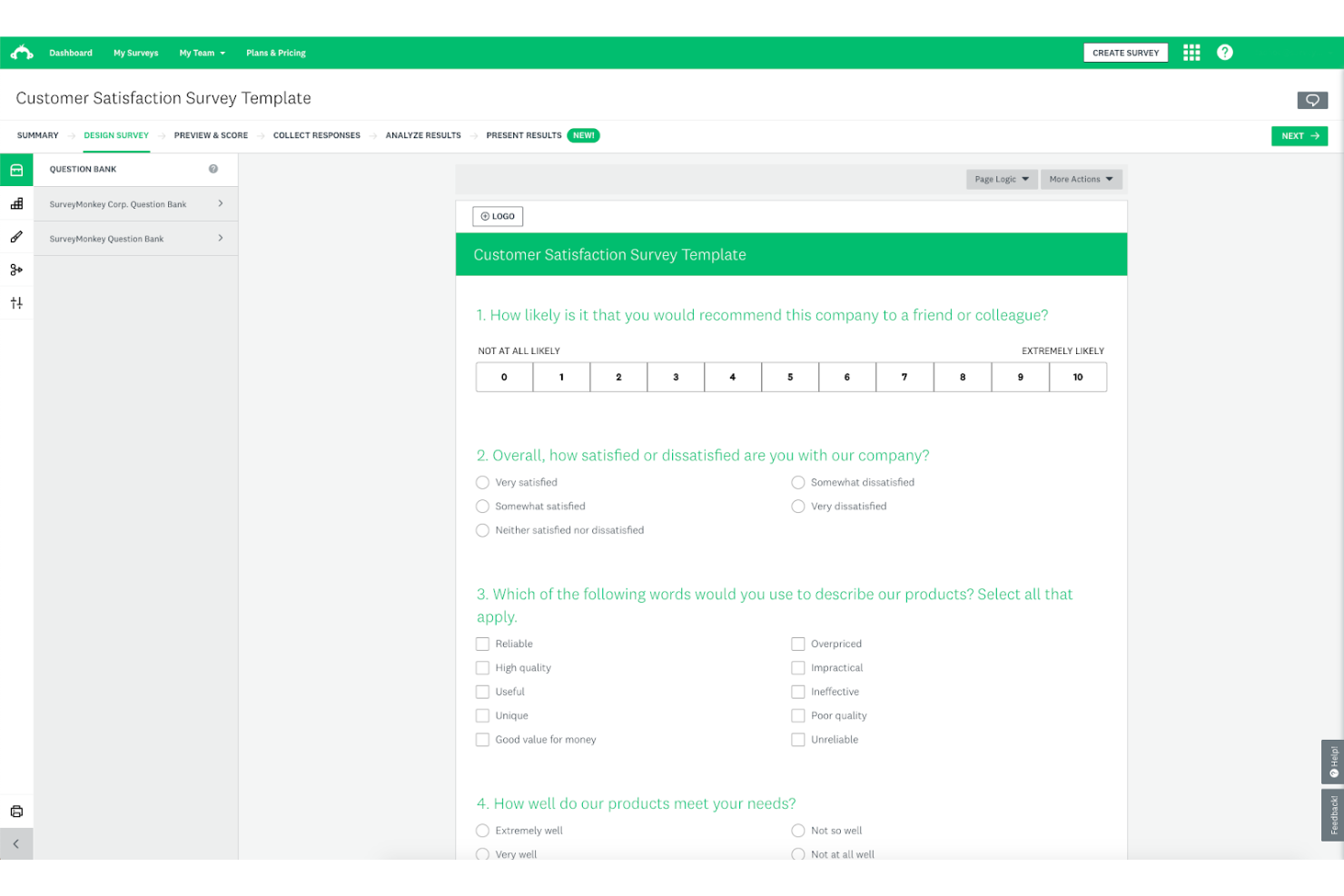
SurveyMonkey ist eine Lösung für Umfragen und Feedback-Management, mit der Sie Feedback sammeln und auswerten können, um Ihr Produkt zu verbessern. Die Plattform bietet eine Vielzahl von Umfragevorlagen, sodass Sie ganz einfach mit der Erfassung von Kundeninformationen beginnen können.
Warum ich SurveyMonkey ausgewählt habe: Ich habe SurveyMonkey in meine Top-10-Liste aufgenommen, weil es einen kostenlosen Tarif und eine Auswahl an Vorlagen für Kundenzufriedenheitsumfragen bietet. Damit ist es ideal für kleine Unternehmen, die gerade erst damit beginnen, Kundenfeedback zu sammeln. Die Plattform hat eine übersichtliche Benutzeroberfläche und ist einfach zu bedienen, sodass Sie kein erfahrener CX-Spezialist sein müssen, um verwertbare Erkenntnisse zu gewinnen.
Trotz seines spielerischen Designs ist SurveyMonkey ein leistungsstarkes Tool zur Feedback-Erfassung, das Unternehmen jeder Größe dabei unterstützen kann, mehr über ihre Nutzer zu erfahren.
SurveyMonkey Besonderheiten und Integrationen:
Besondere Funktionen sind unter anderem Online-Abstimmungen, eine CSAT-Bewertung, Multi-Channel-Antwortsammlung und erweiterte Umfragelogik. Mir gefällt, dass SurveyMonkey ermöglicht, Ergebnisse in Datenformaten zu exportieren, die mit Präsentationsprogrammen wie Microsoft PowerPoint oder Google Slides kompatibel sind, denn dies erleichtert es besonders Anfängern, ihre Arbeit zu präsentieren.
Integrationen umfassen CRM-Systeme, E-Mail-Marketing-Plattformen und Marketing-Automatisierungslösungen wie Salesforce, HubSpot, Microsoft Dynamics, Mailchimp, Constant Contact, Marketo, Pardot, Tableau, Power BI und Google Analytics. SurveyMonkey bietet außerdem eine REST-API, sodass Sie bei Bedarf weitere individuelle Integrationen einrichten können.
Pros and Cons
Pros:
- Flexibles, anpassbares Tool
- Ermöglicht das Einladen von Teammitgliedern zur Analyse von Feedback
- Gute Branding-Optionen
Cons:
- Die kostenlosen Umfragevorlagen bieten nur begrenzte Designanpassungsoptionen
- Das Einrichten von Umfragen mit erweiterter Logik könnte einfacher sein

Front
Am besten für abteilungsübergreifendes Routing von Kundenanfragen
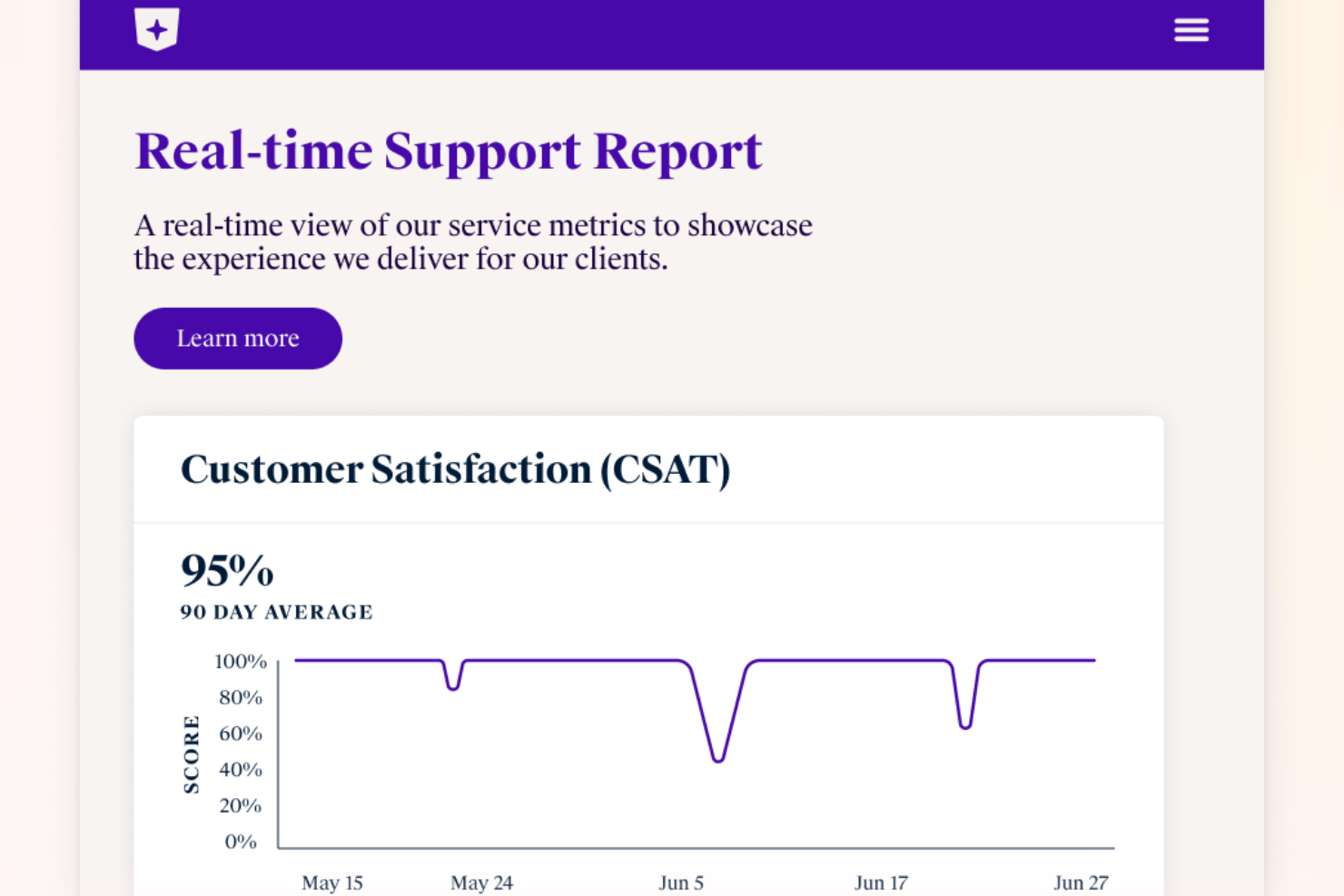
Front bündelt Kundengespräche aus E-Mail, Chat, SMS und mehr in einem einzigen kollaborativen Arbeitsbereich. Diese Plattform ist für Teams konzipiert, die große Mengen an Kundenanfragen bearbeiten müssen und dabei dennoch persönlichen Kontakt pflegen möchten. Wenn Sie nach einer Lösung suchen, mit der Ihr Team schneller reagieren und gemeinsam an Kundenanliegen arbeiten kann, ist Front genau darauf ausgerichtet.
Für wen ist Front am besten geeignet?
Front ist eine starke Wahl für Kundenservice- und Erfolgsteams in mittelgroßen bis großen Unternehmen, die große Mengen an Kundenkommunikation gemeinsam verwalten müssen.
Warum ich Front ausgewählt habe
Für Teams, die Kundenanfragen abteilungsübergreifend weiterleiten müssen, bietet Front einen klaren Vorteil. Ich habe Front ausgewählt, weil sein gemeinsamer Posteingang es ermöglicht, Nachrichten in Echtzeit zuzuweisen, weiterzuleiten und gemeinsam zu bearbeiten, damit nichts verloren geht. Die automatisierten Regeln und Workflows der Plattform helfen dabei, jede Kundenanfrage anhand von Thema, Dringlichkeit oder benutzerdefinierten Kriterien an die richtige Person oder das richtige Team weiterzuleiten. Dieser Ansatz sorgt dafür, dass alle auf dem gleichen Stand bleiben und Kunden auch dann zeitnah und präzise Antworten erhalten, wenn die Anfragen mehrere Teams betreffen.
Front Hauptfunktionen
Weitere Funktionen in Front helfen Teams, durchgehend einheitliche und hochwertige Kundenerlebnisse zu bieten:
- Analysen und Berichte: Überwachen Sie Antwortzeiten, Konversationsvolumen und Teamleistung mit integrierten Dashboards und exportierbaren Berichten.
- Kundenverlauf: Sehen Sie eine vollständige Zeitleiste jeder Kundeninteraktion über alle Kanäle, sodass Ihr Team immer den Kontext kennt.
- Interne Kommentare: Arbeiten Sie über private Kommentare, die für den Kunden unsichtbar bleiben, mit Teamkollegen an Kundennachrichten zusammen.
- Wissensdatenbank-Integration: Greifen Sie direkt aus dem Posteingang auf Hilfsartikel zu und teilen Sie diese für schnelle und präzise Antworten.
Front-Integrationen
Integrationen umfassen Salesforce, HubSpot, Asana, Slack, Microsoft Dynamics 365, Aircall, Twilio, ClickUp, Zendesk Sell, GitHub, Zoom und mehr.
Pros and Cons
Pros:
- Integrierte CSAT-Umfrage- und Analyse-Tools
- Mehrkanal-Posteingang für E-Mail, SMS und Chat
- Interne Kommentare für private Teamabsprachen
Cons:
- Gelegentliche Verzögerungen bei der Synchronisierung mit externen CRMs
- Keine integrierte Sprachanruffunktion
Weitere Optionen
Hier sind einige weitere hervorragende Lösungen für Kundenzufriedenheit, auf die ich während meiner Recherche gestoßen bin. Auch wenn sie es nicht in meine Top-10-Liste geschafft haben, sollten Sie sie sich ebenfalls ansehen:
- Pendo
Am besten geeignet zur In-App-Messung der Kundenzufriedenheit
- Totango
Am besten für SaaS-Scale-ups geeignet
- Qualtrics XM Frontline Digital
Am besten geeignet zur automatischen Erkennung von Absprüngen
- Delighted
Am besten geeignet für mobile CSAT-Umfragen
- GetFeedback
Am besten für Feedback-Tracking geeignet
- Simplesat
Am besten geeignet für leicht verständliche Dashboards
- Kimola Analytics
Am besten geeignet für das Sammeln externen Feedbacks
- InputKit
Am besten für das Management unzufriedener Kunden
- Creatio CRM
Am besten für automatisiertes Kundenfeedback
- Hiver
Am besten für die Integration von CSAT-Umfragen
- LiveAgent
Am besten für Multi-Channel-Kommunikation
- Sogolytics
Am besten geeignet für CSAT-Dashboard und Analysen
- Product Fruits
Am besten geeignet, um Nutzer direkt aus Ihrer App oder Website zu befragen
- Nextiva
Am besten geeignet für Sentiment-Analyse bei Kunden
- Zendesk
Am besten geeignet für integriertes CSAT-Tracking


Wie ich Kundenzufriedenheits-Software bewerte
Ich bewerte diese Tools auf zwei Ebenen: Grundanforderungen wie NPS/CSAT-Verteilung und Closed-Loop-Benachrichtigungen sowie Unterscheidungsmerkmale, die speziell entwickelte VoC-Plattformen von einfachen Umfrage-Tools abheben.
Kernfunktionalität (Grundvoraussetzungen für diese Liste)
Wenn ich Tools für meine Liste auswähle, bewerte ich jedes einzelne auf einer Skala von 0 (Funktion fehlt) bis 5 (herausragend in diesem Bereich) für jede unten aufgeführte Kernfunktionalität. Anschließend ermittle ich die Gesamtpunktzahl des Tools in Prozent. Jedes Tool muss eine Mindestgesamtpunktzahl von 75 % erreichen, um für die Aufnahme in Betracht gezogen zu werden.
- Umfrage-Erstellung & -Verteilung: Ich prüfe, ob das Tool CSAT-, NPS- und CES-Umfragen über verschiedene Kanäle wie E-Mail, In-App, SMS und Web unterstützt – nicht nur eine einzelne Versandmethode.
- Zentrale Feedback-Erfassung: Jedes Tool sollte Feedback aus mehreren Quellen an einem Ort bündeln, sodass Teams nicht zwischen Umfrageantworten, Chatprotokollen und Support-Tickets hin und her wechseln müssen.
- Stimmungs- & Textanalyse: Ich achte auf eine automatisierte Auswertung von Freitextantworten, etwa durch KI-basiertes Tagging von Themen in Tausenden von Kommentaren nach Interaktionen, statt manueller Durchsicht.
- Dashboards & Berichte: Echtzeit-Dashboards, die Filter nach Segment, Zeitraum oder Kanal erlauben, sind hier entscheidend – reine statische CSV-Exporte reichen CX-Verantwortlichen zur Trendbeobachtung nicht aus.
- Closed-Loop-Nachverfolgungs-Workflows: Ich prüfe, ob die Plattform Benachrichtigungen auslöst oder Fälle weiterleitet, wenn Werte sinken, sodass z. B. eine negative Rückmeldung nach dem Onboarding schnell beim richtigen Team landet.
- CX-Stack-Integrationen: Das Tool sollte sich mit Ihrem CRM, Helpdesk und Kommunikationsplattformen verbinden, damit Zufriedenheitsdaten dort bleiben, wo Ihr Team ohnehin arbeitet.
Nachdem ich eine Liste der Tools erstellt habe, die die Kriterien erfüllen, betrachte ich, was jede Plattform besonders macht.
Unterscheidungsmerkmale (Was Anbieter voneinander abhebt)
So vergleiche und differenziere ich verschiedene Anbieter:
Herausragende Funktionen
Ich achte auf KI-gestützte Zusammenfassungen, die Themen in Tausenden von Antworten herausfiltern und VoC-Analysten stundenlanges manuelles Taggen ersparen. Auch feedbackbasierte Journey-Mapping-Funktionen heben sich ab, da Teams damit Umfragen an spezifischen Kontaktpunkten, wie nach dem Onboarding oder nach einem Verlängerungsgespräch, auslösen können. Benchmarking-Daten sind ebenfalls relevant. Tools, die Branchen- oder Peer-Vergleiche bieten, geben CX-Verantwortlichen den nötigen Kontext, um NPS- oder CSAT-Trends für Stakeholder wirklich aussagekräftig zu präsentieren.
Über Funktionen hinaus
Compliance ist wichtig, wenn Feedback persönliche Daten enthält. Ich prüfe auf GDPR- und SOC-2-Konformität sowie konfigurierbare Optionen zur Datenspeicherung für international tätige Teams. Auch die Implementierungsgeschwindigkeit ist entscheidend: Ich bewerte, ob die Plattform vorgefertigte Umfragevorlagen und Unterstützung beim Onboarding bietet, sodass ein Programm in wenigen Wochen und nicht erst in Monaten startet. Preistransparenz spielt ebenfalls eine Rolle, denn mengenbasierte Preise können bei hohem Supportaufkommen schnell ausufern.
Benutzerfreundlichkeit
Die Kundenzufriedenheit zu verbessern, ist keine leichte Aufgabe – das bedeutet jedoch nicht, dass die von Ihnen verwendete App ebenfalls schwierig zu bedienen sein sollte. Ich habe Software ausgewählt, die einfach zu bedienen ist, damit Sie und Ihr Team Feedback problemlos sammeln und darauf reagieren können.
Softwareintegrationen
Es ist nahezu unmöglich, die Zufriedenheit Ihrer Kunden zu beurteilen, wenn Sie sich auf die Daten eines einzigen Tools verlassen. Daher bieten die von mir ausgewählten Lösungen mehrere Integrationen und API-Zugriff, sodass Sie sie in Ihr App-Ökosystem einbinden können.
Berichte & umsetzbare Erkenntnisse
Ein Tool zu haben, das hervorragend Kundendaten sammelt, ist gut, reicht jedoch nicht für eine genaue Bewertung der Kundenzufriedenheit aus. Die Tools, die ich in meine Bewertung aufgenommen habe, verarbeiten Ihre Daten jedoch und stellen sie in übersichtlichen Berichten dar, sodass Sie umsetzbare Erkenntnisse gewinnen und schnell mit der Umsetzung von Lösungen beginnen können.
Stimmungsanalyse
Die Stimmung hinter dem Feedback eines Nutzers erkennen zu können, kann eine große Hilfe bei der Senkung Ihrer Abwanderungsraten sein, da Sie dadurch unzufriedene Kunden schnell erkennen und Maßnahmen ergreifen können, um ihre Situation zu verbessern.
Preise
Software für Kundenzufriedenheit ist in verschiedenen Preisklassen erhältlich. Ich habe jedoch nur Tools aufgenommen, von denen ich überzeugt bin, dass sie Ihnen dabei helfen, Ihre Ziele zu erreichen und eine gute Rendite auf Ihre Investition zu erzielen.
Häufig gestellte Fragen
Möchten Sie mehr über Software zur Kundenzufriedenheit erfahren? Hier finden Sie einige häufig gestellte Fragen – selbstverständlich mit Antworten:
Was ist der Unterschied zwischen Software zur Kundenzufriedenheit, Software für das Kundenerlebnis und Software für den Kundenerfolg?
Es lässt sich nicht leugnen, dass sich diese Arten von Lösungen teilweise überschneiden. Der Hauptunterschied zwischen ihnen besteht jedoch darin, was sie messen sollen:
- Software zur Kundenzufriedenheit soll messen, wie zufrieden Ihre Nutzerbasis mit Ihrem Produkt ist, während sie es verwendet.
- Software für das Kundenerlebnis soll die Wahrnehmung der Nutzer in Bezug auf Ihr Produkt entlang der gesamten Kundenreise messen – vom ersten Kontakt mit Ihrer Lösung über die Akquise, das Onboarding und die Nutzung bis hin zur späteren Abwanderung oder zur Entwicklung zum Markenbotschafter.
- Software für den Kundenerfolg soll messen, wie gut Ihre Kunden Ihr Produkt zur Erreichung ihrer Ziele nutzen können – es geht also eher darum zu messen, ob Ihre Lösung den Kundenerfolg gut ermöglicht (daher der Name).
Welche wichtigen Kennzahlen sollten Sie zur Überwachung der Kundenzufriedenheit verfolgen?
Sie können zahlreiche Kennzahlen zur Kundenzufriedenheit verfolgen. Wenn Sie sich jedoch an die wichtigsten Leistungsindikatoren halten, die von den meisten Teams für Kundenerfolg verwendet werden, machen Sie nichts falsch:
- Kundenzufriedenheitswert (CSAT)
- Net Promoter Score (NPS)
- Kundenabwanderungsrate
- Kundenlebenszeitwert (CLV)
Wie führen Sie eine Prüfung des Kundenerlebnisses durch?
Die Durchführung einer Prüfung des Kundenerlebnisses ist ein komplexer Prozess, der mehrere Schritte umfasst, zum Beispiel:
- Ihre Ziele definieren: Sie sollten konkrete Ziele vor Augen haben, etwa die Abwanderung zu reduzieren oder die Zahl der Fürsprecher zu erhöhen.
- Daten sammeln: Versenden Sie Umfragen, führen Sie Interviews mit Ihren Kunden, beobachten Sie relevante Schlüsselwörter in sozialen Medien und so weiter, um zahlreiche Nutzerdaten zu sammeln.
- Daten analysieren: Suchen Sie nach Trends und Ausreißern. Finden Sie heraus, was Ihre Kunden von Ihrem Produkt erwarten und an welchen Stellen Sie nicht genügend Mehrwert bieten.
- Verbesserungsbereiche auswählen: Kein Unternehmen auf der Welt kann alles gleichzeitig verbessern. Wählen Sie anhand Ihrer Anforderungen – Bedeutung, zeitliche Einschränkungen, Budget, Verfügbarkeit des Teams und so weiter – die Verbesserungsbereiche aus, die Sie angehen möchten.
- Ihre Ergebnisse messen: Verfolgen Sie, wie sich Ihre Änderungen auf das Kundenerlebnis ausgewirkt haben, und machen Sie ausführliche Notizen.
- Neu bewerten: Eine einzelne Prüfung des Kundenerlebnisses ist wertvoll, doch dieser Wert nimmt mit der Zeit ab. Sie sollten stets eine Neubewertung vornehmen und durch weitere Prüfungen neue Verbesserungsmöglichkeiten finden.
Weitere Bewertungen kundenorientierter Software
Hier finden Sie weitere Arten kundenorientierter Software, die Sie in Betracht ziehen sollten, wenn Sie Ihre Kundenzufriedenheit ernsthaft verbessern möchten:
- Software für das Kundenerlebnismanagement
- Software für den Kundenerfolg
- Software für Kundenfeedback
- Plattformen für Kundeninformationen
- Plattformen für Kundenbindung
Abschließende Gedanken
Software zur Kundenzufriedenheit kann Ihnen helfen, Ihre Kunden besser zu verstehen. Dies kann wiederum zu einer zufriedeneren Nutzerbasis und einem profitableren Produkt führen. Wie Bernard Marr, internationaler Bestsellerautor sowie strategischer Berater für Unternehmen und Technologie von Regierungen und Unternehmen, sagte:
„Die heute verfügbare Datentechnologie verschafft Unternehmen beispiellose Möglichkeiten, wenn es darum geht, ihre Kunden zu verstehen. Indem wir Transaktions-, demografische und Einstellungsdaten aus internen und externen Quellen kombinieren, können wir genauer vorhersagen, was Kunden wünschen, und sicherstellen, dass wir zur richtigen Zeit am richtigen Ort sind, um es ihnen bereitzustellen.“
Abonnieren Sie den Newsletter von CX Lead, wenn Sie Tipps dazu erhalten möchten, wie Sie Ihr Produkt für mehr Kundenzufriedenheit optimieren können, direkt in Ihrem Posteingang.